RT3200 - Router BELKIN - Free user manual and instructions
Find the device manual for free RT3200 BELKIN in PDF.



User questions about RT3200 BELKIN
0 question about this device. Answer the ones you know or ask your own.
Ask a new question about this device
Download the instructions for your Router in PDF format for free! Find your manual RT3200 - BELKIN and take your electronic device back in hand. On this page are published all the documents necessary for the use of your device. RT3200 by BELKIN.
USER MANUAL RT3200 BELKIN
Setting Up: Basics....5
Where to find more help ....5
How to install your router ....5
Advanced Configuration....7
How to open the browser-based utility....7
Basic Router Settings....8
Language 9
Internet Setup....10
Basic Wireless Settings 12
Wireless Security....15
Security Option Settings....15
WPA2 Personal 15
Disabled....15
Troubleshooting 16
Your router was not successfully set up....16
Your Internet cable is not plugged in message 17
Cannot access your router message....18
After setup....19
The internet appears to be unavailable 19
Specifications....21
Belkin RT3200 21
Environmental....21
Product Overview
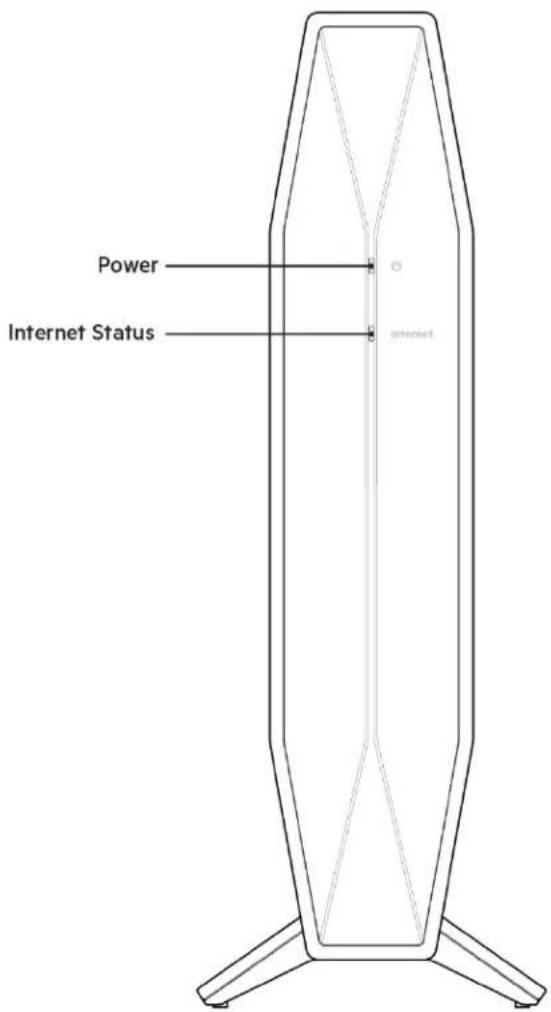
Front
text_image
Power Internet StatusPower light-Blinks white while router is starting up and during WPS pairing. Blinks yellow if WPS pairing fails
Internet status light—Is solid white when connected to the internet and solid yellow when not connected.
Back
text_image
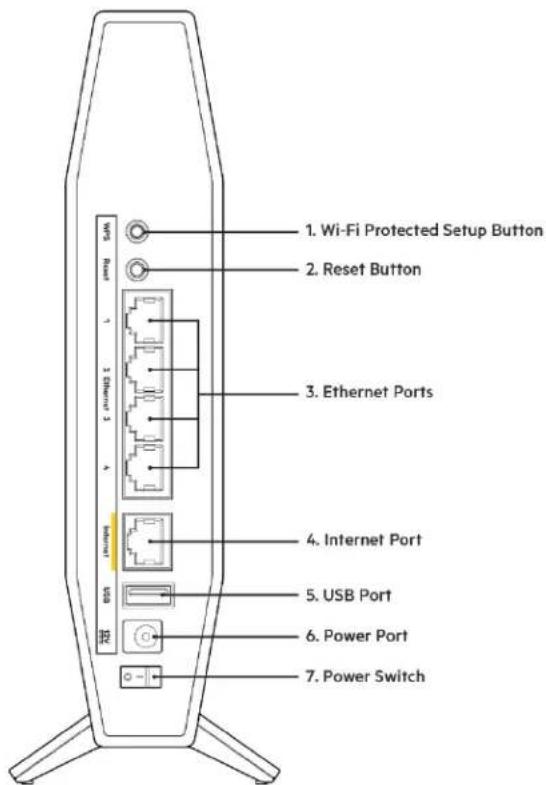
1. Wi-Fi Protected Setup Button 2. Reset Button 3. Ethernet Ports 4. Internet Port 5. USB Port 6. Power Port 7. Power SwitchWi-Fi Protected Setup™ (WPS) button (1)—Press to easily configure wireless security on Wi-Fi Protected Setup-enabled network devices. The power light on the front of the router will blink white while WPS pairing is active.
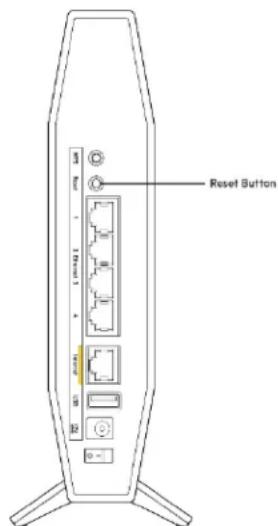
Reset button (2)—Press and hold for until the power LED starts flashing to reset the router to factory settings.
Ethernet ports (3)—Connect ethernet cables (also called network or internet cables) to these gigabit ethernet (10/100/1000) ports and to other wired devices on your network.
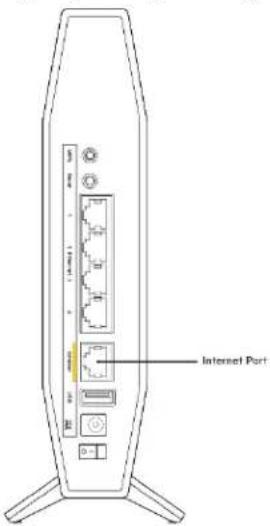
Internet port (4)—Connect an Ethernet cable to this port and to your modem. The internet status light on the front of the router will be white only when the router is connected to a modem that is connected to the internet.
USB 2.0 port (5)—Connect and share a USB drive on your network.
Power port (6)—Connect the included AC power adapter to this port.
Power switch (7) —Press | (ON) to turn on the router.
Setting Up: Basics
Where to find more help
In addition to this user guide, you can find help at Belkin.com/support/RT3200(documentation, downloads, FAQs, technical support, live chat, forums)
Note—Licenses and notices for third party software used in this product may be viewed on
http://www.belkin.com/support/license/. Please contact
http://www.belkin.com/support/gplcodecenter/ for questions or GPL source code requests.
How to install your router
- If replacing an existing router, disconnect that router first.
- Plug in the router to a power source. Make sure the power switch is in the | (ON) position.
- Connect your new router to your modem or modem-router.
| A Modem | OR | B Modem-Router |
| Plug one end of the included ethernet cable into the yellow Internet port on your new router. If you have a modem, plug the other end into the Ethernet (LAN) port on the modem. | Plug one end of the included ethernet cable to the yellow Internet port on your new router. If you have a modem-router, plug the other end into any available port. |
Note—Wait until the power light on the front panel of the router stops blinking and is solid white before moving to Step 4.
- Connect to the network name shown in the Quick Start Guide that came with your router. (You can change the network name and password later.) Select the option to automatically connect to this network in the future. If you need help connecting to the network refer to your device documentation on the provided CD.
Note—You will not have internet access until router setup is complete.
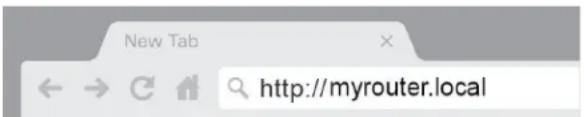
- Enter http://myrouter.local in a web browser. Follow the on-screen instructions to complete setup. You also can enter 192.168.1.1 in a browser to start setup.
text_image
New Tab ← → C H a http://myrouter.local- Once you are finished with setup, please be sure to register your router so we can keep you informed security updates, product recalls and other things that will improve your experience.
Register your product
Once you register we can share important security updates. Product recalls and other things that will improve your experience. All we need is your email. We will only use your email for limited security and customer support purposes.
Email Address
☐ Belkin may also email me to keep up to date with special offers and information from linksys. You can unsubscribe at any time by using the link at the end of any email we send. Read our Privacy Policy here.
Next
Skip
Advanced Configuration
How to open the browser-based utility
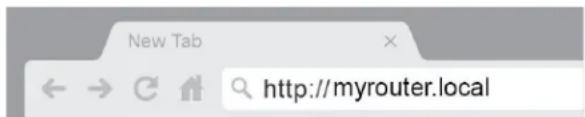
To access some advanced settings, you need to open the browser-based utility. Make sure you are connected to the router, open a web browser and enter http://myrouter.local in a web browser or go to 192.168.1.1.
text_image
New Tab ← → ↻ http://myrouter.localThe router will prompt you for a password.
text_image
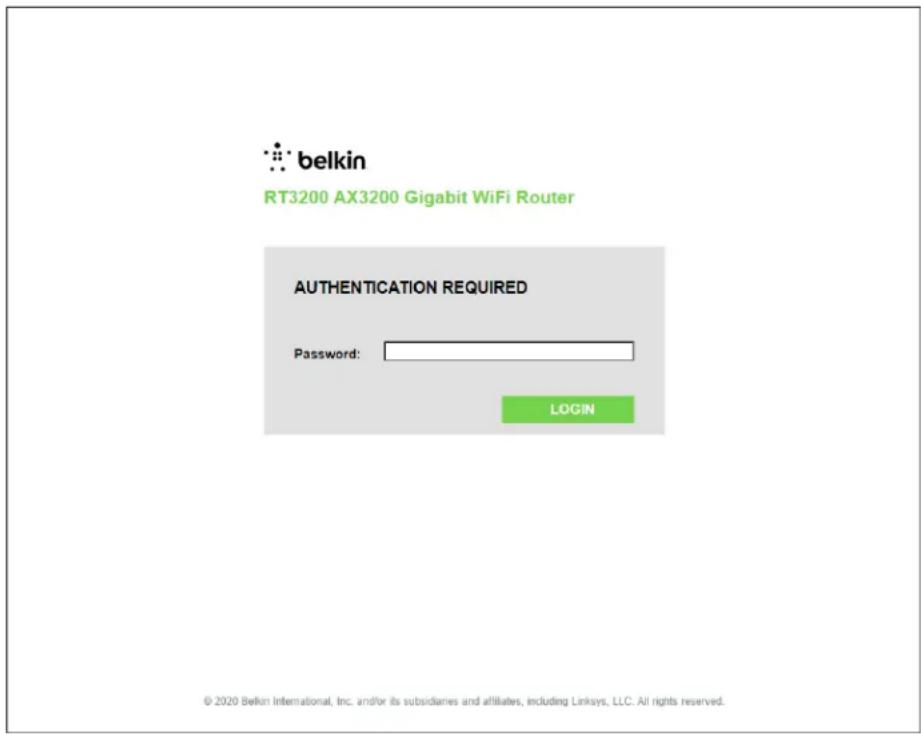
belkin RT3200 AX3200 Gigabit WiFi Router AUTHENTICATION REQUIRED Password: LOGIN © 2020 Belkin International, Inc. and/or its subsidiaries and affiliates, including Linksys, LLC. All rights reserved.If you changed the password during setup, enter the new password. Click LOGIN. If you didn't change the password, or skipped setup altogether, the default password is "admin".
Basic Router Settings
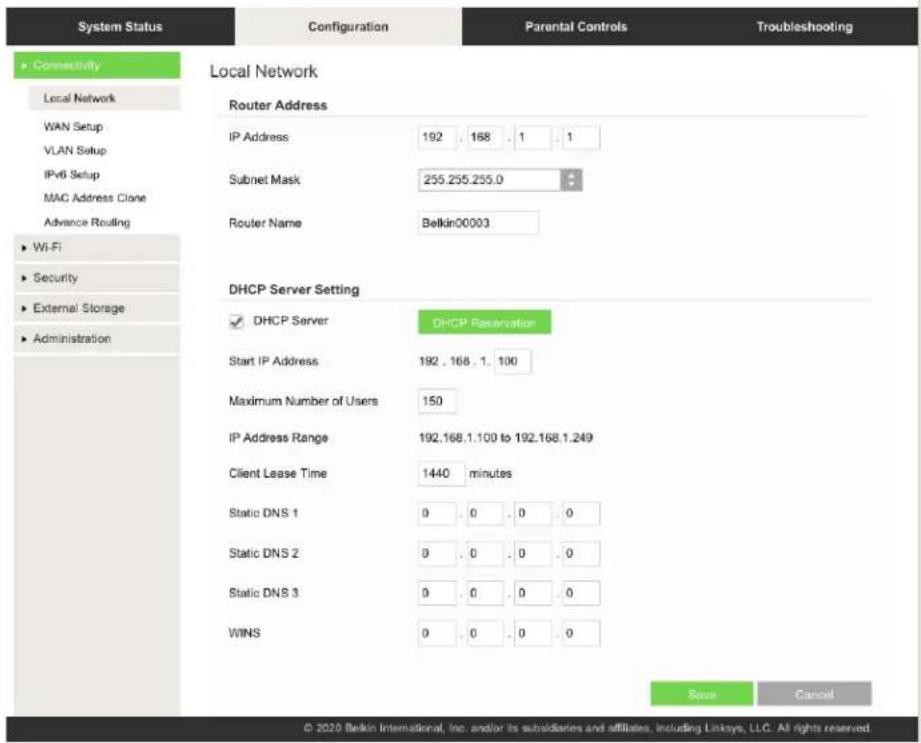
This screen allows you to change the router's basic configuration.

text_image
System Status Configuration Parental Controls Troubleshooting Connectivity Local Network WAN Setup VLAN Setup IPv6 Setup MAC Address Clone Advance Routing Wi-Fi Security External Storage Administration Local Network Router Address IP Address 192 . 168 . 1 . 1 Subnet Mask 255.255.255.0 Router Name Belkin00003 DHCP Server Setting ✓ DHCP Server DHCP Reservation Start IP Address 192 . 168 . 1 . 100 Maximum Number of Users 150 IP Address Range 192.168.1.100 to 192.168.1.249 Client Lease Time 1440 minutes Static DNS 1 0 . 0 . 0 . 0 Static DNS 2 0 . 0 . 0 . 0 Static DNS 3 0 . 0 . 0 . 0 WINS 0 . 0 . 0 . 0 Save Cancel © 2020 Belkin International, Inc. and/or its subsidiaries and affiliates, including Linksys, LLC. All rights reserved.Language
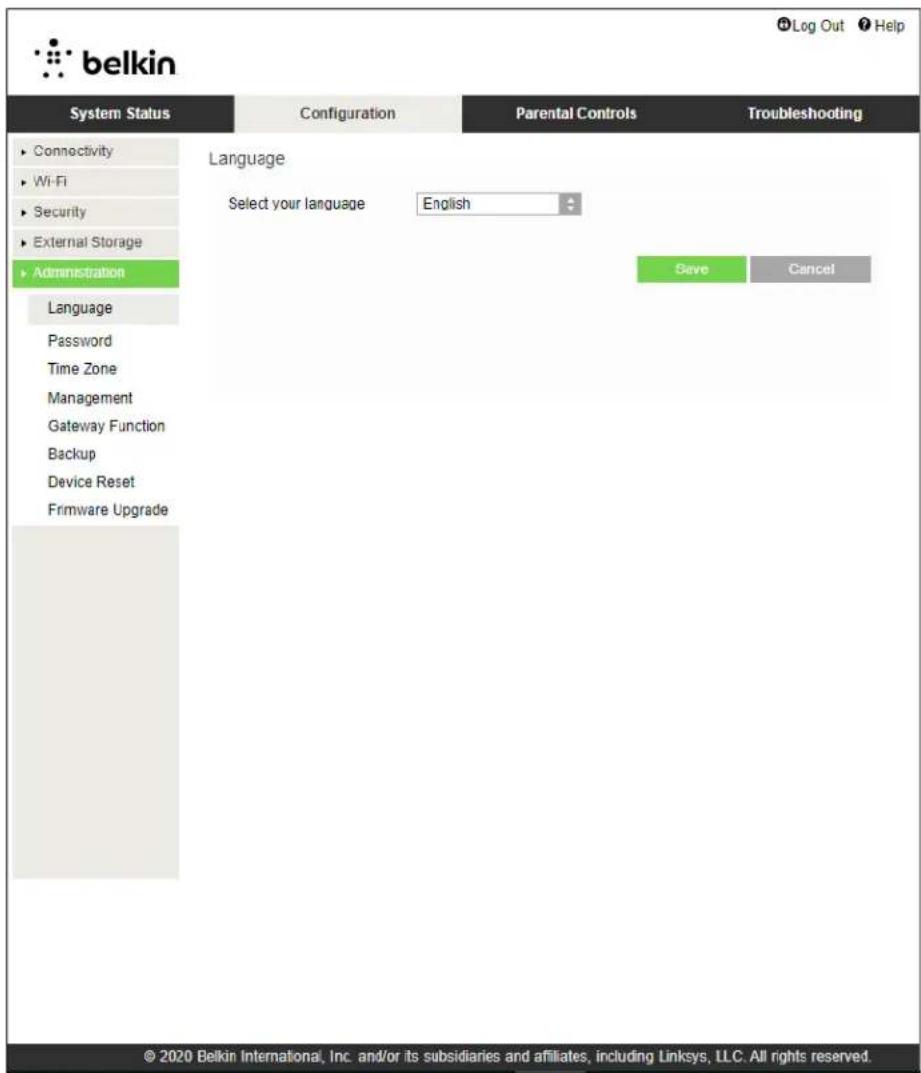
Select your language—To change language, select one from the drop-down menu. The language of the browser-based utility will change within five seconds.
text_image
belkin System Status Configuration Parental Controls Troubleshooting Connectivity Wi-Fi Security External Storage Administration Language Select your language English Save Cancel Language Password Time Zone Management Gateway Function Backup Device Reset Firmware Upgrade © 2020 Belkin International, Inc. and/or its subsidiaries and affiliates, including Linksys, LLC. All rights reserved.Internet Setup
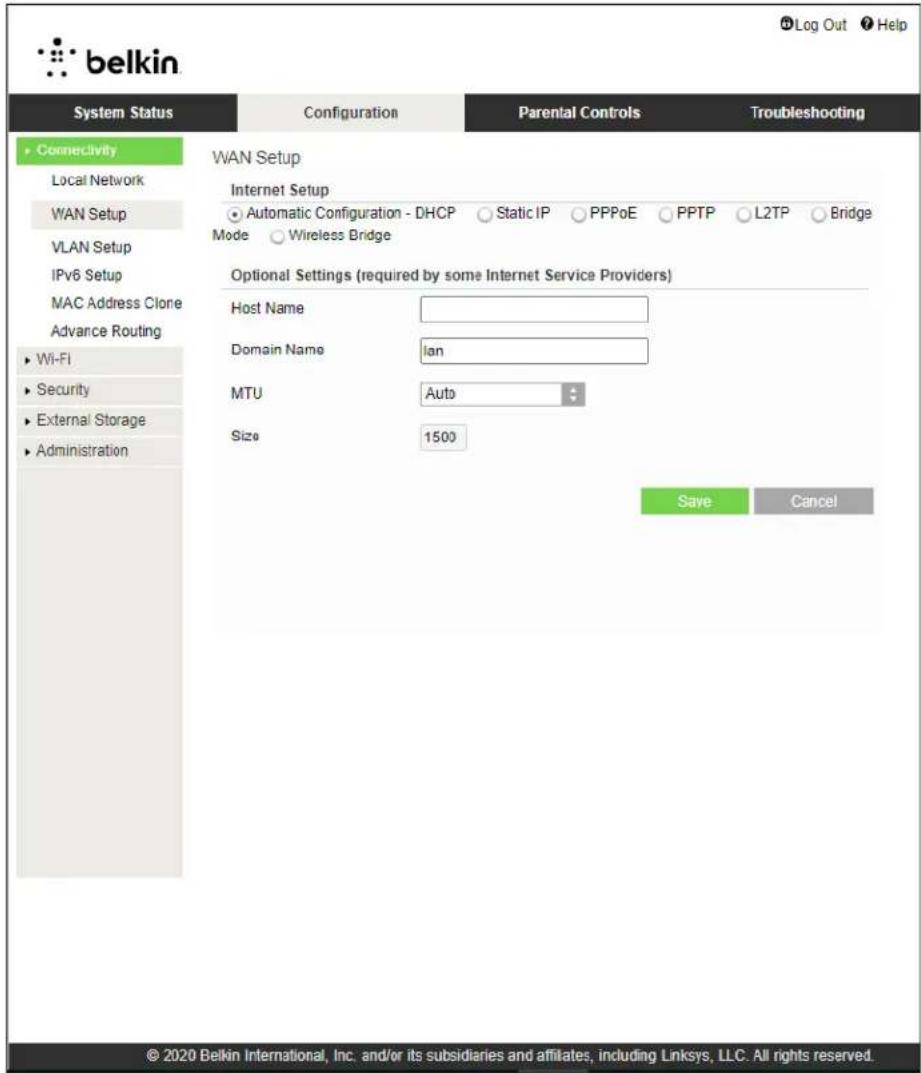
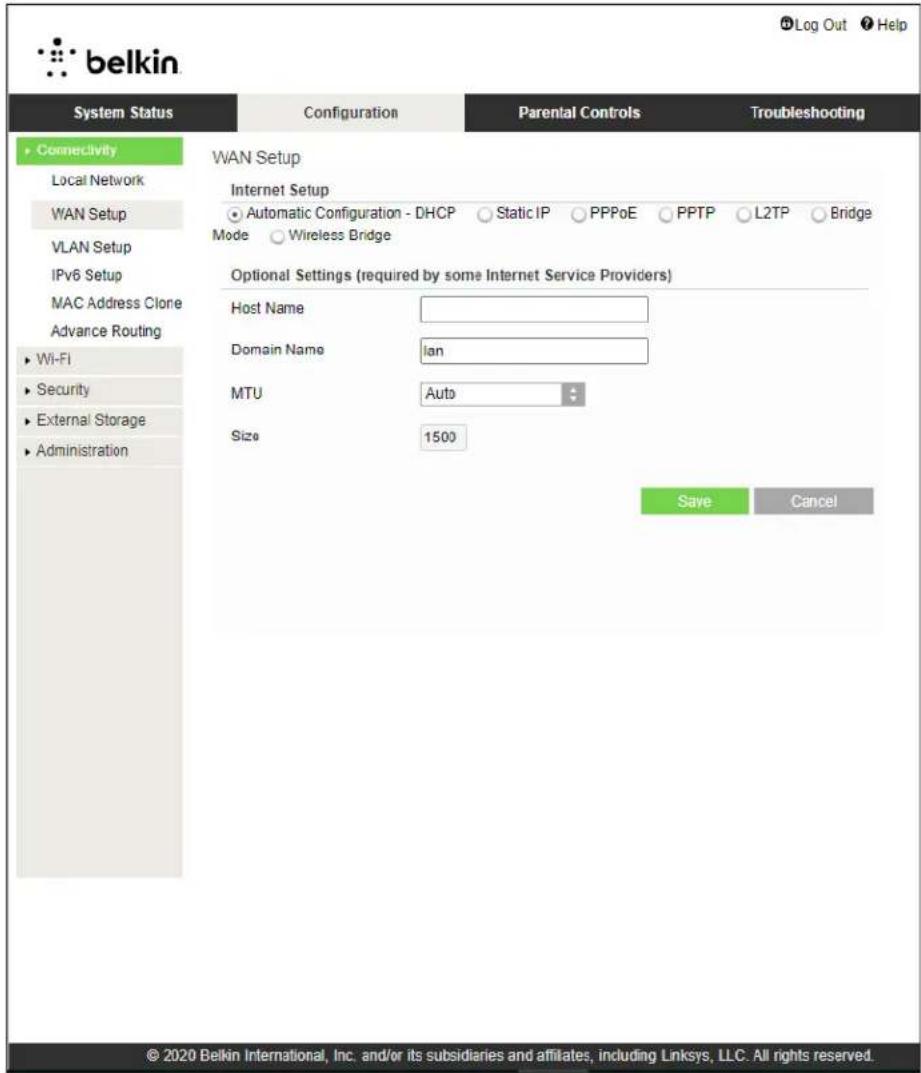
The Internet Setup section configures the router to your internet connection. This information can be provided by your Internet Service Provider (ISP).
Internet Connection Type—Select the type of internet connection your ISP provides from the dropdown menu.
text_image
belkin System Status Configuration Parental Controls Troubleshooting Connectivity Local Network WAN Setup VLAN Setup IPv6 Setup MAC Address Clone Advance Routing Wi-Fi Security External Storage Administration WAN Setup Internet Setup Automatic Configuration - DHCP Static IP PPPoE PPTP L2TP Bridge Mode Wireless Bridge Optional Settings (required by some Internet Service Providers) Host Name Domain Name Ian MTU Auto Size 1500 Save Cancel © 2020 Belkin International, Inc. and/or its subsidiaries and affiliates, including Linksys, LLC. All rights reserved.- Automatic Configuration - DHCP (default) Keep the default only if your ISP supports DHCP or if you connect using a dynamic IP address. (This option usually applies to cable connections.)
- Static IP Select if you are required to use a fixed IP address to connect to the internet.
- PPPoE
Select if you have a DSL connection and your ISP uses Point-to-Point Protocol over Ethernet (PPPoE).
- PPTP
Point-to-Point Tunneling Protocol (PPTP) is a service that generally applies to connections in Europe. If your PPTP connection supports DHCP or a dynamic IP address, select Obtain an IP Address Automatically. If you are required to use a fixed IP address to connect to the internet, select Specify an IP Address and configure the options that appear.
• L2TP
Layer 2 Tunneling Protocol (L2TP) is a service that generally applies to connections in Israel.
Note—Connect on Demand or Keep Alive are options when choosing PPPoE, PPTP and L2TP. They let you choose whether the router connects to the internet only as needed (useful if your ISP charges for connect time), or if the router should always be connected. Select the appropriate option.
- Bridge Mode
Bridge Mode disables all router capabilities and turns the router into an access point. The router will cease to act as a DHCP server and its built-in firewall as well as the NAT features will no longer be in effect.
- Wireless Bridge
A wireless bridge wirelessly connects to your main router and can share the internet connection with devices connected to the bridge's Ethernet ports.
Basic Wireless Settings
text_image
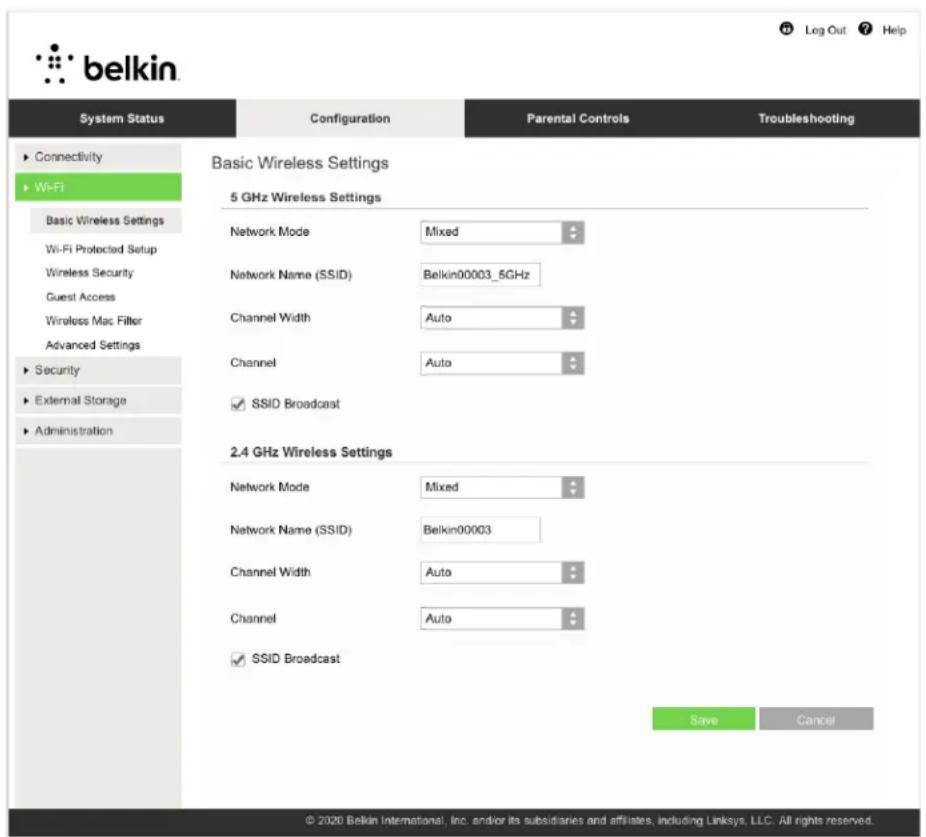
belkin System Status Configuration Parental Controls Troubleshooting Basic Wireless Settings 5 GHz Wireless Settings Network Mode Mixed Network Name (SSID) Belkin00003_5GHz Channel Width Auto Channel Auto ✓ SSID Broadcast 2.4 GHz Wireless Settings Network Mode Mixed Network Name (SSID) Belkin00003 Channel Width Auto Channel Auto ✓ SSID Broadcast Save Cancel © 2020 Belkin International, Inc. and/or its subsidiaries and affiliates, including Linksys, LLC: All rights reserved.5GHz Network Mode—Select the wireless standards your network will support.
- Mixed (default) Keep the default if you have Wireless-A, Wireless-N, Wireless-AC, or Wireless-AX devices in your network.
- Wireless-AC Mixed Select if you have Wireless-A, Wireless-N, or Wireless-AC devices in your network.
- Wireless-A Only Select if you have only Wireless-A devices.
- Wireless-N Only Select if you have only Wireless-N devices.
- Disabled Select if you have no Wireless-A, Wireless-N, Wireless-AC and Wireless-AX (5 GHz) devices in your network. 5GHz radio will be off after you choose this option.
Note—If you are not sure which mode to select, keep the default, Mixed.
2.4GHz Network Mode—Select the wireless standards your network will support.
- Mixed (default)
Keep the default if you have Wireless-B, Wireless-G, Wireless-N 2.4GHz devices in your network.
- Wireless-B/G Only
Select if you have Wireless-B, Wireless-G devices in your network.
- Wireless-B Only
Select if you have only Wireless-B devices.
- Wireless-G Only
Select if you have only Wireless-G devices.
- Wireless-N Only
Select if you have only Wireless-N 2.4G devices.
- Disabled
Select if you have no Wireless-B, Wireless-G, and Wireless-N (2.4 GHz) devices in your network. 2.4GHz radio will be off after you choose this option.
Note—If you are not sure which mode to select, keep the default, Mixed.
Network Name (SSID)
The Service Set Identifier (SSID) is a name used by devices to connect to a wireless network. SSIDs are case-sensitive and must not exceed 32 characters. The default SSIDs for the 2.4 GHz and 5 GHz networks are BelkinXXXXX and BelkinXXXXX_5GHz, respectively. The Xs represent the last five digits of the router's serial number, which can be found on the bottom of the router. If you changed the SSID, both bands have the new SSIDs. You may give them different names through the browser-based utility.
Note—If you restore the router's factory default settings (by pressing the Reset button or using the Configuration > Administration > Device Reset screen), the Network Name will return to its default value. Change the Network Name back to its original name, or you will have to reconnect all devices on your wireless network to the new network name.
Channel Width
Keep the default, Auto (20 MHz or 40 MHz), for best performance in a 2.4 GHz network using Wireless-B, Wireless-G and Wireless-N (2.4 GHz) devices. For a channel width of 20 MHz, select 20 MHz only. For the best performance in a 5 GHz network, keep the default Auto (20, 40 or 80 MHz).
Channel
Select the channel from the drop-down list. Keep the default, Auto, if you are not sure which channel to select.
SSID Broadcast
Keep the default, Enabled, to broadcast the router's SSID. When wireless clients survey the local area for wireless networks to associate with they will detect the SSID broadcast by the router. Attempting to hide your Wi-Fi name does not make your Wi-Fi more secure. Anyone truly interested in accessing your network can find it even if you turn off this feature. If you still do not want to broadcast the router's SSID, select Disabled.
Wireless Security
The router offers the following wireless security options:
WPA2/WPA3 Personal, WPA2 Personal, WPA2 Enterprise, WPA3 Personal, WPA3 Enterprise (WPA stands for Wi-Fi Protected Access.)
WPA3 is the strongest security option.
Security Option Settings
WPA2 Personal
If you select WPA2 Personal, each device in your wireless network MUST use WPA2 Personal and the same passphrase.
Security Mode
WPA2 Personal

If you are not sure whether a device supports WPA2 or WPA3 Personal, select WPA2/WPA3 Mixed Personal option in Security Mode.
Passphrase—Enter a passphrase of 8-63 characters. This is the Wi-Fi password that provides access to the network. It can be the same as entered in setup.
Disabled
If you choose to disable wireless security, you will be informed that wireless security is disabled when you first attempt to access the internet. You will be given the option to enable wireless security, or confirm that you understand the risks but still wish to proceed without wireless security.
Security Mode
Disabled

Troubleshooting
You can find more help from our award-winning customer support at Belkin.com/support/RT3200.
Your router was not successfully set up
If you could not complete setup in the browser-based interface, you can try the following:
- Press and hold the Reset button on your router with a paperclip or pin until the power light on the front of the router turns off and starts blinking (about 10 seconds). Type 192.168.1.1 in a browser to try setup again.
text_image
Reset Button- Temporarily disable your computer's firewall (see the security software's instructions for help). Install the router again.
- If you have another computer, use that computer to install the router.
Your Internet cable is not plugged in message
If you get a "Your Internet cable is not plugged in" message when trying to set up your router:
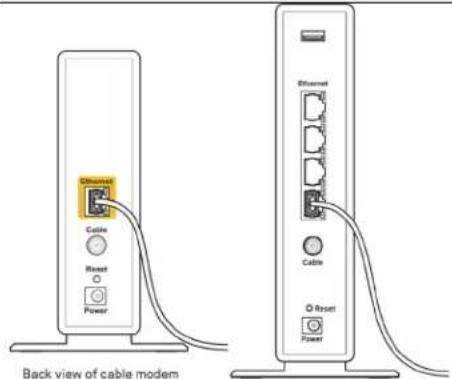
- Make sure that an ethernet or internet cable (or a cable like the one supplied with your router) is securely connected to the yellow Internet port on the back of the router and to the appropriate port on your modem. This port on the modem is usually labeled Ethernet.
text_image
Internet Port• Make sure that your modem is connected to power and is turned on.
 Back view ofModem - Router Back view ofModem - Router | 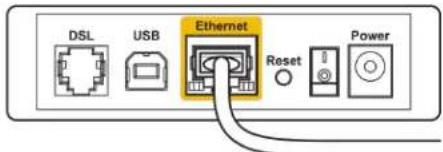 Back view of DSL modem Back view of DSL modem |
| If your internet service is cable, verify that the cable modem's CABLE port is connected to the coaxial cable provided by your ISP. | If your internet service is DSL, make sure that the DSL phone line is connected to the modem's DSL port. |
- If your computer was previously connected to your modem with a USB cable, disconnect the USB cable.
• Install the router again.
Cannot access your router message
To access your router, you must be connected to your own network. If you currently have wireless internet access, the problem may be that you have accidentally connected to a different wireless network.
To fix the problem on Windows computers, do the following*:
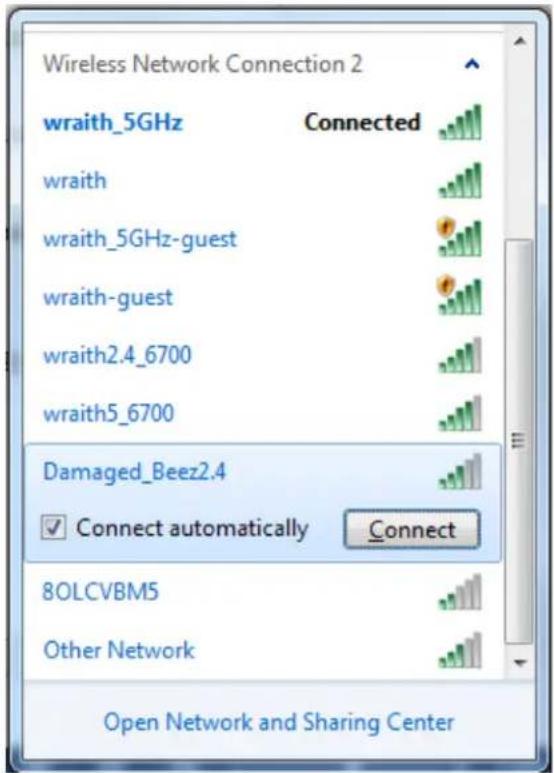
- On your Windows desktop, click on the wireless icon in the system tray. A list of available networks will appear.
- Click your own network name. Click Connect. In the example below, the computer was connected to another wireless network named wraith_5GHz. The wireless network name of the Belkin router, Damaged Beez2.4 in this example, is shown selected.
text_image
Wireless Network Connection 2 wraith_5GHz Connected wraith wraith_5GHz-guest wraith-guest wraith2.4_6700 wraith5_6700 Damaged_Beez2.4 Connect automatically Connect 8OLCVBM5 Other Network Open Network and Sharing Center- If you are prompted to enter a network security key, type your password (security key) into the network security key field. Click OK.
- Your computer will connect to the network, and you should be able to access the router.
*Depending on your version of Windows, there could be some differences in wording or icons in these steps.
To fix the problem on Mac computers, do the following:
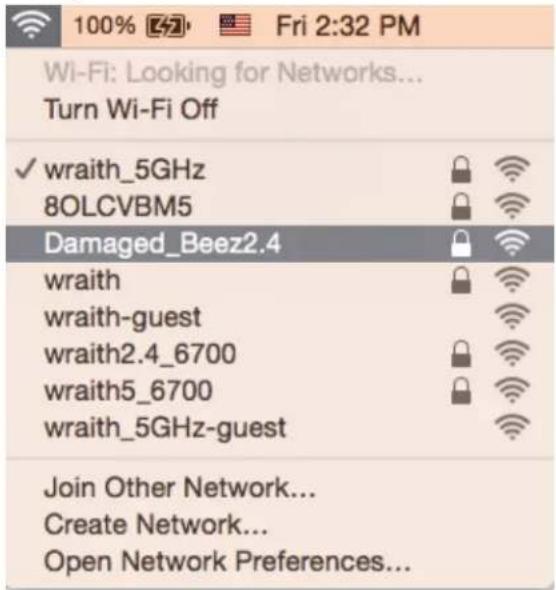
- In the menu bar across the top of the screen, click the Wi-Fi icon. A list of wireless networks will appear.
- In the example below, the computer was connected to another wireless network named wraith_5GHz. The wireless network name of the Belkin router, Damaged_Beez2.4 in this example, is shown selected.
text_image
100% [47] Fri 2:32 PM Wi-Fi: Looking for Networks... Turn Wi-Fi Off ✓ wraith_5GHz 8OLCVBM5 Damaged_Beez2.4 wraith wraith-guest wraith2.4_6700 wraith5_6700 wraith_5GHz-guest Join Other Network... Create Network... Open Network Preferences...-
Click the wireless network name of your Belkin router (Damaged_Beez2.4 in the example).
-
Type your wireless network password (Security Key) into the Password field. Click OK.
After setup
The internet appears to be unavailable
If the internet has difficulty communicating with your router, the problem may appear as a "Cannot find [internet address]" message in your web browser. If you know that the internet address is correct, and if you've tried several valid internet addresses with the same result, the message could mean that there's a problem with your ISP or modem communicating with your router.
Try the following:
• Make sure that the network and power cables are securely connected.
• Make sure that the power outlet that your router is connected to has power.
- Reboot your router.
- Contact your ISP and ask about outages in your area.
The most common method of troubleshooting your router is to turn it off, then back on again. Your router can then reload its custom settings, and other devices (such as the modem) will be able to rediscover the router and communicate with it. This process is called rebooting.
To restart your router using the power cord, do the following:
- Disconnect the power cord from the router and the modem.
- Wait 10 seconds and reconnect the power cord to the modem. Make sure it has power.
- Wait until the modem's online indicator has stopped blinking (about two minutes). Reconnect the power cord to the router.
- Wait until the white Power and Internet lights on the front of the router are solid. This takes about two minutes. Then, connect to the internet from a computer.
Specifications
Belkin RT3200
| Model Name | AX3200 Dual-Band Gigabit WiFi 6 Router |
| Model Number | RT3200 |
| Switch Port Speed | 10/100/1000Mbps (Gigabit Ethernet) |
| Radio Frequency | 2.4 GHz and 5 GHz |
| # of Antennas | 4 |
| Ports | Ethernet (1-4), Internet, Power, USB 2.0 |
| Buttons | Wi-Fi Protected Setup, Reset, Power Switch |
| LEDs | Power, Internet |
| UPnP | Supported |
| Security Features | WPA2 Personal, WPA3 Personal, WPA2/WPA3 Mixed Personal, WPA2 Enterprise, and WPA3 Enterprise |
| Security Key Bits | Up to 192-bit encryption |
| Storage File System Support | FAT, FAT32, NTFS, HFS+ |
Environmental
| Dimensions | 156mm (L) x 77.11mm (W) x 220mm (H) |
| Unit Weight | 638 g |
| Power | 12V, 2A |
| Certifications | FCC, IC, CE, Wi-Fi (IEEE 802.11 a/b/g/n/ac) |
| Operating Temperature | 32° to 104°F (0° to 40°C) |
| Storage Temperature | -4° to 140°F (-20° to 60°C) |
| Operating Humidity | 10% to 80% relative humidity, non-condensing |
| Storage Humidity | 5% to 90% non-condensing |
Notes:
For regulatory, warranty, and safety information, see the CD that came with your router or go to Belkin.com/support/RT3200.
Specifications are subject to change without notice.
Maximum performance derived from IEEE Standard 802.11 specifications. Actual performance can vary, including lower wireless network capacity, data throughput rate, range and coverage.
Performance depends on many factors, conditions and variables, including distance from the access point, volume of network traffic, building materials and construction, operating system used, mix of wireless products used, interference and other adverse conditions.
BELKIN, LINKSYS and many product names and logos are trademarks of the Belkin group of companies. Third-party trademarks mentioned are the property of their respective owners. Licenses and notices for third party software used in this product may be viewed here: http://www.belkin.com/support/license. Please contact http://www.belkin.com/support/gplcodecenter for questions or GPL source code requests.
© 2020 Belkin International, Inc. and/or its affiliates. All rights reserved.

belkin
دليل المستخدم
موجهWiFi 6
Gigabit مزدوج Schwartz
AX3200
طرازRT3200
المحتويات
text_image
New Tab ← → ↻ http://myrouter.localRegister your product
Once you register we can share important security updates. Product recalls and other things that will improve your experience. All we need is your email. We will only use your email for limited security and customer support purposes.
Email Address
☐ Belkin may also email me to keep up to date with special offers and information from linksys. You can unsubscribe at any time by using the link at the end of any email we send. Read our Privacy Policy here.
Next
Skip

text_image
New Tab http://myrouter.localtext_image
belkin RT3200 AX3200 Gigabit WiFi Router AUTHENTICATION REQUIRED Password: LOGIN © 2020 Belkin International, Inc. and/or its subsidiaries and affiliates, including Linkays, LLC. All rights reserved.text_image
System Status Configuration Parental Controls Troubleshooting Connectivity Local Network WAN Setup VLAN Setup IPv6 Setup MAC Address Clone Advance Routing Wi-Fi Security External Storage Administration Local Network Router Address IP Address 192 . 168 . 1 . 1 Subnet Mask 255.255.255.0 Router Name Belkin00003 DHCP Server Setting DHCP Server DHCP Reservation Start IP Address 192 . 168 . 1 . 100 Maximum Number of Users 150 IP Address Range 192.168.1.100 to 192.168.1.249 Client Lease Time 1440 minutes Static DNS 1 0 . 0 . 0 . 0 Static DNS 2 0 . 0 . 0 . 0 Static DNS 3 0 . 0 . 0 . 0 WINS 0 . 0 . 0 . 0 Save Cancel © 2020 Belkin International, Inc. and/or its subsidiaries and affiliates, including Uskaya, LLC. All rights reserved.text_image
belkin System Status Configuration Parental Controls Troubleshooting Connectivity Wi-Fi Security External Storage Administration Language Select your language English Save Cancel Language Password Time Zone Management Gateway Function Backup Device Reset Firmware Upgrade © 2020 Belkin International, Inc. and/or its subsidiaries and affiliates, including Linksys, LLC. All rights reserved.إعداد энерتنت
text_image
belkin System Status Configuration Parental Controls Troubleshooting Connectivity Local Network WAN Setup VLAN Setup IPv6 Setup MAC Address Clone Advance Routing Wi-Fi Security External Storage Administration WAN Setup Internet Setup Automatic Configuration - DHCP Static IP PPPoE PPTP L2TP Bridge Mode Wireless Bridge Optional Settings (required by some Internet Service Providers) Host Name Domain Name Ian MTU Auto Size 1500 Save Cancel © 2020 Belkin International, Inc. and/or its subsidiaries and affiliates, including Linksys, LLC. All rights reserved.text_image
belkin System Status Configuration Parental Controls Troubleshooting Connectivity Wi-Fi Basic Wireless Settings Wi-Fi Protactod Setup Wireless Security Guest Access Wireless Mac Filter Advanced Settings Security External Storage Administration Basic Wireless Settings 5 GHz Wireless Settings Network Mode Mixed Network Name (SSID) Belkin00003_5GHz Channel Width Auto Channel Auto ✓ SSID Broadcast 2.4 GHz Wireless Settings Network Mode Mixed Network Name (SSID) Belkin00003 Channel Width Auto Channel Auto ✓ SSID Broadcast Save Cancel © 2020 Belkin International, Inc. and/or its subsidiaries and affiliates, including Linksys, LLC. All rights reserved.text_image
New Tab ← → ↕ http://myrouter.localRegister your product
Once you register we can share important security updates. Product recalls and other things that will improve your experience. All we need is your email. We will only use your email for limited security and customer support purposes.
Email Address
☐ Belkin may also email me to keep up to date with special offers and information from linksys. You can unsubscribe at any time by using the link at the end of any email we send. Read our Privacy Policy here.
Next
Skip
Pokročilá konfigurace
text_image
System Status Configuration Parental Controls Troubleshooting Connectivity Local Network WAN Setup VLAN Setup IPv6 Setup MAC Address Clone Advance Routing Wi-Fi Security External Storage Administration Local Network Router Address IP Address 192 . 168 . 1 . 1 Subnet Mask 255.255.255.0 Router Name Belkin00003 DHCP Server Setting ✓ DHCP Server DHCP Reservation Start IP Address 192 . 168 . 1 . 100 Maximum Number of Users 150 IP Address Range 192.168.1.100 to 192.168.1.249 Client Lease Time 1440 minutes Static DNS 1 0 . 0 . 0 . 0 Static DNS 2 0 . 0 . 0 . 0 Static DNS 3 0 . 0 . 0 . 0 WINS 0 . 0 . 0 . 0 Save Cancel © 2020 Belkin International, Inc. and/or its subsidiaries and affiliates, including Linksys, LLC. All rights reserved.Jazyk
text_image
belkin System Status Configuration Parental Controls Troubleshooting Connectivity Wi-Fi Security External Storage Administration Language Select your language English Save Cancel Language Password Time Zone Management Gateway Function Backup Device Reset Firmware Upgrade © 2020 Belkin International, Inc. and/or its subsidiaries and affiliates, including Linksys, LLC. All rights reserved.Nastavení internetu
text_image
belkin System Status Configuration Parental Controls Troubleshooting Connectivity Local Network WAN Setup VLAN Setup IPv6 Setup MAC Address Clone Advance Routing Wi-Fi Security External Storage Administration WAN Setup Internet Setup Automatic Configuration - DHCP Static IP PPPoE PPTP L2TP Bridge Mode Wireless Bridge Optional Settings (required by some Internet Service Providers) Host Name Domain Name Ian MTU Auto Size 1500 Save Cancel © 2020 Belkin International, Inc. and/or its subsidiaries and affiliates, including Linksys, LLC. All rights reserved.text_image
belkin System Status Configuration Parental Controls Troubleshooting Connectivity Wi-Fi Basic Wireless Settings Wi-Fi Protected Setup Wireless Security Guest Access Wireless Mac Filter Advanced Settings Security External Storage Administration Basic Wireless Settings 5 GHz Wireless Settings Network Mode Mixed Network Name (SSID) Belkin00003_5GHz Channel Width Auto Channel Auto ✓ SSID Broadcast 2.4 GHz Wireless Settings Network Mode Mixed Network Name (SSID) Belkin00003 Channel Width Auto Channel Auto ✓ SSID Broadcast Save Cancel © 2020 Belkin International, Inc. and/or its subsidiaries and affiliates, including Linksys, LLC. All rights reserved.text_image
New Tab ← → ↻ http://myrouter.localRegister your product
Once you register we can share important security updates. Product recalls and other things that will improve your experience. All we need is your email. We will only use your email for limited security and customer support purposes.
Email Address
☐ Belkin may also email me to keep up to date with special offers and information from linksys. You can unsubscribe at any time by using the link at the end of any email we send. Read our Privacy Policy here.
Next
Skip
Avanceret konfiguration
text_image
New Tab ← → ↻ http://myrouter.localtext_image
belkin RT3200 AX3200 Gigabit WiFi Router AUTHENTICATION REQUIRED Password: LOGIN © 2020 Belkin International, Inc. and/or its subsidiaries and affiliates, including Linksys, LLC. All rights reserved.text_image
System Status Configuration Parental Controls Troubleshooting Connectivity Local Network WAN Setup VLAN Setup IPv6 Setup MAC Address Clone Advance Routing Wi-Fi Security External Storage Administration Local Network Router Address IP Address 192 . 168 . 1 . 1 Subnet Mask 255.255.255.0 Router Name Belkin00003 DHCP Server Setting ✓ DHCP Server DHCP Reservation Start IP Address 192 . 168 . 1 . 100 Maximum Number of Users 150 IP Address Range 192.168.1.100 to 192.168.1.249 Client Lease Time 1440 minutes Static DNS 1 0 . 0 . 0 . 0 Static DNS 2 0 . 0 . 0 . 0 Static DNS 3 0 . 0 . 0 . 0 WINS 0 . 0 . 0 . 0 Save Cancel © 2020 Belkin International, Inc. and/or its subsidiaries and affiliates, including Linksys, LLC. All rights reserved.Sprog
text_image
belkin System Status Configuration Parental Controls Troubleshooting Connectivity Wi-Fi Security External Storage Administration Language Select your language English Save Cancel Language Password Time Zone Management Gateway Function Backup Device Reset Firmware Upgrade © 2020 Belkin International, Inc. and/or its subsidiaries and affiliates, including Linksys, LLC. All rights reserved.Internetopsætning
text_image
belkin System Status Configuration Parental Controls Troubleshooting Connectivity Local Network WAN Setup VLAN Setup IPv6 Setup MAC Address Clone Advance Routing Wi-Fi Security External Storage Administration WAN Setup Internet Setup Automatic Configuration - DHCP Static IP PPPoE PPTP L2TP Bridge Mode Wireless Bridge Optional Settings (required by some Internet Service Providers) Host Name Domain Name Ian MTU Auto Size 1500 Save Cancel © 2020 Belkin International, Inc. and/or its subsidiaries and affiliates, including Linksys, LLC. All rights reserved.• Automatisk konfiguration - DHCP (standard)
text_image
belkin System Status Configuration Parental Controls Troubleshooting Connectivity Wi-Fi Basic Wireless Settings Wi-Fi Protocol Setup Wireless Security Guest Access Wireless Mac Filter Advanced Settings Security External Storage Administration Basic Wireless Settings 5 GHz Wireless Settings Network Mode Mixed Network Name (SSID) Belkin00003_5GHz Channel Width Auto Channel Auto SSID Broadcast 2.4 GHz Wireless Settings Network Mode Mixed Network Name (SSID) Belkin00003 Channel Width Auto Channel Auto SSID Broadcast Save Cancer © 2020 Belkin International, Inc. and/or its subsidiaries and affiliates, including Linksys, LLC. All rights reserved.WPA2/WPA3 Personal, WPA2 Personal, WPA2 Enterprise, WPA3 Personal, WPA3 Enterprise (WPA stands for Wi-Fi Protected Access.)
text_image
New Tab http://myrouter.localtext_image
Register your product Once you register we can share important security updates. Product recalls and other things that will improve your experience. All we need is your email. We will only use your email for limited security and customer support purposes. Email Address □ Belkin may also email me to keep up to date with special offers and information from linksys. You can unsubscribe at any time by using the link at the end of any email we send.Read our Privacy Policy here. Next Skiptext_image
New Tab ← → ↻ http://myrouter.localtext_image
belkin RT3200 AX3200 Gigabit WiFi Router AUTHENTICATION REQUIRED Password: LOGIN © 2020 Belkin International, Inc. and/or its subsidiaries and affiliates, including Linksys, LLC. All rights reserved.text_image
belkin System Status Configuration Parental Controls Troubleshooting Connectivity Local Network Local Network Router Address IP Address 192 . 168 . 1 . 1 Subnet Mask 255.255.255.0 Router Name Belkin00003 Wi-Fi Security External Storage Administration DHCP Server Setting ✓ DHCP Server DHCP Reservation Start IP Address 192 . 168 . 1 . 100 Maximum Number of Users 150 IP Address Range 192.168.1.100 to 192.168.1.249 Client Lease Time 1440 minutes Static DNS 1 0 . 0 . 0 . 0 Static DNS 2 0 . 0 . 0 . 0 Static DNS 3 0 . 0 . 0 . 0 WINS 0 . 0 . 0 . 0 Save Cancel © 2020 Belkin International, Inc. and/or its subsidiaries and affiliates, including Linksys, LLC. All rights reserved.Sprache
text_image
belkin System Status Configuration Parental Controls Troubleshooting Connectivity Wi-Fi Security External Storage Administration Language Select your language English Save Cancel Language Password Time Zone Management Gateway Function Backup Device Reset Firmware Upgrade © 2020 Belkin International, Inc. and/or its subsidiaries and affiliates, including Linksys, LLC. All rights reserved.Internet-Setup
text_image
belkin System Status Configuration Parental Controls Troubleshooting Connectivity Local Network WAN Setup VLAN Setup IPv6 Setup MAC Address Clone Advance Routing Wi-Fi Security External Storage Administration WAN Setup Internet Setup Automatic Configuration - DHCP Static IP PPPoE PPTP L2TP Bridge Mode Wireless Bridge Optional Settings (required by some Internet Service Providers) Host Name Domain Name Ian MTU Auto Size 1500 Save Cancel © 2020 Belkin International, Inc. and/or its subsidiaries and affiliates, including Linksys, LLC. All rights reserved.• Automatische Konfiguration - DHCP (Standard)
text_image
belkin System Status Configuration Parental Controls Troubleshooting Basic Wireless Settings 5 GHz Wireless Settings Network Mode Mixed Network Name (SSID) Belkin00003_5GHz Channel Width Auto Channel Auto ✓ SSID Broadcast 2.4 GHz Wireless Settings Network Mode Mixed Network Name (SSID) Belkin00003 Channel Width Auto Channel Auto ✓ SSID Broadcast Save Cancel © 2020 Belkin International, Inc. and/or its subsidiaries and affiliates, including Linksys, LLC. All rights reserved.text_image
New Tab ← → C H http://myrouter.localRegister your product
Once you register we can share important security updates. Product recalls and other things that will improve your experience. All we need is your email. We will only use your email for limited security and customer support purposes.
Email Address
☐ Belkin may also email me to keep up to date with special offers and information from linksys. You can unsubscribe at any time by using the link at the end of any email we send. Read our Privacy Policy here.
Next
Skip
Σύνθετη διαμόρφωση
text_image
New Tab ← → ↻ http://myrouter.localtext_image
belkin RT3200 AX3200 Gigabit WiFi Router AUTHENTICATION REQUIRED Password: LOGIN © 2020 Belkin International, Inc. and/or its subsidiaries and affiliates, including Linksys, LLC. All rights reserved.text_image
belkin System Status Configuration Parental Controls Troubleshooting Connectivity Local Network WAN Setup VLAN Setup IPv6 Setup MAC Address Clone Advance Routing Wi-Fi Security External Storage Administration Local Network Router Address IP Address 192 . 168 . 1 . 1 Subnet Mask 255.255.255.0 Router Name Belkin00003 DHCP Server Setting ✓ DHCP Server DHCP Reservation Start IP Address 192 . 168 . 1 . 100 Maximum Number of Users 150 IP Address Range 192.168.1.100 to 192.168.1.249 Client Lease Time 1440 minutes Static DNS 1 0 . 0 . 0 . 0 Static DNS 2 0 . 0 . 0 . 0 Static DNS 3 0 . 0 . 0 . 0 WINS 0 . 0 . 0 . 0 Save Cancel © 2020 Belkin International, Inc. and/or its subsidiaries and affiliates, including Linkays, LLC. All rights reserved.Language (Γλώσσα)
text_image
belkin System Status Configuration Parental Controls Troubleshooting Connectivity Wi-Fi Security External Storage Administration Language Select your language English Language Password Time Zone Management Gateway Function Backup Device Reset Firmware Upgrade Save Cancel © 2020 Belkin International, Inc. and/or its subsidiaries and affiliates, including Linksys, LLC. All rights reserved.text_image
belkin System Status Configuration Parental Controls Troubleshooting Connectivity Local Network WAN Setup VLAN Setup IPv6 Setup MAC Address Clone Advance Routing Wi-Fi Security External Storage Administration WAN Setup Internet Setup Automatic Configuration - DHCP Static IP PPPoE PPTP L2TP Bridge Mode Wireless Bridge Optional Settings (required by some Internet Service Providers) Host Name Domain Name Ian MTU Auto Size 1500 Save Cancel © 2020 Belkin International, Inc. and/or its subsidiaries and affiliates, including Linksys, LLC. All rights reserved.text_image
belkin System Status Configuration Parental Controls Troubleshooting Connectivity Wi-Fi Basic Wireless Settings Wi-Fi Protected Setup Wireless Security Guest Access Wireless Mac Filter Advanced Settings Security External Storage Administration Basic Wireless Settings 5 GHz Wireless Settings Network Mode Mixed Network Name (SSID) Belkin00003_5GHz Channel Width Auto Channel Auto ✓ SSID Broadcast 2.4 GHz Wireless Settings Network Mode Mixed Network Name (SSID) Belkin00003 Channel Width Auto Channel Auto ✓ SSID Broadcast Save Cancel © 2020 Belkin International, Inc. and/or its subsidiaries and affiliates, including Linksys, LLC. All rights reserved.text_image
New Tab http://myrouter.localRegister your product
Once you register we can share important security updates. Product recalls and other things that will improve your experience. All we need is your email. We will only use your email for limited security and customer support purposes.
Email Address
☐ Belkin may also email me to keep up to date with special offers and information from linksys. You can unsubscribe at any time by using the link at the end of any email we send. Read our Privacy Policy here.
Next
Skip
text_image
New Tab ← → ↻ http://myrouter.localtext_image
belkin RT3200 AX3200 Gigabit WiFi Router AUTHENTICATION REQUIRED Password: LOGIN © 2020 Belkin International, Inc. and/or its subsidiaries and affiliates, including Linksys, LLC. All rights reserved.text_image
belkin System Status Configuration Parental Controls Troubleshooting Connectivity Local Network Local Network Router Address IP Address 192 . 168 . 1 . 1 Subnet Mask 255.255.255.0 Router Name Belkin00003 Wi-Fi Security External Storage Administration DHCP Server Setting ✓ DHCP Server DHCP Reservation Start IP Address 192 . 168 . 1 . 100 Maximum Number of Users 150 IP Address Range 192.168.1.100 to 192.168.1.249 Client Lease Time 1440 minutes Static DNS 1 0 . 0 . 0 . 0 Static DNS 2 0 . 0 . 0 . 0 Static DNS 3 0 . 0 . 0 . 0 WINS 0 . 0 . 0 . 0 Save Cancel © 2020 Belkin International, Inc. and/or its subsidiaries and affiliates, including Linksys, LLC. All rights reserved.Idioma
text_image
belkin System Status Configuration Parental Controls Troubleshooting Connectivity Wi-Fi Security External Storage Administration Language Select your language English Save Cancel Language Password Time Zone Management Gateway Function Backup Device Reset Firmware Upgrade © 2020 Belkin International, Inc. and/or its subsidiaries and affiliates, including Linksys, LLC. All rights reserved.text_image
belkin System Status Configuration Parental Controls Troubleshooting Connectivity Local Network WAN Setup VLAN Setup IPv6 Setup MAC Address Clone Advance Routing Wi-Fi Security External Storage Administration WAN Setup Internet Setup Automatic Configuration - DHCP Static IP PPPoE PPTP L2TP Bridge Mode Wireless Bridge Optional Settings (required by some Internet Service Providers) Host Name Domain Name Ian MTU Auto Size 1500 Save Cancel © 2020 Belkin International, Inc. and/or its subsidiaries and affiliates, including Linksys, LLC. All rights reserved.text_image
belkin System Status Configuration Parental Controls Troubleshooting Basic Wireless Settings 5 GHz Wireless Settings Network Mode Mixed Network Name (SSID) Belkin00003_5GHz Channel Width Auto Channel Auto ✓ SSID Broadcast 2.4 GHz Wireless Settings Network Mode Mixed Network Name (SSID) Belkin00003 Channel Width Auto Channel Auto ✓ SSID Broadcast Save Cancel © 2020 Belkin International, Inc. and/or its subsidiaries and affiliates, including Linksys, LLC: All rights reserved.text_image
New Tab http://myrouter.localRegister your product
Once you register we can share important security updates. Product recalls and other things that will improve your experience. All we need is your email. We will only use your email for limited security and customer support purposes.
Email Address
☐ Belkin may also email me to keep up to date with special offers and information from linksys. You can unsubscribe at any time by using the link at the end of any email we send. Read our Privacy Policy here.
Next
Skip
Lisämääritykset
text_image
New Tab ← → ↻ http://myrouter.localtext_image
belkin RT3200 AX3200 Gigabit WiFi Router AUTHENTICATION REQUIRED Password: LOGIN © 2020 Belkin International, Inc. and/or its subsidiaries and affiliates, including Linksys, LLC. All rights reserved.text_image
System Status Configuration Parental Controls Troubleshooting Connectivity Local Network WAN Setup VLAN Setup IPv6 Setup MAC Address Clone Advance Routing Wi-Fi Security External Storage Administration Local Network Router Address IP Address 192 . 168 . 1 . 1 Subnet Mask 255.255.255.0 Router Name Belkin00003 DHCP Server Setting ✓ DHCP Server DHCP Reservation Start IP Address 192 . 168 . 1 . 100 Maximum Number of Users 150 IP Address Range 192.168.1.100 to 192.168.1.249 Client Lease Time 1440 minutes Static DNS 1 0 . 0 . 0 . 0 Static DNS 2 0 . 0 . 0 . 0 Static DNS 3 0 . 0 . 0 . 0 WINS 0 . 0 . 0 . 0 Save Cancel © 2020 Belkin International, Inc. and/or its subsidiaries and affiliates, including Linksys, LLC. All rights reserved.Kieli
text_image
belkin System Status Configuration Parental Controls Troubleshooting Connectivity Wi-Fi Security External Storage Administration Language Select your language English Save Cancel Language Password Time Zone Management Gateway Function Backup Device Reset Firmware Upgrade © 2020 Belkin International, Inc. and/or its subsidiaries and affiliates, including Linksys, LLC. All rights reserved.Internet-asetukset
text_image
belkin System Status Configuration Parental Controls Troubleshooting Connectivity Local Network WAN Setup VLAN Setup IPv6 Setup MAC Address Clone Advance Routing Wi-Fi Security External Storage Administration WAN Setup Internet Setup Automatic Configuration - DHCP Static IP PPPoE PPTP L2TP Bridge Mode Wireless Bridge Optional Settings (required by some Internet Service Providers) Host Name Domain Name Ian MTU Auto Size 1500 Save Cancel © 2020 Belkin International, Inc. and/or its subsidiaries and affiliates, including Linksys, LLC. All rights reserved.text_image
belkin System Status Configuration Parental Controls Troubleshooting Basic Wireless Settings 5 GHz Wireless Settings Network Mode Mixed Network Name (SSID) Belkin00003_5GHz Channel Width Auto Channel Auto ✓ SSID Broadcast 2.4 GHz Wireless Settings Network Mode Mixed Network Name (SSID) Belkin00003 Channel Width Auto Channel Auto ✓ SSID Broadcast Save Cancel © 2020 Belkin International, Inc. and/or its subsidiaries and affiliates, including Linksys, LLC: All rights reserved.text_image
New Tab http://myrouter.localRegister your product
Once you register we can share important security updates. Product recalls and other things that will improve your experience. All we need is your email. We will only use your email for limited security and customer support purposes.
Email Address
☐ Belkin may also email me to keep up to date with special offers and information from linksys. You can unsubscribe at any time by using the link at the end of any email we send. Read our Privacy Policy here.
Next
Skip
Configuration avancée
text_image
New Tab ← → ↻ http://myrouter.localtext_image
belkin RT3200 AX3200 Gigabit WiFi Router AUTHENTICATION REQUIRED Password: LOGIN © 2020 Belkin International, Inc. and/or its subsidiaries and affiliates, including Linksys, LLC. All rights reserved.text_image
System Status Configuration Parental Controls Troubleshooting Connectivity Local Network WAN Setup VLAN Setup IPv6 Setup MAC Address Clone Advance Routing Wi-Fi Security External Storage Administration Local Network Router Address IP Address 192 . 168 . 1 . 1 Subnet Mask 255.255.255.0 Router Name Belkin00003 DHCP Server Setting ✓ DHCP Server DHCP Reservation Start IP Address 192 . 168 . 1 . 100 Maximum Number of Users 150 IP Address Range 192.168.1.100 to 192.168.1.249 Client Lease Time 1440 minutes Static DNS 1 0 . 0 . 0 . 0 Static DNS 2 0 . 0 . 0 . 0 Static DNS 3 0 . 0 . 0 . 0 WINS 0 . 0 . 0 . 0 Save Cancel © 2020 Belkin International, Inc. and/or its subsidiaries and affiliates, including Linksys, LLC. All rights reserved.Language (Langue)
text_image
belkin System Status Configuration Parental Controls Troubleshooting Connectivity Wi-Fi Security External Storage Administration Language Select your language English Save Cancel Language Password Time Zone Management Gateway Function Backup Device Reset Firmware Upgrade © 2020 Belkin International, Inc. and/or its subsidiaries and affiliates, including Linksys, LLC. All rights reserved.Internet Setup (Configuration Internet)
text_image
belkin System Status Configuration Parental Controls Troubleshooting Connectivity Local Network WAN Setup VLAN Setup IPv6 Setup MAC Address Clone Advance Routing Wi-Fi Security External Storage Administration WAN Setup Internet Setup Automatic Configuration - DHCP Static IP PPPoE PPTP L2TP Bridge Mode Wireless Bridge Optional Settings (required by some Internet Service Providers) Host Name Domain Name Ian MTU Auto Size 1500 Save Cancel © 2020 Belkin International, Inc. and/or its subsidiaries and affiliates, including Linksys, LLC. All rights reserved.• Bridge Mode (Mode Pont)
text_image
belkin System Status Configuration Parental Controls Troubleshooting Basic Wireless Settings 5 GHz Wireless Settings Network Mode Mixed Network Name (SSID) Belkin00003_5GHz Channel Width Auto Channel Auto ✓ SSID Broadcast 2.4 GHz Wireless Settings Network Mode Mixed Network Name (SSID) Belkin00003 Channel Width Auto Channel Auto ✓ SSID Broadcast Save Cancel © 2020 Belkin International, Inc. and/or its subsidiaries and affiliates, including Linksys, LLC: All rights reserved.text_image
New Tab http://myrouter.localRegister your product
Once you register we can share important security updates. Product recalls and other things that will improve your experience. All we need is your email. We will only use your email for limited security and customer support purposes.
Email Address
☐ Belkin may also email me to keep up to date with special offers and information from linksys. You can unsubscribe at any time by using the link at the end of any email we send. Read our Privacy Policy here.
Next
Skip
text_image
New Tab ← → ↻ http://myrouter.localtext_image
belkin RT3200 AX3200 Gigabit WiFi Router AUTHENTICATION REQUIRED Password: LOGIN © 2020 Belkin International, Inc. and/or its subsidiaries and affiliates, including Linksys, LLC. All rights reserved.text_image
System Status Configuration Parental Controls Troubleshooting Connectivity Local Network WAN Setup VLAN Setup IPv6 Setup MAC Address Clone Advance Routing Wi-Fi Security External Storage Administration Local Network Router Address IP Address 192 . 168 . 1 . 1 Subnet Mask 255.255.255.0 Router Name Belkin00003 DHCP Server Setting ✓ DHCP Server DHCP Reservation Start IP Address 192 . 168 . 1 . 100 Maximum Number of Users 150 IP Address Range 192.168.1.100 to 192.168.1.249 Client Lease Time 1440 minutes Static DNS 1 0 . 0 . 0 . 0 Static DNS 2 0 . 0 . 0 . 0 Static DNS 3 0 . 0 . 0 . 0 WINS 0 . 0 . 0 . 0 Save Cancel © 2020 Belkin International, Inc. and/or its subsidiaries and affiliates, including Linksys, LLC. All rights reserved.Language (Nyelv)
text_image
belkin System Status Configuration Parental Controls Troubleshooting Connectivity Wi-Fi Security External Storage Administration Language Select your language English Save Cancel Language Password Time Zone Management Gateway Function Backup Device Reset Firmware Upgrade © 2020 Belkin International, Inc. and/or its subsidiaries and affiliates, including Linksys, LLC. All rights reserved.text_image
belkin System Status Configuration Parental Controls Troubleshooting Connectivity Local Network WAN Setup VLAN Setup IPv6 Setup MAC Address Clone Advance Routing Wi-Fi Security External Storage Administration WAN Setup Internet Setup Automatic Configuration - DHCP Static IP PPPoE PPTP L2TP Bridge Mode Wireless Bridge Optional Settings (required by some Internet Service Providers) Host Name Domain Name Ian MTU Auto Size 1500 Save Cancel © 2020 Belkin International, Inc. and/or its subsidiaries and affiliates, including Linksys, LLC. All rights reserved.text_image
belkin System Status Configuration Parental Controls Troubleshooting Basic Wireless Settings 5 GHz Wireless Settings Network Mode Mixed Network Name (SSID) Belkin00003_5GHz Channel Width Auto Channel Auto ✓ SSID Broadcast 2.4 GHz Wireless Settings Network Mode Mixed Network Name (SSID) Belkin00003 Channel Width Auto Channel Auto ✓ SSID Broadcast Save Cancel © 2020 Belkin International, Inc. and/or its subsidiaries and affiliates, including Linksys, LLC: All rights reserved.text_image
New Tab http://myrouter.localRegister your product
Once you register we can share important security updates. Product recalls and other things that will improve your experience. All we need is your email. We will only use your email for limited security and customer support purposes.
Email Address
☐ Belkin may also email me to keep up to date with special offers and information from linksys. You can unsubscribe at any time by using the link at the end of any email we send. Read our Privacy Policy here.
Next
Skip
text_image
New Tab ← → ↻ http://myrouter.localtext_image
belkin RT3200 AX3200 Gigabit WiFi Router AUTHENTICATION REQUIRED Password: LOGIN © 2020 Belkin International, Inc. and/or its subsidiaries and affiliates, including Linksys, LLC. All rights reserved.text_image
System Status Configuration Parental Controls Troubleshooting Connectivity Local Network WAN Setup VLAN Setup IPv6 Setup MAC Address Clone Advance Routing Wi-Fi Security External Storage Administration Local Network Router Address IP Address 192 . 168 . 1 . 1 Subnet Mask 255.255.255.0 Router Name Belkin00003 DHCP Server Setting ✓ DHCP Server DHCP Reservation Start IP Address 192 . 168 . 1 . 100 Maximum Number of Users 150 IP Address Range 192.168.1.100 to 192.168.1.249 Client Lease Time 1440 minutes Static DNS 1 0 . 0 . 0 . 0 Static DNS 2 0 . 0 . 0 . 0 Static DNS 3 0 . 0 . 0 . 0 WINS 0 . 0 . 0 . 0 Save Cancel © 2020 Belkin International, Inc. and/or its subsidiaries and affiliates, including Linksys, LLC. All rights reserved.Lingua
text_image
belkin System Status Configuration Parental Controls Troubleshooting Connectivity Wi-Fi Security External Storage Administration Language Select your language English Save Cancel Language Password Time Zone Management Gateway Function Backup Device Reset Firmware Upgrade © 2020 Belkin International, Inc. and/or its subsidiaries and affiliates, including Linksys, LLC. All rights reserved.text_image
belkin System Status Configuration Parental Controls Troubleshooting Connectivity Local Network WAN Setup VLAN Setup IPv6 Setup MAC Address Clone Advance Routing Wi-Fi Security External Storage Administration WAN Setup Internet Setup Automatic Configuration - DHCP Static IP PPPoE PPTP L2TP Bridge Mode Wireless Bridge Optional Settings (required by some Internet Service Providers) Host Name Domain Name Ian MTU Auto Size 1500 Save Cancel © 2020 Belkin International, Inc. and/or its subsidiaries and affiliates, including Linksys, LLC. All rights reserved.text_image
belkin System Status Configuration Parental Controls Troubleshooting Basic Wireless Settings 5 GHz Wireless Settings Network Mode Mixed Network Name (SSID) Belkin00003_5GHz Channel Width Auto Channel Auto ✓ SSID Broadcast 2.4 GHz Wireless Settings Network Mode Mixed Network Name (SSID) Belkin00003 Channel Width Auto Channel Auto ✓ SSID Broadcast Save Cancel © 2020 Belkin International, Inc. and/or its subsidiaries and affiliates, including Linksys, LLC: All rights reserved.text_image
New Tab http://myrouter.localRegister your product
Once you register we can share important security updates. Product recalls and other things that will improve your experience. All we need is your email. We will only use your email for limited security and customer support purposes.
Email Address
☐ Belkin may also email me to keep up to date with special offers and information from linksys. You can unsubscribe at any time by using the link at the end of any email we send. Read our Privacy Policy here.
Next
Skip
text_image
New Tab ← → ↻ http://myrouter.localtext_image
belkin RT3200 AX3200 Gigabit WiFi Router AUTHENTICATION REQUIRED Password: LOGIN © 2020 Belkin International, Inc. and/or its subsidiaries and affiliates, including Linksys, LLC. All rights reserved.text_image
System Status Configuration Parental Controls Troubleshooting Connectivity Local Network WAN Setup VLAN Setup IPv6 Setup MAC Address Clone Advance Routing Wi-Fi Security External Storage Administration Local Network Router Address IP Address 192 . 168 . 1 . 1 Subnet Mask 255.255.255.0 Router Name Belkin00003 DHCP Server Setting ✓ DHCP Server DHCP Reservation Start IP Address 192 . 168 . 1 . 100 Maximum Number of Users 150 IP Address Range 192.168.1.100 to 192.168.1.249 Client Lease Time 1440 minutes Static DNS 1 0 . 0 . 0 . 0 Static DNS 2 0 . 0 . 0 . 0 Static DNS 3 0 . 0 . 0 . 0 WINS 0 . 0 . 0 . 0 Save Cancel © 2020 Belkin International, Inc. and/or its subsidiaries and affiliates, including Linksys, LLC. All rights reserved.Taal
text_image
belkin System Status Configuration Parental Controls Troubleshooting Connectivity Wi-Fi Security External Storage Administration Language Select your language English Save Cancel Language Password Time Zone Management Gateway Function Backup Device Reset Firmware Upgrade © 2020 Belkin International, Inc. and/or its subsidiaries and affiliates, including Linksys, LLC. All rights reserved.Internetinstellingen
text_image
belkin System Status Configuration Parental Controls Troubleshooting Connectivity Local Network WAN Setup VLAN Setup IPv6 Setup MAC Address Clone Advance Routing Wi-Fi Security External Storage Administration WAN Setup Internet Setup Automatic Configuration - DHCP Static IP PPPoE PPTP L2TP Bridge Mode Wireless Bridge Optional Settings (required by some Internet Service Providers) Host Name Domain Name Ian MTU Auto Size 1500 Save Cancel © 2020 Belkin International, Inc. and/or its subsidiaries and affiliates, including Linksys, LLC. All rights reserved.text_image
belkin System Status Configuration Parental Controls Troubleshooting Basic Wireless Settings 5 GHz Wireless Settings Network Mode Mixed Network Name (SSID) Belkin00003_5GHz Channel Width Auto Channel Auto ✓ SSID Broadcast 2.4 GHz Wireless Settings Network Mode Mixed Network Name (SSID) Belkin00003 Channel Width Auto Channel Auto ✓ SSID Broadcast Save Cancel © 2020 Belkin International, Inc. and/or its subsidiaries and affiliates, including Linksys, LLC. All rights reserved.text_image
New Tab ← → ↻ http://myrouter.localRegister your product
Once you register we can share important security updates. Product recalls and other things that will improve your experience. All we need is your email. We will only use your email for limited security and customer support purposes.
Email Address
☐ Belkin may also email me to keep up to date with special offers and information from linksys. You can unsubscribe at any time by using the link at the end of any email we send. Read our Privacy Policy here.
Next
Skip
text_image
New Tab ← → ↻ http://myrouter.localtext_image
belkin RT3200 AX3200 Gigabit WiFi Router AUTHENTICATION REQUIRED Password: LOGIN © 2020 Belkin International, Inc. and/or its subsidiaries and affiliates, including Linksys, LLC. All rights reserved.text_image
System Status Configuration Parental Controls Troubleshooting Connectivity Local Network WAN Setup VLAN Setup IPv6 Setup MAC Address Clone Advance Routing Wi-Fi Security External Storage Administration Local Network Router Address IP Address 192 . 168 . 1 . 1 Subnet Mask 255.255.255.0 Router Name Belkin00003 DHCP Server Setting ✓ DHCP Server DHCP Reservation Start IP Address 192 . 168 . 1 . 100 Maximum Number of Users 150 IP Address Range 192.168.1.100 to 192.168.1.249 Client Lease Time 1440 minutes Static DNS 1 0 . 0 . 0 . 0 Static DNS 2 0 . 0 . 0 . 0 Static DNS 3 0 . 0 . 0 . 0 WINS 0 . 0 . 0 . 0 Save Cancel © 2020 Belkin International, Inc. and/or its subsidiaries and affiliates, including Linksys, LLC. All rights reserved.Språk
text_image
belkin System Status Configuration Parental Controls Troubleshooting Connectivity Wi-Fi Security External Storage Administration Language Select your language English Save Cancel Language Password Time Zone Management Gateway Function Backup Device Reset Firmware Upgrade © 2020 Belkin International, Inc. and/or its subsidiaries and affiliates, including Linksys, LLC. All rights reserved.Internett-oppsett
Under Internett-oppsett konfigureres ruteren til Internett-tilkoblingen din. Denne informasjonen kan du få fra Internett-leverandøren din.
Internett-tilkoblingstype - Velg hvilken type Internett-tilkobling Internett-leverandøren din tilbyr, fra nedtrekksmenyen.
text_image
belkin System Status Configuration Parental Controls Troubleshooting Connectivity Local Network WAN Setup VLAN Setup IPv6 Setup MAC Address Clone Advance Routing Wi-Fi Security External Storage Administration WAN Setup Internet Setup Automatic Configuration - DHCP Static IP PPPoE PPTP L2TP Bridge Mode Wireless Bridge Optional Settings (required by some Internet Service Providers) Host Name Domain Name Ian MTU Auto Size 1500 Save Cancel © 2020 Belkin International, Inc. and/or its subsidiaries and affiliates, including Linksys, LLC. All rights reserved.• Automatisk konfigurasjon - DHCP (standard)
Behold standardverdien bare hvis Internett-leverandøren støtter DHCP eller du er tilkoblet via en dynamisk IP-adresse. (Dette alternativet gjelder vanligvis for kabeltilkoblinger.)
- Statisk IP
text_image
belkin System Status Configuration Parental Controls Troubleshooting Basic Wireless Settings 5 GHz Wireless Settings Network Mode Mixed Network Name (SSID) Belkin00003_5GHz Channel Width Auto Channel Auto ✓ SSID Broadcast 2.4 GHz Wireless Settings Network Mode Mixed Network Name (SSID) Belkin00003 Channel Width Auto Channel Auto ✓ SSID Broadcast Save Cancel © 2020 Belkin International, Inc. and/or its subsidiaries and affiliates, including Linksys, LLC. All rights reserved.text_image
New Tab ← → ↻ http://myrouter.localtext_image
Register your product Once you register we can share important security updates. Product recalls and other things that will improve your experience. All we need is your email. We will only use your email for limited security and customer support purposes. Email Address □ Belkin may also email me to keep up to date with special offers and information from linksys. You can unsubscribe at any time by using the link at the end of any email we send.Read our Privacy Policy here. Next Skiptext_image
New Tab ← → ↻ http://myrouter.localtext_image
belkin RT3200 AX3200 Gigabit WiFi Router AUTHENTICATION REQUIRED Password: LOGIN © 2020 Belkin International, Inc. and/or its subsidiaries and affiliates, including Linksys, LLC. All rights reserved.text_image
belkin System Status Configuration Parental Controls Troubleshooting Connectivity Wi-Fi Security External Storage Administration Language Select your language English Save Cancel Language Password Time Zone Management Gateway Function Backup Device Reset Firmware Upgrade © 2020 Belkin International, Inc. and/or its subsidiaries and affiliates, including Linksys, LLC. All rights reserved.text_image
belkin System Status Configuration Parental Controls Troubleshooting Connectivity Local Network WAN Setup VLAN Setup IPv6 Setup MAC Address Clone Advance Routing Wi-Fi Security External Storage Administration WAN Setup Internet Setup Automatic Configuration - DHCP Static IP PPPoE PPTP L2TP Bridge Mode Wireless Bridge Optional Settings (required by some Internet Service Providers) Host Name Domain Name Ian MTU Auto Size 1500 Save Cancel © 2020 Belkin International, Inc. and/or its subsidiaries and affiliates, including Linksys, LLC. All rights reserved.text_image
belkin System Status Configuration Parental Controls Troubleshooting Basic Wireless Settings 5 GHz Wireless Settings Network Mode Mixed Network Name (SSID) Belkin00003_5GHz Channel Width Auto Channel Auto ✓ SSID Broadcast 2.4 GHz Wireless Settings Network Mode Mixed Network Name (SSID) Belkin00003 Channel Width Auto Channel Auto ✓ SSID Broadcast Save Cancel © 2020 Belkin International, Inc. and/or its subsidiaries and affiliates, including Linksys, LLC: All rights reserved.• Wireless-B/G Only (Tylko Wireless-B/G)
text_image
New Tab ← → ↻ http://myrouter.localRegister your product
Once you register we can share important security updates. Product recalls and other things that will improve your experience. All we need is your email. We will only use your email for limited security and customer support purposes.
Email Address
☐ Belkin may also email me to keep up to date with special offers and information from linksys. You can unsubscribe at any time by using the link at the end of any email we send. Read our Privacy Policy here.
Next
Skip
text_image
New Tab ← → ↻ http://myrouter.localtext_image
belkin RT3200 AX3200 Gigabit WiFi Router AUTHENTICATION REQUIRED Password: LOGIN © 2020 Belkin International, Inc. and/or its subsidiaries and affiliates, including Linksys, LLC. All rights reserved.text_image
System Status Configuration Parental Controls Troubleshooting Connectivity Local Network WAN Setup VLAN Setup IPv6 Setup MAC Address Clone Advance Routing Wi-Fi Security External Storage Administration Local Network Router Address IP Address 192 . 168 . 1 . 1 Subnet Mask 255.255.255.0 Router Name Belkin00003 DHCP Server Setting ✓ DHCP Server DHCP Reservation Start IP Address 192 . 168 . 1 . 100 Maximum Number of Users 150 IP Address Range 192.168.1.100 to 192.168.1.249 Client Lease Time 1440 minutes Static DNS 1 0 . 0 . 0 . 0 Static DNS 2 0 . 0 . 0 . 0 Static DNS 3 0 . 0 . 0 . 0 WINS 0 . 0 . 0 . 0 Save Cancel © 2020 Belkin International, Inc. and/or its subsidiaries and affiliates, including Linksys, LLC. All rights reserved.Idioma
text_image
belkin System Status Configuration Parental Controls Troubleshooting Connectivity Wi-Fi Security External Storage Administration Language Select your language English Save Cancel Language Password Time Zone Management Gateway Function Backup Device Reset Firmware Upgrade © 2020 Belkin International, Inc. and/or its subsidiaries and affiliates, including Linksys, LLC. All rights reserved.text_image
belkin System Status Configuration Parental Controls Troubleshooting Connectivity Local Network WAN Setup VLAN Setup IPv6 Setup MAC Address Clone Advance Routing Wi-Fi Security External Storage Administration WAN Setup Internet Setup Automatic Configuration - DHCP Static IP PPPoE PPTP L2TP Bridge Mode Wireless Bridge Optional Settings (required by some Internet Service Providers) Host Name Domain Name Ian MTU Auto Size 1500 Save Cancel © 2020 Belkin International, Inc. and/or its subsidiaries and affiliates, including Linksys, LLC. All rights reserved.text_image
belkin System Status Configuration Parental Controls Troubleshooting Basic Wireless Settings 5 GHz Wireless Settings Network Mode Mixed Network Name (SSID) Belkin00003_5GHz Channel Width Auto Channel Auto ✓ SSID Broadcast 2.4 GHz Wireless Settings Network Mode Mixed Network Name (SSID) Belkin00003 Channel Width Auto Channel Auto ✓ SSID Broadcast Save Cancel © 2020 Belkin International, Inc. and/or its subsidiaries and affiliates, including Linksys, LLC: All rights reserved.text_image
New Tab ← → C H4 http://myrouter.localRegister your product
Once you register we can share important security updates. Product recalls and other things that will improve your experience. All we need is your email. We will only use your email for limited security and customer support purposes.
Email Address
☐ Belkin may also email me to keep up to date with special offers and information from linksys. You can unsubscribe at any time by using the link at the end of any email we send. Read our Privacy Policy here.
Next
Skip
text_image
New Tab ← → ↻ http://myrouter.localtext_image
belkin RT3200 AX3200 Gigabit WiFi Router AUTHENTICATION REQUIRED Password: LOGIN © 2020 Belkin International, Inc. and/or its subsidiaries and affiliates, including Linkays, LLC. All rights reserved.text_image
belkin System Status Configuration Parental Controls Troubleshooting Local Network Router Address IP Address 192 . 168 . 1 . 1 Subnet Mask 255.255.255.0 Router Name Belkin00003 DHCP Server Setting ✓ DHCP Server DHCP Reservation Start IP Address 192 . 168 . 1 . 100 Maximum Number of Users 150 IP Address Range 192.168.1.100 to 192.168.1.249 Client Lease Time 1440 minutes Static DNS 1 0 0 0 0 Static DNS 2 0 0 0 0 Static DNS 3 0 0 0 0 WINS 0 0 0 0 Save Cancel © 2020 Belkin International, Inc. and/or its subsidiaries and affiliates, including Linksys, LLC. All rights reserved.Language (Limbă)
text_image
belkin System Status Configuration Parental Controls Troubleshooting Connectivity Wi-Fi Security External Storage Administration Language Select your language English Language Password Time Zone Management Gateway Function Backup Device Reset Firmware Upgrade Save Cancel © 2020 Belkin International, Inc. and/or its subsidiaries and affiliates, including Linksys, LLC. All rights reserved.Internet Setup (Configurare Internet)
text_image
belkin System Status Configuration Parental Controls Troubleshooting Connectivity Local Network WAN Setup VLAN Setup IPv6 Setup MAC Address Clone Advance Routing Wi-Fi Security External Storage Administration WAN Setup Internet Setup Automatic Configuration - DHCP Static IP PPPoE PPTP L2TP Bridge Mode Wireless Bridge Optional Settings (required by some Internet Service Providers) Host Name Domain Name Ian MTU Auto Size 1500 Save Cancel © 2020 Belkin International, Inc. and/or its subsidiaries and affiliates, including Linksys, LLC. All rights reserved.text_image
belkin System Status Configuration Parental Controls Troubleshooting Connectivity Wi-Fi Basic Wireless Settings Wi-Fi Protected Setup Wireless Security Guest Access Wireless Mac Filter Advanced Settings Security External Storage Administration Basic Wireless Settings 5 GHz Wireless Settings Network Mode Mixed Network Name (SSID) Belkin00003_5GHz Channel Width Auto Channel Auto ✓ SSID Broadcast 2.4 GHz Wireless Settings Network Mode Mixed Network Name (SSID) Belkin00003 Channel Width Auto Channel Auto ✓ SSID Broadcast Save Cancel © 2020 Belkin International, Inc. and/or its subsidiaries and affiliates, including Linksys, LLC. All rights reserved.WPA2/WPA3 Personal, WPA2 Personal, WPA2 Enterprise, WPA3 Personal, WPA3 Enterprise (WPA semnifică Wi-Fi Protected Access, adică acces protejat Wi-Fi.)
text_image
Back view of cable modem Back view of Modem - Router Back view of DSL modemtext_image
New Tab ← → ↻ http://myrouter.localtext_image
Register your product Once you register we can share important security updates. Product recalls and other things that will improve your experience. All we need is your email. We will only use your email for limited security and customer support purposes. Email Address □ Belkin may also email me to keep up to date with special offers and information from linksys. You can unsubscribe at any time by using the link at the end of any email we send.Read our Privacy Policy here. Next Skiptext_image
New Tab ← → ↻ http://myrouter.localtext_image
belkin RT3200 AX3200 Gigabit WiFi Router AUTHENTICATION REQUIRED Password: LOGIN © 2020 Belkin International, Inc. and/or its subsidiaries and affiliates, including Linksys, LLC. All rights reserved.text_image
System Status Configuration Parental Controls Troubleshooting Connectivity Local Network WAN Setup VLAN Setup IPv6 Setup MAC Address Clone Advance Routing Wi-Fi Security External Storage Administration Local Network Router Address IP Address 192 . 168 . 1 . 1 Subnet Mask 255.255.255.0 Router Name Belkin00003 DHCP Server Setting ✓ DHCP Server DHCP Reservation Start IP Address 192 . 168 . 1 . 100 Maximum Number of Users 150 IP Address Range 192.168.1.100 to 192.168.1.249 Client Lease Time 1440 minutes Static DNS 1 0 . 0 . 0 . 0 Static DNS 2 0 . 0 . 0 . 0 Static DNS 3 0 . 0 . 0 . 0 WINS 0 . 0 . 0 . 0 Save Cancel © 2020 Belkin International, Inc. and/or its subsidiaries and affiliates, including Linksys, LLC. All rights reserved.Язык
text_image
belkin System Status Configuration Parental Controls Troubleshooting Connectivity Wi-Fi Security External Storage Administration Language Select your language English Save Cancel Language Password Time Zone Management Gateway Function Backup Device Reset Firmware Upgrade © 2020 Belkin International, Inc. and/or its subsidiaries and affiliates, including Linksys, LLC. All rights reserved.Настройка Интернета
text_image
belkin System Status Configuration Parental Controls Troubleshooting Connectivity Local Network WAN Setup VLAN Setup IPv6 Setup MAC Address Clone Advance Routing Wi-Fi Security External Storage Administration WAN Setup Internet Setup Automatic Configuration - DHCP Static IP PPPoE PPTP L2TP Bridge Mode Wireless Bridge Optional Settings (required by some Internet Service Providers) Host Name Domain Name Ian MTU Auto Size 1500 Save Cancel © 2020 Belkin International, Inc. and/or its subsidiaries and affiliates, including Linksys, LLC. All rights reserved.text_image
belkin System Status Configuration Parental Controls Troubleshooting Basic Wireless Settings 5 GHz Wireless Settings Network Mode Mixed Network Name (SSID) Belkin00003_5GHz Channel Width Auto Channel Auto ✓ SSID Broadcast 2.4 GHz Wireless Settings Network Mode Mixed Network Name (SSID) Belkin00003 Channel Width Auto Channel Auto ✓ SSID Broadcast Save Cancel © 2020 Belkin International, Inc. and/or its subsidiaries and affiliates, including Linksys, LLC: All rights reserved.Your router was not successfully set up (Inštalácia smerovača nebola úspešná)......16
text_image
New Tab ← → C H i q http://myrouter.localRegister your product
Once you register we can share important security updates. Product recalls and other things that will improve your experience. All we need is your email. We will only use your email for limited security and customer support purposes.
Email Address
☐ Belkin may also email me to keep up to date with special offers and information from linksys. You can unsubscribe at any time by using the link at the end of any email we send. Read our Privacy Policy here.
Next
Skip
Pokročilé nastavenia
text_image
New Tab ← → ↻ http://myrouter.localtext_image
belkin RT3200 AX3200 Gigabit WiFi Router AUTHENTICATION REQUIRED Password: LOGIN © 2020 Belkin International, Inc. and/or its subsidiaries and affiliates, including Linksys, LLC. All rights reserved.text_image
System Status Configuration Parental Controls Troubleshooting Connectivity Local Network WAN Setup VLAN Setup IPv6 Setup MAC Address Clone Advance Routing Wi-Fi Security External Storage Administration Local Network Router Address IP Address 192 . 168 . 1 . 1 Subnet Mask 255.255.255.0 Router Name Belkin00003 DHCP Server Setting ✓ DHCP Server DHCP Reservation Start IP Address 192 . 168 . 1 . 100 Maximum Number of Users 150 IP Address Range 192.168.1.100 to 192.168.1.249 Client Lease Time 1440 minutes Static DNS 1 0 . 0 . 0 . 0 Static DNS 2 0 . 0 . 0 . 0 Static DNS 3 0 . 0 . 0 . 0 WINS 0 . 0 . 0 . 0 Save Cancel © 2020 Belkin International, Inc. and/or its subsidiaries and affiliates, including Linksys, LLC. All rights reserved.Language (Jazyk)
text_image
belkin System Status Configuration Parental Controls Troubleshooting Connectivity Wi-Fi Security External Storage Administration Language Select your language English Save Cancel Language Password Time Zone Management Gateway Function Backup Device Reset Firmware Upgrade © 2020 Belkin International, Inc. and/or its subsidiaries and affiliates, including Linksys, LLC. All rights reserved.Internet Setup (Nastavenie internetu)
text_image
belkin System Status Configuration Parental Controls Troubleshooting Connectivity Local Network WAN Setup VLAN Setup IPv6 Setup MAC Address Clone Advance Routing Wi-Fi Security External Storage Administration WAN Setup Internet Setup Automatic Configuration - DHCP Static IP PPPoE PPTP L2TP Bridge Mode Wireless Bridge Optional Settings (required by some Internet Service Providers) Host Name Domain Name Ian MTU Auto Size 1500 Save Cancel © 2020 Belkin International, Inc. and/or its subsidiaries and affiliates, including Linksys, LLC. All rights reserved.text_image
belkin System Status Configuration Parental Controls Troubleshooting Connectivity Wi-Fi Basic Wireless Settings Wi-Fi Protected Setup Wireless Security Guest Access Wireless Mac Filler Advanced Settings Security External Storage Administration Basic Wireless Settings 5 GHz Wireless Settings Network Mode Mixed Network Name (SSID) Belkin00003_5GHz Channel Width Auto Channel Auto ✓ SSID Broadcast 2.4 GHz Wireless Settings Network Mode Mixed Network Name (SSID) Belkin00003 Channel Width Auto Channel Auto ✓ SSID Broadcast Save Cancel © 2020 Belkin International, Inc. and/or its subsidiaries and affiliates, including Linksys, LLC. All rights reserved.5GHz Network Mode (Režim siete 5 GHz) – Zvolte podporované štandardy bezdrôtovej siete.
• Mixed (Zmiešané) (predvolené)
Ponechajte predvolenú možnosť, ak v sieti využívate zariadenia štandardov Wireless-A, Wireless-N, Wireless-AC alebo Wireless-AX.
• Wireless-AC Mixed (Zmiešané Wireless-AC)
Zvolte, ak v sieti využívate zariadenia štandardov Wireless-A, Wireless-N alebo Wireless-AC.
• Wireless-A Only (Len Wireless-A)
Zvolte, ak využívate len zariadenia štandardu A.
• Wireless-N Only (Len Wireless-N)
Zvolte, ak využívate len zariadenia štandardu Wireless-N.
• Disabled (Vypnuté)
• Wireless-B/G Only (Len Wireless-B/G)
Zvolte, ak v sieti využívate zariadenia štandardov Wireless-B, Wireless-G.
• Wireless-B Only (Len Wireless-B)
Zvolte, ak využívate len zariadenia štandardu Wireless-B.
• Wireless-G Only (Len Wireless-G)
Zvolte, ak využívate len zariadenia štandardu Wireless-G.
• Wireless-N Only (Len Wireless-N)
SSID Broadcast (Vysielanie SSID)
Your router was not successfully set up (Inštalácia smerovača nebola úspešná)
text_image
New Tab ← → ↻ http://myrouter.localRegister your product
Once you register we can share important security updates. Product recalls and other things that will improve your experience. All we need is your email. We will only use your email for limited security and customer support purposes.
Email Address
☐ Belkin may also email me to keep up to date with special offers and information from linksys. You can unsubscribe at any time by using the link at the end of any email we send. Read our Privacy Policy here.
Next
Skip
Avancerad konfiguration
text_image
New Tab ← → ↻ http://myrouter.localtext_image
belkin RT3200 AX3200 Gigabit WiFi Router AUTHENTICATION REQUIRED Password: LOGIN © 2020 Belkin International, Inc. and/or its subsidiaries and affiliates, including Linksys, LLC. All rights reserved.text_image
System Status Configuration Parental Controls Troubleshooting Connectivity Local Network WAN Setup VLAN Setup IPv6 Setup MAC Address Clone Advance Routing Wi-Fi Security External Storage Administration Local Network Router Address IP Address 192 . 168 . 1 . 1 Subnet Mask 255.255.255.0 Router Name Belkin00003 DHCP Server Setting ✓ DHCP Server DHCP Reservation Start IP Address 192 . 168 . 1 . 100 Maximum Number of Users 150 IP Address Range 192.168.1.100 to 192.168.1.249 Client Lease Time 1440 minutes Static DNS 1 0 . 0 . 0 . 0 Static DNS 2 0 . 0 . 0 . 0 Static DNS 3 0 . 0 . 0 . 0 WINS 0 . 0 . 0 . 0 Save Cancel © 2020 Belkin International, Inc. and/or its subsidiaries and affiliates, including Linksys, LLC. All rights reserved.Språk
text_image
belkin System Status Configuration Parental Controls Troubleshooting Connectivity Wi-Fi Security External Storage Administration Language Select your language English Save Cancel Language Password Time Zone Management Gateway Function Backup Device Reset Firmware Upgrade © 2020 Belkin International, Inc. and/or its subsidiaries and affiliates, including Linksys, LLC. All rights reserved.text_image
belkin System Status Configuration Parental Controls Troubleshooting Connectivity Local Network WAN Setup VLAN Setup IPv6 Setup MAC Address Clone Advance Routing Wi-Fi Security External Storage Administration WAN Setup Internet Setup Automatic Configuration - DHCP Static IP PPPoE PPTP L2TP Bridge Mode Wireless Bridge Optional Settings (required by some Internet Service Providers) Host Name Domain Name Ian MTU Auto Size 1500 Save Cancel © 2020 Belkin International, Inc. and/or its subsidiaries and affiliates, including Linksys, LLC. All rights reserved.• Automatisk konfiguration - DHCP (standard)
text_image
belkin System Status Configuration Parental Controls Troubleshooting Basic Wireless Settings 5 GHz Wireless Settings Network Mode Mixed Network Name (SSID) Belkin00003_5GHz Channel Width Auto Channel Auto ✓ SSID Broadcast 2.4 GHz Wireless Settings Network Mode Mixed Network Name (SSID) Belkin00003 Channel Width Auto Channel Auto ✓ SSID Broadcast Save Cancel © 2020 Belkin International, Inc. and/or its subsidiaries and affiliates, including Linksys, LLC. All rights reserved.• Endast Wireless-B/G
text_image
New Tab http://myrouter.localRegister your product
Once you register we can share important security updates. Product recalls and other things that will improve your experience. All we need is your email. We will only use your email for limited security and customer support purposes.
Email Address
☐ Belkin may also email me to keep up to date with special offers and information from linksys. You can unsubscribe at any time by using the link at the end of any email we send. Read our Privacy Policy here.
Next
Skip