USER MANUAL SoundLink Plus BOSE
Please read and keep all safety and use instructions.
For more information about your Bose SoundLink Plus Portable Speaker, visit: support.Bose.com/sl-plus
Declarations of conformity can be found at: www.Bose.com/compliance

Bose Corporation hereby declares that this product is in compliance with the essential requirements and other relevant provisions of Directive 2014/53/EU and all other applicable EU directive requirements.
Important Safety Instructions
If the speaker is exposed to salt or chlorinated water, gently rinse with fresh water following the exposure to remove residue. Make sure the connector port is fully dried out before charging.
Do not block any ventilation openings.
Only use attachments/accessories specified by the manufacturer.
Refer all servicing to qualified personnel. Servicing is required when the apparatus does not operate normally, or has been physically damaged.
WARNING/CAUTIONS

Contains small parts which may be a choking hazard. Not suitable for children under age 3.

This product contains magnetic material. Consult your physician on whether this might affect your implantable medical device.

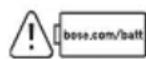
This symbol means use of this product with an incompatible or improperly installed battery could cause a safety hazard. Contact Bose customer service for battery service options or visitbose.com/batt for more information.
- This product must only be operated with compatible Bose certified batteries. Contact Bose customer service for battery service options.
- The battery provided with this product may present a risk of fire, explosion or chemical burn if mishandled, incorrectly replaced or replaced with an incorrect type.
- Do not expose products containing batteries to excessive heat (e.g. from storage in direct sunlight, fire or the like).
- If the battery leaks, do not allow the liquid to come in contact with the skin or eyes. If contact is made, seek medical advice.
- Keep the product away from fire and heat sources. Do NOT place naked flame sources, such as lighted candles, on or near the product.
- Do NOT make unauthorized alterations to this product.
- The speaker wire and interconnect cables included with this system are not approved for in-wall installation. Please check your local building codes for the correct type of wire and cable required for in-wall installation.
- Use this product only with an agency-approved LPS power supply that meets local regulatory requirements (e.g., UL, CSA, VDE, CCC).
- The product label is located on the bottom of the product.
To reduce the risk of fire, do not place any heating or cooking appliance beneath this product.
NOTE: This equipment has been tested and found to comply with the limits for a Class B digital device, pursuant to Part 15 of the FCC Rules. These limits are designed to provide reasonable protection against harmful interference in a residential installation. This equipment generates, uses, and can radiate radio frequency energy and, if not installed and used in accordance with the instructions, may cause harmful interference to radio communications. However, there is no guarantee that interference will not occur in a particular installation. If this equipment does cause harmful interference to radio or television reception, which can be determined by turning the equipment off and on, the user is encouraged to try to correct the interference by one or more of the following measures:
- Reorient or relocate the receiving product or antenna.
- Increase the separation between the equipment and receiver.
- Connect the equipment into an outlet on a circuit different from that to which the receiver is connected.
- Consult the dealer or an experienced radio/TV technician for help.
Changes or modifications not expressly approved by Bose Corporation could void the user's authority to operate this equipment.
This device complies with part 15 of the FCC Rules and with ISED Canada's license-exempt RSS standard(s). Operation is subject to the following two conditions: (1) This device may not cause harmful interference, and (2) this device must accept any interference received, including interference that may cause undesired operation.
This device complies with FCC and ISED Canada radiation exposure limits set forth for the general population. This transmitter must not be co-located or operating in conjunction with any other antenna or transmitter.
CANICESB/NMB(B)
For Europe: Frequency band of operation 2400 to 2483.5 MHz. I Maximum transmit power less than 20 dBm EIRP.
Maximum transmit power is below regulatory limits such that SAR testing is not necessary and exempt per applicable regulations.
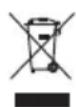
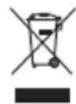
This symbol means the product must not be discarded as household waste, and should be delivered to an appropriate collection facility for recycling. Proper disposal and recycling helps protect natural resources, human health and the environment. For more information on disposal and recycling of this product, contact your local municipality, disposal service, or the shop where you bought this product.
Low-power Radio-frequency Devices Technical Regulations: Without permission granted by the NCC, any company, enterprise, or user is not allowed to change frequency, enhance transmitting power or alter original characteristic as well as performance to a approved low power radio-frequency devices. The low power radio-frequency devices shall not influence aircraft security and interfere legal communications; If found, the user shall cease operating immediately until no interference is achieved. The said legal communications means radio communications is operated in compliance with the Telecommunications Management Act. The low power radio-frequency devices must be susceptible with the interference from legal communications or ISM radio wave radiated devices.
The power delivered by the charger must be between min 2.5 Watts required by the radio equipment, and max 15 Watts in order to achieve the maximum charging speed.

Please dispose of used batteries properly, following local regulations. Do not incinerate.

| Names and Contents of Toxic or Hazardous Substances or Elements |
| Toxic or Hazardous Substances and Elements |
| Part Name | Lead (Pb) | Mercury (Hg) | Cadmium (Cd) | Hexavalent (CR(VI)) | Polybrominated Biphenyl (PBB) | Polybrominated diphenylether (PBDE) | Dybutyl phthalate (DBP) | Di-isobutyl phthalate (DIBP) | Butyl benzyl phthalate (BBP) | Bis(2-ethylhexyl) phthalate (DEHP) |
| PCBs X O | O O O | O O O O O | | | | | | | | |
| Metal Parts | X O | O O O O O | O O O | | | | | | | |
| Plastic Parts | O O | O O O O O | O O O | | | | | | | |
| Speakers | X O O | O O O O O | O O | | | | | | | |
| Cables | O O O O | O O O O O | | | | | | | | |
| This table is prepared in accordance with the provisions of SJ/T 11364.
O: Indicates that this toxic or hazardous substance contained in all of the homogeneous materials for this part is below the limit requirement of GB/T 26572. | 5 |
| X: Indicates that this toxic or hazardous substance contained in at least one of the homogeneous materials used for this part is above the limit requirement of GB/T 26572. |
| Equipment name: Bluetooth Speaker Type designation: 443516 |
| Restricted substances and its chemical symbols |
| Unit | Lead (Pb) | Mercury (Hg) | Cadmium (Cd) | Hexavalent chromium (Cr+6) | Polybrominated biphenyls (PBB) | Polybrominated diphenyl ethers (PBDE) |
| PCBs | - | ○ | ○ | ○ | ○ | ○ |
| Metal Parts | - | ○ | ○ | ○ | ○ | ○ |
| Plastic Parts | ○ | ○ | ○ | ○ | ○ | ○ |
| Speakers | - | ○ | ○ | ○ | ○ | ○ |
| Cables | - | ○ | ○ | ○ | ○ | ○ |
| Note 1: “○” indicates that the percentage content of the restricted substance does not exceed the percentage of reference value of presence.
Note 2: The “-” indicates that the restricted substance corresponds to the exemption. |
Date of Manufacture: The eighth digit in the serial number indicates the year of manufacture; "5" is 2015 or 2025.
Importers: Bose Electronics (Shanghai) Company Limited, Level 6, Tower D, No. 2337 Gudai Rd. Minhang District, Shanghai 201100 | Bose Products B.V., Vijzelstraat 68, 1017HL Amsterdam, The Netherlands | Ingram Micro Mexico SA de CV, Joselillo 3 Int. Piso 5 Col. El Parque, Naucalpan de Juarez, Edo Mex 53398 Phone Number: +52 55 5263 6500 | Bose Limited (H.K.), 7F., No. 2, Sec. 3, Minsheng E. Road, Zhongshan Dist., Taipei City 104511, Phone Number: +886-2-2514 7676 | Bose Limited, 16 Dufour's Place, London W1F 7SP
Input Rating: 5V ---, 3A | Output Rating: 5V ---, 3A
Model: 443516. The CMIIT ID is located on the bottom of the speaker.
This product is covered by a limited warranty from Bose, available at worldwide.Bose.com/Warranty
License Disclosures: To view the license disclosures that apply to the third-party software packages included as components of the Bose SoundLink Plus Portable Speaker, use the Bose app. You can access this information from the Settings menu.
Apple, the Apple logo, iPad, and iPhone are trademarks of Apple Inc., registered in the U.S. and other countries. App Store is a service mark of Apple Inc. The trademark "iPhone" is used in Japan with a license from Aiphone K.K.
Use of the Made for Apple and Works with Apple AirPlay badges means that an accessory has been designed to connect specifically to the Apple product(s) identified in the Made for Apple badge and to work specifically with the technology identified in the Works with Apple AirPlay badge, and has been certified by the developer to meet Apple performance standards. Apple is not responsible for the operation of this device or its compliance with safety and regulatory standards.
The Bluetooth® word mark and logos are registered trademarks owned by Bluetooth SIG, Inc. and any use of such marks by Bose Corporation is under license.
Android and Google Play are trademarks of Google LLC.
Snapdragon Sound is a product of Qualcomm Technologies, Inc. and/or its subsidiaries. Qualcomm,
Snapdragon and Qualcomm Sound are trademarks or registered trademarks of Qualcomm Incorporated.
Spotify is a registered trademark of Spotify AB.
USB Type-C® and USB-C® are registered trademarks of USB Implementers Forum.
Bose, the B logo, SimpleSync, and SoundLink are trademarks of Bose Corporation. | Bose Corporation Headquarters: 1-877-230-5639 | ©2025 Bose Corporation. No part of this work may be reproduced, modified, distributed, or otherwise used without prior written permission.
Please complete and retain for your records
The serial number and model numbers are located on the bottom of the speaker.
Serial number:
Model number: 443516
Please keep your receipt. Now is a good time to register your Bose product. You can easily do this by going to _worldwide.Bose.com/ProductRegistration
WHAT'S IN THE BOX
Contents 9
GETTING STARTED
Initial setup 10
BLUETOOTH® CONNECTIONS
Connect to a device. 12
Using your device's Bluetooth settings 12
Using the Bose app 13
Reconnect to a device 14
Reconnect to the most recently-connected device 14
Reconnect to a different device 14
Connect an additional device. 15
Identify connected devices 15
Switch between two connected devices 15
Disconnect a device 16
Clear the speaker device list. 16
AndroidTM devices only. 17
Connect using Fast Pair 17
Snapdragon Sound™ technology 18
SPEAKER CONTROLS
Power on/off 19
Auto-off timer 20
Media playback and volume 21
BATTERY
Charge the speaker 22
Charging time 23
Hear the battery level 23
Battery protection mode 23
Charge your device 24
STATUS
Power light 25
Bluetooth light 26
Shortcut light 26
VOICE PROMPTS
Pre-installed languages 27
Change the language 27
Disable voice prompts 27
SHORTCUTS
Use your shortcut 28
Change or disable your shortcut 28
SPOTIFY TAP 29
CONNECT BOSE PRODUCTS
Link two Bose Bluetooth Speakers 30
Compatible products 30
Link using the product controls 31
Switch between Stereo mode and Party mode 32
Unlink the speakers 32
Connect to a Bose Smart Speaker or Soundbar 33
Compatible products 33
Connect using the Bose app. 34
Connect using the product controls 35
Reconnect a Bose Smart Speaker or Soundbar 35
PORTABILITY
Strap uses 36
Water and dust resistance 36
CARE AND MAINTENANCE
Service the speaker battery 37
Update the speaker 37
Clean the speaker 37
Store the speaker 37
Replacement parts and accessories 37
Limited warranty 37
TROUBLESHOOTING
Try these solutions first 38
Other solutions 38
Reset the speaker 41
Restore the speaker 42
CONTENTS
Confirm that the following parts are included:

Bose SoundLink Plus Portable Speaker
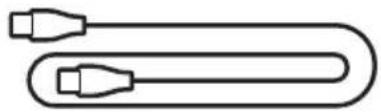
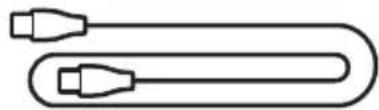
USB Type-C® cable
NOTE: If any part of the product appears to be missing or damaged, do not use it. Visit: support.Bose.com/sl-plus for troubleshooting articles, videos, and product repair or replacement.
The speaker ships with a partial charge. Before using the speaker for the first time, connect it to a power supply. The speaker doesn't need to be fully charged, but it does require the initial connection to activate the battery.
INITIAL SETUP
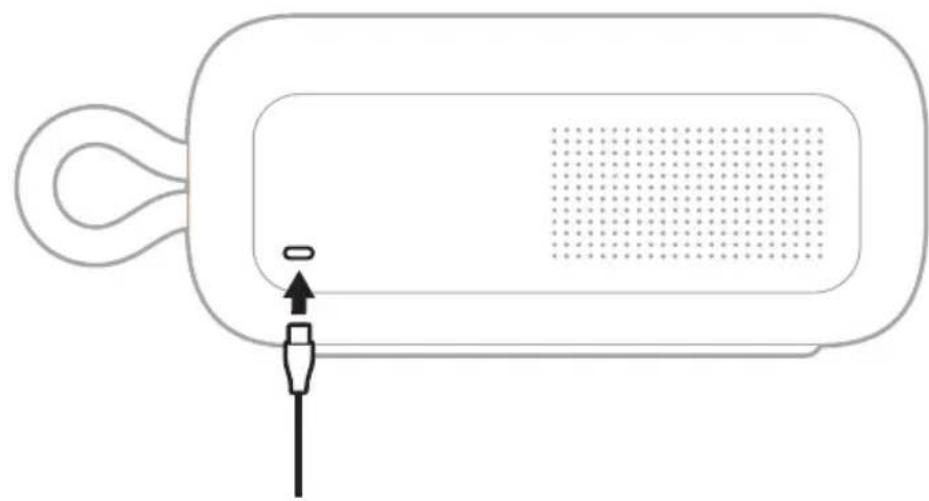
- Connect one end of the USB-C cable to the USB-C port on the back of the speaker.
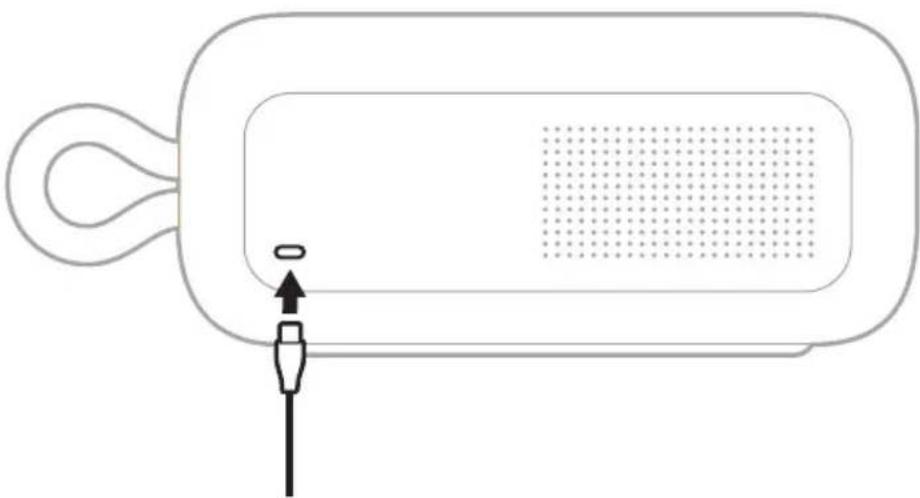
- Connect the other end of the USB-C cable to a USB-C power supply.
The Power light slowly pulses white.

- Press the Power button
The Power light slowly pulses white. You hear the battery level followed by "Ready to connect." The Bluetooth light slowly blinks blue.


- Connect to your device (see page 12).
You can store up to six devices in the speaker device list, and the speaker can be actively connected to up to two devices at a time. You can play audio from only one device at a time.
CONNECT TO A DEVICE
You can connect the speaker to your device using any of the following:
- Your device's Bluetooth settings (see "Using your device's Bluetooth settings")
The Bose app (see page 13)
- Fast Pair (Android devices only) (see page 17)
Using your device's Bluetooth settings
- Press and hold the Bluetooth button 串 until you hear "Ready to connect" and the Bluetooth light slowly blinks blue.
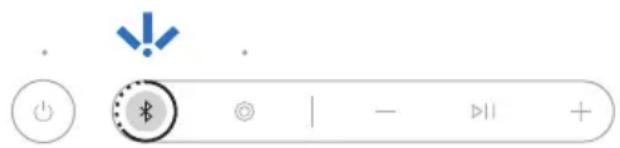
NOTE: If a device is already connected, you hear "Ready to connect another device."
- On your device, access Bluetooth settings.
- Select the speaker from the list of available products.
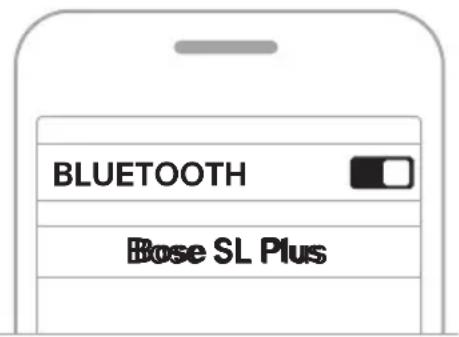
NOTE: Look for the name you entered for the speaker in the Bose app. If you didn't name the speaker, the default name appears.
The speaker appears in the list of connected products. The Bluetooth light glows solid white (see page 26).
Using the Bose app
The Bose app lets you set up and control the speaker from any device, such as a smartphone or tablet.
Using the app, you can manage Bluetooth connections, manage speaker settings, adjust the audio, choose your voice prompt language, and get any future updates and new features made available by Bose.
NOTE: If you've already downloaded the Bose app for another Bose product, you can add the speaker from the product list screen.
- On your device, download the Bose app.


- Follow the app instructions to add the speaker.
RECONNECT TO A DEVICE
Reconnect to the most recently-connected device
When powered on, the speaker connects with the two most recently-connected devices.
NOTES:
- The device must be within range (30 ft or 9 m) and powered on.
- Make sure the Bluetooth feature is enabled on your device.
Reconnect to a different device
NOTE: The device must be within range (30 ft or 9 m) and powered on.
- Press the Bluetooth button 串 and release to hear which devices are currently connected.

- Within 2 seconds, press the Bluetooth button again to hear the name of the next device in speaker device list.
- Repeat until you hear the correct device name.
- Play audio on the connected device.
TIP: You can also reconnect a different device using the device Bluetooth settings or the Bose app (see page 13).
NOTE: If two devices are already connected to the speaker, the newly-connected device replaces the older of the two connections.
CONNECT AN ADDITIONAL DEVICE
The speaker can be actively connected to two devices at a time (multi-point connection).
To connect an additional device, see page 12.
NOTES:
- You can only play audio from one device at a time.
- To manage or disable the multi-point connection feature, use the Bose app. To access this option, tap Source on the product control screen.
- Disabling the multi-point connection feature disconnects the second connected device.
IDENTIFY CONNECTED DEVICES
- Press the Bluetooth button × and release to hear which devices are currentlyconnected.

- Within 2 seconds, press the Bluetooth button again to hear the name of the next device in the speaker device list.
SWITCH BETWEEN TWO CONNECTED DEVICES
- Pause audio on your first device.
- Play audio on your second device.
DISCONNECT A DEVICE
Use the device's Bluetooth settings or the Bose app.
NOTE: Disabling the Bluetooth feature on your device disconnects the speaker and all other Bluetooth-connected products.
CLEAR THE SPEAKER DEVICE LIST
- Press and hold the Bluetooth button × for 15 seconds until you hear "Bluetooth device list cleared. Ready to connect" and the Bluetooth light blinks blue.
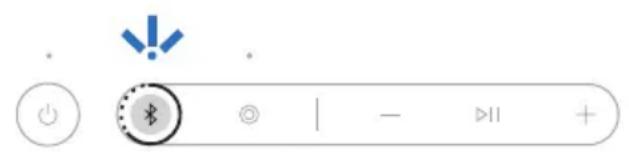
- Delete the speaker from the Bluetooth list on your device.
All devices are cleared, and the speaker is ready to connect (see page 12).
ANDROID DEVICES ONLY
If you have an Android device, you can access the following additional connection features.
Connect using Fast Pair
In one tap, the speaker enables quick, effortless Bluetooth pairing with your Android device.
NOTES:
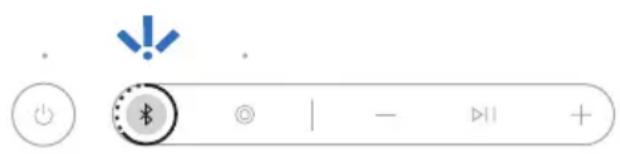
NOTE: If a device is already connected, you hear "Ready to connect another device."
- Place the speaker next to your Android device.
A notification displays on your device prompting you to pair the speaker.
NOTE: If you don't see a notification, check that notifications are enabled for the Google Play Services app on your device.
- Tap the notification.
Once the speaker is connected, a notification appears confirming that the connection is complete.
NOTE: You can also tap the button on the notification to download the Bose app and finish setting up the speaker.
Snapdragon Sound technology
Bose SoundLink Plus Portable Speaker features Snapdragon Sound technology.
Snapdragon Sound optimizes Qualcomm® audio technologies across connected devices to ensure the best sound quality, connection stability, and latency for your streaming audio.
To experience Snapdragon Sound, you need a Snapdragon Sound-certified device, such as a compatible Android device. Once you connect the speaker, your device will automatically stream audio using the aptX Adaptive Bluetooth codec.
NOTE: To see which Snapdragon Sound features the speaker supports and check if your device is compatible, visit: support.Bose.com/sl-plus
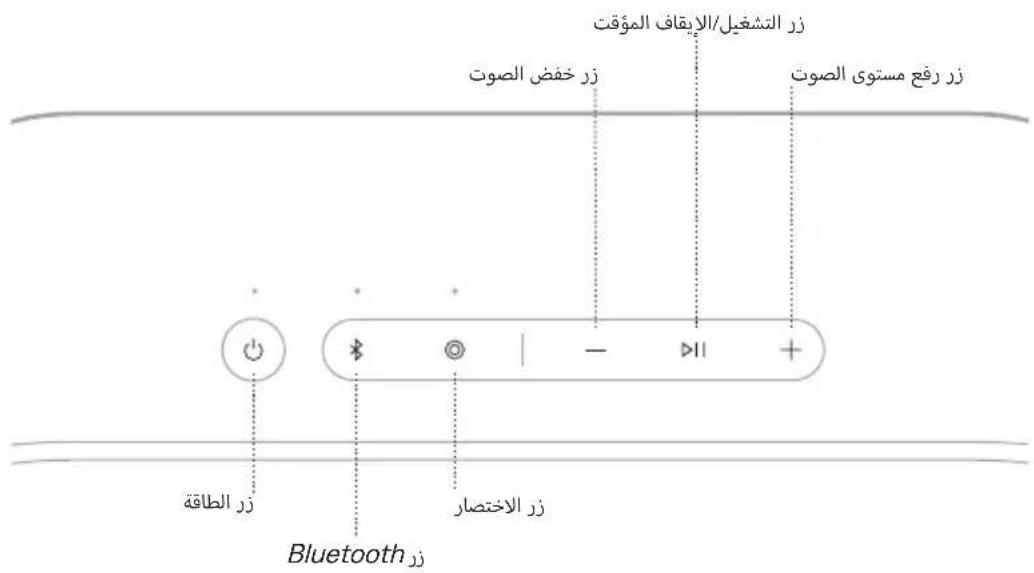
Controls are located on the top of the speaker.

POWER ON/OFF
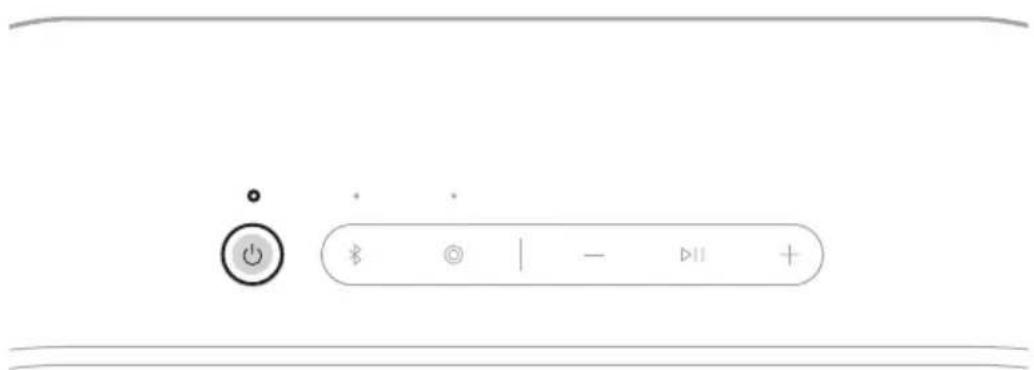
Press the Power button
When powered on, a voice prompt announces the battery level. The Power light glows according to the current battery level (see page 25).
Auto-off timer
The auto-off timer conserves the battery when the speaker is operating on battery power. The speaker switches off when audio has stopped and buttons have not been pressed for 20 minutes.
To wake the speaker, press the Power button or press and hold the Bluetooth button.
NOTE: To change the timer setting, use the Bose app. You can access this option from the Settings menu.
Disable the auto-off timer
Press and hold the Play/Pause button and the Volume up button ^+ simultaneously. You hear "Auto-off disabled."
Repeat to re-enable the auto-off timer.
TIP: You can also disable the auto-off timer using the Bose app. You can access this option from the Settings menu.
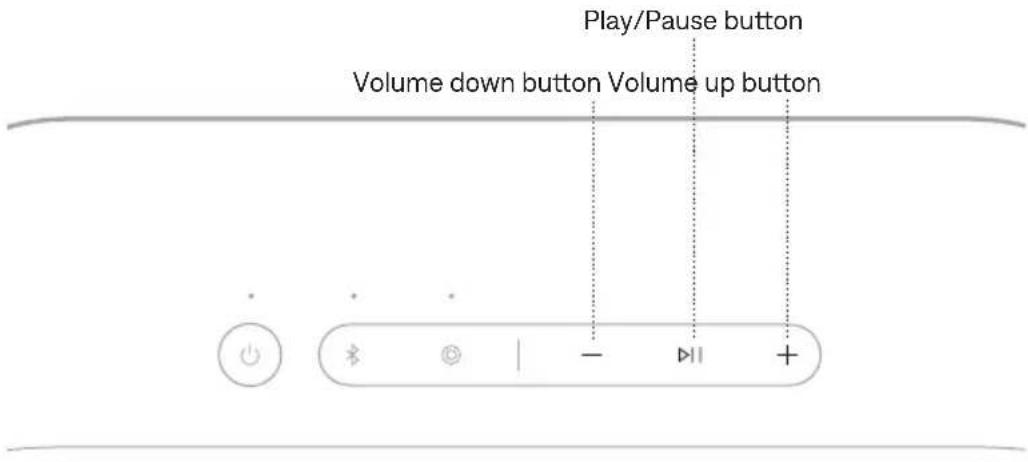
FUNCTION WHAT TO DO
| Play/Pause Press ➔II. | |
| Skip forward Double-press ➔II. | |
| Skip backward Triple-press ➔II. | |
| Volume up | Press +.
NOTES:
·To quickly increase the volume, press and hold +
·When the maximum volume is reached, the Bluetooth light blinks white 2 times. |
| Volume down | Press -.
NOTES:
·To quickly decrease the volume, press and hold -
·When the minimum volume is reached, the Bluetooth light blinks white 2 times. |
TIP: You can also increase or decrease the volume using the volume controls on your device or in the Bose app. You can access this option on the product control screen.
CHARGE THE SPEAKER
CAUTION: Do not attempt to charge the speaker while the speaker is wet. Doing so may cause damage to the speaker. The speaker is waterproof, but the USB-C port must be fully dried out before charging.
NOTE: Make sure you're using the Bose-provided USB cable or a similar USB cable. Bose recommends using a 5V ---, 3A capable power source.
- Connect one end of the USB-C cable to the USB port on the back of the speaker.

- Connect the other end of the USB-C cable to a power source such as a computer or wall charger.
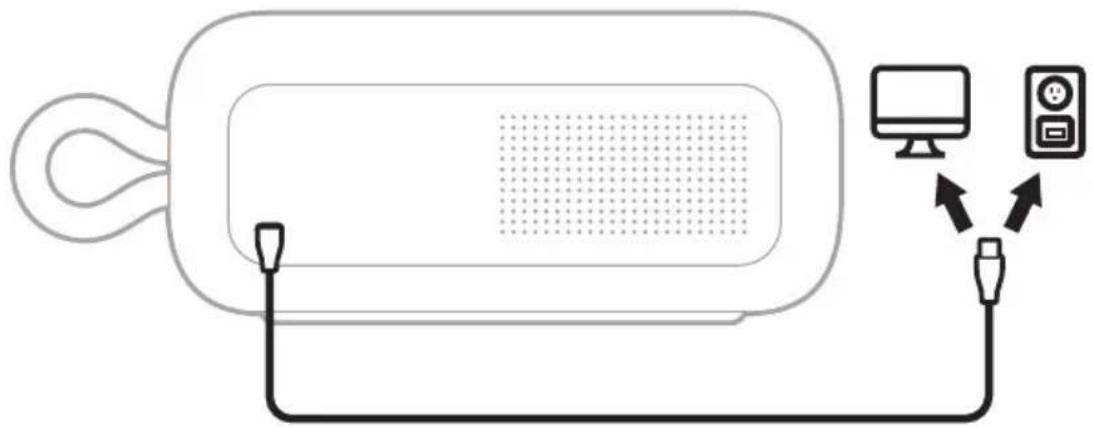
While charging, the battery light pulses white. When the battery is fully charged, the battery light glows solid white.
Charging time
Allow up to 5 hours to fully charge the battery.
A full charge powers the speaker up to 20 hours? At maximum volume, the battery lasts up to 4 hours.3
Charging time and battery performance vary with the USB power supply capability, music content, and speaker volume.
Hear the battery level
Each time you power on the speaker, a voice prompt announces the battery level. When the speaker is in use, a voice prompt announces if the battery needs to be charged.
Press and hold the Power button until you hear a voice prompt.
Battery protection mode
When the speaker battery is depleted (0%) it enters battery protection mode. To reactivate the speaker, connect it to a power supply and press the Power button .
When not in use, store the speaker in a cool place.
CAUTION: Do NOT store the speaker for extended periods when fully charged or with a remaining charge of less than 10% .
CHARGE YOUR DEVICE
CAUTION: Do not attempt to charge your device while the speaker is wet. Doing so may cause damage to the speaker. The speaker is waterproof, but the USB-C port must be fully dried out before charging. If moisture is detected, the Power light slowly blinks white and amber (see page 25).
- Connect one end of the USB-C cable to the USB-C port on the back of the speaker.
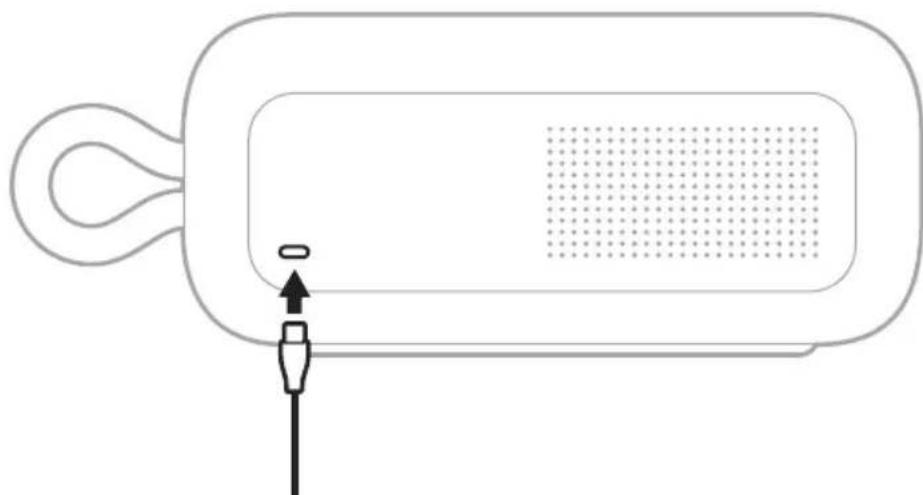
- Connect the other end of the cable to the USB-C port on your device.
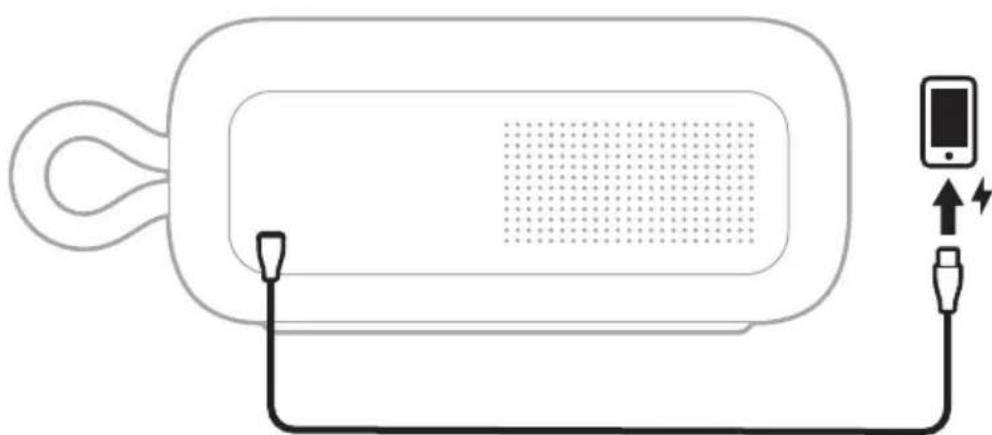
Charging status displays on your device.
The Power, Bluetooth, and Shortcut lights are located on the top of the speaker.
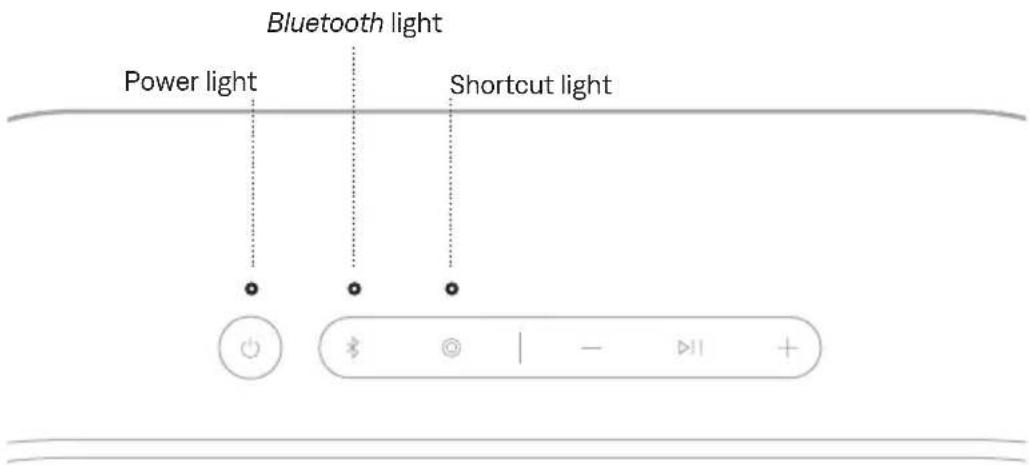
POWER LIGHT
Shows the battery, charging, update, and error status.
LIGHT ACTIVITY SYSTEM STATE
| Solid white Full charge | |
| Solid amber Low charge | |
| Blinks amber Need to charge | |
| Slowly pulses white Charging | |
| Blinks white 3 times (repeated) Updating software | |
| Quickly blinks white (3 seconds) Reset complete | |
| Slowly blinks white and amber (alternating) | Moisture detected - fully dry the USB-C port before charging |
| Quickly blinks white and amber (alternating) | Error - contact Bose customer service |
| Blinks amber 3 times (repeated) Failed battery - contact Bose customer service |
BLUETOOTH LIGHT
Shows the Bluetooth connection status.
LIGHT ACTIVITY SYSTEM STATE
Slowly blinks blue Ready to connect
Quickly blinks blue Connecting
Solid white Connected
Blinks white 2 times Device list cleared
SHORTCUT LIGHT
Shows the status of speakers when linking is set as the shortcut.
LIGHT ACTIVITY SYSTEM STATE
Slowly blinks white Speakers are linking
Solid white Speakers are linked
Voice prompts guide you through the Bluetooth connection process, announce the battery level, and identify connected devices.
TIP: You can easily manage voice prompts using the Bose app. Access this option from the Settings menu.
PRE-INSTALLED LANGUAGE
The following languages are pre-installed on the speaker:
- English - German - Japanese
- Spanish - Italian - Cantonese
- French - Mandarin
CHANGE THE LANGUAGE
Change the voice prompt language using the Bose app. Access this option from the Settings menu.
DISABLE VOICE PROMPTS
Press and hold the Shortcut button and Volume down button — simultaneously until you hear "Voice prompts off."
NOTE: Repeat to re-enable voice prompts.
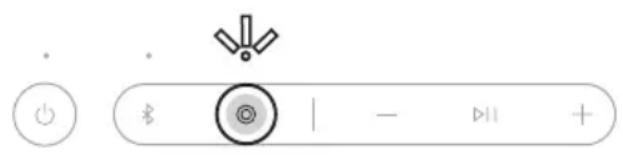
The programmable Shortcut button enables you to quickly and easily access one of the following functions:
- Link two Bose Bluetooth Speakers (default) (see page 30)
- Access Spotify Tap (see page 29)
USE YOUR SHORTCUT
Press the Shortcut button
The Shortcut light blinks once.
NOTE: The Shortcut button © is set by default to link two Bose Bluetooth speakers (see page 30).
CHANGE OR DISABLE YOUR SHORTCUT
To change or disable your shortcut, use the Bose app. To access this option, tap Shortcut on the product control screen.
Spotify Tap is music to your ears, quite literally. Get the tunes playing with a simple gesture.
NOTE: To use Spotify Tap, it must be set as your shortcut in the Bose app and the Spotify app must be up to date.
- Press the Shortcut button © play a recommendation based on your listening taste.

- Press the Shortcut button again for the next recommendation made just for you.
LINK TWO BOSE BLUETOOTH SPEAKERS
For a more immersive music experience, you can sync your Bose SoundLink Plus Portable Speaker with another compatible Bose Bluetooth speaker and play the same audio from both speakers in Stereo mode or Party mode.
- Stereo mode (left speaker and right speaker play separately)
- Party mode (both speakers play in unison)
NOTES:
- The Shortcut button © is set by default to link two Bose Bluetooth speakers.
- You can link to only one other speaker at a time.
- Make sure that the two speakers are within 30 ft (9 m) of each other.
- Make sure that the two speakers are within 30 ft (9 m) of the streaming device.
- For an optimal experience, position the speakers in the same room or outdoor area with no obstructions between them. Performance may vary based on device, distance, and environmental factors.
Compatible products
You can link the Bose SoundLink Plus Portable Speaker to any Bose Bluetooth speaker that has a Shortcut button.

Link using the product controls
- On the speaker, press the Shortcut button
The voice prompt directs you to press the Shortcut button on a second speaker. The Shortcut light slowly blinks white.

- On a second compatible Bose Bluetooth speaker, press the Shortcut button . The Shortcut light slowly blinks white.
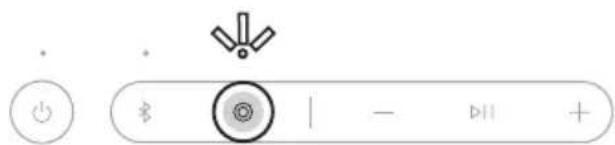
Once the two speakers are linked, a voice prompt announces the mode on both speakers. The Shortcut light on both speakers glows solid white.
NOTE: If the speakers are the same model you hear "Stereo mode," followed by "Left" on the primary speaker and "Right" on the secondary speaker. If they are different models, you hear "Party mode" on both speakers.
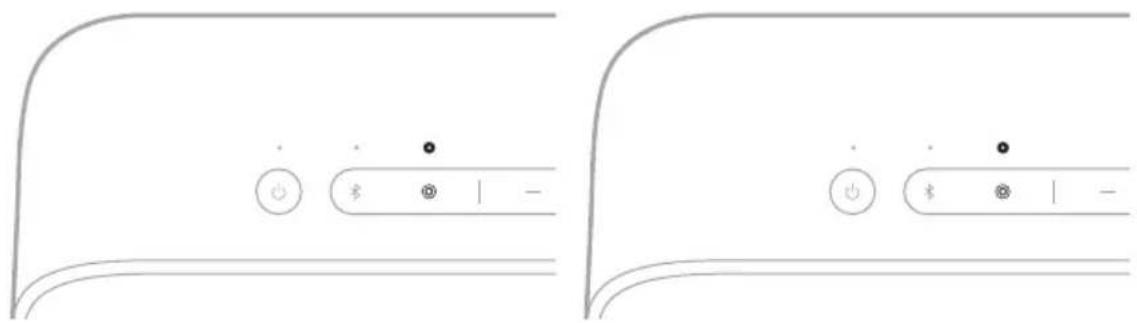
Switch between Stereo mode and Party mode
On either speaker, press the Shortcut button

A voice prompt announces the mode on each speaker.
NOTE: If the speakers are different models, you can only play audio in Party mode.
TIP: You can also switch between Stereo mode and Party mode using the Bose app. You can access this option on the product control screen.
Unlink the speakers
On either speaker, press the Power button or press and hold the Shortcut button .

A voice prompt announces the speakers are no longer linked.
TIP: You can also use the Bose app to unlink the speakers. You can access this option on the product control screen.
CONNECT TO A BOSE SMART SPEAKER OR SOUNDBAR
With Bose SimpleSync technology, you can connect the speaker to a Bose Smart Speaker or Bose Smart Soundbar to listen to the same audio in two different rooms at the same time.
NOTE: SimpleSync technology has a Bluetooth range of up to 30 ft (9 m). Walls and construction materials can affect reception.
Compatible products
You can connect the speaker to any Bose Smart Speaker or Bose Smart Soundbar.
Popular compatible products include:
- Bose Smart Ultra Soundbar/Bose Ultra Soundbar
- Bose Smart Soundbar 900
- Bose Smart Soundbar 700/Bose Soundbar 700
- Bose Smart Soundbar 600
- Bose Soundbar 500
- Bose Smart Speaker 500/Bose Home Speaker 500
- Bose Home Speaker 300
- Bose Portable Smart Speaker/Bose Portable Home Speaker
New products are added periodically. For a complete list and more information, visit: ______support.Bose.com/Groups
Connect using the Bose app
- Press and hold the Bluetooth button × until you hear "Ready to connect" and the Bluetooth light slowly blinks blue.
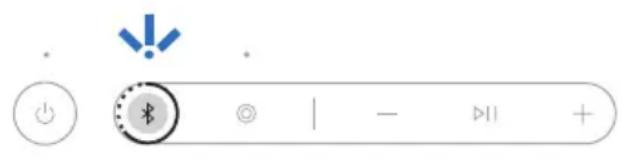
NOTE: If a device is already connected, you hear "Ready to connect another device."
- Use the Bose app to connect the speaker to a compatible Bose product. For more information, visit: support.Bose.com/Groups
NOTES:
- It could take up to 30 seconds to connect.
- Make sure that the speaker is within 30 ft (9 m) of the speaker or soundbar.
- You can connect the speaker to only one product at a time.
Connect using the product controls
- Press and hold the Bluetooth button × until you hear "Ready to connect" and the Bluetooth light slowly blinks blue.
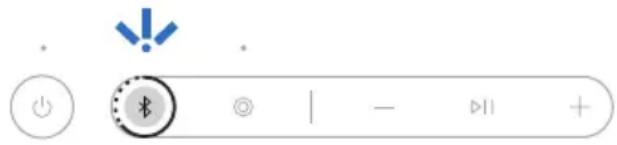
NOTE: If a device is already connected, you hear "Ready to connect another device."
- On the soundbar remote or the top of the speaker, press and hold the Bluetooth button × until the light bar or light ring pulses blue.
The speaker connects to the soundbar or speaker, and you hear the same audio through both devices.
NOTES:
- It could take up to 30 seconds to connect.
- Make sure that the speaker is within 30 ft (9 m) of the speaker or soundbar.
- You can connect the speaker to only one product at a time.
RECONNECT A BOSE SMART SPEAKER OR SOUNDBAR
Use the Bose app to reconnect the speaker to a previously-connected compatible Bose product. For more information, visit: ______support.Bose.
NOTES:
- The speaker or soundbar must be within range (30 ft or 9 m) and powered on.
- If the speaker doesn't connect, see "Speaker doesn't reconnect to a previously-connected Bose Smart Speaker or Soundbar" on page 40.
STRAP USES
You can use the strap as a finger loop to easily carry the speaker. You can also attach it to a carabiner or a cord.

WATER AND DUST RESISTANCE
The speaker is waterproof, splash resistant, and dustproof. It is rated IP67 and IP64. You can immerse the speaker in water for up to 30 minutes at a depth of up to 3.3 ft (1 m). It can also be used while showering and in the rain or snow.
CAUTIONS:
- Do NOT submerge this speaker in any pool of water deeper than 3.3 ft (1 m).
- If the speaker is exposed to salt or chlorinated water, gently rinse with fresh water following the exposure to remove residue. Make sure the connector port is fully dried out before charging.
- Never attempt to charge the speaker while it is wet. Doing so may cause damage to the speaker.

SERVICE THE SPEAKER BATTERY
This product must only be operated with compatible Bose certified batteries. For battery service options, contact Bose customer service or visit ______ support.Bose.com/sl-plus
UPDATE THE SPEAKER
The speaker begins updating automatically when connected to the Bose app and an update is available. Follow the app instructions. When the update begins, the Power light blinks white 3 times (repeated) until the update is complete.
You can also update the speaker using the Bose updater website. On your computer, visit: _____btu.Bose.com and follow the on-screen instructions. When the update beg the Power light blinks white 3 times (repeated) until the update is complete.
CLEAN THE SPEAKER
The speaker may require periodic cleaning.
- Clean the surface of the speaker with a soft, damp cloth (water only). Make sure the USB-C port is fully dried out before charging.
- Do not use any solvents, chemicals or cleaning solutions containing alcohol, ammonia, or abrasives.
- If the speaker is exposed to salt or chlorinated water, gently rinse with fresh water following the exposure to remove residue. Make sure the USB-C port is fully dried out before charging.
STORE THE SPEAKER
When not in use, store the speaker in a cool place.
CAUTION: Do NOT store the speaker for extended periods when the battery is fully charged or has a low charge (see page 23).
REPLACEMENT PARTS AND ACCESSORIES
Replacement parts and accessories can be ordered through Bose customer service.
Visit: ______support.Bose.com/sl-plus
LIMITED WARRANTY
The speaker is covered by a limited warranty. Visit our website at worldwide.Bose.com/Warranty for details of the limited warranty.
To register your product, visit worldwide.Bose.com/ProductRegistration for instructions. Failure to register will not affect your limited warranty rights.
TRY THESE SOLUTIONS FIRST
If you experience problems with the speaker:
- Power the speaker off and then on again (see page 19).
- Check the status lights (see page 25).
- Make sure your device supports Bluetooth connections (see page 12).
- Charge the speaker (see page 22).
- Increase the volume on the speaker, your device, and the music app.
- Move your device closer to the speaker (30 ft or 9 m) and away from any interferenceorobstruction.
- Try connecting another device (see page 12).
- Press and hold the Power button for 15 seconds to reset the speaker (see page 41)
If you couldn't resolve your issue, see the table below to identify symptoms and solutions to common problems. You can also access troubleshooting articles, videos, and other resources at: ______support.Bose.com/sl-plus
If you're unable to resolve your issue, contact Bose customer service.
Visit: __worldwide.Bose.com/contact
OTHER SOLUTIONS
SYMPTOM SOLUTION
| No power (battery) | Battery may be in protection mode or discharged. Connect the speaker to a power supply (see page 22).
Battery may need to be serviced. Contact Bose customer service (see page 37). |
| Speaker doesn’t connect with device | Clear the speaker device list (see page 16). Delete the speaker from the Bluetooth list on your device. Connect again (see page 12).
Visit: ____________support.Bose.com/sl-plus for additional supp |
| Speaker doesn’t respond to multi-press functions | Vary the speed of presses. |
SYMPTOM SOLUTION
| No sound | Make sure voice prompts are on using the Bose app. Press the Bluetooth button \(\text{串}\) and release to hear the connected device. Make sure you're using the correct device. Use a different music source. If two devices are connected, pause audio on the first device and play audio on the other device. |
| Poor sound quality from device connected byBluetooth connection | Use a different music source. If two devices are connected, disconnect the second device. Disable any audio enhancement features on the device or music app. If the speaker was exposed to water, wait for the speaker to dry and try again. |
| Delayed audio | Play audio from a different application or music service. Close and re-open the application or music service. |
| Speaker doesn't charge | Make sure both ends of the USB-C cable are secure (page 22). Make sure you're using the Bose-provided USB-C cable or a similar USB cable and providing a minimum of 5V —, 3A. Try another charging source and charging cable. If the speaker has been exposed to high or low temperatures, let it return to room temperature and then try charging again. If the speaker was exposed to water, wait for the speaker to dry and try again. If the problem persists, contact Bose customer service to request a replacement battery and replace the old one (see page 37). |
| Speaker doesn't link with a BoseBluetooth speaker | Make sure you're connecting to a compatible Bose Bluetooth speaker (see page 30). |
| No sound when BoseBluetooth speakers are linked | Make sure the primary speaker is powered on. If you power off the primary speaker, the secondary speaker stops playing audio. |
SYMPTOM SOLUTION
| Mobile device doesn't charge | Make sure both ends of the USB-C cable are secure (see page 24).If the speaker was exposed to water, wait for the speaker to dry and try again.Make sure your device can receive a charge from another device.Refer to your mobile device owner's guide.Disconnect the USB-C cable from the speaker and then reconnect. If your device still doesn't charge, disconnect the USB-C cable from your device and reconnect. If you're unable to resolve your issue, refer to your device owner's guide. |
| Speaker doesn't connect to a Bose Smart Speaker or Soundbar | Make sure you're using the Bose app (see page 13).Make sure the Bose Smart Speaker or Soundbar is running the latest software. Use the Bose app and run available software updates.Make sure you're connecting to a compatible Bose product. For a list of compatible products, visit: _____________________ support.Bose.coPress and hold the Bluetooth button ✅ until the Bluetooth light blinks blue, and you hear "Ready to connect another device."Make sure that the speaker is within 30 ft (9 m) of the soundbar or speaker. |
| Speaker doesn't reconnecttoa previously-connected Bose Smart Speaker or Soundbar | On the speaker, press and hold the Bluetooth button ✅ until the Bluetooth light blinks blue, and you hear "Ready to connect another device." Use the Bose app to connect the speaker to a compatible Bose product. For more information, visit: _____________________ support.Bose.com/Groups |
| Delayed audio when connected to Bose Smart Speaker or Soundbar | Download the Bose app (see page 13) and run available software updates for the connected speaker and soundbar.On a computer, check____________ btu.Bose.com for USB updates. |
RESET THE SPEAKER
If the speaker is unresponsive, you can reset it.
Resetting the speaker resets the product controls and reboots the speaker. It doesn't clear any device settings.
NOTE: Make sure the USB-C cable isn't connected to the speaker.
- Press and hold the Power button for up to 15 seconds until the speaker powers off.

- Press the Power button
The Power light glows according to the battery level (see page 25).
NOTE: If you're unable to resolve your issue, additional troubleshooting and support is available at: ______support.Bose.com/sl-plus
RESTORE THE SPEAKER
Factory reset clears connected devices and language settings from the speaker and returns it to the original factory settings.
- Press and hold the Volume up button + and Volume down button — for 15 seconds until the Power light quickly blinks white for 3 seconds.

The speaker powers off.
- Press the Power button
The Bluetooth light glows blue, and the speaker is ready to connect.
NOTE: If you're unable to resolve your issue, additional troubleshooting and support is available at: ______support.Bose.com/sl-plus
TILSLUT PRODUKTER FRA BOSE
Sammenkobl to Bose Bluetooth-hojttalere 30
Besog: worldwide.Bose.com/contact
ANDRE LØSNINGER
SYMPTOM LØSNING
Gaanar: worldwide.Bose.com/contact
ANDERE OPLOSSINGEN
SYMPTOOM OPLOSSING
Visite: worldwide.Bose.com/contact
OTRAS SOLUCIONES
SINTOMA SOLUCION
CONNEXIONS BLUETOOTH
CONNEXION DES PRODUITS BOSE
MISE SOUS/HORS TENSION
Visitare: worldwide.Bose.com/contact
ALTRE SOLUZIONI
SINTOMO SOLUZIONE
ELÖRE TELEPİTETT NYELVEK
KOBLETIL BOSE-PRODUKTER
KOBLE TIL EN BOSE SMARTHØYTTALER ELLER -LYDPLANKE PÅ NYTT
KONFIGURACJA WSTEPNA
WSTEPNIE ZAINSTALOWANE JEZYKI
POWIAZANIE DWÓCH GŁOSNIKOW BOSE BLUETOOTH
VAD FINNS I FÖRPACKINGEN?
Innehall 9
FÖRBERDEDELSER
ANSLUTABOSE-PRODUKTER
UPPDATERA HÖGTALAREN
Besok worldwide.Bose.com/contact
ANDRA LÖSNINGAR
SYMPTOM LÖSNING
http://www.Bose.com/compliance/

Bose Corporation是i 2014/53/EU及其本的成用能安EU之
中
私司
hankeguakaphtjitlqldoulohahsitiO.
賊庄用藥賊,達對定的本音在不多音同,
自战的在生,
戌卫/主的

信,

i 1
- "Bluetooth device list cleared. Ready to connectBluetooth当机登录我
SπFfKaJFJFJFJFJFJFJFJFJFJFJFJFJFJFJFJFJFJFJFJFJFJFJFJFJFJFJFJFJFJFJFJFJFJFJFJFJFJFJFJFJFJFJFJFJFJFJFJFJ
相:aBose
Snapdragon Sound 奇舍
Bose SoundLink Plus 휎다용스티터에는SnapdragonSound기울이 탬재出來일수다.
SnapdragonSound是关联到当机封装的Qualcomm®。Odiog头将功
Bose
Bose
Bose
Bose
Bose
Bose
Bose
Bose
Bose
Bose
Bose
Bose
Bose
Bose
Bose
Bose
Bose
Bose
Bose
Bose
Bose
Bose
Bose
Bose
Bose
Bose
Bose
Bose
Bose
Bose
Bose
Bose
Bose
Bose
SπFJFJFJFJFJFJFJFJFJFJFJFJFJFJFJFJFJFJFJFJFJFJFJFJFJFJFJFJFJFJFJFJFJFJFJFJFJFJFJFJFJFJFJFJFJFJFJFJFJFJF
音呈FJFJFJFJFJFJFJFJFJFJFJFJFJFJFJFJFJFJFJFJFJFJFJFJFJFJFJFJFJFJFJFJFJFJFJFJFJFJFJFJFJFJ
[BaT]
SπfKbTtRiKa SπTjIe(0%) BtRlBoH MoDro eern. StFkTo TaHJ 1
SAHJ
"Voice prompts off(音成) 1000000000000000000000000000000000000000000000000000000000000000000000000000000000000000000000000000
☆:音造:
FIOI 1
- 天棚の Bose Bluetooth 所用到的连接(与本页链接) (30 万円)
- Spotify Tap APP商城(29万日志)
邯罗가용
卡羅卡尼巴隆 對韋
卡罗加吉菲尼德在这一百年中曾多次访华。
查 :Borhaii
邯罗之机
BaRo gaiRi 1000000000000000000000000000000000000000000000000000000000000000000000000000000
T 1 T 1 T 1 T 1 T 1 T 1 T 1 T 1 T 1 T 1 T 1 T 1 T 1 T 1 T 1 T 1 T 1 T 1 T 1 T 1 T 1 T 1 T 1 T 1 T 1 T 1 T 1 T 1 T 1 T 1 T 1 T 1 T 1 T 1 T
音呈FJFJFJFJFJFJFJFJFJFJFJFJFJFJFJFJFJFJFJFJFJFJFJFJFJFJFJFJFJFJFJFJFJFJFJFJFJ
support.Bose.com/sl-plus①
朝
SfRn 3.
世,
i
SFlFKeIeDnJrEaRb
| Smokeable smoke
Smokeable smoke
Smokeable smoke
Smokeable smoke
Smokeable smoke
Smokeable smoke
Smokeable smoke
Smokeable smoke
Smokeable smoke
Smokeable smoke
Smokeable smoke
Smokeable smoke
Smokeable smoke
Smokeable smoke
Smokeable smoke
Smokeable smoke
Smokeable smoke
Smokeable smoke
Smokeable smoke
Smokeable smoke
Smokeable smoke
Smokeable smoke
Smokeable smoke
Smokeable smoke
Smokeable smoke
Smokeable smoke | |
| Smokeable smoke
Smokeable smoke
Smokeable smoke
Smokeable smoke
Smokeable smoke
Smokeable smoke
Smokeable smoke
Smokeable smoke
Smokeable smoke
Smokeable smoke
Smokeable smoke
Smokeable smoke
Smokeable smoke
Smokeable smoke
Smokeable smoke
Smokeable smoke
Smokeable smoke
Smokeable smoke
Smokeable smoke
Smokeable smoke
Smokeable smoke
Smokeable smoke
Smokeable smoke
Smokeable smoke
Smokeable
Smokeable
Smokeable
Smokeable
Smokeable
Smokeable
Smokeable
Smokeable
Smokeable
Smokeable
Smokeable
Smokeable
Smokeable
Smokeable
Smokeable
Smokeable
Smokeable
Smokeable
Smokeable
Smokeable
Smokeable
Smokeable
Smokeable
Smokeable
Smokeable
Smokeable
Smokeable
Smokeable
Smokeable
Smokeable
Smokeable
Smokeable
Smokeable
Smokeable | |
中
| 모버일장치가 출전回去jiang을 겨고 | USB-C 키BI降의 유류단이 카다지에 썼戰해 옹리지 훣일화내다(24만이지 썼조).스pci어가 bg에 nb라운 히무스pci어가마를 bg에 갔다가다지시고자서.
장치가다운 히무스pci어가 bg에 nb라운 히무스pci어가마를 bg에 갔다가다지시고자서.
USB-C 키BI降을 썼원어서 bg에 nb라운 히무스pci어가 bg에 갔다가다지시고자서 USB-C 키BI降을 bg에 갔다가다지시고자서.
usb-USB-C 키BI降을 bg에 nb라운 히무스pci어가 bg에 nb라운 히무스pci어가 db.
USB-C 키BI降을 썼원어서 bg에 nb라운 히무스pci어가 bg에 nb라운 히무스pci어가 db.
USB-C 키BI降을 bg에 nb라운 히무스pci어가 bg에 nb라운 히무스pci어가 db.
USB-C 키BI降을 bg에 nb라운 히무스pci어가 bg에 nb라운 히무스pci어가 db.
USB-C 키BI降을 bg에 nb라운 히무스pci어가 bg에 nb라운 히무스pci어가 db.
USB-USB-C 키BI降을 bg에 nb라운 히무스pci어가 bg에 nb라운 히무스pci어가 db.
USB-C 키BI降을 bg에 nb라운 히무스pci어가 bg에 nb라운 히무스pci어가 db.
USB-C 키BI降을 bg에 nb라운 히무스pci어가 bg에 nb라운 히무丝
USB-C 키BI降을 bg에 nb라운 히무丝
USB-C 키BI降을 bg에 nb라운 히무丝
USB-C 키BI降을 bg에 nb라운 히무丝
USB-C 키BI降到
USB-C 키BI降到
USB-C 키BI降到
USB-C 키BI降到
USB-C 키BI降到
USB-C 키BI降到
USB-C 키BI降到
USB-C 키BI降到
USB-C 키BI降到
USB-C 키BI降到
USB-C 키BI降到
USB-C 키BI降到
USB-C 키BI降到
USB-C hdi
USB-C hdi
USB-C hdi
USB-C hdi
USB-C hdi
USB-C hdi
USB-C hdi
USB-C hdi
USB-C hdi
USB-C hdi
USB-C hdi
USB-C hdi
USB-C hdi
USB-C hdi
USB-C hdi
USB-C hdi
USB-C hdi
USB-C hdi
USB-C hdi
USB-C hdi
USB-C hdl
USB-C hdl
USB-C hdl
USB-C hdl
USB-C hdl
USB-C hdl
USB-C hdl
USB-C hdl
USB-C hdl
USB-C hdl
USB-C hdl
USB-C hdl
USB-C hdl
USB-C hdl
USB-C hdl
USB-C hdl
USB-C hdl
USB-C hdl
USB-C hdl
USB-C hdl
USB-C hml
USB-C hdl
USB-C hdl
USB-C hdl
USB-C hdl
USB-C hdl
USB-C hdl
USB-C hdl
USB-C hdl
USB-C hdl
USB-C hdl
USB-C hdl
USB-C hdl
USB-C hdl
USB-C hdl
USB-C hdl
USB-C hdl
USB-C hdl
USB-C hdl
USB-C hdl
USB-C hcl
USB-C hdl
USB-C hdl
USB-C hdl
USB-C hdl
USB-C hdl
USB-C hdl
USB-C hdl
USB-C hdl
USB-C hdl
USB-C hdl
USB-C hdl
USB-C hdl
USB-C hdl
USB-C hdl
USB-C hdl
USB-C hdl
USB-C hdl
USB-C hdl
USB-C hdl
USB-C hsl
USB-C hsl
USB-C hsl
USB-C hsl
USB-C hsl
USB-C hsl
USB-C hsl
USB-C hsl
USB-C hsl
USB-C hsl
USB-C hsl
USB-C hsl
USB-C hsl
USB-C hsl
USB-C hsl
USB-C hsl
USB-C hsl
USB-C hsl
USB-C hsl
USB-C hsl
USB-C hdl
USB-C hdl
USB-C hdl
USB-C hdl
USB-C hdl
USB-C hdl
USB-C hdl
USB-C hdl
USB-C hdl
USB-C hdl
USB-C hdl
USB-C hdl
USB-C hdl
USB-C hdl
USB-C hdl
USB-C hdl
USB-C hdl
USB-C hdl
USB-C hdl
USB-C htl
USB-C hdl
USB-C hdl
USB-C hdl
USB-C hdl
USB-C hdl
USB-C hdl
USB-C hdl
USB-C hdl
USB-C hdl
USB-C hdl
USB-C hdl
USB-C hdl
USB-C hdl
USB-C hdl
USB-C hdl
USB-C hdl
USB-C hdl
USB-C hdl
USB-C hdl
USB-C hrl
USB-C hrl
USB-C hrl
USB-C hrl
USB-C hrl
USB-C hrl
USB-C hrl
USB-C hrl
USB-C hrl
USB-C hrl
USB-C hrl
USB-C hrl
USB-C hrl
USB-C hrl
USB-C hrl
USB-C hrl
USB-C hrl
USB-C hrl
USB-C hrl
USB-C hrl
USB-C hdl
USB-C hdl
USB-C hdl
USB-C hdl
USB-C hdl
USB-C hdl
USB-C hdl
USB-C hdl
USB-C hdl
USB-C hdl
USB-C hdl
USB-C hdl
USB-C hdl
USB-C hdl
USB-C hdl
USB-C hdl
USB-C hdl
USB-C hdl
USB-C hdl
USB-C hnl
USB-C hdl
USB-C hdl
USB-C hdl
USB-C hdl
USB-C hdl
USB-C hdl
USB-C hdl
USB-C hdl
USB-C hdl
USB-C hdl
USB-C hdl
USB-C hdl
USB-C hdl
USB-C hdl
USB-C hdl
USB-C hdl
USB-C hdl
USB-C hdl
USB-C hdl
USB-C hyl
USB-C hyl
USB-C hyl
USB-C hyl
USB-C hyl
USB-C hyl
USB-C hyl
USB-C hyl
USB-C hyl
USB-C hyl
USB-C hyl
USB-C hyl
USB-C hyl
USB-C hyl
USB-C hyl
USB-C hyl
USB-C hyl
USB-C hyl
USB-C hyl
USB-C hyl
USB-C hly
USB-C hyl
USB-C hyl
USB-C hyl
USB-C hyl
USB-C hyl
USB-C hyl
USB-C hyl
USB-C hyl
USB-C hyl
USB-C hyl
USB-C hyl
USB-C hyl
USB-C hyl
USB-C hyl
USB-C hyl
USB-C hyl
USB-C hyl
USB-C hyl
USB-C hyl
USB-C hsl
USB-C hsl
USB-C hsl
USB-C hsl
USB-C hsl
USB-C hsl
USB-C hsl
USB-C hsl
USB-C hsl
USB-C hsl
USB-C hsl
USB-C hsl
USB-C hsl
USB-C hsl
USB-C hsl
USB-C hsl
USB-C hsl
USB-C hsl
USB-C hsl
USB-C hyl
USB-C hyl
USB-C hyl
USB-C hyl
USB-C hyl
USB-C hyl
USB-C hyl
USB-C hyl
USB-C hyl
USB-C hyl
USB-C hyl
USB-C hyl
USB-C hyl
USB-C hyl
USB-C hyl
USB-C hyl
USB-C hyl
USB-C hyl
USB-C hyl
USB-C hvl
USB-C hyl
USB-C hyl
USB-C hyl
USB-C hyl
USB-C hyl
USB-C hyl
USB-C hyl
USB-C hyl
USB-C hyl
USB-C hyl
USB-C hyl
USB-C hyl
USB-C hyl
USB-C hyl
USB-C hyl
USB-C hyl
USB-C hyl
USB-C hyl
USB-C hyl
USB-C hgl
USB-C hgl
USB-C hgl
USB-C hgl
USB-C hgl
USB-C hgl
USB-C hgl
USB-C hgl
USB-C hgl
USB-C hgl
USB-C hgl
USB-C hgl
USB-C hgl
USB-C hgl
USB-C hgl
USB-C hgl
USB-C hgl
USB-C hgl
USB-C hgl
USB-C hgl
USB-C hyl
USB-C hyl
USB-C hyl
USB-C hyl
USB-C hyl
USB-C hyl
USB-C hyl
USB-C hyl
USB-C hyl
USB-C hyl
USB-C hyl
USB-C hyl
USB-C hyl
USB-C hyl
USB-C hyl
USB-C hyl
USB-C hyl
USB-C hyl
USB-C hyl
USB-C hkl
USB-C hyl
USB-C hyl
USB-C hyl
USB-C hyl
USB-C hyl
USB-C hyl
USB-C hyl
USB-C hyl
USB-C hyl
USB-C hyl
USB-C hyl
USB-C hyl
USB-C hyl
USB-C hyl
USB-C hyl
USB-C hyl
USB-C hyl
USB-C hyl
USB-C hyl
USB-C hhl
USB-C hyl
USB-C hyl
USB-C hyl
USB-C hyl
USB-C hyl
USB-C hyl
USB-C hyl
USB-C hyl
USB-C hyl
USB-C hyl
USB-C hyl
USB-C hyl
USB-C hyl
USB-C hyl
USB-C hyl
USB-C hyl
USB-C hyl
USB-C hyl
USB-C hyl
USB-C hYL
USB-C hyl
USB-C hyl
USB-C hyl
USB-C hyl
USB-C hyl
USB-C hyl
USB-C hyl
USB-C hyl
USB-C hyl
USB-C hyl
USB-C hyl
USB-C hyl
USB-C hyl
USB-C hyl
USB-C hyl
USB-C hyl
USB-C hyl
USB-C hyl
USB-C hyl
USB-C hyla
USB-C hyl
USB-C hyl
USB-C hyl
USB-C hyl
USB-C hyl
USB-C hyl
USB-C hyl
USB-C hyl
USB-C hyl
USB-C hyl
USB-C hyl
USB-C hyl
USB-C hyl
USB-C hyl
USB-C hyl
USB-C hyl
USB-C hyl
USB-C hyl
USB-C hyl
USB-C hry
USB-C hyl
USB-C hyl
USB-C hyl
USB-C hyl
USB-C hyl
USB-C hyl
USB-C hyl
USB-C hyl
USB-C hyl
USB-C hyl
USB-C hyl
USB-C hyl
USB-C hyl
USB-C hyl
USB-C hyl
USB-C hyl
USB-C hyl
USB-C hyl
USB-C hyl
USB-C hty
USB-C hyl
USB-C hyl
USB-C hyl
USB-C hyl
USB-C hyl
USB-C hyl
USB-C hyl
USB-C hyl
USB-C hyl
USB-C hyl
USB-C hyl
USB-C hyl
USB-C hyl
USB-C hyl
USB-C hyl
USB-C hyl
USB-C hyl
USB-C hyl
USB-C hyl
USB-C hу
USB-C hyl
USB-C hyl
USB-C hyl
USB-C hyl
USB-C hyl
USB-C hyl
USB-C hyl
USB-C hyl
USB-C hyl
USB-C hyl
USB-C hyl
USB-C hyl
USB-C hyl
USB-C hyl
USB-C hyl
USB-C hyl
USB-C hyl
USB-C hyl
USB-C hyl
USB-C hbl
USB-C hyl
USB-C hyl
USB-C hyl
USB-C hyl
USB-C hyl
USB-C hyl
USB-C hyl
USB-C hyl
USB-C hyl
USB-C hyl
USB-C hyl
USB-C hyl
USB-C hyl
USB-C hyl
USB-C hyl
USB-C hyl
USB-C hyl
USB-C hyl
USB-C hyl
USB-C hll
USB-C hyl
USB-C hyl
USB-C hyl
USB-C hyl
USB-C hyl
USB-C hyl
USB-C hyl
USB-C hyl
USB-C hyl
USB-C hyl
USB-C hyl
USB-C hyl
USB-C hyl
USB-C hyl
USB-C hyl
USB-C hyl
USB-C hyl
USB-C hyl
USB-C hyl
USB-C hY
USB-C hyl
USB-C hyl
USB-C hyl
USB-C hyl
USB-C hyl
USB-C hyl
USB-C hyl
USB-C hyl
USB-C hyl
USB-C hyl
USB-C hyl
USB-C hyl
USB-C hyl
USB-C hyl
USB-C hyl
USB-C hyl
USB-C hyl
USB-C hyl
USB-C hyl
USB-C hfl
USB-C hyl
USB-C hyl
USB-C hyl
USB-C hyl
USB-C hyl
USB-C hyl
USB-C hyl
USB-C hyl
USB-C hyl
USB-C hyl
USB-C hyl
USB-C hyl
USB-C hyl
USB-C hyl
USB-C hyl
USB-C hyl
USB-C hyl
USB-C hyl
USB-C hyl
USB-C hml
USB-C hyl
USB-C hyl
USB-C hyl
USB-C hyl
USB-C hyl
USB-C hyl
USB-C hyl
USB-C hyl
USB-C hyl
USB-C hyl
USB-C hyl
USB-C hyl
USB-C hyl
USB-C hyl
USB-C hyl
USB-C hyl
USB-C hyl
USB-C hyl
USB-C hyl
USB-C hlp
USB-C hyl
USB-C hyl
USB-C hyl
USB-C hyl
USB-C hyl
USB-C hyl
USB-C hyl
USB-C hyl
USB-C hyl
USB-C hyl
USB-C hyl
USB-C hyl
USB-C hyl
USB-C hyl
USB-C hyl
USB-C hyl
USB-C hyl
USB-C hyl
USB-C hyl
USB-C h pyl
USB-C hyl
USB-C hyl
USB-C hyl
USB-C hyl
USB-C hyl
USB-C hyl
USB-C hyl
USB-C hyl
USB-C hyl
USB-C hyl
USB-C hyl
USB-C hyl
USB-C hyl
USB-C hyl
USB-C hyl
USB-C hyl
USB-C hyl
USB-C hyl
USB-C hyl
USB-C hcl
USB-C hyl
USB-C hyl
USB-C hyl
USB-C hyl
USB-C hyl
USB-C hyl
USB-C hyl
USB-C hyl
USB-C hyl
USB-C hyl
USB-C hyl
USB-C hyl
USB-C hyl
USB-C hyl
USB-C hyl
USB-C hyl
USB-C hyl
USB-C hyl
USB-C hyl
USB-C hcy
USB-C hyl
USB-C hyl
USB-C hyl
USB-C hyl
USB-C hyl
USB-C hyl
USB-C hyl
USB-C hyl
USB-C hyl
USB-C hyl
USB-C hyl
USB-C hyl
USB-C hyl
USB-C hyl
USB-C hyl
USB-C hyl
USB-C hyl
USB-C hyl
USB-C hyl
USB-C hycl
USB-C hyl
USB-C hyl
USB-C hyl
USB-C hyl
USB-C hyl
USB-C hyl
USB-C hyl
USB-C hyl
USB-C hyl
USB-C hyl
USB-C hyl
USB-C hyl
USB-C hyl
USB-C hyl
USB-C hyl
USB-C hyl
USB-C hyl
USB-C hyl
USB-C hyl
USB-C hwl
USB-C hyl
USB-C hyl
USB-C hyl
USB-C hyl
USB-C hyl
USB-C hyl
USB-C hyl
USB-C hyl
USB-C hyl
USB-C hyl
USB-C hyl
USB-C hyl
USB-C hyl
USB-C hyl
USB-C hyl
USB-C hyl
USB-C hyl
USB-C hyl
USB-C hyl
USB-C hpl
USB-C hyl
USB-C hyl
USB-C hyl
USB-C hyl
USB-C hyl
USB-C hyl
USB-C hyl
USB-C hyl
USB-C hyl
USB-C hyl
USB-C hyl
USB-C hyl
USB-C hyl
USB-C hyl
USB-C hyl
USB-C hyl
USB-C hyl
USB-C hyl
USB-C hyl
USB-C hfy
USB-C hyl
USB-C hyl
USB-C hyl
USB-C hyl
USB-C hyl
USB-C hyl
USB-C hyl
USB-C hyl
USB-C hyl
USB-C hyl
USB-C hyl
USB-C hyl
USB-C hyl
USB-C hyl
USB-C hyl
USB-C hyl
USB-C hyl
USB-C hyl
USB-C hyl
USB-C hily
USB-C hyl
USB-C hyl
USB-C hyl
USB-C hyl
USB-C hyl
USB-C hyl
USB-C hyl
USB-C hyl
USB-C hyl
USB-C hyl
USB-C hyl
USB-C hyl
USB-C hyl
USB-C hyl
USB-C hyl
USB-C hyl
USB-C hyl
USB-C hyl
USB-C hyl
USB-C hiy
USB-C hyl
USB-C hyl
USB-C hyl
USB-C hyl
USB-C hyl
USB-C hyl
USB-C hyl
USB-C hyl
USB-C hyl
USB-C hyl
USB-C hyl
USB-C hyl
USB-C hyl
USB-C hyl
USB-C hyl
USB-C hyl
USB-C hyl
USB-C hyl
USB-C hyl
USB-C hyll
USB-C hyl
USB-C hyl
USB-C hyl
USB-C hyl
USB-C hyl
USB-C hyl
USB-C hyl
USB-C hyl
USB-C hyl
USB-C hyl
USB-C hyl
USB-C hyl
USB-C hyl
USB-C hyl
USB-C hyl
USB-C hyl
USB-C hyl
USB-C hyl
USB-C hyl
USB-C hyr
USB-C hyl
USB-C hyl
USB-C hyl
USB-C hyl
USB-C hyl
USB-C hyl
USB-C hyl
USB-C hyl
USB-C hyl
USB-C hyl
USB-C hyl
USB-C hyl
USB-C hyl
USB-C hyl
USB-C hyl
USB-C hyl
USB-C hyl
USB-C hyl
USB-C hyl
USB-C hyp
USB-C hyl
USB-C hyl
USB-C hyl
USB-C hyl
USB-C hyl
USB-C hyl
USB-C hyl
USB-C hyl
USB-C hyl
USB-C hyl
USB-C hyl
USB-C hyl
USB-C hyl
USB-C hyl
USB-C hyl
USB-C hyl
USB-C hyl
USB-C hyl
USB-C hyl
USB-C hny
USB-C hyl
USB-C hyl
USB-C hyl
USB-C hyl
USB-C hyl
USB-C hyl
USB-C hyl
USB-C hyl
USB-C hyl
USB-C hyl
USB-C hyl
USB-C hyl
USB-C hyl
USB-C hyl
USB-C hyl
USB-C hyl
USB-C hyl
USB-C hyl
USB-C hyl
USB-C hyt
USB-C hyl
USB-C hyl
USB-C hyl
USB-C hyl
USB-C hyl
USB-C hyl
USB-C hyl
USB-C hyl
USB-C hyl
USB-C hyl
USB-C hyl
USB-C hyl
USB-C hyl
USB-C hyl
USB-C hyl
USB-C hyl
USB-C hyl
USB-C hyl
USB-C hyl
USB-C hdy
USB-C hyl
USB-C hyl
USB-C hyl
USB-C hyl
USB-C hyl
USB-C hyl
USB-C hyl
USB-C hyl
USB-C hyl
USB-C hyl
USB-C hyl
USB-C hyl
USB-C hyl
USB-C hyl
USB-C hyl
USB-C hyl
USB-C hyl
USB-C hyl
USB-C hyl
USB-C hHy
USB-C hyl
USB-C hyl
USB-C hyl
USB-C hyl
USB-C hyl
USB-C hyl
USB-C hyl
USB-C hyl
USB-C hyl
USB-C hyl
USB-C hyl
USB-C hyl
USB-C hyl
USB-C hyl
USB-C hyl
USB-C hyl
USB-C hyl
USB-C hyl
USB-C hyl
USB-C hhy
USB-C hly
USB-C hly
USB-C hly
USB-C hly
USB-C hly
USB-C hly
USB-C hly
USB-C hly
USB-C hly
USB-C hly
USB-C hly
USB-C hly
USB-C hly
USB-C hly
USB-C hly
USB-C hly
USB-C hly
USB-C hly
USB-C hly
USB-C hly
USB-C hyl
USB-C hly
USB-C hly
USB-C hly
USB-C hly
USB-C hly
USB-C hly
USB-C hly
USB-C hly
USB-C hly
USB-C hly
USB-C hly
USB-C hly
USB-C hly
USB-C hly
USB-C hly
USB-C hly
USB-C hly
USB-C hly
USB-C hly
USB-C hty
USB-C hty
USB-C hty
USB-C hty
USB-C hty
USB-C hty
USB-C hty
USB-C hty
USB-C hty
USB-C hty
USB-C hty
USB-C hty
USB-C hty
USB-C hty
USB-C hty
USB-C hty
USB-C hty
USB-C hty
USB-C hty
USB-C hty
USB-C hly
USB-C hly
USB-C hly
USB-C hly
USB-C hly
USB-C hly
USB-C hly
USB-C hly
USB-C hly
USB-C hly
USB-C hly
USB-C hly
USB-C hly
USB-C hly
USB-C hly
USB-C hly
USB-C hly
USB-C hly
USB-C hly
USB-C hry
USB-C hly
USB-C hly
USB-C hly
USB-C hly
USB-C hly
USB-C hly
USB-C hly
USB-C hly
USB-C hly
USB-C hly
USB-C hly
USB-C hly
USB-C hly
USB-C hly
USB-C hly
USB-C hly
USB-C hly
USB-C hly
USB-C hly
USB-C hsl
USB-C hsl
USB-C hsl
USB-C hsl
USB-C hsl
USB-C hsl
USB-C hsl
USB-C hsl
USB-C hsl
USB-C hsl
USB-C hsl
USB-C hsl
USB-C hsl
USB-C hsl
USB-C hsl
USB-C hsl
USB-C hsl
USB-C hsl
USB-C hsl
USB-C hly
USB-C hly
USB-C hly
USB-C hly
USB-C hly
USB-C hly
USB-C hly
USB-C hly
USB-C hly
USB-C hly
USB-C hly
USB-C hly
USB-C hly
USB-C hly
USB-C hly
USB-C hly
USB-C hly
USB-C hly
USB-C hly
USB-C hcy
USB-C hcy
USB-C hcy
USB-C hcy
USB-C hcy
USB-C hcy
USB-C hcy
USB-C hcy
USB-C hcy
USB-C hcy
USB-C hcy
USB-C hcy
USB-C hcy
USB-C hcy
USB-C hcy
USB-C hcy
USB-C hcy
USB-C hcy
USB-C hcy
USB-C hcy
USB-C hty
USB-C hty
USB-C hty
USB-C hty
USB-C hty
USB-C hty
USB-C hty
USB-C hty
USB-C hty
USB-C hty
USB-C hty
USB-C hty
USB-C hty
USB-C hty
USB-C hty
USB-C hty
USB-C hty
USB-C hty
USB-C hty
USB-C hcy
USB-C hcy
USB-C hcy
USB-C hcy
USB-C hcy
USB-C hcy
USB-C hcy
USB-C hcy
USB-C hcy
USB-C hcy
USB-C hcy
USB-C hcy
USB-C hcy
USB-C hcy
USB-C hcy
USB-C hcy
USB-C hcy
USB-C hcy
USB-C hcy
USB-C hyy
USB-C hcy
USB-C hcy
USB-C hcy
USB-C hcy
USB-C hcy
USB-C hcy
USB-C hcy
USB-C hcy
USB-C hcy
USB-C hcy
USB-C hcy
USB-C hcy
USB-C hcy
USB-C hcy
USB-C hcy
USB-C hcy
USB-C hcy
USB-C hcy
USB-C hcy
USB-C hccy
USB-C hcy
USB-C hcy
USB-C hcy
USB-C hcy
USB-C hcy
USB-C hcy
USB-C hcy
USB-C hcy
USB-C hcy
USB-C hcy
USB-C hcy
USB-C hcy
USB-C hcy
USB-C hcy
USB-C hcy
USB-C hcy
USB-C hcy
USB-C hcy
USB-C hcy
USB-C hycd
USB-LC-hy
USB-LC-hy
USB-LC-hy
USB-LC-hy
USB-LC-hy
USB-LC-hy
USB-LC-hy
USB-LC-hy
USB-LC-hy
USB-LC-hy
USB-LC-hy
USB-LC-hy
USB-LC-hy
USB-LC-hy
USB-LC-hy
USB-LC-hy
USB-LC-hy
USB-LLhcyh
USB-LC-hy
USB-LC-hy
USB-LC-hy
USB-LC-hy
USB-LC-hy
USB-LC-hy
USB-LC-hy
USB-LC-hy
USB-LC-hy
USB-LC-hy
USB-LC-hy
USB-LC-hy
USB-LC-hy
USB-LC-hy
USB-LC-hy
USB-LC-hy
USB-Lc-hy
USB-LC-hy
USB-LC-hy
USB-LC-hy
USB-LC-hy
USB-LC-hy
USB-LC-hy
USB-LC-hy
USB-LC-hy
USB-LC-hy
USB-LC-hy
USB-LC-hy
USB-LC-hy
USB-LC-hy
USB-LC-hy
USB-LC-hy
USB-LC-hy
USLC-hy
USB-LC-hy
USB-LC-hy
USB-LC-hy
USB-LC-hy
USB-LC-hy
USB-LC-hy
USB-LC-hy
USB-LC-hy
USB-LC-hy
USB-LC-hy
USB-LC-hy
USB-LC-hy
USB-LC-hy
USB-LC-hy
USB-LC-hy
USB-LC-hy
UBC-LC-hy
UBC-LC-hy
UBC-LC-hy |
山川
SFlIeIiIgIJtJitJtJtJtJtJtJtJtJtJtJtJtJtJtJtJtJtJtJtJtJtJtJtJtJtJtJtJtJtJtJtJtJtJtJtJtJtJtJtJtJtJtJtJtJtJtJtJtJtJtJtJ
SπFJtJtJtJtJtJtJtJtJtJtJtJtJtJtJtJtJtJtJtJtJtJtJtJtJtJtJtJtJtJtJtJtJtJtJtJtJtJtJtJtJtJtJtJtJtJtJtJtJtJtJ t J. dR 1
Sturlappの使方 36
防水·防塵仕樣 36
補足事項
www.Bose.com/compliance:Jc aia [boll] cie [jL gss
aaiyaiyaiyaiyaiyaiyaiyaiyaiyaiyaiyaiyaiyaiyaiyaiyaiyaiyaiyaiyaiyaiyaiyaiyaiyaiyaiyaiyaiyaiyaiyaiyaiyaiyaiyaiyaiyaiyaiyaiyaiyaiyaiyaiyaiyaiyaiyaiyaiyaiyai
140 2000 8g jlll
julll qulll aaii kui jiu jiu jiu oui jiyu juyu juyu juyu juyu juyu juyu juyu juyu juyu juyu juyu juyu juyu juyu juyu juyu juyu juyu juyu juyu juyu juyu juyu juyu juyu juyu juyu juyu juyu juyu juyu juyu juyu juy u
aalb ygawll bbl gaae 15g. aie g dlae jlll wyyd jy aayda y
a 100000000000000000000000000000000000000000
aill lal aee
gall llll gall gill agal alalal alalal alalal alalal alalal alalal alalal alal
.
.(CCC gi VDE gi CSA gi UL jio) aalall aaihail clll blll allo LPS dllo gdo y
ailljai jll jai dai bui
aill lai jai gab gl aai jla gai y i gai y i gai y bia
g. (FCC) aall ylll l 15 aal B aall no g r jag g jag ll d jilai s abla oia c
:
gjgluuaaJl 0zolni .
aalalal alalalal ayj .Jaiay jg>g
gol a jilu u c aalso ojol g jyog s i jzgl jzgl jzgl
joll ggi jnuwali wgl waiol gjgall .dwlwal
JgBose Corporation a
a a a a a a a a a a a a a a a a a a a a a a a a a a a a a a a a a
aJoljUulai jI JUJ! Jg>glg gG Gdauu koll 31ie JUJlJg>
CANICES(B)/NMB(B)
aallll lllllllll 20 no jai tallal jai 2483.5 2400 no a
SAR gagg 5g jg no n (SAR) gill oolaoal Jus Jai Jg lo gag: aabaaaldo joo jlll lalld
g 100000000000000000000000000000000000000000000000000000000000000000000
g aasll aasll ggl uasl dlal glaas glaas ggl asgglgea: aalll aasll lcll aasll alll 0g 11 (NCC) culluall aubll adll no jle uusll ngg dall aasssia aasll alld ll oedell no jle g 11 ydl gag g, aigall culll go jle gdl ydl gag g aill aasssia aasll alld ll aegc aall aasssia aasll alld ll cldl cldl cldl cldl cldl cldl cldl cldl cldl cldl cldl cldl cldl cldl cldl cldl cldl cldl cldl cldl cldl cldl cldl cldl cldl cldl cldl cldl cldl cldl cldl cldl cldl cldl
gdlgl gaoaill (ISM) aalbg aalag aclalw ygaiy gl aygal ayuayl jno
15 g 2.5g 2
y 1


| الإستعمال الحرفية وعربية بعسية محيى بعسية |
| ال,enregistations | |
| الإستعمال الحرفية (الإستعمال) (DEHP) | ال,enregistations (DBP) | ال,enregistations (DIBP) | ال,enregistations (DBP) | ال,enregistations (PBDE) | ال,enregistations (PBB) | ال,enregistations (CR(VI)) | ال,enregistations (Cd) | ال,enregistations (Hg) | ال,enregistations (Pb) | ال,enregistations (Pb) | ال,enregistations (Pb) |
| | | | | O | O | O | | OXOOOOO(OPCB) | OXOOOOO(OPCB) | |
| | | | | O | O | O | | OXOOOOO(OPCB) | OXOOOOO(OPCB) | |
| O | O | O | O | O | O | O | O | O | O | OXOOOOO(OPCB) | |
| | | | | O | O | O | | OXOOOOO(OPCB) | OXOOOOO(OPCB) | |
| | | | | O | O | O | | OXOOOOO(OPCB) | OXOOOOO(OPCB) | |
| 5 | .SJ/T 11364.
GB/T 26572
.GB/T 26572
.GB/T 26572 |
| .GB/T 26572
.GB/T 26572
.GB/T 26572 |
| 443516 : مصnierالعاءBluetooth احي :(الج晗 : مصnierالعاء |
| الإستعمال الحرفية و:gériال:(PBE)العربية | الإستعمال الحرفية /(PBB) | الإستعمال الحرفية /(Cr +9) | (Cd)الإستعمال | (Hg)الإستعمال | الإستعمال (Pb) | الإستعمال |
| ○ | ○ | ○ | ○ | ○ | - | مصnierالعاء /(PCB)العربية |
| ○ | ○ | ○ | ○ | ○ | - | الإستعمال |
| ○ | ○ | ○ | ○ | ○ | ○ | الإستعمال |
| ○ | ○ | ○ | ○ | ○ | - | ال,en話ان |
| ○ | ○ | ○ | ○ | ○ | - | ال,en話ان |
| . . . . . . . . . . . . . . . . . . . . . . . . . . . . . . . . . . . . . . . . . . . . . . . . . . . . . . . . . . . . . . . . . . . . . . . . . . . . . . . . . . . . . . . . . . . . . . . . . . . . . .
.
.
.
.
.
.
.
.
.
.
.
.
.
.
.
.
.
.
.
.
.
.
.
.
.
.
.
.
.
.
.
.
.
.
.
.
.
.
.
.
.
.
.
.
.
.
.
.
.
.
.
.
.
.
.
.
.
.
.
.
.
.
.
.
.
.
.
.
.
.
.
.
.
.
.
.
.
.
.
.
.
.
.
.
.
.
.
.
.
.
.
.
.
.
.
.
.
.
.
.
-
.
.
.
.
.
.
.
.
.
.
.
.
.
.
.
.
.
.
.
.
.
.
.
.
.
.
.
.
.
.
.
.
.
.
.
.
.
.
.
.
.
.
.
.
.
.
.
.
.
.
.
.
.
.
.
.
.
.
.
.
.
.
.
.
.
.
.
.
.
.
.
.
.
.
.
.
.
.
.
.
.
.
.
.
.
.
.
.
.
.
.
.
.
.
.
.
.
.
.
•.
•
•
•
•
•
•
•
•
•
•
•
•
•
•
•
•
•
•
•
•
•
•
•
•
•
•
•
•
•
•
•
•
•
•
•
•
•
•
•
•
•
•
•
•
•
•
•
•
•
•
• | | | | | | |
Bose Electronics (Shanghai) Company Limited, Level 6, Tower D, No. 2337 Gudai Rd. Minhang District,
Ingram Micro Mexico SA de CV, Joselillo | Shanghai 201100 | Bose Products B.V., Vijzelstraat 68, 1017HL
Bose Limited | +52 55 5263 6500 |: 3 Int. Piso 5 Col. El Parque, Naucalpan de Juarez, Edo Mex 53398
+886-2-2514 7676 |: (H.K.), 7F., No. 2, Sec. 3, Minsheng E. Road, Zhongshan Dist., Taipei City 104511
Bose Limited, 16 Dufour's Place, London W1F 7SP
35 5 5
aclawl 10 ydl CMIT .443516:
worldwide.Bose.com/Warranty gssgall jgsos.Bose no sgsalnaa glnllie
Bose SoundLink Plus aclaw caggagagagagagagagagagagagagagagagagagagagagagagagagagagagagagagagagagagagagagagagagagagagagagagagagagagagagagagagagagagagagagagagagagagagagagagagagagag
App Store .Apple Inc .Apple iPhone .Apple .Apple
"Works with Apple AirPlay" "Made for Apple" "Sales by Sales" "Sales by Sales" "Sales by Sales" "Sales by Sales" "Sales by Sales" "Sales by Sales" "Sales by Sales" "Sales by Sales" "Sales by Sales" "Sales by Sales" "Sales by Sales" "Sales by Sales" "Sales by Sales" "Sales by Sales" "Sales by Sales" "Sales by Sales" "Sales by Sales" "Sales by Sales" "Sales by Sales" "Sales by Sales" "Sales by sales" "Sales by sales" "Sales by sales" "Sales by sales" "Sales by sales" "Sales by sales" "Sales by sales" "Sales by sales" "Sales by sales" "Sales by sales" "Sales by sales" "Sales by sales" "Sales by sales" "Sales by sales" "Sales by sales" "Sales by sales" "Sales by sales" "Sales by sales" "Sales by sales" "Sales by sales" "Sales bysales" "Sales bysales" "Sales bysales" "Sales bysales" "Sales bysales" "Sales bysales" "Sales bysales" "Sales bysales" "Sales bysales" "Sales bysales" "Sales bysales" "Sales bysales" "Sales bysales" "Sales bysales" "Sales bysales" "Sales bysales" "Sales bysales" "Sales bysales" "Sales bysales" "Sales bysales" "Sales by sales" "Sales by sales" "Sales by sales" "Sales by sales" "Sales by sales" "Sales by sales" "Sales by sales" "Sales by sales" "Sales by sales" "Sales by sales" "Sales by sales"
Bose asj jn no clll lgl 1g .Bluetooth SIG aas as glao ala aiae aiae aie aie aie aie aie aie aie aie
. Google LLC 品 _ 品 aJGoogle Play,Android
Snapdragon,Qualcomm. .Qualcomm Technologies,Inc .Snapdragon Sound
Qualcomm Incorporated aJw alssa aJbcls g J bclsSnapdragonSoundg
. Spotify AB aspiw alusae aajjdo xolo Spotify Jss
.USB Implementers Forum USUB-C* USB Type-C
: Bose Corporation aBose Corporation aS yBoseCorporation aS yBoseCorporation aS yBoseCorporation aS yBoseCorporation aS yBoseCorporation aS yBoseCorporation aS yBoseCorporation aS yBoseCorporation aS yBoseCorporation aS yBoseCorporation aS yBoseCorporation aS yBoseCorporation aS yBoseCorporation aS y
0
laalg dksJas
aJai jgsal aeg Jauuall
:JdJd
443516:Jd
Jl Jll Jls Jg Wg Wg Wg Wg Wg Wg Wg Wg Wg Wg Wg Wg Wg Wg Wg Wg Wg Wg Wg Wg Wg Wg Wg Wg Wg Wg Wg Wg Wg Wg Wg Wg Wg Wg Wg Wg Wg Wg Wg Wg Wg Wg Wg Wg Wg Wg Wg Wg Wg Wg
worldwide.Bose.com/ProductRegistration
aaiia aiaiaia lo
9 1
J
10
BLUETOOTH
12
12
13 Bose
14 1j
14 8 Jusy jj Jusy
14 1
15
15
15 1
16 14
16 1
17 Android
17 1
18 . ..SnapdragonSound
aclawlglssoljjj
19 1
20
21 2
山
22 2
23
23 1
23
24
#
25 25
26 Bluetooth
26 1
aagal
27 1
27 1
27 1
#
28 1
28 1
SPOTIFY TAP
BOSE
30 Bose Bluetooth
30
31 3
32 1
32 1
33 Bose Smart Soundbar
33
34 . Bose
35 3
35 Bose Smart 1
Jaiol aikol
36
36
aIalgl aIisll
37 1
37 3
37 1
37 1
37 1
37 2
1,2,3,4 = 1,2,3,4
38
38 1
41
42 4
U
| x^ | = | y^ |

algaxb Bose SoundLink Plus aLaw
Type-C* USB
support.Bose.com/sl-plus:
yIglaiwcllao.iaialll
LgSg, Joklly aclawll jy y. dIb Juaay lglw g y, jll oal aclawll olssw lq, jz agxw daclawl j 1
y
.1
.USB-C USB-C 2
aagaaagaaagaaagaaagaaagaaagaaagaaagaaagaaagaaagaaagaaagaaagaaagaaagaaagaaagaaagaaagaaagaaagaaagaaagaaagaaagaaagaaagaaagaaagaaagaaagaaagaaagaaagaaagaaagaaagaaagaaagaaagaa

3.
uBleoth 1111111111111111111111111111111



4..12
a 1
j4y juaiy
:Joo sJ 1sawy Jg aclwll Jog jis
"Bluetooth Bluetooth
(13 aaaa)
jai 17 aeaal
Bluetooth
ybluBleutho"JusUj 1

ab > 3a.
JLjcblueth 2
jol 3 .aioi

sJyI yI yI yI yI yI yI yI yI yI yI yI yI yI yI yI yI yI yI yI yI yI yI yI yI yI yI yI yI yI yI yI yI yI yI yI yI yI yI yI yI yI yI yI yI yI yI yI yI yI yI
.26 4
Bose
Jg jgl g jll l Joo jgs Jl 1000000000000000000000000000000000000000000000000000000000
aagall aalboll al jusl g wll bao g aclaw ldlc oolg Bluetooth yllail ojla kss
.Bose lojgfojog aiaa oio jglg
Bose Boso
1 1


y 2 .aclaw
jLjUaJyI oJcI
JUaYI JgJyJUaYI 1
.1aJUauuui jujg> 1aLauuui Juaia auaa uic
:山
9 30) j k
S OBC = S COD + S BOC - S BOC
aliso jay Jlaaiy ola
g(jol9glal30)glb jgJgKJyB:ab>la.
1

jlll jy jy jy jy jy jay jay jay jay jay jay jay jay jay jay jay jay jay jay jay jay jay jay jay jay jay jay jay jay jay jay jay jay jay jay jay jay jay jay jay jay jay jay jay jay
jol jlo
.(blaiil 1200 juoil) 1g c g i jj 1j 1j 1j 1j
ab = 30.
Android 2
aclawl ljdy kllb jlg jlaow
Google Play
y1jc j3 .
Jlaiy JlaiS 5y jlai yabj dclaw Jwog
jJlJxJyJg>gJll jJll Jc JdJll Lcko :4b>xo.oclawll slc|
Snapdragon Sound
JcSnapdragon Sound Jaa. Napdragon Sound Bose SoundLink Max algaoaiae Jaa
Jaggaaa aaaaal J. .Snapdragon Sound aaii Bose SoundLink Max algaiaa aaaal j .aptX Adaptive Bluetooth jj j j j j j j j j j j j j j j j j j j j j j j j j j j j j j j j j j j j j
Snapdragon Sound support.Bose.com/s1-plus
aclawll j0sglalj 2jll3 a5jlll jjj
J 1
① , 与 , 成的角相等
.25 a

J 1
aeggall gdd jss jce aclawl ggt. aylal lal bgc aclawl Jss loic ayar lal gl alil y
20 1
Bluetooth 青 _ j j 已 _ j 已 _ j 已 _ j 已 _ j 已 _ j 已 _ j 已 _ j 已 _ j 已 _ j 已 _ j 已 _ j 已 _ i
yla jol lil yI gogl k. Bose gbi pui, cgoi slc i: abxlo.
Jalll Jjoo
11 11 11 11 11 11 11 11 11
Jglalll Jgwhll glayl gao ySgwlgs
yI aia j no Jai Iie Jgogll elso.Bose gbi oiaaui yai Jai iai Gao Jbaai sia

gall gsswog bilwglj
aabgljll
IbIg Cuaaag aaiia g aaii aal
claaolblaiolal
:adawll jL 1000 aaiol lal 4aulll
J1
jLjy1
yj a. g
y1
aaijoll
aU 1
.1dLcyl aia jno jusll iis Jgogll kao.Bose gabn no aagaaal alboll dai n
aaii
"aaagallallllallalglg 1 g 1 1 1 1 1 1 1 1 1 1 1 1 1 1 1 1 1 1 1 1 1 1 1 1
Jssosolgbsolr:absoaagaa
:dll lglg 11 d ggs agsw gogg y aagll j
J) Bose Bluetooth .30
Party mode (both speakers play in unison)
:山>山
Gclaw Jwogj Ebljll juaa yjjaa a..Bose Bl
8 bao 0.1g agclaw Jwogj elSs .yoJ
30 aIwJauoJuaoJuaowJjooJst .logssy jno
30 aJLwJnJnJnJnJt
11 calix 3. logiig gge i gdo aiaai gl aalg jnclawl gao yao yao jc Jgaaa
.
aafalll
. Bose Bluetooth aIgai Igai GooBose SoundLink Plus aIgai Jgai

glll 0000011111111111
jlaaiyjjbciaol
1 ..aclawl
Bose Bluetooth clawg
.2
.
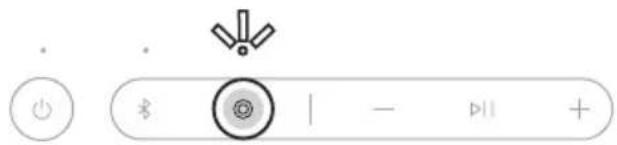
y 1 y
.
jogg aawll aclawll no "jaw" Egoo gao gaoa o jolal o ao jaoaclawll k 13] : afoa aclawll no
Juaaal lks no "Jiae>llg" gaaee, jaiiao jjIb Jo Ia51g. agit

Jiaylyg ygy
Jiaaclawl lsl 100 Jlaaill JJ Jbbsol

Jtclaw no Jg 120all ggl yagall aall ball bai
jolizio jjrb no no ocawll lkiis Jiaiy gog Jc y Cgall Jzssy :alx .
Aolal lal oJlal lla Ugogll csi.Bose gubgBnO Jiay yggyg yg yg yg yg yg yg yg .
jclwJas
Jauaalssd joo Juaaiyjjgjyaayy gao baiol g 1 aall JJgc

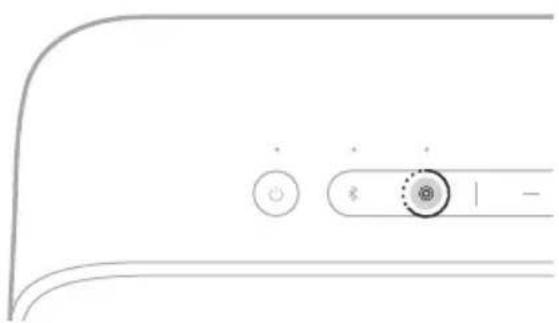
iuclaowll Jaae aagall aullal 0
Jccll J Bose gbiolai lal c:
BOSE SMART SPEAKER BOSE SMART SOUNDBAR
Bose Smart 山 _ 0 ^ 山 Bose Smart aclaw aclawllg S Bose SimpleSync
gll gai jiaalao jia gai gai jia
:al>la. J
aafgolll
.Bose Smart Bose Smart
:JyLo aasalw algolall Juaill
Bose Smart Ultra .Bose Ult
Bose Smart Soundbar 900
BoseSoundbar700/ BoseSmartSoundbar700
J. Bose 60
≤ .Bose Sc
Bose Home Speaker 500 aclaw/ Bose Smart Speaker 500 aSlll aclawll
Bose Home Speaker 300 claw
Bose Home Speaker aclaw/Bose Portable Smart Speaker aSulclaw
ab = 30.
Bose 2 support.Bose.com/Groups
:山
30
jso giaclaw jo (9) lo 30 aIwaoaiaclaw joi Su
.0oJgBaoJgacaaclawllJogdiLs
g 1
ybluBleoth 1
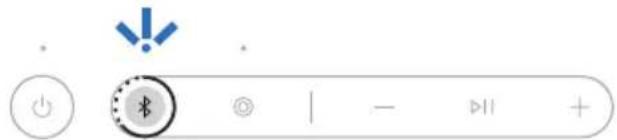
ab > 3 时, b^2 - 1 > 0 , b = 1 或 b = - 1
Bluetooth * 2 .
Jlal 5d Jda aas cagall gawig, yolal cagall Say slawll Ja
:山
.30
gclawl 9) 30 aolw noa oclawll j s
3b+gcl aclawll jogci ciSs .yoJ
BOSE SMART
30 1 J I J I J I J J J J J J J J J J J J J J J J J J J J J J J J J J J J J J J J J J J J J J J J J J J J J J J J J J J J J J J J J J J J J J J J J J J J J J J J J
:
3.3 10
go Jolgill yj. aalll lal yarai .Bose ag no daiao dai gao ayjayy pluswly jaii support.Bose.com/sl-plus ojjgl Bose
clawll
Joo 100000000000000000000000000000000000000000000000000000000000000
btu.Bose.com: 3 3 3 3 3 3 3 3 3 3 3 3 3 3 3 3 3 3 3 3 3 3 3 3 3 3 3 3 3
aclawl 1
.5gjzabjjdclawglc
USB-C jiao jao (bfoolj) aag aclj waoa oosw ygaw
1 1
y Iogio y y Jzll 1y jll clll lal y bq gabw clal .g koll oall gl dall aclawll cdo zl .glj no Jd.
aclawl jz
.2.1.2.3.4.5.6.7.8.9.10.11.12.13.14.15.16.17.18.19.20.21.22.23.24.25.26.27.28.29.30.31.32.33.
(23 aaxal).abwslgolgolglgsslgsgddjllgaglaaslsgo gglbdo
aallgljg
.Bose 15acdoj jso Jls Jo Ciaaallg jal gcbu k
support.Bose.com
2gduo jla
Jol Jol Jol Jol Jol Jol Jol Jol Jol Jol Jol Jol Jol Jol Jol Jol Jol Jol Jol Jol Jol Jol Jol Jol Jol Jol Jol Jol Jol Jol Jol Jol Jol Jol Jol Jol Jol Jol Jol Jol Jol Jol Jol Jol Jol Jol Jol Jol Jol Jol Jol
290^ DA AB
cai aclawll Jaa Wtayoo .(19 aa
.25
.(12 aal)Bluetooth 0yulai yjg jn u
.22
.
(9g30)aJ 1
j ≥ .12 女性
15 00
soport.Bose.com/sl-plus:rgss
.Bose 1aocdojy Juaill aikaioll oio jol jol jol g cisS1g
worldwide.Bose.com/contact:
s
| Bluetooth® jz jz jz jz jz jz jz jz jz jz jz jz jz jz jz jz jz jz jz jz jz jz jz jz jz jz jz jz jz jz jz jz jz jz jz jz jz jz jz jz jz jz jz jz jz jz jz jz jz jz jZJ | |
| Bluetooth® jz jz jz jz jz jz jz jz jz jz jz jz jz jz jz jz jz jz jz jz jz jz jz jz jz jz jz jz jz jz jz jz jz jz jz jz jz jz jz jz jz jz jz jz jz jz jz jz J | Bluetooth® jz jz jz jz jz jz jz jz jz jz jz jz jz jz jz jz jz jz jz jz jz jz jz jz jz jz jz jz jz jz jz jz jz jz jz jz jz jz jz jz jz jz jz jz jz jz jz jz
J |
| Bluetooth® jz jz jz jz jz jz jz jz jz jz jz jz jz jz jz jz jz jz jz jz jz jz jz jz jz jz jz jz jz jz jz jz jz jz jz jz jz jz jz jz jz jz jz jz jz jz jz
J | Bluetooth® jz jz jz jz jz jz jz jz jz jz jz jz jz jz jz jz
J |
| Bluetooth® jz jz jz jz jz jz jz jz jz jz jz jz jz jz jz jz jz jz jz jz jz
J | Bluetooth® jz jz jz jz jz jz jz jz jz jz
J |
| Bluetooth® jz jz jz jz jz jz jz jz jz jz jz jz
J | Bluetooth® jz jz jz jz jz jz jz
J |
| Bluetooth® jz jz jz jz jz jz jz jz
J | Bluetooth® jz jz jz
J |
| Bluetooth® jz jz jz jz jz jz
J | Bluetooth® jz
J |
| Bluetooth® jz jz jz
J | Bluetooth® jz
J |
| Bluetooth® jz
J | Bluetooth® jz
J |
| Bluetooth® jz
J | Bluetooth® jz
J |
| Bluetooth® jz
J | Bluetooth® jz
J |
| Bluetooth® jz
J | Bluetooth® jz
J |
| Bluetooth® jz
J | Bluetooth® jz
J |
| Bluetooth® jz
J | Bluetooth® jz
J |
| Bluetooth® jz
jZ | Bluetooth® jZ
J |
| Bluetooth® jZ
J | Bluetooth® jZ
J |
| Bluetooth® jZ
J | Bluetooth® jZ
J |
| Bluetooth® jZ
J | Bluetooth® jZ
J |
| Bluetooth® jZ
J | Bluetooth® jZ
J |
| Bluetooth® jZ
J | Bluetooth® jZ
J |
| Bluetooth® jZ
J | Bluetooth® jZ
J |
| Bluetooth® jZ
J | Bluetooth®
J |
| Bluetooth® jZ
J | Bluetooth®
J |
| Bluetooth® jZ
J | Bluetooth®
J |
| Bluetooth® jZ
J | Bluetooth®
J |
| Bluetooth® jZ
J | Bluetooth®
J |
| Bluetooth® jZ
J | Bluetooth®
J |
| Bluetooth® jZ
J | Bluetooth®
J |
| Bluetooth® jZ
J | Bluetooth®
jZ |
| Bluetooth® jZ
J | Bluetooth®
jZ |
| Bluetooth® jZ
J | Bluetooth®
jZ |
| Bluetooth® jZ
J | Bluetooth®
jZ |
| Bluetooth® jZ
J | Bluetooth®
jZ |
| Bluetooth® jZ
J | Bluetooth®
jZ |
| Bluetooth® jZ
J | Bluetooth®
jZ |
| Bluetooth® jZ
J
J | Bluetooth®
jZ |
| Bluetooth® jZ
J
J | Bluetooth®
jZ |
| Bluetooth® jZ
J
J | Bluetooth®
jZ |
| Bluetooth® jZ
J
J | Bluetooth®
jZ |
| Bluetooth® jZ
J
J | Bluetooth®
jZ |
| Bluetooth® jZ
J
J | Bluetooth®
jZ |
| Bluetooth® j2
J
J | Bluetooth®
jZ |
| Bluetooth® jZ
J
J | Bluetooth®
jZ |
| Bluetooth® jZ
J
J | Bluetooth®
jZ |
| Bluetooth® jZ
J
J | Bluetooth®
jZ |
| Bluetooth® jZ
J
J | Bluetooth®
jZ |
| Bluetooth® jZ
J
J | Bluetooth®
jZ |
| Bluetooth®, J
J | Bluetooth®
jZ |
| Bluetooth® jZ
J
J | Bluetooth®
jZ |
| Bluetooth® jZ
J
J | Bluetooth®
jZ |
| Bluetooth® jZ
J
J | Bluetooth®
jZ |
| Bluetooth® jZ
J
J | Bluetooth®
jZ |
| Bluetooth® jZ
J
J | Bluetooth®
jZ |
| Bluetooth® j0
J
J | Bluetooth®
jZ |
| Bluetooth® jZ
J
J | Bluetooth®
jZ |
| Bluetooth® jZ
J
J | Bluetooth®
jZ |
| Bluetooth® jZ
J
J | Bluetooth®
jZ |
| Bluetooth® jZ
J
J | Bluetooth®
jZ |
| Bluetooth® jZ
J
J | Bluetooth®
jZ |
| Bluetooth©
J
J
J
J
J
J
J
J
J
J
J
J
J
J
J
J
J
J
J
J
J
J
J
J
J
J
J
J
J
J
J
J
J
J
J
J
J
J
J
J
J
J
J
J
J
J
J
J
J
J
jZ
jZ
jZ
jZ
jZ
jZ
jZ
jZ
jZ
jZ
jZ
jZ
jZ
jZ
jZ
jZ
jZ
jZ
jZ
jZ
jZ
jZ
jZ
jZ
jZ
jZ
jZ
jZ
jZ
jZ
jZ
jZ
jZ
jZ | |
J
| (24)USB-C J5JLJLJLJLJLJLJLJLJLJLJLJLJLJLJLJLJLJLJLJLJLJLJLJLJLJLJLJLJLJLJLJLJLJLJLJLJLJLJLJLJLJLJLJLJLJLJLJLJLJLJ L | |
| USB-C J5JLJLJLJLJLJLJLJLJLJLJLJLJLJLJLJLJLJLJLJLJLJLJLJLJLJLJLJLJLJLJLJLJLJLJLJLJLJLJLJLJLJLJLJLJLJLJLJ L | Jahal
Jahal
Jahal
Jahal
Jahal
Jahal
Jahal
Jahal
Jahal
Jahal
Jahal
Jahal
Jahal
Jahal
Jahal
Jahal
Jahal
Jahal
Jahal
Jahal
Jahal
Jahal
Jahal
Jahal
Jahal
Jahal |
| .(13)USB-USB-USB-USB-USB-USB-USB-USB-USB-USB-USB-USB-USB-USB-USB-USB-USB-USB-USB-USB-USB-USB-USB-USB-USB-USB-USB-USB-USB-USB-USB-USB-USB-USB-USB-USB-USB-USB-USB-USB-USB-USB-USB-USB-USB-USB-USB-USB-USB-USB-USB
Bose Smart
Jahal
Jahal
Jahal
Jahal
Jahal
Jahal
Jahal
Jahal
Jahal
Jahal
Jahal
Jahal
Jahal
Jahal
Jahal
Jahal
Jahal
Jahal
Jahal
Jahal
Jahal
Jahal
Jahal
Jahal
Jahjal
Jahjal
Jahjal
Jahjal
Jahjal
Jahjal
Jahjal
Jahjal
Jahjal
Jahjal
Jahjal
Jahjal
Jahjal
Jahjal
Jahjal
Jahjal
Jahjal
Jahjal
Jahjal
Jahjal
Jahjal
Jahjal
Jahjal
Jahjal
Jahjal
Jah Jal
Jah Jal
Jah Jal
Jah Jal
Jah Jal
Jah Jal
Jah Jal
Jah Jal
Jah Jal
Jah Jal
Jah Jal
Jah Jal
Jah Jal
Jah Jal
Jah Jal
Jah Jal
Jah Jal
Jah Jal
Jah Jal
Jah Jal
Jah Jal
Jah Jal
Jah Jal
Jah Jal
Jah Jal
Jahjal
Jahjal
Jahjal
Jahjal
Jahjal
Jahjal
Jahjal
Jahjal
Jahjal
Jahjal
Jahjal
Jahjal
Jahjal
Jahjal
Jahjal
Jahjal
Jahjal
Jahjal
Jahjal
Jahjal
Jahjal
Jahjal
Jahjal
Jahjal
Jah jal
Jah Jal
Jah Jal
Jah Jal
Jah Jal
Jah Jal
Jah Jal
Jah Jal
Jah Jal
Jah Jal
Jah Jal
Jah Jal
Jah Jal
Jah Jal
Jah Jal
Jah Jal
Jah Jal
Jah Jal
Jah Jal
Jah Jal
Jah Jal
Jah Jal
Jah Jal
Jah Jal
Jah Jal
Jah jal
Jah Jal
Jah Jal
Jah Jal
Jah Jal
Jah Jal
Jah Jal
Jah Jal
Jah Jal
Jah Jal
Jah Jal
Jah Jal
Jah Jal
Jah Jal
Jah Jal
Jah Jal
Jah Jal
Jah Jal
Jah Jal
Jah Jal
Jah Jal
Jah Jal
Jah Jal
Jah Jal
Jahjal
Jah Jal
Jah Jal
Jah Jal
Jah Jal
Jah Jal
Jah Jal
Jah Jal
Jah Jal
Jah Jal
Jah Jal
Jah Jal
Jah Jal
Jah Jal
Jah Jal
Jah Jal
Jah Jal
Jah Jal
Jah Jal
Jah Jal
Jah Jal
Jah Jal
Jah Jal
Jah Jal
Jahjal
Jah jal
Jah Jal
Jah Jal
Jah Jal
Jah Jal
Jah Jal
Jah Jal
Jah Jal
Jah Jal
Jah Jal
Jah Jal
Jah Jal
Jah Jal
Jah Jal
Jah Jal
Jah Jal
Jah Jal
Jah Jal
Jah Jal
Jah Jal
Jah Jal
Jah Jal
Jah Jal
Jahjal
Jah Jal
Jahjal
Jah Jal
Jah Jal
Jah Jal
Jah Jal
Jah Jal
Jah Jal
Jah Jal
Jah Jal
Jah Jal
Jah Jal
Jah Jal
Jah Jal
Jah Jal
Jah Jal
Jah Jal
Jah Jal
Jah Jal
Jah Jal
Jah Jal
Jah Jal
Jah Jal
Jah Jal
Jahjal
Jah Jal
Jah jal
Jah Jal
Jah Jal
Jah Jal
Jah Jal
Jah Jal
Jah Jal
Jah Jal
Jah Jal
Jah Jal
Jah Jal
Jah Jal
Jah Jal
Jah Jal
Jah Jal
Jah Jal
Jah Jal
Jah Jal
Jah Jal
Jah Jal
Jah Jal
Jah Jal
Jah Jal
Jahjal
Jahjal
Jah Jal
Jah Jal
Jah Jal
Jah Jal
Jah Jal
Jah Jal
Jah Jal
Jah Jal
Jah Jal
Jah Jal
Jah Jal
Jah Jal
Jah Jal
Jah Jal
Jah Jal
Jah Jal
Jah Jal
Jah Jal
Jah Jal
Jah Jal
Jah Jal
Jah Jal
Jahjal
Jahjal
Jah jal
Jah Jal
Jah Jal
Jah Jal
Jah Jal
Jah Jal
Jah Jal
Jah Jal
Jah Jal
Jah Jal
Jah Jal
Jah Jal
Jah Jal
Jah Jal
Jah Jal
Jah Jal
Jah Jal
Jah Jal
Jah Jal
Jah Jal
Jah Jal
Jah Jal
Jahjal
Jah Jal
Jah Jal
Jahjal
Jah Jal
Jah Jal
Jah Jal
Jah Jal
Jah Jal
Jah Jal
Jah Jal
Jah Jal
Jah Jal
Jah Jal
Jah Jal
Jah Jal
Jah Jal
Jah Jal
Jah Jal
Jah Jal
Jah Jal
Jah Jal
Jah Jal
Jah Jal
Jah Jal
Jahjal
Jah Jal
Jah Jal
Jah jal
Jah Jal
Jah Jal
Jah Jal
Jah Jal
Jah Jal
Jah Jal
Jah Jal
Jah Jal
Jah Jal
Jah Jal
Jah Jal
Jah Jal
Jah Jal
Jah Jal
Jah Jal
Jah Jal
Jah Jal
Jah Jal
Jah Jal
Jah Jal
Jah Jal
Jahjal
Jah Jal
Jahjal
Jahjal
Jah Jal
Jah Jal
Jah Jal
Jah Jal
Jah Jal
Jah Jal
Jah Jal
Jah Jal
Jah Jal
Jah Jal
Jah Jal
Jah Jal
Jah Jal
Jah Jal
Jah Jal
Jah Jal
Jah Jal
Jah Jal
Jah Jal
Jah Jal
Jah Jal
Jahjal
Jah Jal
Jahjal
Jah jal
Jah Jal
Jah Jal
Jah Jal
Jah Jal
Jah Jal
Jah Jal
Jah Jal
Jah Jal
Jah Jal
Jah Jal
Jah Jal
Jah Jal
Jah Jal
Jah Jal
Jah Jal
Jah Jal
Jah Jal
Jah Jal
Jah Jal
Jah Jal
Jah Jal
Jahjal
Jahjal
Jah Jal
Jahjal
Jah Jal
Jah Jal
Jah Jal
Jah Jal
Jah Jal
Jah Jal
Jah Jal
Jah Jal
Jah Jal
Jah Jal
Jah Jal
Jah Jal
Jah Jal
Jah Jal
Jah Jal
Jah Jal
Jah Jal
Jah Jal
Jah Jal
Jah Jal
Jah Jal
Jahjal
Jahjal
Jahjal
Jah Jal
Jah Jal
Jah Jal
Jah Jal
Jah Jal
Jah Jal
Jah Jal
Jah Jal
Jah Jal
Jah Jal
Jah Jal
Jah Jal
Jah Jal
Jah Jal
Jah Jal
Jah Jal
Jah Jal
Jah Jal
Jah Jal
Jah Jal
Jah Jal
Jahjal
Jahjal
Jah Jal
Jah jal
Jah Jal
Jah Jal
Jah Jal
Jah Jal
Jah Jal
Jah Jal
Jah Jal
Jah Jal
Jah Jal
Jah Jal
Jah Jal
Jah Jal
Jah Jal
Jah Jal
Jah Jal
Jah Jal
Jah Jal
Jah Jal
Jah Jal
Jah Jal
Jah Jal
Jahjal
Jahjal
Jahjal
Jah jal
Jah Jal
Johjal
Johjal
Johjal
Johjal
Johjal
Johjal
Johjal
Johjal
Johjal
Johjal
Johjal
Johjal
Johjal
Johjal
Johjal
Johjal
Johjal
Johjal
Johjal
Johjal
Johjal
Johjal
Johjal
Johjal
Johjal
Joh Jal
Johjal
Johjal
Johjal
Johjal
Johjal
Johjal
Johjal
Johjal
Johjal
Johjal
Johjal
Johjal
Johjal
Johjal
Johjal
Johjal
Johjal
Johjal
Johjal
Johjal
Johjal
Johjal
Johjal
Johjal
Juhjal
Juhjal
Juhjal
Juhjal
Juhjal
Juhjal
Juhjal
Juhjal
Juhjal
Juhjal
Juhjal
Juhjal
Juhjal
Juhjal
Juhjal
Juhjal
Juhjal
Juhjal
Juhjal
Juhjal
Juhjal
Juhjal
Juhjal
Juhjal
Juhjal
Johjal
Johjal
Johjal
Johjal
Johjal
Johjal
Johjal
Johjal
Johjal
Johjal
Johjal
Johjal
Johjal
Johjal
Johjal
Johjal
Johjal
Johjal
Johjal
Johjal
Johjal
Johjal
Johjal
Johjal
Juhj
Juhjal
Juhjal
Juhjal
Juhjal
Juhjal
Juhjal
Juhjal
Juhjal
Juhjal
Juhjal
Juhjal
Juhjal
Juhjal
Juhjal
Juhjal
Juhjal
Juhjal
Juhjal
Juhjal
Juhjal
Juhjal
Juhjal
Juhjal
Juhjal
Juhj
Juhjal
Juhjal
Juhjal
Juhjal
Juhjal
Juhjal
Juhjal
Juhjal
Juhjal
Juhjal
Juhjal
Juhjal
Juhjal
Juhjal
Juhjal
Juhjal
Juhjal
Juhjal
Juhjal
Juhjal
Juhjal
Juhjal
Juhjal
Johjal
Johj
Johjal
Johjal
Johjal
Johjal
Johjal
Johjal
Johjal
Johjal
Johjal
Johjal
Johjal
Johjal
Johjal
Johjal
Johjal
Johjal
Johjal
Johjal
Johjal
Johjal
Johjal
Johjal
Johjal
Johjal
Johj
Johjal
Johjal
Johjal
Johjal
Johjal
Johjal
Johjal
Johjal
Johjal
Johjal
Johjal
Johjal
Johjal
Johjal
Johjal
Johjal
Johjal
Johjal
Johjal
Johjal
Johjal
Johjal
Juhjal
Juhjal
Juhj
Juhjal
Juhjal
Juhjal
Juhjal
Juhjal
Juhjal
Juhjal
Juhjal
Juhjal
Juhjal
Juhjal
Juhjal
Juhjal
Juhjal
Juhjal
Juhjal
Juhjal
Juhjal
Juhjal
Juhjal
Juhjal
Johjal
Johjal
Johjal
Johj
Johjal
Johjal
Johjal
Johjal
Johjal
Johjal
Johjal
Johjal
Johjal
Johjal
Johjal
Johjal
Johjal
Johjal
Johjal
Johjal
Johjal
Johjal
Johjal
Johjal
Juhjal
Juhjal
Juhjal
Juhjal
Juhj
Juhjal
Juhjal
Juhjal
Juhjal
Juhjal
Juhjal
Juhjal
Juhjal
Juhjal
Juhjal
Juhjal
Juhjal
Juhjal
Juhjal
Juhjal
Juhjal
Juhjal
Juhjal
Juhjal
Johjal
Johjal
Johjal
Johjal
Johjal
Johj
Johjal
Johjal
Johjal
Johjal
Johjal
Johjal
Johjal
Johjal
Johjal
Johjal
Johjal
Johjal
Johjal
Johjal
Johjal
Johjal
Johjal
Johjal
Juhjal
Juhjal
Juhjal
Juhjal
Juhjal
Juhjal
Juhj
Juhj
Juhj
Juhj
Juhj
Juhj
Juhj
Juhj
Juhj
Juhj
Juhj
Juhj
Juhj
Juhj
Juhj
Juhj
Juhj
Juhj
Juhj
Juhj
Juhj
Juhj
Juhj
Juhj
Juhj
Juhjal
Juhj
Juhj
Juhj
Juhj
Juhj
Juhj
Juhj
Juhj
Juhj
Juhj
Juhj
Juhj
Juhj
Juhj
Juhj
Juhj
Juhj
Juhj
Juhj
Juhj
Juhj
Juhj
Juhj
Juhjl
Juhj
Juhj
Juhj
Juhj
Juhj
Juhj
Juhj
Juhj
Juhj
Juhj
Juhj
Juhj
Juhj
Juhj
Juhj
Juhj
Juhj
Juhj
Juhj
Juhj
Juhj
Juhj
Juhj
Juhj
Juhl
Juhl
Juhl
Juhl
Juhl
Juhl
Juhl
Juhl
Juhl
Juhl
Juhl
Juhl
Juhl
Juhl
Juhl
Juhl
Juhl
Juhl
Juhl
Juhl
Juhl
Juhl
Juhl
Juhl
Juhl
Juhll
Juhl
Juhl
Juhl
Juhl
Juhl
Juhl
Juhl
Juhl
Juhl
Juhl
Juhl
Juhl
Juhl
Juhl
Juhl
Juhl
Juhl
Juhl
Juhl
Juhl
Juhl
Juhl
Juhl
Juhl
Juhj
Juhj
Juhj
Juhj
Juhj
Juhj
Juhj
Juhj
Juhj
Juhj
Juhj
Juhj
Juhj
Juhj
Juhj
Juhj
Juhj
Juhj
Juhj
Juhj
Juhj
Juhj
Juhj
Juhj
Juhjl
Juhl
Juhl
Juhl
Juhl
Juhl
Juhl
Juhl
Juhl
Juhl
Juhl
Juhl
Juhl
Juhl
Juhl
Juhl
Juhl
Juhl
Juhl
Juhl
Juhl
Juhl
Juhl
Juhl
Juhl
Juhr
Juhr
Juhr
Juhr
Juhr
Juhr
Juhr
Juhr
Juhr
Juhr
Juhr
Juhr
Juhr
Juhr
Juhr
Juhr
Juhr
Juhr
Juhr
Juhr
Juhr
Juhr
Juhr
Juhr
Juhr
Juhrl
Juhrl
Juhrl
Juhrl
Juhrl
Juhrl
Juhrl
Juhrl
Juhrl
Juhrl
Juhrl
Juhrl
Juhrl
Juhrl
Juhrl
Juhrl
Juhrl
Juhrl
Juhrl
Juhrl
Juhrl
Juhrl
Juhrl
Juhrl
Juhrl
Juhr
Juhr
Juhr
Juhr
Juhr
Juhr
Juhr
Juhr
Juhr
Juhr
Juhr
Juhr
Juhr
Juhr
Juhr
Juhr
Juhr
Juhr
Juhr
Juhr
Juhr
Juhr
Juhr
Juhr
Juhrc
Juhr
Juhr
Juhr
Juhr
Juhr
Juhr
Juhr
Juhr
Juhr
Juhr
Juhr
Juhr
Juhr
Juhr
Juhr
Juhr
Juhr
Juhr
Juhr
Juhr
Juhr
Juhr
Juhr
Juhr
Juhc
Juhc
Juhc
Juhc
Juhc
Juhc
Juhc
Juhc
Juhc
Juhc
Juhc
Juhc
Juhc
Juhc
Juhc
Juhc
Juhc
Juhc
Juhc
Juhc
Juhc
Juhc
Juhc
Juhc
Juhc
Juhd
Juhd
Juhd
Juhd
Juhd
Juhd
Juhd
Juhd
Juhd
Juhd
Juhd
Juhd
Juhd
Juhd
Juhd
Juhd
Juhd
Juhd
Juhd
Juhd
Juhd
Juhd
Juhd
Juhd
Juhd
Juh d
Juhd
Juhd
Juhd
Juhd
Juhd
Juhd
Juhd
Juhd
Juhd
Juhd
Juhd
Juhd
Juhd
Juhd
Juhd
Juhd
Juhd
Juhd
Juhd
Juhd
Juhd
Juhd
Juhd
Juhd
Juhdl
Juhd
Juhd
Juhd
Juhd
Juhd
Juhd
Juhd
Juhd
Juhd
Juhd
Juhd
Juhd
Juhd
Juhd
Juhd
Juhd
Juhd
Juhd
Juhd
Juhd
Juhd
Juhd
Juhd
Juhd
Juhdr
Juhd
Juhd
Juhd
Juhd
Juhd
Juhd
Juhd
Juhd
Juhd
Juhd
Juhd
Juhd
Juhd
Juhd
Juhd
Juhd
Juhd
Juhd
Juhd
Juhd
Juhd
Juhd
Juhd
Juhd
Juhr
Juhr
Juhr
Juhr
Juhr
Juhr
Juhr
Juhr
Juhr
Juhr
Juhr
Juhr
Juhr
Juhr
Juhr
Juhr
Juhr
Juhr
Juhr
Juhr
Juhr
Juhr
Juhr
Juhr
Juh r
Juhr
Juhr
Juhr
Juhr
Juhr
Juhr
Juhr
Juhr
Juhr
Juhr
Juhr
Juhr
Juhr
Juhr
Juhr
Juhr
Juhr
Juhr
Juhr
Juhr
Juhr
Juhr
Juhr
Juhr
Juhrs
Juhr
Juhr
Juhr
Juhr
Juhr
Juhr
Juhr
Juhr
Juhr
Juhr
Juhr
Juhr
Juhr
Juhr
Juhr
Juhr
Juhr
Juhr
Juhr
Juhr
Juhr
Juhr
Juhr
Juhr
Juhra
Ja Jh Jh Jh Jh Jh Jh Jh Jh Jh Jh Jh Jh Jh Jh Jh Jh Jh Jh Jh Jh Jh Jh Jh Jh Jh Jh Jh Jh Jh Jh Jh Jh Jh Jh Jh Jh Jh Jh Jh Jh Jh Jh Jh Jh Jh Jh Jh Jh Jh Jh J h Jh Jh Jh Jh Jh Jh Jh Jh Jh Jh Jh Jh Jh Jh Jh Jh Jh Jh Jh Jh Jh Jh Jh Jh Jh Jh Jh Jh Jh Jh Jh Jh Jh Jh Jh Jh Jh Jh Jh Jh Jh Jh Jh Jh Jh Jh Jh Jh Jh Jha Jha Jha Jha Jha Jha Jha Jha Jha Jha Jha Jha Jha Jha Jha Jha Jha Jha Jha Jha Jha Jha Jha Jha Jha Jha Jha Jha Jha Jha Jha Jha Jha Jha Jha Jha Jha Jha Jha Jha Jha Jha Jha Jha Jha Jha Jha Jha Jha Jha Jla Jha Jha Jha Jha Jha Jha Jha Jha Jha Jha Jha Jha Jha Jha Jha Jha Jha Jha Jha Jha Jha Jha Jha Jha Jha Jha Jha Jha Jha Jha Jha Jha Jha Jha Jha Jha Jha Jha Jha Jha Jha Jha Jha Jha Jha Jha Jha Jha Jha JHA Jha Jha Jha Jha Jha Jha Jha Jha Jha Jha Jha Jha Jha Jha Jha Jha Jha Jha Jha Jha Jha Jha Jha Jha Jha Jha Jha Jha Jha Jha Jha Jha Jha Jha Jha Jha Jha Jha Jha Jha Jha Jha Jha Jha Jha Jha Jha Jha Jha Jpa Jha Jha Jha Jha Jha Jha Jha Jha Jha Jha Jha Jha Jha Jha Jha Jha Jha Jha Jha Jha Jha Jha Jha Jha Jha Jha Jha Jha Jha Jha Jha Jha Jha Jha Jha Jha Jha Jha Jha Jha Jha Jha Jha Jha Jha Jha Jha Jha Jha Jna Jha Jha Jha Jha Jha Jha Jha Jha Jha Jha Jha Jha Jha Jha Jha Jha Jha Jha Jha Jha Jha Jha Jha Jha Jha Jha Jha Jha Jha Jha Jha Jha Jha Jha Jha Jha Jha Jha Jha Jha Jha Jha Jha Jha Jha Jha Jha Jha Jha Jta Jha Jha Jha Jha Jha Jha Jha Jha Jha Jha Jha Jha Jha Jha Jha Jha Jha Jha Jha Jha Jha Jha Jha Jha Jha Jha Jha Jha Jha Jha Jha Jha Jha Jha Jha Jha Jha Jha Jha Jha Jha Jha Jha Jha Jha Jha Jha Jha Jha Jcha Jha Jha Jha Jha Jha Jha Jha Jha Jha Jha Jha Jha Jha Jha Jha Jha Jha Jha Jha Jha Jha Jha Jha Jha Jha Jha Jha Jha Jha Jha Jha Jha Jha Jha Jha Jha Jha Jha Jha Jha Jha Jha Jha Jha Jha Jha Jha Jha Jha Jsha Jha Jha Jha Jha Jha Jha Jha Jha Jha Jha Jha Jha Jha Jha Jha Jha Jha Jha Jha Jha Jha Jha Jha Jha Jha Jha Jha Jha Jha Jha Jha Jha Jha Jha Jha Jha Jha Jha Jha Jha Jha Jha Jha Jha Jha Jha Jha Jha Jha Jda Jha Jha Jha Jha Jha Jha Jha Jha Jha Jha Jha Jha Jha Jha Jha Jha Jha Jha Jha Jha Jha Jha Jha Jha Jha Jha Jha Jha Jha Jha Jha Jha Jha Jha Jha Jha Jha Jha Jha Jha Jha Jha Jha Jha Jha Jha Jha Jha Jha Jaa Jha Jha Jha Jha Jha Jha Jha Jha Jha Jha Jha Jha Jha Jha Jha Jha Jha Jha Jha Jha Jha Jha Jha Jha Jha Jha Jha Jha Jha Jha Jha Jha Jha Jha Jha Jha Jha Jha Jha Jha Jha Jha Jha Jha Jha Jha Jha Jha Jha Jya Jha Jha Jha Jha Jha Jha Jha Jha Jha Jha Jha Jha Jha Jha Jha Jha Jha Jha Jha Jha Jha Jha Jha Jha Jha Jha Jha Jha Jha Jha Jha Jha Jha Jha Jha Jha Jha Jha Jha Jha Jha Jha Jha Jha Jha Jha Jha Jha Jha Jtha Jha Jha Jha Jha Jha Jha Jha Jha Jha Jha Jha Jha Jha Jha Jha Jha Jha Jha Jha Jha Jha Jha Jha Jha Jha Jha Jha Jha Jha Jha Jha Jha Jha Jha Jha Jha Jha Jha Jha Jha Jha Jha Jha Jha Jha Jha Jha Jha Jha J哈 Ja Jha Jha Jha Jha Jha Jha Jha Jha Jha Jha Jha Jha Jha Jha Jha Jha Jha Jha Jha Jha Jha Jha Jha Jha Jha Jha Jha Jha Jha Jha Jha Jha Jha Jha Jha Jha Jha Jha Jha Jha Jha Jha Jha Jha Jha Jha Jha Jha Jha J.
Ja Jha Jha Jha Jha Jha Jha Jha Jha Jha Jha Jha Jha Jha Jha Jha Jha Jha Jha Jha Jha Jha Jha Jha Jha Jha Jha Jha Jha Jha Jha Jha Jha Jha Jha Jha Jha Jha Jha Jha Jha Jha Jha Jha Jha Jha Jha Jha Jha Jha Jgha j 100000000000000000000000000000000000000000000000000000000000000000000000000000000000000000000000000001000000000000000000000000000000000000000000000000000000000000000000000000000000000000000000000000001100000000000000000000000000000000000000000000000000000000000000000000000000000000000000000000000000800000000000000000000000000000000000000000000000000000000000000000000000000000000000000000000000000087500000000000000000000000000000000000000000000000000000000000000000000000000000000000000000000000000065555555555555555555555555555555555555555555555555555555555555555555555555555555555555555555555555555.
Ja Ja Ja Ja Ja Ja Ja Ja Ja Ja Ja Ja Ja Ja Ja Ja Ja Ja Ja Ja Ja Ja Ja Ja Ja Ja Ja Ja Ja Ja Ja Ja Ja Ja Ja Ja Ja Ja Ja Ja Ja Ja Ja Ja Ja Ja Ja Ja Ja Ja Ja Ja Ja Ja Ja Ja Ja Ja Ja Ja Ja Ja Ja Ja Ja Ja Ja Ja Ja Ja Ja Ja Ja Ja Ja Ja Ja Ja Ja Ja Ja Ja Ja Ja Ja Ja Ja Ja Ja Ja Ja Ja Ja Ja Ja Ja Ja Ja Ja Ja JaJa Ja Ja Ja Ja Ja Ja Ja Ja Ja Ja Ja Ja Ja Ja Ja Ja Ja Ja Ja Ja Ja Ja Ja Ja Ja Ja Ja Ja Ja Ja Ja Ja Ja Ja Ja Ja Ja Ja Ja Ja Ja Ja Ja Ja Ja Ja Ja Ja Ja Ja Ja Ja Ja Ja Ja Ja Ja Ja Ja Ja Ja Ja Ja Ja Ja Ja Ja Ja Ja Ja Ja Ja Ja Ja Ja Ja Ja Ja Ja Ja Ja Ja Ja Ja Ja Ja Ja Ja Ja Ja Ja Ja Ja Ja Ja Ja Ja JaJaJaJaJaJaJaJaJaJaJaJaJaJaJaJaJaJaJaJaJaJaJaJaJaJaJaJaJaJaJaJaJaJaJaJaJaJaJaJaJaJaJaJaJaJaJaJaJaJaJaJaJaJaJaJaJaJaJaJaJaJaJaJaJaJaJaJaJaJaJaJaJaJaJaJaJaJaJaJaJaJaJaJaJaJaJaJaJaJaJaJaJaJaJaJaJaJaJaJaJa JaJaJaJaJaJaJaJaJaJaJaJaJaJaJaJaJaJaJaJaJaJaJaJaJaJaJaJaJaJaJaJaJaJaJaJaJaJaJaJaJaJaJaJaJaJaJaJaJaJaJaJaJaJaJaJaJaJaJaJaJaJaJaJaJaJaJaJaJaJaJaJaJaJaJaJaJaJaJaJaJaJaJaJaJaJaJaJaJaJaJaJaJaJaJaJaJaJaJa Ja Ja Ja Ja Ja Ja Ja Ja Ja Ja Ja Ja Ja Ja Ja Ja Ja Ja Ja Ja Ja Ja Ja Ja Ja Ja Ja Ja Ja Ja Ja Ja Ja Ja Ja Ja Ja Ja Ja Ja Ja Ja Ja Ja Ja Ja Ja Ja Ja Ja Ja Ja Ja Ja Ja Ja Ja Ja Ja Ja Ja Ja Ja Ja Ja Ja Ja Ja Ja Ja Ja Ja Ja Ja Ja Ja Ja Ja Ja Ja Ja Ja Ja Ja Ja Ja Ja Ja Ja Ja Ja Ja Ja Ja Ja Ja Ja Ja ja Ja Ja Ja Ja Ja Ja Ja Ja Ja Ja Ja Ja Ja Ja Ja Ja Ja Ja Ja Ja Ja Ja Ja Ja Ja Ja Ja Ja Ja Ja Ja Ja Ja Ja Ja Ja Ja Ja Ja Ja Ja Ja Ja Ja Ja Ja Ja Ja Ja Ja Ja Ja Ja Ja Ja Ja Ja Ja Ja Ja Ja Ja Ja Ja Ja Ja Ja Ja Ja Ja Ja Ja Ja Ja Ja Ja Ja Ja Ja Ja Ja Ja Ja Ja Ja Ja Ja Ja Ja Ja Ja Ja Ja Ja Ja Ja Ja Ja Ja ja ja ja ja ja ja ja ja ja ja ja ja ja ja ja ja ja ja ja ja ja ja ja ja ja ja ja ja ja ja ja ja ja ja ja ja ja ja ja ja ja ja ja ja ja ja ja ja ja ja ja ja ja ja ja ja ja ja ja ja ja ja ja ja ja ja ja ja ja ja ja ja ja ja ja ja ja ja ja ja ja ja ja ja ja ja ja ja ja ja ja ja ja ja ja ja ja ja ja jaJa jaJaJaJaJaJaJaJaJaJaJaJaJaJaJaJaJaJaJaJaJaJaJaJaJaJaJaJaJaJaJaJaJaJaJaJaJaJaJaJaJaJaJaJaJaJaJaJaJaJaJaJaJaJaJaJaJaJaJaJaJaJaJaJaJaJaJaJaJaJaJaJaJaJaJaJaJaJaJaJaJaJaJaJaJaJaJaJaJaJaJaJaJaJaJaJaJaJaJaJaJAJaJaJaJaJaJaJaJaJaJaJaJaJaJaJaJaJaJaJaJaJaJaJaJaJaJaJaJaJaJaJaJaJaJaJaJaJaJaJaJaJaJaJaJaJaJaJaJaJaJaJaJaJaJaJaJaJaJaJaJaJaJaJaJaJaJaJaJaJaJaJaJaJaJaJaJaJaJaJaJaJaJaJaJaJaJaJaJaJaJaJaJaJaJaJaJaJaJaJa jaJa ja ja ja ja ja ja ja ja ja ja ja ja ja ja ja ja ja ja ja ja ja ja ja ja ja ja ja ja ja ja ja ja ja ja ja ja ja ja ja ja ja ja ja ja ja ja ja ja ja ja ja ja ja ja ja ja ja ja ja ja ja ja ja ja ja ja ja ja ja ja ja ja ja ja ja ja ja ja ja ja ja ja ja ja ja ja ja ja ja ja ja ja ja ja ja ja ja ja ja Jadja Jadja Jadja Jadja Jadja Jadja Jadja Jadja Jadja Jadja Jadja Jadja Jadja Jadja Jadja Jadja Jadja Jadja Jadja Jadja Jadja Jadja Jadja Jadja Jadja Jadja Jadja Jadja Jadja Jadja Jadja Jadja Jadja Jadja Jadja Jadja Jadja Jadja Jadja Jadja Jadja Jadja Jadja Jadja Jadja Jadja Jadja Jadja Jadja Jadja Jadla Jadla Jadla Jadla Jadla Jadla Jadla Jadla Jadla Jadla Jadla Jadla Jadla Jadla Jadla Jadla Jadla Jadla Jadla Jadla Jadla Jadla Jadla Jadla Jadla Jadla Jadla Jadla Jadla Jadla Jadla Jadla Jadla Jadla Jadla Jadla Jadla Jadla Jadla Jadla Jadla Jadla Jadla Jadla Jadla Jadla Jadla Jadla Jadla Jadla Jadlal Jadla Jadla Jadla Jadla Jadla Jadla Jadla Jadla Jadla Jadla Jadla Jadla Jadla Jadla Jadla Jadla Jadla Jadla Jadla Jadla Jadla Jadla Jadla Jadla Jadla Jadla Jadla Jadla Jadla Jadla Jadla Jadla Jadla Jadla Jadla Jadla Jadla Jadla Jadla Jadla Jadla Jadla Jadla Jadla Jadla Jadla Jadla Jadla Jadla JadLA Jadla Jadla Jadla Jadla Jadla Jadla Jadla Jadla Jadla Jadla Jadla Jadla Jadla Jadla Jadla Jadla Jadla Jadla Jadla Jadla Jadla Jadla Jadla Jadla Jadla Jadla Jadla Jadla Jadla Jadla Jadla Jadla Jadla Jadla Jadla Jadla Jadla Jadla Jadla Jadla Jadla Jadla Jadla Jadla Jadla Jadla Jadla Jadla Jadla Jadda Jadla Jadla Jadla Jadla Jadla Jadla Jadla Jadla Jadla Jadla Jadla Jadla Jadla Jadla Jadla Jadla Jadla Jadla Jadla Jadla Jadla Jadla Jadla Jadla Jadla Jadla Jadla Jadla Jadla Jadla Jadla Jadla Jadla Jadla Jadla Jadla Jadla Jadla Jadla Jadla Jadla Jadla Jadla Jadla Jadla Jadla Jadla Jadla Jadla Jadka Jadla Jadla Jadla Jadla Jadla Jadla Jadla Jadla Jadla Jadla Jadla Jadla Jadla Jadla Jadla Jadla Jadla Jadla Jadla Jadla Jadla Jadla Jadla Jadla Jadla Jadla Jadla Jadla Jadla Jadla Jadla Jadla Jadla Jadla Jadla Jadla Jadla Jadla Jadla Jadla Jadla Jadla Jadla Jadla Jadla Jadla Jadla Jadla Jadla Jadlda Jadla Jadla Jadla Jadla Jadla Jadla Jadla Jadla Jadla Jadla Jadla Jadla Jadla Jadla Jadla Jadla Jadla Jadla Jadla Jadla Jadla Jadla Jadla Jadla Jadla Jadla Jadla Jadla Jadla Jadla Jadla Jadla Jadla Jadla Jadla Jadla Jadla Jadla Jadla Jadla Jadla Jadla Jadla Jadla Jadla Jadla Jadla Jadla Jadla Jadlabadabababababababababababababababababababababababababababababababababababababababababababababababababababababababababababababababababababababababababababababababababababababababababababababababababababababbababababababababababababababababababababababababababababababababababababababababababababababababababababababababababababababababababababababababababababababababababababababababababababababababababababadabababababababababababababababababababababababababababababababababababababababababababababababababababababababababababababababababababababababababababababababababababababababababababababababababababacababababababababababababababababababababababababababababababababababababababababababababababababababababababababababababababababababababababababababababababababababababababababababababababababababababe bja jda jda jda jda jda jda jda jda jda jda jda jda jda jda jda jda jda jda jda jda jda jda jda jda jda jda jda jda jda jda jda jda jda jda jda jda jda jda jda jda jda jda jda jda jda jda jda jda jda jda jdga jda jda jda jda jda jda jda jda jda jda jda jda jda jda jda jda jda jda jda jda jda jda jda jda jda jda jda jda jda jda jda jda jda jda jda jda jda jda jda jda jda jda jda jda jda jda jda jda jda jeda jda jda jda jda jda jda jda jda jda jda jda jda jda jda jda jda jda jda jda jda jda jda jda jda jda jda jda jda jda jda jda jda jda jda jda jda jda jda jda jda jda jda jda jda jda jda jda jda jda jdia jda jda jda jda jda jda jda jda jda jda jda jda jda jda jda jda jda jda jda jda jda jda jda jda jda jda jda jda jda jda jda jda jda jda jda jda jda jda jda jda jda jda jda jda jda jda jda jda jda jdata jda jda jda jda jda jda jda jda jda jda jda jda jda jda jda jda jda jda jda jda jda jda jda jda jda jda jda jda jda jda jda jda jda jda jda jda jda jda jda jda jda jda jda jda jda jda jda jda jda jdba jda jda jda jda jda jda jda jda jda jda jda jda jda jda jda jda jda jda jda jda jda jda jda jda jda jda jda jda jda jda jda jda jda jda jda jda jda jda jda jda jda jda jda jda jda jda jda jda jda jdda jda jda jda jda jda jda jda jda jda jda jda jda jda jda jda jda jda jda jda jda jda jda jda jda jda jda jda jda jda jda jda jda jda jda jda jda jda jda jda jda jda jda jda jda jda jda jda jda jda jdelta jda jda jda jda jda jda jda jda jda jda jda jda jda jda jda jda jda jda jda jda jda jda jda jda jda jda jda jda jda jda jda jda jda jda jda jda jda jda jda jda jda jda jda jda jda jda jda jda jda jnda jda jda jda jda jda jda jda jda jda jda jda jda jda jda jda jda jda jda jda jda jda jda jda jda jda jda jda jda jda jda jda jda jda jda jda jda jda jda jda jda jda jda jda jda jda jda jda jda jda jida jda jda jda jda jda jda jda jda jda jda jda jda jda jda jda jda jda jda jda jda jda jda jda jda jda jda jda jda jda jda jda jda jda jda jda jda jda jda jda jda jda jda jda jda jda jda jda jda jda jdas jda jda jda jda jda jda jda jda jda jda jda jda jda jda jda jda jda jda jda jda jda jda jda jda jda jda jda jda jda jda jda jda jda jda jda jda jda jda jda jda jda jda jda jda jda jda jda jda jda jdra jda jda jda jda jda jda jda jda jda jda jda jda jda jda jda jda jda jda jda jda jda jda jda jda jda jda jda jda jda jda jda jda jda jda jda jda jda jda jda jda jda jda jda jda jda jda jda jda jda jrda jda jda jda jda jda jda jda jda jda jda jda jda jda jda jda jda jda jda jda jda jda jda jda jda jda jda jda jda jda jda jda jda jda jda jda jda jda jda jda jda jda jda jda jda jda jda jda jda jda jday a da da da da da da da da da da da da da da da da da da da da da da da da da da da da da da da da da da da da da da da da da da da da da da da da da da da da da da da da da da da da da da da da da da da da da da da da da da da da da da da da da da da da da da da da da da da da da da da da da da da da dada da da da da da da da da da da da da da da da da da da da da da da da da da da da da da da da da da da da da da da da da da da da da da da da da da da da da da da da da da da da da da da da da da da da da da da da da da da da da da da da da da da da da da da da da da da da da da da da da da da da das da da da da da da da da da da da da da da da da da da da da da da da da da da da da da da da da da da da da da da da da da da da da da da da da da da da da da da da da da da da da da da da da da da da da da da da da da da da da da da da da da da da da da da da da da da da da da da da da da da da dia da da da da da da da da da da da da da da da da da da da da da da da da da da da da da da da da da da da da da da da da da da da da da da da da da da da da da da da da da da da da da da da da da da da da da da da da da da da da da da da da da da da da da da da da da da da da da da da da da da da dan da da da da da da da da da da da da da da da da da da da da da da da da da da da da da da da da da da da da da da da da da da da da da da da da da da da da da da da da da da da da da da da da da da da da da da da da da da da da da da da da da da da da da da da da da da da da da da da da da da da dera dada dada dada dada dada dada dada dada dada dada dada dada dada dada dada dada dada dada dada dada dada dada dada dada dada dada dada dada dada dada dada dada dada dada dada dada dada dada dada dada dada dada dada dada dada dada dada dada dada dada dama dada dada dada dada dada dada dada dada dada dada dada dada dada dada dada dada dada dada dada dada dada dada dada dada dada dada dada dada dada dada dada dada dada dada dada dada dada dada dada dada dada dada dada dada dada dada dada dada dada daca dada dada dada dada dada dada dada dada dada dada dada dada dada dada dada dada dada dada dada dada dada dada dada dada dada dada dada dada dada dada dada dada dada dada dada dada dada dada dada dada dada dada dada dada dada dada dada dada dada daaa dada dada dada dada dada dada dada dada dada dada dada dada dada dada dada dada dada dada dada dada dada dada dada dada dada dada dada dada dada dada dada dada dada dada dada dada dada dada dada dada dada dada dada dada dada dada dada dada dada dadas dada dada dada dada dada dada dada dada dada dada dada dada dada dada dada dada dada dada dada dada dada dada dada dada dada dada dada dada dada dada dada dada dada dada dada dada dada dada dada dada dada dada dada dada dada dada dada dada dada dadera dada dada dada dada dada dada dada dada dada dada dada dada dada dada dada dada dada dada dada dada dada dada dada dada dada dada dada dada dada dada dada dada dada dada dada dada dada dada dada dada dada dada dada dada dada dada dada dada dada dea dada dea dea dea dea dea dea dea dea dea dea dea dea dea dea dea dea dea dea dea dea dea dea dea dea dea dea dea dea dea dea dea dea dea dea dea dea dea dea dea dea dea dea dea dea dea dea dea dea dea dea de a dada dada dada dada dada dada dada dada dada dada dada dada dada dada dada dada dada dada dada dada dada dada dada dada dada dada dada dada dada dada dada dada dada dada dada dada dada dada dada dada dada dada dada dada dada dada dada dada dada dana dada dada dada dada dada dada dada dada dada dada dada dada dada dada dada dada dada dada dada dada dada dada dada dada dada dada dada dada dada dada dada dada dada dada dada dada dada dada dada dada dada dada dada dada dada dada dada dada dada dinda dada dada dada dada dada dada dada dada dada dada dada dada dada dada dada dada dada dada dada dada dada dada dada dada dada dada dada dada dada dada dada dada dada dada dada dada dada dada dada dada dada dada dada dada dada dada dada dada dada dadadadadadadadadadadadadadadadadadadadadadadadadadadadadadadadadadadadadadadadadadadadadadadadadadadadadadadadadadadadadadadadadadadadadadadadadadadadadadadadadadadadadadadadadadadadadadadadadadadadadladadadadadadadadadadadadadadadadadadadadadadadadadadadadadadadadadadadadadadadadadadadadadadadadadadadadadadadadadadadadadadadadadadadadadadadadadadadadadadadadadadadadadadadadadadadadadadadadadadadadagdadee fdda fdda fdda fdda fdda fdda fdda fdda fdda fdda fdda fdda fdda fdda fdda fdda fdda fdda fdda fdda fdda fdda fdda fdda fdda fdda fdda fdda fdda fdda fdda fdda fdda fdda fdia fdda fdia fdia fdia fdia fdia fdia fdia fdia fdia fdia fdia fdia fdia fdia fdia fdia fdia fdia fdia fdia fdia fdia fdia fdia fdia fdia fdia fdia fdia fdia fdia fdia fdia fdia fdia fdia fdia fdia fdia fdia fdia fdia fdia fdia fdia fdia fdia fdia fdia fdia fdiae fdia fdia fdia fdia fdia fdia fdia fdia fdia fdia fdia fdia fdia fdia fdia fdia fdia fdia fdia fdia fdia fdia fdia fdia fdia fdia fdia fdia fdia fdia fdia fdia fdia fdia fdia fdia fdia fdia fdia fdia fdia fdia fdia fdia fdia fdia fdia fdia fdia fdial fdia fdia fdia fdia fdia fdia fdia fdia fdia fdia fdia fdia fdia fdia fdia fdia fdia fdia fdia fdia fdia fdia fdia fdia fdia fdia fdia fdia fdia fdia fdia fdia fdia fdia fdia fdia fdia fdia fdia fdia fdia fdia fdia fdia fdia fdia fdia fdia fdia fdie fdia fdia fdia fdia fdia fdia fdia fdia fdia fdia fdia fdia fdia fdia fdia fdia fdia fdia fdia fdia fdia fdia fdia fdia fdia fdia fdia fdia fdia fdia fdia fdia fdia fdia fdia fdia fdia fdia fdia fdia fdia fdia fdia fdia fdia fdia fdia fdia fdia fdnia fdia fdia fdia fdia fdia fdia fdia fdia fdia fdia fdia fdia fdia fdia fdia fdia fdia fdia fdia fdia fdia fdia fdia fdia fdia fdia fdia fdia fdia fdia fdia fdia fdia fdia fdia fdia fdia fdia fdia fdia fdia fdia fdia fdia fdia fdia fdia fdia fdia fd ia fdia fdia fdia fdia fdia fdia fdia fdia fdia fdia fdia fdia fdia fdia fdia fdia fdia fdia fdia fdia fdia fdia fdia fdia fdia fdia fdia fdia fdia fdia fdia fdia fdia fdia fdia fdia fdia fdia fdia fdia fdia fdia fdia fdia fdia fdia fdia fdia fdia fdIA fdia fdia fdia fdia fdia fdia fdia fdia fdia fdia fdia fdia fdia fdia fdia fdia fdia fdia fdia fdia fdia fdia fdia fdia fdia fdia fdia fdia fdia fdia fdia fdia fdia fdia fdia fdia fdia fdia fdia fdia fdia fdia fdia fdia fdia fdia fdia fdia fdia fdianfdia fdia fdia fdia fdia fdia fdia fdia fdia fdia fdia fdia fdia fdia fdia fdia fdia fdia fdia fdia fdia fdia fdia fdia fdia fdia fdia fdia fdia fdia fdia fdia fdia fdia fdia fdia fdia fdia fdia fdia fdia fdia fdia fdia fdia fdia fdia fdia fdia fdia FDIA FDIA FDIA FDIA FDIA FDIA FDIA FDIA FDIA FDIA FDIA FDIA FDIA FDIA FDIA FDIA FDIA FDIA FDIA FDIA FDIA FDIA FDIA FDIA FDIA FDIA FDIA FDIA FDIA FDIA FDIA FDIA FDIA FDIA FDIA FDIA FDIA FDIA FDIA FDIA FDIA FDIA FDIA FDIA FDIA FDIA FDIA FDIA FDIA FDIA FDIBA FDIBA FDIBA FDIBA FDIBA FDIBA FDIBA FDIBA FDIBA FDIBA FDIBA FDIBA FDIBA FDIBA FDIBA FDIBA FDIBA FDIBA FDIBA FDIBA FDIBA FDIBA FDIBA FDIBA FDIBA FDIBA FDIBA FDIBA FDIBA FDIBA FDIBA FDIBA FDIBA FDIBAFDIBA FDIBA FDIBA FDIBA FDIBA FDIBA FDIBA FDIBA FDIBA FDIBA FDIBA FDIBA FDIBA FDIBA FDIBA FDIBA FDIBA FDIBA FDIBA FDIBA FDIBA FDIBA FDIBA FDIBA FDIBA FDIBA FDIBA FDIBA FDIBA FDIBA FDIBA FDIBA FDIBA FDIA FDIBA FDIBA FDIBA FDIBA FDIBA FDIBA FDIBA FDIBA FDIBA FDIBA FDIBA FDIBA FDIBA FDIBA FDIBA FDIBA FDIBA FDIBA FDIBA FDIBA FDIBA FDIBA FDIBA FDIBA FDIBA FDIBA FDIBA FDIBA FDIBA FDIBA FDIBA FDIBA FDIA FDIA FDIBA FDIBA FDIBA FDIBA FDIBA FDIBA FDIBA FDIBA FDIBA FDIBA FDIBA FDIBA FDIBA FDIBA FDIBA FDIBA FDIBA FDIBA FDIBA FDIBA FDIBA FDIBA FDIBA FDIBA FDIBA FDIBA FDIBA FDIBA FDIBA FDIBA FDIBA FDIB Afda fdda fdda fdda fdda fdda fdda fdda fdda fdda fdda fdda fdda fdda fdda fdda fdda fdda fdda fdda fdda fdda fdda fdda fdda fdda fdda fdda fdda fdda fdda fdda fdda fddа fdda fdda fdda fdda fdda fdda fdda fdda fdda fdda fdda fdda fdda fdda fdda fdda fdda fdda fdda fdda fdda fdda fdda fdda fdda fdda fdda fdda fdda fdda fdda fdda fdda fef ffe ffe ffe ffe ffe ffe ffe ffe ffe ffe ffe ffe ffe ffe ffe ffe ffe ffe ffe ffe ffe ffe ffe ffe ffe ffe ffe ffe ffe ffe ffe ffe ffe ffe ffe ffe ffe ffe ffe ffe ffe ffe ffe ffe ffe ffe ffe ffe ffe ffe fde fde fde fde fde fde fde fde fde fde fde fde fde fde fde fde fde fde fde fde fde fde fde fde fde fde fde fde fde fde fde fde fde fde fde fde fde fde fde fde fde fde fde fde fde fde fde fde fde fde fdda fdd fdda fdd fdda fdd fdda fdd fdda fdd fdda fdd fdda fdd fdda fdd fdda fdd fdda fdd fdda fdd fdda fdd fdda fdd fdda fdd fdda fdd fdda fdd fdda fdd fdda fdd fdda fdd fdda fdd fdda fDDA FDDA FDDA FDDA FDDA FDDA FDDA FDDA FDDA FDDA FDDA FDDA FDDA FDDA FDDA FDDA FDDA FDDA FDDA FDDA FDDA FDDA FDDA FDDA FDDA FDD | |
aclawl bfo oslc!
Lakwod 8dclc
abio 0leclisay
:also.slo.aclawU
15 1

2.
(25 aal) 1jI jw s g w g dll