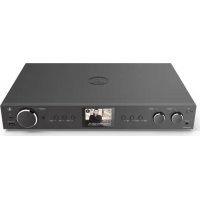
DIT2105SBTX - Radio HAMA - Free user manual and instructions
Find the device manual for free DIT2105SBTX HAMA in PDF.



| Product type | Hi-Fi digital tuner radio |
| Brand | Hama |
| Model | DIT2105SBTX |
| Radio reception | DAB, DAB+, FM |
| Connectivity | WiFi, Bluetooth, LAN (Ethernet), USB, AUX (3.5 mm), optical and coaxial outputs, stereo RCA output, Line Out (3.5 mm) |
| Online services | Spotify Connect, Internet Radio |
| Display | 2.8-inch color screen |
| Control | Front buttons, navigation wheel, remote control with AAA batteries |
| Functions | Alarm, equalizer, presets (4 direct keys), preset management, clock, timer |
| Antennas | Telescopic (DAB/FM), dual WiFi antenna, Bluetooth antenna |
| Power supply | Mains via adapter (power outlet) |
| Dimensions (approx.) | 300 mm (W) x 150 mm (H) x 200 mm (D) |
| Weight (approx.) | 2.5 kg |
| Care and cleaning | Slightly damp lint-free cloth, no harsh detergents |
| Safety instructions | Do not expose to moisture, do not open, use at least 20 cm from body, do not use near heat sources |
| Spare parts / repairability | Replaceable antenna (coaxial connector), remote batteries, cables included. Repair by authorized service only. |
| General information | Complete manual in PDF available at www.hama.com. Quick guide included. Warranty according to legal conditions. |
| WiFi frequency bands | 2.4 GHz and 5 GHz (5150-5850 MHz) |
| Maximum RF power | WiFi 2.4 GHz: 15.5 dBm; WiFi 5 GHz: 16.5 dBm; Bluetooth: 6.5 dBm (reception) / 4 dBm (transmission) |
Frequently Asked Questions - DIT2105SBTX HAMA
User questions about DIT2105SBTX HAMA
0 question about this device. Answer the ones you know or ask your own.
Ask a new question about this device
Download the instructions for your Radio in PDF format for free! Find your manual DIT2105SBTX - HAMA and take your electronic device back in hand. On this page are published all the documents necessary for the use of your device. DIT2105SBTX by HAMA.
USER MANUAL DIT2105SBTX HAMA
natural_image
Line drawing of a rectangular electronic device with buttons and a central display (no text or symbols)QuickGuide
Kurzanleitung
Noticed'utilisation
Instruccionesbreves
Краткоеруководство
Istruzionibrevi
| AudioConnectorsAudioAnschlüsse | |
| InputsAUXIn3.5mm | |
| Outputs | Headphone 3.5mm, Digital Optical, Digital Coaxial, RCA L/R, Line Out 3.5mm |
| SourcesQuellen | Presets Favoriten | |
| DAB/DAB+(174.928- 2 39.2MHz) | √ | 30 |
| FM(87.5- 1 08MHz) | √ | 30 |
| InternetRadio | √ | 30 |
| SpotifyConnect | √ | 10 |
| AmazonMusic | √ | 8 |

Further information and features are available on/
natural_image
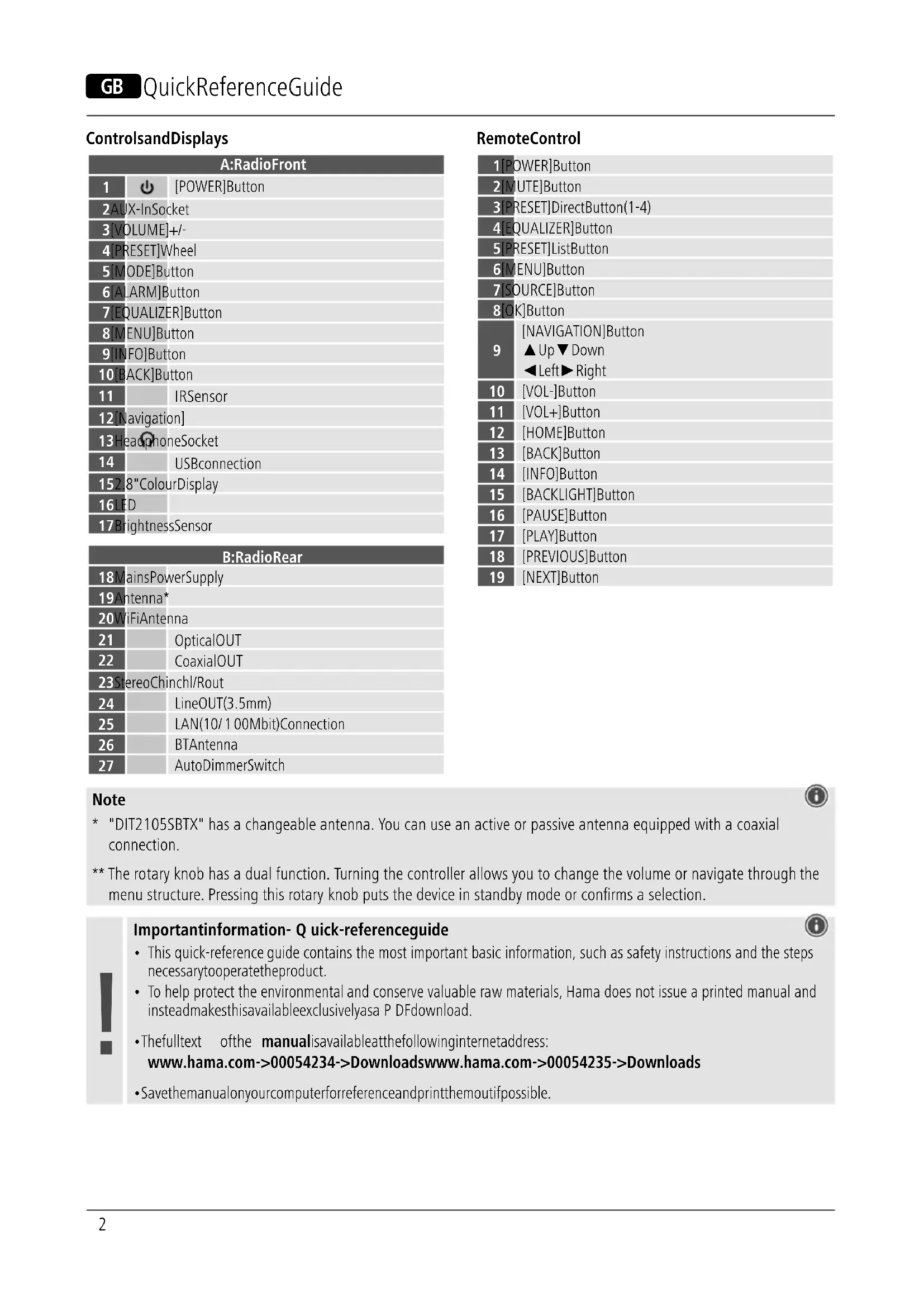
Two identical diagrams of a device with battery and sensor components, no text or symbols present.* "DIT2105SBTX" has a changeable antenna. You can use an active or passive antenna equipped with a coaxial connection.
** The rotary knob has a dual function. Turning the controller allows you to change the volume or navigate through the menu structure. Pressing this rotary knob puts the device in standby mode or confirms a selection.
Importantinformation- Q quick-referenceguide

- This quick-reference guide contains the most important basic information, such as safety instructions and the steps necessary to operate the product.
- To help protect the environmental and conserve valuable raw materials, Hama does not issue a printed manual and insteadmakethisavailableexclusivelyasa P DFdownload.
- Thefulltext ofthe manualisavailableatthefollowinginternetaddress:
www.hama.com->00054234->Downloadswww.hama.com->00054235->Downloads
- Savethemanualonyourcomputerforreferenceandprintthemoutifpossible.
1. ExplanationofWarningSymbolsandNotes
Riskofelectricshock

This symbol indicates a risk of electric shock from touching product parts carrying hazardous voltage.
Warning

This symbol is used to indicate safety instructions to draw your attention to specific hazards and risks.
Note

This symbol is used to indicate additional information or important notes.
2.PackageContents
• Digital-HiFi-TunerDIT2105SBTX
-Telescopicantenna
- 2x Antenna (1x BT; 1x Wifi)
• RCA cable (for stereo L/R RCA output)
- Remotecontrol
- 2xAAAbatteries
- Quickguide
3. Safety Instructions
• The product is intended for private, non-commercial use only.
- Donotusetheproductinareasinwhichelectronic productsare notpermitted.
- Protect the product from dirt, moisture and overheating and use it indryroomsonly.
- Aswithallelectricalproducts, thisdevicesshouldbekept outofthereachofchildren.
- Donotdroptheproductanddonotexposeittoany majorshocks.
- Donotoperatetheproductoutsidethepowerlimits specifiedinthetechnicaldata.
- Keep the packaging material out of thereach of children duetotherisk of suffocation.
- Disposeofpackagingmaterialimmediatelyin accordancewiththelocallyapplicableregulations.
- Do not modify the device in any way. Doing so voids the warranty.
- Usetheproductonlyfortheintendedpurpose.
- Donotusetheproductintheimmediatevicinityof heaters,otherheatsourcesorindirectsunlight.
- Do not use the product in a damp environment and avoidsplashingwater.
- Onlyusethearticleundermoderateclimaticconditions.
Riskofelectricshock

- Donotopenthedeviceorcontinuetooperateitifit becomesdamaged.
- Donotusetheproductifthe AC adapter, the adapter cable or the mains cable are damaged.
- Donotattempttoserviceorrepairtheproduct yourself. Leave any and all service work to qualified experts.
Warning-Batteries

- Wheninsertingbatteries, notethecorrectpolarity(+ and- m arkings)andinsertthebatteriesaccordingly. Failure to do so could result in the batteries leaking or exploding.
- Onlyusebatteries(orrechargeablebatteries)that matchthespecifiedtype.
- Before you insert the batteries, clean the battery contactsandthepolarcontacts.
- Donotallowchildrentochangebatterieswithout supervision.
- Donotmixoldandnewbatteries,orbatteriesof differenttypesorfromdifferentmanufacturers.
- Remove the batteries from products that are not being usedforanextendedperiod(unlessthesare be i n g keptreadyforanemergency).
- Donotshort-circuitbatteries.
- Donotchargebatteries.
- Donotburnbatteries.
- Keepbatteriesoutofthereachofchildren.
- Neveropen, damageorswallowbatteriesorallow themtoentertheenvironment. Theycancontaintoxic, environmentallyharmfulheavymetals.
- Removespentbatteriesfromtheproductanddispose ofthemwithoutdelay.
- Avoidstoring, chargingorusingthedeviceinextreme temperaturesandextremelylowatmosphericpressure (forexample,athighaltitudes).
4.BeforeFirstUse
Note

A d etaileddescriptionofthe UNDOKappandallofits
functionscanbefoundinour UNDOKguideat:

www.hama.com->00054234,00054235->Downloads
Notesonuse

•The[OK]buttonand ▶ onther emotecontrol correspondtothe[POWER/VOLUME/ENTER/NAVIGATE]button(11)onthefrontoftheradio.
- The ◀ buttonontheremotecontrolcorrespondsto the[] buttononthefrontoftheradio
- The ▲▼ buttons on the remote control correspond to turning then navigation controller to the left and right on the front of the radio.
Preparingtheremotecontrolforuse
Openthecoveronthebatterycompartment. This can be found on the back of theremote control and can be opened by sliding in the direction indicated. The extent of delivery include two AA batteries which must be inserted into the battery compartment for the remote control to work. When inserting the batteries, ensure that they are inserted with the correct polarity. The relevant polarity (+ / -) is marked inside the battery compartment.
Settingupa n etworkconnection 4.1LAN(wirednetwork)
- ConnecttheLANconnectionofyourroutertotheLAN connection on your radio. You will require an Ethernet cable,whichisnotincludedinthedelivery,t o d o t his.
- Make sure that the router is on and working properly, and that you have an Internet connection.
- Seetheoperatinginstructionsforyourrouterregardinga properlyfunctioningLANconnection.
- Thenproceedasdescribedinpoint5, "GettingStarted".
4.2WLAN(wirelessnetwork)
- Ensure that the router is switched on, is functioning correctly and that there is a connection to the internet.
- Activate the WLAN function of your router.
- Follow your router's operating instructions as regards the correct functioning of the WLAN connection.
- Thenproceeddirectlyasdescribedundersection5, Gettingstarted'.
5. Getting Started

Note- o ptimisingreception
"DIT2105SBTX"hasanantennaconnectionforexternal antennas with a coaxial connection. A suitable telescopic antennathatalloysDAB,DAB+andFMreceptionis included in the extent of delivery. Alternatively, you can use an active or passive antennatoimprovethe receptionortoadaptittoyourrequirements.
Pleasenote:
• Alwayspulltheantennaoutcompletely.
- Werecommendyouadjusttheantennaverticallyto ensure o ptimalreception.
5.1 GeneralNotesonUse
5.1.1 SwitchOn/ Off/ Stand by
- Press [POWER/VOLUME/ENTER/NAVIGATE] (11) to switchontheradio.
- Press and hold [POWER/VOLUME/ENTER/NAVIGATE] (11)for3 s econdstoswitchtheradiooff(standby).
- Tocompletelyswitchoffthedevice, disconnectitfrom thepowersupply.
5.1.2 Navigation and Control
• After pressing a shortcut button, navigate through the menuitemsusing.
- Selecttheindividualmenuitemsbyturning[POWER/VOLUME/ENTER/NAVIGATE] (11).
- Confirm the selection by pressing [POWER/VOLUME/ENTER/NAVIGATE] (11).
5.1.3 Volume Adjustment
- Turnthevolumeup(right)ordown(left)byturning [POWER/VOLUME/ENTER/NAVIGATE] (11) accordingly.
5.2SwitchingON
Warning

- Only operate the product from a socket that has been approved forthedevice. Thesocketmustbeinstalled closetotheproductandmustbeeasilyaccessible.
- Disconnect the product from the powersupply using the On/Offswitch— if this is not available, unplug the power cord from the socket.
- If using a multi-socket power strip, make sure that the totalpowerconsumptionofallconnecteddevicesdoes notexceedthepowerstrip'smaximumthroughput rating.
-
If you will not be using the product for a prolonged period, disconnectitfrommainspower.
-
Connectthepowersupplytothemainsconnection(1) onthebackoftheradio.
- Connect the network cable to a properly installed and easily accessiblenetworksocket.
- Waituntiltheradiohasinitialisedfully.
- Press [POWER/VOLUME/ENTER/NAVIGATE] (11) to switchontheradio.
Note— s witchingonforthefirsttime

- The Setup Wizard starts up automatically when the radioisturnedonforthefirsttime.
- ThedefaultusedlanguageisEnglish.
- You can skip the Wizard and start it up again later in German.
5.3Language
The first time it is used, theradio's default language is English. To change radio's menulanguage, proceedings follows:
- Press[ ⚙] (7)toaccesstheSettingsmenu.
- Use [POWER/VOLUME/ENTER/NAVIGATE] (11) to navigatetothe"Settings"menuitem.
- Confirm the selection by pressing [POWER/VOLUME/ENTER/NAVIGATE] (11).
- Use [POWER/VOLUME/ENTER/NAVIGATE] (11) to navigate the "Language" menu item. Confirm the selection bypassing [POWER/VOLUME/ENTER/NAVIGATE] (11).
- Use [POWER/VOLUME/ENTER/NAVIGATE] (11) to select your preferred system language.
- Thelanguagesettingcurrentlyselectedismarkedwith anasterisk(*).
Note

- The following languages are a vailable: English, Danish, French, German, Italian, Norwegian, Finnish, Swedish, Turkish, Polish, Dutch, Portuguese, Spanish
6. Care and Maintenance
- Only clean this product with a slightly damp, lint-free clothanddonotuseaggressivecleaningagents.
- If you do not plan to use the product for a prolonged period, turnoffthedeviceanddisconnectitfromthe power supply. Store it in a clean, dry place away from directsunlight.
7.WarrantyDisclaimer
Hama GmbH & Co KG assumes no liability and provides no warrantyfordamageresultingfromimproperinstallation/mounting,improperuseoftheproductorfromfailuretoobservetheoperatinginstructionsand/orsafetynotes.
8. Service and Support
PleasecontactHamaProductConsultingifyouhaveany questionsaboutthisproduct. Hotline:+499091502-115(German/English)
Furthersupportinformationcanbefoundhere: www.hama.com
Thefull textofthemanualisavailableatthefollowing internetaddress: www.hama.com->00054234->Downloads www.hama.com->00054235->Downloads
9. Recycling Information Noteon environmental protection:
AftertheimplementationoftheEuropean Directives2012/19/EUand2006/66/EUinthe nationallegalsystem,thefollowingapplies: electricalandelectronicdevicesaswellas batteriesmustnotbedisposedofwithhouseholdwaste. Consumersare o bligedbylawtoreturnelectricaland electronicdevicesaswellasbatteriestothedesignated publiccollectionpointsortothepointofsaleattheend oftheirservicelves.Detailedinformationonthistopicis definedinthenationallawsoftherespectivecountry. This presenceoftheabovesymbolontheproduct,operating instructionsorpackageindicatesthattheproductis subjecttotheseregulations.Byrecycling,reusingthe materialsorotherformsofutilisingolddevices/batteries, youare m akinganimportantcontributiontoprotecting ourenvironment.
10. Declaration of Conformity
CE HamaGmbH& C o K G h erebydeclaresthatthe radioequipmenttype[00054234,00054235]isin compliancewithDirective2014/53/EU. Thefull textoftheEUdeclarationofconformityisavailableatthe followinginternetaddress: www.hama.com->00054234->Downloads www.hama.com->00054235->Downloads
| Frequencyband(s) | Maximumradio-frequency powertransmitted |
| BluetoothReceiver2.402-2 .480GHz | 6.5 d Bm(EIRP) |
| BluetoothTransmitter2.402-2 .480 GHz | 4 d Bm(EIRP) |
| WiFi:2.400-2 .480GHz15.5dBm(EIRP) | |
| WiFi:5.150-5 .350GHz16.5dBm(EIRP) | |
| WiFi:5.470-5 .725GHz16.5dBm(EIRP) | |
| WiFi:5.725-5.850 GHz | 11 dBm (EIRP) |
RestrictionsorRequirementsin
Belgium, Bulgaria, Czech Republic, Denmark, Germany, Estonia, Ireland, Greece, Spain, France, Croatia, Italy, Cyprus, Latvia, Lithuania, Luxembourg, Hungary, Malta, the Netherlands, Austria, Poland, Portugal, Romania, Slovenia, Slovakia, Finland, Sweden, United Kingdom
Note

Ifchannels36-64(channelsoffrequency 5150 MHz - 5350 MHz) are used, the device may only be usedinclosedrooms.
To limit exposure to electromagnetic fields

This device is intended for use at a distance of least 20cm from the body of the user or persons nearby. This device must not beworn nor carried on the body.
Restrictionsouexigencesen
9. Pokynyk likvidaci
86652 Monheim/Germany
www.hama.com
The Spotify software is subject to third party licenses found here: https://www.spotify.com/connect/third-party-licenses
All listed brands are trademarks of the corresponding companies. Errors and omissions excepted, and subject to technical changes. Our general terms of delivery and payment are applied.

- Importantinformation- Q quick-referenceguide
- ExplanationofWarningSymbolsandNotes
- Riskofelectricshock
- Warning
- Note
- 2.PackageContents
- Safety Instructions
- Warning-Batteries
- 4.BeforeFirstUse
- Notesonuse
- Preparingtheremotecontrolforuse
- Settingupa n etworkconnection 4.1LAN(wirednetwork)
- 4.2WLAN(wirelessnetwork)
- Getting Started
- Note- o ptimisingreception
- GeneralNotesonUse
- SwitchOn/ Off/ Stand by
- Navigation and Control
- Volume Adjustment
- 5.2SwitchingON
- Note— s witchingonforthefirsttime
- 5.3Language
- Care and Maintenance
- 7.WarrantyDisclaimer
- Service and Support
- Recycling Information Noteon environmental protection:
- Declaration of Conformity
- RestrictionsorRequirementsin
- To limit exposure to electromagnetic fields
- Restrictionsouexigencesen
- Pokynyk likvidaci
Brand : HAMA
Model : DIT2105SBTX
Category : Radio