USER MANUAL Unico PEG PEREGO
EN Instructions for use
FRNoticed'emploi
5
6
7
8
natural_image
Mechanical linkage component diagram with labeled point 'a' (no text or symbols on the diagram itself)
natural_image
Simple line drawing of a hand holding a fan with an arrow indicating direction (no text or symbols)
natural_image
Diagram of a mechanical component with a downward arrow indicating force or direction (no text or symbols present)
natural_image
Diagram of a mechanical or fluidic component with curved flow arrows, no visible text or symbols
natural_image
Illustration of a stroller with wheels and a curved handle, showing a change in motion (no text or symbols)
9
natural_image
Line drawing of a mechanical device with a circular base and arrow indicating upward motion (no text or symbols)
10
b
natural_image
Hand holding a circular component with a pointed tip, no text or symbols visible
natural_image
Diagram of a mechanical device with a lever and wheel, showing a downward force arrow (no text or symbols)
11
12
natural_image
Technical line drawing of a vehicle chassis frame with directional arrows indicating movement or force (no text or symbols present)
natural_image
Technical illustration of a stroller with two views (a and b) showing different mechanical configurations (no text or symbols present)

7
a
natural_image
Diagram showing a car seatbelt buckle with arrows indicating seat movement (no text or symbols)
b
natural_image
Diagram showing a folding or folding process with arrows indicating direction, no text or symbols present
8
a
natural_image
Diagram showing a tool interacting with a mechanical component, with an arrow labeled '2' indicating direction (no text or symbols present)
natural_image
Mechanical component diagram showing a lever and pivot point with an arrow indicating direction (no text or symbols)
natural_image
Top-down line drawing of a car seatbelt with a black diagonal band indicating the seat (no text or symbols)

9
b
10
11
natural_image
Line drawing of a child's seatbelt device with straps and seat (no text or symbols)
12
13
14
15
16
natural_image
Illustration of a stroller with a checkmark indicating selection (no text or symbols present)
natural_image
Illustration of a stroller with decorative wings and a curved arrow indicating rotation (no text or symbols)
17
natural_image
Simple line drawing of a curved mechanical component with circular ends (no text or symbols)
natural_image
Simple line drawing of a leaf with a curved arrow pointing downward, no text or symbols present
natural_image
Diagram of a mechanical component with a downward arrow indicating force or direction (no text or symbols present)

natural_image
Diagram showing a curved arrow labeled 'd' pointing to a shaded region, with no readable text or symbols.
natural_image
Line drawing of a stroller mechanism with a handle and wheel, showing motion direction (no text or symbols)
18
natural_image
Line drawing of a wheelchair seat with a belt and wheel, no text or symbols present
19
b
natural_image
Illustration of a bird in flight with wings spread, showing wing motion and a curved arrow (no text or symbols)
20
natural_image
Line drawing of a stroller with wheels and a starburst symbol labeled 'click' (no text or symbols on the diagram itself)
21
22
natural_image
Technical line drawing of a vehicle suspension system with an inset showing the assembly detail (no text or symbols)
1
2
3
a
natural_image
Simple line drawing of a folded garment with an arrow pointing to the bottom seam (no text or symbols)
b
natural_image
Illustration of a baby stroller with a downward arrow and checkmark indicating action (no text or symbols)
4
b
natural_image
Line drawing of a baby stroller with wheels and a funnel, no text or symbols present
5
©
natural_image
Simple line drawing of a folded paper or scroll with a curved arrow indicating rotation (no text or symbols)
natural_image
Line drawing of a baby stroller with wheels and canopy (no text or symbols)
6
a
natural_image
Illustration of two strollers with different body positions and a checkmark indicating cancellation (no text or symbols present)
b
7
Unico chassis
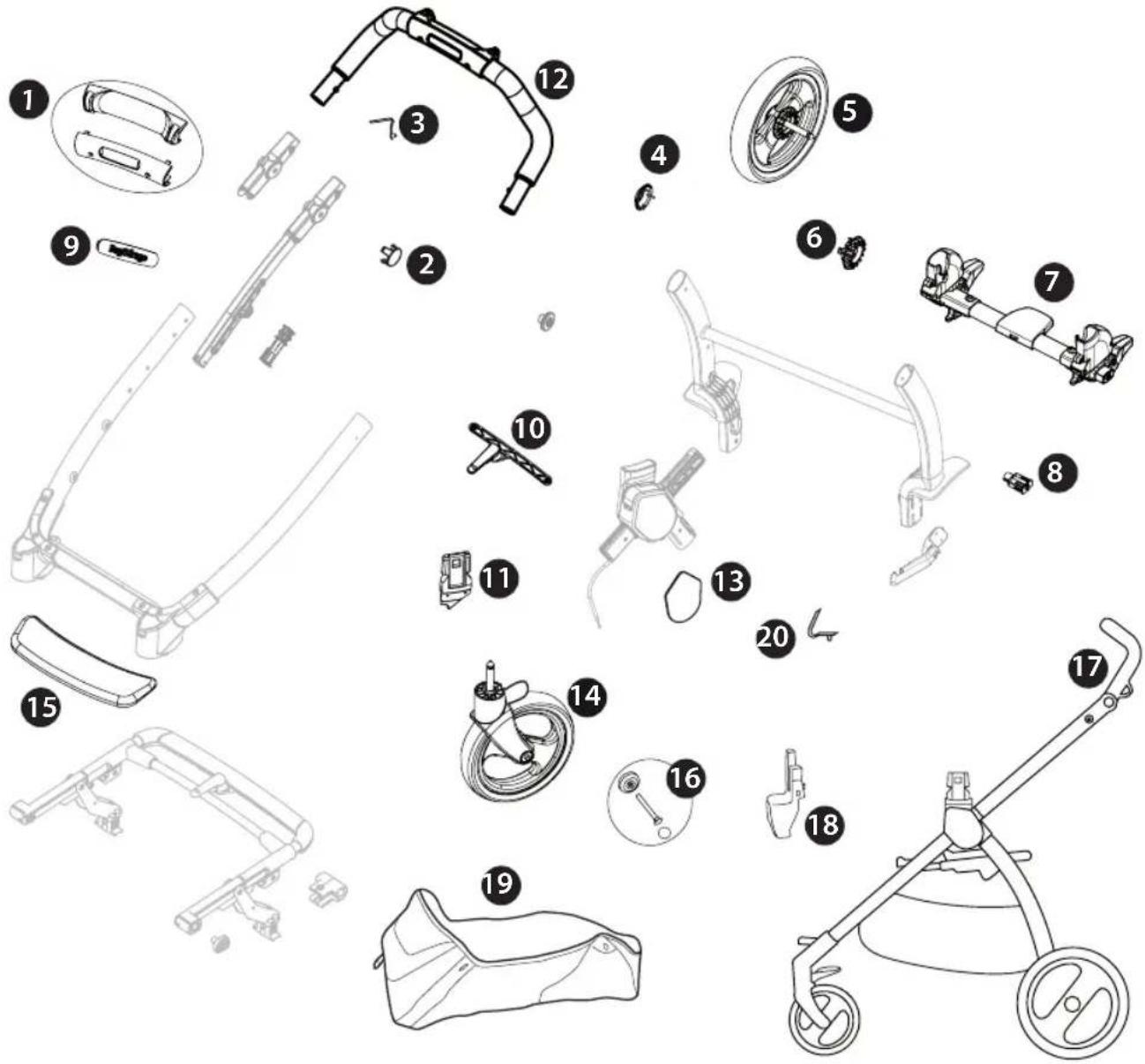
1) SPST7302N
SPST7302KN
2) SPST7301N
3) MMMO0025D
4) SPST6232KN
5) SAPI7255N
6) SPST7255N
7) ARPI0730L89NGR
8) SPST7309N
9) SPST7357JNS01P
10) SAPI10405NGP
11) SPST10252DN
SPST10252SN
12) SAPI0473NL89
13) SPST7286XWDNPEG
SPST7286XWSNPEG
14) SAPI7303JN
15) SPST7263N
16) MMST0087N
SPST7303N
MMRA0007
MMCA0007L30
17) ITCUN0000NL89
18) SAPI10260DNF
SAPI10260SNF
19) ERSHFT00-SH01RT01
20) MMMO0025D
Unico seat
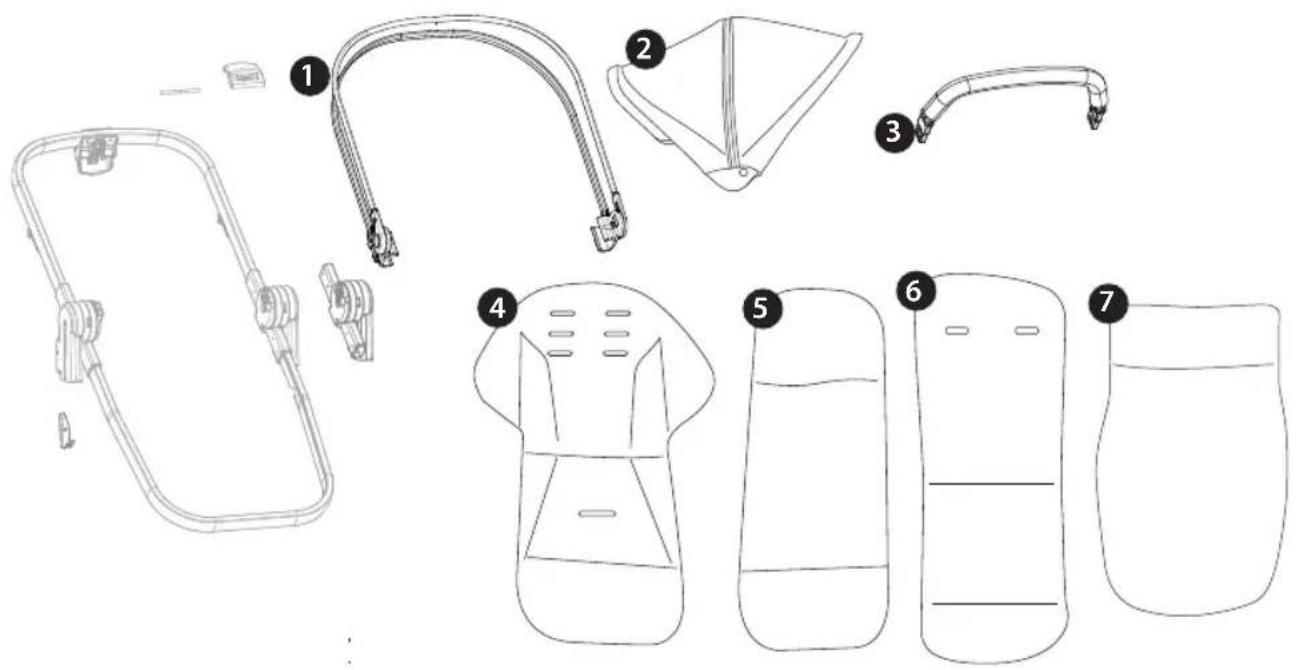
1) ASPI0228L89N
2) BCAUNC00*
3) SAPI10231NL89
4) BMAUNC00*
5) BINAUNC00*
6) MMFM0021
7) BCOUNC00*
EN• Spare parts available in different colours to be specified when ordering.
Thank you for choosing a PegPerego product.
WARNING
IMPORTANT: READ THE INSTRUCTIONS CAREFULLY BEFORE USE AND KEEP FOR FUTURE REFERENCE. The child's safety could be at risk if these instructions are not followed.
_ This product was designed for the transport of 1 child in the seat.
- Do not use this product for a number of occupants greater than that intended by the manufacturer.
- WARNING Check that the attachment devices are correctly engaged before use.
- WARNING To avoid injury ensure that the child is kept away when unfolding and folding this product.
- WARNING Do not let the child play with this product.
This product is not a toy.
- WARNING The assembly and preparation of the product must be carried out by an adult.
_ Do not use this product if there are parts missing or signs of breakage.
_ WARNING Never leave the child unattended.
_ Do not insert fingers into the mechanisms.
_ Be careful not to hurt the child when adjusting the mechanisms (handlebar, backrest ...).
- Do not use the product near to stairs or steps, heat sources, naked flames or dangerous objects within reach of the child.
- Only replacement parts supplied or recommended by the manufacturer/distributor shall be used.
- WARNING Do not add any mattress are not approved by the manufacturer.
_ Do not use accessories which are not approved by the manufacturer.
PRAM BODY:
- WARNING: this product is suitable for children who cannot sit unaided, cannot roll and are unable to raise themselves on their hands and knees. Maximum weight of child: 9 Kg.
- WARNING: the front bar should NOT be used as a handle to lift the product while baby is in it.
CHASSIS
_ This product was designed for use in combination with PegPerego T-Matic products :
- Unico Chassis + Unico Seat: This product is suitable from 0 months up to 22 kg or 4 years, whichever comes first. For babies weighing more than 15 kg, direct and use the seat exclusively following the direction of travel.
- Unico Chassis + Car Seat: is approved for children from birth up to 13 kg of weight; When used in combination with car seat, this vehicle does not replace a cot or a bed. Should your child need to sleep, then it should be placed in a suitable pram body, cot or bed.
- WARNING Check that the seat unit or car seat attachment devices are correctly engaged before use.
– Always apply the brake when stationary and when loading or unloading children.
- Any load applied to the handle and/or the backrest and/or laterally to the product can compromise the stability of the product.
- Do not load the baskets over 7 Kg. Do not put weight in the cup holder (if present) in excess of those indicated on the cup holders themselves and never hot drinks. Do not put loads of more than 0.2 Kg in the hood pockets (if present).
\_ WARNING This product is not suitable for running or skating.
SEAT
_ The Unico SEAT was designed to be used in combination with the Unico chassis.
- WARNING: Always use the restraint system. Always use the five-point safety harness.
Always lock the waist strap with the crotch strap.
- The front bar has not been designed to support the child's weight; the front bar has not been designed to lift the seat with the child's weight. The front bar does not replace the seat belt.
- WARNING: do not use the rain canopy (if present) in interiors and check the child is not too hot; do not leave near sources of heat and keep away from cigarettes. The rain canopy must not be used on a stroller without a hood or parasol it can attach to. Use the rain canopy only under adult supervision. Check the rain canopy does not interfere with any moving mechanism in the chassis or stroller. Remove the rain canopy before folding the chassis or stroller.
The images referring to the textile details may differ from the collection purchased.
For more information, consult our website: www.pegperego.com
INSTRUCTIONS UNICO CHASSIS
1 OPENING: Before opening the frame, if present, remove (without using blades) all die-cut cardboard.
WARNING:
- DO NOT PULL OR FORCE THE FASTENER BEYOND ITS LIMIT.
— DO NOT USE THE FASTENER AS A HANDLE BAR FOR TRANSPORT OR TO CARRY WEIGHTS.
DO NOT HANG BAGS OR OTHER ACCESSORIES ON THIS ELEMENT.
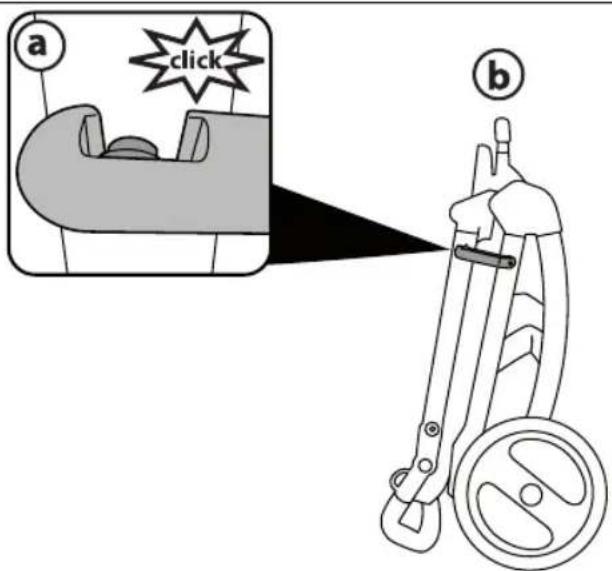
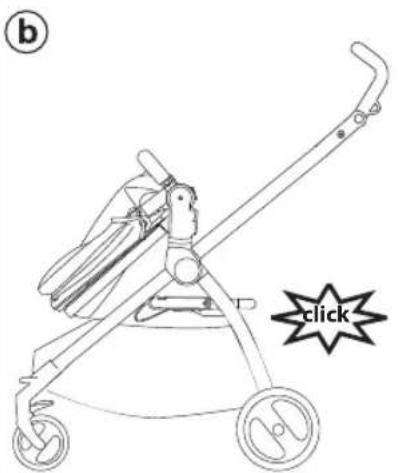
Press the side fastener downwards, grip the upper ends of the handle bar and rotate them towards you until the chassis has opened completely (fig_a). Opened chassis (fig_b). The chassis is opened correctly when you hear a click, which corresponds to the handle bar frame attaching - please look at the picture.
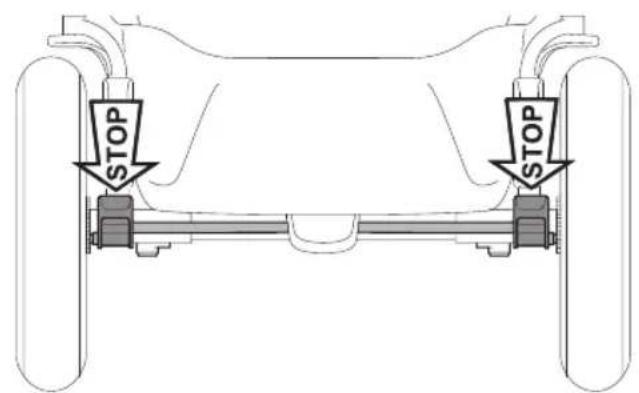
2 FITTING THE WHEELS: slot the rear wheel crosspiece onto the uprights (fig_a), ensuring that it is facing the right way, then attach the rear wheels until they click into place (fig_b). To assemble the front wheels, fit them
into the slots until they lock into place (fig_c).
3 ATTACHING THE MAIN HANDLE: if the handle tube faces upwards, align it with the stroller (Fig_a).
Fasten the handle to the frame as shown in the figure (Fig_b).
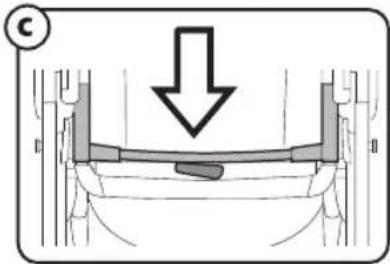
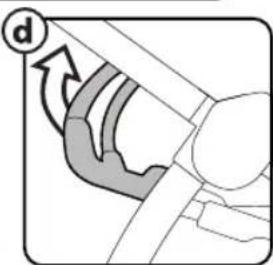
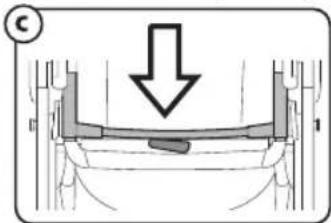
To complete the operation, press the two side buttons on the handle (Fig_c) to ensure the handle pushes in all the way, until it clicks into place (Fig_d).
4 BASKET: fastening the front part of the basket.
Fasten the basket eyelets to the buttons on each side of the frame (fig_1).
To complete the basket attachment procedure for the front part, you are required to insert the supplied tie (fig_2) as follows:
position it between the basket and buttons, as shown (fig_3) and use your finger to push downwards, so as to complete the attachment procedure (fig_(fig_4). Repeat the same procedure for the other side of the basket.
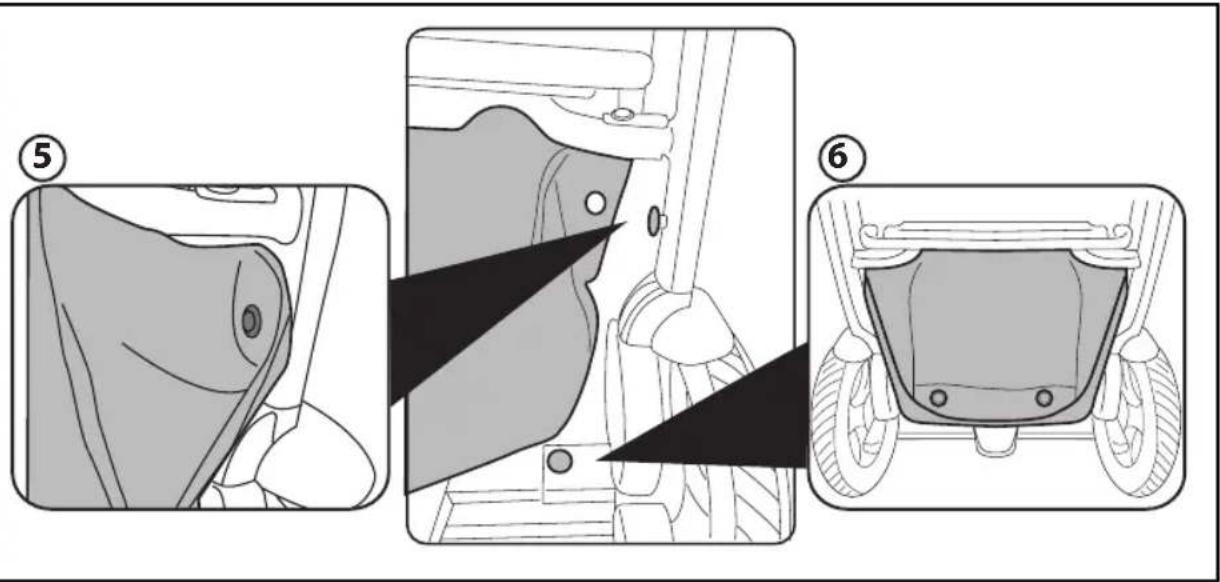
5 Fastening the rear part of the basket.
Fasten the upper basket eyelet to the button on each side of the frame (Fig_5).
Fasten the basket's two lower eyelets to the two buttons on the rear bar of the frame (Fig_6).
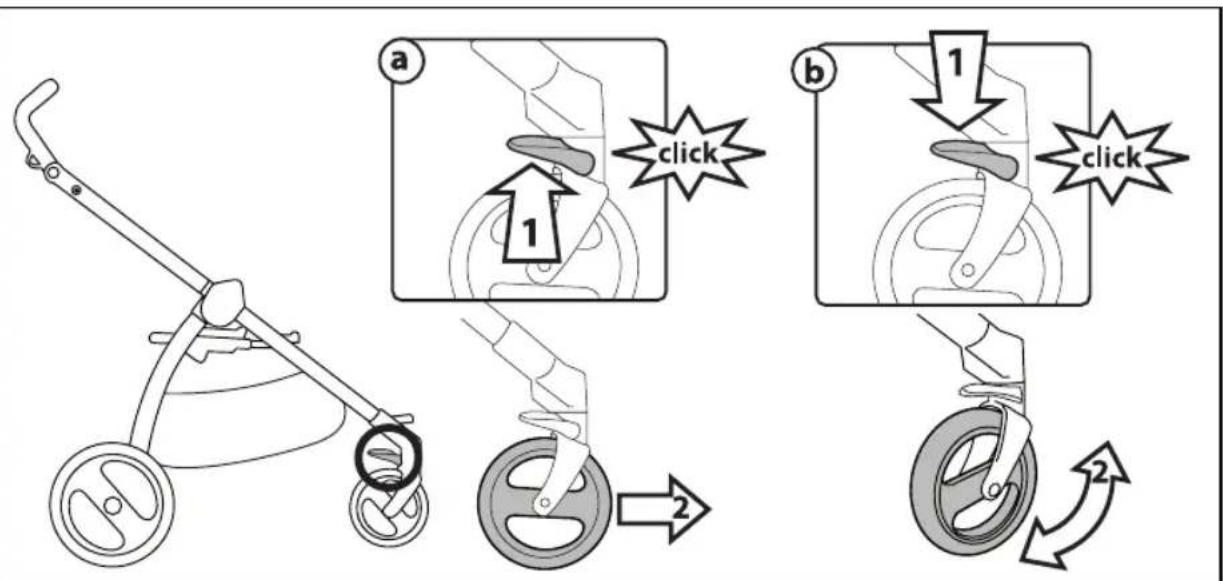
6 FIXED OR SWIVELLING FRONT WHEELS: for fixed wheels, lift the levers (fig_a); for swivelling wheels, lower the levers (fig_b). We recommend using fixed wheels on uneven terrain.
7 BRAKE: Press the lever down to apply the brake on the chassis and lift it to release the brake.
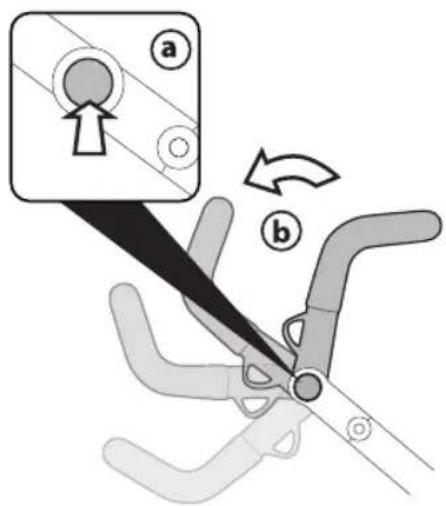
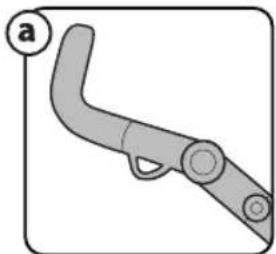
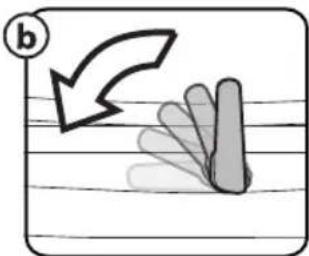
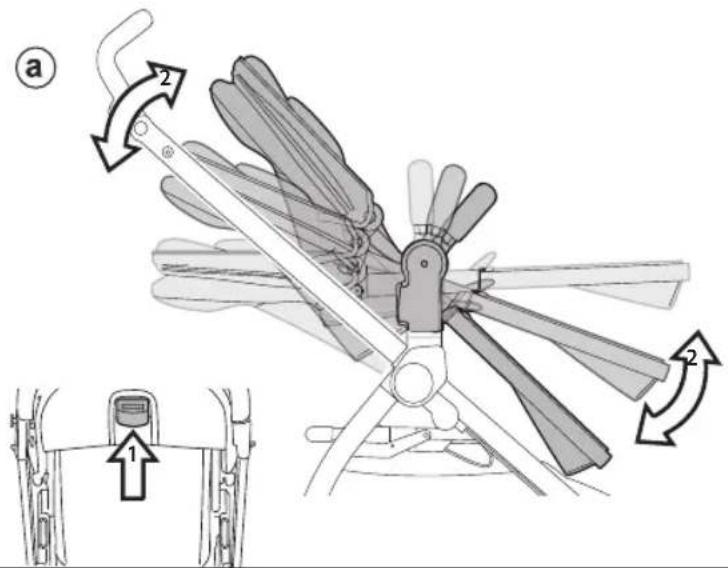
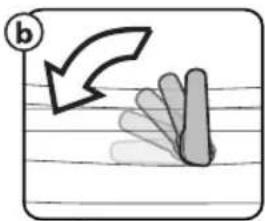
ADJUSTABLE HANDLEBAR: To adjust the height of the handlebar, press both of the side buttons at the same time (fig_a) and swing it into the desired position (fig_b), then release the buttons.
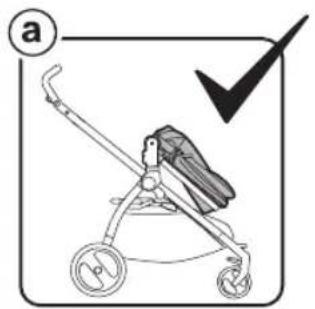
8 FOLDING: the chassis can be closed without the seat or with the seat facing the world.
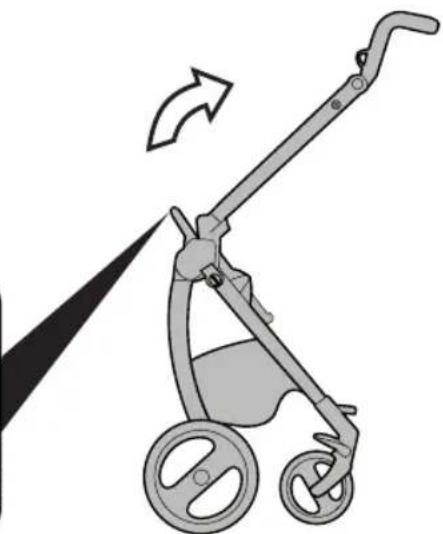
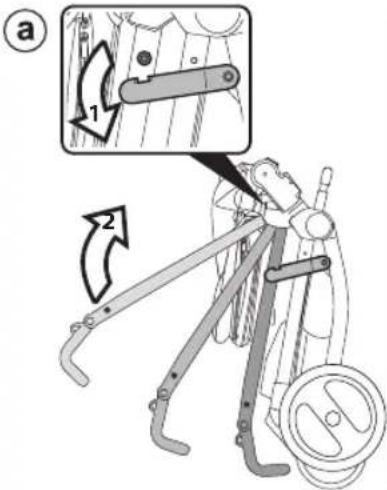
To fold the stroller, it is best to set the front wheels to their fixed position and close the hood (if fitted). Place the handle as shown in the figure (fig_a).
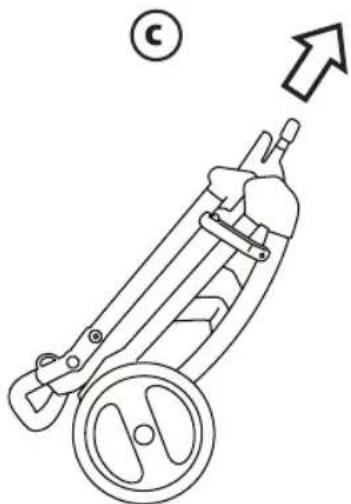
Rotate the safety lever to the left (fig_b) and pull the frame's internal handle towards you (fig_c). Lift the handle until the frame is completely folded (fig_d).
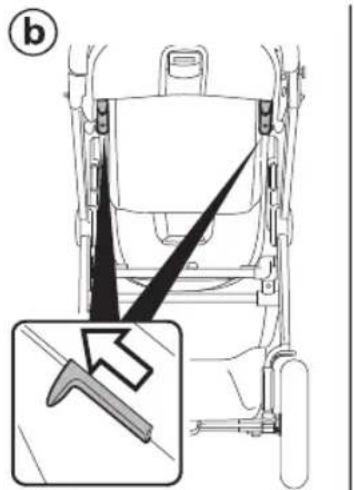
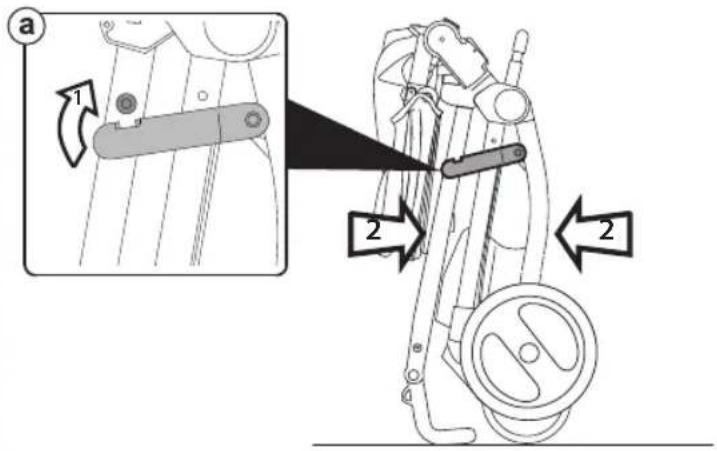
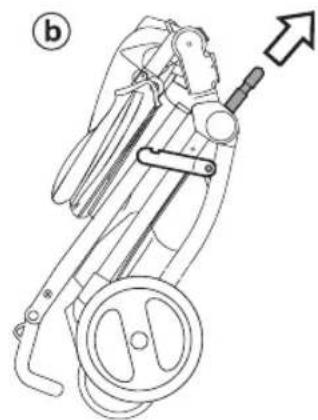
9 To fold correctly, make sure the side hook is engaged (fig_a). When folded, the chassis will stand upright (fig_b).
TRANSPORT: the stroller can be conveniently carried (with the front wheels in fixed position) using the central handle bar (fig_c).
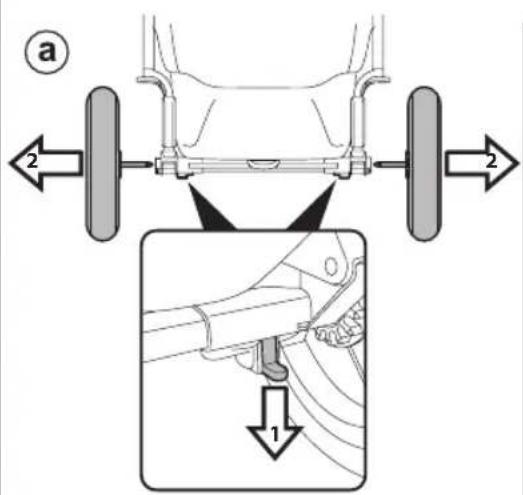
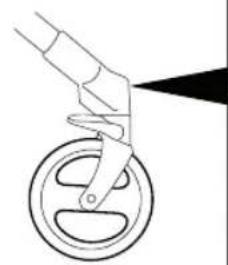
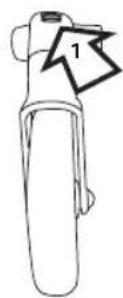
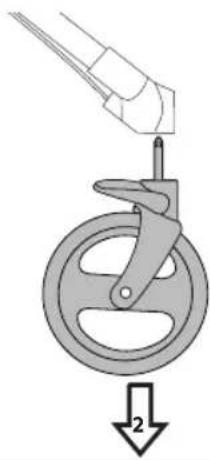
10 All the wheels can be removed to reduce dimensions further. To remove the back wheels: pull the lever downwards and remove the wheel as illustrated (fig_a). To remove the front wheels: press the tab as shown and remove the wheels (fig_b).
T-MATIC SYSTEM
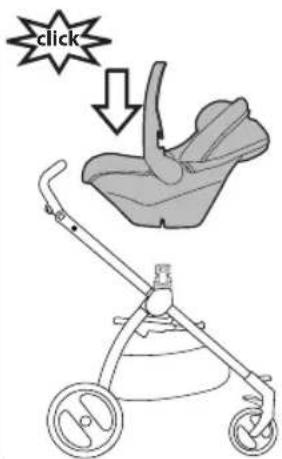
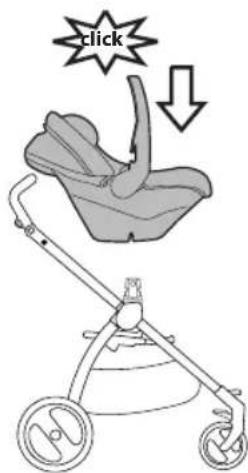
11 T-Matic System is the quick, practical system that allows you to attach to the Unico Chassis:
- Unico Seat
- PegPerego Car Seat (through Primo Viaggio LINKS adapters).
Position them on the T-matic System and press on the product with both hands until they lock into place.
Check that the child transport element is properly attached.
SERIAL NUMBERS
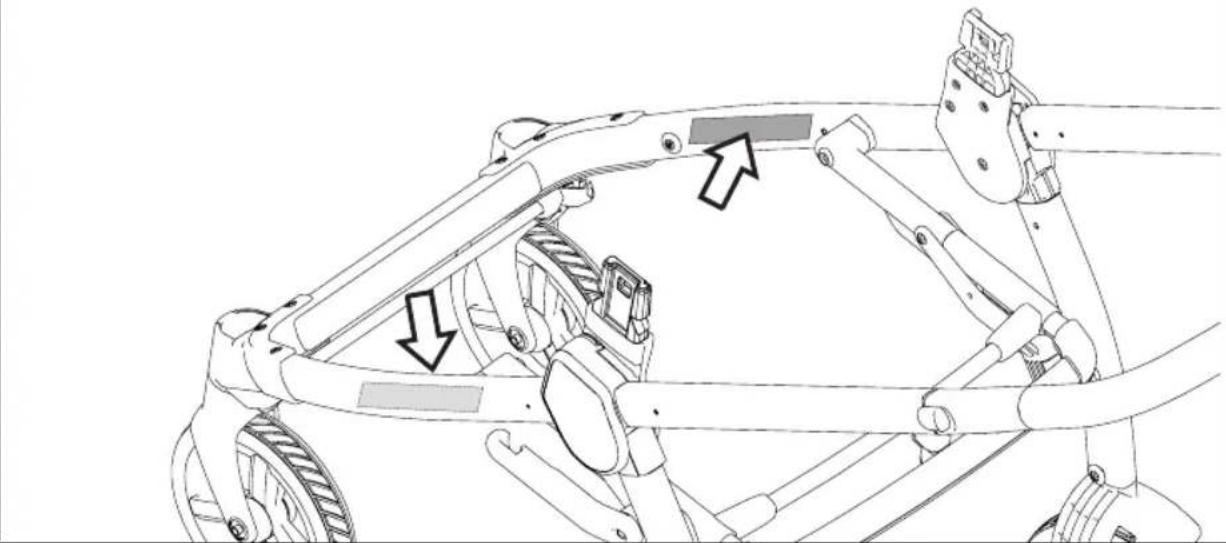
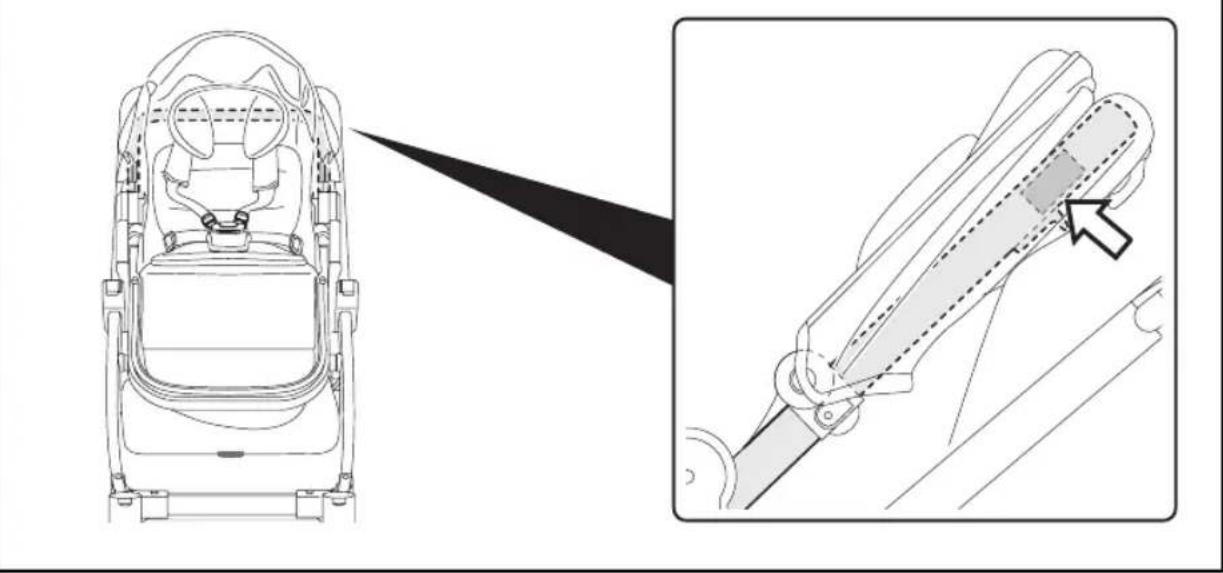
12 Unico Chassis, has the information on the product's production date on the lower part of the frame.
_ Product name, production date and serial number of the chassis. This information is essential in the event of a claim.
INSTRUCTIONS UNICO SEAT
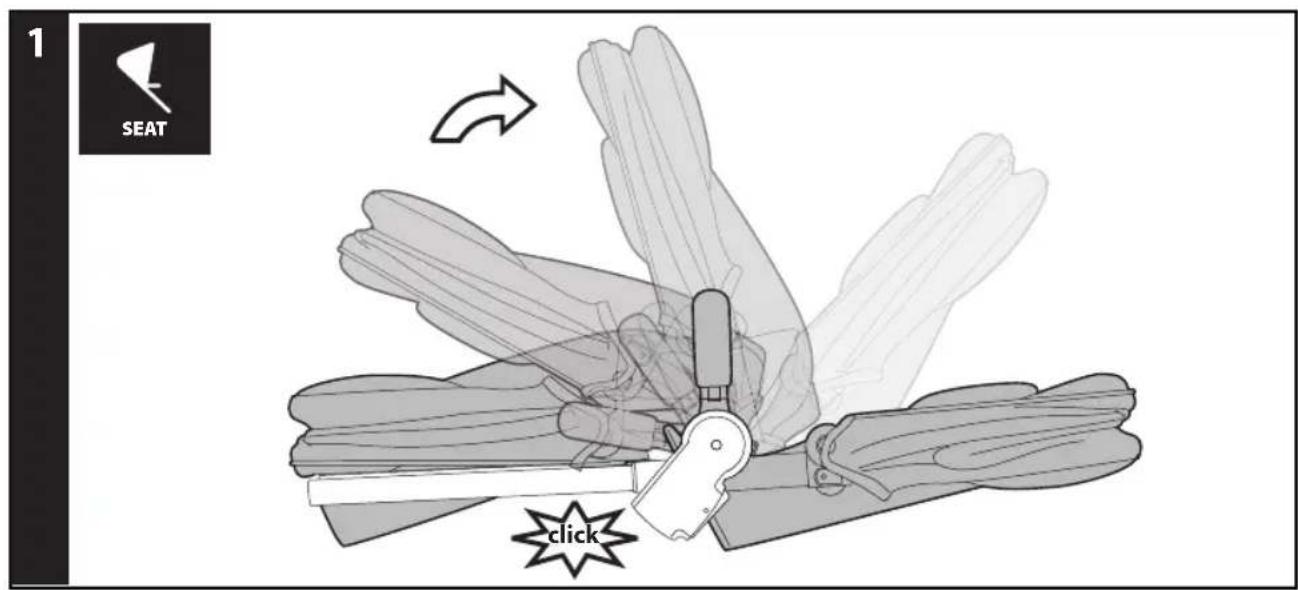
1 OPENING: Before opening the Unico Seat, remove (without using blades) any die-cut cardboard.
Open the seat from the ends, pulling until it clicks.
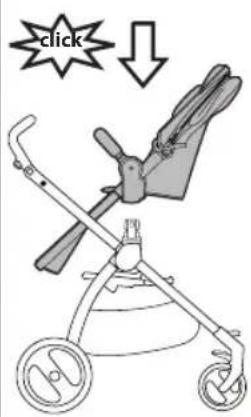
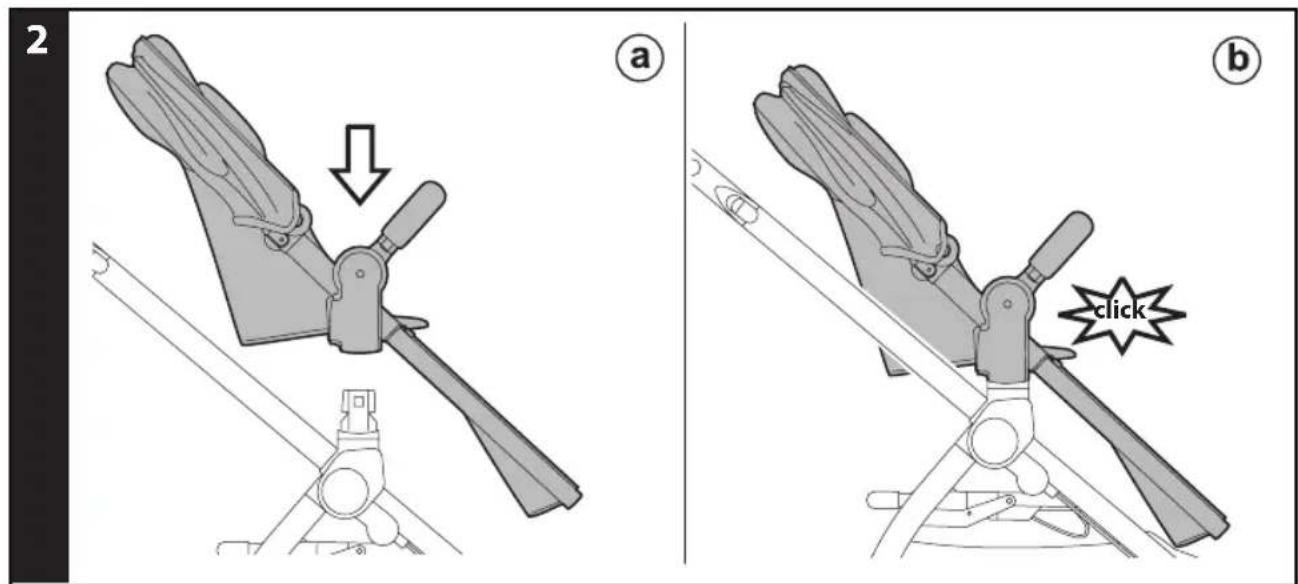
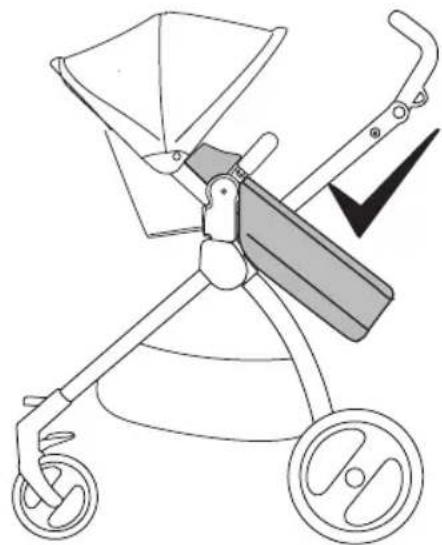
2 ATTACHING THE SEAT ONTO THE CHASSIS: To fasten the Unico Seat, position it on the chassis (fig_a) and press down with both hands until it clicks (fig_b).
Ensure the Unico Seat is properly attached.
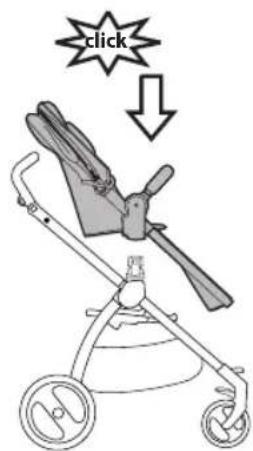
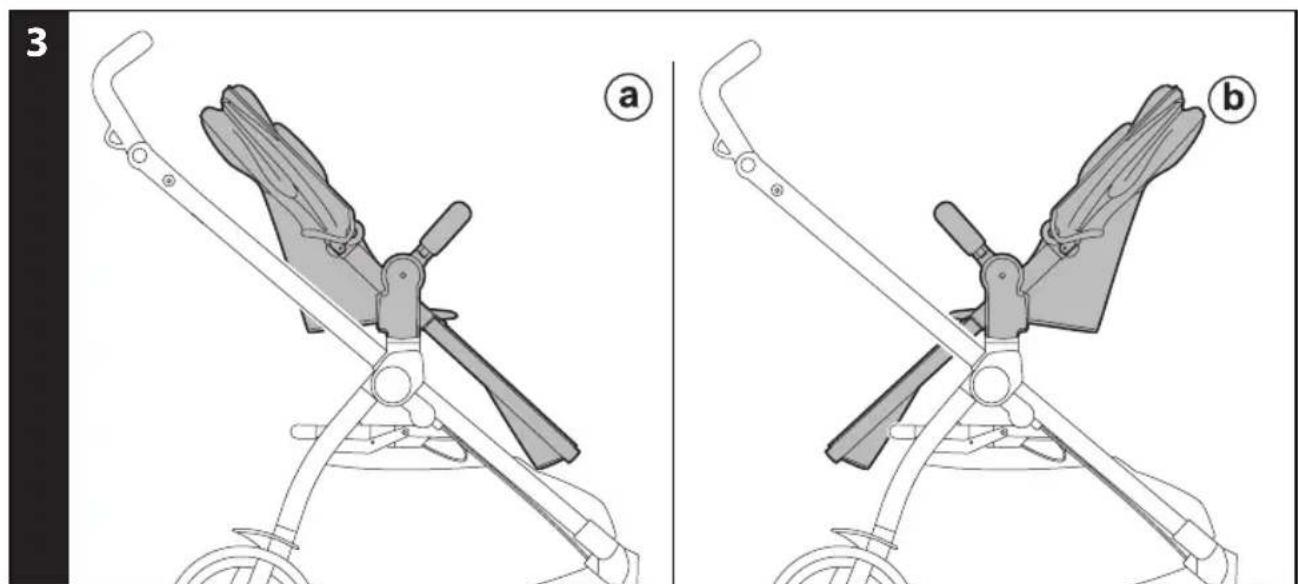
3 The Unico Seat can be attached onto the chassis in "world-facing" (fig_a) or "mum-facing" position (fig_b).
Always engage the brake on the chassis before fastening and unfastening the seat.
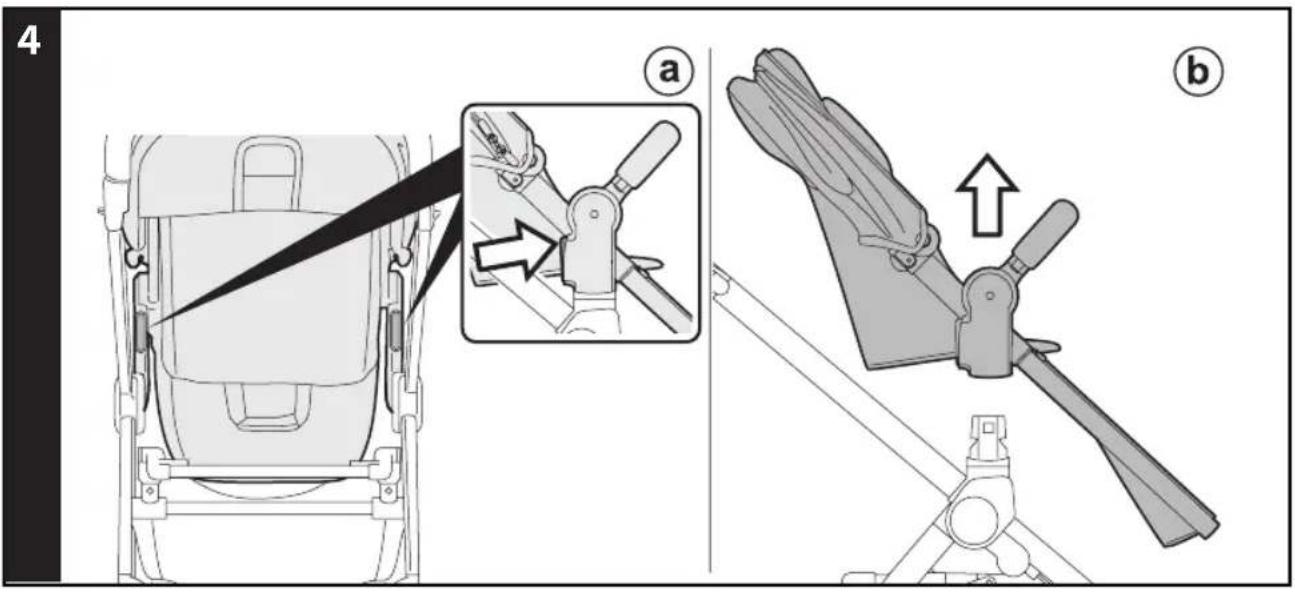
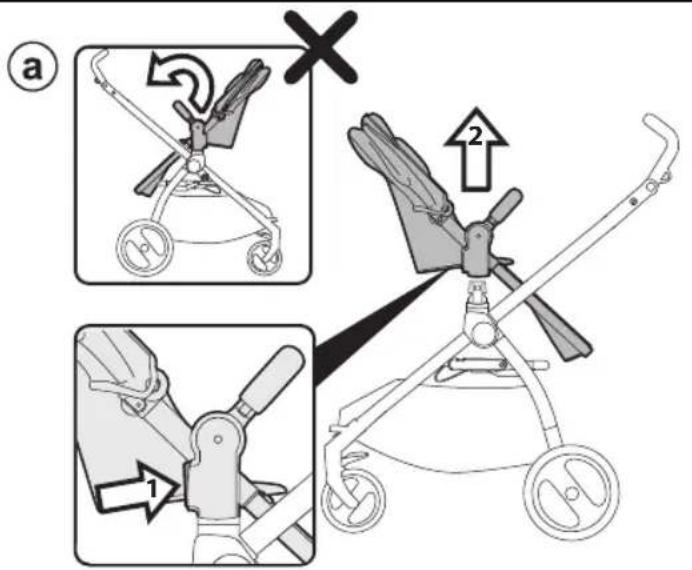
4 REMOVING THE UNICO SEAT FROM THE CHASSIS: To unfasten the Unico Seat, press the levers near the chassis attachments (fig_a) and lift the seat at the same time (fig_b).
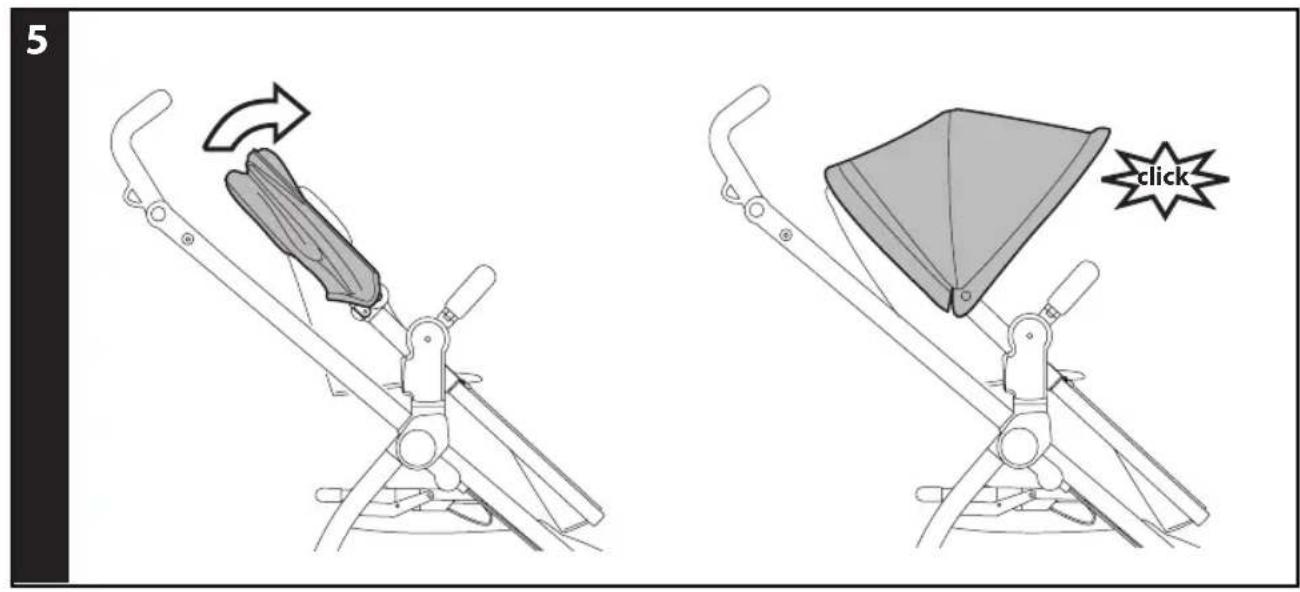
5 HOOD: to use the hood, stretch it until it clicks (so it is completely open).
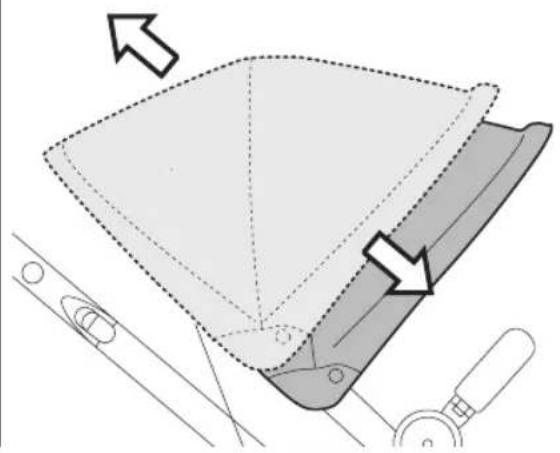
6 To open the hood, unfasten the Velcro on the rear (fiq_a).
The hood includes a loop to be used to hang your child's favourite toy (fig_b).
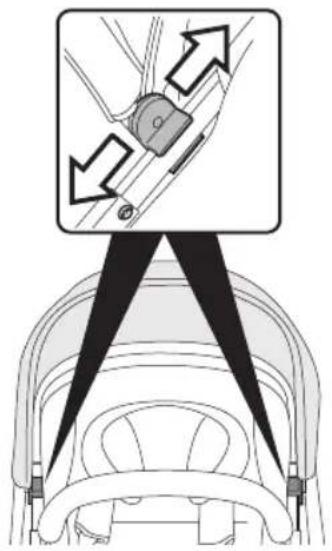
7 Sliding the hood's attachments on the uprights (fig_a), you can vary its distance from the seat (fig_b).
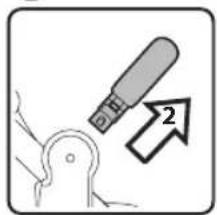
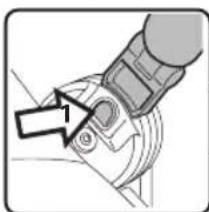
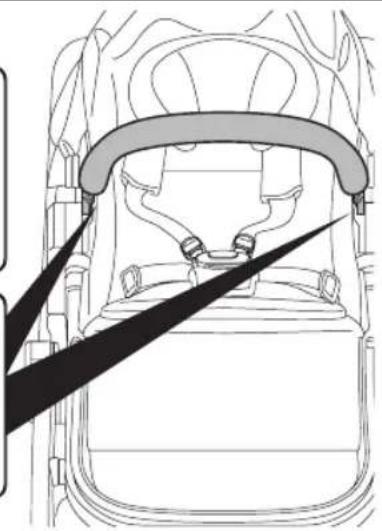
8 FRONT BAR: The front bar can be removed by pushing the buttons on the sides (fig_a), or it can be opened on one side pressing one button only (fig_b).
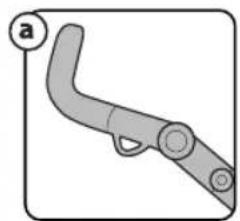
9 BED POSITION: the seat can be adjusted in 4 positions, from "sitting" to "lying". To switch from one position to another, pull the lever shown in the picture (fig_a).
ADJUSTING THE BACKREST: press the clip to lower or lift the backrest to the desired height (Fig. b).
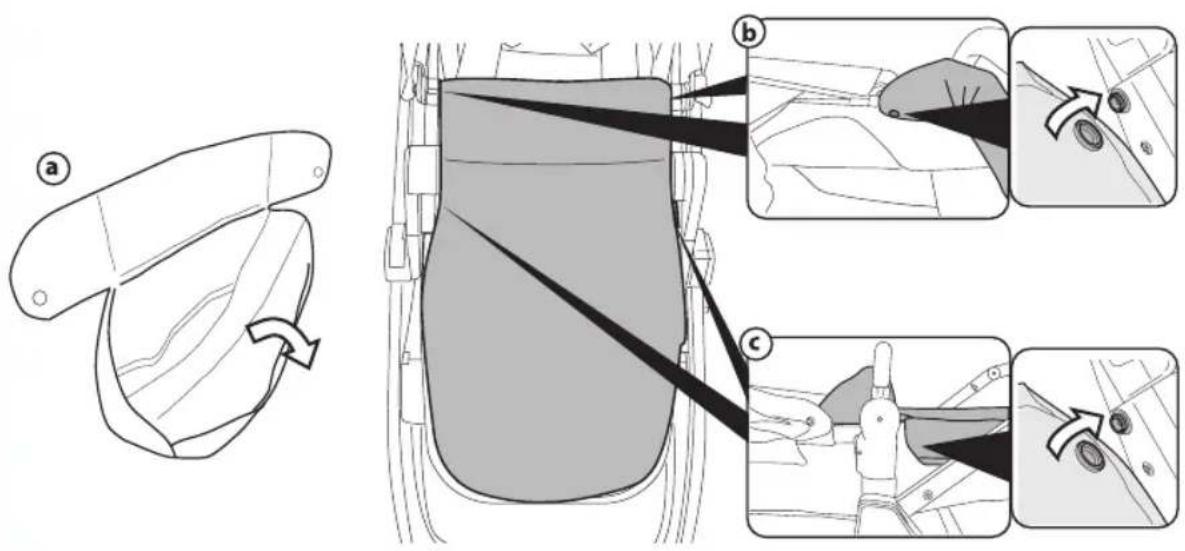
10 COVER (when included): unfasten the Velcro and open the cover completely (Fig.a). Fit it onto the product, avoiding the front bar. Fasten both sides on the inside (Fig.b), then fasten both sides on the outside (Fig. c).
11 COMFORT INSERT: the product comes with a comfort insert designed to offer additional comfort and support for baby.
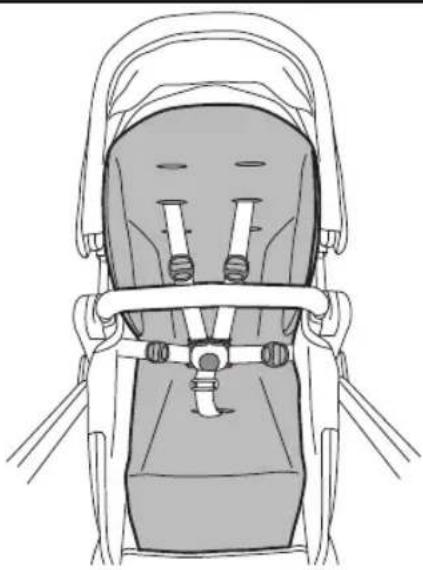
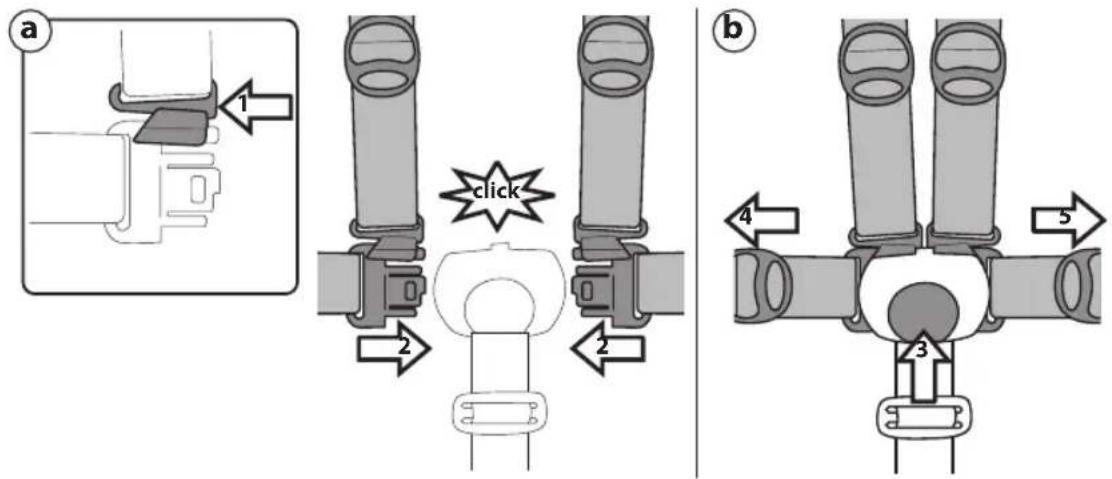
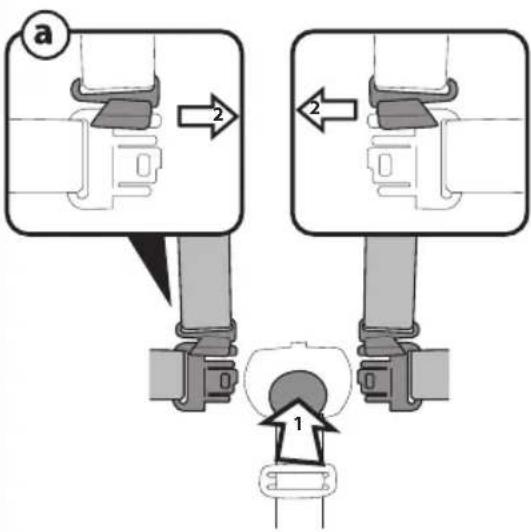
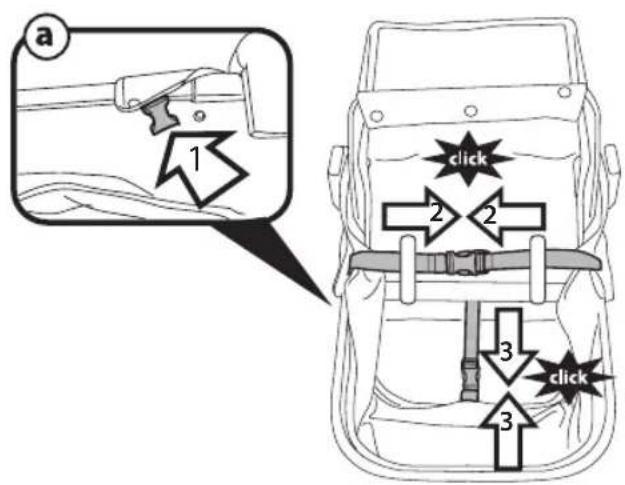
12 5-POINT SAFETY HARNESS: to fasten, insert the two buckles into the waist strap (with the straps attached in the crotch strap) until you hear a click (fig_a). To unfasten them, press the button which is situated at the centre of the seatbelt buckle and pull the waist strap outwards (fig_b).
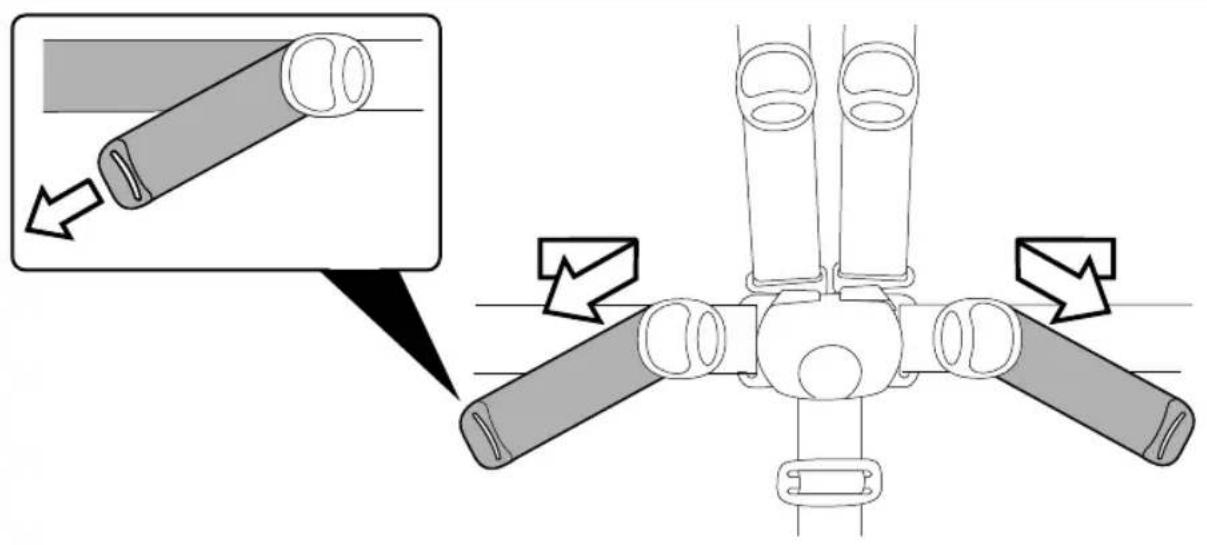
13 To tighten the waist strap, pull on both sides in the direction of the arrow; to loosen it, do the opposite.
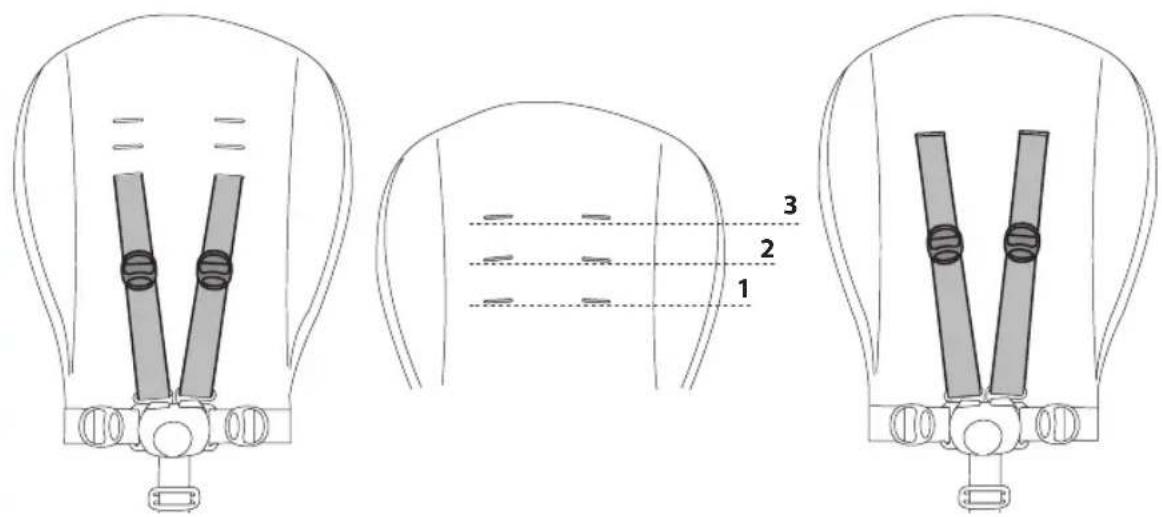
14 The safety harness can be adjusted in 3 positions according to the child's height. You must use the higher positions as the child grows bigger.
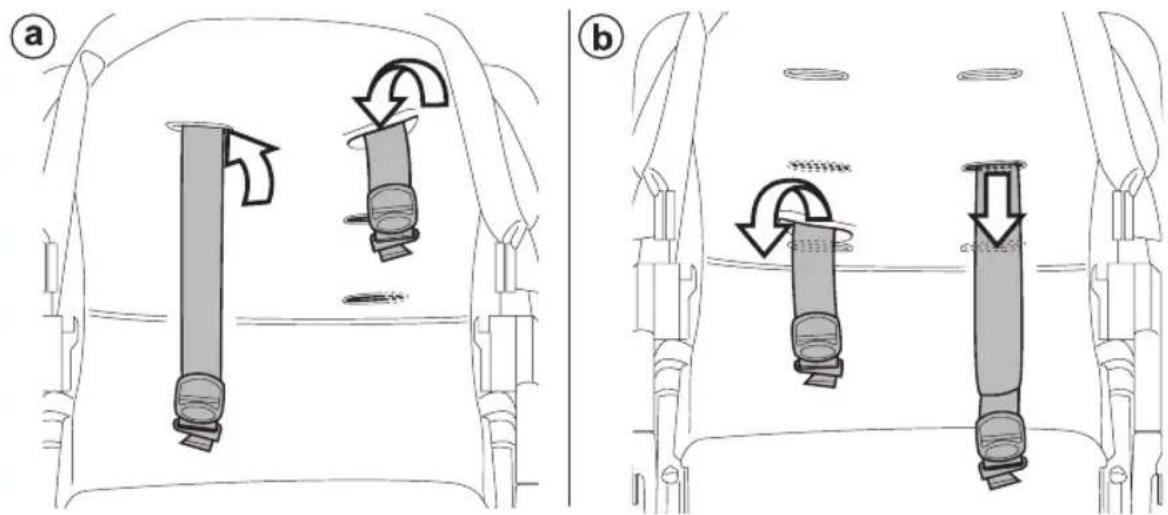
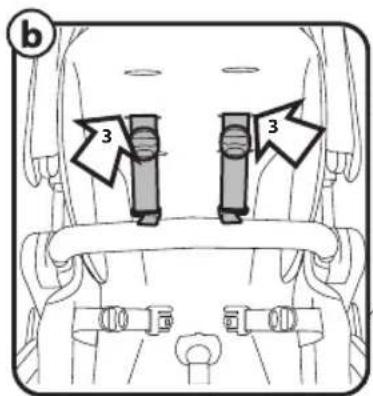
15 Adjust the height by sliding the straps through the slots in the insert and then through those in the backrest (fig_a) and insert them into the slots required (fig_b).
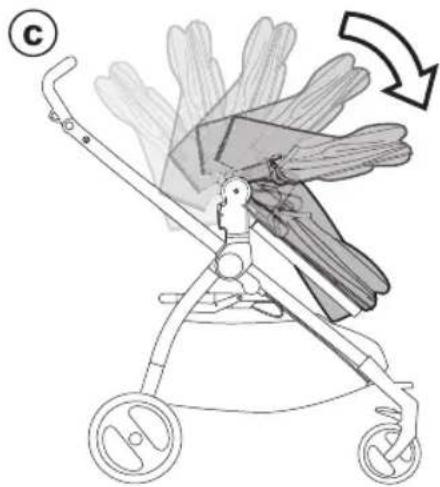
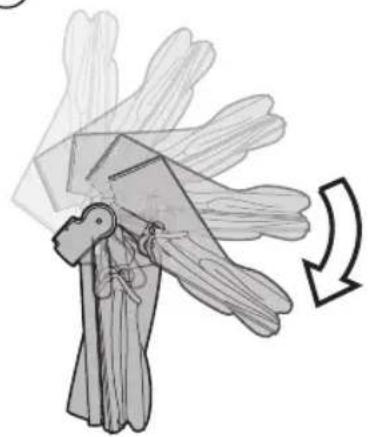
16 FOLDING THE UNICO SEAT ATTACHED ONTO THE CHASSIS: the Unico Seat can be folded attached on the chassis only in world-facing position (fig_a). To do this:
- the leg rest must be in "sitting" position,
- fold down the hood,
- pull the levers on the up-right (fig_b)
- fold Unico Seat onto itself (fig_c).
17 FOLDING THE CHASSIS WITH THE Unico SEAT FASTENED: To fold the chassis, we recommend ensuring the front wheels are fixed and the hood (when fastened) is closed.
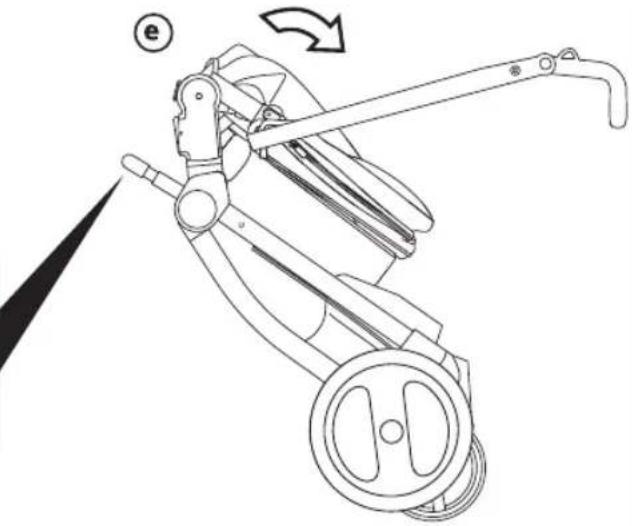
Position the handlebar as shown in the figure (fig_a) Rotate the safety lever to the left (fig_b) and at the same time pull the frame's internal handle towards you (fig_c).
Lift the handle (fig_d) until the frame is completely folded (fig_e).
18 To fold correctly, check the side fastener is engaged. If it has not engaged automatically, compress the frame slightly. The folded stroller is free-standing (fig_a).
TRANSPORT: the stroller can be conveniently carried (with the front wheels in locked position) using the central handle (fig_b).
19 WARNING: If Unico Seat is in mum-facing position, it must be unfastened before folding (fig_a). It can take up less room when folded (fig_b).
20 OPENING THE CHASSIS WITH UNICO SEAT ATTACHED:
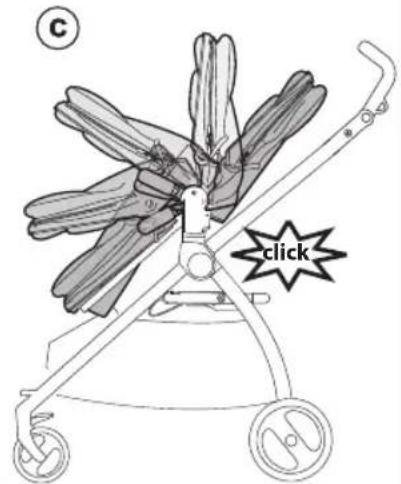
Press the side attachment fastener downwards, grip the upper ends of the handle bar and rotate them towards you until the chassis opens completely (fig_a). Unico chassis open (fig_b). A "click" sound means it has opened correctly and corresponds to the attachment onto the base. Next, open the Unico Seat from the ends, pulling it until it clicks (fig_c).
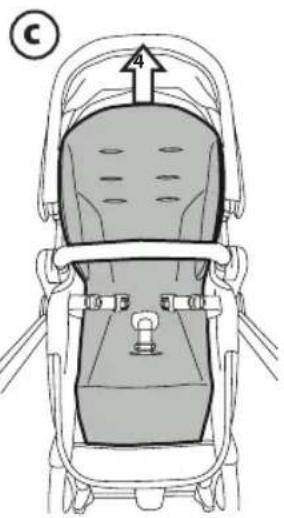
21 REMOVING THE LINING: the only element that can be removed and washed is the comfort insert.
To remove it:
- Release the strap (Arrow 1)
- Remove the buckles from the strap (Arrow 2)
- Slide the straps through the holes (Arrow 3)
- Raise the insert off the seat (Arrow 4).
- Release the strap (Arrow 1)
- Remove the buckles from the strap (Arrow 2)
- Slide the straps through the holes (Arrow 3)
- Raise the insert off the seat (Arrow 4).
SERIAL NUMBERS
22 Information about the production date can be found on the Unico Seat.
_ The product name, production date and serial number of the chassis.
This information is required for any complaints.
INSTRUCTIONS FOR USE PRAM BODY
To transform the Unico seat into a carrycot for use from birth:
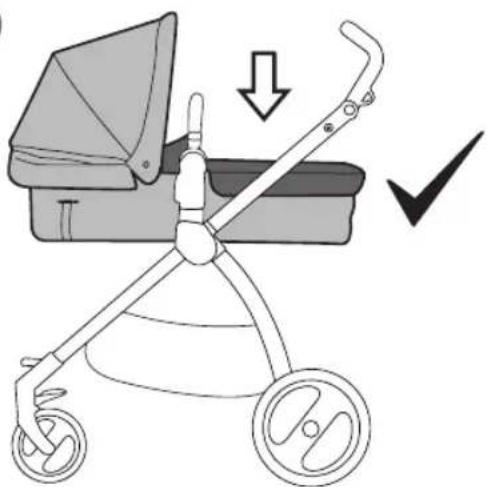
- Place the seat in the horizontal position (SEAT - Fig. 9 a).
- Lower the seat's backrest fully (SEAT - Fig. 9 b).
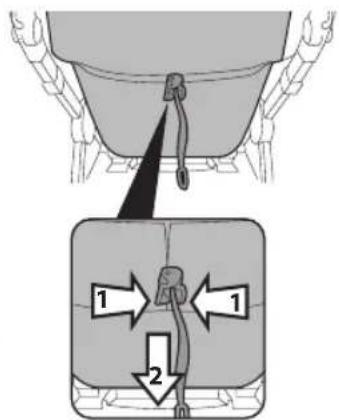
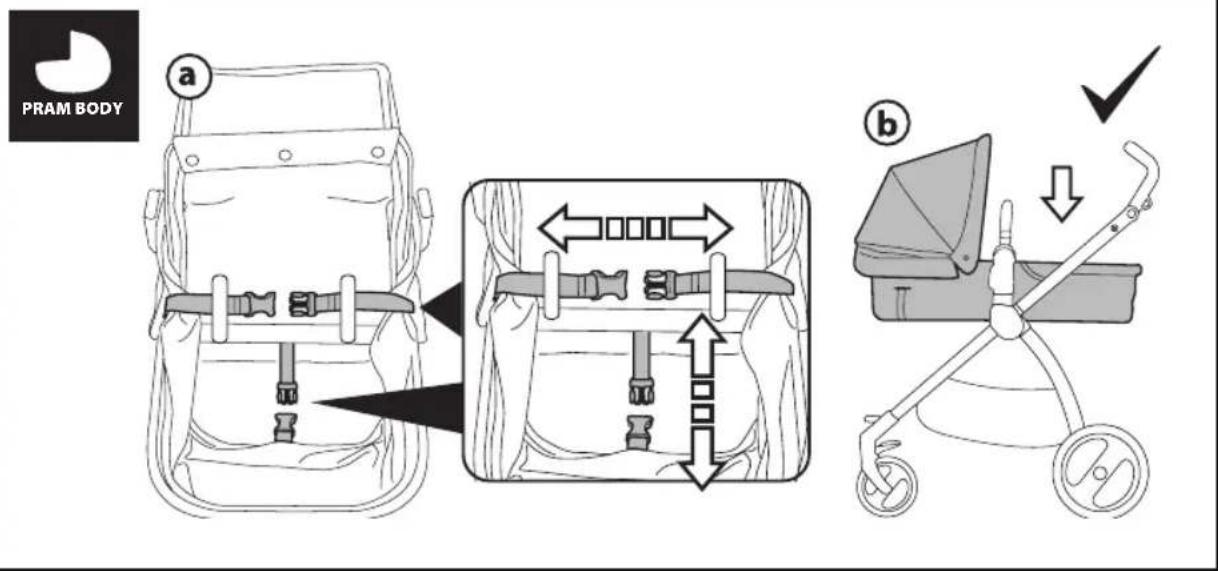
1 Unfasten the two buckles placed under the seat (Fig. a).
- Press down on the seat to ensure the product opens completely (Fiq. b).
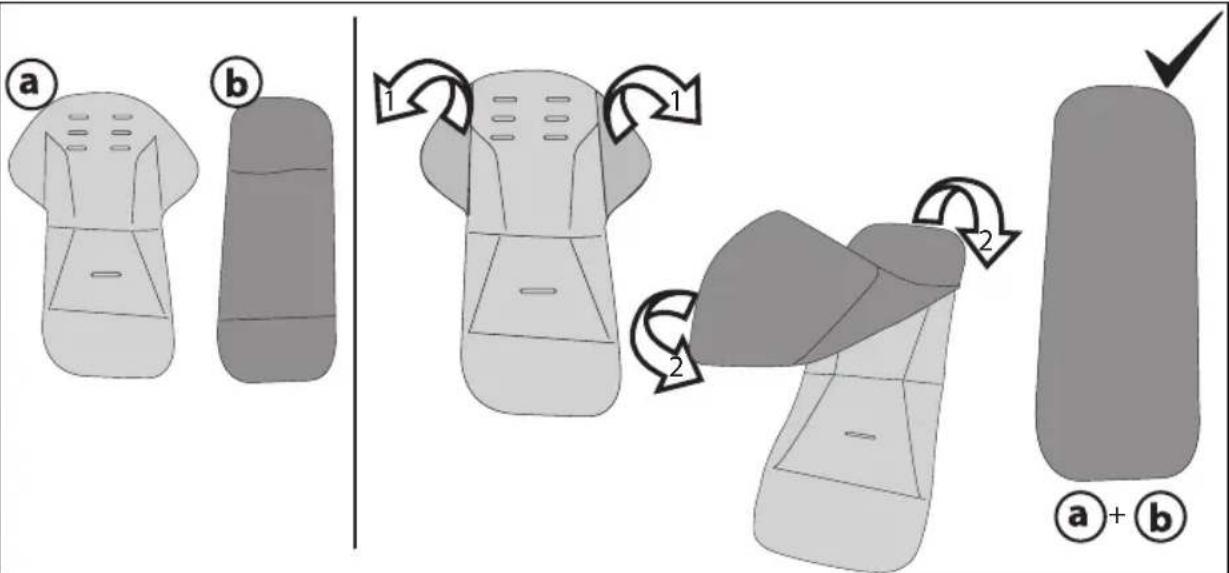
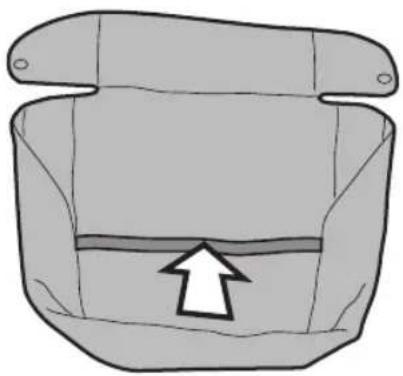
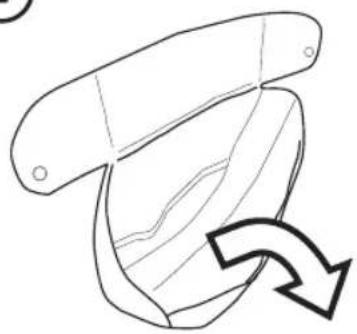
2 Remove the comfort insert from the stroller and slip it into the sheet provided.
A: INSERT
B: SHEET
Fold the insert's flaps inwards (arrows 1) and slip the insert into the sheet (arrows 2).
Insert fitted inside the sheet correctly.
3 Position the Velcro on the cover and close it well (Fig.a).
- Fit the cover onto the carrycot as shown in figure (Fig.b), avoiding the front bar.
- Button the cover to the carrycot as specified in the paragraph INSTRUCTIONS FOR USE UNICO SEAT POINT 10 b-c.
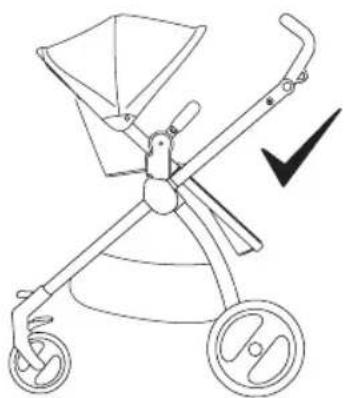
4 TRANSFORMATION FROM CARRYCOT TO SEAT:
Fasten the two buckles until they click into place, as shown in the figure (fig_a). WARNING: slip them through the slots.
Raise the backrest and place the seat in the desired position (fig_b).
Pull the comfort insert out of the sheet. Fit the insert onto the seat.
5 Open the Velcro on the cover, to ensure greater foot support for baby (fig_c).
Fit the cover onto the seat, avoiding the front bar, and fasten the 4 side buttons.
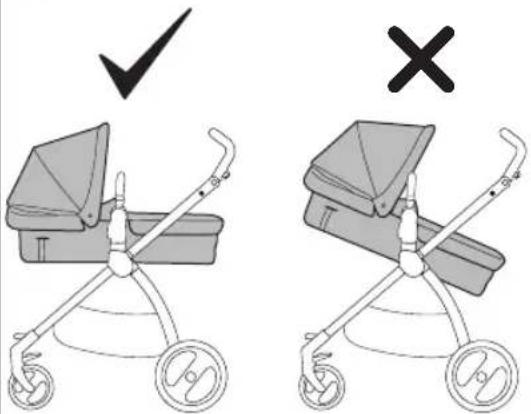
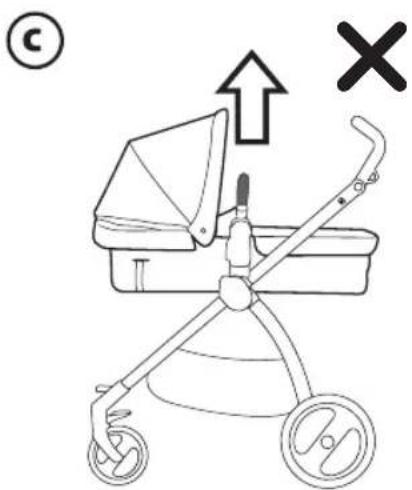
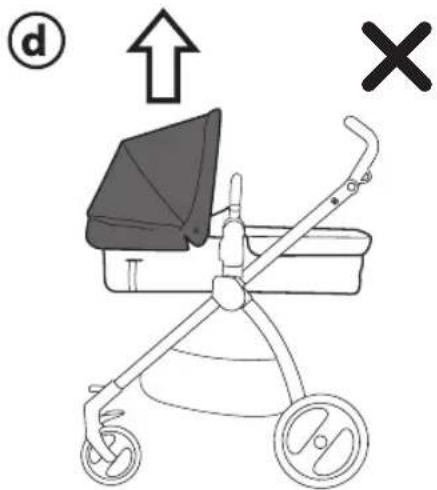
6 WARNING: the carrycot must only be used in the horizontal position (fig_a).
WARNING: from birth up to about 6 months of age, the stroller should be used in the carrycot configuration.
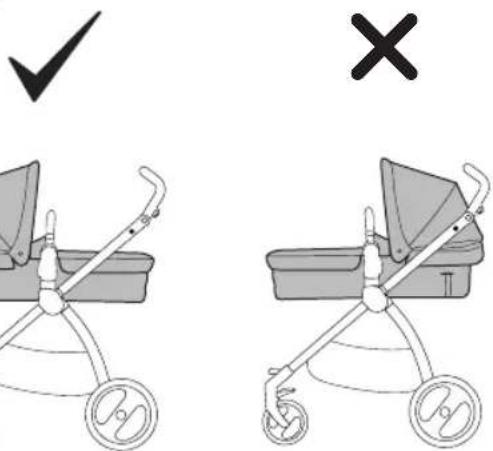
WARNING: When the stroller is in the carrycot configuration, the carrycot should be fastened to the stroller facing mom (fig_b).
WARNING: do not remove the carrycot from the stroller while baby is in it.
WARNING: also in the carrycot configuration, the seat should ONLY be used when fastened to the frame.
7 WARNING: the front bar should NOT be used as a handle to lift the product while baby is in it (fig_c). WARNING: do not use the hood to lift the product while baby is in it (fig_d).
PegPerego accessories are designed as a useful, practical means of simplifying the lives of parents. Discover all your product's accessories on www.pegperego.com
CLEANING AND MAINTENANCE
Cleaning must only be carried out by adults.
PRODUCT MAINTENANCE: protect from the weather: water, rain, or snow; prolonged and continuous exposure to bright sunlight may give rise to colour changes of various different materials; store this product in a dry place.
CLEANING THE CHASSIS: periodically clean all plastic parts with a damp cloth. Do not use solvent or similar cleaning products; keep all metal parts dry to prevent rusting; keep moving parts clean (adjustment mechanisms, locking mechanisms, wheels, ...) and free of dust and sand and, if necessary, lubricate with light machine oil.
CLEANING FABRIC PARTS: Brush the fabric parts to remove dust.
- When washing, closely follow the instructions stated on the label sewn into the cover.
- Do not use chlorine bleach.
- Do not iron.
- Do not dry clean.
- Do not remove stains with solvents.
- Do not tumble dry.
PEGPEREGO S.p.A.
PegPerego SpA adopts a quality management system certified by TÜV Italia Srl in accordance with the ISO 9001 standard. PegPerego can make changes at any time to the models described in this publication for technical or commercial reasons.
PEGPEREGO AFTER-SALES SERVICE
If any parts of the item get lost or damaged, only use genuine PegPerego spare parts. For any repairs, replacements, information on the products and sales of genuine spare parts and accessories, contact the PegPerego Assistance Service and state the serial number of the product, if present.
tel. 0039/039/60.88.213
e-mail assistenza@pegperego.com
website www.pegperego.com
All intellectual property rights on the contents of this manual are property of PegPerego S.p.A. and are protected by the laws in force.
FR\_Français
- Tirar as fivelas do cinto (Seta 2)
- Fold kalechen ned.
RENG∅RING AF DELE I STOF:
- Product name: Unico
- Product reference number: IP19*
- Reference Standards (origin): EN1888-1:2018
EN1888-2:2018, EN 71-2:2011+A1:2014, EN 71-3, Regolamento (CE) N. 1907/2006 - All. XVII pt. 16,17,43,51,52 (REACH)
- Declaration of conformity La PegPerego S.p.A. dichiara
- Date and place of issue: Arcore, September 2019
PegPerego S.p.A. Via De Gasperi, 50 20862 Arcore (MB), ITALY
FR\_Français
All of the intellectual property rights for the contents of this instruction manual belong
to PegPerego S.p.A. and are protected by the laws in force.