Monarch ED - Binoculars NIKON - Free user manual and instructions
Find the device manual for free Monarch ED NIKON in PDF.



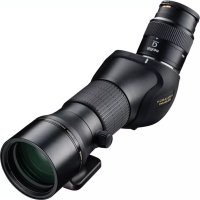
| Product type | Spotting scope |
| Brand | Nikon |
| Model | Monarch ED |
| Objective lens diameter | 82 mm or 60 mm depending on model |
| Minimum focusing distance | 5.0 m (82 mm models) / 3.3 m (60 mm models) |
| Weight | 1,650 g (82ED-S) / 1,640 g (82ED-A) / 1,260 g (60ED-S) / 1,250 g (60ED-A) |
| Length | 325 mm (82ED-S) / 334 mm (82ED-A) / 262 mm (60ED-S) / 270 mm (60ED-A) |
| Width × Height | 124×103 mm (82ED-S) / 112×108 mm (82ED-A) / 124×93 mm (60ED-S) / 110×98 mm (60ED-A) |
| Waterproof | Yes, waterproof up to 1 m for 10 minutes, nitrogen purged |
| Compatible eyepieces | MEP series (MEP-38W, MEP-20-60, MEP-30-60W) |
| Magnification | Variable depending on eyepiece: 20-60×, 30×, 38×, etc. |
| Field of view at 1000 m | Variable depending on eyepiece, e.g., 35 m (MEP-38W on 82 mm) |
| Exit pupil | Variable depending on eyepiece and magnification |
| Eye relief | 18.5 mm (MEP-38W) / 16.1-15.3 mm (MEP-20-60) / 15.2-14.2 mm (MEP-30-60W) |
| Tripod attachment | 1/4\" - 0.6 mm screw hole |
| Optical material | ED (Extra-low Dispersion) lenses |
| Sunshade | Sliding type |
| Power supply | None (optical instrument) |
| Supplied accessories | Objective lens cap, mount cap, instruction manual |
| Maintenance and cleaning | Clean, soft cloth, anhydrous alcohol for lenses; do not use solvents |
| Safety | Never look at the sun or intense light; do not use while walking |
| Spare parts and repairability | Interchangeable MEP series eyepieces; service by authorized dealer |
Frequently Asked Questions - Monarch ED NIKON
User questions about Monarch ED NIKON
0 question about this device. Answer the ones you know or ask your own.
Ask a new question about this device
Download the instructions for your Binoculars in PDF format for free! Find your manual Monarch ED - NIKON and take your electronic device back in hand. On this page are published all the documents necessary for the use of your device. Monarch ED by NIKON.
USER MANUAL Monarch ED NIKON
Printed in China (827C)2DE/1606
Nikon
Füürdustur und Sturme / Fieldscope / Fieldscope / Lunette (d'observation)/ Das Beobachtungsfernrohr / Il fieldscope / Tubkikare / Telescoop / 3pintelhaj Tpy6a / Fieldscope / Luneta observwacyjna / Kaukoputki / Teleskop / Monokulární dalekohled Fieldscope / Fieldscope / Lunetā terestre / Megfigyelótávcsó
MONARCH
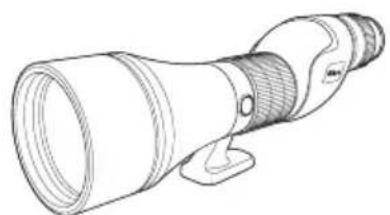
82ED-S
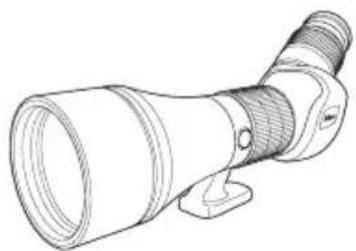
82ED-A
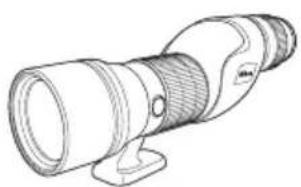
60ED-S
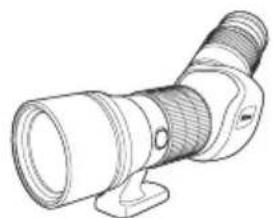
60ED-A
使用說明書/Instruction manual/Manual de instrucciones/Mode d'emploi/Bedienungsanleitung/Manuale diistruzioni/Bruksanvisning/Handleiding/Inchtpukzma no3kcnnyataum/Manual de instruções/Instrukcja obšugi/Käyttoopas/Brukerveileding/Prirucka uživatele/Instruktionsvejledning/Manual de instruciuni/Hasznalatiutasítás
Jp
目次
This is a good idea.
MEP-38WMEP-20-60MEP-30-60W
Safety and operation precautions 24
Supplied items 26
Optional accessories 27
Nomenclature 28
Nomenclature (Eyepiece) 29
Mounting to the tripod 30
Removing the objective lens end cap/extending the lens hood 30
Mounting and removing the eyepiece 31
Focusing 32
Rotating the lens barrel (angled models only) 33
Attaching the stay-on case 34
About the eyepiece lens 36
Storage and cleaning 37
Waterproof Models 38
Product specifications 39
Eyepiece lens specifications 40
System chart. 41
Thank you for your purchase.
- Thoroughly read this instruction manual before using the product, and be sure to use the product correctly.
- After reading, retain this instruction manual in a place where it can be easily referenced, such as near the product.
- This instruction manual contains descriptions of the "MONARCH Fieldscope unit" and "Exclusive MEP Series Eyepiece Lens".
- Specifications and design are subject to change without notice.
- No production in any form of this manual, in whole or in part (except for brief quotation in critical articles or reviews), may be made without written authorization from NIKON VISION CO., LTD.
Safety and operation precautions
In order to ensure the safe use of this product, read this manual carefully and be sure you understand the information provided before attempting to operate the product.
This manual provides instructions that you should follow in order to use the product safely and to prevent damage to people and property. Be sure that you thoroughly understand the information described here before attempting to use the product.
| WARNING | This indication alerts you to the fact that any improper use ignoring the contents described herein can result in potential death or serious injury. |
| CAUTIONS | This indication alerts you to the fact that any improper use ignoring the contents described herein can result in potential injury or material loss. |
WARNING
- Do not look directly at the sun or intense light while using the fieldscope.
CAUTIONS
- Keep the product away from rain, water splashes, sand, and mud. Do not operate the focus ring if the product is wet from rain.
- Do not disassemble the product.
- Do not swing the product with the strap of the stay-on case. Doing so may hit others and cause injury.
-
Be careful not to pinch your fingers when retracting the lens hood, or when attaching or removing the body.
-
Do not place the product in places where it cannot be secured in a stable position. Doing so may cause the product to topple or fall over and result in injury.
- Do not use the product while walking. Doing so may cause you to run into other people or objects, or fall down, resulting in injury.
- Do not leave the product in a car on a hot or sunny day, or near heat-generating equipment.
- The lens surface may become cloudy if the product is exposed to radical temperature changes, such as entering a warm room from the cold outdoors.
- Keep the packaging box, packing materials, and supplied items out of reach of children.
- Prevent children from inadvertently swallowing small parts. In the event that it occurs, consult a doctor immediately.
- Some people may suffer from skin inflammation after using the rubber eyecup for a long period of time. If you develop any symptoms, consult a doctor immediately.
- Be sure to store the product in the carrying bag securely and close the buckle when you carry the product.
Supplied items
Fieldscope unit
- Objective lens cap × 1 - Mount cap × 1 - Instruction manual (this booklet)
Eyepiece lens unit
- Eyepiece cap × 1 - Mount cap × 1
- Eyepiece lens case × 1 (Included only if you purchased a single eyepiece lens unit. Not included if you purchased a set.)
The following supplied items are included only with MEP-30-60W.
- DS (digiscoping) ring attachment × 1
- Eyepiece cap for the DS (digiscoping) ring attachment × 1
- If you purchased a single fieldscope unit, the stay-on case, eyepiece lens, and the items supplied with the eyepiece lens are not included.
The objective lens cap of the fieldscope unit and the eyepiece cap of the eyepiece lens unit have a hole (loss prevention hole) through which a cord is passed so that you do not lose the cap. Use the hole as necessary.
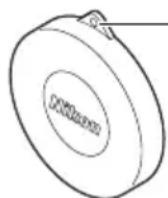
Loss prevention hole
Optional accessories
- Stay-on case (with strap)*
- Supplied if you purchased the fieldscope and eyepiece as a set.
En
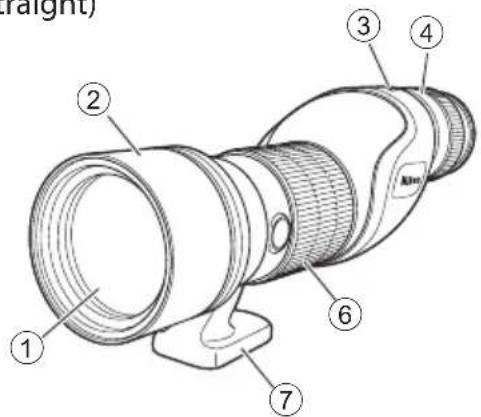
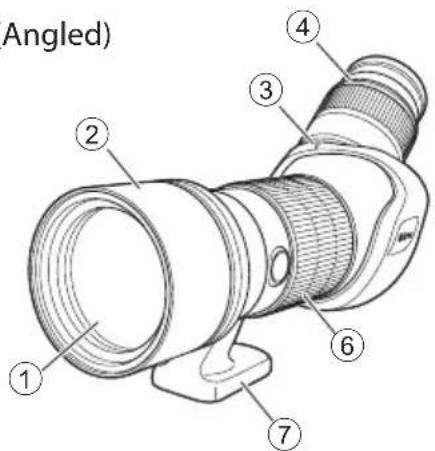
Nomenclature
(Straight)
(Angled)
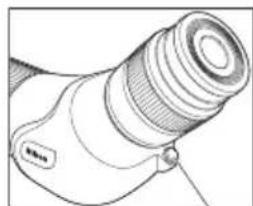
5
① Objective lens
⑥ Focus ring
② Lens hood (slide type)
⑦ Tripod mount
③ Eyepiece lens attachment index
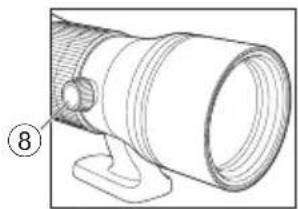
⑧ Clamp (angled type only)
④ Eyepiece
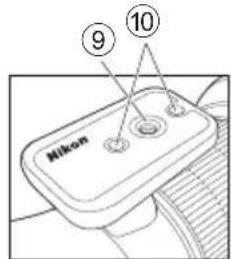
⑨ Tripod screw hole (1 / 4^ ) (1 hole)
⑤ Detachment button for the eyepiece lens
⑩ Video pin hole (2 holes)
- This is the overview when the eyepiece is connected.
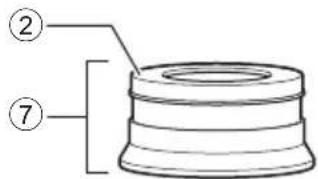
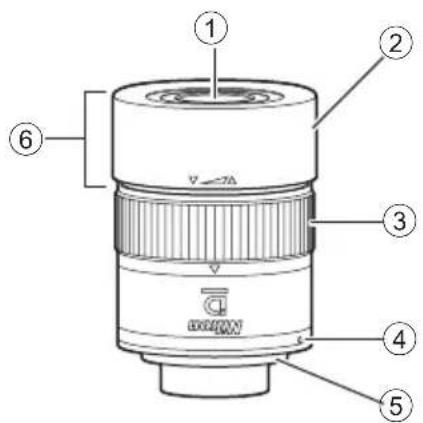
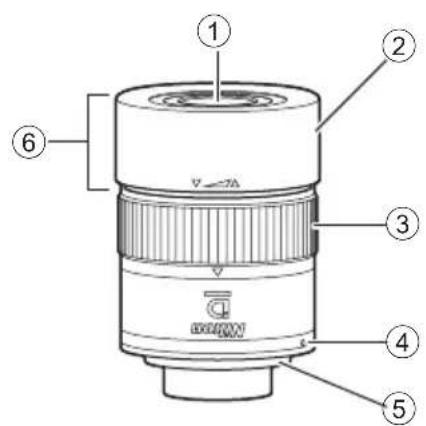
Nomenclature (Eyepiece)
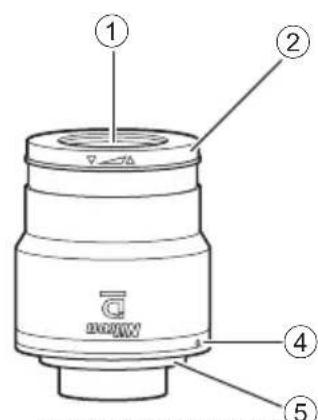
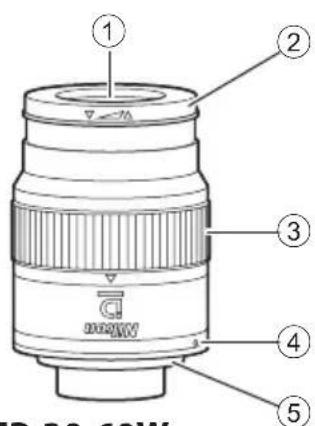
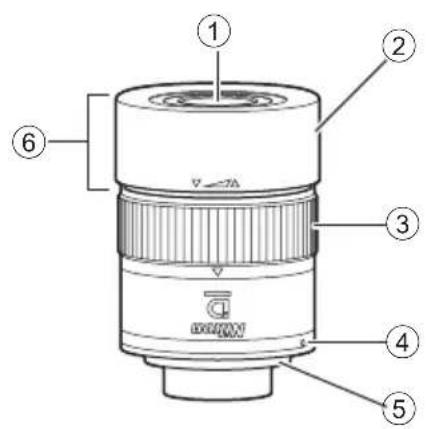
MEP-38W MEP-20-60 MEP-30-60W
① Eyepiece
② Eyecup rubber
③ Zoom ring
④ Eyepiece lens attachment index
⑤ Eyepiece mount
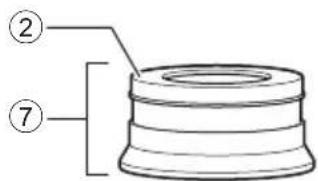
⑥ TS ring attachment
⑦ DS ring attachment
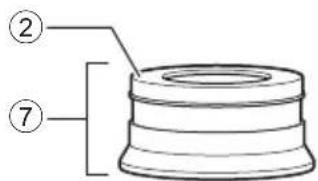
- The eyepiece lens of the MONARCH fieldscope uses "Type 1 Bayonet Mount". Eyepiece lenses other than the Nikon Fieldscope Eyepiece Lens MEP Series cannot be used.
En
Mounting to the tripod
1) Mount the fieldscope to the tripod.
- Screw the tripod screw into the tripod screw hole to firmly lock the fieldscope in place.
- Use a large, highly stable tripod.
2) (Angled type only) Screw in the clamp clockwise (①) to lock the fieldscope in place.
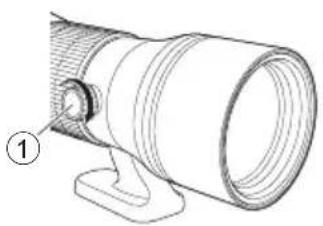
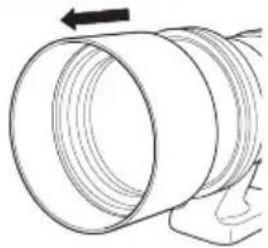
Removing the objective lens end cap/extending the lens hood
Extend or retract the lens hood only when the objective lens cap is removed.
- Attach the objective lens end cap when carrying or not using the product.
Mounting and removing the eyepiece
En
Mounting
Align the eyepiece attachment indices of the unit and the eyepiece, insert the lens (1), and rotate counter-clockwise while pressing in until you hear a lock sound (2).
Note: The eyepiece will not rotate if you do not sufficiently press it in.
- To prevent contaminants such as water drops from entering, the eyepiece is fitted with a rubber O-ring. Although this presents slight resistance, firmly insert the eyepiece until it is secure.
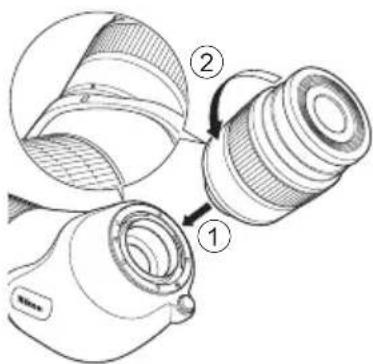
Note: Take note of the following when attaching the stay-on case to the unit.
- When the eyepiece lens is mounted, be careful not to get the rim of the case caught in the eyepiece mount contact area.
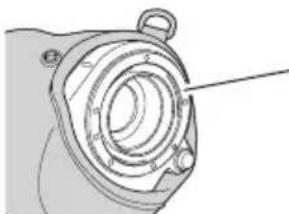
Eyepiece mount contact area
En
Removing
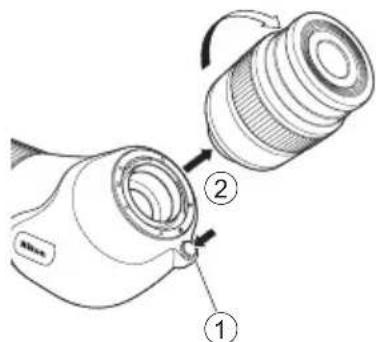
While pressing the detachment button for the eyepiece lens (1), rotate the eyepiece lens clockwise to remove it (2).
Focusing
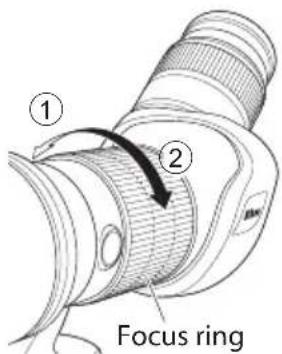
Focusing is performed with the focus ring.
Rotate the focus ring in the direction of (1) to bring distant objects into focus. Rotate it in the direction of (2) to bring near objects into focus.
Rotating the lens barrel (angled models only)
En
Loosening the clamp by rotating it counter-clockwise allows you to rotate the lens barrel.
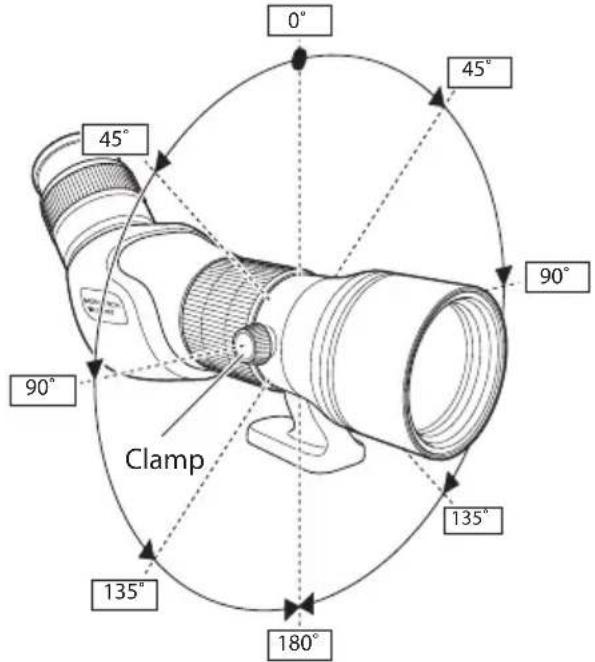
- The lens barrel produces a click sound at 45-degree increments.
- Screw in the clamp to lock the lens barrel at any angle.
En
Attaching the stay-on case
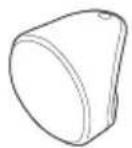
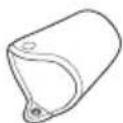
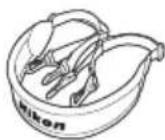
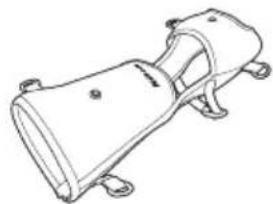
Objective lens cover Eyepiece cover Strap Stay-on case unit
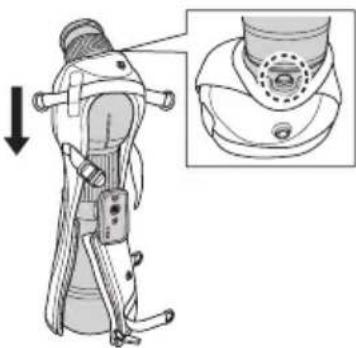
■ Attaching
1) Place the fieldscope on a platform with the objective lens side on the bottom, and cover the fieldscope with the stay-on case unit from the eyepiece side.
- Perform this procedure with the objective lens cap attached so that the fieldscope does not get damaged.
- Cover so that the detachment button of the eyepiece lens is not hidden.
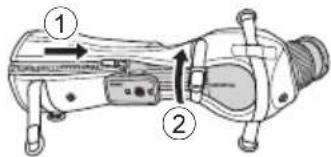
2) ① Pull up the zipper, and ② tighten the belt.
3) Attach the ① objective lens cover and ② eyepiece cover to the stay-on case unit.
- The eyepiece cover has a top and bottom. Attach the cover so that the side with the longer tab is at the bottom.
4) Attach the strap at four places.
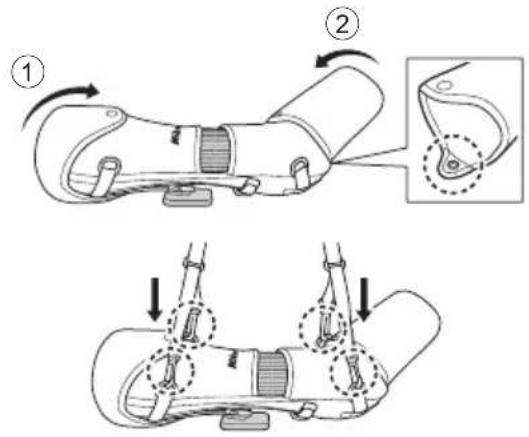
Correct attachment
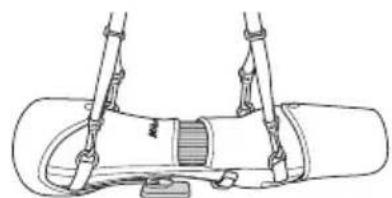
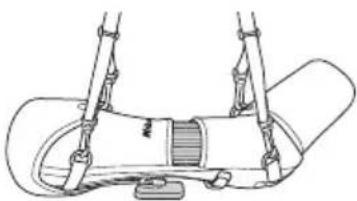
Straight type Angled type
En
About the eyepiece lens
When observing
When observing with the naked eye: Use by rotating the eyepiece section counter-clockwise to extend.
When observing with glasses: Use by keeping the eyecup section retracted.
When shooting while digiscoping
For MEP-38W and MEP-20-60
Completely retract the eyecup section by rotating the eyepiece section counter-clockwise until you cannot see the bronze index. 1)
For MEP-30-60W
1) Remove the TS (turn slide) ring attachment by rotating it counter-clockwise.
2) Attach the DS (digital scoping) ring attachment by rotating it clockwise.
- Attach by firmly rotating all the way.
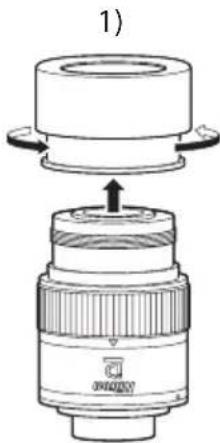
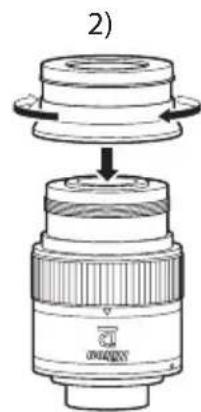
Storage and cleaning
- Do not wash the product with cold or hot water.
- Gently wipe off dirt from the product (except for the lens) with a soft, clean cloth. Do not use organic solvents such as benzene or paint thinner, or cleaning solutions that contain organic solvents.
- Remove dust from the lens surface with a soft, oil-free brush.
- Remove stains and smudges like fingerprints from the lens surface by gently wiping them with cleaning paper, or a soft, clean cloth that has been dampened with a small amount of anhydrous alcohol (ethanol) or commercially available lens cleaner.
En
Waterproof Models
Fieldscope Unit
- The fieldscope unit is waterproof due to its nitrogen gas-filled design. It can be safely used in conditions of high humidity, wind, and rain and is resistant to clouding and mold.
-
However, take note of the following during use.
-
Do not use the product underwater or clean it under strong running water.
-
Any moisture should be wiped off the body before adjusting movable parts.
-
To maintain your Fieldscope's waterproof properties, Nikon Vision recommends regular servicing by an authorized dealer.
Eyepiece Lens
- The eyepiece lens unit is not waterproof. When replacing the lens, perform it in an area with no humidity as much as possible.
- Although the eyepiece lens is designed to be waterproof when attached to the fieldscope unit, it cannot be used underwater.
Product specifications
En
| 82ED-S 82ED-A 60ED-S 60ED-A | 82ED-S 60ED-A | |||
| Objective diameter (mm) 82 82 60 60 | ||||
| Close focusing distance (m/ft) 5.0/16.4 5.0/16.4 3.3/10.8 3.3/10.8 | ||||
| Filter-attachment size (mm) 86 (P=1.0) 86 (P=1.0) 67 (P=0.75) 67 (P=0.75) | ||||
| Length (mm/in.) *1 | 325(355*2)/12.8(14.0*2) 33 | 4(364*2)/13.1(14.3*2) 26 | 26(285*2)/10.3(11.2*2) 27 | 0(293*2)/10.6(11.5*2) |
| Height × Width (mm/in.) *1 | 124×103/4.9×4.1 | 112×108/4.4×4.3 | 124×93/4.9×3.7 | 110×98/4.3×3.9 |
| Weight (g/oz)*1 | 1,650/58.2 | 1,640/57.8 | 1,260/44.4 | 1,250/44.1 |
| Waterproof performance | Fieldscope unit: Waterproof and fog-proof (up to 1 m (3.3 ft) for 10 min., nitrogen gas purged)*3 | |||
1 Without caps
2 When hood is fully extended.
*3 This product will suffer no damage to the optical system if submerged or dropped in water to a maximum depth of 1 meter (3.3 ft) for up to 10 minutes. NOT designed for underwater usage.
Note: Above specifications do not include eyepieces.
Eyepiece lens specifications
| Model | MEP-38W | MEP-20-60 | MEP-30-60W | |||
| MONARCH Fieldscope diameter (mm) 82 60 82 | 60 82 60 | |||||
| Magnification (x) 38 30 20 - 60 16 - 48 30 - 60 | 24 - 48 | |||||
| Angular field of view (Real/degree) (°) 2.0 2.5 2.1 - 1.0 | *3 | 2.6 - 1.2*3 | 2.0 - 1.23 | 2.5 - 1.5*3 | ||
| Angular field of view (Apparent/degree) (°) *1 | 66.4 40.4 - 54.3 | *3 | 55.3 - 65.6*3 | |||
| Field of view at 1,000 m/yd. (m) | 35 | 44 | 37 - 17*3 | 45 - 21*3 | 35 - 21*3 | 44 - 26*3 |
| (ft) | 105 | 132 | 111 - 51*3 | 135 - 63*3 | 105 - 63*3 | 132 - 78*3 |
| Exit pupil (mm) | 2 2.0 4.1 - 1.4 | *3 | 3.8 - 1.3*3 | 2.7 - 1.43 | 2.5 - 1.3*3 | |
| Relative brightness | 4.8 4.0 | 16.8 - | 2.0 *3 | 14.4 - 1.7*3 | 7.3 - 2.03 | 6.3 - 1.6*3 |
| Eye relief (mm) | 18.5 16.1 - 15.3 | *3 | 15.2 - 14.2*3 | |||
| Length (mm/in.)*2 | 73/2.9 | 89/3.5 | 91/3.6 (with DS)*4 | |||
| 92/3.6 (with TS)*5 | ||||||
| Outer diameter (mm/in.)*2 | 61/2.4 | 62/2.4 | 62/2.4 | |||
| Weight (g/oz)*2 | 270/9.5 350/12.3 | 370/13.1 (with DS)*4 | ||||
| 400/14.1 (with TS)*5 | ||||||
| Waterproof performance | Eyepiece: Not waterproof With Fieldscope attached: Waterproof (water equivalent to 5 mm (0.2 in.) per minute for a duration of 30 minutes)*6 | |||||
1 Calculated based on the ISO14132-1:2002 standard
2 Without caps
3 Designed reference value at the highest magnification
4 When the DS (digiscoping) ring attachment is attached
5 When the TS (turn slide) ring attachment is attached
6 This product will suffer no damage to the optical system in falling water equivalent to 5 mm (0.2 in.) rainfall per minute for a duration of 30 minutes. NOT designed for underwater usage.
Note: Because values shown on these charts were designed values rounded up/down, calculation of figures may not match exactly.
System chart
En
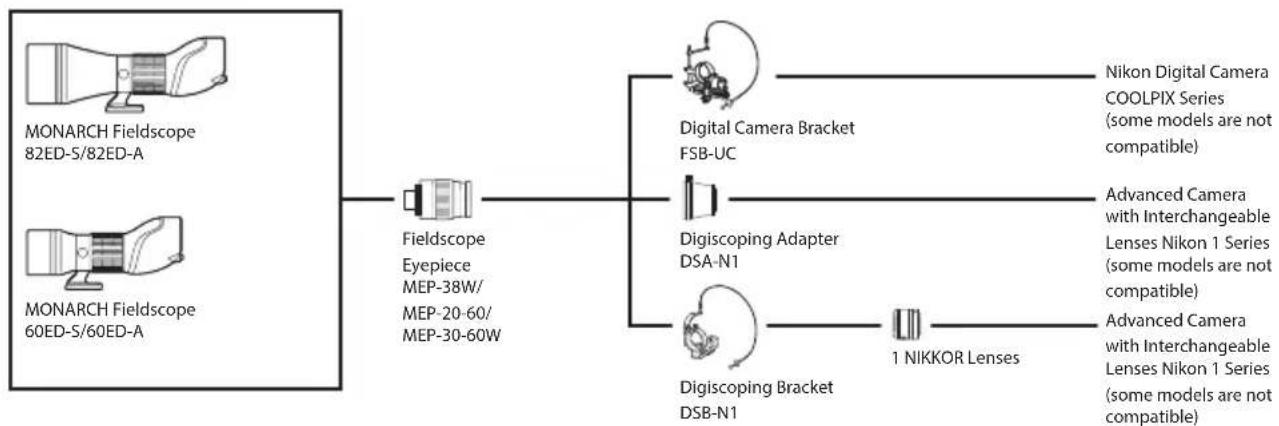
The above chart is as of May 2016. For more information and details of compatible models, see Nikon website.
Tabla de Contents
MEP-38W MEP-20-60 MEP-30-60W
MEP-38W MEP-20-60 MEP-30-60W
Scatto in digiscoping
Per i modelli MEP-38W e MEP-20-60
Verliesprevention opening
Optionele accessoires
PoneBa3pnteHna Tpy6a
- Poinbetbna Tpy6a BDOHepoHuaema 6laOapra a3OTOHAnHeHHo KOHCTpyKu. Ee moxho 6e30nacHO nCnoB3OBaTB B yCNOBnx BBICOKo BJaXHOCTn, npu BeTpe N BO BpemdoJk. Kpome Toro, OHa ycToUHbA K NOMyTHehIO I o6pa3ObaHIO pIceHN.
-
Ondako npn nCnoNb3ObaHnn n3deleny o6paTne BHHMaHne Ha cNeDyUoIee.
-
He nCnoJb3yIe n3dJIe ne IOD BOIoN H e OUnIaIe erO IOD cINbHOCTpye BOIbl.
- Ppejde yem perylnpoBaT noDnKhbIe qactn, Heo6xoImO ydaJIITb C Kopnyca BcIO Blary.
Para MEP-38W e MEP-20-60
Pb
MEP-38W MEP-20-60 MEP-30-60W
Modele MEP-38W i MEP-20-60
PI
MEP-38W MEP-20-60 MEP-30-60W
① Søker
② Øyekoppigummi
③ Zoomering
Festeindeks for okularlinse
⑤ Søkerfeste
⑥ TS-ringtilbehør
⑦ DS-ringtilbehör
MEP-38W MEP-20-60 MEP-30-60W
MEP-38W MEP-20-60 MEP-30-60W
Pro modely MEP-38W a MEP-20-60
Pro model MEP-30-60W
MEP-38W MEP-20-60 MEP-30-60W
① Ocular
② Vizor din cauciuc
③ Inel de zoom
④ Index de fixare ocular
⑤ Montura ocular
Inel de fixare TS
⑦ Inel de fixare DS