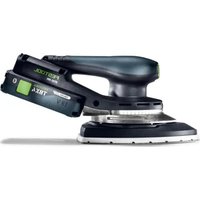
ETSC 2 150 - Sander FESTOOL - Free user manual and instructions
Find the device manual for free ETSC 2 150 FESTOOL in PDF.



User questions about ETSC 2 150 FESTOOL
0 question about this device. Answer the ones you know or ask your own.
Ask a new question about this device
Download the instructions for your Sander in PDF format for free! Find your manual ETSC 2 150 - FESTOOL and take your electronic device back in hand. On this page are published all the documents necessary for the use of your device. ETSC 2 150 by FESTOOL.
USER MANUAL ETSC 2 150 FESTOOL
en: EU Declaration of Conformity. We declare under sole responsibility that this product complies with all the relevant requirements in the following EU Directives, and following standards or normative documents were applied:
We as the manufacturer declare under our sole responsibility that the product(s) fulfill(s) all the relevant provisions of the following UK Regulations and are manufactured in accordance with the following designated standards:
S.I. 2008/1597 Supply of Machinery [Safety] Regulations 2008
S.I. 2017/1206 Radio Equipment Regulations 2017
S.I. 2016/1091 Electromagnetic Compatibility Regulations 2016
S.l. 2021/422 Restriction of the Use of Certain Hazardous Substances in Electrical and Electronic Equipment Regulations 2012
BS EN 62841-1:2015 + AC:2015 + A11:2022,
BS EN 62841-2-4:2014 + AC:2015,
BS EN 55014-1:2017 + A11:2020,
BS 55014-2:1997 + A1:2001 + A2:2008 + AC:1997,
BS EN 300 328 V2.2.2
BS EN 303 446-1 V1.2.1
BS EN 301489-1V1.9.2
BS EN 301 489-17 V3.2.4.
BS EN IEC 63000:2018
Head of Research & Development Products

Tim Weber
Head of Product Compliance
Inhaltsverzeichnis
1 Symbols. 16
2 Safety warnings. 16
3 Intended use. 17
4 Technical data. 18
5 Parts of the device. 18
6 Battery pack. 18
7 Commissioning. 18
8 Settings. 18
9 Working with the electric power tool.....20
10 Service and maintenance. 21
11 Accessories 21
12 Environment. 21
13 General information. 21
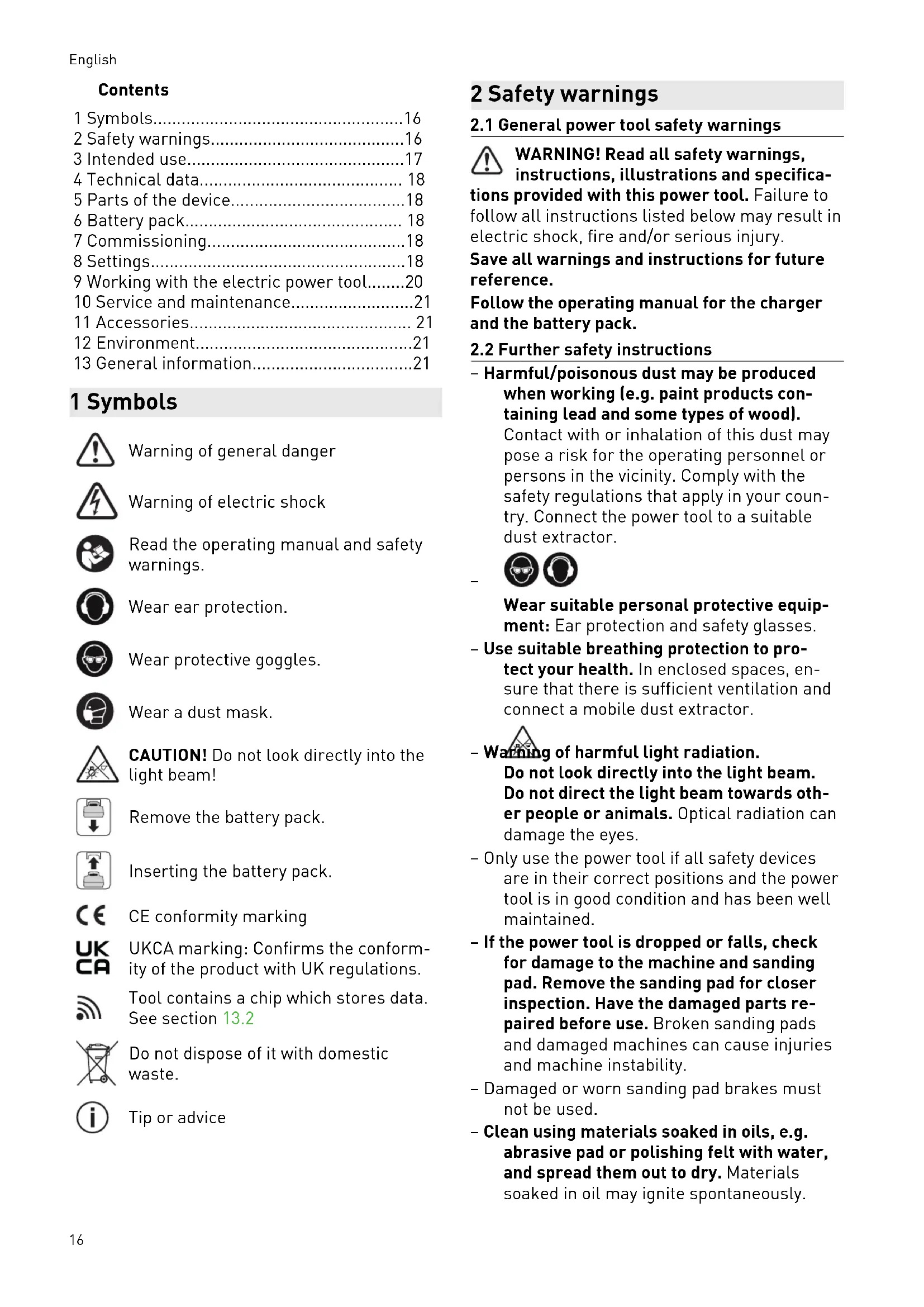
1 Symbols

Warning of general danger

Warning of electric shock

Read the operating manual and safety warnings.

Wear ear protection.

Wear protective goggles.

Wear a dust mask.

CAUTION! Do not look directly into the light beam!

Remove the battery pack.

Inserting the battery pack.

CE conformity marking

UKCA marking: Confirms the conformity of the product with UK regulations.

Tool contains a chip which stores data. See section 13.2

Do not dispose of it with domestic waste.

Tip or advice
2 Safety warnings
2.1 General power tool safety warnings

WARNING! Read all safety warnings, instructions, illustrations and specifica
tions provided with this power tool. Failure to follow all instructions listed below may result in electric shock, fire and/or serious injury.
Save all warnings and instructions for future reference.
Follow the operating manual for the charger and the battery pack.
2.2 Further safety instructions
Harmful/poisonous dust may be produced when working (e.g. paint products containing lead and some types of wood).
Contact with or inhalation of this dust may pose a risk for the operating personnel or persons in the vicinity. Comply with the safety regulations that apply in your country. Connect the power tool to a suitable dust extractor.

Wear suitable personal protective equipment: Ear protection and safety glasses.
- Use suitable breathing protection to protect your health. In enclosed spaces, ensure that there is sufficient ventilation and connect a mobile dust extractor.

- Wearing of harmful light radiation.
Do not look directly into the light beam. Do not direct the light beam towards other people or animals. Optical radiation can damage the eyes.
- Only use the power tool if all safety devices are in their correct positions and the power tool is in good condition and has been well maintained.
- If the power tool is dropped or falls, check for damage to the machine and sanding pad. Remove the sanding pad for closer inspection. Have the damaged parts repaired before use. Broken sanding pads and damaged machines can cause injuries and machine instability.
- Damaged or worn sanding pad brakes must not be used.
-
Clean using materials soaked in oils, e.g. abrasive pad or polishing felt with water, and spread them out to dry. Materials soaked in oil may ignite spontaneously.
-
Caution: Fire hazard! Prevent the material being sanded and the sander from overheating. Always empty the dust container before taking breaks from work. Grinding dust in the filter bag and/or in the filter of the mobile dust extractor may ignite spontaneously under unfavourable conditions, such as flying sparks, when sanding. There is a particular risk if the sanding dust is mixed with clear coats or polyurethane residues or other chemical substances and the material being sanded becomes hot after it has been worked on for a long time.
- Always use the power tool with a long-life dust bag or a Festool mobile dust extractor with an antistatic suction hose (AS). A slight electric shock may cause you to panic briefly and become distracted, which may result in an accident.
- Do not use power supply units to operate cordless power tools. Only use the intended battery packs. Do not use third-party chargers to charge the battery packs. The use of accessories not expressly authorised by the manufacturer can result in electric shocks and/or serious accidents.
2.3 Dealing with mixed dust containing metal and sanding damp surfaces
With mixed dust containing metal (such as dust produced from sanding paint in the automotive field) and when sanding damp surfaces, the following measures must be observed for reasons of safety:
- Connect the machine to a suitable dust extractor.
-
Regularly vacuum the motor housing of the machine to remove dust deposits.
-
Wear protective goggles.
2.4 Emission levels
The levels determined in accordance with EN 62841 are typically:
ETSC 2 125
Sound pressure level L PA = 74dB(A)
Sound power level L WA=82 dB(A)
Uncertainty K = 2.5 dB
ETSC2150
Sound pressure level L PA = 76dB(A)
Sound power level L
$$ \mathrm {W A} = 8 4 \mathrm {d B (A)} $$
Uncertainty K = 2.5 dB

CAUTION
Noise emissions created while working with the power tool may damage your hearing.
Always use ear protection.
Vibration emission level a_h (vector sum for three directions) and uncertainty K measured in accordance with EN 62841:
ETSC 2 125 ETSC 2 150
| ah | 2 m/s2 | 3.5 m/s2 |
| K | 1.5 m/s2 | 1.5 m/s2 |
The specified emission levels (vibration, noise)
- are used to compare machines.
- They are also used for making preliminary estimates regarding vibration and noise load during operation.
- They represent the primary applications of the power tool.

CAUTION
The emission values may deviate from the specified values. This is dependent on how the tool is used and the type of workpiece being machined.
Assess the actual load during the entire operating cycle.
Depending on the actual load, suitable protective measures must be defined in order to protect the operator.
3 Intended use
The sanders are designed for sanding wood, plastic, composites, paint/varnish, filler and similar materials.
With mixed dust containing metal (such as dust resulting from paint sanding in the automotive industry) and when sanding damp surfaces, special safety warnings must be observed (see chapter 2.3).
The sanders are not intended to be suitable for wet sanding and for grinding bare metal.
Material containing asbestos must not be sanded.
This power tool is suitable for use with BP Festool battery packs of the same voltage class.
4 Technical data
| Cordless eccentric sander | ETSC 2 125 | ETSC 2 150 |
| Motor voltage 18 V | --- | |
| Speed (no-load) 6000–10,000 rpm | ||
| Sanding stroke 3.5 mm | ||
| Sanding pad Dia. 125 mm | Dia. 150 mm | |
| Weight (excl. battery pack, incl. sanding pad) | 1.33 kg | 1.36 kg |
5 Parts of the device
[1-1] On/off switch
[1-2] Light switch
[1-3] Button for releasing the battery pack
[1-4] Battery pack
[1-5] Surface control light
[1-6] Sanding pad brake
[1-7] Sanding pad
[1-8] Speed control
[1-9] Handle (insulated gripping surface)
[1-10] Extractor connector
[1-11] Edge protector
[1-12] Long-life dust bag
Accessories shown or described are not always included in the scope of delivery.
The specified illustrations appear at the beginning of the Operating Instructions.
6 Battery pack
Before using the battery pack, check that the battery interface is clean. Any contamination of the battery interface may impair correct contact and lead to the contacts being damaged.
A faulty contact may result in the machine overheating or being damaged.
[2A] Remove the battery pack.
[2B] click Insert the battery pack - until it clicks into place.
Further information about the charger and battery pack with capacity indicator can be found in the corresponding operating manual.
7 Commissioning
7.1 Switching on/off
ON Press the on/off switch [1-1].
OFF Press the on/off switch [1-1].
8 Settings

WARNING
Risk of injury
- Remove the battery pack from the power tool before performing any work on the power tool.
8.1 Electronics
Temperature cut-out
The power tool switches off if it becomes too hot. It can only be switched on again once the power tool has cooled sufficiently.
Constant speed
The preselected motor speed is kept constant through electronic control. This means that, if the machine is used as intended (reasonable contact pressure), a constant sanding speed is achieved.
Speed reduction in the event of high vibrations
If high vibrations and oscillations occur at the power tool, e.g. with the use of an interface pad, the speed is automatically reduced in order to protect the power tool and the user.
Speed control
You can use the adjusting wheel [1-8] to continuously adjust the speed within the speed range (see Section 4). This enables the sanding speed to be optimally adjusted to suit the material you are working on.

Remove the battery pack.
Insert the battery pack - until it clicks into place.
Speed range by sanding task
| - Sanding with max. abrasion | 5 - 6 |
| - Sanding off old paint | |
| - Sanding wood and veneered surfaces prior to paintwork | |
| - Intermediate sanding of paintwork on surfaces | |
| - Sanding thinly applied undercoat | 4 - 5 |
| - Sanding wood with sanding cloth | |
| - Edge breaking on wooden parts | |
| - Smoothing primed wooden surfaces | |
| - Sanding solid wood and veneered edges | 3 - 4 |
| - Sanding rebate of windows and doors | |
| - Intermediate sanding of paintwork on edges | |
| - Light sanding of natural wood windows using sanding cloth | |
| - Smoothing wooden surfaces using sanding cloth before staining | |
| - Rubbing or removing excess lime-stone residue using sanding cloth | |
| - Intermediate sanding of paintwork on stained surfaces | 2 -3 |
| - Cleaning natural wood window rebates using sanding cloth | |
| - Sanding stained edges | 1 - 2 |
| - Sanding thermoplastics |
Restart protection
The built-in restart protection prevents the power tool from starting up again automatically if the power is disconnected during continuous use. To restart it, the power tool must be switched on again.
8.2 Replacing the sanding pad [3A]
Always use original Festool tools and original Festool accessories. Using low-quality tools or accessories from other manufacturers may increase the risk of injury and seriously unbalance the machine, decreasing the quality of the working results and accelerating power tool wear.
WARNING! Do not perform any structural changes to the open interior space of the power tool when the sanding pad is dismantled.
Unscrew the screw [3-2].
- Remove the sanding pad [3-1] by pulling it downwards.
- Attach the new sanding pad.
- Tighten the screw by hand [2.5 Nm].
8.3 Hardness of the sanding pad
The power tool can be fitted with sanding pads of different hardnesses to suit the surface being sanded.
Hard: Coarse and fine sanding on flat surfaces. Sanding along edges.
Soft: Universal for coarse and fine sanding, for flat and convex surfaces.
Extra-soft: Fine sanding of moulded parts, arches, radii. Do not use on edges.
8.4 Attaching sanding accessories using StickFix [3B]
The required StickFix sandpaper and StickFix sanding cloth can be attached quickly and simply to the StickFix sanding pad.
![FESTOOL ETSC 2 150 - Attaching sanding accessories using StickFix [3B] - 1](/content/2026/03/523139/images/9558ff2dc7c3bb47816f17ccc8ee34f6a487bed8d87a7073efe539253e00bedc.jpg)
CAUTION
Risk of injury from decreasing StickFix adhesion
The sanding pad accessories can come loose from the sanding pad.
Replace the sanding pad.
- Affix the self-adhesive sanding accessory [3-4] to the sanding pad [3-3].
8.5 Dust extraction

WARNING
Hazardous dust
Damage to the respiratory passage
Always work with an extractor.
Comply with national regulations.
Wear a dust mask.
Integral dust extractor with long-life dust bag
As standard, the sanders are equipped with an integral dust extractor. The sanding dust is extracted through extraction openings in the sanding pad and is collected in the dust bag.
The integral dust extraction system is not suitable for mineral or metallic types of dust. These would clog the fabric structure of the long-life dust bag, which would in turn restrict the integral dust extraction function of the sander.
Fitting the dust bag [4A]
- Fosh the dust bag [4-1] until it clicks into place.
- Tighten clamping lever [4-2].
If the suction power is decreasing, remove and empty the dust bag [4C].
English
Removing the dust bag [4B]
- do the clamping lever.
- Remove the dust bag.
Dust extraction with Festool's mobile dust extractor
To prevent having to frequently empty the dust bag when working with the power tool for a long period of time, you can connect Festool's mobile dust extractor with an extraction hose diameter of 27mm to the extractor connector [1-10].
CAUTION! If an anti-static suction hose is not used, static charge may occur. The user may receive an electric shock and the electronics of the power tool may be damaged.
The start-up mode of the mobile dust extractor can be used by connecting a Bluetooth® battery pack (see battery pack operating manual).
If the power tool is used in cordless operation with a mobile dust extractor, the battery life decreases. Reducing the suction power minimises this effect.
High suction power can impair control of the power tool. Reducing the suction power minimises this effect.
8.6 Edge protector [5]
The edge protector [5-1] stops the outer edge of the sanding pad from coming into contact with a surface (e.g. when sanding along a wall or a window), preventing machine kickback or machine damage.
- Fosh the edge protector into the groove on the machine.
- F2sh the two ends (left and right) of the edge protector into place until they click.
do both ends of the edge protector. - Remove the edge protector by pulling it forwards.
8.7 Adjusting the surface control light
When the power tool is switched on, the surface control light [1-5] switches on in the most recently used mode. The surface control light can also be controlled using the light switch [1-2] when the power tool is switched off.
Switching on
Press the light switch once.
Dimming
Press the light switch twice.
Switching off
Press the light switch three times.
Brightness and afterglow time
- Can be configured using the Festool App.
Resetting
Press the light switch for at least five seconds.
8.8 Festool App*
The power tool can be configured with the Festool App. To do this, the battery pack used must be a Bluetooth® battery pack.
The battery pack is connected via Bluetooth, see the operating manual for the battery pack.
You can find further information about operating the power tool in the Festool App.
- Not available in all countries.
9 Working with the electric power tool

WARNING
Risk of injury
Always secure the workpiece in such a manner that it cannot move while being machined.
- Do not overload the machine by pressing with excessive force! The best sanding results are achieved with moderate application pressure. The sanding performance and quality are mainly dependent on the selection of the correct abrasive.
- Hold the machine with one hand by the handle [1-9] to ensure safe guidance.
- Never work without sanding pad brake attached [1-6].
- The pad foam becomes brittle due to ageing. Before working, check the pad foam for wear.
9.1 Warning signals
Warning signals occur and the power tool switches off in the following operating states:
| Acous-tic sig-nal | Cause Action | |
| Beeps once. | Battery pack empty/incompat-ible. | Charge/change the battery pack. |
| Power tool over-loaded. | Reduce the load on the power tool. | |
| Power tool has overheated. | Once it has cooled down, re-start the power tool. | |
| Beeps contin-uously. | The power tool is faulty. | Contact the manufacturer to rectify the fault. |
10 Service and maintenance

WARNING
Risk of injury, electric shock
Always remove the battery pack from the power tool before performing any maintenance or service work.
- All maintenance and repair work which requires the motor housing to be opened should always be carried out by an authorised service workshop.
Customer service and repairs must only be carried out by the manufacturer or service workshops. You must only use original Festool spare parts.
Further information: www.festool.co.uk/service
- To ensure constant air circulation, always keep the cooling air openings in the motor housing clean and free of blockages.
- In the event of a slowdown in performance or increased vibrations, vacuum and clean cooling air openings.
- Do not clean the power tool with compressed air.
- Always keep the contacts on the power tool and battery pack clean.
10.1 Cleaning the extraction channels [6]
We recommend cleaning the extraction channels in the sander [6-1] with a small flat brush or a cloth roughly once a week (especially when sanding artificial resin putty, when sand-ing damp surfaces or plaster).
10.2 Cleaning the inside of the power tool [6]
Regularly clean the inside of the power tool at the bottom of the fan [6-3], otherwise the vibration values deteriorate as a result of the dust accumulation.
10.3 Maintaining the sanding pad and sanding pad brake [6]
The sanding pad brake [6-2] brushes against the sanding pad and prevents uncontrolled turning of the sanding pad. The sanding pad brake is almost wear-free thanks to the pins used. The sanding pad itself can become worn, however.
In the case of a decreasing braking effect, first check the sanding pad for wear and replace it if necessary. Replace the sanding pad brake if damaged.
11 Accessories
You can find the PO numbers for accessories and tools under www.festool.co.uk.
12 Environment

Do not dispose of electrical devices, used batteries and battery packs in the household waste. Recycle devices, ac-
cessories and packaging. Observe applicable national regulations.
Before disposing of used batteries, battery packs and lamps, separate them from the electrical device without destroying them. This means they can be recycled efficiently.
In accordance with the European Directive on waste electrical and electronic equipment and implementation in national law, used electrical devices must be collected separately and handled in for environmentally friendly recycling. Information on the collection points can be viewed at www.festool.co.uk/recycling.
Information on critical materials:
www.festool.co.uk/reach
13 General information
13.1 License information
License information on any open source licenses used in the product can be found in the Festool app* at Information > Power tool open source licenses.
- Not available in all countries.
13.2 Information on data privacy
The power tool contains a chip which automatically stores machine and operating data. The
English
data saved cannot be traced back directly to an individual.
The data can be read in a contactless manner using special devices and shall only be used by Festool for fault diagnosis, repair and warranty processing and for quality improvement or enhancement of the power tool. The data shall not be used in any other way without the express consent of the customer.
13.3 Bluetooth®
The Bluetooth® word mark and the logos are registered trademarks of Bluetooth SIG, Inc.; they are used by TTS Tooltechnic Systems AG & Co. KG, and therefore by Festool, under licence.
Imported into the UK by
Festool UK Ltd
1 Anglo Saxon Way
Bury St Edmunds
IP30 9XH
Great Britain
Sommaire
Protection anti-redemarrage
[1-11] Randbescherming
[1-12] Longlife-stofzak
Varning for allman risk

Varning for elstötar

Montere stovpose [4A]
Skyvinn stovposen [4-1]paa langt det gär.
SAm klemspaken [4-2].