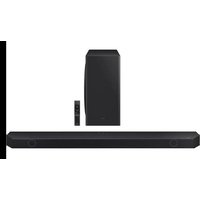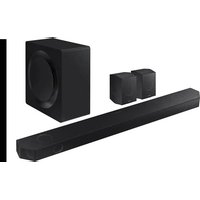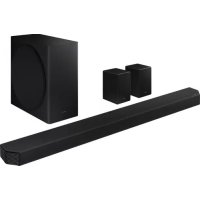
HWQ950A - Soundbar SAMSUNG - Free user manual and instructions
Find the device manual for free HWQ950A SAMSUNG in PDF.



User questions about HWQ950A SAMSUNG
0 question about this device. Answer the ones you know or ask your own.
Ask a new question about this device
Download the instructions for your Soundbar in PDF format for free! Find your manual HWQ950A - SAMSUNG and take your electronic device back in hand. On this page are published all the documents necessary for the use of your device. HWQ950A by SAMSUNG.
USER MANUAL HWQ950A SAMSUNG
Thank you for purchasing this Samsung product.
To receive more complete service, please register your product at
www.samsung.com/register
SAFETY INFORMATION
SAFETYWARNINGS
TO REDUCE THE RISK OF ELECTRIC SHOCK, DO NOT REMOVE THE COVER (OR BACK).
NO USER-SERVICEABLE PARTS ARE INSIDE. REFER SERVICING TO QUALIFIED SERVICE PERSONNEL.
Refer to the table below for an explanation of symbols which may be on your Samsung product.
| CAUTION RISK OF ELECTRIC SHOCK. DO NOT OPEN. | |
| This symbol indicates that high voltage is present inside. It is dangerous to make any kind of contact with any internal part of this product. | |
| This symbol indicates that this product has included important literature concerning operation and maintenance. | |
| Class II product: This symbol indicates that a safety connection to electrical earth (ground) is not required. If this symbol is not present on a product with a power cord, the product MUST have a reliable connection to protective earth (ground). | |
| AC voltage: Rated voltage marked with this symbol is AC voltage. | |
| DC voltage: Rated voltage marked with this symbol is DC voltage. | |
| Caution. Consult Instructions for use: This symbol instructs the user to consult the user manual for further safety related information. |
WARNING
- To reduce the risk of fire or electric shock, do not expose this appliance to rain or moisture.
CAUTION
TO PREVENT ELECTRIC SHOCK, MATCH WIDE BLADE OF PLUG TO WIDE SLOT, FULLY INSERT.
- This apparatus shall always be connected to a AC outlet with a protective grounding connection.
- To disconnect the apparatus from the mains, the plug must be pulled out from the mains socket, therefore the mains plug shall be readily operable.
- Do not expose this apparatus to dripping or splashing. Do not put objects filled with liquids, such as vases, on the apparatus.
- To turn this apparatus off completely, you must pull the power plug out of the wall socket. Consequently, the power plug must be easily and readily accessible at all times.
PRECAUTIONS
- Ensure that the AC power supply in your house complies with the power requirements listed on the identification sticker located on the bottom of your product. Install your product horizontally, on a suitable base (furniture), with enough space around it for ventilation (7 10~cm) . Make sure the ventilation slots are not covered. Do not place the unit on amplifiers or other equipment which may become hot. This unit is designed for continuous use. To fully turn off the unit, disconnect the AC plug from the wall outlet. Unplug the unit if you intend to leave it unused for a long period of time.
- During thunderstorms, disconnect the AC plug from the wall outlet. Voltage peaks due to lightning could damage the unit.
- Do not expose the unit to direct sunlight or other heat sources. This could lead to overheating and cause the unit to malfunction.
- Protect the product from moisture (i.e. vases), and excess heat (e.g. a fireplace) or equipment creating strong magnetic or electric fields. Unplug the power cable from the AC wall socket if the unit malfunctions. Your product is not intended for industrial use. It is for personal use only. Condensation may occur if your product has been stored in cold temperatures. If transporting the unit during the winter, wait approximately 2 hours until the unit has reached room temperature before using.
- The battery used with this product contains chemicals that are harmful to the environment. Do not dispose of the battery in the general household trash. Do not expose the battery to excess heat, direct sunlight, or fire. Do not short circuit, disassemble, or overheat the battery.
CAUTION: Danger of explosion if the battery is replaced incorrectly. Replace only with the same or equivalent type.
Fabric cleaning
Remove any dirt or stain on the product surface immediately.
Removing and cleaning can be less effective for some substances or if left for a prolonged time.
CAUTION
-
Use a vacuum cleaner or an adhesive lint roller to remove dust, handprints, and the likes.
-
Some cleaning brushes may damage the product, depending on the materials they contain.
-
Towels and cleaning clothes may leave lint or dirt on the product.
-
Do not use a nail or other tools to scratch the dirt off. It may damage the fabric.
-
To remove oil or liquid stains, use a clean white cloth moist with water. If the stain persists, wipe it with a mixture of water and neutral detergent (such as dishwashing soaps) and a cloth.
-
A non-neutral detergent or cleaner may cause discoloration or fabric damage.
- After cleaning, use a dry cloth or hairdryer to dry the area.
- Do not use excessive force to avoid discoloration or fabric damage.
CONTENTS
01 Checking the Components 6
02 Product Overview 7
Top Panel of the Soundbar. 7
Bottom Panel of the Soundbar 7
03 Using the Soundbar Remote Control 9
Inserting Batteries before using the Remote Control (AA batteries X 2). 9
How to Use the Remote Control. 9
Active Voice Amplifier (AVA) 10
Using the Hidden Buttons (Buttons with more than one function). 10
Output specifications for the different sound effect modes 11
Adjusting the Soundbar volume with a TV remote control 12
04 Connecting the Soundbar 13
Connecting the power and units. 13
-RecommendedSpeakerLayout 14
- Manually connecting the Subwoofer or Surround Speakers 14
- LED Indicator Lights on the Rear of Subwoofer and Surround Speakers 15
- Auto EQ. 16
05 Using a wired connection to the tv
Method 1. Connecting with HDMI 17
- Connecting the TV that supports HDMI ARC (Audio Return Channel) 17
Method 2. Connecting using an Optical Cable 18
06 Using a wireless connection to the TV
Method 1. Connecting via Bluetooth 19
Method 2. Connecting via Wi-Fi 20
07 Connecting an External Device
Method 1. Connecting using an HDMI Cable (Capable of Dolby Atmos decoding and playback). 21
Method 2. Connecting using an Optical Cable 22
08 Connecting a Mobile Device
Method 1. Connecting via Bluetooth 23
Method 2. Connecting via Wi-Fi (Wireless Network). 24
Getting Started with Amazon Alexa (Built-in Alexa). 25
Getting Started with Alexa on Amazon Product (Works with Alexa). 26
Using the Tap Sound 27
09 Connecting To Apple AirPlay 2
Connect and use with an Apple product 28
10 Installing the Wall Mount 29
Installation Precautions 29
Wallmount Components 29
Installing the Surround Speakers on a Wall 30
11 Installing the Soundbar above a TV Stand 30
Component 30
12 Software Update 31
Auto Update. 31
USB Update 31
Initialisation 32
13 Troubleshooting 32
14 Licence 34
15 Open Source Licence Notice 34
16 Important Notes About Service 34
17 Specifications and Guide 35
Specifications 35
01 CHECKING THE COMPONENTS

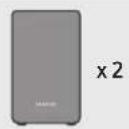
Soundbar Main Unit Soundbar Remote Control / Batteries Subwoofer

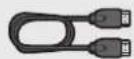
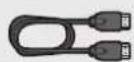
HDMI Cable

Surround Speaker (Left / Right)
Power Cord (Subwoofer, Surround Speaker, Soundbar)


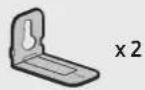
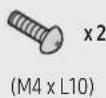
Wall Mount Guide Holder-Screw Screw

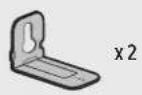
Bracket-Wall Mount Rubber-Foot
For more information about the power supply and power consumption, refer to the label attached to the product. (Label: Rear of the Soundbar Main Unit)
To purchase additional components or optional cables, contact a Samsung Service Centre or Samsung Customer Care.
For more information about the wallmount or rubber-foot, see pages 29-31.
- Design, specifications, and App screen are subject to change without prior notice.
The appearance of the accessories may differ slightly from the illustrations above.
02 PRODUCT OVERVIEW
Top Panel of the Soundbar
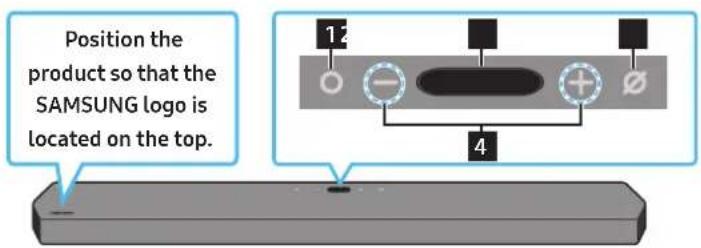
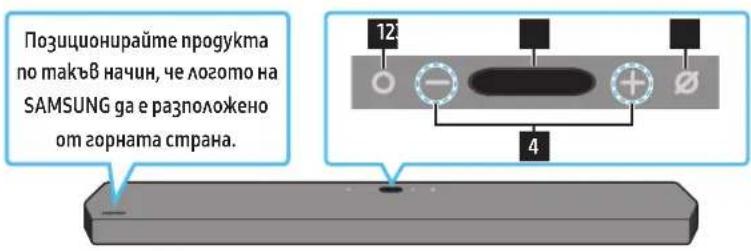
| 1 | ○ (Multi Function) Button • In standby mode, press the ○ Multi Function) button to turn on the Soundbar. • Press the ○ Multi Function) button to change the input source. |
| 2 | Display Displays the product's status and current mode. D.IN → HDMI1 → HDMI 2 → Wi-Fi → BT |
| 3 | ○ (Mic On/Off) Button Press the button to turn the microphone on or off. |
| 4 | - + (Volume) Button Adjusts the volume. |
- When you plug in the AC cord, the power button will begin working in 4 to 6 seconds.
- When you turn on this unit, there will be a 4 to 5 second delay before it produces sound.
If you hear sounds from both the TV and Soundbar, go to the Settings menu for the TV audio and change the TV speaker to External Speaker.
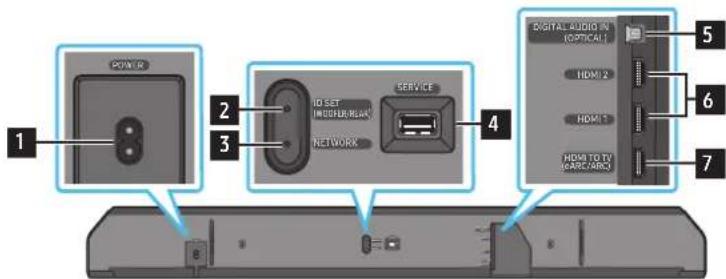
Bottom Panel of the Soundbar
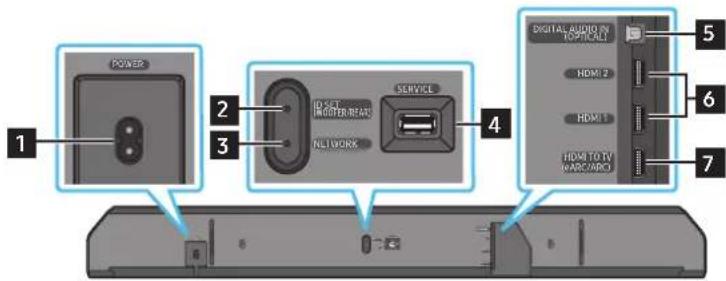
| 1 POWER Connect the Soundbar's AC power cable. (See page 13) |
| 2 D SET (WOOFER/REAR) Press to connect the Soundbar to surround speakers and a subwoofer wirelessly. |
| 3 NETWORK Press to connect to a wireless network (Wi-Fi) via the SmartThings app. |
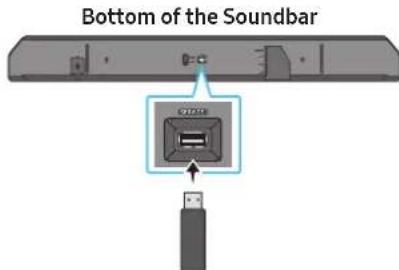
| 4 SERVICE Connect a USB storage device to upgrade the product's software. |
| 5 DIGITAL AUDIO IN (OPTICAL) Connect to the digital (optical) output of an external device. (See page 22) |
| 6 HDMI 1 / HDMI 2 Inputs digital video and audio signals simultaneously using an HDMI cable. Connect to the HDMI output of an external device. (See page 21) |
- When disconnecting the power cord from a wall outlet, pull the plug. Do not pull the cable.
- Do not connect this unit or other components to an AC outlet until all connections between components are complete.
03 USING THE SOUNDBAR REMOTE CONTROL
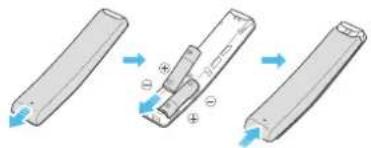
Inserting Batteries before using the Remote Control (AA batteries X 2)
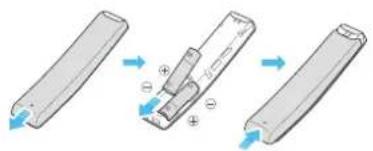
Slide the back cover in the direction of the arrow until it is completely removed. Insert 2 AA batteries (1.5V) oriented so that their polarity is correct. Slide the battery cover back into position.
How to Use the Remote Control
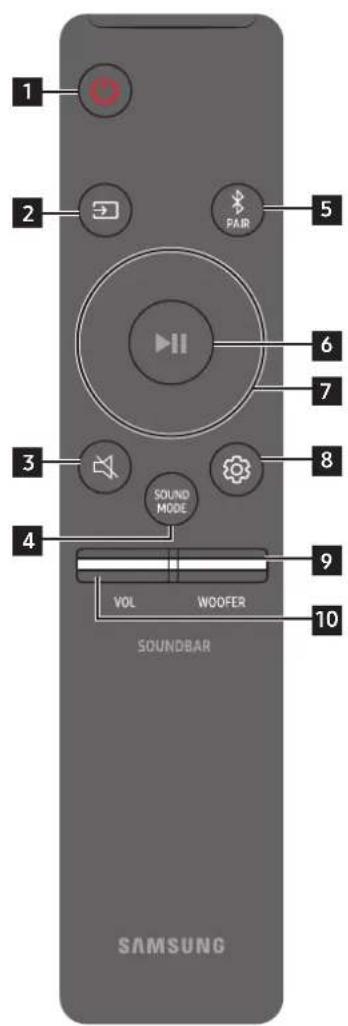
| 1 | Power | Turns the Soundbar on and off. • Auto Power Down Function The unit turns off automatically in the following situations: • In D.IN / HDMI1 / HDMI2 / Wi-Fi / BT mode if there is no audio signal for 18 minutes. |
| 2 | Source | Press to select a source connected to the Soundbar. • Voice Feedback On/Off You can turn on or off the Voice Feedback. Press and hold the (Source) button on the remote control for 5 seconds while the Soundbar is off (Standby mode). Each time you change the Voice Feedback setting, the OLED Display will show "AUI OFF" (Default) or "AUI ON". |
| 3 | Mute | Press the (Mute) button to mute the sound. Press it again to unmute the sound. |
| 4 | SOUND MODE | You can select the desired sound mode by choosing STANDARD, SURROUND, GAME PRO, or ADAPTIVE SOUND. • STANDARD Outputs the original sound. • SURROUND Provides a wider sound field than standard. • GAME PRO Provides stereoscopic sound to immerse you in the action while gaming. • ADAPTIVE SOUND Analyzes the content in real time and automatically provides the optimal sound field based on the characteristics of the content. |
| 5 | PAIR | Switch the Soundbar to Bluetooth pairing mode. Press the button and wait for the "BTPAIRING" screen to connect to a new Bluetooth device. |
| Bluetooth PAIR | ||
| 6 | Play / Pause | You can also play or pause music by pressing the button. |
| 7 | Up/Down/Left/Right | Press the indicated areas to select Up/Down/Left/Right. Press Up/Down/Left/Right on the button to select or set functions. • Music Skip Press the Right button to select the next music file. Press the Left button to select the previous music file. • ID SET Use this option when the Subwoofer or Surround Speakers are not connected or need reconnection. While powered off, press and hold the Up button for 5 seconds to perform ID SET. (See page 14.) |
| 8 | Sound Control | When pressed, the setting items such as AUTO EQ, AVA, TREBLE, BASS, SYNC, CENTER LEVEL, SIDE LEVEL, FRONT TOP LEVEL, REAR LEVEL, REAR TOP LEVEL, REAR SIDE LEVEL, and VIRTUAL ON/OFF are displayed in sequence. The desired item can be adjusted using the Up/Down buttons. • To control the volume of the treble or bass sound, select TREBLE or BASS in Sound Settings, and then adjust the volume between -6~+6 by using the Up/Down buttons. • Press and hold the @Sound Control button for about 5 seconds to adjust the sound for each frequency band. 150Hz, 300Hz, 600Hz, 1.2kHz, 2.5kHz, 5kHz, and 10kHz are selectable using the Left/Right buttons and each can be adjusted to a setting between -6 to +6 using the Up/Down buttons. (Make sure the Sound mode is set to "STANDARD") • To control the volume of the each speaker select CENTER LEVEL, SIDE LEVEL, or FRONT TOP LEVEL in Sound Settings, and then adjust the volume between -6~+6 by using the Up/Down buttons. • If the video on the TV and audio from the Soundbar are not synchronized, select SYNC in Sound Control, and then set the audio delay between 0~300 milliseconds by using the Up/Down buttons. • SYNC is only supported for some functions. • If Surround Speakers are connected, select REAR LEVEL, REAR TOP LEVEL, or REAR SIDE LEVEL and then use the Up/Down buttons to adjust the volume within a -6 to +6 range. • The VIRTUAL Speaker function can be turned ON/OFF by using the Up/Down buttons. • You can use the AUTO EQ function if a subwoofer is connected. |
| 9 | WOOFER LEVEL | Push the button up or down to adjust the level of the woofer to -12 or between -6 to +6. To set the woofer volume level to 0 (Default), press the button. |
| 10 | VOLUME | Push the button up or down to adjust the volume. • Mute Press the VOL button to mute the sound. Press it again to unmute the sound. |
Active Voice Amplifier (AVA)
- Analyses external noise in real time while soundbar is playing, so that voice audio can always be heard clearly.
- No data is saved during the analysis.
Using the Hidden Buttons (Buttons with more than one function)
| Hidden Button | Reference page | |
| Remote Control Button Function | ||
| WOOFER (Up) TV remote control | On/Off (Standby) page 12 | |
| Up ID SET page 14 | ||
| ® (Sound Control) | 7 Band EQ page 10 | |
Output specifications for the different sound effect modes
| Effect Input | Output | |
| With Subwoofer & Surround Speaker | ||
| STANDARD | 2.0 ch 2.1 ch | |
| 5.1 ch 5.1 ch / 7.1 ch (DTS) | ||
| 7.1 ch 7.1 ch | ||
| Dolby Atmos®, DTS:X 7.1.4 ch | ||
| SURROUND | 2.0 ch 11.1.4 ch | |
| 5.1 ch 11.1.4 ch | ||
| 7.1 ch 11.1.4 ch | ||
| Dolby Atmos®, DTS:X 11.1.4 ch | ||
| GAME PRO | 2.0 ch 11.1.4 ch | |
| 5.1 ch 11.1.4 ch | ||
| 7.1 ch 11.1.4 ch | ||
| Dolby Atmos®, DTS:X 11.1.4 ch | ||
| ADAPTIVE SOUND | 2.0 ch 11.1.4 ch | |
| 5.1 ch 11.1.4 ch | ||
| 7.1 ch 11.1.4 ch | ||
| Dolby Atmos®, DTS:X 11.1.4 ch |
The Surround Speakers will not produce sounds for 2 channel output while STANDARD mode is in use. To enable sound for the Surround Speakers, change the effect mode to SURROUND.
Adjusting the Soundbar volume with a TV remote control
Adjust the Soundbar volume using the TV's remote control.
This function can be used with IR remote controls only. Bluetooth remote controls (remote controls that require pairing) are not supported.
- Set the TV speaker to External Speaker to use this function.
- Manufacturers supporting this function: VIZIO, LG, Sony, Sharp, PHILIPS, PANASONIC, TOSHIBA, Hisense, RCA
- Turn Off the Soundbar.
- Push up and hold the WOOFER button for 5 seconds. Each time you push the WOOFER button up and hold it for 5 seconds, the mode switches in the following order: "OFF-TV REMOTE" (Default mode), "SAMSUNG-TV REMOTE", "ALL-TV REMOTE".
| Remote Control Button Display Status | ||
| (Default mode)OFF-TV REMOTE | Disable the TV remote control. | |
| SAMSUNG-TV REMOTE | Enable a Samsung TV's IR remote control. | |
| ALL-TV REMOTE | Enable a third-party TV's IR remote control. | |
04 CONNECTING THE SOUNDBAR
Connecting the power and units
Use the Power cord to connect the Subwoofer, Surround Speakers, and Soundbar to an electrical outlet in the following order:
For more information about the required electrical power and power consumption, refer to the label attached to the product. (Label: Rear of the Soundbar Main Unit)
- Connect the Power cord to the Subwoofer.
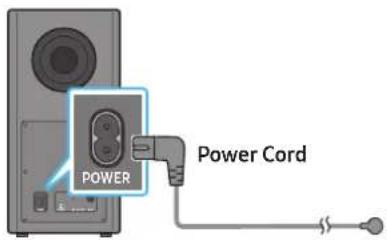
Rear of Subwoofer
- Connect the power cord to the Left and Right Surround Speakers.
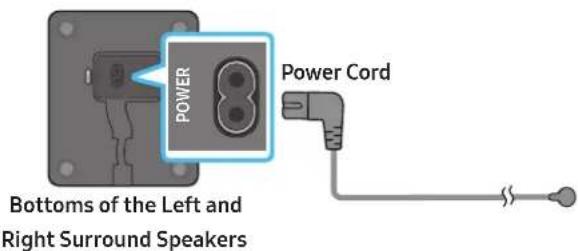
- Connect the Power cord to the Soundbar.
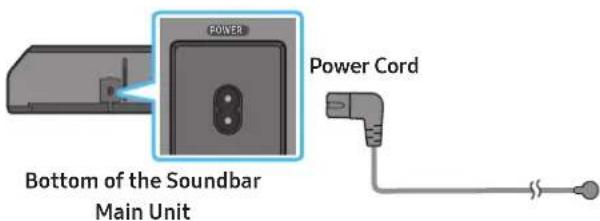
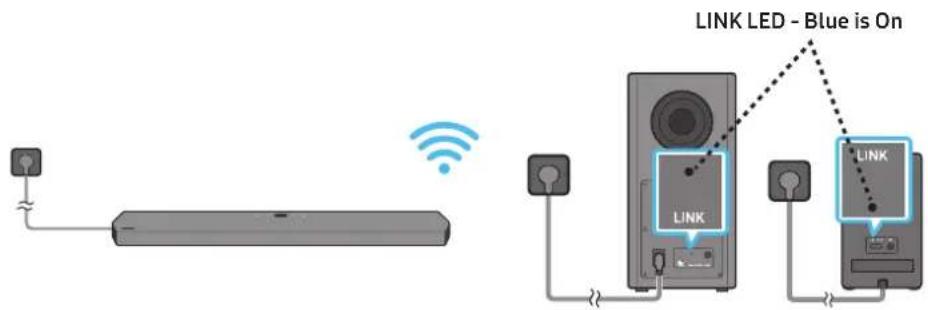
- Connect power to the Soundbar, Subwoofer and Surround Speakers. The Subwoofer and Surround Speakers are automatically connected when the Soundbar is turned on.
NOTE
- Connect the Subwoofer and Surround Speakers power before connecting to the Soundbar. The Subwoofer and Surround Speakers will be automatically connected when turning on the Soundbar.
- If you unplug and reconnect the power cord when the product is turned on, the Soundbar turns on automatically.
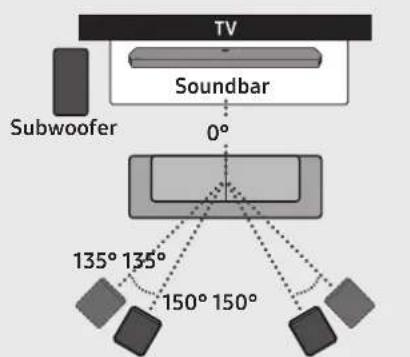
Surround Speaker L Surround Speaker R
CAUTION
- Wireless receiving antennas are built into the wireless subwoofer and surround speakers. Keep the units away from water and moisture.
- For optimal listening performance, make sure that the areas around the wireless subwoofer and surround speakers locations are clear of any obstructions.
Manually connecting the Subwoofer or Surround Speakers
Before performing the manual connection procedure below:
-
Check whether the power cables for the Soundbar and subwoofer or Surround Speakers are connected properly.
Make sure that the Soundbar is turned off. -
Turn off the Soundbar main.
-
Press and hold ID SET on the rear of the subwoofer and surround speakers for at least 5 seconds.
-
The red indicator at the rear of each speaker turns off and the blue indicator blinks.
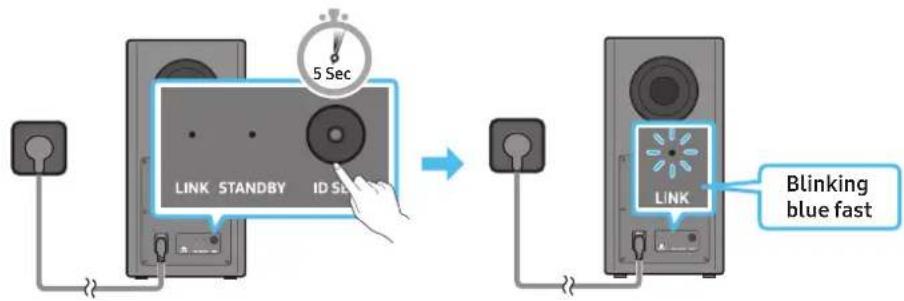
Rear of Subwoofer Rear of Subwoofer
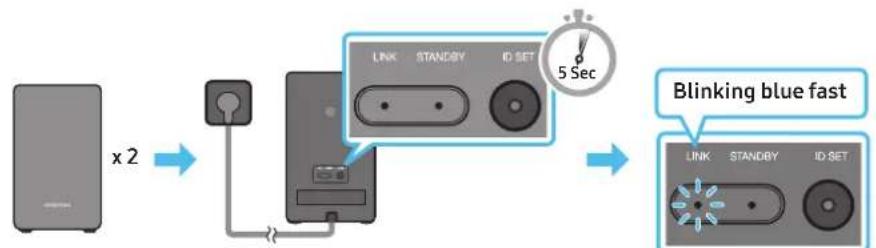
Rear of the Left and Right Surround Speakers
-
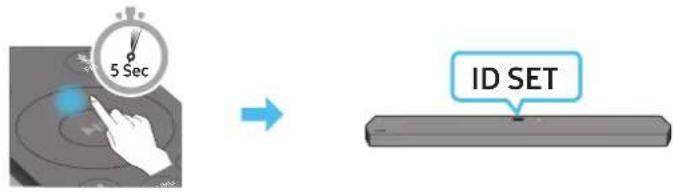
Press the Up button on the remote control for 5 seconds.
-
The ID SET message appears on the display of the Soundbar for a moment, and then it disappears.
- The Soundbar will automatically power on when ID SET is complete.
- Check if the LINK LED is solid blue (connection complete).
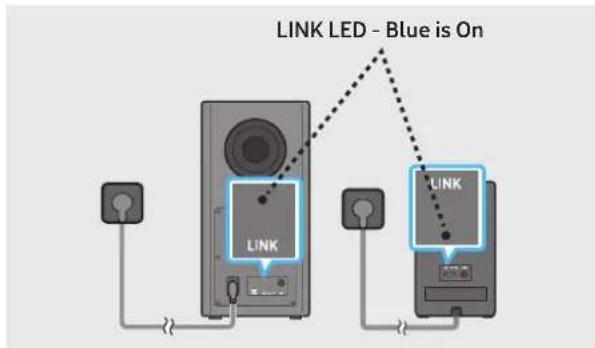
The LINK LED indicator stops blinking and glows a solid blue when a connection is established between the Soundbar and the Wireless Subwoofer, surround speakers.
LED Indicator Lights on the Rear of Subwoofer and Surround Speakers
| LED Status Description | |||
| Blue LINK STANDBY ID SET | On | Successfully connected (normal operation) | - |
| Blinking Recovering the connection | Check if the power cable attached to the main Soundbar unit is connected properly or wait about 5 minutes. If blinking persists, try manually connecting the subwoofer and Surround Speakers. See page 14. | ||
| Red LINK STANDBY ID SET | On | Standby (with the Soundbar main unit turned off) | Check if the power cable attached to the main Soundbar unit is connected properly. |
| Connection failed | Connect again. See the instructions for manual connection on page 14. | ||
| Red and blue LINK STANDBY ID SET | Blinking Malfunction | See the contact information for the Samsung Service Centre in this manual. | |
NOTE
If the main unit is powered off, the wireless subwoofer will go into stand-by mode and the STANDBY LED on the rear of the sub-woofer will turn red after blinking in blue several times.
If you use a device that uses the same frequency as the Soundbar near the Soundbar, interference may cause some sound interruption.
- The maximum transmission distance of the main unit's wireless signal is about 10m , but may vary depending on your operating environment. If a steel-concrete or metallic wall is between the main unit and the wireless subwoofer, the system may not operate at all because the wireless signal cannot penetrate metal.
CAUTION
- Wireless receiving antennas are built into the wireless subwoofer and Surround Speakers. Keep the unit away from water and moisture.
- For optimal listening performance, make sure that the area around the wireless subwoofer and the Surround Speakers are clear of any obstructions.
Auto EQ
Samsung's Auto EQ Technology uses a microphone mounted in the subwoofer to detect and correct low-frequency response peaks caused by the room dimensions and the subwoofer location. The result will be a more neutral overall low-frequency response.
- Subwoofer should be placed with a minimum of 3'' (8 cm) clearance from each side to the nearest boundary.
- You must keep the room as quiet as possible while operating the Auto EQ tuning.
- Do not use any buttons until the Auto EQ tuning is complete.
- Auto EQ tuning takes about 2 minutes.
- During Auto EQ tuning, there is no sound from the Soundbar's main unit and rear speakers.
If you are using the function for the first time
- Press the (Sound Control) button until Auto EQ is selected.
- Press the Up/Down buttons to select Tuning, and then press the button.
-
Tuning will start, and the progress appears in percentage.
-
To cancel tuning, press the Up, Down, Left, Right or button, and then press the button to confirm.
- If the tuning is failed, LED blinks in red.
- If the tuning is successful, LED blinks in blue.
If you have done the tuning process
- Press the (Sound Control) button until Auto EQ is selected.
- Press the Up/Down buttons to select Tuning, and then press the button.
-
Press the Up/Down buttons to select one of the following options.
-
On: Turn on the previously tuned EQ settings.
- Off: Turn on the default EQ settings.
- Tuning: Start the tuning process again.
05 USING A WIRED CONNECTION TO THE TV
Method 1. Connecting with HDMI

CAUTION
- When both the HDMI cable and optical cable are connected, the HDMI signal is received first.
To connect the HDMI cable between the TV and Soundbar, be sure to connect the terminals marked ARC. Otherwise, the TV sound may not be output.
The recommended cable is High Speed HDMI Cable with Ethernet.
Connecting the TV that supports HDMI ARC (Audio Return Channel)
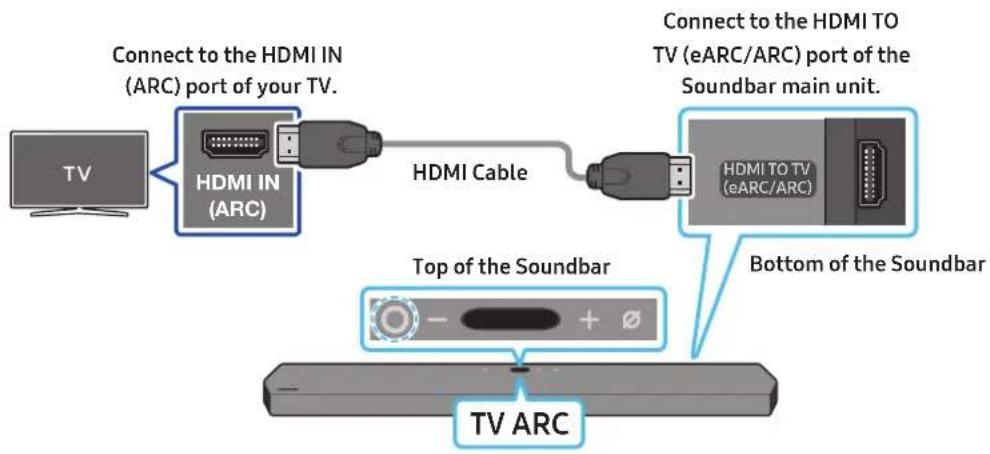
- With the Soundbar and TV turned off, connect the HDMI cable as shown in the figure.
- Turn on the Soundbar and TV.
-
"TVARC" appears in the display window of the Soundbar main unit and the Soundbar plays TV sound.
-
When the TV sound is not output, press the (Multi Function) button at the top of the Soundbar or the (Source) button on the remote control to select the "D.IN" mode. The screen displays "D.IN" and "TV ARC" in sequence, and TV sound is played.
- When connecting a TV that supports the eARC function, "eARC" appears on the display and the sound is heard.
To connect with eARC, the eARC function in the TV menu should be set to On. Refer to the TV user manual for details on setting. (e.g. Samsung TV: Home () Settings () Sound Expert Settings HDMI-eARC Mode (Auto))
If "TV ARC" does not appear in the display window of the Soundbar main unit, confirm that the HDMI cable is connected to the correct port. - Use the volume buttons on the TV's remote control to change the volume on the Soundbar.
NOTE
- When you connect the TV that supports the HDMI ARC (Audio Return Channel) to the Soundbar with an HDMI cable, you can transmit the digital video and audio data without connecting a separate optical cable.
We recommend you use a coreless HDMI cable if possible. If you use a cored HDMI cable, use one whose diameter is less than 14 mm. - This function is not available if the HDMI cable does not support ARC.
- When the audio in a broadcast is encoded in Dolby Digital and the "Digital Output Audio Format" on your TV is set to PCM, we recommend that you change the setting to Dolby Digital. When the setting on the TV is changed, you will experience better sound quality. (The TV menu may use different words for Dolby Digital and PCM depending on the TV manufacturer.)
Method 2. Connecting using an Optical Cable
Pre-connection Checklist
- When both the HDMI cable and optical cable are connected, the HDMI signal is received first.
- When you use an optical cable and the terminals have covers, be sure to remove the covers.

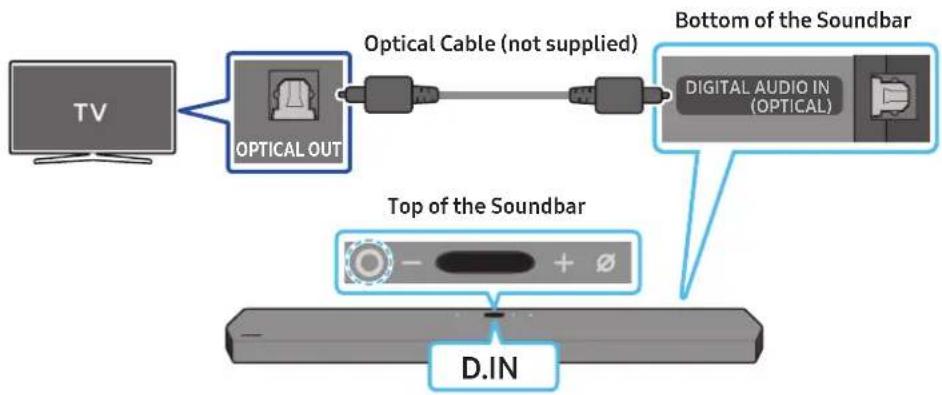
- With the TV and Soundbar turned off, connect the DIGITAL AUDIO IN (OPTICAL) port on the Soundbar and the OPTICAL output port on the TV with the optical cable (not supplied), as shown in the figure.
- Turn on the Soundbar and TV.
- Press the (Multi Function) button at the top of the Soundbar or the (Source) button on the remote control to select the "D.IN" mode.
- The TV sound is output from the Soundbar.
Using the Q-Symphony Function
For Q-Symphony, the Soundbar syncs with a Samsung TV to output sound through two devices for optimum surround effect. When the Soundbar is connected, the menu, "TV+Soundbar" appears under the Sound Output menu of the TV. Select the corresponding menu.
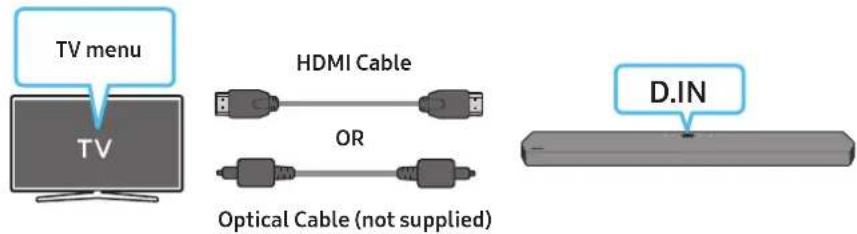
- TV menu example: TV + [AV] Soundbar series name (HDMI)
NOTE
It can operate according to the Codec supported by TV.
- This function is supported only when the HDMI Cable or Optical Cable (not supplied) is connected.
- This function is available in some Samsung TVs and some Soundbar models.
- When using Q-Symphony, you can only choose GAME PRO or ADAPTIVE SOUND.
Using the Spacefit sound
Provides optimized sound quality by analyzing the listening spaces.
To enable this function, turn on the Adaptive Sound+ mode on your Samsung TV menu.
(Home ( Settings ( General Intelligent Mode Settings Adaptive Sound+)
NOTE
The sound mode on your Soundbar will automatically change to Adaptive Sound+ if you enable the Adaptive Sound+ mode on your TV.
- This function works when the Soundbar connects to some of the Samsung TVs.
06 USING A WIRELESS CONNECTION TO THE TV
Method 1. Connecting via Bluetooth
When a Samsung TV is connected using Bluetooth, you can hear stereo sound without the hassle of cabling.
- Only one Samsung TV can be connected at a time.
Samsung TV that supports Bluetooth can be connected. Check the specifications of your TV.
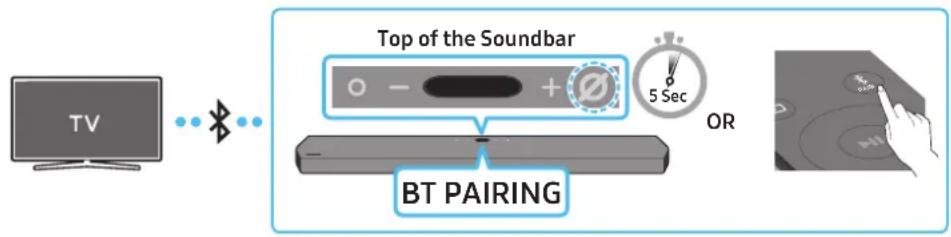
The initial connection
- Press the PAIR button on the Soundbar remote control to enter the "BT PAIRING" mode.
(OR) a. Press the (Multi Function) button on the top panel and then select "BT".
"BT" changes to "BTPAIRING" in a few seconds automatically or changes to "BT READY" if there is a connect record.
b. When "BT READY" appears, press and hold the (Mic On/Off) button on the top panel of the Soundbar for more than 5 seconds to display "BT PAIRING".
- Select Bluetooth mode on the Samsung TV.
(e.g. Home (@) Settings (@) Sound Sound Output Bluetooth SpeakerList [AV] Samsung Soundbar Q950A / Q960A (Bluetooth)) - Select "[AV] Samsung Soundbar Q950A / Q960A" from the list on TV's screen.
An available Soundbar is indicated with "Need Pairing" or "Paired" on the TV's Bluetooth device list. To connect the Samsung TV to the Soundbar, select the message, and then establish a connection. - When the Samsung TV is connected, [TV Name] "BT" appears on the Soundbar's top display.
- You can now hear Samsung TV sound from the Soundbar.
After you have connected the Soundbar to your Samsung TV the first time, use the "BT READY" mode to reconnect.
If the device fails to connect
If you have an existing Soundbar (e.g., [AV] Samsung Soundbar Q950A / Q960A) on the list of speakers on the Samsung TV, delete it.
- Then repeat steps 1 through 3.
Disconnecting the Soundbar from the Samsung TV
Press the (Multi Function) button at the top of the Soundbar or the (Source) button on the remote control to select the mode other than "BT".
- Disconnecting takes time because the Samsung TV must receive a response from the Soundbar.
(The time required may differ, depending on the Samsung TV model.)
What is the difference between BT READY and BT PAIRING?
- BT READY: In this mode, you can reconnect any Samsung TV or mobile device that was connected before.
- BTPAIRING: In this mode, you can connect a new device to the Soundbar.
(Press the PAIR button on the Soundbar remote control or press and hold the (Mic On/Off) button on the top of the Soundbar for more than 5 seconds while the Soundbar is in "BT" mode.)
Notes on Bluetooth connection
- Locate a new device within 1m to connect via Bluetooth communication.
- If asked for a PIN code when connecting a Bluetooth device, enter <0000>.
- The Soundbar automatically turns off after 18 minutes in the Ready state.
-
The Soundbar may not perform Bluetooth search or connection correctly under the following circumstances:
-
If there is a strong electrical field around the Soundbar.
- If several Bluetooth devices are simultaneously paired with the Soundbar.
- If the Bluetooth device is turned off, not in place, or malfunctions.
Electronic devices may cause radio interference. Devices that generate electromagnetic waves must be kept away from the Soundbar main unit - e.g., microwaves, wireless LAN devices, etc.
Method 2. Connecting via Wi-Fi
Pre-connection Checklist
- Wi-Fi connection is available only on Samsung TV.
- Check whether the wireless router (Wi-Fi) is turned on and the TV is connected to the router.
- The TV and Soundbar must be connected to the same wireless network (Wi-Fi).
If your wireless router (Wi-Fi) uses a DFS channel, you will not be able to establish a Wi-Fi connection between the TV and Soundbar. Contact your Internet service provider for details. -
Because the menus may differ depending on the year of manufacture, refer to your TV manual.
To connect the TV to the Soundbar via Wi-Fi, connect the Soundbar to the wireless router first. See page 24, for details on how to establish a Wi-Fi connection. -
For more information about Wi-Fi connection to the Soundbar, see page 24, "Method 2. Connecting via Wi-Fi (Wireless Network)".
-
Change the input source of the TV by using the Audio menu to Soundbar.
Samsung TVs released in 2017 or later
Home ( ) Settings ( ) Sound Sound Output [AV] Samsung Soundbar Q950A / Q960A (Wi-Fi)
07 CONNECTING AN EXTERNAL DEVICE
Method 1. Connecting using an HDMI Cable (Capable of Dolby Atmos decoding and playback)
Pre-connection Checklist
- If the Audio Output options include Secondary Audio, make sure Secondary Audio is set to Off.
Make sure that the content supports Dolby Atmos®.
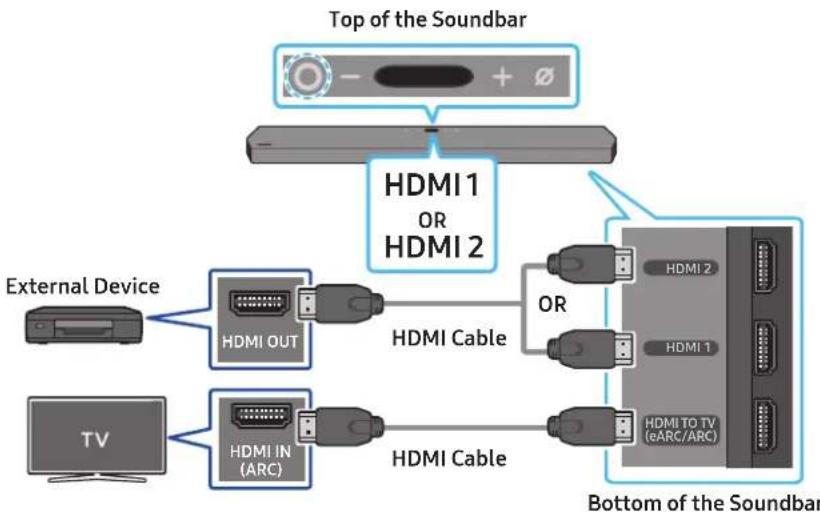
- Use an HDMI cable to connect the HDMI OUT port on the external device and the HDMI port on the bottom of the Soundbar.
- Use an HDMI cable to connect the HDMI IN port of the TV and the HDMI TO TV (eARC/ARC) port on the bottom of the Soundbar.
- Turn on the Soundbar, TV, and the external device.
- Press the (Multi Function) button on the top of the Soundbar or the (Source) button on the remote control to select "HDMI 1" or "HDMI 2" mode.
- The Soundbar display indicates that "HDMI 1" or "HDMI 2" mode is currently selected and the Soundbar will start playing sounds.
NOTE
- When you use Dolby Atmos®: If the input source is Dolby Atmos®, 11.1.4 channels are outputted.
- When Dolby Atmos® is activated, "DOLBY ATMOS" appears in the top display.
- Configuring Dolby Atmos® on your BD player or other device
Open the audio output options on the settings menu of your BD player or other device and make sure that "No Encoding" is selected for Bitstream. For example, on a Samsung BD Player, go to Home Menu Sound Digital Output and then select Bitstream (unprocessed).
Supported UHD Signals Specification (3840 x 2160p)
| Frame rate (fps) Colours | our depth RGB 4:4:4 YCbCr 4:4:4 YCbCr 4:2:2 YCbCr 4:2:0 | ||||
| <60 | 8 bit O O O O | ||||
| 10 bit - | - | O O | |||
| 12 bit | - | - | O O | ||
| 120 | 8 bit | - | - | - | - |
| 10 bit - | - | - | - | ||
- Supported specification may vary depending on the connected external device or usage conditions.
Method 2. Connecting using an Optical Cable
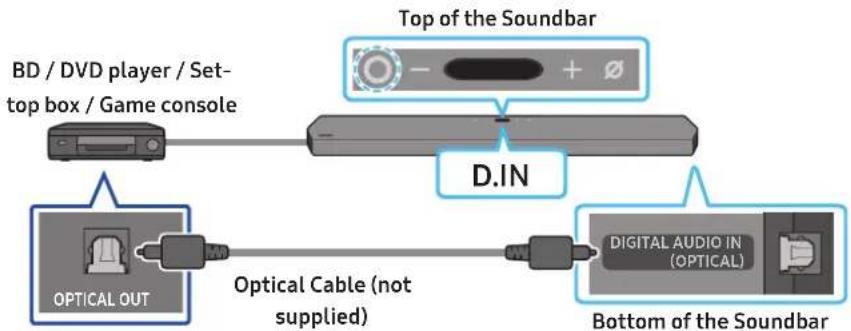
- Use an optical cable (not supplied) to connect the DIGITAL AUDIO IN (OPTICAL) on the Soundbar main and the OPTICAL OUT port on the external device.
- Turn on the Soundbar and external device.
- To select "D.IN" mode, press the (Multi Function) button on the top of the Soundbar or the (Source) button on the remote control.
- Your Soundbar will play sounds from the external device.
08 CONNECTING A MOBILE DEVICE
Method 1. Connecting via Bluetooth
When a mobile device is connected using Bluetooth, you can hear stereo sound without the hassle of cabling.
- When you connect a paired Bluetooth device with the Soundbar off, the Soundbar automatically turns on.
The initial connection
-
When connecting to a new Bluetooth device, make sure the device is within 1 m distance.
-
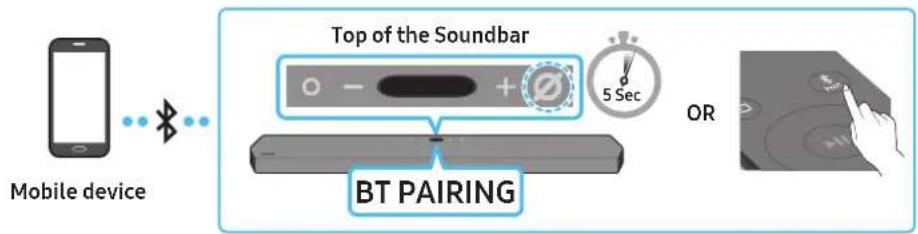
Press the PAIR button on the Soundbar remote control to enter the "BT PAIRING" mode.
(OR) a. Press the (Multi Function) button on the top panel and then select "BT".
"BT" changes to "BT PAIRING" in a few seconds automatically or changes to "BT READY" if there is a connect record.
b. When "BT READY" appears, press and hold the (Mic On/Off) button on the top panel of the Soundbar for more than 5 seconds to display "BT PAIRING".
- On your device, select "[AV] Samsung Soundbar Q950A / Q960A" from the list that appears.
- When the Soundbar is connected to the Mobile device, [Mobile Device Name] "BT" appears in the top display.
- Play music files from the device connected via Bluetooth through the Soundbar.
After you have connected the Soundbar to your mobile device the first time, use the "BT READY" mode to reconnect.
If the device fails to connect
If you have an existing Soundbar (e.g., "AV) Samsung Soundbar Q950A/Q960A") in the list of speakers on the Mobile device, delete it.
- Repeat steps 1 and 2.
What is the difference between BT READY and BT PAIRING?
- BTREADY: In this mode, you can reconnect any Samsung TV or mobile device that was connected before.
BTPAIRING: In this mode, you can connect a new device to the Soundbar.
(Press the PAIR button on the Soundbar remote control or press and hold the (Mic On/Off) button on the top of the Soundbar for more than 5 seconds while the Soundbar is in "BT" mode.)
Notes on Bluetooth connection
- Locate a new device within 1 m to connect via Bluetooth communication.
- If asked for a PIN code when connecting a Bluetooth device, enter <0000>.
- The Soundbar automatically turns off after 18 minutes in the Ready state.
-
The Soundbar may not perform Bluetooth search or connection correctly under the following circumstances:
-
If there is a strong electrical field around the Soundbar.
- If several Bluetooth devices are simultaneously paired with the Soundbar.
- If the Bluetooth device is turned off, not in place, or malfunctions.
Electronic devices may cause radio interference. Devices that generate electromagnetic waves must be kept away from the Soundbar main unit - e.g., microwaves, wireless LAN devices, etc.
The Soundbar supports SBC data (44.1kHz, 48kHz).
- Connect only to a Bluetooth device that supports the A2DP (AV) function.
- You cannot connect the Soundbar to a Bluetooth device that supports only the HF (Hands Free) function.
- When connecting the Soundbar to a Bluetooth device, place them as close to each other as possible.
- The farther the Soundbar and Bluetooth device are from each other, the lower the sound quality will become. The Bluetooth connection may break when the devices are out of the effective range.
- The Bluetooth connection may not function as intended in areas with poor reception.
-
A Bluetooth device may experience noise or malfunction under in the following conditions:
-
When the body is in contact with the signal transceiver on the Bluetooth device or Soundbar
In corners or when there is an obstacle in proximity, such as a wall or partition, where electrical changes may occur. - When exposed to radio interferences by other products operating on the same frequency ranges, such as medical equipment, microwave ovens, and wireless LAN devices.
- Obstacles such as doors and walls may still impact the sound quality even when the devices are within the effective range.
Note that your Soundbar cannot be paired with other Bluetooth devices while using the Bluetooth option.
- This wireless device may cause electrical interference during operation.
Disconnecting the Bluetooth device from a Soundbar
You can disconnect a Bluetooth device from the Soundbar. For instructions, see the Bluetooth device's user manual.
- The Soundbar will be disconnected.
- When the Soundbar is disconnected from the Bluetooth device, the Soundbar will display "BT DISCONNECTED" on the top display.
Disconnecting the Soundbar from the Bluetooth device
Press the (Multi Function) button on the top of the Soundbar or the (Source) button on the remote control to switch the mode from "BT".
- Disconnecting takes time because the Bluetooth device must receive a response from the Soundbar. (Disconnection time may differ, depending on the Bluetooth device)
- When the Soundbar is disconnected from the Bluetooth device, the Soundbar will display "BT DISCONNECTED" on the top display.
Method 2. Connecting via Wi-Fi (Wireless Network)
To connect a Soundbar to a mobile device via a wireless network (Wi-Fi), the SmartThings app is required.
The initial connection
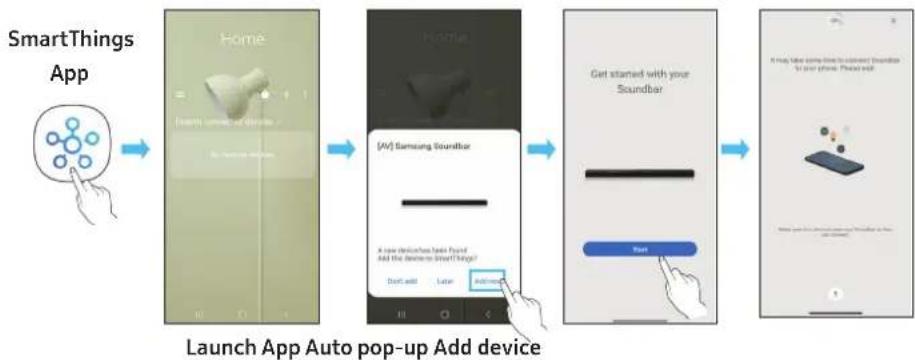
- Install and launch the SmartThings app from your mobile device (smartphone or tablet).
- On the app, follow the screen instructions to add the Soundbar.
The automatic pop-up (the second screenshot below) may not show on some devices. If the pop-up window does not appear, press " ^+ " on the Home screen. The Soundbar is added to the app.
Getting Started with Amazon Alexa (Built-in Alexa)
- Amazon Alexa is a service provided by Amazon.
- This function may not be supported depending on the model or geographical area.
This function only supports some languages, and the supported functions may differ depending on the geographical area.
For product specification or compatibility, refer to the Samsung website (www.samsung.com).
Using Alexa, you can play music, listen to news, see weather forecasts, and control home appliances. To use Amazon Alexa, an Amazon account is required to connect the Soundbar over the network.
- Install the SmartThings app on your mobile device and then launch it.
- Enter the Alexa account by following the instructions on the app and then log in the service.

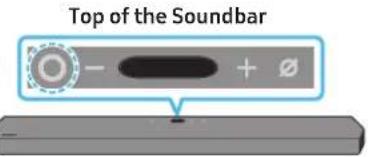
- Call Alexa or press the (Multi Function) button on the Soundbar for 3 seconds to use the Alexa service.
Press the (Multi Function) button for 3 seconds to call Alexa. Say with the button pressed to enable voice recognition.
Use voice commands to control the Soundbar

Trigger + Command
| Things to try Example of what to say | |
| Volume control | "Alexa, turn up the volume." |
| "Alexa, turn down the volume" | |
| Listening to streaming content from Amazon Music | "Alexa, play some jazz music" |
| Playback control | "Alexa, play next song." |
| "Alexa, stop the music." | |
| "Alexa, what is this song?" | |
| Weather information | "Alexa, what's the weather?" |
| Timer scheduling | "Alexa, set a timer for 10 minutes." |
Getting Started with Alexa on Amazon Product (Works with Alexa)
- This function may not be supported depending on the model or geographical area.
This function only supports some languages, and the supported functions may differ depending on the geographical area. - For product specification or compatibility, refer to the Samsung website (www.samsung.com).
This service is provided by Amazon and can be terminated at any time. Samsung does not assume responsibility for service availability. - Amazon Alexa app screen is subject to change without prior notice.
Connect and use with an Amazon product (Amazon Echo)
Use an Amazon Echo product to control your Soundbar and enjoy music services provided by Amazon Echo.
To use Amazon Alexa, an Amazon account is required to connect the Soundbar over the network.
- Install the SmartThings app on your mobile device and then launch it.
- Enter the Alexa account by following the instructions on the app and then log in the service.
Use voice commands to control the Soundbar
The Amazon Echo service you can use with your Soundbar is limited to music. Other services provided by Amazon Echo, such as news and weather, can only be accessed through your Amazon Echo product.

Trigger + Command + Speaker name
- To use voice commands for the Soundbar named "Living room"
| Action Voice Command | |
| To set the volume level to 5 | "Alexa Set the volume to 5 on Living room" |
| To increase the volume level | "Alexa Volume up on Living room" |
| To mute the sound | "Alexa Mute on Living room" |
| To listen to a radio station named KISS FM | "Alexa Play Kiss FM on Living room" |
| To play the next song | "Alexa Next song on Living room" |
| To stop the audio | "Alexa Stop on Living room" |
| To turn the audio off | "Alexa Turn off on Living room" |
Using the Tap Sound
Tap the Soundbar with your mobile device to play the sound of content on the mobile device through the Soundbar.
- This function may not be supported, depending on the mobile device.
- This function is only compatible with Samsung mobile devices with Android 8.1 or later.
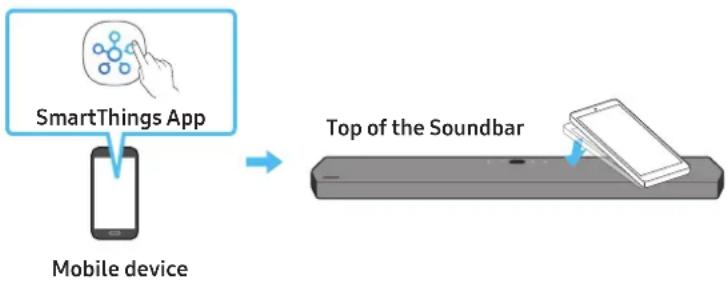
-
Turn on the Tap Sound function on your mobile device.
-
For details on how to turn on the function, refer to "Setting the Tap Sound function" below.
-
Tap the Soundbar with the mobile device. Select "Start now" in the displayed message window.
A connection is established between the mobile device and Soundbar via Bluetooth.
- Play the sound of content on the mobile device through the Soundbar.
This function connects a mobile device to the Soundbar via Bluetooth by detecting vibration that occurs when the device touches the Soundbar.
- Make sure the mobile device does not tap a sharp corner of the Soundbar. The Soundbar or mobile device may become scratched or damaged.
It is recommended that the mobile device be covered with a case. Lightly tap the wide area in the upper portion of the Soundbar, without using excessive force.
- To use this function, update the SmartThings app to the latest version.
The function may not be supported, depending on the app version.
Setting the Tap Sound function
Use the SmartThings app to turn on the Tap View, Tap Sound function.
- On the mobile device, run the SmartThings app.
- Select ( ) in the SmartThings app screen displayed on the mobile device.
- Set "Tap View, Tap Sound" to On to allow the function to work when a mobile device moves close to the Soundbar. The function is turned on.
NOTE
- When the mobile device is in power-saving mode, the Tap Sound function does not work.
- The Tap Sound function may not work if there are devices near the Soundbar that cause radio interference such as electric devices. Make sure devices that may cause radio interference are placed at a sufficient distance away from the Soundbar.
09 CONNECTING TO APPLE AIRPLAY 2
This feature may not be available in some countries.
Connect and use with an Apple product
- With AirPlay 2, you can control your home's audio system from your iPhone, iPad, HomePod, or Apple TV.
- This Samsung Soundbar supports AirPlay 2 and requires iOS 11.4 or later.
NOTE
- Confirm that the Soundbar is connected to Wi-Fi. (Refer to Method 2. Connecting via Wi-Fi (Wireless Network))
10 INSTALLING THE WALL MOUNT
Installation Precautions
Install on a vertical wall only.
- Do not install in a place with high temperature or humidity.
- Verify whether the wall is strong enough to support the product's weight. If not, reinforce the wall or choose another installation point.
Purchase and use the fixing screws or anchors appropriate for the kind of wall you have (plaster board, iron board, wood, etc.). If possible, fix the support screws into wall studs.
Purchase wall mounting screws according to the type and thickness of the wall you want to mount the Soundbar on.
Diameter: M5
Length: 35mm or longer recommended.
- Connect cables from the unit to external devices before you install the Soundbar on the wall.
- Make sure the unit is turned off and unplugged before you install it. Otherwise, it may cause an electric shock.
Wallmount Components

Wall Mount Guide

X2

(M4 x L10)
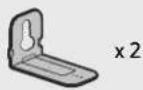
Holder-Screw Screw
Bracket-Wall Mount
- Place the Wall Mount Guide against the wall surface.
The Wall Mount Guide must be level.
- If your TV is mounted on the wall, install the Soundbar at least 5 cm below the TV.
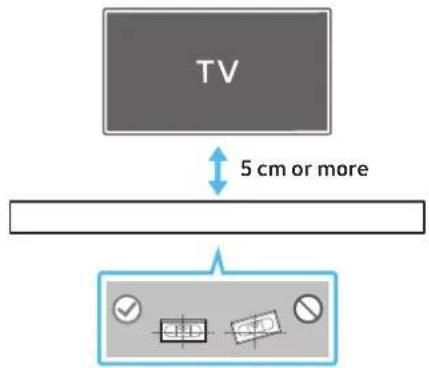
-
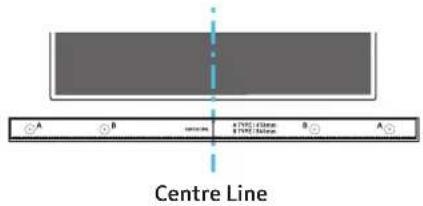
Align the Wall Mount Guide's Centre Line with the centre of your TV (if you are mounting the Soundbar below your TV), and then fix the Wall Mount Guide to the wall using tape.
-
If you are not mounting below a TV, place the Centre Line in the centre of the installation area.
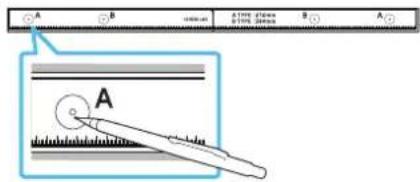
- Push a pen tip or sharpened pencil tip through the centre of the A-TYPE images on each end of the Guide to mark the holes for the supporting screws, and then remove the Wall Mount Guide.
-
Using an appropriately sized drill bit, drill a hole in the wall at each marking.
-
If the markings do not correspond to the positions of studs, make sure you insert appropriate anchors or mollies into the holes before you insert the support screws. If you use anchors or mollies, make sure the holes you drill are large enough for the anchors or mollies you use.
-
Push a screw (not supplied) through each Holder-Screw, and then screw each screw firmly into a support screw hole.
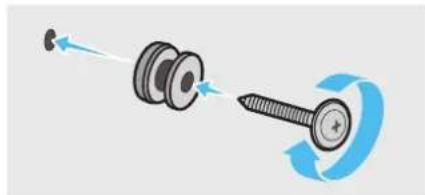
- Install the 2 Bracket-Wall Mounts in the correct orientation on the bottom of the Soundbar using 2 Screws.
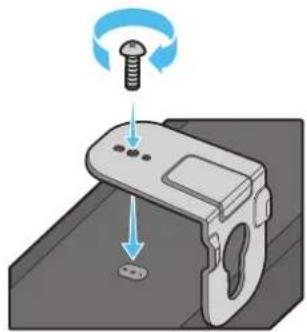
- When assembling, make sure the hanger part of the Bracket-Wall Mounts are located behind the rear of the Soundbar.
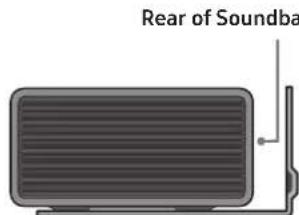
Right end of Soundbar
- Install the Soundbar with the attached Bracket-Wall Mounts by hanging the Bracket-Wall Mounts on the Holder-Screws on the wall.
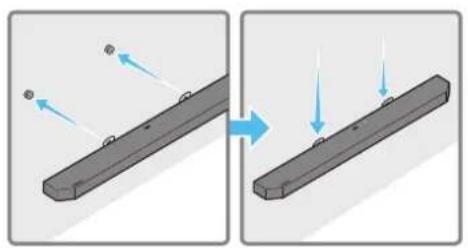
-
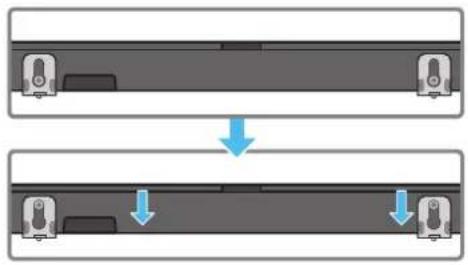
Slide the Soundbar down as shown below so that the Bracket-Wall Mounts rest securely on the Holder-Screws.
-
Insert the Holder-Screws into the wide (bottom) part of the Bracket-Wall Mounts, and then slide the Bracket-Wall Mounts down so that the Bracket-Wall Mounts rest securely on the Holder-Screws.
Installing the Surround Speakers on a Wall
You can purchase wall mounts separately to install the surround speakers on a wall.
Wall mounts aren't sold by Samsung Electronics.
Notes for Wall Mounting the Surround Speakers
- Surround Speaker wall mounts must be able to support more than 8.0kg .
-
Hole size: 1/4 - 20 UNC threaded insert
-
Standard Screw: 6.35 mm,
1.27mm Pitch
Length:18mmlong
Quantity: Left 1 EA / Right 1 EA
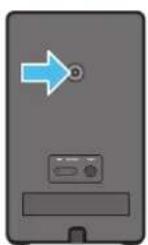
L
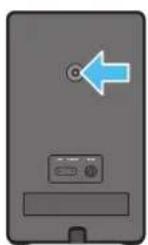
R
- Check the strength of the wall before you install the Wall Mount Brackets. If the strength is insufficient, make sure to reinforce the wall before installing the Wall Mount Brackets and the speakers on the wall.
Samsung Electronics is not liable for any damage to the product due to the product being installed inappropriately. - Take care not to install the speakers sideways or upside down.
11 INSTALLING THE SOUNDBAR ABOVE A TV STAND
Component

Rubber-Foot
To install, attach the Rubber-Feet to the bottom of the Soundbar before placing it in position above the TV stand. Make sure you attach the Rubber-Feet so they do not lie outside the edges of the TV stand. Refer to the figure below.
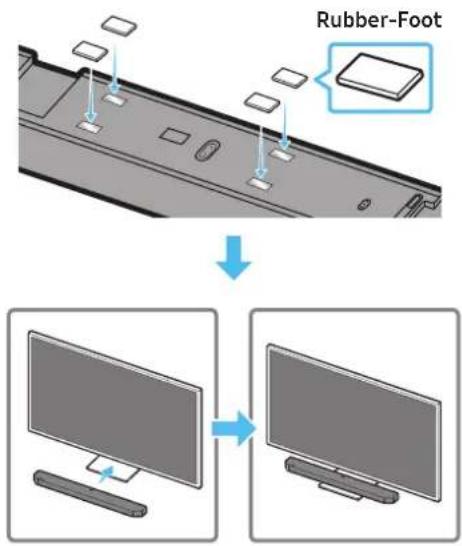
Place the Soundbar on a TV stand.
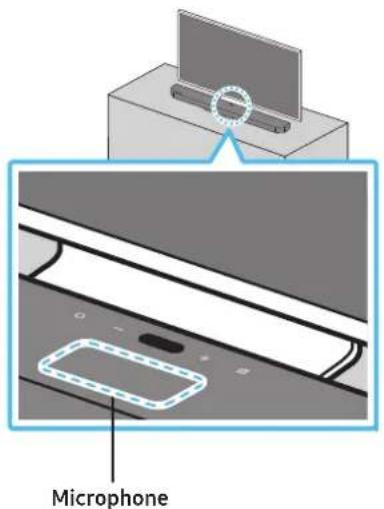
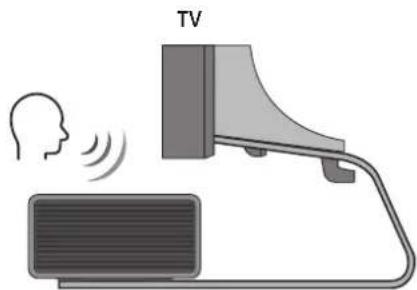
As illustrated in the image, align the centre of the Soundbar with the centre of the TV, carefully place the Soundbar onto the TV stand. At this time, place the microphone at the front of the stand not to interfere with voice recognition.
Right end of Soundbar
NOTE
- Make sure the Soundbar is placed on a flat and solid surface.
Insufficient gap from the TV may cause voice recognition and acoustic problems.
12 SOFTWARE UPDATE
Auto Update
When the Soundbar is connected to the Internet, software updates automatically occur even when the Soundbar is turned off.
- To use the Auto Update function, the Soundbar must be connected to the Internet.
The Wi-Fi connection to the Soundbar will be terminated if the Soundbar's power cord is disconnected or the power is cut off. If the power is cut off, when the power comes back on or you reconnect the power cord, turn on the Soundbar, and then reconnect it to the Internet.
USB Update
Samsung may offer updates for the Soundbar's system firmware in the future.
When an update is available, you can update the Soundbar by connecting the USB drive that contains the update firmware to the SERVICE port of the Soundbar.
- Go to the Samsung website (www.samsung.com) → search for the model name from the customer support menu option.
For more information about update, refer to Upgrade Guide. - Download the upgrade file (USB type).
- Unzip the file to create a folder with the file name.
- Store the created folder in a USB and then connect it to the Soundbar.
-
Turn on the Soundbar. Then the product is updated within 3 minutes with displaying the message, "UPDATE".
-
During update, do not turn it off or remove the USB.
- If "UPDATE" does not appear on the display window, remove the power cord from the Soundbar and then reconnect it.
- When the latest version is installed, no update is performed.
Depending on the USB type, update may not be supported.
Initialisation
Top of the Soundbar
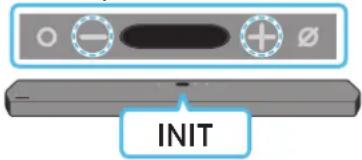
With the Soundbar on, press the (Volume) buttons on the body at the same time for at least 5 seconds. "INIT" appears on the display and then the Soundbar is initialised.
CAUTION
- All the settings of the Soundbar are initialised. Be sure to perform this only when initialisation is required.
13 TROUBLESHOOTING
Before seeking assistance, check the following.
Soundbar does not turn on.
- Check whether the power cord of the Soundbar is correctly inserted into the outlet.
Soundbar works erratically.
After removing the power cord, insert it again.
- Remote the power cord from the external device and try again.
- If there is no signal, the Soundbar automatically turns off after a certain period of time. Turn on the power. (See page 9.)
Remote control does not work
- Point the remote directly at the soundbar.
- Replace the batteries with new ones.
Sound is not output from the soundbar.
- The volume of the Soundbar is too low or muted. Adjust the volume.
- When any external device (STB, Bluetooth device, mobile device, etc.) is connected, adjust the volume of the external device.
- For sound output of the TV, select Soundbar. (Samsung TV: Home () Settings ( Sound Sound Output Select Soundbar)
- The cable connection to the Soundbar may not be loose. Remove the cable and connect again.
- Remove the power cord completely, reconnect, and turn the power on.
- Initialise the product and try again. (See page 32.)
Sound is not output from the subwoofer or the rear speakers.
- Check whether the LED indicator on the rear of the Subwoofer and Surround Speakers are on in blue. Reconnect the Soundbar and Subwoofer and Surround Speakers if the indicator is blinking in blue or turned red. (See page 14.)
- You may experience an issue if there is an obstacle between the Soundbar and Subwoofer. Move devices to an area away from obstacles.
- Other devices sending radio frequency signals in proximity may interrupt the connection.
- Keep your speaker away from such devices.
- Remove and reconnect the power plug.
In case there is sound jitter, delays, or noise from the Subwoofer and Surround Speaker
- If there are any objects between the Soundbar and Subwoofer speaker, this could cause a problem. Please reposition these to a place without such an object.
- There may be sound jitter or delays when the Subwoofer and Surround Speaker are far from the Soundbar. Please place them near the Soundbar.
- There may be sound jitter or delays when the Soundbar is near an instrument or electrical device that can cause radio interference. Place the Soundbar far from such devices that can cause radio interference. (E.g., wireless router)
- Change the TV network connection status from wireless to wired.
The Subwoofer volume is too low
- The original volume of the content you are playing may be low. Try adjusting the Subwoofer level. (See page 10.)
- Bring the Subwoofer speaker closer to you.
In case the TV is not connected via HDMI TO TV (eARC/ARC)
- Check whether the HDMI cable is correctly connected to the ARC terminal. (See page 17.)
- Connection may not be possible due to the connected external device (set-top box, game machine, etc.). Directly connect the Soundbar.
- HDMI-CEC may not be activated on the TV. Turn on the CEC on the TV menu. (Samsung TV: Home () Settings () General External Device Manager Anynet+ (HDMI-CEC) ON)
- To connect with eARC, the eARC function in the TV menu should be set to On. (Samsung TV: Home (m) → Settings (Sound → Expert Settings → HDMI-eARC Mode (Auto))
There is no sound in when connecting to the TV in HDMI TO TV (eARC/ARC) mode
- Your device is unable to play the input signal. Change the TV's audio output to PCM or Dolby Digital. (For a Samsung TV: Home () Settings () Sound Expert Settings Digital Output Audio Format)
Soundbar will not connect via Bluetooth.
- When connecting a new device, switch to "BT PAIRING" for connection. (Press the PAIR button on the remote control or press the Mic On/Off) button on the body for at least 5 seconds.)
- If the Soundbar is connected to another device, disconnect that device first to switch the device.
- Reconnect it after removing the Bluetooth speaker list on the device to connect. (Samsung TV: Home ( Settings ( Sound Sound Output Bluetooth Speaker List)
- The automatic TV connection may be disabled. While the Soundbar is in "BT READY", press and hold the Left button on the Soundbar remote control for 5 seconds to select ON-TV CONNECT. If you see OFF-TV CONNECT, press and hold Left button again for 5 seconds to switch the selection.
- Remove and reconnect the power plug, then try again.
- Initialise the product and try again. (See page 32.)
Sound drops out when connected via Bluetooth.
- Some devices can cause radio interference if they are located too close to the Soundbar. e.g. microwaves, wireless routers, etc.
- If your device that is connected via Bluetooth moves too far away from the soundbar, it may cause the sound to drop out. Move the device closer to the soundbar.
- If a part of your body is in contact with the Bluetooth transceiver or the product is installed on metal furniture, the sound may drop out. Check the installation environment and conditions for use.
Soundbar will not connect to Wi-Fi.
- Check whether your wireless router is on.
- Turn off the router, turn it back on, and then try again.
- The soundbar will not connect if the wireless signal is too weak. Try moving the router closer to the soundbar, or eliminating any obstacles that are between the soundbar and the router, if possible.
- If your wireless router is new, you will need to reconfigure the speaker's network settings.
The soundbar does not turn on automatically with the TV.
- When you turn off the Soundbar while watching TV, power synchronization with the TV is disabled. First turn off the TV.
The AVA function is not available in the following cases.
The AVA function will not be available using Q-symphony function.
- The AVA function will not be available when the microphone is turned off.
The Auto EQ tuning process failed.
- Tuning process may fail if there is a sound output from the Soundbar or any external noise during the tuning process. Proceed the tuning process in a quiet environment.
- Do not manipulate the Soundbar during the tuning process.
14 LICENCE
Dolby
ATMOS
Dolby, Dolby Atmos, and the double-D symbol are registered trademarks of Dolby Laboratories Licensing Corporation. Manufactured under license from Dolby Laboratories. Confidential unpublished works. Copyright © 2012-2020 Dolby Laboratories. All rights reserved.
dtsx
For DTS patents, see http://patents.dts.com. Manufactured under license from DTS, Inc. (for companies headquartered in the U.S./ Japan/Taiwan) or under license from DTS Licensing Limited (for all other companies). DTS, DTS:X Pro, DTS:X, and the DTS:X logo are registered trademarks or trademarks of DTS, Inc. in the United States and other countries. © 2020 DTS, Inc. ALL RIGHTS RESERVED.
HOMI
The terms HDMI and HDMI High-Definition Multimedia Interface, and the HDMI Logo are trademarks or registered trademarks of HDMI Licensing Administrator, Inc. in the United States and other countries.

Spotify

- Use your phone, tablet or computer as a remote control for Spotify. Go to Spotify.com/connect to learn how
- The Spotify Software is subject to third party licenses found here: https://www.spotify.com/connect/third-party-licenses.

Works with
Apple AirPlay
- Apple, AirPlay, iPhone, iPad, HomePod, and Apple TV are trademarks of Apple Inc., registered in the U.S. and other countries.
- Use of the Works with Apple badge means that an accessory has been designed to work specifically with the technology identified in the badge and has been certified by the developer to meet Apple performance standards.
15 OPEN SOURCE LICENCE NOTICE
To send inquiries and requests for questions regarding open sources, contact Samsung Open Source (http://opensource.samsung.com)
16 IMPORTANT NOTES ABOUT SERVICE
- Figures and illustrations in this User Manual are provided for reference only and may differ from actual product appearance.
- An administration fee may be charged if either
(a) an engineer is called out at your request and there is no defect with the product (i.e. where the user manual has not been read).
(b) you bring the unit to a repair centre and there is no defect with the product (i.e. where the user manual has not been read).
- You will be informed of the administration fee amount before a technician visits.
17 SPECIFICATIONS AND GUIDE
Specifications
| Model Name HW-Q950A / HW-Q960A | |
| Weight 7.1kg | |
| Dimensions (W x H x D) 1232.0 x 69.5 x 138.0 mm | |
| Operating Temperature Range +5°C to +35°C | |
| Operating Humidity Range 10 % ~ 75 % | |
| AMPLIFIER Rated Output power ((18 W x 6) + (10 W x 3) + (18 W x 6)) + 160 W + (35 W x 6) | |
| Supported play formats | Dolby 5.1ch / Dolby Digital Plus / Dolby TRUE HD / Dolby ATMOS DTS 5.1ch / DTS HD / DTS-HD Master Audio / DTS:X / LPCM 8Ch |
| WIRELESS DEVICE OUTPUT POWER Wi-Fi max transmitter power | 100mW at 2.4GHz - 2.4835GHz, 200mW at 5.15GHz - 5.25GHz, 100mW at 5.25GHz - 5.35GHz & 5.47GHz - 5.725GHz |
| WIRELESS DEVICE OUTPUT POWER BT max transmitter power 100mW at 2.4GHz - 2.4835GHz | |
| WIRELESS DEVICE OUTPUT POWER SRD max transmitter power 25mW at 5.775GHz - 5.875GHz | |
| Subwoofer Name PS-WA95B | |
| Weight 9.8kg | |
| Dimensions (W x H x D) | 210.0 x 403.0 x 403.0 mm |
| AMPLIFIER Rated Output power | 160 W |
| WIRELESS DEVICE OUTPUT POWER SRD max transmitter power 25mW at 5.775GHz - 5.875GHz | |
| Wireless Surround Speaker SET Name | PS-RA95BB-1, PS-RA95BB-2 |
| Weight | 1.8 kg |
| Dimensions (W x H x D) | 125.0 x 203.0 x 141.0 mm |
| AMPLIFIER Rated Output power | 35 W x 6 |
| WIRELESS DEVICE OUTPUT POWER SRD max transmitter power 25mW at 5.775GHz - 5.875GHz |
NOTE
Samsung Electronics Co., Ltd reserves the right to change the specifications without notice.
Weight and dimensions are approximate.
Precaution : The Soundbar will restart automatically if you turn on/turn off Wi-Fi.
| Overall Standby Power Consumption (W) | 7.0 W |
| Wi-FiPort deactivation method | Press the ID SET button on the bottom panel of the Soundbar for 30 seconds to turnWi-Fi On / Off. |
| BluetoothPort deactivation method | Press the NETWORK button on the bottom panel of the Soundbar for 30 seconds to turnBluetooth On / Off. |
Hereby, Samsung declares that this radio equipment is in compliance with Directive 2014/53/EU and the relevant UK statutory requirements.
The full text of the declaration of conformity is available at the following internet address:
http://www.samsung.com go to Support and enter the model name.
This equipment may be operated in all EU countries and in the UK.
The 5GHz WLAN(Wi-Fi or SRD) function of this equipment may only be operated indoors.
[Correct disposal of batteries in this product]
(Applicable in countries with separate collection systems)
This marking on the battery, manual or packaging indicates that the batteries in this product should not be disposed of with other household waste at the end of their working life. Where marked, the chemical symbols Hg, Cd or Pb indicate that the battery contains mercury, cadmium or lead above the reference levels in EC Directive 2006/66.
If batteries are not properly disposed of, these substances can cause harm to human health or the environment.
To protect natural resources and to promote material reuse, please separate batteries from other types of waste and recycle them through your local, free battery return system.
Correct Disposal of This Product
(Waste Electrical & Electronic Equipment)
(Applicable in countries with separate collection systems)
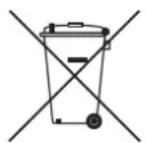
This marking on the product, accessories or literature indicates that the product and its electronic accessories (e.g. charger, headset, USB cable) should not be disposed of with other household waste at the end of their working life. To prevent possible harm to the environment or human health from uncontrolled waste disposal, please separate these items from other types of waste and recycle them responsibly to promote the sustainable reuse of material resources.
Household users should contact either the retailer where they purchased this product, or their local government office, for details of where and how they can take these items for environmentally safe recycling.
Business users should contact their supplier and check the terms and conditions of the purchase contract. This product and its electronic accessories should not be mixed with other commercial wastes for disposal.
For information on Samsung's environmental commitments and product specific regulatory obligations e.g. REACH, WEEE, Batteries, visit: www.samsung.com/uk/aboutsamsung/sustainability/environment/our-commitment/data/
INHΦOPMAÇNЯ 3A BΕ3OΠACHOCT
PPEyIPEXAEHnA 3A B3O1ACHOCT
3A DA HAMAMITE ONACHOCTTA OT EAEKTPNUECKN YAP, HE CBAIYTE KAIKA (MUN 3AADHNAKAIK).
BbTPE HMA YACTN, KOUTO IODAEKAT HA OBCAYKBAHE OT NTOTPBNEIA.3A TEXHnuecko OBCAYKBAHE CE OEBPHETE KbM KBANUINPAH CEPBN3EH INPCOHAA.
Buxme ma6luqama no-goy 3a o6rchenue Ha cumboIume, koumo moke ga ca Ha Bawu npogykm Samsung.
|  |  |
| To3u cumBoI noka3Ba, ye B'bmpe uma Bucoko hampkceHue. OnPACHO e ga oc'bcsecmB8aMe kakBbmo u ga e 6uAo koHmakm c B'bmpeuHama qacm ha npogykma. | |
|  | To3u cumBoI noka3Ba, ye B npogykma e BkAioyeHa BaxHa gokymenmaця 3a pa6omama u nogpBXkama. |
|  |  |
|  |  |
|  |  |
|  |  |
|  |  |
|  |  |
PNEyPPEKDEHNE
3a ga haamaune pucka om nokap uu eekmpuecku ygap, He u3aaaume mo3u ypeg h g6kg uu 8aaa.
BHIMAHHE
3A DAAH3EHTEHAEKTPNUECKNYAP,UINPOKNIATUINOTHAUENCEA TPRBBA DA CE NOCTABN B UINPOKNAOT N A CEA BMBKHE OOKPAI.
To3u anapam Buaa um68a gacceBb3Ba kbm npomeHauBomoko8 (AC) konmakc bsc 3aumha Bp3ka 3a3emBahe.
- 3a ga u3kIoUHme anapama om eIekmpuueckama mpeka, uenceIb mmp6Ba ga ce u3Bagu om eIekmpuueckua koHmakm, cAegoBameIHO c uenceIa mpr6Ba ga ce pa6oMu Iecho.
He u3aaaume mozu anapam ha kanku uu npbcku. He nocmaBraume Bby anapama npegmmu, nuhncmu, kamo Hanpumep Ba.
3a ga u3kauyme mozu anapam hantbHno,mpra6Ba ga u3Bagume uenceMa om eekmpuueckura konmakm. 3amoBa go uenceMa mpr6Ba uma lecen U 6bp3 gocmbn no 8cko Bpeme.
PPEA3HMEPKN
- YBepeme ce, Ye AC 3axpaHbAhemo B goma Bu c6omBemcmBa Ha u3uckBaHnma 3a eEekmpo3axpaHbAne, u36poehu Bbpy UgehmufkauOnHHc mukep, pa3noLoKeH ha goHaama cmpaHa npogykma. MohmupaIme npogykma xopuzoHmAAHO Bbpy nogxogya ocHoBa (Me6eA) c gocmambUHO OKAO HO npocmpaHcMo Bo 3a BeHMuaau (7 \~ 10 cm). YBepeme ce, ye BeHMuaauOnHume omBopu He ca 6lokupaHu. He nocmaBraime ycmpoucMBo mo Bbpy ycuaBameu uuu gpy2o 60pygBahe, koemo moke ga ce Hazopeu. ToBa ycmpoucMo e npoekmupaHO 3a npogbAkuIma hyonpe6a. 3a ga u3kluOumHe hbaHo ycmpoucMBo, u3kluOeMe AC uenceMa om eekmpuueckua konmakm. 3kluOeMe ycmpoucMBo o m eekmpo3axpaHbAhemo, ako B3hAmepraBame ga He 20 u3noA3Bame 3a npogbAkuImeH nepuoG om BpeMe.
- IIOBpeMeHaZpbMoneBuHn6bpuU3kAoucme AC uencea om eekmpueckua konmkm. NkoBu cmouhocmu Ha Hanpekehuemo, gkau ceHaMbauu,Moke ga noBpegarmycpmoucmBoMo.
3.Heu3a2aume ycmpoumBomo Ha npka cAhnBeBa cBemau HA uu gpyu 3mouhuHa monluha.ToBa moke ga goBege go npeprBahe u ga npuuHn HeunpaaBocmHa ycmpoumBomo. - Пазeme npogykma om ьлаа (hanpumep Ba3u) u npekomeph monluha (hanpumep kamua), kakmo u om obopygBahe, koemo cb3ga8a cunhu mazhumu uau ekempueecku nolemaa.ИЗкIoусeme 3axpaHbauu ka6eam AC ekempueeckua konmakm,ako ycmpoocmbo e eu3npaBho. Bauu am npogykme n ep npegha3naueh3a npomuUHa en yonpme6a.To e npegha3nauecama 3a unHa yonpme6a.Ako npogykmbe 6ua cbxpaHbAn npu hucku memnepamypu, moke ga ce o6pa3y8a kongeh3.Ako mpaHcnopmupame ycmpoucmbono npe3 zumama, u3ukaume npu6U3umeHo 2 Yaca, npeggu 20 u3no38ame, 3ga gocmu2ne cmaHa memnepamya.
- 3no3BaHama 8 mo3u npogykmbamepura c6bprka xumuka, koumo ca Bpegu 3a okolhama cpega. He u3x6bpmae6amepuma 3aegno c 6oUme 6umoBu omnagbu. He u3a2aume 6amepuma ha npekomepha monluha, npka cBHeBa CBemHa uu oBn. He cBp3Baume Ha kbco, he pa32o6Baume u he gonyckaume npepbahe ha 6amepuma. BHIMAHNE : CbuecmByBa onachocm om ekcn03ua, ako 6amepuma 6bge 3aemenha HenpaBauho. Cmenya me camo cbc cbuua ekBuAenmen mun.
NoucmbaHe hakopnyca
OmcmpaHaBaime He3a6aBHo 8CuUk3ambpcraBanu UAnne mHa om noBbpxHocmma Ha npogykma.
OmcmpaHbAhemo u noucmbHemmo Mege ga 6bge no-maKo efekmuBho 3a Hkou BeuecmBa, uau akc bIumc ocmam 3a npogbkumeen nepuog om Bpeme.
BHIMAHHE
- ɪnəʊʌsɪbæmnpaxoxcmykɑyka unpoʌla ənʊcμmBahe n Mɒxbɔe cʌenrəuʌnɛhma, 3a ga omcmpaŋhBame npax, omneamþu o m npþcμu gpyzunogobhu.
Hrkou yemku 3a noucmbahe moke ga noBpegram npogykma B 3aBucumocm om mamepuaaa, am koumo ca u3pa6omehu.
-XaBuau kbpnu 3a noucmbahe moke ga ocmaBam MbxoBe uu 3aMbpcaBaHura no npogykma.
He u3no3Baume Hokb mUu gpy2u UHcmpymemu 3a u3cm6p2Bahe Ha 3aMbpcaBaHuaMa.ToBa MoKe ga noBpegu Kopnyca.
3a ga omcmpaHume nemha om Maclo uuu meuHcmu, u3no3Baumte uucma 6bpa, hanoeha c Boga. Ako nemhama ca ynopumu, u3mpuime 2u c pa3mBopen BbB Boga Heympaen noocmBaun npenapam (Hanpumep npenapamu 3a Muene Ha cbgo8e) u kbpna.
- PocumBa npenapam, koumo He e Heympaen, uu xumuecko cpecmBo 3a noucmbahe moke ga goBege go o6e3BemBahe uu noBpega ha kopnyca.
Cieg noucmBahe u3noa3Baime cyxa kbpna uu cewoap 3a u3cuwaBahe ha no6bpxhocmma. - He npuaaui me npekomepha cua, 3a ga u36e2heme o6e3uBemBahe uu no8pega ha kopnyca.
CbAbPXAHNE
01 ПpoBepka ha komnoHeHMume 6
02 Onucahue Ha npogykma 7
Topen nape Ha Soundbar. 7
DolennanenHaSoundbar 7
03 N3no3BaHe Ha gucmaHcuOHHom ynpaBHeue Ha Soundbar 9
Iocma8ahe Ha 6amepuume npegu u3noa3Bahe Ha gucmauohomo ynpaBHeue (2 6amepuu pa3mep AA) 9
Hauun ha pa6oma c gucmauohmo ynpa8aene. 9
AkmuBEN 2AacoB ycuAbaMeA (AVA). 10
13noa3BaHe hckpumme 6ymoH (6ymoH c noBeue om egna fynkuia) 11
13xogHu cneuufukauu 3a pa3AuHume pekmu 3a 38ykoB efekm 11
Pezyuapahe Ha cUama Ha 3Byka Ha Soundbar c gucmaHooHmo ynpaBHeue Ha meLe8u3opa .12
04 C8bp3BaHe Ha Soundbar 13
BkIouBaHe na 3axpaHbHemo u ycmpoUcmbama. 13
- Ppenopbumelno ofoepMaHue Ha BucokozoBopumeAume 14
PbHcBp3BaHe Ha cb6yphi pa uu cbpayng BucokozOOpumeAume. 14
CBeMaHn Ha LED unghukamopa 8aqhama qam Ha c6bpyu Cpayng BucokozoBopumeIme. 15 - Auto EQ 16
05 IV3noA3BaHe Ha ka6eHa 8Pb3ka kbm meAeBu3opa 17
Memog 1. CBbp3Bahe c HDMI 17
C8bp3BaHe ha meleBuzop, kuo noggbpka HDMI ARC (kana 3a o6pameh 3yck) .17
Memog 2. Cbpy3BaHe c nomouma ha onmuueh ka6eA 18
06 I3noA3BaHe Ha 6e3KuUHa Bpb3ka kbM meIeBu3opa 19
Memog 1. CBp3Bahe npe3 Bluetooth 19
Memog 2. CBbp3BaHe uepe3 Wi-Fi 20
07 CBp3BaHe kBM BbHnHO ycmpoucMBo 21
Memog 1. CBp3Bahe nocpegcmBOM HDMI ka6eA (c B3mokhocm 3a gekogupahe u B3npou3Bekgahe Ha Dolby Atmos) 21
Memog 2. Cbpy3BaHe c nomouma ha onmuueh ka6eA 22
08 CBbp3BaHe kBm mo6uAno ycmpoucmBo 23
Memog 1. CBpb3Bahe npe3 Bluetooth 23
Memog 2. CBbp3BaHe npe3 Wi-Fi (6e3kuHa mpeka) .24
Ibpu cmbnku c Amazon Alexa (BapageHa Alexa) 25
TbpBu cmbnku c Alexa B npogyk m Ha Amazon (pa6omu c Alexa) 26
U3noA3BaHe Ha Tap Sound 27
09 CBbP3BaHe kM AirPlay 2 Ha Apple 28
Cb3BaHe u 3no3BaHe c npogykHa Apple. 28
10 Mohmupahe Ha cmeHHama cmouka 29
Ipegnazhu mepku npu mohmupahe 29
KOMnoHeHmu 3a cmeH MoHmak 29
MOnmupaneHa cbpayngBucokozoBopumeAumeHa cmeHa 30
11 MoHmupaHe Ha Soundbar Hag cmoUka 3a meAe8u3op 30
Komnohehm. 30
12 Akmyaun3upaHe Ha coΦmyepa 31
ABmomamuHa akmyaua3au 31
Akmyaua3au 4pe3 USB 31
Hnuauaaue 32
13 OmcmpaHaBHe Ha Heu3npaBHocmu 32
14 ANUEH3 34
15 BeIeKka 3a IuueHc omBopen kog 34
16 BaKHu 6eIexkku 3a cepBu3Homo o6cLykBaHe 34
17 CneuΦukaquu u pkoBogcmBo
Cneuufukaauu. 35
01 ПЮBEРКАHA KOMПОHEHTNTE

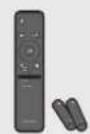
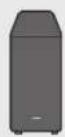
OcHoBNo ycmpoUcmBo Ha Soundbar DucmaHouHNO ynpaBHeue/6amepuu 3a Soundbar Cy6ypep
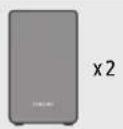

Cbpayng BucokozOpumA (A8/gecen)
3axpaHbau ka6eA (cb6yΦb, c6payHg Bucoko2oBopumeA, Soundbar)
HDMI ka6eA


Bogay3a cmehnca mouka Dbpka-BuHm BuHm

Cko6a 3a cmehna cmoika rymekhpak
- 3a gonbHumeHa unHopMaue omHocHO 3axpaHbEmo u nompe6eHuemo Ha eEekmpoeepuur HanpaBeme cnpaBka c emukema, nocmaBen ha npogykma. (Emukem: 3agha Yacm Ha ochoBnmuogyHa Soundbar)
3a g3akynume gonbHumeau kOmoHeMu uAu He3agbAumu ka6au, ce Cbpkeme c6c cepBuzHua eHmbp Ha Samsung uAu c cHmbpa 3a o6caykBahe ha Kauehmua Samsung.
3a no8eue unphiouma onnocho cmehnama cmoika uau ymuhenka pkap Bukmcmp.29-31. - Duaunb, cneuufkaaumue u ekpaHm ha npuokehma nogkam Ha npomHa 6e3 npegu3Becme.
- Bugb m ha akcecoapume moke ga ce pa3aun8a om npegcmbeHua Hua uocmpauuume no-zope.
02ОПИСАНЕHA ПОДУКТА
TopeH naHeI Ha Soundbar
| 1 | Буmonо (Мулифункцюнел) •В рекUM на зомбостм hamucHEME (Мулифункцюнел) 6уmon, за ga ьклочyme Soundbar. •HamucHEME (Мулифункцюнел) 6уmon, за ga npomehume ьхогшу u3moунuk. |
| 2 | Испалей ИзБexга сбстяноу mekушу рекUM на npogykma. D.IN → HDMI 1 → HDMI 2 → Wi-Fi → BT |
| 3 | Буmonо (ВкAL./ИЗК. на мukрфona) HamucHEME 6уmonа, за ga ьклочyme уlu u3klочyme мukрфona. |
| 4 | Буmon - + (Сulla на 3Byka) Ресушира сulla на 3Byka. |
KoZAMO 8kauuMe AC ka6eaa, 6ymohb m 3a 3axpaHbAmemo 3ape6omu cag 4 go 6 cekyhu.
KoZamO BkIIOUme moBa ycmpoiCmBo, ue MuHam 4 go 5 cekyHgu, npegu mo ga u3gage 3Byk.
Ako ce 4yBa 3Byk kakmo om meLeB3opa, maka u om Soundbar, omugeme 6 MeHIO Hacmpouku, 3a ga pezyIupame 3Byka Ha meLeB3opa u ga npomehume BucokozBopumaeHa meLeB3opa Ha BbHueh Bucoko2oBopumeA.
Dəen naheHa Soundbar
| 1 POWER Сбъркeme ka6eMa 3a 3axpaH8aHe c npomEuB mok ha Soundbar. (ВухмсmpaMuca 13) |
| 2 SET (WOOFER/REAR) Hamucheme, 3a ga cБьркeme 6e3kUHcSoundbar kьm sbpayng BucokoZoBopumelme u cy6yfepa. |
| 3 ETWORK Hamucheme, 3a ga cБьркeme kьm 6e3kUHa mpeka (Wi-Fi) npe3 npuaKHeuemo SmartThings. |
| 4 SERVICE Сбъркeme USB ycmpoUcMBo 3a cbxpanHeue, 3a ga Hagcmpoume coФmyepa Ha npogykma. |
| 5 DIGITAL AUDIO IN (OPTICAL) Сбъркeme кьm zuΦpoBua (onmuaH) u3xog Ha BbHUno ycmpoUcMBo. (ВухмсmpaMuca 22) |
| 6 HDMI 1/HDMI 2 ПугаBa egnoBpemHo zuΦpoBu Bugeo u ayguo cu2HaIu npe3 HDMI ka6eA. Сбъркeme кьm HDMI u3xog Ha BbHUno ycmpoUcMBo. (ВухмсmpaMuca 21) |
KoZamO u3kAIO8ame 3axpaH8auiu kabe om kohmakma, u3gpbnaIme ueenceLa. He gbpnaIme ka6eLa.
Cbpkeme moBa ycmpoicmBo uau gpyu komnoehmu kbnpomeHauBomokob konmakm caog kamo ca ymaHOBeHu Bcuku Bp3ku mekgy komnoehumme.
03 I3IIOA3BAHE HA ANCTAHUOHHOTO YNPABAEHNE HA SOUNDBAR
ПосмаБяне на 6amepuume npegu u3noλ3Bahe на gucmaMuOHomo ynpaBλeHue (2 6amepuu pa3mep AA)
Плбнeme 3agнua kanak no nocoka Ha cmpeAkama, gokamo 20 omcmpaHume u3uaIo. NocmaBeme 2 6amepuu AA (1,5 V), kamo caegume 3a npaBnHa mOpueHmau Ha noIoucme. Плбнeme kanaeHmo Ha 6amepuMa omHoBa ha My.
Haun ha pa6oma c gucmahuoHomo ynpaBHeue

| 1 | 3axpan8ahe | Вк纂чьа uuzk纂чьa Soundbar. Функу Auto Power Down УсмочьBomo ce uzks纂чьa a8mamamuchoNo B clegHume cumyaauu: В ржum D.IN/HDMI/HDMI 2/Wi-Fi/BT, akосяma ayguo cuZhaB pamkuime ha 18 muhymu. |
| 2 | Изменuk | Hamucheme, 3a ga uz6epeme uz3mochuk, c6bpr3an k6m Soundbar. Вк../ИЗК. Na 2laac0Ba obpamHa 8р3ka Можeme ga 6k纂чume uuu ga uzks纂чume 2laocBama obpamHa 8р3ka. Hamucheme u 3agpbjxme 6ymoHa (Изменuk) Na gucmaHuzonHomo урразынue 3a 5cekyngu, gokamo ycmpoicmBomo Soundbar e uzks纂eNo (8 pekum Ha 20moBnOcm). Прu 6як npomna Ha nacmpoikama Ha 2laocBama obpamHa 8р3ka Ha OLED gucnЯо уe ce noka3Ba AUI OFF (no nogpa3bupaHe) uuu AUI ON. |
| 3 | Изменчae Na 3Byka | Hamucheme 6ymoHa (Из纂чae Na 3Byka), 3a ga uzks纂чume 3Byka. Hamucheme 20 omho8o, 3a ga ommenume 3a2aywaBahemo. |
| 4 | SOUND MODE SOUND MODE | Mожeme ga uz6epeme 6keLAnuia pexkum Na 3Byka, kamo uz6epeme STANDARD, SURROUND, GAME PRO uuu ADAPTIVE SOUND. STANDARD ИЗБекga opuzuaHannu 3Byk. SURROUND ОцуряBa 3BykoBo noIe, no-шupoko om cmaHapmHomo. GAME PRO пегocmaBra cmepeockonuueH 3Byk, koUmo 8u nomanu 8 geUcmbuemo no 8peMe Na u2pa. ADAPTIVE SOUND Аналuzura c6bprkAnuemo 8 peaHNo 8peMe u a8mamamuHno npegocmaBra OnmuaHNo 3BykoBo noIe B 3aBucumocm om xapakmepucmukme Na c6bprkAnuemo. |
| 5 | PAIR Bluetooth PAIR | Вк纂чeme Soundbar 8 ржUM 3a cgBoBaine npe3 Bluetooth. Hamucheme 6ymonu u u3ukaüme ekpana ,BT PAIRING", 3a ga c6bprkeme c Ho8o Bluetooth ycompoicmBo. |
| 6 | B6chnou3Bexkgane/ Puy3a | Mожeme с6uO ga 6b3npou3Bexkgame uuu ga nocmaBame my3uka Na nay3a c Hamuckanemo Na 6ymoHa. |
| 7 | Hаоре/Hаоу/Налбо/Hаясно | Hamuscheme обздануюмеоблacMu,за ga u36epeme Haоpe/Haоу/HаяБо/HаяСно. |
| Hamuscheme Haоpe/Haоу/HаяБо/HаяСно на 6у'mонa,за ga u36epeme уlu haclmpoume Функшu. | ||
| Плоруckане на музkaано u3пьанецнue | ||
| Hamuscheme 6у'mонaHaан气.HаяСно,за ga u36epeme clegВашь'mузkaалenфай.Hamuscheme 6у'mонaHaаl8о,за ga u36epeme npeguшу'mузkaалenфай. | ||
| ID SET | ||
| Изnoλ3Ба'me мaуоу,koza'mу c6byfepb'mу lalc bpayng Bucokozobopumel'me He ca cBp3anu lyu mpr6Ba ga 6bgam c6bp3anu omno8o. | ||
| Дokamca u3kkuoyenu,hamuscheme u 3a9b6kmte 6y'monHa Haоze 3a 5 cekyngu,3a ga ce u38bpuu ID SET.(Bukmee smpanuca 14.) | ||
| 8 | Конmarл на 3Byka | Kozamo ce hamusche, noclegoBameNo ce noka38am hacmpouBamme elememmu, kamo hapumep Auto EQ, AVA, TREBLE, BASS, SYNC, CENTER LEVEL, SIDE LEVEL, FRONT TOP LEVEL, REAR LEVEL, REAR TOP LEVEL, VIRTUAL ON/OFF.Желану'me elemem'mосяа GA CE PEZUAPU C NOMOUMA HA 6ymOnume Haоze/Haogy. |
| 3a ga unpaBraBame cullama Na 3Byka Na Bucokume uLU Na 6acoBume mono8e, u36epeme TREBLE uLU BASS B, Hacmpouku Na 3Byka", cleg koemo hacmpoieme cullama Na 3Byka MeKgy-6~+6, kamo u3noλ3Bame 6ymOnume Haоze/Haogy. | ||
| Hamuscheme u 3a9b6kmte 6y'monHa 6(КонрЯн a 3Byka) 3a okolao 5 cekyngu,3a ga pezyuapame 3Byka 3a 6cya chevmomha lema. Mokeme ga u36bapame u3mekgy 150 Hz, 300 Hz, 600 Hz, 1,2 KHz, 2,5 KHz, 5 kHz u 10 kHz, kamo u3noλ3Bame 6ymOnume HauBo/HaugCNO, u 8cka chevmommaMayke Ga CE pezyuapame go hacmpouka om -6 go +6 c nomouma Na 6ymOnume Haоze/Haogy. (YBepeme ce, che pequm Na 3Byka e c hacmpouka ,STANDARD") | ||
| 3a ga unpaBraBame cullama Na 3Byka Na Bceku om Bucokozobopumel'me, u36epeme CENTER LEVEL, SIDE LEVEL uLU FRONT TOP LEVEL B, Hacmpouku Na 3Byka", cleg koemo hacmpoieme cullama Na 3Byka MeKgy-6~+6, kamo u3noλ3Bame 6ymOnume Haоze/Haogy. | ||
| Ako kapmuhama Na meleBu3opa u 3BykM om Soundbar He ca suhprouHuzupuHa, u36epeme SYNC B, KoHmpov Na 3Byka" u cleg moBa 3agaime 3a6aBHNemo Na 3Byka MeKgy 0~300 MUaLucekyHgu, kamo u3noλ3Bame 6ymOnume Haоze/Haogy. | ||
| SYNC ce noŋgBpka camo 3a yapkouФункшu. | ||
| Ako ca cBp3anu cIbayng Bucokozobopumel'mu, u36epeme REAR LEVEL, REAR TOP LEVEL uLU REAR SIDE LEVEL, cleg koemo u3noλ3BaiMe 6ymOnume Haоze/Haogy. | ||
| Функшima Na Bucokozobopumel'VA VIRTUAL Mayke Ga 6bge ON/OFF c nomouma Na 6ymOnume Haоze/Haogy. | ||
| Mokeme ga u3noλ3Bame Mayuku'ma AUTO EQ, akc e cBp3an c6bYpb. | ||
| 9 | НИВО HA WOOFER | Hamuscheme 6у'mona Na 3Byka Na 3a ga pezyuapame HuBOM Na yfepa go -12 uLU om -6 go +6. Hamuscheme 6у'mona Na 3a ga 3aagagem He u3nO3Bame MayekuMayma AUTO EQ, akc e cBp3an c6bYpb. |
| 10 | СИА HA 3BYKA | Hamuscheme 6у'mona Na 3Byka Na 3a ga pezyuapame CuLama Na 3Byka. |
| N3kuaQBaHe Na 3Byka | ||
| Hamuscheme 6у'mona Na VOL,Зa ga u3kuaQHume 3Byka. Hamuscheme 20 omHoBO,Зa ga ommenume 3azAyyaBamemo. |
AkmuBeh 2aaco8 ycuunBameA (AVA)
Ahaun3upaBbHnHuaWyM BpeaHNO Bpeme, gokamo cayHg6apa B3npou3Bejkga c6gbpkaHue, maka ye 2aoBomo ayguo BuHaZe cyBa rcho.
He ce 3anucBam gahHn no Bpeme Ha aHaua3a.
I3noA3BaHe ha ckpumume 6ymohu (6ymohuC noBee om egHa yHKzua)
| Скрumsьемон | Смразница 3a smpa8ku | |
| Буmonи ha guсmansцоню уnpaБаленue Функця | ||
| WOODER (Haze) | Влухованe/uzkluovBahe ha guсmansцоню ynpaБаленue ha meleBuzopa (TomoBhocm) | смразница 12 |
| Haze ID SET sympanuca 14 | ||
| (Кончpoи ha 38yka) | 7-LEMOB ekBaalau3ep sympanuca 10 | |
I3xogHu cneuΦukaquu 3a pa3AuHume pekumu 3a 38ykoB efekm
| Еф ekm Input (Bxog) | Изхог | |
| Сбс сбсфьр и сбpayng ВucokozobорUMeA | ||
| STANDARD | 2.0 канда 2.1 канда | |
| 5.1 канда 5.1 канда/7.1 канда (DTS) | ||
| 7.1 канда 7.1 канда | ||
| Dolby Atmos®, DTS:X 7.1.4 канда | ||
| SURROUND | 2.0 канда 11.1.4 канда | |
| 5.1 канда 11.1.4 канда | ||
| 7.1 канда 11.1.4 канда | ||
| Dolby Atmos®, DTS:X | 11.1.4 канда | |
| GAME PRO | 2.0 канда 11.1.4 канда | |
| 5.1 канда 11.1.4 канда | ||
| 7.1 канда 11.1.4 канда | ||
| Dolby Atmos®, DTS:X | 11.1.4 канда | |
| ADAPTIVE SOUND | 2.0 канда 11.1.4 канда | |
| 5.1 канда 11.1.4 канда | ||
| 7.1 канда 11.1.4 канда | ||
| Dolby Atmos®, DTS:X | 11.1.4 канда |
Cbpayng Bucoko0BopumeIme Hma ga u3gaBam 3Byk npe3 2-kaHuau uXog, kozamo ce u3noa3Ba pekum STANDARD. 3a ga 6kauome 3Byka Ha cbpayng Bucoko0BopumeIme, npomeheme pekuma ha efekmume h SURROUND.
Pezyuupahe Ha cUama Ha 3Byka Ha Soundbar c gucmaHcuOHmo ynpaBHeue Ha meLeBu3opa
Pezyupaume cuama Ha 3Byka Ha Soundbar c gucmaauonHmo ynpaBaeHue Ha meeBu3opa.
Ta3u yhkumao ge ca ue 3no38a cmo c Hgucmauohno ynpa8aehue. Bluetooth gucmauohnu ynpa8aehua (gucmauohnu ynpa8aehua, npu koumo ce u3uckBa cg608ahe) He ce noggbpam.
3agaime 3a Bucoko2oBopumeHa meeBupopa hacpmouka BbHueh Bucoko2oBopume, 3ga u3noA3Bame ma3u cyHKua.
- Ppou3Bogumeu, koumo nogbpkam ma3u phyHkuua: VIZIO, LG, Sony, Sharp,PHILIPS, PANASONIC, TOSHIBA, Hisense, RCA
- 13k10e Me Soundbar.
- Hamucheme haope u 3agpbkme 6ymoHa WOOFER 3a 5 ckyhgu.
Ipu BcyaKo hamuckane haope u 3agpbkahe Ha 6ymoHa WOOFER 3a 5 ckyhgu pekumb m ce npomeH, kamo noclegobameAHOcmma e ceghama: OFF-TV REMOTE (pekum no nogpa36upaH), SAMSUNG-TV REMOTE, ALL-TV REMOTE.
| Бутона guсmansцюномо уразьгелей | Доступные Смамус | |
| 5 Sec | (Pеким no nogра36upahe) | ДeakMuВupaÎme guсmansцюномо уразьгелей на meλeВuzopa. |
| OFF-TV REMOTE | ||
| 5 Sec | SAMSUNG-TV REMOTE | АктураÎme Ич guсmansцюно уразьгелей на meλeВuzopa Samsung. |
| 5 Sec | ALL-TV REMOTE | АктураÎme Ич guсmansцюно уразьгелей на meλeВuzopa на mpema српа. mpema.cрпа. |
04 Cbbp3BAHE HA SOUNDBAR
BkIouBaHe Ha 3axpaHBaHemo u ycmpoUcmBama
H3noaBuae 3axpaHbauqra ka6a, 3ga cBpjkeme cb6ybpba, cbpayhg Bucok02oBopumeu Soundbar kkm eekcu konmkm B cagnue peg:
-
3a noBee ueHΦopMaua omHocHo Heo6xogummo eKmpo3axpaHBaHe u nompe6eHuemo Ha eKmpoeHep2u HnpaBeme cnpa8ka c emukema, nocmaBeH npogykma. (Emukem: 3agHa qacm Ha ocHOBmuogyHa Soundbar)
-
BkIyOe me 3axpaHbuaqia k6aB Km cy6ypepa.
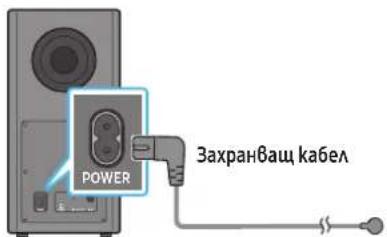
3aHa cmpaHa ha cb6ybpa
2.CBpxkeme3axpaHbuaa kabeKbM AeBu u geChnue bpaayH Bucoko0oBopum
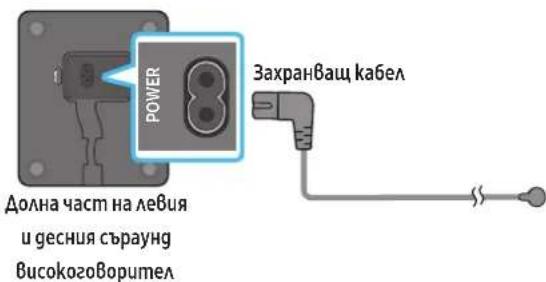
3.CBbpkeme zaxpaHbuaaKa6eKbM Soundbar.
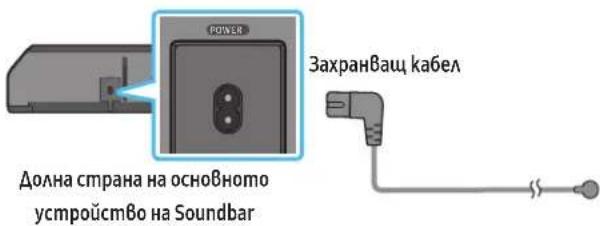
- Cbpxkeme 3axpaHbaa k6e Ka bM Soundbar, c6ybpu u cbpayng BucokozoBopumeAume. C6ybpm u cbpayng BucokozoBopumeAume ce Cb6p3am aBmomamuHo, kozmo Soundbar e Bkluueh.
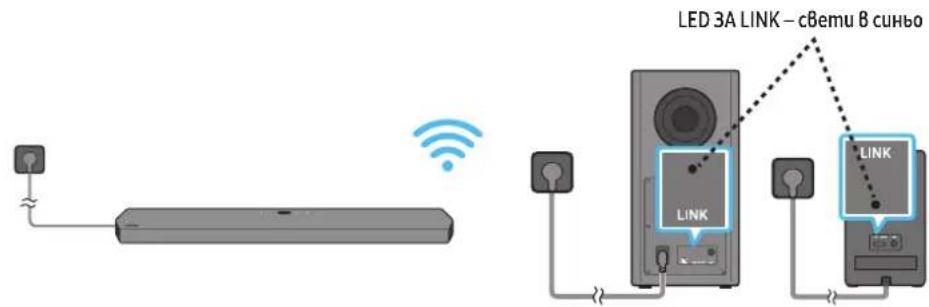
3A6EAEKKKA
Cbpxkeme jaxpaHbAemno ha cb6yphpa u cbpayng bucokoBopumeAume, npegua cBxpkeme kSm Soundbar. C6bypbm u cbpayng BucokozOpumame ue ce cBpkm aBmamuHNO, koamo 6KIOUcme Soundbar.
Ako u3Bagume u nocmaBume omHo8 zaxpaHbauqra k6eB kohmakma, gokamo npogykmbm e 8kloueH, Soundbar ce 8klou7Ba aBmamuuho.
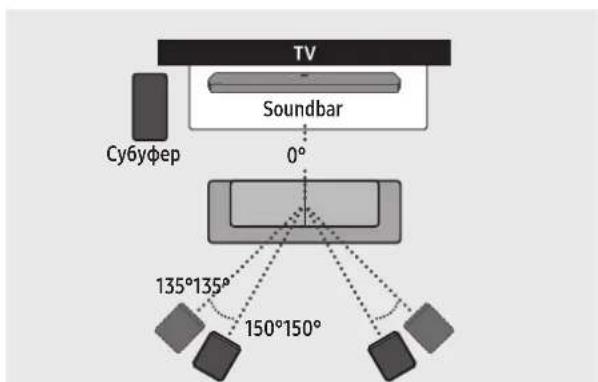
CbpayngBucoko2oBopumA CbpayngBucoko2oBopumA
BHIMAHHE
- Be3kuHume npueMu anmenu ca 8apagEuB 6e3kuHnue cb6ybp u c6payng Bucoko2oBopumeAume. Naeme mogyume om Boga u Blaza.
3a onmuaHno u3kuBaaHe npu caywae ce yBepeme, ye 6 o6aacma okolo mecmaHa 6eKuuHnCb6yΦpUcbpayng Bucoko0BopumeAme Hama npenamcmBua.
Pbno cBp3BaHe Ha cb6yΦba pa uu cbpayHg BucokozoBopumeAume
Ipeguu3BpuuBaHa npoaeypama no pbuho cBp3BaHe no-goy:
Ipo8epeme gaa 3axpaHbaumae ka6eau HaSoundbar ucb6ybpbaaUc bpayhgBucok02ObopumeAme ca cbpahn npaBuaHO.
- yBepemece,yeSoundbarue3kauoyen.
- ɪnəkʌŋeme oʊchɒhʊmo yʊmɒpʊc mɒ Soundbar.
-
Hamuche m 3agpbkm ID SET B 3aghama qam h c6bybpa u cbpayng Bucoko2oBopumeaume 3a Hau-mAko 5 ckyhgu.
-
YepBenuum unghukamop om3ag Ha Bceku Bucoko2oBopumee ce u3kauuBa u cunum unghukamop npemua8a.
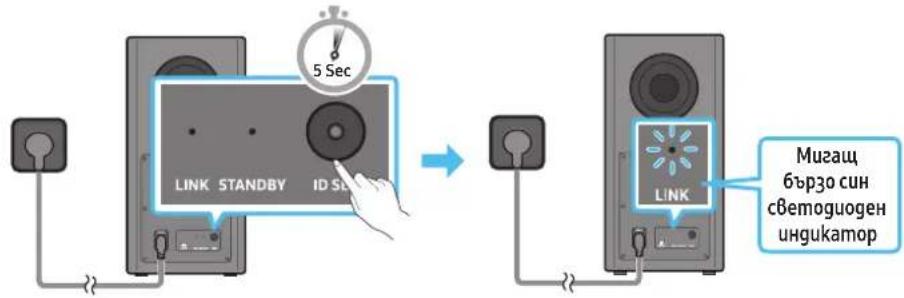
3aHa cmpaHa Ha cb6yΦbpa 3aHa cmpaHa Ha cy6yΦepa
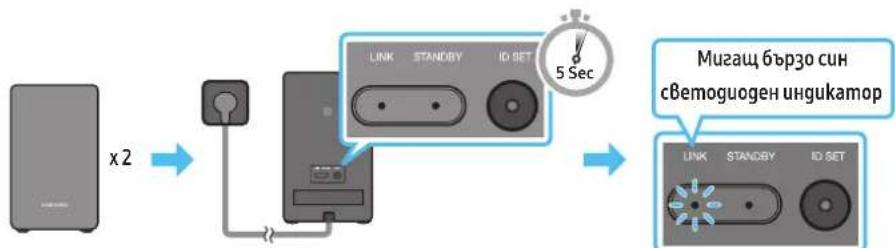
3aHa yacm Ha AeBua u geChu cByayh BucokozoBopumeA
-
Hamucheme 6ymoHa Haze Ha gucmanuohHom ynpa8eHue 3a5 ckyhgu.
-
Ha gucnlaea Ha Soundbar 3a kpmko ce u3Bekga cbo6uenuemo ID SET, koemo caeg moBa u3ye3Ba.
Soundbar ue 8kauy aBmamuHno, koamo npukau nu npouegypama no ID SET.
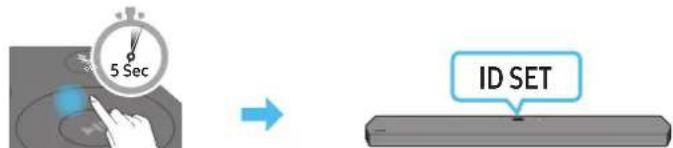
- IpoBepeme gau cBemoguogHm unghukamop 3a Bp3ka LINK cBemu nocmHaHO B cUho (Bp3kama e ocbuaceMBeHa).
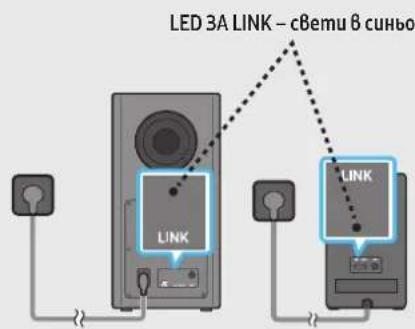
Hngukamopb mLED 3A LINK cnupa ga Muza u cBemu B nocmnoHo cuHo, kozamo e ycmaHOBa Bp3ka Mekgy Soundbar u 6e3kUHHa Cb6ybp, cbpayhg Bucoko2oBopumeAume.
C6emuHa LED uHgukamopa 83agama yacm Ha c6bypa u cbpayng Bucoko2oBopumeAume
| Сбemogουgen undgukamop Cmamyс OnuscaHue Pa3geAumeАна способимс | ||
| CUn LINK STANDBY ID SET | Вклочen | Усneyно сбьр3BAne (Hорmaна рабома) |
| Muza Врьзама | сьь�сановьа | |
| ЧерБен LINK STANDBY ID SET | Вклочen | Tomo8hoscm (п Pru u3kючени ocho8no усmpоьсм8о на Soundbar) |
| Heycneшно сььр3BAne | ||
| ЧерБен и си LINK STANDBY ID SET | Muza Heu3npa8 | Hocm |
3AbeEckKA
Ako ochoBhmo ycmpoucmBo e u3kauyeno,6e3kuuHnarm cb6ybp ue 8ae3e 8 pexum Ha zomobHocm u cBemogogbm STANDBY om3ag Ha cb6ybp aue cmahe cepBen, cieg kamo npemuue Hraokko nmu B cuHo.
Ako 8 6a30cm go Soundbar u3no3Bame ycmpo3mBo, koemo no3Ba cbuama yecmoma kamo Soundbar, cmyueneuma moke ga goBegam go npebcBauha 3Byka.
MakcumaHmo pa3cmohue Ha npegaBahe Ha 6e3kUHnca2Ha om ochoBnua Mogya e okao 10 m, Ho moke ga Bapupa B 3aBucumocm om ycAoBuMa ha pa6oma. Ako mekyo hou nogya U 6e3kUHnca6yphiUp uma cmomanohoeMoHa BAu Memalha CmeHa, cucmemama Moke u3o6uo ga He pa6omu, 3auomo 6e3kuHnma cuHa Hne moke ga npohukne npe3 Memal.
BHIMAHHE
- Be3kunHume npuemHu anmehu ca BapageHu B6e3kuHnue cb6yΦb p u cbpayng Bucoko2oBopumame. Pamaeme Mogya o om Boga u Blaaa.
3a onmuaHOn u3kU8BaHe npu cayuane cyBepeme, ye 6 o6laamma okao 6e3kuuHnue cb6yΦb p u cbpayng Bucoko2oBopumeIume HMa npenramcmBu.
Auto EQ
Texnooama Auto EQ Ha Samsung u3no3Ba Mukpofoh, MohmupaB Cb6bybpa, 3a ga omkpuBa u kopuaupa nkoBe ha huckoecmHom xaapkmepcmu, npuunenu om pa3mepume Ha cmaMa U mecmonolokehuemo Ha cb6bybpa. Pe3yammb m ue 6bge no-neympalna uiaocmHa huckoecmHn xaapkmepcmuka.
C6bybpmmp86a ga 6ge nocmaBEN Ha MUHUMAHO omcmOHue 3"(8 cm) om 8cka cmpaHa ha Hau-6u3kama 2apaua.
B nomeseenuemo mp6Ba ga e B3Mokho hai-muxo, gokamo ce u3BbpwBa hacmpoukama Ha Auto EQ.
He u3no3Baume HukakB6ymyoHu, gokamo hacmpoukama Ha Auto EQ He 3aBbpu.
- Hacmpoukama Ha Auto EQ omHema oko2 Muhymu.
- Пбрема на hampoikama ha Auto EQ He ce chyBa 3Byk om ochOBHua Mogya Ha Soundbar u om 3aghume Bucoko2Obopumeu.
Ako u3noa3Bame ykuura ma 3nbpBu nmb
- Hamuckaume 6ymoHa (KohmpoHa 3Byka), gokamo onuuaMa Auto EQ 6bge u36paHa.
- Hamucheme 6ymohume Hazope/Hagoy,3ga u36epeme Tuning, cke koemo Hamucheme 6ymoHa
-
Hacmpoikama ue 3anouhe uuznbHeuemo Ha npouce ca noka3Ba 8 npoueHmu.
-
3a ga ommeHume Hacmpoukama, Hamucheme 6ymoHa Haope, Hagoy, HaaBo, Hagcho uau ceg koemo hamucheme 6ymoHa 3a ga nomBpgume.
Ako hacmpoukama e heynewha, cBemoguoghui umgukamop mza B cepBeho.
Ako hcmpoukama e ycneuha, cBemoguoghum ughukamop mua 8 cuho.
Ako cme u3bpuwbau npoueca no hacmpouka
- Hamuckaume 6ymoHa (KohmpoHa 3Byka), gokamo onuuaama Auto EQ 66ge u36paHa.
- Hamucheme 6ymohume Haope/Hagoy,3ga u36epeme Tuning, cleg koemo Hamucheme 6ymoHa
- Hamucheme 6ymohume Hazepe/Hagony, 3a ga u36epeme egha om nocouehume no-goy onuui.
On:BkAouBa no-paHO zagageHume hacpmojuHaekBaaJ3epa.
Off:BkAIOyBa hacmpoukume no nogpa36upaheHa ekBaau3epa.
Tuning: Cmapupa omHoBo npoeca no hacmpouka.
05 IN3NOA3BAHE HA KABEHA BPb3KA KbM TEAEBU3OPA
Memog 1. CBbp3Bahe c HDMI

BHIMAHHE
Ko2amHDMIka6eAumu onmuynma km6a ca cBp3anu, nbpBo ce noayuBaHDMi cuhaBm.
3a gacBpke mHDMl ka6eMa meE8u3opa uSoundbar,yBepeme ce,ye cme Cb3paAu u3Bogume,06o3haueHu cARC.B npomueh cayau meEuaOpmb moke ga He u3gaBa 3Byk.
-Перорьшемя kав e High Speed HDMI Cable with Ethernet.
Cb3BaHe ha meeBuzop, koumo noggbpka HDMI ARC (kana 3a o6pamen 3Byk)
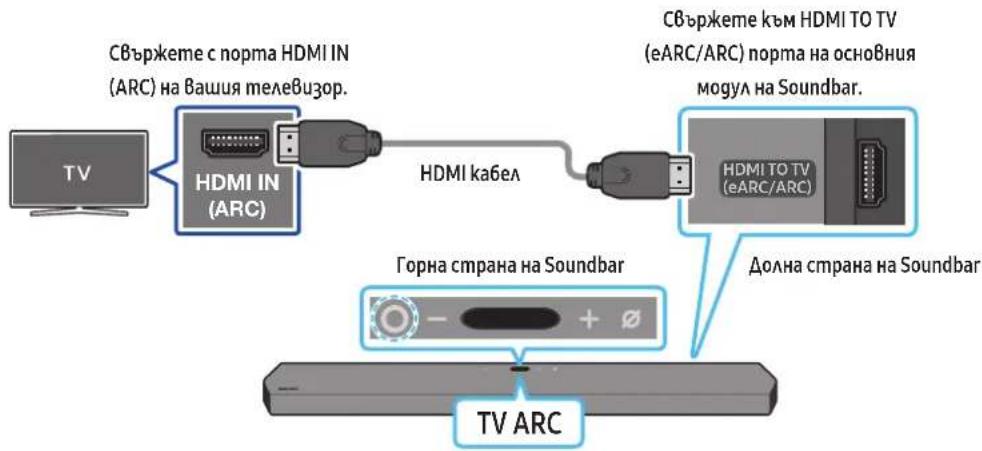
- Ppu u3khuoyenu Soundbar umeaeBuzop Cbpxkeme HDMI ka6ea, kakmo e nokaaho ha fuzypama.
2.BkauyemeSoundbarumaeBuzopa. - TVARC" ce no8aHa npo3opea Ha gucnAe Ha oChBHom ycmpoCmBo Ha Soundbar u Soundbar Bb3npou3Bekga 36yk om meeBu3opa.
Ako 3Bykmbom meVeB3opa He ce B3npou3Bekga, Hamucheme (Myamufykuuohua) 6ymoB zoPama yacm Ha Soundbar uu 6ymoHa (M3moHuk) Ha gucmauHnHomo ynpaBHeue, 3 ga u36epeme pekum D.IN. Ha ekpaha noclegoBameHo ce nokaBam D.IN u TV ARC u 3Bykbom om meVeB3opa ce B3npou3Bekga.
Kozamo cBb3Bame meleB3op, koumo nogbpka yHKuma eARC, ha gucnAe ce noka3Ba eARC u 3BykM 3an04Ba ga ce 4yBa.
3a gac6bpkeme ype3 eARC, fyhkuama eARC 8 meHomo ha meAeBuzopa mpa6Ba ga 6bge Bkauhe.3a nogpo6hcmu omhcno Hacmpoukume HanpaBeme cnpaBka c pbkoBogcmBomo 3a nompe6umela Ha meAeBuzopa. (Hanp.meAeBuzop Samsung:Home( )→Hacmpouku( 已 )→38yk→Ekcnpmu Hacmpouku → Pekum HDMI-eARC (aBmammuen))
Ako TVARC he cne nokake ha npogopea ha gucnnae ha ochoB homo ycmpoucmbo Ha Soundbar, npoBepeme gau HDMI ka6eMa e Cb3an kbn pnaBuHn nopm.
- 3noaBalmye bmoHume 3a cua Ha 3Byka Ha gucmaHooHomo ynpaBHeue Ha meeB3opa, 3 ga npomeHume cuama Ha 3Byka Ha Soundbar.
3ABEAEKKA
Kozamo cBbpxkeme ue3 HDMI ka6eMa meAeBu3op, nogbpxkaHDMI ARC (kaHa 3a o6pameH 3Byk), kM Soundbar, mokeme ga npegaBame uphiPoBu Bugeo ayguog aHHU, 6e3 u3no3BaHe Ha omgeAen onmuhen ka6eA.
- Ipnopb4Bame no 8b3moKHoCm ga u3noA3Bame 6e3kuAen HDMI ka6eA. Ako HDMI ka6eAemb c kuA, u3noA3Baum e ka6eC guaembp nog 14 mm.
-TaФyHKuHHeHa pa3noAokHe,ako HDMI ka6eBm He noggbpka ARC.
Kozamo 3Bykmbn ha npegaBahemo e kogupan B Dolby Digital u, Dopmam Ha u3xoguuzu cΦpoB 3BykHa BaWua meeBuzop e 3agagen Ha PCM, npenopb4BaMe ga npomeHume hacmpouikama Ha Dolby Digital. Kozamo hacmpouikama Ha meeBu3opa ce npomeHu, kaecmBoMo HA 3Byka ue ce noBuTu.(TeaeBu3oHHom o MeHO moke ga u3noA3Ba pa3AuHnu gmu 3a Dolby Digital u PCM 8 3aBucumocm om npou3BogumeHa meeBu3opa.)
Memog 2. CBbp3Bahe c nomouma Ha onmuye ka6eA
Kohpnoen cnucbk 3a npoBepka npegu c8bp3Bahe
KoazoHDMI ka6eMa ummuhyam ka6eCa cBpb3anu, npbBo ce noayyBaHDMI cuaHaBm.
Kozamo u3no3Bame onmuehen ka6eukaemume umam nokpumue,ce y6epeme,ue cme npemaxhau nokpuuma.

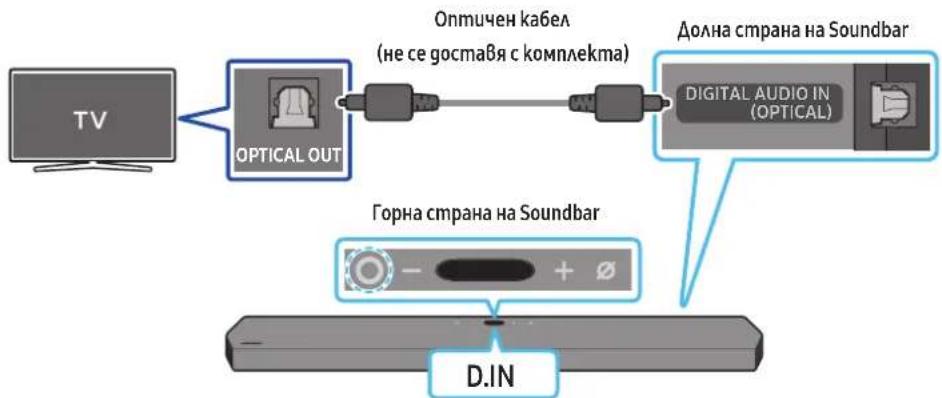
- Ipu u3kauhen meleBuzop u Soundbar cBbpxkeme npma Ha Soundbar DIGITAL AUDIO IN (OPTICAL) unopma OPTICAL u3xog Ha meleBzopa c onmuHua ka6e (he ce npegocma8), kakmo e nokaaho Ha fuzypama.
- BkAIOUeMe Soundbar u meAEBu3opa.
- Hamucheme (Myamufykuohua) 6ymoh, hAmupaue ce Bbpx yophama cmpaHa Ha Soundbar, uau 6ymoHa (M3moHuk) Ha gucmauohomo ynpaBaeHue, 3ga u36epeme pekum D.IN.
- 38kybom meaBuzopa ce b3npou36ekga om Soundbar.
№3BaHe Ha ykuma Q-Symphony
Ipu Q-Symphony Soundbar ce cunxpoHua p c meeB3op Samsung, 3a ga ce u3Bekga 3Byk om gBe ycmpoucmBa 3a onmumaeh cbpayhg efekm. KoZamo ce cBpke Soundbar, ce noka3Ba MeHomo TV+Soundbar nog MeHomo N3Bekgahe Ha 3Byk ha meeB3opa. 36epeme cbomBemHomo MeHIO.
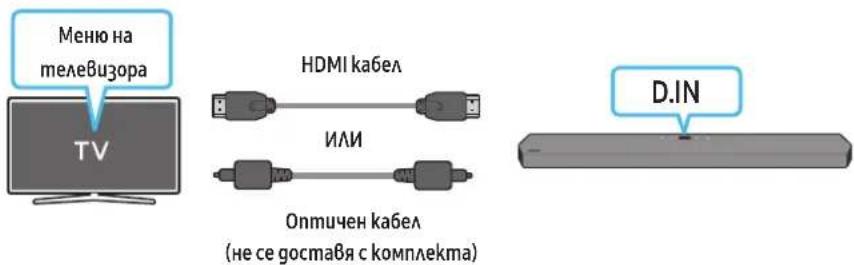
Ako ycmpooumBomo He ycnee ga ce cbpke
Ako 8 cnucbka c Bucok020BopumeuHa mele8u3opa Samsung umame cbueecmBya,Soundbar (Hanpumep [AV] Samsung Soundbar Q950A / Q960A), 2o u3mpuune.
- Cλeg moBa noBmopeme cmbnku om 1 go 3.
IpekbcBaHe Ha Bp3kama Ha Soundbar kbm meAeB3opa Samsung
Hamucheme (Myamufykuohua) 6ymoHa a0pHama cmpaHa Ha Soundbar uu 6ymoHa (mouhuk) Ha gucmauohmo ynpa8eue,3a ga u36epemepekum,pa3auhen om BT.
- PtekbcBaHemHa Bpb3kama omHema Bpeme, mbl kamo meAeBu3OpbM Samsung mp6Ba ga noAyu om2oBop om Soundbar.
(Heo6xogumomo Bpeme moke ga ce pa3Au4Ba 8aBucmocm om mogeAa meeBu3op Samsung.)
KakBa e pa3aukama mekgy BT READY u BT PAIRING?
BTREADy:Bm03u pekum mokeme ga ce c6bpke meoHoBc Bceku meaeBupop Samsung uau Mo6uHyo ycmpoUcm8o, c koumo(koemo) cme ycmaHO8aAU 8p6ka npegu.
BTPAIRING:Bm03u pekum mokeme ga cBpke me HoBo ycmpoUcmBo kbM Soundbar.
(Hamucheme 6ymoHa PAIR Ha gucmauHmoHomO ynpaBHeue Ha Soundbar uHa Hamucheme u zagpbKme 6ymoHa (Bk./N3ka. Ha MukpoHa) B zoPama qacm Ha Soundbar 3a noBeue om 5 cekyhu, gokamo Soundbar e 8 pekum BT.)
Beleekku omHocno Cb3BaHe npe3 Bluetooth
Pa3nooKeme Ho8o ycmpoCmBo 8 guaMembP om 1 m, 3a ga ycmaHoBume 8p3ka npe3 Bluetooth.
Ako 6bge nouckaH INH kog npu cBbp3Bahe c Bluetooth ycmpoemBo, BbBegeme<0000>.
Soundbar aBmamuHc ce 3kAouBa cieg 18 Muymu B cbcmohue ha zomobhocm.
Soundbar moke ga he u3BpuBa npaBuaHo mbpche Ha Bluetooth uau cBp3BaHe npu caeghume o6cmoeAcmBa:
Ako ycmpoicBomo He ycnee ga ce Cbpeke
Ako B cnucbka c BucokozBopumeu Ha Mo6uHomo ycmpoicmBo umame cbuecmByBaou Soundbar (Hanpumep [AV] Samsung Soundbar Q950A / Q960A), 20 u3mpuime.
- No8mopeme cmnku1 u 2.
KakBa pa3Aukama mekgy BT READY u BT PAIRING?
BTREADy:Bm03upekum mokeme ga ce cBpke meoHoBo C Bceku mee6u3op Samsung uAU Mo6uHcmpoCm8o, c koumo(koemo) cme ycmaHOBaA 8p63ka npegu.
BTPAIRING:Bm03u pekum mokkeme ga Cbpxkeme HoBo ycmpoucmBo kBM Soundbar. (Hamuche me 6ymoHa PAIR Ha gucmaHooHmo ynpaBHeue Ha Soundbar uHa Hamuche me zagpbkme 6ymoHa (BkA./N3ka.Ha MukpoOHa) B zoPhamacm Ha Soundbar 3a noBeue om 5 cekyhu, gokamo Soundbar e 6 pekum BT.)
Beleekku omHocno Cb3BaHe npe3 Bluetooth
Pa3noaoxeme Ho8o ycmpoucmBo 8 guamembp om 1 m, 3a ga ycmaHoBume 6pb3ka npe3 Bluetooth.
Ako 66ge nouckan HINH kog npu cBp3Bahe c Bluetooth ycmpoumBo, B6 Begeme<0000>.
Soundbar a8mamuHc ce u3kAuaB8a cieg 18 MuHmu B cbcmHue ha zomOBoHocm.
Soundbar moke ga he u3BpuBna npaBuaho mbcpehe Ha Bluetooth uu cBp3Bahe npu cAegHume o6cmoeMaB:
Hacmpouka Ha yhnkuzma Tap Sound
H3noA3Baime npuokehemo SmartThings, 3ga 8kAnome fynkma TapView, TapSound.
- HaMo6uaHomo ycmpoCm8o cmapmuAme npuOKeHuemo SmartThings.
2.Изберемe(→)om ekpaHa ha npuaKeHemuO SmartThings,koMu ce noka3BaHa mo6uaHomo ycmpoUcMBo. - 3a „Tap View, Tap Sound" 3agaume Bkλ, 3ga pa6omu ΦyHKUma, kozamo go Soundbar ce npu6luKu mo6UHIO ycmpoUcmBo. ΦyHKUma e bKluOeHa.
3A6EAEKKKA
Kozamo mo6uHomo ycmpoucmbOe b E hepeocnemBaau pekum, fyhkuema Tap Sound he pa6omu.
-Функцma Tap Sound moke ga he pa6omu,ako 8 6a30cm go Soundbar uma ycmpoicmba, koumo npuunHbam paguoocmyuen, Hanpumep eakmpuecky cmpoicmba.Ycmpoicmbama, koumo npuunHbam paguoocmyuen, mpa6ba ga 6bgam nocmaBnHa gocmambo p3cmohue om Soundbar.
09 Cbbp3BAHE KbM AIRPLAY 2 HA APPLE
Ta3u pfynkuiMoKe ga He e Ha pa3noLoKeHue B hakou gbpkaBu.
CБьрЗБаHe u u3noλЗБaHe c npogykm Ha Apple
C AirPlay 2 mokeme ga ynpa8AbaBame ayguocumemama B goma cu om Baawu iPhone, iPad, HomePod uAu Apple TV.
To3u Samsung Soundbar noggbpka AirPlay 2 u u3uckBa Bepcua hi iOS 11.4 uau no-hoBa.
3A6EAEKKKA
- PpOepepe gau Soundbarc cBb3aH kM Wi-Fi mpekama. (Buxkme Memog 2. C6bp3BaHe npe3Wi-Fi (6e3kuHa mpeka))
10 MOHTUNPAHE HA CTEHHATA CTOИKA
Ipegna3Hu MEPku npu Mohmupahe
Mohmupaime camo Bbpxy BepmukaHa cmeHa.
He Mohmupaume Ha Maccmo C Bucoka memnepamypauu Baakhocm.
- PpoBepeme gau cmehama e gocmambhyo 3gpaBa, 3a ga u3gbpku me2amo Ha npogykma. Ako he e, nogcuema uu u36epeme gpyzo mrcmo 3a MOhmac.
Kyneme u 3no3Baume 3akpenBauu BuHmoBe uu gio6eau, nogxograu 3a Bauu mun cmeha (Ma3uKa, MemA, gbpBo u m.H.). Ako e 6b3MoXHO, 3akpeneme onopHume BuHmoBe kBm 2pegu Bcmehama.
3akyneme BuMoBe 3a cmeH eMHmax BcbomBemcBue c muna u ge6eunama Ha cmeHama,Ha koHmo keAe me ga MOhmupame Soundbar. - DaamembP: M5
- Dbukha: npenopb4Ba ce gbkuna om 35 mm un no-20ma.
- CBbkjeme ka6eIume om ycmpoUcmBomo kBM BbHnU ycmpoUcmBa, npegu ga mohmupame Soundbar ha cmehama.
- Pnegu ga mohmupame ycmpoicmBomo, yBepeme ce, ye mo e u3kauheu u wenceaum My e u3Bageh om kohmakma. B npomueh cayau moke ga ce noayu eekmpueecku ygap.
Komnohehmu 3a cmehen MohmaK
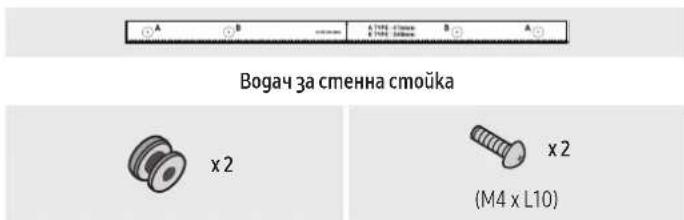

Abpkau-BuHm BuHm
Cko6a 3a cmeHHa cmouka
- NocmaBeme Bogaya 3a MoHmupahe Ha cmeha cpeuy noBbpxHocmmHa cmehama.
Bogayb m3 cmehn ha cmoika mp68a ga e nocma8eH xopuzmnaHo.
- Ako meVeB3OpbM Bu e moHmupaHa cmeHama, moHmupaAme Soundbar Ha nohe 5 cm nog meVeB3opa.
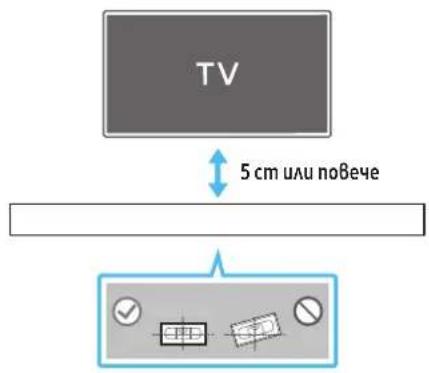
- NogpaBheme ueHmpaHama AunHna HoBogaya 3a cmehHa cmoika cnpmo ueHmbpa Ha meAeBu3opa (ako moHmupame Soundbar nog meAeBu3opa) u cAeg moBa zakpeneme Bogaya 3a cmehHa cmoika kbM cmeHama, kamo u3noA3Bame mukco.
Ako He Mohmupame nog meaBuzop, nocmaBeme uehmpaHama AuHua 8 uehmba Ha 30Hama 3a MoHmak.
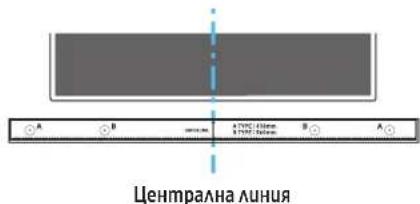
3.Пьх悔БьхаHa xumukaUngocmpen mouB npe3 uehmbrpaHa u36pakenmaA-mun B8Bceku kpaHa Bogaya,3a ga Mapkupame omBopume 3a noggbpxauime BuHmOe, ceg moBa maxheme Bogaya 3a MOhmupaHe Ha cmeHa.
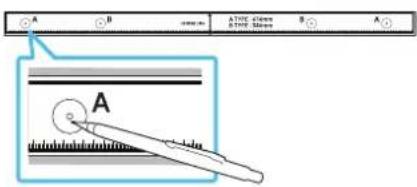
- Kamo u3no3Bame 6opMaunu c nogxogau pa3mep, npo6uime om8op 8 cmehama Bbpxy Bcka mapkuo8ka.
Ako MapkopoBkume He cbomBemcmBam Ha no3uquume Ha uuΦmoBeme, nocmaBeme nogxogauo onopu uuu 60aMoBe B omBopume, npegu ga nocmaBume noggbpkaumme BuHmoBe. Ako u3no3Bame onopu uuu ynabmHumeu, yBepeme ce, ye omBopume, koumo npo6uBame, ca gocmambuHO 20aemu 3a onopume uu ynaBMhumeAume, koumo no3Bame.
- IbXheme BuHm (He ce gocmaBc komnAekma) BbB Bceku gbpka-BuHm U cAeg moBa 3aBuUme Bceku BuHm 3gpaBo 0 omBopa Ha noggbpkaua BuHm.
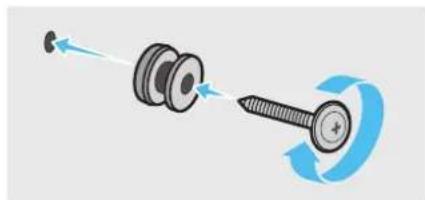
- MoHmupaIme 2-ma MOHmaKHu eAeMeHma ckO6a-cmeHa 8 npaBuaHmo HanaPbAeHue 8 gohama yacm Ha Soundbar, kamo u3noA38ame 2 BuHma.
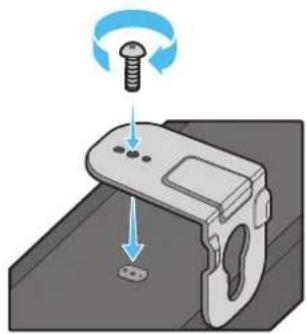
- Ppu ca06BaHemoe cybepeme, ye 3akayuume yacmu Ha MOHmaxkume enemmu ckoba -cmeha ca p3nooKeHu 3ag 2b6paHa Soundbar.
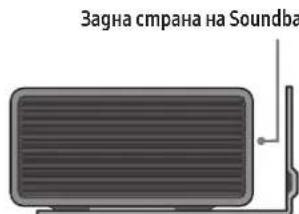
Aecen kpaHa Soundbar
- Mohmupaime Soundbar 3aegHo c npukaeyHume MohmaKHe eMeHmu ck6a-cmeHa, kamo okaume MohmaKHe eMeHmu ck6a-cmeHa ha gbpkaume Ha BuHmoBe Ha cmeHama.
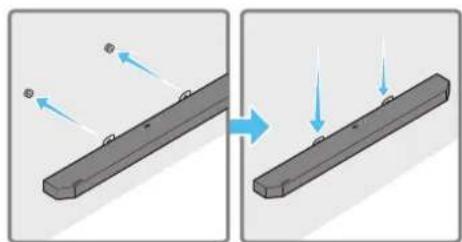
- Πλβheme Soundbar hagony, kakmo e nokazahno no-goy,3a ga mozam MOHmaxku eAleMeHmu ck06a-cmeHa g3acmaHam cma6uAno Bbpxy gbpkaumeha BuHmoBe.
PocmaBeme gbpkaHume Ha BuHmoBe 8 wupokama (goHa) qacm Ha MOHMAKHMue eAeMeHmu ckO6a-cmeHa, cieg koemo npunb3Heme Hagoy MoHMAKHMue eAeMeHmu ckO6a-cmeHa, 3a ga Mozam MOHMAKHMue eAeMeHmu ckO6a-cmeHa ga 3acmaHam cmaBuHo Ha gbpkaHume Ha BuHmoBe.
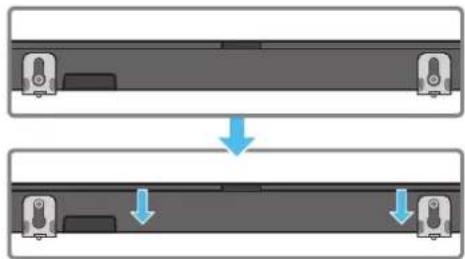
Mohmupahe Ha cbpayHg BucokozoBopumeAume Ha cmeha
MoKe ga 3akynume cmeHHu KOH3oAU omgeAHO, 3ga MOHMupame cbpayHg
Akmyaun3aun ype3 USB
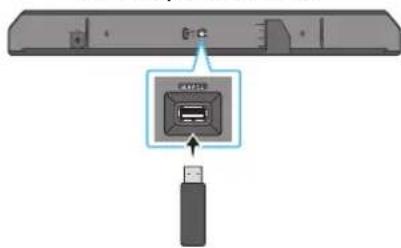
OaHa cmpaHa Ha Soundbar
Bb3mokho e 86bgeue Samsung ga npegaaa akmyaau3auu 3a bpyepa h cucmemama Soundbar.
Koamu mHaauHa akmyaua3au, mokee ga akmyaunape Me Soundbar ue3 cBp3BaHe h USB fauu namemma, cbgpkaa a kmyaunupanur foep, kmnopma SERVICE Ha Soundbar.
- Omugeme Ha ye6 calma Ha Samsung (www.samsung.com) nombpceme umemo Ha MogeA om onuqma Ha MeHomo 3a nogpokka Ha kuehmu.
3a no8eue unfoopmauou omno 0kmyaua3auuume Buokme pboBogcmBoMo 3a HaCmpoik. - Ⅱm3me2aeme fauHa 3a Haq2paXgAne (USB mun).
- Pa3apxuBpaume paAa, 3a qa cbgagem npank c umemo Ha paAa.
-
3ana3eme c6gagehama nanka Ha USB Hocumex u cAeg moBa 2o cBbpxkeme kM Soundbar.
5.Bkmoe MeSoundbar.Caeg moBa npogykmb ce akmyau3upa8 npogbXekue Ha Makcym 3 Muhymu, kamo ce u3Bexka cbo6uenuo UPDATE -
Pto BpeMe Ha akmyaua3auma He 20 u3kaouBaume u He Bageme USB HOCUMEA.
AkoHa np03opea Ha gucnna He ce no8Bu UPDATE, u3Bageme 3axpaHbawu ka6e om Soundbar u caeg mo8a zo Bkauyeme omHOo.
AkoeuncmalaupanaHa-HoBamaBepcua,Heceu3BpwaHukakBa akmyauaa.
B 3a8ucumocm om muna USB uma BepoarmHocm ga He ce noggbpkam akmyauaauu.
Hnuaa3aua
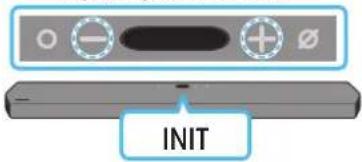
Topha cmpaHa Ha Soundbar
Ipu 8kaueyenSoundbar Hamuche meegHoBpeMeHHO 6ymoHume (uHa 38yka) Ha ycmpoucmBomo 3a nohe 5 cekyHgu. Ha gucnAe ce u3Bexkga INIT uSoundbar ce uhuuaAupa.
BHIMAHHE
Bcuku hacmpouku Ha Soundbar ca uhuuaa3upaH. Ybepeme ce, ye cme U3BpuuMoBa camo akc eHaaaa uhuuaa3auu.
13 OTCTPAHЯBAHE HA HEN3ПРABHOCTN
Ipegu ga nombpcume nomou, npoBepeme caeghomo.
Soundbar He ce 8kAn4Ba.
-ПюВере gaau zaxpaHBauzum ka6eHa Soundbar e nocmaBEN npaBuAnho B koHmakma.
Soundbar pa6omu Henpegcka3yeMo.
- ɪn3gæme ʒaːpʌhBauŋka6eʌu 2ɔnocmaBeme omhoB。
- ɪmʒaɡe mæzæpənBæuŋa kæbæl om BæhʊnHO ycmpoʊcMbʊ u onumaʊme omHoBo.
AkoHMaCuZHa,SoundbarabMmamuHNo ce u3kauoBa cae ng onpegeen nepuog om 8peme.BkauoHeme zo om 6ymoHa 3a 8kauoBahe/u3kauoBahe. (Bukmecmpahu9.)
AucmauohHomoynpaBaeHuehepa6omu
Hacouche gucmauohomo ynpaBHeue gupekmno kmb Soundbar.
- NogMeHeme 6amepuume c Ho8u.
Om Soundbar He ce u3Bekga 3Byk.
3Bykm om Soundbar enpekaeHcA6 uu 3a2yweH. Pezyuapame cuama ha 38ya.
Ko2a o cBp3aHO BbHNO ycmpoUcmBo (gekogep 3a meAeBu3u, Bluetooth ycpmOcMBO,Mo6uHNO ycpmOcMBO u m.H.),pezuaPauMe cuama Ha 3Byka Ha BbHNO homo ycpmOcMBO.
- 3a u3xogau 38yk om meAeBu3opa u36epeme Soundbar. (TeAeBu3op Samsung: Home ( ) → Hacmpouku ( ) → 38yk → 38ykoB u3xog → U36op Ha Soundbar)
C8bp3BaHemHa ka6eMa kM Soundbar He 6uBa ga e Xaa6aBo. H3ageme ka6eMa u 20 cBpkeme omho8o.
I3Bageme 3axpaHBaunra ka6eU3uA, cBpKeme omHoBu 6kauOme 3axpaHBaHemo.
- Hnuau3upaune npogykma u onumaume omhoB. (Buxme cpauna 32.)
Om cb6yfoa uu3agHume BucokozoBopumeu He ce u3Bekga 3Byk.
- PpOBepe maLED unghukamopbM 8 zagHama qacm Ha cb6ybpa U cbpayng BucokozoBopumeAme cBemu 8 cuhbo. Cbpxkeme omHOBo Soundbar,cb6yphpa u cbpayng BucokozoBopumeAme,ako unghukamopbMuza 8 cuhbo uAu cBemu 8 cepBeno. (BuXme cmpaHua 14.)
- Moke ga B63Hukne np6aem, akmekgy Soundbar u cy6ypepa um npenamcmBue. Pnpemcme ycmpoucmbama Ha mcamo, gaaey om npenamcmBua.
- Apyu pa3noLoKeHu Ha6u3o ycmpoIcm8a, koumo u3npauam paguoecmomHcu2HaAU, Mozam ga npebchAm Bp3kama. ApbkmbeBucok02OpumeA galey om makuBa ycmpoIcm8a.
- 36ageme uencea u 20 nocmaBeme omHoBo.
Ako uma mpenme He 3Byka, 3a6aBnua uU wym om c6yphiu cbpayHg BucokooBopumeA
Haauuemo Ha kakBumo u ga enpegmemu Mexky Soundbar u cb6ypa moke ga goBege go B3hukBaHemo Ha npo6aem. Peno3uohupaume 2u Ha mcmo, kbgemo Hma nogo6hu pegmemu.
- Moke ga uma mpenmene Ha 3Byka umu 3a6aBnua, ako cb6yΦbpm u cbpayng BucokozoBopumea ca ganee om Soundbar. Iocma8eme zu 6u30 go Soundbar.
- Moke ga uma mpenmehe ha 3Byka uuu 3a6a8Hnue, ako Soundbar e B 6au30cm go uhcmpyemehu uu eekmpueeckcu ycmpoucmba, koumo moam ga npegu3Bukam paguoocmyuenu. PocmaBeme Soundbar galeye om ycmpoucmba, koumo moaam ga npegu3Bukam paguoocmyuenu. (Hanpumep 6e3kuenpymep)
- Ppomeheme c6cmouhemo Ha mpekoBama Bpb3ka Ha meeBu3opa om 6e3kuHa ha ka6eHa.
CuaHa 3Byka Ha BucoKo2oBOpumeHa cy6yepa e npekaHn Hucka
- Пьрванама сuaHa 3Byka Ha c6g6pKaHuemo, koemo 8b3npou3Bexkgame, moke ga e Hucka. Onumaime ga pezyAupame HuBomo Ha cy6yepa. (BuKme cmpaHua 10.)
PocmaBeme BucokozOBoumemaHa cy6yepa no-6luo go Bac.
Bcayauy me meaB3opbm He cBbp3an 4pe3 HDMI TO TV (eARC/ARC)
- Ipo8epeme gaAu HDMI ka6eAbm e cBb3aH npaBuAno kbM ARC kAemama. (Bukme cmpaHaua 17.)
Bb3MoXho e ga He moKe ga 6bge ycmaHOBeHa Bpb3ka 3apagu Cbbp3aHomo BbHuHO ycmpoucmBo (gekogep 3a mee6u3u, mee8u3oHna u2poBa koH30a um.H.).CbPkeme gupekmHo kbM Soundbar. - HDMI-CEC MoKe U ga He ce akMuBupa Ha meAeBu3opa. BkIoUcHeme CEC om MeHOMo Ha meAeBu3opa. (TeAeBu3op Samsung: HauAo () Hacmpouku (出 06山 u cne e p Ha BbHnHO ycmpoucmBo Anynet+ (HDMI-CEC) ON)
3a ga ce cBbpxkeme ue3 eARC, fyHKuMa ma eARC B meHIO ha meeBu3opmp68ga 6bge 8kauyeha. (TeaeB3Op Samsung: Home ( Hacmpouku ( 3Byk Ekcnpmu Hacmpouku Pekum HDMI-eARC (aBmomamuehen))
Hama 38yk npu BkAnuBaHe Ha meAeBuzopa B pekum HDMI TO TV (eARC/ARC)
Bawemo ycmpoocBo He moke ga Bb3npou3Bege BxogHuaaHa. Ipomeheme ayguo u3xoga Ha meleBu3opa Ha PCM uu Dolby Digital. (3a meLeBu3op Samsung: Home () Hacmpoiku (串) 38yk Ekcnpmu Hacmpoiku OpMam Ha u3xogra uphiO8 3Byk)
Soundbar He ocbupecm8a 8b3kaype3 Bluetooth.
Kozamo ce cBp3Ba Ho8o ycmpoucM8o, 3a ycmaHO8aBe Ha 8pb3ka npeBkIOUCheme Ha BT PAIRING. (HamucHeme 6ymoHa PAIR Ha gucmaHuoHHomo ynpaBHeue uHa HamucHeme 6ymoHa kA./N3kA.Ha MukpofoHa) Ha ycmpoucBOMo nohe 3a 5 cekyHgu.)
AkoSoundbareBbp3aHkmbgpyzoycmpooucMo,npBo npekbcheme 8pb3kamaHa moBa ycmpooucMo,3ga cmehume ycmpooucBomo.
Cbpkeme 20 omHoBo, cleg kamo npemaxheme cnucbka c Bluetooth BucokozBopumeu Ha ycmpoicmbomo, koemo ue ce cbbp38a. (TeAeBu3op Samsung: Hauano (H) Hacmpouku ( 3Byk U3BeXgahe Ha 3Byka Cnucbk C bucoko2oBopumeu, cBb3aHnpe3 Bluetooth)
- A8momamuyhmo cBb3BaHe ha meeBu3Op moke ga e geakmuBupaHo. Dokamo Soundbar e B pexkUM BT READY, Hamucheme u 3agpbkme 6ymoHa Ha gucmaHouHomo ynpaBaeHue Ha Soundbar 3a 5 ckyHgu, 3a ga u36epeme ON-TV CONNECT. Ako Bugume OFF-TV CONNECT, Hamucheme u 3agpbkme 6ymoHa Ha8o 3a 5 ckyHgu, 3a ga npomeHume u36opa.
- 13Bageme ueenceA u zo nocmaBe me omHoBo, cieg moBa onumaune nak.
- IHHUuaa3upaume npogykma u onumaume omHoBo. (Bukme cmpauuza 32.)
38kybmc 2y6u,kozmo o ocsecmBena Bpb3ka qpe3 Bluetooth.
Hrkou ycmpooucBa moke ga npegu3Bukam paguocmyueHua,ako ce hamupam m8bpge 6aU30 go Soundbar, Hanpumep MukpoBbAHOBu neku, 6e3kuHu pymepu u m.H.
- Ako ycmpoicmBomo, koemo cBp3aHOpye3 Bluethoth, 6bge npemecmeho mBpgge gao om Soundbar, 3Bykzm Moke ga ce u32y6u. PnemecmemeycmpoicmBomo no-6u30 go Soundbar.
Ako qacm om Bawemo mno e 8 konhmacm c npueMo-npegaBame na Bluetooth cu2Hama u npogykmbm e MoHmuap Hbpxy MeMaHa noBbpxHocm, 36ykbm moKe ga ce u32y6u. IpoBepeme MoHmaxkHa cpega u ycAoBura ma 3a ynompe6a.
Soundbar He ocbuecmBaBp3ka c Wi-Fi mpekama.
-ПpoBepeme gaAu 6e3KuUHm pymep e BkAIOueH.
- ɪzhkʌhʊeme pymepa, Bkʌhʊeme zo u cæg moBa onumaüme omHoBo
Soundbar hama ga ocbucecmBu Bp3ka,ako 6e3kuuHnarm cuHa e mBbpgecla6. Onumaume ga npemecmume Mapupymuzamopa no-6lu30 goSoundbar uua ga omcmpanume Bcuku npenmcmBma MeKgy Soundbar umapupymuzamopa,ako e B3moxho.
Ako6e3kuhmuymep e Ho8,ue mpa6Ba ga npekohfuzypupame mpekoBume hacmpouku Ha bucokozoBopumea.
Soundbar He ce BkluOBa aBmomamuHc 3aegHo cmeBu3opa.
Kozamo u3kauyume Soundbar, gokamo 2aegame meeBu3u, ce geakmuBupa cunxpoHuzupaHemo Ha 3axpaHbHemo c meeBu3opa. PbpBo u3kauyeme eMeEbu3opa.
Фнкuaima AVA He e hauuha B noocyu hme no-goy cayau.
- ΦυkHzμma AVA №ma ga e haʌuŋha, koazo ce u3noλ3Ba φυkHzμma Q-symphony.
-Фунkuama AVA hma ga e haunha,kozamo MukpofoHb m u3kauoeh.
Ppouecbm no hacmpouka Ha Auto EQ e HeycneuH.
- PiouecBm no Hacmpouka moke ga 6bge Heycneuen, ako om Soundbar ce u38ekga 3Byk uuu akoo uma kakBmo u ga e 6bHwenu wum no 6peMe npoueca no Hacmpouka. PpogbAke me c npoueca no Hacmpouka B muxa 06cmano8ka.
- He pa6omeme cIb Soundbar no 8peMe Ha npoueca na Hacmpouka.
14 ANUEH3
Dolby ATMOS
Dolby, Dolby Atmos, and the double-D symbol are registered trademarks of Dolby Laboratories Licensing Corporation. Manufactured under license from Dolby Laboratories. Confidential unpublished works. Copyright © 2012-2020 Dolby Laboratories. All rights reserved.
dtsx
For DTS patents, see http://patents.dts.com. Manufactured under license from DTS, Inc. (for companies headquartered in the U.S./Japan/Taiwan) or under license from DTS Licensing Limited (for all other companies). DTS, DTS:X Pro, DTS:X, and the DTS:X logo are registered trademarks or trademarks of DTS, Inc. in the United States and other countries. © 2020 DTS, Inc. ALL RIGHTS RESERVED.
HOMI
The terms HDMI and HDMI High-Definition Multimedia Interface, and the HDMI Logo are trademarks or registered trademarks of HDMI Licensing Administrator, Inc. in the United States and other countries.

- 3no3Baume Baum meaepoh, ma6em uu komnbp kamo gucmanuoHno ynpa8eHue 3a Spotify. Omugeme Ha agpec spotify.com/ connect, 3a ga Hayume kak
CoMmyepbHaSpoty e npegmHaAueH3Ha mpemu Aua, koumo Mozam ga 6bgam Hamepu Ha cAegnagpec: https://www.spotify.com/ connect/third-party-licenses.

- Apple, AirPlay, iPhone, iPad, HomePod, and Apple TV are trademarks of Apple Inc., registered in the U.S. and other countries.
- Use of the Works with Apple badge means that an accessory has been designed to work specifically with the technology identified in the badge and has been certified by the developer to meet Apple performance standards.
15 BΕΛΕχΚΑ 3A ΑΝΙΝΗЗ C OTBOPEH KOД
3a u3npaahe Ha 3anumBaHua u uckaanu 3a Bbpocu BbB Bpb3ka c omBopen kog ce cBbpxkeme c uehmba pa 3a omBopen kog Ha Samsung (http://opensource.samsung.com)
16 BAXKH N BELEEXK N 3A CEPBn3HOTO OBCAYKBAHE
- PnegocmaBeHume cxemu u uLcmpauuB hacmoa umo PbkoBogcmBo 3a nompe6umae ca cmo 3a cnpa8ka u moke ga ce pa3au4am om peaHnue BbHneBug ha npogykma.
- Moke ga ce haucu ma kca 3a agmuucmpupahe, ako: a) e u3Bukan mexhuk no Baue hacmorahe u Hma gefkm B npogykma (m.e. He cme npoeau pbo8ogcmBomo 3a nompe6ume; b) 3aheceme yega B cepBuzhen uehmbp u Hma gefkm B npogykma (m.e. He cme npoeau pbo8ogcmBomo 3a nompe6ume).
- Lüe 6bge me unφopmupaH 3a agmuucmpamuBhama makca npegu noceueHuemo Ha mexhuka.
17 CNEUΦNKAU IN PbKOBOACTBO
CneuΦukauuu
| Изма могел HW-Q950A / HW-Q960A | |
| Тezeл 7,1kg | |
| Раимеру (ш x В x Д) 1232,0 x 69,5 x 138,0 mm | |
| Дuaрацон на равомнама MEMпорамура 0m +5°C go +35°C | |
| Дuaрацон на ваджносm npu pa6oma 10% ~ 75% | |
| УСИАВATEА Номуналha uzхогна моциосм ((18 W x 6) + (10 W x 3) + (18 W x 6)) + 160 W + (35 W x 6) | |
| Пoggьржану Формаму за БьзрουзБекгане | Dolby 5.1ch / Dolby Digital Plus / Dolby TRUE HD / Dolby ATMOS DTS 5.1ch / DTS HD / DTS-HD Master Audio / DTS:X / LPCM 8Ch |
| ИЗХОДHA моцльноCT HA BEЗЖИЧОTO UCTЮДСТВ Макс. моцльносma npegaБамая npu Wi-Fi 8рьзka | 100 mW npu 2,4 GHz - 2,4835 GHz, 200 mW npu 5,15 GHz - 5,25 GHz, 100 mW npu 5,25 GHz - 5,35 GHz u 5,47 GHz - 5,725 GHz |
| ИЗХОДHA моцльноCT HA BEЗЖИCHОTO UCTЮДСТВ Макс. моцльносma npegaБамая npu BT 8рьзka 100 mW npu 2,4 GHz - 2,4835 GHz | |
| ИЗХОДHA моцльноCT HA BEЗЖИCHОTO UCTЮДСТВ Макс. моцльносma npegaБамая npu SRD 8рьзka 25mW npu 5,775GHz - 5,875GHz |
| Haumehobanue ha c6b6yφbpa PS-WA95B | |
| Tezao 9,8 kg | |
| Размeper (ЛX x B x Δ) 210,0 x 403,0 x 403,0 mm | |
| УСИВАТЕА Номуна наuzхогна моцносm 160 W | |
| ИЗХОДHA моцноCT HA БEZКИЧHOT O YСТПОДТВО Makc. моцносm на npegaБамец ру SRD Брзka 25mW ру 5,775GHz - 5,875GHz |
| Име на komпл ekma om 6e3жчни сьpayнг Вucokozobopumelu | PS-RA95BB-1, PS-RA95BB-2 |
| Тeа lo | 1,8kg |
| Разmersу (ш x В x Д) 125,0 x 203,0 x 141,0 mm | |
| УСИАВATEА Номуная захога моцносм | 35 W x 6 |
| ИЗХОДHA моцност HA БЕЗКИЧНОТ YСТРОЛСТВО Мakс. моцносм на пergабамеля.npu SRD 8рьзka 25mW.npu 5,775GHz - 5,875GHz | |
3ABEAEKKA
Samsung Electronics Co., Ltd cu 3ana3Ba npaBomo gnpoMeH cneuufkaucume 6e3 npegu3ecmue.
TeaAmoUpa3Mepume c npu6Aumehu.
Ipegn3HaMpa: Ako 8kAIOUme/u3kAIOUme Wi-Fi,Soundbar ue ce pecmapupa aBmamuHc.
| Овessa koнсумаця на[eнз扼иь в peşкUM на зомвhoeсм(W) | 7,0 W |
| Wi-FiMemog за geakMuBupané на nopma | Hamucheme 6ymona ID SET ha goлчига nahela ha Soundbar 3a 30 cekyнgu, 3a ga 8kIoquime уluu3kIoquime Wi-Fi. |
| BluetoothMemog за geakMuBupané на nopma | Hamucheme 6ymona NETWORK Ha goлчига nahela ha Soundbar 3a 30 cekyнgu, 3a ga 8kIoquime уluu3kIoquime Bluetooth. |
C hacmojomo Samsung geklapupa, ye moBa paguo60pyBahe e B cbomBemcmBue c DupekmuBa 2014/53/EC u c npuaokumme 3akohBu u3uckBaHua H O6egunehomo kpaamBo.
PbHn mekm ha gekapauauma 3a cboemcBue e hauuhen ha cleghun uhmephem agpec:
http://www.samsung.com, kamo omugeme Ha Noggpbkka u BbBegeme umemo Ha Mogela.
To3u ypege meke ga ce u3noa3Ba BbB Bcuu Ka mpaHn Ha EC u B O6eguHeno h kpaamBo.
C fynkua ma 5 GHz WLAN (Wi-Fi uau SRD 8p3ka) ha mozu ypeg moke ga ce pa6omu camo B zakpuu nomuenueu.
[ПаьluAnu 3x8bpyAne Ha 6amepuune 8 mo3u npogykm]
(Пра�жима 8 gbpkaBc bC cucmemu 3a pa3geAHO CmEmoc6UpaHe)
ToBa 6o3haueHue B'pxy 6amepyma, pkoBogcmBomo uau onako8kama noka3Ba, ye 6amepuume B mo3u npogykme mpra6Ba ga ce u3x6bpamc gpyume 6umoBu omnagbu kpa h mehxure ekcnAoamauoHen cpok. Kbgemo ca mapkupaHxumueckume cumBoaHg, Cd uau Pb noka3Bam, ye 6amepuma cbgbpka kuaBak, kagmu uu oAoBO Hag konhmpaHume HBa B DupekmuBa 2006/66 Ha EO.
Ako 6amepuum He ce u3xBpam npaBuaHno, me3u BeuecemBa MoZAM ga npegu3Bukam yBpekgahe Na oBeukomo 3gpaBe uHa okaHama cpega.
3a ga npegnaume npupognme pecypcu u 3a ga cbgeucmbame 3a mnozokpamhama ynompe6a ha mapeuaHume pecypcu, omgeyume 6amepuime om gpyzume BugoBe omnagbueu u zu peukkaupaume nocpecmBom Bawama okaHa cucmema 3a 6e3nAmHo 8pbuahe Ha 6amepuu.
IpaBuaHo u3xBpAne Ha mo3u npogyk
(Omnagbμ om eλekmpuecko u eλekmpoHn o6OpygBaHe)
(Праохимо 8 gbpkaBu cbc cucmemu 3a pa3geAHO CMemoc6upaHe)
To3u 3nak, nocmaBen Bbpy u3geuemo, He2oBu npunagalexHocmu uau neamHu MamepuaA, O3naaBa, ye npogykmbu Hze2oBume eekmpOnHu npunagalexHocmu (Hanpumep 3apqno ycmpoucMBo, cayuaAku, USB ka6e) He mpa6Ba ga ce u3xBbpam 3aegho c gpyume 6umobu omnagbu, kozamo u3mee ekcnAoamauoHnurm um cpoK. 3a ga He u3a2ame Ha onachcm 08eukomo 3gpaBe u ga npegnama okoIhama cpega om 3ambcpaBae 8 peyamam Ha 6e3kOHpOAno U3XbPAAhe Ha omnagbU, omgeAumme me3u ycmpoucMa om gpyume 6ugoBe omnagbUu 2u npegaBae me 3a peuzkLupane. Nog6Ho om2oBopno noBegehue hacbpaaBa ycmoHBOmo MHO2OKpAmHO u3no3BaHe Ha mamepuaHume pecypcu.
Pompe6umule 8 gomauhu ycoBua mpr6Ba ga ce cBpbkam cm bp2oBeua ha gpe6Ho, om kozomo ca 3akynu mu 0mu npogykm, uU cbc bcm6emhama Meema hagpkaHbna azeHnue, 3a ga noayam nogpo6Hu uncmpkyuu kbge u kak moam ga npegagam me3u ycmpouaphe, bezonacho 3a okolhama cpega.
KopnpamBhme nompe6umau cagcBpka cogmaUuka cu u gnpoBepm npaBuaama u ycoBuma ha gozoBopa 3a nokynka. To3u npogykmu He2oBume eAekmpOnn npunagAekHocmu He mpr68ga ce cmecBam u 3xBpbam 3aegHo c gpyu mbp208cu omnagbu.
3a unhopmau omo hocno ahaekumehmme ha Samsung 3a ona3Bahe ha okolhama cpega u cneuphiunme 3a npogykma hopamubhu tagbkehure, Hanp. REACH, OEO, 6amepuu, nocememe:
www.samsung.com/uk/aboutsamsung/sustainability/environment/our-commitment/data/
SIGURNOSNE INFORMACije
SIGURNOSNA UPOZORENJA
DA BISTE SMANJILI OPASNOST OD STRUJNOG UDARA, NEMOJTE UKLANJATI POKLOPAC (NITI STRAZNJI DIO).
UNUTRA SE NE NALAZE DIJELOVI KOJE KORISNICI MOGU SAMI POPRAVITI. SVE POPRAVKE PREPUSTITE KVALIFICIRANOM SERVISNOM OSOBLJU.
Objašnenje symbola koji se mogu nalaziti na vašem proizvodu Samsung potražite u donjoj tablici.
| OPREZ | |
| OPASNOST OD STRUJNOG UDARA. NEMOJTE OTVARATI. | |
| Ovaj simbol znači da je struja u unutrašnjosti visokog napona. Opasno je dolaziti u bilo kakav doticaj s unutarnjim sklopopima proizvoda. | |
| Ovaj simbol naznačuje da je uz urežaj prilozëna važna dokumentaciţa o njegovom radu i odžavanju. | |
| Proizvod II. razreda: ovaj simbol označava da.nije potrebna sigurnosna veza s uzemljenjem.Ako se taj simbol ne nalazi na proizvodu s kabelom za napajanje, proizvod MORA imati pouzdan spoj na zašitno uzemljenje. | |
| ~ | Izmjenični napon: nazivni napon označen navenidenim simbolom predstavlja izmjenični napon. |
| --- | Istosmjerni napon: nazivni napon označen navenidenim simbolom predstavlja istosmjerni napon. |
| A i | Oprez. Pogledajte upute za upotrebu: ovaj simbol upićuje korisnika da potraži dodatne informacije u pogledu sigurnosti u korisnčkom priručniku. |
UPOZORENJE
- Kako bi se smanjila opasnost od požara ili strujnog udara, ne izlažite ovaj uredaj kiši ili vlazi.
OPREZ
- RADI SPRJEÇAVANJA STRUJNOG UDARA, SIRU NOZICU UTIKAÇA PORAVNAJE SA SIRIM UTOROM I U POTPUNOSTI UMETNITE.
- Ovaj uredaj treba uvijek biti povezan suticnicom izmjenicne struje sa sigurnom vezom na uzemljenje.
- Za odspajanje uredaja sa izvora struje, utikač se mora izvuči iz strujne uticnice, stoga je potreban pristup strujnoj uticnici.
- Ne izlažite uredaj prskanju ili kapanju. Ne stavljate predmetenapunjene tekucinom, primjerice vaze, na uredaj.
- Za potpuno iskjučivanje ureža morate izvuci utikač iz zidne utičnice.
Stoga utikač mora u svakom trenutku biti lakо dostupan.
MJERE OPREZA
- Pobrinite se da je napajanze izmjenicnom strujom u kuci kompatibilno sa zahtjevima napajanza navedenim na identifikaciksjoj najepnici na donjem dijelu proizvoda. Proizvod postavite vodoravno, na odgovarajucoj podlozi (namješaj), s dovoljno prostora oko njega za prozračivanje (7 10cm) . Osiguraje da otvori za prozračivanje nisuPokriveni. Ne stavljaje jedinicu na pojacala ili drugu opremu koja se zagrijava. Ova je jedinica dizajnirana za neprekidnu upotrebu. Za potpuno isključivanje jedinice isključite strujni utika iz zidne uticnice. Iskopcjte jedinicu akо je ne namjeravate koristiti duze vrijeme.
- Za vrijeme grmljavinskog nevremena odspojite utikač izmjenične struje iz zidne utičnice. Skokovi napona uzrokovani grmljavinom mogu ošteti jedinicu.
- Nemojte izlagati jedinicu izravnom suncevom svjetlu ili drugim izvorim topline. To moze uzrokovati pregrijavanje i kvar na jedinici.
- Zašitite proizvod od vlage (npr. vaza), prekomjerne topline (npr. kamina) te opreme koja stvara jaka magnetska ili elektricna polja. Iskopćajte kabel napajanja iz zidne utićnice ako je jeginica u kvaru. Vaš proizvodnecte namijenjen za industrijsku upotrebu. Namijenjen je samo za osobnu upotrebu. Ako je proizvod pohranjen na niskim temperaturama, moze se pojaviti kondensacija. Ako se jeginica prevozi tijekom zime, prije upotrebe prčekajte priblžno 2 sata dok se jeginica ne vrati na sobnu temperaturu.
- Baterija koja se koristi s ovim proizvodom sadrži kemikalije koje su štete na okolis. Ne odlažite bateriju u opci kučni opad. Ne izlažite bateriju prekomjernoj toplini, izravnoj sunčevoj svjetlosti niti vatri. Ne stvarajte katke spojeve, ne rastavljate niti pregrijavaje bateriju. OPREZ: Opasnost od eksplozije ak se baterija neispravno zamijeni. Zamijenite je samo baterijom iste ili ekvivalentne vrste.
Ciscenje tkanine
Odmah ukonite prljavstinu ili mrlju s povrsine proizvoda.
Dolby, Dolby Atmos, and the double-D symbol are registered trademarks of Dolby Laboratories Licensing Corporation. Manufactured under license from Dolby Laboratories. Confidential unpublished works. Copyright © 2012-2020 Dolby Laboratories. All rights reserved.
dtsx
For DTS patents, see http://patents.dts.com. Manufactured under license from DTS, Inc. (for companies headquartered in the U.S./Japan/Taiwan) or under license from DTS Licensing Limited (for all other companies). DTS, DTS:X Pro, DTS:X, and the DTS:X logo are registered trademarks or trademarks of DTS, Inc. in the United States and other countries. © 2020 DTS, Inc. ALL RIGHTS RESERVED.
HDMI
The terms HDMI and HDMI High-Definition Multimedia Interface, and the HDMI Logo are trademarks or registered trademarks of HDMI Licensing Administrator, Inc. in the United States and other countries.

Works with Apple AirPlay
- Apple, AirPlay, iPhone, iPad, HomePod, and Apple TV are trademarks of Apple Inc., registered in the U.S. and other countries.
- Use of the Works with Apple badge means that an accessory has been designed to work specifically with the technology identified in the badge and has been certified by the developer to meet Apple performance standards.
15 NAPOMENA O LICENCI ZAKORISTENJE SOFTVERAOTVORENOG KODA
Za slanje upita i zahtjeva za pitanja vezana za softver otvorenog koda, kontaktirajte Samsung Open Source (http://opensource.samsung.com)
16 VAŽNE NAPOMENE O USLUZI
- Slike i ilustracije u ovom korisničkom piručniku navedene su samo za referencu i mogu se razlikovati od stvarnog izgleda proizvoda.
- Moguca je naplata naknade za administraciju u slučaju
(a) poziva inżenjera na vaš zahtjev, akо se utvrdi da na proizvodu ne postoji kvar (tj. niste pročitali korisnički prirucnik)
(b) dostave uredaja u servisni centar, ak so utvrdi da na proizvodu ne postoji kvar (tj. niste procitali korisnicki prisncik).
- O iznosu administrativne naknade bit cete obaviješeni prise posjeta tehnicara.
17 SPECIFIKACIJEVODIC
Specifikacije
| Naziv modela HW-Q950A / HW-Q960A | |
| Težina 7,1 kg | |
| Dimenzije (Š x V x D) 1232,0 x 69,5 x 138,0 mm | |
| Raspon radne temperature +5°C do +35°C | |
| Raspon radne vlage 10 % ~ 75 % | |
| POJAČALO Nazivna izlazna snaga ((18 W x 6) + (10 W x 3) + (18 W x 6)) + 160 W + (35 W x 6) | |
| Podržani formati reprodukcije | Dolby 5.1ch / Dolby Digital Plus / Dolby TRUE HD / Dolby ATMOS DTS 5.1ch / DTS HD / DTS-HD Master Audio / DTS:X / LPCM 8Ch |
| IZLAZNA SNAGA BEŽICNOG UREDAJA Maks. snaga Wi-Fi odašiljača | 100 mW pri 2,4 GHz - 2,4835 GHz, 200 mW pri 5,15 GHz - 5,25 GHz, 100 mW pri 5,25 GHz - 5,35 GHz i 5,47 GHz - 5,725 GHz |
| IZLAZNA SNAGA BEŽICNOG UREDAJA Maks. snaga BT odašiljača 100mW pri 2,4GHz - 2,4835GHz | |
| IZLAZNA SNAGA BEŽICNOG UREDAJA Maks. snaga SRD odašiljača 25mW pri 5,775GHz - 5,875GHz | |
| Naziv uredaja Subwoofer PS-WA95B | |
| Težina 9,8 kg | |
| Dimenzije (Š x V x D) 210,0 x 403,0 x 403,0 mm | |
| POJAČALO Nazivna izlazna snaga | 160 W |
| IZLAZNA SNAGA BEŽICNOG UREDAJA Maks. snaga SRD odašiljača 25mW pri 5,775GHz - 5,875GHz | |
| Naziv KOMPLETEA bežichnih zvučnika za surround zvuk | PS-RA95BB-1, PS-RA95BB-2 |
| Težina | 1,8 kg |
| Dimenzije (Š x V x D) 125,0 x 203,0 x 141,0 mm | |
| POJAČALO Nazivna izlazna snaga 35 W x 6 | |
| IZLAZNA SNAGA BEŽICNOG UREDAJA Maks. snaga SRD odašiljača 25mW pri 5,775GHz - 5,875GHz |
NAPOMENA
Samsung Electronics Co., Ltd pridržava pravo promijeniti spefikacije bez ranijeg upozorenja.
Tezina i dimenzije su priblizne.
Mjera opreza: Soundbar ce se automatiski ponovnoPokrenuti aku uključite/isključite bežicnu vezu.
| Ukupna potrošnja energije u stanju mirovanja (W) | 7,0 W |
| Wi-Fi | Pritisnite gumb ID SET na donjoj ploči sustava Soundbar na 30 sekundi da biste uključili/ isključili Wi-Fi. |
| Način isključivanja prijključka | |
| Bluetooth | Pritisnite gumb NETWORK na donjoj ploči sustava Soundbar 30 sekundi da biste uključili/ isključili Bluetooth. |
| Način isključivanja prijključka |
Tvrtka Samsung ovime izjavljuje da je ova radio-oprema sukladna Direktivi 2014/53/EU te relevantnim zakonskim odredbama Ujedinjenog Kraljevstva.
09 PřIPOJENÍK APPLE AIRPLAY 2
Dolby, Dolby Atmos, and the double-D symbol are registered trademarks of Dolby Laboratories Licensing Corporation. Manufactured under license from Dolby Laboratories. Confidential unpublished works. Copyright © 2012-2020 Dolby Laboratories. All rights reserved.
dtsx
For DTS patents, see http://patents.dts.com. Manufactured under license from DTS, Inc. (for companies headquartered in the U.S./Japan/Taiwan) or under license from DTS Licensing Limited (for all other companies). DTS, DTS:X Pro, DTS:X, and the DTS:X logo are registered trademarks or trademarks of DTS, Inc. in the United States and other countries. © 2020 DTS, Inc. ALL RIGHTS RESERVED.
HDMI
The terms HDMI and HDMI High-Definition Multimedia Interface, and the HDMI Logo are trademarks or registered trademarks of HDMI Licensing Administrator, Inc. in the United States and other countries.

- Apple, AirPlay, iPhone, iPad, HomePod, and Apple TV are trademarks of Apple Inc., registered in the U.S. and other countries.
- Use of the Works with Apple badge means that an accessory has been designed to work specifically with the technology identified in the badge and has been certified by the developer to meet Apple performance standards.
15 UPOZORNÉNÍK LICENCÍM NA OPEN SOURCE
Pokud chcete poslat dotazy a požadavky týkajíci se softaru open sources, obratte se na Samsung Open Source (http://opensource.samsung.com)
16 DÜLEZITÉ POZNÁMKY KE SLUŽBě
If batteries are not properly disposed of, these substances can cause harm to human health or the environment.
Abyste chrani prirodniz zdroje a podporovali opetovn peuzit materialu, oddelte baterie od jinych typ odpadu a recyklujte je prostrednictvim mistniho systemu zpetneho odbereu bateri.
www.samsung.com/uk/aboutsamsung/sustainability/environment/our-commitment/data/
SIKKERHEDSOPLYSNINGER
SIKKERHEDSADVARSLER
DAKSLT MA IKKE AFMONTERES, DA DET OGER RISIKOEN FOR ELEKTRISK STOD (ELLER BAGSIDEN).
DER ER INGEN INDVENDIGE DELE, SOM SKAL SERVICERES.
SERVICEARBEJDE SKAL UDFORES AF KVALIFICERDE
SERVICEMEDARBEJDERE.
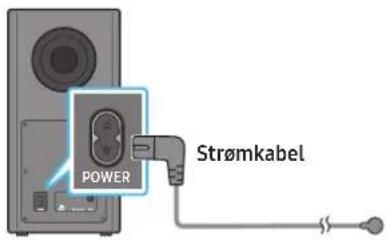
Subwooferens bagside
Surroundhjttaler V Surroundhjttaler H
FORSIGTIG
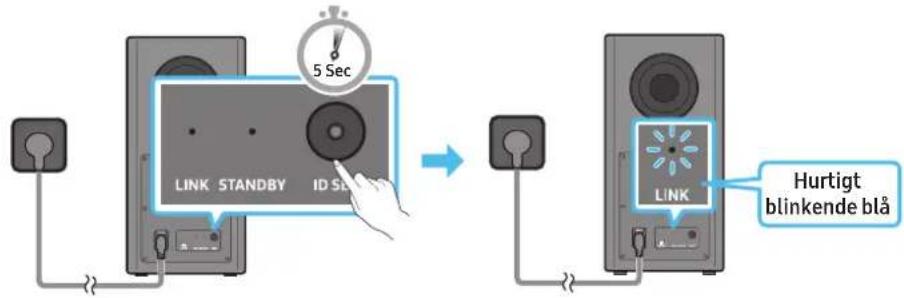
Subwooferens bagside Subwooferens bagside
09 OPRETTESEL TIL APPLE AIRPLAY 2
Dolby, Dolby Atmos, and the double-D symbol are registered trademarks of Dolby Laboratories Licensing Corporation. Manufactured under license from Dolby Laboratories. Confidential unpublished works. Copyright © 2012-2020 Dolby Laboratories. All rights reserved.
dtsx
For DTS patents, see http://patents.dts.com. Manufactured under license from DTS, Inc. (for companies headquartered in the U.S./Japan/Taiwan) or under license from DTS Licensing Limited (for all other companies). DTS, DTS:X Pro, DTS:X, and the DTS:X logo are registered trademarks or trademarks of DTS, Inc. in the United States and other countries. © 2020 DTS, Inc. ALL RIGHTS RESERVED.
HOMI
The terms HDMI and HDMI High-Definition Multimedia Interface, and the HDMI Logo are trademarks or registered trademarks of HDMI Licensing Administrator, Inc. in the United States and other countries.

- Brug din Telefon, tablet eller computer som fjernbetjening til Spotify. Gå til Spotify.com/connect for at &, hvordan du gør
- Spotify-softwareer underlagt tredjepartslicensee. Få mere at vide her: https://www.spotify.com/connect/third-party-licenses.

- Apple, AirPlay, iPhone, iPad, HomePod, and Apple TV are trademarks of Apple Inc., registered in the U.S. and other countries.
- Use of the Works with Apple badge means that an accessory has been designed to work specifically with the technology identified in the badge and has been certified by the developer to meet Apple performance standards.
15 LICENSBEMAERKNINGER VEDR. OPEN SOURCE
Hvis du vil sende sporgsmal og anmodninger vedrarende open sources, kan du kontakte Samsung Open Source ((http://opensource.samsung.com)
16 VIGTIGE NOTER OM SERVICE
www.samsung.com/uk/aboutsamsung/sustainability/environment/our-commitment/data/
Dolby, Dolby Atmos, and the double-D symbol are registered trademarks of Dolby Laboratories Licensing Corporation. Manufactured under license from Dolby Laboratories. Confidential unpublished works. Copyright © 2012-2020 Dolby Laboratories. All rights reserved.
dtsx
For DTS patents, see http://patents.dts.com. Manufactured under license from DTS, Inc. (for companies headquartered in the U.S./Japan/Taiwan) or under license from DTS Licensing Limited (for all other companies). DTS, DTS:X Pro, DTS:X, and the DTS:X logo are registered trademarks or trademarks of DTS, Inc. in the United States and other countries. © 2020 DTS, Inc. ALL RIGHTS RESERVED.
HOMI
The terms HDMI and HDMI High-Definition Multimedia Interface, and the HDMI Logo are trademarks or registered trademarks of HDMI Licensing Administrator, Inc. in the United States and other countries.

- Apple, AirPlay, iPhone, iPad, HomePod, and Apple TV are trademarks of Apple Inc., registered in the U.S. and other countries.
- Use of the Works with Apple badge means that an accessory has been designed to work specifically with the technology identified in the badge and has been certified by the developer to meet Apple performance standards.
15 HINWEIS ZUR OPEN SOURCE-LIZENZ
VEILIGHEIDSWAARSCHUWINGEN
OM DE KANS OP EEN ELEKTRISCHE SCHOK TE VERKLEINEN MAG U DE BEHUIZING NIET VERWIJDEREN (OF DE ACHTERZIJDE).
ER BEVINDEN ZICH GEEN ONDERDELEN DIE DOOR DE GEBRUiker KUNNEN WORDEN GEREpareERD. LAAT REPARATIE EN ONDERHOUD OVER AAN GEKWALIFICEERD SERVICEPERSONEEL.
VOORZORGSGMAATREGELEN
SAMSUNG-TV REMOTE, 'ALL-TV REMOTE'.
Samsung-tv's uitgebracht in 2017 of later
Home () Installingen () Geluid Geluidsuitvoer [AV] Samsung Soundbar Q950A / Q960A (Wi-Fi)
07 EEN EXTERN APPARAAT VERBINDEN
09 VERBINDEN MET APPLE AIRPLAY 2
Length: 18 mm lang
Aantal: Links 1st/Rechts 1st
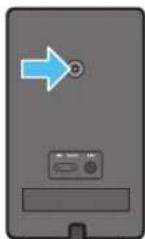
L
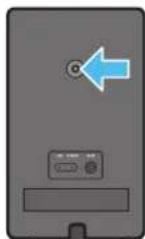
R
13 PROBLEEMOPLOSSING
Dolby, Dolby Atmos, and the double-D symbol are registered trademarks of Dolby Laboratories Licensing Corporation. Manufactured under license from Dolby Laboratories. Confidential unpublished works. Copyright © 2012-2020 Dolby Laboratories. All rights reserved.
dtsx
For DTS patents, see http://patents.dts.com. Manufactured under license from DTS, Inc. (for companies headquartered in the U.S./Japan/Taiwan) or under license from DTS Licensing Limited (for all other companies). DTS, DTS:X Pro, DTS:X, and the DTS:X logo are registered trademarks or trademarks of DTS, Inc. in the United States and other countries. © 2020 DTS, Inc. ALL RIGHTS RESERVED.
HDMI
The terms HDMI and HDMI High-Definition Multimedia Interface, and the HDMI Logo are trademarks or registered trademarks of HDMI Licensing Administrator, Inc. in the United States and other countries.

- Apple, AirPlay, iPhone, iPad, HomePod, and Apple TV are trademarks of Apple Inc., registered in the U.S. and other countries.
- Use of the Works with Apple badge means that an accessory has been designed to work specifically with the technology identified in the badge and has been certified by the developer to meet Apple performance standards.
15 OPEN SOURCE-LICENTIEKENNISGEVING
www.samsung.com/uk/aboutsamsung/sustainability/environment/our-commitment/data/
OHUTUSALANE TEAVE
HOIATUSED
ELEKTRILÖGIOHU VÄHENDAMISEKS ARGE EEMALDAGE KAANT (EGA TAGAPANEELI).
SEADMES POLE KASUTAJA HOOLDATAVAID OSI. HOOLDAMISEKS PÖORDUGE KVALITSEERITUD TEENINDUSTÖOTAJATE POOLE.
09 ÜHENDAMINE APPLE AIRPLAY 2-GA
Dolby, Dolby Atmos, and the double-D symbol are registered trademarks of Dolby Laboratories Licensing Corporation. Manufactured under license from Dolby Laboratories. Confidential unpublished works. Copyright © 2012-2020 Dolby Laboratories. All rights reserved.
dtsx
For DTS patents, see http://patents.dts.com. Manufactured under license from DTS, Inc. (for companies headquartered in the U.S./Japan/Taiwan) or under license from DTS Licensing Limited (for all other companies). DTS, DTS:X Pro, DTS:X, and the DTS:X logo are registered trademarks or trademarks of DTS, Inc. in the United States and other countries. © 2020 DTS, Inc. ALL RIGHTS RESERVED.
HOMI
The terms HDMI and HDMI High-Definition Multimedia Interface, and the HDMI Logo are trademarks or registered trademarks of HDMI Licensing Administrator, Inc. in the United States and other countries.

- Kasutage telefoni, tahvelarvutit voi arvutit Spotify kaugjuhtimispuldina. Lisateavet vt Spotify.com/connect
- Spotify Software allub muu osapoole litsentsidele, mille leiate siit: https://www.spotify.com/connect/third-party-licenses.

- Apple, AirPlay, iPhone, iPad, HomePod, and Apple TV are trademarks of Apple Inc., registered in the U.S. and other countries.
- Use of the Works with Apple badge means that an accessory has been designed to work specifically with the technology identified in the badge and has been certified by the developer to meet Apple performance standards.
15 AVATUD LÄHTEKOODI LITSENTSI TEATIS
Active Voice Amplifier (AVA)
09 YHTEYDEN MUODOSTAMINEN APPLE AIRPLAY 2:EEN
Dolby, Dolby Atmos, and the double-D symbol are registered trademarks of Dolby Laboratories Licensing Corporation. Manufactured under license from Dolby Laboratories. Confidential unpublished works. Copyright © 2012-2020 Dolby Laboratories. All rights reserved.
dtsx
For DTS patents, see http://patents.dts.com. Manufactured under license from DTS, Inc. (for companies headquartered in the U.S./Japan/Taiwan) or under license from DTS Licensing Limited (for all other companies). DTS, DTS:X Pro, DTS:X, and the DTS:X logo are registered trademarks or trademarks of DTS, Inc. in the United States and other countries. © 2020 DTS, Inc. ALL RIGHTS RESERVED.
HDMI
The terms HDMI and HDMI High-Definition Multimedia Interface, and the HDMI Logo are trademarks or registered trademarks of HDMI Licensing Administrator, Inc. in the United States and other countries.

- Apple, AirPlay, iPhone, iPad, HomePod, and Apple TV are trademarks of Apple Inc., registered in the U.S. and other countries.
- Use of the Works with Apple badge means that an accessory has been designed to work specifically with the technology identified in the badge and has been certified by the developer to meet Apple performance standards.
15 AVOIMEN KOODIN LISENSSITIEDOTE
17 TEKNISET TIEDOT JA OPAS
Tekniset tiedot
www.samsung.com/uk/aboutsamsung/sustainability/environment/our-commitment/data/.
INFORMATIONS DE SECURITE
AVERTISSEMENTS DE SECURITE
POUR LIMITER LE RISQUE DE CHOC ÉLECTRIQUE, NE RETIREZ PAS LE CACHED (OU LE DOS).
L'INTERIEUR NE CONTIENT AUCUNE PIECE REPARABLE PAR L'UTILISATEUR. CONFIEZ TOUTE RÉPARATION AU PERSONNEL D'ENTRETIEN QUALIFIÉ.
02 VUE D'ENSEMBLE DU PRODUIT
09 CONNEXIONÀ APPLE AIRPLAY 2
Dolby, Dolby Atmos, and the double-D symbol are registered trademarks of Dolby Laboratories Licensing Corporation. Manufactured under license from Dolby Laboratories. Confidential unpublished works. Copyright © 2012-2020 Dolby Laboratories. All rights reserved.
dtsx
For DTS patents, see http://patents.dts.com. Manufactured under license from DTS, Inc. (for companies headquartered in the U.S./Japan/Taiwan) or under license from DTS Licensing Limited (for all other companies). DTS, DTS:X Pro, DTS:X, and the DTS:X logo are registered trademarks or trademarks of DTS, Inc. in the United States and other countries. © 2020 DTS, Inc. ALL RIGHTS RESERVED.
HOMI
The terms HDMI and HDMI High-Definition Multimedia Interface, and the HDMI Logo are trademarks or registered trademarks of HDMI Licensing Administrator, Inc. in the United States and other countries.

- Apple, AirPlay, iPhone, iPad, HomePod, and Apple TV are trademarks of Apple Inc., registered in the U.S. and other countries.
- Use of the Works with Apple badge means that an accessory has been designed to work specifically with the technology identified in the badge and has been certified by the developer to meet Apple performance standards.
15 AVIS CONCERNANT LES LICENCES LIBRES
16 REMARQUES IMPORTANTES RELATIVES AUSERVICE
www.samsung.com/uk/aboutsamsung/sustainability/environment/our-commitment/data/
HPOΦOPIEaΦAIA
IPOEIOIHSEIAA
TIA NA MEIΩEETON KINΔYNO HAEKTPONAHIEIA, MHN AΦAIPITE TO KAAYMMA (H TO ΠIΩ KAAYMMA).
STO ESOTEPIKO EN YNAPXOYN EAPTHMATA IOY MNOPOYN NA EIIKEYASTOYN AIO TO XPHETH. ANAEGTE THN EPIAGIA EIIKKEYHS EEEIAIKEYMENO IPOQNIKO EEPBIS.
Tia tvn eEeynoon twv oouoov nuo nopei va ouavntoe t o npoios Samsung, avatpeTe otov nivaka napakatw.
09 Σ'YNΔEΣH ΣTO APPLE AIRPLAY 2
Autn n aeitoupyia evexetal va miv elval diaheoumn o opouvecs wpec.
Dolby, Dolby Atmos, and the double-D symbol are registered trademarks of Dolby Laboratories Licensing Corporation. Manufactured under license from Dolby Laboratories. Confidential unpublished works. Copyright © 2012-2020 Dolby Laboratories. All rights reserved.
dtsx
For DTS patents, see http://patents.dts.com. Manufactured under license from DTS, Inc. (for companies headquartered in the U.S./Japan/Taiwan) or under license from DTS Licensing Limited (for all other companies). DTS, DTS:X Pro, DTS:X, and the DTS:X logo are registered trademarks or trademarks of DTS, Inc. in the United States and other countries. © 2020 DTS, Inc. ALL RIGHTS RESERVED.
HOMI
The terms HDMI and HDMI High-Definition Multimedia Interface, and the HDMI Logo are trademarks or registered trademarks of HDMI Licensing Administrator, Inc. in the United States and other countries.

Xpnaiomoinoae to nIephiwo, to taumet n tov uoloyoiotou wC tnExepuotnpio yia to Spotify. Nyaive oto spotify.com/connect yia va maTheic nwc
To loviapikokSpotify unoketai oadieic tiptw, tio onoic mnpoeic va i 5d: https://www.spotify.com/connect/third-party-licenses.

- Apple, AirPlay, iPhone, iPad, HomePod, and Apple TV are trademarks of Apple Inc., registered in the U.S. and other countries.
- Use of the Works with Apple badge means that an accessory has been designed to work specifically with the technology identified in the badge and has been certified by the developer to meet Apple performance standards.
15 ΣHME'IQΣH ΓIA THN'AΔEIA X'P'H\S'H Λ'OΓIΣMIKO'Y ANOIXTO'Y K'ΩΔIKA
Tia va oTeiEe epWtHmuata kal aIthmuata nou aΦopov loyioμko avoxtou Kwδika, eπikovvnoTe με to Samsung Open Source (http://opensource. samsung.com)
16 ΣHMANTIK'ΕΣ ΣHMEI'ΩΣΕΙΣ ΣXETIK'A ME THN YΠHPEΣ'IA
Ta oxnata kai ol eikovc se auto To Evxelpio xpnoT npaeovtai mvo yia okoouc avopac kal nopei va biapepouv ano tv npaymukn εμφavion tou poiovtoc.
Evexetal va unapEeXpewan dikkepaiwoc e npiinwn nov a) kAnthe evac texvikoC katonu auhtmuoc oac kal dev slantowei kantoel elattwa oTo npoiov (nla,av dev siabaoate to vyeipidio xpnot). b) npookoote tn movadoe eva kevtpo enlokeuwkai dev siatiotwei kantoel elattwma oTo npoiov (nla,av dev siabaoate to vyeipidio xpnoT).
- Ipotaouac eniokcptei evac texvikoc, 0a evnmuepwtheta yia to kooto.
17 PPOΔIATPAΦ'ΕΣ KAI OΔHΓ'ΟΣ
PpOdelta
www.samsung.com/uk/aboutsamsung/sustainability/environment/our-commitment/data/
BIZTONSÁGINFORMÁCIÖK
BIZTONSAGI FIGYELMEZTETÉSEK
AZ ARAMUTES VESZELYENEK CSOKKENTSE ERDEKEBEN NE TAVOLITSA EL A BURKOLATOT (VAGY A HATOLDALT)!
A KESZULEK BELSEJEBEN NINCSENEK FELHASNZALO ALTAL KEZELENDÖ ALKATRESZEK. A SZERVIZELEST BIZZA KEPZETT SZAKEMBERRE.
A Soundbar also panelje
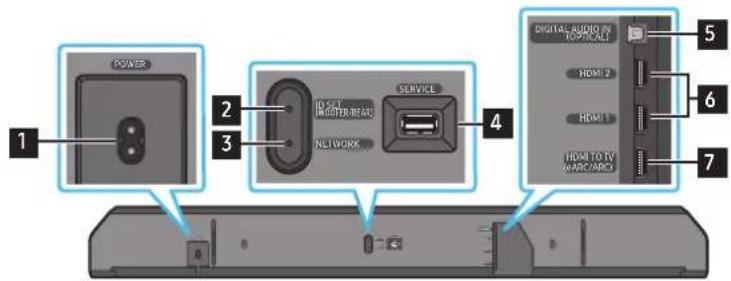
09 CSATLAKOZTATÁS AZ APPLE AIRPLAY 2-ESHEZ
Dolby, Dolby Atmos, and the double-D symbol are registered trademarks of Dolby Laboratories Licensing Corporation. Manufactured under license from Dolby Laboratories. Confidential unpublished works. Copyright © 2012-2020 Dolby Laboratories. All rights reserved.
dtsx
For DTS patents, see http://patents.dts.com. Manufactured under license from DTS, Inc. (for companies headquartered in the U.S./Japan/Taiwan) or under license from DTS Licensing Limited (for all other companies). DTS, DTS:X Pro, DTS:X, and the DTS:X logo are registered trademarks or trademarks of DTS, Inc. in the United States and other countries. © 2020 DTS, Inc. ALL RIGHTS RESERVED.
HDMI
The terms HDMI and HDMI High-Definition Multimedia Interface, and the HDMI Logo are trademarks or registered trademarks of HDMI Licensing Administrator, Inc. in the United States and other countries.

- Apple, AirPlay, iPhone, iPad, HomePod, and Apple TV are trademarks of Apple Inc., registered in the U.S. and other countries.
- Use of the Works with Apple badge means that an accessory has been designed to work specifically with the technology identified in the badge and has been certified by the developer to meet Apple performance standards.
15 NYICT FORRÁSKÖDÜ LICENC
www.samsung.com/uk/aboutsamsung/sustainability/environment/our-commitment/data/
09 CONNECTION AD APPLE AIRPLAY 2
Dolby, Dolby Atmos, and the double-D symbol are registered trademarks of Dolby Laboratories Licensing Corporation. Manufactured under license from Dolby Laboratories. Confidential unpublished works. Copyright © 2012-2020 Dolby Laboratories. All rights reserved.
dtsx
For DTS patents, see http://patents.dts.com. Manufactured under license from DTS, Inc. (for companies headquartered in the U.S./Japan/Taiwan) or under license from DTS Licensing Limited (for all other companies). DTS, DTS:X Pro, DTS:X, and the DTS:X logo are registered trademarks or trademarks of DTS, Inc. in the United States and other countries. © 2020 DTS, Inc. ALL RIGHTS RESERVED.
HDMI
The terms HDMI and HDMI High-Definition Multimedia Interface, and the HDMI Logo are trademarks or registered trademarks of HDMI Licensing Administrator, Inc. in the United States and other countries.

Works with Apple AirPlay
- Apple, AirPlay, iPhone, iPad, HomePod, and Apple TV are trademarks of Apple Inc., registered in the U.S. and other countries.
- Use of the Works with Apple badge means that an accessory has been designed to work specifically with the technology identified in the badge and has been certified by the developer to meet Apple performance standards.
15 AVVISO DI LICENZA PER IL SOFTWARE OPEN SOURCE
02 PRODUKTA PÄRSKATS
Soundbar augšejais panelis
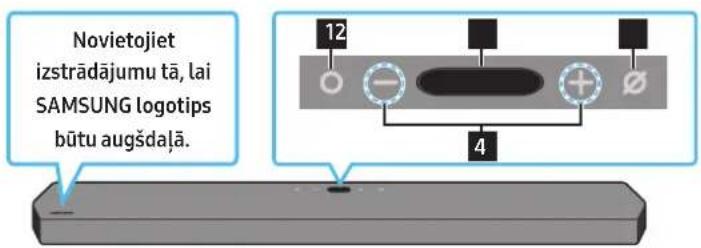
13 PROBLEMU NOVER'SANA
Pirms meklejat palidzibu, paarbaudiet talak noradito.
Soundbar neiesledzas.
Dolby, Dolby Atmos, and the double-D symbol are registered trademarks of Dolby Laboratories Licensing Corporation. Manufactured under license from Dolby Laboratories. Confidential unpublished works. Copyright © 2012-2020 Dolby Laboratories. All rights reserved.
dtsx
For DTS patents, see http://patents.dts.com. Manufactured under license from DTS, Inc. (for companies headquartered in the U.S./Japan/Taiwan) or under license from DTS Licensing Limited (for all other companies). DTS, DTS:X Pro, DTS:X, and the DTS:X logo are registered trademarks or trademarks of DTS, Inc. in the United States and other countries. © 2020 DTS, Inc. ALL RIGHTS RESERVED.
HDMI
The terms HDMI and HDMI High-Definition Multimedia Interface, and the HDMI Logo are trademarks or registered trademarks of HDMI Licensing Administrator, Inc. in the United States and other countries.

- Kā tālvadibas pulti pakalpojumam Spotify izmantojiet tāruni, plansetdatoru vai datoru. Lai uzzinatu, kā atveriet Spotify.com/ connect
- Uz programmaturu Spotify attiecas trešo pušu licences, kas pieejamas šeit: https://www.spotify.com/connect/third-party-licenses.
Works with Apple AirPlay
- Apple, AirPlay, iPhone, iPad, HomePod, and Apple TV are trademarks of Apple Inc., registered in the U.S. and other countries.
- Use of the Works with Apple badge means that an accessory has been designed to work specifically with the technology identified in the badge and has been certified by the developer to meet Apple performance standards.
15 PAZINOJUMS PAR ATVERTA PIRMKODA LICENCI
Lai sutitu jautajumus un pieprasijumus par atvertajiem avotiem, szinieties ar Samsung Open Source (http://opensource.samsung.com)
16 SVARIGI PAZINOJUMI PAR APKALPOŠANU
- Shemas un atteli saja lietotaja rokasgramata ir nodrosinati tikai atsaucei, un tie var atskirties no faktiska izstradajuma izskata.
Jums var tikt piemerota maksa par pakalpojumu sniegsanu, ja
(a) pēc jūsui pieprasijuma tikis izsaukts inženieris, bet netiek konstateti nekādi izstradajuma defekti (t. i., ja neesat izlasijis šajā lietotaja rokasgrāmata sniegto informáciju);
(b) jus aizvedat ierici uz remonta centru, kura netiek konstateti nekadi izstradajuma defekti (t. i., ja neesat izlasijis šaja lietotaja rokasgramata sniego to informaciju).
- Jus tiksiet informets par administracijas maksas apjomu pirms tehniska darbinieka vizites.
17 SPECifikACIJAS UN NORADES
Specifikacijas
| Modela nosaukums HW-Q950A / HW-Q960A | |
| Svars 7,1 kg | |
| Izmēri (P x A x Dz) 1232,0 x 69,5 x 138,0 mm | |
| Darba temperatūras diapazons no +5°C lidz +35 °C | |
| Darba mitruma diapazons 10% ~ 75% | |
| PASTIPRINATAJSNominālā izvades jauda ((18 W x 6) + (10 W x 3) + (18 W x 6)) + 160 W + (35 W x 6) | |
| Atbalstitie atskanošanas formāti | Dolby 5.1ch / Dolby Digital Plus / Dolby TRUE HD / Dolby ATMOSDTS 5.1ch / DTS HD / DTS-HD Master Audio / DTS:X / LPCM 8Ch |
| BEZVADU IERICES IZVADES JAUDAWi-Fi maksimālā raiditāja jauda | 100 mW, 2,4 GHz - 2,4835 GHz, 200 mW, 5,15 GHz - 5,25 GHz,100 mW, 5,25 GHz - 5,35 GHz un 5,47 GHz - 5,725 GHz |
| BEZVADU IERICES IZVADES JAUDABT maksimālā raiditāja jauda 100 mW, 2,4 GHz - 2,4835 GHz | |
| BEZVADU IERICES IZVADES JAUDASRD maksimālā raiditāja jauda 25mW, 5,775GHz - 5,875GHz | |
| Zemfrekvences skalruṇa nosaukums PS-WA95B | |
| Svars 9,8 kg | |
| Izmēri (P x A x Dz) 210,0 x 403,0 x 403,0 mm | |
| PASTIPRINATAJSNominālā izvades jauda 160 W | |
| BEZVADU IERICES IZVADES JAUDASRD maksimālā raiditāja jauda 25mW, 5,775GHz - 5,875GHz | |
| Bezvadu telpiskās skalruṇa komplektanosaukums | PS-RA95BB-1, PS-RA95BB-2 |
| Svars | 1,8 kg |
| Izmēri (P x A x Dz) 125,0 x 203,0 x 141,0 mm | |
| PASTIPRINATAJSNominālā izvades jauda | 35 W x 6 |
| BEZVADU IERICES IZVADES JAUDASRD maksimālā raiditāja jauda 25mW, 5,775GHz - 5,875GHz |
PIEZIME
www.samsung.com/uk/aboutsamsung/sustainability/environment/our-commitment/data/
SAUGUMO INFORMACIJA
SAUGOS JSPÉJIMAI
NENUIMKITE DANGTELIO (ARBA GALINES DALIES), KAD SUMAZINTUMETE ELEKTROS SMUGIO PAVOJU.
IRENGINYJENERA DALIJKURI TECHNINE PrieziURA GALIATLIKTI NAUDOTOJAS.DEL TECHNINES PrieziUROS DARBU KREIPKITES KVALIFIKUOTUS TECHNINES PrieziUROS SPECIALISTUS.
Toliau esancioje lenteleje paaiskinami simboliai, kurie gali buti ant jusy "Samsung" gaminio.
Active Voice Amplifier" (AVA)
Analizujoa triuksmareluioju laiku, kai paleistas „Soundbar“, kad visada butu aiskiaigirdimas balso garsas.
- Analizés metu nejraśyta jokiu duomenu.
Pasléptu mygtuku naudojimas (mygtukai su keliomis funkcjjomis)
Dolby, Dolby Atmos, and the double-D symbol are registered trademarks of Dolby Laboratories Licensing Corporation. Manufactured under license from Dolby Laboratories. Confidential unpublished works. Copyright © 2012-2020 Dolby Laboratories. All rights reserved.
dtsx
For DTS patents, see http://patents.dts.com. Manufactured under license from DTS, Inc. (for companies headquartered in the U.S./Japan/Taiwan) or under license from DTS Licensing Limited (for all other companies). DTS, DTS:X Pro, DTS:X, and the DTS:X logo are registered trademarks or trademarks of DTS, Inc. in the United States and other countries. © 2020 DTS, Inc. ALL RIGHTS RESERVED.
HDMI
The terms HDMI and HDMI High-Definition Multimedia Interface, and the HDMI Logo are trademarks or registered trademarks of HDMI Licensing Administrator, Inc. in the United States and other countries.

- Naudokite Telefona, planšetinj arba paprastā kompiuterj kaip „Spotify" nuotolinio valdymo pulta. Apsilanky kite adresu Spotify.com/connect ir sužinokite daigiau
"Spotify"programmeirjrangai taikomosttreciuji saliciu licenciijos pateiktos Cia:https://www.spotyf.com/connect/third-party-licenses.

- Apple, AirPlay, iPhone, iPad, HomePod, and Apple TV are trademarks of Apple Inc., registered in the U.S. and other countries.
- Use of the Works with Apple badge means that an accessory has been designed to work specifically with the technology identified in the badge and has been certified by the developer to meet Apple performance standards.
15 ATVIROJO KODO LICENCIJOS PRANEŠIMAS
Jei norite siusti uzklausas ir klausimus del atviruju kodu, susisiekite su "Samsung Open Source" (http://opensource.samsung.com)
16 SVARBIOS PASTABOS API PASLAUGA
www.samsung.com/uk/aboutsamsung/sustainability/environment/our-commitment/data/
SIKKERHETSINFORMASJON
SIKKERHETSADVVARSLER
FOR A REDUSERERE RISIKOEN FOR ELEKTRISK STOT SKAL IKKE DEKSLET FJERNES (ELLER BAKSIDEN).
INGEN INNVENDIGE DELER KAN REPAIRERES AV BRUKEREN. OVERLAT SERVICE TIL KVALIFISERT SERVICEPERSONELL.
09 KOBLE TIL APPLE AIRPLAY 2
Dolby, Dolby Atmos, and the double-D symbol are registered trademarks of Dolby Laboratories Licensing Corporation. Manufactured under license from Dolby Laboratories. Confidential unpublished works. Copyright © 2012-2020 Dolby Laboratories. All rights reserved.
dtsx
For DTS patents, see http://patents.dts.com. Manufactured under license from DTS, Inc. (for companies headquartered in the U.S./Japan/Taiwan) or under license from DTS Licensing Limited (for all other companies). DTS, DTS:X Pro, DTS:X, and the DTS:X logo are registered trademarks or trademarks of DTS, Inc. in the United States and other countries. © 2020 DTS, Inc. ALL RIGHTS RESERVED.
HDMI
The terms HDMI and HDMI High-Definition Multimedia Interface, and the HDMI Logo are trademarks or registered trademarks of HDMI Licensing Administrator, Inc. in the United States and other countries.

- Apple, AirPlay, iPhone, iPad, HomePod, and Apple TV are trademarks of Apple Inc., registered in the U.S. and other countries.
- Use of the Works with Apple badge means that an accessory has been designed to work specifically with the technology identified in the badge and has been certified by the developer to meet Apple performance standards.
15 LISENSMERKNAD FOR APEN KILDE
Hvis du vil sende spørsmål om Åpne killedekoder, kan du kontakte Samsung Open Source via e-post (http://opensource.samsung.com)
16 VIKTIGE MERKNADER OM SERVICE
Active Voice Amplifier (AVA)
09 LACZENIE Z SYSTEMEM APPLE AIRPLAY 2
Dolby, Dolby Atmos, and the double-D symbol are registered trademarks of Dolby Laboratories Licensing Corporation. Manufactured under license from Dolby Laboratories. Confidential unpublished works. Copyright © 2012-2020 Dolby Laboratories. All rights reserved.
dtsx
For DTS patents, see http://patents.dts.com. Manufactured under license from DTS, Inc. (for companies headquartered in the U.S./Japan/Taiwan) or under license from DTS Licensing Limited (for all other companies). DTS, DTS:X Pro, DTS:X, and the DTS:X logo are registered trademarks or trademarks of DTS, Inc. in the United States and other countries. © 2020 DTS, Inc. ALL RIGHTS RESERVED.
HDMI
The terms HDMI and HDMI High-Definition Multimedia Interface, and the HDMI Logo are trademarks or registered trademarks of HDMI Licensing Administrator, Inc. in the United States and other countries.

- Apple, AirPlay, iPhone, iPad, HomePod, and Apple TV are trademarks of Apple Inc., registered in the U.S. and other countries.
- Use of the Works with Apple badge means that an accessory has been designed to work specifically with the technology identified in the badge and has been certified by the developer to meet Apple performance standards.
15 INFORMACJA O LICENCJACH NA OPROGRAMOWANIE OPEN SOURCE
16 WAZNE INFORMACJE O USLUDZE
www.samsung.com/uk/aboutsamsung/sustainability/environment/our-commitment/data/
INFORMAÇÉS DE SEGURANÇA
AVISOS DE SEGURANÇA
PARA REDUZIR O RISCO DE CHOQUE ELETRICO, NAO RETIRAR A TAMPA (OU A PARTE POSTERIOR).
Active Voice Amplifier (AVA)
09 LIGAR AO APPLE AIRPLAY 2
Dolby, Dolby Atmos, and the double-D symbol are registered trademarks of Dolby Laboratories Licensing Corporation. Manufactured under license from Dolby Laboratories. Confidential unpublished works. Copyright © 2012-2020 Dolby Laboratories. All rights reserved.
dtsx
For DTS patents, see http://patents.dts.com. Manufactured under license from DTS, Inc. (for companies headquartered in the U.S./Japan/Taiwan) or under license from DTS Licensing Limited (for all other companies). DTS, DTS:X Pro, DTS:X, and the DTS:X logo are registered trademarks or trademarks of DTS, Inc. in the United States and other countries. © 2020 DTS, Inc. ALL RIGHTS RESERVED.
HOMI
The terms HDMI and HDMI High-Definition Multimedia Interface, and the HDMI Logo are trademarks or registered trademarks of HDMI Licensing Administrator, Inc. in the United States and other countries.

- Apple, AirPlay, iPhone, iPad, HomePod, and Apple TV are trademarks of Apple Inc., registered in the U.S. and other countries.
- Use of the Works with Apple badge means that an accessory has been designed to work specifically with the technology identified in the badge and has been certified by the developer to meet Apple performance standards.
15 AVISO DE LICENÇA DE CÓDIGO ABERTO
Para enviar duvidas ou pedidos para pergoides relacionadas com9digo aberto, contacte a Samsung Open Source (http://opensource.samsung.com)
16 NOTAS IMPORTANTES SOBRE A ASSISTÊNCIA
www.samsung.com/uk/aboutsamsung/sustainability/environment/our-commitment/data/
INFORMATI DESPRE SIGURANTA
AVERTIZÁRIDE SIGURANTA
PENTRU A REDUCE PERICOLUL DE ELECTROCUTARE, NU DEMONTATI CAPACUL (SAU PARTEA DIN SPATE).
IN INTERIOR NU EXISTÁ COMPONENTE CARE POT FI REPARATE DE CATRE UTILIZATOR. TOATE REPARATIILE TREBUIE EFFECTUATE NUMAI DE CATRE PERSONAL DE CALIFICAT.
Active Voice Amplifier (AVA)
09 CONECTAREA LA APPLE AIRPLAY 2
Este posibil ca aceastafunctie sa nu fie disponibilina in unele tari.
Conectarea 山 utilizes area cu un produs Apple
- Cu tehnologia AirPlay 2, puteti controla sistemas audio de acasa de pe iPhone, iPad, HomePod Sau Apple TV.
- Acest disposizitiv Soundbar Samsung accepta AirPlay 2 si necessitiesystemul de operare iOS 11.4 Sau o versiune ulterioara.
NOTÄ
- Confirmatu c di dispositivul Soundbar este conectat la Wi-Fi. (Consultatu Metoda 2. Conectarea prin Wi-Fi (retea wireless))
10 MONTAREA SUPORTULUI DE PERETE
Măsuri de siguranta privind instalarea
Dolby, Dolby Atmos, and the double-D symbol are registered trademarks of Dolby Laboratories Licensing Corporation. Manufactured under license from Dolby Laboratories. Confidential unpublished works. Copyright © 2012-2020 Dolby Laboratories. All rights reserved.
dtsx
For DTS patents, see http://patents.dts.com. Manufactured under license from DTS, Inc. (for companies headquartered in the U.S./Japan/Taiwan) or under license from DTS Licensing Limited (for all other companies). DTS, DTS:X Pro, DTS:X, and the DTS:X logo are registered trademarks or trademarks of DTS, Inc. in the United States and other countries. © 2020 DTS, Inc. ALL RIGHTS RESERVED.
HDMI
The terms HDMI and HDMI High-Definition Multimedia Interface, and the HDMI Logo are trademarks or registered trademarks of HDMI Licensing Administrator, Inc. in the United States and other countries.

- Apple, AirPlay, iPhone, iPad, HomePod, and Apple TV are trademarks of Apple Inc., registered in the U.S. and other countries.
- Use of the Works with Apple badge means that an accessory has been designed to work specifically with the technology identified in the badge and has been certified by the developer to meet Apple performance standards.
15 NOTA REFERITOARE LA LICENTA PENTRU PROGRAME OPEN SOURCE
Pentru a trimite solicitari si intrebari despite programele open source, contactaSamsung Open Source (http://opensource.samsung.com)
16 NOTE IMPORTANTE DESPRE SERVICIU
SIGURNOSNE INFORMACije
SIGURNOSNA UPOZORENJA
DA BISTE SMANJILI OPASNOST OD STRUJNOG UDARA, NEMOJTE UKLANJATI POKLOPAC (NITI ZADNJ DEO).
UNUTRA SE NE NALAZE DELOVI KOJE KORISNICI MOGU SAMI DA POPRAVE. SVE POPRAVKE PREPUSTITE KVALIFIKOVANOM SERVISNOM OSOBLJIU.
Dolby, Dolby Atmos, and the double-D symbol are registered trademarks of Dolby Laboratories Licensing Corporation. Manufactured under license from Dolby Laboratories. Confidential unpublished works. Copyright © 2012-2020 Dolby Laboratories. All rights reserved.
dtsx
For DTS patents, see http://patents.dts.com. Manufactured under license from DTS, Inc. (for companies headquartered in the U.S./Japan/Taiwan) or under license from DTS Licensing Limited (for all other companies). DTS, DTS:X Pro, DTS:X, and the DTS:X logo are registered trademarks or trademarks of DTS, Inc. in the United States and other countries. © 2020 DTS, Inc. ALL RIGHTS RESERVED.
HOMI
The terms HDMI and HDMI High-Definition Multimedia Interface, and the HDMI Logo are trademarks or registered trademarks of HDMI Licensing Administrator, Inc. in the United States and other countries.

- Koristite svoj telecom, tablet ili računar kao daljinski upravljac za Spotify. Idite na web lokaciju Spotify.com/connect da biste sznali kako
- Softver Spotify podleže licencama trečih stana koje se mogu pronáci ovde: https://www.spotify.com/connect/third-party-licenses.

- Apple, AirPlay, iPhone, iPad, HomePod, and Apple TV are trademarks of Apple Inc., registered in the U.S. and other countries.
- Use of the Works with Apple badge means that an accessory has been designed to work specifically with the technology identified in the badge and has been certified by the developer to meet Apple performance standards.
15 NAPOMENA O LICENÇA KORISÇENJE SOFTVERA OTVORENOG KODA
Za slanje upita i zahteva za pitanja vezana za softver otvorenog koda, kontaktirajte Samsung Open Source (http://opensource.samsung.com)
16 VAŽNE NAPOMENE O USLUZI
- Slike i ilustracije u ovom korisničkom piručniku su navedene samo za referencu i mogu se razlikovati od stvarnog izgleda proizvoda.
- Moguca je naplata naknade za administraciju u slučaju
(a) poziva inżenjera na vaš zahtev, akо se utvrdi da na proizvodu ne postoji kvar (tj. niste pročitali korisnički prisćnik).
(b) dostave uredaja u servisi center, ak so utvrdi da na proizvodu ne postoji kvar (tj. niste procitali korisniicki prisncik).
- O iznosu administrativne naknade cete biti obavešteni pre posetate tehnicara.
17 SPECIFIKACIJEVODIC
Specifikacije
| Naziv modela HW-Q950A / HW-Q960A | |
| Težina 7,1kg | |
| Dimenzije (Š x V x D) 1232,0 x 69,5 x 138,0 mm | |
| Raspon radne temperature +5 °C do +35 °C | |
| Raspon radne vlage 10 % ~ 75 % | |
| POJAČALO Nazivna izlazna snaga ((18 W x 6) + (10 W x 3) + (18 W x 6)) + 160 W + (35 W x 6) | |
| Podržani formati reprodukcije | Dolby 5.1ch / Dolby Digital Plus / Dolby TRUE HD / Dolby ATMOS DTS 5.1ch / DTS HD / DTS-HD Master Audio / DTS:X / LPCM 8Ch |
| IZLAZNA SNAGA BEŽICNOG UREDAJA Maks. snaga Wi-Fi predajnika | 100 mW pri 2,4 GHz - 2,4835 GHz, 200 mW pri 5,15 GHz - 5,25 GHz, 100 mW pri 5,25 GHz - 5,35 GHz i 5,47 GHz - 5,725 GHz |
| IZLAZNA SNAGA BEŽICNOG UREDAJA Maks. snaga BT predajnika 100mW pri 2,4GHz - 2,4835GHz | |
| IZLAZNA SNAGA BEŽICNOG UREDAJA Maks. snaga SRD predajnika 25mW pri 5,775GHz - 5,875GHz | |
| Naziv sabvufera PS-WA95B | |
| Težina 9,8 kg | |
| Dimenzije (Š x V x D) 210,0 x 403,0 x 403,0 mm | |
| POJAČALO Nazivna izlazna snaga | 160 W |
| IZLAZNA SNAGA BEŽICNOG UREDAJA Maks. snaga SRD predajnika 25mW pri 5,775GHz - 5,875GHz | |
| Naziv KOMPLETEA bežićnih surround zvučnica | PS-RA95BB-1, PS-RA95BB-2 |
| Težina | 1,8 kg |
| Dimenzije (Š x V x D) 125,0 x 203,0 x 141,0 mm | |
| POJAČALO Nazivna izlazna snaga | 35 W x 6 |
| IZLAZNA SNAGA BEŽICNOG UREDAJA Maks. snaga SRD predajnika 25mW pri 5,775GHz - 5,875GHz |
NAPOMENA
Samsung Electronics Co., Ltd zadrzava pravo da promeni specifikacije bez prethodnog upozorenja.
- Težina i dimenzije su priblizne.
Mere opreza: Uredaj Soundbar ce se automatski restartovati ak oukljucite/iskljucite Wi-Fi.
| Ukupna potrošnja energije u režimu mirovanja (W) | 7,0 W |
| Wi-Fi | Pritisnite dugme ID SET na donjem paneluSYSTEMa Soundbar na 30 sekundi da biste uključili/isključili Wi-Fi. |
| Način isključivanja prijključka | |
| Bluetooth | Pritisnite dugme NETWORK na donjem paneluSYSTEMa Soundbar 30 sekundi da biste uključili/isključili Bluetooth. |
| Način isključivanja prijključka |
- Kompanija Samsung ovm izjavljuje da je ova radio-oprema u skladu sa Direktivom 2014/53/EU i relevantnim zakonskim odredbama Ujedinjenog Kraljevstva.
Ceo tekst izjave o usklaDENosti dostupan je na sledecoj internet adresi:
http://www.samsung.com; idite na stavku Podrška iunesite naziv modela.
Ova oprema sme da se koristi u svim državama Članicama EU i Ujedinjenom Kraljevstvu.
Funkcija WLAN (Wi-Fi ili SRD) od 5 GHz ove opreme moze da se koristi samo u zatvorenim prostorima.
www.samsung.com/uk/aboutsamsung/sustainability/environment/our-commitment/data/
BEZPECNOSTNÉ INFORMACIE
BEZPECNOSTNÉ VYSTRAHY
NA ZNIZENIE NEBEZPECENSTVA ZASAHU ELEKTRICKYM PRUDOM
NEODSTRANUJTE KRYT (ALEBO ZADNU STRANU).
VNUTRI SA NENACHADZAJU ZIADNE SUCASTI, KTORYCH UDRZBU BY MOHOL VYKONAVAT POUZIVATEL. AKYKOLVEK SERVISNY ZASAH PRENECHAJE KVALIFIKOVANYM ODBORNIKOM.
09 PRIPOJENIE K APPLE AIRPLAY 2
Tato fungcia nemusi byt v niektorych krajinach k disposzicii.
Pripojenie a použivanie sproduktom Apple
- S technologiou AirPlay 2 mozte ovladat domaci audiosystem pomocu iPhone, iPad, HomePod alebo Apple TV.
- Toto zariadenie Samsung Soundbar podporuje technologiu AirPlay 2 a vyžaduje systém iOS 11.4 alebo novsí.
POZNÁMKA
13 RIESENIE PROBLEMOV
Skorako sa obratite na technicku podporu, skontrolujte nasledujuce skutocnosti.
Dolby, Dolby Atmos, and the double-D symbol are registered trademarks of Dolby Laboratories Licensing Corporation. Manufactured under license from Dolby Laboratories. Confidential unpublished works. Copyright © 2012-2020 Dolby Laboratories. All rights reserved.
dtsx
For DTS patents, see http://patents.dts.com. Manufactured under license from DTS, Inc. (for companies headquartered in the U.S./Japan/Taiwan) or under license from DTS Licensing Limited (for all other companies). DTS, DTS:X Pro, DTS:X, and the DTS:X logo are registered trademarks or trademarks of DTS, Inc. in the United States and other countries. © 2020 DTS, Inc. ALL RIGHTS RESERVED.
HOMI
The terms HDMI and HDMI High-Definition Multimedia Interface, and the HDMI Logo are trademarks or registered trademarks of HDMI Licensing Administrator, Inc. in the United States and other countries.

- Použivajte Telefon, tablet alebo počitac ako dialkový ovládač pre Spotify. InformácieNJdete na adrese Spotify.com/connect
- Na softvér Spotify sa vztahujú licencié tretích strán uvedene tu: https:// www.spotify.com/connect/third-party-licenses.

- Apple, AirPlay, iPhone, iPad, HomePod, and Apple TV are trademarks of Apple Inc., registered in the U.S. and other countries.
- Use of the Works with Apple badge means that an accessory has been designed to work specifically with the technology identified in the badge and has been certified by the developer to meet Apple performance standards.
15 POZNÁMKA K LICENCI S OTVORENYM ZDROJOVYM KÓDOM
Ak chcetezaslat otazky ci poziadavky na otazky o otvorenych zdrojoch, obratte sa na diviziou Samsung Open Source (http://opensource.samsung.com)
16 DÖLEZITÉ POZNÁMKY K SERVISU
If batteries are not properly disposed of, these substances can cause harm to human health or the environment.
S cielom chrani'prirodne zdroje a podporovat opakovan' pouzivanie materialov separujte baterie od inych typov odpadu a recyklujte ich prostrednictvom miestneho bezplatneho systemu vracania bateriei.

www.samsung.com/sk/aboutsamsung/sustainability/environment/our-commitment/data/
VARNOSTNE INFORMACije
VARNOSTNA OPOZORILA
ZA ZMANJSANJE NEVARNOSTI ELEKTRICNEGA UDARA NE ODSTRANJUITE POKROVA (ALI HRBTNEGA DELA).
V NOTRANJOSTI NI DELOV, KI BI JIH LAHKO POPRAVIL UPORABNIK. VSA POPRAVILA PREPUSTITE POOBLASCENEMU SERVISNEMU OSEBJU.
Dolby, Dolby Atmos, and the double-D symbol are registered trademarks of Dolby Laboratories Licensing Corporation. Manufactured under license from Dolby Laboratories. Confidential unpublished works. Copyright © 2012-2020 Dolby Laboratories. All rights reserved.
dtsx
For DTS patents, see http://patents.dts.com. Manufactured under license from DTS, Inc. (for companies headquartered in the U.S./Japan/Taiwan) or under license from DTS Licensing Limited (for all other companies). DTS, DTS:X Pro, DTS:X, and the DTS:X logo are registered trademarks or trademarks of DTS, Inc. in the United States and other countries. © 2020 DTS, Inc. ALL RIGHTS RESERVED.
HOMI
The terms HDMI and HDMI High-Definition Multimedia Interface, and the HDMI Logo are trademarks or registered trademarks of HDMI Licensing Administrator, Inc. in the United States and other countries.

- Apple, AirPlay, iPhone, iPad, HomePod, and Apple TV are trademarks of Apple Inc., registered in the U.S. and other countries.
- Use of the Works with Apple badge means that an accessory has been designed to work specifically with the technology identified in the badge and has been certified by the developer to meet Apple performance standards.
15 OBVESTILO O ODPRTOKODNI LICENCI
www.samsung.com/uk/aboutsamsung/sustainability/environment/our-commitment/data/
09 CONEXION A APPLE AIRPLAY 2
Dolby, Dolby Atmos, and the double-D symbol are registered trademarks of Dolby Laboratories Licensing Corporation. Manufactured under license from Dolby Laboratories. Confidential unpublished works. Copyright © 2012-2020 Dolby Laboratories. All rights reserved.
dtsx
For DTS patents, see http://patents.dts.com. Manufactured under license from DTS, Inc. (for companies headquartered in the U.S./Japan/Taiwan) or under license from DTS Licensing Limited (for all other companies). DTS, DTS:X Pro, DTS:X, and the DTS:X logo are registered trademarks or trademarks of DTS, Inc. in the United States and other countries. © 2020 DTS, Inc. ALL RIGHTS RESERVED.
HDMI
The terms HDMI and HDMI High-Definition Multimedia Interface, and the HDMI Logo are trademarks or registered trademarks of HDMI Licensing Administrator, Inc. in the United States and other countries.

- Apple, AirPlay, iPhone, iPad, HomePod, and Apple TV are trademarks of Apple Inc., registered in the U.S. and other countries.
- Use of the Works with Apple badge means that an accessory has been designed to work specifically with the technology identified in the badge and has been certified by the developer to meet Apple performance standards.
www.samsung.com/uk/aboutsamsung/sustainability/environment/our-commitment/data/
SÄKERHETSINFORMATION
SAKERHETSVARNINGAR
MINSKA RISKEN FOR ELSTÖTAR GENOM ATT INTE TA BORT HÖLJET (ELLER BAKSIDAN).
DET FINNS INGA DELAR SOM ANVÄNDAREN SJÄLV KAN LAGA INUTI PRODUKTEN. LÄT ALL SERVICE UTFÖRAS AV BEHÖRIG SERVICEPERSONAL. I tabellen nedan förklaras de symboler som kan finnas på din Samsungprodukt.
"SAMSUNG-TV REMOTE", "ALL-TV REMOTE".
09 ANSLUTA TILL APPLE AIRPLAY 2
Dolby, Dolby Atmos, and the double-D symbol are registered trademarks of Dolby Laboratories Licensing Corporation. Manufactured under license from Dolby Laboratories. Confidential unpublished works. Copyright © 2012-2020 Dolby Laboratories. All rights reserved.
dtsx
For DTS patents, see http://patents.dts.com. Manufactured under license from DTS, Inc. (for companies headquartered in the U.S./Japan/Taiwan) or under license from DTS Licensing Limited (for all other companies). DTS, DTS:X Pro, DTS:X, and the DTS:X logo are registered trademarks or trademarks of DTS, Inc. in the United States and other countries. © 2020 DTS, Inc. ALL RIGHTS RESERVED.
HDMI
The terms HDMI and HDMI High-Definition Multimedia Interface, and the HDMI Logo are trademarks or registered trademarks of HDMI Licensing Administrator, Inc. in the United States and other countries.

- Apple, AirPlay, iPhone, iPad, HomePod, and Apple TV are trademarks of Apple Inc., registered in the U.S. and other countries.
- Use of the Works with Apple badge means that an accessory has been designed to work specifically with the technology identified in the badge and has been certified by the developer to meet Apple performance standards.
15 LICENSMEDDELANDE FÖR OPEN SOURCE
www.samsung.com/uk/aboutsamsung/sustainability/environment/our-commitment/data/
© 2021 Samsung Electronics Co., Ltd. All rights reserved.
Contact SAMSUNG WORLD WIDE
If you have any questions or comments relating to Samsung products, please contact the SAMSUNG customer care Centre.
| Country Samsung Service | Centre Web Site | |
| UK 0333 000 0333 www.samsung.com/uk/support | ||
| IRELAND (EIRE) 0818 717100 www.samsung.com/ie/support | ||
| GERMANY 06196 77 555 77 www.samsung.com/de/support | ||
| FRANCE 01 48 63 00 00 www.samsung.com/fr/support | ||
| ITALIA 800-SAMSUNG (800.7267864) www.samsung.com/it/support | ||
| SPAIN 91175 00 15 www.samsung.com/es/support | ||
| PORTUGAL 808 207 267 www.samsung.com/pt/support | ||
| LUXEMBURG 261 03 710 www.samsung.com/be_fr/support | ||
| NETHERLANDS 088 90 90 100 www.samsung.com/nl/support | ||
| BELGIUM | 02-201-24-18 | www.samsung.com/be/support (Dutch) www.samsung.com/be_fr/support (French) |
| NORWAY 21629099 www.samsung.com/no/support | ||
| DENMARK | 707 019 70 | www.samsung.com/dk/support |
| FINLAND | 030-6227 515 | www.samsung.com/fi/support |
| SWEDEN | 0771 726 786 | www.samsung.com/se/support |
| POLAND | 801-172-678* lub +48 22 607-93-33* * (opłatawedtug taryfy operatora) | http://www.samsung.com/pl/support/ |
| HUNGARY | 0680SAMSUNG (0680-726-7864) | www.samsung.com/hu/support |
| AUSTRIA | 0800 72 67 864 (0800-SAMSUNG) | www.samsung.com/at/support |
| SWITZERLAND 0800 726 786 | www.samsung.com/ch/support (German) www.samsung.com/ch_fr/support (French) | |
| CZECH | 800 - SAMSUNG (800-726786) | www.samsung.com/cz/support |
| SLOVAKIA | 0800 - SAMSUNG (0800-726 786) | www.samsung.com/sk/support |
| CROATIA | 072 726 786 | www.samsung.com/hr/support |
| BOSNIA | 055 233 999 | www.samsung.com/ba/support |
| North Macedonia | 023 207 777 | www.samsung.com/mk/support |
| MONTENEGRO | 020 405 888 | www.samsung.com/support |
| SLOVENIA | 080 697 267 (brezplačna Števlka) | www.samsung.com/si/support |
| SERBIA | 011 321 6899 | www.samsung.com/rs/support |
| Kosovo | 080010101 | www.samsung.com/support |
| ALBANIA | 045 620 202 www.samsung.com/al/support | |
| BULGARIA | 0800111 31 - Beželatěen 3а всяку oneparatóri *3000 - Стона[eин гадскп разговши с nanopетд тariфага на моблийе oneparatór 09:00 до 18:00 - Понеделник до пétък | www.samsung.com/bg/support |
| ROMANIA | 0800872678 - Apel gratuit *8000 - Apel tarifat in retea | www.samsung.com/ro/support |
| CYPRUS | 8009 4000 only from landline, toll free | www.samsung.com/gr/support |
| GREECE | 80111-SAMSUNG (80111 726 7864) only from land line (+30) 210 6897691 from mobile and land line | |
| LITHUANIA | 8-800-77777 www.samsung.com/lt/support | |
| LATVIA 8000-7267 | www.samsung.com/lv/support | |
| ESTONIA 800-7267 | www.samsung.com/ee/support | |