
EPTN920 - Phone charger SAMSUNG - Free user manual and instructions
Find the device manual for free EPTN920 SAMSUNG in PDF.
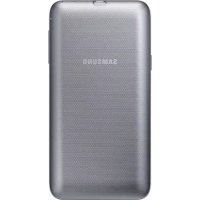



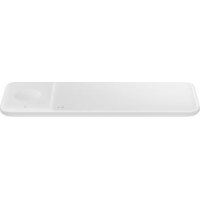
| Product Type | Wireless Charging Station |
| Brand | Samsung |
| Model | EPTN920 |
| Compatibility | Mobile devices compatible with wireless charging (e.g., Galaxy S6 edge+) |
| Power Supply | Separate USB charger (sold separately) |
| Internal Battery Indicator | 4 LED indicators (blinking according to level) |
| Wireless Charging Indicator | Blue (charging), Green (fully charged), Flashing blue (error) |
| Main Functions | Wireless charging, standby mode, battery level check |
| Package Contents | Wireless Charging Station, quick start guide |
| Thermal Protection | Yes, automatic shutoff in case of excessive temperature |
| Usage Precautions | Do not place objects between the device and the station; use only certified accessories |
| Maintenance and Cleaning | Wipe with a dry, soft cloth |
| Repairability | Contact a Samsung after-sales service center |
| Compliance Standards | R&TTE Directive (1999/5/EC), CE marking |
| After-Sales Service | Refer to the warranty certificate or contact the retailer |
Frequently Asked Questions - EPTN920 SAMSUNG
User questions about EPTN920 SAMSUNG
0 question about this device. Answer the ones you know or ask your own.
Ask a new question about this device
Download the instructions for your Phone charger in PDF format for free! Find your manual EPTN920 - SAMSUNG and take your electronic device back in hand. On this page are published all the documents necessary for the use of your device. EPTN920 by SAMSUNG.
USER MANUAL EPTN920 SAMSUNG
Please read this manual before using the device to ensure safe and proper use.
- Images may differ in appearance from the actual product. Content is subject to change without prior notice.
- Before using the wireless charger pack, make sure the mobile device you want to connect to is compatible with this wireless charger pack.
- The content of this manual is based on the EP-TG928 wireless charger pack and Galaxy S6 edge+ model.
Instructional icons

Warning: situations that could cause injury to yourself or others

Caution: situations that could cause damage to your device or other equipment

Notice: notes, usage tips, or additional information
Getting started
Package contents
Check the product box for the following items:
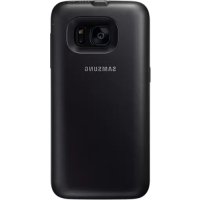
- Wireless charger pack
- Quick start guide

- The items supplied with the device and any available accessories may vary depending on the region or service provider.
- The supplied items are designed only for this device and may not be compatible with other devices.
- Appearances and specifications are subject to change without prior notice.
- You can purchase additional accessories from your local Samsung retailer. Make sure they are compatible with the device before purchase.
- Use only Samsung-approved accessories. Using unapproved accessories may cause performance problems and malfunctions that are not covered by the warranty.
- Availability of all accessories is subject to change depending entirely on manufacturing companies. For more information about available accessories, refer to the Samsung website.
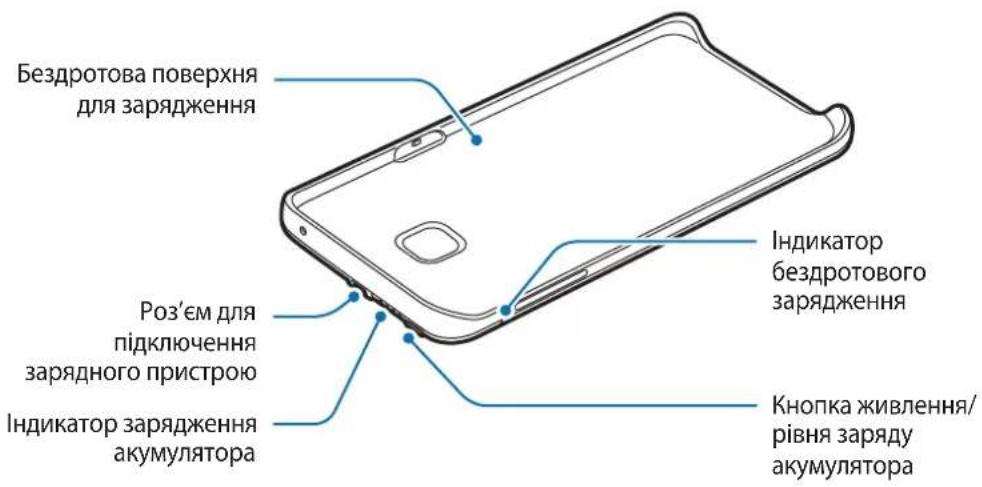
Device layout
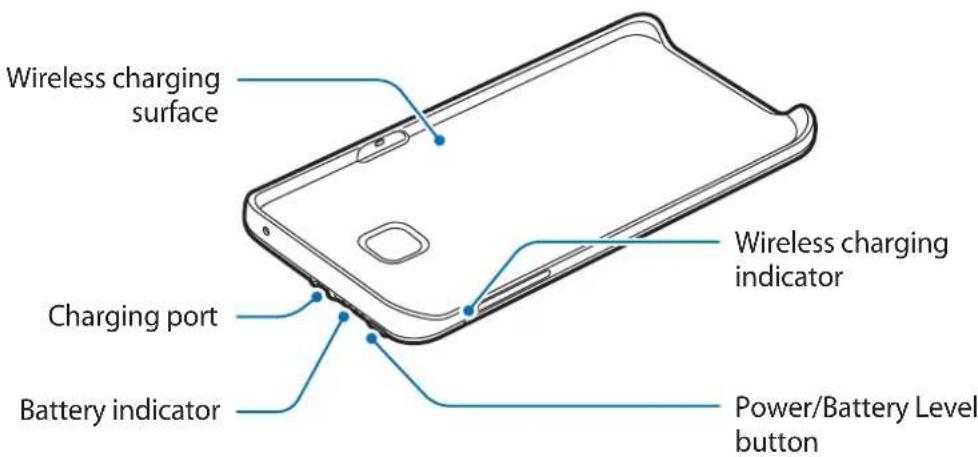
Charging the wireless charger pack
Use the charger to charge the battery before using it for the first time.

Use only Samsung-approved chargers and cables. Unapproved chargers or cables can cause the battery to explode or damage the wireless charger pack.
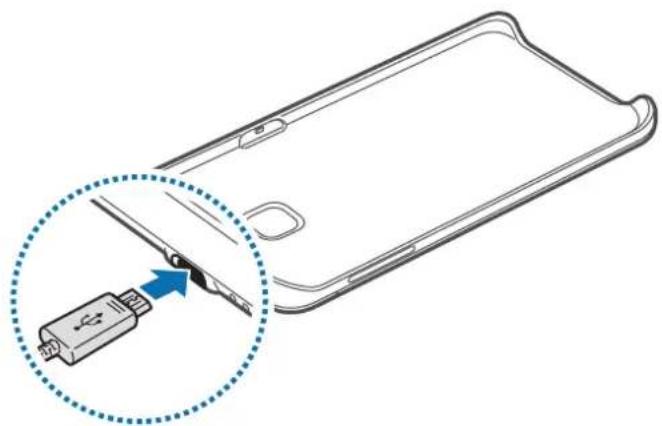
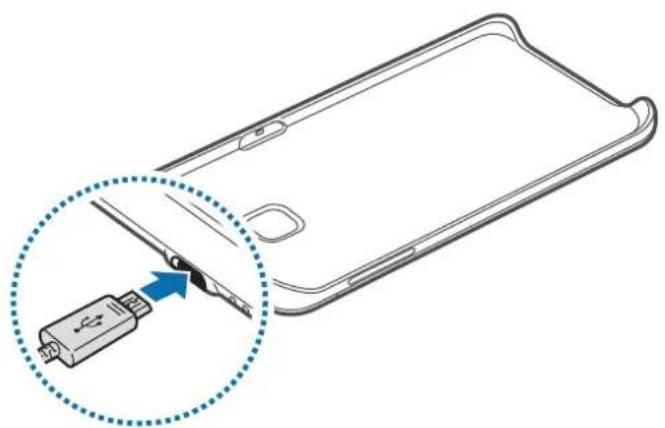
1 Connect the wireless charger pack to a charger.
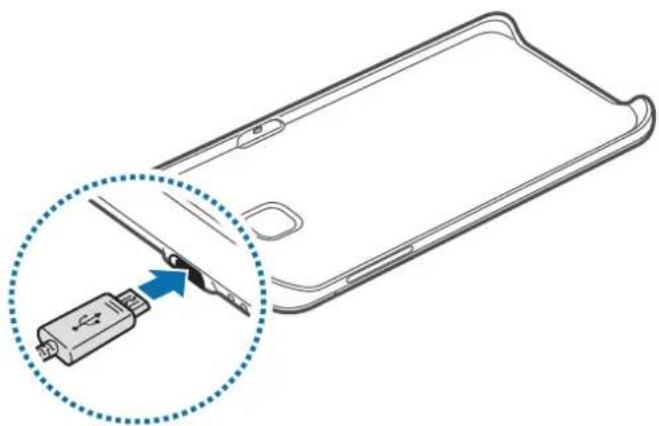

Connecting the charger improperly may cause serious damage to the wireless charger pack. Any damage caused by misuse is not covered by the warranty.
2 After fully charging, disconnect the wireless charger pack from the charger.

- To save energy, unplug the charger when not in use. The charger does not have a power switch, so you must unplug the charger from the electric socket when not in use to avoid wasting power. The charger should remain close to the electric socket and easily accessible while charging.
- The socket-outlet shall be installed near the equipment and shall be easily accessible.
Battery charging tips and precautions
- Chargers are sold separately.
- The charger can simultaneously charge the wireless charger pack and a mobile device when both are connected, but charging may take longer.
- While charging, the wireless charger pack may heat up. This is normal and should not affect the wireless charger pack's lifespan or performance. If the battery gets hotter than usual, the charger may stop charging.
- If the wireless charger pack is not charging properly, take the wireless charger pack and the charger to a Samsung Service Centre.
Checking the battery status
While the wireless charger pack is charging, the battery indicator will flash according to the charging status.
Charging status Battery indicator status
100% Four indicator lights on 75-99% Three indicator lights on and one indicator light blinking 50-75% Two indicator lights on and one indicator light blinking 25-50% One indicator light on and one indicator light blinking 0-25% One indicator light blinking

If the wireless charger pack is exposed to extremely hot or cold temperatures or an error occurs, the four indicator lights will blink. Disconnect the charger from the wireless charger pack, and then reconnect them.
Checking the remaining battery power
Check the remaining battery power by pressing the Battery level button.
The battery indicator will activate according to the remaining battery power.
| Remaining battery power | Battery indicator status |
| 75–100% Four indicator lights on | |
| 50–75% Three indicator lights on | |
| 25–50% Two indicator lights on | |
| 5–25% One indicator light on | |
| less than 5% One indicator light blinking | |
Using the wireless charger pack
Charging your mobile device
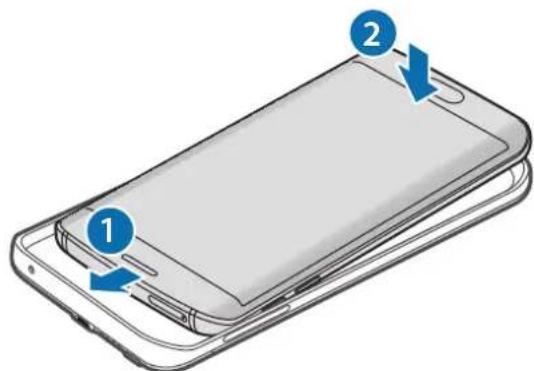
1 Insert your mobile device into the wireless charger pack.
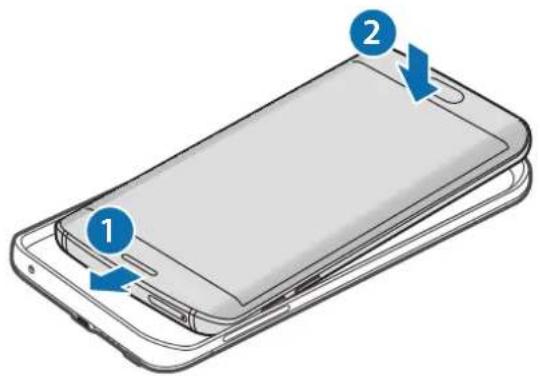
2 Press the wireless charger pack's Power button.
Wireless charging will start.
To deactivate wireless charging, press and hold the Power button. To activate wireless charging again, press the Power button.
3 When the mobile device is fully charged, disconnect it from the wireless charger pack.

- The wireless charger pack and mobile device may vibrate while charging due to high power frequency.
- Do not place any objects between the mobile device and the wireless charger pack. Doing so may prevent the mobile device from charging properly.
- If you use the wireless charger pack in areas with weak network signals, your mobile device may lose network reception.
- If you connect a charger to the mobile device during wireless charging, the wireless charging feature will be unavailable.
- While the mobile device is charging, you cannot use some mobile device features, such as Near Field Communication (NFC), Magnetic Secure Transmission (MST), and Heart rate measurement (HRM).
Checking the wireless charging status
You can check the mobile device's charging status via the wireless charging indicator.
| Colour Wireless charging status | |
| Blue → Green When in standby mode | |
| Blue When charging | |
| Green When fully charged | |
| Flashing blue When not charging properly due to a general error | |
| Off | When the wireless charger pack is off or when the mobile device is disconnected from the wireless charger pack |

- If the mobile device is not charging after being connected to the wireless charger pack, turn off the mobile device and then turn it on again.
- The wireless charger pack is an auxiliary external battery. It may not fully charge some mobile devices.
- If the wireless charger pack and the mobile device is exposed to extremely hot or cold temperatures or an error occurs, the wireless charging indicator will flash in blue. Disconnect the mobile device from the wireless charger pack, and then reconnect them.
Declaration of Conformity
Product details
For the following
Product: WIRELESS CHARGER Battery Pack
Model(s): EP-TG928
C∈0678
Declaration & Applicable standards
We hereby declare that the product above is in compliance with the essential requirements of the R&TTE Directive (1999/5/EC) by application of:
EN 301 489-1 V1.9.2
EN 300 330-1 V1.7.1
EN 60950-1:2006 + A11:2009 + A1:2010 + A12:2011
EN 301 489-3 V1.6.1
EN 300 330-2 V1.5.1
EN 62311:2008
and the Directive (2011/65/EU) on the restriction of the use of certain hazardous substances in electrical and electronic equipment by application of EN 50581:2012.
Representative in the EU
Samsung Electronics Euro QA Lab. (YEAR TO
Blackbushe Business Park BEGIN AFFIXING
Saxony Way, Yateley, Hampshire CE MARKING 2015)
GU46 6GG, UK
21 August 2015 Stephen Colclough / EU Representative
(Place and date of issue) (Name and signature of authorised person)
- This is not the address of Samsung Service Centre. For the address or the phone number of Samsung Service Centre, see the warranty card or contact the retailer where you purchased your product.
Declaration of Conformity
Product details
For the following
Product: WIRELESS CHARGER Battery Pack
Model(s):EP-TN920
C∈0678
Declaration & Applicable standards
We hereby declare, that the product above is in compliance with the essential requirements of the R&TTE Directive (1999/5/EC) by application of:
EN 301 489-1 V1.9.2
EN 300 330-1 V1.7.1
EN 60950-1:2006 + A11:2009 + A1:2010 + A12:2011
EN 301 489-3 V1.6.1
EN 300 330-2 V1.5.1
EN62311:2008
and the Directive (2011/65/EU) on the restriction of the use of certain hazardous substances in electrical and electronic equipment by application of EN 50581:2012.
Representative in the EU
Samsung Electronics Euro QA Lab. (YEAR TO
Blackbushe Business Park BEGIN AFFIXING
Saxony Way, Yateley, Hampshire CE MARKING 2015)
GU46 6GG, UK
21 August 2015 Stephen Colclough / EU Representative
(Place and date of issue) (Name and signature of authorised person)
- This is not the address of Samsung Service Centre. For the address or the phone number of Samsung Service Centre, see the warranty card or contact the retailer where you purchased your product.
Copyright
Copyright © 2015 Samsung Electronics
This manual is protected under international copyright laws.
No part of this manual may be reproduced, distributed, translated, or transmitted in any form or by any means, electronic or mechanical, including photocopying, recording, or storing in any information storage and retrieval system, without the prior written permission of Samsung Electronics.
Trademarks
SAMSUNG and the SAMSUNG logo are registered trademarks of Samsung Electronics. All other trademarks and copyrights are the property of their respective owners.
Copyright © 2015 Samsung Electronics
Copyright © 2015 Samsung Electronics
Blackbushe Business Park START APPLYING
Saxony Way, Yateley, Hampshire CE MARKING 2015)
GU46 6GG, UK
Blackbushe Business Park START APPLYING
Saxony Way, Yateley, Hampshire CE MARKING 2015)
GU46 6GG, UK
Copyright © 2015 Samsung Electronics
Copyright © 2015 Samsung Electronics
Copyright © 2015 Samsung Electronics
Copyright © 2015 Samsung Electronics
Blackbushe Business Park START APPLYING THE CE MARKING
Saxony Way, Yateley, Hampshire "CE" MARKING - 2015)
GU46 6GG, UK
shldodoy
21 August 2015 Stephen Colclough / EC Representative
(Place and date of issue) (Signature of authorized person)
- This is not the address of the Samsung service center. For the address and phone number of the Samsung service center, see the warranty card or contact the retailer from whom you purchased the product.
Blackbushe Business Park DECLARATION OF CONFORMITY
Saxony Way, Yateley, Hampshire "CE" MARKING - 2015)
GU46 6GG, UK
shldodoy
21 August 2015 Stephen Colclough / EC Representative
(Place and date of issue) (Signature of authorized person)
- This is not the address of the Samsung service center. For the address and phone number of the Samsung service center, see the warranty card or contact the retailer from whom you purchased the product.
Copyright
Copyright © 2015 Samsung Electronics
This manual is protected by international copyright laws.
No part of this manual may be reproduced, distributed, translated, or transmitted in any form or by any means, electronic or mechanical, including photocopying, recording, or storage in any information storage and retrieval system, without the prior written permission of Samsung Electronics.
Trademarks
SAMSUNG and the SAMSUNG logo are registered trademarks of Samsung Electronics. All other trademarks and copyrights are the property of their respective owners.
Read me first
Please read this manual carefully before using the device to ensure safe and proper use.
- Images may differ from the actual product. Content is subject to change without prior notice.
- Before using the wireless charging cover, check whether the mobile device you want to connect is compatible with this wireless charging cover.
- The content of this manual is based on the wireless charging cover EP-TG928 and the Galaxy S6 edge+ model.
Symbols used

Warning: situations in which you or other people could be injured

Blackbushe Business Park
Saxony Way, Yateley, Hampshire
GU46 6GG, UK
Blackbushe Business Park
Saxony Way, Yateley, Hampshire
GU46 6GG, UK
Copyright © 2015 Samsung Electronics
This manual is protected by international copyright laws.
No part of this manual may be reproduced, distributed, translated, or transmitted in any form or by any means, electronic or mechanical, including photocopying, recording, or storing in any information storage and retrieval system, without the prior written permission of Samsung Electronics.
Trademarks
SAMSUNG and the SAMSUNG logo are registered trademarks of Samsung Electronics. All other trademarks and copyrights are the property of their respective owners.
Read Me First
Before using your device, read this manual to ensure safe and correct use.
- Images may differ from the actual product. Content is subject to change without prior notice.
- Before using the wireless charger, make sure that the mobile device you want to connect is compatible with this wireless charger.
- The content of this manual is based on the wireless charger EP-TG928 and the Galaxy S6 edge+ model.
Instruction icons

Copyright © 2015 Samsung Electronics
This manual is protected by international copyright laws.
No part of this manual may be reproduced, distributed, translated, or transmitted in any form or by any means, electronic or mechanical, including photocopying, recording, or storage in any information storage and retrieval system, without the prior written permission of Samsung Electronics.
Trademarks
- SAMSUNG and the SAMSUNG logo are registered trademarks of Samsung Electronics. All other trademarks and copyrights are the property of their respective owners.
Read me first
Copyright © 2015 Samsung Electronics
Blackbushe Business Park AFIKS
Saxony Way, Yateley, Hampshire CE-MARGISTUS 2015)
GU46 6GG, UK
- August 2015. Stephen Colclough / EU representative
Blackbushe Business Park AFIKS
Saxony Way, Yateley, Hampshire CE-MARGISTUS 2015)
GU46 6GG, UK
- August 2015. A Stephen Colclough / EL-i volinik
Copyright © 2015 Samsung Electronics
Blackbushe Business Park CE-MARKING 2015
Saxony Way, Yateley, Hampshire (CE MARKING TO BE ADDED)
GU46 6GG, UK
Blackbushe Business Park CE-MARKING 2015
Saxony Way, Yateley, Hampshire (CE MARKING TO BE ADDED)
GU46 6GG, UK
Copyright © 2015 Samsung Electronics
Copyright © 2015 Samsung Electronics
Blackbushe Business Park (CE MARKING TO BE ADDED)
Saxony Way, Yateley, Hampshire CE-MARKING 2015)
GU46 6GG, UK
Shlodogh
- August 2015 Stephen Colclough / EU-representative
Blackbushe Business Park DETTILFØYES
Saxony Way, Yateley, Hampshire CE-MARKING 2015)
GU46 6GG, UK
Shlodogh
- August 2015 Stephen Colclough / EU-representative
Copyright © 2015 Samsung Electronics
Blackbushe Business Park LIITTÄMISEN
Saxony Way, Yateley, Hampshire ALKAMISVUOSI 2015)
GU46 6GG, UK
shldodoy
Blackbushe Business Park LIITTÄMISEN
Saxony Way, Yateley, Hampshire ALKAMISVUOSI 2015)
GU46 6GG, UK
Copyright © 2015 Samsung Electronics
Blackbushe Business Park DECLARATION OF CONFORMITY
Saxony Way, Yateley, Hampshire CE MARKING 2015)
GU46 6GG, UK
- August 2015 Stephen Colclough / EU representative
Blackbushe Business Park DECLARATION OF CONFORMITY
Saxony Way, Yateley, Hampshire CE MARKING 2015)
GU46 6GG, UK
- August 2015 Stephen Colclough / EU representative
Blackbushe Business Park DECLARATION OF CONFORMITY
Saxony Way, Yateley, Hampshire CE MARKING 2015)
GU46 6GG, UK
sheldeagh
21 August 2015 Stephen Colclough / Authorized Representative
(Place and date of issue) (Name and signature of authorized person)
Blackbushe Business Park DECLARATION OF
Saxony Way, Yateley, Hampshire CE MARKING 2015)
GU46 6GG, UK
shldodoy
21 August 2015 Stephen Colclough / Authorized Representative
(Place and date of issue) (Name and signature of authorized person)
Blackbushe Business Park 2015 CE MARKING
Saxony Way, Yateley, Hampshire CE MARKING)
GU46 6GG, UK
shldodoy
Blackbushe Business Park 2015 CE MARKING
Saxony Way, Yateley, Hampshire CE marking
GU46 6GG, UK
shldodoy
Blackbushe Business Park Labeling
Saxony Way, Yateley, Hampshire CE marking 2015)
GU46 6GG, UK
Shlodogh
Blackbushe Business Park Labeling
Saxony Way, Yateley, Hampshire CE marking 2015)
GU46 6GG, UK
shldoug
Copyright © 2015 Samsung Electronics
| RenkKablosuz Şarj durumu | |
| Mavi → Yeşil Bekleme modundayken | |
| Mavi Şarj olurken | |
| Yeşil Şarj tam doluyken | |
| Mavi yanıp.Since Mavi renkte yanıp)söner | |
| Kapalı | Kablosuz Şarj cihazı paketi kapalıyken veya mobil cihaz kablosuz Şarj cihazı paketine®,®,®,®,®,®,®,®,®,®,®,®,®,®,®,®,®,®,®,®,®,®,®,®,®,®,®,®,®,®,®,®,®,®,®,®,®,®,®,®,®,®,®,®,®,®,®,®,®,®,®,®,®,®,®,®,®,®,®,®,®,®,®,®,®,®,®,®,®,®,®,®,®,®,®,®,®,®,®,®,®,®,®,®,®,®,®,®,®,®,®,®,®,®,®,®,®,®,®,®,®cihazı paketine®,®,®,®,®,®,®,®,®,®,®,®,®,®,®,®,®,®,®,®,®,®,®,®,®,®,®,®,®,®,®,®,®,®,®,®,®,®,®,®,®,®,®,®,®,®,®,®,®,®,®,®,®,®,®,®,®,®,®,®,®,®,®,®,®,®,®,®,®,®,®,®,®,®,®,®,®,®,®,®,®,®,®,®,®,®,®,®,®,®,®,®,®,®cihazı pakete,®,®,®,®,®,®,®,®,®,®,®,®,®,®,®,®,®,®,®,®,®,®,®,®,®,®,®,®,®,®,®,®,®,®,®,®,®,®,®,®,®,®,®,®,®,®,®,®,®,®,®,®,®,®,®,®,®,®,®,®,®,®,®,®,®,®,®,®,®,®,®,®,®,®,®,®,®,®,®,®,®,®,®,®,®,®,®,®,®,®,®,®,®,®,®,®,®,®,®, ®cihazı paketine®,®,®,®,®,®,®,®,®,®,®,®,®,®,®,®,®,®,®,®,®,®,®,®,®,®,®,®,®,®,®,®,®,®,®,®,®,®,®,®,®,®,®,®,®,®,®,®,®,®,®,®,®,®,®,®,®,®,®,®,®,®,®,®,®,®,®,®,®,®,®,®,®,®,®,®,®,®,®,®,®,®,®,®,®,®,®,®,®,®,®,®,®cihazı pakete,,®,®,®,®,®,®,®,®,®,®,®,®,®,®,®,®,®,®,®,®,®,®,®,®,®,®,®,®,®,®,®,®,®,®,®,®,®,®,®,®,®,®,®,®,®,®,®,®,®,®,®,®,®,®,®,®,®,®,®,®,®,®,®,®,®,®,®,®,®,®,®,®,®,®,®,®,®,®,®,®,®,®,®,®,®,®,®,®,®,®,®,®,®,®,®,®,®,®,®,©cihazı pakete,,®,®,®,®,®,®,®,®,®,®,®,®,®,®,®,®,®,®,®,®,®,®,®,®,®,®,®,®,®,®,®,®,®,®,®,®,®,®,®,®,®,®,®,®,®,®,®,®,®,®,®,®,®,®,®,®,®,®,®,®,®,®,®,®,®,®,®,®,®,®,®,®,®,®,®,®,®,®,®,®,®,®,®,®,®,®,®,®,®,®,®,®,®cihazı pakete,s,\n\n |

Copyright © 2015 Samsung Electronics
| الإستعمال بعسية | الإستعمال الحرفية |
| %.1. . . - %.0. . . . . . . . . . . . . . . . . . . . . . . . . . . . . . . . . . . . . . . . . . . . . . . . . . . . . . . . . . . . . . . . . . . . . . . . . . . . . . . . . . . . . . . . . . . . . . . . . . . . .. %.0. . . - %.0. . . . . . . . . . . . . . . . . . . . . . . . . . . . . . . . . . . . . . . . . . . . . . . . . . . . . . . . . . . . . . . . . . . . . . . . . . . . . . . . . . . . . . . . . . . . .. %.0. . . . . . . . . . . . . . . . . . . . . . . . . . . . . . . . . . . . . . . . . . . . . . . . . . . . . . . . . . . . . . . . . . . . . . . . . . . . . . . . . . . . . . . . . . . . . . . . . . . %.0. . . . . . . . . . . . . . . . . . . . . . . . . . . . . . . . . . . . . . . . . . . . . . . . . . . . . . . . . . . . . . . . . . . . . . . . . . . . . . . . . . . . . . . . . . . . . . . . . . %.0. %.0.0.0.0.0.0.0.0.0.0.0.0.0.0.0.0.0.0.0.0.0.0.0.0.0.0.0.0.0.0.0.0.0.0.0.0.0.0.0.0.0.0.0.0.0.0.0.0.0.0.0. %.0.0.0.0.0.0.0.0.0.0.0.0.0.0.0.0.0.0.0.0.0.0.0.0.0.0.0.0.0.0.0.0.0.0.0.0.0.0.0.0.0.0.0.0.0.0.0.0.8 |
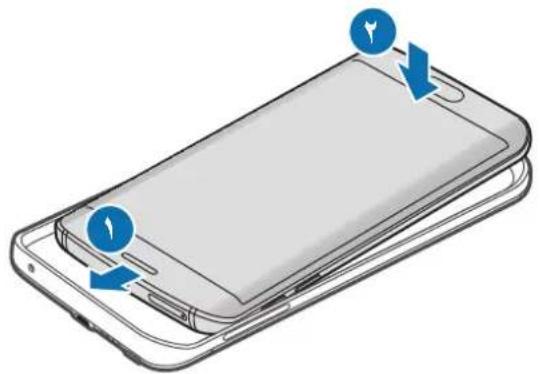

Magnetic Secure Transmission (MST), Near Field Communication (NFC)
Heart rate measurement (HRM)
| السلامالله | |
| الله | |
| الله | |
| الله | |
| الله | |
| اللهاللهالله | الله |

a
.
J 1
1 1
1
15
1 1
.
Galaxy S6 edge+ EP-TG928
∴ m = 3/11
gai gai slai
j 1

j 1

L 1

oJai

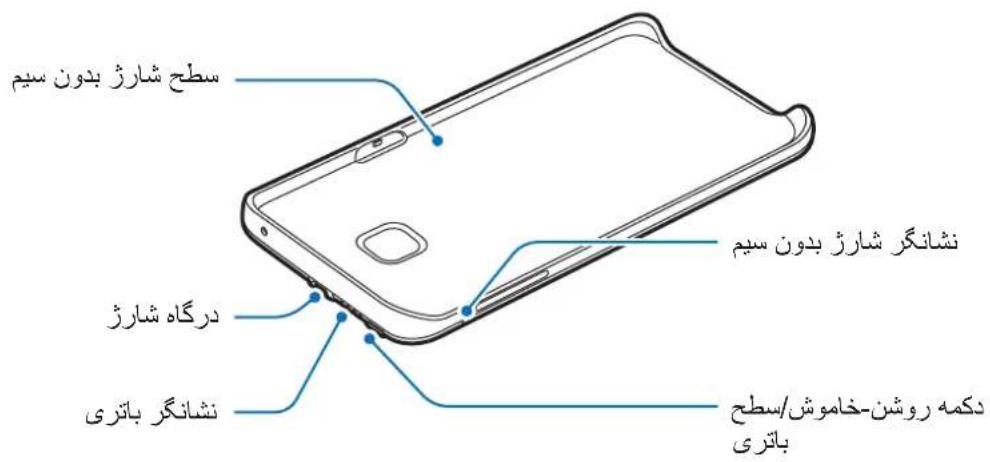

Near Field Communication (NFC)
(HRM) Magnetic Secure Transmission (MST)
Copyright © 2015 Samsung Electronics
Samsung Electronics
Warning — situations that may lead to damage of the device or other equipment

Preparation - preparation, tips for additional information
Getting started
Package contents
The package contains the following components:
- Wireless charger battery pack Quick start guide

Package contents and available accessories may vary by region and service provider. - The supplied accessories are designed exclusively for this device and may be incompatible with other devices. The appearance and technical specifications of the product may be changed without prior notice. - Accessories can be purchased from Samsung company dealers. Before purchasing, make sure they are compatible with your device. - Use only accessories recommended by Samsung. Using non-recommended accessories may cause problems and malfunctions that are not covered by the warranty. - The availability of any accessories depends entirely on the manufacturer. For more information about available accessories, see the Samsung website.
Device layout
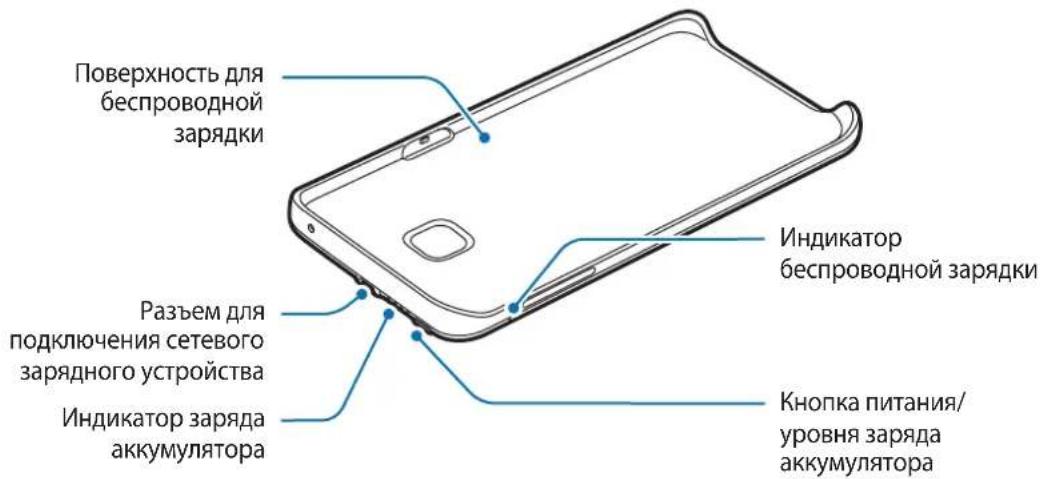
Charging the wireless charger battery pack
Before using the device for the first time, you must charge the battery using the charging device.

Use only charging devices and cables approved by Samsung. Using incompatible charging devices or cables may cause the battery to explode or damage the wireless charger battery pack.
1 Connect the wireless charger battery pack to the charging device.

Incorrect connection of the charging device may cause serious damage to the wireless charger battery pack. The warranty does not cover any damage resulting from incorrect use of the device and accessories.
2 When charging is complete, disconnect the wireless charger battery pack from the charging device.

To save energy, unplug the power adapter when it is not in use. The power adapter is not equipped with a power switch, so it must be unplugged from the electrical outlet to interrupt the charging process and save energy. When using the power adapter, it should be firmly attached to the electrical outlet and be easily accessible.
Tips for charging the battery safely
Charging devices are included in the delivery. With the wireless charger, you can charge the external battery and the mobile device simultaneously when they are connected, but the charging process may take longer. During wireless charging, the external battery may heat up. This is normal and does not affect its performance or lifespan. If the battery gets hotter than usual, the wireless charger may stop working.
2 Press the power button on the wireless external battery.
Wireless charging will start.
To turn off wireless charging, press and hold the power button. To turn it on again, press the power button.
3 After fully charging the mobile device, disconnect it from the wireless external battery.

During charging, the wireless external battery and the mobile device may vibrate due to the high frequency of the power source. Do not place any objects between the mobile device and the wireless external battery. Otherwise, this may prevent proper charging of the mobile device. - When using the wireless external battery in areas with weak network signal, reception may be unstable on the mobile device. If the charger is connected to the mobile device during wireless charging, the wireless charging function is unavailable. During charging of the mobile device, some of its functions are unavailable, such as near field communication (NFC), magnetic secure transmission (MST), and heart rate measurement (HRM).
"Samsung Telecommunications, Ltd", 19th Floor, Samsung Electronics Industrial Park, TEDA, 300385, China
"Samsung Electronics H.K. Co., Ltd." Yeongdeungpo-gu, Seoul, Hong Kong, China
"Samsung Electronics Vietnam Co., Ltd." Industrial Park Yen Phong A, Yen Phong District, Bac Ninh Province, Vietnam
Declaration of Conformity
Product Information
Device
Product: Wireless External Battery
Model(s): EP-TG928
C∈0678
External battery
Model(s): EP-TN920
C∈0678
© Samsung Electronics, 2015.
This manual is protected by international copyright laws.
No part of this manual may be reproduced, distributed, translated, or transmitted in any form or by any means, electronic or mechanical, including photocopying, recording, or storage in any information storage and retrieval system, without the prior written permission of Samsung Electronics.
Trademarks
SAMSUNG and the SAMSUNG logo are registered trademarks of Samsung Electronics. Other copyrights and trademarks are the property of their respective owners.
Read before use
For safe and proper use of the device, please read this manual carefully before use.
External products may differ from images. Content may change without prior notice. - Before using the wireless charger, make sure that the mobile device to be charged is compatible with this charger. - The content of this manual is based on the wireless charger EP-TG928 and the Galaxy S6 edge+ model.
Regional notices

Warning: situations that could cause injury to yourself or others

Caution: situations that could cause damage to the device or other equipment

Note: notes, usage tips, or additional information
Getting started
Package contents
Check the product box for the following items:
- Wireless charger (with cable) Quick Start Guide

The items supplied with the device may vary depending on the country or operator. The components supplied with the package are designed specifically for this device and may be incompatible with other devices. The appearance may change without prior notice. You can purchase additional accessories from your local Samsung dealer. Before purchasing, make sure they are compatible with your device. Use only Samsung-approved accessories. Using unapproved accessories may cause malfunctions and failures not covered by the warranty. Availability of accessories may vary depending on the manufacturer. For information on available accessories, visit the Samsung website.
Device layout
Charging the wireless charger
Before using the device, charge the battery using the charger.

Use only Samsung-approved chargers and cables. Using unapproved chargers or cables may cause the battery to explode or damage the wireless charger.
1 Connect the wireless charger to the charger.

Improper connection of the charger may cause serious damage to the wireless charger. The warranty does not cover damage to the device caused by improper use.
2 When the battery is fully charged, disconnect the charger from the wireless charger.

To save energy, unplug the charger when not in use. If the charger has no power indicator, unplug it from the electrical outlet when not in use to save energy. During charging, the charger should be close to the socket and easily accessible.
Charging precautions and safety measures
The charger is not included in the package. You can use the charger to charge the wireless charger and mobile devices simultaneously, but the charging process may take longer. During charging, the wireless charger may heat up. This is normal and does not affect its performance or lifespan. If the battery heats up more than usual, stop charging with the charger. If the wireless charger is not charging properly, take it and the charger to a Samsung Service Center.
Battery status indicator
75-100% Charged, all indicators lit
50-75% Charged, three indicators lit
25-50% Charged, two indicators lit
5-25% Charged, one indicator lit
Less than 5% Charged, one indicator blinking
Blackbushe Business Park, Place of receipt
Saxony Way, Yateley, Hampshire, Marking CE: 2015
GU46 6GG, UK
Shlodogh
21 August 2015 Stephen Colclough / EU Representative
(Place and date of issue) Signature and name of authorized person
- This is not the address of the Samsung service center. The address or phone number of the Samsung service center can be found in the warranty card. Also contact the point of sale.
We declare that the product complies with the essential requirements of Directive 1999/5/EC on radio and telecommunications equipment, in accordance with:
EN 301 489-1 V1.9.2
EN 300 330-1 V1.7.1
EN 60950-1:2006 + A11:2009 + A1:2010 + A12:2011
EN 301 489-3 V1.6.1
EN 300 330-2 V1.5.1
EN 62311:2008
Directive 2011/65/EU on the restriction of the use of certain hazardous substances in electrical and electronic equipment, together with standard EN 50581:2012.
Representative
Samsung Electronics Euro QA Lab.
Blackbushe Business Park
Saxony Way, Yateley, Hampshire CE marking: 2015)
GU46 6GG, UK
Place and date of issue
21 August 2015 Stephen Colclough / EU Representative
(Place and date of issue) (Name and signature of authorized person)
- This is not the address of the Samsung service center. The address or telephone number of the Samsung service center can be found in the warranty card. You can also contact the seller of the product.
© Samsung Electronics, 2015
This user manual is protected by international laws governing copyright.
Reproduction, distribution, translation, or transmission of this manual in any form or by any means, electronic or mechanical, including photocopying, recording, or storage in any information retrieval system, is prohibited without the prior written permission of Samsung Electronics.
Trademarks
- SAMSUNG and the SAMSUNG logo are registered trademarks of Samsung Electronics.
- All other trademarks are the property of their respective owners.
For your safety, read this manual before using the device.
The content of this manual may differ from the actual product depending on the software version. The manual is subject to change without prior notice. For the latest version of the manual, refer to the Samsung website. This manual is designed for the SM-G928 and Galaxy S6 edge+ models.
Instructional icons

Warning: situations that could cause injury to yourself or others

Caution: situations that could cause damage to your device or other equipment

Note: notes, tips, or additional information
Getting started
Opama KypaMbI
Batapei Tymecin 6acbI, KaIfAH 6atape KyaTbIH TeKcepH3.
Mo6nIbdi Kypblfbl3dbI 3apdTay
1 Mo6nIbdi Kypblfbl3dbI cbIMcbI3 3apraTafbl TONTamacbiHa caIbHbI3.
2 CbIMcbI3 3apraTafblw TOnTaMaCbIHbH Kyat TyMeciH 6acblb3.
CbIMcbl3 3apJdTay 6actanaDbI.
CbIMcbI3 3apraTaydbI cHdipy ywiH Kyat tyMecin 6acbln, yCTan TypbHbI3. CbIMcbI3 3apraTaydbI kaTadaH Kocy ywiH Kyat tyMecin 6acblbI3.
3 Mo6nIbdi Kypblfbl TOIbIFbIMeH 3apraTalfah 6oJca, cbIMCbI3 3apraTafbl TOnTaMaCbHaH aXbipaTbIHbI3.

CbIMcbI3 3apraTafbl TOnTamaCbl MeH MOBnIbI Kypblfbl, XOFapbl Kyat XNIiriHe 6aIIaHbICTbl, 3aprTay yaKbITbIHda dipiJeYi MymKIn. Mo6nIbI Kypblfbi MeH cbIMcbI3 3apraTafbl TOnTaMaCbI apacbHa eW6ip 3aTTapdbI KOImaHbI. Olai 6oJmaca, Mo6nIbI Kypblfbl Dypbc 3apraTajMaybIMyMKIn. CbIMcbI3 3apraTafbl TOITamacbHbIH,KeJI CNrHaJIbI TEmeH 6OJaTBH JepJIepDe KOJdaHbINFaH Ke3de,MOBnJIbI KypblfHbIH,KeJIJeH aKbIPaybl MyMKiH. CbIMcbI3 3aprTay KeiHde 3apraTaBtBI MObIbI KypblfbiFa KaIfacaHbI3, CbIMcbl3 3aprTay yHKunraCbl KOJ XeTimDi 6oImaNbI. Mo6nIbdi KypblfblHbI 3apTay yaKbITbIHda Mo6nIbdi KypblfblHbIH Ke6ip MymKiHdIKTepiH, MbCaJIbI XaKbIH MaHaIbI 6aJIaHbIC (NFC), MarHNTIK Kayinci3 6epiic (MST) XaHe Xypek bIpfaBih OJIwey (HRM) MymKiHdIKTepiH KOJaHyFa 6OJMaIbI.
CbIMcbI3 3apArday KyiH Tekcepy
Moibdi KypblfblHbH 3apay KyiH cbIMcbI 3apay Kepcetkiwi apkblteKcepyre 6oJabi.
Blackbushe Business Park KAJFAY KOCY
Saxony Way, Yateley, Hampshire BACTA/JFAH XbJI - 2015)
GU46 6GG, UK
shldodoy
21 July 2015 J. Stephen Colclough / EO ekili
(Date of issue) (Name, surname and contact details)
* Please refer to the Samsung service center's website or contact the Samsung service center via telephone for the warranty card or the phone's serial number.
Product information
Product information
Below
Product: Wireless Charger
Blackbushe Business Park ADDITIONAL INFORMATION
Saxony Way, Yateley, Hampshire DATE OF ISSUE - 2015)
GU46 6GG, UK
shldodoy
21 July 2015 J. Stephen Colclough / EO ekili
(Date of issue) (Name, surname and contact details)
* Please refer to the Samsung service center's website or contact the Samsung service center via telephone for the warranty card or the phone's serial number.
EAC
Copyright © 2015 Samsung Electronics
This product is protected by international copyright laws.
No part of this publication may be reproduced, stored in a retrieval system, or transmitted in any form or by any means, electronic or mechanical, including photocopying, recording, or any information storage and retrieval system, without prior written permission from Samsung Electronics.
Trademarks
SAMSUNG and the SAMSUNG logo are trademarks of Samsung Electronics. All other trademarks and copyrights are the property of their respective owners.
Read me first
Please read this manual before using the device to ensure safe and proper use.
- Images may differ in appearance from the actual product. Content is subject to change without prior notice.
- Before using the wireless charger pack, make sure the mobile device you want to connect to is compatible with this wireless charger pack.
- The content of this manual is based on the EP-TG928 wireless charger pack and Galaxy S6 edge+ model.
Instructional icons

Warning: situations that could cause injury to yourself or others

Caution: situations that could cause damage to your device or other equipment

Notice: notes, usage tips, or additional information
Getting started
Package contents
Check the product box for the following items:
- Wireless charger pack
- Quick start guide

- The items supplied with the device and any available accessories may vary depending on the region or service provider.
- The supplied items are designed only for this device and may not be compatible with other devices.
- Appearances and specifications are subject to change without prior notice.
- You can purchase additional accessories from your local Samsung retailer. Make sure they are compatible with the device before purchase.
- Use only Samsung-approved accessories. Using unapproved accessories may cause performance problems and malfunctions that are not covered by the warranty.
- Availability of all accessories is subject to change depending entirely on manufacturing companies. For more information about available accessories, refer to the Samsung website.
Device layout
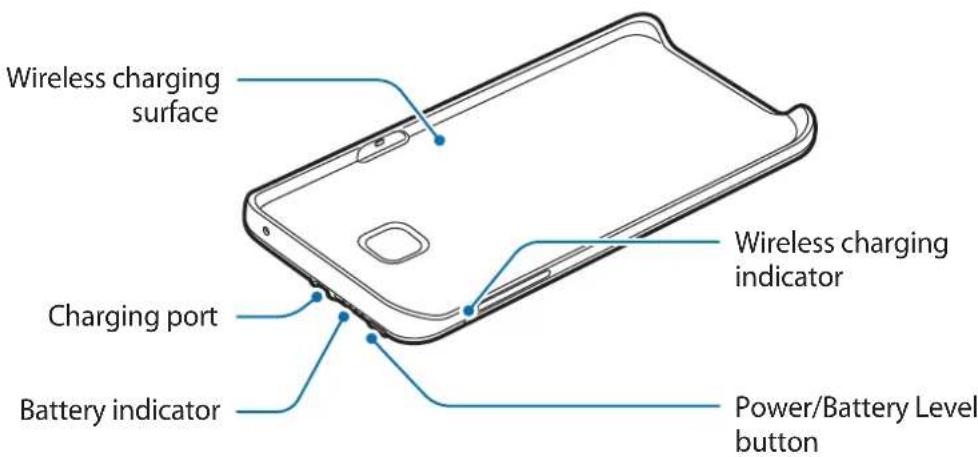
Charging the wireless charger pack
Use the charger to charge the battery before using it for the first time.

Use only Samsung-approved chargers and cables. Unapproved chargers or cables can cause the battery to explode or damage the wireless charger pack.
1 Connect the wireless charger pack to a charger.
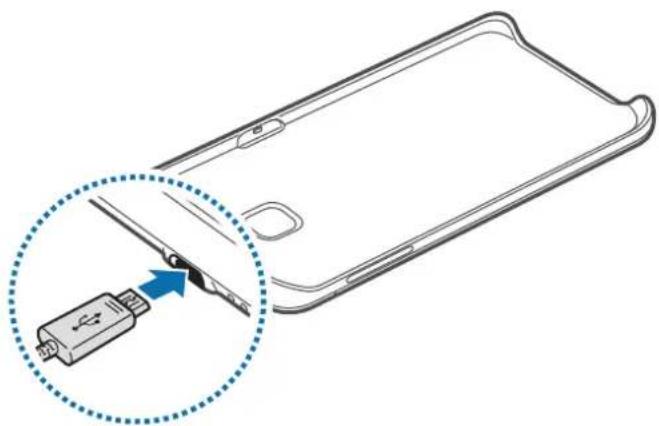

Connecting the charger improperly may cause serious damage to the wireless charger pack. Any damage caused by misuse is not covered by the warranty.
2 After fully charging, disconnect the wireless charger pack from the charger.

To save energy, unplug the charger when not in use. The charger does not have a power switch, so you must unplug the charger from the electric socket when not in use to avoid wasting power. The charger should remain close to the electric socket and easily accessible while charging.
Battery charging tips and precautions
- Chargers are sold separately.
- The charger can simultaneously charge the wireless charger pack and a mobile device when both are connected, but charging may take longer.
- While charging, the wireless charger pack may heat up. This is normal and should not affect the wireless charger pack's lifespan or performance. If the battery gets hotter than usual, the charger may stop charging.
- If the wireless charger pack is not charging properly, take the wireless charger pack and the charger to a Samsung Service Center.
Checking the battery status
While the wireless charger pack is charging, the battery indicator will flash according to the charging status.
| Charging status Battery indicator status |
| 100% Four indicator lights on |
| 75–99% Three indicator lights on and one indicator light blinking |
| 50–75% Two indicator lights on and one indicator light blinking |
| 25–50% One indicator lights on and one indicator light blinking |
| 0–25% One indicator light blinking |

If the wireless charger pack is exposed to extremely hot or cold temperatures or an error occurs, the four indicator lights will blink. Disconnect the charger from the wireless charger pack, and then reconnect them.
Checking the remaining battery power
Check the remaining battery power by pressing the Battery level button.
The battery indicator will activate according to the remaining battery power.
| Remaining battery power | Battery indicator status |
| 75–100% Four indicator lights on | |
| 50–75% Three indicator lights on | |
| 25–50% Two indicator lights on | |
| 5–25% One indicator light on | |
| less than 5% One indicator light blinking | |
Using the wireless charger pack
Charging your mobile device
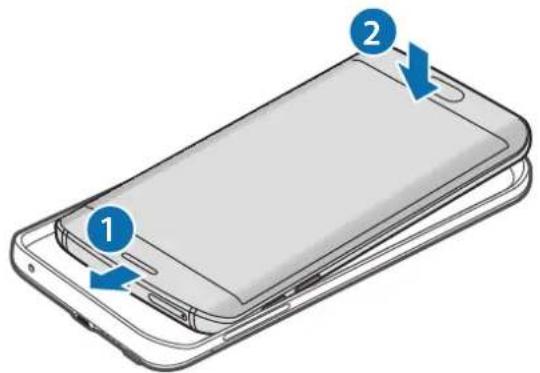
1 Insert your mobile device into the wireless charger pack.
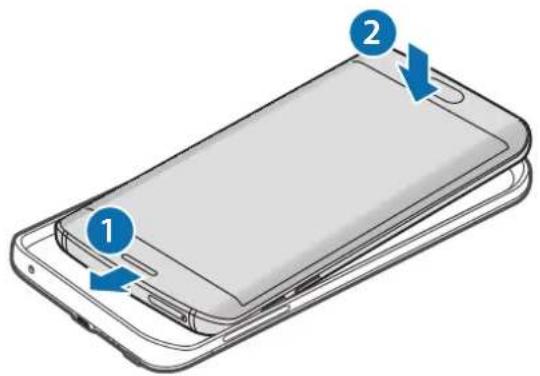
2 Press the wireless charger pack's Power button.
Wireless charging will start.
To deactivate wireless charging, press and hold the Power button. To activate wireless charging again, press the Power button.
3 When the mobile device is fully charged, disconnect it from the wireless charger pack.

- The wireless charger pack and mobile device may vibrate while charging due to high power frequency.
- Do not place any objects between the mobile device and the wireless charger pack. Doing so may prevent the mobile device from charging properly.
- If you use the wireless charger pack in areas with weak network signals, your mobile device may lose network reception.
- If you connect a charger to the mobile device during wireless charging, the wireless charging feature will be unavailable.
- While the mobile device is charging, you cannot use some mobile device features, such as Near Field Communication (NFC), Magnetic Secure Transmission (MST), and Heart rate measurement (HRM).
Checking the wireless charging status
You can check the mobile device's charging status via the wireless charging indicator.
| Color Wireless charging status | |
| Blue → Green When in standby mode | |
| Blue When charging | |
| Green When fully charged | |
| Flashing blue When not charging properly due to a general error | |
| Off | When the wireless charger pack is off or when the mobile device is disconnected from the wireless charger pack |

- If the mobile device is not charging after being connected to the wireless charger pack, turn off the mobile device and then turn it on again.
- The wireless charger pack is an auxiliary external battery. It may not fully charge some mobile devices.
- If the wireless charger pack and the mobile device are exposed to extremely hot or cold temperatures, or if an error occurs, the wireless charging indicator will flash blue. Disconnect the mobile device from the wireless charger pack, and then reconnect them.
Copyright
Copyright © 2015 Samsung Electronics
This manual is protected under international copyright laws.
No part of this manual may be reproduced, distributed, translated, or transmitted in any form or by any means, electronic or mechanical, including photocopying, recording, or storing in any information storage and retrieval system, without the prior written permission of Samsung Electronics.
Trademarks
- SAMSUNG and the SAMSUNG logo are registered trademarks of Samsung Electronics. All other trademarks and copyrights are the property of their respective owners.
Copyright © 2015 Samsung Electronics
Copyright © 2015 Samsung Electronics
This manual is protected under international copyright laws.
Samsung Electronics, 2015.
| baoTterl 相長 BaoTterl 早Tate EpiTite | |
| 75~100% | 4개 툴심 |
| 50~75% | 3개 툴심 |
| 25~50% | 2개 툴심 |
| 5~25% | 1개 툴심 |
| 5% 이하 | 1개 썼BKIN |
Roman calendar
1 1
2 early
early,
3 Qua Zhuan I Ri Yao Ze Yong,

Roman day
The first line of the final selected progressive state representation statement, such as:


- INSTRUCTIONAL ICONS
- GETTING STARTED
- PACKAGE CONTENTS
- DEVICE LAYOUT
- CHARGING THE WIRELESS CHARGER PACK
- BATTERY CHARGING TIPS AND PRECAUTIONS
- CHECKING THE BATTERY STATUS
- CHARGING STATUS BATTERY INDICATOR STATUS
- CHECKING THE REMAINING BATTERY POWER
- USING THE WIRELESS CHARGER PACK
- CHARGING YOUR MOBILE DEVICE
- CHECKING THE WIRELESS CHARGING STATUS
- DECLARATION OF CONFORMITY
- PRODUCT DETAILS
- DECLARATION & APPLICABLE STANDARDS
- REPRESENTATIVE IN THE EU
- COPYRIGHT
- TRADEMARKS
- READ ME FIRST
- SYMBOLS USED
- INSTRUCTION ICONS
- J
- OJAI
- CHARGING THE WIRELESS CHARGER BATTERY PACK
- TIPS FOR CHARGING THE BATTERY SAFELY
- AFTER FULLY CHARGING THE MOBILE DEVICE, DISCONNECT IT FROM THE WIRELESS EXTERNAL BATTERY
- PRODUCT INFORMATION
- C∈
- READ BEFORE USE
- REGIONAL NOTICES
- CHARGING THE WIRELESS CHARGER
- CHARGING PRECAUTIONS AND SAFETY MEASURES
- BATTERY STATUS INDICATOR
- REPRESENTATIVE
- OPAMA KYPAMBI
- MO6NIBDI KYPBLFBL3DBI 3APDTAY
- CBIMCBI3 3APARDAY KYIH TEKCEPY
- EAC
- ROMAN CALENDAR
- ROMAN DAY
Brand : SAMSUNG
Model : EPTN920
Category : Phone charger