
EPTG930 - Phone charger SAMSUNG - Free user manual and instructions
Find the device manual for free EPTG930 SAMSUNG in PDF.
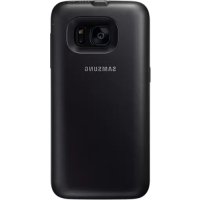



| Product Type | Battery Case / Portable Wireless Charger |
| Brand | Samsung |
| Model | EPTG930 |
| Compatibility | Samsung mobile devices compatible with wireless charging |
| Charging Technology | Wireless induction (Qi) |
| Power Input | Via USB charger (not included, Samsung-approved recommended) |
| Battery Level Indicator | 4 LED indicators: blinking according to remaining charge |
| Wireless Charging Indicator | Blue/green LED: standby, charging, full charge, error |
| Power Button | Yes: activates/deactivates wireless charging |
| Simultaneous Charging | Possible: the charger can charge the case and mobile device at the same time (slower) |
| Charging Priority | The mobile device charges before the battery case |
| Safety | Use only Samsung-approved accessories; avoid extreme temperatures |
| Care and Cleaning | Wipe with a soft, dry cloth; do not use chemicals |
| Repairability | Take to an authorized Samsung service center |
| Warranty | Covers manufacturing defects; use of non-approved accessories not covered |
| Package Contents | Battery case, quick start guide |
| Operating Temperature | Avoid extreme temperatures; the case may heat up normally during charging |
| Precautions | Do not place objects between the mobile device and the case; may lose network connection in weak signal areas |
Frequently Asked Questions - EPTG930 SAMSUNG
User questions about EPTG930 SAMSUNG
0 question about this device. Answer the ones you know or ask your own.
Ask a new question about this device
Download the instructions for your Phone charger in PDF format for free! Find your manual EPTG930 - SAMSUNG and take your electronic device back in hand. On this page are published all the documents necessary for the use of your device. EPTG930 by SAMSUNG.
USER MANUAL EPTG930 SAMSUNG
Please read this manual before using the device to ensure safe and proper use.
- Images may differ in appearance from the actual product. Content is subject to change without prior notice.
- Before using the backpack, make sure the mobile device you want to connect to is compatible with this backpack.
Instructional icons

Warning: situations that could cause injury to yourself or others

Caution: situations that could cause damage to your device or other equipment

Notice: notes, usage tips, or additional information
Getting started
Package contents
Check the product box for the following items:
- Backpack Quick start guide

- The items supplied with the device and any available accessories may vary depending on the region or service provider.
- The supplied items are designed only for this device and may not be compatible with other devices.
- Appearances and specifications are subject to change without prior notice.
- You can purchase additional accessories from your local Samsung retailer. Make sure they are compatible with the device before purchase.
- Use only Samsung-approved accessories. Using unapproved accessories may cause performance problems and malfunctions that are not covered by the warranty.
- Availability of all accessories is subject to change depending entirely on manufacturing companies. For more information about available accessories, refer to the Samsung website.
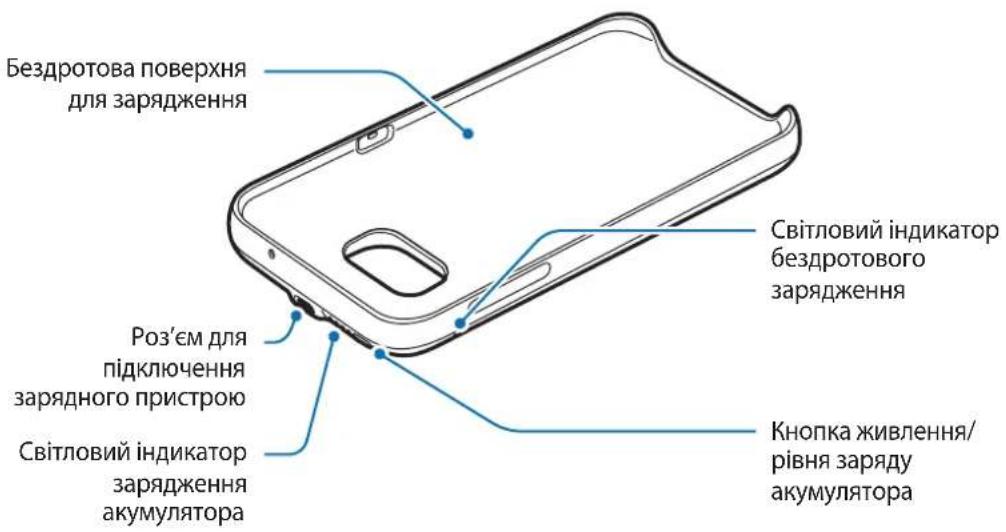
Device layout
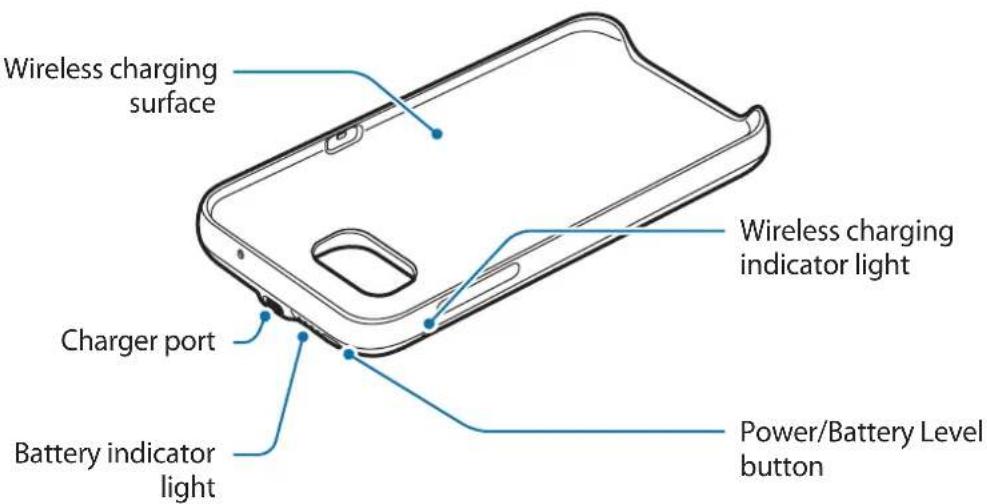
Charging the backpack
Charge the battery before using it for the first time or when it has been unused for extended periods.

Use only Samsung-approved chargers and cables. Unapproved chargers can cause the battery to explode or damage the backpack.
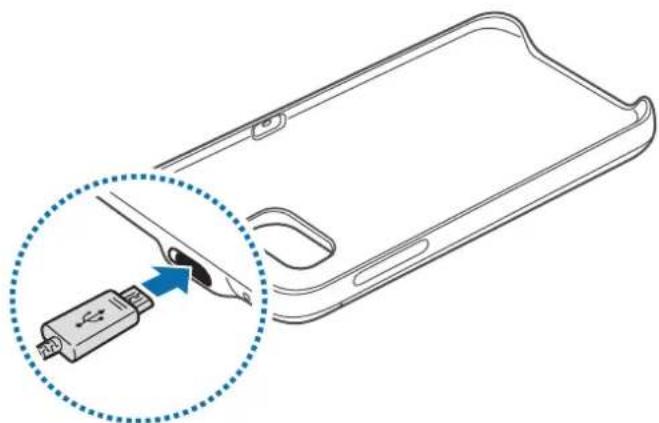
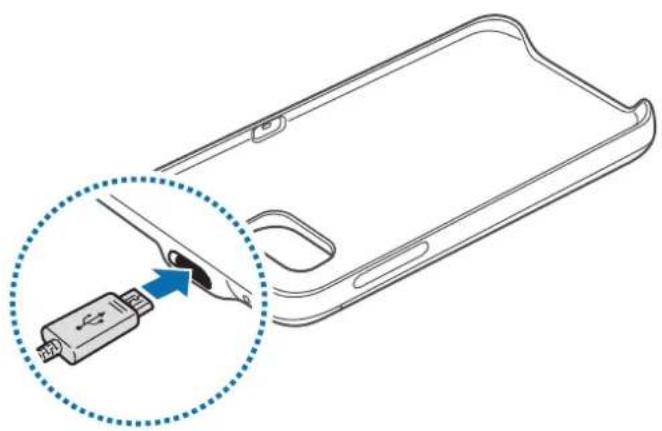
1 Connect the backpack to a charger.
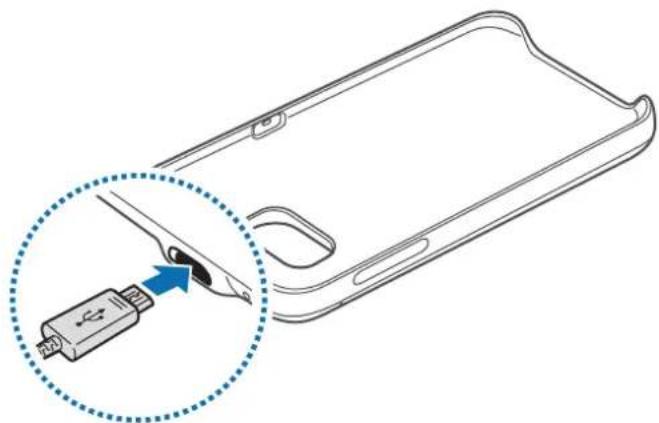

Connecting the charger improperly may cause serious damage to the backpack. Any damage caused by misuse is not covered by the warranty.
2 After fully charging, disconnect the backpack from the charger.

- To save energy, unplug the charger when not in use. The charger does not have a power switch, so you must unplug the charger from the electric socket when not in use to avoid wasting power. The charger should remain close to the electric socket and easily accessible while charging.
- The socket-outlet shall be installed near the equipment and shall be easily accessible.
Battery charging tips and precautions
- Chargers are sold separately.
- Using a power source other than the charger, such as a computer, may result in a slower charging speed due to a lower electric current.
- The charger can simultaneously charge the backpack and a mobile device when both are connected, but charging may take longer.
- If a mobile device is attached to the backpack during charging, the mobile device will be charged before the backpack.
- While charging, the backpack may heat up. This is normal and should not affect the backpack's lifespan or performance. If the battery gets hotter than usual, the charger may stop charging.
- The actual capacity (Wh) is measured based on the battery's output current and voltage. It may differ from the capacity (Wh) indicated on the device, depending on the output power condition, the connected device's circuit configuration, and the operation environment.
- If the backpack is not charging properly, take the backpack and the charger to a Samsung Service Centre.
Checking the battery status
While the backpack is charging, the battery indicator will flash according to the charging status.
| Charging status Battery indicator status |
| 100% Four indicator lights on |
| 75–99% Three indicator lights on and one indicator light blinking |
| 50–75% Two indicator lights on and one indicator light blinking |
| 25–50% One indicator lights on and one indicator light blinking |
| 0–25% One indicator light blinking |

If the backpack is exposed to extremely hot or cold temperatures or an error occurs, the four indicator lights will blink. Disconnect the charger from the backpack, and then reconnect them.
Checking the remaining battery power
Check the remaining battery power by pressing the Battery level button.
The battery indicator will activate according to the remaining battery power.
| Remaining battery power | Battery indicator status |
| 75–100% Four indicator lights on | |
| 50–75% Three indicator lights on | |
| 25–50% Two indicator lights on | |
| 5–25% One indicator light on | |
| less than 5% One indicator light blinking | |
Using the backpack
Charging your mobile device
1 Insert your mobile device into the backpack.
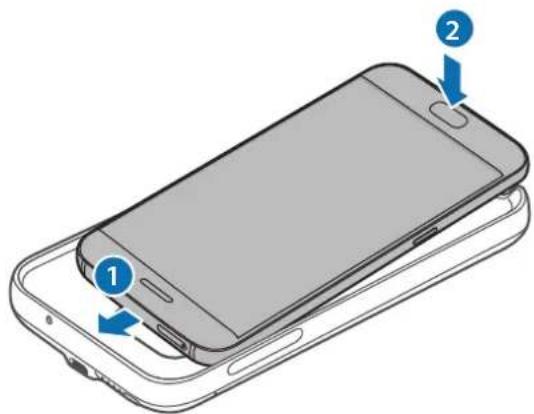
2 Press the backpack's Power button. Wireless charging will start.
To deactivate wireless charging, press and hold the Power button. To activate wireless charging again, press the Power button.
3 When the mobile device is fully charged, disconnect it from the backpack.

- The backpack and mobile device may vibrate while charging due to high power frequency.
- Do not place any objects between the mobile device and the backpack. Doing so may prevent the mobile device from charging properly.
- If you use the backpack in areas with weak network signals, your mobile device may lose network reception.
- If you connect a charger to the mobile device during wireless charging, the wireless charging feature will be unavailable.
- While using the backpack, you cannot use some mobile device features, such as Near Field Communication (NFC) and Samsung Pay. Some features that use the mobile device's back sensor may not work. To use these features, remove the backpack from your mobile device.
Checking the wireless charging status
You can check the mobile device's charging status via the wireless charging indicator.
| Colour Wireless charging status | |
| Blue → Green When in standby mode | |
| Blue When charging | |
| Green When fully charged | |
| Flashing blue When not charging properly due to a general error | |
| Off | When the backpack is off or when the mobile device is disconnected from the backpack |

- If the mobile device is not charging after being connected to the backpack, turn off the mobile device and then turn it on again.
- The backpack is an auxiliary external battery. It may not fully charge some mobile devices.
- If the backpack and the mobile device is exposed to extremely hot or cold temperatures or an error occurs, the wireless charging indicator will flash in blue. Disconnect the mobile device from the backpack, and then reconnect them.
Copyright
Copyright © 2016 Samsung Electronics
This manual is protected under international copyright laws.
No part of this manual may be reproduced, distributed, translated, or transmitted in any form or by any means, electronic or mechanical, including photocopying, recording, or storing in any information storage and retrieval system, without the prior written permission of Samsung Electronics.
Trademarks
- SAMSUNG and the SAMSUNG logo are registered trademarks of Samsung Electronics.
- All other trademarks and copyrights are the property of their respective owners.
Copyright © 2016 Samsung Electronics
Copyright © 2016 Samsung Electronics
Copyright © 2016 Samsung Electronics
Copyright © 2016 Samsung Electronics
Copyright © 2016 Samsung Electronics
Copyright © 2016 Samsung Electronics
- Backpack Quick Guide

- The elements and accessories supplied with the device may vary depending on the region or service provider.
- The supplied items are designed only for this device and may not be compatible with other devices. Appearance and specifications are subject to change without notice.
- You can purchase additional accessories from your local Samsung dealer. Before purchasing, make sure they are compatible with the device.
- Use only Samsung-approved accessories. Using unapproved accessories may cause performance problems and malfunctions that are not covered by the warranty. Availability of all accessories is subject to change depending on manufacturers. For more information about available accessories, refer to the Samsung website.
Device layout
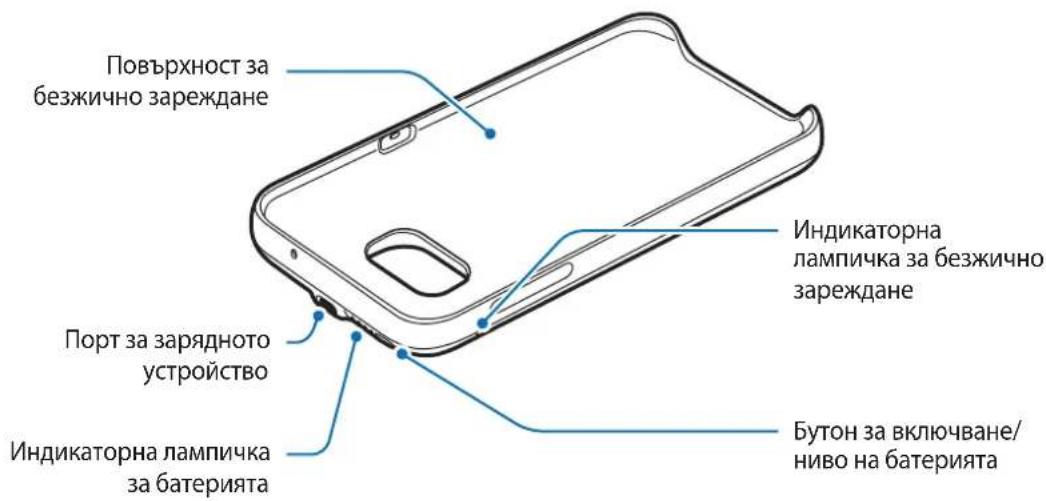
Samsung Galaxy backpack
Battery, when used for the first time or after not being used for a long time.

Use only Samsung-approved chargers and cables. Unapproved chargers can cause battery explosion or damage to the backpack.
1 Connect the backpack to the charger.
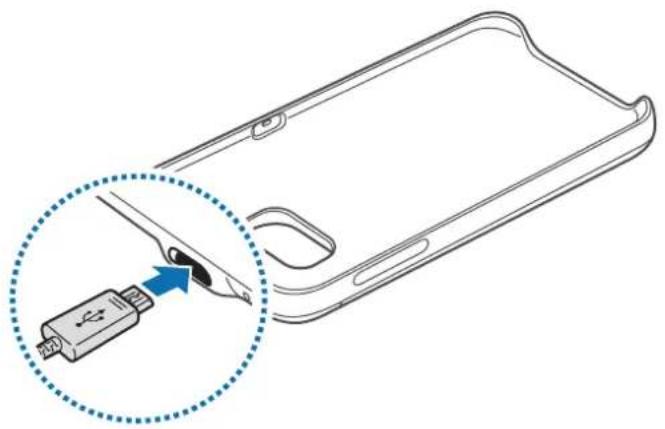

Incorrect connection to the charger can cause serious damage to the backpack. Any damage caused by improper use is not covered by the warranty.
2 When fully charged, disconnect the backpack from the charger.

To save energy, unplug the charger from the electrical outlet when not in use. The charger has a standby indicator light, so you must unplug it from the electrical outlet when not in use to avoid wasting energy. The charger should remain close to the electrical outlet and be easily accessible while charging.
Battery charging tips
Chargers are sold separately. Using a different charger or power source, such as a computer, may result in slower charging due to a weaker electrical current. The charger can charge the backpack and the mobile device simultaneously when both are connected, but charging may take longer. If the backpack is used while charging, it may heat up. This is normal and should not affect the lifespan or performance of the backpack. If the battery heats up more than usual, the charger may stop charging. The actual capacity (Wh) is measured based on the output and the battery's rated capacity. It may differ from the capacity (Wh) indicated on the device, depending on the output conditions, the configuration of the connected device, and the operating environment. If the backpack does not charge properly, take it and the charger to a Samsung service center.
Checking the battery status
While the backpack is charging, the battery indicator will light up according to the charging status.
| Състорные на зараздаде | Състорные на Инданakotopa за ватерията |
| 100% Yeши рс сбerteши Инданakotрни лamпочки | |
| 75 - 99% | Три сбerteши Инданakotрни лamпочки и edna пэрмигваши Инданakotрни лamпочka |
| 50 - 75% | Дов сбerteши Инданakotрни лamпочки и edna пэрмигваши Инданakotрни лamпочka |
| 25 - 50% | Еда сбerteши Инданakotрни лamпочka и edna пэрмигваши Инданakotрни лamпочka |
| 0 - 25%Еда пэрмигваши Инданakotрни лamпочka | |

If the backpack is exposed to extremely low or high temperatures or if an error occurs, the four indicator lights will blink. Disconnect the charger from the backpack, and then reconnect it.
Copyright © 2016 Samsung Electronics
This manual is protected by international copyright laws.
No part of this manual may be reproduced, distributed, translated, or transmitted in any form or by any means, electronic or mechanical, including photocopying, recording, or storage in any information storage and retrieval system, without the prior written permission of Samsung Electronics.
SAMSUNG and the SAMSUNG logo are registered trademarks of Samsung Electronics. All other trademarks and copyrights are the property of their respective owners.
Read me first
Please read this manual carefully before using the device to ensure safe and correct use.
- Backpack Quick Start Guide

- Items supplied with the device and all available accessories may vary depending on the region and service provider.
- Supplied items are designed only for this device and may not be compatible with other devices.
- Appearances and specifications are subject to change without prior notice.
- You can purchase additional accessories at local Samsung stores. Before purchasing, check whether the accessory is compatible with the device.
- Use only accessories approved by Samsung. Using unapproved accessories may cause problems and malfunctions that are not covered by the warranty.
- Availability of all accessories is subject to change and depends entirely on the manufacturer. For more information about available accessories, refer to the Samsung website.
Device layout
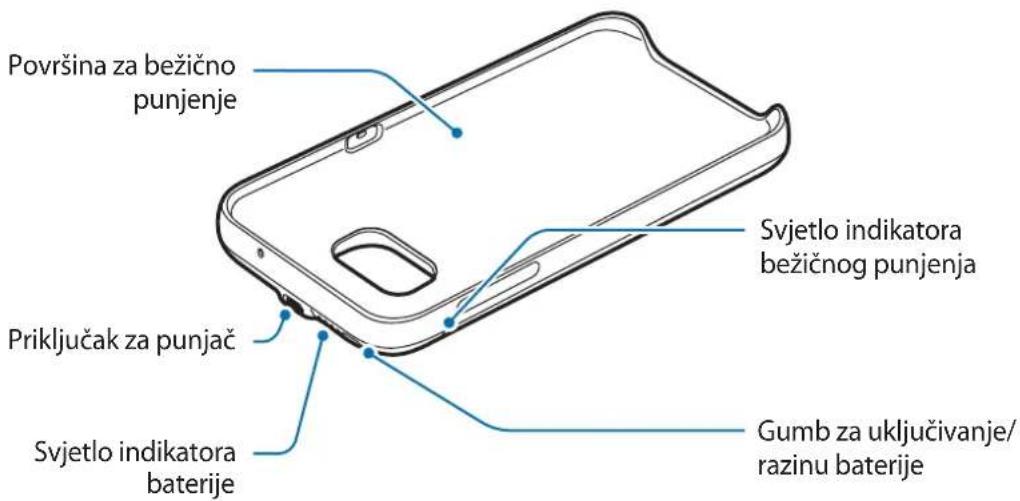
Charging the backpack
Before using the battery for the first time or after it has been unused for a long time, charge the battery.

Use only chargers and cables approved by Samsung. Unapproved chargers may cause the battery to explode or damage the backpack.
1 Connect the backpack to the charger.

Copyright © 2016 Samsung Electronics
This manual is protected by international copyright laws.
No part of this manual may be reproduced, distributed, translated, or transmitted in any form or by any means, electronic or mechanical, including photocopying, recording, or storing in any information storage and retrieval system, without the prior written permission of Samsung Electronics.
Trademarks
SAMSUNG and the SAMSUNG logo are registered trademarks of Samsung Electronics. All other trademarks and copyrights are the property of their respective owners.
Read me first
Copyright © 2016 Samsung Electronics
This manual is protected by international copyright laws.
No part of this manual may be reproduced, distributed, translated, or transmitted in any form or by any means, electronic or mechanical, including photocopying, recording, or storing in any information storage and retrieval system, without the prior written permission of Samsung Electronics.
Trademarks
SAMSUNG and the SAMSUNG logo are registered trademarks of Samsung Electronics. All other trademarks and copyrights are the property of their respective owners.
Read me first
Copyright © 2016 Samsung Electronics
Copyright © 2016 Samsung Electronics
Copyright © 2016 Samsung Electronics
Copyright © 2016 Samsung Electronics
For alternative support, please call the phone number 81556480.
Copyright
Copyright © 2016 Samsung Electronics
Copyright © 2016 Samsung Electronics
Copyright © 2016 Samsung Electronics
Copyright © 2016 Samsung Electronics
| RenkKablosuz Şarj durumu | |
| Mavi → Yeşil Bekleme modundayken | |
| Mavi Şarj olurken | |
| Yeşil Şarj tam doluyken | |
| Mavi yanıp.Since | Genel bir arizadan dolaykıduzgün bir seksilde Şarj olmadiğında mavi renkte yanıp)sowner |
| Kapalı Backpack kapalıyen veya mobil cihaz backpack'e®,®,®,®,®,®,®,®,®,®,®,®,®,®,®,®,®,®,®,®,®,®,®,®,®,®,®,®,®,®,®,®,®,®,®,®,®,®,®,®,®,®,®,®,®,®,®,®,®,®,®,®,®,®,®,®,®,®,®,®,®,®,®,®,®,®,®,®,®,®,®,®,®,®,®,®,®,®,®,®,®,®,®,®,®,®,®,®,®,®,®,®,®,®,®,®,®,®,®,®,®değilken | |

Copyright © 2016 Samsung Electronics

Backpack

.
.
.
i 1
.
Jg 1
a


Backpack
a a a a a a a a a a a a a a a a a a a a a a a a a a a a a a a a a a a a a a a

Backpack
Jalll y. Backpack 8.

Backpack

J 1 1 1 1 1 1 1 1 1 1 1 1 1 1 1 1 1 1 1 1 1 1 1 1 1 1 1 1 1
1

a a
. Backpack
Backpack
.
(Wh) a (Wh)
.
a
| %1 . . . |
| %99 - V0 |
| %V0 - 0 . |
| %0 . - 90 |
| %90 - . |


backpack
backpack
backpack
Therefore, the area of triangle OBC equals the area of triangle COD plus the area of triangle BOC.
J 1 (Wh)
(Wh) 1
Therefore, a_i equals b_i.
.
y
Jd j 1
Copyright © 2016 Samsung Electronics
.
J 14
s
Samsung Electronics
.
75-100% All four LED indicators are on
50-75% Three LED indicators are on
25-50% Two LED indicators are on
5-25% One LED indicator is on
Below 5% LED indicator blinks
Using the wireless external battery pack
Charging the mobile device
1 Insert the mobile device into the body of the wireless external battery pack.
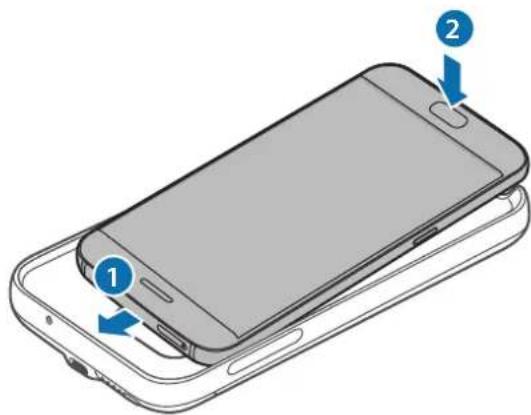
2 Press the power button on the wireless external battery pack. Wireless charging will begin.
To turn off wireless charging, press and hold the power button. To turn on wireless charging again, press the power button.
3 After the mobile device is fully charged, disconnect it from the wireless external battery pack.

During charging, the wireless external battery pack and the mobile device may vibrate due to the high frequency of the power source. Do not place any objects between the mobile device and the wireless external battery pack. Otherwise, this may lead to improper charging of the mobile device. - When using the wireless external battery pack in places with a weak network signal, reception may be weak on the mobile device. If the charging device is connected to the mobile device during wireless charging, the wireless charging function is unavailable. While using the wireless external battery pack, some of its functions are unavailable, such as near field communication (NFC) and Samsung Pay. Some functions that use the sensor on the back of the mobile device may not work. To use such functions, remove the wireless external battery pack from the mobile device.
© Samsung Electronics, 2016.
If the device is not used for a long time, it is necessary to charge the battery, as well as if it has not been used for a long period of time.

Use only Samsung-approved chargers and cables. Using non-recommended chargers may cause battery damage or damage to the device.
1. Connect the charger to the device.


Incorrect connection of the charger may cause serious damage to the device. The warranty does not cover damage caused by incorrect use.
2. When the battery is fully charged, disconnect the charger from the device.

To save energy, unplug the charger when it is not in use. If the charger has no power indicator, unplug it from the electrical outlet when not in use. To save energy, during charging, the charger should be fully plugged into the socket and be easily accessible.
Battery charging status indicator
100%: All four indicator lights are on. 75-99%: Three indicator lights are on, and the fourth is off. 50-75%: Two indicator lights are on, and the third is off. 25-50%: One indicator light is on, and the second is off. 0-25%: One indicator light is blinking.

All four indicator lights will blink if the device is exposed to very high or very low temperatures, or in case of a malfunction. Disconnect the charger from the device, then reconnect it.
Checking the battery level before recording
Check the battery level before recording by pressing the battery level button.
The battery indicator will be displayed according to the battery level before recording.
Battery charge before recording
Battery indicator status
75-100%: All four indicator lights are on. 50-75%: Three indicator lights are on. 25-50%: Two indicator lights are on. 5-25%: One indicator light is on.
Mehwe 5 % Блима€ одн CBITIOBи iHДИКaTOp
Using the backpack
Charging the mobile device
1 Connect the mobile device to the backpack.
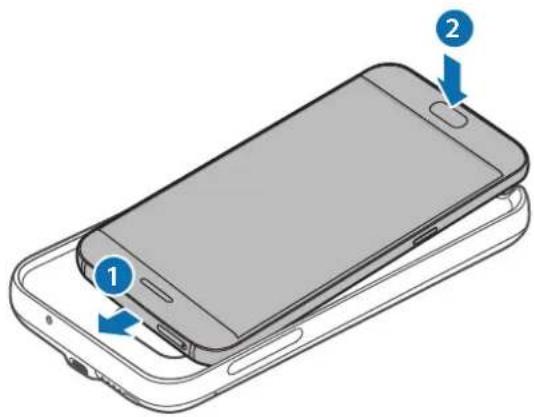
2 Press and hold the power button on the backpack. Wireless charging will start.
To turn off wireless charging, press and hold the power button. To turn it on again, press and hold the power button.
When the mobile device is fully charged, disconnect it from the backpack.

- During charging, the backpack and the mobile device may vibrate due to the high frequency of the power source. Do not place any objects between the mobile device and the backpack. This may cause improper charging of the mobile device. - If the backpack is used in a place with a weak signal, the mobile device may lose its signal. - If the charging device is connected to the mobile device during wireless charging, the wireless charging function is unavailable. While using the backpack, some of its functions are unavailable, such as wireless connection and NFC and Samsung Pay. Some functions that use the sensor on the back of the mobile device may not work. To use these functions, remove the backpack from the mobile device.
Checking the wireless charging status
The charging status of the mobile device can be checked using the wireless charging indicator.
| KoIIp CtAN 6e3dpoTobOro 3apJdxJehn |
| CinHi → 3elenH y pexkimi ouykubHn |
| CinH i PiД quac 3apJdxJehn |
| 3elenH y pazi nobHoro 3apJdxJehn |
| Блима€ cinHim Y pazi HeNaIexJHO rO 3apJdxJehn chepe3 nomilky 3aRaIbHoro xapaKtepy |
| ВиМК. Y pazi BmKHeHry backpack a60 BiДКlIQUeHry mobIbHoro pricItroB ViD HbOro |

- If the mobile device does not charge after being connected to the backpack, turn it off and on again.
- The backpack is an additional external battery. Some mobile devices cannot be fully charged using it.
- The wireless charging indicator will blink blue if the backpack and the mobile device are in an environment with very high or very low temperatures, or if an error occurs. Disconnect the mobile device from the backpack, then reconnect it.
Copyright
© Samsung Electronics, 2016
This device has been manufactured in accordance with the laws on copyright.
It is prohibited to reproduce, distribute, translate or transmit in any form or by any means, electronic or mechanical, including photocopying, recording or storing in any information retrieval system, any part of this manual without the prior written permission of Samsung Electronics.
Trademarks
SAMSUNG and the SAMSUNG logo are registered trademarks of Samsung Electronics. All other trademarks and copyrights are the property of their respective owners.
Safety warnings
To prevent safety hazards, read the safety warnings before using the product.
The images may differ from the actual product. Content is subject to change without prior notice. - When using the backpack, be careful not to let the mobile device fall out of the backpack.
Safety precautions

Warning: situations that could cause injury to yourself or others

Caution: situations that could cause damage to the product or other equipment

Warning: situations that could cause electric shock or fire
Safety instructions
Battery usage
If the battery indicator is low, charge the battery before using the device.
Charging the mobile device
1 Mobile Backpack User Manual
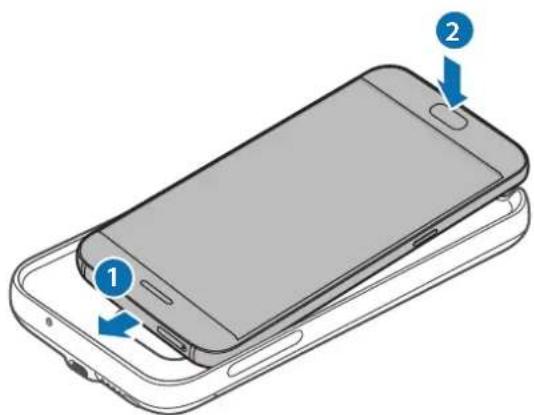
2 Backpack User Manual. Before using the backpack, read this manual carefully. To use the backpack, press the power button. To use the backpack, press the power button. 3 If the mobile device is connected to the backpack, the backpack will be charged.

- The backpack and the mobile device are connected via Bluetooth, and charging is possible when the power is on. There is no separate power button between the mobile device and the backpack. If not, the mobile device cannot be charged.
- When the backpack is used in places where the cellular signal is weak, the mobile device's battery may drain faster. If you have enabled the power saving mode, the power saving function will be more effective. The mobile device's NFC and Samsung Pay features may not work when the backpack is attached. Some features of the large device may not work when the backpack is attached. To use these features, remove the backpack from the large device.
Checking the power saving mode
The mobile device's power saving mode can be checked through the power saving indicator.
Copyright © 2016 Samsung Electronics
This document is protected by international copyright laws.
No part of this publication may be reproduced, stored in a retrieval system, or transmitted in any form or by any means, electronic, mechanical, photocopying, recording, or otherwise, without the prior written permission of Samsung Electronics Co., Ltd.
Trademarks
SAMSUNG and the SAMSUNG logo are trademarks of Samsung Electronics Co., Ltd. All other trademarks and copyrights are the property of their respective owners.
Read me first
Please read this manual before using the device to ensure safe and proper use.
- Images may differ in appearance from the actual product. Content is subject to change without prior notice.
- Before using the backpack, make sure the mobile device you want to connect to is compatible with this backpack.
Instructional icons

Warning: situations that could cause injury to yourself or others

Caution: situations that could cause damage to your device or other equipment

Notice: notes, usage tips, or additional information
Getting started
Package contents
Check the product box for the following items:
- Backpack Quick start guide

- The items supplied with the device and any available accessories may vary depending on the region or service provider.
- The supplied items are designed only for this device and may not be compatible with other devices.
- Appearances and specifications are subject to change without prior notice.
- You can purchase additional accessories from your local Samsung retailer. Make sure they are compatible with the device before purchase.
- Use only Samsung-approved accessories. Using unapproved accessories may cause performance problems and malfunctions that are not covered by the warranty.
- Availability of all accessories is subject to change depending entirely on manufacturing companies. For more information about available accessories, refer to the Samsung website.
Device layout
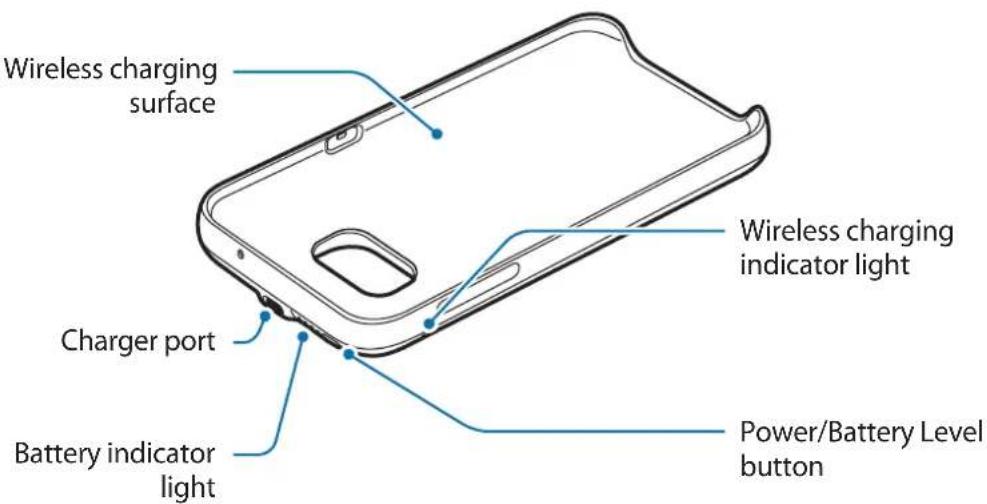
Charging the backpack
Charge the battery before using it for the first time or when it has been unused for extended periods.

Use only Samsung-approved chargers and cables. Unapproved chargers can cause the battery to explode or damage the backpack.
1 Connect the backpack to a charger.
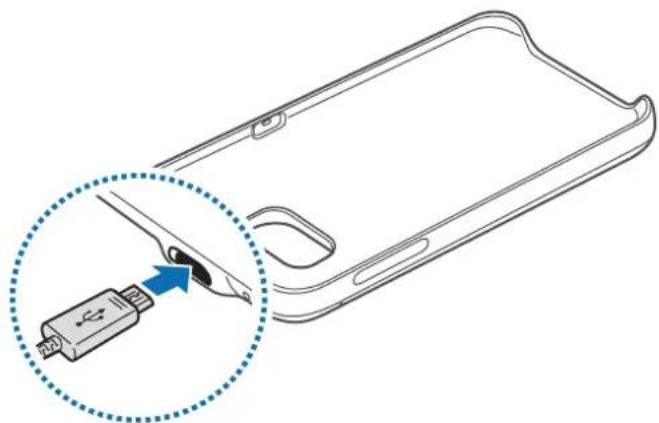

Connecting the charger improperly may cause serious damage to the backpack. Any damage caused by misuse is not covered by the warranty.
2 After fully charging, disconnect the backpack from the charger.

To save energy, unplug the charger when not in use. The charger does not have a power switch, so you must unplug the charger from the electric socket when not in use to avoid wasting power. The charger should remain close to the electric socket and easily accessible while charging.
Battery charging tips and precautions
- Chargers are sold separately.
- Using a power source other than the charger, such as a computer, may result in a slower charging speed due to a lower electric current.
- The charger can simultaneously charge the backpack and a mobile device when both are connected, but charging may take longer.
- If a mobile device is attached to the backpack during charging, the mobile device will be charged before the backpack.
- While charging, the backpack may heat up. This is normal and should not affect the backpack's lifespan or performance. If the battery gets hotter than usual, the charger may stop charging.
- The actual capacity (Wh) is measured based on the battery's output current and voltage. It may differ from the capacity (Wh) indicated on the device, depending on the output power condition, the connected device's circuit configuration, and the operation environment.
- If the backpack is not charging properly, take the backpack and the charger to a Samsung Service Center.
Checking the battery status
While the backpack is charging, the battery indicator will flash according to the charging status.
| Charging status Battery indicator status |
| 100% Four indicator lights on |
| 75–99% Three indicator lights on and one indicator light blinking |
| 50–75% Two indicator lights on and one indicator light blinking |
| 25–50% One indicator lights on and one indicator light blinking |
| 0–25% One indicator light blinking |

If the backpack is exposed to extremely hot or cold temperatures or an error occurs, the four indicator lights will blink. Disconnect the charger from the backpack, and then reconnect them.
Checking the remaining battery power
Check the remaining battery power by pressing the Battery level button.
The battery indicator will activate according to the remaining battery power.
| Remaining battery power | Battery indicator status |
| 75–100% Four indicator lights on | |
| 50–75% Three indicator lights on | |
| 25–50% Two indicator lights on | |
| 5–25% One indicator light on | |
| less than 5% One indicator light blinking | |
Using the backpack
Charging your mobile device
1 Insert your mobile device into the backpack.
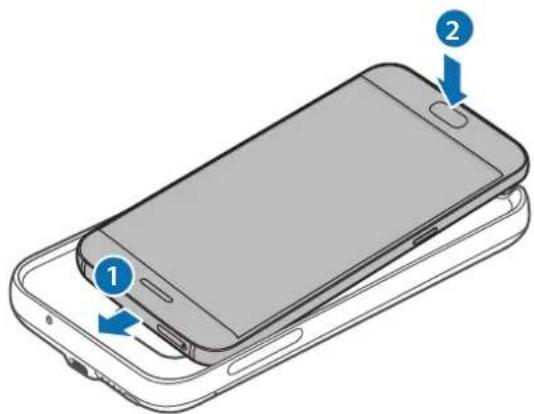
2 Press the backpack's Power button. Wireless charging will start.
To deactivate wireless charging, press and hold the Power button. To activate wireless charging again, press the Power button.
3 When the mobile device is fully charged, disconnect it from the backpack.

- The backpack and mobile device may vibrate while charging due to high power frequency.
- Do not place any objects between the mobile device and the backpack. Doing so may prevent the mobile device from charging properly.
- If you use the backpack in areas with weak network signals, your mobile device may lose network reception.
- If you connect a charger to the mobile device during wireless charging, the wireless charging feature will be unavailable.
- While using the backpack, you cannot use some mobile device features, such as Near Field Communication (NFC) and Samsung Pay. Some features that use the mobile device's back sensor may not work. To use these features, remove the backpack from your mobile device.
Checking the wireless charging status
You can check the mobile device's charging status via the wireless charging indicator.
| Color Wireless charging status | |
| Blue → Green When in standby mode | |
| Blue When charging | |
| Green When fully charged | |
| Flashing blue When not charging properly due to a general error | |
| Off | When the backpack is off or when the mobile device is disconnected from the backpack |

- If the mobile device is not charging after being connected to the backpack, turn off the mobile device and then turn it on again.
- The backpack is an auxiliary external battery. It may not fully charge some mobile devices.
- If the backpack and the mobile device are exposed to extremely hot or cold temperatures or an error occurs, the wireless charging indicator will flash in blue. Disconnect the mobile device from the backpack, and then reconnect them.
This product contains chemicals known to the State of California to cause cancer, birth defects, or other reproductive harm. For more information, please call 1-800-SAMSUNG (726-7864)
Samsung Electronics America, Inc
85 Challenger Road,
Ridgefield Park, New Jersey, 07660
Phone: 1-800-SAMSUNG (726-7864)
Copyright
Copyright © 2016 Samsung Electronics America, Inc.
This manual is protected under international copyright laws.
No part of this manual may be reproduced, distributed, translated, or transmitted in any form or by any means, electronic or mechanical, including photocopying, recording, or storing in any information storage and retrieval system, without the prior written permission of Samsung Electronics.
Trademarks
SAMSUNG and the SAMSUNG logo are registered trademarks of Samsung Electronics. - All other trademarks and copyrights are the property of their respective owners.
Copyright © 2016 Samsung Electronics
© Samsung Electronics, 2016.


- INSTRUCTIONAL ICONS
- GETTING STARTED
- PACKAGE CONTENTS
- DEVICE LAYOUT
- CHARGING THE BACKPACK
- BATTERY CHARGING TIPS AND PRECAUTIONS
- CHECKING THE BATTERY STATUS
- CHECKING THE REMAINING BATTERY POWER
- USING THE BACKPACK
- CHARGING YOUR MOBILE DEVICE
- CHECKING THE WIRELESS CHARGING STATUS
- COPYRIGHT
- TRADEMARKS
- SAMSUNG GALAXY BACKPACK
- BATTERY CHARGING TIPS
- READ ME FIRST
- BACKPACK
- A A
- A
- Y
- USING THE WIRELESS EXTERNAL BATTERY PACK
- AFTER THE MOBILE DEVICE IS FULLY CHARGED, DISCONNECT IT FROM THE WIRELESS EXTERNAL BATTERY PACK
- BATTERY CHARGING STATUS INDICATOR
- CHECKING THE BATTERY LEVEL BEFORE RECORDING
- BATTERY CHARGE BEFORE RECORDING
- BATTERY INDICATOR STATUS
- CHARGING THE MOBILE DEVICE
- SAFETY WARNINGS
- SAFETY PRECAUTIONS
- SAFETY INSTRUCTIONS
- BATTERY USAGE
- CHECKING THE POWER SAVING MODE
- SAMSUNG ELECTRONICS AMERICA, INC
Brand : SAMSUNG
Model : EPTG930
Category : Phone charger