
EBPA710 - Phone charger SAMSUNG - Free user manual and instructions
Find the device manual for free EBPA710 SAMSUNG in PDF.




| Product Type | External battery (power bank) for mobile devices |
| Brand | Samsung |
| Model | EB-PA710 |
| Input Power | USB (via charger sold separately) |
| Output Power | USB (standard 5V) |
| Battery Level Indicator | LED indicator lights |
| Control Buttons | On/Off button, battery level check button |
| Main Functions | Charging mobile devices, stop/resume charging, battery level indication |
| Compatibility | Compatible mobile devices (check before use) |
| Use While Charging | Possible (except if battery level is too low) |
| Safety | Use only Samsung-approved accessories; risk of explosion if unauthorized charger used |
| Precautions | Avoid extreme temperatures; if battery heats abnormally, charging stops |
| Package Contents | Battery pack, quick start guide |
| Warranty | Damage resulting from improper use is not covered |
| Copyright Year | 2016 Samsung Electronics |
| Trademark | SAMSUNG and the SAMSUNG logo are registered trademarks of Samsung Electronics |
| Charging Port (input) | USB (type not specified) |
| Output Port | USB (type not specified) |
Frequently Asked Questions - EBPA710 SAMSUNG
User questions about EBPA710 SAMSUNG
0 question about this device. Answer the ones you know or ask your own.
Ask a new question about this device
Download the instructions for your Phone charger in PDF format for free! Find your manual EBPA710 - SAMSUNG and take your electronic device back in hand. On this page are published all the documents necessary for the use of your device. EBPA710 by SAMSUNG.
USER MANUAL EBPA710 SAMSUNG
Please read this manual before using the device to ensure safe and proper use.
- Images may differ in appearance from the actual product. Content is subject to change without prior notice.
- Before using the battery pack, make sure it is compatible with your device.
- The content of this manual is based on the EB-PA710 model.
Instructional icons

Warning: situations that could cause injury to yourself or others

Caution: situations that could cause damage to your device or other equipment

Notice: notes, usage tips, or additional information
Getting started
Package contents
Check the product box for the following items:
- Battery pack
- Quick start guide

- The items supplied with the device and any available accessories may vary depending on the region or service provider.
- The supplied items are designed only for this device and may not be compatible with other devices.
- Appearances and specifications are subject to change without prior notice.
- You can purchase additional accessories from your local Samsung retailer. Make sure they are compatible with the device before purchase.
- Use only Samsung-approved accessories. Using unapproved accessories may cause performance problems and malfunctions that are not covered by the warranty.
- Availability of all accessories is subject to change depending entirely on manufacturing companies. For more information about available accessories, refer to the Samsung website.
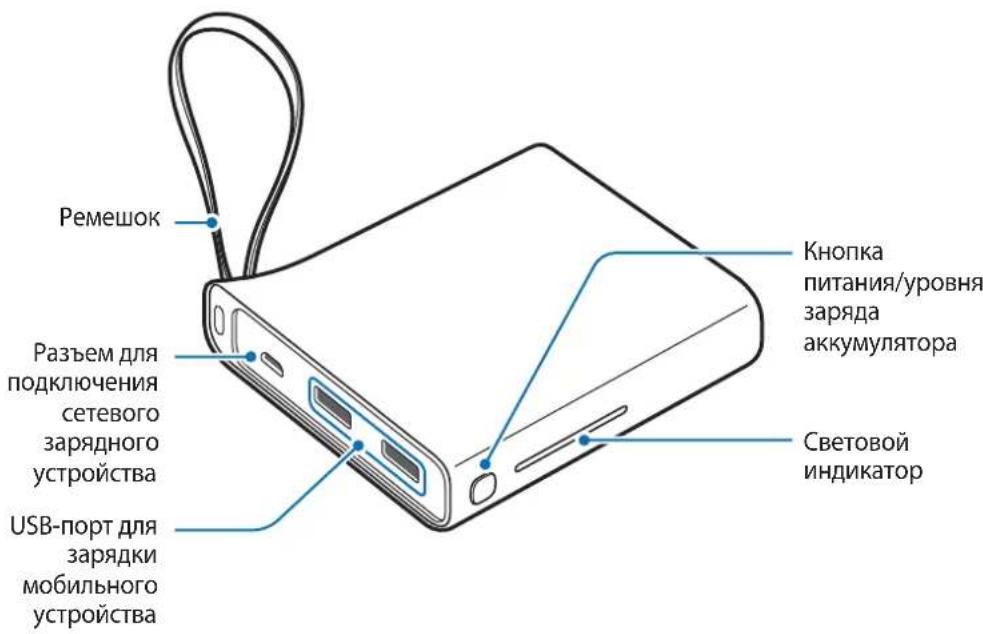
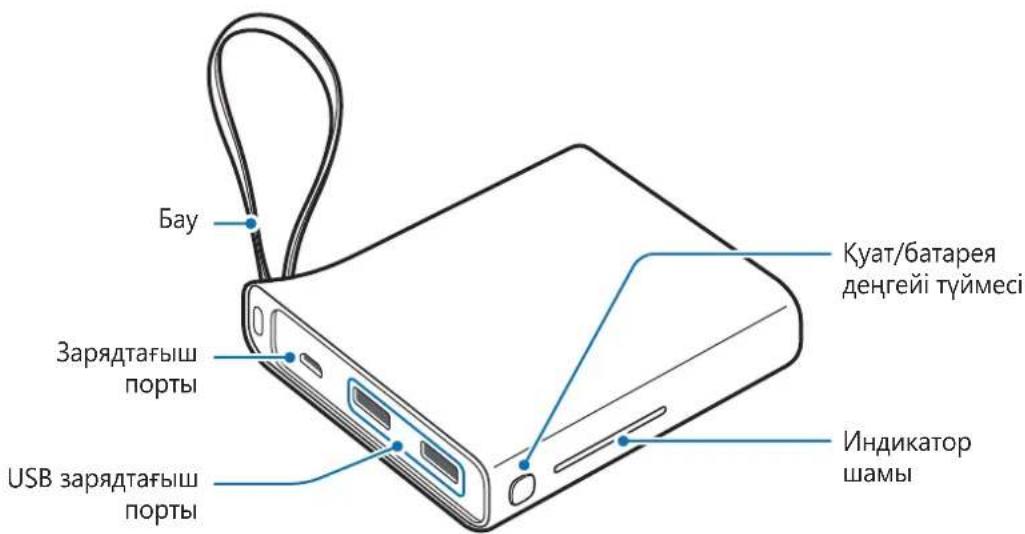
Device layout
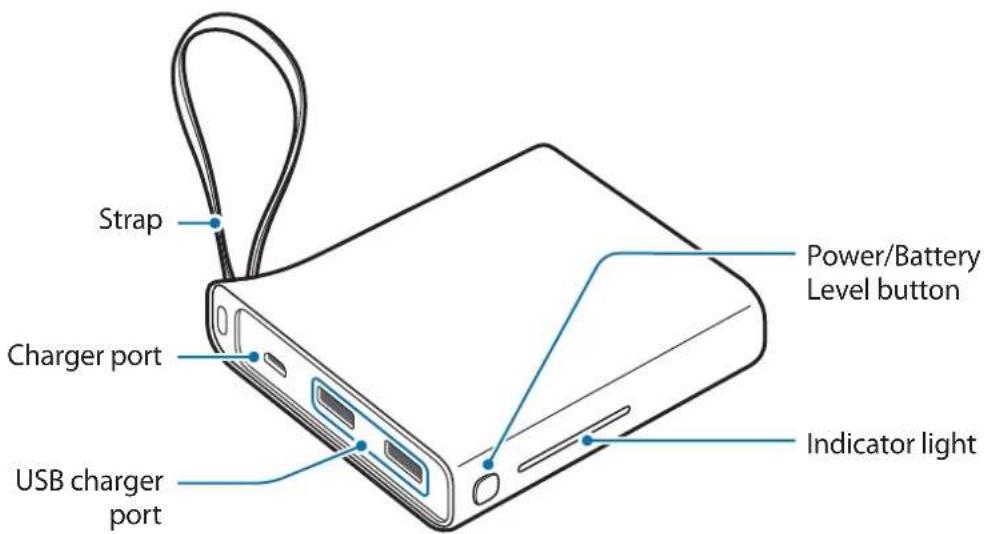
Charging the battery pack
Charge the battery before using the battery pack for the first time or when the battery pack has been unused for extended periods.

Use only Samsung-approved chargers and cables. Unapproved chargers or cables can cause the battery to explode or damage the battery pack.
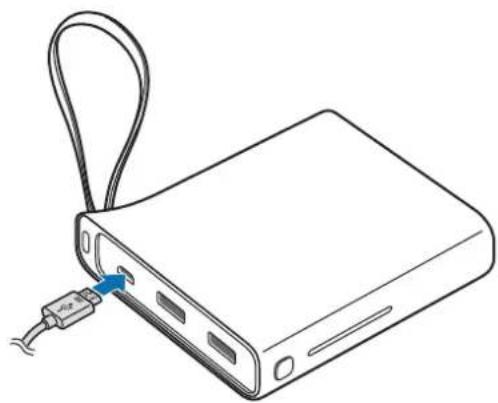
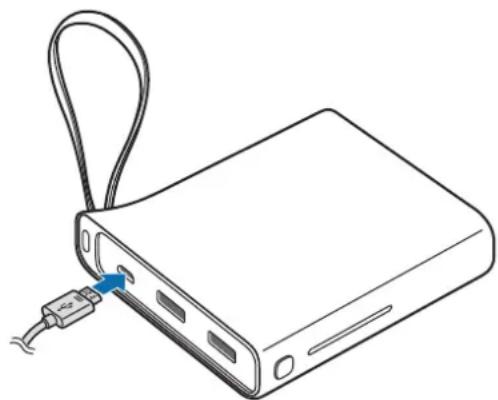
1 Connect the battery pack to a charger.
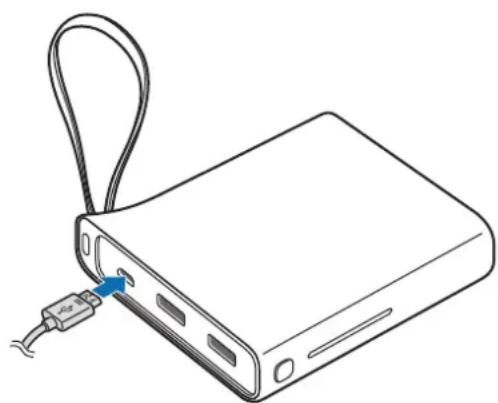

Connecting the charger improperly may cause serious damage to the battery pack. Any damage caused by misuse is not covered by the warranty.

- You can charge the battery pack using the charger (sold separately).
- Using a power source other than the charger, such as a computer, may result in a slower charging speed due to a lower electric current.
- The battery pack can be used while it is charging, but it may take longer to fully charge the battery.
- While charging, the battery pack may heat up. This is normal and should not affect the battery pack's lifespan or performance. If the battery gets hotter than usual, the charger may stop charging.
- The actual capacity (Wh) is measured based on the battery's output current and voltage. It may differ from the capacity (Wh) indicated on the device, depending on the output power condition, the connected device's circuit configuration, and the operation environment.
- If the battery pack is not charging properly, take the battery pack and the charger to a Samsung Service Centre.
2 After fully charging, disconnect the battery pack from the charger.

- To save energy, unplug the charger when not in use. The charger does not have a power switch, so you must unplug the charger from the electric socket when not in use to avoid wasting power. The charger should remain close to the electric socket and easily accessible while charging.
- The socket-outlet shall be installed near the equipment and shall be easily accessible.
Checking the remaining battery power
Check the remaining battery power by pressing the Battery Level button. The indicator lights alert you to the remaining battery power.
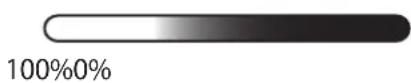
Using the battery pack
Charging the mobile device
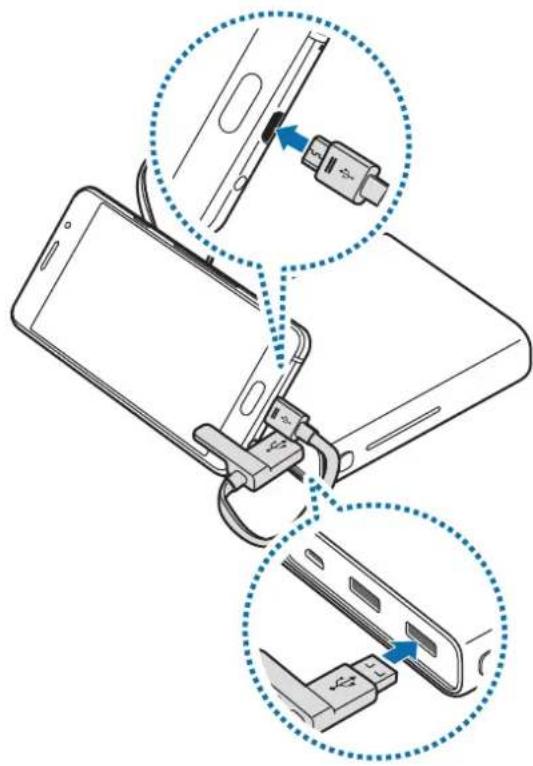
1 Connect one end of the USB cable to the battery pack's USB charger port. Then, plug the other end of the USB cable into the mobile device's multipurpose jack. Charging will start.

After the mobile device is fully charged, disconnect the USB cable from both devices.

- To stop charging, press and hold the Power button for approximately two seconds. To resume charging, press the Power button.
- You can use the battery pack while it is charging but you may not be able to use it if the battery level is too low.
- If the mobile device is not charging after being connected to the battery pack, press the Power button.
- The battery pack is an auxiliary external battery. It may not fully charge some mobile devices.
- If the battery pack is exposed to extremely hot or cold temperatures or an error occurs, the indicator light will flash. Disconnect the mobile device from the battery pack, and then reconnect them.
Checking the charging status
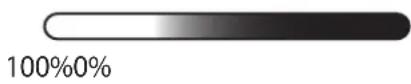
The indicator light alerts you to the connected mobile device's charging status.
| Status Indicator light | |
| Charging | 100%0% |
| Fully charged | 100%0% |
Copyright
Copyright © 2016 Samsung Electronics
This manual is protected under international copyright laws.
No part of this manual may be reproduced, distributed, translated, or transmitted in any form or by any means, electronic or mechanical, including photocopying, recording, or storing in any information storage and retrieval system, without the prior written permission of Samsung Electronics.
Trademarks
SAMSUNG and the SAMSUNG logo are registered trademarks of Samsung Electronics. All other trademarks and copyrights are the property of their respective owners.
Copyright © 2016 Samsung Electronics
Copyright © 2016 Samsung Electronics
Copyright © 2016 Samsung Electronics
Copyright © 2016 Samsung Electronics
Copyright © 2016 Samsung Electronics
Copyright © 2016 Samsung Electronics

- The actual capacity, delivery of the device, may vary depending on the region or service provider.
- The delivered device is intended only for this device and may not be compatible with other devices. The contents and specifications are subject to change without notice.
- You can purchase additional accessories from your local Samsung dealer. Before purchasing, make sure they are compatible with the device.
- Use only Samsung-approved accessories. Using unapproved accessories may cause performance problems and malfunctions that are not covered by the warranty. The availability of all accessories is subject to change depending on the manufacturers. For more information about the accessories, refer to the Samsung website.
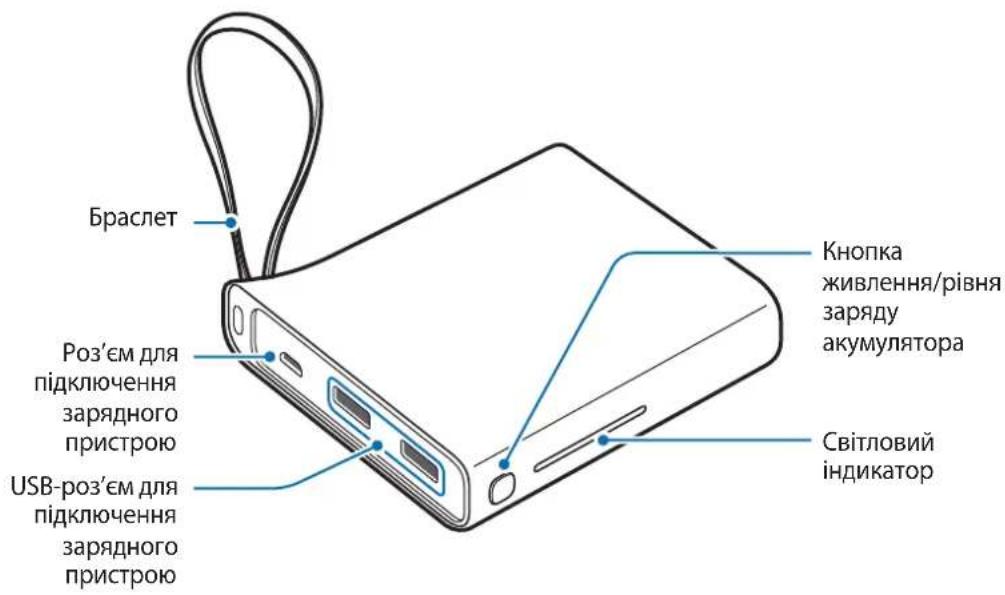
Device layout
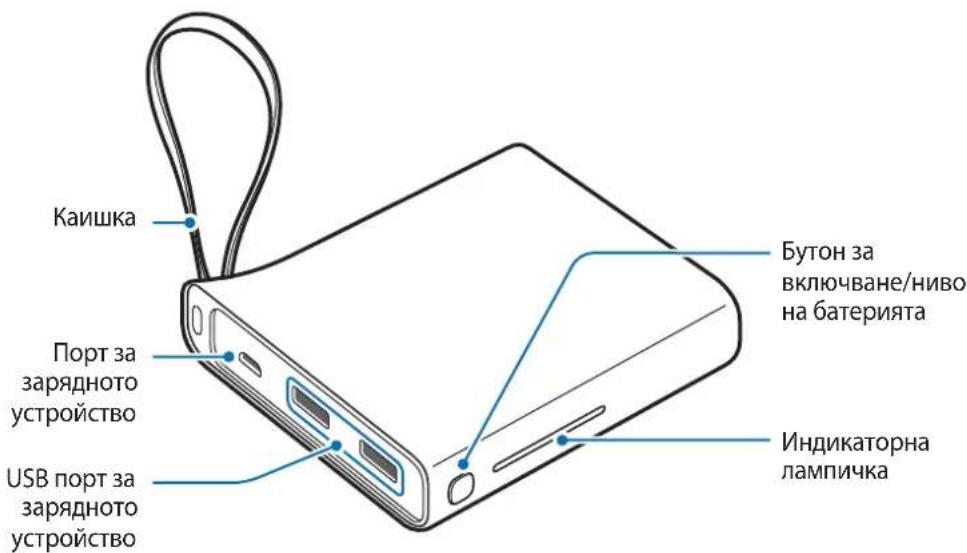
Charging the battery pack
Charge the battery before using the battery pack for the first time or when the battery pack has not been used for a long time.

Use only Samsung-approved charging devices and cables. Unapproved charging devices or cables can cause the battery to explode or damage the battery pack.
1 Connect the battery pack to the charging device.
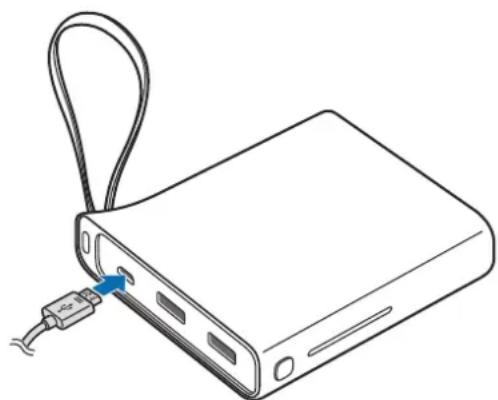

Improper connection to the charging device can cause serious damage to the battery pack. Any damage caused by incorrect use is not covered by the warranty.

- You can charge the battery pack using the charging device (sold separately).
- Using a power source with a lower voltage, such as a computer, may result in slower charging due to lower electric current.
- The battery pack can be used while charging, but it may take longer to fully charge the battery.
- The battery pack may heat up while charging. This is normal and does not affect the lifespan or performance of the battery pack. If the battery gets hotter than usual, the charging device may stop charging.
- The rated capacity (Wh) is measured based on the output current and voltage of the battery. It may differ from the capacity (Wh) indicated on the device depending on the output power conditions, the configuration of the connected device, and the operating environment.
- If the battery pack is not charging properly, take the battery pack and the charging device to a Samsung service center.
2 After charging is complete, disconnect the battery pack from the charging device.

To save energy, unplug the charging device from the electrical outlet when not in use. The charging device has a built-in switch, so you must unplug it from the electrical outlet when not in use to avoid wasting energy. The charging device should remain close to the electrical outlet and be easily accessible while charging.
Check the remaining battery charge.
Check the remaining battery charge by pressing the battery level button.
The indicator lights will inform you of the remaining battery charge.
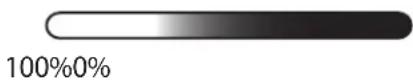
Copyright © 2016 Samsung Electronics
This manual is protected by international copyright laws.
No part of this manual may be reproduced, distributed, translated, or transformed in any form or by any means, electronic or mechanical, including photocopying, recording, or storage in any information retrieval system, without the prior written permission of Samsung Electronics.
Trademarks
SAMSUNG and the SAMSUNG logo are registered trademarks of Samsung Electronics. All other trademarks and copyrights are the property of their respective owners.
Read this first
Before using the device, carefully read this manual to ensure safe and proper use.
- Images may differ from the actual product. Content is subject to change without prior notice.
- Before using the battery pack, check that it is compatible with your device.
- The contents of this manual are based on the EB-PA710 model.
Symbols used

Warning: situations in which you or other persons may be injured

Copyright © 2016 Samsung Electronics
This manual is protected by international copyright laws.
No part of this manual may be reproduced, distributed, translated, or transmitted in any form or by any means, electronic or mechanical, including photocopying, recording, or storing in any information storage and retrieval system, without the prior written permission of Samsung Electronics.
Trademarks
SAMSUNG and the SAMSUNG logo are registered trademarks of Samsung Electronics. All other trademarks and copyrights are the property of their respective owners.
Read me first
Before using the device, read this manual to ensure safe and correct usage.
Copyright © 2016 Samsung Electronics
This manual is protected by international copyright laws.
No part of this manual may be reproduced, distributed, translated, or transmitted in any form or by any means, electronic or mechanical, including photocopying, recording, or storing in any information storage and retrieval system, without the prior written permission of Samsung Electronics.
Trademarks
SAMSUNG and the SAMSUNG logo are registered trademarks of Samsung Electronics. All other trademarks and copyrights are the property of their respective owners.
Read first
Copyright © 2016 Samsung Electronics
Copyright © 2016 Samsung Electronics
Copyright © 2016 Samsung Electronics
Copyright © 2016 Samsung Electronics
Copyright © 2016 Samsung Electronics
Copyright © 2016 Samsung Electronics
Copyright © 2016 Samsung Electronics
Copyright © 2016 Samsung Electronics
Copyright © 2016 Samsung Electronics
1
a 1000
i 1
1
aie 100
Oo
y
Jy jyj yj 00000000000000000000000000000000000000000000000
00 1 1 1 1 1 1 1 1 1 1 1 1 1 1 1 1 1 1 1 1 1 1 1 1 1 1 1 1 1 1 1 1

J 1
a 1

J 1

J 1 J 1 J 1 J 1 J 1 J 1 J 1 J 1 J 1 J 1 J 1 J 1 J 1 J 1 J 1 J 1 J 1 J 1 J 1 J 1 J 1 J 1 J 1 J 1 J 1

y
1 1
100%0%
s
0
1 USB JkS 8
1
1J 1J 1J 1J 1J 1J 1J 1J 1J 1J 1J 1J 1J 1J 1J 1J 1J 1J 1J 1J 1J 1J 1J 1J 1J 1J 1J 1J 1J 1J 1J 1J 1J 1J 1J 00
J 1 J
1 1

Copyright © 2016 Samsung Electronics
1
Samsung Electronics j 1j 0j 0j 0j 0j 0j 0j 0j 0j 0j 0j 0j 0j 0j 0j
J 1
s
Samsung Electronics
1
Application, tips, additional information
Getting started
Package contents
The package contains the following components:
External battery Quick start guide

- The package contents and available accessories may vary by region and are determined by the service provider.
- The supplied accessories are designed only for this device and may be incompatible with other devices. The appearance and specifications of the product may be changed without prior notice.
- Additional accessories can be purchased from your nearest Samsung dealer. Before purchasing, make sure they are compatible with your device.
- Use only Samsung-approved accessories. Using unapproved accessories may cause malfunctions and failures that are not covered by the warranty.
- Availability of any accessories depends entirely on the manufacturer. For more information about available accessories, see the Samsung website.
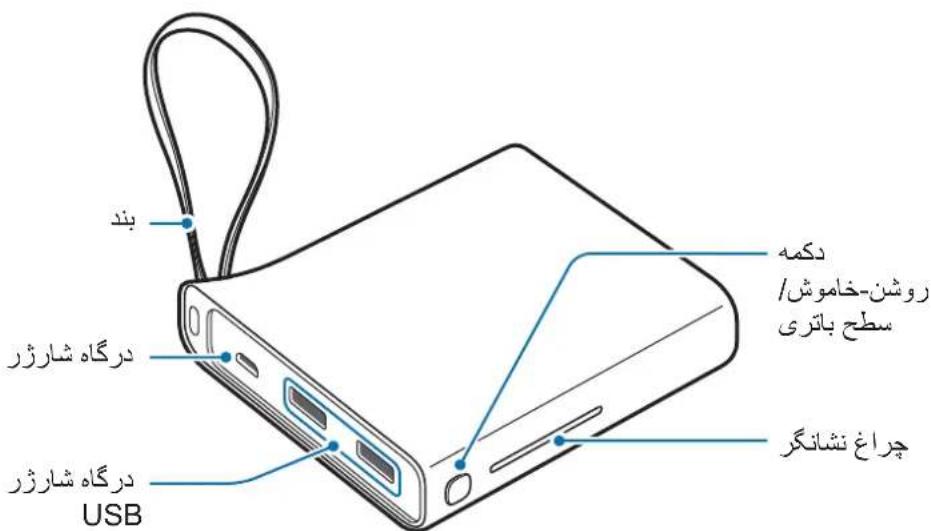
Device layout
© Samsung Electronics, 2016.
This manual is protected by international copyright laws.
No part of this manual may be reproduced, distributed, translated, or transmitted in any form or by any means, electronic or mechanical, including photocopying, recording, or storage in any information storage and retrieval system, without the prior written permission of Samsung Electronics.
Trademarks
Samsung and the Samsung logo are registered trademarks of Samsung Electronics. Other copyrights and trademarks are the property of their respective owners.
Read me before using
For safe and proper use of the device, please read this manual carefully before use.
The appearance of the product may differ from the image. The content may change without prior notice. - Before using the battery, make sure it is compatible with your device. The content of this manual is based on the model EB-PA710.
Trademarks

Warning: situations that could cause injury to yourself or others

Caution: situations that could cause damage to the device or other equipment

Note: notes, usage tips, or additional information
Getting started
Package contents
Check the following components are included:
- Battery, Quick Start Guide

The components included with the device may vary by country or carrier. The components supplied are designed specifically for this device and may be incompatible with other devices. The appearance may change without prior notice. - Additional accessories may be purchased from your local Samsung retailer. Before purchasing, make sure they are compatible with your device. Use only accessories recommended by Samsung. Using non-recommended accessories may cause problems and malfunctions that are not covered by the warranty. - The availability of accessories may vary depending on the manufacturer. - For more information about available accessories, please visit the Samsung website.
Device layout
Charging the battery
If the external battery is not used for a long time, it needs to be charged.

Use only the charger and cables recommended by Samsung. Using non-recommended chargers or cables may cause battery damage or damage to the external battery.
1. Connect the battery to the charger.
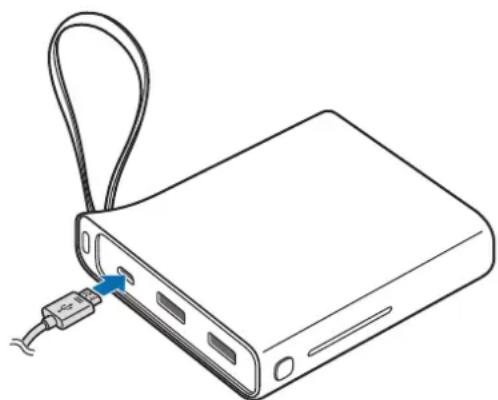

Improper connection of the charger may cause serious damage to the external battery. The warranty does not cover damage caused by improper use.

© Samsung Electronics, 2016
This user manual is protected by international copyright laws.
Reproduction, distribution, translation, or transmission of this manual in any form or by any means, electronic or mechanical, including photocopying, recording, or storage in any information retrieval system, is prohibited without the prior written permission of Samsung Electronics.
Trademarks
SAMSUNG and the SAMSUNG logo are registered trademarks of Samsung Electronics. All other trademarks are the property of their respective owners.


Eckepim: eckepTuJIep, naДaIaNy TpyaJIbI KeHecTeP Hemece KocbIMwa aKnapaT
Kmbictbi 6actay
Opama KypaMbI
KypblfblbIHcblpTKbl KepiHici
Баразец Тонтахьн заюдай
Batape TontamacbH 6ipinwi pet naJaIaNy aIbIHHa Hemece 6atape TontamacbI y3ak yaKbIT 6oBi naiDaIaNbIMaca, 6atapeHbI 3aprTaHbI3.

Tek Samsung 6ekitkeh 3apraTaBtapdbj XaHe Ka6eIbepdi naJaIaHbIbI3.
Bekitimereh 3apraTaftap HeMece Ka6eJIbep 6aTapeHbIH XapblybiHa HeMece
6atapey TontamacbHbIH 3aKbIMdaIybiHa eKeIyIMMKiH.
1 BaTapea TOnTaMaCbIH 3apAaTaBbIwKa XaJIFaHbI3.

3apraTbIbIbI dypbic kaiFamay 6atape TOnTaMaCbIH KaTbI 3aKbIMdaybl MymKiH. Dypbc naJaHa6ay Tydbipfah e6bp 3akbIMbl KeiNilik KaMTbImaMybl.

-БатaperяларToNTamacbIH3aprTaftbIUtbl(6eJIekcatbIaIbI)naJaIahbIn3apraTayra 6oJalbl. KOMnbOTep cnaKTbI 3apraTafblTah epeKwelenHeH KyaT Ke3iH naJaIaHy, TOKtbH eH TeMeH XbldAmdbIfbl Ce6e6iHeH 3aprTay XbldAmdbIfblHbIH TEmeHdeYiHe aKeJIiCOKtbpbyMymKiH. - BaTapeЯ TOnTamaCbIH 3apAaTalbIn XaTkaHda NaIaIaHyfa 6OlaDbI, 6ipak, 6atapeeHbI ToJIbIK 3apAaTayFa y3aFbIPaK yaKbIT KeTyi MymKiH. 3apTay KeiHde, 6atape TOnTaMaCbI Kb3bIN KeTyIMyMKIn. ByI KaIbITbIXaFdai XHe 6atape TOnTaMaCbIHbIH Kb13MeT Mep3IMHe Hemece eHimdiirHe acep etneiy tnic. Erep 6atape aTeTteriJeH bICTbIfbipak, 6oJca, 3apTafbiw 3apTaydbI TOKTaTybl MyMKIn. HaKbI cbIHdbIMdbIfbl (Bt·caF) 1bIfbc TOrbl MeH 6aTapeHbIH KepHeyi 6oHbHsa eJlheDi. OJ, 1bIfbc KyaTbIHbIH, 7apTTapbHa, XaJIraHFaH Kypblfbl Ti36eKTepiHi KOHpyauncBHa JHe NaJaAly 7apTTapbHa 6aJaHaICTbl, Kypblfbla KepcetilreH cbIHdbIMIKtaH (Bt·caF) epeKeJeHy i MymKiH. - BaTape TONTAMacbI dypbcI 3aprTaJMaJ XaTca, 6atape TONTAMacbI MeH 3apraTafblTbI Samsung cepBnC opTaJbIfbHa anapbIbI3.
2 3apay aKaTaHaHaH KeiH 6aTape TOnTaMaCbH 3apraTaBbIHTaH aXbipaTbIbI3.

KyaattbI yHemdey ywiN naJaIaNbIMaHaN Ke3De 3apraTbIbTI JKeJIeH axbipTaBbI3. 3apraTbIbTIbIH KyaT KocBbIbXoK, COHbIKTaH KyaTbI bICbIPaNTayDbI 6OJIbIPMay ywiN naJaIaNb6aHaN Ke3De 3apraTbIbTI bJeKtp po3eTKa YcBiHa aXbipAty Kepek. 3apraTay keiHne 3apraTbIbIsh 3JeKtp po3eTKa YcBiHa XaKbIH XeHe OHaJ KOJI JeTImDi 6OJIyBe Kepek.
Kaalfahn 6aTapey KyaTbIn Tekcepy
Battery charging indicator, charging cable connection. The indicator light informs you about the charging status of the battery.
Charging the battery
Usage
Charging the device
1 Connect the USB cable to the USB charging port of the battery.
Then connect the other end of the USB cable to the device's charging port.
Charging will begin.
2 After charging the device, unplug the USB cable from the device and from the power source.

To stop charging, press and hold the power button for two seconds. To restart charging, press the power button again. It is possible to use the battery while it is charging, but this may extend the charging time. - If the device is connected to the battery and does not charge, press the power button. - The battery can be used as an external battery. It can charge some devices. - If the battery is too hot or wet, or if it is affected by temperature or placed in a certain position, the indicator light will blink. Unplug the device from the battery and reconnect it.
Checking the charging status
The indicator light informs you about the charging status of the connected device.
| Куй Иndикатор ШаMbI | |
| Зарадталда | 100%0% |
| Толыбимен | |
| Зарадталfasн | 100%0% |
EAC
COPYRIGHT
Copyright © 2016 Samsung Electronics
This document is protected by international copyright laws.
Samsung Electronics shall not be liable for any direct or indirect damages, whether in contract or tort, arising out of the use of this product, including but not limited to loss of data, loss of profits, or any other incidental or consequential damages.
Trademarks
SAMSUNG and the SAMSUNG logo are trademarks of Samsung Electronics Co., Ltd. All other trademarks and copyrights are the property of their respective owners.
Read me first
Please read this manual before using the device to ensure safe and proper use.
- Images may differ in appearance from the actual product. Content is subject to change without prior notice.
- Before using the battery pack, make sure it is compatible with your device.
- The content of this manual is based on the EB-PA710 model.
Instructional icons

Warning: situations that could cause injury to yourself or others

Caution: situations that could cause damage to your device or other equipment

Notice: notes, usage tips, or additional information
Getting started
Package contents
Check the product box for the following items:
- Battery pack
- Quick start guide

- The items supplied with the device and any available accessories may vary depending on the region or service provider.
- The supplied items are designed only for this device and may not be compatible with other devices.
- Appearances and specifications are subject to change without prior notice.
- You can purchase additional accessories from your local Samsung retailer. Make sure they are compatible with the device before purchase.
- Use only Samsung-approved accessories. Using unapproved accessories may cause performance problems and malfunctions that are not covered by the warranty.
- Availability of all accessories is subject to change depending entirely on manufacturing companies. For more information about available accessories, refer to the Samsung website.
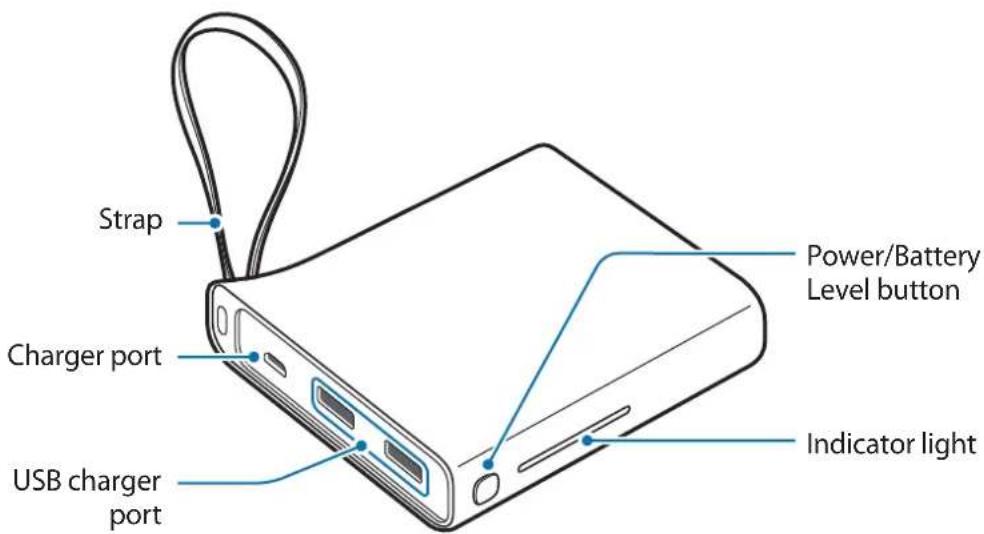
Device layout
Charging the battery pack
Charge the battery before using the battery pack for the first time or when the battery pack has been unused for extended periods.

Use only Samsung-approved chargers and cables. Unapproved chargers or cables can cause the battery to explode or damage the battery pack.
1 Connect the battery pack to a charger.
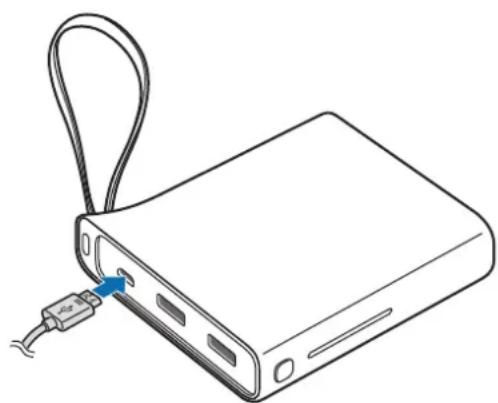

Connecting the charger improperly may cause serious damage to the battery pack. Any damage caused by misuse is not covered by the warranty.

- You can charge the battery pack using the charger (sold separately).
- Using a power source other than the charger, such as a computer, may result in a slower charging speed due to a lower electric current.
- The battery pack can be used while it is charging, but it may take longer to fully charge the battery.
- While charging, the battery pack may heat up. This is normal and should not affect the battery pack's lifespan or performance. If the battery gets hotter than usual, the charger may stop charging.
- The actual capacity (Wh) is measured based on the battery's output current and voltage. It may differ from the capacity (Wh) indicated on the device, depending on the output power condition, the connected device's circuit configuration, and the operation environment.
- If the battery pack is not charging properly, take the battery pack and the charger to a Samsung Service Center.
2 After fully charging, disconnect the battery pack from the charger.

To save energy, unplug the charger when not in use. The charger does not have a power switch, so you must unplug the charger from the electric socket when not in use to avoid wasting power. The charger should remain close to the electric socket and easily accessible while charging.
Checking the remaining battery power
Check the remaining battery power by pressing the Battery Level button. The indicator lights alerts you to the remaining battery power.

Using the battery pack
Charging the mobile device
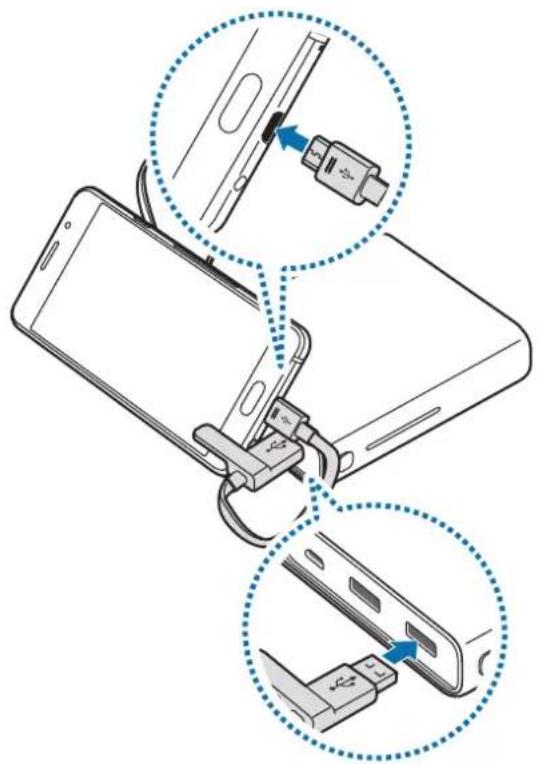
1 Connect one end of the USB cable to the battery pack's USB charger port. Then, plug the other end of the USB cable into the mobile device's multipurpose jack. Charging will start.
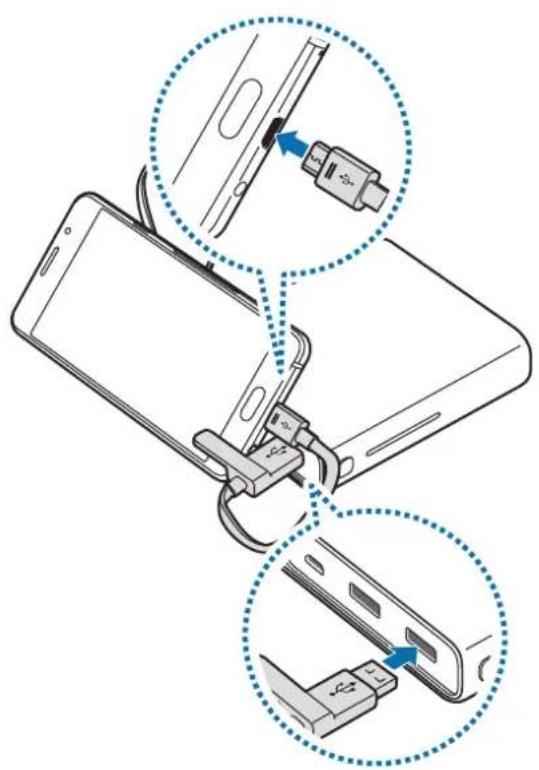
After the mobile device is fully charged, disconnect the USB cable from both devices.

- To stop charging, press and hold the Power button for approximately two seconds. To resume charging, press the Power button.
- You can use the battery pack while it is charging but you may not be able to use it if the battery level is too low.
- If the mobile device is not charging after being connected to the battery pack, press the Power button.
- The battery pack is an auxiliary external battery. It may not fully charge some mobile devices.
- If the battery pack is exposed to extremely hot or cold temperatures or an error occurs, the indicator light will flash. Disconnect the mobile device from the battery pack, and then reconnect them.
Checking the charging status
The indicator light alerts you to the connected mobile device's charging status.
| Status Indicator light | |
| Charging | 100%0% |
| Fully charged | 100%0% |
Copyright
Copyright © 2016 Samsung Electronics
This manual is protected under international copyright laws.
No part of this manual may be reproduced, distributed, translated, or transmitted in any form or by any means, electronic or mechanical, including photocopying, recording, or storing in any information storage and retrieval system, without the prior written permission of Samsung Electronics.
Trademarks
SAMSUNG and the SAMSUNG logo are registered trademarks of Samsung Electronics. All other trademarks and copyrights are the property of their respective owners.
Copyright © 2016 Samsung Electronics
Copyright © 2016 Samsung Electronics
This manual is protected under international copyright laws.

- INSTRUCTIONAL ICONS
- GETTING STARTED
- PACKAGE CONTENTS
- DEVICE LAYOUT
- CHARGING THE BATTERY PACK
- CHECKING THE REMAINING BATTERY POWER
- USING THE BATTERY PACK
- CHARGING THE MOBILE DEVICE
- CHECKING THE CHARGING STATUS
- COPYRIGHT
- TRADEMARKS
- CHECK THE REMAINING BATTERY CHARGE
- READ THIS FIRST
- SYMBOLS USED
- READ ME FIRST
- READ FIRST
- OO
- Y
- S
- READ ME BEFORE USING
- CHARGING THE BATTERY
- KMBICTBI 6ACTAY
- OPAMA KYPAMBI
- KYPBLFBLBIHCBLPTKBL KEPIHICI
- БАРАЗЕЦ ТОНТАХЬН ЗАЮДАЙ
- KAALFAHN 6ATAPEY KYATBIN TEKCEPY
- CHARGING THE DEVICE
- EAC
Brand : SAMSUNG
Model : EBPA710
Category : Phone charger