
DSC-TX30 - Camera SONY - Free user manual and instructions
Find the device manual for free DSC-TX30 SONY in PDF.



| Product type | Waterproof digital camera |
| Brand | Sony |
| Model | DSC-TX30 |
| Sensor | Exmor R CMOS 1/2.3-inch, 18.2 effective megapixels |
| Lens | Carl Zeiss Vario-Tessar, 5x optical zoom (26-130mm equiv. 35mm) |
| Screen | 3.3-inch OLED touchscreen (8.3 cm), 1,229,760 dots |
| Waterproof rating | IP68, up to 10m for 60 minutes |
| Shock resistance | Drop from 1.5m (MIL-STD 810F 516.5-Shock standard) |
| Dimensions (W × H × D) | 96.4 × 59.3 × 15.4 mm |
| Weight | Approx. 140g (with battery and Memory Stick Micro) |
| Power supply | NP-BN rechargeable battery 3.6V; AC-UB10 mains adapter (5V, 0.5A) |
| Recording media | 48MB internal memory, Memory Stick Micro, microSD/microSDHC/microSDXC card |
| File formats | Still images: JPEG; Movies: AVCHD Ver. 2.0, MP4 H.264 |
| Connectivity | Micro-USB, micro-HDMI |
| Main features | Intelligent Auto mode, Scene Selection (including Underwater), Photo Effect, Smile Shutter, Optical SteadyShot |
| Maintenance and cleaning | Rinse with fresh water after underwater use; wipe with a soft cloth; do not use solvents |
| Safety | Do not expose to violent shocks; do not open the cover underwater; respect operating temperatures |
| Spare parts and repairability | NP-BN battery, AC-UB10 mains adapter, micro-USB cable; waterproof seal replaceable by authorized service center |
| General information | Manual available online; compatible with Windows (PlayMemories Home); limited warranty |
Frequently Asked Questions - DSC-TX30 SONY
User questions about DSC-TX30 SONY
0 question about this device. Answer the ones you know or ask your own.
Ask a new question about this device
Download the instructions for your Camera in PDF format for free! Find your manual DSC-TX30 - SONY and take your electronic device back in hand. On this page are published all the documents necessary for the use of your device. DSC-TX30 by SONY.
USER MANUAL DSC-TX30 SONY
Learning more about the camera ("Cyber-shot User Guide")
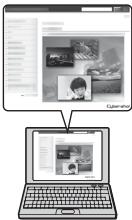
"Cyber-shot User Guide" is an on-line manual. Refer to it for in-depth instructions on the many functions of the camera.
① Access the Sony support page.
http://www.roy.net/SonyInfo/Support/
② Select your country or region.
③ Search for the model name of your camera within the support page.
- Check the model name on the bottom of your camera.
Checking the supplied items
The number in parentheses indicates the number of pieces.
- Camera (1)
- Rechargeable battery pack NP-BN (1)
(This rechargeable battery pack cannot be used with Cyber-shot that are supplied with the NP-BN1 battery pack.)
- Micro USB cable (1)
- AC Adaptor AC-UB10/UB10B/UB10C/UB10D (1)
- Power cord (mains lead) (not supplied in the USA and Canada) (1)
- Wrist strap (1)
- Instruction Manual (this manual) (1)
Notes on the water-proofing (1)
Owner's Record
The model and serial numbers are located on the bottom. Record the serial number in the space provided below. Refer to these numbers whenever you call your Sony dealer regarding this product.
Model No. DSC-TX30
Serial No.
Model No. AC-UB10/AC-UB10B/AC-UB10C/AC-UB10D
Serial No.
GB
WARNING
To reduce fire or shock hazard, do not expose the unit to rain or moisture.
IMPORTANT SAFETY INSTRUCTIONS -SAVE THESE INSTRUCTIONS DANGER TO REDUCE THE RISK OF FIRE OR ELECTRIC SHOCK, CAREFULLY FOLLOW THESE INSTRUCTIONS
If the shape of the plug does not fit the power outlet, use an attachment plug adaptor of the proper configuration for the power outlet.
CAUTION
Battery pack
If the battery pack is mishandled, the battery pack can burst, cause a fire or even chemical burns. Observe the following cautions.
- Do not disassemble.
- Do not crush and do not expose the battery pack to any shock or force such as hammering, dropping or stepping on it.
- Do not short circuit and do not allow metal objects to come into contact with the battery terminals.
- Do not expose to high temperature above 60°C (140°F) such as in direct sunlight or in a car parked in the sun.
- Do not incinerate or dispose of in fire.
-
Do not handle damaged or leaking lithium ion batteries.
-
Be sure to charge the battery pack using a genuine Sony battery charger or a device that can charge the battery pack.
- Keep the battery pack out of the reach of small children.
- Keep the battery pack dry.
- Replace only with the same or equivalent type recommended by Sony.
- Dispose of used battery packs promptly as described in the instructions.
1 AC Adaptor
Use the nearby wall outlet (wall socket) when using the AC Adaptor. Disconnect the AC Adaptor from the wall outlet (wall socket) immediately if any malfunction occurs while using the apparatus.
The power cord (mains lead), if supplied, is designed specifically for use with this camera only, and should not be used with other electrical equipment.
For Customers in the U.S.A. and Canada
I RECYCLING LITHIUM-ION BATTERIES
Lithium-Ion batteries are recyclable.
You can help preserve our environment by returning your used rechargeable batteries to the collection and recycling location nearest you.
For more information regarding recycling of rechargeable batteries, call toll free
1-800-822-8837, or visit http://www.rbrc.org/

Caution: Do not handle damaged or leaking Lithium-Ion batteries.
Battery pack
This device complies with Part 15 of the FCC Rules. Operation is subject to the following two conditions:
(1) This device may not cause harmful interference, and (2) this device must accept any interference received, including interference that may cause undesired operation.
This Class B digital apparatus complies with Canadian ICES-003.
For Customers in the U.S.A.
UL is an internationally recognized safety organization. The UL Mark on the product means it has been UL Listed
If you have any questions about this product, you may call: Sony Customer Information Center 1-800-222-SONY (7669).
The number below is for the FCC related matters only.
Regulatory Information
Declaration of Conformity
Trade Name:SONY
Model No.: DSC-TX30
Responsible Party: Sony Electronics Inc.
Address: 16530 Via Esprillo,
San Diego, CA 92127 U.S.A.
Telephone No.: 858-942-2230
This device complies with Part15 of the FCC Rules. Operation is subject to the following two conditions: (1) This device may not cause harmful interference, and (2) this device must accept any interference received, including interference that may cause undesired operation.
CAUTION
You are cautioned that any changes or modifications not expressly approved in this manual could void your authority to operate this equipment.
Note:
This equipment has been tested and found to comply with the limits for a Class B digital device, pursuant to Part 15 of the FCC Rules.
These limits are designed to provide reasonable protection against harmful interference in a residential installation. This equipment generates, uses, and can radiate radio frequency energy and, if not installed and used in accordance with the instructions, may cause harmful interference to radio communications. However, there is no guarantee that interference will not occur in a particular installation. If this equipment does cause harmful interference to radio or television reception, which can be determined by turning the equipment off and on, the user is encouraged to try to correct the interference by one or more of the following measures:
- Reorient or relocate the receiving antenna.
- Increase the separation between the equipment and receiver.
- Connect the equipment into an outlet on a circuit different from that to which the receiver is connected.
- Consult the dealer or an experienced radio/TV technician for help.
For Customers in Europe
I Notice for the customers in the countries applying EU Directives
This product has been manufactured by or on behalf of Sony Corporation, 1-7-1 Konan Minato-ku Tokyo, 108-0075 Japan. Inquiries related to product compliance based on European Union legislation shall be addressed to the authorized representative, Sony Deutschland GmbH, Hedelfinger Strasse 61, 70327 Stuttgart, Germany. For any service or guarantee matters, please refer to the addresses provided in the separate service or guarantee documents.
This product has been tested and found compliant with the limits set out in the EMC regulation for using connection cables shorter than 3 meters (9.8 feet).
Attention
The electromagnetic fields at the specific frequencies may influence the picture and sound of this unit.
Notice
If static electricity or electromagnetism causes data transfer to discontinue midway (fail), restart the application or disconnect and connect the communication cable (USB, etc.) again.
Disposal of Old Electrical & Electronic Equipment (Applicable in the European Union and other European countries with separate collection systems)


This symbol on the product or on its packaging indicates that this product shall not be treated as household waste. Instead it shall be handed over to the applicable collection point for the recycling of electrical and electronic equipment. By ensuring this product is disposed of correctly, you will help prevent potential negative consequences for the environment and human health, which could otherwise be caused by inappropriate waste handling of this product. The recycling of materials will help to conserve natural resources. For more detailed information about recycling of this product,
please contact your local Civic Office, your household waste disposal service or the shop where you purchased the product.
Disposal of waste batteries (applicable in the European Union and other European countries with separate collection systems)

This symbol on the battery or on the packaging indicates that the battery provided with this product shall not be treated as household waste. On certain batteries this symbol might be used in combination with a chemical symbol. The chemical symbols for mercury (Hg) or lead (Pb) are added if the battery contains more than 0.0005% mercury or 0.004% lead. By ensuring these batteries are disposed of correctly, you will help prevent
potentially negative consequences for the environment and human health which could otherwise be caused by inappropriate waste handling of the battery. The recycling of the materials will help to conserve natural resources.
In case of products that for safety, performance or data integrity reasons require a permanent connection with an incorporated battery, this battery should be replaced by qualified service staff only. To ensure that the battery will be treated properly, hand over the product at end-of-life to the applicable collection point for the recycling of electrical and electronic equipment.
For all other batteries, please view the section on how to remove the battery from the product safely.
Hand the battery over to the applicable collection point for the recycling of waste batteries. For more detailed information about recycling of this product or battery, please contact your local Civic Office, your household waste disposal service or the shop where you purchased the product.
Notice for customers in the United Kingdom
A moulded plug complying with BS 1363 is fitted to this equipment for your safety and convenience.
Should the fuse in the plug supplied need to be replaced, a fuse of the same rating as the supplied one and approved by ASTA or BSI to BS 1362, (i.e., marked with an 品 or mark) must be used.
If the plug supplied with this equipment has a detachable fuse cover, be sure to attach the fuse cover after you change the fuse. Never use the plug without the fuse cover. If you should lose the fuse cover, please contact your nearest Sony service station.
About water-proof, dust-proof, and shock-proof performance of the camera
This camera has enhanced water-proof, dust-proof and shock-proof protection. Damage caused from misuse, abuse or failure to properly maintain the camera is not covered by the limited warranty.
- This camera is water-proof/dust-proof equivalent to IEC60529 IP68. The camera is operable up to a water depth of 10m (33 ft.) for 60 minutes.
- Do not subject the camera to pressurized water, such as from a tap.
- Do not use in hot springs.
- Use the camera in the recommended operating water temperature range of 0°C to +40°C (32°F to 104°F).
-
As for shock-proof performance, this product has passed our in-company testing, which conforms to MIL-STD 810F Method 516.5-Shock (U.S. Department of Defense test method standard for shock), by dropping this product from a height of 1.5m (5 ft.) above a 5-cm (2 inches) thick plywood board*.
-
Depending on use conditions and circumstances, no guarantee is made regarding damage to, malfunction of, or the water-proof performance of this camera.
-
As for dust-proof/shock-proof performance, there is no guarantee that the camera will not become scratched or dented.
- Sometimes water-proof performance is lost if the camera is subjected to a strong shock such as from being dropped. We recommend the camera be inspected at an authorized repair shop for a fee.
- Accessories supplied do not meet water-proof, dust-proof, and shock-proof specifications.
Notes before using the camera under/near water
- Make sure that no foreign matter such as sand, hair, or dirt gets inside the battery/memory card cover. Even a small amount of foreign matter may lead to water entering the camera.
- Confirm that the sealing gasket and its mating surfaces have not become scratched. Even a small scratch may lead to water entering the camera. If the sealing gasket or its mating surfaces become scratched, take the camera to an authorized repair shop to have the sealing gasket replaced for a fee.
① Sealing gasket
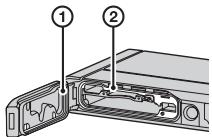
② Surface contacting the sealing gasket
- If dirt or sand gets on the sealing gasket or its mating surfaces, wipe the area clean with a soft cloth that will not leave behind any fibers. Prevent the sealing gasket from becoming scratched by touching it while charging a battery or using a cable.
- Do not open/close the battery/memory card cover with wet or sandy hands or GB near water. There is a risk this will lead to sand or water getting inside. Before opening the cover, perform the procedure described in "Cleaning after using the camera under/near water".
- Open the battery/memory card cover with the camera completely dry.
- Always confirm that the battery/memory card cover has been securely locked.
Notes on using the camera under/near water
- The touch panel may be activated by water splashes on the screen icons. When using the camera under/near water, it is recommended that you hide the icons by touching DISP/OFF on the right side of the screen. Touch DISP/ON for a few seconds to display the icons again.
- The touch panel cannot be operated underwater. Use the buttons of the camera to perform shooting operations.
- Do not subject the camera to shock such as from jumping into water.
- Do not open and close the battery/memory card cover while under/near water.
- This camera sinks in water. Place your hand through the wrist strap to prevent the camera from sinking.
- Faint, white, circular spots may appear in under-water flash photos due to reflections off of floating objects. This is not a malfunction.
- Select (Underwater) in Scene Selection to shoot underwater with less distortion.
- If water drops or other foreign matter is present on the lens, you will be unable to record clear images.
- Do not open the lens cover where the sand is whirling.
Cleaning after using the camera under/near water
- Always clean the camera with water after use within 60 minutes, and do not open the battery/memory card cover before cleaning is finished. Sand or water may get inside places where it cannot be seen. If not rinsed, waterproof performance will be degraded.
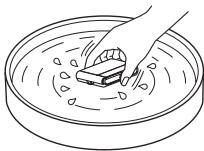
- Allow the camera to sit in pure water poured into a cleaning bowl for about 5 minutes. Then, gently shake the camera, press each button, slide the zoom lever or the lens cover inside the water, to clean away any salt, sand or other matter lodged around the buttons or the lens cover.
- After rinsing, wipe away water drops with a soft cloth. Allow the camera to dry completely in a shady location with good ventilation. Do not blow dry with a hair dryer as there is a risk of deformation and/or degraded waterproof performance.
- Wipe away water drops or dust on the memory card/battery cover with a soft dry cloth.
- This camera is constructed to drain water. Water will drain from openings around the ON/OFF (Power) button, zoom lever, and other controls. After removing from water, place the camera on a dry cloth for a while to allow water to drain.
- Bubbles may appear when the camera is placed under water. This is not a malfunction.
- The camera body may become discolored if it comes in contact with sunscreen or suntan oil. If the camera does come in contact with sunscreen or suntan oil, quickly wipe it clean.
- Do not allow the camera to sit with salt water inside or on the surface. This may lead to corrosion or discoloration, and degradation of water-proof performance.
- To maintain the water-proof performance, we recommend that once a year you take the camera to your dealer, or to an authorized repair shop, to have the sealing gasket of the battery/memory card cover replaced for a fee.
Identifying parts
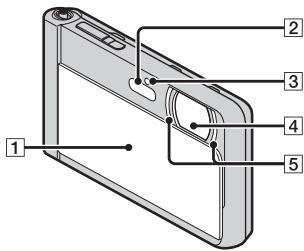
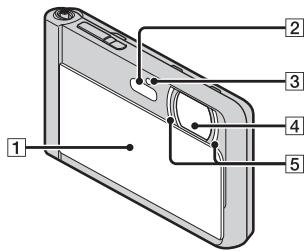
Lens cover
2 Flash
3 Self-timer lamp/Smile Shutter lamp/AF illuminator
4 Lens
5 LED light
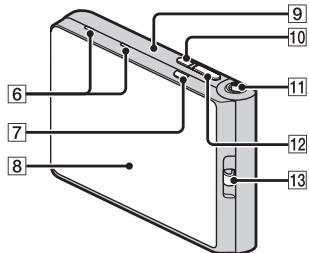
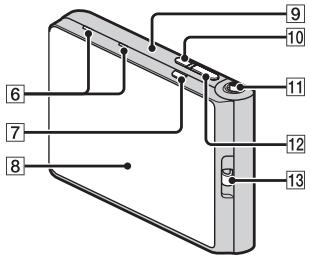
6 Microphone
MOVIE (Movie) button
8 OLED screen/Touch panel
Speaker (built-in)
10 ON/OFF (Power) button
11 W/T (Zoom) lever
12 Shutter button
13 Hook for wrist strap
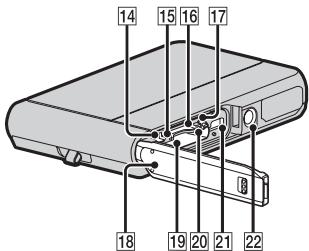
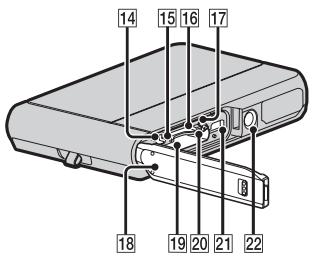
14 Multi/Micro USB Terminal*
Charge lamp
16 Memory card slot
17 Battery eject lever
18 Battery/memory card cover
19 Battery insertion slot
20 Access lamp
[2] HDMI micro jack
22 Tripod receptacle
-
Use a tripod with a screw less than 5.5mm (7/32 inches) long. Otherwise, you cannot firmly secure the camera, and damage to the camera may occur.
-
Supports Micro USB compatible device.
Inserting the battery pack
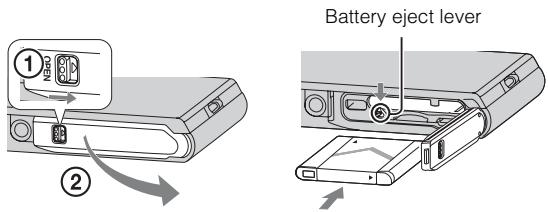
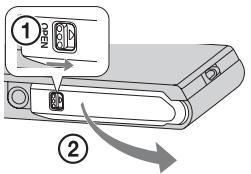
1 Open the cover.
2 Insert the battery pack.
- Align the battery pack with the guide inside the battery insertion slot. Insert the battery pack until the battery eject lever locks into place.
- Securely close the battery cover until you hear the slide lock on the cover catch in place and so that the yellow mark under the slide lock can no longer be seen.
- Closing the cover with the battery inserted incorrectly may damage the camera.
Charging the battery pack
For customers in the USA, Canada
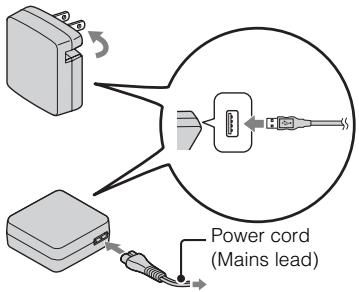
For customers in countries/regions other than the USA and Canada
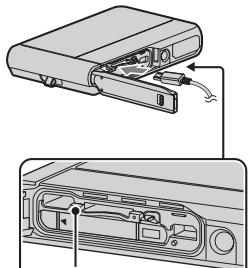
Charge lamp
Lit: Charging
Off: Charging finished
Flashing:
Charging error orcharging pausedtemporarily becausethe camera is notwithin the propertemperature range
GB
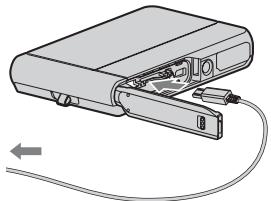
1 Open the battery/memory card cover and connect the camera and the AC Adaptor (supplied), using the micro USB cable (supplied).
2 Connect the AC Adaptor to the wall outlet (wall socket). The Charge lamp lights orange, and charging starts.
- Turn off the camera while charging the battery.
- You can charge the battery pack even when it is partially charged.
- When the Charge lamp flashes and charging is not finished, remove and re-insert the battery pack.
Notes
- If the Charge lamp on the camera flashes when the AC Adaptor is connected to the wall outlet (wall socket), this indicates that charging is temporarily stopped because the temperature is outside the recommended range. When the temperature gets back within the appropriate range, the charging resumes. We recommend charging the battery pack in an ambient temperature of between 10°C to 30°C (50°F to 86°F) .
- The battery pack may not be effectively charged if the terminal section of the battery is dirty. In this case, wipe any dust off lightly using a soft cloth or a cotton swab to clean the terminal section of the battery.
- Connect the AC Adaptor (supplied) to the nearest wall outlet (wall socket). If malfunctions occur while using the AC Adaptor, disconnect the plug from the wall outlet (wall socket) immediately to disconnect from the power source.
- When charging is finished, disconnect the AC Adaptor from the wall outlet (wall socket).
- Be sure to use only genuine Sony brand battery packs, micro USB cable (supplied) and AC Adaptor (supplied).
Charging time (Full charge)
The charging time is approximately 115min using the AC Adaptor (supplied).
Notes
- The above charging time applies when charging a fully depleted battery pack at a temperature of 25°C ( 77°F ). Charging may take longer depending on conditions of use and circumstances.
Charging by connecting to a computer
The battery pack can be charged by connecting the camera to a computer using a micro USB cable.
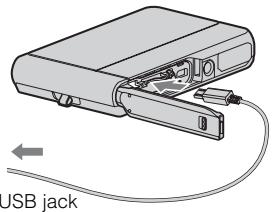
GB
Notes
-
Note the following points when charging via a computer:
-
If the camera is connected to a laptop computer that is not connected to a power source, the laptop battery level decreases. Do not charge for an extended period of time.
- Do not turn on/off or restart the computer, or wake the computer to resume from sleep mode when a USB connection has been established between the computer and the camera. The camera may cause a malfunction. Before turning on/off, or restarting the computer or waking the computer from sleep mode, disconnect the camera and the computer.
- No guarantees are made for charging using a custom-built computer or a modified computer.
Battery life and number of images that can be recorded and played back
| Battery life | Number of images | |
| Shooting (still images) | Approx. 125 min. | Approx. 250 images |
| Typical movie shooting | Approx. 30 min. | — |
| Continuous movie shooting | Approx. 60 min. | — |
| Viewing (still images) | Approx. 180 min. | Approx. 3600 images |
Notes
- The above number of images applies when the battery pack is fully charged. The number of images may decrease depending on the conditions of use.
-
The number of images that can be recorded is for shooting under the following conditions:
-
Using Sony microSD memory card (Class 4 or faster) (sold separately)
- The battery pack is used at an ambient temperature of 25°C (77°F) .
-
The number for "Shooting (still images)" is based on the CIPA standard, and is for shooting under the following conditions:
(CIPA: Camera & Imaging Products Association)
- [Panel Brightness] is set to [3].
- Shooting once every 30 seconds.
- The zoom is switched alternately between the W and T ends.
- The flash strobes once every two times.
- The power turns on and off once every ten times.
-
The numbers of minutes for movie shooting are based on the CIPA standard, and are for shooting under the following conditions:
-
Movie quality:AVC HD HQ
- Typical movie shooting: Battery life based on repeatedly starting/stopping shooting, zooming, turning on/off, etc.
- Continuous movie shooting: Battery life based on non-stop shooting until the limit (29 minutes) has been reached, and then continued by pressing the MOVIE button again. Other functions, such as zooming, are not operated.
Supplying power
The camera can be supplied with power from the wall outlet (wall socket) by connecting to the AC Adaptor, using the micro USB cable (supplied).
You can import images to a computer without worrying about draining the battery pack by connecting the camera to a computer using the micro USB cable.
In addition, you can use the AC Adaptor AC-UD10 (sold separately) or AC-UD11 (sold separately) for shooting to supply power when shooting.
GB
Notes
- Power cannot be supplied when the battery pack is not inserted in the camera.
- Shooting is not possible when the camera is connected directly to a computer or to a power outlet using the supplied AC Adaptor.
- If you connect the camera and a computer using the micro USB cable while the camera is in playback mode, the display on the camera will change from the playback screen to the USB connection screen. Touch (Playback) to switch to the playback screen.
Inserting a memory card (sold separately)
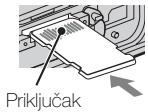
Make sure that the correct side is facing up.
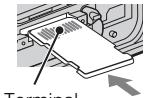
"Memory Stick Micro" media (M2)
Terminal
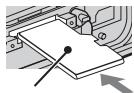
microSD memory card
Printing surface
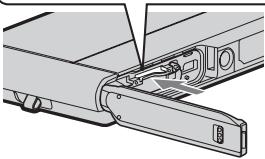
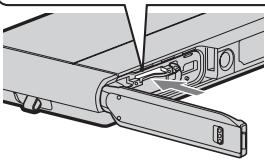
1 Open the cover.
2 Insert the memory card (sold separately).
- With the camera lens facing upward, as illustrated, insert the memory card straight in until it clicks into place.
- Pushing down on the microSD memory card (in the direction of the battery insertion slot) while inserting it may damage the camera.
- Be careful when removing the microSD memory card, as it may pop out quickly.
3 Close the cover.
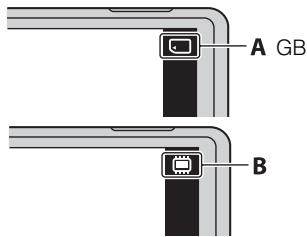
4 Check the icon displayed on the upper right screen and make sure the memory card is inserted correctly.
- A: The memory card is inserted correctly.
- B: The memory card is not inserted correctly. Confirm the direction of the memory card and reinsert it straight into the camera.
- Only one memory card can be inserted.
Memory cards that can be used
| Memory card | For still images | For movies | |
| A | Memory Stick Micro | ✓ | — |
| Memory Stick Micro (Mark2) | ✓ | ✓ | |
| B | microSD memory card | ✓ | ✓ (Class 4 or faster) |
| microSDHC memory card | ✓ | ✓ (Class 4 or faster) | |
| microSDXC memory card | ✓ | ✓ (Class 4 or faster) |
- In this manual, products in A are collectively referred to as "Memory Stick Micro" media, and products in B are collectively referred to as microSD memory card.
To remove the memory card/battery pack
Memory card: Push the memory card in once to eject the memory card.
Battery pack: Slide the battery eject lever. Be sure not to drop the battery pack.
Notes
- Never remove the memory card/battery pack when the access lamp (page 11) is lit.
This may cause damage to data in the memory card/internal memory.
ON/OFF (Power) button
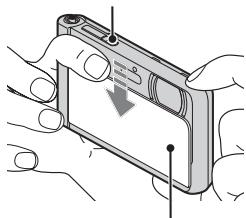
Lens cover
1 Lower the lens cover.
The camera is turned on.
Date & Time setting is displayed when you turn on the camera for the first time.
- You can also turn on the camera by pressing the ON/OFF (Power) button.
- It may take time for the power to turn on and allow operation.
2 Select a desired language.
3 Select a desired geographic location by following the on-screen instructions, then touch [Next].
4 Set [Daylight Savings] or [Summer Time], [Date & Time Format] and [Date & Time], then touch [Next].
- Midnight is indicated as 12:00 AM, and noon as 12:00 PM.
5 Touch [OK].
6 Follow the instructions on the screen.
- The battery pack will run out quickly when: - Disp. Resolution is set to [High].
GB
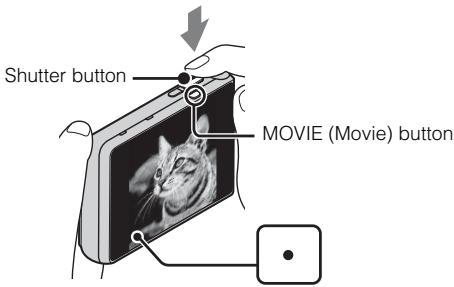
Shooting still images
1 Press the shutter button halfway down to focus.
When the image is in focus, a beep sounds and the indicator lights.
2 Press the shutter button fully down to shoot an image.
Shooting movies
1 Press the MOVIE (Movie) button to start recording.
- Use the W/T (zoom) lever to change the zoom scale.
2 Press the MOVIE button again to stop recording.
Notes
- The sound of the lever operating will be recorded when the zoom function operates while shooting a movie. The sound of the MOVIE button operating may also be recorded when movie recording is finished.
- Continuous shooting is possible for approximately 29 minutes at one time at the camera's default settings and when the temperature is approximately 25°C ( 77°F ). When movie recording is finished, you can restart recording by pressing the MOVIE button again. Recording may stop to protect the camera depending on the ambient temperature.
Viewing images
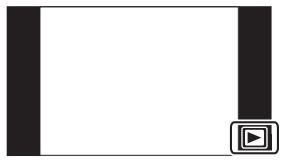
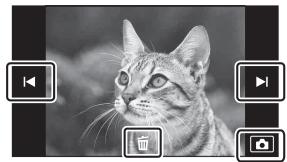
1 Touch (Playback).
- When images on a memory card recorded with other cameras are played back on this camera, the registration screen for the data file appears.
Selecting next/previous image
Touch (Next)/I (Previous) on the screen.
- To play back movies, touch (Playback) in the center of the screen.
- To zoom in, move the W/T (zoom) lever to the T side.
- Deleting an image
Touch (Delete) → [This Image].
Returning to shooting images
Touch on the screen.
- You can also return to shooting mode by pressing the shutter button halfway down.
In-Camera Guide
This camera is equipped with a built-in instruction guide. This allows you to search the camera's functions according to your needs.
GB
1 Touch MENU.
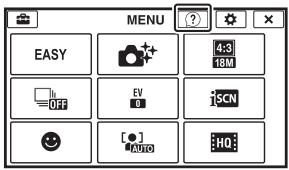
2 Touch? (In-Camera Guide), then select the desired MENU item.
The operation guide for the selected item is displayed.
- If you touch? (In-Camera Guide) when the MENU screen is not displayed, you can search the guide using keywords or icons.
Introduction of other functions
Other functions used when shooting or playing back can be operated touching the MENU on the screen. Only applicable functions are displayed. The four items under MENU do not appear in the MENU screen.
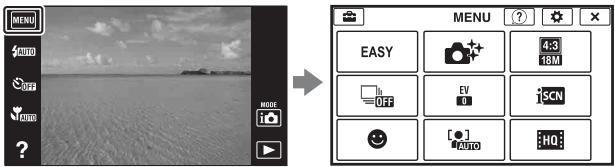
Menu Items
Shooting
| Movie shooting scene | Select movie recording mode. |
| Photo Creativity | Change settings easily and shoot images when the shooting mode is set to [Intelligent Auto] or [Superior Auto]. |
| Easy Mode | Shoot still images using minimal functions. |
| Flash | Set the flash settings. |
| LED Light | Set the LED Light when shooting in Magnifying Glass Plus mode. |
| Self-Timer | Set the self-timer settings. |
| Defocus Effect | Set the level of background defocus effect when shooting in Background Defocus mode. |
| Still Image Size(Dual Rec) | Set the still image size shot while recording a movie. |
| Still Image Size/ Panorama Image Size/Movie Size/ Movie Quality | Select the image size and the quality for still images, panoramic images or movie files. |
| Cont. Shooting Settings | Set the burst shooting settings. |
| Macro | Shoot beautiful close-up images of small subjects. |
| HDR Painting effect | When [HDR Painting] is selected in Picture Effect, sets the effect level. |
| Area of emphasis | When [Miniature] is selected in Picture Effect, sets the part to focus on. |
| Color hue | When [Toy camera] is selected in Picture Effect, sets the color hue. |
| Extracted Color | When [Partial Color] is selected in Picture Effect, selects the color to extract. |
| Illustration Effect | When [Illustration] is selected in Picture Effect, sets the effect level. |
| Exposure Compensation | Adjust the exposure manually. |
| ISO | Adjust the luminous sensitivity. |
| White Balance | Adjust color tones of an image. |
| Focus | Select the focus method. |
| Metering Mode | Select the metering mode that sets which part of the subject to measure to determine the exposure. |
| Scene Recognition | Set to automatically detect shooting conditions. |
| Soft Skin Effect | Set the Soft Skin Effect and the effect level. |
| Smile Shutter | Set to automatically release the shutter when a smile is detected. |
| Smile Detection Sensitivity | Set the Smile Shutter function sensitivity for detecting smiles. |
| Face Detection | Select to detect faces and adjust various settings automatically. |
| Anti Blink | Set to automatically shoot two images and select image in which the eyes are not blinking. |
| Movie SteadyShot | Set the strength of SteadyShot in movie mode. If you change this setting, the angle of view will change. |
| In-Camera Guide | Search the camera's functions according to your needs. |
GB
Viewing
| Easy Mode | Increase the text size on the screen for ease of use. |
| Date Select | Select the desired image to view by date. |
| Calendar | Select the date to be played back on Calendar. |
| Image Index | Display multiple images at the same time. |
| Slideshow | Select a method of continuous playback. |
| Delete | Delete an image. |
| Paint | Paint on a still image and saves it as a new file. |
| Beauty Effect | Retouch a face on a still image. |
| Retouch | Retouch an image using various effects. |
| Picture Effect | Add various texture on images. |
| 3D Viewing | Set to play back images shot in 3D mode on a 3D TV. |
| View Mode | Select the display format for images. |
| Display Cont. Shooting Group | Select to display burst images in groups or display all images during playback. |
| Protect | Protect the images. |
| Print (DPOF) | Add a print order mark to a still image. |
| Rotate | Rotate a still image to the left. |
| Volume | Adjust the volume. |
| Exposure data | Set whether or not to display the shooting data (Exif data) of the currently displayed file on the screen. |
| Number of images in index | Set the number of images displayed in the index screen. |
| In-Camera Guide | Search the camera's functions according to your needs. |
If you touch the MENU while shooting or during playback, (Settings) is provided as a final selection. You can change the default settings on the

(Settings) screen.
GB
| Shooting Settings | Movie format/AF Illuminator/Grid Line/Clear Image Zoom/Digital Zoom/Wind Noise Reduct./Scene Recog. Guide/Red Eye Reduction/Blink Alert/Write Date/Disp. Resolution |
| Main Settings | Beep/Panel Brightness/Language Setting/Display color/ Demo Mode/Initialize/CTRL FOR HDMI/USB Connect Setting/USB Power Supply/LUN Setting/Download Music/Empty Music/Power Save/Version |
| Memory Card Tool* | Format/Create REC.Folder/Change REC.Folder/Delete REC.Folder/Copy/File Number |
| Clock Settings | Area Setting/Date & Time Setting |
- If a memory card is not inserted, (Internal Memory Tool) will be displayed and only [Format] can be selected.
Features of "PlayMemories Home"
The software "PlayMemories Home" allows you to import still images and movies to your computer and use them. "PlayMemories Home" is required for importing AVCHD movies to your computer.
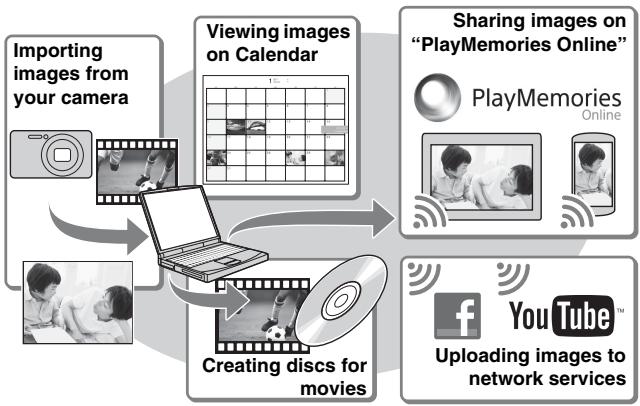

Downloading "PlayMemories Home" (for Windows only)
You can download "PlayMemories Home" from the following URL:
www.sony.net/pm
Notes
- An Internet connection is required to install "PlayMemories Home".
- An Internet connection is required to use "PlayMemories Online" or other network services. "PlayMemories Online" or other network services may not be available in some countries or regions.
- "PlayMemories Home" is not compatible with Macs. Use the applications that are installed on your Mac. For details, visit the following URL: http://www.sony.co.jp/imsoft/Mac/
■ Installing "PlayMemories Home" on a computer
1 Using the Internet browser on your computer, go to the following URL, then click [Install] → [Run].
www.sony.net/pm
2 Follow the instructions on the screen to complete the installation.
- When the message to connect the camera to a computer is displayed, connect the camera and computer using the micro USB cable (supplied).
To the Multi/ Micro USB Terminal
To a USB jack
Viewing "PlayMemories Home Help Guide"
For details on how to use "PlayMemories Home", refer to the "PlayMemories Home Help Guide".
1 Double-click the [PlayMemories Home Help Guide] icon on the desktop.
- To access the "PlayMemories Home Help Guide" from the start menu: Click [Start] → [All Programs] → [PlayMemories Home] → [PlayMemories Home Help Guide].
- For Windows 8, select the [PlayMemories Home] icon from the Start screen to start [PlayMemories Home], then select [PlayMemories Home Help Guide] from [Help] menu.
- For details on "PlayMemories Home", you can also see the "Cyber-shot User Guide" (page 2) or the following PlayMemories Home support page (English only): http://www.sony.co.jp/pmh-se/
Number of still images and recordable time of movies
The number of still images and recordable time may vary depending on the shooting conditions and the memory card.
Still images
(Units: Images)
| Capacity Size | Internal memory | Memory card |
| Approx. 48 MB | 2 GB | |
| 18M | 7 | 295 |
| VGA | 155 | 6400 |
| 16:9(13M) | 8 | 325 |
Movies
The table below shows the approximate maximum recording times. These are the total times for all movie files. Continuous shooting is possible for approximately 29 minutes (a product specification limit). The maximum continuous recording time of an MP4 (12M) format movie is about 15 minutes (limited by the 2 GB file size restriction).
(h hour), m (minute))
| Capacity Size | Internal memory | Memory card |
| Approx. 48 MB | 2 GB | |
| AVC HD 24M (FX) | — | 10 m (10 m) |
| AVC HD 9M (HQ) | — | 25 m (15 m) |
| MP4 12M | — | 15 m |
| MP4 3M | — | 1 h 10 m |
The number in ( ) is the minimum recordable time.
- The recordable time of movies varies because the camera is equipped with VBR (Variable Bit Rate), which automatically adjusts image quality depending on the shooting scene. When you record a fast-moving subject, the image is clearer but the recordable time is shorter because more memory is required for recording. The recordable time also varies depending on the shooting conditions, the subject or the image quality/size settings.
Notes on using the camera
Functions built into this camera
- This manual describes the functions of 1080 60i-compatible devices and 1080 50i-compatible devices.
To check if your camera is a 1080 60i-compatible device or 1080 50i-compatible device, check for the following marks on the bottom of the camera.
1080 60i-compatible device: 60i
1080 50i-compatible device: 50i
- Do not watch 3D images shot with this camera for extended periods of time on 3D-compatible monitors.
- When you view 3D images shot with this camera on a 3D-compatible monitors, you may experience discomfort in the form of eye strain, fatigue, or nausea. To prevent these symptoms, we recommend that you take regular breaks. However, you need to determine for yourself the length and frequency of breaks you require, as they vary according to the individual. If you experience any type of discomfort, stop viewing the 3D images until you feel better, and consult a physician as necessary. Also refer to the operating instructions supplied with the device or software you have connected or are using with this camera. Note that a child's eyesight is still at the development stage (particularly children below the age of 6). Consult a pediatrician or ophthalmologist before letting your child view 3D images, and make sure he/she observes the above precautions when viewing such images.
On use and care
Avoid rough handling, disassembling, modifying, physical shock, or impact such as hammering, dropping, or stepping on the product. Be particularly careful of the lens.
Notes on recording/playback
- Before you start recording, make a trial recording to make sure that the camera is working correctly.
- Do not aim the camera at the sun or other bright light. It may cause the malfunction of the camera.
- If moisture condensation occurs, remove it before using the camera.
- Do not shake or strike the camera. It may cause a malfunction and you may not be able to record images. Furthermore, the recording media may become unusable or image data may be damaged.
Do not use/store the camera in the following places
- In an extremely hot, cold or humid place
In places such as in a car parked in the sun, the camera body may become deformed and this may cause a malfunction.
- Under direct sunlight or near a heater
The camera body may become discolored or deformed, and this may cause a malfunction.
- In a location subject to rocking vibration
- Near a location that generates strong radio waves, emits radiation or is strongly magnetic place. Otherwise, the camera may not properly record or play back images.
On carrying
Do not sit down in a chair or other place with the camera in the back pocket of your trousers or skirt, as this may cause malfunction or damage the camera.
Carl Zeiss lens
The camera is equipped with a Carl Zeiss lens which is capable of reproducing sharp images with excellent contrast. The lens for the camera has been produced under a quality assurance system certified by Carl Zeiss in accordance with the quality standards of Carl Zeiss in Germany.
Notes on the screen
The screen is manufactured using extremely high-precision technology so over 99.99% of the pixels are operational for effective use. However, some tiny black and/or bright dots (white, red, blue or green) may appear on the screen. These dots are a normal result of the manufacturing process, and do not affect the recording.
On camera's temperature
Your camera and battery may get hot due to continuous use, but it is not a malfunction.
On the overheat protection
Depending on the camera and battery temperature, you may be unable to record movies or the power may turn off automatically to protect the camera.
A message will be displayed on the screen before the power turns off or you can no longer record movies. In this case, leave the power off and wait until the camera and battery temperature goes down. If you turn on the power without letting the camera and battery cool enough, the power may turn off again or you may be unable to record movies.
On charging the battery
If you charge a battery that has not been used for a long time, you may be unable to charge it to the proper capacity.
This is due to the battery characteristics, and is not a malfunction. Charge the battery again.
Warning on copyright
Television programs, films, videotapes, and other materials may be copyrighted. Unauthorized recording of such materials may be contrary to the provisions of the copyright laws.
No compensation for damaged content or recording failure
Sony cannot compensate for failure to record or loss or damage of recorded content due to a malfunction of the camera or recording media, etc.
Cleaning the camera surface
Clean the camera surface with a soft cloth slightly moistened with water, then wipe the surface with a dry cloth. To prevent damage to the finish or casing:
- Do not expose the camera to chemical products such as thinner, benzine, alcohol, disposable cloths, insect repellent, sunscreen or insecticide.
Maintaining the monitor
- Hand cream or moisturizer left on the screen may dissolve its coating. If you get any on the screen, wipe it off immediately.
- Wiping forcefully with tissue paper or other materials can damage the coating.
- If fingerprints or debris are stuck to the screen of the monitor, we recommend that you gently remove any debris and then wipe the screen clean with a soft cloth.
Note on disposal/transfer of the camera
To protect personal data, perform the following when disposing of or transferring the camera.
- Format the internal memory (page 27), record images up to full capacity of the internal memory with the lens covered, and then format the internal memory again.
This will make it difficult to recover any of your original data. - Reset all camera settings by performing [Initialize] (page 27).
Specifications
Camera
[System]
Image device: 7.76mm (1/2.3 type) Exmor R CMOS sensor
Total pixel number of camera: Approx. 18.9 Megapixels
Effective pixel number of camera: Approx. 18.2 Megapixels
Lens: Carl Zeiss Vario-Tessar 5 × zoom lens
f = 4.7 mm - 23.5 mm (26 mm -
130mm (35 mm film equivalent))
F3.5 (W) - F4.8 (T)
While shooting movies (16:9):
28mm - 140mm^*
While shooting movies (4:3):
35mm - 175mm^*
- When [Movie SteadyShot] is set to [Standard]
SteadyShot: Optical
Exposure control: Automatic exposure, Scene Selection
White balance: Automatic, Daylight, Cloudy, Fluorescent 1/2/3, Incandescent, Flash, One Push
File format:
Still images: JPEG (DCF, Exif, MPF Baseline) compliant, DPOF compatible
3D still images: MPO (MPF
Extended (Disparity Image)) compliant
Movies (AVCHD format):
AVCHD format Ver. 2.0 compatible
Video: MPEG-4 AVC/H.264
Audio: Dolby Digital 2ch, equipped with Dolby Digit
Creator
Manufactured under license from Dolby Laboratories.
Movies (MP4 format):
Video:MPEG-4AVC/H.264
Audio: MPEG-4 AAC-LC 2ch
Recording media: Internal Memory (Approx. 48 MB), "Memory Stick Micro" media, microSD memory cards
Flash: Flash range (ISO sensitivity (Recommended Exposure Index) set to Auto):
Approx. 0.08m to 3.3m
(3 1/4 inches to 10 ft. 10 inches) (W)
Approx. 0.6m to 2.4m
(1 ft. 11 5/8 inches to 7 ft.
10 1/2 inches) (T)
[Input and Output connectors]
HDMI connector: HDMI micro jack
Multi/Micro USB Terminal*:
USB communication
USB communication: Hi-Speed USB (USB 2.0)
- Supports Micro USB compatible device.
[Screen]
OLED screen:
Wide (16:9), 8.3cm (3.3 type)
Total number of dots:
1 229 760 dots equivalent
[Power, general]
Power: Rechargeable battery pack NP-BN, 3.6 V
AC Adaptor AC-UB10/UB10B/
UB10C/UB10D, 5 V
Power consumption (during shooting):
1.0 W
Operating temperature: -10°C to +40°C (14°F to 104°F)
Storage temperature: -20°C to +60°C (-4°F to +140°F)
Dimensions (CIPA compliant): 96.4mm× 59.3mm× 15.4mm (37 / 8 inches × 23 / 8 inches × 5/8 inches)W/H/D
Mass (CIPA compliant) (including NP-BN battery pack, "Memory Stick Micro" media): Approx. 140g 4.9 oz)
Microphone: Stereo
Speaker: Monaural
Exif Print: Compatible
PRINT Image Matching III: Compatible
Water-proof/dust-proof performance: Equivalent to IEC60529 IP68 (The camera is operable up to a water depth of 10m 33 ft.) for 60 minutes.)
Shock-proof performance: Conforming to MIL-STD 810F Method 516.5-Shock standards, this product has passed testing when dropped from a height of 1.5m (5 ft.) above a 5-cm (2 inches) thick plywood board.
Water-proof, dust-proof, and shockproof performance is based on standard testing by Sony.
AC Adaptor AC-UB10/UB10B/ UB10C/UB10D
Power requirements: AC 100 V to 240V 50Hz / 60Hz 70mA
Output voltage: DC 5 V, 0.5 A
Operating temperature: 0°C to 40°C (32°F to 104°F)
Storage temperature: -20°C to +60°C (-4°F to +140°F)
Dimensions: Approx. 50mm× 22mm× 54mm (2 inches × 7/8 inches × 2 1/4 inches) (W/H/D)
Mass: For the USA and Canada: Approx. 48g (1.7 oz) For countries or regions other than the USA and Canada: Approx. 43g (1.5 oz)
Rechargeable battery pack NP-BN
Used battery: Lithium-ion battery
Maximum voltage: DC 4.2 V
Nominal voltage: DC 3.6 V
Maximum charge voltage: DC 4.2 V
Maximum charge current: 0.9A
Capacity: typical:2.3 Wh (630 mAh) minimum:2.2 Wh (600 mAh)
Design and specifications are subject to change without notice.
Trademarks
- The following marks are trademarks of Sony Corporation.
Cybershot, "Cyber-shot," "Memory Stick Micro"
- "AVCHD" and "AVCHD" logotype are trademarks of Panasonic Corporation and Sony Corporation.
- The terms HDMI and HDMI High-Definition Multimedia Interface, and the HDMI Logo are trademarks or registered trademarks of HDMI Licensing LLC in the United States and other countries.
- Windows is registered trademark of Microsoft Corporation in the United States and/or other countries.
Mac is registered trademark of Apple Inc. - microSDXC logo is a trademark of SD-3C, LLC.
- "P" and "PlayStation" are registered trademarks of Sony Computer Entertainment Inc.
- Facebook and the "f" logo are trademarks or registered trademarks of Facebook, Inc.
YouTube and the YouTube logo are trademarks or registered trademarks of Google Inc. -
In addition, system and product names used in this manual are, in general, trademarks or registered trademarks of their respective developers or manufacturers. However, the TM or marks are not used in all cases in this manual.
-
Add further enjoyment with your PlayStation 3 by downloading the application for PlayStation 3 from PlayStation Store (where available.)
- The application for PlayStation 3 requires PlayStation Network account and application download. Accessible in areas where the PlayStation Store is available.
Additional information on this product and answers to frequently asked questions can be found at our Customer Support Website.
http://www.sony.net/
Printed on 70% or more recycled paper using VOC (Volatile Organic Compound)-free vegetable oil based ink.
GB
Appareil photo (1)
- Batterie rechargeable NP-BN (1)
Responsible : Sony Electronics Inc.
Adresse: 16530 Via Esprillo, San Diego, CA 92127 E.-U.
(CIPA: Camera & Imaging Products Association)
1 Touchez (Lecture).
(h (heures), m (minutes))
| CapacitéTaille | Mémoire interne | Carte mémoire |
| Environ 48 Mo | 2 Go | |
| AVC HD 24M (FX) | — | 10 m(10 m) |
| AVC HD 9M (HQ) | — | 25 m(15 m) |
| MP4 12M | — | 15 m |
| MP4 3M | — | 1 h 10 m |
Batterie rechargeable NP-BN
Batterie utilise: Batterie Lithium-ion
Tension maxima: 4,2 V CC
Works with PlayStation®3
Works with PlayStation®3
(CIPA: Camera & Imaging Products Association)
Works with PlayStation®3
(h (horas), m (minutes))
(CIPA: Camera & Imaging Products Association)
(MPF Extended (Disparity Image))
Filme (AVCHD-Format):
Works with PlayStation®3
Ong. 18,9 megapixels
Ong. 18,2 megapixels
Lens: Carl Zeiss Vario-Tessar 5 × zoomlens
f = 4.7 mm - 23.5 mm (26 mm - 130 mm (equivalent met 35 mm-film))
F3,5 (W) - F4,8 (T)
compatible met MPO (MPF
Extended (Disparity Image))
(ong.48 MB),"Memory Stick
Micro", microSD-geheugenkaarten
Flitser: flitserbereik (ISO-gevoeligkeit
Cyber-shot, "Cyber-shot", "Memory Stick Micro"
Works with PlayStation®3
Elementary apparatus
Works with PlayStation®3
Works with PlayStation®3
(CIPA: Camera & Imaging Products Association)
A membranous cystitis (BCC) is a rare entity that is characterized by the presence of a single or multiple cystic lesion in the bladder. It is usually associated with a history of bladder cancer, and it is also common in men.
| Shooting Settings | Movie format/AF Illuminator/Grid Line/Clear Image Zoom/Digital Zoom/Wind Noise Reduct./ Scene Recog. Guide/Red Eye Reduction/Blink Alert/Write Date/Disp. Resolution |
| Main Settings | Beep/Panel Brightness/Language Setting/Display color/Demo Mode/Initialize/CTRL FOR HDMI/USB Connect Setting/USB Power Supply/LUN Setting/Download Music/Empty Music/Power Save/Version |
| Memory Card Tool* | Format/Create REC.Folder/Change REC.Folder/Delete REC.Folder/Copy/File Number |
| Clock Settings | Area Setting/Date & Time Setting |
- Ak nie je vo fotoparáte vlozená památvá karta, zobrási sa ikona (Internal Memory Tool), príčom bude možné zvolíf len možnost [Format].
Funkcie softféru „PlayMemories Home“
Works with PlayStation®3
Ziskajte dalsie potesenie z konzoly PlayStation 3 po prevzati aplikacie pre konzolu PlayStation 3 z obchodu PlayStation Store (ak je k dispozicii).
- Ak chcete prevziaf aplikáciu pre PlayStation 3, musite mat učet na PlayStation Network. Dostupné v oblastiach, kde je k disposići PlayStation Store.
Bližsie informácie o tomtovyrobku a odpovede na Častéotázaky najdete na našej webovej stranke v sekcii Sluzby Zákaznikom.
http://www.sony.net/
(CIPA: Camera & Imaging Products Association)
Visa "Hjälpguide for PlayMemories Home"
Mer information om hur du anvander "PlayMemories Home" fãr du om du lãser "Hjälpguide for PlayMemories Home".
Cybershot, "Cyber-shot", "Memory Stick Micro"
(h (time), m (minut))
| Kapasitet Størrelse | Interninne | Minnekort |
| Ca. 48 MB | 2 GB | |
| AVC HD 24M (FX) | — | 10 m (10 m) |
| AVC HD 9M (HQ) | — | 25 m (15 m) |
| MP4 12M | — | 15 m |
| MP4 3M | — | 1 h 10 m |
Tallet i parentes viser minsteverdien for opptakstiden som er tilgengelig.
Cybershot, "Cyber-shot", "Memory Stick Micro"
Works with PlayStation®3
(CIPA: Camera & Imaging Products Association)
(h (timer), m (minutter))
| Kapacitet Størrelse | Intern hukommelse | Hukommelseskort |
| Ca. 48 MB | 2 GB | |
| AVC HD 24M (FX) | — | 10 m (10 m) |
| AVC HD 9M (HQ) | — | 25 m (15 m) |
| MP4 12M | — | 15 m |
| MP4 3M | — | 1 h 10 m |
Antal effective pixels for kameraet: Ca. 18,2 megapixels
Memory Stick Micro (M2)
microSD
memorjska.kartica

1 OtvoritePoklopac.
2 Umetnite memorijsku karticu (prodaje se zasebno).
-
Dok je leça Fotoaparata okrenuta gore, kako je prikazano, umetnite memorijski karticu dok ne klikne.
-
Pritiskanje memorjske cartice microSD (u smjeru utora za umetanje baterije) pri umetanju要去steti Fotoaparat.
-
Budite oprezni pri uklanjanju memorjske kartice microSD jer我会 brzo iskočiti.
Potrosnja snage (pri snimanju): 1,0 W
Radna temperatura: -10°C to +40°C
Temperatura pohrane: -20°C do +60°C
Dimenzije (u skladu sa standardom CIPA): 96,4mm× 59,3mm× 15,4mm (S/V/D)
Masa (u skladu sa standardom CIPA) (ukljucujuci NP-BN bateriju, TM Memory Stick Micro): približno 140g
Mikrofon: stereo
Zvučnik: monofonski
Exif Print: kompatibilan
PRINT Image Matching III: kompatibilan
Otpornost na prasinu/vodu:
ekvivalent IEC60529 IP68
(fotoapatrar maybe raditi u vodi do dubine do 10 m 60 minuta).
Otpornost na udarce: u skladu sa standardom MIL-STD 810F Metode 516.5-udarac, ovaj proizvod prosao je ispitivanje padom s visine od 1,5m na 5cm debelu sperplocu.
Otpornost na vodu, prasinu udarce temelji se na standardnom ispitivanju vtrike Sony.
AC ispravljac AC-UB10/ UB10B/UB10C/UB10D
Zahtjevi napajanja: 100V do 240V izmjenične struje, 50Hz / 60Hz , 70mA
Izlaznipapon: 5V istosmjerno, 0,5A
Radna temperatura: 0°C do 40°C
Temperatura pohrane: -20°C do +60°C
Dimenzije: prbližno 50mm× 22mm× 54 mm (S/V/D)
Tezina:
za SAD i Kanadu: prbližno 48 g
za države ili regije osim SAD-a i Kanade: prbližno 43 g
Punjiva baterija NP-BN
Koristena baterija: litij-ionska baterija
Works with PlayStation®3
- Povecajte uživanje u upotrebi uredajna PlayStation 3 preuzimanjem aplikacije za PlayStation 3 iz trgovine PlayStation Store (gdje je dostupna).
- Za aplikaciju za PlayStation 3 potrebno je stvoriti račun PlayStation Network i preuzeti aplikaciju. Dostupno je na područjima gdje je PlayStation Store dostupan.
130mm (echivalent film
35mm))
F3,5 (W) - F4,8 (T)
La inregistrare这部电影 (16:9):
28mm - 140mm^*
La inregistrare这部电影 (4:3):
35mm - 175mm^*
Film (format AVCHD): format
AVCHD compatibil cu Ver. 2.0
Video: MPEG-4 AVC/H.264
Audio: Dolby Digital 2 can., echipat cu Dolby Digital Stereo Creator
- Produs sub licenta Dolby Laboratories.
Filme (format MP4):
Video:MPEG-4AVC/H.264
Audio: MPEG-4 AAC-LC 2 can.
Medii de inregistrare: Memorie interna (Aprox. 48 MB),
"Memory Stick Micro", carduri de memorie microSD
Blit: interval de blit (sensibilitate
ISO (Indicele de expunere recomandat) setata la Auto):
aprox. 0,08m pana la 3,3 m (W)
aprox. 0,6m pana la 2,4 m (T)
[Conectori intrare si lesire]
Conector HDMI: Minimufá HDMI
Terminal Multi/Micro USB*: comunicare USB
Comunicare USB: Hi-Speed USB (USB 2.0)
Works with PlayStation®3
1 PiεoTe to (Avanapaywyn).
- Otav avanagayovtae autn tn mynxav nixoves ts xagtas mnuinncov exov evygafei e alles mynavaes, emphiicetai n oohv xataxogions yia to agxio deodouwv.
Works with PlayStation®3
Tva aa oiaaoubetave Tgouoootego To PlayStation 3 oac, Xavte liywn ts5 ephiagouyns yaa Play Station 3 aTo To PlayStation Store (ovov duiotetai).
H eaooyn yia to PlayStation 3 aataei evan loayaguao oTo PlayStation Network kau tn lyn ts eaooyng. Eivau dtaeoum n oe neogoxg otov uaoxto PlayStation Store.
Pioo0eTe5nnoofoogie5
Oxetuae to qoiov auTo xau
aavntnoic oe ovvyes
eogtnoeic mtoogeite va bgeite
oto diaduxvaxo to
Voootngieng nElambdaov ma.
http://www.sony.net/
EkTuWmevo 70% nIeipaoTepo avakukawmevo xaptI eX npnI elambdaiovbaiaigevou aOutka Eaia, nou dE vnepeixeIOE (TNTikc Opyavikc Evwoei).
Eupwaikn Eyyunon SONY
Ayntεπλatn,
Zag evxagiotobv nov ayogadate
avtoT nooov Tn Sony. EAnicovue
va meivete aavovtonouvo ato tn
xonjouTo. vnu antihov ngittwnon
noT opoiov oac xceauotei oepig
(EToxweun) xata th diapexiau tnc
eyvunong, tapaxaleite va
etuxovnonote me to xataotnma
ayogac n eva maoTov dixtvov
eovooanotveuv neoepig maq (ASN)
tnc Evogwaizns Oixovomuxs Zovns
(EOZ) naaAawov wov
avafoqvota o' uvtnTnv eyyunon i
ota ovovodovva uvtiv pfuaadia
(IIgoxN KALVUNgs TgEvOnns).
Mtoogeitva Boette kentougeie yta
ta meIyovtou bxtvov maq ASN, otouc
tnkefovivkoivxataLoyous, otouc
xataLoyov npovotov maq xaatis
wotoaeide gas. Ta va atofoyete
aade pigttn talaatogia, oas
oviootoube va daabatoe npoeetkxa
to eyeidoio xonons nootov va epetee
eE anfem To vupoynmveut ao hnt to dixtro eSvovoadotneuvov oepicus ma.
H Eyyunon ΣaS
H naogoua eyyon noxveyia to
pooiov tsy Sory ao ayogaoate,ep
oooy natao ayawegeta ota
phivalda aov ovvodeav to pooiov
oag, uotiyuoguooteon ot
ayogaoptne Evtoc tsPiqoxns
Kaalvns Eeynuongs.
Me tnv paoofoa, n Sony eeyvataot to npoiov evia aalaiayevo ato kae elattoua oxeticoevo me ta vua n ynv tataeovn yua ma neiodo ENO2 ETOY2 aro tv npqopoyia n5 ayxng ayogas. H agodya va naooepoia kau extanpooeiynpaaofoa eyyon, etaegla Sony, evia avtn nov avapegeota o auriv tv nEeyon no oto ovboevodavnt qvlladoio tn xwoa otov etwiozeta n enooyen xata th diaqea tnc eyyonc. Eav, evtos n1s nepoodov yyinong, anoebeiel ealattuamato so npoiov (ata thnv npqopoyia n5 ayxng ayogac) loyva axatallnov valawn h atoxueov, n Sony i eva mLos tov duxtov Egoovodotnuov SeBc ASN TNS PEOOCH KALVPS NTS Eeyonns 0a enooyeo i th 0a avvataotno (xt erLoyn tsr Sony) xogic enuapuvny aoyeoyaxn i vtalalaxnzta, to npoiov n ta elattoumaia eagotmuata tv, evtoc elovoyov govov, baoeiTw ogowxraovhovovovovovtovkau H Sony xau ta aeNtov dixtvov Egoovodotneveu SScb ASN mtovvva atxaataotno fsvggtmatae aee GaoTjmae aee VEA aee GaoTjmae aee Aee Tjmae aee Tjmae aee Tjmae aee Tjmae aee Tjmae aee Tjmae aee Tjmae aee Tjmae aee Tjmae aee Tjmae aee Tjmae aee Tjmae aee Tjmae aee Tjmae aee Tjmae aee Tjmae aee Tjmae aee Tj
'Opoi
- Euaevcduvau tnc aooovac
eyunong th aaoevovta moo ev aooaouothei to oototuvto
tuoloyo n anodoei noanog (me
tny evdien ts nuogounvia
ayogac, tv oovteov tv npovotos
xai ng erwuviaocuov eugov)
muie to eaattowatio npoviv
vtos ngs neqiovodov eynong. H
Sony xaa taeuon tv dxtov
Egoaodntuev eoBc ASN
muogovvaagvhoov tn dgovav
euaeun kata nynpeiodo
yynuoeawv dev neoooxoovv
ta npovavaegoeva ygamma aev
dev npoxutovn ao atu na
neogovnia ayogac, to npoviv n to
mvoIto tv poiovtoc n enwovua
tv eumopv h aagovba yvyon
dev wveav o tuoc tv movtov
noequaoos agihos tv npovotvs
exaallooei, diaygaei,
aphiogeit xataotei
duovavaywotos.
2.Γa va aropevzthetaiαβnη aωλεuva /diayoayeσ aeapovoeva n aortooewe ma eoa n εgqntma va oohnevoεδoouw, oepieetva ta apagoeot πvuaadwoet to pioovoc yea euxovnataynπe iyo doon
3.H πaαo α eYyonmDev xalvnte ta Eoadaa TouSawdvovus metapaojosouovvoeovtae metapaojaTou pOiovtosacqoc Xa ato Tn Sony h meLoTou dxtovs ASN.
GR
4.Haopoboa eYunon dev xaluntae ta e:
Piouodxovtnenonxu
eiooev havntataotaon
Egaojmuatow og aotetaeoja
pvaioyoiigphiogac
-Avaioaua (ovotatua ien yia ta oioia npoβIeTea Ieoiodn avntataotaon kata Tn diaoza cngs evos npoiovtro osw m enavaoogtouve msataqies,phiiyra extrunowns, yaoioe,lambdaes,xalodia xJ).
Znua n eAattouata nov 1000nnnaav loywo xno5, 1eTovoyiaas n eiooouo avbatoav m thv axovz anotauan n ooxanxon.
Znuei aaiayes oTo qoiov Tov 10oxxionav aio:
KaxiXgJOn, oVuaaovouevov:
*tov yqoiouov nov eueo
vuoxn, aothetauxn n
euaovaxnx nuaa n
aalayeg oto npoiov nbaen
oe oboves vogov
xovotaalwx
* m xavovzhi n othoufoyn
m tnc onyies nC Sony
eyataotcaon n xononTov
TpooiyoTc
* movtienon tov
oiovto ovphiwa µ Tc
odnyie awotngovtienon
Tc Sony
* yzataotaon n xonon tov
TPOIOVTOE TOO TO m
ooumovo n ig texyivcE
PPOUAYOAPcEs RA TA
TPOUTa aooalaeic nov
IOWVOn OTXwOa OTOV EeY
yZATAOTAEi XAI
xONMOOTIEiTATQIOIV.
Molvaes aTo wS nXoHOn Tov qoiovtOe loyouo Toov dev paoexetAe To T oaioy havdoev Eyaataaon tov loiauZoV.
TnV xataoan n ta
elattuata tov oovtnmuatow
me ta oioia xnoaouotieta n
ota oioia evooatawetato
yoov extos a0 alla
oiovta ts Sonye edixa
oxediueva va
xonmuoiovtai me to ev
loyowoioiv.
XoJOnTov pOoiovToG EeAotnmuata, TepoeeiauAo EoIaOoXa aIaa pOoiovTa Tov OIOOW oTuOg, n XaTaTaamXa To npOtvTO dev OvWOTVA ano T Sony.
Euaoxuevni Ewixuoyneioa Euaoxuevi and otoja tvov deivaimuIytnsOnytov dxtvov ASN.
Pv0muoic n 000aouyoe wocis nyn oynoyeyn yoaanovaaoteon nT5 Sony, otioie ouane aauabavvtai:
*n avaiaoan tov π 回 oivto nqa ano ta π 回 oiaoyaoaeps na π 回 axantnoiota aov π 回 oiyogovotra oto π 回 eeiioio xonons
*o tgootounaoei to π 回 oivto me ovo ta π 回 oipoofoe iopo eovixes tonixes texviexes π 回 oiaoyaoepcs na ootvta
aphiiaicnov wovov ne
xwocya taoioteo π 回 oiov dev ixoe oxediatae
xa kataoxaeveetie
□Aμελεια.
A tvxjmuata, vovaxya, vyoa, xnuizc xaa IaIcs oouies, 1nauva, dovnoioc, vtebouxn thqoitnta, axatalnao eaoquo, ttaotan, vtebouxn n eaoauey toofoobooia n taon eoodoo, atvoioia, nlaextoogatuxes exxvewoeis ovteaeuaabavouovtov xeqaovv, alowv eiooteivov dvuaoeu kai etidgaoev.
5.H naoovaaeyunon xalvnte movo ta vuaa meon tooioovoc. Aev xalvnte to loyauoxo (eTe Tc Sone, yte tQitovxataoxoeavotow) ia to otoio npexetau npoeeetau va ayoei ma aoeia xoiogn ato tv Teuio xoiotn hwootc dnawoeis eyyunom n eaeqoei ano tn yevynon.
Eaipoeic kai npiopoi
Me eiaeon tov oov avaeovotai
avotego, no Sony de aagexei xajia
eyinon (qntn, awtonn, ex tov vouov
n al) 0oov apogaa tv noiotira, ta
entidom, nyn axoigia, tn yaoiortia,
tny zataaIooTATo Tnv npoiOvtos n
tov loyauoxoVn paoegeta a
ovodoei to poiov, yia
ovyezqaiveo zoTo. Eav n oxybooa
voofoia atayogvei πληω n
peuocx nTv naogboa eiae, n
Sony eiaei n peoogicetivn evyunoi
tno mvOn meyont extoan tov
entepene i noyovoa voohoeia.
Otoaaidntote eyyunon n otoia dev
eiaeita ano (oto metoo tv on
entepene o oxyov viooc) 0a
neoogictai ot diagceia oixc ts
paoovac yevnojns.
H movabxivoxoewon tS Sony ouphiwa me nTn paoovaaevynon eiva nEvooexn n avtxataaotaon aoovtwovouvtoeovt aovthnxnc ts yevnoq. H Sony dev evthetavalya otoaodnontote aiaeaie nImaovotae na ta oioviota, to ooei, nTnv aogova eyyunon, oupeiauaabevoewov tow ovoaowxAawavatolewov, tv uetaocovataBnneyvaTny aoyoga tv poiovvtos, nAolaias xedov, Eooohatoc, deobuvov, atoalauon nOjongtvos TOnovovntote vovdebeevov npoiovtwv-tnc aueons, Taepuiattovocn nEanoxoovtns axoeiae nCnuaicn nn avavn n Aoiaeaia nCnina aphiqa oe:
- LEARNING MORE ABOUT THE CAMERA ("CYBER-SHOT USER GUIDE")
- CHECKING THE SUPPLIED ITEMS
- OWNER'S RECORD
- WARNING
- IMPORTANT SAFETY INSTRUCTIONS -SAVE THESE INSTRUCTIONS DANGER TO REDUCE THE RISK OF FIRE OR ELECTRIC SHOCK, CAREFULLY FOLLOW THESE INSTRUCTIONS
- CAUTION
- BATTERY PACK
- 1 AC ADAPTOR
- FOR CUSTOMERS IN THE U.S.A. AND CANADA
- I RECYCLING LITHIUM-ION BATTERIES
- FOR CUSTOMERS IN THE U.S.A
- REGULATORY INFORMATION
- DECLARATION OF CONFORMITY
- NOTE
- FOR CUSTOMERS IN EUROPE
- I NOTICE FOR THE CUSTOMERS IN THE COUNTRIES APPLYING EU DIRECTIVES
- ATTENTION
- NOTICE
- DISPOSAL OF OLD ELECTRICAL & ELECTRONIC EQUIPMENT (APPLICABLE IN THE EUROPEAN UNION AND OTHER EUROPEAN COUNTRIES WITH SEPARATE COLLECTION SYSTEMS)
- DISPOSAL OF WASTE BATTERIES (APPLICABLE IN THE EUROPEAN UNION AND OTHER EUROPEAN COUNTRIES WITH SEPARATE COLLECTION SYSTEMS)
- NOTICE FOR CUSTOMERS IN THE UNITED KINGDOM
- ABOUT WATER-PROOF, DUST-PROOF, AND SHOCK-PROOF PERFORMANCE OF THE CAMERA
- NOTES BEFORE USING THE CAMERA UNDER/NEAR WATER
- NOTES ON USING THE CAMERA UNDER/NEAR WATER
- CLEANING AFTER USING THE CAMERA UNDER/NEAR WATER
- IDENTIFYING PARTS
- INSERTING THE BATTERY PACK
- 1 OPEN THE COVER
- 2 INSERT THE BATTERY PACK
- CHARGING THE BATTERY PACK
- FOR CUSTOMERS IN THE USA, CANADA
- NOTES
- CHARGING TIME (FULL CHARGE)
- CHARGING BY CONNECTING TO A COMPUTER
- BATTERY LIFE AND NUMBER OF IMAGES THAT CAN BE RECORDED AND PLAYED BACK
- SUPPLYING POWER
- INSERTING A MEMORY CARD (SOLD SEPARATELY)
- MEMORY CARDS THAT CAN BE USED
- TO REMOVE THE MEMORY CARD/BATTERY PACK
- 1 LOWER THE LENS COVER
- 2 SELECT A DESIRED LANGUAGE
- 3 SELECT A DESIRED GEOGRAPHIC LOCATION BY FOLLOWING THE ON-SCREEN INSTRUCTIONS, THEN TOUCH [NEXT]
- 4 SET [DAYLIGHT SAVINGS] OR [SUMMER TIME], [DATE & TIME FORMAT] AND [DATE & TIME], THEN TOUCH [NEXT]
- 5 TOUCH [OK]
- 6 FOLLOW THE INSTRUCTIONS ON THE SCREEN
- SHOOTING STILL IMAGES
- SHOOTING MOVIES
- VIEWING IMAGES
- 1 TOUCH (PLAYBACK)
- SELECTING NEXT/PREVIOUS IMAGE
- DELETING AN IMAGE
- RETURNING TO SHOOTING IMAGES
- IN-CAMERA GUIDE
- INTRODUCTION OF OTHER FUNCTIONS
- MENU ITEMS
- SHOOTING
- VIEWING
- FEATURES OF "PLAYMEMORIES HOME
- DOWNLOADING "PLAYMEMORIES HOME" (FOR WINDOWS ONLY)
- INSTALLING "PLAYMEMORIES HOME" ON A COMPUTER
- VIEWING "PLAYMEMORIES HOME HELP GUIDE
- NUMBER OF STILL IMAGES AND RECORDABLE TIME OF MOVIES
- STILL IMAGES
- MOVIES
- NOTES ON USING THE CAMERA
- FUNCTIONS BUILT INTO THIS CAMERA
- ON USE AND CARE
- NOTES ON RECORDING/PLAYBACK
- DO NOT USE/STORE THE CAMERA IN THE FOLLOWING PLACES
- ON CARRYING
- CARL ZEISS LENS
- NOTES ON THE SCREEN
- ON CAMERA'S TEMPERATURE
- ON THE OVERHEAT PROTECTION
- ON CHARGING THE BATTERY
- WARNING ON COPYRIGHT
- NO COMPENSATION FOR DAMAGED CONTENT OR RECORDING FAILURE
- CLEANING THE CAMERA SURFACE
- MAINTAINING THE MONITOR
- NOTE ON DISPOSAL/TRANSFER OF THE CAMERA
- SPECIFICATIONS
- CAMERA
- [SYSTEM]
- [INPUT AND OUTPUT CONNECTORS]
- [SCREEN]
- [POWER, GENERAL]
- AC ADAPTOR AC-UB10/UB10B/ UB10C/UB10D
- RECHARGEABLE BATTERY PACK NP-BN
- TRADEMARKS
- HTTP://WWW.SONY.NET
- 1 TOUCHEZ (LECTURE)
- BATTERIE RECHARGEABLE NP-BN
- ELEMENTARY APPARATUS
- A MEMBRANOUS CYSTITIS (BCC) IS A RARE ENTITY THAT IS CHARACTERIZED BY THE PRESENCE OF A SINGLE OR MULTIPLE CYSTIC LESION IN THE BLADDER. IT IS USUALLY ASSOCIATED WITH A HISTORY OF BLADDER CANCER, AND IT IS ALSO COMMON IN MEN
- FUNKCIE SOFTFÉRU „PLAYMEMORIES HOME
- VISA "HJÄLPGUIDE FOR PLAYMEMORIES HOME
- 1 OTVORITEPOKLOPAC
- 2 UMETNITE MEMORIJSKU KARTICU (PRODAJE SE ZASEBNO)
- AC ISPRAVLJAC AC-UB10/ UB10B/UB10C/UB10D
- PUNJIVA BATERIJA NP-BN
- [CONECTORI INTRARE SI LESIRE]
- 1 PIΕOTE TO (AVANAPAYWYN)
- EUPWAIKN EYYUNON SONY
- AYNTΕΠΛATN
- H EYYUNON ΣAS
- OPOI
- EAIPOEIC KAI NPIOPOI
Brand : SONY
Model : DSC-TX30
Category : Camera