Coolshot 40i GII - Laser pointer NIKON - Free user manual and instructions
Find the device manual for free Coolshot 40i GII NIKON in PDF.




Frequently Asked Questions - Coolshot 40i GII NIKON
User questions about Coolshot 40i GII NIKON
0 question about this device. Answer the ones you know or ask your own.
Ask a new question about this device
Download the instructions for your Laser pointer in PDF format for free! Find your manual Coolshot 40i GII - NIKON and take your electronic device back in hand. On this page are published all the documents necessary for the use of your device. Coolshot 40i GII by NIKON.
USER MANUAL Coolshot 40i GII NIKON
Getting to know the Laser Rangefinder
Key features. 8
Nomenclature/Composition. 9
Internal display 10
Functions
First Target Priority algorithm 11
LOCKED ON sign
(First Target Priority detection sign) 11
Actual Distance Indicator. 11
Inserting/Replacing battery
Type of battery. 12
Inserting/Replacing battery. 12
Battery level indicator 12
Changing the measurement display mode
Changing the distance display unit
Measurement
Adjusting the focus of the internal display. 15
Measuring. 15
Single measurement. 16
Continuous measurement. 16
Technical notes
Specifications 17
Troubleshooting/Repair 19
Introduction
Read this First
Thank you for purchasing the Nikon Laser Rangefinder.
Before using the product, read this manual thoroughly to ensure proper use.
After reading this manual, keep it in a readily accessible place for future reference.
About the manual
- No part of the manual may be reproduced, transmitted, transcribed, stored in a retrieval system, or translated into any language in any form, by any means, without Nikon's prior written permission.
- Illustrations and display content shown in this manual may differ from the actual product.
- Nikon will not be held liable for any errors this manual may contain.
The appearance, specifications, and capabilities of this product are subject to change without notice.
About controls for radio interference
This device complies with Part 15 of the FCC Rules. Operation is subject to the following two conditions:
(1) This device may not cause harmful interference, and
(2) This device must accept any interference received, including interference that may cause undesired operation.
- This equipment has been tested and found to comply with the limits for a Class B digital device, pursuant to Part 15 of the FCC Rules and to EU EMC directive. These limits are designed to provide reasonable protection against harmful interference in a residential installation. This equipment generates, uses and can radiate radio frequency energy and, if not installed and used in accordance with the instructions, may cause harmful interference to radio communications. However, there is no guarantee that interference will not occur in a particular installation. If this equipment does cause harmful interference to radio or television reception, which can be determined by turning the equipment off and on, the user is encouraged to try to correct the interference by one or more of the following measures:
Reorient or relocate the receiving antenna.
- Increase the separation between the equipment and receiver.
- Consult the dealer or an experienced radio/TV technician for help.
Notice for customers in Canada
CAN ICES-3(B)/NMB-3(B)
SAFETY AND OPERATION PRECAUTIONS
Strictly observe the guidelines contained in this manual in order to use this product safely and prevent possible injury or property damage to you and others. Understand the contents thoroughly for correct use of the product.
WARNING
This indicates that improper use by ignoring the contents described herein can result in potential death or serious injury.
CAUTION
This indicates that improper use by ignoring the contents described herein can result in potential injury or material loss.
SAFETY PRECAUTIONS (Laser)
This product uses an invisible laser beam. Be sure to observe the following:
WARNING
- Do not press the PWR button while looking into the laser emission aperture. You may damage your eyes.
Do not aim at eyes.
- Do not point the laser at people.
- Do not look at lasers with other optical instruments such as lenses or binoculars. You may damage your eyes.
- When not measuring, keep your fingers away from the PWR button to avoid accidentally emitting the laser.
- When not in use for an extended period, remove the battery.
- Do not disassemble, remodel, or repair the product. The laser emission may be harmful to your health. If the product is disassembled, remodeled, or repaired, it is no longer guaranteed by the manufacturer.
- Store the product in a place out of reach of children.
SAFETY PRECAUTIONS (Monocular)
WARNING
- Never look directly at the sun, intense light, or lasers while using this product. It may seriously damage the eyes or cause blindness.
CAUTION
- Keep the plastic bag used to wrap this product or other small parts out of reach of children. The bag may block their mouths and noses and cause them to suffocate.
- Be careful of children inadvertently swallowing small parts or accessories. If children swallow such parts, see a doctor immediately.
- Turn off this product when not in use.
-
When carrying this product, store it in the case.
If this product fails to operate correctly for any reason, discontinue use immediately and consult with a Nikon authorized service representative. -
Do not leave this product in an unstable place. It may fall and cause injury or malfunction.
- Do not use this product while walking. You may walk into something or fall and cause injury or malfunction.
- Do not swing this product by the strap. You may hit others and cause injury.
- The rubber parts of this product (such as the eyecup) or rubber parts of the included case and strap may deteriorate if used or stored for a long period of time. The deteriorated rubber may attach on clothes and cause stains. Check their condition before use, and consult with a Nikon authorized service representative if a defect is found.
Using the rubber eyecup for extended periods of time may cause skin inflammation. If you develop any symptoms, stop use and see a doctor immediately.
PRECAUTIONS (Lithium battery)
Incorrect use may cause the lithium battery to rupture or leak, which will corrode the device or stain your hands and clothing.
Be sure to observe the following:
Install the battery with the ^+ and -poles positioned correctly.
- Remove the battery when this is depleted or will not be used for extended periods.
- Keep the battery away from fire or water. Never disassemble the battery.
- Do not charge the lithium battery.
- Do not short the terminal of the battery chamber.
- Do not carry the battery together with keys or coins in a pocket or bag. You may short the battery and cause overheating.
If liquid leaked from the lithium battery comes into contact with clothing or skin, rinse with plenty of water. If it enters the eyes or mouth, rinse with water and consult a doctor immediately.
- When disposing of the lithium battery, follow your local area regulations.
HANDLING AND OPERATION PRECAUTIONS
- Do not subject this product to physical shock.
If you accidentally apply strong physical shock or drop the product and suspect a malfunction, consult with your local dealer or a Nikon authorized service representative immediately. - Do not use the product underwater.
- Wipe off any rain, water, sand, or mud on the product as soon as possible with a soft, clean cloth.
- When this product is exposed to extreme temperature changes (suddenly brought from a cold place to a warm place or vice-versa), the lens surfaces may get cloudy. Do not use the product until the cloudiness has disappeared.
-
Do not leave the product in a car on a hot or sunny day, or near heat generating equipment.
-
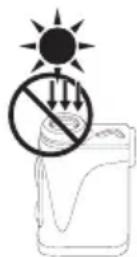
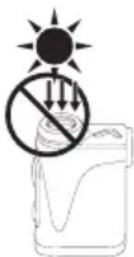
Do not leave the eyepiece in direct sunlight. The condenser effect of the lens may damage the internal display surface.
CARE AND MAINTENANCE PRECAUTIONS
LENS
Be careful that you do not directly touch the lens surface with your hands when cleaning it. Remove dust or lint with a blower*. For fingerprints or other stains that cannot be removed with a blower, wipe the lens with a dry soft cloth or cleaning cloth for eyeglasses, using a spiral motion that starts at the center of the lens and working towards the edges. Wiping too firmly or wiping with a hard material may damage the lens. If this fails, gently wipe the lens using a cloth lightly dampened with commercial lens cleaner.
MAIN BODY
After gently removing dust with a blower, clean the body surface with a soft, clean cloth. After use at a seaside, wipe off salt that may be on the body surface with a damp, soft, clean cloth, and then wipe with a dry cloth. Do not use benzene, thinner, or other cleaners containing organic solvents.
STORAGE
Water condensation or mold may occur on lens surfaces because of high humidity. Therefore, store the product in a cool, dry place. After use on a rainy day or at night, thoroughly dry it at room temperature, then store in a cool, dry place.
- A rubber cleaning tool that blows air from a nozzle.

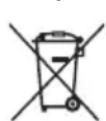
Symbol for separate collection applicable in European countries
This symbol indicates that this battery is to be collected separately. The following apply only to users in European countries.
- This battery is designated for separate collection at an appropriate collection point. Do not dispose of as household waste.
For more information, contact the retailer or the local authorities in charge of waste management.

Symbol for separate collection applicable in European countries
This symbol indicates that this product is to be collected separately. The following apply only to users in European countries.
- This product is designated for separate collection at an appropriate collection point. Do not dispose of as household waste.
- For more information, contact the retailer or the local authorities in charge of waste management.
Getting to know the Laser Rangefinder
Key features
- Employs the First Target Priority algorithm that makes a flagstick easy to measure
- LOCKED ON sign (First Target Priority detection sign) is lit when measuring overlapping subjects and the distance to the closest subject is displayed
High-quality 6× finder with multilayer coating - Larger ocular for easy viewing
- Switch between two measurement display modes for the internal display: Golf mode (slope adjusted distance (horizontal distance ± height) and actual distance) and Actual distance mode
- Golf mode (default setting) displays the slope adjusted distance (horizontal distance ± height) which is useful for golf
Built-in Actual Distance Indicator - Press and hold down the PWR button to activate the continuous measurement function (up to approx. 8 seconds)
Automatic power shut-off (approx. 8 sec. unoperated from standby screen) - Rainproof — JIS/IEC protection class 4 (IPX4) equivalent (under Nikon's testing conditions)
- Invisible/Eyesafe EN/IEC Class 1M Laser
This product uses an invisible laser beam for measuring. It measures the time the laser beam takes to travel from the rangefinder to the target and back. Laser reflectivity and measurement results may vary according to climatic and environmental conditions, as well as the color, surface finish, size, shape and other characteristics of the target.
Measurement may be inaccurate or fail in the following cases:
In snow, rain or fog
Small or slender target
Black or dark target
Target has stepped surface
- Moving or vibrating target
- When measuring the surface of water
Target measured through glass
- When the target is glass or a mirror
- When laser incidence to the target's reflective surface is oblique
About measurement results
This device is a basic rangefinder. Its measurement results cannot be used as official evidence.
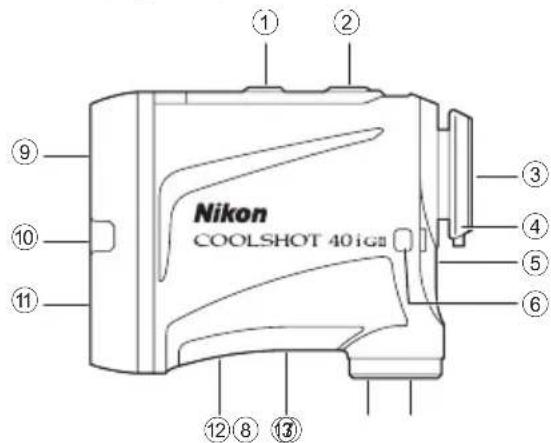
Nomenclature/Composition
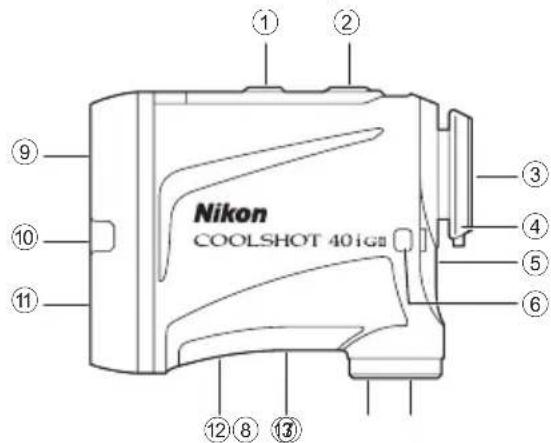
① MODE button
② PWR button (POWER ON/Measurement button)
③ 6× monocular eyepiece
④ Eyecup/Diopter adjustment ring
⑤ Diopter index
⑥ Strap eyelet
⑦ Battery-chamber cover
⑧ Battery-chamber cover "Open" indication
⑨ Monocular objective lens/Laser emission aperture
10 Actual Distance Indicator
① Invisible laser detector aperture
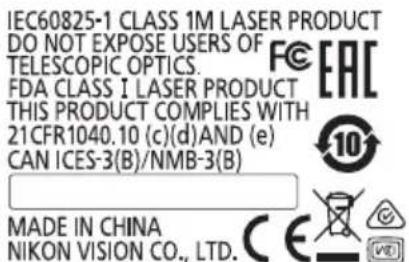
12 Product number label
13 Indication
- The carabiner-like ring that comes with the case is for the purpose of carrying the Laser Rangefinder only. Do not hang anything heavy on it, nor tug on it strongly. It cannot be used for climbing.
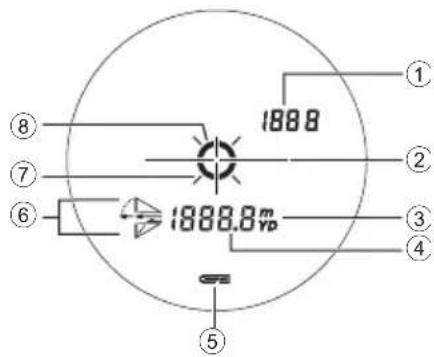
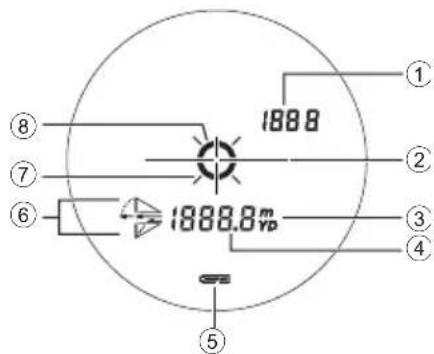
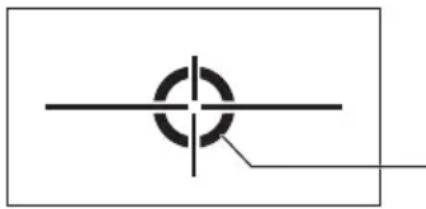
□ Internal display
Actual distance (in Golf mode)* ----: "Failed to measure" or "Unable to measure"
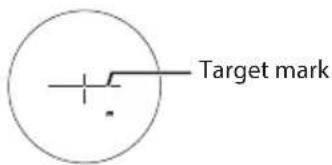
② Target mark :Aim at the target you want to measure. Position the target at the center of the mark.
③ Unit of measure (m: meter/YD: yard)
④ Distance ----: "Failed to measure" or "Unable to measure"
⑤ Battery level indicator
⑥ Golfmodemark*
巧 Laser emission mark: Appears while the laser is being emitted for a measurement. Do not look towards the objective lens side while this mark is shown.
⑧ LOCKED ON sign (First Target Priority detection sign)
: When measuring overlapping subjects, and the distance to the closest subject is displayed, this sign is lit.
- For details, refer to "Changing the measurement display mode".
- The internal display of this product is enlarged by the eyepiece. Although you may see dust that has entered, it does not affect the accuracy of measurement.
Functions
First Target Priority algorithm
When measuring overlapping subjects, First Target Priority algorithm displays the distance to the closest subject.
LOCKED ON sign (First Target Priority detection sign)
When measuring overlapping subjects, such as a flagstick with trees in the background, and the distance to a closest subject is displayed, LOCKED ON sign (First Target Priority detection sign)* is lit in the viewfinder.
- Single measurement: When measuring overlapping subjects and the distance to a closest subject is displayed, the sign appears.
Continuous measurement: When displayed figures shift to a closer subject, the sign appears.

Actual Distance Indicator
When the measurement display mode is set to Actual distance mode, the Actual Distance Indicator blinks while the Laser Rangefinder is ON.
You can find out at a glance that the inclinometer function is not being used.
Inserting/Replacing battery


Type of battery
3V CR2 lithium battery × 1


Inserting/Replacing battery
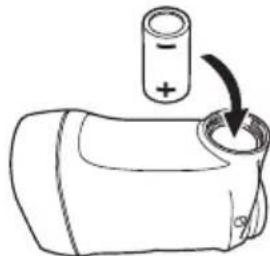
- Open the battery-chamber cover.
Rotate the battery-chamber cover counterclockwise and remove it.
- Insert the battery.
To replace the battery, take out the old battery before inserting a new one.
Follow the battery insertion mark inside the battery chamber to insert the + and - ends of the battery in the correct orientation (insert so that the - end faces up). If the battery is not inserted correctly, the Laser Rangefinder will not operate.
- Attach the battery-chamber cover.
Rotate the battery-chamber cover clockwise and secure it firmly. When attaching the battery-chamber cover, securely screw it all the way and check that it is secured.
- The battery-chamber cover may be difficult to rotate because this product uses a rubber seal to maintain its water resistance capabilities.


Battery level indicator
| Display Description | ||
| = | After power on, displays for 2 seconds only. Sufficient power available. | |
| = | After power on, displays for 2 seconds only. | Power getting low. Prepare to replace the battery. |
| = | Displayed continuously. Low. Battery should be replaced with a new one. | |
| = | Blinks. After blinking 3 times, automatically powers off. | The battery is empty. Replace the battery. |
Changing the measurement display mode
Switch between two modes (refer to the figure below) according to your golf playstyle. The displayed information differs depending on the mode. Factory default setting is golf mode.
- Press the PWR button to turn on the Laser Rangefinder.
- The measurement display mode switches every time you press the MODE button.

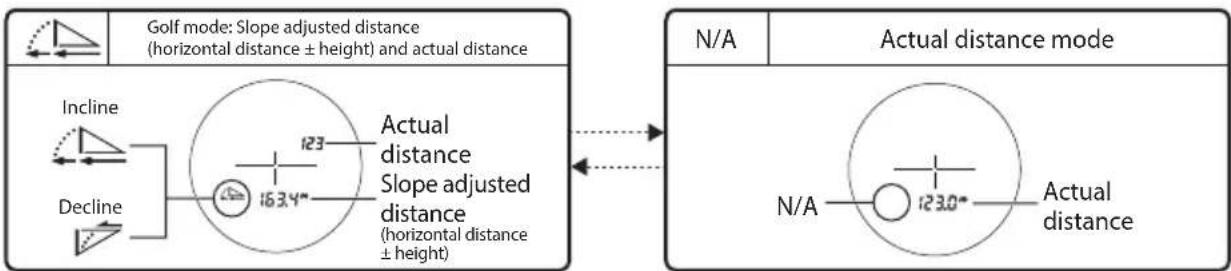
In Actual distance mode, the Actual Distance Indicator blinks.
- The setting is saved even when the Laser Rangefinder is turned OFF.
Changing the distance display unit
For the display unit of the measurement results, select YD (yards) or m (meters). Factory default setting is YD (yard).
- Press the PWR button to turn on the Laser Rangefinder.
- Press and hold the MODE button for at least 1.5 seconds, and release your finger from the button when the distance display unit changes.


- The setting is saved even when the Laser Rangefinder is turned OFF.
Measurement
Caution — Controls, adjustments or usage of procedures other than those specified herein may produce negative effects or damage to your health due to laser radiation.
- Before measuring, confirm each menu setting by referring to "Changing the measurement display mode" and "Changing the distance display unit".
□ Adjusting the focus of the internal display
If the internal display is difficult to see, adjust the focus with the following procedure.
- Press the PWR button to turn on the power.
- Look through the eyepiece and rotate the diopter adjustment ring until the internal display comes into focus.
Diopter adjustment ring
Measuring
- Press the PWR button to turn on the power.
If you do not operate the button for about 8 seconds, the power turns off automatically.

Immediately after power-on
- Aim at the target.
Position the center of the target mark on the target.
- Press the PWR button to measure.
After measurement, the result is displayed for approx. 8 seconds, then power automatically turns off. Press the PWR button while the power is on to measure again.
Single measurement
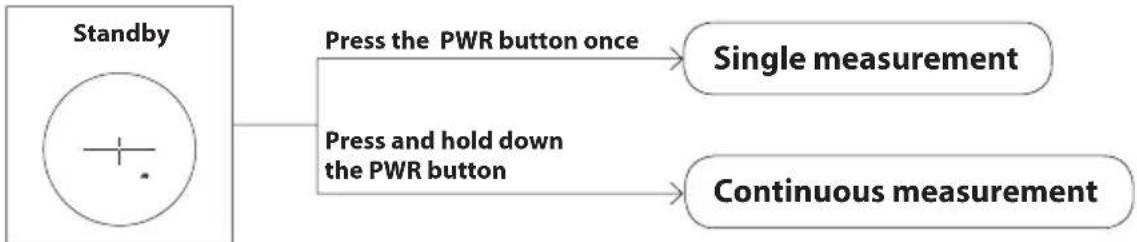
Pressing the PWR button once starts single measurement, then displays the results.
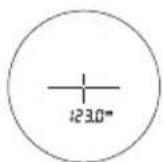
Example of measured distance display
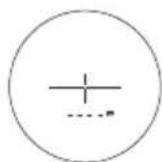
Example of measurement failure
Continuous measurement
Press and hold down the PWR button to start continuous measurement up to approx. 8 seconds. During measurement, the measured result is displayed consecutively while the laser emission mark is flashing. If you release your finger from the button, continuous measurement stops.
- When measuring a flagstick at a golf course
- Keep targeting the flagstick at the center of the target mark with the continuous measurement function to minimize the effects of hand shake.
Technical notes
□ Specifications
| Measurement range (actual distance) 7.5-1 | 460 meters/8-1,600 yards |
| Distance display (increment) | Actual distance (upper): Every 1 m/yd. Actual distance (lower): Every 0.5 m/yd. Slope adjusted distance (lower): Every 0.2 m/yd. |
| Accuracy (actual distance)*1 | ±0.75 m/yd. (shorter than 700 m/yd.) ±1.25 m/yd. (700 m/yd. and over, shorter than 1,000 m/yd.) ±1.75 m/yd. (1,000 m/yd. and over) |
| Magnification (×) 6 | |
| Effective diameter of objective lens (mm) 21 | |
| Angular field of view (real) (°) 7.5 | |
| Eye relief (mm) 18.0 | |
| Exit pupil (mm) 3.5 | |
| Diopter adjustment ±4 m | -1 |
| Dimensions (L × H × W) (mm/in.) | 96 × 74 × 41/3.8 × 2.9 × 1.6 |
| Weight (g/oz.) Approx. 170/6.0 (without battery) | |
| Operating temperature (°C/°F) -10 — +50/14 — 122 | |
| Operating humidity (%RH) 80 or less (without dew condensation) | |
| Power source | CR2 lithium battery × 1 (DC 3V) Automatic power shut-off (after approx. 8 sec. unoperated) |
| Structure Rainproof | *2 |
| Electromagnetic compatibility | FCC Part15 SubPartB class B, EU:EMC directive, AS/NZS, VCCI classB, CU TR 020, ICES-003 |
| Environment RoHS, WEEE | |
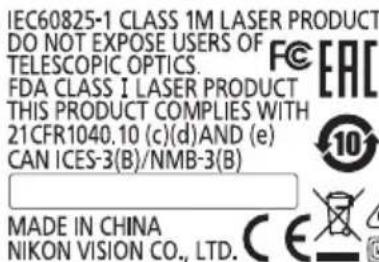
| Laser classification | IEC60825-1: Class 1M/Laser Product FDA/21 CFR Part 1040.10: Class I Laser Product |
| Wavelength (nm) | 905 |
| Pulse duration (ns) 9.7 | |
| Output (W) 33.8 | |
| Beam divergence (mrad) Vertical: 0.25, Horizontal: 1.8 | |
-
The specifications of the product may not be achieved depending on the target object's shape, surface texture and nature, and/or weather conditions.
1 Under Nikon's measurement conditions.
2 This product is equivalent to JIS/IEC protection class 4 (IPX4) (under Nikon's testing conditions). This rating does not guarantee the water resistance performance of the unit or that it will be free from damage or problems under all conditions. Please observe the following when using: -
Do not operate or hold the product in running water.
If any moisture is found on movable parts of this product, stop using the product and wipe it off.
Battery life
Approx. 8,000 times (at approx. 20^ (68^)
This figure may differ according to conditions such as temperature and other factors. Use only as a guide.
- The battery supplied with this Nikon Laser Rangefinder is for operation checking. Due to natural electrical discharge, the life of this battery will likely be shorter than that noted above.
Troubleshooting/Repair
If this product fails to function as expected, check the list below before consulting your local dealer or the store where you purchased it.
- If there is a problem with the product.
| Problem Cause/Solution | |
| • Does not turn on | • Press the PWR button (top of the body). • Check that the battery is inserted correctly. • Replace the battery with a new one. |
| • Unable to measure • Anomalous result | • Confirm the settings. • Confirm if it can measure a large target close to you (example: a building approx. 15 m/yd, ahead of you). • Clean the lens surface if necessary. |
| • is displayed in the internal display | • Failure indication. Please contact your local dealer or the store where you purchased the product. |
If you require a repair, please contact your local dealer or the store where you purchased the product.
Do not repair or disassemble. It may result in a serious incident.
Please note that Nikon is not responsible for any direct or indirect damage if the user attempts to repair or disassemble the product.
Espanol
CONTENIDO
Introduccion
Leaayoestrero 21
Nomenclature/Composition. 43
Ecran interne. 44
Fonctions
Algorimto First Target Priority
③ Meeteenheid (m: meter/YD: yard)
④ Afstand
B3OJACHOCTb I MEPbI INPEIOCTOPOXHOCTN
PNI 3KcJIyATAUIN. 124
3HaKOMCTBOcIa3epHbIM daJIbHOMePOM
OchOBhble xapaKTepeNCTnKn 127
CneunphiKaua/cocTab 128
BcTpoEHnbl dncnnei 129
Функцин
AIIropuTm npnopTeTa 6nkaauee uei 130
3HaK «LOCKED ON» (3HaK o6HApyKeHn npOpnteTa 6JnxKaIwe uei) 130
HnkaTop oakTuueckoro paCToHHa 130
UcTaHOBka/3aMeHa aKKymyIaTOpHoI 6aTapeN
Tin 6atapen. 131
UcTaHOBka/3aMeHa aKKyMylTopHo6aTapeu...131
INHdkaTop ypOBn 3apdKn aKkymyIaTOpHo6aTapeu ...131
U3MeHeHne pexnma oTo6paXeHHna U3MepeHHra
HaCtpoNka eDHHu oTo6paXeHn paCCTOHNH
U3mepenHe
PerynupOBKa fokyca BHyTpHHeRo nncIeJ....134
IpoBedeHne n3MepeHn 134
Pa3oBoe n3mepenHe 135
HenpepbIBHoe n3mepene.. 135
Texnueckne npmeuahna
Texnueckne xapaKtepuCTnKn 136
IOnckn yctpaHHeH HeNCnpaBHOCTe/peMOHT...138
BBeHeHne
PpOuHTaIe 3TO B nepByIO oupeBb
Blaorapum 3a npno6peHne naeepHoro daNbHomepa Nikon.
Ipeed hauanom pa60tbBHNMaTeNbHO npouHTaTe daHHe pkyoOCTBO, yTObI npabunbHO nCNoJb3ObaTb N3dennie. Iocne npouTeHnA depKnte daHHe pyKOoDcTBo B neKoOCTynHom MeCe dIy NOlyueHn CnpaBKn B daJbHeuWeM.
O daHHOM pyKOBoDCTBe
JaHHoe pyKOBODTO 3aPpeaaeTcB BOCnpon3BOOnITb, npepaBaTb, npeo6pa3OBBiBaTb, xpaHtB B NONCKOBONCTeMe nnnepeBOOnTb Ha IIO60 Ra3bIK B IIO60 fOpme IIO6bIMn CpeIcTBAMN 6e3 PpeBapNTeBHOrO NUCbMeHHOrO pa3peWeHnO T KOMNaHN Nikon.
- UJIIOCTpaunn n 3o6paXeHnA DCnIeB DaHHOM pyKOBOdCTBe MOrY T OTnuaTbcra O T aKTNUeCKORO n3deJn.
KOMnHaNr Nikon He HecET OTBETCTBEHHOCTn 3a IIO6bIe OUI6KN B 3TOM PYKOBODCTBE.
BHeHn Bn DaHHoro n3dne, eO xapaKtepntuN N BO3MOxHOCTM MOrTy 6bTb N3MeHeHb 6e3 npedBaPHTbHORo yBeDOMHeHn.
O paHnonomexax, co3daBaembIX opraHamu ynpabHeHn
JaHbI np6Op COoTBcTBye Tpe6ObaHnM Yactu 15 PpaBn FCC. Pa6ota np6opa COOTBeTCTByeT TakIM Dbym ycNoBnM:
(1) daHHbI np6Op He MoKet 6bITb NCTOuHnKOM HeOnyCTmBix NOMex;
(2) daHbI np6Op DoJIkeH npHMaTb IIO6be BxOJaUe NOMexn, BKIOUaY IOMexn, KOToPbE MOrTy HApuHTb HopMaIbHyU pa6Oty np6Opa.
JaHHOe 6OpOyOBaHHe npOBepHo Ha COOTBcTCTBne OOrpaHueHnM dIg UINpOBoX yCtpoCTB KlaCCa B coRnACHO Actn 15 PpaBn FCC n DnpeKTHbB EC o6 3MC. TaKne OrpaHueHnPa3pa6oTaHbI dNn HApEkaUe 3aunTbI OT HeOnyCTMbIX NOMEX B CTAIOHApHBx YcTahOBkax. DaHHOe 6OpOyOBaHHe reHepnpyeT, NcNoJIb3yET M0KeT N3NyUaTB paIOuOACTOTHyO 3HeprnIO pNn HecO6NIODeHNpyKOBOdCTBa NO EKnIyAtaUNn, a TaKke MoKet Bbl3BaTb HeOnyCTMbIE NOMEX B pa6oTe CpeCDTB paIOOCBzN. OHaKo rapaHTnpOBaTb OTCYCTBNE NOMEX B ONpeJEnHHbx YcTahOBkAX HEBO3MOxHO. Ecn DaHHOe 6OpOyOBaHHe cTaET npUnHNOH HeOnyCTMbIX NOMEX pPnEma paNIO nn TeLEBn3IOHHoro CnHana, KOToPbIE MOxHO ONpeJENbTB, BKIOUaN N BkIKUOaN Pn6Op, NlB3OBaTeJAM peKOMEHdyETcN PONbTaBCr YcTpaHNTb NOMEx C NOMOUsO ODNHO N3 HNXeONNCAHbIX CNOC6OB:
CmeHnte noJoxKeHne npnemHO aHTehHb IINI nepemecntte ee B dpyroe MeCTO.
- YBeHnUyTe paCCToHHe Mekdy npu6Opom u npueMHnKOM.
- IpoKoHcyIbTnpyTeCb C oΦuHaJIbHbIM dIJIePOM uIN ONbITbIM CneuaJIaNCTOM NO paIINO- IN TeNaIpaPaType.
PpmeaHne IJIPOJb3OBATeJIeB KaHaDe CANICES-3(B)/NMB-3(B)
B630NACHOCTb IMEPbI PPEIOCTOPOXHOCTIN INKINYATAUIN
Ctporo co6nOaIte yka3AHn, npBBeHbIe B daHHOM pyKOBOdCTBe, 7TO6bl 6e3oNaCHO nCNoJIb3OBaTb 3To n3DeJIne I He DOyCTHTb BO3MOXHbIX TpaBM Ce6r I OKpyXaIOUxu INN NOBpeKdEHNmUySeCTBa. 7TO6bl npABNbHO nCNoJIb3OBaTb n3DeJIne, y6eINTec, 7TO BcR INHOpMaucn, n3LOXKeHHaB pyKOBOdCTBe, IOHIMaETc npABNbHO.
PDEyIPEKXDEHNE
Yka3bIbaeT HTo, YTO IIO6OHe HnPaBnIbHoe NcNoIb3OBaHne, INHOpnpUoOee CBeDeHn, N3IOKeHHbIe 3Decb, MoKet npNBecTu K CmepTu NN K cepbe3HO TpaBMe.
OCTOPOXHO
YKa3bIbAeT Ha To, YTOIO6oe
HeINpaBnIbHOe NcNOJIb3OBaHNe,
NTHOPnpyUOSeE CBeDEHnA,
N3IOKeHHbe 3JeCb, MOKe TpNBecTN K
TpAbMe IIN MaTePnaJIbHOMy Uep6y.
MEPblI PPEIOCTOPOXHOCTN (la3epHoe yctpOICTBO)
B 3TOM u3dennn npumehaetcna HEBNIMbI Ia3epHbI Lyu. PnpdeKnbAaTeCb TaKnx pekomeHaau:
PDEyPExKDeHNE
- TIA B OTBepCTne Ia3epHOro n3IyataTe, He Haxmaite KhoNky PWR (PiTaHne). 3To MoKeT npuBecTu K NOBpeXdeHnIO rna3.
He HanpaBnIe B rJa3a.
He HappaBnIe lyu na3epa B cTOpOny npynx IIOJe.
He cmotpnte Ha na3epbI uepe3 dpyrne onTnueckne np6opby (HaNPmep, uepe3 o6bektnbHnn 6nHOKN).3To MOKET npBecTN K NOBpeKeHIO rna3
Korda n3MepeHn He BbINOHJIOCTc, He depxnte naIbci Ha KhONKe PwR (PiTaHne), yTo6bl He dOnyctntb cnuyainHO BkIouehn Na3epa.
Ecn np6op He npednonaraetcnaonb30BaTb B TeueHneIINTeJIbHORO BpemeHn, n3BLeKeNTeN3 Hero aKKymyTAOpHyIO 6aTapeio.
He pa3bpaTe, He moNfNpUyTe n He pemOnTpyTe 3To n3dennie. Ja3epHoe n3nyeHne MoKet nary6Ho Otpa3nTbcra Ha 3doPobBe. Ecn n3dennie 6blno pa3o6paHO, MoNfNpUPOBaHO nnO TpeMOHTnpOBaHO, rapaHTna npOn3BODnteHa Hrero He DeiCTByET.
XpaHnTe 3TO n3dennB HeoCTyHOM dIeTe MeTe.
MEPbI INPEIOCTOPOXHOCTN (MOHOKyIaP)
I P E D Y N P E X K D E H N E
- Pn nCnoJb3ObaHnn 3TO rN3dEHH N B KOEM Cnyae He CMOTPnTe HENOCpeDCTBHeHNO HO CONHcE,ApKNI CBETIINIa3epbl.3TO MOKeT npNBecTN K cepbe3HOMy NOBpeXJeHNIO Tla3 IIN CTaTb PnUHHoCJIeNOTbl.
OCTOPOXHO
Держпгл actIKOBьm MeWOKду NaKOBKn DaHHORO N3dENN INHbIeMeNKNe DeTANB HeIOCTynhBx DnIgTeMeCTax.MeWOK MoKET nepeKpbITb potINHnoc, INpe6eHOK MoKET 3aDOXHyTcR.
CobJIOaIte octopoxHocTB,TO6bI detn cnyauHo He nporlotnn MeKne deTaN nn npHaDnexHocTc. Ecn detn npornot TaKe deTaN, HemeJeHHo 6paTntecb K BpaY.
BbIKIOaIte daHHoe n3dJIne, KOrda OHO He IcNoIb3yeTc.
IJIa nepeHOCKn DaHHoro n3dennr nCNoJb3ynte yTnp.
- Ecnn daHno n3dne pa6oTaET He npabnIbHO no IIO60 npuHHe, HemeJeHHo pKeKpaTnte erO nCNoJIb3OBAHne n o6paTntEcB B cepBnchbl ueHTp KOMnaHn Nikon.
He octabJnTe daHnoe n3dene Ha HeycTouNBOI NOBepxHOCTn. OHO MoKet yNaCTb, YTO cnOco6Ho npNBecTn K TpaBMe IJI N K HenoJaKaM B ero pa6ote.
He nCnoJb3yIte daHHoe u3dennepn xOdb6e.MoKHO cNOTKHytbcraNNyn ynaCTb,TO cNoCo6Ho npNBecTu K TpaBMe uNk HenoJaKaM B pa6ote u3dennia.
HepackaunBaIte daHHoe n3dJeHne,
Jepka ero 3a peMeHB. PnN 3TOM
MOKHO 3aTeb OKpyKaIOuX N
PpUHNHTb NM TpaBMy.
- PnIN cNoB3OBAHn INxpaHeHn B TeueHne dIrrTO BpeMeHN pe3NHOBbIe DeTaN DaHHORo N3DeJIna (HaNPmep, HArNa3Nk) INn pe3NHOBbldeTaII NOCTABJIeMOrO cyTlPa n PemHr MOyT NaATb KPOuNTbC. KPOuKN pe3NHbIMoYr pncTbK OdExKeN O OCTaBtB Ha Hei PAnHa. IPOBepRte INxCocToHnE nepei NCNoB3OBAHnEM np6opa n 6paTInTeCb B cepBnChbI ueHTp KOMnAHn Nikon pnO6hApUkeHn KaKoro-Jn6o DeΦeKaTa.
ДиTeNbHoeИспОьЗOBaHne pe3nHOBOrHafla3HnKa MoKeT Bbl3BaTb pa3dpaXeHne Koxn.Пи ПЯВЛeHnII pN3HaKOB pa3dpaXeHnIpeKpaTnte ИСпОЛьЗOBaHne И HeMeДЛeHNo 6раТNTecbКВрау.
MEPbI INPEIOCTOPOXHOCTN (nHTueBa 6aTape)
HnpaBnIbHoe nCnoB3ObaHne MoKET npVBecTn K pa3pyuWeHIO nn npoteUeJIHTNeBOI 6aTapeN, YTO cnOCo6HO NOBpeINb np6Op nn OCTaBtB IaTHa Ha pyKaX u OdekJe. PnpdePknBaITcB TaKx peKOMeHdaU:
BctabnIte 6atapeIO,co6JIIOdaI noJrphOCTb (+n - )
ИЗькайебатаю,Kогда онанлпнocью pa3ржkeha,在и ecnnp6op He npednoIaraeTcNcNoIb3ObTaB TeueHne doIrTO BpeMeHn.
He donyckaTe nonadaHna 6atapeB OOrh bN B Body. Hnkorga He pa3bnpaTe 6atapeIO.
He 3apjkaaTe JntneBvio 6aTapeIO.
He 3aMbikaTe OKOheHbIKoHTaKT 6aTapeHOrO OtceKa.
He nepehocnte 6aTaapeo B KapMahe nn CymKe BMeCTe C KJIouaMn Nnn MOHeTaMn. 3To MoKeT npuBecTu K KopoTkOMy 3aMbKaHnO n neperpeBy 6aTapei.
- Ppi npoteque kndkoctn n3
nntnebo 6atape H aodeknynn
KoKy npomOte nopaxkeHHbI
yactok 60nbwm KOnuYeCTBOM
Bobl. Ecnx kndkoctb nonana B
rna nN B pot, npomOte BoDOn I
HemeJeHHO o6paNTeCb K BpaCy.
- YTNIN3NpyIte INTnEByIO 6aTapeIO B COOTBeTCTBUN C MeCTHbIMN Tpe6OBAHNAMM.
MEPbI INPEIOCTOPOXHOCTN INPNI O6PAUeHnN N 3KcPIYATAuN
He noDBepraTe 3To n3dene Hn3uYeCKm COTpCeHnM.
EcnBbCnyaHNO noDbeprnn 3TO n3dene COTPcHEnIO nn yPOHNn erO nCHTaTe, qTO OHO HeNCnPabHNO, HEmeDJIeHHO 6paTntecb K MeCTHomy DInIepy NN B cepBnchbl cHTp KomnaHNI Nikon.
He nCnoB3yIe n3dJIne noD BOIOJ.
Kak MoKHO cKopee ydaJnTe C np6opa KaIIN DoXJa, BObbl, a TaKKe neCunHKuN IIN rpr3b MRAKO IN YNCTOIN TKAHbIO.
Ecni 3to n3dene ne noBepraetcpe3kIMn3MeHeHnAMTEMnepaTpybI (HeoxnuaHHOBHCNTcN3XoJOnaB TEnIOe NOMEseHne HAO6OpOT),NOBepxHOCTNo6BeKTuBA MOrTy3aNoTeb.He NCnOJIb3yInTe np6OpDo NOHoro Ncye3HOBeHnA3aNOTBaHn.
He octabnIte 3To n3dJIne B aBTOMO6nIe B xkapKn nn COJHeHb IeHb nn pIaOM C o6OpyIOBaHNem, BblJeIaIOUm TepNo.
He octabTnTE OKyIaP NOB BO3JeCTBnEM npMbIX COJIHeuHbIX lyuei. KoHDeHCnpyUoUsn 3OeKTIINH3bl MoKeT npNBecTN K NOBpeXJdeHnIO NOBepxHOCTN BCTPOEHNO DnCnJIeA.
MEPbI INPEDOCTOPOXHOCTN INPU YXODE IN TEXOBCLYJKUBAHIN
Obbektub
CTapaiTeB He npKacatcbc HEnocpeDCTBeHHO K NOBepxHOctn 06bekTNaBpN erO ouNCTke. YdaJIte Nblb Nll BOPCNHK n NOMOuIg rpyun*.OTneayATKn naIbueB n dpyrNe 3aqr3HeHn, KOToPbIe He ydaetC ydaIITb C NOMOuBIO rpyuIN, cJeDuYe T ydaJIaTb cyXoM MraKoN TkaHbIO NII TkaHbIO IJRA OUYCTKN OUCOB, nepemeaJ ae IO CNIPAIN OT CEHTpa 06bekTNaBA K erO kpaAM.CNIuKOM 6oNbUoE ycInne NII XeCTKN MaTePnaI MOryT pnpBecTN K NOBpeXdEHNO 06bekTNaBa.Ecn 3aqr3HeHne ydaIITb He ydaeTc, octopoxHO npOpnte 06bekTNB TkaHbIO, cIerKa CMOueHHOHNIKKOCTbIO IJRA OUYCTKN 06bekTNoB.
KOPNYC
OcToPOxHO ydaJIb NBc NOMoUbIO rpyuIN, OunCTnTe NOBepXHOCTb KOpNyca MraKoI N UChTOI TkaHbIO. Iocne IcNoIb3OBAHn np6Opa Ha MOpCKOM No6epeKBe, COptNE CoJIb, KOtOPaR MoJla cKOnNTbcr Ha NOBepXHOCTn KOpNyca, BnaXHoI, MRAKOI N ChTOI TKAHbIO, a 3aTEM IpOTpTE HAcYxo CxyOJ TKAHbIO. He IcNoIb3yIte 6eH30J, pactBOpNTeIb IIN dPyrNe uNCTaUe BeueCTBa, B COCTAB KOTopBX BXODT OPraHnueckne paCTBOpNTeI.
XPAHEHNE
Pn BbICOKOBlaXHOCTNu NOBepxHOCTx O6BeKTHBa MOKeT NOBHTcK KOHeHcat NIN NIIeCHeB. NTo 3dEne CneDyET XpaHtB INPOXHaHOM CyXOM MeTe. NcNe IcNoIb3OBAHn NO dOxJem NIO HO CNEyET TuaTeNBO BbCyHtB Pn6Op Pn KOMHaTHoI Tempeatype, NoCne Yero XpaHtB INPOXHaHOM CyXOM MeTe.
- Pe3nHOBaa rpya npeHa3HaueHa ДЯ OунCTkn рибopa CTpyeɪ ВоЗdуxa, РдаБаEMоЧеэЗ солно.

CmB0n pa3dienbHoro c6opaOTxoOOB, npMehaembI B ebponeeCKx CTpaHax
DaHHbI CmB0N O3HaayeT,HTO 3Ta
6BaTapeoJOnKHa yTNINHPOBAtcB
OTEnbHO TO pTyHX OTXoDB.
PnBBeHeHHa NHXe HOpMaun KAcAETc
TolbKO nONb3OBatene IN cTpaH EBpOnb.
JaHHa6batapeHdoJNHa yTNIN3nOpaBtCBAOTDeBbHOOT dpYrNXOTXoOBBCOOTBeTCTByIOuNX npInemhBxnyHKHe. HyTNIMnpyTe BMEcE CbITOBbIMNOTOXdAMn
Дяпл养老服务бдунрбнйиформадиобразпсКрpoадучИКМСЕТьMВАCTAM,OTBETCTBEHнIM3aOBAPSTKYOTXOIOB

CmB0n pa3dienbHoro c6opa oTxoOOB, npmehrembi B ebponeecknx CtpaHax
DAnHbI CMMBOI O3HaayeT, YTO 3TO
n3dJeWne CNeYeT YTNIN3NPOBaTb
OTdJIbHO OT dpyHX.
PnBBeHNH HnKe INΦOpMaUNa
KcAeaTcA TOnbKO NtB3ObaTeNe I3
CTpaH EbpOnbl.
JaHHOe n3dne moJHKo yTmN3nPOBbTaC OTeJbHoOT dpYnX B COOTBeCTByOuix npMeHHbNyHKTax.He yTmN3npyte BMeCe C bItobBMn OTXdAMn.
Длголууньбоге noDpo6Hoi mHopmaunm 6obpatntecb K npodabuy INI K MeCTbIM Bnactm, OTBeTCTBHeHHbIM 3a 06pa6Otky OTxOJOB.
3HaKOMCTBO C Na3epHbIM DaJbHomepOM
OchOBhIe xapaKTepnCTmKn
- IcnoIb3yETc aIITropNT m npHOpTeta 6mJkaWse UeN, nO3B0JIIOU nnERKO n3MePntb paCCToHne Do fJaXKa
-ПиИЗМЕРЕНИ ПЕКРБИBAIOUxСЯ OББЕТОВ 3нАК «LOCKEDON》(3нАКOBHApYKeHЯпиОпИтETa6nЖашeци)noCBeuHbAeTcB BUNOINCKaTeNe,IpacSTOrHnedo6nЖaшeroOББЕТaBBBOIDNTcHaДICnJIeN - BbICOKOKaueCTBeHHbI BNIOUCKaTeNb C MHOROCLOHbIM NOKpbITnEM, OeBcneuBaOUsN 6-KpaTHoe yBEnuHeHne
- Okynap 60nbwero pa3mepa dny ydo6ctba Ha6njoednna
- IpeKlnoueHne Mekdy DByMa pexImaMn OTo6paXeHn N3MepeHn DnBHyTpeHHero DnCnJIe: pexIMOM nIrpbl B roIbΦ (pacCTOHaHne C nonpabKOi Ha CKIOH (ropu3oHTaIbHOe pacCTOHaHne ± Bbcota) n oakTuyeckoe pacCTOHaHne) npexIMOM oakTuyeCKoro pacCTOHaHn
B pexnme nrgpbI B roJbΦ (ctaHapTha HactpoKa) Ha dncnne BbIOuNTc paCCTOAHne C nonpaBkoi Ha cKIOH (ropn3OHTaJIbHOe paCCTOAHne ± BBICota), 4TO NOE3HO npn irpe B roJbΦ
BCTpoHHbI INHnKaTOP aKtNueCKOro pacCTOHHa
YTo6bI BKHOnuTb yHKnIO HnpepbIBHO n3Mepenra, HaxmTe KhoNky PWR u ydepXnBaIte ee np6n3ntelbHO do 8 cekyHd. - ABTomatnueckoe OTKIOUeHne NITAHN (npm. Upe3 8 ckyHOnOTCYTCTBnKaKnx-Jn6o DeIcTBn Ha KpaHe OxuHaHn)
3aunTa OTdoxJa: KnaCC 3aunTb4 NO CTaNdapTaM JIS u IEC (IPX4) (B yCnoBnax TeCTnpoBaHnra Nikon). - HeBnIIMbI n 6e3oNaChbI dIra rna3 Ia3ep Klacca 1M cTaNdapTa EN/IEC
Ope3yNbTaTAX m3MepeHnA
JaHHOe yctpoiCTBO npedctabIaTe c6oB 6a3OBbI daIbHomep. PezylbTaTbi erO n3MepeHn He MOryt NCNoJIb3OBAtCBaB OfNuaJIbHbIX CBnDeTeIbCTBax.
B 3TOM n3dennn dnn n3MepeHn npumehreTCn HeBnIMbI na3epHbI lyu. Pnp6Op n3MepaET Bpem, 3a KOTOPoe na3epHbI lyu DOxOAnT OT daNbHomepa K ceni n o6paTHo. Ko3phiunueHT OTPaxeHnna3epa n pe3yNbTaTbI n3MepeHn MOrTy OTnUcaTbcR B 3aBucNMOCTn OT KInMaTuYeCKNX ycNoBn N COCTOHNn OKpykaIOSei Cpebl, ZBeTa, OTdeKNn NOBepXHOCTn, pa3Mepa, fOpMbI n Dpyrnx XapaKTePncTnk ceHn.
I3mepeHne moKet 6bItb HeTochbIM nIIN HeBO3MOXhbIM B CNeDyUOx CNyuaX:
Ioxb,CHernnTymaH
MaJIeHbKaIyIuY3KaIzIb
- Yepna nn TEmHaar ceIb
LcIbcoCTypeHuaToIIOBepxHOCTbIO
- DnraouaJcNb6BnpuyoJcaeIb
- UelbIuN3MepeHnBbl6paHa NOBepxHOCTb BODbI
-Измеренье paCCToHnДо ZeJI npOBoDHTcA uepe3 CTeKNo
- Ecnn ueIb cTeKJIHHa HnH 3epKaIbHa
- Ecni lyu nahepa nonadaet Ha otpaxaioyuo nobepxHOCTb uei HAKIOHNO
CneunΦnkaa/ocTab
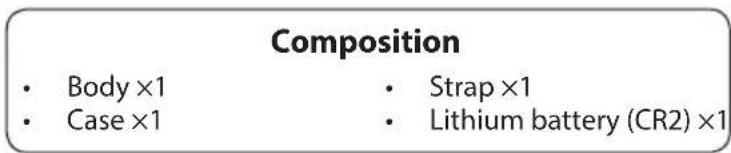
CocTab
Kopnyc × 1
PemeHbX1
Φytnp×1
-Литnevвая6atapera(CR2)×1
① KhoNka MODE (Pexm)
② KhoNka PWR (ΠιTaHne) (KhoNka ΠΙΝΑΤΑHNE BKJI./I3mpeHne)
③ MoHOKyIaRbHbOkyIaRc6-KpaTHbIM yBJIuYeHHeM
④ Harla3Huk/KoNbCuO dNoontpuiHou HaCTpoKu
⑤ INHKeC DNONTPmHHOHACTPOKN
⑥ yuKo pEmHr
⑦ Kpbuika 6aTaapeHoro OTecka
8 INHdkaun «OpEn» (OTkp.) KpbIuKn 6aTapeHoro OTeKa
9IIN3aMOHOKyIrpHOrOobkeKtNbA/OTBepCTne na3epHOro n3nyuataeIa
10 INHnKaTOP aKTHueCKORo pacCTOHN
10TBePCTne npnEMHnKa n3JyueHnHEBnIMOro na3epa
12 Ta6nUka c Homepom 3dennr
13 Hndnkaun
- Kolbuto, noxoxee Ha Kapabun, npnilaraemoe K cyTny, npedha3Haueho TOnbKO dny nepehockn na3epHoro daIbHomepa. He noDBeWBAInTe Ha Hero yTO-lNo6 ToXkENoe n He TaUnTe 3a Hero cnBHO. Ero HEnb3r IcNoB3OBAtb Dnra Uen ne NOpBeMa.
BcTpoeHHbI dncnle
① ΦaKTnueckoe paCCToHHe (BpeKmE nRpbl B roJbΦ) --: «C6oN n3MepeHn» nIi «He ydaetc n3MePntb»
② yka3aTeIb ceIi HabeIte Ha cIb, paCtOHaHe Do KOTopoH Heo6xOIMo n3MePnTb. CoBmecHTe cIb C cEHTpOM yka3aTeIa cIeN.
③ EINHnCbI n3MepeHnA (m:M/YD:apDbI)
④PacctoHnE -:《C60uN3MepeHnA》nn《He ydaetcN3Mepntb》
⑤ INДиКaTOp yPoBnAЗрДк n aKKyMЛrTOpHoi 6aTapeN
⑥ yka3aTeBpeXIma nIrpbl B roJbΦ
7 Metka na3epHoro n3nyeHnna: OTo6paKaetcB BO BpeMa nCnoIb3ObaHnna na3epa n3mepeHnna. He cmOTpuTe B IIN3y 06BeKtNbA, KOrda oTo6paKaetc 3TOT 3HaK.
⑧ 3HaK «LOCKED ON» (3HaK o6HapyKeHn npOpntTa 6nkaaewe
C:ПиИЗМеренипepeКрьИаUоxСяОБeКТOBи BBIODEpacCTOЯHЯДобиЖаMueroОБeKTeHa DnICПЛe CBETITcR 3TOT3HaK.
*Длг полуевни ддпнгельнбх CBeDEHсм.«ИЗмehнepeжma OTO6paKeHnИЗмepeHnA»
BHyTpeHnn IincnIe Ha daHHOM yCTpoIcTBe yBeHnUbaETcOkyIaPOM. PncyTCTBne nbIIN He BnIeT HtoHocTh n3MepeHn.
Функцн
AInropntm npnopnteTa 6nxxauiwne cein
Pn n3mepennn nepekpbbaioxncs o6bektoB aIropntM npnopnteTa 6nkaaue cenn no3BOJAre OTo6pa3ntb paCCToHne do 6nkaaero o6bekta.
3HaK «LOCKED ON» (3HaK o6hApXkeHn npOpntTa 6nXkaaIwei cenn)
Korda npoucxoHITn3MepeHne nepeKpbIbAIOUxxCra 06BeKTOB, TaKnx KaK, HApnPmep, fnaKc DepeBbAmHa 3aHHe NpAe He, n pacCTOAHne DO 6nKaJWero 06BeKTA BbBOUNTCra Ha DnCnNe, TO 3HaK «LOCKED ON» (3NaK o6HapyKeHn npOpNTa 6nKaJWe ue nn)* NOcBeynBaETcBA BuOnckatene.
*Pa30OBe n3MepeHne: Ecn npocxOHT n3MepeHne nepeKpbBaIOuXcra 6bekTOB, n OTo6paKaetcpa cactoHHe do 6nkaaIeRo n3 Hux, To NOBnEeTcra 3TOT 3HaK. HenpepbIBHOe n3MepeHne: Ecn oTo6paKaemble fmyrpyb CmeauOTcK 6nkaaIeMy 6bekTy, TO NOBnEeTcra 3TOT 3HaK.
TOpNT 3nak «LOCKED ON» (3nak o6hApyKeHn npOpnteta 6nkaaue nen).
HdNkaTOpΦaKTnueckoro pacCTOHHN
Korda Bb6paH peXIM fakTneCKoro pacCTOHHra, yka3aTeJIb fakTneCKoro pacCTOHHra MURAe T npn BKIOUeHHOM Ia3epHOM daIbHomepe.
Moxho 6bictpo onpeidenTb, UTo fYHKnIg N3MepeHn yKIOHa He nCNoB3yeTc.
YcTaHOBka/3aMeHa aKKymyIaTOpHoi 6aTapei
Tun 6atapen
Indicator distance current
Printed in China, 913C_1_2001PL341



- Getting to know the Laser Rangefinder
- Functions
- Inserting/Replacing battery
- Changing the measurement display mode
- Changing the distance display unit
- Measurement
- Technical notes
- Introduction
- Read this First
- About the manual
- About controls for radio interference
- SAFETY AND OPERATION PRECAUTIONS
- WARNING
- CAUTION
- SAFETY PRECAUTIONS (Laser)
- SAFETY PRECAUTIONS (Monocular)
- PRECAUTIONS (Lithium battery)
- HANDLING AND OPERATION PRECAUTIONS
- CARE AND MAINTENANCE PRECAUTIONS
- LENS
- MAIN BODY
- STORAGE
- Symbol for separate collection applicable in European countries
- Key features
- Measurement may be inaccurate or fail in the following cases:
- About measurement results
- Nomenclature/Composition
- □ Internal display
- First Target Priority algorithm
- LOCKED ON sign (First Target Priority detection sign)
- Actual Distance Indicator
- Type of battery
- Battery level indicator
- □ Adjusting the focus of the internal display
- Measuring
- Single measurement
- Continuous measurement
- □ Specifications
- Battery life
- Troubleshooting/Repair
- Espanol
- CONTENIDO
- Introduccion
- Fonctions
- 3HaKOMCTBOcIa3epHbIM daJIbHOMePOM
- Функцин
- UcTaHOBka/3aMeHa aKKymyIaTOpHoI 6aTapeN
- U3MeHeHne pexnma oTo6paXeHHna U3MepeHHra
- HaCtpoNka eDHHu oTo6paXeHn paCCTOHNH
- U3mepenHe
- Texnueckne npmeuahna
- BBeHeHne
- PpOuHTaIe 3TO B nepByIO oupeBb
- O daHHOM pyKOBoDCTBe
- O paHnonomexax, co3daBaembIX opraHamu ynpabHeHn
- B630NACHOCTb IMEPbI PPEIOCTOPOXHOCTIN INKINYATAUIN
- PDEyIPEKXDEHNE
- OCTOPOXHO
- MEPblI PPEIOCTOPOXHOCTN (la3epHoe yctpOICTBO)
- PDEyPExKDeHNE
- MEPbI INPEIOCTOPOXHOCTN (MOHOKyIaP)
- I P E D Y N P E X K D E H N E
- MEPbI INPEIOCTOPOXHOCTN (nHTueBa 6aTape)
- MEPbI INPEIOCTOPOXHOCTN INPNI O6PAUeHnN N 3KcPIYATAuN
- MEPbI INPEDOCTOPOXHOCTN INPU YXODE IN TEXOBCLYJKUBAHIN
- Obbektub
- KOPNYC
- XPAHEHNE
- CmB0n pa3dienbHoro c6opaOTxoOOB, npMehaembI B ebponeeCKx CTpaHax
- CmB0n pa3dienbHoro c6opa oTxoOOB, npmehrembi B ebponeecknx CtpaHax
- 3HaKOMCTBO C Na3epHbIM DaJbHomepOM
- OchOBhIe xapaKTepnCTmKn
- Ope3yNbTaTAX m3MepeHnA
- I3mepeHne moKet 6bItb HeTochbIM nIIN HeBO3MOXhbIM B CNeDyUOx CNyuaX:
- CneunΦnkaa/ocTab
- CocTab
- BcTpoeHHbI dncnle
- Функцн
- AInropntm npnopnteTa 6nxxauiwne cein
- 3HaK «LOCKED ON» (3HaK o6hApXkeHn npOpntTa 6nXkaaIwei cenn)
- HdNkaTOpΦaKTnueckoro pacCTOHHN
- YcTaHOBka/3aMeHa aKKymyIaTOpHoi 6aTapei
- Indicator distance current
Brand : NIKON
Model : Coolshot 40i GII
Category : Laser pointer