
CoolShot 20 GII - Laser pointer NIKON - Free user manual and instructions
Find the device manual for free CoolShot 20 GII NIKON in PDF.


| Product type | Laser rangefinder |
| Brand | Nikon |
| Model | CoolShot 20 GII |
| Dimensions | Approx. 110 x 75 x 40 mm |
| Weight | Approx. 200 g |
| Power supply | 1 CR2 battery (3V) |
| Measuring range | Up to 550 m |
| Magnification | 6x |
| Accuracy | ±1 m |
| Main functions | Distance measurement, continuous mode, scan mode |
| Laser classification | Class 1 (eye safe) |
| Maintenance and cleaning | Clean the lenses with a soft, dry cloth |
| Spare parts and repairability | CR2 battery, protective case available |
| General information | 2-year warranty |
| Operating temperature | -10°C to 50°C |
Frequently Asked Questions - CoolShot 20 GII NIKON
User questions about CoolShot 20 GII NIKON
0 question about this device. Answer the ones you know or ask your own.
Ask a new question about this device
Download the instructions for your Laser pointer in PDF format for free! Find your manual CoolShot 20 GII - NIKON and take your electronic device back in hand. On this page are published all the documents necessary for the use of your device. CoolShot 20 GII by NIKON.
USER MANUAL CoolShot 20 GII NIKON
Getting to know the Laser Rangefinder
Key features....8
Nomenclature/Composition....9
Internal display 10
Inserting/Replacing battery
Type of battery....11
Inserting/Replacing battery....11
Battery level indicator 11
Changing the distance display unit....12
Measurement
Adjusting the focus of the internal display.... 13
Measuring....13
Single measurement....14
Continuous measurement....15
Technical notes
Specifications 16
Troubleshooting/Repair 18
Introduction
Read this First
Thank you for purchasing the Nikon Laser Rangefinder COOLSHOT 20 GII.
Before using the product, read this manual thoroughly to ensure proper use.
After reading this manual, keep it in a readily accessible place for future reference.
● About the manual
- No part of the manual may be reproduced, transmitted, transcribed, stored in a retrieval system, or translated into any language in any form, by any means, without Nikon's prior written permission.
• Illustrations and display content shown in this manual may differ from the actual product. - Nikon will not be held liable for any errors this manual may contain.
- The appearance, specifications, and capabilities of this product are subject to change without notice.
● About controls for radio interference
- This device complies with Part 15 of the FCC Rules. Operation is subject to the following two conditions:
(1) This device may not cause harmful interference, and
(2) This device must accept any interference received, including interference that may cause undesired operation. - This equipment has been tested and found to comply with the limits for a Class B digital device, pursuant to Part 15 of the FCC Rules and to EU EMC directive. These limits are designed to provide reasonable protection against harmful interference in a residential installation. This equipment generates, uses and can radiate radio frequency energy and, if not installed and used in accordance with the instructions, may cause harmful interference to radio communications. However, there is no guarantee that interference will not occur in a particular installation. If this equipment does cause harmful interference to radio or television reception, which can be determined by turning the equipment off and on, the user is encouraged to try to correct the interference by one or more of the following measures:
• Reorient or relocate the receiving antenna.
- Increase the separation between the equipment and receiver.
- Consult the dealer or an experienced radio/TV technician for help.
Notice for customers in Canada
CAN ICES-3(B)/NMB-3(B)
■ SAFETY AND OPERATION PRECAUTIONS
Strictly observe the guidelines contained in this manual in order to use this product safely and prevent possible injury or property damage to you and others. Understand the contents thoroughly for correct use of the product.
WARNING
This indicates that improper use by ignoring the contents described herein can result in potential death or serious injury.
CAUTION
This indicates that improper use by ignoring the contents described herein can result in potential injury or material loss.
SAFETY PRECAUTIONS (Laser)
This product uses an invisible laser beam. Be sure to observe the following:
WARNING
- Do not press the PWR button while looking into the laser emission aperture. You may damage your eyes.
• Do not aim at eyes.
• Do not point the laser at people.
- Do not look at lasers with other optical instruments such as lenses or binoculars. You may damage your eyes.
- When not measuring, keep your fingers away from the PWR button to avoid accidentally emitting the laser.
- When not in use for an extended period, remove the battery.
- Do not disassemble, remodel, or repair the product. The laser emission may be harmful to your health. If the product is disassembled, remodeled, or repaired, it is no longer guaranteed by the manufacturer.
- Store the product in a place out of reach of children.
SAFETY PRECAUTIONS (Monocular)
WARNING
- Never look directly at the sun, intense light, or lasers while using this product. It may seriously damage the eyes or cause blindness.
CAUTION
- Keep the plastic bag used to wrap this product or other small parts out of reach of children. The bag may block their mouths and noses and cause them to suffocate.
- Be careful of children inadvertently swallowing small parts or accessories. If children swallow such parts, see a doctor immediately.
- Turn off this product when not in use.
- When carrying this product, store it in the case.
-
If this product fails to operate correctly for any reason, discontinue use immediately and consult with a Nikon authorized service representative.
-
Do not leave this product in an unstable place. It may fall and cause injury or malfunction.
- Do not use this product while walking. You may walk into something or fall and cause injury or malfunction.
- Do not swing this product by the strap. You may hit others and cause injury.
- The rubber parts of this product (such as the eyecup) or rubber parts of the included case and strap may deteriorate if used or stored for a long period of time. The deteriorated rubber may attach on clothes and cause stains. Check their condition before use, and consult with a Nikon authorized service representative if a defect is found.
- Using the rubber eyecup for extended periods of time may cause skin inflammation. If you develop any symptoms, stop use and see a doctor immediately.
PRECAUTIONS (Lithium battery)
Incorrect use may cause the lithium battery to rupture or leak, which will corrode the device or stain your hands and clothing.
Be sure to observe the following:
- Install the battery with the + and – poles positioned correctly.
- Remove the battery when this is depleted or will not be used for extended periods.
- Keep the battery away from fire or water. Never disassemble the battery.
• Do not charge the lithium battery. - Do not short the terminal of the battery chamber.
- Do not carry the battery together with keys or coins in a pocket or bag. You may short the battery and cause overheating.
- If liquid leaked from the lithium battery comes into contact with clothing or skin, rinse with plenty of water. If it enters the eyes or mouth, rinse with water and consult a doctor immediately.
- When disposing of the lithium battery, follow your local area regulations.
HANDLING AND OPERATION PRECAUTIONS
- Do not subject this product to physical shock.
- If you accidentally apply strong physical shock or drop the product and suspect a malfunction, consult with your local dealer or a Nikon authorized service representative immediately.
- Do not use the product underwater.
- Wipe off any rain, water, sand, or mud on the product as soon as possible with a soft, clean cloth.
- When this product is exposed to extreme temperature changes (suddenly brought from a cold place to a warm place or vice-versa), the lens surfaces may get cloudy. Do not use the product until the cloudiness has disappeared.
- Do not leave the product in a car on a hot or sunny day, or near heat generating equipment.
- Do not leave the eyepiece in direct sunlight. The condenser effect of the lens may damage the internal display surface.
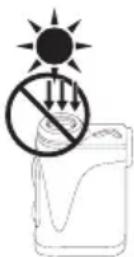
CARE AND MAINTENANCE PRECAUTIONS
LENS
Be careful that you do not directly touch the lens surface with your hands when cleaning it. Remove dust or lint with a blower*. For fingerprints or other stains that cannot be removed with a blower, wipe the lens with a dry soft cloth or cleaning cloth for eyeglasses, using a spiral motion that starts at the center of the lens and working towards the edges. Wiping too firmly or wiping with a hard material may damage the lens. If this fails, gently wipe the lens using a cloth lightly dampened with commercial lens cleaner.
MAIN BODY
After gently removing dust with a blower, clean the body surface with a soft, clean cloth. After use at a seaside, wipe off salt that may be on the body surface with a damp, soft, clean cloth, and then wipe with a dry cloth. Do not use benzene, thinner, or other cleaners containing organic solvents.
STORAGE
Water condensation or mold may occur on lens surfaces because of high humidity. Therefore, store the product in a cool, dry place. After use on a rainy day or at night, thoroughly dry it at room temperature, then store in a cool, dry place.
* A rubber cleaning tool that blows air from a nozzle.

Symbol for separate collection applicable in European countries
This symbol indicates that this battery is to be collected separately. The following apply only to users in European countries.
• This battery is designated for separate collection at an appropriate collection point. Do not dispose of as household waste.
- For more information, contact the retailer or the local authorities in charge of waste management.

Symbol for separate collection applicable in European countries
This symbol indicates that this product is to be collected separately. The following apply only to users in European countries.
- This product is designated for separate collection at an appropriate collection point. Do not dispose of as household waste.
- For more information, contact the retailer or the local authorities in charge of waste management.
Getting to know the Laser Rangefinder
□ ■ Key features
• Employs the First Target Priority algorithm that makes a flagstick easy to measure
• High-quality 6× finder with multilayer coating
• Automatic continuous measurement for up to 4 seconds if single measurement fails
- Press and hold down the PWR button to activate the continuous measurement function (up to approx. 8 seconds)
• Automatic power shut-off (approx. 8 sec. unoperated from standby screen)
- Rainproof — JIS/IEC protection class 4 (IPX4) equivalent (under Nikon's testing conditions)
• Invisible/Eyesafe EN/IEC Class 1M Laser
This product uses an invisible laser beam for measuring. It measures the time the laser beam takes to travel from the rangefinder to the target and back. Laser reflectivity and measurement results may vary according to climatic and environmental conditions, as well as the color, surface finish, size, shape and other characteristics of the target.
Measurement may be inaccurate or fail in the following cases:
• In snow, rain or fog
• Small or slender target
- Black or dark target
• Target has stepped surface
- Moving or vibrating target
- When measuring the surface of water
• Target measured through glass
- When the target is glass or a mirror
- When laser incidence to the target's reflective surface is oblique
About measurement results
This device is a basic rangefinder. Its measurement results cannot be used as official evidence.
□ ■ Nomenclature/Composition
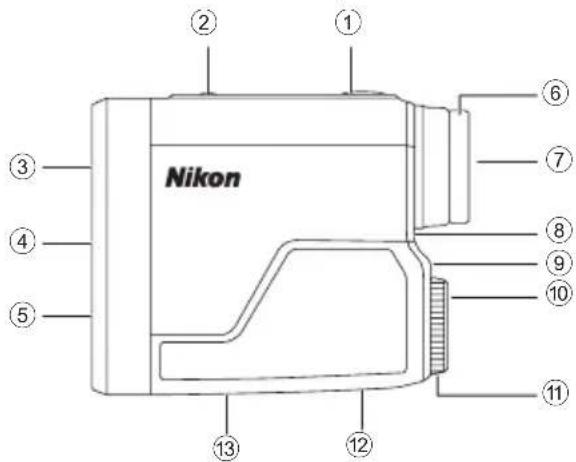
Composition
- Body ×1
- Case ×1
- Strap ×1
• Lithium battery (CR2) ×1
① PWR button (POWER ON/Measurement button)
② MODE button
③ Monocular objective lens
④ Laser emission aperture
⑤ Laser detector aperture
⑥ Eyecup/Diopter adjustment ring
⑦ 6× monocular eyepiece
⑧ Diopter index
⑨ Strap eyelet
⑩ Battery-chamber cover "Open" indication
⑪ Battery-chamber cover
⑫ Product number label
⑬ Indication
IEC60825-1 CLASS 1M LASER PRODUCT
DO NOT EXPOSE USERS OF TELESCOPIC OPTICS.
FDA CLASS I LASER PRODUCT
THIS PRODUCT COMPLIES WITH
21CFR1040.10(c)(d)AND(e)
CAN ICES-3(B)/NMB-3(B)
MADE IN MYANMAR
ODUCT
COPIC OPTICS.



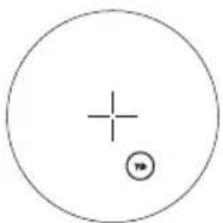
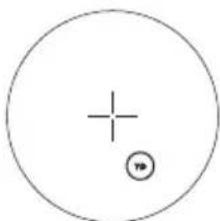
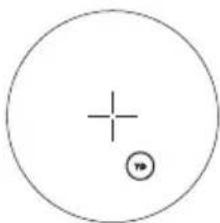
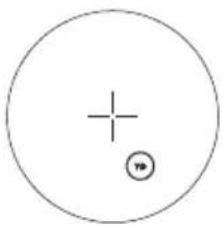
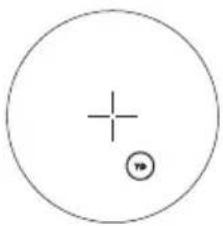
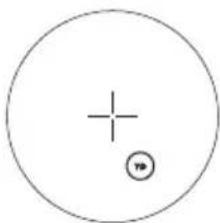
① Target mark
+: Aim at the target you want to measure.
Position the target at the center of the mark.
② Unit of measure (m: meter/YD: yard)
③ Distance
---: "Failure to measure" or "Unable to measure"
④ Battery level indicator
⑤ Laser irradiation mark
×: Appears while the laser is being irradiated for a measurement. Do not look towards the objective lens side while this mark is shown.
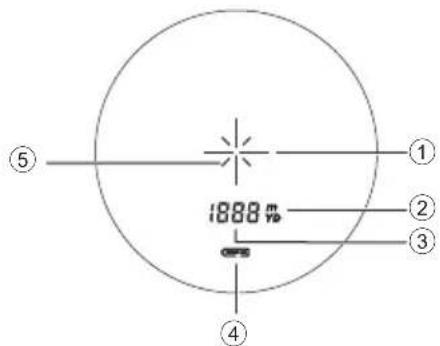
- The internal display of this product is enlarged by the eyepiece. Although you may see dust that has entered, it does not effect the accuracy of measurement.
Inserting/Replacing battery
□ ■ Type of battery
3V CR2 lithium battery ×1
☐ ■ Inserting/Replacing battery
- Open the battery-chamber cover.
Rotate the battery-chamber cover counterclockwise and remove it.
- Insert the battery.
To replace the battery, take out the old battery before inserting a new one.
Follow the battery insertion mark inside the battery chamber to insert the + and - ends of the battery in the correct orientation (insert so that the + end faces outward). If the battery is not inserted correctly, the Laser Rangefinder will not operate.
- Attach the battery-chamber cover.
Rotate the battery-chamber cover clockwise and secure it firmly. When attaching the battery-chamber cover, securely screw it all the way and check that it is secured.
- The battery-chamber cover may be difficult to rotate because this product uses a rubber seal to maintain its water resistance capabilities.
□ ■ Battery level indicator
| Display Description | ||
| After power on, displays for 2 seconds only. Sufficient power available. | ||
| After power on, displays for 2 seconds only. | Power getting low.Prepare to replace the battery. | |
| Displayed continuously. Low. Battery should be replaced with a new one. | ||
| Blinks. After blinking 3 times, automatically powers off. | The battery is empty.Replace the battery. | |
Changing the distance display unit
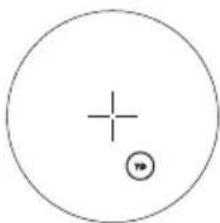
For the display unit of the measurement results, select YD (yards) or m (meters). Factory default setting is YD (yard).
- Press the PWR button to turn on the Laser Rangefinder.
- Press and hold the MODE button for more than two seconds. When the display unit has been switched, release the button.

flowchart
graph LR
    A["YD (yard) (meter)"] --> B["m"]
natural_image
Simple geometric diagram with a circle containing a plus sign and a small circle with a minus sign (no text or labels)• The setting is saved even when the Laser Rangefinder is turned OFF.
Measurement
Caution — Controls, adjustments or usage of procedures other than those specified herein may produce negative effects or damage to your health due to laser radiation.
□ ■ Adjusting the focus of the internal display
If the internal display is difficult to see, adjust the focus with the following procedure.
- Press the PWR button to turn on the power.
- Look through the eyepiece and rotate the diopter adjustment ring until the internal display comes into focus.
Diopter adjustment ring
□ ■ Measuring
- Press the PWR button to turn on the power.
- If you do not operate the button for about 8 seconds, the power turns off automatically.
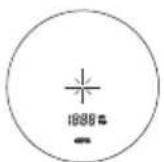
Immediately after power-on
- Aim at the target.
Position the center of the target mark on the target.
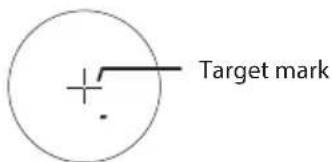
- Press the PWR button to measure.
After measurement, the result is displayed for approx. 8 seconds, then power automatically turns off. Press the PWR button while the power is on to measure again.
□ ■ Single measurement
Pressing the PWR button once starts single measurement, then displays the results.
- If measurement fails, measurement continues automatically for up to about 4 seconds until results are obtained. Measurement stops when it is successful, even within about 4 seconds.
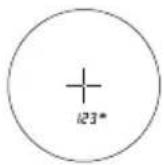
Example of measured distance display

Example of measurement failure
□ ■ Continuous measurement
Press and hold down the PWR button to start continuous measurement up to approx. 8 seconds. During measurement, the measured result is displayed consecutively while the laser irradiation mark is blinking. If you release your finger from the button, continuous measurement stops.
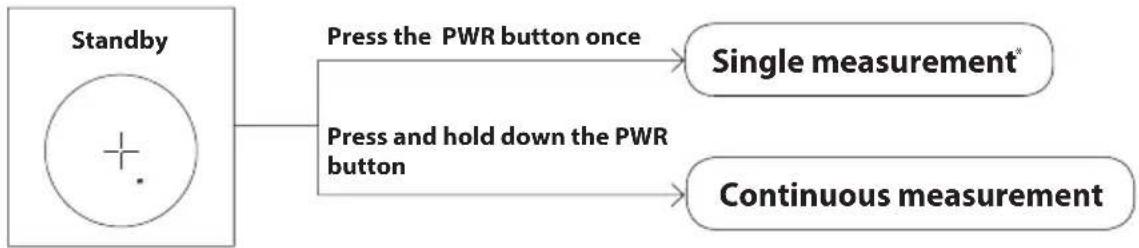
flowchart
graph TD
    A["Standby"] --> B["Press the PWR button once"]
    A --> C["Press and hold down the PWR button"]
    B --> D["Single measurement*"]
    C --> E["Continuous measurement"]
* If measurement fails, measurement continues automatically for up to about 4 seconds until results are obtained.
● When measuring a flagstick at a golf course
Keep targeting the flagstick at the center of the target mark with the continuous measurement function to minimize the effects of hand shake.
Technical notes
Specifications
| Measurement range (actual distance) 5 - 73 | 0 m/6 - 800 yd. |
| Distance display (increment) | 1 m/yd. |
| Accuracy (actual distance)*1 | ±1 m/yd. (shorter than 100 m/yd.) ±2 m/yd. (100 m/yd.and over) |
| Magnification (×) 6 | |
| Effective diameter of objective lens (mm) 20 | |
| Angular field of view (real) (°) 6.0 | |
| Eye relief (mm) 16.7 | |
| Exit pupil (mm) 3.3 | |
| Diopter adjustment ±4 m | -1 |
| Dimensions (L × H × W) (mm/in.) | 91 × 73 × 37/3.6 × 2.9 ×1.5 |
| Weight (g/oz.) Approx. 130/4.6 (without battery) | |
| Operating temperature (°C/°F) -10 — +50/14 — 122 | |
| Operating humidity (%RH) 80 or less (without dew condensation) | |
| Power source | CR2 lithium battery × 1 (DC 3V) Automatic power shut-off (after approx. 8 sec. unoperated) |
| Structure Rainproof | *2 |
| Electromagnetic compatibility | FCC Part15 SubPartB class B, EU:EMC directive, AS/NZS, VCCI classB, CU TR 020, ICES-003 |
| Environment RoHS, WEEE | |
| Laser classification | IEC60825-1: Class 1M/Laser Product FDA/21 CFR Part 1040.10: Class I Laser Product |
| Wavelength (nm) | 905 |
| Pulse duration (ns) | 20 |
| Output (W) 23 | |
| Beam divergence (mrad) Vertical: 3.33, Horizontal: 0.17 | |
- The specifications of the product may not be achieved depending on the target object's shape, surface texture and nature, and/or weather conditions.
*1 Under Nikon's measurement conditions.
^*2 This product is equivalent to JIS/IEC protection class 4 (IPX4) (under Nikon's testing conditions). This rating does not guarantee the water resistance performance of the unit or that it will be free from damage or problems under all conditions. Please observe the following when using:
- Do not operate or hold the product in running water.
- If any moisture is found on movable parts of this product, stop using the product and wipe it off.
Battery life
Approx. 20,000 times (at approx. 20°C (68°F))
This figure may differ according to conditions such as temperature and other factors. Use only as a guide.
• The battery supplied with this Nikon Laser Rangefinder is for operation checking. Due to natural electrical discharge, the life of this battery will likely be shorter than that noted above.
□ ■ Troubleshooting/Repair
If this product fails to function as expected, check the list below before consulting your local dealer or the store where you purchased it.
- If there is a problem with the product.
| Problem Cause/Solution | |
| Does not turn on | Press the PWR button (top of the body).Check that the battery is inserted correctly.Replace the battery with a new one. |
| Unable to measureAnomalous result | Confirm the settings.Confirm if it can measure a large target close to you (example: a building approx. 15 m/yd. ahead of you).Clean the lens surface if necessary. |
- If you require a repair, please contact your local dealer or the store where you purchased the product. Do not repair or disassemble. It may result in a serious incident.
Please note that Nikon is not responsible for any direct or indirect damage if the user attempts to repair or disassemble the product.
Español
CONTENIDO
Introducción
Lea esto primero 20
FDA CLASS I LASER PRODUCT THIS PRODUCT COMPLIES WITH 21CFR1040.10(c)(d)AND(e) CAN ICES-3(B)/NMB-3(B)
MADE IN MYANMAR
flowchart
graph LR
    A["YD (yarda) (metro)"] --> B["m"]
    B --> A
natural_image
Simple geometric diagram with a circle containing a plus sign and a small circle with a minus sign (no text or labels)CONSIGNE POUWANT VARIER LOCALEMENT > WWW.CONSIGNESDETRIFR
FDA CLASS I LASER PRODUCT
THIS PRODUCT COMPLIES WITH
21CFR1040.10(c)(d)AND(e)
CAN ICES-3(B)/NMB-3(B)
MADE IN MYANMAR

natural_image
Simple geometric diagram with a circle containing a plus sign and a small circle with a minus sign (no text or labels)FDA CLASS I LASER PRODUCT
THIS PRODUCT COMPLIES WITH
21CFR1040.10(c)(d)AND(e)
CAN ICES-3(B)/NMB-3(B)
MADE IN MYANMAR



flowchart
graph LR
    A["YD (Yard) (Meter)"] --> B["m"]

natural_image
Simple geometric diagram with a circle containing a plus sign and a small circle with a minus sign (no text or labels)FDA CLASS I LASER PRODUCT
THIS PRODUCT COMPLIES WITH 21CFR1040.10(c)(d)AND(e)
CAN ICES-3(B)/NMB-3(B)
MADE IN MYANMAR
□ ■ Display interno
natural_image
Simple geometric diagram with a circle containing a plus sign and a small circle with a minus sign (no text or labels)FDA CLASS I LASER PRODUCT
THIS PRODUCT COMPLIES WITH
21CFR1040.10(c)(d)AND(e)
CAN ICES-3(B)/NMB-3(B)
MADE IN MYANMAR



flowchart
graph LR
    A["YD (yard) (meter)"] --> B["m"]
natural_image
Simple geometric diagram with a circle containing a plus sign and a small circle with a dot (no text or symbols)Specifications....112
Problemen oplossen/Reparatie....114
Inleiding
□ ■ Lees dit eerst
FDA CLASS I LASER PRODUCT
THIS PRODUCT COMPLIES WITH 21CFR1040.10(c)(d)AND(e)
CAN ICES-3(B)/NMB-3(B)
MADE IN MYANMAR



flowchart
graph LR
    A["YD (yard) (meter)"] --> B["m"]
    B --> A
natural_image
Simple geometric diagram with a circle containing a plus sign and a small circle with a minus sign (no text or labels)FDA CLASS I LASER PRODUCT
THIS PRODUCT COMPLIES WITH
21CFR1040.10(c)(d)AND(e)
CAN ICES-3(B)/NMB-3(B)
MADE IN MYANMAR





natural_image
Simple geometric diagram with a circle containing a plus sign and a small circle with a minus sign (no text or labels)
FDA CLASS I LASER PRODUCT
THIS PRODUCT COMPLIES WITH
21CFR1040.10(c)(d)AND(e)
CAN ICES-3(B)/NMB-3(B)
MADE IN MYANMAR
natural_image
Simple geometric diagram with a circle containing a plus sign and a small circle with a dot (no text or symbols)FDA CLASS I LASER PRODUCT
THIS PRODUCT COMPLIES WITH
21CFR1040.10(c)(d)AND(e)
CAN ICES-3(B)/NMB-3(B)
MADE IN MYANMAR

flowchart
graph LR
    A["YD (jaardi) (metri)"] --> B["m"]
STELL OG VEDLIKEHOLDSTILTAK
OBJEKTIV
Vær forsiktig slik at du ikke kommer i direkte kontakt med objektivets overflate med hendene når du rengjør det. Fjern støv eller lo med en blåsebelg*. For fingeravtrykk eller andre flekker som ikke kan fjernes med en blåsebelg, skal du tørke objektivet med en myk, tørr klut eller brilleklut i sirkelbevegelser som starter midt på objektivet og fortsetter ut mot kanten. Hvis du tørker for hardt eller bruker et hardt materiale, kan det skade objektivet. Hvis dette ikke fungerer, kan du tørke objektivet med en klut som er lett fuktet med vanlig linserens.
HUS
FDA CLASS I LASER PRODUCT
THIS PRODUCT COMPLIES WITH 21CFR1040.10(c)(d)AND(e)
CAN ICES-3(B)/NMB-3(B)
MADE IN MYANMAR



flowchart
graph LR
    A["YD (yard) (meter)"] --> B["m"]
    B --> A
- Innstillingen lagres hver gang laseravstandsmåleren slås AV.
natural_image
Simple geometric diagram with a circle containing a plus sign and a small circle with a number 79 in the bottom right corner (no text or symbols beyond basic markings)Måling
FORHOLDSREGLER....181
Lær laserafstandsmåleren at kende
Fejlfinding/reparation....194
Indledning
□ ■ Læs dette først
FDA CLASS I LASER PRODUCT
THIS PRODUCT COMPLIES WITH 21CFR1040.10(c)(d)AND(e)
CAN ICES-3(B)/NMB-3(B)
MADE IN MYANMAR



flowchart
graph LR
    A["YD (yard) (meter)"] --> B["m"]
- Indstillingen gemmes, selvom laserafstandsmåleren slukkes.
natural_image
Simple geometric diagram with a circle containing a plus sign and a small circle with a number 79 in the bottom right corner (no text or symbols beyond basic markings)Måling
FDA CLASS I LASER PRODUCT
THIS PRODUCT COMPLIES WITH 21CFR1040.10(c)(d)AND(e)
CAN ICES-3(B)/NMB-3(B)
MADE IN MYANMAR
flowchart
graph LR
    A["YD (yard) (metr)"] --> B["m"]
    B --> A
natural_image
Simple geometric diagram with a circle containing a plus sign and a small circle with a minus sign (no text or labels)Měření
FDA CLASS I LASER PRODUCT
THIS PRODUCT COMPLIES WITH 21CFR1040.10(c)(d)AND(e)
CAN ICES-3(B)/NMB-3(B)
MADE IN MYANMAR
flowchart
graph LR
    A["YD (yard) (metru)"] --> B["m"]
    B --> A
natural_image
Simple geometric diagram with a circle containing a plus sign and a small circle with a minus sign (no text or labels)Măsurarea
FDA CLASS I LASER PRODUCT
THIS PRODUCT COMPLIES WITH 21CFR1040.10(c)(d)AND(e)
CAN ICES-3(B)/NMB-3(B)
MADE IN MYANMAR



flowchart
graph LR
    A["YD (yard) (méter)"] --> B["m"]
natural_image
Simple geometric diagram with a circle containing a plus sign and a small circle with a minus sign (no text or labels)FDA CLASS I LASER PRODUCT
THIS PRODUCT COMPLIES WITH
21CFR1040.10(c)(d)AND(e)
CAN ICES-3(B)/NMB-3(B)
MADE IN MYANMAR



natural_image
Simple geometric diagram with a circle containing a plus sign and a small circle with a number '10' below it (no text or symbols beyond the drawing)측정
Printed in China, 887C_1_1902AL122
- Getting to know the Laser Rangefinder
- Inserting/Replacing battery
- Measurement
- Technical notes
- Introduction
- Read this First
- ● About the manual
- ● About controls for radio interference
- ■ SAFETY AND OPERATION PRECAUTIONS
- WARNING
- CAUTION
- SAFETY PRECAUTIONS (Laser)
- SAFETY PRECAUTIONS (Monocular)
- PRECAUTIONS (Lithium battery)
- HANDLING AND OPERATION PRECAUTIONS
- CARE AND MAINTENANCE PRECAUTIONS
- LENS
- MAIN BODY
- STORAGE
- Symbol for separate collection applicable in European countries
- □ ■ Key features
- Measurement may be inaccurate or fail in the following cases:
- About measurement results
- Composition
- □ ■ Type of battery
- ☐ ■ Inserting/Replacing battery
- □ ■ Battery level indicator
- Changing the distance display unit
- □ ■ Adjusting the focus of the internal display
- □ ■ Measuring
- □ ■ Single measurement
- □ ■ Continuous measurement
- Specifications
- Battery life
- □ ■ Troubleshooting/Repair
- Español
- CONTENIDO
- Introducción
- □ ■ Display interno
- Inleiding
- □ ■ Lees dit eerst
- STELL OG VEDLIKEHOLDSTILTAK
- OBJEKTIV
- HUS
- Måling
- Lær laserafstandsmåleren at kende
- Indledning
- □ ■ Læs dette først
- Měření
- Măsurarea
- 측정
Brand : NIKON
Model : CoolShot 20 GII
Category : Laser pointer