
COOLSHOT PRO II STABILIZED - Laser pointer NIKON - Free user manual and instructions
Find the device manual for free COOLSHOT PRO II STABILIZED NIKON in PDF.


| Product Type | Laser Rangefinder with Image Stabilizer |
| Brand | Nikon |
| Model | COOLSHOT PRO II STABILIZED |
| Dimensions (L × H × W) | 100 × 75 × 42 mm |
| Weight (without battery) | Approx. 180 g |
| Power Supply | CR2 3V Lithium Battery ×1 |
| Battery Life | Approx. 2200 measurements (at 20°C) |
| Measurement Range | 7.5-1090 m / 8-1200 yd |
| Accuracy | ±0.75 m (<700 m), ±1.25 m (700-1000 m), ±1.75 m (>1000 m) |
| Magnification | 6x |
| Exit Pupil | 3.5 mm |
| Diopter Adjustment | ±4 m⁻¹ |
| Waterproofing | Waterproof up to 1 m for 10 minutes, fog-proof (nitrogen filled) |
| Main Functions | STABILIZED (vibration reduction), First Target Priority, display modes (golf, actual distance, etc.), LOCKED ON indicator, continuous measurement (8 s max) |
| Maintenance and Cleaning | Clean the lens with a blower and a soft cloth; the body with a damp cloth; do not use solvents. |
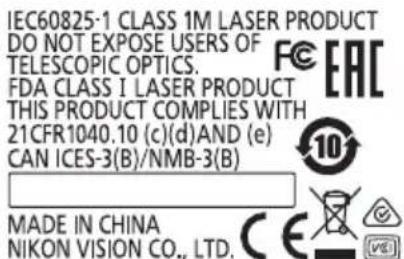
| Safety | Class 1M laser (IEC), do not look into the emitter, do not disassemble, keep out of reach of children. |
| Spare Parts and Repairability | CR2 battery, strap, carrying case; repair by Nikon service center, do not attempt to repair yourself. |
| General Information | FCC, CE certified, rain resistant (IPX4) (battery compartment), temperature -10°C to +50°C |
Frequently Asked Questions - COOLSHOT PRO II STABILIZED NIKON
User questions about COOLSHOT PRO II STABILIZED NIKON
0 question about this device. Answer the ones you know or ask your own.
Ask a new question about this device
Download the instructions for your Laser pointer in PDF format for free! Find your manual COOLSHOT PRO II STABILIZED - NIKON and take your electronic device back in hand. On this page are published all the documents necessary for the use of your device. COOLSHOT PRO II STABILIZED by NIKON.
USER MANUAL COOLSHOT PRO II STABILIZED NIKON
Getting to know the Laser Rangefinder
Key features. 8
Nomenclature/Composition. 9
Internal display 10
Functions
STABILIZED function 11
First Target Priority algorithm. 11
Dual LOCKED ON
(First Target Priority detection notice function)...11
Actual Distance Indicator. 11
Inserting/Replacing battery
Type of battery. 12
Inserting/Replacing battery. 12
Battery level indicator 12
Navigating the menus
Changing the measurement display mode.14
Changing the internal display luminance (F1)....15
Changing the distance display unit (F2) 16
Switching the electronic sound (F3) ON or OFF ... 17
Operation diagram of the setting menus. 18
Measurement
Adjusting the focus of the internal display. 19
Measuring. 19
Single measurement. 20
Continuous measurement. 20
Technical notes
Specifications 21
Troubleshooting/Repair 23
Introduction

Read this First
Thank you for purchasing the Nikon Laser Rangel finder.
Before using the product, read this manual thoroughly to ensure proper use.
After reading this manual, keep it in a readily accessible place for future reference.
About the manual
- No part of the manual may be reproduced, transmitted, transcribed, stored in a retrieval system, or translated into any language in any form, by any means, without Nikon's prior written permission.
- Illustrations and display content shown in this manual may differ from the actual product.
- Nikon will not be held liable for any errors this manual may contain.
The appearance, specifications, and capabilities of this product are subject to change without notice.
About controls for radio interference
This device complies with Part 15 of the FCC Rules. Operation is subject to the following two conditions:
(1) This device may not cause harmful interference, and
(2) This device must accept any interference received, including interference that may cause undesired operation.
-
This equipment has been tested and found to comply with the limits for a Class B digital device, pursuant to Part 15 of the FCC Rules and to EU EMC directive. These limits are designed to provide reasonable protection against harmful interference in a residential installation. This equipment generates, uses and can radiate radio frequency energy and, if not installed and used in accordance with the instructions, may cause harmful interference to radio communications. However, there is no guarantee that interference will not occur in a particular installation. If this equipment does cause harmful interference to radio or television reception, which can be determined by turning the equipment off and on, the user is encouraged to try to correct the interference by one or more of the following measures:
-
Reorient or relocate the receiving antenna.
- Increase the separation between the equipment and receiver.
- Consult the dealer or an experienced radio/TV technician for help.
Notice for customers in Canada CANICES-3(B)/NMB-3(B)
■ SAFETY AND OPERATION PRECAUTIONS
Strictly observe the guidelines contained in this manual in order to use this product safely and prevent possible injury or property damage to you and others. Understand the contents thoroughly for correct use of the product.
WARNING
This indicates that improper use by ignoring the contents described herein can result in potential death or serious injury.
CAUTION
This indicates that improper use by ignoring the contents described herein can result in potential injury or material loss.
SAFETY PRECAUTIONS (Laser)
This product uses an invisible laser beam. Be sure to observe the following:
WARNING
-
Do not press the PWR button while looking into the laser emission aperture. You may damage your eyes.
-
Do not aim at eyes.
- Do not point the laser at people.
- Do not look at lasers with other optical instruments such as lenses or binoculars. You may damage your eyes.
- When not measuring, keep your fingers away from the PWR button to avoid accidentally emitting the laser.
- When not in use for an extended period, remove the battery.
- Do not disassemble, remodel, or repair the product. The laser emission may be harmful to your health. If the product is disassembled, remodeled, or repaired, it is no longer guaranteed by the manufacturer.
- Store the product in a place out of reach of children.
SAFETY PRECAUTIONS (Monocular)
WARNING
- Never look directly at the sun, intense light, or lasers while using this product. It may seriously damage the eyes or cause blindness.
- Users of medical devices such as cardiac pacemakers should not use this product and its accessories. Magnets built into the product and accessories can cause medical device malfunctions. Also, keep credit cards and electronic media away from this product and its accessories. Recorded data may get corrupted.
CAUTION
- Keep the plastic bag used to wrap this product or other small parts out of reach of children. The bag may block their mouths and noses and cause them to suffocate.
- Be careful of children inadvertently swallowing small parts or accessories. If children swallow such parts, see a doctor immediately.

- Turn off this product when not in use.
- When carrying this product, store it in the case.
- If this product fails to operate correctly for any reason, discontinue use immediately and consult with a Nikon authorized service representative.
- Do not leave this product in an unstable place. It may fall and cause injury or malfunction.
- Do not use this product while walking. You may walk into something or fall and cause injury or malfunction.
- Do not swing this product by the strap. You may hit others and cause injury.
- The rubber parts of this product (such as the eyecup) may deteriorate if used or stored for a long period of time. The deteriorated rubber may attach on clothes and cause stains. Check their condition before use, and consult with a Nikon authorized service representative if a defect is found.
- Using the rubber eyecup for extended periods of time may cause skin inflammation. If you develop any symptoms, stop use and see a doctor immediately.
PRECAUTIONS (Lithium battery)
Incorrect use may cause the lithium battery to rupture or leak, which will corrode the device or stain your hands and clothing.
Be sure to observe the following:
- Install the battery with the + and - poles positioned correctly.
- Remove the battery when this is depleted or will not be used for extended periods.
- Keep the battery away from fire or water. Never disassemble the battery.
- Do not charge the lithium battery.
- Do not short the terminal of the battery chamber.
- Do not carry the battery together with keys or coins in a pocket or bag. You may short the battery and cause overheating.
If liquid leaked from the lithium battery comes into contact with clothing or skin, rinse with plenty of water. If it enters the eyes or mouth, rinse with water and consult a doctor immediately. - When disposing of the lithium battery, follow your local area regulations.
HANDLING AND OPERATION PRECAUTIONS
- Do not subject this product to physical shock.
- If you accidentally apply strong physical shock or drop the product and suspect a malfunction, consult with your local dealer or a Nikon authorized service representative immediately.
- Do not use the product underwater.
- Wipe off any rain, water, sand, or mud on the product as soon as possible with a soft, clean cloth.
- When this product is exposed to extreme temperature changes (suddenly brought from a cold place to a warm place or vice-versa), the lens surfaces may get cloudy. Do not use the product until the cloudiness has disappeared.
-
Do not leave the product in a car on a hot or sunny day, or near heat generating equipment.
-
Do not leave the eyepiece in direct sunlight. The condenser effect of the lens may damage the internal display surface.

CARE AND MAINTENANCE PRECAUTIONS
LENS
Be careful that you do not directly touch the lens surface with your hands when cleaning it. Remove dust or lint with a blower*. For fingerprints or other stains that cannot be removed with a blower, wipe the lens with a dry soft cloth or cleaning cloth for eyeglasses, using a spiral motion that starts at the center of the lens and working towards the edges. Wiping too firmly or wiping with a hard material may damage the lens. If this fails, gently wipe the lens using a cloth lightly dampened with commercial lens cleaner.
MAIN BODY
After gently removing dust with a blower, clean the body surface with a soft, clean cloth. After use at a seaside, wipe off salt that may be on the body surface with a damp, soft, clean cloth, and then wipe with a dry cloth. Do not use benzene, thinner, or other cleaners containing organic solvents.
STORAGE
Water condensation or mold may occur on lens surfaces because of high humidity. Therefore, store the product in a cool, dry place. After use on a rainy day or at night, thoroughly dry it at room temperature, then store in a cool, dry place.
- A rubber cleaning tool that blows air from a nozzle.

Symbol for separate collection applicable in European countries
This symbol indicates that this battery is to be collected separately. The following apply only to users in European countries.
- This battery is designated for separate collection at an appropriate collection point. Do not dispose of as household waste.
- For more information, contact the retailer or the local authorities in charge of waste management.

Symbol for separate collection applicable in European countries
This symbol indicates that this product is to be collected separately. The following apply only to users in European countries.
- This product is designated for separate collection at an appropriate collection point. Do not dispose of as household waste.
- For more information, contact the retailer or the local authorities in charge of waste management.

Getting to know the Laser Rangefinder
Key features
STABILIZED function is employed for reducing the vibrations caused by hand movement
Red internal display is easy-to-read
- Employs the First Target Priority algorithm that makes a flagstick easy to measure
- Notifies with a LOCKED ON sign (First Target Priority detection sign) and electronic sound when measuring overlapping subjects and the distance to the closest subject is displayed
High-quality 6× finder with multilayer coating
- Larger ocular for easy viewing
- Select from four measurement display modes
- Golf mode (default setting) displays the slope adjusted distance (horizontal distance ± height) which is useful for golf
Built-in Actual Distance Indicator
- Press and hold down the PWR button to activate the continuous measurement function (up to approx. 8 seconds)
Automatic power shut-off (approx. 8 sec. unoperated from standby screen)
- Waterproof and fogproof (not designed for underwater usage)
- Invisible/Eyesafe EN/IEC Class 1M Laser
This product uses an invisible laser beam for measuring. It measures the time the laser beam takes to travel from the rangefinder to the target and back. Laser reflectivity and measurement results may vary according to climatic and environmental conditions, as well as the color, surface finish, size, shape and other characteristics of the target.
Measurement may be inaccurate or fail in the following cases:
In snow, rain or fog
- Small or slender target
- Black or dark target
- Target has stepped surface
- Moving or vibrating target
- When measuring the surface of water
- Target measured through glass
- When the target is glass or a mirror
- When laser incidence to the target's reflective surface is oblique
About measurement results
This device is a basic rangefinder. Its measurement results cannot be used as official evidence.
Nomenclature/Composition
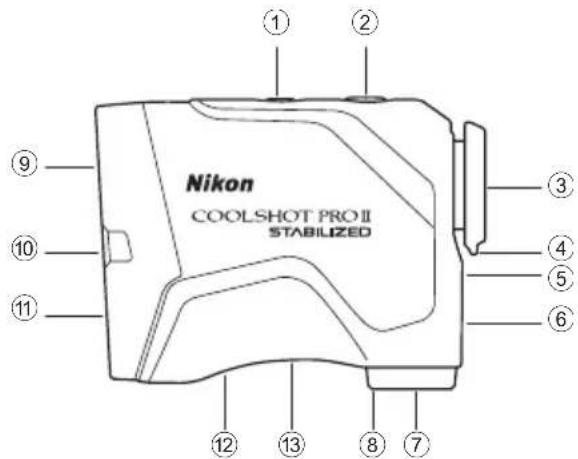
Composition
Body × 1
Case × 1
- Lithium battery (CR2) × 1
① MODE button
② PWR button (POWER ON/Measurement button)
③ 6× monocular eyepiece
④ Eyecup/Diopter adjustment ring
⑤ Diopter index
⑥ Strap eyelet
⑦ Battery-chamber cover
⑧ Battery-chamber cover "Open" indication
⑨ Monocular objective lens/Laser emission aperture
10 Actual Distance Indicator
① Invisible Laser detector aperture
12 Product number label
13 Indication

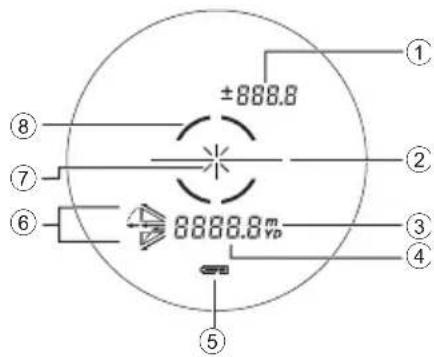
Internal display
① Height (actual distance at golf mode setting) ----: "Failure to measure" or "Unable to measure"
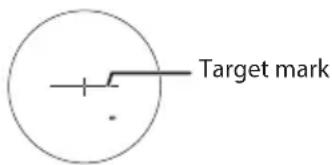
② Target mark : Aim at the target you want to measure. Position the target at the center of the mark.
③ Unit of measure (m: meter/YD: yard)
④ Distance ----: "Failure to measure" or "Unable to measure"
⑤ Battery level indicator
⑥ Measurement display mode indications
⑦ Laser irradiation mark × : Appears while the laser is being irradiated for a measurement. Do not look towards the objective lens side while this mark is shown.
LOCKED ON sign (First Target Priority detection sign) : When measuring overlapping subjects, and the distance to the closest subject is displayed, this sign is lit.
- The internal display of this product is enlarged by the eyepiece. Although you may see dust that has entered, it does not effect the accuracy of measurement.
Functions
STABILIZED function
ON and OFF
The STABILIZED function is activated concurrently when the Laser Rangefinder is ON.
When the Laser Rangefinder is OFF, the STABILIZED function automatically turns off.
■ First Target Priority algorithm
When measuring overlapping subjects, First Target Priority algorithm displays the distance to the closest subject.
Dual LOCKED ON (First Target Priority detection notice function)
When measuring overlapping subjects, such as a flagstick with trees in the background, and the distance to a closest subject is displayed, LOCKED ON sign (First Target Priority detection sign)* is lit in the viewfinder with an electronic sound (if the electronic sound setting is on).
- Single measurement: When measuring overlapping subjects and the distance to a closest subject is displayed, the LOCKED ON sign appears with an electronic sound.
Continuous measurement: When displayed figures shift to a closer subject, the LOCKED ON sign appears with an electronic sound.
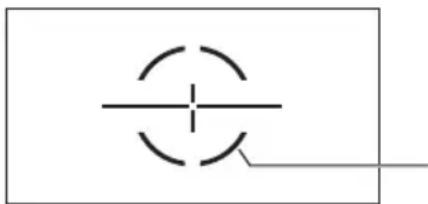
LOCKED ON sign (First Target Priority detection sign) is lit.
Actual Distance Indicator
When the measurement display mode is actual distance mode, the Actual Distance Indicator blinks while the Laser Rangefinder is ON.
You can find out at a glance that the inclinometer function is not being used.


Inserting/Replacing battery
Type of battery
3V CR2 lithium battery × 1
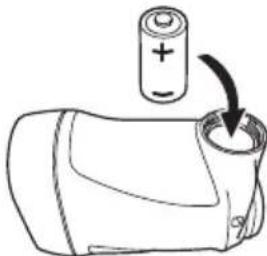
Inserting/Replacing battery
- Open the battery-chamber cover.
Rotate the battery-chamber cover counterclockwise and remove it.
- Insert the battery.
To replace the battery, take out the old battery before inserting a new one.
Follow the battery insertion mark inside the battery chamber to insert the + and - ends of the battery in the correct orientation (insert the battery so that + is pointing outward). If the battery is not inserted correctly, the Laser Rangefinder will not operate.
- Attach the battery-chamber cover.
Rotate the battery-chamber cover clockwise and secure it firmly. When attaching the battery-chamber cover, securely screw it all the way and check that it is secured.
- The battery-chamber cover may be difficult to rotate because this product uses a rubber seal to maintain its waterproof capabilities.
Battery level indicator
| Display Description | ||
| = | After power on, displays for 2 seconds only. Sufficient power available. | |
| = | After power on, displays for 2 seconds only. | Power getting low. Prepare to replace the battery. |
| = | Displayed continuously. Low. Battery should be replaced with a new one. | |
| = | Blinks. After blinking 3 times, automatically powers off. | The battery is empty. Replace the battery. |
Navigating the menus
- Operating the MODE button
There are two ways to press the MODE button. Operate the button while following the descriptions in this manual.
- "Press and hold" means to continue pressing the button for 1.5 seconds or longer.
- "Press" means to press the button quickly (less than 1.5 seconds).

Changing the measurement display mode
Switch between four modes (refer to the figure below) according to your golf playstyle. The displayed information differs depending on the mode. Factory default setting is golf mode.
- Press the PWR button to turn on the Laser Rangefinder.
- The measurement display mode switches every time you press the MODE button.
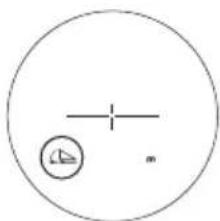
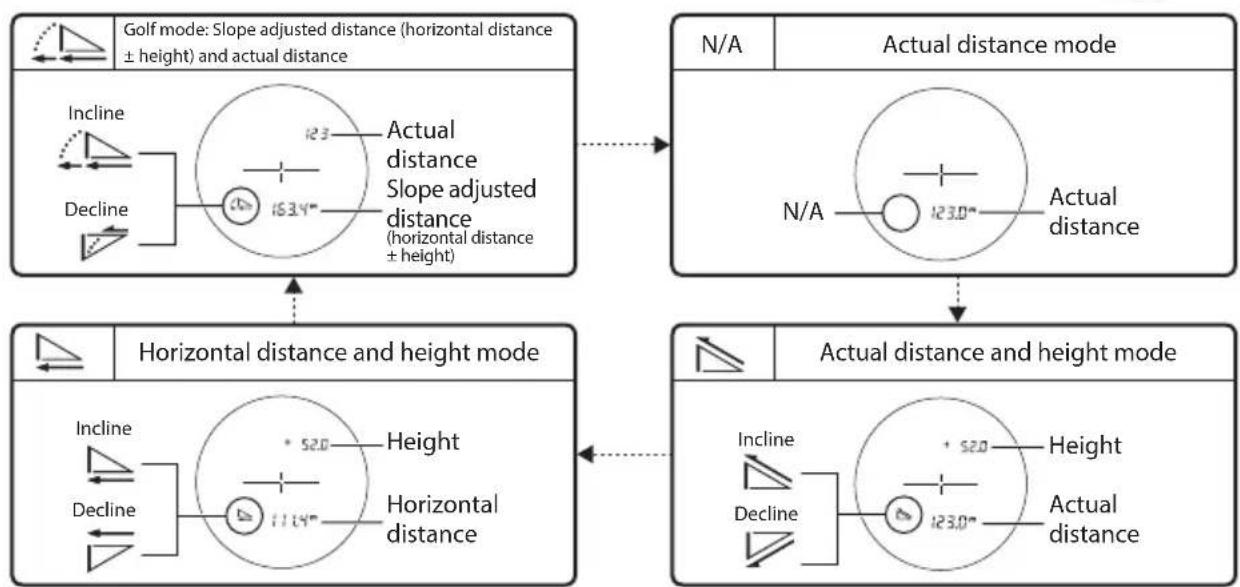
- The setting is saved even when the Laser Rangefinder is turned OFF.
Changing the internal display luminance (F1)
Adjust the brightness of the internal display. The factory default setting is A (Auto, automatic brightness control). You can select A, or 1 to 5.
-
A (Auto): The luminance is adjusted automatically according to the brightness of the surroundings.
1-5:1 is the darkest, while 5 is the brightest. -
Press the PWR button to turn on the Laser Rangefinder.
- Press and hold the MODE button.
- You can now change the internal display luminance.
- The setting switches every time you press the PWR button.
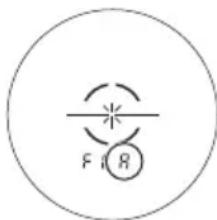

- If you press and hold the MODE button or do not operate the buttons for about 8 seconds, the displayed setting is saved and the Laser Rangefinder returns to standby.
- The setting is saved even when the Laser Rangefinder is turned OFF.
Changing the distance display unit (F2)
For the display unit of the measurement results, select YD (yards) or m (meters). Factory default setting is YD (yard).
- Press the PWR button to turn on the Laser Rangefinder.
- Press and hold the MODE button.
-
Press the MODE button once.
-
You can now change the distance display unit.
-
The setting switches every time you press the PWR button.

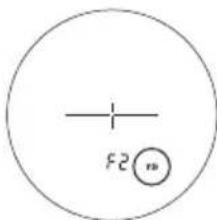
- If you press and hold the MODE button or do not operate the buttons for about 8 seconds, the displayed setting is saved and the Laser Rangefinder returns to standby.
- The setting is saved even when the Laser Rangefinder is turned OFF.
Switching the electronic sound (F3) ON or OFF
When the electronic sound setting is ON, the LOCKED ON sign (First Target Priority detection sign) is lit with an electronic sound. Factory default setting is On (on).
- Press the PWR button to turn on the Laser Rangefinder.
- Press and hold the MODE button.
-
Press the MODE button two times.
-
You can now switch the electronic sound ON or OFF.
-
The setting switches every time you press the PWR button.

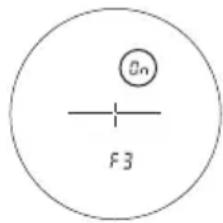
- If you press the MODE button or do not operate the buttons for about 8 seconds, the displayed setting is saved and the Laser Rangefinder returns to standby.
- The setting is saved even when the Laser Rangefinder is turned OFF.
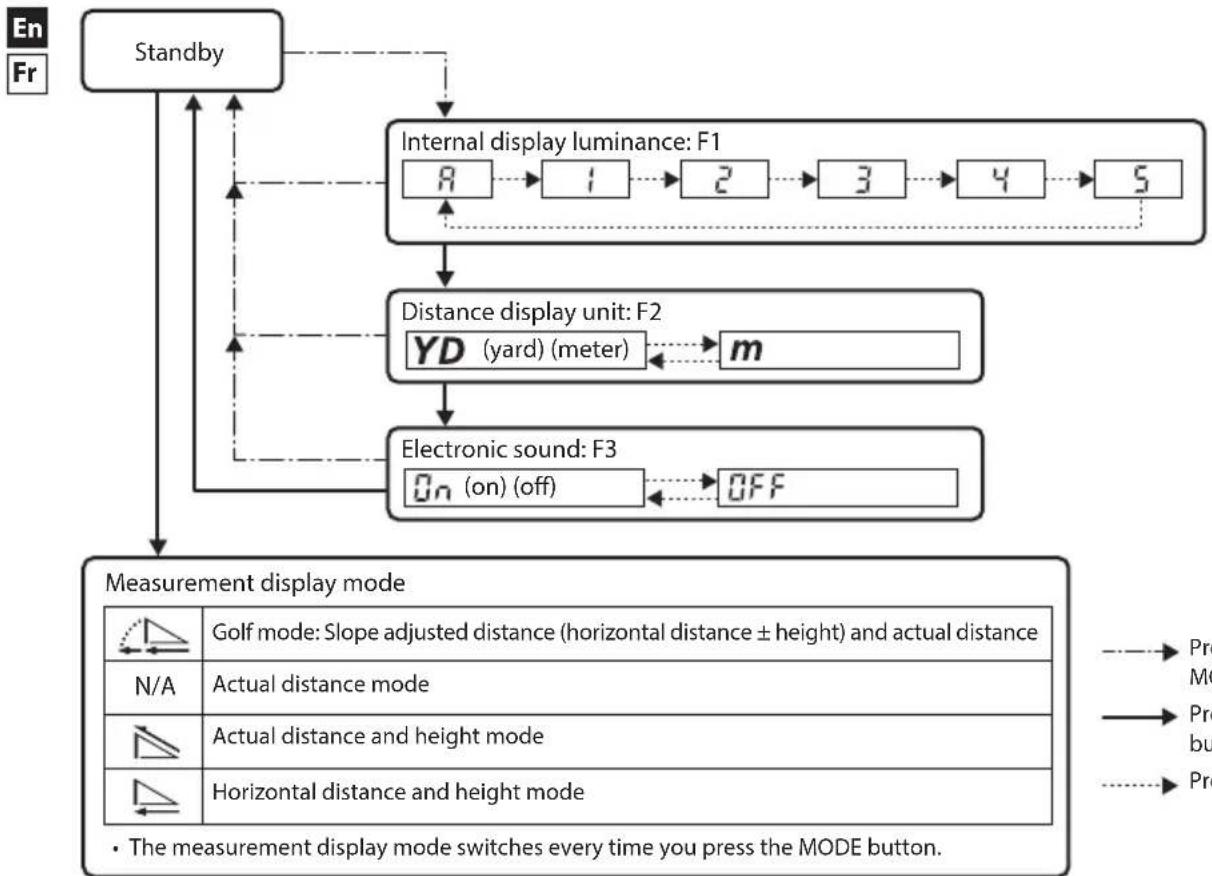
Operation diagram of the setting menus
Press and hold the MODE button.
Press the MODE button.
Press the PWR button.
Measurement
Caution — Controls, adjustments or usage of procedures other than those specified herein may produce negative effects or damage to your health due to laser radiation.
- Before measuring, be sure to confirm each menu setting. Refer to "Navigating the menus" for menu details and how to change the settings.
Adjusting the focus of the internal display
If the internal display is difficult to see, adjust the focus with the following procedure.
- Press the PWR button to turn on the power.
- Look through the eyepiece and rotate the diopter adjustment ring until the internal display comes into focus.
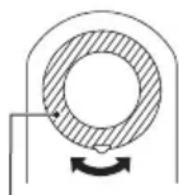
Diopter adjustment ring
Measuring
-
Press the PWR button to turn on the power.
-
If you do not operate the button for about 8 seconds, the power turns off automatically.
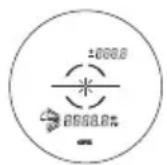
Immediately after power-on
- Aim at the target.
Position the center of the target mark on the target.
- Press the PWR button to measure.
After measurement, the result is displayed for approx. 8 seconds, then power automatically turns off. Press the PWR button while the power is on to measure again.
Single measurement
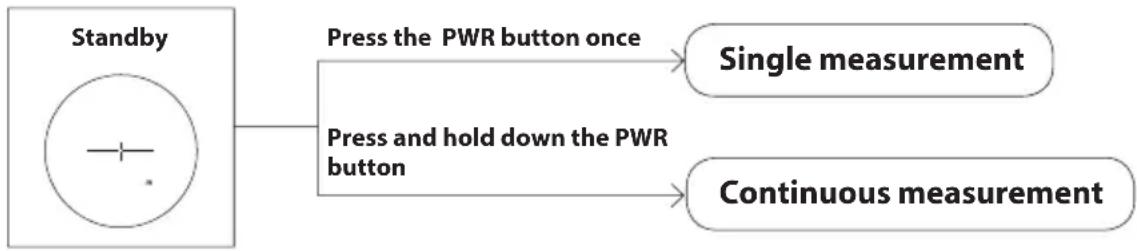
Pressing the PWR button once starts single measurement, then displays the results.
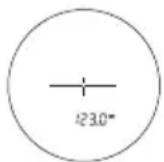
Example of measured distance display

Example of measurement failure
Continuous measurement
Press and hold down the PWR button to start continuous measurement up to approx. 8 seconds. During measurement, the measured result is displayed consecutively while the laser irradiation mark is blinking. If you release your finger from the button, continuous measurement stops.
- When measuring a flagstick at a golf course
- Keep targeting the flagstick at the center of the target mark with the continuous measurement function to minimize the effects of hand shake.
Technical notes
■ Specifications
| Measurement range (actual distance) 7.5-1 | 090 meters/8-1,200 yards |
| Distance display (increment) | Actual distance (upper): Every 1 m/yd. Actual distance (lower): Every 0.5 m/yd. Horizontal distance/Slope adjusted distance (lower): Every 0.2 m/yd. Height (upper): Every 0.2 m/yd. (shorter than 100 m/yd.) Every 1 m/yd. (100 m/yd. and over) |
| Accuracy (actual distance)*1 | ±0.75 m/yd. (shorter than 700 m/yd.) ±1.25 m/yd. (700 m/yd. and over, shorter than 1,000 m/yd.) ±1.75 m/yd. (1,000 m/yd. and over) |
| Magnification (×) 6 | |
| Effective diameter of objective lens (mm) 21 | |
| Angular field of view (real) (°) 7.5 | |
| Eye relief (mm) 18.0 | |
| Exit pupil (mm) 3.5 | |
| Diopter adjustment ±4 m | -1 |
| Dimensions (L × H × W) (mm/in.) | 100 × 75 × 42/3.9 × 3.0 × 1.7 |
| Weight (g/oz.) Approx. 180/6.3 (without battery) | |
| Operating temperature (°C/°F) -10 — +50/14 | 4 — 122 |
| Operating humidity (%RH) 80 or less (without dew condensation) | |
| Power source | CR2 lithium battery × 1 (DC 3V) Automatic power shut-off (after approx. 8 sec. unoperated) |
| Structure | Waterproof (up to 1 m/3.3 ft for 10 minutes)², fogproof Battery chamber is rainproof — JIS/IEC protection class 4 (IPX4) equivalent (under Nikon's testing conditions)³ |
| Electromagnetic compatibility | FCC Part15 SubPartB class B, EU:EMC directive, AS/NZS, VCCI classB, CU TR 020, ICES-003 |
| Environment RoHS, WEEE | |
| Laser classification | IEC60825-1: Class 1M/Laser Product FDA/21 CFR Part 1040.10: Class I Laser Product |
| Wavelength (nm) 905 | |
| Pulse duration (ns) 9.7 | |
| Output (W) 33.8 | |
| Beam divergence (mrad) Vertical: 0.25, Horizontal: 1.8 | |
- The specifications of the product may not be achieved depending on the target object's shape, surface texture and nature, and/or weather conditions.
*1 Under Nikon's measurement conditions.
^2 Waterproof models
This product has waterproof capabilities, and will suffer no damage to the optical system nor observation if submerged or dropped in water to a maximum depth of 1m / 3.3 ft for up to 10 minutes.
This product offers the following advantages:
- Can be used in conditions of high humidity, dust and rain without risk of damage to internal functions.
- Nitrogen-filled design makes it resistant to condensation and mold.
However, observe the following when using the Nikon Laser Rangefinder:
- Do not operate or hold the product in running water.
- If any moisture is found on movable parts of this product, stop using the product and wipe it off.
*3 The battery chamber is rainproof, not waterproof. Water may enter the device if the Rangefinder is submerged in water. If water enters the battery chamber, wipe out any moisture and allow time for the chamber to dry.
Battery life
Approx. 2,200 times (at approx. 20^ (68^)
This figure may differ according to conditions such as temperature and other factors. Use only as a guide.
- The battery supplied with this Nikon Laser Rangefinder is for operation checking. Due to natural electrical discharge, the life of this battery will likely be shorter than that noted above.
Troubleshooting/Repair
If this product fails to function as expected, check the list below before consulting your local dealer or the store where you purchased it.

If there is a problem with the product.
| Problem Cause/Solution | |
| • Does not turn on | • Press the PWR button (top of the body). • Check that the battery is inserted correctly. • Replace the battery with a new one. |
| • Unable to measure • Anomalous result | • Confirm the settings. • Confirm if it can measure a large target close to you (example: a building approx. 15 m/yd. ahead of you). • Clean the lens surface if necessary. |
| • Cannot see the internal display • Difficult to see the internal display | • Check the brightness of the internal display, and adjust it as necessary. Cover the objective lens so that checking the internal display is easier. |
| • Do not know if STABILIZED function is working | • Compare the vibration of the target in the viewfinder when the Laser Rangefinder is ON and OFF. • While the Laser Rangefinder is ON, the STABILIZED function is always activated. |
| • Cannot turn off the STABILIZED function | • The STABILIZED function is activated concurrently when the Laser Rangefinder is ON. When the Laser Rangefinder is OFF, the STABILIZED function automatically turns off. • The STABILIZED function cannot be turned on or off manually. |
| • There are minute motion sounds when the power turns on and off | • Due to the STABILIZED system motor, minute motion sounds occur. These sounds are normal, please continue to use the Laser Rangefinder. |
| • There are sounds from the inside when the body is shaken while the power is off | • The stabilizing mechanism moves inside. These sounds are normal. These sounds do not occur when the power is on, even if the body is shaken. |
| • [E] is displayed in the internal display | • Failure indication. Please contact your local dealer or the store where you purchased the product. |
- If you require a repair, please contact your local dealer or the store where you purchased the product. Do not repair or disassemble. It may result in a serious incident.
Please note that Nikon is not responsible for any direct or indirect damage if the user attempts to repair or disassemble the product.
About performance parts for repair and the repairable period
The repairable period is within the holding period of performance parts for repair (parts necessary to maintain performance). In some cases, repairs may be possible even after the parts holding period has passed, so please contact a Nikon service organization, the store where you purchased the product, or your nearest dealer. In addition, if the product is found to be completely damaged due to malfunction or damage caused by submersion, fire, or dropping, it cannot be repaired even within the holding period. Evaluation of the degree of failure or damage is at the discretion of the Nikon service organization.
Français

SOMMAIRE
Introduction
Printed in China, 926C_1_2101ML94