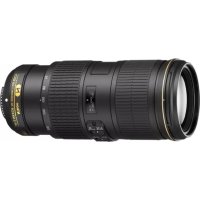
AFS Nikkor 70200mm f4G ED VR - Camera lens NIKON - Free user manual and instructions
Find the device manual for free AFS Nikkor 70200mm f4G ED VR NIKON in PDF.



| Product Type | AF-S G-type lens with built-in microprocessor and F mount |
| Brand | Nikon |
| Model | AF-S Nikkor 70-200 mm f/4G ED VR |
| Focal Length | 70 - 200 mm |
| Maximum Aperture | f/4 |
| Optical Construction | 20 elements in 14 groups (including 3 ED glass elements and nanocrystal coating) |
| Angle of View (FX) | 34°20' - 12°20' |
| Angle of View (DX) | 22°50' - 8° |
| Focusing | Autofocus (SWM) with permanent manual focus override (A/M) |
| Vibration Reduction | Yes, switchable Normal/Active, up to 4 stops gain |
| Minimum Focus Distance | 1 m (from focal plane) |
| Diaphragm Blades | 9 (circular) |
| Aperture Range | f/4 to f/32 |
| Filter Diameter | 67 mm |
| Dimensions (Diameter × Length) | Approx. 78 mm × 178.5 mm |
| Weight | Approx. 850 g |
| Supplied Accessories | LC-67 front cap, LF-4 rear cap, HB-60 lens hood, CL-1225 case |
| Compatible Accessories | 67 mm filters, RT-1 tripod collar, AF-S TC-14E/TC-17E/TC-20E teleconverters |
| Care and Cleaning | Blower for dust, soft cloth with ethanol, do not use organic solvents |
| Safety | Do not disassemble; avoid shocks, humidity, flammable gas; do not point at sun |
| Mount Seal | Rubber seal for weather resistance |
| Warranty | Repair by authorized service center only |
Frequently Asked Questions - AFS Nikkor 70200mm f4G ED VR NIKON
User questions about AFS Nikkor 70200mm f4G ED VR NIKON
0 question about this device. Answer the ones you know or ask your own.
Ask a new question about this device
Download the instructions for your Camera lens in PDF format for free! Find your manual AFS Nikkor 70200mm f4G ED VR - NIKON and take your electronic device back in hand. On this page are published all the documents necessary for the use of your device. AFS Nikkor 70200mm f4G ED VR by NIKON.
USER MANUAL AFS Nikkor 70200mm f4G ED VR NIKON
PykoBoDCTBO noIb3OBaTeJIa
Gebruikshandleiding
Manual do utiliser
Manual do usuario
Manuale d'uso
Návod k obssluze
- Do not disassemble. Touching the internal parts of the camera or lens could result in injury. In the event of malfunction, the product should be repaired only by a qualified technician. Should the product break open as the result of a fall or other accident, remove the camera battery and/or disconnect the AC adapter and then take the product to a Nikon-authorized service center for inspection.
- Turn the camera off immediately in the event of malfunction. Should you notice smoke or an unusual smell coming from the equipment, immediately unplug the AC adapter and remove the camera battery, taking care to avoid burns. Continued operation could result in fire or injury. After removing the battery, take the equipment to a Nikon-authorized service center for inspection.
- Do not use in the presence of flammable gas. Operating electronic equipment in the presence of flammable gas could result in explosion or fire.
- Do not look at the sun through the lens or the camera viewfinder. Viewing the sun or other bright light source through the lens or viewfinder could cause permanent visual impairment.
- Keep out of reach of children. Failure to observe this precaution could result in injury.
-
Observe the following precautions when handling the lens and camera:
-
Keep the lens and camera dry. Failure to observe this precaution could result in fire or electric shock.
- Do not handle the lens or camera with wet hands. Failure to observe this precaution could result in electric shock.
- Keep the sun well out of the frame when shooting backlit subjects. Sunlight focused into the camera when the sun is in or close to the frame could cause a fire.
-
If the lens will not be used for an extended period, attach the front and rear lens caps and store the lens out of direct sunlight. If left in direct sunlight, the lens could focus the sun's rays onto flammable objects, causing fire.
-
Do not carry tripods with a lens or camera attached. You could trip or accidentally strike others, resulting in injury.
- Do not leave the lens where it will be exposed to extremely high temperatures, such as in an enclosed automobile or in direct sunlight. Failure to observe this precaution could adversely affect the lens' internal parts, causing fire.
Notice for Customers in Canada
CANICES-3B/NMB-3B
Parts of the Lens
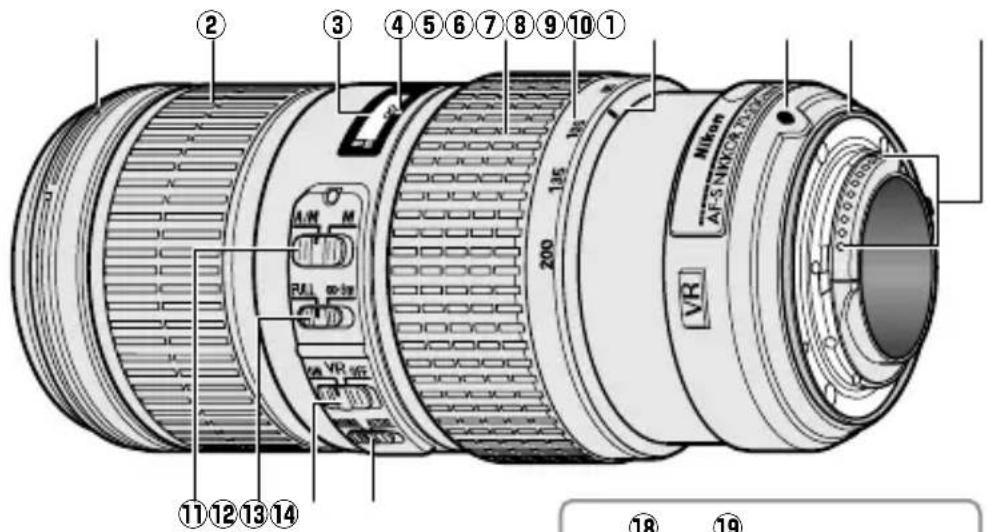
* Optional.
(1) Lens hood mounting mark ..... 18
2 Focus ring. 15
3 Focus distance indicator
(4) Focus distance mark
⑤ Zoom ring 15
6 Focal length scale 15
⑦ Focal length mark
8 Lens mounting mark
9 Rubber lens-mount gasket.....20
CPU contacts. 20
1 Focus-mode switch 15
12 Focus limit switch. 15
Vibration reduction ON/OFF switch 16
Vibration reduction mode switch 16
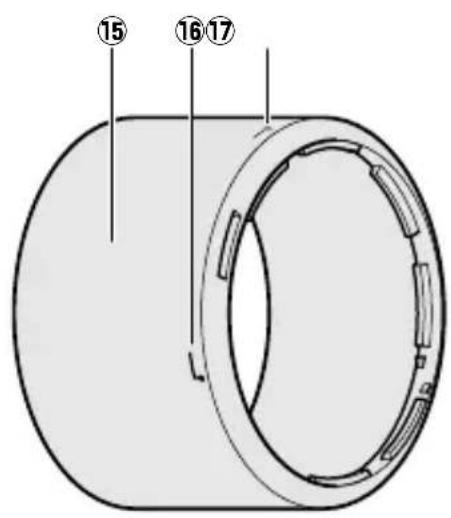
Lens hood 18
Lens hood alignment mark..... 18
Lens hood lock mark. 18
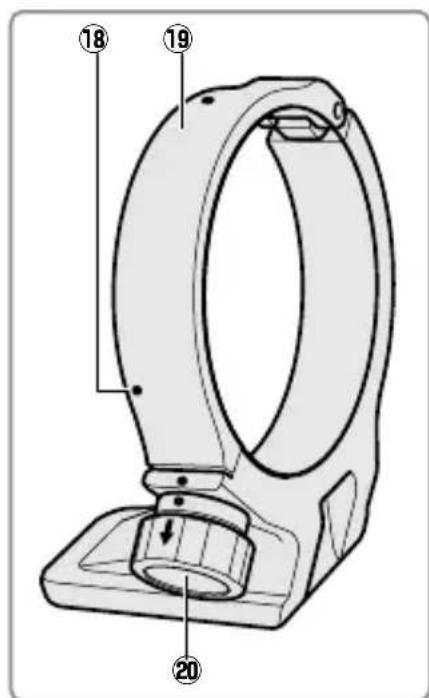
18 Position indices (90^)^* 19
19 Tripod collar ring* 19
20 Tripod collar ring attachment knob* 19
En
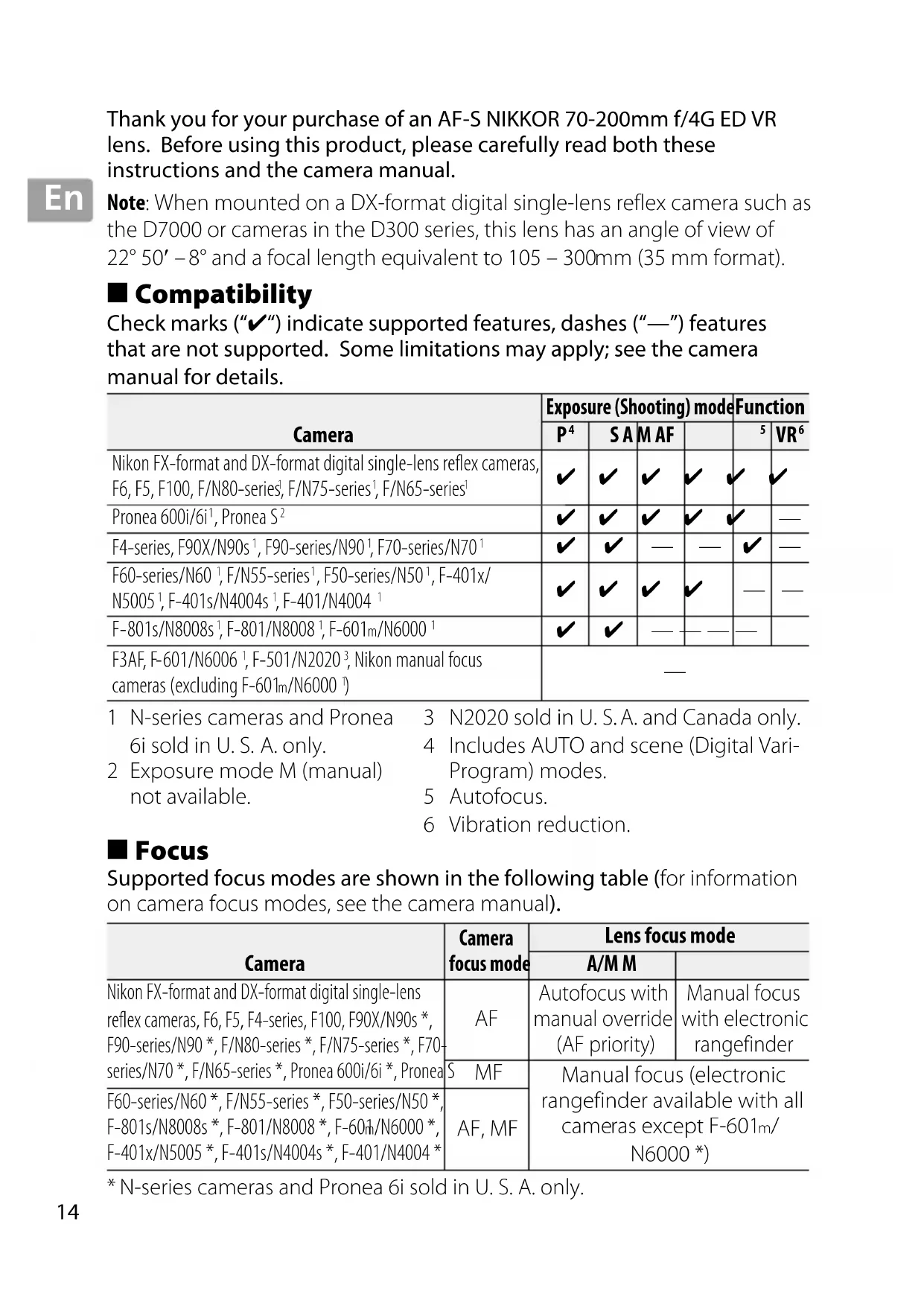
Thank you for your purchase of an AF-S NIKKOR 70-200mm f/4G ED VR lens. Before using this product, please carefully read both these instructions and the camera manual.
Note: When mounted on a DX-format digital single-lens reflex camera such as the D7000 or cameras in the D300 series, this lens has an angle of view of 22^ 50' - 8^ and a focal length equivalent to 105 - 300mm (35 mm format).
Compatibility
Check marks ("✓") indicate supported features, dashes ("—") features that are not supported. Some limitations may apply; see the camera manual for details.
| Camera | Exposure (Shooting) mode | Function | ||||
| P4 | SA | M AF | 5 | VR6 | ||
| Nikon FX-format and DX-format digital single-lens reflex cameras, F6, F5, F100, F/N80-series1, F/N75-series1, F/N65-series1 | ✓ | ✓ | ✓ | ✓ | ✓ | ✓ |
| Pronea 600i/6i1, Pronea S2 | ✓ | ✓ | ✓ | ✓ | ✓ | — |
| F4-series, F90X/N90s1, F90-series/N901, F70-series/N701 | ✓ | ✓ | — | — | ✓ | — |
| F60-series/N601, F/N55-series1, F50-series/N501, F-401x/N50051, F-401s/N4004s1, F-401/N40041 | ✓ | ✓ | ✓ | ✓ | — | — |
| F-801s/N8008s1, F-801/N80081, F-601m/N60001 | ✓ | ✓ | — | — | — | |
| F3AF, F-601/N60061, F-501/N20203, Nikon manual focus cameras (excluding F-601m/N60003) | — | |||||
1 N-series cameras and Pronea 6i sold in U.S.A. only.
3 N2020 sold in U.S.A. and Canada only.
2 Exposure mode M (manual) not available.
4 Includes AUTO and scene (Digital VariProgram) modes.
5 Autofocus.
6 Vibration reduction.
Focus
Supported focus modes are shown in the following table (for information on camera focus modes, see the camera manual).
| Camera | Camera focus mode | Lens focus mode | |
| A/MM | |||
| Nikon FX-format and DX-format digital single-lens reflex cameras, F6, F5, F4-series, F100, F90X/N90s *, F90-series/N90 *, F/N80-series *, F/N75-series *, F70-series/N70 *, F/N65-series *, Pronea 600i/6i *, Pronea | AF | Autofocus with manual override (AF priority) | Manual focus with electronic rangefinder |
| S MF | Manual focus (electronic rangefinder available with all cameras except F-601m/N6000*) | ||
| F60-series/N60 *, F/N55-series *, F50-series/N50 *, F-801s/N8008s *, F-801/N8008 *, F-601h/N6000 *, F-401x/N5005 *, F-401s/N4004s *, F-401/N4004 * | AF, MF | ||
- N-series cameras and Pronea 6i sold in U. S. A. only.
A/M (Autofocus with Manual Override/AF Priority)
To focus using autofocus with manual override (A/M):
1 Slide the lens focus-mode switch to A/M.
2 Focus.
If desired, autofocus can be over-ridden by rotating the lens focus ring while the shutter-release button is pressed halfway (or, if the camera is equipped with an AF-ON button, while the AF-ON button is pressed); note that the ring must be rotated a short distance before autofocus is over-ridden. To refocus using autofocus, press the shutter-release button halfway or press the AF-ON button again.
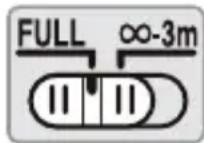
The Focus Limit Switch
This switch determines the focus distance limits for autofocus.
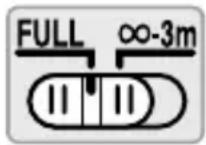
FULL: Select this option for subjects that may be closer than 3m (9.84 ft).
- 3 ~m : If your subject will always be at distance of at least 3 ~m (9.84 ft), select this option for faster focusing.
Zoom and Depth of Field
Before focusing, rotate the zoom ring to adjust the focal length and frame the photograph. If the camera offers depth-of-field preview (stop down), depth of field can be previewed in the viewfinder (see page 210 for more information).
Note: Note that the focus distance indicator is intended only as a guide and may not accurately show the distance to the subject and may, due to depth of field or other factors, not show when the camera is focused on a distant object.
Aperture
Aperture is adjusted using camera controls.
Built-in Flash Units
When using the built-in flash on cameras equipped with a built-in flash unit, remove the lens hood to prevent vignetting (shadows created where the end of the lens obscures the built-in flash).
Vibration Reduction (VR)
Vibration reduction (VR) reduces blur caused by camera shake, allowing shutter speeds up to 4.0 stops slower than would otherwise be the case. This increases the range of shutter speeds available and permits hand-held, tripod-free photography in a wide range of situations. The effects of VR on shutter speed are measured according to Camera and Imaging Products Association (CIPA) standards; FX-format lenses are measured using FX-format digital cameras, DX-format lenses using DX-format cameras. Zoom lenses are measured at maximum zoom.
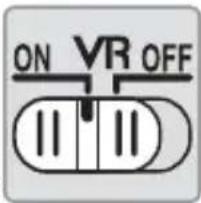
Using the Vibration Reduction ON/OFF Switch
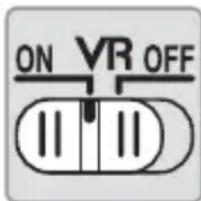
Select ON to enable vibration reduction. Vibration reduction is activated when the shutter-release button is pressed halfway, reducing the effects of camera shake for improved framing and focus.
Select OFF to turn vibration reduction off.
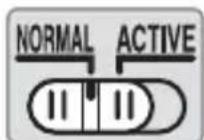
Using the Vibration Reduction Mode Switch
The vibration reduction mode switch is used to select the vibration reduction mode when vibration reduction is on.
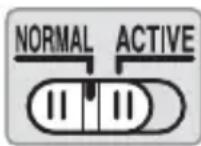
Select NORMAL to reduce the effects of vibration when photographing from a fixed position and in other situations with comparatively little camera motion.
Select ACTIVE to reduce the effects of vibration when shooting from a moving vehicle, while walking, and in other situations with active camera motion.
Using Vibration Reduction: Notes
- Slide the vibration reduction switch to OFF if the camera does not support vibration reduction (pg. 14). Leaving vibration reduction on may greatly increase the drain on the battery, particularly in the case of Pronea 600i/6i cameras.
- When using vibration reduction, press the shutter-release button halfway and wait for the image in the viewfinder to stabilize before pressing the shutter-release button the rest of the way down.
- When vibration reduction is active, the image in the viewfinder may be blurred after the shutter is released. This does not indicate a malfunction.
- Slide the vibration reduction mode switch to NORMAL for panning shots. When the camera is panned, vibration reduction applies only to motion that is not part of the pan (if the camera is panned horizontally, for example, vibration reduction will be applied only to vertical shake), making it much easier to pan the camera smoothly in a wide arc.
- Do not turn the camera off or remove the lens while vibration reduction is in effect. If power to the lens is cut while vibration reduction is on, the lens may rattle when shaken. This is not a malfunction, and can be corrected by reattaching the lens and turning the camera on.
- If the camera is equipped with a built-in flash, vibration reduction will be disabled while the flash charges.
- Turn vibration reduction off when the camera is securely mounted on a tripod, but leave it on if the tripod head is not secured or when using a monopod.
En
The Lens Hood
The lens hoods protect the lens and block stray light that would otherwise cause flare or ghosting.
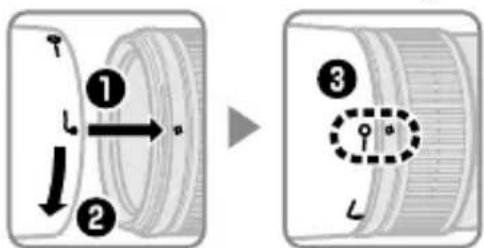
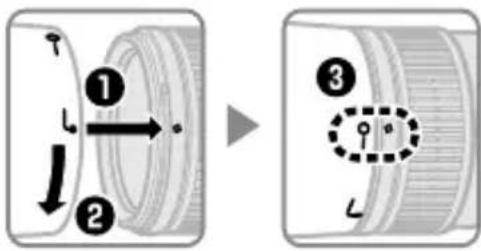
Align the lens hood lock mark (-) with the lens hood mounting mark () on the lens (3).
When attaching or removing the hood, hold it near the symbol on its base and avoid gripping it too tightly. Vignetting may occur if the hood is not correctly attached.
The hood can be reversed and mounted on the lens when not in use. When the hood is reversed, it can be attached and removed by rotating it while holding it near the lock mark (—O).
Focusing Screens
The following cameras support a variety of focusing screens for use in different situations.
| Screen Camera A B C E | EC-B EC-E | G1 | G2 | G3 | G4 J L | M U | ||||||||
| F6 | ◎ | ◎ | — | ◎ | — | — | — | — | — | — | ◎ | ◎ | ◎ | ◎ |
| F5+DP-30 | ◎ | ◎ | ◎ | ◎ | ◎ | ◎ (+0.5) | ◎ | ◎ | ◎ | ◎ | ||||
| F5+DA-30 | ◎ (+1.0) | ◎ (+0.5) | ○ | ◎ (+0.5) | ◎ | ○ (-1.0) | ◎ (+0.5) | ◎ (+1.0) | ◎ |
Recommended.
O: Vignetting visible in viewfinder (photographs are not affected).
—: Not compatible with camera.
( ): Figures in parentheses give the exposure compensation for center-weighted metering. Select "Other screen" for Custom Setting b6 ("Screen comp.") when adjusting exposure compensation for the F6; note that with screens other than B or E, "Other screen" must be selected even when the value for exposure compensation is 0. Exposure compensation for the F5 can be adjusted using Custom Setting 18; see the camera manual for details.
Empty cell: Not suited to use with this lens. Note that type M screens can however be used for photomicrography and macro photography at magnifications of 1 : 1 or higher.
Note: The F5 supports matrix metering with A, B, E, EC-B/EC-E, J, and L focusing screens only.
The Optional RT-1 Tripod Collar Ring
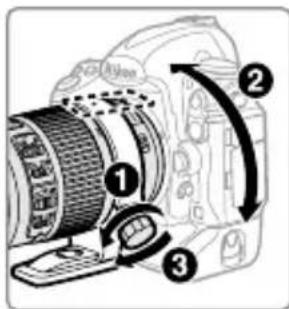
Loosen the tripod collar ring attachment knob to rotate the camera to the desired position and orient the display horizontally or vertically. Note that your hand may come into contact with the tripod if you rotate the camera while holding it by the handgrip. Depending on how the camera or tripod is attached, camera shake may be reduced by attaching the tripod to the camera tripod mount.
WARNING
Fully tighten the tripod collar ring attachment knob when attaching tripod collar ring. Failure to observe this precaution could result in the tripod collar ring becoming detached from the lens, causing injury.
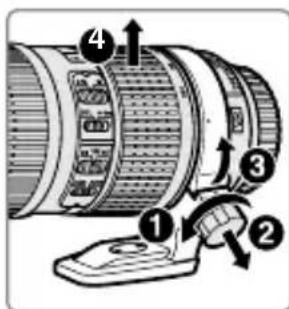
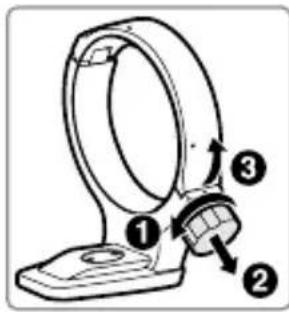
Attaching the Tripod Collar Ring
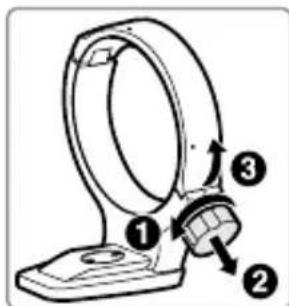
1 Loosen the tripod collar ring attachment knob (1).
2 Open the ring. Pull the attachment knob toward you (2) and open the ring (3).
3 Place the lens in the ring (4).
4 Close the ring.
Pull the attachment knob toward you (5) and close the ring (6). Do not use excessive force, as your hand could be caught in the ring.
5 Tighten the attachment knob (7).
Positioning the Camera
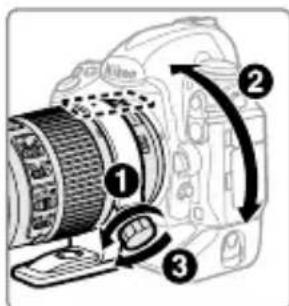
Loosen the attachment knob (1), adjust the position indices to the desired vertical or horizontal orientation (2), and then tighten the attachment knob (3).
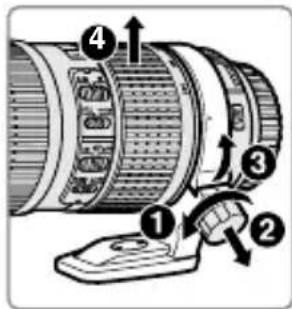
Removing the Tripod Collar Ring
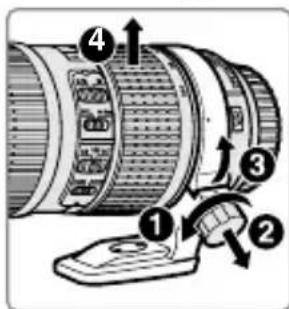
1 Loosen the attachment knob (1).
2 Remove the ring. Pulling the attachment knob toward you (2), open (3) and remove the lens (4).
En
Lens Care
- Do not pick up or hold the lens or camera using only the lens hood.
- Keep the CPU contacts clean.
- Should the rubber lens-mount gasket be damaged, cease use immediately and take the lens to a Nikon-authorized service center for repair.
- Use a blower to remove dust and lint from the lens surfaces. To remove smudges and fingerprints, apply a small amount of ethanol or lens cleaner to a soft, clean cotton cloth or lens-cleaning tissue and clean from the center outwards using a circular motion, taking care not to leave smears or touch the glass with your fingers.
- Never use organic solvents such as paint thinner or benzene to clean the lens.
- The lens hood or NC filters can be used to protect the front lens element.
- Attach the front and rear caps before placing the lens in its flexible pouch.
- If the lens will not be used for an extended period, store it in a cool, dry location to prevent mold and rust. Do not store in direct sunlight or with naphtha or camphor moth balls.
- Keep the lens dry. Rusting of the internal mechanism can cause irreparable damage.
- Leaving the lens in extremely hot locations could damage or warp parts made from reinforced plastic.
Supplied Accessories
- 67 mm snap-on Front Lens Cap LC-67
Rear Lens Cap LF-4 - Bayonet Hood HB-60
- Flexible Lens Pouch CL-1225
Compatible Accessories
- 67 mm screw-on filters
- Tripod collar ring RT-1
- AF-I/AF-S Teleconverters TC-14E/TC-14E II/TC-17E II /TC-20E / TC-20E II */TC-20E III *
- Autofocus is available only with cameras that offer f/8 support.
■ Specifications
Type Type G AF-S lehs with built-in CPU and F mount
| Focal length 70 – 200 mm | |
| Maximum aperture f/4 | |
| Lens construction | 20 elements in 14 groups (including 3 ED lens elements and lens elements with Nano-Crystal coatings) |
| Angle of view | · Nikon film SLR and FX-format D-SLR cameras: 34° 20' – 12° 20' · Nikon DX-format D-SLR cameras: 22° 50' – 8° · IX240 system cameras: 27° 40' – 9° 50' |
| Focal length scale Graduated in millimeters (70, 85, 105, 135, 200) | |
| Distance information | Output to camera |
| Zoom Manual zoom | using independent zoom ring |
| Focusing | Nikon Internal Focusing (IF) System with autofocus controlled by Silent Wave Motor and separate focus ring for manual focus |
| Vibration reduction | Lens shift using voice coil motors (VCMs) |
| Focus distance indicator | 1 m to infinity (∞) |
| Minimum focus distance | 1 m (3.28 ft) from focal plane at all zoom positions |
| Diaphragm blades 9 (rounded diaphragm opening) | |
| Diaphragm Fully automatic | |
| Aperture range f/4 to f/32 | |
| Metering Full aperture | |
| Focus limit switch T | wo positions: FULL (∞ - 1m) and ∞ - 3 m |
| Filter-attachment size | 67 mm (P = 0.75 mm) |
| Dimensions | Approx. 78 mm maximum diameter × 178.5 mm (distance from camera lens mount flange) |
| Weight | Approx. 850 g (30.0 oz) |
Nikon reserves the right to change the specifications of the hardware described in this manual at any time and without prior notice.
SICHERHEITSHINWEISE
Bctpoehhble BCnblwKm
Ipn nCnOJb3OBaHn BCTpOeHHoB CnblsKn Ha oToKampe,
obopydOBaHHoTakOy BCblsKO, CHMNTe 6JIeHny obBeKTnBa, uTO6bl
n36eXaTb BInhBeTInpOBaHn (TeHei, 6pa3yIOxxCra TaM, rKe Kpaai
ObBeKTnBa 3aTeMHReT BCblsKy).
■Поваделене вбраци (VR)
IodabJIeHne Bn6paun (VR) yMeHbJaeT Cma3bIBaHHe, Bbl3BaHHoe
dpoJahnem fOTOKaMEpbI, I03BOJra IcnoJb3OBaTb BbldePJKn Do 4,0
OCTAHOBOK dnnHHee, Yem 3TO IMeNo 6bl MeCTO B dpYrNX cnyaJx. 3To
yBeJIuHBAeT dHaNA3OH DOCTUINbIX 3NaueHn BbldePJKn I IO3BOJraET
BblONHЯTb fOTOCbEMky C pyKn 6e3 IcnoJb3OBaHn JtTaTbBA BO MHOJN X
CITyaQJnx.BIIaHnE VR Ha BblepKkY n3MepJeTcB COOTBETCTBn CO
ctaHapTaMn Camera and Imaging Products Association (CIPA; AccouaZna
IPOUN3BOJnteJe fOTOKaMEp n UcTPOJCTB o6pa6OTkn I3o6paJXeHn);
ObbeKTbBlfOpMaTa FX n3MepeIOTCs C NOMOsbIO ZnΦpOBbIX fOTOKaMEp
OpMaTa FX, ObbeKTbBlfOpMaTa DX n3MepeIOTCf fOTOKaMEpaMn fOpMaTa
DX. 3ym-ObBeKTbBl n3MepeIOTC npn MaKcImaJIbHOM yBeJIuYeHN.
IcnoIb3OBaHne nepeKJIouaTeJЯ noJaBLeHnY Bn6paCn BKJI./BblKJI.
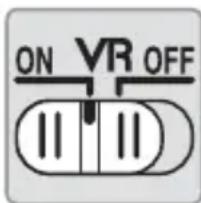
BbI6epuTe ON (BKJI.) uTo6bl BkIIOuHTb nOaBHeHne Bn6paun.
Iodablenie Bn6paunBkIouaetcra, KOrda cnysckobar KHONka 3aTBopa Haxata HanoIOBHy, yMeHbShaet 0f0eKdIPOXaHNA FOToKAMepbl, UTO yLyUshaET KaDpnpOBaHne IN OOKycuropOBky.
BbI6epuTe OFF (BblKJI.) 4TO6bl BblKJIOUHTb nOJaBLeHne Bn6paun.
IcnoIb3OBaHne nepeKIOUaTeJIPEXIMa IOpAbLeHnBn6paCNI
IpeeklouateIb pexima noaBHeHn Bn6paun nCnoJb3yeTcIy IBa6opa pexima noaBHeHn Bn6paun, eCNI OHO BKJIUOeHO.
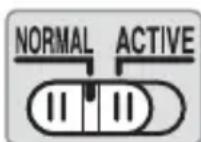
BbI6epnte NORMAL, yTO6bl nOdaBnTb 3ΦΦeKT Bn6paun BO BpeM rCbeMKn C HeNoDBeXHOro NIOJoxEHNrN I B dpyrNX CNTyaunx npn cpaBHnTeNbHO He6OJbShOM DnBXKeHNn φOTOKaMepbl.
BbI6epnTE ACTIVE, yTO6bl nOdaBnTb 3ΦΦeKT Bn6paunn BO BpeM rCBemKn n3 DBNkUyIeROc aBTOMo6nla, BO BpeM XoNb6bl, a TaKKe B dpynx CNTyaIax npn 3HaunTeJbHOM DnIXKeHn φOTOKaMepbl.
IcnoB308aHue nodaBHeu Bubau: Ppumeyanu
- Перешиптосякюател NGaBHeNn Bn6paun B noLoxKeHne OFF, ecn foToKaMePa He NOdEprKuBaet NOdaBLeHne Bn6paun (cTp. 64). NocToHHoe BKIOUeHne NOdaBLeHn Bn6paun 3NaHTelbHo yBeJIuHbAeT pAcXoJ 3apJa 6aTapei, ocObeHNo Ha foToKaMepax Pronea 600i.
- Пи IncnoIb3OBAHn NOdAbleHn Bn6paCn HaKMTe CnyCKOBYIO KHOJky 3aTBOPa HanoIobHy n nepei Tem KaK HaxKaTb CnyCKOBYIO KHOJky 3aTBOPa NOLHOCTbU, DOxNITecb, NOKa N3O6paXKeHne B BVIONCaTeNe cTa6nIIN3npyeTc.
- Ecni noidaBHeHne Bn6paun aKTHINHO, n3o6paXeHne B BVIOUCKaTeJe MOKe T CMa3aTbCn PocNe OnyckaHn 3aTBOPa. 3TO He YBJIaETc HEnCnpaBHOCTbI0.
-Перемechтentepeeklouatelepbexnma noablennaBn6paunB noIooxeNNE NORMALдЯ naHopamhbx cHIMKOB. KOrda foToKaMepa naHopampyetcra,poabLeHne Bn6paun npimHeTcra TOnbKO dJa DBNXeHn, KOtOpbIe He YBIAOTcra qactbIO naHopamnpoBaHn (ecIn fOToKaMepa naHopampyetcra nO rOpNZHTaJI,HaPnMpE,TO noAbLeHne Bn6paun 6ydet npimEnrTaCRA TOnbKO dJa noDaBleHn BePTNKalbHbIX cOTpcHn),чTO obJeRHT pIaNBOHe BblONHeHne naHopamnpoBaHn foToKaMepbI NO shIpOKo Dyre.
He BbIKIIOUaIte fOTOKaMepy n He ChIMaIte OBeKTHB BO BpeMa pa6Otbl NOAbLeHnRA B6paqni. Ecln OTcoEINHTb PntAHne OBeKTHBa BO BpeMa pa6Otbl NOAbLeHnRA B6paqni, BO BpeMa TpRcKn OBeKTHB MoKeT Dpe6e3XaTb. 3TO He ABLaeTcH HeNCnPabHOCTbIO, dJa yCTpaHEnra Dpe6e3XaHnRA CJIeDyET NOBTOPOdCOeINHTb OBeKTHB IN BKJIIOuHTb fOTOKaMepy. - Ecnn foToKamepa o6OpyIDoBaHa BCTpOeHHoB BCnblsKOi, NOaBJIeHne Bn6paun 6yJeT 3a6NOKIpOBaHO BO BpeM 3apJDK N BCnblsKn.
- BыкючITE NOДаВленье Вибраци ecn φOTOKamepa HaJexHo yCTaHOBJIeHa Ha шТАТИBE, HO OCTaBbTe eRO BKJIQUeHHbIM, ecn ГOLOBka шТАТИBa 3akpenJIeHa HeHaJExKHO nI IN NCNoЛьЗуETcЯ MOHOnOD.
■Бленьда
I P E D U N P E X K D E H N E
Pn yctaHOBKe KOJIbca WtATnBa NOnHOCTbIO 3aTARNBaIe pyUky yCTaHOBKn KOJIbca WtATnBa. HeBbINOJIHHeNHe 3ToI Mepbl PpeIOCTOPOXHOCTN MOXET pINBEcTNIOTCOeHNHeHIO KOJIbca WtATnBA OT OBeKTnBa, YTO MOXET npuHHHTb TpaBMbl.
yctahOBka Koblupa wTaTnBa
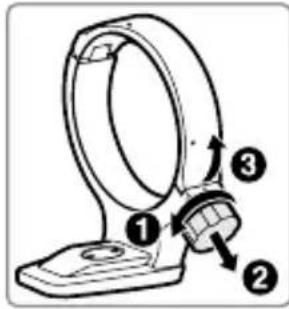
1 Ocna6bTe pyuky yctaHOBKn Koblca wTaTnBa (1).
2 OTKpoIte KOnbUo. NotHnTe Ha ce6y pyuKv yCTaHOBKn (2) n OTKpoIte KOnbUo (3).
3ПомecntteobbeKtNB B Kobilvo (4).
4 3akpoTe Kobluo. IotraHnTe Ha ce6pa yUcKaY uCTaHOBKn (5) n 3akpoTe Kobluo (6). He npilaraIte Upe3MePbIX ycIIIn, NocKoJIbKy KOJIbIO MoXeT 3aUeMnTb pyKy.
5 3aTaNHTe pyuKy yCTaHOBKn (7).
yctahOBka foTOKaMepbl
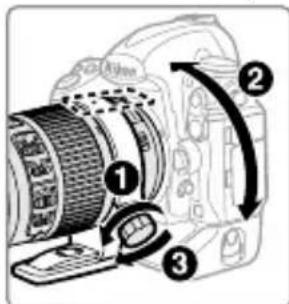
Ocna6bTe pyuKy yctaHOBKn (1), nocTaBbTe yka3aTeNn NOLOXeHnB HyXHyIO BepTnKaJIbHyIO NnI rOpn3oHTaJIbHyIO opneHTaCnIO (2), a 3aTeM 3aTaNHTe pyuKy yCTaHOBKn (3).
ChyTne KOnbca WtTaTNBa
1 Ocna6bTe pyuky yctaHOBKn (0).
2 CHIMITE KOJIbzo.
NotaryB pyuKy yctaHObKn Ha ce68 (2), OTKpoiTe 3) N BblbTe OobekTINB (4).
Ru
yxo3a 06bekTUBOM
He npHmMaTe n He depXnTe oBeKtNB nn fOTOKaMepy TOnbKO 3a 6JeHny.
- CodepXnTe KOHTaKtbl MmKpOnpoueccopa B uHCTOTE.
- Ecni pe3iHOBA npOKlaJa Ka KpeJIeHna O6BeKTbBa NOBpeKdHa, HemeIeHNO ppeKpaTte IcNoIb3ObAHne I OTHeCtTe ee B OfIuHaIbHbI cepBnchbl ueHTp Nikon dIra peMOHTa.
- Испосьугу Дя удаленя с поberхнoctи объektва пыл n Bорсинок Утобу удалпь пая и OTпeчатки пальцeВ,doбавы Te Heбольшоe колчecтBOЭТИLOBOrO CnIrPta Ил OЧNTteЯ Дя Obъektва на МягkyIO,ЧИСТУ XЛОПКOBYTO TkaHb Ил ТkaHb Дя OЧNTKn Obъektва n,наная OT цHTpa, OчNTte erO KpyROBbIMN DBИжЕНЯМN, CTapaЯсь He NOCTaВИТь пЯTHО n HeДOTPOHYtCBЯ пальцam N Do CTeKna.
- HNKoIa He IcNoIb3yIe IJra OUInCTKn O6BeKtNBA OprAHnueckne pactBOpHTeJI, TAKNe KaK pa36abNTeJI dJa Kpackn IIN 6eH3nH.
-Бленьду пиьгс NC можно IncnoьзOBaТь Дя 3auntbI nepeДнero
элем enta obbeKtNBa.
3aKpoIe nepeHIO u 3aHIO KpbIuKN OBeKTnBa, npeTem KaK NOJOKITb OBeKTnB MmRkn YexOJ.
- Ecni obbeKtiv He 6ydt IcnoIb3ObaTbcra B TeueHne npoJIKTeJIbHO BpeMeHn, XpaHnte erO B npoxlanHom, cyXOM MeCTe, YTO6bl npedOTBpATNTb NOBHeHne PLeceHN pXaBUnHb. He XpaHnte IOBIO3dEiCTBnEM npAIMOr COJIHeUHO CBeTa NIN BmecTe C HaΦTaIIINHOBbIMN NIN KaMΦapHbIMN ShapNKamN IpOTNB MOJI.
XpaHnTe o6bekTnB cyxIm. PkaBJIeHne BHyTpEHHero mExaHn3Ma MoKet npNBecTI K HeNoPpABNMOMy NOBpeJdeHIO.
- EcIIIOCTaBNTb OBeKtINB Upe3BbIaHNO JkapKOM MeCTe, 3TO MOKeT npINBeCTN K NOBpeJdeHnIO IIn DeΦOpMauIN YacteN, CdJIaHHbIX N3 ycIIeHHOrO PIACTnKa.
Bxodjaune B Komnlekt npHaJeXHOCTN
Compatible accessories
| Tela Cârma A B C E | EC-B EC-E | G1 G2 | G3 | G4 J L M | U | ||||||||
| F6 | ◎ | ◎ | — | ◎ | — | — | — | — | — | ◎ | ◎ | ◎ | |
| F5+DP-30 | ◎ | ◎ | ◎ | ◎ | ◎ (+0,5) | ◎ | ◎ | ◎ | |||||
| F5+DA-30 | ◎ (+1,0) | ◎ (+0,5) | ○ | ◎ (+0,5) | ◎ | ○ (-1,0) | ◎ (+0,5) | ◎ (+1,0) | ◎ |
: Recomendado.
| P2 | SAMAF | 3 | VR4 | ||||
| ✓ | ✓ | ✓ | ✓ | ✓ | ✓ | ||
| ✓ | ✓ | ✓ | ✓ | ✓ | — | ||
| ✓ | ✓ | — | — | ✓ | — | ||
| ✓ | ✓ | ✓ | ✓ | — | — | ||
| ✓ | ✓ | — | — | — | |||
| — | |||||||
1 Modul de expunere M (manual) nu este disponibil.
2 Include modurile AUTO 山 scenă (Programe multiple prestabilite digital).
3 Focalizare automata.
4 Reducerea vibratilior.
Focalizare
Seria F60, serial F55, serial F50, F-801s, F-801, F-601m, F-401x, F-401s, F-401
Ipimitka: F5 niTpmye MaTpuHn MeToD 3amipy TilbKn 3 ekpaHaMn fokycBaHHA A, B,E, EC-B/EC-E, J Ta L.
Iodatkobe kibuepe Iy KpinnenHa wtatNB RT-1
Biikpytib pykoTky npinkpInnHn KInbca WtTaNbA, 06 nobepHytn
fotoKamepy y notpi6he noLoXeHH Ta po3TaUyBaTu dinCnnei
roPi3oHTaIbHo a6o BepTKaIbHo. 3ayBaXTe, 0o Bi moXeTe 3aueNTu
WtTaNB pyKOIO, kso NOBepTaTe fotoKamepy, TpmaOUn II 3a pyKy.
3aJeXHO Bi cNoCo6y npinkpInnHn fotoKamepn a6o WtTaNbA,
TpemTiHH fotoKamepn MoxHa 3MeHsITN, pID'EDHaBShn WtTaNB Do
rHi3da dJa KpInlENHn fotoKamepn Ha WtTaNB.

PONEPEIXEHH
Iobhictu 3aTaryHitb pyUk npKpInHeHH KInbZra JnKpInHeHH Ha WtATNB npn npEHaHHi KInbZra Do WtATNBy. HexTyBaHHa ZIM 3aCTepExeHHa MOnKe npN3BecTu DO TORO, 10 KInbZe DnKpInHeHH Ha WtATNB BiD'EDHaETbcra BiD O6'ekTnBa, CnpuHIOUCh TpaBMyBaHHa.
PnEHaHnaKilbuaJkpinHeHHa HTaTINB
1 BiDkpyTiB pyKy npnKpInIeHHa KInbIa Ia KpinIeHHa Ha WtATNB (1).
2 BiDkpniTe KInbue. NotarHITb pykny Ha ce6e (2) i BiDkpniTe KInbue (3).
3 Nomicitb 06'ekTnB y KInbue (4).
4 3akpiTe kInbue. NotarHItb puKy Ha ce6e (5) i 3akpiTe kInbue (6). He dokladaite naMipnX 3ycnIb, o6 He 3axaTn KInbceM pyKy.
5 3ataryHitb pyky (7).
PozhiouhyBaHHa oToKaMepn
BiiKpyTitb pyuKy (1), BiDperyIIOte nOLOXeHnMaTOK NO3nUioHyBaHHaBiNObiIDHO do notpi6HOi opiEHTaui, BeptNKaJIbHOi qH rOpN3OHTaJIbHOi (2), NOTIM 3aTARHITb pyuKy (3).
Bid'εdHaHЯ KInbçaДЯ KpinlleHЯ Ha wtatNB
1 BiikpytiB pyky (0).
2 3HimiTb KInbue.
NotarytbyukyHaCe6e(2),BiKpnIte(3)Ta 3HIMITbO6'EKTNB(4).
| 照相机 对焦屏 | J | L | M | U |
| F6 | ◎ | ◎ | ◎ | |
| F5+DP-30 | ◎ | ◎ | ◎ | |
| F5+DA-30 | ◎ (+0.5) | ◎ (+1.0) | ◎ |
推荐使用。
△hihjnJi(geo)toLJIeRnEa.1,2,3,4,5,6,7,8,9,10,11,12,13,14,15,16,17,18,19,20,21,22,23,24,25,26,27,28,29,30,31,32,33,34,35,36,37,38,39,40,41,42,43,44,45,46,47,48,49,50,51,52,53,54,55,56,57,58,59,60,61,62,63,64,65,66,67,68,69,70,71,72,73,74,75,76,77,78,79,80,81,82,83,84,85,86,87,88,89,90

| 카메라 | onoesthes(울목)모드 | 기formance | ||||
| P2 | S | A M | AF | 3 | VR4 | |
| Nikon FX foamy具体 DX foamy mini-jetzel일AnRiuplekks S kaéra, F6, F5, F100, F80-ssi-ss, F75-ss, F65-ss | ✓ | ✓ | ✓ | ✓ | ✓ | |
| Frolo내에 600i, frolo내에 S1 | ✓ | ✓ | ✓ | ✓ | — | |
| F4-ss-ss, F90X, F90-ss-ss, F70-ss-ss | ✓ | ✓ | — | ✓ | — | |
| F60-ss-ss, F55-ss-ss, F50-ss-ss, F-401x, F-401s, F-401 | ✓ | ✓ | ✓ | — | — | |
| F-801s, F-801, F-601M | ✓ | ✓ | — | — | — | |
| F3AF, F-601, F-501, Nikon 셶동 출류 키에 ra(F-601M 채와) | — | |||||
upleReSiGa nAingJnKmeLaeRr AaIeNt AaeLg ReSiTo RaIeHgUeHgUeEeBnBnBnBnBnBnBnBnBnBnBnBnBnBnBnBnBnBnBnBnBnBnBnBnBnBnBnBnBnBnBnBnBnBnBnBnBnBnBnBnBnBnBnBnBnBnBnBnBnBnB.
■ 愿邮隆 视定(VR)
Ranst Hndn Rnst to bho hgoe Hre Hne HsT Hng HnH u rgea h n nn (stray light)u
LanZ HuaJin TaK(—O) 1000
卍德則未歴者,賊之。日,自王,夫子,夫子,夫子,夫子,夫子,夫子,夫子,夫子,夫子,夫子,夫子,夫子,夫子,夫子,夫子,夫子,夫子,夫子,夫子,夫子,夫子,夫子,夫子,夫子,夫子,夫子,夫子,夫子,夫子,夫子,夫子,夫子,夫子,夫子
후드를usa용하지울을 때는회EZ에 겙구로장eschal수有點nya.후드를 겙구로장eschal어만후드를 출목図士(—〇) progressively thechakha natachchalih su onlhynida.
□
| UML J | G4 G3 | G2 G1 | EC-B EC-E | E C B A | L L L L L L L L L L L L L L L L L L L L L L L L L L L L L L L L L L L L L L L L L L L L L L L L L L L L L L L L L L L L L L L L L L L L L L L L L L L L L L L L L L L L L L L L L L L L L L L L L L L L L | ||||||||
| ◎ | ◎ | ◎ | — | — | — | ◎ | — | ◎ | ◎ | F6 | |||
| ◎ | ◎ | ◎ | ◎ (+0.5) | ◎ | ◎ ○ | ◎ | ◎ | F5+DP-30 | |||||
| ◎ | ◎ (+1.0) | ◎ (+0.5) | ○ (-1.0) | ◎ | ◎ (+0.5) | ○ | ◎ (+0.5) | ◎ (+1.0) | F5+DA-30 |
"Other screen" . . . . . . . . . . . . . . . . . . . . . . . . . . . . . . . . . . . . . . . . . . . . . . . . . . . . . . . . . . . . . . . . . . . . . . . . . . "Other screen" "Screen comp." b6 ydsLgC21dAaUyDyLL (ydsL) "Other screen" "Other screen" "Other screen" "Other screen" "Other screen" "Other screen" "Other screen" "Other screen" "Other screen" "Other screen" "Other screen" "Other screen" "Other screen" "Other screen" "Other screen" "Other screen" "Other screen" "Other screen" "Other screen" "Other screen" "Other screen" "Other screen" "Other screen" "Other screen" "Other screen" "Other screen" "Lgolss:18 ydsLgC21dAaUyDyLL F5 IydsLg Lgolss:18 ydsLgC21dAaUyDyLL F5 IydsLg Lgolss:18 ydsLgC21dAaUyDyLL F5 IydsLg Lgolss:18 ydsLgC21dAaUyDyLL F5 IydsLg Lgolss:18 ydsL41:17 ydsLgC21dAaUyDyLL F5 IydsLg Lgolss:18 ydsL41:17 ydsLgC21dAaUyDyLL F5 IydsLg Lgolss:18 ydsL41:17 ydsLgC21dAaUyDyLL F5 IydsLg
Ar
iLj:J1j081 Jlaa plss
jIJIJIJIJIJIJIJIJIJIJIJIJIJIJIJIJIJIJIJIJIJIJIJIJIJIJIJIJIJIJIJIJIJIJIJIJIJIJIJIJIJIJIJIJIJIJIJIJIJIJIJIJIJIJIJIJIJIJIJIJIJIJIJIJIJIJIJIJIJIJIJIJIJIJIJIJIJIJIJIJIJIJIJIJIJIJIJIJIJIJIJIJIJIJIJIJIJIJIJIJIJ
J 15000000000000000000000000000000000000000000000000
Pronea 600i Ig
aogjai
aIgll jj Jj j j j j j j j j j j j j j j j j j j j j j j j j j j j j j j j j j j j j j
J 2
s1s21 ggag Jhc lc lio
aJrJrJrJrJrJrJrJrJrJrJrJrJrJrJrJrJrJrJrJrJr
J< 1 1 1 1 1 1 1 1 1 1 1 1 1 1 1 1 1 1 1 1 1 1 1
jIjI JJI Jc sll a w d 1g IJrA Ll jx .a
Jgss J 1. Ljzai sic a wse jc ax xw gur y d jzai JLa Joc sl
J 1
…
·Lp
Jololololololololololololololololololololololololololololololololololololololololololololololololololololololololol
iJ 111 111 111 111 111 111 111 111 111 111 111 111 11
(VR)
Lao Jy Jz j 11 y j 11 j 11 j 11 j 11 j 11 j 11 j 11 j 11 j 11 j 11 j 11 j 11 j 11 j 11 j 11 j 11 j 11 j 11 j 11 j 11 j 11 j 11 j 11 j 11 j 11 j 1
j1j 1Jxla J1J
J 1 J 1 J 1 J 1 J 1 J 1 J 1 J 1 J 1 J 1 J 1 J 1 J 1 J 1 J 1 J 1 J 1 J 1 J 1 J 1 J 1 J 1 J 1
J 1
jLJ L (L) OFF
j10x1 Jx
j1j1 j1j1 j1j1 j1j1 j1j1 j1j1 j1j1 j1j1 j1j1 j1j1 j1j1 j1j1 j1j1 j1j1 j1j1 j1j1 j1j1 j1j1 j1j1 j1j1 j1j1
g 111111111111111111111111111
g 5rno 5r no n no gnnnll n c jjai jai (b) ACTIVE j
(AF A/M
(A/M) 1
A/M 1
1
2
aessll l jyj k yj d jy j yj j yj j yj j j j j j j j j j j j j j j j j j j j j j j j j j j j j j j j j j j j j j j j
AF-ON jj jgJgJLl l 1 g) abn a n nn Jn Jn Jn Jn Jn Jn Jn
sLJI JJ 1aLwJ LgwrjB jAALJ (AF-ONJJc
iLlI I J 1 1 1 1 1 1 1 1 1 1 1 1 1 1 1 1 1
AF-ON jJJI bJg JbJn JJJn
s
i 1
3 3 3 3 3 3 3 3 3 3 3 3 3 3 3 3 3 3 3 3 3 3 3 3 3 3 3 3 3 3 3 3 3 3 3 3 3 3 3 3 3 3 3 3 3 3 3 3 3 3 3
13 3 aLwO Lc LoJdG Jg:0-3 m
.
g
13! 13
J 1
(1)
aLwos 8 aeg lss hao plssu wU 20 g jg jg aLwos
15 15
1
LaI 100-704G ED VR jlr c lJg
gD7000 1Jx DX a sds g aas c sLg aas Lg jn 300-105 gLwBg8°-22° 50' aagj aasll D300 dLwWn .(p35
1 11111111111111111111111111111
| الإستعمال | wangheng-tianjin (صباح) | الإستعمال | ||||
| \( ^{4} \)VR | \( ^{3} \)AF M A S | \( ^{2} \)P | ||||
| \( ✓✓ \) | \( ✓✓ \) | \( ✓✓ \) | \( gFX\ddot{a}\ddot{a}\ddot{a}\ddot{a}\ddot{a}\ddot{a}\ddot{a}\ddot{a}\ddot{a}\ddot{a}\ddot{a}\ddot{a}\ddot{a}\ddot{a}\ddot{a}\ddot{a}\ddot{a}\ddot{a}\ddot{a}\ddot{a}\ddot{a} \)\( F65\ddot{a}\ddot{a}\ddot{a}\ddot{a}\ddot{a}\ddot{a}\ddot{a}\ddot{a}\ddot{a}\ddot{a}\ddot{a}\ddot{a}\ddot{a}\ddot{a}\ddot{a}\ddot{a}\ddot{a}\ddot{a}\ddot{a}\ddot{b}\ddot{a}\ddot{b}\ddot{a}\ddot{a}\ddot{a}\ddot{a}\ddot{a}\ddot{a}\ddot{a}\ddot{a}\ddot{a}\ddot{a}\ddot{a}\ddot{a}\ddot{a}\ddot{a}\ddot{a}\ddot{a}\ddot{a}\ddot{a}\ddot{a}\ddot{b} \) | |||
| - | \( ✓✓ \) | \( ✓✓ \) | \( ✓ \) | \( ^{1}Pronea S .Pronea 600i \) | ||
| - | \( ✓ \) | - | - | \( ✓ \) | \( ✓ \) | \( F70\ddot{a}\ddot{a}\ddot{a}\ddot{a}\ddot{a}\ddot{a}\ddot{a}\ddot{a}\ddot{a}\ddot{a}\ddot{a}\ddot{a}\ddot{a}\ddot{a}\ddot{a}\ddot{a}\ddot{a}\ddot{a}\ddot{a}\ddot{u} \) |
| - | - | \( ✓✓ \) | \( ✓✓ \) | \( ,F-401x,F50\ddot{a}\ddot{a}\ddot{a}\ddot{a}\ddot{a}\ddot{a}\ddot{a}\ddot{a}\ddot{a}\ddot{a}\ddot{a}\ddot{a}\ddot{a}\ddot{a}\ddot{a}\ddot{a}\ddot{a}\ddot{a}\ddot{a}\ddot{l} \) | ||
| - | - | \( ✓ \) | \( ✓ \) | \( F-601m,F-801,F-801s \) | ||
| - | \( ^{2}LMS\ddot{a}\ddot{a}\ddot{a}\ddot{a}\ddot{a}\ddot{a}\ddot{a}\ddot{a}\ddot{a}\ddot{a}\ddot{a}\ddot{a}\ddot{a}\ddot{a}\ddot{a}\ddot{a}\ddot{a}\ddot{a}\ddot{a}\ddot{ab} \) | |||||
- () M
- 3 JALs
j1jioXJ L24
5
a a a a a a a a a a a a a a a a a a a a a a a a a a a a a a
()
Depth of field (Imperial) (ft)
| Focus distance Depth of field Reproduction ratio | ||||||||
| f/4 f/5.6 | f/8 f/11 f/16 f/22 f/32 | |||||||
| [f=70 mm] | ||||||||
| 3.5 | 3 ft 5 4/16 in. - 3 ft 6 12/16 in. | 3 ft 5 1/16 in. - 3 ft 6 15/16 in. | 3 ft 4 11/16 in. - 3 ft 7 7/16 in. | 3 ft 4 3/16 in. - 3 ft 7 15/16 in. | 3 ft 3 8/16 in. - 3 ft 8 14/16 in. | 3 ft 2 10/16 in. - 3 ft 10 3/16 in. | 3 ft 1 5/16 in. - 4 ft 8/16 in. | 1/10.9 |
| 4 | 3 ft 11 1/16 in. - 4 ft 15/16 in. | 3 ft 10 11/16 in. - 4 ft 1 7/16 in. | 3 ft 10 3/16 in. - 4 ft 2 1/16 in. | 3 ft 9 8/16 in. - 4 ft 2 12/16 in. | 3 ft 8 8/16 in. - 4 ft 4 3/16 in. | 3 ft 7 5/16 in. - 4 ft 6 2/16 in. | 3 ft 5 8/16 in. - 4 ft 9 8/16 in. | 1/13.0 |
| 5 | 4 ft 10 5/16 in. - 5 ft 1 13/16 in. | 4 ft 9 12/16 in. - 5 ft 2 6/16 in. | 4 ft 8 14/16 in. - 5 ft 3 10/16 in. | 4 ft 7 13/16 in. - 5 ft 5 1/16 in. | 4 ft 6 2/16 in. - 5 ft 7 11/16 in. | 4 ft 4 3/16 in. - 5 ft 11 3/16 in. | 4 ft 1 5/16 in. - 6 ft 5 14/16 in. | 1/17.3 |
| 7 | 6 ft 8 6/16 in. - 7 ft 3 15/16 in. | 6 ft 7 3/16 in. - 7 ft 5 8/16 in. | 6 ft 5 4/16 in. - 7 ft 8 1/16 in. | 6 ft 3 2/16 in. - 7 ft 11 8/16 in. | 5 ft 11 12/16 in. - 8 ft 6 2/16 in. | 5 ft 8 1/16 in. - 9 ft 3 4/16 in. | 5 ft 2 14/16 in. - 10 ft 11 6/16 in. | 1/25.9 |
| 10 | 9 ft 4 5/16 in. - 10 ft 8 14/16 in. | 9 ft 1 11/16 in. - 11 ft 10/16 in. | 8 ft 9 13/16 in. - 11 ft 6 13/16 in. | 8 ft 5 8/16 in. - 12 ft 3 10/16 in. | 7 ft 10 15/16 in. - 13 ft 9 4/16 in. | 7 ft 4 3/16 in. - 16 ft 1 7/16 in. | 6 ft 6 15/16 in. - 22 ft 7 13/16 in. | 1/38.7 |
| ∞ | 122 ft 11 10/16 in. - ∞ | 90 ft 2 4/16 in. - ∞ | 63 ft 3 12/16 in. - ∞ | 46 ft 2 10/16 in. - ∞ | 31 ft 11 10/16 in. - ∞ | 23 ft 5 4/16 in. - ∞ | 16 ft 3 6/16 in. - ∞ | 1/∞ |
f/4 f/5.6f/8 f/11 f/16 f/22 f/32
| [f=85 mm] | ||||||||
| 3.5 | 3 ft 5 8/16 in. - 3 ft 6 8/16 in. | 3 ft 5 4/16 in. - 3 ft 6 12/16 in. | 3 ft 5 1/16 in. - 3 ft 6 15/16 in. | 3 ft 4 11/16 in. - 3 ft 7 7/16 in. | 3 ft 4 3/16 in. - 3 ft 8 1/16 in. | 3 ft 3 8/16 in. - 3 ft 8 14/16 in. | 3 ft 2 8/16 in. - 3 ft 10 5/16 in. | 1/9.1 |
| 4 | 3 ft 11 4/16 in. - 4 ft 12/16 in. | 3 ft 11 1/16 in. - 4 ft 15/16 in. | 3 ft 10 11/16 in. - 4 ft 1 7/16 in. | 3 ft 10 3/16 in. - 4 ft 1 15/16 in. | 3 ft 9 8/16 in. - 4 ft 3 in. | 3 ft 8 8/16 in. - 4 ft 4 3/16 in. | 3 ft 7 3/16 in. - 4 ft 6 6/16 in. | 1/10.9 |
| 5 | 4 ft 10 13/16 in. - 5 ft 1 3/16 in. | 4 ft 10 7/16 in. - 5 ft 1 11/16 in. | 4 ft 9 12/16 in. - 5 ft 2 8/16 in. | 4 ft 8 14/16 in. - 5 ft 3 8/16 in. | 4 ft 7 11/16 in. - 5 ft 5 4/16 in. | 4 ft 6 4/16 in. - 5 ft 7 7/16 in. | 4 ft 3 15/16 in. - 5 ft 11 10/16 in. | 1/14.6 |
| 7 | 6 ft 9 8/16 in. - 7 ft 2 12/16 in. | 6 ft 8 8/16 in. - 7 ft 3 13/16 in. | 6 ft 7 1/16 in. - 7 ft 5 8/16 in. | 6 ft 5 8/16 in. - 7 ft 7 15/16 in. | 6 ft 2 14/16 in. - 8 ft | 6 ft - 8 ft 5 8/16 in. | 5 ft 7 11/16 in. - 9 ft 4 9/16 in. | 1/21.7 |
| 10 | 9 ft 6 8/16 in. - 10 ft 6 4/16 in. | 9 ft 4 9/16 in. - 10 ft 8 10/16 in. | 9 ft 1 9/16 in. - 11 ft 12/16 in. | 8 ft 10 3/16 in. - 11 ft 6 4/16 in. | 8 ft 5 1/16 in. - 12 ft 4 11/16 in. | 7 ft 11 6/16 in. - 13 ft 7 11/16 in. | 7 ft 3 8/16 in. - 16 ft 5 4/16 in. | 1/32.5 |
| ∞ | 174 ft 12/16 in. - ∞ | 127 ft 8 4/16 in. - ∞ | 89 ft 6 12/16 in. - ∞ | 65 ft 3 12/16 in. - ∞ | 45 ft 1 7/16 in. - ∞ | 33 ft - ∞ | 22 ft 10 9/16 in. - ∞ | 1/∞ |
f/4 f/5.6f/8 f/11 f/16 f/22 f/32
| [f=105 mm] | ||||||||
| 3.5 | 3 ft 5 10/16 in. - 3 ft 6 6/16 in. | 3 ft 5 8/16 in. - 3 ft 6 8/16 in. | 3 ft 5 6/16 in. - 3 ft 6 12/16 in. | 3 ft 5 3/16 in. - 3 ft 6 15/16 in. | 3 ft 4 13/16 in. - 3 ft 7 5/16 in. | 3 ft 4 5/16 in. - 3 ft 7 15/16 in. | 3 ft 3 10/16 in. - 3 ft 8 12/16 in. | 1/7.4 |
| 4 | 3 ft 11 8/16 in. - 4 ft 8/16 in. | 3 ft 11 6/16 in. - 4 ft 10/16 in. | 3 ft 11 3/16 in. - 4 ft 15/16 in. | 3 ft 10 13/16 in. - 4 ft 1 5/16 in. | 3 ft 10 3/16 in. - 4 ft 1 15/16 in. | 3 ft 9 10/16 in. - 4 ft 2 10/16 in. | 3 ft 8 10/16 in. - 4 ft 4 1/16 in. | 1/8.6 |
| 5 | 4 ft 11 3/16 in. - 5 ft 13/16 in. | 4 ft 10 15/16 in. - 5 ft 1 1/16 in. | 4 ft 10 7/16 in. - 5 ft 1 11/16 in. | 4 ft 9 15/16 in. - 5 ft 2 4/16 in. | 4 ft 9 in. - 5 ft 3 6/16 in. | 4 ft 8 1/16 in. - 5 ft 4 13/16 in. | 4 ft 6 6/16 in. - 5 ft 7 3/16 in. | 1/11.8 |
| 7 | 6 ft 10 5/16 in. - 7 ft 1 13/16 in. | 6 ft 9 12/16 in. - 7 ft 2 8/16 in. | 6 ft 8 12/16 in. - 7 ft 3 10/16 in. | 6 ft 7 9/16 in. - 7 ft 5 1/16 in. | 6 ft 5 10/16 in. - 7 ft 7 9/16 in. | 6 ft 3 10/16 in. - 7 ft 10 13/16 in. | 6 ft 6 16 in. - 8 ft 4 13/16 in. | 1/17.6 |
| 10 | 9 ft 8 4/16 in. - 10 ft 3 15/16 in. | 9 ft 6 15/16 in. - 10 ft 5 8/16 in. | 9 ft 4 15/16 in. - 10 ft 8 1/16 in. | 9 ft 2 8/16 in. - 10 ft 11 6/16 in. | 8 ft 10 11/16 in. - 11 ft 5 6/16 in. | 8 ft 6 8/16 in. - 12 ft 1 7/16 in. | 8 ft 4 16 in. - 13 ft 5 6/16 in. | 1/26.3 |
| ∞ | 265 ft 3 in. - ∞ | 194 ft 6 in. - ∞ | 136 ft 6 in. - ∞ | 99 ft 6 in. - ∞ | 68 ft 6 in. - ∞ | 50 ft - ∞ | 34 ft 6 in. - ∞ | 1/∞ |
f/4 f/5.6f/8 f/11 f/16 f/22 f/32
| [f=135 mm] | ||||||||
| 3.5 | 3 ft 5 12/16 in. - 3 ft 6 4/16 in. | 3 ft 5 12/16 in. - 3 ft 6 4/16 in. | 3 ft 5 10/16 in. - 3 ft 6 6/16 in. | 3 ft 5 6/16 in. - 3 ft 6 10/16 in. | 3 ft 5 3/16 in. - 3 ft 6 13/16 in. | 3 ft 4 15/16 in. - 3 ft 7 3/16 in. | 3 ft 4 7/16 in. - 3 ft 7 11/16 in. | 1/5.8 |
| 4 | 3 ft 11 12/16 in. - 4 ft 4/16 in. | 3 ft 11 10/16 in. - 4 ft 6/16 in. | 3 ft 11 6/16 in. - 4 ft 10/16 in. | 3 ft 11 4/16 in. - 4 ft 13/16 in. | 3 ft 10 15/16 in. - 4 ft 1 3/16 in. | 3 ft 10 7/16 in. - 4 ft 1 11/16 in. | 3 ft 9 13/16 in. - 4 ft 2 6/16 in. | 1/6.9 |
| 5 | 4 ft 11 8/16 in. - 5 ft 8/16 in. | 4 ft 11 4/16 in. - 5 ft 12/16 in. | 4 ft 11 1/16 in. - 5 ft 15/16 in. | 4 ft 10 11/16 in. - 5 ft 1 5/16 in. | 4 ft 10 1/16 in. - 5 ft 2 1/16 in. | 4 ft 9 8/16 in. - 5 ft 2 14/16 in. | 4 ft 8 6/16 in. - 5 ft 4 3/16 in. | 1/9.2 |
| 7 | 6 ft 10 15/16 in. - 7 ft 1 1/16 in. | 6 ft 10 9/16 in. - 7 ft 1 9/16 in. | 6 ft 9 15/16 in. - 7 ft 2 3/16 in. | 6 ft 9 4/16 in. - 7 ft 3 in. | 6 ft 8 1/16 in. - 7 ft 4 7/16 in. | 6 ft 6 10/16 in. - 7 ft 6 4/16 in. | 6 ft 4 7/16 in. - 7 ft 9 8/16 in. | 1/13.7 |
| 10 | 9 ft 9 12/16 in. - 10 ft 2 6/16 in. | 9 ft 8 14/16 in. - 10 ft 3 6/16 in. | 9 ft 7 9/16 in. - 10 ft 4 13/16 in. | 9 ft 6 in. - 10 ft 6 12/16 in. | 9 ft 3 8/16 in. - 10 ft 10 1/16 in. | 9 ft 10/16 in. - 11 ft 2 6/16 in. | 8 ft 8 3/16 in. - 11 ft 10 3/16 in. | 1/20.5 |
| ∞ | 438 ft 6 in. - ∞ | 321 ft - ∞ | 225 ft 6 in. - ∞ | 164 ft - ∞ | 113 ft 6 in. - ∞ | 82 ft 6 in. - ∞ | 57 ft 6 in. - ∞ | 1/∞ |
f/4 f/5.6f/8 f/11 f/16 f/22 f/32
| [f=200 mm] | ||||||||
| 3.5 | 3 ft 514/16 in. - 3 ft 62/16 in. | 3 ft 514/16 in. - 3 ft 62/16 in. | 3 ft 512/16 in. - 3 ft 64/16 in. | 3 ft 512/16 in. - 3 ft 64/16 in. | 3 ft 510/16 in. - 3 ft 68/16 in. | 3 ft 56/16 in. - 3 ft 610/16 in. | 3 ft 53/16 in. - 3 ft 613/16 in. | 1/4.0 |
| 4 | 3 ft 1114/16 in. - 4 ft 2/16 in. | 3 ft 1112/16 in. - 4 ft 4/16 in. | 3 ft 1112/16 in. - 4 ft 4/16 in. | 3 ft 1110/16 in. - 4 ft 6/16 in. | 3 ft 116/16 in. - 4 ft 10/16 in. | 3 ft 113/16 in. - 4 ft 13/16 in. | 3 ft 1015/16 in. - 4 ft 13/16 in. | 1/4.8 |
| 5 | 4 ft 1112/16 in. - 5 ft 4/16 in. | 4 ft 1110/16 in. - 5 ft 6/16 in. | 4 ft 118/16 in. - 5 ft 8/16 in. | 4 ft 114/16 in. - 5 ft 12/16 in. | 4 ft 111/16 in. - 5 ft 15/16 in. | 4 ft 1011/16 in. - 5 ft 17/16 in. | 4 ft 101/16 in. - 5 ft 21/16 in. | 1/6.4 |
| 7 | 6 ft 118/16 in. - 7 ft 10/16 in. | 6 ft 114/16 in. - 7 ft 12/16 in. | 6 ft 1015/16 in. - 7 ft 11/16 in. | 6 ft 109/16 in. - 7 ft 17/16 in. | 6 ft 915/16 in. - 7 ft 23/16 in. | 6 ft 94/16 in. - 7 ft 3 in. | 6 ft 81/16 in. - 7 ft 47/16 in. | 1/9.5 |
| 10 | 9 ft 1013/16 in. - 10 ft 13/16 in. | 9 ft 107/16 in. - 10 ft 111/16 in. | 9 ft 912/16 in. - 10 ft 24/16 in. | 9 ft 9 in. - 10 ft 34/16 in. | 9 ft 711/16 in. - 10 ft 413/16 in. | 9 ft 62/16 in. - 10 ft 612/16 in. | 9 ft 310/16 in. - 10 ft 915/16 in. | 1/14.3 |
| ∞ | 904 ft - ∞ | 662 ft 6 in. - ∞ | 464 ft 6 in. - ∞ | 338 ft - ∞ | 233 ft - ∞ | 169 ft 6 in. - ∞ | 117 ft - ∞ | 1/∞ |
Unlike other lenses, the focal length of internal focus (IF) lenses decreases with focus distance.
No reproduction in any form of this manual, in whole or in part (except for brief quotation in critical articles or reviews), may be made without written authorization from NIKON CORPORATION.





- Notice for Customers in Canada
- Parts of the Lens
- En
- Compatibility
- Focus
- A/M (Autofocus with Manual Override/AF Priority)
- The Focus Limit Switch
- Zoom and Depth of Field
- Aperture
- Built-in Flash Units
- Vibration Reduction (VR)
- Using the Vibration Reduction ON/OFF Switch
- Using the Vibration Reduction Mode Switch
- Using Vibration Reduction: Notes
- The Lens Hood
- Focusing Screens
- The Optional RT-1 Tripod Collar Ring
- WARNING
- Attaching the Tripod Collar Ring
- Positioning the Camera
- Removing the Tripod Collar Ring
- Lens Care
- Supplied Accessories
- Compatible Accessories
- ■ Specifications
- SICHERHEITSHINWEISE
- Bctpoehhble BCnblwKm
- ■Поваделене вбраци (VR)
- IcnoIb3OBaHne nepeKJIouaTeJЯ noJaBLeHnY Bn6paCn BKJI./BblKJI.
- BbI6epuTe ON (BKJI.) uTo6bl BkIIOuHTb nOaBHeHne Bn6paun.
- IcnoIb3OBaHne nepeKIOUaTeJIPEXIMa IOpAbLeHnBn6paCNI
- IcnoB308aHue nodaBHeu Bubau: Ppumeyanu
- ■Бленьда
- I P E D U N P E X K D E H N E
- yctahOBka Koblupa wTaTnBa
- yctahOBka foTOKaMepbl
- ChyTne KOnbca WtTaTNBa
- Ru
- yxo3a 06bekTUBOM
- Bxodjaune B Komnlekt npHaJeXHOCTN
- Focalizare
- Iodatkobe kibuepe Iy KpinnenHa wtatNB RT-1
- PONEPEIXEHH
- PnEHaHnaKilbuaJkpinHeHHa HTaTINB
- PozhiouhyBaHHa oToKaMepn
- Bid'εdHaHЯ KInbçaДЯ KpinlleHЯ Ha wtatNB
- ■ 愿邮隆 视定(VR)
- □
- 5
Brand : NIKON
Model : AFS Nikkor 70200mm f4G ED VR
Category : Camera lens