AirFresh Clean Connect 500 - Humidifier SOEHNLE - Free user manual and instructions
Find the device manual for free AirFresh Clean Connect 500 SOEHNLE in PDF.

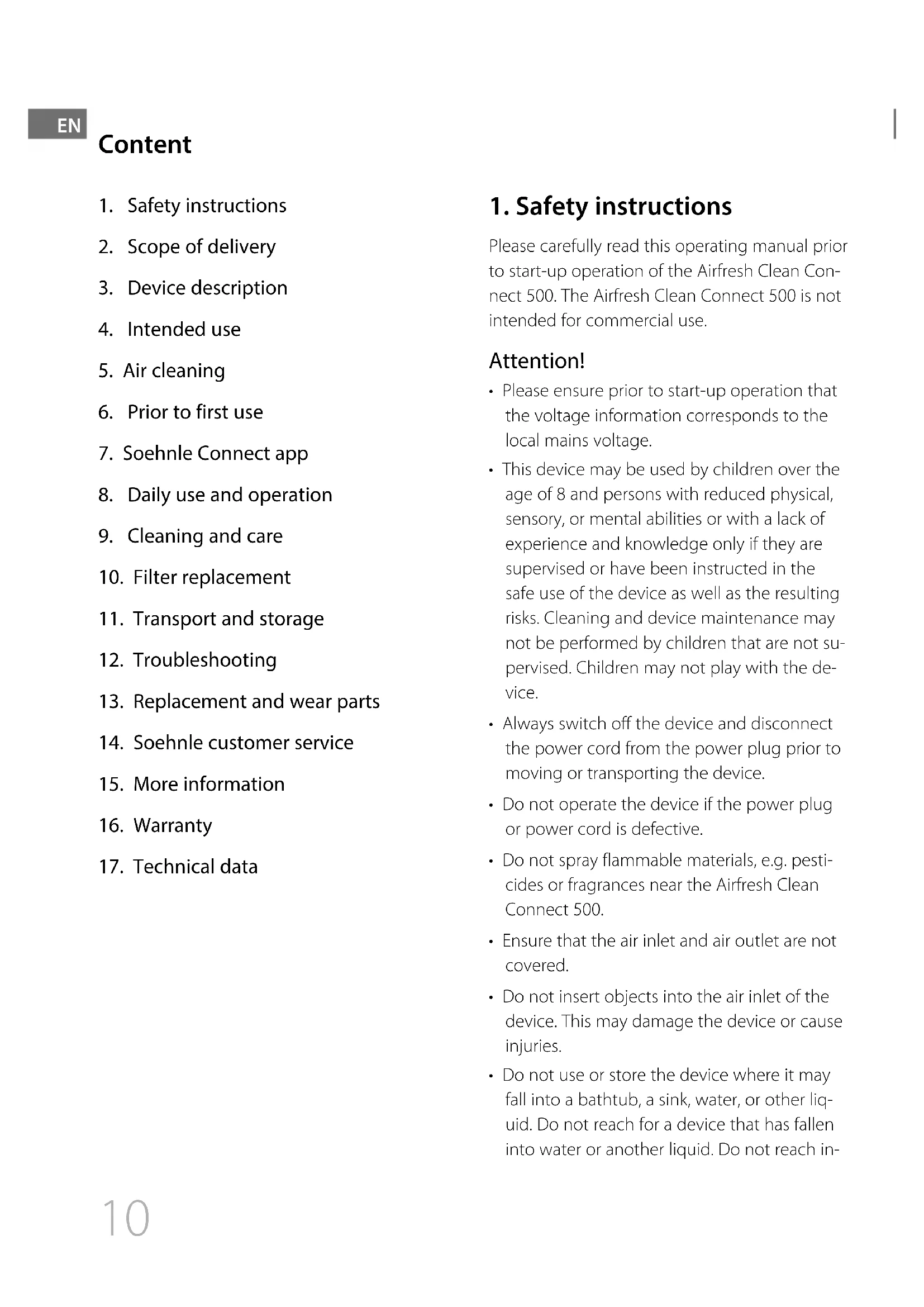


| Product Type | Air purifier with UV-C lamp |
| Brand | Soehnle |
| Model | AirFresh Clean Connect 500 |
| Dimensions (diameter × height) | 270.5 × 531.5 mm |
| Weight | 5.0 kg |
| Power supply | 220-240 V~, 50/60 Hz, 65 W |
| Recommended area | Up to 40-50 m² |
| Noise level | 30 dB (I), 45 dB (II), 55 dB (III), 62 dB (IV) |
| Air quality sensor | PM2.5 sensor with digital display and color LED ring |
| Fan speeds | 4 speeds: Low, Medium, High, Turbo |
| Operating modes | Auto, Manual, Night, Timer (2/4/8 h) |
| UV-C lamp | Wavelength 254 nm, lifespan ~20,000 hours |
| Filtration | Combined filter: washable pre-filter, EPA filter, activated carbon filter |
| Connectivity | Bluetooth 4.0, Soehnle Connect app (iOS/Android) |
| Cleaning and maintenance | Clean the pre-filter under water monthly; vacuum the EPA/carbon filter |
| Filter replacement | Every 4320 service hours (REPLACE FILTER indicator) |
| Replacement parts | Soehnle filter ref. 68107 |
| Safety | Double insulation (class II), automatic shutdown, safety instructions |
| Warranty | 2 years |
| Customer service | Toll-free telephone: 00 800 536 36 363 (Mon-Fri 8:00-18:00) |
Frequently Asked Questions - AirFresh Clean Connect 500 SOEHNLE
User questions about AirFresh Clean Connect 500 SOEHNLE
0 question about this device. Answer the ones you know or ask your own.
Ask a new question about this device
Download the instructions for your Humidifier in PDF format for free! Find your manual AirFresh Clean Connect 500 - SOEHNLE and take your electronic device back in hand. On this page are published all the documents necessary for the use of your device. AirFresh Clean Connect 500 by SOEHNLE.
USER MANUAL AirFresh Clean Connect 500 SOEHNLE
AIRFRESH CLEAN CONNECT 500
BEDIENUNGSANLEITUNG
USER MANUAL
MODE D'EMPLOI
ISTRUZIONI PER L'USO
GEBRUIKSAANWIJZING
MANUAL DE INSTRUÇÕES
BRUGSANVISNING
BRUKSANVISNING
INSTRUKCJA OBSŁUGI
NÁVOD NA OBSLUHU
NÁVOD K POUŽITI
natural_image
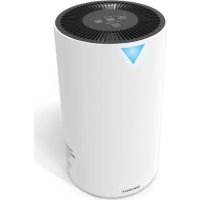
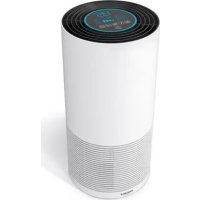
White cylindrical water purifier with digital display and ventilation grilles (no visible text or symbols)Deutsch 2
English 10
Français 18
Italiano 26
Nederlands 34
Español 42
Poertuguês 50
Dansk 58
Svenska 66
Český 74
Slovenský 82
Polsku 90
Русский 98
Türkçe 106
Lietuvos 114
български 122
اللغة العربية 130
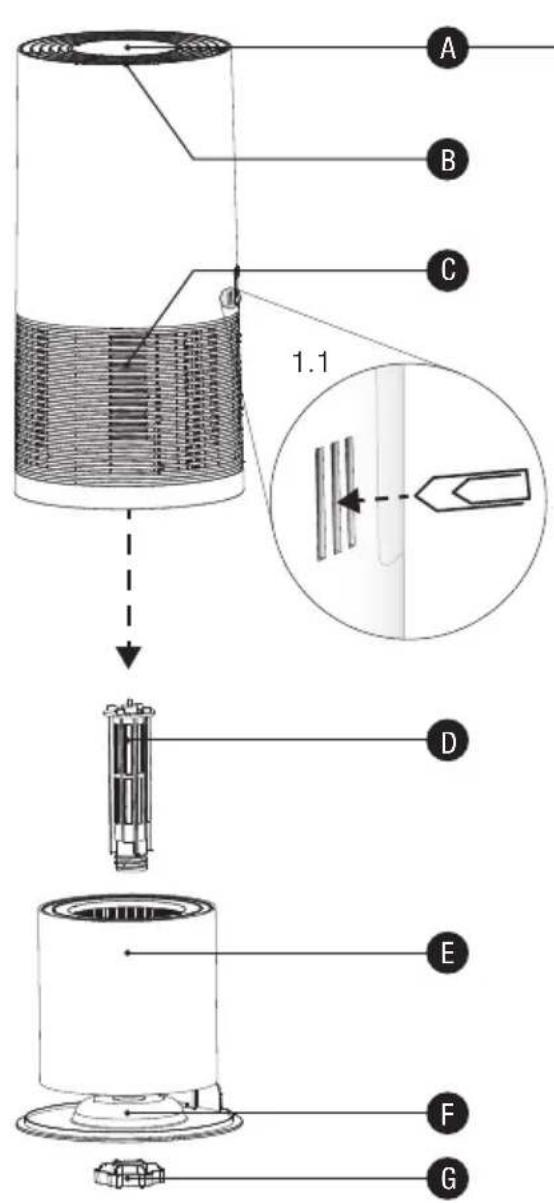
text_image
A B C 1.1 D E F G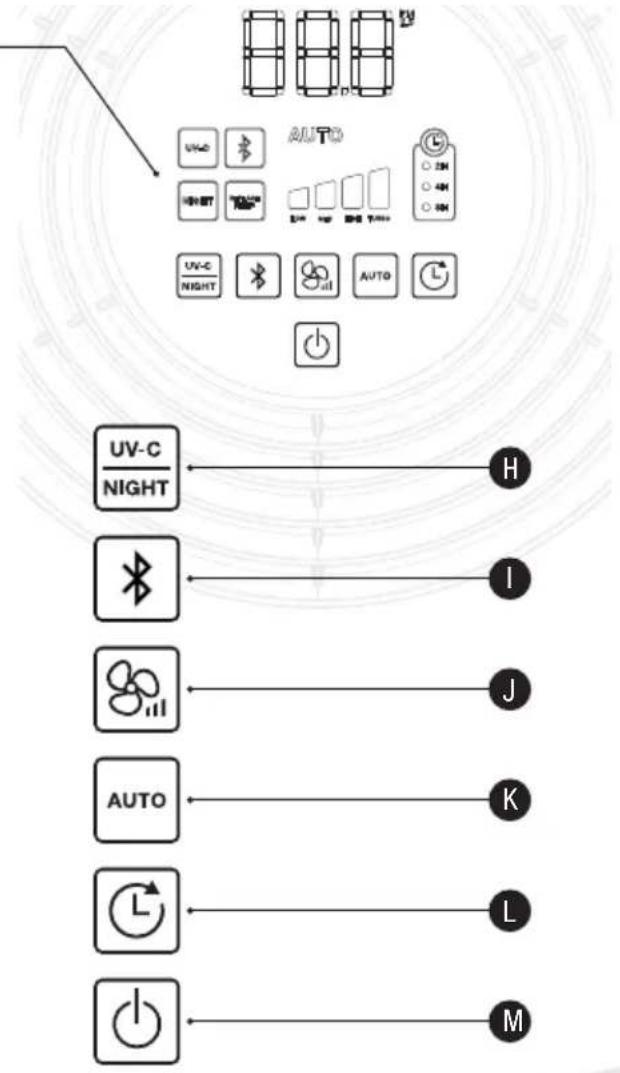
text_image
AUTO UV-C NIGHT H I J AUTO K L M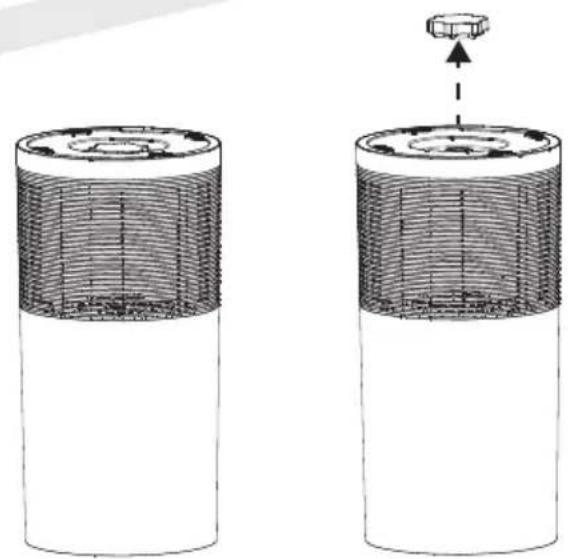
natural_image
Diagram of two cylindrical batteries with internal structure and a small component above them (no text or symbols)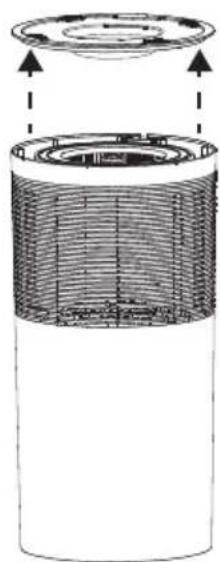
natural_image
Cross-sectional diagram of a cylindrical battery showing internal structure and top view (no text or symbols)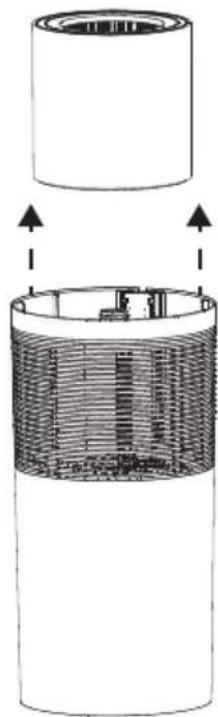
natural_image
Diagram of a cylindrical device with internal structure and arrows indicating assembly or operation (no text or symbols)2.12.22.32.4
Inhalt
7. Soehnle Connect-App
text_image
QR code image containing encoded data, no visible human-readable text
GET IT ON
Google Play

Download on the
App Store
Android™: ≥ 4.4.4 / iOS°: ≥ 9.0 / Bluetooth°: ≥ 4.0
- Safety instructions
- Scope of delivery
- Device description
- Intended use
- Air cleaning
- Prior to first use
- Soehnle Connect app
- Daily use and operation
- Cleaning and care
- Filter replacement
- Transport and storage
- Troubleshooting
- Replacement and wear parts
- Soehnle customer service
- More information
- Warranty
- Technical data
1. Safety instructions
Please carefully read this operating manual prior to start-up operation of the Airfresh Clean Connect 500. The Airfresh Clean Connect 500 is not intended for commercial use.
Attention!
- Please ensure prior to start-up operation that the voltage information corresponds to the local mains voltage.
- This device may be used by children over the age of 8 and persons with reduced physical, sensory, or mental abilities or with a lack of experience and knowledge only if they are supervised or have been instructed in the safe use of the device as well as the resulting risks. Cleaning and device maintenance may not be performed by children that are not supervised. Children may not play with the device.
- Always switch off the device and disconnect the power cord from the power plug prior to moving or transporting the device.
- Do not operate the device if the power plug or power cord is defective.
- Do not spray flammable materials, e.g. pesticides or fragrances near the Airfresh Clean Connect 500.
- Ensure that the air inlet and air outlet are not covered.
- Do not insert objects into the air inlet of the device. This may damage the device or cause injuries.
- Do not use or store the device where it may fall into a bathtub, a sink, water, or other liquid. Do not reach for a device that has fallen into water or another liquid. Do not reach in-
to the water or another liquid, even if the device is no longer connected to the power outlet at that time. Risk of electric shock in case of moisture when the device is reconnected to the power outlet. Use a dry cloth to wipe moisture off. Do not touch the power plug or device with wet hands.
Attention!
- If the power outlet used to operate the Airfresh Clean Connect 500 is not properly connected, the power plug of the device will get hot. Ensure that you are using a properly connected power outlet for the device.
- Do not place any objects on top of the Air-fresh Clean Connect 500 and do not sit on it.
- Use only the original filter by Soehnle, which is specifically suited for this Airfresh Clean Connect 500.
- Do not use the Airfresh Clean Connect 500 after using incense for insect protection or in places with oil residue or chemical vapours or where incense sticks are burnt.
- Do not use the Airfresh Clean Connect 500 near heaters, fireplaces, or gas-powered devices.
- Do not stand on the device.
2. Scope of delivery
1 Soehnle Airfresh Clean Connect 500
1 Soehnle combination filter for Airfresh Clean Connect 500
1 Operating manual
3. Device description
A: Control console
B : Cover and air outlet
C : Housing and air inlet
D: UV-C lamp
E : Combination filter (68107)
F : Removable housing base
G: Screw cap
4. Intended use
The Airfresh Clean Connect 500 is intended exclusively for cleaning room air.
5. Air cleaning
With the Soehnle combination filter you can remove a multitude of unwanted particles and odours from your room air. Micro-organisms and viruses are destroyed by adding UV-C light.
Washable pre-filter:
Captures the first dust and allergen particles.
EPA filter / Activated carbon filter:
Captures dust, smoke, pollen and other allergens. Filters odours from the air.
UV-C Light:
Destroys micro-organisms, e.g. germs, viruses, bacteria, and mould (e.g. mould toxins)
6. Prior to first use
- Place the device upright on a solid and level surface. Keep a minimum distance of half a metre from the device to each wall.
- To ensure optimum performance of the device, please ensure that the air inlets and air outlets are not covered.
- Inspect the power cord to ensure that it is not damaged.
- Connect the power cord to a power outlet.
7. Soehnle Connect app
In order to use functions such as remote control or data recording of your Soehnle Clean Connect 500, it is recommended to connect the device to the Soehnle Connect app.
- Download and install the free Soehnle Connect app on your smartphone or tablet. Scan the QR code to go directly to the app. Alternatively, you can find it on Google Play or the App Store.
text_image
QR code image containing encoded data, no visible human-readable text
GET IT ON
Google Play

Download on the
App Store
Android™: ≥ 4.4.4 / iOS°: ≥ 9.0 / Bluetooth°: ≥ 4.0
2.Activate Bluetooth® on your smartphone or tablet and start the Soehnle Connect app. When you start the app for the first time, you will be automatically guided through the process for connecting a Soehnle appliance. Please ensure that Bluetooth® is activated on your Clean Connect 500 when connecting. Please note the "Bluetooth® connection"
If you have already used the Soehnle Connect app, to connect go to the "Main menu" in the Soehnle Connect app and press "My devices" and then "Add device".
8. Daily use and operation
PM 2.5 sensor
The current air quality is determined continuously and displayed numerically on the display. The displayed PM 2.5 value is the fine dust load (50% of particles < 2.5μm) in μg/m³. The luminous LED ring on the top shows the current degree by means of different colours:
RED = high load (>150 g/m ^3 )
PINK = medium load (101 - 150 g/m ^3 )
PURPLE = low load (51 - 100 g/m ^3 )
BLUE = no load (0 - 50 g/m ^3 )
Switching on and off

Press the ON/OFF button (M) to turn the Airfresh Clean Connect 500 on or off.
Setting the operating time

Press the (L) button to set the desired operating time. Choose between 2, 4 and 8 hours. The device switches off automatically after the time has elapsed. The selected operating time is displayed on the control console. If no operating time is selected (no indicator light is on) the Airfresh Clean Connect 500 is in continuous operation.
Changing the fan speed

Press the button (J) to select the fan speed and thus the desired intensity of the air ejection:
Low (I) - Medium (II) -
High (III) - Turbo (IV)
Automatic mode

Pressing the (K) button puts the Clean Connect 500 into automatic mode. In this mode, the unit automatically adjusts the fan speed in relation to the air quality in the room. Thus, you always achieve the best possible air quality.
Bluetooth ^® connection

You can connect the Airfresh Clean Connect 500 to a Bluetooth® enabled mobile device that has the Soehnle Connect app installed. To do so, briefly press the (I) button on your Clean Connect 500. You can see if the Bluetooth® is switched on when the ⚠ symbol lights up on the
Clean Connect 500 display. Press again to turn off Bluetooth®.
If the Airfresh Clean Connect 500 is connected to a mobile device, it can be controlled via the control console of the housing as well as via the Soehnle Connect app.
UV-C lamp and night-time mode

Press the button (H) once to switch on the UV-C lamp inside the Airfresh Clean Connect 500 (UV-C indicator is on). Press again to activate the night-time mode without turning off the UV-C lamp (UV-C indicator light is on, NIGHT indicator light flashing). Press the (H) button again to turn off the UV-C lamp (UV-C indicator light is off, NIGHT indicator light flashes), or turn off both (UV-C indicator light is off, NIGHT indicator light is off).
Nightmode
In the night-time mode, you can run the Airfresh Clean Connect 500 without being disturbed by additional light sources. Once you activate the night-time mode, all indicator lights on the device will soon be turned off without the device switching off. All previous settings for operating time and fan speed will remain unchanged. Activation of the night-time mode is indicated by flashing of the indicator light before the illumination switches off completely.
The unit can run either in night-time mode or in automatic mode. These two modes cannot be activated at the same time.
9. Cleaning and care
Cleaning the combination filter
Regular cleaning of the combination filter (1x month) ensures faultless operation of the Airfresh Clean Connect 500 and the greatest possible room air quality.
Proceed as follows:
- Switch the device off prior to cleaning and disconnect the power plug.
- Turn the device upside down and place it on a solid surface (2.1).
- Open the screw cap on the bottom of the device (2.2).
- Remove the housing base by lifting it up (2.3).
- Remove the combination filter (2.4) and clean it. Replace the filter and ensure that it is inserted correctly.
The pre-filter is attached to the filter with a hook and loop fastener. Clean the pre-filter under running water. Ensure that the pre-filter is dry before reattaching into the EPA filter. EPA and activated carbon filter should be cleaned only with a vacuum cleaner.
- Close the device and fasten the screw cap. Turn the device right side up and place it on a solid surface.
- Reconnect the power cord to a power outlet and switch the device on.
Cleaning the housing
Switch the device off prior to cleaning and disconnect the power plug. Clean the housing of Airfresh Clean Connect 500 with a slightly damp cloth.
10. Replacing the filter
The combination filter should be replaced after approx. 4320 operating hours. After approx. 4320 operating hours, the filter change indicator (REPLACE FILTER) flashes automatically on the control console of the device. Use only original Soehnle filters!
Proceed as follows to change the filter:
- Switch the device off and disconnect the power plug.
- Open the device as described above in Chapter 7 and remove the combination filter (2.4).
- Insert the new combination filter into the housing. Ensure that the new filter unit is inserted correctly.
- Close the device and fasten the screw cap. Turn the device right side up and place it on a solid surface.
- Reconnect the power cord to a power outlet and switch the device on.
- Press the red "Reset button" to reset the operating hours counter. The button is located behind the three access slots on the side of the product (1.1). To press the button, use a thin object (for example, a paper clip). A signal sounds and the filter reset indicator light disappears. The operating time metre is now reset.
11. Transport and storage
Transport
WARNING!
Always switch the device off before transporting it. Always disconnect the power plug from the power outlet.
Storage
We recommend carefully cleaning your Airfresh Clean Connect 500 before storing the device. Ensure that all parts are clean and dry prior to
storing the device. Store the Airfresh Clean Connect 500 in a cool and dry place.
12. Troubleshooting
Switch the device off and disconnect the power plug before performing the following tests.
Problem: The device does not work
- Ensure that the Airfresh Clean Connect 500 is connected to a power source.
- Ensure that the filter is inserted correctly.
- Ensure that the bottom cover is inserted correctly and close tightly with the screw cap.
Problem: Insufficient airflow
- Ensure that the filter is clean. Please clean the filter if it is soiled.
- Ensure that air inlet and air outlet are not blocked or obstructed.
Problem: Excessive noise
- Ensure that no foreign objects are located in the fan and remove them if necessary.
- Ensure that the filter is clean. Please clean the filter if it is soiled.
- Ensure that the filter is inserted correctly.
- Ensure that the device is placed securely and evenly on a solid surface.
13. Replacement and wear parts
• 68107 Soehnle filter for Airfresh Clean Connect 500
(pre-filter, EPA filter & activated carbon filter)
Additional replacement parts can be ordered directly from us. Please contact our customer service.
14. Soehnle customer service
Our consumer service is happy to help you in case of questions and comments
Hotline: 00 800 536 36 363 (freephone)
Mon – Fri 08:00 – 18:00
For more information on our products, please
visit www.soehnle.com.
15. More information
Declaration of conformity
Leifheit AG herewith declares that this product is in compliance with the general requirements and other relevant provisions of applicable European directives. Declarations of conformity are available on the homepage: www.soehnle.com.
Disposal of used electric devices
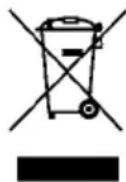
Please dispose of this product after its service life according to the Waste Electrical and Electronic Equipment Regulation 2012/19/EU – WEEE.
The symbol on the product or its
packaging indicates that this product cannot be treated as normal household waste but must be returned to a collection point for recycling electrical and electronic products.
EC conformity
Soehnle hereby declares that this device complies with the basic requirements and the other relevant
provisions of Directive 2014/53/EU. You can find the EU Declaration of Conformity at www.soehnle.com.
16. Warranty
Leifheit AG offers a 2 year warranty for this quality product as of the purchase date (or in case of orders, as of receipt of the goods). You must assert the warranty claims immediately after the defect has occurred within the warranty period. The warranty covers the quality of the products. The following are excluded from the warranty:
- Wear caused by use or other natural wear.
- Damage caused by improper use or handling (e.g. impact, shock, drop).
- Damage caused by non-compliance with these operating instructions. In case of a warranty claim, Leifheit, at its own discretion, either repairs the defective components or replaces the product. If a repair cannot be performed and an identical product is no longer available in the
product range for the purpose of replacement, you will receive a replacement product of the closest equivalent value.
Reimbursement of the purchase price is not possible in case of a warranty claim. Moreover, this warranty does not grant any claims for damages. To assert the warranty, please contact the seller where you have acquired the product and present the defective product and the purchase receipt (copy). This warranty is valid worldwide. Your statutory rights, in particular warranty rights, continue to apply and are not limited by this warranty.
- Technical data
| Item number 68098 | |
| Room size up to ca. 40-50 m | 2 |
| Operating environment 5 °C ~ 40 °C, 10 ~ 95% RH | |
| Operating voltage range 220 – 240 V~ alternating current | |
| Current frequency 50 / 60Hz | |
| Rated output of the system 65W | |
| Dimensions 270,5 (∅) x 531,5 (H) mm / 10,65 (∅) x 20,93 (H) inch | |
| Volume 30dB (I), 45dB (II), 55dB (III), 62dB (IV) | |
| Weight 5,0 kg | |
| UV light wave length 254 nm | |
| UV-C lamp service life approx. 20.000 hours | |
| Bluetooth version 4.0 | |
| Bluetooth frequency 2400 MHz | |
| Max. Bluetooth transmission power | 100 mW |

The product is double insulated and corresponds to protection category 2.
FR
Table des matières
7. Application Soehnle Connect
text_image
QR code image containing encoded data, no visible human-readable text
text_image
GET IT ON Google Play Download on the App StoreAndroid ^™ : ≥ 4.4.4 / iOS ^® : ≥ 9.0 / Bluetooth ^® : ≥ 4.0
14. Service clients Soehnle
7. App Soehnle Connect
text_image
QR code image containing encoded data, no visible human-readable text
text_image
GET IT ON Google Play
Android™: ≥ 4.4.4 / iOS°: ≥ 9.0 / Bluetooth°: ≥ 4.0
Electronic Equipment).
7. Soehnle Connect-App
text_image
QR code image containing encoded data, no visible human-readable text
text_image
GET IT ON Google Play Download on the App StoreAndroid™: ≥ 4.4.4 / iOS°: ≥ 9.0 / Bluetooth°: ≥ 4.0
text_image
QR code image containing encoded data, no visible human-readable text
GET IT ON
Google Play

Download on the
App Store
Android ^™ : ≥ 4.4.4 / iOS ^° : ≥ 9.0 / Bluetooth ^° : ≥ 4.0
Baja (I) - Media (II) -
Alta (III)– Turbo (IV)
Modo automático

text_image
QR code image containing encoded data, no visible human-readable text
text_image
GET IT ON Google Play Download on the App StoreAndroid™: ≥ 4.4.4 / iOS°: ≥ 9.0 / Bluetooth°: ≥ 4.0
Electrical and Electronic Equipment).
7. Soehnle Connect-App
text_image
QR code image containing encoded data, no visible human-readable text
text_image
GET IT ON Google Play Download on the App StoreAndroid ^™ : ≥ 4.4.4 / iOS ^® : ≥ 9.0 / Bluetooth ^® : ≥ 4.0
text_image
QR code image containing encoded data, no visible human-readable text
text_image
GET IT ON Google Play Download on the App StoreAndroid ^™ : ≥ 4.4.4 / iOS ^® : ≥ 9.0 / Bluetooth ^® : ≥ 4.0
text_image
QR code image containing encoded data, no visible human-readable text
text_image
GET IT ON Google Play Download on the App StoreAndroid ^™ : ≥ 4.4.4 / iOS ^® : ≥ 9.0 / Bluetooth ^® : ≥ 4.0
text_image
QR code image containing encoded data, no visible human-readable text
text_image
GET IT ON Google Play Download on the App StoreAndroid™: ≥ 4.4.4 / iOS°: ≥ 9.0 / Bluetooth°: ≥ 4.0
text_image
QR code image containing encoded data, no visible human-readable text
text_image
GET IT ON Google Play Download on the App StoreAndroid ^™ : ≥ 4.4.4 / iOS ^® : ≥ 9.0 / Bluetooth ^® : ≥ 4.0
(Waste Electrical and Electronic Equipment).
text_image
QR code image containing encoded data, no visible human-readable text
text_image
GET IT ON Google Play Download on the App StoreAndroid ^™ : ≥ 4.4.4 / iOS ^® : ≥ 9.0 / Bluetooth ^® : ≥ 4.0
WEEE (Waste Electrical and Electronic Equipment).
text_image
QR code image containing encoded data, no visible human-readable text
text_image
GET IT ON Google Play Download on the App StoreAndroid ^™ : ≥ 4.4.4 / iOS ^° : ≥ 9.0 / Bluetooth ^° : ≥ 4.0
Düşük (I) – Orta (II) – Yüksek (III) – Turbo (IV)
Otomatik mod

text_image
QR code image containing encoded data, no visible human-readable text
text_image
GET IT ON Google Play Download on the App StoreAndroid ^™ : ≥ 4.4.4 / iOS ^° : ≥ 9.0 / Bluetooth ^° : ≥ 4.0
7. Soehnle Connect-App
text_image
QR code image containing encoded data, no visible human-readable text
text_image
GET IT ON Google Play
Android™: ≥ 4.4.4 / iOS°: ≥ 9.0 / Bluetooth°: ≥ 4.0
Electronic Equipment).
Soehnle Airfresh Clean Connect 500 جهاز 1
Airfresh Clean Con- خاص بجهاز Soehnle 1 مرشح مدمج nect 500
1 دليل استخدام
3. وصف الجهاز
لوحة التحكم : A
text_image
QR code image containing encoded data, no visible human-readable text
text_image
GET IT ON Google Play Download on the App StoreAndroid™: ≥ 4.4.4 / iOS*: ≥ 9.0 / Bluetooth*: ≥ 4.0
.(Electronic Equipment
measure, collect, analyse, advise
text_image
QR code image containing encoded data, no visible human-readable textAndroid": 4.4.4
iOS:9.0
Bluetooth:4.0

Download on the
App Store

GET IT ON
Google Play
Quality & Design by
LEIFHEIT AG
Leifheitstraße 1
56377 Nassau/Germany
www.soehnle.com
CE