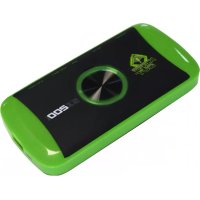
SX200 - Video Capture Card KeepOut - Free user manual and instructions
Find the device manual for free SX200 KeepOut in PDF.



| Product type | Video capture card |
| Brand | KeepOut |
| Model | SX200 |
| Maximum resolution | 1080p (Full HD) |
| Video inputs | HDMI, YPbPr (component), composite (via adapter) |
| Video output | HDMI |
| Microphone input | 3.5 mm jack |
| Audio output | Line Out (3.5 mm jack) |
| Storage | USB Host port and SD card slot |
| Power supply | 5 V DC / 2 A (via included AC adapter) |
| Maximum file size | 1.95 GB (approximately 15 min at 1080p) |
| Included software | ArcSoft ShowBiz 3.5 (video editing) |
| Firmware update | Yes, via USB key or SD card |
| Package contents | SX200, installation guide, CD, AV adapter, USB charger, USB cable |
| Console compatibility | PS4 (HDCP disabled), PS3, Xbox, etc. |
| Maintenance | Clean with a soft, dry cloth. Do not use abrasive products. |
| Safety | Use only the provided adapter. Do not expose to moisture or shocks. |
| Spare parts and repairability | Contact KeepOut after-sales service for any repair or part. |
Frequently Asked Questions - SX200 KeepOut
/:2015
1:7
/:31
/:11
/:00
/:00
1:0
Copy this file to an SD card or USB key, connect it to the device and turn on again. The time will be adjusted.
User questions about SX200 KeepOut
0 question about this device. Answer the ones you know or ask your own.
Ask a new question about this device
Download the instructions for your Video Capture Card in PDF format for free! Find your manual SX200 - KeepOut and take your electronic device back in hand. On this page are published all the documents necessary for the use of your device. SX200 by KeepOut.
USER MANUAL SX200 KeepOut
| Location to capture | USB 2.0 Host, SD Card |
| Video Input | Digital: HDMI |
| Analog: Component Video, Composite Video | |
| Audio Input | Digital: HDMI |
| Analog: RCA L/R, 3.5mm MicroPhone In | |
| Note: Microphone without pass through to HDMI input | |
| Video Output | Digital: HDMI (Pass-through from HDMI or Component or Composite Input) |
| Audio Output | Digital: HDMI (Pass-through from HDMI or RCA L/R Input) |
| Analog: 3.5mm Stereo (Pass-through from HDMI or RCA L/R Input) |
Connectors applicable to video consoles
| HDMI | WiiU, Xbox 360, Xbox One, PS4 |
| Components | WiiU, Xbox 360, PS3 |
| Compound | WiiU, Xbox 360, PS3 |
Note: HDCP contents cannot be recorded
Extra Hardware
| Codification | Hardware MPEG4 encoder |
| User interface | Capture button |
| Led status indicator | |
| Dimensions | 140(L) × 70(W) × 23(H) mm |
| Weight | 115g |
Standards
| Storage | Pendrive USB, Portable hard drive, SD card |
| Max Capacity: USB / 2T, SD / 64G | |
| Note: exFAT format is not compatible | |
| Resolution | Entry: 720 x 480 (60p), 720 x 576 (50p), 1280 x 720p (50p), 1280 x 720p(60p), 1920 x 1080 (50i), 1920 x 1080 (60i), 1920 x 1080 (24p), 1920 x 1080 (25p), 1920 x 1080 (30p), 1920 x 1080 (50p), 1920 x 1080 (60p) |
| Capture: 720 x 480 (60p), 720 x 576 (50p), 1280 x 720p (50p), 1280 x 720p(60p), 1920 x 1080 (50i), 1920 x 1080 (60i), 1920 x1080 (24p), 1920 x 1080 (25p), 1920 x 1080 (30p), 1920 x 1080 (25p), 1920 x 1080 (30p) | |
| Note: Upscaling is not supported | |
| Recording Format | Video: MP4, Audio: AAC Stereo |
| Recording quality | Max: 18Mbps@1080P 30fps |
| Recording quality | Max: 2GB / Per File, With RTC (Real Time Clock) |
| Recording quality | Max: 140MB / Minute, 8.4GB / Hour |
| Power | USB DC 5V / 2A |
Applications
| Software | Arcsoft Showbiz |
| Video Editing | Timeline / Storyboard edit, Split / Divide Scenes, Multi Trim Scenes ... |
| Export Video | Upload to YouTube |
| Portable Device: iPod, iPhone, iPod Touch, Apple TV, PSP, PS3, Xbox | |
| File: MPEG 1 / 2 / 4, WMV HD, Quicktime (MOV) ... | |
| Operating System Requirements | Windows 8 (32 / 64 bit), Windows 7 (32 / 64 bit), Windows Vista (32 / 64 bit) |
| CPU requirements | Intel Core 2 Duo 2.8GHz, AMD Athlon 64X2 Dual Core 3.0GHz |
| Memory requirements | 4 GB RAM |
| Graphics Card Requirements | VGA card with support for DirectX 10.0c or above |
Комплектът включва
· SX200
BG
BG
| Location to capture | USB 2.0 Host, SD Card |
| Video Input | Digital: HDMI |
| Analog: Component Video, Composite Video | |
| Audio Input | Digital: HDMI |
| Analog: RCA L/R, 3.5mm MicroPhone In | |
| Note: Microphone without pass through to HDMI input | |
| Video Output | Digital: HDMI (Pass-through from HDMI or Component or Composite Input) |
| Audio Output | Digital: HDMI (Pass-through from HDMI or RCA L/R Input) |
| Analog: 3.5mm Stereo (Pass-through from HDMI or RCA L/R Input) |
Connectors applicable to video consoles
| HDMI | WiiU, Xbox 360, Xbox One, PS4 |
| Components | WiiU, Xbox 360, PS3 |
| Compound | WiiU, Xbox 360, PS3 |
Note: HDCP contents cannot be recorded

Extra Hardware
| Codification | Hardware MPEG4 encoder |
| User interface | Capture button |
| Led status indicator | |
| Dimensions | 140(L) × 70(W) × 23(H) mm |
| Weight | 115g |
Standards
| Storage | Pendrive USB, Portable hard drive, SD card |
| Max Capacity: USB / 2T, SD / 64G | |
| Note: exFAT format is not compatible | |
| Resolution | Entry: 720 x 480 (60p), 720 x 576 (50p), 1280 x 720p (50p), 1280 x 720p(60p), 1920 x 1080 (50i), 1920 x 1080 (60i), 1920 x 1080 (24p), 1920 x 1080 (25p), 1920 x 1080 (30p), 1920 x 1080 (50p), 1920 x 1080 (60p) |
| Capture: 720 x 480 (60p), 720 x 576 (50p), 1280 x 720p (50p), 1280 x 720p(60p), 1920 x 1080 (50i), 1920 x 1080 (60i), 1920 x1080 (24p), 1920 x 1080 (25p), 1920 x 1080 (30p), 1920 x 1080 (25p), 1920 x 1080 (30p) | |
| Note: Upscaling is not supported | |
| Recording Format | Video: MP4, Audio: AAC Stereo |
| Recording quality | Max: 18Mbps@1080P 30fps |
| Recording quality | Max: 2GB / Per File, With RTC (Real Time Clock) |
| Recording quality | Max: 140MB / Minute, 8.4GB / Hour |
| Power | USB DC 5V / 2A |
Applications
| Software | Arcsoft Showbiz |
| Video Editing | Timeline / Storyboard edit, Split / Divide Scenes, Multi Trim Scenes ... |
| Export Video | Upload to YouTube |
| Portable Device: iPod, iPhone, iPod Touch, Apple TV, PSP, PS3, Xbox | |
| File: MPEG 1 / 2 / 4, WMV HD, Quicktime (MOV) ... | |
| Operating System Requirements | Windows 8 (32 / 64 bit), Windows 7 (32 / 64 bit), Windows Vista (32 / 64 bit) |
| CPU requirements | Intel Core 2 Duo 2.8GHz, AMD Athlon 64X2 Dual Core 3.0GHz |
| Memory requirements | 4 GB RAM |
| Graphics Card Requirements | VGA card with support for DirectX 10.0c or above |
Obsah balení


Technická Podpora
| Location to capture | USB 2.0 Host, SD Card |
| Video Input | Digital: HDMI |
| Analog: Component Video, Composite Video | |
| Audio Input | Digital: HDMI |
| Analog: RCA L/R, 3.5mm MicroPhone In | |
| Note: Microphone without pass through to HDMI input | |
| Video Output | Digital: HDMI (Pass-through from HDMI or Component or Composite Input) |
| Audio Output | Digital: HDMI (Pass-through from HDMI or RCA L/R Input) |
| Analog: 3.5mm Stereo (Pass-through from HDMI or RCA L/R Input) |
Connectors applicable to video consoles
| HDMI | WiiU, Xbox 360, Xbox One, PS4 |
| Components | WiiU, Xbox 360, PS3 |
| Compound | WiiU, Xbox 360, PS3 |
Note: HDCP contents cannot be recorded

Extra Hardware
| Codification | Hardware MPEG4 encoder |
| User interface | Capture button |
| Led status indicator | |
| Dimensions | 140(L) × 70(W) × 23(H) mm |
| Weight | 115g |
Standards
| Storage | Pendrive USB, Portable hard drive, SD card |
| Max Capacity: USB / 2T, SD / 64G | |
| Note: exFAT format is not compatible | |
| Resolution | Entry: 720 x 480 (60p), 720 x 576 (50p), 1280 x 720p (50p), 1280 x 720p(60p), 1920 x 1080 (50i), 1920 x 1080 (60i), 1920 x 1080 (24p), 1920 x 1080 (25p), 1920 x 1080 (30p), 1920 x 1080 (50p), 1920 x 1080 (60p) |
| Capture: 720 x 480 (60p), 720 x 576 (50p), 1280 x 720p (50p), 1280 x 720p(60p), 1920 x 1080 (50i), 1920 x 1080 (60i), 1920 x1080 (24p), 1920 x 1080 (25p), 1920 x 1080 (30p), 1920 x 1080 (25p), 1920 x 1080 (30p) | |
| Note: Upscaling is not supported | |
| Recording Format | Video: MP4, Audio: AAC Stereo |
| Recording quality | Max: 18Mbps@1080P 30fps |
| Recording quality | Max: 2GB / Per File, With RTC (Real Time Clock) |
| Recording quality | Max: 140MB / Minute, 8.4GB / Hour |
| Power | USB DC 5V / 2A |
Applications
| Software | Arcsoft Showbiz |
| Video Editing | Timeline / Storyboard edit, Split / Divide Scenes, Multi Trim Scenes ... |
| Export Video | Upload to YouTube |
| Portable Device: iPod, iPhone, iPod Touch, Apple TV, PSP, PS3, Xbox | |
| File: MPEG 1 / 2 / 4, WMV HD, Quicktime (MOV) ... | |
| Operating System Requirements | Windows 8 (32 / 64 bit), Windows 7 (32 / 64 bit), Windows Vista (32 / 64 bit) |
| CPU requirements | Intel Core 2 Duo 2.8GHz, AMD Athlon 64X2 Dual Core 3.0GHz |
| Memory requirements | 4 GB RAM |
| Graphics Card Requirements | VGA card with support for DirectX 10.0c or above |
Lieferumfang
· SX200

Composite-Video-Verbindung (wie PS2, VHS, V8, Hi8, etc.)

DE
Technischer Support
| Location to capture | USB 2.0 Host, SD Card |
| Video Input | Digital: HDMI |
| Analog: Component Video, Composite Video | |
| Audio Input | Digital: HDMI |
| Analog: RCA L/R, 3.5mm MicroPhone In | |
| Note: Microphone without pass through to HDMI input | |
| Video Output | Digital: HDMI (Pass-through from HDMI or Component or Composite Input) |
| Audio Output | Digital: HDMI (Pass-through from HDMI or RCA L/R Input) |
| Analog: 3.5mm Stereo (Pass-through from HDMI or RCA L/R Input) |
Connectors applicable to video consoles
| HDMI | WiiU, Xbox 360, Xbox One, PS4 |
| Components | WiiU, Xbox 360, PS3 |
| Compound | WiiU, Xbox 360, PS3 |
Note: HDCP contents cannot be recorded

Extra Hardware
| Codification | Hardware MPEG4 encoder |
| User interface | Capture button |
| Led status indicator | |
| Dimensions | 140(L) × 70(W) × 23(H) mm |
| Weight | 115g |
Standards
| Storage | Pendrive USB, Portable hard drive, SD card |
| Max Capacity: USB / 2T, SD / 64G | |
| Note: exFAT format is not compatible | |
| Resolution | Entry: 720 x 480 (60p), 720 x 576 (50p), 1280 x 720p (50p), 1280 x 720p(60p), 1920 x 1080 (50i), 1920 x 1080 (60i), 1920 x 1080 (24p), 1920 x 1080 (25p), 1920 x 1080 (30p), 1920 x 1080 (50p), 1920 x 1080 (60p) |
| Capture: 720 x 480 (60p), 720 x 576 (50p), 1280 x 720p (50p), 1280 x 720p(60p), 1920 x 1080 (50i), 1920 x 1080 (60i), 1920 x1080 (24p), 1920 x 1080 (25p), 1920 x 1080 (30p), 1920 x 1080 (25p), 1920 x 1080 (30p) | |
| Note: Upscaling is not supported | |
| Recording Format | Video: MP4, Audio: AAC Stereo |
| Recording quality | Max: 18Mbps@1080P 30fps |
| Recording quality | Max: 2GB / Per File, With RTC (Real Time Clock) |
| Recording quality | Max: 140MB / Minute, 8.4GB / Hour |
| Power | USB DC 5V / 2A |
Applications
| Software | Arcsoft Showbiz |
| Video Editing | Timeline / Storyboard edit, Split / Divide Scenes, Multi Trim Scenes ... |
| Export Video | Upload to YouTube |
| Portable Device: iPod, iPhone, iPod Touch, Apple TV, PSP, PS3, Xbox | |
| File: MPEG 1 / 2 / 4, WMV HD, Quicktime (MOV) ... | |
| Operating System Requirements | Windows 8 (32 / 64 bit), Windows 7 (32 / 64 bit), Windows Vista (32 / 64 bit) |
| CPU requirements | Intel Core 2 Duo 2.8GHz, AMD Athlon 64X2 Dual Core 3.0GHz |
| Memory requirements | 4 GB RAM |
| Graphics Card Requirements | VGA card with support for DirectX 10.0c or above |


Thank you for choosing the HD Gamer video capture SX200 by Keep Out.
Product description
The portable solution for recording and sharing. The new HD portable gamer grabber SX200 is the ultimate solution to record your best games in HD quality up to 1080p. Designed specifically for gamers and youtubers, its pocket size means it can go anywhere with USB and SD inputs can connect a flash drive or SD card to capture your games without a PC and can later edit them and upload them to Internet easily. The SX200 is compatible with different resolutions and includes HDMI input and component video for different video consoles. Microphone connection will give opportunity to discuss your games in real time and simultaneously be recorded. It includes free software video editing with which you can upload videos to YouTube directly.
Discover the best tool to record your games !!!
Technical specifications
Connections
| Location to capture | USB 2.0 Host, SD Card |
| Video Input | Digital: HDMI |
| Analog: Component Video, Composite Video | |
| Audio Input | Digital: HDMI |
| Analog: RCA L/R, 3.5mm MicroPhone In | |
| Note: Microphone without pass through to HDMI input | |
| Video Output | Digital: HDMI (Pass-through from HDMI or Component or Composite Input) |
| Audio Output | Digital: HDMI (Pass-through from HDMI or RCA L/R Input) |
| Analog: 3.5mm Stereo (Pass-through from HDMI or RCA L/R Input) |
Connectors applicable to video consoles
| HDMI | WiiU, Xbox 360, Xbox One, PS4 |
| Components | WiiU, Xbox 360, PS3 |
| Compound | WiiU, Xbox 360, PS3 |
Note: HDCP contents cannot be recorded
Extra Hardware
| Codification | Hardware MPEG4 encoder |
| User interface | Capture button |
| Led status indicator | |
| Dimensions | 140(L) × 70(W) × 23(H) mm |
| Weight | 115g |
Standards
| Storage | Pendrive USB, Portable hard drive, SD card |
| Max Capacity: USB / 2T, SD / 64G | |
| Note: exFAT format is not compatible | |
| Resolution | Entry: 720 x 480 (60p), 720 x 576 (50p), 1280 x 720p (50p), 1280 x 720p(60p), 1920 x 1080 (50i), 1920 x 1080 (60i), 1920 x 1080 (24p), 1920 x 1080 (25p), 1920 x 1080 (30p), 1920 x 1080 (50p), 1920 x 1080 (60p) |
| Capture: 720 x 480 (60p), 720 x 576 (50p), 1280 x 720p (50p), 1280 x 720p(60p), 1920 x 1080 (50i), 1920 x 1080 (60i), 1920 x1080 (24p), 1920 x 1080 (25p), 1920 x 1080 (30p), 1920 x 1080 (25p), 1920 x 1080 (30p) | |
| Note: Upscaling is not supported | |
| Recording Format | Video: MP4, Audio: AAC Stereo |
| Recording quality | Max: 18Mbps@1080P 30fps |
| Recording quality | Max: 2GB / Per File, With RTC (Real Time Clock) |
| Recording quality | Max: 140MB / Minute, 8.4GB / Hour |
| Power | USB DC 5V / 2A |
Applications
| Software | Arcsoft Showbiz |
| Video Editing | Timeline / Storyboard edit, Split / Divide Scenes, Multi Trim Scenes ... |
| Export Video | Upload to YouTube |
| Portable Device: iPod, iPhone, iPod Touch, Apple TV, PSP, PS3, Xbox | |
| File: MPEG 1 / 2 / 4, WMV HD, Quicktime (MOV) ... | |
| Operating System Requirements | Windows 8 (32 / 64 bit), Windows 7 (32 / 64 bit), Windows Vista (32 / 64 bit) |
| CPU requirements | Intel Core 2 Duo 2.8GHz, AMD Athlon 64X2 Dual Core 3.0GHz |
| Memory requirements | 4 GB RAM |
| Graphics Card Requirements | VGA card with support for DirectX 10.0c or above |
Package contents
· SX200
· Quick Installation Guide in multiple languages
· Installation CD
· AV cable adapter
· USB charger
·USB Cable
Note: Make sure your package contains the elements described above. If you find something is missing or damaged, please contact your dealer.
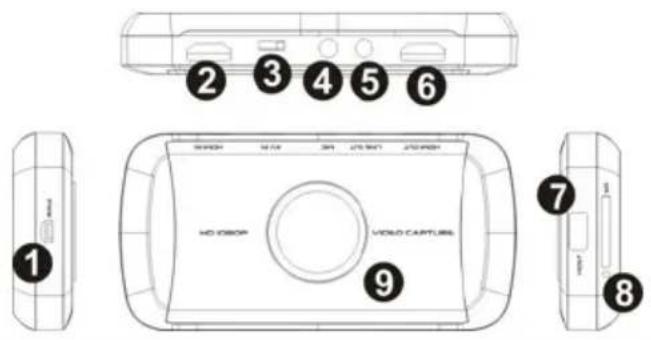
Parts descriptions
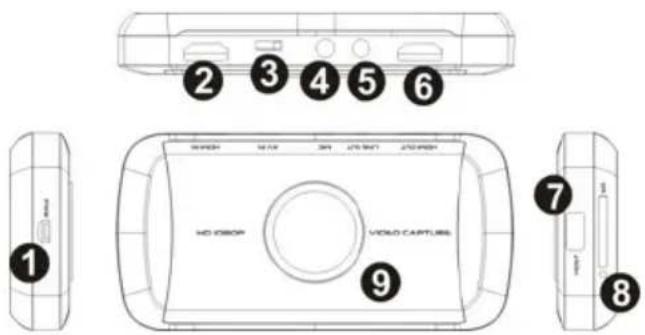
EN
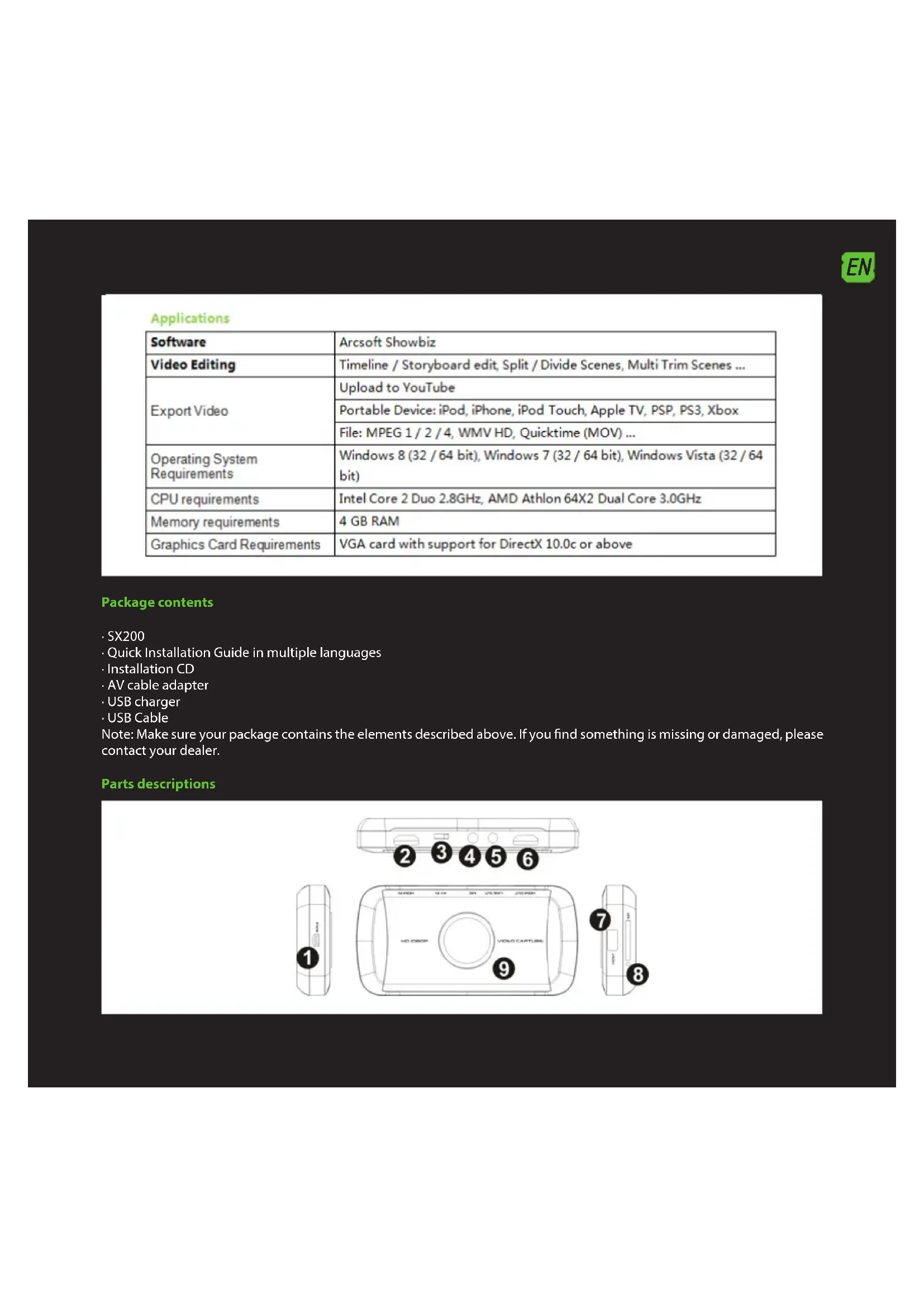
- PWR - Power output 5VDC / 2A
- HDMI IN - HDMI input
- AV IN – Component input, YPbPr or video input via adapter cable
- MIC - To connect a microphone and record voice comments when playing a game.
- LINEA OUT - Audio output.
- HDMI OUT- HDMI output
- HOST USB – Input to connect USB flash drive or hard drive
- SD - SD card input
- Record button and LED status indicator - Press to record / stop recording, the display shows the operating status.
Connections
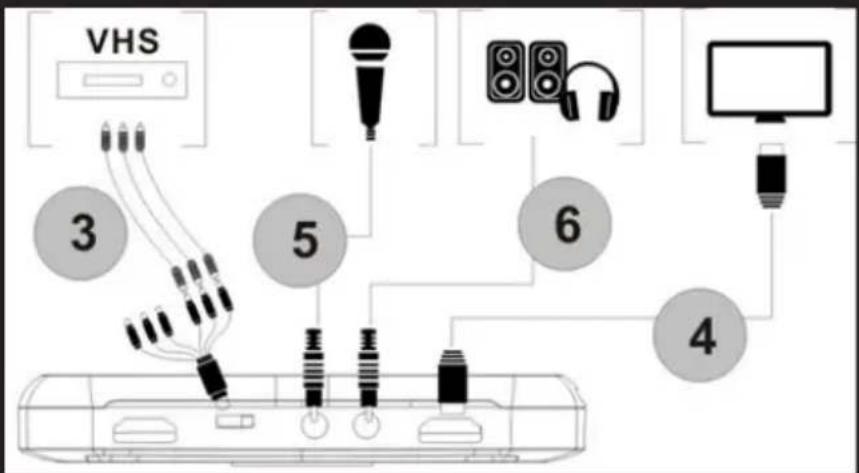
This grabber has 3 input modes: HDMI, component, compound. It automatically recognizes the video input source, no need to change the font manually. Never connect 2 or 3 sources simultaneously.
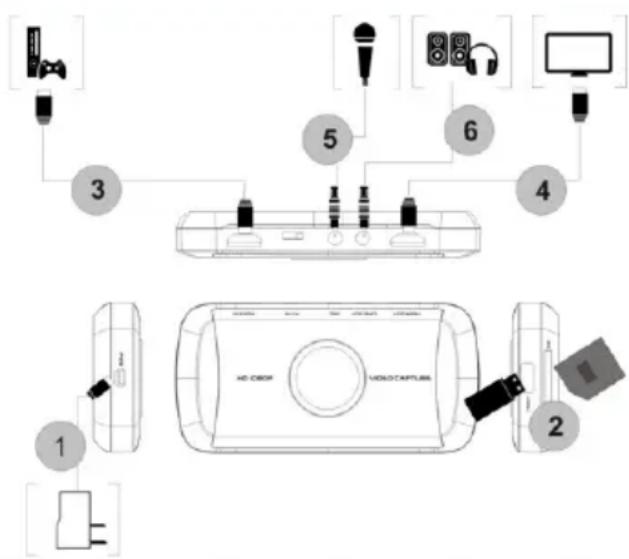
HDMI connection
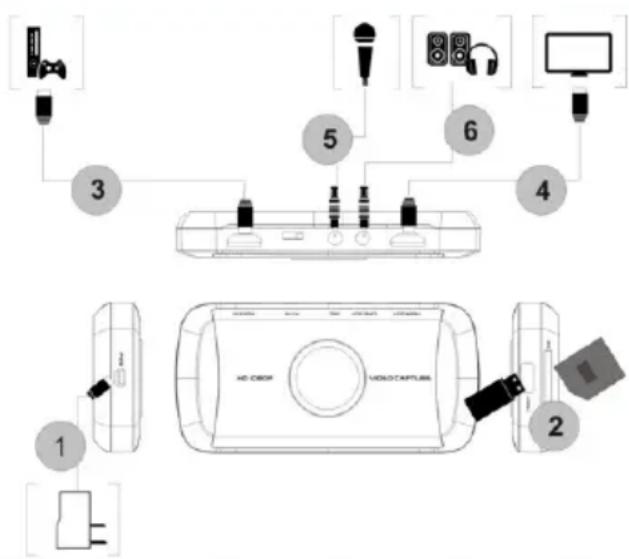

- Connect the supplied USB cable between the adapter and the input PRW SX200 and connect the adapter to a household electrical outlet.
- Connect a USB drive or SD card (Note: Only the first connected will be recognized)
- Connect an HDMI cable between the HDMI output of the SX200 and the TV's HDMI input.
- Connect speakers or headphones (not included) to the "LINE OUT" of the SX200 if desired this is optional because the HDMI output reproduces the audio
- Connect microphone to record your comments during the game if you wish. (microphone not included) Optional
Note: Some HDMI video sources may have HDCP protection. You cannot go pass the video step for the grabber to record it.
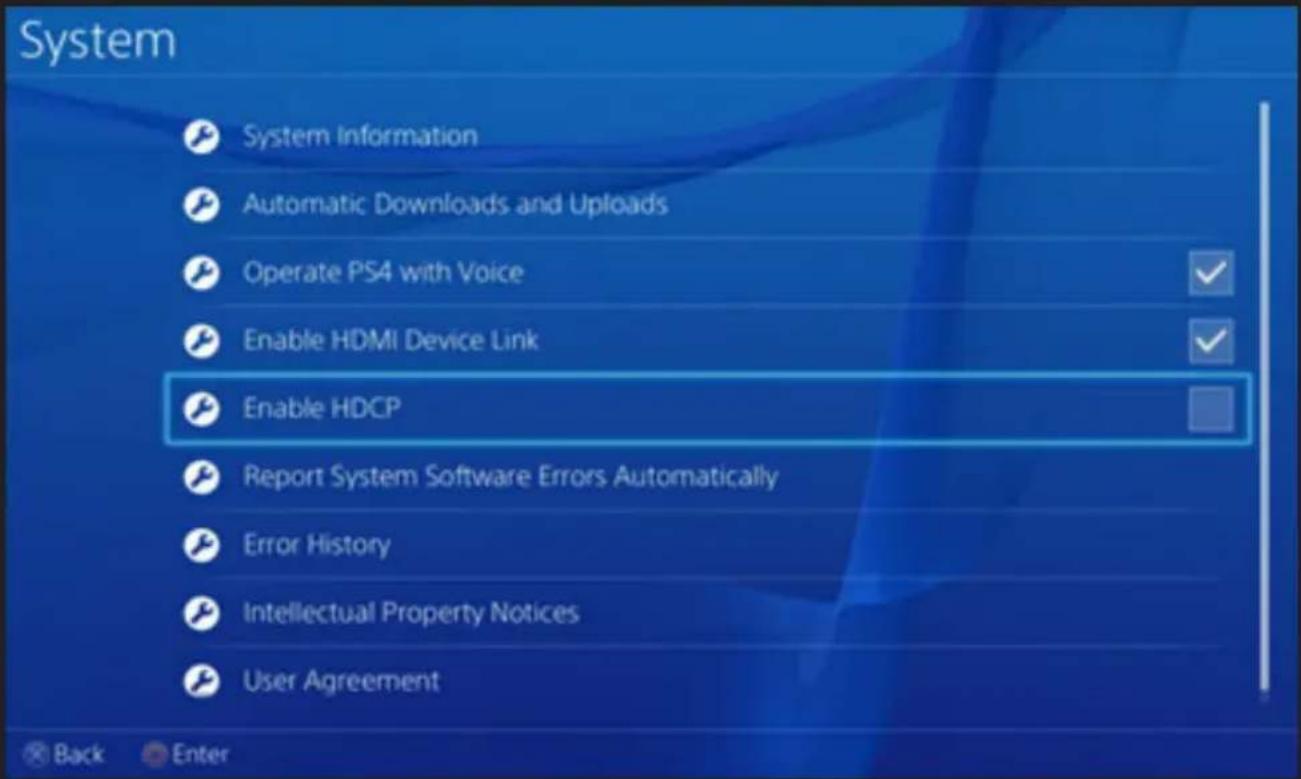
For PS4, HDCP option must be disabled. Make sure the firmware of the PS4 is newer than 1.7
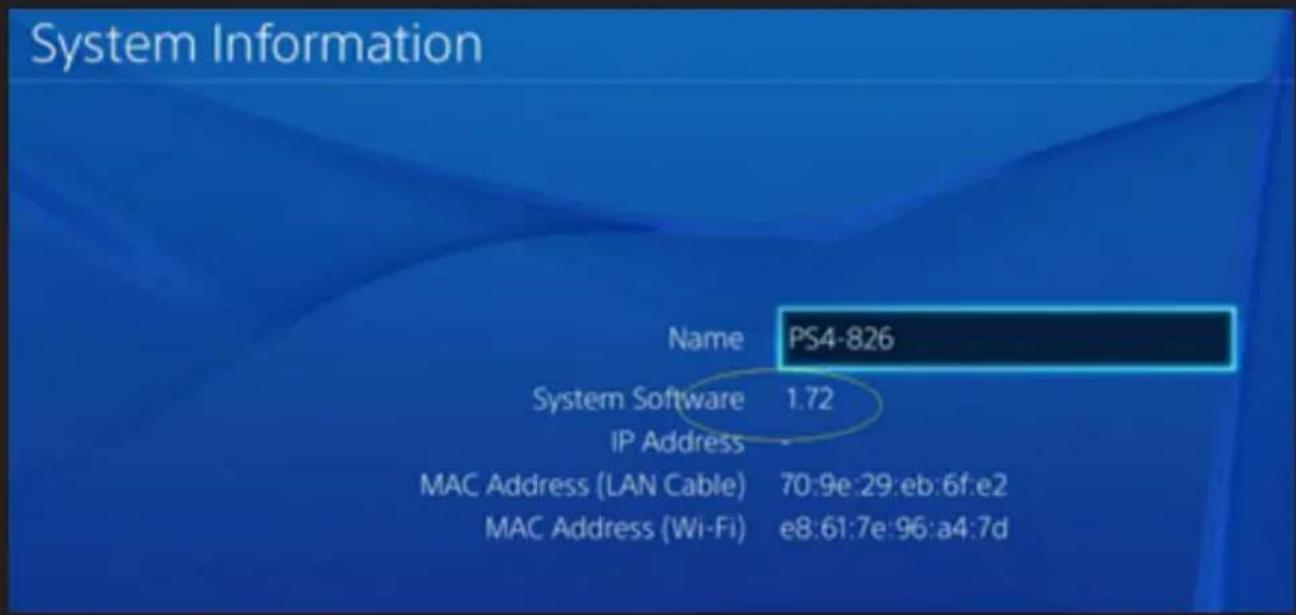
Go to System Settings. Disable the "Enable HDCP" option.
EN
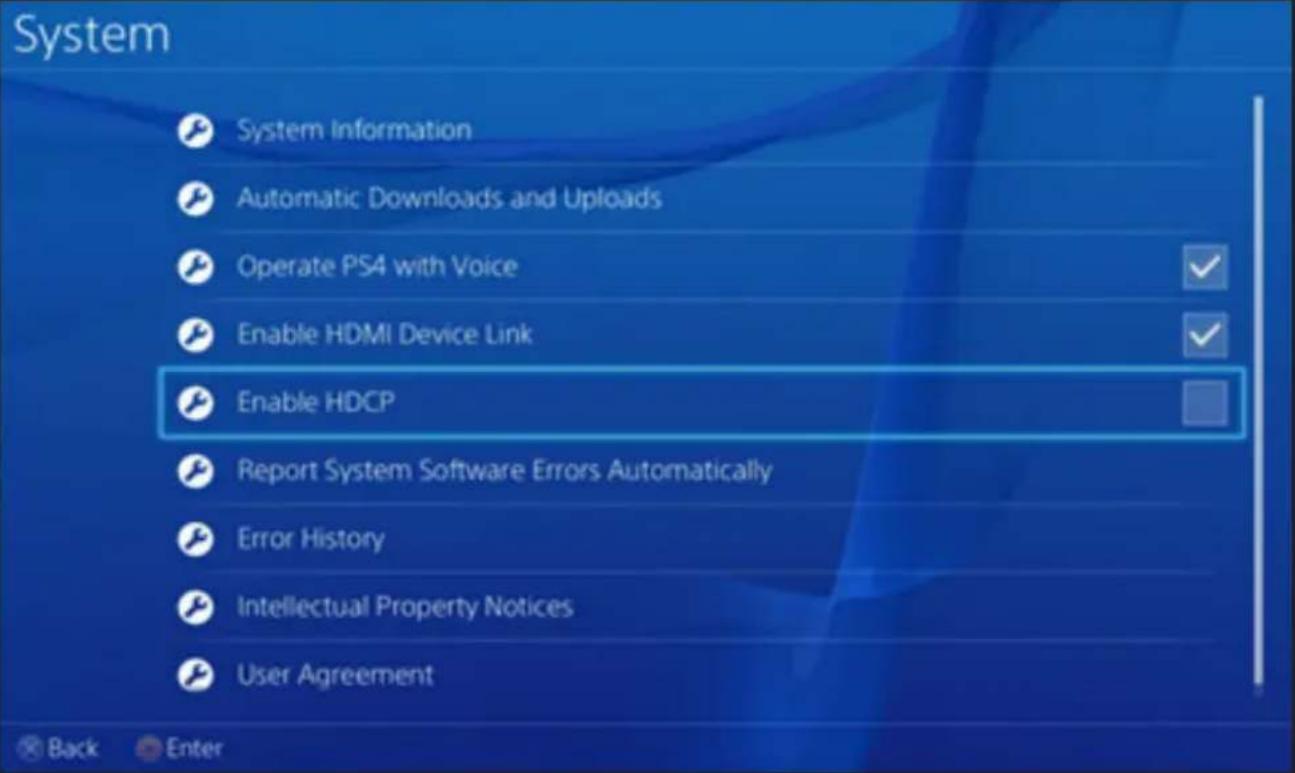
Note: HDCP disable option for recording games only, it is not to record the contents of Bluray movies.
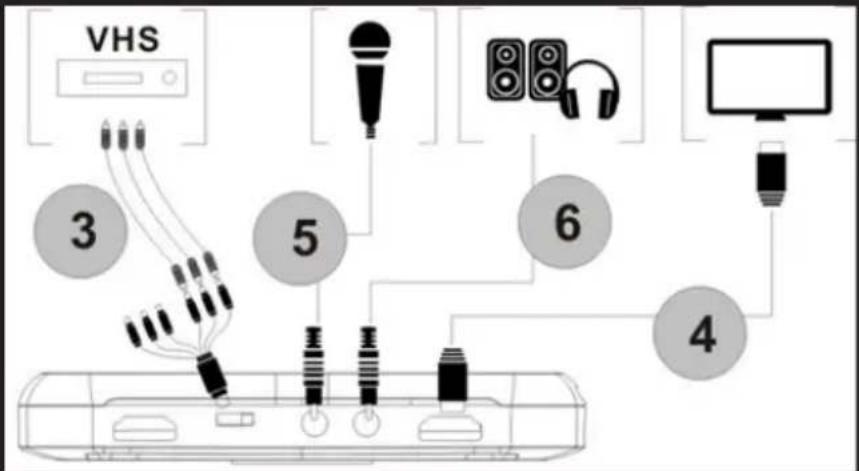
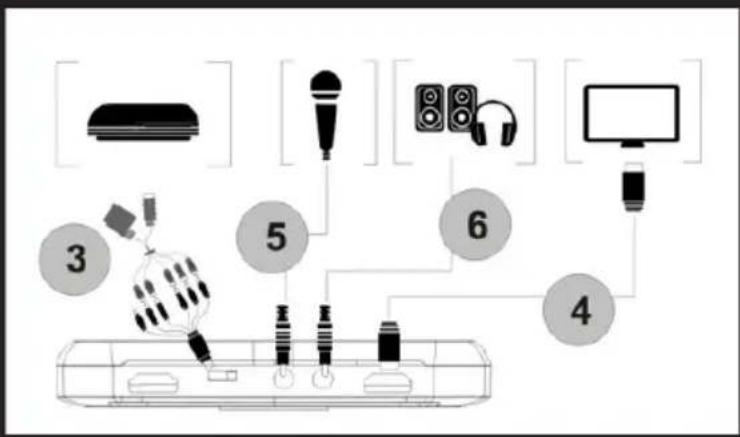
Connection by Ypbpr video (DVD player, PS3 etc.)

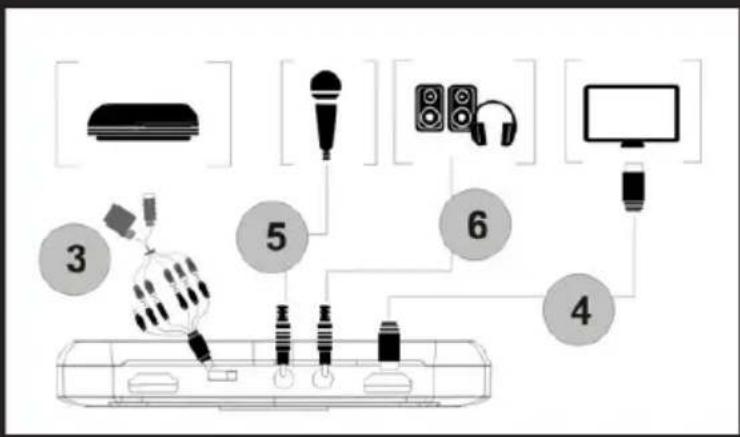
- Steps 1 and 2 as HDMI connection
- Use the supplied component video adapter cable (red, blue, green) and connect it to the video console with their respective cables.
- Steps 4,5,6 connection like HDMI
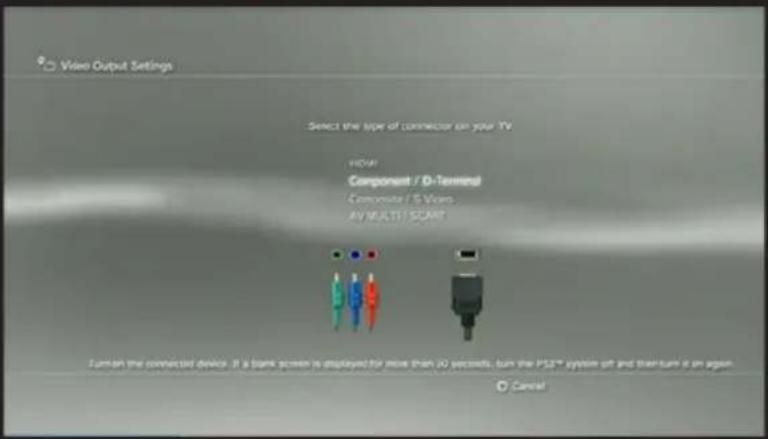
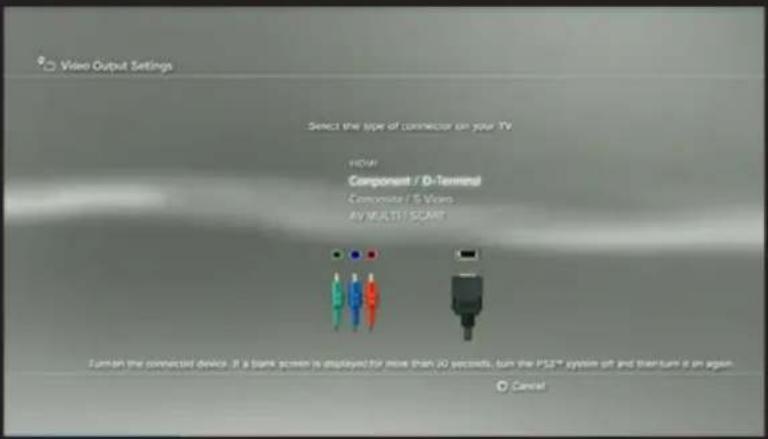
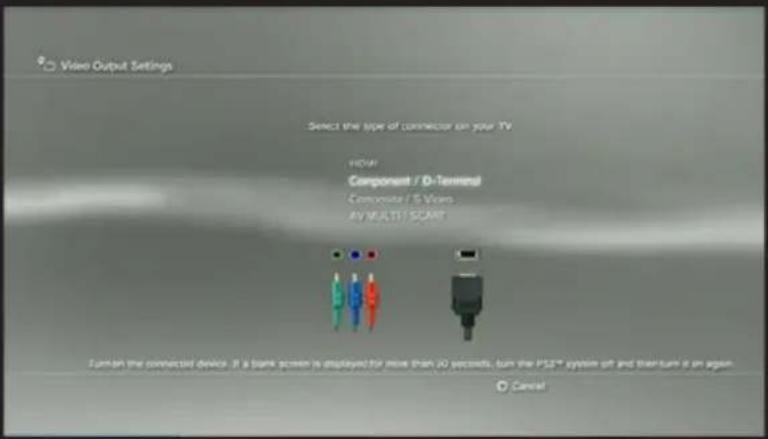
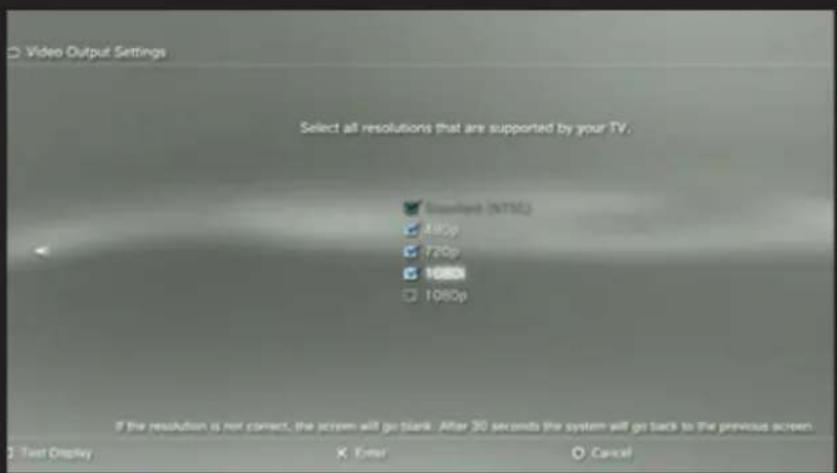
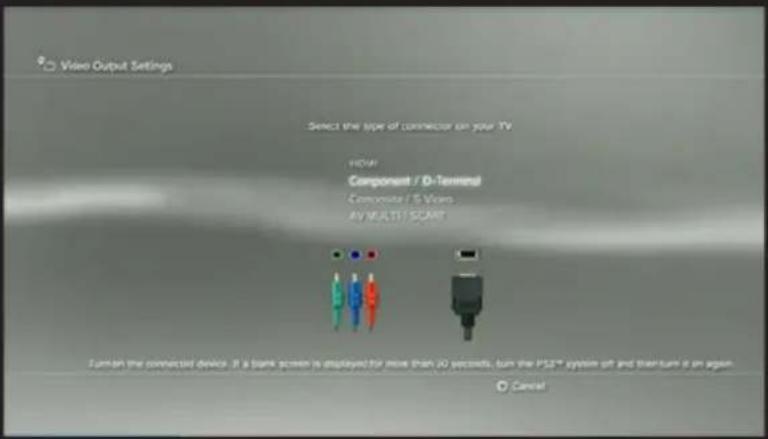
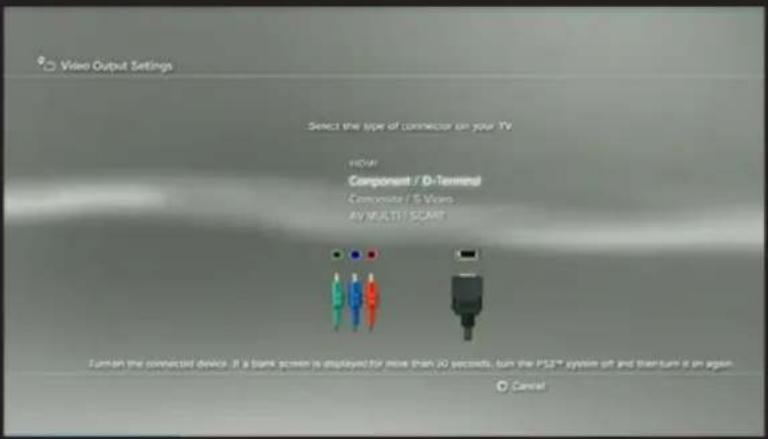
Note: PS3 connected, it is also necessary to make the following settings:
Go to the configuration settings --- video output, select "Component / D-Terminal"

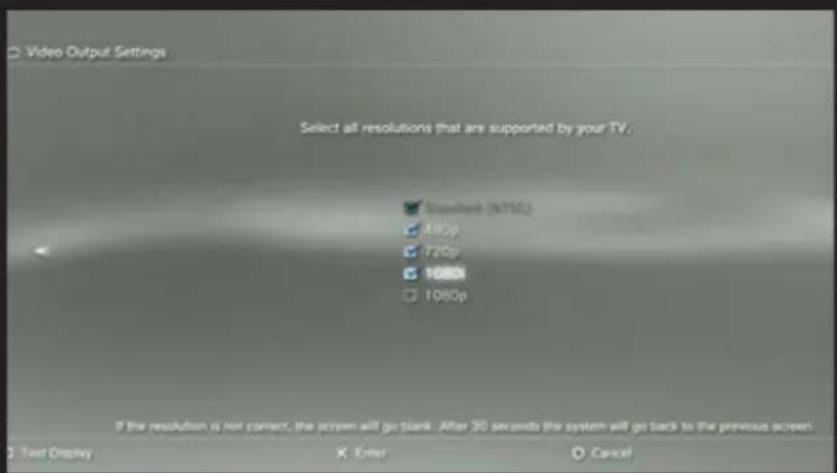
In the resolution setting, make sure the "1080P" is not checked, otherwise a game (eg GT5) cannot be recorded.
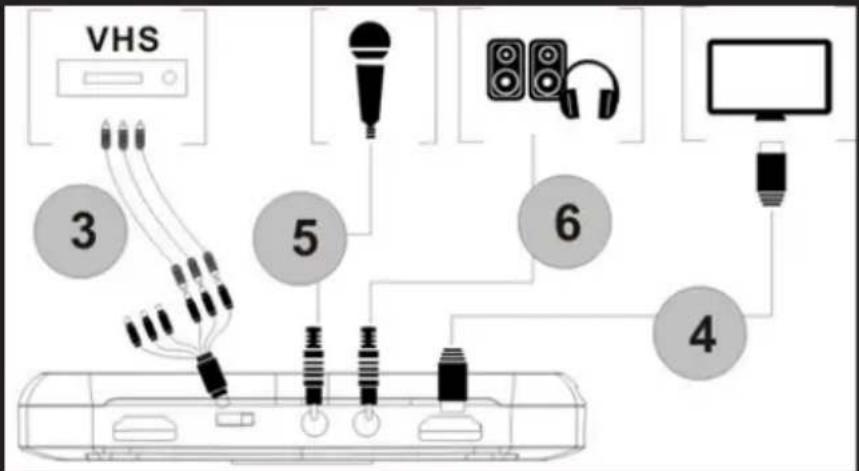
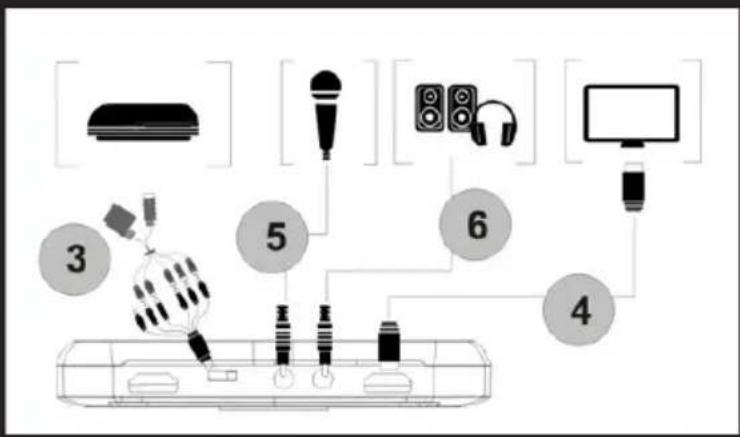
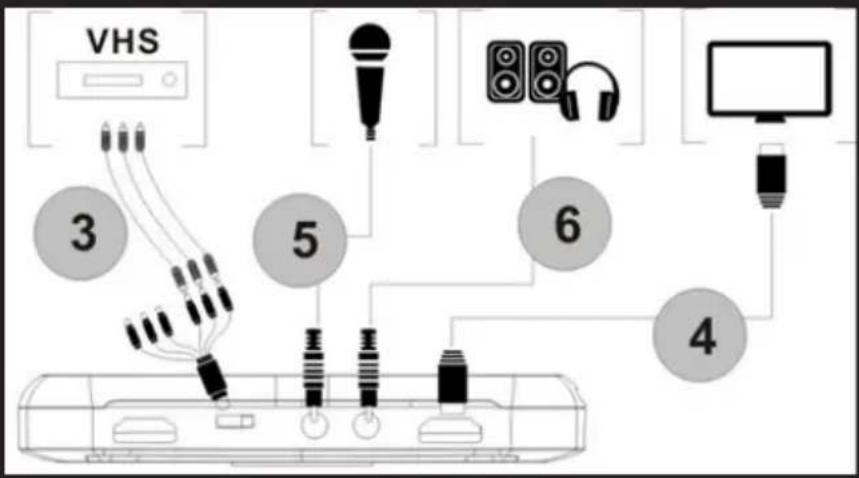
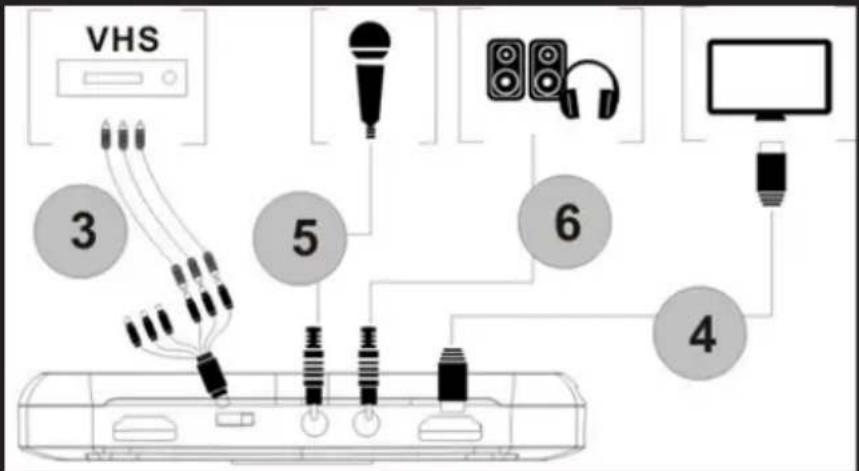
Composite video connection (like PS2, VHS, V8, Hi8, etc)
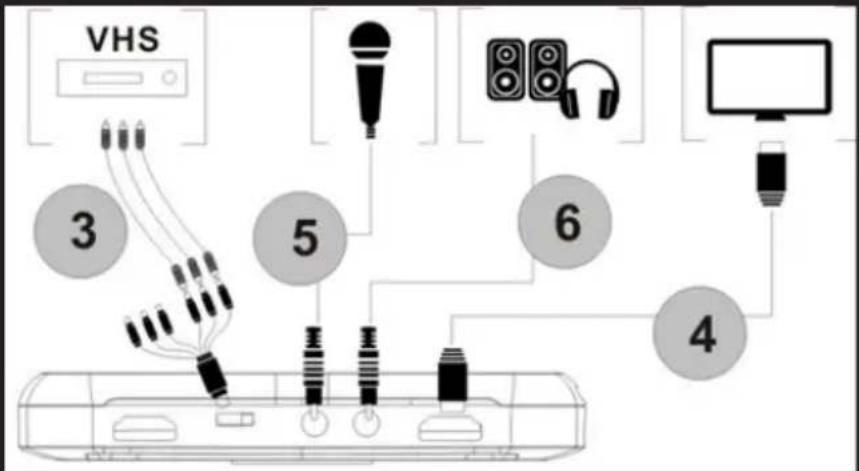

- Steps 1 and 2 as HDMI connection
- Connect adapter composite video (yellow video cable and red and white audio cord) and plug it into the console video with their respective cables.
- Steps 4,5,6 connection like HDMI
Operating process
Once connected, you will see the green indicator record button on.
To record the video it is very simple --- press the record button, then you will see the indicator change to solid red, it means that recording is in process.
To stop recording, press the button again, the indicator will blink for a few seconds and then turn green, it means that the recording has finished, now you can remove your USB stick or SD card.
Note: Please do not remove the USB memory or SD card when the indicator is flashing. Recording will stop automatically if the USB or SD flash card have no free space.
After stopping the recording, connect the USB flash drive or SD card to the computer you will see the recorded files: 1080P for recording, the file will Encode_1080P_1, 720 or 480p recording, file will Encode_1.
Each recording operation / stop create a different recording file: Encode_1080P_1, Encode_1080P_2, Encode_1080P_3 ... and so on.
The maximum size per file will be around 1.95GB (about 15 minutes to 1080p video), recording a video more than 1.95GB (15 minutes), the files are distributed in more than one file, for example: if you record a 45 minutes of 1080p video recording by clicking, you will see 3 files: Encode_1080P_1, Encode_1080P_1_1, Encode_1080P_1_2 ... etc.
Always remove the USB memory or SD card safely from your PC, otherwise you may lose the recorded information.
Firmware Update and Other Functions
- Firmware update: You may need to update the firmware of this device for some reason. Download from the website the latest firmware available. Copy the firmware file on the USB drive or SD card, turn off the device (power connector, unplug) Connect the USB memory device or SD card, connect the power, the indicator flashes between 7 and 8 seconds, and when changing to green, it means that the update is complete.
- After a long time using the device, you will see the number of recording files become too large, for example Encode_1080P_234 but it wants to start from Encode_1080P_0, reset by holding the record button (before turning on the device) then connect the power connector to power the device, after 3 seconds, the file number will start from
- Change the date: it is possible that the date of the recorded file is not synchronous with the local time. To change the device time it is necessary to create a TXT file name "rtc_setup" enter your local date and time with this format (for example July 31 2015 11:00:00):
EN
/:2015
1:7
/:31
/:11
/:00
/:00
1:0
Should be exactly the same format (first line is age, second line are the months, etc, completion / 0, start each line with "/"), and save it.
Then copy the rtc_setup file to an SD card or USB memory, connect the device and then turn on, then the time will be adjusted.
Video Editing
This device incorporates a video editing software ArcSoft ShowBiz 3.5, with which you can edit recorded videos.
Insert the included installation CD, run the autorun.exe and install the software.
Once installed run the software and you will see its environment.
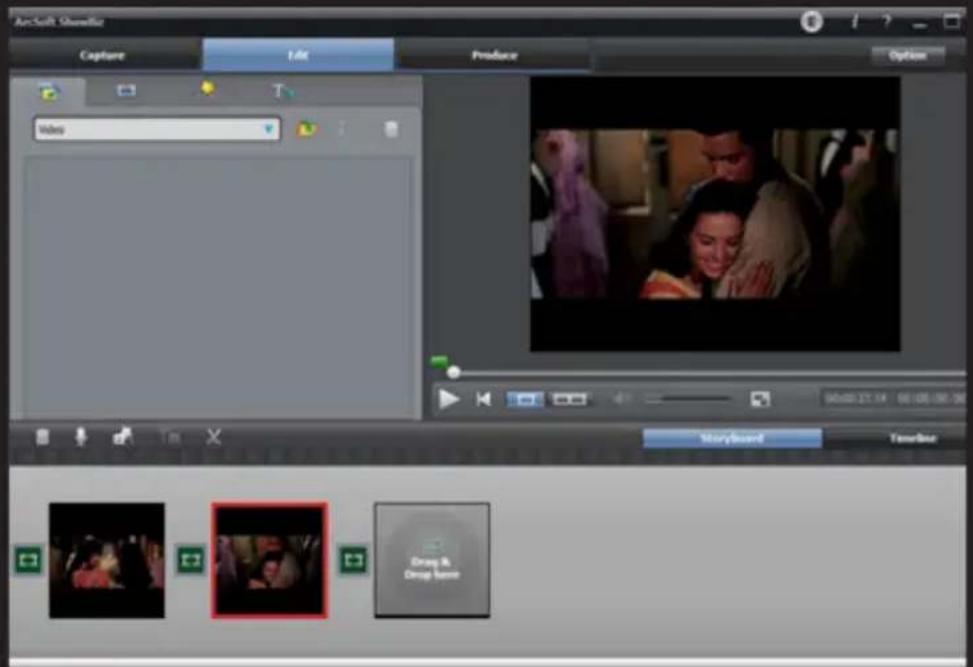

- You can combine two or more video at a time, just drag them in Showbiz.
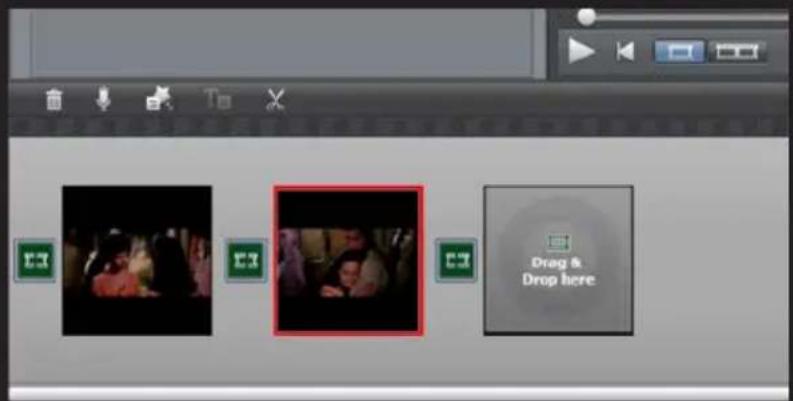
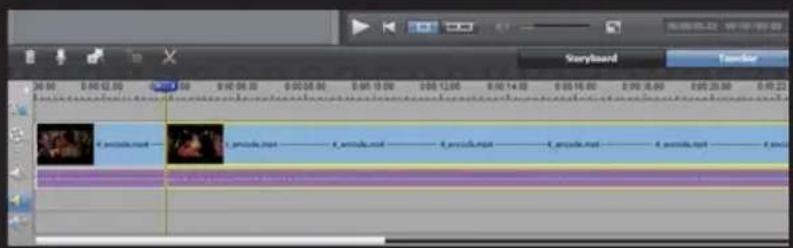
- You can cut a video or more.
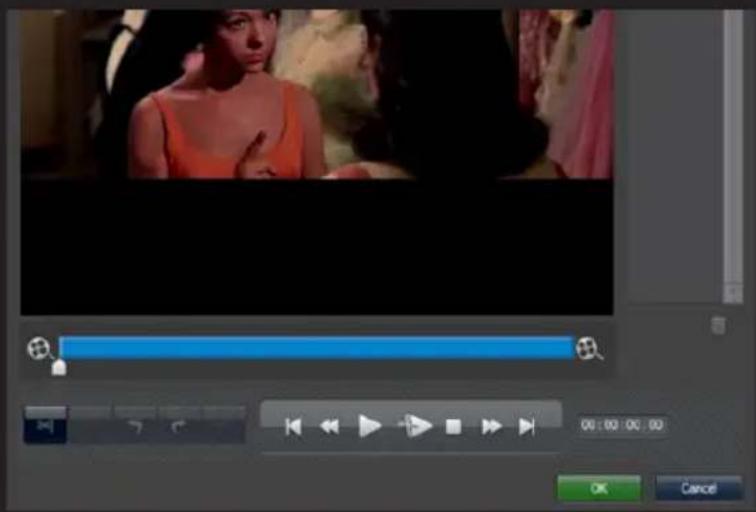
EN
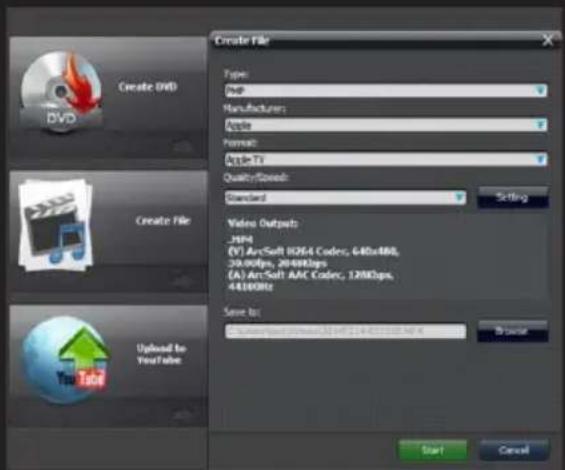
- Click "Produce" after editing, you can create a DVD or upload video to YouTube
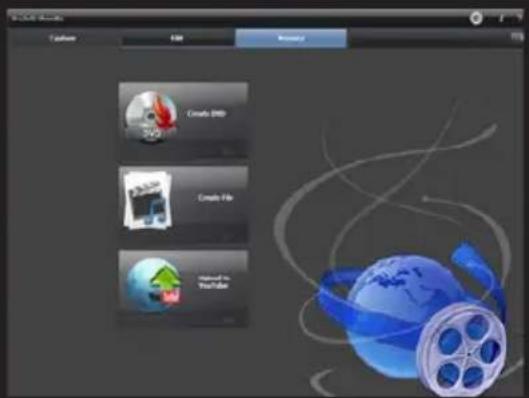
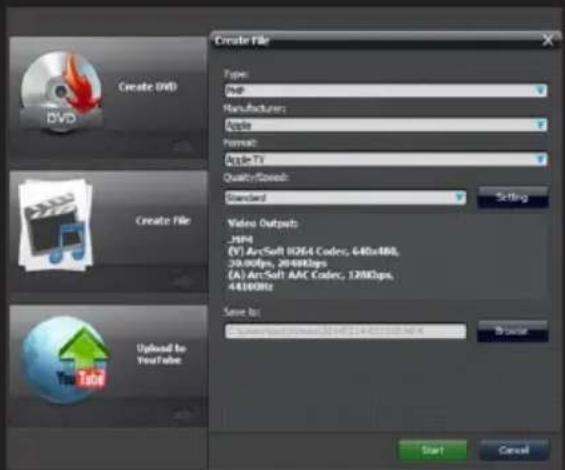
- Please click "Create File" to create multiple files for different devices like Apple, PSP, smartphone, etc:
Technical Support
For more information on installing and configuring this product visit our website www.keepoutgaming.com or write and email to support@keep-out.eu
Introducción

ES
ES
Soporte técnico
| Location to capture | USB 2.0 Host, SD Card |
| Video Input | Digital: HDMI |
| Analog: Component Video, Composite Video | |
| Audio Input | Digital: HDMI |
| Analog: RCA L/R, 3.5mm MicroPhone In | |
| Note: Microphone without pass through to HDMI input | |
| Video Output | Digital: HDMI (Pass-through from HDMI or Component or Composite Input) |
| Audio Output | Digital: HDMI (Pass-through from HDMI or RCA L/R Input) |
| Analog: 3.5mm Stereo (Pass-through from HDMI or RCA L/R Input) |
Connectors applicable to video consoles
| HDMI | WiiU, Xbox 360, Xbox One, PS4 |
| Components | WiiU, Xbox 360, PS3 |
| Compound | WiiU, Xbox 360, PS3 |
Note: HDCP contents cannot be recorded

Extra Hardware
| Codification | Hardware MPEG4 encoder |
| User interface | Capture button |
| Led status indicator | |
| Dimensions | 140(L) × 70(W) × 23(H) mm |
| Weight | 115g |
Standards
| Storage | Pendrive USB, Portable hard drive, SD card |
| Max Capacity: USB / 2T, SD / 64G | |
| Note: exFAT format is not compatible | |
| Resolution | Entry: 720 x 480 (60p), 720 x 576 (50p), 1280 x 720p (50p), 1280 x 720p(60p), 1920 x 1080 (50i), 1920 x 1080 (60i), 1920 x 1080 (24p), 1920 x 1080 (25p), 1920 x 1080 (30p), 1920 x 1080 (50p), 1920 x 1080 (60p) |
| Capture: 720 x 480 (60p), 720 x 576 (50p), 1280 x 720p (50p), 1280 x 720p(60p), 1920 x 1080 (50i), 1920 x 1080 (60i), 1920 x1080 (24p), 1920 x 1080 (25p), 1920 x 1080 (30p), 1920 x 1080 (25p), 1920 x 1080 (30p) | |
| Note: Upscaling is not supported | |
| Recording Format | Video: MP4, Audio: AAC Stereo |
| Recording quality | Max: 18Mbps@1080P 30fps |
| Recording quality | Max: 2GB / Per File, With RTC (Real Time Clock) |
| Recording quality | Max: 140MB / Minute, 8.4GB / Hour |
| Power | USB DC 5V / 2A |
Applications
| Software | Arcsoft Showbiz |
| Video Editing | Timeline / Storyboard edit, Split / Divide Scenes, Multi Trim Scenes ... |
| Export Video | Upload to YouTube |
| Portable Device: iPod, iPhone, iPod Touch, Apple TV, PSP, PS3, Xbox | |
| File: MPEG 1 / 2 / 4, WMV HD, Quicktime (MOV) ... | |
| Operating System Requirements | Windows 8 (32 / 64 bit), Windows 7 (32 / 64 bit), Windows Vista (32 / 64 bit) |
| CPU requirements | Intel Core 2 Duo 2.8GHz, AMD Athlon 64X2 Dual Core 3.0GHz |
| Memory requirements | 4 GB RAM |
| Graphics Card Requirements | VGA card with support for DirectX 10.0c or above |
Pakendi sisu
· SX200
· Quick Installation Guide mitmes keeles
- Installeerimise CD
· AV kaabel adapter
• USB laadija
· USB kaabel

Mine System Settings. Keela "Luba HDCP" variant.
ET

Composite video ühendus (nagu PS2, VHS, V8, Hi8, jne)

ET
Technical Support
| Location to capture | USB 2.0 Host, SD Card |
| Video Input | Digital: HDMI |
| Analog: Component Video, Composite Video | |
| Audio Input | Digital: HDMI |
| Analog: RCA L/R, 3.5mm MicroPhone In | |
| Note: Microphone without pass through to HDMI input | |
| Video Output | Digital: HDMI (Pass-through from HDMI or Component or Composite Input) |
| Audio Output | Digital: HDMI (Pass-through from HDMI or RCA L/R Input) |
| Analog: 3.5mm Stereo (Pass-through from HDMI or RCA L/R Input) |
Connectors applicable to video consoles
| HDMI | WiiU, Xbox 360, Xbox One, PS4 |
| Components | WiiU, Xbox 360, PS3 |
| Compound | WiiU, Xbox 360, PS3 |
Note: HDCP contents cannot be recorded
Extra Hardware
| Codification | Hardware MPEG4 encoder |
| User interface | Capture button |
| Led status indicator | |
| Dimensions | 140(L) × 70(W) × 23(H) mm |
| Weight | 115g |
Standards
| Storage | Pendrive USB, Portable hard drive, SD card |
| Max Capacity: USB / 2T, SD / 64G | |
| Note: exFAT format is not compatible | |
| Resolution | Entry: 720 x 480 (60p), 720 x 576 (50p), 1280 x 720p (50p), 1280 x 720p(60p), 1920 x 1080 (50i), 1920 x 1080 (60i), 1920 x 1080 (24p), 1920 x 1080 (25p), 1920 x 1080 (30p), 1920 x 1080 (50p), 1920 x 1080 (60p) |
| Capture: 720 x 480 (60p), 720 x 576 (50p), 1280 x 720p (50p), 1280 x 720p(60p), 1920 x 1080 (50i), 1920 x 1080 (60i), 1920 x1080 (24p), 1920 x 1080 (25p), 1920 x 1080 (30p), 1920 x 1080 (25p), 1920 x 1080 (30p) | |
| Note: Upscaling is not supported | |
| Recording Format | Video: MP4, Audio: AAC Stereo |
| Recording quality | Max: 18Mbps@1080P 30fps |
| Recording quality | Max: 2GB / Per File, With RTC (Real Time Clock) |
| Recording quality | Max: 140MB / Minute, 8.4GB / Hour |
| Power | USB DC 5V / 2A |
Applications
| Software | Arcsoft Showbiz |
| Video Editing | Timeline / Storyboard edit, Split / Divide Scenes, Multi Trim Scenes ... |
| Export Video | Upload to YouTube |
| Portable Device: iPod, iPhone, iPod Touch, Apple TV, PSP, PS3, Xbox | |
| File: MPEG 1 / 2 / 4, WMV HD, Quicktime (MOV) ... | |
| Operating System Requirements | Windows 8 (32 / 64 bit), Windows 7 (32 / 64 bit), Windows Vista (32 / 64 bit) |
| CPU requirements | Intel Core 2 Duo 2.8GHz, AMD Athlon 64X2 Dual Core 3.0GHz |
| Memory requirements | 4 GB RAM |
| Graphics Card Requirements | VGA card with support for DirectX 10.0c or above |

FR


Support Technique
| Location to capture | USB 2.0 Host, SD Card |
| Video Input | Digital: HDMI |
| Analog: Component Video, Composite Video | |
| Audio Input | Digital: HDMI |
| Analog: RCA L/R, 3.5mm MicroPhone In | |
| Note: Microphone without pass through to HDMI input | |
| Video Output | Digital: HDMI (Pass-through from HDMI or Component or Composite Input) |
| Audio Output | Digital: HDMI (Pass-through from HDMI or RCA L/R Input) |
| Analog: 3.5mm Stereo (Pass-through from HDMI or RCA L/R Input) |
Connectors applicable to video consoles
| HDMI | WiiU, Xbox 360, Xbox One, PS4 |
| Components | WiiU, Xbox 360, PS3 |
| Compound | WiiU, Xbox 360, PS3 |
Note: HDCP contents cannot be recorded

Extra Hardware
| Codification | Hardware MPEG4 encoder |
| User interface | Capture button |
| Led status indicator | |
| Dimensions | 140(L) × 70(W) × 23(H) mm |
| Weight | 115g |
Standards
| Storage | Pendrive USB, Portable hard drive, SD card |
| Max Capacity: USB / 2T, SD / 64G | |
| Note: exFAT format is not compatible | |
| Resolution | Entry: 720 x 480 (60p), 720 x 576 (50p), 1280 x 720p (50p), 1280 x 720p(60p), 1920 x 1080 (50i), 1920 x 1080 (60i), 1920 x 1080 (24p), 1920 x 1080 (25p), 1920 x 1080 (30p), 1920 x 1080 (50p), 1920 x 1080 (60p) |
| Capture: 720 x 480 (60p), 720 x 576 (50p), 1280 x 720p (50p), 1280 x 720p(60p), 1920 x 1080 (50i), 1920 x 1080 (60i), 1920 x1080 (24p), 1920 x 1080 (25p), 1920 x 1080 (30p), 1920 x 1080 (25p), 1920 x 1080 (30p) | |
| Note: Upscaling is not supported | |
| Recording Format | Video: MP4, Audio: AAC Stereo |
| Recording quality | Max: 18Mbps@1080P 30fps |
| Recording quality | Max: 2GB / Per File, With RTC (Real Time Clock) |
| Recording quality | Max: 140MB / Minute, 8.4GB / Hour |
| Power | USB DC 5V / 2A |
Applications
| Software | Arcsoft Showbiz |
| Video Editing | Timeline / Storyboard edit, Split / Divide Scenes, Multi Trim Scenes ... |
| Export Video | Upload to YouTube |
| Portable Device: iPod, iPhone, iPod Touch, Apple TV, PSP, PS3, Xbox | |
| File: MPEG 1 / 2 / 4, WMV HD, Quicktime (MOV) ... | |
| Operating System Requirements | Windows 8 (32 / 64 bit), Windows 7 (32 / 64 bit), Windows Vista (32 / 64 bit) |
| CPU requirements | Intel Core 2 Duo 2.8GHz, AMD Athlon 64X2 Dual Core 3.0GHz |
| Memory requirements | 4 GB RAM |
| Graphics Card Requirements | VGA card with support for DirectX 10.0c or above |
Sadržaj pakiranja
· SX200
- Brzi Uputstva na više jezika
· Instalacijski CD
· AV kabel Adapter
• USB punjač
· USB kabel
Napomena: Provjerite je li paket sadrži elemente gore opisane. Ako ste pronašli nešto nedostaje ili je oštećen, molimo obratite se dobavljaču.
Dijelovi opisi
HR
- PWR - Snaga 5Vdc / 2A
- HDMI IN - HDMI ulaz
- AV IN - Komponenta ulaz, YPbPr ili video ulaz preko adapter kabel
- MIC - Za spajanje mikrofona i snimanje glasovne komentare kada igrate igru.
- LINEA OUT - Audio izlaz.
- HDMI ishode HDMI izlaz
- DOMAĆIN USB - Ulaz za povezivanje USB flash pogon ili tvrdi disk
-
SD - SD kartica ulaz
-
Tipka Snimanje i LED indikator statusa - Pritisnite za snimanje / zaustavljanje snimanja, zaslon prikazuje radno stanje.
Veze
Ovaj grabilo ima 3 načina unosa: HDMI, komponentni, spoj. To automatski prepoznaje ulazni izvor video, nema potrebe da ručno promijeniti font. Nikada povezivanje 2 ili 3 izvora istovremeno.
HDMI veza

- Connect USB kabel između adaptera i ulaz PRW SX200 i spojite adapter na zidnu utičnicu kućanstva.
- Connect USB pogon ili SD karticu (Napomena: prvog spajanja priznaju se samo)
- Connect HDMI kabel između HDMI izlaz SX200 i TV-a HDMI ulaz.
- Connect zvučnici ili slušalice (nisu uključene) na "LINE" iz SX200 želji je to opcija jer HDMI izlaz reproducira zvuk
- Connect mikrofon za snimanje svoje komentare tijekom igre, ako želite. (Mikrofon nije uključen) Izborni
Napomena: Neki HDMI video izvora može imati zaštitu HDCP. Ne možete ići položiti video korak za hvatač to snimiti.
Napomena: HDCP onemogućiti mogućnost za snimanje igre samo, nije da snimite sadržaj BluRay filmova.
Priključak od YPbPr Video (DVD player, PS3 itd)

- Steps 1 i 2 kao što je HDMI priključak
- Use adaptera kabel isporučen komponentni video (crvena, plava, zelena) i spojite ga na video konzole s njihovim kabelima.
- Steps 4,5,6 vezu kao HDMI
HR
U okruženju rezolucije, pobrinite "1080P" nije označeno, inače igra (npr GT5) ne mogu se snimiti.
Kompozitni video veze (kao što su PS2, VHS, Hi8, V8, itd)

- Steps 1 i 2 kao što je HDMI priključak
- Connect Adapter kompozitni video (žuti video kabel i crveni i bijeli audio kabel) i uključite ga u konzole video s njihovim kabelima.
- Steps 4,5,6 vezu kao HDMI
Radni proces
Jednom povezan, vidjet ćete zelenu tipku pokazatelj rekord na.
Za snimanje video je vrlo jednostavna --- pritisnite gumb za snimanje, onda ćete vidjeti promjenu indikatora za crvena, to znači da je snimanje u tijeku.
Za zaustavljanje snimanja, ponovno pritisnite gumb, indikator će treptati na nekoliko sekundi, a zatim zeleni, to znači da je snimanje završeno, sada možete ukloniti svoj USB stick ili SD karticu.
Napomena: Molimo vas da ne uklanjajte USB memorije ili SD karticu kada indikator trepće. Snimanje će se automatski zaustaviti ako je USB ili SD flash kartica nemaju slobodnog prostora.
Nakon zaustavljanja snimanja, spojite USB flash pogon ili SD karticu na računalo ćete vidjeti snimljene datoteke: 1080p za snimanje, datoteka će Encode_1080P_1, 720 ili 480p snimanje, datoteka će Encode_1.
Svaka operacija snimanja / stop stvoriti drugu datoteku snimanja: Encode_1080P_1, Encode_1080P_2, Encode_1080P_3 ... i tako dalje.
Maksimalna veličina datoteke će biti oko 1.95GB (oko 15 minuta do 1080p video), snimanje video više od 1.95GB (15 minuta), datoteke se distribuiraju u više od jedne datoteke, na primjer: ako snimate 45 minuta od 1080p video snimanje klikom, vidjet ćete tri datoteke: Encode_1080P_1, Encode_1080P_1_1, Encode_1080P_1_2 ... itd
HR
- Molimo kliknite na "Izradi File" stvoriti više datoteka za različite uređaje kao što su Apple, PSP, smartphone, itd:
Tehnička Podrška
Za više informacija o instaliranju i konfiguriranju ovaj proizvod posjetite našu web stranicu www.keepoutgaming.com ili napisati i e-mail za support@keep-out.eu

Bemutatkozás
| Location to capture | USB 2.0 Host, SD Card |
| Video Input | Digital: HDMI |
| Analog: Component Video, Composite Video | |
| Audio Input | Digital: HDMI |
| Analog: RCA L/R, 3.5mm MicroPhone In | |
| Note: Microphone without pass through to HDMI input | |
| Video Output | Digital: HDMI (Pass-through from HDMI or Component or Composite Input) |
| Audio Output | Digital: HDMI (Pass-through from HDMI or RCA L/R Input) |
| Analog: 3.5mm Stereo (Pass-through from HDMI or RCA L/R Input) |
Connectors applicable to video consoles
| HDMI | WiiU, Xbox 360, Xbox One, PS4 |
| Components | WiiU, Xbox 360, PS3 |
| Compound | WiiU, Xbox 360, PS3 |
Note: HDCP contents cannot be recorded
Extra Hardware
| Codification | Hardware MPEG4 encoder |
| User interface | Capture button |
| Led status indicator | |
| Dimensions | 140(L) × 70(W) × 23(H) mm |
| Weight | 115g |
Standards
| Storage | Pendrive USB, Portable hard drive, SD card |
| Max Capacity: USB / 2T, SD / 64G | |
| Note: exFAT format is not compatible | |
| Resolution | Entry: 720 x 480 (60p), 720 x 576 (50p), 1280 x 720p (50p), 1280 x 720p(60p), 1920 x 1080 (50i), 1920 x 1080 (60i), 1920 x 1080 (24p), 1920 x 1080 (25p), 1920 x 1080 (30p), 1920 x 1080 (50p), 1920 x 1080 (60p) |
| Capture: 720 x 480 (60p), 720 x 576 (50p), 1280 x 720p (50p), 1280 x 720p(60p), 1920 x 1080 (50i), 1920 x 1080 (60i), 1920 x1080 (24p), 1920 x 1080 (25p), 1920 x 1080 (30p), 1920 x 1080 (25p), 1920 x 1080 (30p) | |
| Note: Upscaling is not supported | |
| Recording Format | Video: MP4, Audio: AAC Stereo |
| Recording quality | Max: 18Mbps@1080P 30fps |
| Recording quality | Max: 2GB / Per File, With RTC (Real Time Clock) |
| Recording quality | Max: 140MB / Minute, 8.4GB / Hour |
| Power | USB DC 5V / 2A |
Applications
| Software | Arcsoft Showbiz |
| Video Editing | Timeline / Storyboard edit, Split / Divide Scenes, Multi Trim Scenes ... |
| Export Video | Upload to YouTube |
| Portable Device: iPod, iPhone, iPod Touch, Apple TV, PSP, PS3, Xbox | |
| File: MPEG 1 / 2 / 4, WMV HD, Quicktime (MOV) ... | |
| Operating System Requirements | Windows 8 (32 / 64 bit), Windows 7 (32 / 64 bit), Windows Vista (32 / 64 bit) |
| CPU requirements | Intel Core 2 Duo 2.8GHz, AMD Athlon 64X2 Dual Core 3.0GHz |
| Memory requirements | 4 GB RAM |
| Graphics Card Requirements | VGA card with support for DirectX 10.0c or above |
A csomag tartalma


HU
Technikai Segítség
| Location to capture | USB 2.0 Host, SD Card |
| Video Input | Digital: HDMI |
| Analog: Component Video, Composite Video | |
| Audio Input | Digital: HDMI |
| Analog: RCA L/R, 3.5mm MicroPhone In | |
| Note: Microphone without pass through to HDMI input | |
| Video Output | Digital: HDMI (Pass-through from HDMI or Component or Composite Input) |
| Audio Output | Digital: HDMI (Pass-through from HDMI or RCA L/R Input) |
| Analog: 3.5mm Stereo (Pass-through from HDMI or RCA L/R Input) |
Connectors applicable to video consoles
| HDMI | WiiU, Xbox 360, Xbox One, PS4 |
| Components | WiiU, Xbox 360, PS3 |
| Compound | WiiU, Xbox 360, PS3 |
Note: HDCP contents cannot be recorded
Extra Hardware
| Codification | Hardware MPEG4 encoder |
| User interface | Capture button |
| Led status indicator | |
| Dimensions | 140(L) × 70(W) × 23(H) mm |
| Weight | 115g |
Standards
| Storage | Pendrive USB, Portable hard drive, SD card |
| Max Capacity: USB / 2T, SD / 64G | |
| Note: exFAT format is not compatible | |
| Resolution | Entry: 720 x 480 (60p), 720 x 576 (50p), 1280 x 720p (50p), 1280 x 720p(60p), 1920 x 1080 (50i), 1920 x 1080 (60i), 1920 x 1080 (24p), 1920 x 1080 (25p), 1920 x 1080 (30p), 1920 x 1080 (50p), 1920 x 1080 (60p) |
| Capture: 720 x 480 (60p), 720 x 576 (50p), 1280 x 720p (50p), 1280 x 720p(60p), 1920 x 1080 (50i), 1920 x 1080 (60i), 1920 x1080 (24p), 1920 x 1080 (25p), 1920 x 1080 (30p), 1920 x 1080 (25p), 1920 x 1080 (30p) | |
| Note: Upscaling is not supported | |
| Recording Format | Video: MP4, Audio: AAC Stereo |
| Recording quality | Max: 18Mbps@1080P 30fps |
| Recording quality | Max: 2GB / Per File, With RTC (Real Time Clock) |
| Recording quality | Max: 140MB / Minute, 8.4GB / Hour |
| Power | USB DC 5V / 2A |
Applications
| Software | Arcsoft Showbiz |
| Video Editing | Timeline / Storyboard edit, Split / Divide Scenes, Multi Trim Scenes ... |
| Export Video | Upload to YouTube |
| Portable Device: iPod, iPhone, iPod Touch, Apple TV, PSP, PS3, Xbox | |
| File: MPEG 1 / 2 / 4, WMV HD, Quicktime (MOV) ... | |
| Operating System Requirements | Windows 8 (32 / 64 bit), Windows 7 (32 / 64 bit), Windows Vista (32 / 64 bit) |
| CPU requirements | Intel Core 2 Duo 2.8GHz, AMD Athlon 64X2 Dual Core 3.0GHz |
| Memory requirements | 4 GB RAM |
| Graphics Card Requirements | VGA card with support for DirectX 10.0c or above |

IT
Collegamento video composito (come PS2, VHS, V8, Hi8, ecc)

Supporto Tecnico
| Location to capture | USB 2.0 Host, SD Card |
| Video Input | Digital: HDMI |
| Analog: Component Video, Composite Video | |
| Audio Input | Digital: HDMI |
| Analog: RCA L/R, 3.5mm MicroPhone In | |
| Note: Microphone without pass through to HDMI input | |
| Video Output | Digital: HDMI (Pass-through from HDMI or Component or Composite Input) |
| Audio Output | Digital: HDMI (Pass-through from HDMI or RCA L/R Input) |
| Analog: 3.5mm Stereo (Pass-through from HDMI or RCA L/R Input) |
Connectors applicable to video consoles
| HDMI | WiiU, Xbox 360, Xbox One, PS4 |
| Components | WiiU, Xbox 360, PS3 |
| Compound | WiiU, Xbox 360, PS3 |
Note: HDCP contents cannot be recorded
Extra Hardware
| Codification | Hardware MPEG4 encoder |
| User interface | Capture button |
| Led status indicator | |
| Dimensions | 140(L) × 70(W) × 23(H) mm |
| Weight | 115g |
Standards
| Storage | Pendrive USB, Portable hard drive, SD card |
| Max Capacity: USB / 2T, SD / 64G | |
| Note: exFAT format is not compatible | |
| Resolution | Entry: 720 x 480 (60p), 720 x 576 (50p), 1280 x 720p (50p), 1280 x 720p(60p), 1920 x 1080 (50i), 1920 x 1080 (60i), 1920 x 1080 (24p), 1920 x 1080 (25p), 1920 x 1080 (30p), 1920 x 1080 (50p), 1920 x 1080 (60p) |
| Capture: 720 x 480 (60p), 720 x 576 (50p), 1280 x 720p (50p), 1280 x 720p(60p), 1920 x 1080 (50i), 1920 x 1080 (60i), 1920 x1080 (24p), 1920 x 1080 (25p), 1920 x 1080 (30p), 1920 x 1080 (25p), 1920 x 1080 (30p) | |
| Note: Upscaling is not supported | |
| Recording Format | Video: MP4, Audio: AAC Stereo |
| Recording quality | Max: 18Mbps@1080P 30fps |
| Recording quality | Max: 2GB / Per File, With RTC (Real Time Clock) |
| Recording quality | Max: 140MB / Minute, 8.4GB / Hour |
| Power | USB DC 5V / 2A |
Applications
| Software | Arcsoft Showbiz |
| Video Editing | Timeline / Storyboard edit, Split / Divide Scenes, Multi Trim Scenes ... |
| Export Video | Upload to YouTube |
| Portable Device: iPod, iPhone, iPod Touch, Apple TV, PSP, PS3, Xbox | |
| File: MPEG 1 / 2 / 4, WMV HD, Quicktime (MOV) ... | |
| Operating System Requirements | Windows 8 (32 / 64 bit), Windows 7 (32 / 64 bit), Windows Vista (32 / 64 bit) |
| CPU requirements | Intel Core 2 Duo 2.8GHz, AMD Athlon 64X2 Dual Core 3.0GHz |
| Memory requirements | 4 GB RAM |
| Graphics Card Requirements | VGA card with support for DirectX 10.0c or above |

NL
NL
| Location to capture | USB 2.0 Host, SD Card |
| Video Input | Digital: HDMI |
| Analog: Component Video, Composite Video | |
| Audio Input | Digital: HDMI |
| Analog: RCA L/R, 3.5mm MicroPhone In | |
| Note: Microphone without pass through to HDMI input | |
| Video Output | Digital: HDMI (Pass-through from HDMI or Component or Composite Input) |
| Audio Output | Digital: HDMI (Pass-through from HDMI or RCA L/R Input) |
| Analog: 3.5mm Stereo (Pass-through from HDMI or RCA L/R Input) |
Connectors applicable to video consoles
| HDMI | WiiU, Xbox 360, Xbox One, PS4 |
| Components | WiiU, Xbox 360, PS3 |
| Compound | WiiU, Xbox 360, PS3 |
Note: HDCP contents cannot be recorded

Extra Hardware
| Codification | Hardware MPEG4 encoder |
| User interface | Capture button |
| Led status indicator | |
| Dimensions | 140(L) × 70(W) × 23(H) mm |
| Weight | 115g |
Standards
| Storage | Pendrive USB, Portable hard drive, SD card |
| Max Capacity: USB / 2T, SD / 64G | |
| Note: exFAT format is not compatible | |
| Resolution | Entry: 720 x 480 (60p), 720 x 576 (50p), 1280 x 720p (50p), 1280 x 720p(60p), 1920 x 1080 (50i), 1920 x 1080 (60i), 1920 x 1080 (24p), 1920 x 1080 (25p), 1920 x 1080 (30p), 1920 x 1080 (50p), 1920 x 1080 (60p) |
| Capture: 720 x 480 (60p), 720 x 576 (50p), 1280 x 720p (50p), 1280 x 720p(60p), 1920 x 1080 (50i), 1920 x 1080 (60i), 1920 x1080 (24p), 1920 x 1080 (25p), 1920 x 1080 (30p), 1920 x 1080 (25p), 1920 x 1080 (30p) | |
| Note: Upscaling is not supported | |
| Recording Format | Video: MP4, Audio: AAC Stereo |
| Recording quality | Max: 18Mbps@1080P 30fps |
| Recording quality | Max: 2GB / Per File, With RTC (Real Time Clock) |
| Recording quality | Max: 140MB / Minute, 8.4GB / Hour |
| Power | USB DC 5V / 2A |
Applications
| Software | Arcsoft Showbiz |
| Video Editing | Timeline / Storyboard edit, Split / Divide Scenes, Multi Trim Scenes ... |
| Export Video | Upload to YouTube |
| Portable Device: iPod, iPhone, iPod Touch, Apple TV, PSP, PS3, Xbox | |
| File: MPEG 1 / 2 / 4, WMV HD, Quicktime (MOV) ... | |
| Operating System Requirements | Windows 8 (32 / 64 bit), Windows 7 (32 / 64 bit), Windows Vista (32 / 64 bit) |
| CPU requirements | Intel Core 2 Duo 2.8GHz, AMD Athlon 64X2 Dual Core 3.0GHz |
| Memory requirements | 4 GB RAM |
| Graphics Card Requirements | VGA card with support for DirectX 10.0c or above |
PL
PL
Pomoc Techniczna
| Location to capture | USB 2.0 Host, SD Card |
| Video Input | Digital: HDMI |
| Analog: Component Video, Composite Video | |
| Audio Input | Digital: HDMI |
| Analog: RCA L/R, 3.5mm MicroPhone In | |
| Note: Microphone without pass through to HDMI input | |
| Video Output | Digital: HDMI (Pass-through from HDMI or Component or Composite Input) |
| Audio Output | Digital: HDMI (Pass-through from HDMI or RCA L/R Input) |
| Analog: 3.5mm Stereo (Pass-through from HDMI or RCA L/R Input) |
Connectors applicable to video consoles
| HDMI | WiiU, Xbox 360, Xbox One, PS4 |
| Components | WiiU, Xbox 360, PS3 |
| Compound | WiiU, Xbox 360, PS3 |
Note: HDCP contents cannot be recorded

Extra Hardware
| Codification | Hardware MPEG4 encoder |
| User interface | Capture button |
| Led status indicator | |
| Dimensions | 140(L) × 70(W) × 23(H) mm |
| Weight | 115g |
Standards
| Storage | Pendrive USB, Portable hard drive, SD card |
| Max Capacity: USB / 2T, SD / 64G | |
| Note: exFAT format is not compatible | |
| Resolution | Entry: 720 x 480 (60p), 720 x 576 (50p), 1280 x 720p (50p), 1280 x 720p(60p), 1920 x 1080 (50i), 1920 x 1080 (60i), 1920 x 1080 (24p), 1920 x 1080 (25p), 1920 x 1080 (30p), 1920 x 1080 (50p), 1920 x 1080 (60p) |
| Capture: 720 x 480 (60p), 720 x 576 (50p), 1280 x 720p (50p), 1280 x 720p(60p), 1920 x 1080 (50i), 1920 x 1080 (60i), 1920 x1080 (24p), 1920 x 1080 (25p), 1920 x 1080 (30p), 1920 x 1080 (25p), 1920 x 1080 (30p) | |
| Note: Upscaling is not supported | |
| Recording Format | Video: MP4, Audio: AAC Stereo |
| Recording quality | Max: 18Mbps@1080P 30fps |
| Recording quality | Max: 2GB / Per File, With RTC (Real Time Clock) |
| Recording quality | Max: 140MB / Minute, 8.4GB / Hour |
| Power | USB DC 5V / 2A |
Applications
| Software | Arcsoft Showbiz |
| Video Editing | Timeline / Storyboard edit, Split / Divide Scenes, Multi Trim Scenes ... |
| Export Video | Upload to YouTube |
| Portable Device: iPod, iPhone, iPod Touch, Apple TV, PSP, PS3, Xbox | |
| File: MPEG 1 / 2 / 4, WMV HD, Quicktime (MOV) ... | |
| Operating System Requirements | Windows 8 (32 / 64 bit), Windows 7 (32 / 64 bit), Windows Vista (32 / 64 bit) |
| CPU requirements | Intel Core 2 Duo 2.8GHz, AMD Athlon 64X2 Dual Core 3.0GHz |
| Memory requirements | 4 GB RAM |
| Graphics Card Requirements | VGA card with support for DirectX 10.0c or above |
Conteúdo do pacote

PT
PT
Suporte Técnico
| Location to capture | USB 2.0 Host, SD Card |
| Video Input | Digital: HDMI |
| Analog: Component Video, Composite Video | |
| Audio Input | Digital: HDMI |
| Analog: RCA L/R, 3.5mm MicroPhone In | |
| Note: Microphone without pass through to HDMI input | |
| Video Output | Digital: HDMI (Pass-through from HDMI or Component or Composite Input) |
| Audio Output | Digital: HDMI (Pass-through from HDMI or RCA L/R Input) |
| Analog: 3.5mm Stereo (Pass-through from HDMI or RCA L/R Input) |
Connectors applicable to video consoles
| HDMI | WiiU, Xbox 360, Xbox One, PS4 |
| Components | WiiU, Xbox 360, PS3 |
| Compound | WiiU, Xbox 360, PS3 |
Note: HDCP contents cannot be recorded
Extra Hardware
| Codification | Hardware MPEG4 encoder |
| User interface | Capture button |
| Led status indicator | |
| Dimensions | 140(L) × 70(W) × 23(H) mm |
| Weight | 115g |
Standards
| Storage | Pendrive USB, Portable hard drive, SD card |
| Max Capacity: USB / 2T, SD / 64G | |
| Note: exFAT format is not compatible | |
| Resolution | Entry: 720 x 480 (60p), 720 x 576 (50p), 1280 x 720p (50p), 1280 x 720p(60p), 1920 x 1080 (50i), 1920 x 1080 (60i), 1920 x 1080 (24p), 1920 x 1080 (25p), 1920 x 1080 (30p), 1920 x 1080 (50p), 1920 x 1080 (60p) |
| Capture: 720 x 480 (60p), 720 x 576 (50p), 1280 x 720p (50p), 1280 x 720p(60p), 1920 x 1080 (50i), 1920 x 1080 (60i), 1920 x1080 (24p), 1920 x 1080 (25p), 1920 x 1080 (30p), 1920 x 1080 (25p), 1920 x 1080 (30p) | |
| Note: Upscaling is not supported | |
| Recording Format | Video: MP4, Audio: AAC Stereo |
| Recording quality | Max: 18Mbps@1080P 30fps |
| Recording quality | Max: 2GB / Per File, With RTC (Real Time Clock) |
| Recording quality | Max: 140MB / Minute, 8.4GB / Hour |
| Power | USB DC 5V / 2A |
Applications
| Software | Arcsoft Showbiz |
| Video Editing | Timeline / Storyboard edit, Split / Divide Scenes, Multi Trim Scenes ... |
| Export Video | Upload to YouTube |
| Portable Device: iPod, iPhone, iPod Touch, Apple TV, PSP, PS3, Xbox | |
| File: MPEG 1 / 2 / 4, WMV HD, Quicktime (MOV) ... | |
| Operating System Requirements | Windows 8 (32 / 64 bit), Windows 7 (32 / 64 bit), Windows Vista (32 / 64 bit) |
| CPU requirements | Intel Core 2 Duo 2.8GHz, AMD Athlon 64X2 Dual Core 3.0GHz |
| Memory requirements | 4 GB RAM |
| Graphics Card Requirements | VGA card with support for DirectX 10.0c or above |

Conexiune prin YPbPr video (DVD player, PS3 etc.)

RO
Conexiune video compozit (cum ar fi PS2, VHS, V8, Hi8, etc)

RO
Suport Tehnic
| Location to capture | USB 2.0 Host, SD Card |
| Video Input | Digital: HDMI |
| Analog: Component Video, Composite Video | |
| Audio Input | Digital: HDMI |
| Analog: RCA L/R, 3.5mm MicroPhone In | |
| Note: Microphone without pass through to HDMI input | |
| Video Output | Digital: HDMI (Pass-through from HDMI or Component or Composite Input) |
| Audio Output | Digital: HDMI (Pass-through from HDMI or RCA L/R Input) |
| Analog: 3.5mm Stereo (Pass-through from HDMI or RCA L/R Input) |
Connectors applicable to video consoles
| HDMI | WiiU, Xbox 360, Xbox One, PS4 |
| Components | WiiU, Xbox 360, PS3 |
| Compound | WiiU, Xbox 360, PS3 |
Note: HDCP contents cannot be recorded
Extra Hardware
| Codification | Hardware MPEG4 encoder |
| User interface | Capture button |
| Led status indicator | |
| Dimensions | 140(L) × 70(W) × 23(H) mm |
| Weight | 115g |
Standards
| Storage | Pendrive USB, Portable hard drive, SD card |
| Max Capacity: USB / 2T, SD / 64G | |
| Note: exFAT format is not compatible | |
| Resolution | Entry: 720 x 480 (60p), 720 x 576 (50p), 1280 x 720p (50p), 1280 x 720p(60p), 1920 x 1080 (50i), 1920 x 1080 (60i), 1920 x 1080 (24p), 1920 x 1080 (25p), 1920 x 1080 (30p), 1920 x 1080 (50p), 1920 x 1080 (60p) |
| Capture: 720 x 480 (60p), 720 x 576 (50p), 1280 x 720p (50p), 1280 x 720p(60p), 1920 x 1080 (50i), 1920 x 1080 (60i), 1920 x1080 (24p), 1920 x 1080 (25p), 1920 x 1080 (30p), 1920 x 1080 (25p), 1920 x 1080 (30p) | |
| Note: Upscaling is not supported | |
| Recording Format | Video: MP4, Audio: AAC Stereo |
| Recording quality | Max: 18Mbps@1080P 30fps |
| Recording quality | Max: 2GB / Per File, With RTC (Real Time Clock) |
| Recording quality | Max: 140MB / Minute, 8.4GB / Hour |
| Power | USB DC 5V / 2A |
Applications
| Software | Arcsoft Showbiz |
| Video Editing | Timeline / Storyboard edit, Split / Divide Scenes, Multi Trim Scenes ... |
| Export Video | Upload to YouTube |
| Portable Device: iPod, iPhone, iPod Touch, Apple TV, PSP, PS3, Xbox | |
| File: MPEG 1 / 2 / 4, WMV HD, Quicktime (MOV) ... | |
| Operating System Requirements | Windows 8 (32 / 64 bit), Windows 7 (32 / 64 bit), Windows Vista (32 / 64 bit) |
| CPU requirements | Intel Core 2 Duo 2.8GHz, AMD Athlon 64X2 Dual Core 3.0GHz |
| Memory requirements | 4 GB RAM |
| Graphics Card Requirements | VGA card with support for DirectX 10.0c or above |
Obsah balenia
- Steps 1 a 2 as HDMI pripojenie
- Použité adaptéra kábel dodávaný komponentné video (červená, modrá, zelená) a pripojte ho k video konzoly s ich príslušnými káblami.
- Steps 4,5,6 pripojenie, ako je HDMI
SK
Kompozitné video pripojenie (ako PS2, VHS, V8, Hi8, atd)
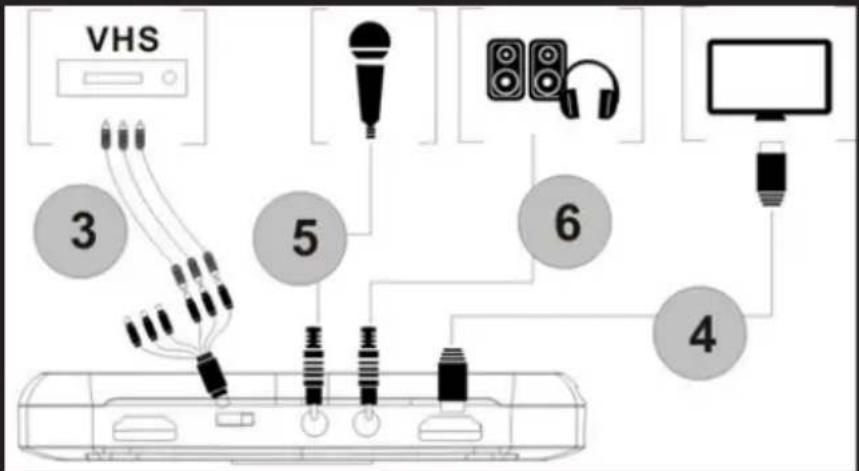
- Steps 1 a 2 as HDMI pripojenie
- Pripojte adaptér kompozitné video (žltý video kábel a červený a biely audio kábel) a pripojte ho do konzoly videa s ich príslušnými káblami.
- Steps 4,5,6 pripojenie, ako je HDMI
Pracovný proces

Technická Podpora
| Location to capture | USB 2.0 Host, SD Card |
| Video Input | Digital: HDMI |
| Analog: Component Video, Composite Video | |
| Audio Input | Digital: HDMI |
| Analog: RCA L/R, 3.5mm MicroPhone In | |
| Note: Microphone without pass through to HDMI input | |
| Video Output | Digital: HDMI (Pass-through from HDMI or Component or Composite Input) |
| Audio Output | Digital: HDMI (Pass-through from HDMI or RCA L/R Input) |
| Analog: 3.5mm Stereo (Pass-through from HDMI or RCA L/R Input) |
Connectors applicable to video consoles
| HDMI | WiiU, Xbox 360, Xbox One, PS4 |
| Components | WiiU, Xbox 360, PS3 |
| Compound | WiiU, Xbox 360, PS3 |
Note: HDCP contents cannot be recorded
Extra Hardware
| Codification | Hardware MPEG4 encoder |
| User interface | Capture button |
| Led status indicator | |
| Dimensions | 140(L) × 70(W) × 23(H) mm |
| Weight | 115g |
Standards
| Storage | Pendrive USB, Portable hard drive, SD card |
| Max Capacity: USB / 2T, SD / 64G | |
| Note: exFAT format is not compatible | |
| Resolution | Entry: 720 x 480 (60p), 720 x 576 (50p), 1280 x 720p (50p), 1280 x 720p(60p), 1920 x 1080 (50i), 1920 x 1080 (60i), 1920 x 1080 (24p), 1920 x 1080 (25p), 1920 x 1080 (30p), 1920 x 1080 (50p), 1920 x 1080 (60p) |
| Capture: 720 x 480 (60p), 720 x 576 (50p), 1280 x 720p (50p), 1280 x 720p(60p), 1920 x 1080 (50i), 1920 x 1080 (60i), 1920 x1080 (24p), 1920 x 1080 (25p), 1920 x 1080 (30p), 1920 x 1080 (25p), 1920 x 1080 (30p) | |
| Note: Upscaling is not supported | |
| Recording Format | Video: MP4, Audio: AAC Stereo |
| Recording quality | Max: 18Mbps@1080P 30fps |
| Recording quality | Max: 2GB / Per File, With RTC (Real Time Clock) |
| Recording quality | Max: 140MB / Minute, 8.4GB / Hour |
| Power | USB DC 5V / 2A |
Applications
| Software | Arcsoft Showbiz |
| Video Editing | Timeline / Storyboard edit, Split / Divide Scenes, Multi Trim Scenes ... |
| Export Video | Upload to YouTube |
| Portable Device: iPod, iPhone, iPod Touch, Apple TV, PSP, PS3, Xbox | |
| File: MPEG 1 / 2 / 4, WMV HD, Quicktime (MOV) ... | |
| Operating System Requirements | Windows 8 (32 / 64 bit), Windows 7 (32 / 64 bit), Windows Vista (32 / 64 bit) |
| CPU requirements | Intel Core 2 Duo 2.8GHz, AMD Athlon 64X2 Dual Core 3.0GHz |
| Memory requirements | 4 GB RAM |
| Graphics Card Requirements | VGA card with support for DirectX 10.0c or above |
Paket içeriği
TR
TR
Teknik Destek
Do not expose to direct sunlight and other heat sources.
Do not handle liquids near or on the unit.
Never spill liquid of any kind on the unit.
Do not place the unit near devices that generate magnetic fields.
Do not place heavy objects on top of the unit
POWER SUPPLY
Use only our adapter, output voltage 5VDC / 2A.
Disconnect the power supply when the weather is stormy, thunder or lightning.
Disconnect the power supply, when no one is home or not in use for a long time
Keep the power cord out of the reach of children or physical or mechanical.
TEMPERATURE
Do not place the unit near a radiator or heater.
If the unit is suddenly moved from a cold to a warm place, unplug the power cord for at least two hours.
MOISTURE
Do not expose the machine to rain, moisture or place near water.
Make sure the interior is dry and cool.
VENTILATION
Keep openings free.
Make sure the drive has enough space for ventilation around.
Never cover the device.
EC DECLARATION OF CONFORMITY
We declare under our sole responsibility that the product:
Brand name: KEEP OUT GAMING
Model no: SX200
Product description: HD VIDEO CAPTURE
The measurements shown in this test report were made in accordance with the procedures given in the:
- EMC DIRECTIVE: 2004/108/EC
- RoHS DIRECTIVE: 2011/65/EU
To which this declaration is based on with full conformance to the following European norms and standards:
- EN 55013::2013
- EN 61000-3-2: : 2014
- EN 61000-3-3::2013
- EN 55020::2007+A11:2011
Signed June 23, 2015

Jose Luis Ruiz Gómez
Managing Director
KEEP OUT GAMING.
ADD: Polígono Industrial Guadalquivir
Gelves (Sevilla), Spain.
Website: www.approx.es

Importado por / Imported by:
APPROX IBERIA S. L.
CIF: B-91202499
Soporte técnico / Technical support:
support@keep-out.eu
The content of this guide is
subject to typographical errors.


48H NON STOP

NO SHARING!

FEEL SUPERIOR
keepoutgaming.com
- Комплектът включва
- BG
- Obsah balení
- Technická Podpora
- Lieferumfang
- DE
- Technischer Support
- Product description
- Technical specifications
- Package contents
- Parts descriptions
- EN
- Connections
- HDMI connection
- Operating process
- Firmware Update and Other Functions
- Video Editing
- Technical Support
- Introducción
- ES
- Soporte técnico
- Pakendi sisu
- ET
- FR
- Support Technique
- Sadržaj pakiranja
- Dijelovi opisi
- HR
- Veze
- HDMI veza
- Radni proces
- Tehnička Podrška
- Bemutatkozás
- A csomag tartalma
- HU
- Technikai Segítség
- IT
- Supporto Tecnico
- NL
- PL
- Pomoc Techniczna
- Conteúdo do pacote
- PT
- Suporte Técnico
- RO
- Suport Tehnic
- Obsah balenia
- SK
- Pracovný proces
- Paket içeriği
- TR
- Teknik Destek
- POWER SUPPLY
- TEMPERATURE
- MOISTURE
- VENTILATION
- EC DECLARATION OF CONFORMITY
Brand : KeepOut
Model : SX200
Category : Video Capture Card