HXAIR - Headphones KeepOut - Free user manual and instructions
Find the device manual for free HXAIR KeepOut in PDF.


Pick your language and provide your email: we'll send you a specifically translated version.
| Product Type | Over-Ear Bluetooth Headphones |
| Dimensions | 18 x 15 x 6 cm |
| Weight | 200 g |
| Power Supply | Built-in rechargeable lithium-ion battery |
| Battery Life | Up to 20 hours of playtime |
| Charging | USB-C (cable included) |
| Wireless Range | 10 meters |
| Driver Size | 40 mm |
| Frequency Response | 20 Hz - 20 kHz |
| Impedance | 32 Ω |
| Microphone | Built-in with noise reduction |
| Controls | Volume up/down, play/pause, call answer/end |
| Connectivity | Bluetooth 5.0 |
| Compatibility | All Bluetooth-enabled devices |
| Ear Cushions | Soft memory foam, replaceable |
| Cleaning | Wipe with soft dry cloth |
| Safety | Avoid exposure to water and extreme temperatures |
| Spare Parts | Earpads, charging cable, user manual |
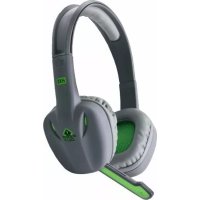
| General Info | Brand: KeepOut, Model: HXAIR, Color: Black |
Frequently Asked Questions - HXAIR KeepOut
How do I pair the HXAIR headphones with my phone?
Ensure the headphones are charged and turned on. Press and hold the power button for 3 seconds until the LED flashes blue and red. Go to your phone's Bluetooth settings and select KeepOut HXAIR.
What is the battery life of the HXAIR?
The battery lasts up to 20 hours on a full charge. Actual battery life may vary depending on volume and usage.
How do I charge the headphones?
Use the provided USB-C charging cable. Connect the cable to the headphones and a USB power source. The LED turns red while charging and blue when fully charged.
Can I use the headphones while charging?
Yes, you can use the headphones in wired mode while charging by connecting the audio cable (if included). For wireless use, it is recommended to charge before use.
How do I reset the HXAIR headphones?
Turn off the headphones. Press and hold the power button for 10 seconds until the LED flashes purple. This will reset the device and clear paired devices.
Are the ear cushions replaceable?
Yes, the ear cushions are made of memory foam and can be replaced. Contact KeepOut support for spare parts or compatible replacements.
What should I do if the headphones are not connecting?
Make sure Bluetooth is enabled on your device. Try resetting the headphones as described. Also, ensure the headphones are within 10 meters of the device and not connected to another device.
How do I clean the headphones?
Use a soft dry cloth to wipe the ear cushions and headband. Do not use liquids or abrasive cleaners. For deep cleaning, remove ear cushions and gently wipe with a damp cloth, then air dry.
Is there a warranty for HXAIR?
Yes, KeepOut offers a 1-year limited warranty against manufacturing defects. Keep your purchase receipt for warranty claims.
Can I use the headphones for gaming?
Yes, the HXAIR can be used for gaming with any Bluetooth-enabled console or PC. The built-in microphone allows for voice chat. Check latency may be minimal.
User questions about HXAIR KeepOut
0 question about this device. Answer the ones you know or ask your own.
Ask a new question about this device
No questions yet. Be the first to ask one.
Download the instructions for your Headphones in PDF format for free! Find your manual HXAIR - KeepOut and take your electronic device back in hand. On this page are published all the documents necessary for the use of your device. HXAIR by KeepOut.
USER MANUAL HXAIR KeepOut

Manual assistant
Powered by Anthropic
Waiting for your message
Product information
Brand : KeepOut
Model : HXAIR
Category : Headphones