
HX8V2 - Headphones KeepOut - Free user manual and instructions
Find the device manual for free HX8V2 KeepOut in PDF.


| Product Type | Gaming Headset |
| Brand | KeepOut |
| Model | HX8V2 |
| Connection | USB |
| Sound Technology | Virtual 7.1 Surround Sound |
| Microphone | Noise-cancelling, adjustable |
| Software | KEEP OUT 7.1 Sound Effect Gaming Headset Software |
| Audio Channels | 2CH, 4CH, 6CH, 8CH selectable |
| Equalizer | 12 presets plus user-defined |
| Environment Effects | 23 modes, 3 sizes |
| Karaoke/Magic Voice | Microphone echo, speed, vocal cancel |
| Compatibility | Windows PC, game consoles with USB |
| Package Contents | Headset, Quick installation guide |
| Care and Cleaning | Wipe with a dry, soft cloth; avoid liquids |
| General Information | Imported by APPROX IBERIA S.L.; support@keep-out.eu |
Frequently Asked Questions - HX8V2 KeepOut
User questions about HX8V2 KeepOut
0 question about this device. Answer the ones you know or ask your own.
Ask a new question about this device
Download the instructions for your Headphones in PDF format for free! Find your manual HX8V2 - KeepOut and take your electronic device back in hand. On this page are published all the documents necessary for the use of your device. HX8V2 by KeepOut.
USER MANUAL HX8V2 KeepOut
Посетете нашия сайт, за да изтеглите нашият водач www.keep-out.eu потребителя Navštivte naše webové stránky a stáhněte si náš průvodce www.keep-out.eu uživatele Besuchen Sie unsere Website, um unsere Führung www.keep-out.eu Benutzer downloaden Επισκεφθείτε την ιστοσελίδα μας για να κατεβάσετε τον οδηγό χρήσης μας www.keep-out.eu Külasta meie kodulehel laadida meie giid www.keep-out.eu kasutaja Visitez notre site pour télécharger notre www.keep-out.eu guide d’utilisation Posjetite našu web stranicu za download našeg vodiča www.keep-out.eu korisnika Látogasson el honlapunkra, hogy töltse le a vezető www.keep-out.eu felhasználó Visita il nostro sito per scaricare il manuale d’uso www.keep-out.eu Bezoek onze website om onze gids www.keep-out.eu gebruiker downloaden Odwiedź naszą stronę internetową, aby pobrać nasz przewodnik użytkownika www.keep-out.eu Visite o nosso site para baixar o nosso guia www.keep-out.eu usuário Vizitați site-ul nostru pentru a descărca ghidul nostru www.keep-out.eu de utilizare Navštívte naše webové stránky a stiahnite si náš sprievodca www.keep-out.eu užívatel’a Rehberimiz www.keep-out.eu kullanıcı indirmek için web sitemizi ziyaret
INTRODUCTION
Thank you for choosing the Keep out Gaming Headset.
PRODUCT DESCRIPTION
The Keep Out Headsets offer professional audio performance in games. Incorporates more advanced features for players to enter fully into the game. Its high-fidelity speakers produce quality sound 7.1 and create a unique acoustic environment thanks to its comfortable and adaptable soft padded arms. Your microphone incorporates the latest technology for noise suppression and provides excellent communication giving maximum realism to games.
The Keep Out Headsets are the best choice for the winner.
Package Contents
- Headset
- Quick installation guide in various languages.
Note:
Make sure that your package contains the items described above. If any item is missing or damaged, please contact your dealer.
INSTALLATION AND CONFIGURATION
- Connection: Connect the Headset in a free USB port of your PC or game console.
- Installation on Windows: Insert the installation CD into your drive and double-click the icon for My
Computer or My Computer, then double-click the floppy drive where you placed the CD and boot the installation program.
- KEEP OUT 7.1 Sound Effect Gaming Headset Software:
Icon
Please observe the following image, the icon will show KEEP OUT Gaming Headset 7.1 Sound Effect in the lower right corner of your desktop, click the icon to access.

Principal Configuration:
- Entry system, change options 2CH, 4CH, 6CH, 8CH, the button [?] On the right shows some tips as follows
MP3, WMA, AAC, CD, VCD: 2CH
DVD with Dolby Digital or DTS, WMA-Pro: 6CH
DVD with Dolby Digital or DTS ES: 8CH
3D Games: 8CH.
Note: An unsuitable choice of file type to play can cause poor reproduction.
- Mode Settings DSP and DSP effects.
- Analog Output Type: Headphones or speakers.
- Output device, you can adjust the speaker decibels.
EN

Mixer:
- Volume Control
- Switch on or off the sound
- Microphone Volume Control
- Switch the microphone on or off
- Recording. Microphone Volume Control
- Recording. Switch the microphone on or off.
- Advanced settings of the microphone

Effect:
- Environment: 23 modes for your choice:
- Size: Small, Medium, Large for election
- Equalizer: 12 kinds for your choice and defined by the user.

Karaoke / Magic Voice
- Enable / disable and configure the microphone echo
- Enable / disable and configure the playback speed
- Enable / disable and configure the vocal cancel.
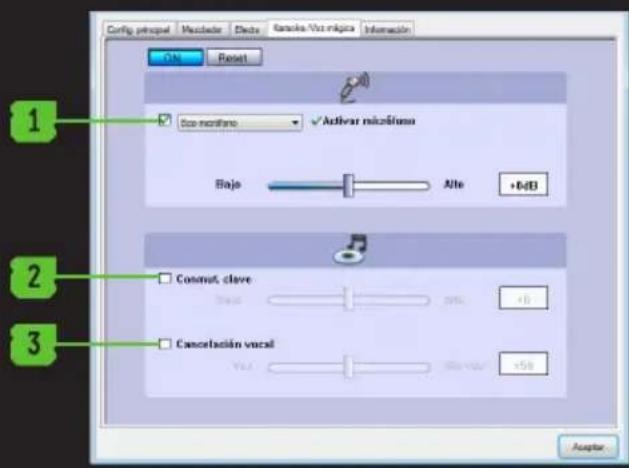
Displays information about the software and allows you to display or not the software icon on the desktop.


TECHNICAL SUPPORT
For more information on installing and configuring this product go to our website www.keepout.eu or write an email to the following address: support@keep-out.eu.

natural_image
Abstract green brushstroke pattern on black background (no text or symbols)
INTRODUCCIÓN
- KEEP OUT 7.1 Sound Effect Gaming Headset Software:
Icono
natural_image
Abstract green brushstroke pattern on black background (no text or symbols)Importado por / Imported by:
APPROX IBERIA S. L.
CIF: B-91202499
Soporte técnico / Technical support:
support@keep-out.eu
The content of this guide is subject to typographical errors.


48H NON STOP

NO SHARING!

FEEL SUPERIOR
keepoutgaming.com
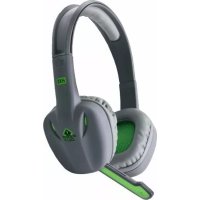
Brand : KeepOut
Model : HX8V2
Category : Headphones