KNHDMISW25 - Switch KONIG - Free user manual and instructions
Find the device manual for free KNHDMISW25 KONIG in PDF.



Frequently Asked Questions - KNHDMISW25 KONIG
User questions about KNHDMISW25 KONIG
0 question about this device. Answer the ones you know or ask your own.
Ask a new question about this device
Download the instructions for your Switch in PDF format for free! Find your manual KNHDMISW25 - KONIG and take your electronic device back in hand. On this page are published all the documents necessary for the use of your device. KNHDMISW25 by KONIG.
USER MANUAL KNHDMISW25 KONIG
text_image
KÖNIG ELECTRONICKN-HDMISW25
text_image
JON Preset IR Source 1 2 3 4 JON1.ICH Select ARC ON/OFF ARC SelectMANUAL (p. 2)
4-Port HDMI switch
ANLEITUNG (S. 5)
MANUAL DE USO (p. 18)
This is a fast switching HDMI 4x1 1.4a with HEAC, 3D function. It supports 4 HDMI inputs and 1 HDMI output. With Built-in HDCP engine for Instant Port Switching (IPS), 4 Ports switching can be very fast because there is no need to redo HDCP authentication when port switching occurs. With the built-in HEC(HDMI Ethernet) and ARC(Audio Return Channel) chips, it can split HEC which is from HDTV to Ethernet signals, and can split ARC which is also from HDTV to Coaxial, Toslink, Stereo audio signals which are also from source device through ARC ON/OFF button on the Remote Control.
FEATURES & SPECIFICATIONS:
• Supports 4 HDMI inputs and 1 HDMI output.
- Built-in HDCP engine for Instant Port Switching (IPS), 4 Port switching can be very fast because there is no need to redo HDCP authentication when port switching occurs.
• Supports Audio Return Channel (ARC) from sink device. Connect ARC port to Amplifier Receiver.
- Supports digital audio Toslink and COAX output simultaneously and Stereo audio output from source device. Connect these port to Amplifier Receiver.
- Supports 3D all format, including 1080p@23.98/24Hz, 720p@59.94/60Hz/50Hz, bandwidth up to 225MHz.
- Supports CEC.
• Supports highest video resolution 1080p.
• Supports 225MHz/2.25Gbps per channel (6.75Gbps all channel) bandwidth.
- Supports 12bit per channel (36bit all channel) deep color.
• Supports uncompressed audio such as LPCM.
- Supports compressed audio such as DTS Digital, Dolby Digital (including DTS-HD and Dolby True HD).
Note: Specifications are subject to change without notice. Weight and dimensions are approximate.
PACKAGE CONTENTS:
Before attempting to use this unit, please check the packaging and make sure the following items are contained in the shipping carton:
- Main unit.
- 5V/2A DC Power Supply x1.
- User's Manual.
- Remote Control x1
PANEL DESCRIPTIONS:
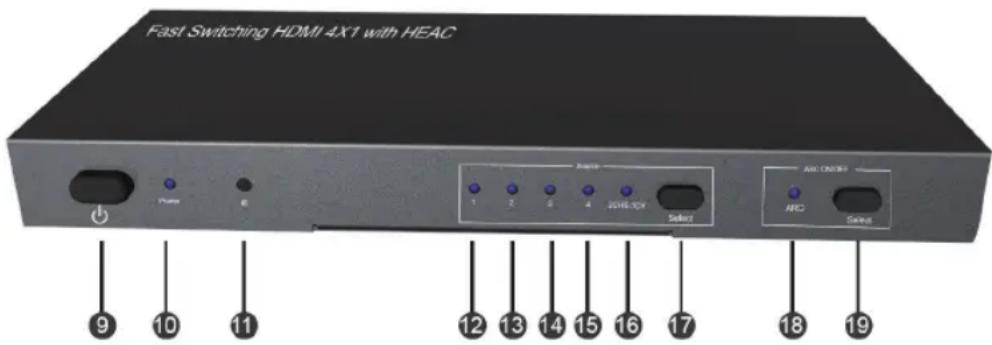
Front
text_image
Fast Switching HDMI 4X1 with HEAC 9 10 11 Chase E AEC 1 2 3 4 20Hz/5V Select AEC CMOSI NCD Select 12 13 14 15 16 17 18 19Back
text_image
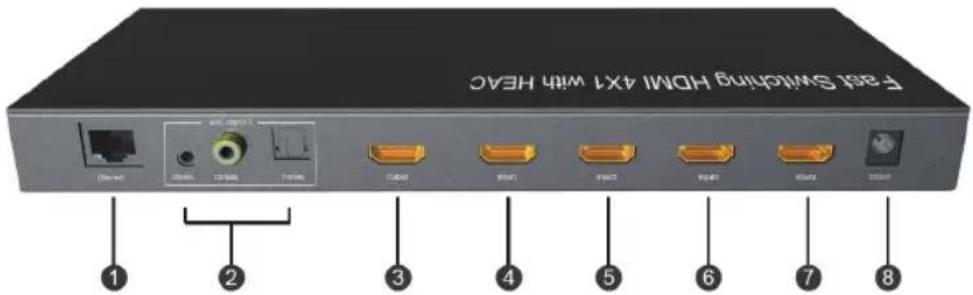
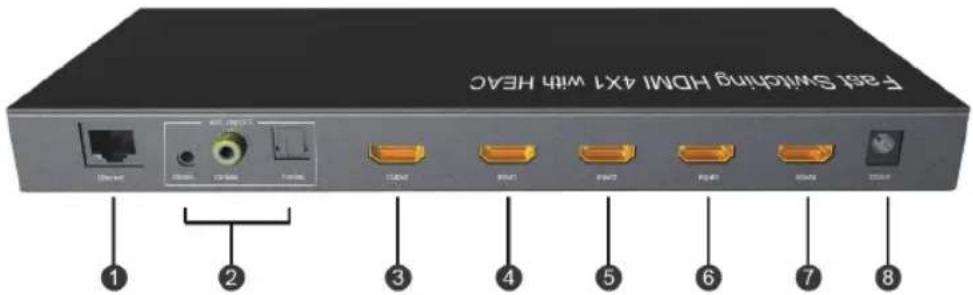
Fast Switching HDMI 4X7 with HEC 1 2 3 4 5 6 7 8| 1 | Ethernet: | Connect this port to PC. When HDTV with HEC enable HEC function, PC will be connected to Ethernet. |
| 2 | Audio Port: | Connect the three ports to Amplifier ReceiverWhen select ARC ON, audio output is from HDTV with ARC.When select ARC OFF, audio output is from Source devices. |
| 3 HDMI Output: Connect this port to HDTV | ||
| 4-7 HDMI Input: Connect these ports to source devices | ||
| 8 DC/5V: Connect this port to Power Supply | ||
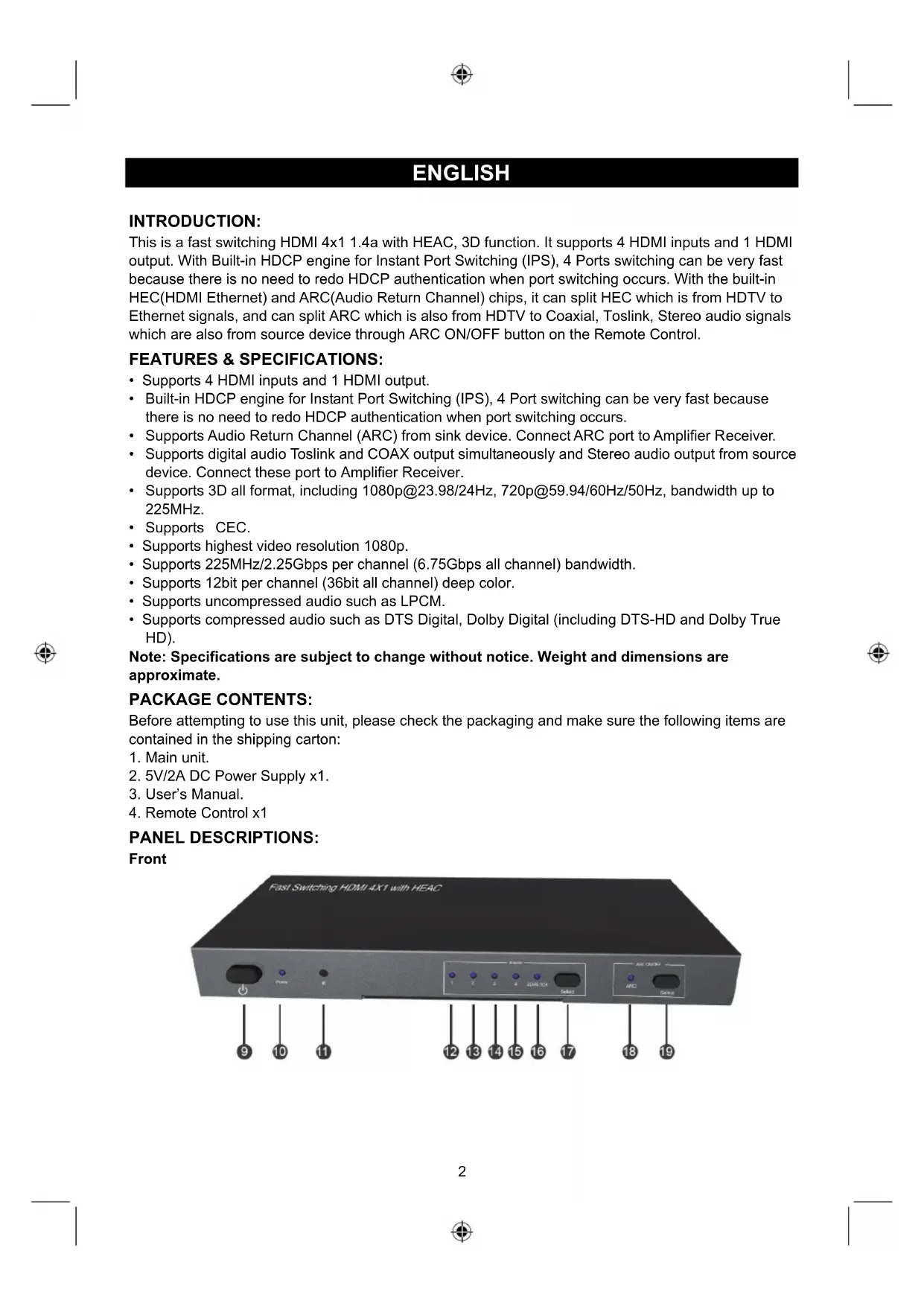
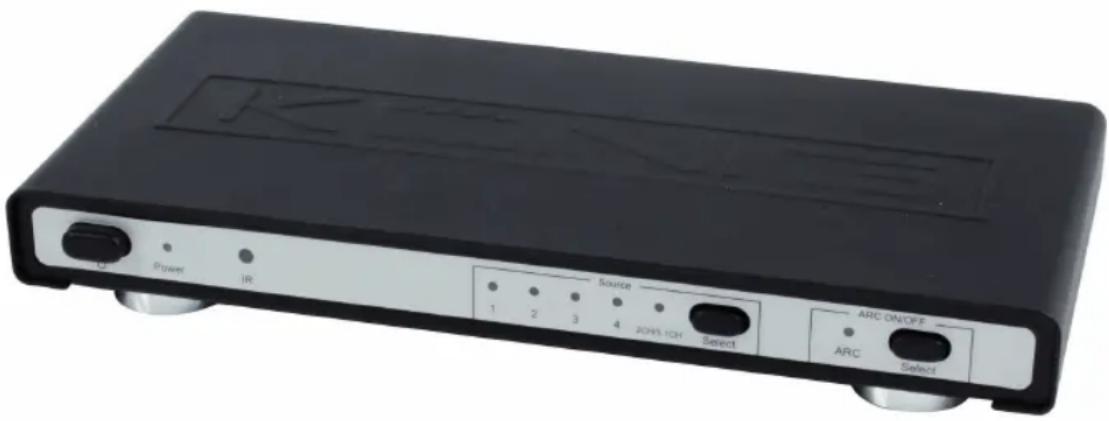
| 9 Power Switch: Turn on or off the power | ||
| 10 | Power LED: | When the switching is working, LED turns blue; When it is standby, LED turns red |
| 11 IR: | Receive the signal from Infrared Remote Control | |
| 12-15 | Input LED: LED will turn on when input port is selected | |
| 16 | 2CH/5.1CH LEDLED will turn off when 2CH button is pressed. | |
| 17 Select: Press this button to select 4 inputs circularly. | ||
| 18 | ARC: | ON/OFF LEDLED will turn on when ARC ON button is pressed, then this product will enable ARC function, and audio signal will be from HDTV; LED will turn off when ARC OFF button is pressed, then ARC function will be turned off, and audio signal will be from source devices. |
| 19 Select: Press this button to select ARC on or off. | ||
CONNECTION AND OPERATION:
CONNECTION
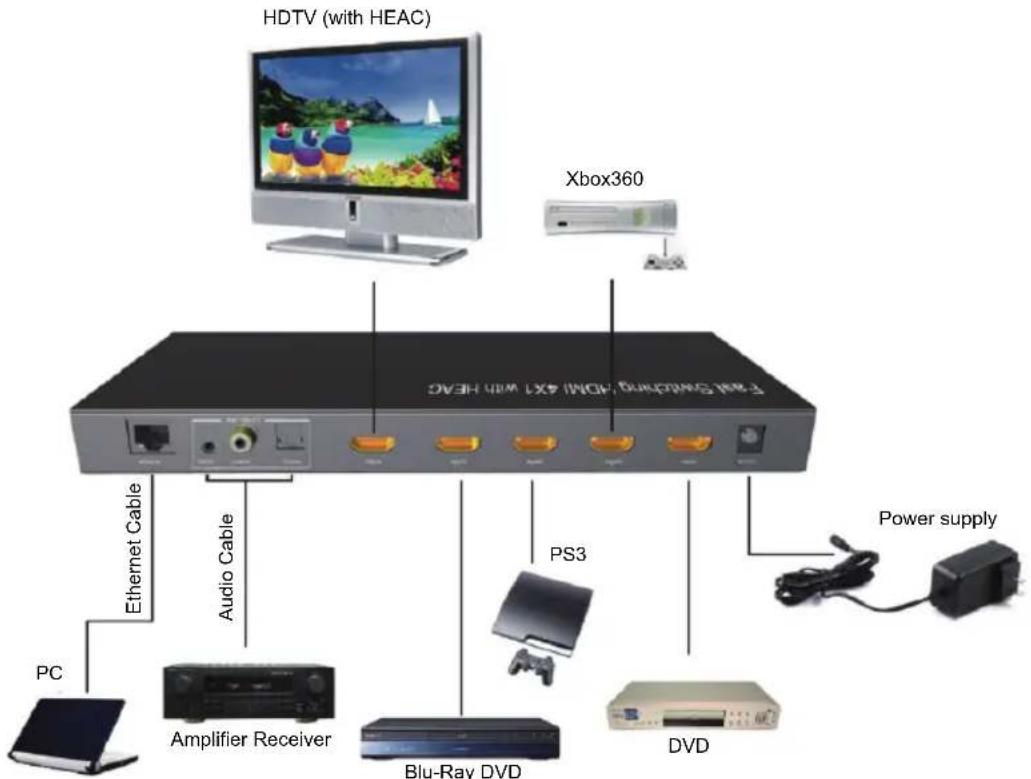
- Connect HDMI input of the product to source devices. (Input cables are optional)
- Connect HDMI output of the product to HDTV.
- Connect audio port to Amplifier Receiver.
- Connect Ethernet port to PC
- Insert the DC side of 5V power supply into the unit and then connect the AC side of the power supply into the wall outlet.
- Turn on the power.
OPERATION
-
Source Select Press "Select" button or remote control to switch Input sources from Input1 to Input4 manually.
-
2CH/5.1CH Audio Output Select
Note: Only when the source supports 5.1CH output (including CD), this function is effective and it realizes through the 2.1CH and 5.1CH buttons on the remote control. Press "2CH" button, the product outputs 2CH audio and the LED turns off; press "5.1CH" button, the product outputs 5.1CH audio and the LED turns on. When provided with power, it automatically selects 5.1CH audio output. If the source can only supports 2CH audio output, the "5.1CH" button will become invalid, that is, although you press "5.1CH" button, the product still outputs 2CH audio and the LED is still on.
3. ARC ON/OFF
When select ARC ON, audio output is from HDTV with ARC.
When select ARC OFF, audio output is from Source device.
Attention: Insert / Extract cable gently.
CONECTION DIAGRAM
text_image
HDTV (with HEAC) Xbox360 E-TRAM SWITCHING HDMI 4.61 WBS HEAC Ethernet Cable Audio Cable PC Amplifier Receiver Blu-Ray DVD PS3 DVD Power supplySafety precautions:


To reduce risk of electric shock, this product should ONLY be opened by an authorized technician when service is required. Disconnect the product from mains and other equipment if a problem should occur. Do not expose the product to water or moisture.
Maintenance:
Clean only with a dry cloth. Do not use cleaning solvents or abrasives.
Warranty:
No guarantee or liability can be accepted for any changes and modifications of the product or damage caused due to incorrect use of this product.
General:
- Designs and specifications are subject to change without notice.
- All logos brands and product names are trademarks or registered trademarks of their respective holders and are hereby recognized as such.
- This manual was produced with care. However, no rights can be derived. König Electronic can not accept liability for any errors in this manual or their consequences.
- Keep this manual and packaging for future reference.
Attention:

This product is marked with this symbol. It means that used electrical and electronic products should not be mixed with general household waste. There is a separate collections system for these products.
DEUTSCH
EINFÜHRUNG:
text_image
Fast Switching HDMI 4X7 with HEC 1 2 3 4 5 6 7 8text_image
Fast Switching HDMI 4X7 with HEC 1 2 3 4 5 6 7 8text_image
Fast Switching HDMI 4X7 with HEC 1 2 3 4 5 6 7 8text_image
F-851 Switching HDMI 4X7 with HEC ① ② ③ ④ ⑤ ⑥ ⑦ ⑧text_image
F-261 SWITCH HDMI 4X7 WITH HEAC ① ② ③ ④ ⑤ ⑥ ⑦ ⑧text_image
Fast Switching HDMI 4X1 with HEC ① ② ③ ④ ⑤ ⑥ ⑦ ⑧text_image
Fast Switching HDMI 4X1 with HEC ① ② ③ ④ ⑤ ⑥ ⑦ ⑧text_image
Fast Switching HDMI 4X1 with HEAC 9 10 11 Power E Front 1 2 3 4 2016/07/08 Select AIC Connection NFC S###Bagside