
SAS-CARCAM10 - Dash cam KONIG - Free user manual and instructions
Find the device manual for free SAS-CARCAM10 KONIG in PDF.


| Product type | Dash camera |
| Brand | Konig |
| Model | SAS-CARCAM10 |
| Video resolution | Full HD 1080p (1920x1080) |
| Viewing angle | 170° wide angle |
| Sensor type | CMOS |
| Screen | 2.0 inch LCD |
| Power supply | Cigarette lighter 12V / 24V |
| Supported memory | microSD card up to 32 GB (not included) |
| Loop recording | Yes |
| Motion detection | Yes |
| G-sensor | Built-in, collision detection |
| Night vision | Yes (infrared LED) |
| Battery | Built-in rechargeable |
| Dimensions | Approx. 6.5 x 5.5 x 3.0 cm |
| Weight | Approx. 70 g |
| Menu language | French, English, etc. |
| Warranty | 2 years |
| Maintenance and cleaning | Clean the lens with a soft, dry cloth. Avoid solvents. |
| Safety | Do not expose to excessive heat. Use the provided adapter. |
Frequently Asked Questions - SAS-CARCAM10 KONIG
User questions about SAS-CARCAM10 KONIG
0 question about this device. Answer the ones you know or ask your own.
Ask a new question about this device
Download the instructions for your Dash cam in PDF format for free! Find your manual SAS-CARCAM10 - KONIG and take your electronic device back in hand. On this page are published all the documents necessary for the use of your device. SAS-CARCAM10 by KONIG.
USER MANUAL SAS-CARCAM10 KONIG
SAS-CARCAM10
Car DVR
Description
The car DVR is a device that is mounted to the windscreen of your vehicle in order to take photos, record videos and and play back photos and videos.
- Display
- On/off button
- Mode button
- OK button
- Menu button
- Up button
- Down button
- Lens
- Infrared lamp
- USB connection
- Memory card slot (microSD / TransFlash)
- Speaker
- Microphone
- Reset button
- Car charger
- Charging indicator
- USB connector
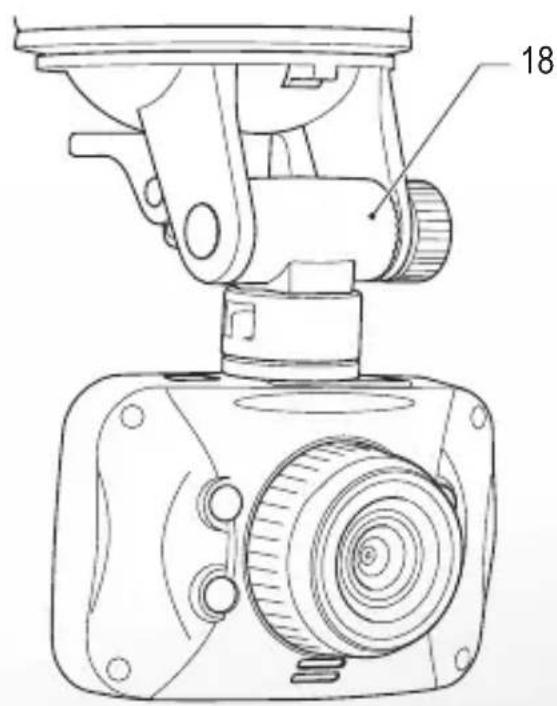
- Windscreen mount
Buttons
| On/off | Press the button to switch on the device. Press and hold the button for 2 seconds to switch off the device.Photo mode / Video mode: Press the button to switch on or off the infrared lamp. |
| Mode | Press the button to select photo mode, video mode or playback mode. |
| OK | Menu mode: Press the button to confirm.Photo mode: Press the button to take photos.Video mode: Press the button to record videos.Playback mode: Press the button to play back photos and videos. |
| Menu | Photo mode / Video mode: Press the button to access or exit the menu.Playback mode: Press the button to delete or protect files. |
| Up | Menu mode: Press the button to move up in the menu.Photo mode / Video mode: Press the button to zoom in.Playback mode: Press the button to increase the volume. |
| Down | Menu mode: Press the button to move down in the menu.Photo mode / Video mode: Press the button to zoom out.Playback mode: Press the button to decrease the volume. |
Photo mode
| Symbols | |||
 | Photo mode Battery indicato |  | |
 | Connection to the car charger |  | Memory card: microSD / TransFlash |
| Menu | |
| Capture Mode Single / 2S Timer / 5S Timer / 10S Timer | |
| Resolution | |
| Sequence Off / On | |
| Quality Fine / Normal / Economy | |
| Sharpness Strong / Normal / Soft | |
| White Balance Auto / Daylight / Cloudy / Tungsten / Fluorescent | |
| Color Color / Black&White / Sepia | |
| ISO Auto / 100 / 200 / 400 | |
| Exposure | +2.0 / +5/3 / +4/3 / +1.0 / +2/3 / +0.0 / -1/3 / -2/3 / -1.0 / -4/3 / -5/3 / -2.0 |
| Face Detection Off / Face Detection / Smile Detection | |
| Anti-Shaking Off / On | |
| Quick Review Off / 2 Seconds / 5 Seconds | |
| Date Stamp Off / Date / Date / Time | |
To take photos:
- Insert a memory card into the memory card slot.
- Insert the USB connector of the car charger into the USB connection of the device. Connect the car charger to the car charger connection of your vehicle.
- Mount the device to the windscreen using the windscreen mount.
- Switch on the device.
- Set the photo mode.
- Set the correct settings using the menu.
- Take the photo.
Video mode
| Symbols | |||
 | Video mode File protection |  | |
 | Battery indicator Loop record |  | |
 | Connection to the car charger |  | Infrared lamp indicator |
 | Motion detection Microphone |  | |
 | Exposure Operation indicator |  | |
 | Memory card: microSD /TransFlash | ||
| Menu | |
| VIDEO | |
| Resolution | 1080FDH (1920x1080) / 1080P (1440x1080) / 720P (1280x720) / WVGA (848x480) / VGA (640x480) / QVGA (320x240) |
| Loop Recording Off / 3 Minutes / 5 Minutes/ 10 Minutes | |
| Exposure | +2.0 / +5/3 / +4/3 / +1.0 / +2/3 / +0.0 / -1/3 / -2/3 / -1.0 / -4/3 / -5/3 / -2.0 |
| Motion Detection Off / On | |
| Record Audio Off / On | |
| Date Stamp Off / On | |
| G-Sensor Off / Low / Medium / High | |
| SETUP | |
| Card Info Name / Size / Free (Memory) | |
| Date / Time Date / Time | |
| Auto Power Off Off / On | |
| Beep Sound Off / On | |
| Language | English / French / Spanish / German / Italian / Simplified Chinese / Traditional Chinese / Russian / Japanese |
| TV Mode PAL / NTSC | |
| Frequency 50 Hz / 60 Hz | |
| Lamp Setting Off / On | |
| Image Rotation Off / On | |
| Backlight | Off / 1 Minute / 2 Minutes / 3 Minutes / 5 Minutes |
| Format | Cancel / OK |
| Default Setting | Cancel / OK |
| Version | Software version |
To record videos:
- Insert a memory card into the memory card slot.
- Insert the USB connector of the car charger into the USB connection of the device. Connect the car charger to the car charger connection of your vehicle.
- Mount the device to the windscreen using the windscreen mount.
- Switch on the device.
- Set the video mode.
- Set the correct settings using the menu.
- Record the video.
Playback mode
| Menu | |
| Delete | Delete Current / Delete All |
| Protect | Lock current / Unlock current / Lock all / Unlock all |
| Slide Show | 2 / 5 / 8 |
To play back photos or videos:
- Switch on the device.
- Set the playback mode.
- Play back the photos or the videos.
Reset button
To reset the device, use a small needle or a paper clip to press and hold the reset button for 3 seconds.
Computer camera
To use the device as a computer camera, connect the device to the computer using a USB cable.
Technical data
| Display TFT LCD (1.5") | |
| Image sensor HR CMOS | |
| External memory microSD / TransFlash (≤ 32 GB) | |
| Photo file format JPEG | |
| Video file format AVI / MOV | |
| Audio Built-in microphone / speaker | |
| USB version USB 2.0 | |
| Battery Built-in rechargeable Li-ion battery | |
Safety


• To reduce risk of electric shock, this product should only be opened by an authorized technician when service is required.
- Disconnect the product from the mains and other equipment if a problem should occur.
- Read the manual carefully before use. Keep the manual for future reference.
- Only use the device for its intended purposes. Do not use the device for other purposes than described in the manual.
- Do not use the device if any part is damaged or defective. If the device is damaged or defective, replace the device immediately.
- The device is suitable for indoor use only. Do not use the device outdoors.
- Do not expose the product to water or moisture.
- Only use the supplied car charger.
Cleaning and maintenance
Warning!
- Do not use cleaning solvents or abrasives.
- Do not clean the inside of the device.
- Do not attempt to repair the device. If the device does not operate correctly, replace it with a new device.
- Clean the outside of the device using a soft, damp cloth.
Warranty
Any changes and/or modifications to the product will void the warranty. We cannot accept any liability for damage caused by incorrect use of the product.
Disposal

- The product is designated for separate collection at an appropriate collection point. Do not dispose of the product with household waste.
- For more information, contact the retailer or the local authority responsible for waste management.
Documents
The product has been manufactured and supplied in compliance with all relevant regulations and directives, valid for all member states of the European Union. The product complies with all applicable specifications and regulations in the country of sales. Formal documentation is available upon request. The formal documentation includes, but is not limited to the Declaration of Conformity, the Material Safety Data Sheet and the product test report.
Disclaimer
Designs and specifications are subject to change without notice. All logos, brands and product names are trademarks or registered trademarks of their respective holders and are hereby recognized as such.
SAS-CARCAM10
Auto-DVR
Beschrijving

Brand : KONIG
Model : SAS-CARCAM10
Category : Dash cam