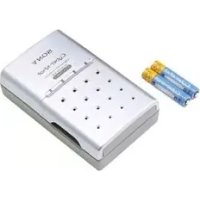
ACCUNQ - Battery charger SONY - Free user manual and instructions
Find the device manual for free ACCUNQ SONY in PDF.



| Product Type | Battery Charger |
| Brand | Sony |
| Model | ACCUNQ |
| Dimensions | Approx. 65 × 32 × 106 mm (W/H/D) |
| Weight | Approx. 120 g |
| Power Supply | 100-240 V AC, 50/60 Hz |
| Output | 1.2 V DC, 460 mA × 4 or 920 mA × 2 |
| Operating Temperature | 0°C to 40°C |
| Compatible Batteries | Sony nickel-metal hydride rechargeable batteries (HR11/45, HR03 type AAA, NH-AAA ; HR15/51, HR6 type AA, NH-AA) |
| Number of Batteries Chargeable | Up to 4 batteries simultaneously |
| Functions | Fast charge (1-2 batteries) and normal charge (3-4 batteries) |
| Charging Time (Fast) | AAA: approx. 1 h 15 min ; AA: approx. 1 h 55 min |
| Charging Time (Normal) | AAA: approx. 2 h 30 min ; AA: approx. 3 h 50 min |
| Charging Indicator | CHARGE light: on during charging, off when finished, flashing in case of error |
| Safety | Short-circuit protection; do not charge other battery types; observe polarity |
| Maintenance and Cleaning | Clean with a soft cloth; do not use alcohol, thinner, or benzine |
| Plugs and Adapters | Integrated plug (USA, Canada, Japan) or power cord (other countries) |
| Recycling | Batteries are recyclable; follow local guidelines |
Frequently Asked Questions - ACCUNQ SONY
User questions about ACCUNQ SONY
0 question about this device. Answer the ones you know or ask your own.
Ask a new question about this device
Download the instructions for your Battery charger in PDF format for free! Find your manual ACCUNQ - SONY and take your electronic device back in hand. On this page are published all the documents necessary for the use of your device. ACCUNQ by SONY.
USER MANUAL ACCUNQ SONY
Operating Instructions
Mode d'emploi
Bedienungsanleitung
The model and serial numbers are located on the bottom of the unit.
Record the serial number in the space provided below.
Refer to these numbers whenever you call upon your Sony dealer regarding this product.
Model No. BC-CSQ2 Serial No.
ACC-UNQ
安全のたてに(バッチリーチヤーダー)
Before operating the unit, please read this manual thoroughly and retain it for future reference.
WARNING
To prevent fire or shock hazard, do not expose the unit to rain or moisture.
For the customers in the USA
CAUTION
You are cautioned that any changes or modifications not expressly approved in this manual could void your authority to operate this equipment.
Note:
This equipment has been tested and found to comply with the limits for a Class B digital device, pursuant to Part 15 of the FCC Rules. These limits are designed to provide reasonable protection against harmful interference in a residential installation. This equipment generates, uses, and can radiate radio frequency energy and, if not installed and used in accordance with the instructions, may cause harmful interference to radio communications.
However, there is no guarantee that interference will not occur in a particular installation. If this equipment does cause harmful interference to radio or television reception, which can be determined by turning the equipment off and on, the user is encouraged to try to correct the interference by one or more of the following measures:
- Reorient or relocate the receiving antenna.
- Increase the separation between the equipment and receiver.
- Connect the equipment into an outlet on a circuit different from that to which the receiver is connected.
- Consult the dealer or an experienced radio/TV technician for help.
For the customers in the USA and Canada
RECYCLING NICKEL METAL HYDRIDE BATTERIES
Nickel Metal Hydride batteries are recyclable. You can help preserve our environment by returning your used rechargeable batteries to the collection and recycling location nearest you.
For more information regarding recycling of rechargeable batteries, call toll free 1-800-822-8837, or visit http://www.rbrc.org/

Caution: Do not handle damaged or leaking Nickel Metal Hydride batteries.
NOTICE FOR THE CUSTOMERS IN THE UNITED KINGDOM
A moulded plug complying with BS 1363 is fitted to this equipment for your safety and convenience.
Should the fuse in the plug supplied need to be replaced, a 5 AMP fuse approved by ASTA or BSI to BS 1362, (i.e., marked with or mark) must be used.
If the plug supplied with this equipment has a detachable fuse cover, be sure to attach the fuse cover after you change the fuse. Never use the plug without the fuse cover. If you should lose the fuse cover, please contact your nearest Sony service station.
For the customers in Australia
- The appliance is not intended for use by young children or infirm persons without supervision.
- Young children should be supervised to ensure that they do not play with the appliance.
CAUTION
Follow the instructions below to prevent the occurrence of death or serious injury resulting from fire or explosions:
To avoid the danger of leakage, internal heat build-up, or explosion, please keep the following in mind.
- Do not charge the batteries with any charger other than a Sony-specified battery charger.
- Do not solder, modify, rebuild, or dismantle the batteries. Also, do not dispose of the batteries in a fire, do not heat them, and do not short the terminals.
- If the liquid leaking from the batteries gets in your eyes, wash your eyes out with clean water, then see a doctor for the proper treatment immediately.
To avoid the occurrence of death or serious injury resulting from fire, please take the following precautions.
- Be sure to insert the batteries with the correct / polarities.
- Do not allow any metal objects to come into contact with the / terminals of the batteries. Also, do not transport or store the batteries with metal objects like necklaces or hairpins.
- Do not strip, peel off, or damage the outer covering of the batteries.
- If liquid that leaks from the batteries gets on your hands or clothing, wash it off immediately with clean water.
- Store the batteries out of the reach of young children.
- If you notice the batteries have leaked, changed color, or changed shape, do not use them.
To avoid injury, please take the following precautions.
- Do not mix or use dry cell batteries, capacitors, other types of batteries, or other brands of batteries with the specified batteries.
- Avoid direct shock to the batteries, and do not throw them against anything.
- Do not mix old and new batteries, or charged and uncharged batteries.
- When you use two or more batteries, charge and use them together.
- When you are not using the batteries, remove them from the unit.
Table of Contents
Identifying the parts 4
Charging the batteries 4
Precautions 6
Using Nickel-Metal Hydride batteries 9
Troubleshooting 10
Specifications 11
- In this document, the word batteries refers to rechargeable batteries.
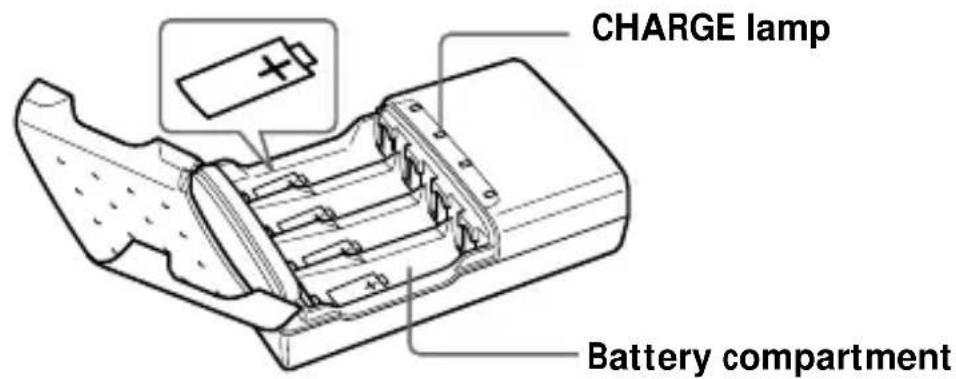
Identifying the parts
Charging the batteries
1 Insert Sony HR11/45, HR03 (size AAA), NH-AAA or Sony HR15/ 51, HR6 (size AA), NH-AA Nickel-Metal Hydride batteries ensuring that the + / - indicators on the batteries are aligned with the + / - indicators on the charger, and close the cover.
You can charge up to four Sony HR11/45, HR03 (size AAA), NH-AAA Nickel-Metal Hydride or Sony HR15/51, HR6 (size AA), NH-AA Nickel-Metal Hydride batteries in this charger.
2 Charge the batteries.
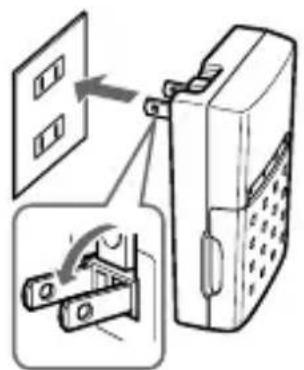
- For the customers in the USA, Canada and Japan:
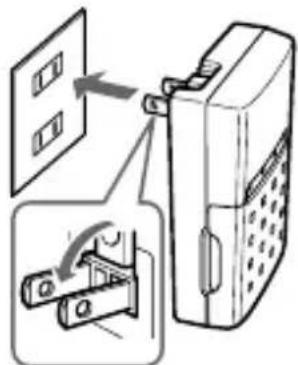
Flip up the power plug and insert it into the wall outlet.
- For the customers in the other countries:
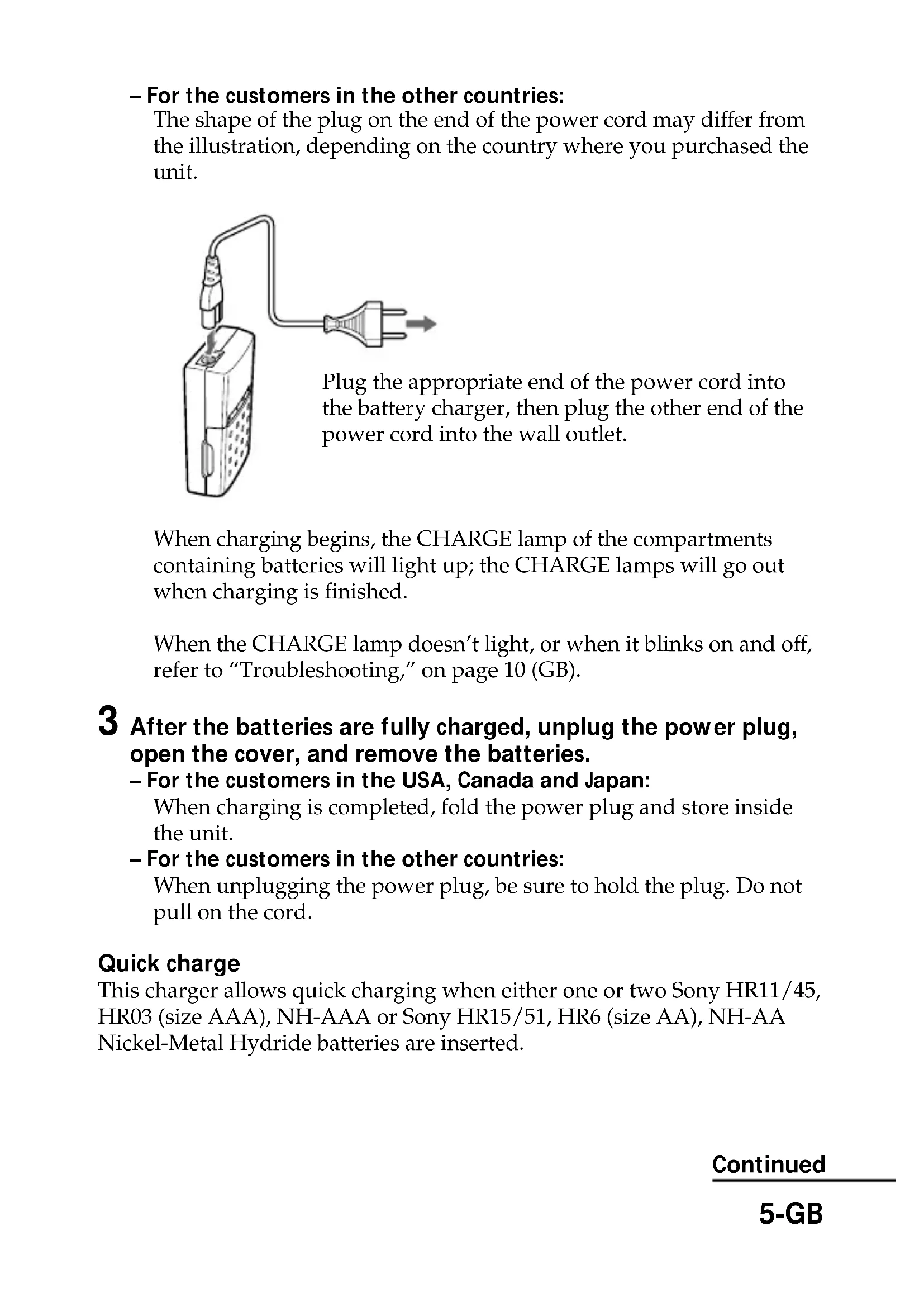
The shape of the plug on the end of the power cord may differ from the illustration, depending on the country where you purchased the unit.

Plug the appropriate end of the power cord into the battery charger, then plug the other end of the power cord into the wall outlet.
When charging begins, the CHARGE lamp of the compartments containing batteries will light up; the CHARGE lamps will go out when charging is finished.
When the CHARGE lamp doesn't light, or when it blinks on and off, refer to "Troubleshooting," on page 10 (GB).
3 After the batteries are fully charged, unplug the power plug, open the cover, and remove the batteries.
- For the customers in the USA, Canada and Japan:
When charging is completed, fold the power plug and store inside the unit.
- For the customers in the other countries:
When unplugging the power plug, be sure to hold the plug. Do not pull on the cord.
Quick charge
This charger allows quick charging when either one or two Sony HR11/45, HR03 (size AAA), NH-AAA or Sony HR15/51, HR6 (size AA), NH-AA Nickel-Metal Hydride batteries are inserted.
Charging the batteries (continued)
Charging times
| Super Quick Charge No (one or two batteries) | rimal Quick Charge (three or four batteries) | |
| Sony HR11/45, HR03 (size AAA), NH-AAA approx. 1 h 15 min approx. | 2 h 30 min | |
| Sony HR15/51, HR6 (size AA), NH-AA approx. 1 h 55 min approx. 3 h | 50 min | |
| batteries |
The times indicated are for batteries with the capacities listed below.
Sony HR11/45, HR03 (size AAA), NH-AAA: 750 mAh (typ.)
Sony HR15/51, HR6 (size AA), NH-AA: 1750 mAh (typ.)
Do not connect the battery charger to a voltage adaptor (travel converter) for overseas travel. This may result in overheating or other malfunction.
Precautions
- Use the charger near the wall outlet. Even if the CHARGE lamp is not turned on, the charger is still connected to the power. If the charger malfunctions, unplug the power plug from the wall outlet.
- Be careful not to jar, crush, drop or otherwise damage the battery charger.
- Do not disassemble or modify the battery charger.
- Do not let water get on the battery charger. Do not put any foreign objects into the charger.
- Do not place the charger near water.
- Do not leave a battery that is charging near small children.
- Do not use the battery charger in environments with excessive humidity, oily smoke or steam.
- Use only the correct type of battery.
- Make sure your hands are completely dry before touching the battery charger.
-
Place the battery charger on a stable foundation.
-
Do not touch the battery charger or the batteries while the charger is charging.
- Do not cover the battery charger, for example with a cloth or a cushion.
- Do not charge fully charged batteries.
- Do not charge the battery by reversing the polarities.
Notes on using the battery charger and battery
Charging
- Do not charge any batteries other than Sony Nickel-Metal Hydride rechargeable batteries. If you use manganese, alkaline, or similar batteries, they make leak or explode.

- Insert the batteries into the battery charger compartment properly. If the batteries are not inserted properly, the terminals of the battery charger may be damaged, or the batteries may not charge properly.
- Before using the batteries for the first time, be sure that they are fully charged beforehand.
- After batteries have been fully charged, quickly remove them from the charger. If you allow them to remain in the charger for a long time, the performance of the batteries may deteriorate.
- Just after the charging lamp goes out, the batteries are still hot. Be careful.
- To obtain the best performance from the batteries, use up the charge completely, and then recharge them fully, repeating this process several times.
- When you buy batteries, or when they haven't been used for a long time, the charge they hold may be less than expected. This is a characteristic of such batteries. However, if you use up the charge completely, and then recharge them, after a few times, they will again accept a full charge.
Temperature of the charging environment
To maximize charging capability, charge the batteries where the ambient temperature is between 10^ to 30^ ( 50^ to 86^ ). If the ambient temperature is outside the range of 10^ to 30^ ( 50^ to 86^ ), the batteries may not charge efficiently.
Precautions (continued)
Locations
Do not install or store the battery charger in locations with the following conditions:
- Locations with extremes of temperature
Leaving the unit in direct sunlight, in a closed automobile, or near heat-producing devices, may result in deformation or malfunction of the unit. - Locations subject to vibration
- Locations subject to strong magnetism
- Locations subject to dust or sand
If you use the battery charger, for example, on a beach or in a desert, make sure that you keep the battery charger away from any sand. A battery charger that is covered with sand may cause a malfunction.
Usage
- Do not jar or drop the battery charger.
- Because the battery charger may cause noise, do not use it near televisions or AM radio tuners.
- Do not allow metal to come in contact with the connecting part of this unit. A short may occur.
Care and maintenance of the battery charger
- To clean the battery charger, use a soft cloth or tissue paper.
- If needed, use a soft cloth dampened with diluted mild detergent, then wipe the unit with dry cloth.
- Do not use alcohol, thinner, benzene, etc. to clean the battery charger. Using these chemicals may damage the battery charger.
- If you use a chemically treated cleaning cloth, follow the instructions.
- Do not spray volatile material such as pesticide on the battery charger. Do not let rubber or vinyl touch the battery charger. Doing so may damage the charger.
Notes on the power plug
- Do not touch the power plug during thunderstorms.
- Make sure to insert the power plug in the wall outlet properly.
- If you are not going to be using the battery charger, unplug the power plug.
- When you service the battery charger, unplug the power plug.
If any difficulty should arise, unplug the unit and contact your nearest Sony dealer.
Using Nickel-Metal Hydride batteries
Charging
- Use the batteries only after fully charging them.
The batteries have only a small charge when shipped from the factory. - Charge the batteries after you have fully used up the previous charge.
- Please be sure to charge the batteries just before you use them.
If the batteries are left fully charged without being used, the charge will decrease naturally, so it is recommended that you charge them immediately prior to the time you intend to use them.
- If you recharge the batteries several times without fully using up the previous charge, the battery will not accept a full charge, and the length of time the batteries can be used will gradually decrease. This is called the "memory effect." If the "memory effect" occurs, use up the charge completely, and then recharge the batteries. Repeat this a few times, and the "memory effect" will disappear.
Battery life
- It is better to prepare enough batteries for two or three times the length of time you plan to use the unit.
- If fact, the colder it gets, the more battery performance decreases, and the shorter the length of time the batteries can be used.
When you are not using the unit
- To protect the batteries, remove them from the unit. If left in place, the batteries may leak.
Care and maintenance
- Please be sure to keep the battery terminals clean.
When you have not used the batteries for a long time, or when the terminals have become dirty, please wipe the and terminals of the batteries clean using a tissue, etc., before using them.
Storing the batteries
- After using up the charge completely, remove the batteries from the unit and store them in a cool place.
- If you don't intend to use the batteries for a while, it is safer to store them in the battery case (supplied).
Troubleshooting
Charge lamp status: ( :Blinking, :Lit, :O)
| Symptom Remedy | ||
| Charg-ing. | Operating normally. | |
| Lamps don't light when batteries first inserted. | ·Something is wrong with either the batteries or the charger. →Follow the troubleshooting procedures below to determine the problem. | |
| Lamps for slots with batteries inserted blink. | ||
| Lamps for slots with or without batteries blink. | ·The ambient temperature is inappropriate for charging. →Charge the batteries in a more appropriate environment. | |
| Lamps for all four inserted batteries blink. →Remove one battery. ·All lamps blink. | ||
| ·The ambient temperature is inappropriate for charging. →Charge the batteries in a more appropriate environment. | ||
| ·Something is wrong with either the batteries or the charger. →Follow the troubleshooting procedures below to determine the problem. | ||
Troubleshooting procedures

Specifications
Battery Charger BC-CSQ2
Input rating AC 100 - 240 V, 50/60 Hz
7 W, 12 VA - 15 VA
Output rating
DC 1.2V 460mA× 4 / 920mA× 2
Operating temperature 0^ to +40^ (32^ to 104^)
Dimensions
Approx. 65 × 32 × 106 ~mm(w / h / d)
(25 / 8 × 15 / 16 × 41 / 4 inches)
Mass Approx. 120g (4 oz)
Applicable batteries Sony Nickel-Metal Hydride rechargeable batteries
HR11/45, HR03 (size AAA), NH-AAA
HR15/51, HR6 (size AA), NH-AA
Rechargeable Battery NH-AAA-DI
Nominal voltage 1.2V
Capacity 750mAh (typ.)
Operating temperature 0^ to +40^ (32^ to 104^)
Design and specifications are subject to change without notice.
AVENTISSEMENT
Piles HR15/51, HR6 (type AA), NH-AA de Sony: 1750 mAh (type)
HR11/45, HR03 (type AAA), NH-AAA
HR15/51, HR6 (type AA), NH-AA
Pile rechargeable NH-AAA-DI
Tension nominale 1,2 V
Capacité 750 mAh (type)
HR11/45, HR03 (GröBe AAA), NH-AAA
HR15/51, HR6 (GröBe AA), NH-AA
Akku NH-AAA-DI
Nennspannung 1,2 V
Sony HR11/45, HR03 (formaat AAA), NH-AAA batterijen: 750 mAh (typ.)
Sony HR15/51, HR6 (formaat AA), NH-AA batterijen: 1750mAh (typ.)
HR11/45, HR03 (AAA), NH-AAA
HR15/51, HR6 (AA), NH-AA
Oplaadbare batterij NH-AAA-DI
Nominale spanning 1,2V
Capaciteit 750mAh (typ.)
HR11/45, HR03 (storlek AAA), NH-AAA
HR15/51, HR6 (storlek AA), NH-AA
HR11/45, HR03 (formato AAA), NH-AAA
HR15/51, HR6 (formato AA), NH-AA
Pila ricaricabile NH-AAA-DI
Tensione nominale 1,2V
Carregar as pilhas 3
Precauçoes 5
Utilizar pilhas de hidreto de metal de niqueel 8
Resolucao de problemas 9
Caracteristicas techniques 10
HR11/45, HR03 (tamanho AAA), NH-AAA
HR15/51, HR6 (tamanho AA), NH-AA
Identification of delene 3
Identification of delene

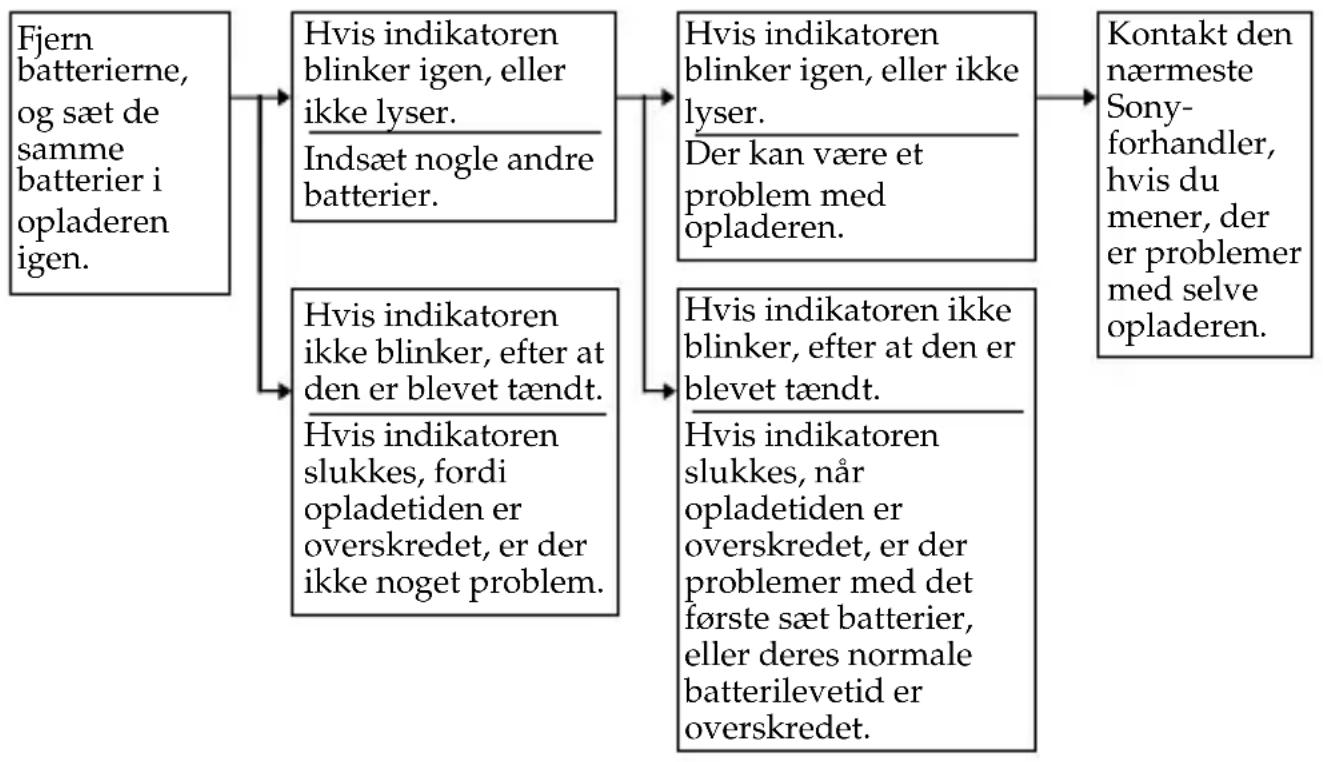
Fejlfinding (fortsat)
Fejlfindingsprocedurer
Specificationer
Batteriplader BC-CSQ2
Indgangseffekt 100 - 240 V vekselström, 50/60 Hz
7W, 12 VA - 15 VA
Udgangseffekt 1,2V jævnstrøm, 460mA× 4 / 920mA× 2
Driftstemperatur 0^ til +40^
Mäl Ca. 65× 32× 106mm (b / h / d)
Vægt Ca. 120 g
Anvendelige batterier Sony genopladelige
nikkelmetalhydridbatterier
HR11/45, HR03 (störrelse AAA), NH-AAA
IcnoJb30BaHne aKKymyIaTOPOB Tnna HnKeJIb-MeTaII rIaPnI 8
YcTpaHHe HEnoJaOK 10
Texnueckne xapaKtepncTKn 11
B 3TOM DOKymeTe NOd CNOBOM 6aTapeeKN NODpa3yMeBaIOTcN Oo3apJxKaembl e aKKymyJIaTOPbl.
Овознayaши частей
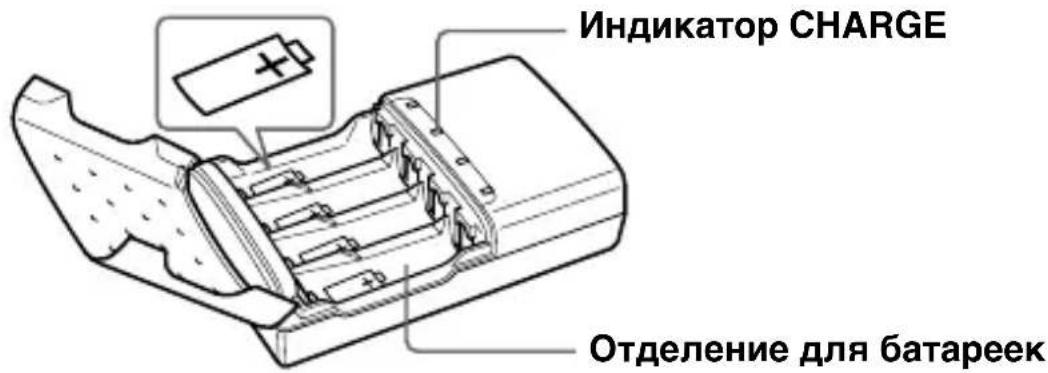
3apяДka aKKymЛЯTOPOB
1 BcTaBbTe 6aTapeiKu Sony HR11/45, HR03 (pa3mep AAA), NH-AAA uIe Sony HR15/51, HR6 (pa3mep AA) HnKeJIb-MetaII rIdpHbIe 6aTapeiKu NH-AA c co6JIIODeHHeM NOJAPHOCTN, TaK yTO6bl O6O3HaueHn +/- Na 6aTapeiKaX COBnaJaIc C 6oO3HaueHnAMn +/- B 3apJdHOM yCTpO'cTBe, n 3aKpoIte KpbIshKy.
ΦopMa BnIKN Ha KOHcE Ka6eJI NITaHn MOXeT OTJNUaTbCn OT Toi, KOTOPaN3O6paXeHa Ha NJIIOCTpaUIN, B 3aBNCIMoCTn OT CTpaHbI, rIe 6blIo npno6peTeHO yCTpO'CTBO.
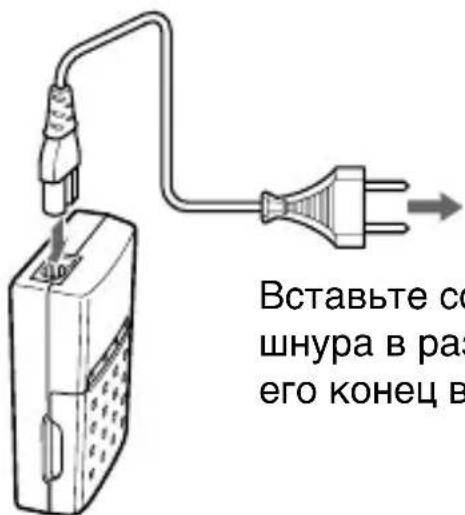
BCTaBbTe COOTBeTCTByUOuN KONEc CeTeBOrO
ShHypa B pa3bEm 3apAaHOrO yCTpOInCTBa, a npYroN
ero KOHeC B CeTeByIO p03eTKy.
Korda Nauchetc3apdka, 3aropntcna Mnpoccha CHARGE otceka, coepkaeero 6atapei; naMnocha CHARGE norachet nocle 3aBepseHn noD3apAdkn.
Ecnn lamnoka CHARGE He ropit nnn 3aropaeTcny rachet,
6bpatntecb K pa3demy "YcTpaHne HenoIaDOK" Ha cTp. 10 (RU).
3 ПО OKOHан И ПОПОН 3apяdkn 6aTapeeK OTcoeHInTe BILKY Ka6eJIЯ PHTAHN OTe T, OTKpoIte KpbIshKy I n3BJIeKInTe 6aTapeiKN.
He yctaHaBnBaIte n He xpaHnte 3aprAnHoe yCTpoiCTBO npn CJIeDyUOxNx ycNoBnX:
B MeCTax C npeIeJIbHbIMN 3HaueHnA M N TeMnepaTyp He ocTaBnIte yCTPOcTBo B MeCTax nprMOrO nOnaDAnH N COJHeuHO rCBeTa, B 3aKpbITOM aBTOMo6nJe nIIN pRdOM C TeIION3nyuAIOUmN yCTPOcTBaMn, TaK KaK 3TO MOKeT nPnBeCTn K DeOpMaun nIIN BBIOy yCTPOcTBa n3 CTPOr.
B MeCTax, NOvBePKeHHbIX Bn6paCnn
B MecTaX, NO. DBepXeHHbIX CINJbHbIM MaRHTHBIM NOJAM
B MeCTax C BbICOKM COePxaHHe M nbIIN nn neCKa Ppi nCNoJIb3OBAHn 3apAInHO yCTpoiCTBa, HApPIMep, Ha IIJaKe IINI B PyCTbIHe, y6eIInTEcB, YTO OHO He NODBePxeHO Bo3DeiCTBnIO neCKa. Bo3DeiCTBnE neCKa MoKeT npNBecTN K HeNCnPpABHOCtN 3apAInHO yCTpoiCTBa.
IcnoJb30BaHne
He haxmaite n He 6pocaiTe 3apdHoe yctpoiCTBO.
Mepbl ppeoctopoxkhoctn (ppoJxkeHne)
- TaK KaK 3apAДHoe yCTpoIcTBO MOKeT CO3aBaTb NOMEXN, He INCNoJIb3yIte erO prIOM C TeJIeBn3Opam NII npIeMHnKamN B dIina3OHe AM.
He donyckaTe KOHTaKTa MeTaNlIuecknx DeTaNc C coeHnHTeBHBIMn DeTaNm DaHHoro yCTpoNCTBa. 3TO MOKeT npNBecTu K KOPOTKOMy 3aMbIkaHIO.
Yxod n o6cnykBaHne 3apAHorO yctpoiCTBa
- Дя чстkn 3apяднoro устpoиства Incnoь3уп Te Мягkyю TkaHb nIN caIФETkn.
- При НEOбхODIMOCTN NcNoIb3yIe MЯrKyIO TkaHb, CMOчEHHyIO B CJIa6OM pactBOpe MOIOSeIRO BeIeCTBa, a 3aTeM IpoTpIte CyXOJ TkaHbIO.
He nCnoJb3yIte cInpT, pa36aBnteIb, 6eH30n I T.D. dIy ChCTKn 3apAnHO yCTpoiCTBa. NcNoJIb3OBAHne NOIO6HbIX XIMNueCKNX BeueCTB MoKET npINBeCTn K NOBpeJDeHNIO 3apAnHO yCTpoiCTBa dIy 6aTaapeek. - Пи IncnoIb3OBAHnXIMnueCKn O6pa6oTaHHoYnCTaUeT KaHn CJIeDyIte INHCTpyKcIyM NO ee npImMeHnIO.
He paCnblIyTe IeTuYne MaTePnaIbI, HApPImep, NecTnUdbI, B6Jln3N 3apAnHO yCTpoiCTBa dJa 6aTaapeek. He npKacaiTecsb K 3apAnHomy yCTpoiCTBy dJa 6aTaapeek pe3HOBbIMn nJI BHNIOBbIMn npEiMeTaMn. 3TO MoKeT npNBecTn K NOBpeJdeHInO 3apAnHO yCTpoiCTBa.
PpimMeaHnOTHocnteIbHO BUNKKa6eJI NaTaHn
He doTpaHbAaTeCb Do BnIKKa6eIaHTHa BO BpeMa rpo3bl.
- Y6eIntecb, yTO BnIka Ka6eI NaTaHn BCTaBJeHa B CTeByIO PO3ETKy.
- Ecni He Tpe6yeTcH NcNoIb3OBaTb 3apAIDHOe yCTpO'CTBO, OTKJIIOHTe Ka6eIb NiTaHn.
- При обслужиBaHи 3apДнOrO yCtpoIcTba OTKJIQUHTe Ka6eIb NITaHЯ.
Korda yctpoiCTBO He nCnoJb3yeTc
- UTo6bI 3aUHTnTb 6aTapeKn, BbInbTe nx n3 annapata. Ecnn nx OCTaBnTb Ha MeCTe, 6aTapeKn MOryT npOteYb.
Yxod n TexHnueckoe o6cnyKnBaHne
- 06aTeIbHO coepKnte KOHTaKTbI aKKymyIaTOpa B uNCTOTE. Ecnn 6aTapeiKn He nCNoJIb3yIOTCB T TeueHne dJIteJIbHOro BpeMeHN nn ecnn 3aIrpA3HnJIncb KOHTaKTbl, TO nepei NcNoJIb3OBAHNem aKKymyIaTOPOB OuNCTNTe INX KOHTaKTbl n -, nCNoJIb3yraNCTUToTKaHb I T.D.
XpaHeHne aKKymyIaTOPOB
- Послne понов зарядки n3ВлeКITE баТаpeйки n3 устpoісТВа ихранITE IX B похладHom месTe.
Korda 6aTaapeeKn dInTeIbHoe BpeM He nCNoIb3yIOTc, Lyuwe nx XpaHnTB B cyTnpe dna 6aTaapeek (npnilaraetc).
YcTpaHHe NHeNoJaDoK
CocToHHe HndNKatopa 3apAdkn:
HR11/45, HR03 (pa3mep AAA), NH-AAA
HR15/51, HR6 (pa3mep AA), NH-AA
Texnueckne xapaKtepncTnKn (npoJoxeHne)
1 Sony HR11/45, HR03(AAA□□), NH-AAA□
00 00 00 00 00 00 00 00 00 00
□ 0000 000

CHARGE
CHARGE
CHARGE 9(KR)
□
3 1000 1000 1000 1000 1000 1000
-USA, , , : 1000
Sony HR11/45, HR03(AAA), NH-AAA: 75
Sony HR15/51, HR6(AA:NH-AA:1750
CHARGE CHI 10000000000000000000000000000000000000000
· 1000 1000 1000 1000 1000 1000 1000
- 1000 10000 1000 10000 10000.
· 100 1000 100 100 1000. 100 100 1000
- 10000 10000 10000
- 0000 0000 00 00 0000
. 1000 1000 10, 10 10 10 1000 10 1000 10
·□□ □□□ □□□□
.000 0000 00 000
. 1000 1000 100 100
- 0000 0000 0000 0000 0000.
- 1000
. 1111 1111 1111 1111
- 0000 0000 0000 0000 0000.
□□ 00□
(
000 0000
- Sony Ⅱ- Ⅱ Ⅲ Ⅲ Ⅲ Ⅲ Ⅲ Ⅲ Ⅲ Ⅲ Ⅲ Ⅲ Ⅲ Ⅲ Ⅲ Ⅲ Ⅲ Ⅲ Ⅲ Ⅲ Ⅲ Ⅲ Ⅲ Ⅲ Ⅲ Ⅲ Ⅲ Ⅲ Ⅲ Ⅲ Ⅲ Ⅲ Ⅲ Ⅲ Ⅲ Ⅲ

· 1000 1000 1000 1000. 1000 1000 1000, 1000 1000 1000 1000.
- 10000 100 1000 100 1000 100000.
· 1000 1000 1000 1000 1000 1000. 1000 1000 1000 1000 1000.
.00 000 00 00 000 0000
· 1000 1000 1000 1000 1000 1000
· 10000 10000 10000 10000 10000 10000 10000. 1000 1000 10000 10000 10000. 1000 1000 1000 1000 1000 1000
10°C 30°C 10°C 30°C 10°C 30°C 10°C
Printed on 100% recycled paper using VOC (Volatile Organic Compound)-free vegetable oil based ink.

Printed on 100% recycled paper using VOC (Volatile Organic Compound)-free vegetable oil based ink.

#
BC-CSC
a|d|1j2y10
yda
J 1
21 × 21
S OBC = S BOC + S_ BOC
Jaaeeu u aaiyauaayuauyauuauuuu
jolal
NH-AAA. (size AAA) HR03.HR11/45
NH-AA. (size AA) HR6.HR15/51
NH-AAA-DI
S_木弟 = 1,
a b
()
4.2g 1
J 1
J 1
-AR

Jalilaljlll jlll l
L
j 1
JolSJIyAeLJIg
.
1 1
.
lalg
L
JolSJIy Ieioo JolSJIy 1yIyIyIyIyIyIyIyIyIyIyIyIyIyIyIyIy
.()
a
1
原不等式成立
J 1
HR11/45, HR03 (size AAA), NH-AAA Sony
.HR15/51,HR6 (size AA), NH-AA
g
1j 1
...
a.b.c.
iJlJI 1
…
…

CHARGE
山
HR11/45, HR03 (size AAA), Sony
HHR15/51, HR6 (size AA), NH-AA gNH-AAA
g 1-+
HR11/45, HR03 (size AAA), Sony
HR15/51,HR6(size AA),NH-AA,NH-AAA
1
2
一:jUwglusg.
a dSg aB1
| x - 1| = | x_0 - 1| = | y x - 1|
…
r-AR
1

g 1
:
jz jzjjggl
.
.Sony
1
LgIgIgIgIgIgIgIgIgIgIgIgIgIgIgIgIgIgIgIgIgIgIgIgIgIgIgIgIgIgIg
1
= y1u1
1
1
1 1
J 1
.
JbJglg 1d
1
lglS = g
1
45 10 no no no no no no no no no no no no no no no no no no no no no no no no no no no no no no no no no no no no no no no no no no no no no no no no no no no no no no no no no no no no no no no
有 ( x,y - 1) ( y,1) S.
.
.
Accessory Kit
J
ACC-UNQ


- 安全のたてに(バッチリーチヤーダー)
- WARNING
- To prevent fire or shock hazard, do not expose the unit to rain or moisture.
- CAUTION
- Note:
- RECYCLING NICKEL METAL HYDRIDE BATTERIES
- NOTICE FOR THE CUSTOMERS IN THE UNITED KINGDOM
- For the customers in Australia
- Follow the instructions below to prevent the occurrence of death or serious injury resulting from fire or explosions:
- Table of Contents
- Identifying the parts
- Charging the batteries
- Charge the batteries.
- - For the customers in the other countries:
- After the batteries are fully charged, unplug the power plug, open the cover, and remove the batteries.
- Quick charge
- Charging the batteries (continued)
- Charging times
- Precautions
- Notes on using the battery charger and battery
- Charging
- Temperature of the charging environment
- Precautions (continued)
- Locations
- Usage
- Care and maintenance of the battery charger
- Notes on the power plug
- Using Nickel-Metal Hydride batteries
- Battery life
- When you are not using the unit
- Care and maintenance
- Storing the batteries
- Troubleshooting
- Troubleshooting procedures
- Specifications
- Battery Charger BC-CSQ2
- Applicable batteries Sony Nickel-Metal Hydride rechargeable batteries
- Rechargeable Battery NH-AAA-DI
- AVENTISSEMENT
- Pile rechargeable NH-AAA-DI
- Akku NH-AAA-DI
- Oplaadbare batterij NH-AAA-DI
- Pila ricaricabile NH-AAA-DI
- Identification of delene
- Fejlfinding (fortsat)
- Fejlfindingsprocedurer
- Specificationer
- Batteriplader BC-CSQ2
- Овознayaши частей
- 3apяДka aKKymЛЯTOPOB
- ПО OKOHан И ПОПОН 3apяdkn 6aTapeeK OTcoeHInTe BILKY Ka6eJIЯ PHTAHN OTe T, OTKpoIte KpbIshKy I n3BJIeKInTe 6aTapeiKN.
- IcnoJb30BaHne
- Mepbl ppeoctopoxkhoctn (ppoJxkeHne)
- Yxod n o6cnykBaHne 3apAHorO yctpoiCTBa
- PpimMeaHnOTHocnteIbHO BUNKKa6eJI NaTaHn
- Korda yctpoiCTBO He nCnoJb3yeTc
- Yxod n TexHnueckoe o6cnyKnBaHne
- XpaHeHne aKKymyIaTOPOB
- YcTpaHHe NHeNoJaDoK
- CocToHHe HndNKatopa 3apAdkn:
- Texnueckne xapaKtepncTnKn (npoJoxeHne)
- #
- Jalilaljlll jlll l
- Accessory Kit
Brand : SONY
Model : ACCUNQ
Category : Battery charger