
BC-L500 - Battery charger SONY - Free user manual and instructions
Find the device manual for free BC-L500 SONY in PDF.
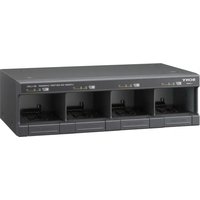


| Product Type | Battery Charger |
| Brand | Sony |
| Model | BC-L500 |
| Dimensions (W x H x D) | 435 x 124 x 235 mm |
| Weight | Approx. 5.6 kg |
| Power Supply | 100-240 V AC, 50/60 Hz, 480 VA |
| Output Voltage | 16.4 V / 16.8 V (5A/3A) |
| Number of Batteries Charged Simultaneously | 4 |
| Compatible Battery Types | Sony Lithium-ion |
| Charging Time (BP-GL65A) | Approx. 155 minutes |
| Charging Time (BP-GL95A) | Approx. 145 minutes |
| Charging Time (BP-FLX75) | Approx. 110 minutes |
| Charge Indicators | Orange and green LEDs (flashing/steady) |
| Diagnostic Functions | Fault detection (voltage, time) |
| Safety | Grounding, overvoltage protection, usage instructions |
| Operating Temperature | 0°C to 45°C |
| Recommended Charging Temperature | 10°C to 30°C |
| Maintenance | Clean with a dry cloth |
| Supplied Accessories | Instruction manual, plug lock |
| Note | Do not use with Ni-MH or Ni-Cd batteries |
Frequently Asked Questions - BC-L500 SONY
User questions about BC-L500 SONY
0 question about this device. Answer the ones you know or ask your own.
Ask a new question about this device
Download the instructions for your Battery charger in PDF format for free! Find your manual BC-L500 - SONY and take your electronic device back in hand. On this page are published all the documents necessary for the use of your device. BC-L500 by SONY.
USER MANUAL BC-L500 SONY
Japanese/English/French/German/Italian/Spanish
1st Edition (Revised 4)

2699487050
For safety
Before operating the unit, please read this manual thoroughly and retain it for future reference.
Important Safety Instructions

- Read these instructions.
- Keep these instructions.
- Heed all warnings.
- Follow all instructions.
- Do not use this apparatus near water. Clean only with dry cloth.
- Do not block any ventilation openings. Install in accordance with the manufacturer's instructions.
- Do not install near any heat sources such as radiators, heat registers, stoves, or other apparatus (including amplifiers) that produce heat.
- Do not defeat the safety purpose of the polarized or grounding-type plug. A polarized plug has two blades with one wider than the other. A grounding type plug has two blades and a third grounding prong. The wide blade or the third prong are provided for your safety. If the provided plug does not fit into your outlet, consult an electrician for replacement of the obsolete outlet.
- Protect the power cord from being walked on or pinched particularly at plugs, convenience receptacles, and the point where they exit from the apparatus.
- Only use attachments/accessories specified by the manufacturer.
- Use only with the cart, stand, tripod, bracket, or table specified by the manufacturer, or sold with the apparatus. When a cart is used, use caution when moving the cart/apparatus combination to avoid injury from tip-over.
- Unplug this apparatus during lightning storms or when unused for long periods of time.
- Refer all servicing to qualified service personnel. Servicing is required when the apparatus has been damaged in any way, such as power-supply cord or plug is damaged, liquid has been spilled or objects have fallen into the apparatus, the apparatus has been exposed to rain or moisture, does not operate normally, or has been dropped.
WARNING
To reduce the risk of fire or electric shock, do not expose this apparatus to rain or moisture.
To avoid electrical shock, do not open the cabinet. Refer servicing to qualified personnel only.
WARNING
THIS APPARATUS MUST BE EARTHED.
WARNING
When installing the unit, connect the power cord to a socket-outlet which must be provided near the unit and easily accessible.
If a fault should occur during operation of the unit, disconnect the power cord.
WARNING
Batteries shall not be exposed to excessive heat such as sunshine, fire or the like.
This symbol is intended to alert the user to the presence of uninsulated "dangerous voltage" within the product's enclosure that may be of sufficient magnitude to constitute a risk of electric shock to persons.

This symbol is intended to alert the user to the presence of important operating and maintenance (servicing) instructions in the literature accompanying the appliance.
WARNING: THIS WARNING IS APPLICABLE FOR USA ONLY.
If used in USA, use the UL LISTED power cord specified below.
DO NOT USE ANY OTHER POWER CORD.
Plug Cap Parallel blade with ground pin (NEMA 5-15P Configuration)
Cord Type SJT, three 16 or 18 AWG wires
Length Minimum 1.5 m (4 ft. 11 in.), Less than 2.5 m (8 ft. 3 in.)
Rating Minimum 10A, 125V
Using this unit at a voltage other than 120 V may require the use of a different line cord or attachment plug, or both. To reduce the risk of fire or electric shock, refer servicing to qualified service personnel.
WARNING: THIS WARNING IS APPLICABLE FOR OTHER COUNTRIES.
- Use the approved Power Cord (3-core mains lead) / Appliance Connector / Plug with earthing-contacts that conforms to the safety regulations of each country if applicable.
- Use the Power Cord (3-core mains lead) / Appliance Connector / Plug conforming to the proper ratings (Voltage, Ampere).
If you have questions on the use of the above Power Cord / Appliance Connector / Plug, please consult a qualified service personnel.
CAUTION
The apparatus shall not be exposed to dripping or splashing and no objects filled with liquid, such as vases, shall be placed on the apparatus.
CAUTION
The unit is not disconnected from the AC power source (mains) as long as it is connected to the wall outlet, even if the unit itself has been turned off.
For the customers in the U.S.A.
This equipment has been tested and found to comply with the limits for a Class B digital device, pursuant to part 15 of the FCC Rules. These limits are designed to provide reasonable protection against harmful interference in a residential installation. This equipment generates, uses and can radiate radio frequency energy and, if not installed and used in accordance with the instructions, may cause harmful interference to radio communications. However, there is no guarantee that interference will not occur in a particular installation. If this equipment does cause harmful interference to radio or television reception, which can be determined by turning the equipment off and on, the user is encouraged to try to correct the interference by one or more of the following measures:
- Reorient or relocate the receiving antenna.
- Increase the separation between the equipment and receiver.
- Connect the equipment into an outlet on a circuit different from that to which the receiver is connected.
- Consult the dealer or an experienced radio/TV technician for help.
You are cautioned that any changes or modifications not expressly approved in this manual could void your authority to operate this equipment.
For the customers in Europe
This product is intended for use in the following Electromagnetic Environments: E1 (residential), E2 (commercial and light industrial), E3 (urban outdoors), E4 (controlled EMC environment, ex. TV studio).
For the customers in the U.S.A.
SONY LIMITED WARRANTY - Please visit http://www.sony.com/psa/warranty for important information and complete terms and conditions of Sony's limited warranty applicable to this product.
For the customers in Canada
SONY LIMITED WARRANTY - Please visit http://www.sonybiz.ca/pro/lang/en/ca/article/resources-warranty-product-registration for important information and complete terms and conditions of Sony's limited warranty applicable to this product.
For the customers in Europe
Sony Professional Solutions Europe - Standard Warranty and Exceptions on Standard Warranty. Please visit http://www.pro.sony.eu/warranty for important information and complete terms and conditions.
For the customers in Korea
SONY LIMITED WARRANTY - Please visit http://bpeng.sony.co.kr/handler/BPAS-Start for important information and complete terms and conditions of Sony's limited warranty applicable to this product.
Table of Contents
Overview 15
Features 15
Precautions 16
Location and Function of Parts. 17
Charging 18
Specifications 19
Overview
The BC-L500 Battery Charger is a tabletop-type charger for Sony lithium-ion battery packs. It is capable of simultaneous charging of four battery packs.
Note
The BP-M50/M100 (nickel metal hydride battery packs) and the BP-90A/NP-1B (nickel-cadmium battery packs) cannot be charged with the BC-L500.
Features
Simultaneous charging of up to four battery packs
Up to four battery packs can be inserted and charged simultaneously.
High-speed and simultaneous charging
Four battery packs can be charged in the same amount of time for charging only one battery pack.
Front-loading mechanism
Battery packs can be inserted and removed from the front side of the BC-L500.
Therefore, it can be placed on the shelf, and even can be stacked over another BC-L500.
Charging Sony lithium-ion battery packs
For details on battery packs that can be charged using the BC-L500, visit the Sony Professional products website.
Sony Professional products website:
U.S.A. http://pro.sony.com
Canada http://www.sonybiz.ca
Latin America http://sonypro-latin.com
Europe http://www.pro.sony.eu/pro
Middle East, Africa http://sony-psmea.com
The BC-L500 checks inserted battery packs for abnormalities. The charge indicator will flash in orange and green alternately if a battery pack cannot be charged normally.
Charge indicator
During charging, the charge indicator changes its color according to charge amount. The color changes when charge amount reaches 80% of full capacity.
Precautions
On the battery charger
- Use the BC-L500 in an operating environment of 0°C to 45°C (32°F to 113°F). Since charging is difficult at low temperatures, we recommend that battery packs be charged at temperatures between 10°C and 30°C (50°F and 86°F).
- Avoid using or storing the BC-L500 in dusty places or places with corrosive gases.
- Avoid using or storing the BC-L500 in places exposed to direct sunlight.
- Do not cover the ventilation holes.
- Do not place the BC-L500 on an inclined surface.
- When you place a BC-L500 on top of another BC-L500, do not stack them over two layers.
- Place the BC-L500 at least 10 cm (4 inches) apart from the wall.
On battery packs
- Even when fully charged, battery packs gradually lose their charge over time. To avoid shortening the life of battery packs, recharge them fully right before use.
- To prolong the life of battery packs, store them in a cool place (about 0°C to 23°C (32°F to 73°F)), and charge in a place with an ambient temperature between 10°C and 30°C (50°F and 86°F).
- When ambient temperatures are 5°C (41°F) or lower, the performance of a battery pack suffers and the usable time of a battery pack becomes shorter. To get the longest usable time, warm the battery packs to room temperature (about 20°C (68°F)) before use.
- For more information on the battery pack, refer to the Operating Instructions supplied with the battery pack.
- Carrying a spare battery pack is recommended.
Lithium-ion battery packs are free from memory effect. There is no need to discharge them fully before recharging.
If the usable time of a battery pack becomes noticeably short, it is time to replace it with a new one.
Location and Function of Parts
Front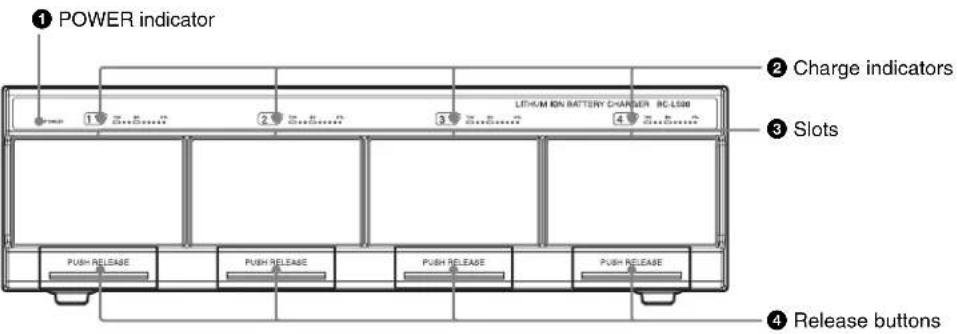
Rear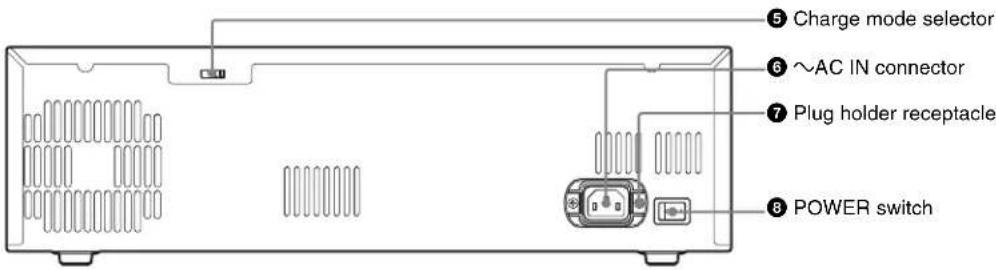
• POWER indicator
Lights up when the BC-L500 is turned on.
Charge indicators
Indicate the progress or result of charging by flashing or lighting in orange or green.
Flashing in orange: Charge in progress (charged less than 80%)
Flashing in green: Charge in progress (charged 80% or more)
On in green: Charging completed
Flashing in orange and green alternately: An abnormality has been detected during charging.
• Slots
Insert the battery packs.
For details on inserting/removing the battery packs, see "Charging" (page 18).
4 Release buttons
Press to remove the inserted battery packs.
Charge mode selector
| Selector position Charge mode | |
| H Batteries are charged to their full capacity. | |
| L Charge amount is reduced, but it prolongs battery life. |
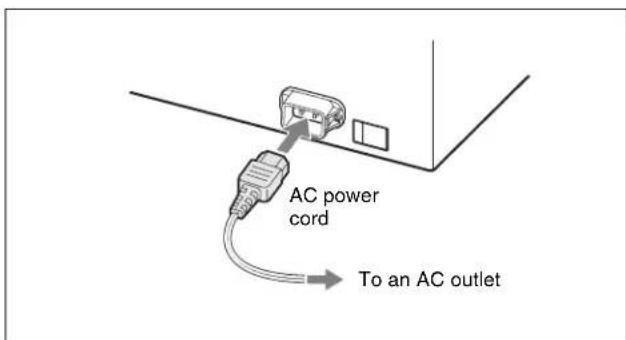
~ AC IN (AC power input) connector
Used to connect the charger to an AC outlet via the AC power cord.
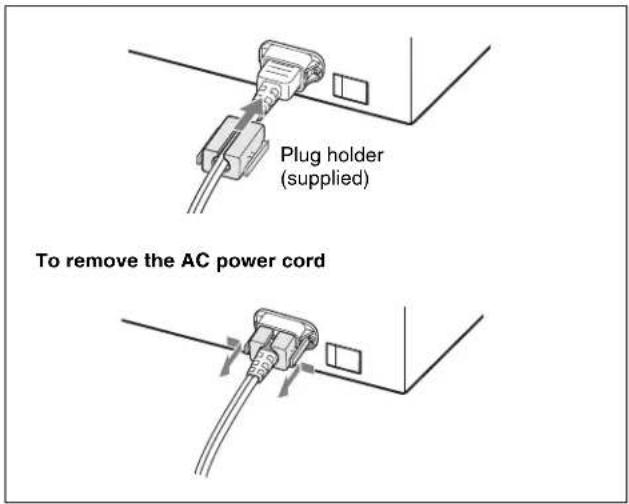
Plug holder receptacle
Secure the AC power cord with the supplied plug holder as illustrated below so that the cord will not come loose from the charger.
3 POWER switch
Press the I side of this switch to turn on the battery charger. When the charger is turned on, the POWER indicator lights up and charging starts when the battery packs are inserted.
Charging
1. Connect the AC power cord to the ~ AC IN connector, then connect the other end of the cord to an AC power outlet.
2. Press the I side of the POWER switch to turn on the battery charger.
3. Insert the battery pack.
Insert the battery pack into the slot as illustrated below. When battery packs are inserted into all slots, you can charge four battery packs simultaneously.
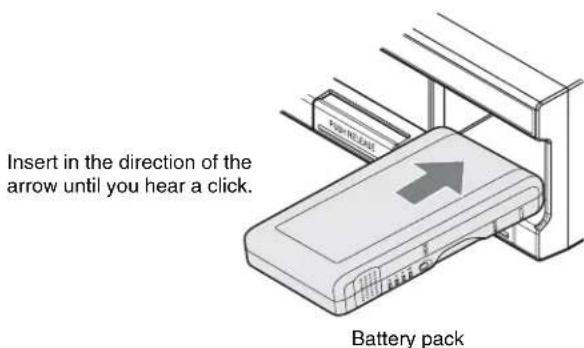
When the width of the battery pack is narrower than the slot, be sure to match the center line of the battery pack with that of the slot.
During charging, the charge indicator above the slot flashes according to the charging process. When the charge indicator lights up in green, charging is completed.
When charging is completed
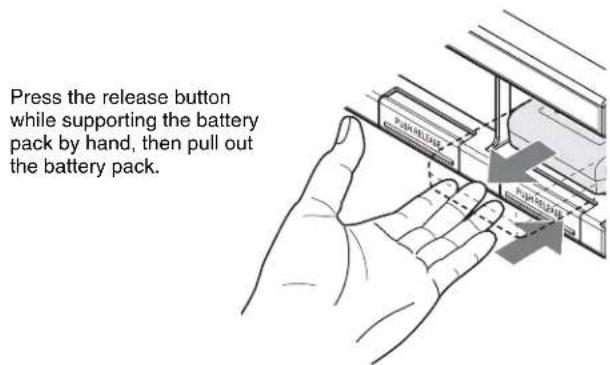
Remove the battery pack from the slot as illustrated below, then press the O side of the POWER switch to turn off the battery charger.
Charging time
The time to charge a completely exhausted battery pack to its full capacity is shown in the table below (when charging a battery pack at a temperature of 25°C (77°F)).
| Battery pack Charging time to full capacity | |
| BP-FLX75 About 110 minutes |
Up to four battery packs can be charged simultaneously in the amount of time shown in the table.
About the charge indicators
The charge indicators show the charging status of the inserted battery packs, as shown in the table below.
| Indicator status Charging status | |
| Flashing in orange In progress (charged less than 80%) | |
| Flashing in green In progress (charged 80% or more) | |
| On in green Charging completed | |
| Flashing in orange and green alternately | An abnormality has been detected during charging. (For details, see “When an abnormality is detected while charging” below.) |
When an abnormality is detected while charging
When one of the following conditions is detected while charging, the charge indicator flashes in orange and green alternately, and charging is canceled to protect the battery pack.
After the start of charging, the voltage of the DC output for battery charging has dropped below the specified level (6 V). After the start of charging, the voltage of the DC output for battery charging has exceeded the specified level (17.5 V). The battery voltage did not rise to the specified level within a specified period of time (2 hours).
When an abnormality is detected, the battery pack may be defective. Do not use that battery pack.
When the internal fan has stopped, all charge indicators also flash in orange and green alternately at the same time.
The charge indicator remains flashing until the side of the POWER switch is pressed, the AC power cord is disconnected, or the battery pack is removed.
Notes
- When a battery pack that is not chargeable with the BC-L500 is connected, charging does not take place.
- The BP-M50/M100 (nickel metal hydride battery packs) cannot be charged with the BC-L500.
Note on the battery packs
Performance of the BC-L500 is guaranteed only for Sony lithium-ion batteries.
Specifications
General
Voltage source 100-240 V AC, 50 / 60Hz
Current drain 480 VA
Peak inrush current
(1) Power ON, current probe method: 15A(100V) / 34A(240V) (2) Hot switching inrush current measured in accordance with European standard EN55103-1: 18 A (230 V)
Operating temperature
0°C to 45°C (32°F to 113°F)
Mass: Approx. 5.6kg (12 lb 6 oz)
Dimensions (w/h/d)
435 × 124 × 235 mm (17 1/4 × 5 × 9 3/8 inches) (excluding projecting parts)
Input/Output
Current input (AC)
480 VA
Voltage output (DC)
16.4 V (5 A / 3 A) / 16.8 V (5 A / 3 A) (square-shaped 5-pin connector)
Supplied accessories
Operation manual (1)
AC power cord (U.S.A. only) (1)
Plug holder (1)
Designs and specifications are subject to change without notice.
Note
Always verify that the unit is operating properly before use. SONY WILL NOT BE LIABLE FOR DAMAGES OF ANY KIND INCLUDING, BUT NOT LIMITED TO, COMPENSATION OR REIMBURSEMENT ON ACCOUNT OF THE LOSS OF PRESENT OR PROSPECTIVE PROFITS DUE TO FAILURE OF THIS UNIT, EITHER DURING THE WARRANTY PERIOD OR AFTER EXPIRATION OF THE WARRANTY, OR FOR ANY OTHER REASON WHATSOEVER.
French
Weight approx. 5.6 kg
Dimensions (w/h/d)
435 x 124 x 235 mm (excluding protrusions)
Inputs/outputs
Current consumption (AC)
480 VA
The material contained in this manual consists of information that is the property of Sony Corporation and is intended solely for use by the purchasers of the equipment described in this manual.
Sony Corporation expressly prohibits the duplication of any portion of this manual or the use thereof for any purpose other than the operation or maintenance of the equipment described in this manual without the express written permission of Sony Corporation.



- JAPANESE/ENGLISH/FRENCH/GERMAN/ITALIAN/SPANISH
- ST EDITION (REVISED 4)
- FOR SAFETY
- IMPORTANT SAFETY INSTRUCTIONS
- WARNING
- CAUTION
- FOR THE CUSTOMERS IN THE U.S.A
- FOR THE CUSTOMERS IN EUROPE
- FOR THE CUSTOMERS IN CANADA
- FOR THE CUSTOMERS IN KOREA
- TABLE OF CONTENTS
- OVERVIEW
- NOTE
- FEATURES
- SIMULTANEOUS CHARGING OF UP TO FOUR BATTERY PACKS
- HIGH-SPEED AND SIMULTANEOUS CHARGING
- FRONT-LOADING MECHANISM
- CHARGING SONY LITHIUM-ION BATTERY PACKS
- CHARGE INDICATOR
- PRECAUTIONS
- ON THE BATTERY CHARGER
- ON BATTERY PACKS
- LOCATION AND FUNCTION OF PARTS
- POWER INDICATOR
- CHARGE INDICATORS
- SLOTS
- RELEASE BUTTONS
- AC IN (AC POWER INPUT) CONNECTOR
- PLUG HOLDER RECEPTACLE
- POWER SWITCH
- CHARGING
- WHEN CHARGING IS COMPLETED
- CHARGING TIME
- ABOUT THE CHARGE INDICATORS
- WHEN AN ABNORMALITY IS DETECTED WHILE CHARGING
- NOTES
- NOTE ON THE BATTERY PACKS
- SPECIFICATIONS
- GENERAL
- INPUT/OUTPUT
- SUPPLIED ACCESSORIES
- FRENCH
- INPUTS/OUTPUTS
Brand : SONY
Model : BC-L500
Category : Battery charger