
AC-DN10A - Battery charger SONY - Free user manual and instructions
Find the device manual for free AC-DN10A SONY in PDF.
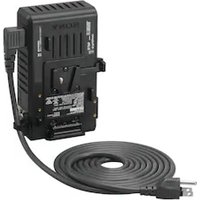


| Product Type | Battery Charger / AC Adapter |
| Brand | Sony |
| Model | AC-DN10A |
| Dimensions (W × H × D) | 101 × 177 × 48 mm |
| Weight | Approx. 810 g |
| Power Supply | 100 – 240 V AC, 50/60 Hz |
| Power Consumption | 130 VA or less |
| Operating Temperature | 0 °C to 35 °C |
| DC Output Voltage | 16.7 V |
| DC Output Current | 6 A max. (thermal derating possible) |
| Max. DC Output Power | 100 W |
| Output Connector Types | Square 5-pin, XLR 4-pin |
| Compatible Battery Packs | BP-GL95B/GL95A/GL65A, BP-FL75/FLX75 |
| Typical Charging Time (at 25 °C) | BP-GL95B: approx. 90 min; BP-GL95A: approx. 135 min; BP-GL65A: approx. 140 min; BP-FL75/FLX75: approx. 65 min |
| Backup Battery Function | Continuous power supply in case of power outage via installed battery |
| Thermal Protection | Charging stops if internal temperature < 0 °C or > 60 °C |
| Safety – Humidity | Do not expose to rain, moisture, dripping or splashing |
| Safety – Grounding | Use a 3-wire power cord with a conforming ground plug |
| Maintenance – Cleaning | Clean with a dry cloth only |
| Maintenance – Terminal Inspection | Periodically check the condition of the battery terminal pins |
| Supplied Accessories | Instruction manual, AC power cord (angled type) |
| Optional Accessories | DC power cord |
Frequently Asked Questions - AC-DN10A SONY
User questions about AC-DN10A SONY
0 question about this device. Answer the ones you know or ask your own.
Ask a new question about this device
Download the instructions for your Battery charger in PDF format for free! Find your manual AC-DN10A - SONY and take your electronic device back in hand. On this page are published all the documents necessary for the use of your device. AC-DN10A by SONY.
USER MANUAL AC-DN10A SONY
© 2018 Sony Corporation
4747212050
For safety
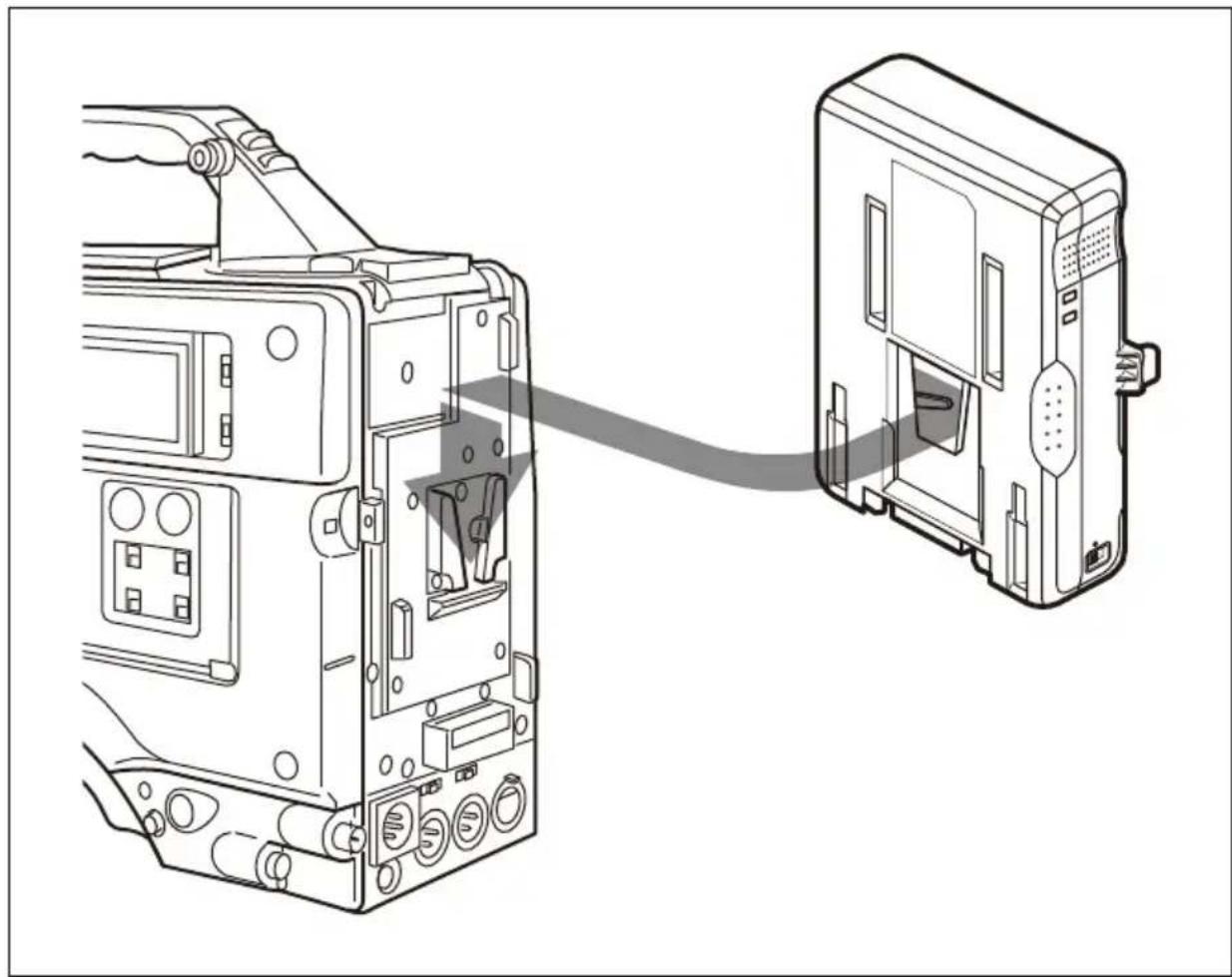
Mounting to a camcorder, etc.
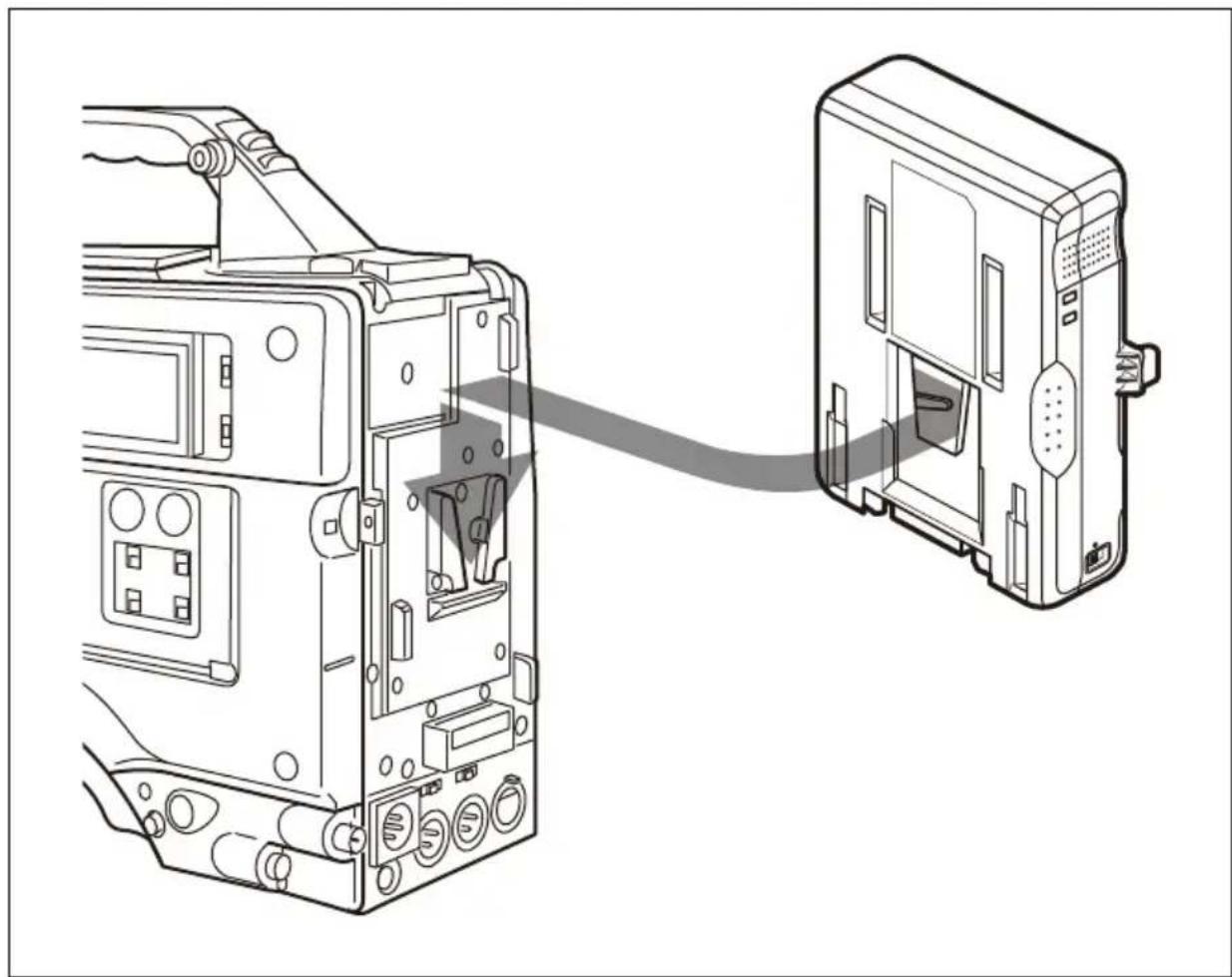
Mount as shown in the figure below.
Note
Wireless mounting bracket for camcorder
Before operating the unit, please read this manual thoroughly and retain it for future reference.
Important Safety Instructions
- Read these instructions.
- Keep these instructions.
- Heed all warnings.
- Follow all instructions.
- Do not use this apparatus near water.
- Clean only with dry cloth.
- Do not block any ventilation openings. Install in accordance with the manufacturer's instructions.
- Do not install near any heat sources such as radiators, heat registers, stoves, or other apparatus (including amplifiers) that produce heat.
- Do not defeat the safety purpose of the polarized or grounding-type plug. A polarized plug has two blades with one wider than the other. A grounding-type plug has two blades and a third grounding prong. The wide blade or the third prong are provided for your safety. If the provided plug does not fit into your outlet, consult an electrician for replacement of the obsolete outlet.
- Protect the power cord from being walked on or pinched particularly at plugs, convenience receptacles, and the point where they exit from the apparatus.
- Only use attachments/accessories specified by the manufacturer.
- Use only with the cart, stand, tripod, bracket, or table specified by the manufacturer, or sold with the apparatus.

When a cart is used, use caution when moving the cart/apparatus combination to avoid injury from tip-over.
apparatus combination to avoid injury from tip-over.
- Unplug this apparatus during lightning storms or when unused for long periods of time.
- Refer all servicing to qualified service personnel. Servicing is required when the apparatus has been damaged in any way, such as power-supply cord or plug is damaged, liquid has been spilled or objects have fallen into the apparatus, the apparatus has been exposed to rain or moisture, does not operate normally, or has been dropped.
To reduce the risk of fire or electric shock, do not expose this apparatus to rain or moisture.
To reduce the risk of fire or electric shock, do not expose this apparatus to rain or moisture.
To avoid electrical shock, do not open the cabinet. Refer servicing to qualified personnel only.
This apparatus must be earthed.
This apparatus must be earthed.
WARNING
This unit has no power switch. When installing the unit, incorporate a readily accessible disconnect device in the fixed wiring, or connect the power plug to an easily accessible socket-outlet near the unit. If a fault should occur during operation of the unit, operate the disconnect device to switch the power supply off, or disconnect the power plug.
WARNING
Batteries shall not be exposed to excessive heat such as sunshine, fire or the like.
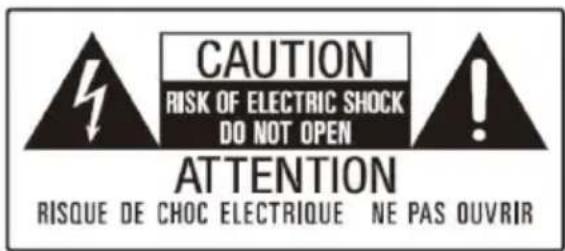
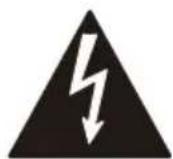
This symbol is intended to alert the user to the presence of uninsulated "dangerous voltage" within the product's enclosure that may be of sufficient magnitude to constitute a risk of electric shock to persons.

This symbol is intended to alert the user to the presence of important operating and maintenance (servicing) instructions in the literature accompanying the appliance.
WARNING: THIS WARNING IS APPLICABLE FOR USA ONLY.
If used in USA, use the UL LISTED power cord specified below.
DO NOT USE ANY OTHER POWER CORD.
Plug Cap Parallel blade with ground pin (NEMA 5-15P Configuration)
Cord Type SJT, three 16 or 18 AWG wires
Length Minimum 1.5 m (4 ft. 11 in.), Less than 2.5 m (8 ft. 3 in.)
Rating Minimum 10 A, 125 V
Using this unit at a voltage other than 120 V may require the use of a different line cord or attachment plug, or both.
To reduce the risk of fire or electric shock, refer servicing to qualified service personnel.
WARNING: THIS WARNING IS APPLICABLE FOR OTHER COUNTRIES/REGIONS.
- Use the approved Power Cord (3-core mains lead) / Appliance Connector / Plug with earthing-contacts that conforms to the safety regulations of each country/region if applicable.
- Use the Power Cord (3-core mains lead) / Appliance Connector / Plug conforming to the proper ratings (Voltage, Ampere).
If you have questions on the use of the above Power Cord / Appliance Connector / Plug, please consult a qualified service personnel.
WARNING
The apparatus shall not be exposed to dripping or splashing. No objects filled with liquids, such as vases, shall be placed on the apparatus.
Operation of this equipment in a residential environment could cause radio interference.
CAUTION
— There is a danger of explosion if a battery other than specified is charged. Do not charge batteries other than the recommended batteries. — When you dispose of the battery or the product, you must obey the law in the corresponding area or country. Do not dispose of the battery or the product in a fire or a hot oven, or mechanically crush or cut the battery. It may explode or cause a fire. Do not subject the battery to extremely low air pressure that may result in an explosion or the leakage of flammable liquid or gas. — Do not place the battery in a high temperature place, such as under direct sunlight or near fire. It may ignite, explode, or cause a fire. Do not immerse or wet the battery in water or seawater. This may cause an electric shock.
No naked flame sources, such as lighted candles, should be placed on the apparatus.
This equipment is not suitable for use in locations where children are likely to be present.
The unit may become hot, depending on the power consumption of the devices connected to the unit. This is not a malfunction. Take care not to touch heated parts for extended periods.
FOR SERVICE PERSONNEL
CAUTION
RISK OF ELECTRIC SHOCK
The fuse of the primary circuit of this product may be connected on the neutral wire side.
Disconnect the unit from the power supply to prevent electric shock when repairing.
For customers in Norway
This equipment can be connected to an IT power distribution system.
For customers in the U.S.A.
This equipment has been tested and found to comply with the limits for a Class A digital device, pursuant to part 15 of the FCC Rules. These limits are designed to provide reasonable protection against harmful interference when the equipment is operated in a commercial environment. This equipment generates, uses and can radiate radio frequency energy and, if not installed and used in accordance with the instruction manual, may cause harmful interference to radio communications. Operation of this equipment in a residential area is
likely to cause harmful interference in which case the user will be required to correct the interference at his own expense.
You are cautioned that any changes or modifications not expressly approved in this manual could void your authority to operate this equipment.
If you have any questions about this product, you may call:
Sony Customer Information Service
Center 1-800-222-7669 or
http://www.sony.com/
Supplier's Declaration of Conformity
Trade Name: SONY
Model: AC-DN10A
Responsible party: Sony Electronics Inc.
Address: 16535 Via Esprillo,
San Diego,
CA 92127 U.S.A.
Telephone Number: 858-942-2230
This device complies with part 15 of the FCC Rules. Operation is subject to the following two conditions: (1) This device may not cause harmful interference, and (2) this device must accept any interference received, including interference that may cause undesired operation.
For the customers in Canada
CAN ICES-3 (A)/NMB-3(A)
For the customers in Europe
This product is intended for use in the following Electromagnetic
Environments: E2 (commercial and light industrial), E3 (urban outdoors), E4 (controlled EMC environment, ex. TV studio).
This apparatus shall not be used in the residential area.
Reduction in the Use of Hazardous Substances in Electrical & Electronic Equipment (Applicable in Republic of India)
This product and its components, consumables, parts or spares comply with the hazardous substances restriction of India's E-Waste (Management) Rules. The maximum allowable concentrations of the restricted substances are 0.1% by weight in homogenous materials for Lead, Mercury, Hexavalent Chromium, Polybrominated Biphenyls (PBB) and Polybrominated Diphenyl Ethers (PBDE), and 0.01% by weight in homogenous materials for Cadmium, except for the exemptions specified in Schedule II of the aforesaid Rules.
For the customers in the U.S.A. SONY LIMITED WARRANTY -
Please visit
www.sony.com/psa/warranty for important information and complete terms and conditions of Sony's limited warranty applicable to this product.
For the customers in Canada SONY LIMITED WARRANTY -
Please visit
www.sony.com/psa/warranty for important information and complete terms and conditions of Sony's limited warranty applicable to this product.
For the customers in Europe
Sony Europe B.V. - Standard Warranty and Exceptions on Standard Warranty.
Please visit
https://pro.sony/support-services/primesupport/support-professional-solutions-europe-standard-product-warranty for important information and complete terms and conditions.
For the customers in Korea SONY LIMITED WARRANTY -
Please visit
https://pro.sony/ko_KR/support-services for important information and complete terms and conditions of Sony's limited warranty applicable to this product.
Table of Contents
Overview ......24
Features 24
Location and Function of Parts.... 25
Connections 27
Connectable Devices 27
Connecting the AC Power Cord 27
Using the Cord Strap 28
Attaching to a Camcorder or Other Device 29
Charging a Battery Pack 30
Usage Precautions 32
Specifications 33
Overview
The AC-DN10A is a battery charger for Sony Lithium-ion battery packs. It functions as an AC adaptor when attached to a portable device, such as a camcorder.
Note
BP-M50/M100 Nickel Metal Hydride Battery Packs cannot be charged with the unit.
Features
Maximum power supply of 100 W DC
The unit supplies a maximum of 16.7 V DC, 6 A to a device with a maximum input voltage rating of 17 V. The unit can charge a battery pack while supplying DC power to the connected device. However, when there is insufficient current for battery charging due to DC power supply to the device, the battery charging is stopped (DC supply to the camcorder or other device is maintained).
Battery backup function
Should the AC power cord be accidentally unplugged from the AC power source, a charged lithium-ion battery pack attached to the unit provides an alternate back-up power to the connected device.
Battery packs that can be charged by the unit / Sony devices that can be connected to the unit
For details on battery packs that can be charged using the unit and devices that can be connected to the unit, visit the Sony Professional products website.
Sony Professional products website:
Countries and regions other than Japan and China
(click [Change Country, Region or Language] at the bottom of the page and select the region and language) https://pro.sony/
Japan
https://www.sony.jp/professional/
China
https://www.sonystyle.com.cn/professional/
Location and Function of Parts
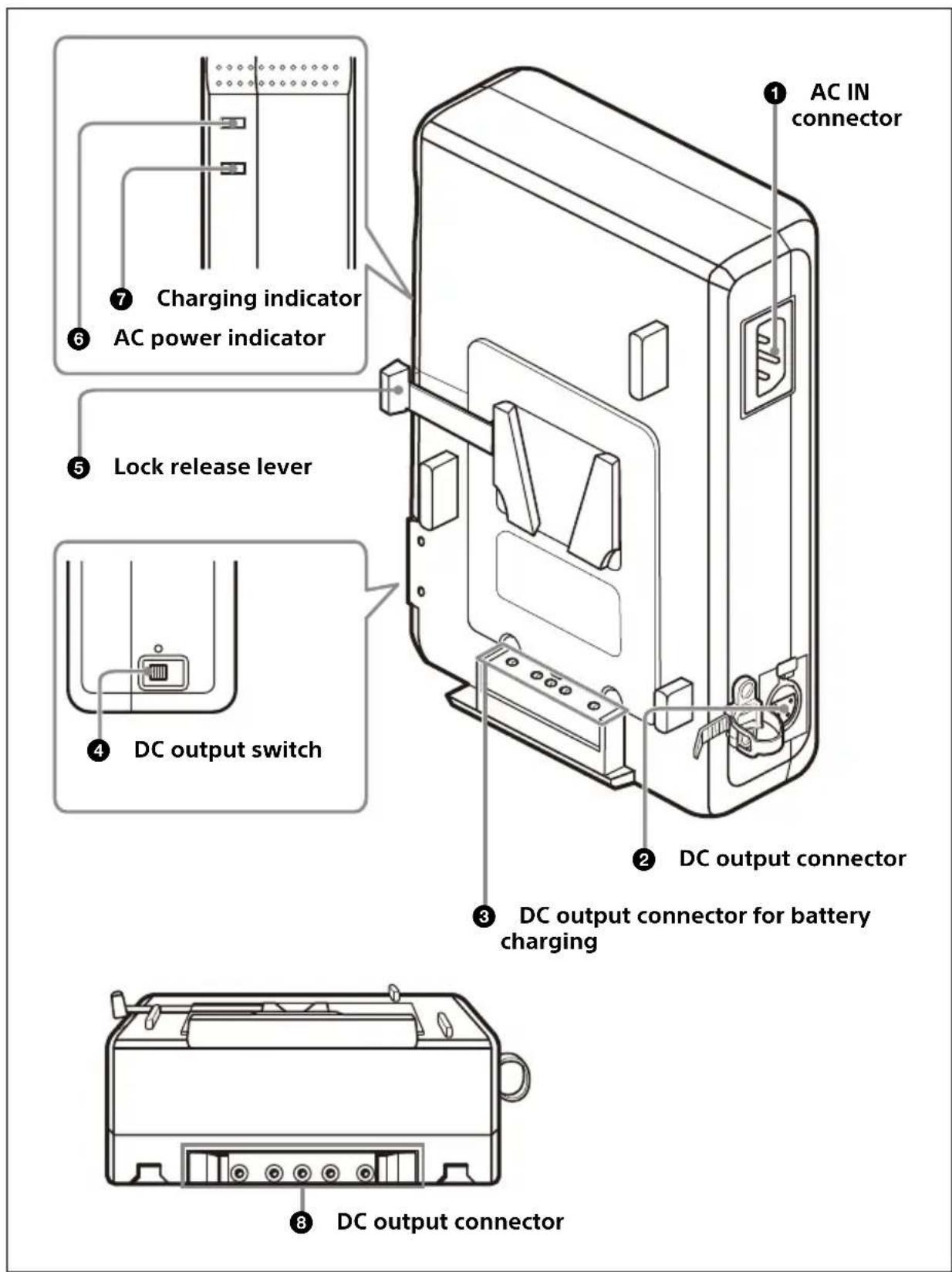
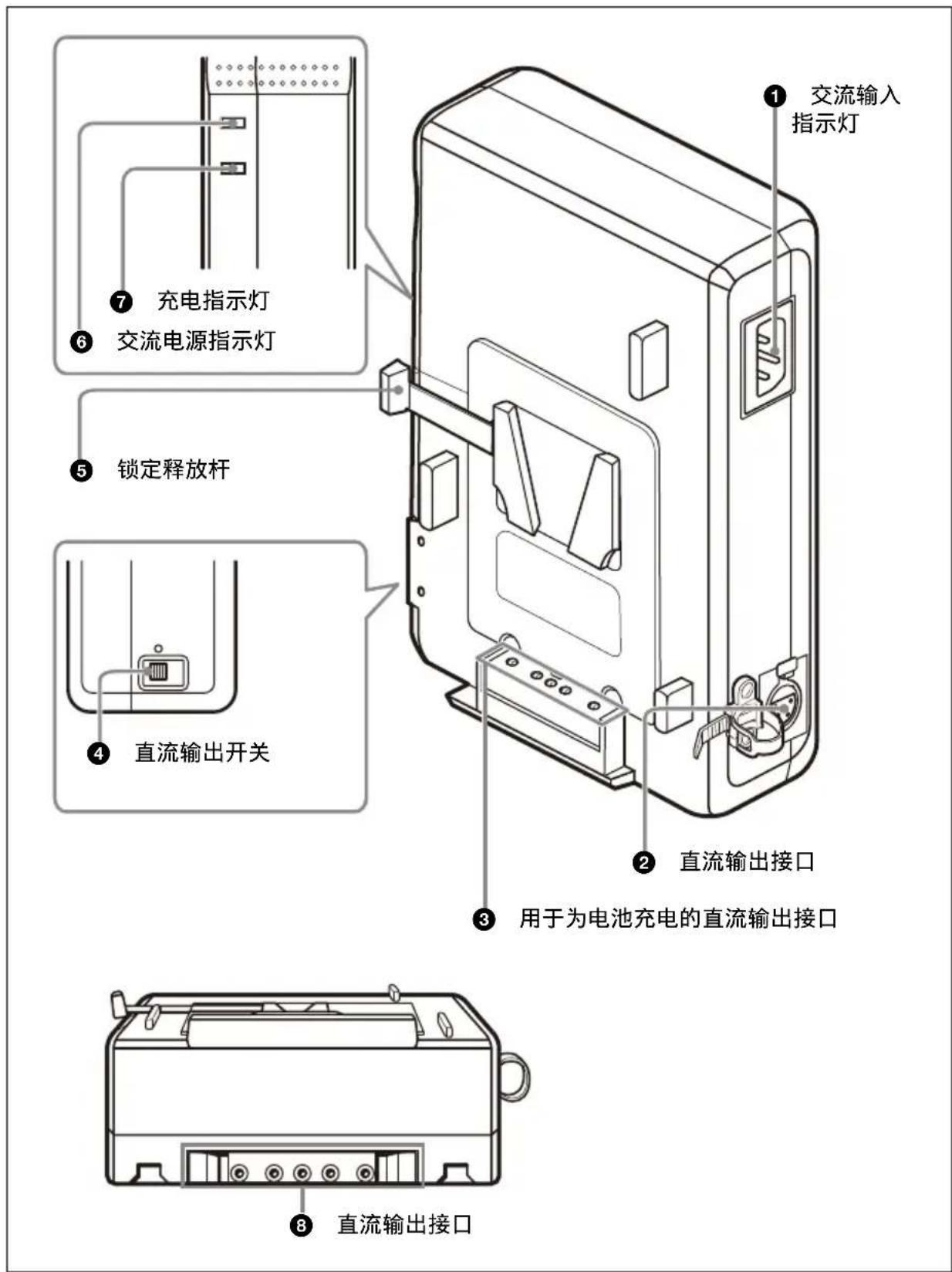
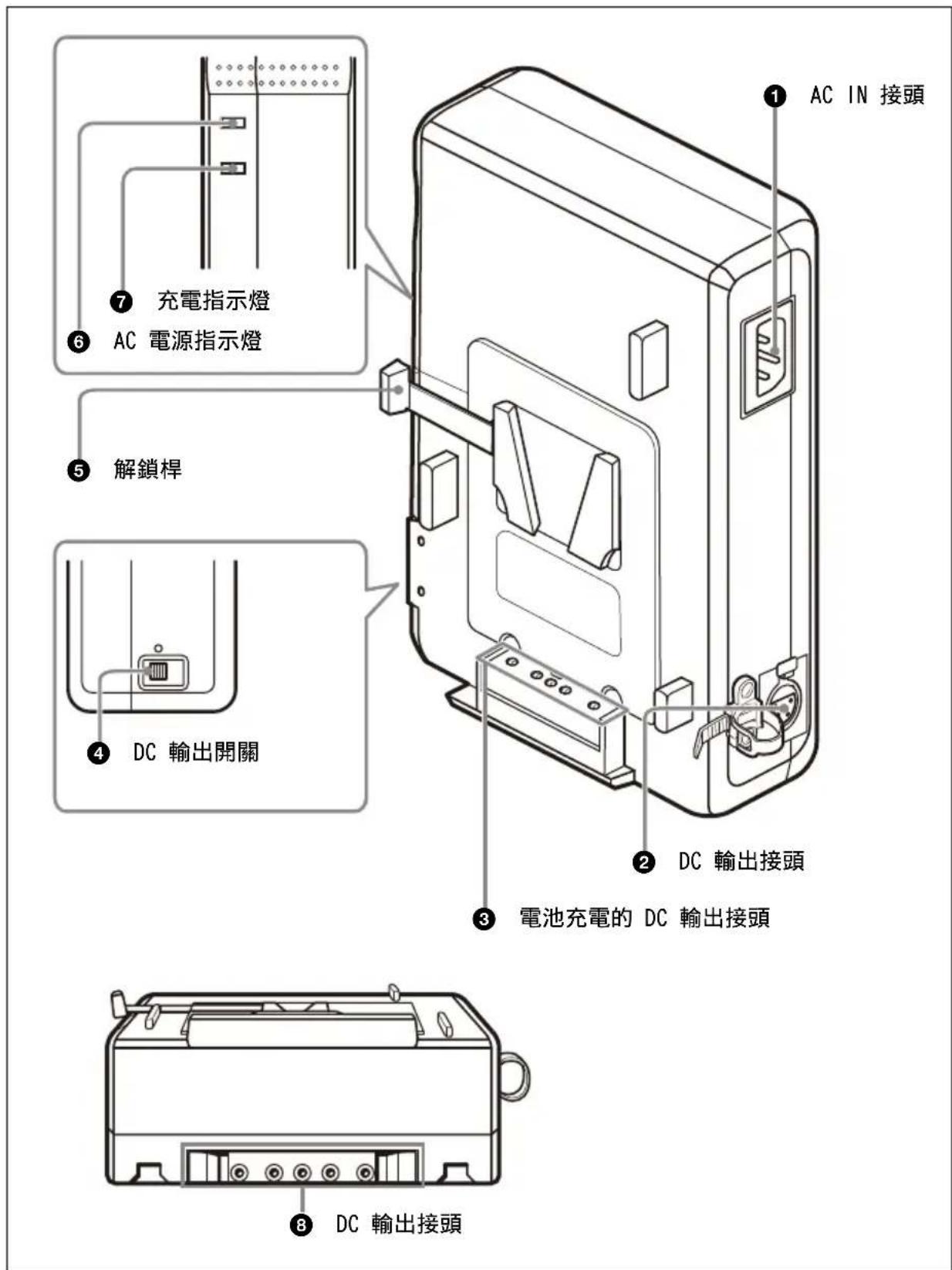
① AC IN connector
Connects to an AC power source using the supplied AC power cord.
② DC output connector (XLR-type, 4-pin)
Supplies DC power to a portable device using an optional DC power cord.
③ DC output connector for battery charging (square, 5-pin)
Supplies power for charging a lithium-ion battery pack.
④ DC output switch
DC power supply is output to the DC output connector when the switch is in the ○ position.
⑤ Lock release lever
To remove the battery pack, pull the lithium-ion battery pack upward while pushing the lever.
⑥ AC power indicator
Indicates the connection status of the AC power source and status of the DC output as given below.
| Indicator | AC power source | DC output switch | DC output status |
| Lit (green) | Connected | ○ position | ON |
| Lit (orange) | Connected | Unmarked position | OFF* |
| Not lit | Not connected | - OFF** |
* While the battery is charging, the DC output is ON even if the DC output switch is in the unmarked position. ** The battery backup function operates while the battery pack is attached to the unit.
⑦ Charging indicator
Displays the charging status of the battery pack.
For details about the charging indicator and charging status, see "About the charging indicator" on page 31.
⑧ DC output connector (square, 5-pin)
Supplies DC power to a camcorder, portable editor, or field editor, connected directly to the unit.
Connections
Connectable Devices
![graph LR A["AC-DN10A (This unit)"] --> B["Lithium-ion battery pack"] C["XDCAM or other camcorders"] --> A C --> D["Other portable devices"]](/content/2026/04/728520/images/35b052039431e81e88531cc0340524a90cff0a760c2380478ec8fb96dacea5da.jpg)
For details on devices that can be connected to the unit, visit the Sony Professional products website on page 24.
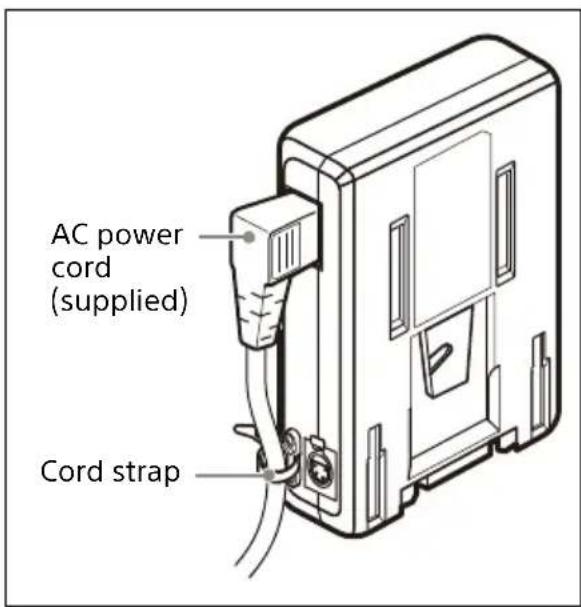
Connecting the AC Power Cord
When connecting the supplied AC power cord (angle type) or an optional AC power cord (straight type) to the unit, secure the cord with the cord strap as shown below.
Using the Cord Strap
1 Pull back the clasp to release the strap, or pull the strap out.
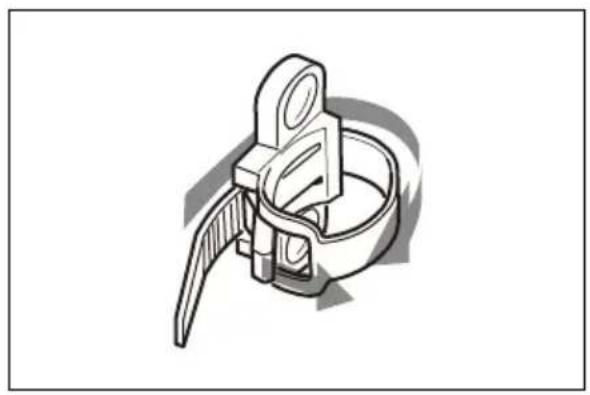
2 Connect the AC power cord and wrap the strap around it.
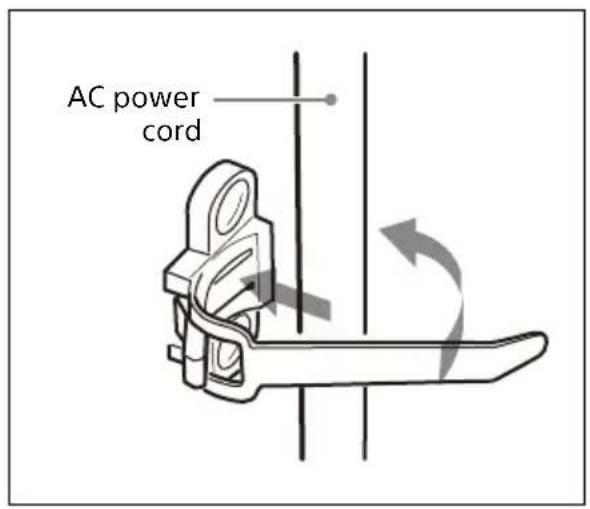
3 Insert the strap through the buckle and push it in the direction of the arrow until the cord is firmly secured.
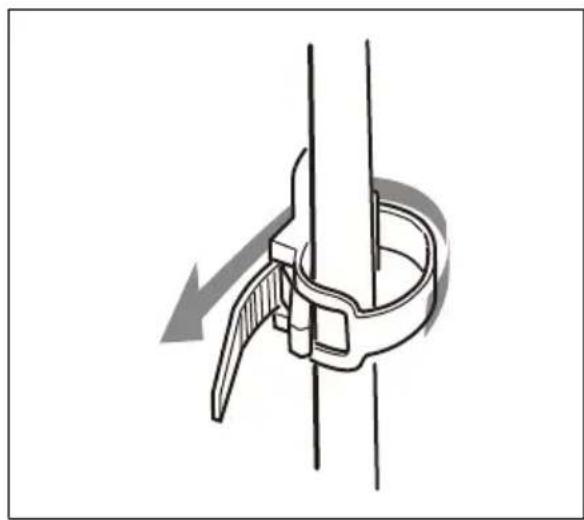
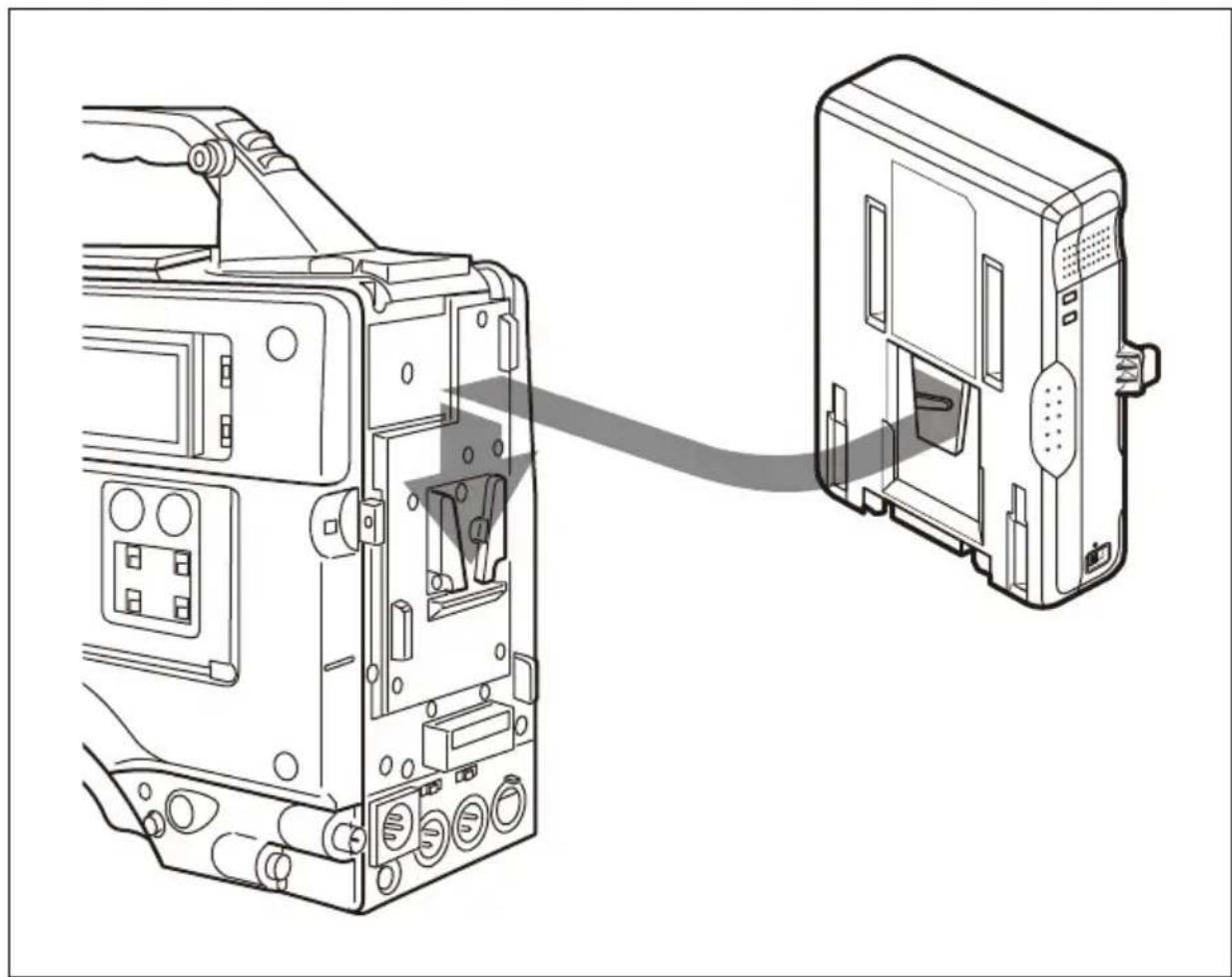
Attaching to a Camcorder or Other Device
Attach the unit to the device as shown in the illustration below.
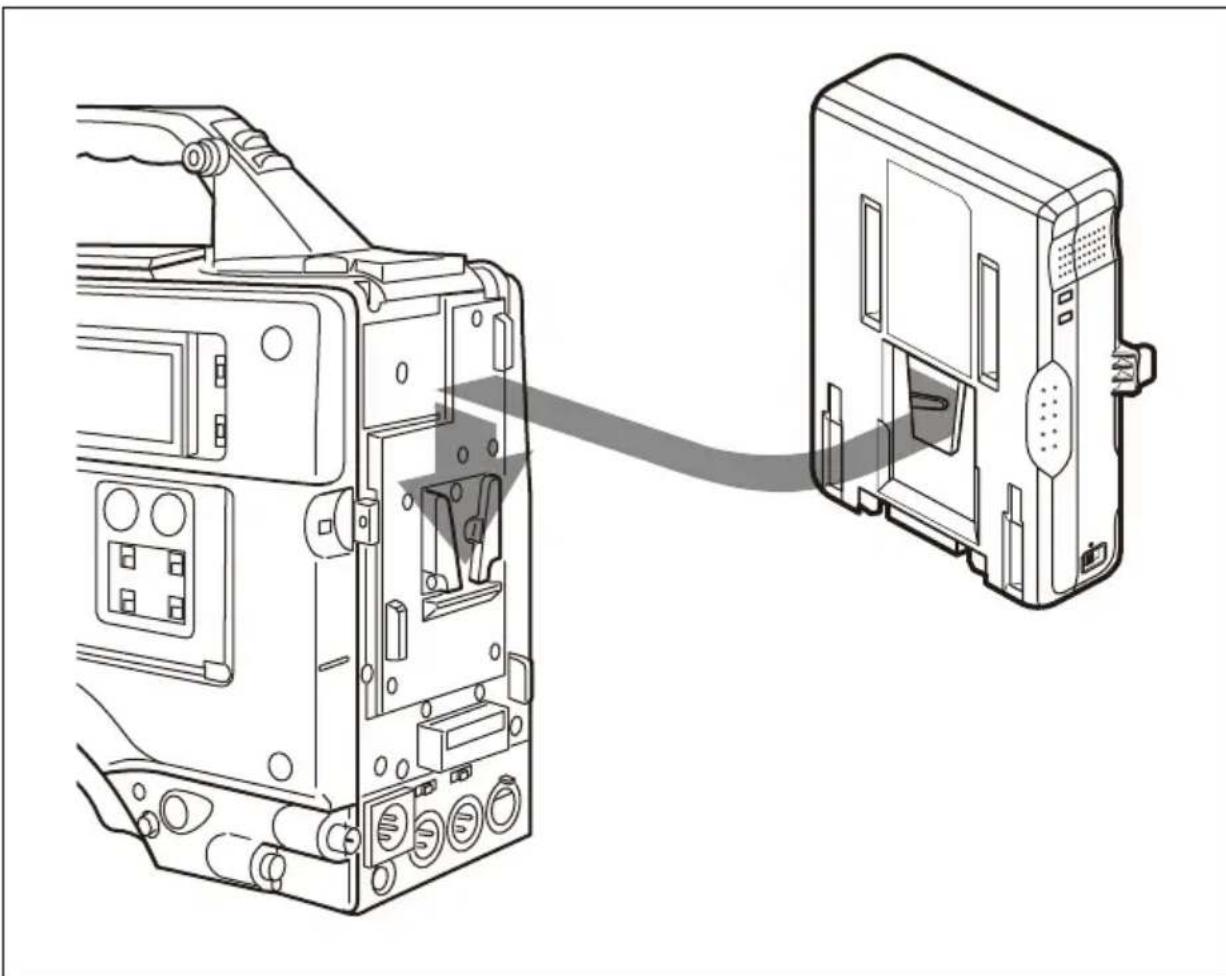
Note
When the bracket assembly for mounting wireless communication equipment (Part No.: A-8278-057-B, for use by service personnel) is attached to the camcorder, detach the cord strap from the unit by loosening the two screws. Then, turn the cord strap 180 degrees, and then reattach it.
Charging a Battery Pack
For safety, use only the Sony battery packs listed below.
• Lithium-ion Battery Packs: BP-GL95B BP-FL75/FLX75
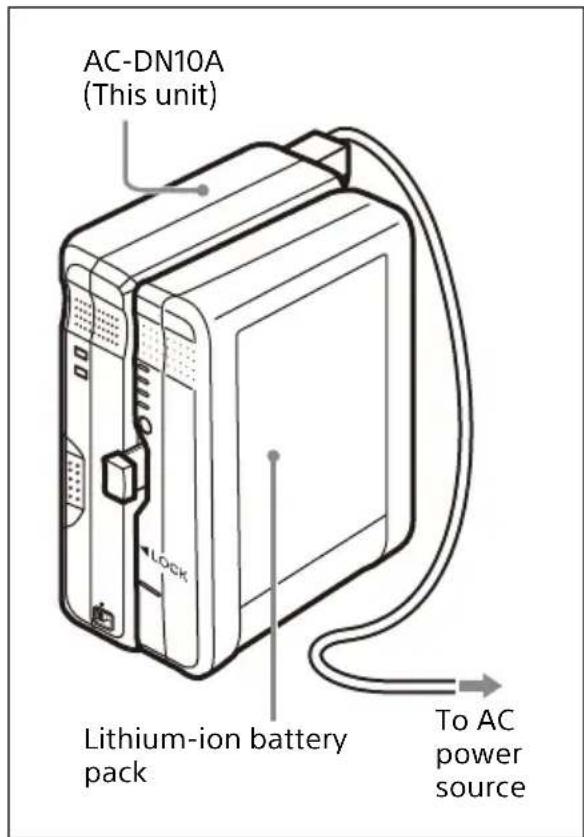
Attach and charge a lithium-ion battery pack as shown below.
1. Attach the lithium-ion battery pack.
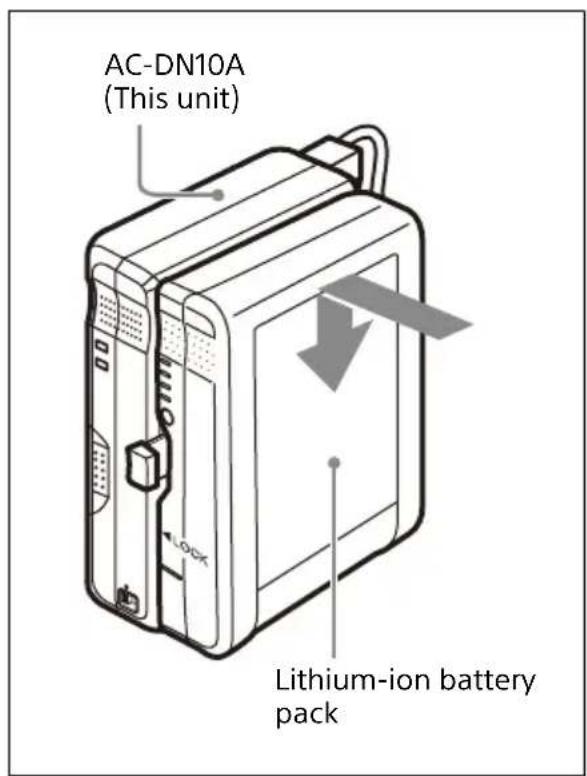
2. Plug the AC power cord connected to the unit into an AC power outlet.
Charging starts automatically.
Charging time
The time to charge a completely exhausted battery pack to its full capacity is shown in the table below (when charged at a temperature of 25 °C (57 °F) without supplying DC power to a connected device).
| Battery pack Charging time to full capacity | |
| BP-GL95B Approx. | 90 minutes |
| BP-FL75/FLX75 Approx. | 65 minutes |
About the charging indicator
The charging indicator shows the charging status of the attached battery pack as shown in the table below.
| Indicator Charging status | |
| Flashing (orange) | Charging (less than 90% capacity) |
| Flashing (green) | Charging (between 90% and 100% capacity) |
| Lit (green) Fully charged | |
| Flashing (orange → green → off) | Charging standby state (internal temperature of battery is 0 °C (32 °F) and lower or 60 °C (140 °F) and higher) |
| Flashing rapidly (orange and green) | Error detected during charging (For details, see “When an abnormality is detected while charging” below.) |
When an abnormality is detected while charging
When one of the following conditions is detected while charging, the charging indicator flashes rapidly in orange and green and the charging is stopped to protect the battery pack.
• After the start of charging, the voltage of the DC output connector for battery charging has dropped below the specified level (6 V). • After the start of charging, the voltage of the DC output connector for battery charging has exceeded the specified level (17.5 V). • The battery voltage did not rise to the specified level within a specified period (2 hours).
The charging indicator remains flashing until the unit is disconnected from the AC power source or the battery pack is removed.
Notes
- When a battery pack which is not chargeable with the unit is connected, charging does not take place and the charging indicator does not light up.
- BP-M50/M100 Nickel Metal Hydride Battery Packs cannot be charged with the unit.
- Nickel-cadmium battery packs cannot be charged using the DC-L1 (adaptor for NP-1B) and DCL90 (adaptor for BP-90A).
Usage Precautions
Notes about the battery charger
- Use the unit in an operating environment of 0 °C to 35 °C (32 °F to 95 °F). Since charging is difficult at low temperatures, we recommend that battery packs be charged between 10 °C and 30 °C (50 °F and 86 °F).
- The unit has a charging control function controlled by the temperature. If the internal temperature of the battery is 0 °C (32 °F) and lower or 60 °C (140 °F) and higher, the unit is in standby state and charging does not take place. When the temperature is above 0 °C (32 °F) or below 60 °C (140 °F), charging takes place.
- Avoid using or storing the unit in dusty places or places with corrosive gases.
- Avoid using or storing the unit in places exposed to direct sunlight.
Notes about battery packs
- Even when fully charged, battery packs gradually lose their charge naturally. Use the battery packs as soon as possible after charging.
- Carry and store battery packs by installing them in your equipment or by repacking them using the original packing material.
- To prolong the life of battery packs, store them in a cool place (about 20 °C (68 °F)), and charge in a place with an ambient temperature
between 10 °C and 30 °C (50 °F and 86 °F).
- When temperatures are 10 °C (50 °F) or lower, the performance of a battery pack suffers and the usable time of a battery pack becomes shorter. To get the longest usable time, warm the battery packs to room temperature (about 20 °C (68 °F)) before use.
- Carrying a spare battery pack is recommended.
Lithium-ion battery packs are free from memory effect. There is no need to discharge them fully before recharging.
If the usable time of a battery pack becomes very short, it is time to replace it with a new one.
Note about the battery terminal
The battery terminal of this unit (the connector for battery packs and AC adaptors) is a consumable part. Power may not be supplied to the unit properly if the pins of the battery terminal are bent or deformed by shock or vibrations, or if they become corroded due to prolonged outdoor use.
Periodic inspections are recommended to keep the unit working properly and to prolong its usable lifetime.
Contact a Sony service or sales representative for more information about inspections.
Condensation
If the unit is suddenly taken from a cold to a warm location, or if ambient
temperature suddenly rises, moisture may form on the outer surface of the unit and/or inside of the unit. This is known as condensation. If condensation occurs, turn off the unit and wait until the condensation clears before operating the unit. Operating the unit while condensation is present may damage the unit.
Specifications
General
Power requirements 100-240 V AC, 50/60 Hz
Power consumption 130 VA or lower
Operating temperature 0 °C to 35 °C (32 °F to 95 °F)
Mass: Approx. 810 g (1 lb 14 oz)
Dimensions: 101 × 177 × 48 mm (4 × 7 × 1 15/16 inches) (width / height / depth) (Excluding protrusions)
Output
Output power (DC): 100 W (max.) Output voltage (DC): 16.7 V Output current (DC): 6 A (max.) However, for temperatures in the range 35 °C to 45 °C (95 °F to 113 °F), the maximum output current is as follows. Up to 40 °C (104 °F) (PXW-Z750, etc.): 5 A (max.) Up to 45 °C (113 °F) (HXC-FB80, etc.): 4 A (max.) Output terminal (DC): Square 5-pin connector, XLR 4-pin connector, 16.7 V, 6 A (max.) Output terminal (DC): Square 5-pin connector, 16.8 V, 5 A/3 A, 14.2 V, 5.7 A
Supplied accessories
Operating Instructions (1)
Optional accessory
DC power cord
Design and specifications are subject to change without notice.
Notes
• Always verify that the unit is operating properly before use. SONY WILL NOT BE LIABLE FOR DAMAGES OF ANY KIND INCLUDING, BUT NOT LIMITED TO, COMPENSATION OR REIMBURSEMENT ON ACCOUNT OF THE LOSS OF PRESENT OR PROSPECTIVE PROFITS DUE TO FAILURE OF THIS UNIT, EITHER DURING THE WARRANTY PERIOD OR AFTER EXPIRATION OF THE WARRANTY, OR FOR ANY OTHER REASON WHATSOEVER.
- SONY WILL NOT BE LIABLE FOR CLAIMS OF ANY KIND MADE BY USERS OF THIS UNIT OR MADE BY THIRD PARTIES.
- SONY WILL NOT BE LIABLE FOR THE TERMINATION OR DISCONTINUATION OF ANY SERVICES RELATED TO THIS UNIT THAT MAY RESULT DUE TO CIRCUMSTANCES OF ANY KIND.
French
https://www.sonystyle.com.cn/professional/
Note
Note
Note
Note
Location and Function of Parts
Connecting to a Camcorder or Other Device
Connect this unit to a device as shown in the figure below.
Note
Location and Function of Parts
Connecting to a Camcorder or Other Device
Connect this device to that device as shown in the figure below.
Note
Mounting on a camcorder or other device
Note
Note
Note



- FOR SAFETY
- MOUNTING TO A CAMCORDER, ETC
- NOTE
- IMPORTANT SAFETY INSTRUCTIONS
- TO REDUCE THE RISK OF FIRE OR ELECTRIC SHOCK, DO NOT EXPOSE THIS APPARATUS TO RAIN OR MOISTURE
- THIS APPARATUS MUST BE EARTHED
- WARNING
- WARNING: THIS WARNING IS APPLICABLE FOR OTHER COUNTRIES/REGIONS
- CAUTION
- FOR SERVICE PERSONNEL
- RISK OF ELECTRIC SHOCK
- FOR CUSTOMERS IN NORWAY
- FOR CUSTOMERS IN THE U.S.A
- SUPPLIER'S DECLARATION OF CONFORMITY
- FOR THE CUSTOMERS IN CANADA
- FOR THE CUSTOMERS IN EUROPE
- REDUCTION IN THE USE OF HAZARDOUS SUBSTANCES IN ELECTRICAL & ELECTRONIC EQUIPMENT (APPLICABLE IN REPUBLIC OF INDIA)
- FOR THE CUSTOMERS IN THE U.S.A. SONY LIMITED WARRANTY
- FOR THE CUSTOMERS IN CANADA SONY LIMITED WARRANTY
- FOR THE CUSTOMERS IN KOREA SONY LIMITED WARRANTY
- TABLE OF CONTENTS
- OVERVIEW
- FEATURES
- MAXIMUM POWER SUPPLY OF 100 W DC
- BATTERY BACKUP FUNCTION
- BATTERY PACKS THAT CAN BE CHARGED BY THE UNIT / SONY DEVICES THAT CAN BE CONNECTED TO THE UNIT
- COUNTRIES AND REGIONS OTHER THAN JAPAN AND CHINA
- JAPAN
- CHINA
- LOCATION AND FUNCTION OF PARTS
- ① AC IN CONNECTOR
- ② DC OUTPUT CONNECTOR (XLR-TYPE, 4-PIN)
- ③ DC OUTPUT CONNECTOR FOR BATTERY CHARGING (SQUARE, 5-PIN)
- ④ DC OUTPUT SWITCH
- ⑤ LOCK RELEASE LEVER
- ⑥ AC POWER INDICATOR
- ⑦ CHARGING INDICATOR
- ⑧ DC OUTPUT CONNECTOR (SQUARE, 5-PIN)
- CONNECTIONS
- CONNECTABLE DEVICES
- CONNECTING THE AC POWER CORD
- USING THE CORD STRAP
- ATTACHING TO A CAMCORDER OR OTHER DEVICE
- CHARGING A BATTERY PACK
- CHARGING TIME
- ABOUT THE CHARGING INDICATOR
- WHEN AN ABNORMALITY IS DETECTED WHILE CHARGING
- NOTES
- USAGE PRECAUTIONS
- NOTES ABOUT THE BATTERY CHARGER
- NOTES ABOUT BATTERY PACKS
- NOTE ABOUT THE BATTERY TERMINAL
- CONDENSATION
- SPECIFICATIONS
- GENERAL
- OUTPUT
- SUPPLIED ACCESSORIES
- OPTIONAL ACCESSORY
- FRENCH
- CONNECTING TO A CAMCORDER OR OTHER DEVICE
- MOUNTING ON A CAMCORDER OR OTHER DEVICE
Brand : SONY
Model : AC-DN10A
Category : Battery charger