
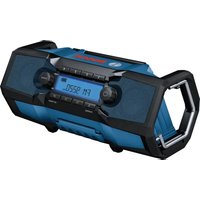
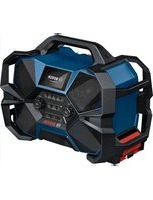
PRA 10 8 LI - Radio BOSCH - Free user manual and instructions
Find the device manual for free PRA 10 8 LI BOSCH in PDF.
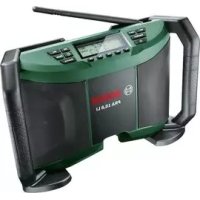



| Brand | Bosch |
| Model | PRA 10 8 LI |
| Type | Portable Radio |
| Power Supply | 12 V mains adapter (100–240 V~, 50/60 Hz) or 10.8 V Lithium-Ion battery |
| Recommended Battery | Bosch PBA 10.8 V... |
| Recommended Charger | Bosch AL 11.. CV |
| Backup Batteries | 2 × 1.5 V type LR03/AAA |
| FM Frequency Range (OUC) | 87.5 – 108 MHz |
| AM Frequency Range (MF) | 531 – 1602 kHz |
| Rated Amplifier Power | 2 × 5 W (on mains) |
| Weight (according to EPTA 01:2014) | 1.7 kg |
| Operating Temperature Range | -10 °C to +40 °C |
| Charging Temperature Range | 0 °C to +45 °C |
| Storage Temperature Range | -20 °C to +50 °C |
| Built-in Equalizer | Yes, manual adjustment of bass and treble (-5 to +5) |
| Station Memory | 5 FM + 5 AM, via memory presets |
| Auxiliary Audio Input | 3.5 mm AUX IN jack |
| 12 V Output (for accessories) | 12 V connection socket |
| Mute Function | Yes |
| Antenna | Telescopic rod antenna |
| Display | Backlit display with battery charge indicator |
| Cleaning | Soft damp cloth, without solvents or detergents |
| Protection Rating | Not specified (dry indoor use) |
Frequently Asked Questions - PRA 10 8 LI BOSCH
User questions about PRA 10 8 LI BOSCH
0 question about this device. Answer the ones you know or ask your own.
Ask a new question about this device
Download the instructions for your Radio in PDF format for free! Find your manual PRA 10 8 LI - BOSCH and take your electronic device back in hand. On this page are published all the documents necessary for the use of your device. PRA 10 8 LI by BOSCH.
USER MANUAL PRA 10 8 LI BOSCH
Robert Bosch GmbH
Power Tools Division
70764 Leinfelden-Echterdingen
GERMANY
www.bosch-pt.com
1609 92A 1RZ (2015.10) T7164

PRA 10,8 LI

BOSCH
Read all safety warnings and all instructions. Failure to follow the warnings and instructions may result in electric shock, fire and/or serious injury.
instructions may result in electric shock, fire and/or serious injury.
Save all warnings and instructions for future reference.
The term "radio" in the warnings refers to your mains-operated radio (with power-supply plug) or battery-operated radio (without power-supply plug).
Keep work area clean and well lit. Cluttered or dark areas invite accidents. The mains part of the power-supply plug must match the outlet. Never modify the plug in any way. Do not use any adapter plugs with radios. Unmodified plugs and matching outlets will reduce risk of electric shock. Do not abuse the cord of the power-supply plug. Never use the cord for carrying, pulling or unplugging the radio. Keep cord away from heat, oil, sharp edges and moving parts. Damaged or entangled cords increase the risk of electric shock. Completely unwind the cord of the power-supply plug when powering the radio from the mains. Otherwise the cord can heat up. Ensure that the mains plug can be pulled at any time. The mains plug is the only way to disconnect the radio from the mains.

Do not expose radio or power-supply plug to rain or wet conditions. The penetration of water into the radio or the power-supply plug increases the risk of electric shock.
Keep the radio and the power-supply plug clean. Dirt poses a danger of electric shock. Check the radio, power-supply plug, cord and connector before each use. Stop using the radio if you discover damage to it. Do not open the radio or the power-supply plug yourself, and have them serviced only by a qualified repair person using only identical replacement parts. Damaged radios, power-supply plugs, cords and connectors increase the risk of electric shock. This radio is not intended for use by children and persons with physical, sensory or mental limitations or a lack of experience or knowledge. This radio can be used by children aged 8 or older and by persons who have physical, sensory or mental limitations or a lack of experience or knowledge if a person responsible for their safety supervises them or has instructed them in the safe operation of the radio and they understand the associated dangers. Otherwise, there is a danger of operating errors and injuries. Supervise children during use, cleaning and maintenance. This will ensure that children do not play with the radio.




Do not open the battery. Danger of short-circuiting.

Protect the battery against heat, e.g., against continuous intense sunlight, fire, water, and moisture. Danger of explosion.
When battery pack is not in use, keep it away from other metal objects like paper clips, coins, keys, nails, screws, or other small metal objects that can make a connection from one terminal to another. Shorting the battery terminals together may cause burns or a fire. Under abusive conditions, liquid may be ejected from the battery; avoid contact. If contact accidentally occurs, flush with water. If liquid contacts eyes, additionally seek medical help. Liquid ejected from the battery may cause irritations or burns. In case of damage and improper use of the battery, vapours may be emitted. Ventilate the area and seek medical help in case of complaints. The vapours can irritate the respiratory system. Recharge only with the charger specified by the manufacturer. A charger that is suitable for one type of battery pack may create a risk of fire when used with another battery pack. Use the battery only together with your Bosch product. This is the only way to protect the battery against dangerous overload. The battery can be damaged by pointed objects such as nails or screwdrivers or by force applied externally. An internal short circuit can occur and the battery can burn, smoke, explode or overheat. Read and strictly observe the safety and work instructions in the operating instructions of the devices you connect to the radio.
Product Description and Specifications

Read all safety warnings and all instructions. Failure to follow the warnings and instructions may result in electric shock, fire and/or serious injury.
Product Features
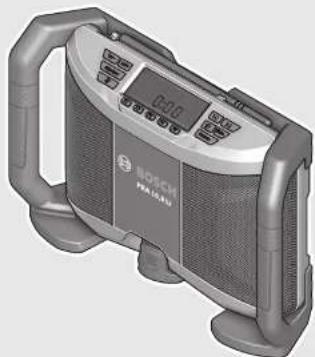
The numbering of the product features refers to the illustration of the radio on the graphics page.
1 Carrying handle 2 Speaker 3 On/Off button
4 "Equalizer" button (for manual sound adjustment)
5 "Vol -" button for reducing the volume/treble/bass setting
6 "Vol +" button for increasing the volume/treble/bass setting
7 Rod antenna 8 Display 9 Preset buttons 10 button (for setting the time) 11 seek button 12 seek button 13 "Mute" button 14 "Source" button (for selecting an audio source) 15 Battery pack* 16 Battery unlocking button 17 Battery port 18 Screw for battery lid 19 Battery lid 20 Lid of the storage compartment 21 Locking latch of the storage compartment 22 "AUX IN" socket 23 12 V connection socket 24 Power-supply plug 25 Plug-in connector 26 AUX cable
*Accessories shown or described are not part of the standard delivery scope of the product. A complete overview of accessories can be found in our accessories program.
Display Elements
a Radio frequency indicator b Battery charge-control indicator c Stereo indicator d Mute indicator e Multi-function indicator f Audio-source indicator
Technical Data
| Portable Radio PRA 10,8 LI | |
| Article number | 3 603 JB1 0.. |
| Back-up batteries | 2 x 1.5 V (LRO3/AAA) |
| Battery | V 10.8 |
| Weight according to EPTA-Procedure 01:2014 | kg 1.7 |
| Permitted ambient temperature | |
| - during charging | °C 0...+45 |
| - during operation* | °C -10...+40 |
| - during storage | °C -20...+50 |
| Recommended batteries | PBA 10,8 V ... |
| Recommended chargers | AL 11.. CV |
| * Limited performance at temperatures <0 °C | |
| Technical data determined with battery from delivery scope. | |





12 | English
Portable Radio PRA 10,8 LI Audio Operation/Radio
| Operating voltage | ||
| - for operation with power-supply plug | V | 12 |
| - for battery-pack operation | V | 10.8 |
| Rated output of amplifier (for operation with power-supply plug) | 2 x 5 W | |
| Reception range | ||
| - FM | MHz | 87.5-108 |
| - AM | kHz | 531-1602 |
* Limited performance at temperatures <0 °C Technical data determined with battery from delivery scope.
Power-supply plug Article number 1 600 A00 0..
| Input voltage | V~ 100-240 |
| Frequency | Hz 50/60 |
| Input current | mA 500 |
| Output voltage | V= 12 |
| Output current | mA 1500 |
| Weight according to EPTA-Procedure 01:2014 | kg 0.2 |
| Protection class | ☐/II |
Assembly
Power Supply of Radio
The radio can be powered using the power-supply plug 24 or using a Li-Ion battery 15.
Operation with Battery Pack
Note: The use of batteries unsuitable for your radio can lead to malfunction or damage to the radio.
Note: The battery pack is supplied partially charged. To ensure full capacity of the battery pack, completely charge the battery pack in the battery charger before using for the first time.
▶ Use only the chargers listed in the technical data. Only these chargers are matched to the lithium-ion battery of your radio.
The lithium-ion battery can be charged at any time without reducing its service life. Interrupting the charging procedure does not damage the battery.
Insert a battery into the battery port 17 in such a manner that the connections of the battery face against the connections in the battery port 17, and allow the battery to engage in the battery port.
The battery charge-control indicator b appears on the display as soon as a battery with sufficient voltage is inserted and the radio is not connected to the mains by the power-supply plug 24.
The battery charge-control indicator b indicates the current battery pack status. When the battery charge-control indicator flashes, the battery pack must be charged.
| Indication | Capacity |
| ≥ 2/3 | |
| ≥ 1/3 | |
| < 1/3 | |
| Reserve | |
| Battery pack empty |
To remove the battery pack 15, press the unlocking buttons 16 and pull the battery pack out of the battery port 17.
Operation with Power-supply Plug
▶ Observe the mains voltage! The voltage of the power source for the power-supply plug must correspond with the data on the type plate of the power-supply plug.
Open the protective cap of the 12 V connection socket 23. Insert the plug-in connector 25 of the 12 V power-supply plug into the 12 V connection socket 23. Connect the power-supply plug to the mains supply.
▶ Use only the original Bosch power-supply plug intended for your radio. This measure alone enables trouble-free operation of the radio.
After removing the plug-in connector, reattach the protective cap of the 12 V connection socket 23 to protect against dirt/debris.
The power-supply plug 24 can be stored in the storage compartment of the radio when it is not being used. To do so, open the locking latch 21 and fold open the lid 20 of the storage compartment.
Inserting/Replacing the Back-up Battery
Back-up batteries must be inserted to store the time on the radio. Alkali-manganese batteries are recommended for this.
To open the battery compartment, loosen screw 18 and remove battery lid 19. Insert the back-up batteries. When inserting, pay attention to the correct polarity according to the representation on the outside of the battery lid.
Mount the battery lid 19 again and tighten it with screw 18.
Replace the back-up batteries if the display e dims and the time is no longer stored on the radio.
Always replace all batteries at the same time. Only use batteries from one brand and with the identical capacity.
▶ Take the back-up batteries out of the radio when you are not using it for a prolonged period of time. The back-up batteries can corrode and self-discharge during prolonged storage.




Operation
▶ Protect the radio against moisture and direct sunlight. The radio is suitable only for use in dry indoor areas.
Audio Operation
Switching On and Off
To switch on the radio, press the On/Off button 3. The display 8 is activated and the audio source selected the last time the radio was switched off will be played.
Note: When operating for the first time with a battery or when the radio has not been used for a prolonged period of time, it may be necessary to press the On/Off button 3 repeatedly or for longer to switch on the tool.
Each time after pressing a button, the display 8 is illuminated for several seconds.
To switch off the radio, press the On/Off button 3 again. The currently selected audio source will be stored.
To save energy, only switch the radio on when you are using it.
Adjusting the Volume
A medium volume (value of 10) is always set when you switch on the radio.
To increase the volume, press the "Vol +" button 6; to reduce the volume, press the "Vol -" button 5. The volume setting "VL" is indicated with a value between 0 and 20 for a few seconds in indicator e on the display.
Before adjusting or changing a radio station, set the volume to a lower setting; before starting an external audio source, set the volume to medium.
The sound can be switched off by pressing the "Mute" button 13. To switch the sound on again, either press the "Mute" button 13 once more or either of the "Vol +" 6 or "Vol -" buttons 5.
Adjusting the Sound
An equalizer is integrated into the radio to ensure optimum sound reproduction.
To manually change the bass level, press the "Equalizer" button 4 once. "BA" is indicated on the display along with the stored bass level value in the multi-function indicator e. To manually change the treble, press the "Equalizer" button 4 again; "TR" as well as the stored treble value are indicated in the multi-function indicator e.
The bass and treble levels can be adjusted between -5 and +5. To increase the indicated value, press the "Vol +" button 6; to lower the value, press the "Vol -" button 5. The changed values are automatically stored when indicator e changes back to the time indication a few seconds after last pressing either of the buttons.
Selecting an Audio Source
To select an audio source, press the "Source" button 14 until the indicator f for the desired internal audio source (see "Setting/Storing Radio Stations", page 13) or for the desired external audio source (see "Connecting External Audio Sources", page 13) is indicated on the display:
- "FM": FM radio.
- "AM": AM radio.
- "AUX": external audio source (e.g. CD player) via the 3.5 mm socket 22.
Setting the Rod Antenna
The radio is supplied with the rod antenna 7 mounted. When listening to the radio, swing the rod antenna in the direction that provides the best reception.
If it is not possible to achieve sufficient reception, place the radio in a location with better reception.
Note: Operating the radio in the immediate vicinity of radio units, wireless equipment or other electronic devices may impair the radio reception.
Setting/Storing Radio Stations
Press the "Source" button 14 until "FM" is indicated for the ultra-short wave reception range or "AM" for the medium wave reception range in display element f.
To set a certain radio frequency, press the ▶▶| seek button 12 to increase the frequency or the |◀◀ seek button 11 to decrease it. The current frequency is shown in indicator a on the display.
To scan for radio stations with a high signal strength,
press and briefly hold the seek button 12 or the seek button 11. The frequency of the found radio station is shown in indicator a on the display.
If a suitable signal has a sufficiently strong reception, the radio automatically switches to stereo reception. The stereo indicator c will appear on the display.
To store a set station, press one of the preset buttons 9 for 3 seconds. As soon as "PR" and the number of the selected preset button appears in display element e, the station is stored.
A total of 5 FM and 5 AM stations can be preset. Please note that an already occupied preset is overwritten when a new radio station is assigned to it.
To start the playback of a stored station, briefly press the respective preset button 9. "PR" as well as the preset number of the station are indicated in display element e for a few seconds.
Connecting External Audio Sources
Apart from the integrated radio, various external audio sources can be played.
Remove the protective cap of the "AUX IN" socket 22. Insert the angled 3.5 mm plug of the AUX cable 26 into the socket (see illustration on the graphics page). Connect the second plug of the AUX cable to an appropriate audio source.
For playback of the connected audio source, press the
"Source" button 14 until "AUX" appears in indicator f on the display.
After removing the plug of the AUX cable, reattach the protective cap of the "AUX IN" socket 22 again to protect against dirt/debris.





Time Indication
The radio has a time indication with separate power supply. If back-up batteries with sufficient capacity are inserted into the battery compartment (see "Inserting/Replacing the Backup Battery", page 12), the time can be stored even when the radio is disconnected from the power supply via battery or power-supply plug.
Setting the Time
- To set the time, press the Button 10 until the hours indication flashes in display element e.
- Press the ▶▶| seek button 12 or the |◀◀ seek button 11 until the correct hour setting is indicated.
- Press the Button 10 again, so that the minutes indication flashes in display element e.
- Press the ▶▶| seek button 12 or the ◀◀ seek button 11 until the correct minute setting is indicated.
- Press the Button 10 a third time to store the time setting.
Working Advice
Recommendations for Optimal Handling of the Battery
Protect the battery against moisture and water.
Store the battery only within a temperature range between -20°C and 50°C. As an example, do not leave the battery in the car in summer.
A battery that is new or has not been used for a longer period does not develop its full capacity until after approx. 5 charging/discharging cycles.
A significantly reduced working period after charging indicates that the battery is used and must be replaced.
Observe the notes for disposal.
Troubleshooting – Causes and Corrective Measures
Cause Corrective Measure Radio not working
| No power supply Completely insert the power-supply plug and plug-inconnector or the chargedbattery pack |
| Radio too warm or too cold Wait until the radio hasreached operatingtemperature |
Radio not working in corded operation
| Power-supply plug or connection cable defective | Check the power-supply plug and the connection cable, and have them replaced as required |
| Wrong power-supply plug inserted | Use the original Bosch power-supply plug (also available as spare part) |
Cause Corrective Measure Radio not working in cordless operation
| Battery contacts contaminated | Clean the battery contacts (e.g. by inserting and removing the battery several times) or replace the battery |
Battery pack defective Replace the battery
| Battery pack too warm or too cold | Wait until the battery has reached operating temperature |
Radio suddenly fails
| Power-supply plug or batterypack not properly orcompletely inserted | Plug in power-supply plug orbattery properly andcompletely |
Bad radio reception
| Interference from other devices or insufficient set-up location | Place the radio in another location with better reception or at a greater distance to other electronic devices |
Time indication faulty
| Back-up batteries of clock empty | Replace back-up batteries |
| Back-up batteries incorrectly inserted (wrong polarity) | Insert back-up batteries correctly |
When the corrective measures do not eliminate an error, please contact an authorised service agent for Bosch power tools.
Maintenance and Service
Maintenance and Cleaning
Keep the radio clean to ensure good, safe operation.
Wipe off debris using a moist and soft cloth. Do not use any cleaning agents or solvents.
After-sales Service and Application Service
Our after-sales service responds to your questions concerning maintenance and repair of your product as well as spare parts. Exploded views and information on spare parts can also be found under:
www.bosch-pt.com
Bosch's application service team will gladly answer questions concerning our products and their accessories.
In all correspondence and spare parts orders, please always include the 10-digit article number given on the nameplate of the product.





Great Britain
Robert Bosch Ltd. (B.S.C.)
P.O. Box 98
Broadwater Park
North Orbital Road
Denham
Uxbridge
UB9 5HJ
At www.bosch-pt.co.uk you can order spare parts or arrange the collection of a product in need of servicing or repair.
Tel. Service: (0344) 7360109
E-Mail: boschservicecentre@bosch.com
Ireland
Origo Ltd.
Unit 23 Magna Drive
Magna Business Park
City West
Dublin 24
Tel. Service: (01) 4666700
Fax: (01) 4666888
Australia, New Zealand and Pacific Islands
Robert Bosch Australia Pty. Ltd.
Power Tools
Locked Bag 66
Clayton South VIC 3169
Customer Contact Center
Inside Australia:
Phone: (01300) 307044
Fax: (01300) 307045
Inside New Zealand:
Phone: (0800) 543353
Fax: (0800) 428570
Outside AU and NZ:
Phone: +61 3 95415555
www.bosch.com.au
Republic of South Africa
Customer service
Hotline: (011) 6519600
Gauteng - BSC Service Centre
35 Roper Street, New Centre
Johannesburg
Tel.: (011) 4939375
Fax: (011) 4930126
E-Mail: bsctools@icon.co.za
KZN - BSC Service Centre
Unit E, Almar Centre
143 Crompton Street
Pinetown
Tel.: (031) 7012120
Fax: (031) 7012446
E-Mail: bsc.dur@za.bosch.com
Western Cape - BSC Service Centre
Democracy Way, Prosperity Park
Milnerton
Tel.: (021) 5512577
Fax: (021) 5513223
E-Mail: bsc@zsd.co.za
Bosch Headquarters
Midrand, Gauteng
Tel.: (011) 6519600
Fax: (011) 6519880
E-Mail: rbsa-hq.pts@za.bosch.com
Transport
The contained lithium-ion batteries are subject to the Dangerous Goods Legislation requirements. The user can transport the batteries by road without further requirements.
When being transported by third parties (e.g.: air transport or forwarding agency), special requirements on packaging and labelling must be observed. For preparation of the item being shipped, consulting an expert for hazardous material is required.
Dispatch batteries only when the housing is undamaged.
Tape or mask off open contacts and pack up the battery in such a manner that it cannot move around in the packaging.
Please also observe possibly more detailed national regulations.
Disposal

Radios, power-supply plugs, battery packs/batteries, accessories and packaging should be sorted for environmental-friendly recycling.
Do not dispose of radios, power-supply plugs and battery packs/batteries into household waste!
Only for EC countries:
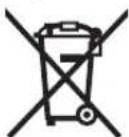
According to the European Guideline 2012/19/EU, electrical devices/tools that are no longer usable, and according to the European Guideline 2006/66/EC, defective or used battery packs/batteries, must be collected separately and disposed of in an environmentally correct manner.
Batteries no longer suitable for use can be directly returned at:
Great Britain
Robert Bosch Ltd. (B.S.C.)
P.O. Box 98
Broadwater Park
North Orbital Road
Denham
Uxbridge
UB 9 5HJ
At www.bosch-pt.co.uk you can order spare parts or arrange the collection of a product in need of servicing or repair.
Tel. Service: (0344) 7360109
E-Mail: boschservicecentre@bosch.com
Battery packs/batteries:
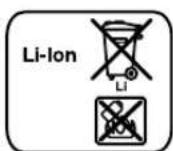
Li-ion: Please observe the instructions in section "Transport", page 15.
Subject to change without notice.



Robert Bosch (France) S.A.S.
Bosch Service Center
Telegrafvej 3
2750 Ballerup
At www.bosch-pt.dk you can order spare parts online or create a repair order.
Tel. Service Center: 44898855
Fax: 44898755
E-Mail: vaerktoej@dk.bosch.com
Transport
- "AM": Radio via MV,
Bosch Service Center
Telegrafvej 3
2750 Ballerup
Danmark
Tel.: (08) 7501820 (inom Sverige)
Fax: (011) 187691
Transport
| ≥2/3 | |
| ≥1/3 | |
| <1/3 | |
| Reserve | |
| Tomt batteri |
Robert Bosch Sp. z o.o.
Bosch Service Center PT
K Vápence 1621/16
692 01 Mikulov
No. TC RU C-DE.AЯ46.B.71281
No. TC RU C-DE.AЯ46.B.64603
17 Battery compartment
Tel. power tool service: (021) 4057540
Fax: (021) 4057566
E-Mail: infoBSC@ro.bosch.com


- PRA 10,8 LI
- BOSCH
- SAVE ALL WARNINGS AND INSTRUCTIONS FOR FUTURE REFERENCE
- PRODUCT DESCRIPTION AND SPECIFICATIONS
- PRODUCT FEATURES
- DISPLAY ELEMENTS
- ENGLISH
- ASSEMBLY
- POWER SUPPLY OF RADIO
- OPERATION WITH BATTERY PACK
- OPERATION WITH POWER-SUPPLY PLUG
- INSERTING/REPLACING THE BACK-UP BATTERY
- OPERATION
- AUDIO OPERATION
- SWITCHING ON AND OFF
- ADJUSTING THE VOLUME
- ADJUSTING THE SOUND
- SELECTING AN AUDIO SOURCE
- SETTING THE ROD ANTENNA
- SETTING/STORING RADIO STATIONS
- CONNECTING EXTERNAL AUDIO SOURCES
- TIME INDICATION
- SETTING THE TIME
- WORKING ADVICE
- RECOMMENDATIONS FOR OPTIMAL HANDLING OF THE BATTERY
- TROUBLESHOOTING – CAUSES AND CORRECTIVE MEASURES
- MAINTENANCE AND SERVICE
- MAINTENANCE AND CLEANING
- AFTER-SALES SERVICE AND APPLICATION SERVICE
- WWW.BOSCH-PT.COM
- GREAT BRITAIN
- IRELAND
- AUSTRALIA, NEW ZEALAND AND PACIFIC ISLANDS
- REPUBLIC OF SOUTH AFRICA
- CUSTOMER SERVICE
- GAUTENG - BSC SERVICE CENTRE
- KZN - BSC SERVICE CENTRE
- WESTERN CAPE - BSC SERVICE CENTRE
- BOSCH HEADQUARTERS
- TRANSPORT
- DISPOSAL
- ONLY FOR EC COUNTRIES
- BATTERY PACKS/BATTERIES
Brand : BOSCH
Model : PRA 10 8 LI
Category : Radio