Babytalker 1010 - Baby monitors TOPCOM - Free user manual and instructions
Find the device manual for free Babytalker 1010 TOPCOM in PDF.


User questions about Babytalker 1010 TOPCOM
0 question about this device. Answer the ones you know or ask your own.
Ask a new question about this device
Download the instructions for your Baby monitors in PDF format for free! Find your manual Babytalker 1010 - TOPCOM and take your electronic device back in hand. On this page are published all the documents necessary for the use of your device. Babytalker 1010 by TOPCOM.
USER MANUAL Babytalker 1010 TOPCOM
text_image
TOPCOM® YOUR CHILDREN, OUR CONCERN KIDZZZ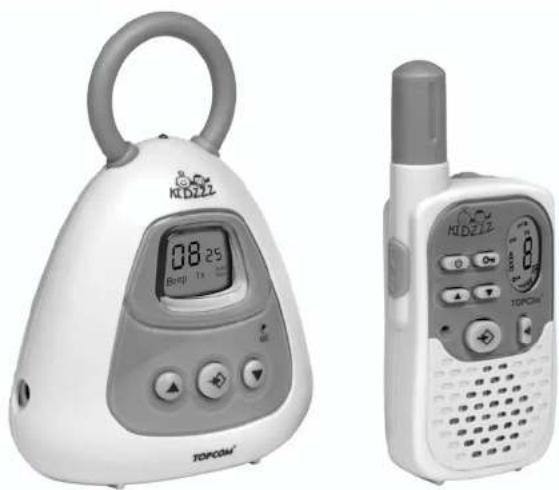
natural_image
Two electronic devices: a digital kettlebell with '08:25' display and a handheld radio with a 8-pin model (no visible text or symbols on the devices themselves)PMR BABYTALKER 1010
USER GUIDE / HANDLEIDING / MANUEL D'UTILISATEUR / BEDIENUNGSANLEITUNG / MANUAL DE USUARIO / BRUKSANVISNING / BRUGERVEJLEDNING / ANVÄNDARHANDBOK / KÄYTTÖOHJE / MANUALE D'USO / MANUAL DO UTILIZADOR / UŽIVATELSKÁ PŘÍRUČKA / ΟΔΗΓΙΕΣ ΧΡΗΣΗΣ / HASZNÁLATI ÚTMUTATÓ / INSTRUKCJA OBSŁUGI / UŽIVATEL'SKY MANUÁL
V 1.1

UK The features described in this manual are published with reservation to modifications.
NL De in deze handleiding beschreven mogelijkheden worden gepubliceerd onder voorbehoud van wijzigingen.
F Les possibilités décrites dans ce manuel sont publiées sous réserve de modifications.
D Die in dieser Bedienungsanleitung umschriebenen Möglichkeiten, werden vorbehaltlich Änderungen publiziert.
ES Las características descritas en este manual pueden ser objeto de futuras modificaciones.
S Funktionerna i denna bruksanvisning publiceras med reservation för ändringar.
DK Vi forbeholder os retten til ændringer af de specifikationer, der er beskrevet i denne brugsanvisning.
N Funksjoner beskrevet i denne manualen kan endres uten nærmere informasjon.
IT Le caratteristiche descritte nel presente manuale vengono pubblicate con riserva di modifica.
SF Tässä ohjekirjassa julkaissut tiedot voivat muuttua ilman ennakkoilmoitusta.
PT As características descritas neste manual são publicadas sob reserva de modificação.
CZ Možnost úpravy funkci popsaných v této příručce vyhrazena.
GR Οι λειτουργίες που περιγράφονται στο παρόν εγχειρίδιο, δημοσιεύονται με επιφύλαξη τυχόν τροποποιήσεων.
HU A jelen használati útmutatóban leírt adatokra a gyártó fenntartja a változtatás jogát.
PL Właściwości opisane w niniejszej instrukcji obsługi są publikowane z zatrzeżeniem prawa wprowadzenia zmian.
SK Vlastnosti popísané v tejto príručke sú publikované s vyhradeným právom na zmenu.
This product is in compliance with the essential requirements and other relevant provisions of the R&TTE directive 1998/5IEC. The Declaration of conformity can be found on:
http://www.topcom.net/support/cedeclarations.php
1.
text_image
Diagram of a digital pressure monitor with labeled parts including digital display, buttons, and ports2.3
text_image
23 22 21 20 19 18 17 16 15 14 13 12 88 + 50V + 50V + 50V + 50V + 50V + 50V + 50V + 50V4.
text_image
Tx M 88°CH Ac Beep Auto Mon A B C E D F G H I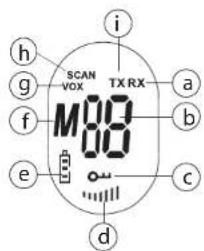
text_image
i h g SCAN VOX TX RX M80 a f b e c dUK The CE symbol indicates that the unit complies with the essential requirements of the R&TTE directive.
Thank you for purchasing the Babytalker 1010. It's a short range (up to 2 km in open field), low powered babyphone base station in combination with a 446 MHz PMR (Pivate Mobile Radio).
2 Intended purpose
The Babytalker 1010 can be used to keep in contact with your baby or to monitor any audible activity in a room from a longer distance (up to 2 km in open field).
The selectable VOX sentivity ensures you that every sound in the baby's room is clearly received.
3 CE Mark and restrictions

Restriction:
Check the local regulations before using it outside the country where it was purchased. The standard may be prohibited in this country.
The CE symbol on the unit, user guide and giftbox indicates that the unit complies with the essential requirements of the R&TTE directive 1995/5/EC.
4 Safety instructions
4.1 General
Please read carefully through the following information concerning safety and proper use. Make yourself familiar with all functions of the device. Keep this manual on a safe place for future use.
4.2 Babies safety
- The Babytalker 1010 is not a substitute for responsible and proper adult supervision and should not be used as such.
- Make sure the Baby Unit and adapter cable are always out of reach of the baby, at least one metre away.
- Never place the Baby Unit inside the baby's bed or playpen!
- Never cover the baby monitor (with a towel, blanket, etc.).
4.3 Burning injuries
- If the cover of the antenna is damaged, do not touch because when an antenna comes in contact with the skin, a minor burn may result when transmitting.
- Batteries can cause property damage such as burns if conductive material such as jewellery, keys or beaded chains touches exposed terminals. The material may complete an electrical circuit (short circuit) and become quite hot. Exercise care in handling any charged battery, particularly when placing it inside a pocket, purse or other container with metal objects.
4.4 Injuries
- Do not place your device in the area over an air bag or in the air bag deployment area.
Air bags inflate with great force. If a PMR is placed in the bag deployment area and the air bag inflates, the communicator may be propelled with great force and cause serious injury to the occupants of the vehicle. - Keep the PMR at least 15 centimetres away from a pacemaker.
- Turn your PMR OFF as soon as interference is taking place with medical equipment.
4.5 Danger of explosion
- Do not replace batteries in a potentially explosive atmosphere. Contact sparking may occur while installing or removing batteries and cause an explosion.
- Turn your PMR off when in any area with a potentially explosive atmosphere. Sparks in such areas could cause an explosion or fire resulting in bodily injury or even death.
- Never throw batteries in fire as they may explode.

Areas with potentially explosive atmospheres are often, but not always, clearly marked. They include fuelling areas such as below deck on boats, fuel or chemical transfer or storage facilities; areas where the air contains chemicals or particles, such as grain, dust or metal powders; and any other area where you would normally be advised to turn off your vehicle engine.
4.6 Poisoning danger
- Keep batteries away from small children
4.7 Legal
- Turn your PMR OFF in any facilities where posted notices instruct you to do so.
Hospitals or health care facilities may be using equipment that is sensitive to external RF energy. - Replacing or modifying the antenna may affect the PMR radio specifications and violate the CE regulations. Unauthorised antennas could also damage the radio.
4.8 Notes
- Do not touch the antenna while transmitting, it could affect the range.
- Remove the battery if the device is not going to be used for a long period.
5 Cleaning and maintenance
- To clean the unit, wipe with a soft cloth dampened with water. Don't use a cleaner or solvents on the unit; they can damage the case and leak inside, causing permanent damage.
- Battery contacts may be wiped with a dry lint-free cloth.
- If the unit gets wet, turn it off and remove the batteries immediately. Dry the battery compartment with a soft cloth to minimize potential water damage. Leave the cover off the battery compartment overnight or until completely dry. Do not use the unit until completely dry.
6 Disposal of the device (environment)

At the end of the product lifecycle, you should not throw this product into the normal household garbage but bring the product to a collection point for the recycling of electrical and electronic equipments. The symbol on the product, user guide and/or box indicate this.
Some of the product materials can be re-used if you bring them to a recycling point. By re-using some parts or raw materials from used products you make an important contribution to the protection of the environment. Please contact your local authorities in case you need more information on the collection points in your area.

Dispose of batteries at a designated battery disposal unit and not in the household waste.
7 Using the Babytalker 1010
To have communication between the Babyphone and the PMR device they need to be set both on the same channel and within receiving range (up to max. 2 km in open field). Since these devices use free frequency bands (channels), all devices in operation share these channels (total 8 channels). Therefore, privacy is not guaranteed.
The babytalker operates on VOX mode. This means that the device starts sending as soon as the microphone detects sound. The sensitivity of the sound detection can be changed by the user.
Any other PMR device in range, on the same channel and in standby mode (not transmitting) will hear the transmitted signal.

Speaking from a PMR unit to the babyphone is not possible to prevent unknown persons to disturb the babies night rest.
8 Included in the package
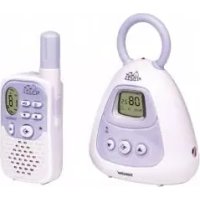
- 1 x Baby Unit
- 1 x Parent unit
- 1 x Beltclip
- 1 x Power adapter
- 1 x Charger
- 1 x Battery pack
- User guide
9 l n s t a l l a t i o n

The Baby unit can operate with power adapter OCH with non-rechargeable 'LR03' alkaline batteries. It has no charging function. The Parent unit can operate with rechargeable or LR03' alcaline batteries (not included).
9.1 Baby unit
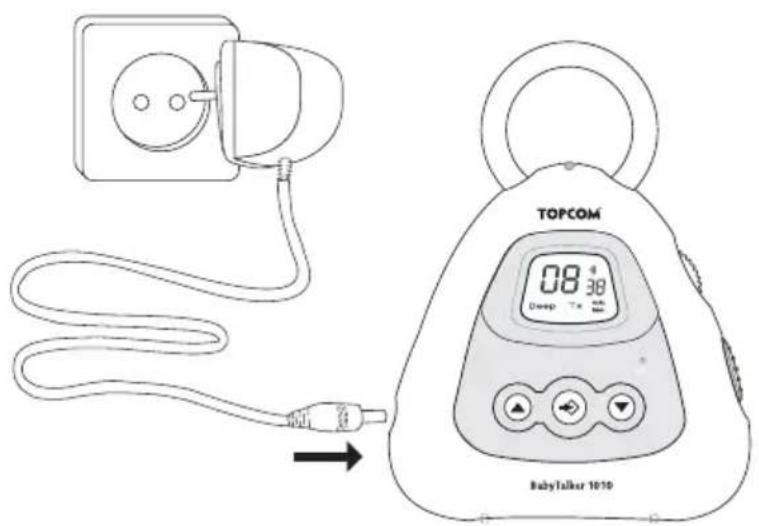
9.1.1 Using the power adapter
Plug one end of the adaptor (DC 10V/300mA) into the power outlet and the other end into the adapter jack on the side of the baby unit .7A click indicates, the jack is locked into position.
text_image
TOPCOM 08:38 Deep Tx BabyTalker 10109.1.2 Using batteries
text_image
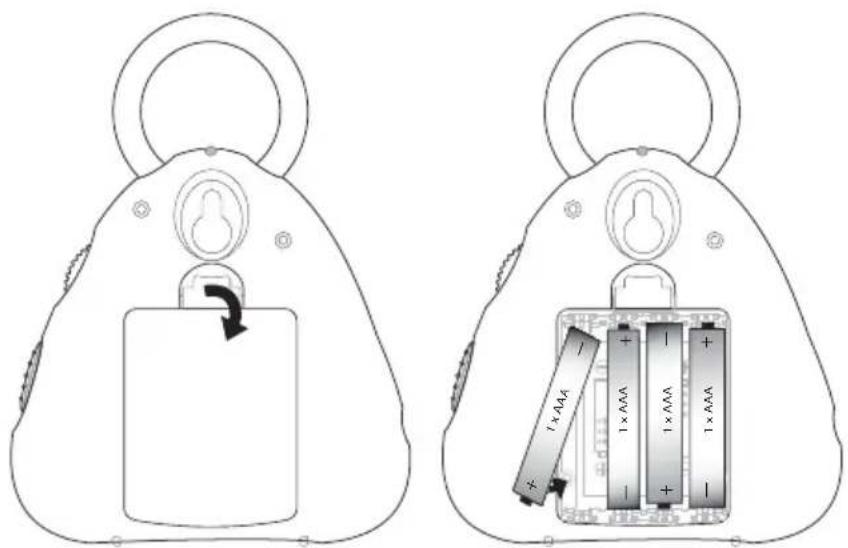
Diagram showing two views of a device with battery, battery pack, and charging cable labeled with power ratings (1×AAA) and charge values.Instead of using the power adapter, the baby unit can be powered by 'LR03' Alkaline (non-rechargeable) batteries.
1 Pull the battery cover tab and gently remove the battery cover.
2 Install 4 'AAA' 'LR03' alkaline batteries following the polarity as shown.
3 Re-install the Battery Cover
9.2 Parent unit
text_image
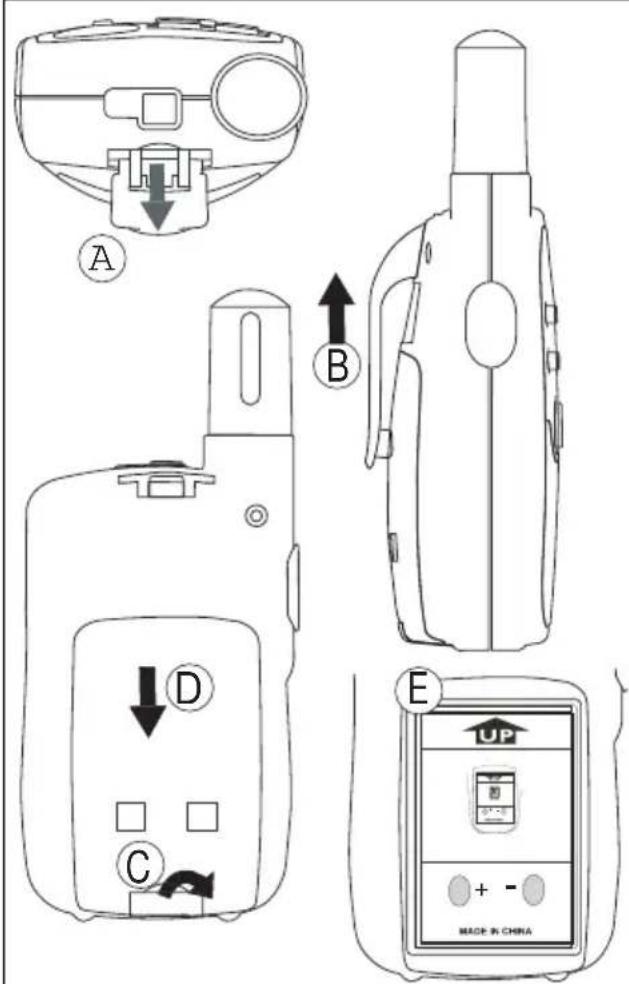
A B C D E UP + - MADE IN CHINA9.2.1 Removing/Installing the Belt Clip
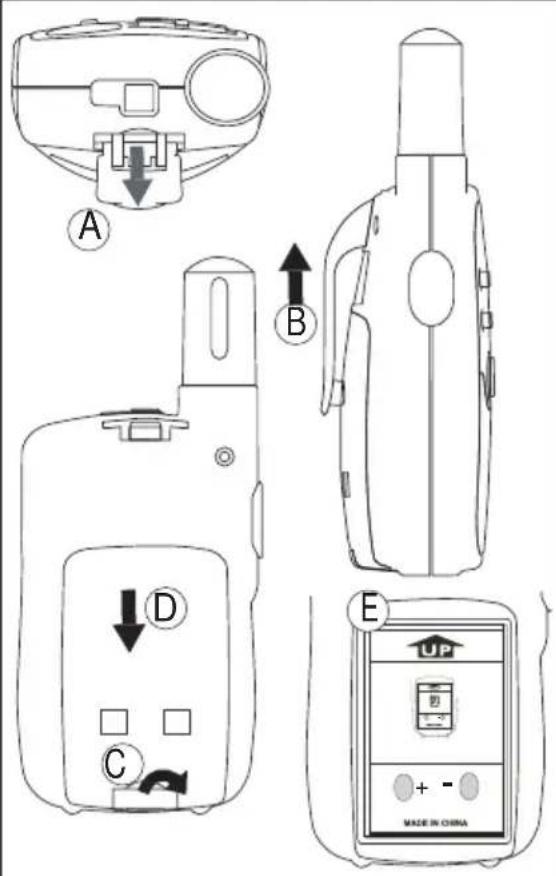
1 To remove the clip from the unit, push the belt clip (B) towards the antenna, while pulling the belt clip tab away from the unit (A).
2 When re-installing the belt clip, a click indicates the Belt Clip is locked into position.
9.2.2 Battery Installation
1 Remove the belt clip (See chapter 9.2.1).
2 Pull the battery door tab down (C) and slide the battery cover away from the antenna. (D)
3 Install the rechargeable battery pack following the polarity as shown. Ensure that the metal contacts on the site are facing outwards from the radio to connect on the battery door.(E)
4 Re-install the Battery Cover and Belt Clip (See chapter 9.2.1).
Note: Instead of the supplied battery pack, the PMR can be used with 3xAAA NiMh batteries. Follow the polarity as shown in the battery compartment when installing.
9.2.3 Recharging batteries
With the enclosed rechargeable battery pack or 3 x AAA NiMh rechargeable batteries (not supplied) installed, the batteries can be charged with the included charger(DC 7,5V / 200mA).

Only use the included AC/DC ADAPTER with "AAA" rechargeable batteries. Do not charge this unit when regular "AAA" 'LR03' alkaline batteries are installed. Do not connect other chargers. This may damage your device.
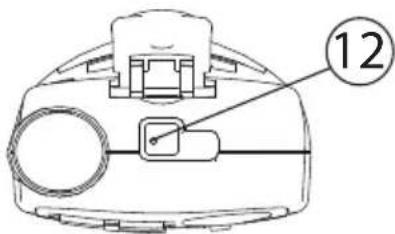
- Plug the small plug of the adapter into the charger jack on the top of the unit and the other end in the electrical socket.
- Make sure that the unit is switched off in order to charge the batteries properly.
text_image
12NOTE: It takes approximately 12 to 14 hours to fully charge the batteries (with 600mAh).
10 Supporting device for wall assembly
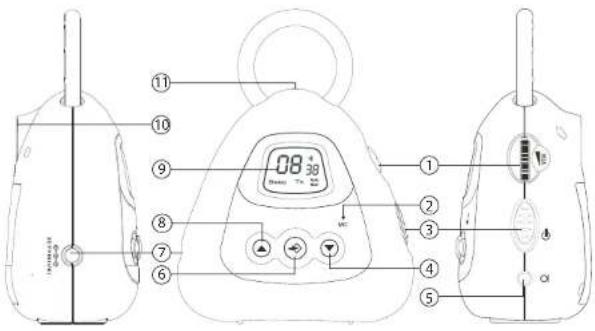
The baby unit is wall mountable. The appropriate screw is not supplied. Turn a 3mm screw into the wall. The screw head must be approx. 3 mm out of the wall so that the screw can be fixed correctly into the hang hole at the back of the baby unit. Hang the baby unit with its hang hole ⑩ carefully to this screw.
11 Battery Charge Level
The BATTERY CHARGE LEVEL in the Parent Unit, as well as in the Baby Unit is indicated by the number of squares present inside the BATTERY icon on the LCD Display.
- Battery Full
- Battery 2/3 charged
- Battery 1/3 charged
- Battery empty
12 Buttons
12.1 Baby unit
(See picture 1 on the folded cover page)
1 VOX sensitivity control
2 Microphone
3 On/Off switch
4 Menu down button: Select the previous value in the menu.
5 External microphone connector (microphone not included)
6 Menu button: Enter the setting menu
7 Power adapter connector
8 Menu up button - Select the next value in the menu.
9 LCD display
10 Hang hole for wall mounting
11 ON/OFF LED
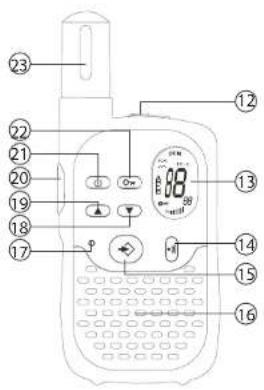
12.2 Parent unit
(See picture 2 on the folded cover page)
12 Charger connector
13 LCD display
14 Call button
15 Menu button - Enter the setting menu
16 Speaker
17 Microphone
18 Menu down button
– Decrease the speaker volume
- Select the previous value in the menu.
19 Menu up button ▲
- Select the next value in the menu.
– Increase the speaker volume
20 Push to talk button PTT
21 On/Off Button
22 Lock button
23 Antenna
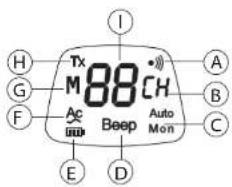
13 LCD Display information
13.1 Baby unit
(See picture 3 on the folded cover page)
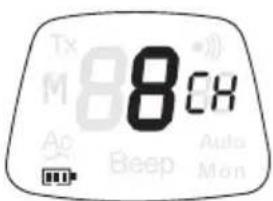
A Call Tones icon
B Channel indicator
C Auto monitor function icon
D Beep tone function icon
E Battery level indicator
F Power adapter connected icon
G Channel Memory indicator
H Transmission icon
I Channel/Memory channel number
13.2 Parent unit
(See picture 4 on the folded cover page)
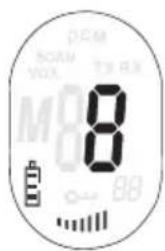
a Receive icon
b Channel/Memory channel number
c Key pad lock icon
d Speaker volume
e Battery level indicator
f Channel Memory indicator
g V O X i c o n
h SCAN icon
i Transmission icon
14 Turning the Babytalker 1010 ON/OFF
14.1 Baby unit
text_image
Tx M 8868 Ae Beep Auto MonTo turn ON:
- Set the On/Off switch
③to the top position (I), the LCD display channel or memory location.
will show the current channel or memory location.
To switch OFF
- Set the On/Off switch
③ to the bottom position (O), the LCD
display will turn blank.
14.2 Parent unit
text_image
DCM VOUT T3.0x M0 8 BBTo turn ON:
- Press and hold the
button
②The unit will "beep" and the ent channel.
LCD display will display the current channel.
To switch OFF
- Press and hold the
button
②The unit will "beep" and the
LCD display will turn blank.
15 Setting the Channel Memory
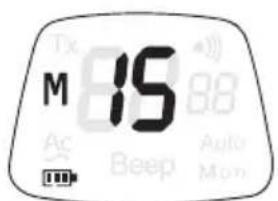
To have communication between the Baby Unit and the Parent unit they need to be set both on the same channel memory. 15 Channel Memories are available (See chapter 23).

Any PMR set on the corresponding channel can receive and listen to the conversation.
15.1 Baby unit
text_image
M 15 Ac Beep Auto Mon- Press the - button twice the current channel memory flashes on the display.
- Press the - button or the - button to change the channel memory.
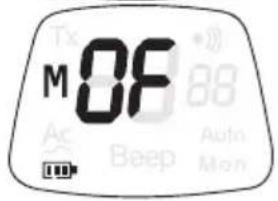
To disactivate the Channel Memory function, select OF
text_image
M0F 88 Auto Mon Beep- The unit will return to standby if no button is pressed within 5 seconds.
15.2 Parent unit
text_image
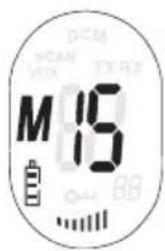
M 15 15- Press the - button twice, the current channel memory flashes on the display.
- Press the - button or the9 - button to change the channel memory.
To disactivate the Channel Memory function, select OF
- Press the - button to confirm and return to stand-by mode.
16 Adjusting the Baby Unit VOX sensitivity
The baby unit transmission is activated by the voice of the baby or by another sound in the environment (VOX).
The VOX sensitivity can be adjusted by turning the VOX sensitivity switch ①
- Up = Highest sensitivity position
- Down = Lowest sensitivity position

Try the VOX sensitivity and exercise sufficiently before using the Babytalker 1010.
17 Adjusting the Parent Unit Speaker Volume
text_image
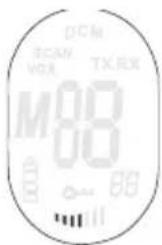
DCM SCANV VOLX TX,EX M00 00 88 111- Press the - button in stand-by-mode to increase the speaker volume. The volume level is displayed.
- Press the - button to decrease the speaker volume.
18 Beep tone ON/OFF
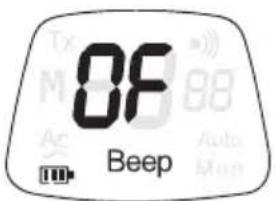
The Baby Unit can transmit automatically a 1 khz beep tone every 30 seconds when it is in the listening mode. This function can be used when you need to be sure that the babytalker is operational at all time.
text_image
0F Beep- Press the - button 3 times.
- Press the - button to enable (ON) or the - button to disable (OF) this function.
- Press the - button to confirm the selection.
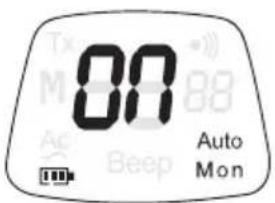
19 Automatic monitor ON/OFF
The Baby Unit can automatically open the microphone every 5 minutes and transmit the room activity for 5 seconds.
text_image
00 Auto Mon- Press the - button 4 times.
- Press the - button to enable (ON) or the - button to disable (OF) this function.
- Press the - button to confirm the selection.
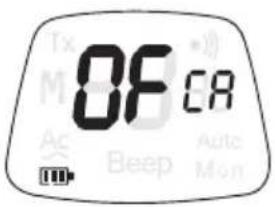
20 Alert Tone ON/OFF
The Baby Unit will send out an alert tone when you activate the VOX function. After the alert tone, it will transmit the detected voice signal.
text_image
08 CR Beep Auto Mon- Press the - button 5 times.
- Press the - button to enable (ON) or the - button to disable (OF) this function.
- Press the - button to confirm the selection.
21 Using the Parent unit as a PMR
Besided using the Parent unit as receiver for the Baby unit transmission, you can use it to communicate with other PMR (Private Mobile Radio) users which are on the same channel.
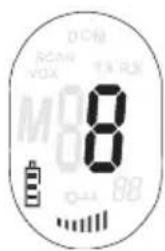
21.1 Changing Channels

To use the Parent Unit as a standard PMR, the Channel Memory function must be disactivated (See chapter 15.2) and the unit must be set to the same channel as your correspondent PMR.
text_image
DCM SCAN VOX THRX MO 8 0 04 88- Press the - button once15the current channel number flashes on the display.
- Press the - button or the - button to change the channel.
- Press the - button to confirm and return to stand-by mode.
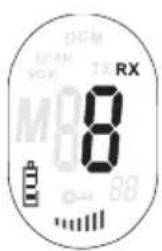
21.2 Receiving a Signal
text_image
DEM VCK TX RX 8 88The Parent Unit is continuously in RECEIVE mode when the unit is switched ON and not transmitting. When a signal is detected the RX icon will be displayed.
21.3 Transmitting a Signal
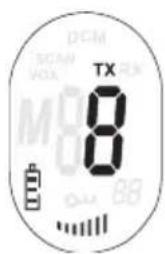
text_image
DCM 8 TX 8 88- Press and hold the - Button to TRANSMIT. The TX symbol is displayed.
- Hold the unit in a vertical position with the MICROPHONE 10cm from the mouth and speak into the microphone.
- Release the - button when you want to stop transmitting.

To check the channel activity use the monitor function (See chapter 21.6). Release and press the PTT - button ⑳ to restart transmitting.
21.4 VOX Selection
The PMR is capable of voice activated (VOX) transmission. In VOX mode, the radio will transmit a signal when it is activated by your voice or other sound around you. VOX operation is not recommended. If you plan to use your radio in a noisy or windy environment.
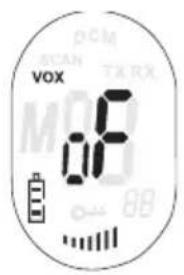
text_image
vox 08 DCM SCAN TX RX MOR 88- Press the - button 3 times, the current VOX setting flashes on the display and the VOX icon is displayed.
- Press the - button to turn the VOX feature ON press - button 1 again to select the VOX sensitivity level which displayed. Press the ▼ button until OF appears on the display, to turn VOX OFF.
- Press the - button to confirm and return to stand-by mode.
21.5 Call Tones
A call tone alerts others that you want to talk.
Press the • button briefly. The call tone will be transmitted for 3 seconds on the set channel.
21.6 Monitor
You can use the MONITOR feature to check for weaker signals in the current channel.
- Press and hold the - button and the - button for simultaneous for 3 seconds to activate channel monitoring.
- Press the - button to stop monitoring.
21.7 Channel Scan
CHANNEL SCAN performs searches for active signals in an endless loop from channel 1 to 8 including
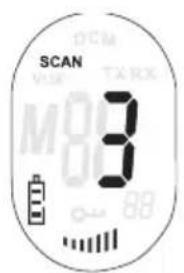
text_image
SCAN DCM VUM TARX M00 3 88- Press and hold the - button . Press the - button briefly to start scanning.
- Release the buttons.
- When an active signal (one of 8 channels) is detected, CHANNEL SCAN pauses and you will hear the active signal.
- Press the - button to communicate through the active signal channel.
- Press the - button to deactivate channel scan.
- Press the - button or the - button to bypass the current channel and continue to search for another active channel
21.8 Button Lock
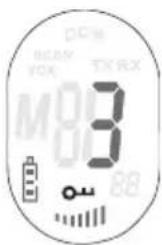
text_image
DCM BEAM VOC TX RX M83 00 88- Press and hold the - button for 3 seconds to activate the BUTTON LOCK mode. The BUTTON LOCK icon is displayed on the LCD Screen.
- Press and hold the - button again for 3 seconds to deactivate BUTTON LOCK
21.9 Display backlight
To activate the backlight of the LCD display press a button briefly.
The LCD backlight will light for 5 seconds.
22 Troubleshooting
| No power Clean the battery contacts with a soft cloth.Replace the batteries | |
| No transmission Make sure the PTT-button is pressed completely before you speak.Monitor the channel activity and switch to another channel if the current is used. | |
| No reception Check the speaker volumeMake sure that you are in the reception range of the sender and change if necessary your location | |
| Limited Range and noise during transmission | The talking range depends on the terrain.Steal constructions, concrete buildings or the use in vehicles have a bad influence on the range.Try to avoid as many obstacles as possible and communicate in a clear line of sight.Change your locations. |
| Interference The receiver and transmitter are to close. Themimimum distance between 2 units is 1,5m. | |
23 Technical specifications
| ChannelsSub-codeFrequencyRangeBatteriesTransmission PowerModulation TypeChannel spacingPower Adapter | 8CTCTSS446.00625MHz - 446.09375 MHzUp to 2 Km (Open field)Baby Unit: 4 x AAA ‘LR03’ Alkaline batteriesParent Unit: 4 x AAA rechargeable batteries=< 500mW ERPFM - F3E12,5 kHzBaby Unit: DC 10V/300mAParent Unit: DC 7,5V/200mA |
| Memory Location PMR channel Number CTCSS frequency | |
| M1 1 189,9Hz | |
| M2 2 189,9Hz | |
| M3 3 189,9Hz | |
| M4 4 189,9Hz | |
| M5 5 189,9Hz | |
| M6 6 189,9Hz | |
| M7 7 189,9Hz | |
| M8 8 189,9Hz | |
| M9 1 183,5Hz | |
| M10 2 183,5Hz | |
| M11 3 183,5Hz | |
| M12 4 183,5Hz | |
| M13 5 183,5Hz | |
| M14 6 183,5Hz | |
| M15 7 183,5Hz | |
24 Warranty
24.1 Warranty period
Topcom units have a 24-month warranty period. The warranty period starts on the day the new unit is purchased. Consumables or defects causing a negligible effect on operation or value of the equipment are not covered.
The warranty has to be proven by presentation of a copy of the original purchase receipt, on which the date of purchase and the unit-model are indicated.
24.2 Warranty handling
A faulty unit needs to be returned to an authorized service centre including a valid purchase note. If the unit develops a fault during the warranty period, the service centre will repair any defects caused by material or manufacturing faults free of charge.
The service centre will at its discretion fulfil its warranty obligations by either repairing or exchanging the faulty units or parts of the faulty units. In case of replacement, colour and model can be different from the original purchased unit.
The initial purchase date shall determine the start of the warranty period. The warranty period is not extended if the unit is exchanged or repaired by the appointed service centres.
24.3 Warranty exclusions
Damage or defects caused by incorrect treatment or operation and damage resulting from use of non-original parts or accessories are not covered by the warranty.
The warranty does not cover damage caused by outside factors, such as lightning, water and fire, nor any damage caused during transportation.
No warranty can be claimed if the serial number on the unit has been changed, removed or rendered illegal.
1 Inleiding
20 PUSH TO TALK-toets PTT
21 Aan/uit-knop
22 Vergrendeltoets
23 Antenne
20 PUSH TO TALK-toets PTT 21 Aan/uit-knop ⏻ 22 Vergrendeltoets ⏻ 23 Antenne
13 Informatie LCD-display
text_image
Diagram showing two battery components with labeled internal blocks and a directional arrow indicating rotation or movement.20 Bouton Push to talk PTT
21 Bouton On/Off
22 Bouton Lock
23 Antenne
text_image
Diagram showing two views of a device with battery and resistor, labeled with Chinese text indicating internal components.text_image
00 Auto Montext_image
OFCA8 Beep Auto Monnatural_image
Line drawing of a stylized bag with a handle and internal keyhole, no text or symbols present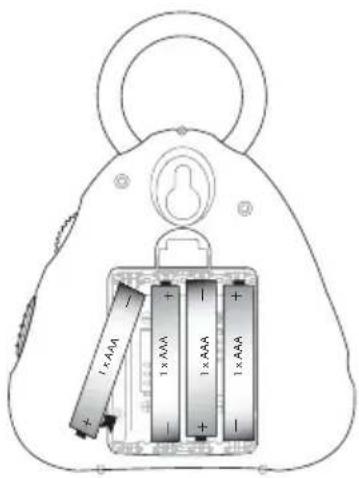
text_image
Diagram showing two views of a battery with labeled components and battery cells, including a 1×A/AAA battery model.text_image
DIM VIX TX HX 8 BBtext_image
Diagram showing two types of electronic devices with battery and battery pack, labeled with charge ranges (1×AAA, 1×AAA, 1×AAA)I stedet for at bruge strømadapteren kan babyenheden strømforsynes med 'LR03' alkaliske (ikke-genopladelige) batterier.
text_image
DCM NOAH VAX TX 8 M 0 0 0 0 0 0 0 0 0 0 0 0 0 0 0 0 0 0 0 0 0 0 0 0 0 0 0 0 0 0 0 0 0 0 0 0 0 0 0 0 0 0 0 0 0 0 0 0 0 0 1text_image
vox 0.0F SCAN TX RX 89text_image
Diagram showing two views of a battery lock mechanism with labeled components and battery pack layouttext_image
DEM S1AM VCK TXRX M88 00 88text_image
TX 8 8 8 8natural_image
Line drawing of a bag with a handle and internal mechanism (no text or symbols)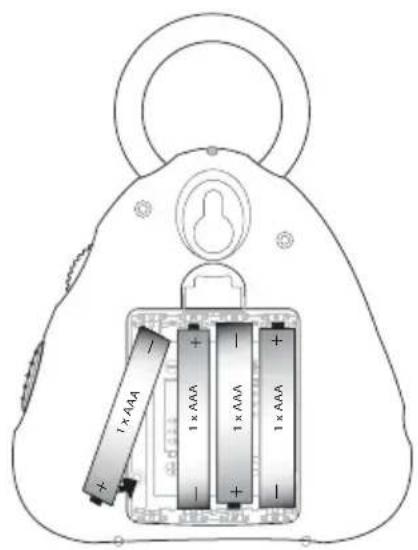
text_image
1 x AAA 1 x AAA 1 x AAA 1 x AAAtext_image
8 DCAM VCC VCK TX RX M 8 8Päälle kytkeminen:
text_image
M 15 SCAR VOL DSM TH RXtext_image
0F CA Ac Beep Auto Mentext_image
OCM SCAN VOX TX/RX M83 00 80natural_image
Line drawing of a mechanical lifting device with a handle and central lock (no text or symbols)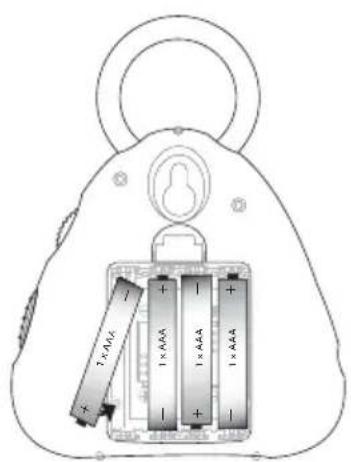
text_image
1×4A4A 1×4A4A 1×4A4A 1×4A4A9.2 Unità Genitore
text_image
A B C D E MADE IN CHINAtext_image
DC SCAN VOA TX 8 M 80text_image
TOPCOM 08 3 Hamp Tx RallyTalker 1010text_image
Diagram showing two views of a device with battery, battery pack, and charging module labeled in Chinese.9.2.3 Recarregar as baterias
text_image
M 15 OK OK OK OKtext_image
0F CA Beep Auto Mactext_image
Diagram showing two views of a device with battery and battery pack, labeled with power rating (1×AAA) and current direction arrow.5 External microphone connector (microphone not included)
text_image
M 15 NCOAN VOX TARA BBtext_image
Diagram showing two views of a device with battery, switch, and internal components labeled with charge ranges.text_image
8 Scan Yux TWA M 88 0.0000000000000000000000000000000000000000000000000000000000000000000000000000000000000000000text_image
OCM SCAN VOX TX 8 8 80text_image
Diagram showing two views of a device with battery and battery pack, labeled with charge values and polarity indicators.20 Lenyomva beszéd gomb PTT (Push To Talk) PTT
21 Be/Ki gomb
text_image
M 15 DCM VCK TARK ON ONnatural_image
Line drawing of a stylized bag with a handle and internal mechanism (no text or symbols)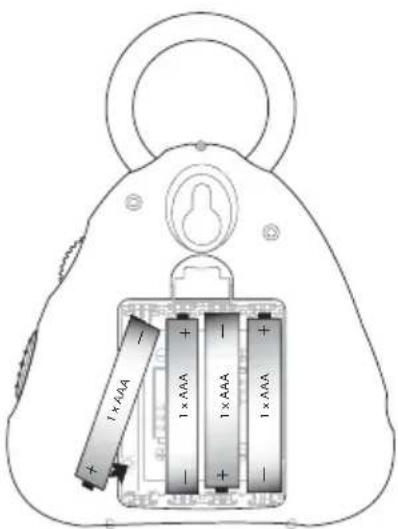
text_image
1 x AAA 1 x AAA 1 x AAA 1 x AAAtext_image
vox 0.8F PCM MCAN TXRX M BBtext_image
Diagram showing two views of a device with battery, switch, and battery pack labeled with power rating (1x AAA)text_image
DCM DCAM VOLX TX,EX M00 00 BBtext_image
vox 0F SCAN TX RX 88- Low Voltage Directive 73/23/EEC
- EMC Directive 89/336/EEC
- EN 300296-2 V1.1.1:2001
- EN 301489-01 V1.5.1:2004
- EN 301489-05 V1.3.1:2002
- EN 60950-1:2001
- EN 60950-1/A11:2004
Data: 06/07/2006
Kontakt: Topcom Europe Nv, department R&D, Research Park, Grauwmeer 17, 3001
Heverlee, Belgia. Tel: +32 16 398920, Fax: +32 16 398939
SERVICE RETURN CARD - RÜCKSENDEKARTE - CARTE DE RETOUR SERVICE - RETOURFICHE
RETURN WITH YOUR DEFECT PRODUCT
natural_image
Two identical rectangular frames with evenly spaced vertical lines inside, no text or symbols present.Location/Ort./Lieu/Plaats: Post code/Postleitzahl/Code Postal/Postcode:

natural_image
Two identical empty rectangular grids with no text, numbers, or symbolsCountry/Land/Pays/Land:
Tel./Tél.:
E-mail:
(Original Proof of Purchase has to be attached to this return card to be valid for warranty)