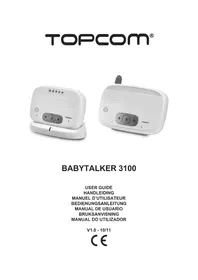
Babytalker 3100 KS4231 - Baby monitors TOPCOM - Free user manual and instructions
Find the device manual for free Babytalker 3100 KS4231 TOPCOM in PDF.



| Product Type | Baby monitor |
| Brand | Topcom |
| Model | Babytalker 3100 KS4231 |
| Technology | DECT with NEMo (No Emission Mode) |
| Frequency | 1.880 GHz to 1.900 GHz |
| Outdoor range | Up to 300 m |
| Indoor range | Up to 50 m |
| Parent unit power supply | Rechargeable NiMH battery 2.4 V (included) or AC adapter 6 V DC / 300 mA |
| Parent unit battery life | Approx. 10 hours charging for full use |
| Baby unit power supply | 3 AA alkaline batteries (LR06, not included) or AC adapter 6 V DC / 300 mA |
| Baby unit battery life | Varies depending on batteries |
| Parent unit dimensions | 117 x 62 x 72 mm |
| Baby unit dimensions | 137 x 60 x 101 mm |
| Parent unit weight | 98 g (without battery) |
| Baby unit weight | 141 g (without batteries) |
| Main functions | Two-way audio monitoring, built-in nightlight, link indicator, volume adjustment (6 levels), search function, adjustable NEMo mode |
| Safety | Use only the supplied adapter; do not cover the device; keep out of baby's reach; do not open the housing |
| Cleaning and maintenance | Wipe with a soft, slightly damp cloth; do not use solvents |
| Warranty | 24 months (excluding batteries and rechargeable battery) |
Frequently Asked Questions - Babytalker 3100 KS4231 TOPCOM
User questions about Babytalker 3100 KS4231 TOPCOM
0 question about this device. Answer the ones you know or ask your own.
Ask a new question about this device
Download the instructions for your Baby monitors in PDF format for free! Find your manual Babytalker 3100 KS4231 - TOPCOM and take your electronic device back in hand. On this page are published all the documents necessary for the use of your device. Babytalker 3100 KS4231 by TOPCOM.
USER MANUAL Babytalker 3100 KS4231 TOPCOM
UK The features described in this manual are published with reservation to modifications.
We request that you read this information in order to quickly become familiar with this equipment and learn how to use its functions.
2 Information Regarding This User Guide
This user guide contains information on the Babytalker 3100 babyphone (referred to as 'the equipment' in the following) and provides important instructions on the initial use, safety, proper use and maintenance of this equipment.
Always keep the user guide available near the equipment. Every person responsible for operating, repairing or cleaning the equipment must read and/or consult the user guide.
Keep this user guide in a safe place and give it to the next owner of the equipment.
3 Copyright
This document is protected by copyright legislation.
All rights are reserved, including rights of photo mechanical reproduction, copying or distribution using specific means such as data processing, data storage media or data networks, either in full or in part, as well as technical changes and changes to the contents.
4Warnings
DANGER
This warning points out an imminent hazardous situation.
Death or severe injuries may result if the hazardous situation cannot be avoided.
CAUTION
This warning points out a potentially hazardous situation.
Injuries and/or material damage may result if the hazardous situation cannot be avoided.

- This symbol points out information that makes it easier to use the equipment.
5 Proper use
This equipment is exclusively intended for private (non-professional) use in closed rooms for monitoring babies. All other forms of use are improper and can lead to hazards.
Always follow the instructions provided in this user guide.
No liability is accepted for any loss or damage resulting from improper use.
The user of the equipment is exclusively responsible for all risks.
6 Safety
6.1 Risk of Electric Shock
DANGER
Contact with conductors or components under electrical tension can be lethal.
Observe the following safety instructions in order to avoid the risk of electric shock:
- To avoid the risk of damage to the equipment, use only the AC mains adapter supplied with the equipment.
- Do not use the equipment if the AC mains adapter, the power cable or the plug is damaged.
- Never open the enclosure of the AC mains adapter. There is a risk of electric shock if you touch any contacts or connections under electrical tension or if you modify the electrical or mechanical construction.
- Protect the equipment against moisture and moisture penetration, and keep it free of dust. Unplug the AC mains adapter immediately in case of contact with moisture.
- Unplug the AC mains adapter in case of malfunctions, during thunderstorms, and when cleaning the equipment.
- Protect the cable against contact with hot surfaces or other sources of hazard, and do not allow it to be pinched.
6.2 Using Batteries (regular or rechargeable)
CAUTION
Failure to use batteries according to instructions can be hazardous. Always use batteries (regular or rechargeable) of the same type.
- Ensure that batteries are installed with correct polarity. Damage to the batteries and the equipment can result from installation with incorrect polarity.
- Never toss batteries into a fire, due to the risk of explosion.
- Never allow battery terminals to come into contact with each other or with metal objects, either intentionally or accidentally. This can cause overheating, fire or explosion.
- Keep batteries out of the reach of children. Consult a doctor immediately in case of swallowing.
- Fluid from leaking batteries can cause permanent damage to the equipment. Take particular care when handling damaged or leaking batteries, due to the risk of corrosion. Wear safety gloves.
- Remove the batteries if the equipment will not be used for an extended period.
6.3 General Rules for Safe Use
To ensure safe use of the equipment, always observe the following safety instructions:
- The equipment must always be assembled by an adult. During assembly, keep small parts out of the reach of children.
- Do not allow children to play with the equipment or parts of the equipment.
- Ensure that the babyphone and power cable are always out of the reach of the baby.
- Do not cover the babyphone with a towel, blanket, or the like.
- Defective components must always be replaced by original replacement parts, as other components may not fulfil the safety standards.
- Switch off your babyphone whenever this is requested by a sign, poster, or other message. The equipment used in hospitals and other health care facilities may be sensitive to high-frequency signals from external sources.
6.4 No emission mode (NEMo)
This babyphone (complying with the DECT standard) allows NEMo operation (No emission mode). The baby unit reduces its transmitting power according to the distance from the parent unit during communication. The baby & parent unit handset reduces its radio output to zero if the babyunit doesn't receive any sound.
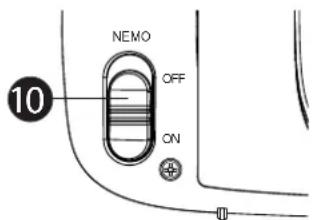
This does not mean that the normal DECT radiation is harmful to health, but that NEMo mode avoids unnecessary radiation exposure. You can turn the NEMo function on/off by a switch 10t the back of the babyunit (see"9.4 NEMo Switch Setting")
7 Operation
The babyphone consists of two units: one for the parents and one for the baby. They are connected by a wireless link compliant with the DECT standard.
Thanks to DECT technology, this equipment is protected against eavesdropping and immune to interference from other equipment.
The baby unit starts transmitting as soon as the microphone picks up a sound. The sound is reproduced by the parent unit. The microphone sensitivity can be adjusted by the user (see "").
i
- The babyphone can never replace proper supervision by an adult; it only provides support.
7.1 Baby Unit Components
See Figure on the fold-out page.
1 Night light
7 Battery cover closing screw
2 Power LED
8 Connector for AC mains adapter
3 Night light button
9 Fixing clips
4 On/Off switch
10 NEMO radiation switch
5 Paging button

6 Microphone
7.2 Parent Unit Components
See Figure on the fold-out page.
11 Volume LEDs
17 Power LED
12 Loudspeaker
18 Belt/wall fastening clip
13 Link LED
19 Battery compartment cover
14 Increase volume
20 Charging indicator
15 On/Off switch
21 AC mains adapter
16 Decrease volume / Previous menu

8 Initial use
8.1 Package Contents
The equipment is supplied as standard with the following items:
-1 baby unit
-1userguide
-1 parent unit
-1 service card
-1 charging station
- 1 NiMH rechargeable battery pack
-2AC mains adapters
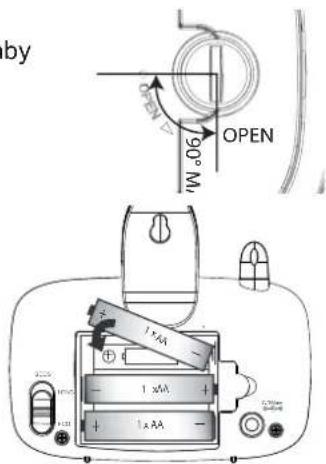
8.2 Installing Batteries in the Baby Unit
See Figure on the fold-out page.

- You can operate the baby unit with three AA cells (LR06/Mignon; we recommend alkaline cells) or the included AC mains adapter.
- The baby unit cannot recharge batteries.
-
It is recommended to always leave the batteries in the unit, even if you use the AC mains adapter. The unit will automatically switch to battery power in case of a mains power interruption.
-
Rotate the belt clip 9ward.
- Turn the screw on the cover of the battery compartment ⑦ the back of the baby unit 90^ counterclockwise and remove the battery compartment cover.

-
Do not turn the screw past the 'Open' point.
-
Fit three AA alkaline cells (LR06/Mignon) in the battery compartment. Ensure that the polarity is correct.
- Close the battery compartment.

- Never mix used cells with fresh cells.
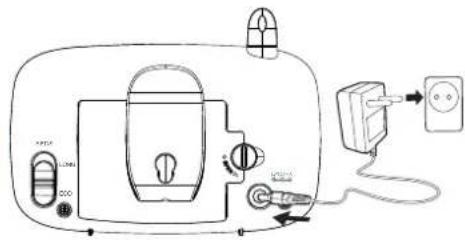
8.3 Connecting the Baby Unit to the AC Mains
Insert the small plug of the AC mains adapter in the mains power connector of the baby unit 8nd plug the AC mains adapter into a mains connector (230 V / 50 Hz).
CAUTION
- The mains connector must be within easy reach so you can quickly unplug the power cable in an emergency.
- Use only the supplied AC mains adapter (6 V DC / 300 mA).
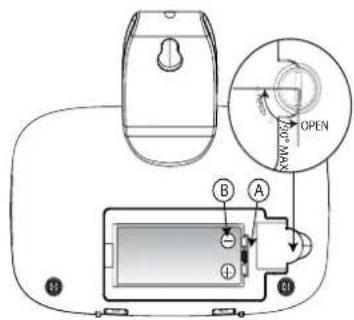
8.4 Installing Rechargeable Batteries in the Parent Unit
See Figure on the fold-out page.
CAUTION
-
Use only the supplied NiMH battery pack in the parent unit.
-
Rotate the belt clip 18ward.
- Turn the screw on the cover of the battery compartment at the back of the parent unit 90^ counterclockwise and remove the battery compartment cover.
i
-
Do not turn the screw past the 'Open' point.
-
Place the NiMH battery pack in the battery compartment. Ensure that the tab of the battery pack fits in the corresponding recess and that the polarity matches the figure (B).
- Carefully close the battery compartment and rotate the belt clip back downward.
8.5 Installing the Parent Unit charging cradle
- Insert the small plug of the AC mains adapter in the mains power connector 21the charging station and plug the AC mains adapter into a mains connector (230 V / 50 Hz).
- Place the parent unit in the charging station. The red Charging LED 201 go on.
i
- It takes around 10 hours to fully charge the batteries.
9 Operation and Use
9.1 Switching the Baby Unit and Parent Unit On and Off
- Press the On/Off switch
15 switch on the parent unit. The power LED will lit
- Press the On/Off switch
4vch on the baby unit. The power LED will li2
i
-
The parent unit will try to establish a connection with the baby unit. If the Link LED goes on, a connection has been established. If it does not, see below.
-
Press the On/Off switch
15vitch on the parent unit. The power LED will g17out. - Press the On/Off switch
To 4vitch off the baby unit. The power LED will g2out.
9.2 Checking the Link Between the Parent Unit and the Baby Unit
You should always check the wireless link when you use the babyphone for the first time.
Put the parent unit in the same room as the baby unit, separated by at least two metres.
- Switch on both devices. The parent unit will try to establish a connection with the baby unit.
- The green Link LED 13 the parent unit blinks while it is trying to establish a connection.
If NEMo mode is turned OFF (see "9.4 NEMo Switch Setting"): The LED 13 stays on continuously after a connection has been established.
If NEMo mode is turned ON: The green link LED 13 on Parent Units will flash until they communicate. Once the link is established, the LED 13 will light continuously. After a while, when the baby unit doesn't capture any sound, the LED 13 will flash every 5 seconds because the baby unit stops the transmission.
- The sounds picked up by the microphone 6e reproduced by the parent unit.
- The volume of the reproduced sound is indicated by the volume LEDs ① the top of the parent unit.
The higher the volume, the more LEDs are on. - An audible tone is generated when the maximum volume is reached.
- If no connection is established, a double beep tone is generated as a warning and the Link LED 1inks.
- Reduce the distance between the parent and baby units until a new connection is established.
9.3 Finding the Parent Unit (Paging function)
- Press the Paging button 5 baby unit and hold it pressed for at least 2 seconds before releasing it.
- In response, the parent unit will emit a high-pitched tone for 30 seconds. This makes it easier to find the parent unit.
- Briefly press the On/Off switch on 15e parent unit to switch off the tone.
9.4 NEMo Switch Setting
The Babbtalker 3100 is based on the unique NEMo technology, which lets parents set the radiated power of the equipment. See "6.4 No emission mode (NEMo)".
| i | ·If NEMo is turned ON and the baby unit picks up noise, it will take about 3 seconds before the parent unit will turn on the speaker. |
If you want to have a quicker response you can turn the NEMo function OFF. By turn
OFF the NEMo function you will have always communication between the baby-and parent unit (even when there is no noise).
To turn it ON/OFF:
- Turn off both parent- and baby unit.
- Slide the switch to ON or OFF at the back of baby unit.
- Power up both units (no need to concern which unit first)
9.5 Setting the Reproduction Volume of the Parent Unit
There are six volume settings.
- Press button i25rease the volume.
- Press button 023crease the volume.
When you set the volume at the lowest setting the speaker will be turned off. Only the volume LED's will lit when noise is captured by the baby unit.
| i | ·If volume is turned off and maximum volume is captures by the baby unit, you will hear a short beep to indicate this. |
9.6 Switching the Night Light On and Off
- You can switch the night light on and off directly on the baby unit by pressing button

10 Cleaning and Maintenance
This section contains important instructions for cleaning and maintaining the equipment.
Follow these instructions to ensure trouble-free use and prevent damage to the equipment due to improper maintenance.
10.1 Safety Instructions
DANGER
Risk of fatal injury due to electric shock!
- Before cleaning the equipment, switch it off and unplug the power cable from the mains receptacle.
CAUTION
Risk due to leaking battery fluid
Fluid from leaking batteries (regular or rechargeable) can cause injuries (skin irritation) or damage to the equipment. Wear safety gloves.
CAUTION
- Do not use cleaning products or solvents. They can damage the case or seep into the equipment and cause permanent damage.
10.2 Cleaning
- Clean the equipment with a soft, slightly dampened cloth.
- Clean soiled connectors and contacts with a soft brush.
- Clean the battery contacts and battery compartment with a dry, lint-free cloth.
- If the equipment gets wet, switch it off and remove the batteries immediately.
Wipe the battery compartment dry with a soft cloth in order to minimise potential water damage.
Leave the battery compartment open until it is completely dry.
Do not use the equipment before it is completely dry.
10.3 Maintenance
- Check the batteries (regular or rechargeable) in the equipment regularly and replace them when necessary.
- Check the connectors and cables for defects.
CAUTION
If you suspect that the equipment is damaged, always have it checked by an expert before using it again.
11 Troubleshooting
This section provides important instructions for localising and correcting problems.
Follow these instructions in order to avoid hazards and damage.
11.1 Safety Instructions
DANGER
Risk of fatal injury due to electric shock!
- Unplug the power cable before attempting to correct a problem.
CAUTION
Risk of hazard due to incorrect repairs
Incorrect repairs can expose users to serious hazards and cause damage to the equipment.
- Never attempt to modify or repair the equipment.
- Always have repairs to equipment or cables performed by a specialist or the service centre.
- If you suspect that the equipment is damaged (for example, if it has fallen on the floor), have it checked by a specialist before you use it again.
11.2 Problem Causes and Solutions
The following table is intended to help you localise and solve minor problems.
| Problem Possible cause Solution | ||
| The rechargeable battery pack of the parent unit does not charge | Charging station plug not connected Connect plug | |
| Dirty contacts Clean the battery terminals | as and charging station contacts with a soft cloth | |
| The rechargeable battery pack is defective | Replace the battery pack | |
| Parent unit does not switch on | The rechargeable battery pack is not charged | Charge the battery pack |
| Equipment defective Contact customer | service | |
| ‘NOT LINKED’ appears on the parent unit display | Baby unit not switched on Switch on the baby unit | baby unit |
| The parent unit and baby unit are too far apart | Reduce the distance between the parent unit and the baby unit | |
| The parent unit is not registered with the baby unit | Register the parent unit with the baby unit (see “11.3 Registering the Parent Unit with the Baby Unit”) | |
| The parent unit does not reproduce the sounds picked up by the baby unit | The volume setting of the parent unit may be too low or switched off. | Increase the volume setting of the parent unit |
| Short sounds are not heard Turn off the NEMo function | NEMo function | |
| Limited range and interference during transmission | The range of the equipment depends on the surroundings. Steel structures and concrete walls can impair transmission. | Avoid obstacles as much as possible. |
| The equipment emits a high-pitched whistle | The parent unit and baby unit are too close together | Increase the distance to at least 2 metres |
11.3 Registering the Parent Unit with the Baby Unit
If the night light of the baby unit blinks and/or no connection can be established between the parent unit and the baby unit (blinking green LED 13n the parent unit), the parent unit needs to be registered with the baby unit.
| i | ·Check that the AC mains adapter of the baby unit is connected and plugged into a mains receptacle and that the batteries in the parent unit are charged. |
- Unplug the AC mains adapter of the baby unit from the mains receptacle and remove the batteries from the parent unit.
- Press the On/Off switch 4 the baby unit and hold it pressed while plugging the AC mains adapter into the mains receptacle.
The baby unit will start up in registration mode.
- Release the On/Off switch 4the night light of the baby unit will blink for 60 seconds.
- Press the On/Off switch 15 the parent unit and hold the button pressed while installing the batteries.
The parent unit will start up and the 1 volume -the power at link-LED will link. Release the On/Off switch 15
- Registration mode ends after successful registration or after 60 seconds.
The night light of the baby unit will stop blinking;
The LEDs of the parent unit will go off. - You will hear a long beep when registration is successful or three short beeps if it is not.
Checking the link between the parent unit and the baby unit:
- Press and hold the Paging button 5 in the baby unit for 2 seconds.
- In response, the parent unit will emit a high-pitched tone for 30 seconds.
- Briefly press the On/Off switch 15 the parent unit to switch off the tone.
12 Storage and Disposal Instructions
| i | ·We recommend that you keep the box and packing materials so you can use them to transport the equipment in the future if necessary. |
12.1 Storage
Remove the batteries (regular or rechargeable) from the parent unit and the baby unit.
Store the equipment in a dry location.
12.2 Waste Disposal of Package Materials

The package materials are environmentally friendly materials that can be given to your local waste collector for recycling.
12.3 Waste Disposal (environmental protection)
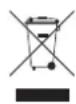
Disposal of the equipment in accordance with the provisions of European Directive 2002/96/EC, Waste Electrical and Electronic Equipment (WEEE), regarding discarded electrical and electronic equipment. Contact your municipal waste disposal department for information.
Dispos of batteries (regular or rechargeable) in an environmentally friendly manner in accordance with local regulations.
13 Technical data
| Frequency 1880 GHz to 1900 GHz | |
| Range Outdoors: up to 300 m | Indoors: up to 50 m |
| Operating temperature 15 °C to 35 °C | 20 % to 75 % relative humidity |
| Parent unit | |
| Rechargeable batteries Battery pack (2,4 V) | NiMH) (included) |
| AC mains adapter (5E-AD060030-E) | Input: 230 V AC / 50 Hz / 150 mA Output: 6 V DC / 300 mA |
| Dimensions approx. 117 x 62 x 72 mm | |
| Weight 98 g (without rechargeable batteries) | |
| Baby unit | |
| Batteries 3 alkaline cells (LR06/AA) (not included) | |
| AC mains adapter (5E-AD060030-E) Input: | 230 V AC / 50 Hz / 150 mA Output: 6 V DC / 300 mA |
| Dimensions approx. 137 x 60 x 101 mm | |
| Weight 141 g (without batteries) | |
14 EC Conformity Declaration
TOPCOM EUROPE NV hereby declares that this device is in compliance with the essential requirements and other relevant provisions of Directive 1999/5/EC.
The declaration of conformity can be found at http://www.topcom.net/cedeclarations.asp
15 Topcom Warranty
15.1 Warranty period
The Topcom units have a 24-month warranty period. The warranty period starts on the day the new unit is purchased. There is no warranty on standard or rechargeable batteries (AA/AAA type).
Consumables or defects causing a negligible effect on operation or value of the equipment are not covered. The warranty has to be proven by presentation of the original or copy of the purchase receipt, on which the date of purchase and the unit-model are indicated.
15.2 Warranty exclusions
Damage or defects caused by incorrect treatment or operation and damage resulting from use of non-original parts or accessories are not covered by the warranty.
The warranty does not cover damage caused by outside factors, such as lightning, water and fire, nor any damage caused during transportation.
No warranty can be claimed if the serial number on the units has been changed, removed or rendered illegible. Any warranty claims will be invalid if the unit has been repaired, altered or modified by the buyer.
1 Allgemeines
Activation/Désactivation :


- Information Regarding This User Guide
- Copyright
- 4Warnings
- DANGER
- CAUTION
- Proper use
- Safety
- Risk of Electric Shock
- Using Batteries (regular or rechargeable)
- General Rules for Safe Use
- No emission mode (NEMo)
- Operation
- Baby Unit Components
- Parent Unit Components
- Initial use
- Package Contents
- Installing Batteries in the Baby Unit
- Connecting the Baby Unit to the AC Mains
- Installing Rechargeable Batteries in the Parent Unit
- i
- Installing the Parent Unit charging cradle
- Operation and Use
- Switching the Baby Unit and Parent Unit On and Off
- Checking the Link Between the Parent Unit and the Baby Unit
- Finding the Parent Unit (Paging function)
- NEMo Switch Setting
- Setting the Reproduction Volume of the Parent Unit
- Switching the Night Light On and Off
- Cleaning and Maintenance
- Safety Instructions
- Cleaning
- Maintenance
- Troubleshooting
- Safety Instructions
- Problem Causes and Solutions
- Registering the Parent Unit with the Baby Unit
- Storage and Disposal Instructions
- Storage
- Waste Disposal of Package Materials
- Waste Disposal (environmental protection)
- Technical data
- EC Conformity Declaration
- Topcom Warranty
- Warranty period
- Warranty exclusions
- Allgemeines
Brand : TOPCOM
Model : Babytalker 3100 KS4231
Category : Baby monitors