
SEMJ7NC - Earphones PIONEER - Free user manual and instructions
Find the device manual for free SEMJ7NC PIONEER in PDF.



| Product type | Stereo headphones with active noise reduction |
| Brand | Pioneer |
| Model | SEMJ7NC |
| Speaker | Rare earth magnet ø 40 mm |
| Maximum input | 100 mW |
| Impedance | 24 Ω (ON), 52 Ω (OFF) |
| Sensitivity | 103 dB (ON1), 100 dB (OFF) |
| Frequency response | 20 Hz to 20,000 Hz |
| Noise reduction | 15 dB or more (at 300 Hz) |
| Power supply | 2 AAA batteries (3 V) |
| Battery life (alkaline batteries) | Approximately 20 hours |
| Battery life (manganese batteries) | Approximately 8 hours |
| Cord | Detachable unilateral 1.5 m + extension 3.5 m |
| Weight | Approximately 200 g (without cord and batteries) |
| Included accessories | Airplane adapter, 6.3 mm adapter, case, 2 AAA batteries |
| Functions | Active noise reduction, SRS Surround |
| Switch | OFF / ON1 (noise reduction) / ON2 (noise reduction + surround) |
| Construction | Foldable, closed ear cups, adjustable headband |
| Maintenance | Clean with soft cloth, avoid solvents |
| Safety | Do not expose to water, open flame |
| Repairability | Consult dealer or Pioneer center |
Frequently Asked Questions - SEMJ7NC PIONEER
User questions about SEMJ7NC PIONEER
0 question about this device. Answer the ones you know or ask your own.
Ask a new question about this device
Download the instructions for your Earphones in PDF format for free! Find your manual SEMJ7NC - PIONEER and take your electronic device back in hand. On this page are published all the documents necessary for the use of your device. SEMJ7NC by PIONEER.
USER MANUAL SEMJ7NC PIONEER
WRA1103A EN. fm Page 1 Monday, March 12, 2007 12:52 PM
Pioneer SE-MJ7NC
natural_image
Line drawing of a pair of outdoor headphones (no text or symbols)Operating Instructions Mode d'emploi Bedienungsanleitung Istruzioni per l'uso Manual de instrucciones
Gebruiksaanwijzing Manual de instruções Bruksanvisning Οδηγίες λειτουργίας Çalıştırma Talimatları
Bruksanvisning Provozní pokyny Használati Útmutató Návod na obsluhu Инструкция по эксплуатации Instrukcja obsługi
natural_image
Pure geometric diagram with intersecting lines and circles, no text or symbols present
natural_image
Pure geometric diagram with intersecting lines and circles, no text or symbols present
natural_image
Pure geometric diagram with intersecting lines and shapes, no text or symbols present

WRA1103A EN. fm Page 2 Monday, March 12, 2007 12:52 PM


If you want to dispose this product, do not mix it with general household waste. There is a separate collection system for used electronic products in accordance with legislation that requires proper treatment, recovery and recycling.
Private households in the member states of the EU, in Switzerland and Norway may return their used electronic products free of charge to designated collection facilities or to a retailer (if you purchase a similar new one).
For countries not mentioned above, please contact your local authorities for the correct method of disposal.
By doing so you will ensure that your disposed product undergoes the necessary treatment, recovery and recycling and thus prevent potential negative effects on the environment and human health.
K05B_En
Information to User
Alteration or modifications carried out without appropriate authorization may invalidate the user's right to operate the equipment. D8-10-2_En
WARNING
This equipment is not waterproof. To prevent a fire or shock hazard, do not place any container filed with liquid near this equipment (such as a vase or flower pot) or expose it to dripping, splashing, rain or moisture. D3-4-2-1-3_A_En
Operating Environment
Operating environment temperature and humidity: +5 °C to +35 °C (+41 °C to +95 °F); less than 85 %RH (cooling vents not blocked) Do not install this unit in a poorly ventilated area, or in locations exposed to high humidity or direct sunlight (or strong artificial light) D3-4-2-1-7c_A_En
WARNING
To prevent a fire hazard, do not place any naked flame sources (such as a lighted candle) on the equipment. D3-4-2-1-7a_A_En
This product complies with the EMC Directive 2004/108/EC.
WARNING
Do not use or store batteries in direct sunlight or other excessively hot place, such as inside a car or near a heater. This can cause batteries to leak, overheat, explode or catch fire. It can also reduce the life or performance of batteries. D3-4-2-3-3 En
D3-4-2-3-3 En
This product is for general household purposes. Any failure due to use for other than household purposes (such as long-term use for business purposes in a restaurant or use in a car or ship) and which requires repair will be charged for even during the warranty period. K041_En
When disposing of used batteries, please comply with governmental regulations or environmental public instruction's rules that apply in your country/area. D3-4-2-3-1_En

is a registered trademark of SRS Labs, Inc.
SRS Headphones technology is licensed from SRS Labs, Inc.

natural_image
Pure geometric diagram with intersecting lines and circles, no text or symbols present
WRA1103A EN. fm Page 3 Monday, March 12, 2007 12:52 PM
natural_image
Pure geometric diagram with intersecting lines and circles, no text or symbols presentMain Features
Supports noise canceling + surround to enjoy a wide range of sound sources, from music to movies.
- Equipped with active noise canceling function to reduce noise to 1/5th (300 Hz) normal levels.
• Equipped with SRS Headphone surround function, optimum for watching in-flight movies, etc.
Switchable between "noise canceling" and "noise canceling + surround"
- Power can also be turned off for use as conventional headphones.
Large-diameter unit closed type headphones for powerful sound experience
- 40 mm large-diameter unit with high-coercivity rare-earth magnets.
Easy-to-use, easy-to-store design
- Fold-up design for easy storage in a supplied pouch.
- Includes volume control
• Supports detachable one-side cord
• In flight plug adapter - 6.3 mm 3P plug adapter
- Detachable 1.5 m single-sided cable. 3.5 m extension cable.
Regarding noise-canceling
This feature reduces ambient noise (in-flight airframe noise, bus or other vehicular noise, indoor air-conditioner noise, etc.) to 1/5th normal levels, allowing high-quality sound even in such ambient noises. As a result, the need to raise sound volume to excessive levels is reduced.
Set Contents
Confirm the presence of all parts and components before use.
- Headphones• Connection cord
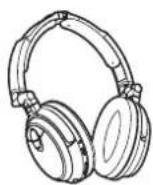
- In flight plug adapter
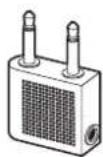
- Storage pouch

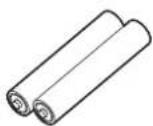
• AAA alkaline batteries (2) (for confirming operation)
(ø 3.5 mm 3P mini- plug ↔ ø 3.5 mm L- type 3P mini-plug) 1.5 m x 1 3.5 m x 1
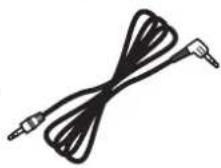
Use the two cords as required depending on the conditions.
- 6.3 mm plug adapter

- Operating Instructions

WRA1103A EN. fm Page 4 Monday, March 12, 2007 12:52 PM
natural_image
Pure geometric diagram with intersecting lines and circles, no text or symbols presentNames and Functions of Parts
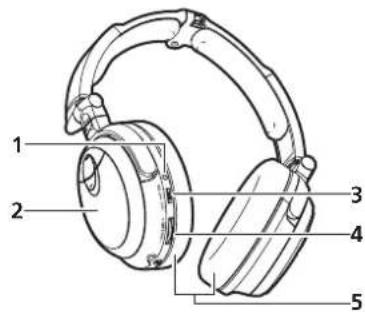
1 Power indicator
Lights when power is turned on.
2 Battery cover
Slide to open the cover.
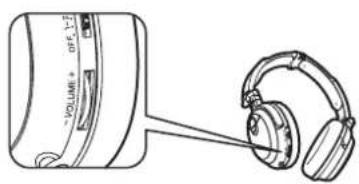
3 Power switch
Provided with three positions:
OFF, ON1 (noise canceller on), ON2 (noise canceller + SRS surround on)
4 VOLUME control dial
Rotate to adjust sound volume.
5 E a r p a d s
Inserting Batteries
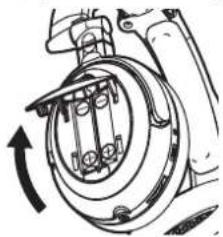
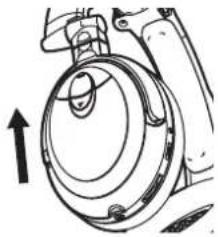
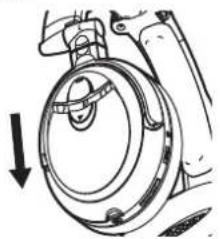
1 Press and slide open the battery cover on the left headphone cover as shown in the illustration.
2 Insert batteries, taking care to align their ⊕ and ⊖ polarities correctly.
natural_image
Mechanical diagram showing a rotating component with no visible text or symbols3 Close the battery cover and slide back to its original position.
natural_image
Technical line drawing of a mechanical component with an upward arrow indicating motion (no text or symbols)When to replace batteries
When batteries become expended, the power indicator will become darker, and sound will appear distorted, with greater than normal amounts of noise. Always replace both batteries simultaneously. When the headphones are in continuous operation, nominal battery life will be as follows:
AAA Alkaline batteries: About 20 hours
AAA Manganese batteries: About 8 hours (Battery life may vary depending on surrounding temperatures and other conditions of use.)
natural_image
Mechanical diagram showing a rotating component with a downward arrow indicating motion (no text or symbols)
natural_image
Pure geometric diagram with intersecting lines and circles, no text or symbols present

WRA1103A EN. fm Page 5 Monday, March 12, 2007 12:52 PM
Using the Headphones
To protect your ears from damage, always rotate the volume dial of the headphones or your music device to its lowest position before wearing the headphones.
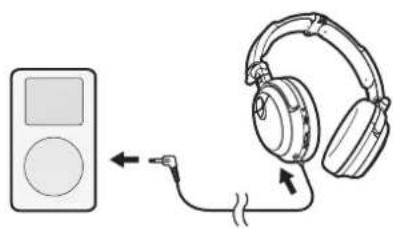
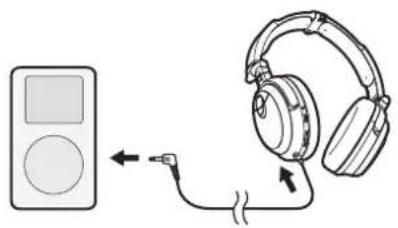
1 Attach one end of the furnished connection cord to the headphones, and the other end to your music playback device.
natural_image
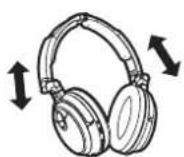
Diagram showing a music player connected to an audio headset via cable (no text or symbols)2 Adjust the length of the headband as you place the headphones over your head.
Place the (R) housing over your right ear, and the (L) housing over your left ear.
3 Use the VOLUME control dial to adjust the sound volume.
The sound volume can be adjusted even when the power switch is set to OFF.
natural_image
Line drawing of a device connected to an earphone (no text or symbols present)
Note
- When disconnecting the cord, pull on the plug, not the cord.
- When connecting the headphones to an airline onboard audio system, use the supplied plug adapter (the adapter may not comply with the systems used on some airlines).
- Do not use with airline onboard sound systems under the following conditions:
- Whenever the cabin crew announces that electronic devices are prohibited.
- When the use of privately owned headphones is prohibited inside the plane.
- When not using the headphones, set the power switch to OFF.
Normal headphones use
1 Set the headphones' power switch to OFF.
Music can be heard even when the power switch is set to OFF. Sound will be produced in conventional 2-channel stereo playback, but the noise-canceller and SRS surround effects will not function.
Noise canceller
1 Set the headphones' power switch to ON1.
The green power indicator will light, and sound will be heard in 2-channel stereo playback. The noise canceller function will operate, reducing the effect of environmental noise and allowing you to listen at a sound volume lower than that used when the power switch is set to OFF.
natural_image
Pure geometric diagram with intersecting lines and circles, no text or symbols present


WRA1103A EN. fm Page 6 Monday, March 12, 2007 12:52 PM
natural_image
Pure geometric diagram with intersecting lines and circles, no text or symbols presentNoise canceller + SRS surround ^*1 function
1 Set the headphones' power switch to ON2.
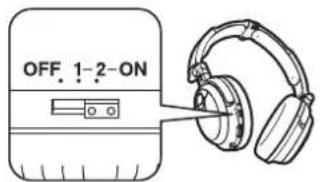
The green power indicator will light, and both the noise canceller and SRS surround functions will operate.
*1 The SRS surround function utilizes SRS HEADPHONE technology developed by SRS Labs, Inc., (USA) to reproduce headphone sound with a greater sense of three-dimensional realism. When using headphones equipped with SRS HEADPHONE technology, music is not focused on the center of the head, but is reproduced with a greater sense of natural expanse.

Note
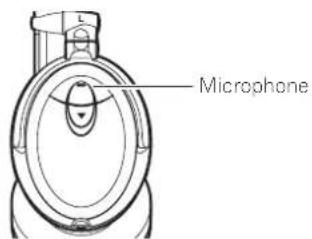
- The noise-canceller function is designed to reduce noise primarily in the low-frequency range, and is not effective at reducing high-frequency noise. - If the headphones' microphone is covered with your hand or other object, feedback may be caused, resulting in a "howling" sound. In this case, remove your hand or other obstruction from the microphone.
- The effectiveness of the noise canceller function may vary depending on the way in which the headphones are worn.
After use
1 Set the power switch to OFF.
Sound can still be heard from the headphones when the power switch is set to OFF, but the noise-canceller function will not operate to lower environmental noise.
Storing the headphones
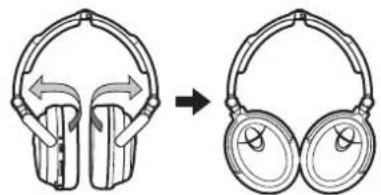
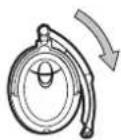
When not in use, store the headphones as shown below.
1 Reverse the direction of the ear pads.
natural_image
Diagram showing the change in headband from front to side (no text or symbols present)2 Fold the headband as shown.
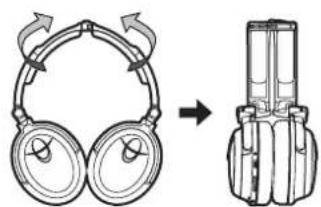
natural_image
Diagram showing a pair of headphones transforming into a multi-chamber device (no text or symbols present)3 Fold the headband as shown to align with the ear pads.
natural_image
Pure geometric diagram with intersecting lines and circles, no text or symbols present

WRA1103A EN. fm Page 7 Monday, March 12, 2007 12:52 PM
natural_image
Pure geometric diagram with intersecting lines and circles, no text or symbols presentTroubleshooting
If you suspect a malfunction, perform the following checks, since a simple operating error may be the cause of the problem. The problem may also be caused by factors other than the headphones themselves, so be sure to check the sound components with which the headphones are used.
If the problem persists after making the following checks, consult your dealer or nearest Pioneer Service Station.
Problem Remedy
| No sound. • Check connection between headphones and AV system component. • Confirm that power is turned on to the AV component. • Adjust the output sound volume on the AV component. • Adjust the sound volume on the headphones. | |
| Sound is distorted. • Lower the sound volume on the connected AV component. • Replace the headphone batteries. | |
| Power won't turn on. • Replace the headphone batteries. • Check that batteries are installed correctly (are ⊕ and ⊖ polarities correct?). | |
| Feedback sound (howling). • If you are covering the microphone part of the headphone with your hand, remove your hand. | |
| Noise canceller produces no effect. | • Set the power switch to position ON1 or ON2 (power indicator lights green). |
Precautions
- Do not subject headphones to dropping, striking, or other severe impacts, since damage may result.
• To ensure high quality sound reproduction, keep the plug clean by wiping occasionally with a soft clean cloth. A dirty plug may cause degradation of sound quality or interruption of sound production.
Environmental conditions
- Avoid leaving the headphones in the following places:
– Automobiles with closed windows, other locations exposed to direct sunlight, or nearby heating appliances or places exposed to high heat. - Places exposed to high concentrations of dust.
- Places exposed to high humidity.


WRA1103A EN. fm Page 8 Monday, March 12, 2007 12:52 PM
natural_image
Pure geometric diagram with intersecting lines and circles, no text or symbols presentAbout use of headphones
When the sound volume is raised excessively, sound may leak and bother persons nearby; avoid excessive sound volumes. In locations exposed to high levels of noise, it is common to raise the sound volume to compensate for surrounding noise, but to ensure safety, the volume should not be raised so high that you cannot hear sounds of danger or warning.
Ear pads
The headphones' ear pad material may degrade or decompose after extended use or storage.
Cleaning and care
Keep the headphones clean by wiping occasionally with a soft cloth. In the event of severe soiling, dip a clean cloth in a weak solution of neutral detergent, wring the cloth, and wipe gently. Never use thinner, benzene, alcohol or other chemical cleaners since they will deform the surface material.
In event of malfunction
• In the event of a malfunction, or if a foreign object becomes lodged in the headphones, immediately turn off the power and consult your dealer or Pioneer Service Station.
- When taking your headphones to your dealer or Pioneer Service Station for service, be sure to bring both the headphones and connection cord.
Other information
This product has been designed to reduce noise and enhance your listening experience. It has not been designed for pilot use or for in-flight communications as designated by the FAA. Do not use this product for purposes other than those for which it was designed.
Specifications
Type.....Closed dynamic Speaker unit ..... 40 mm rare-earth magnet Maximum input.....100 mW Impedance ..... 24 Ω (ON), 52 Ω (OFF) Sensitivity ..... 103 dB (ON1), 100 dB (OFF) Frequency response ..... 20 Hz to 20 000 Hz Noise suppression... 15 dB or more (at 300 Hz) Driver units..... 40 mm ø Cord..... Detachable 1.5 m single-sided cable, 3.5 m extension cable Power..... DC 3 V (AAA battery x 2) Weight..... about 200 g (not including cord or batteries)
Accessories
In flight plug adapter....1
ø 6.3 mm plug adapter ....1
Connection cord (ø 3.5 mm 3P mini-plug ↔ ø 3.5 mm L-type 3P mini-plug)
1.5 m....1
3.5 m....1
AAA alkaline batteries....2
Storage pouch....1
Operating Instructions 1

Note
- The appearance and specifications of this product are subject to change without notice.
Published by Pioneer Corporation.
Copyright © 2007 Pioneer Corporation.
All rights reserved.
8
En

natural_image
Pure geometric diagram with intersecting lines and circles, no text or symbols present
WRA1103A EN.fm Page 9 Monday, March 12, 2007 12:52 PM


WRA1103A FR.fm Page 2 Monday, March 12, 2007 8:24 PM


natural_image
Pure geometric diagram with intersecting lines and circles, no text or symbols present
WRA1103A FR.fm Page 3 Monday, March 12, 2007 8:24 PM
natural_image
Pure geometric diagram with intersecting lines and circles, no text or symbols presentWRA1103A FR.fm Page 4 Monday, March 12, 2007 8:24 PM
natural_image
Pure geometric diagram with intersecting lines and circles, no text or symbols presentnatural_image
Mechanical diagram showing a rotating component with no visible text or symbolsnatural_image
Technical line drawing of a mechanical component with an upward arrow indicating motion (no text or symbols)natural_image
Mechanical diagram showing a rotating component with a downward arrow indicating motion (no text or symbols)
natural_image
Pure geometric diagram with intersecting lines and circles, no text or symbols present
WRA1103A FR.fm Page 5 Monday, March 12, 2007 8:24 PM
natural_image
Diagram showing a music player connected to an audio headset via cable (no text or symbols)natural_image
Line drawing of a vintage electronic device connected to an earphone (no text or symbols present)Remarque
natural_image
Pure geometric diagram with intersecting lines and circles, no text or symbols present

WRA1103A FR.fm Page 6 Monday, March 12, 2007 8:24 PM
natural_image
Pure geometric diagram with intersecting lines and circles, no text or symbols presentnatural_image
Diagram showing the change in headband from left to right (no text or symbols present)natural_image
Pure geometric diagram with intersecting lines and circles, no text or symbols present

WRA1103A FR.fm Page 7 Monday, March 12, 2007 8:24 PM
natural_image
Pure geometric diagram with intersecting lines and circles, no text or symbols presentGuide de dépannage
natural_image
Pure geometric diagram with intersecting lines and circles, no text or symbols present

WRA1103A FR.fm Page 8 Monday, March 12, 2007 8:24 PM
natural_image
Pure geometric diagram with intersecting lines and circles, no text or symbols presentPublication de Pioneer Corporation. © 2007 Pioneer Corporation.
natural_image
Pure geometric diagram with intersecting lines and a central circular pattern (no text or symbols)
WRA1103A FR.fm Page 9 Monday, March 12, 2007 8:24 PM

WRA1103A GE.fm Page 2 Friday, March 30, 2007 4:37 PM


WRA1103A GE.fm Page 3 Friday, March 30, 2007 4:37 PM
natural_image
Pure geometric diagram with intersecting lines and circles, no text or symbols presentWichtigste Merkmale
natural_image
Pure geometric diagram with intersecting lines and circles, no text or symbols present
WRA1103A GE.fm Page 4 Friday, March 30, 2007 4:37 PM
- Tragetasch
1 Einschaltanzeige
natural_image
Mechanical component diagram showing a rotating wheel with a downward arrow indicating motion (no text or symbols)natural_image
Mechanical diagram showing a rotating component with a curved arrow indicating rotation (no text or symbols)natural_image
Technical line drawing of a mechanical component with an upward arrow indicating motion (no text or symbols)
4
Ge
natural_image
Pure geometric diagram with intersecting lines and circles, no text or symbols present
natural_image
Pure geometric diagram with intersecting lines and circles, no text or symbols present

WRA1103A GE.fm Page 5 Friday, March 30, 2007 4:37 PM
natural_image
Pure geometric diagram with intersecting lines and circles, no text or symbols presentnatural_image
Line drawing of a device connected to an earphone (no text or symbols present)
natural_image
Diagram showing a music player connected to an audio headset via cable (no text or symbols)
natural_image
Pure geometric diagram with intersecting lines and circles, no text or symbols present
WRA1103A GE.fm Page 6 Friday, March 30, 2007 4:37 PM
natural_image
Pure geometric diagram with intersecting lines and circular shapes, no text or symbols presentHinweis
natural_image
Pure geometric diagram with intersecting lines and circles, no text or symbols present
WRA1103A GE.fm Page 7 Friday, March 30, 2007 4:37 PM
natural_image
Pure geometric diagram with intersecting lines and circles, no text or symbols presentHinweis
natural_image
Diagram showing the change in headear from front to side (no text or symbols present)natural_image
Pure geometric diagram with intersecting lines and circles, no text or symbols present

WRA1103A GE.fm Page 8 Friday, March 30, 2007 4:37 PM
natural_image
Pure geometric diagram with intersecting lines and circles, no text or symbols presentStörungsbeseitigung
natural_image
Pure geometric diagram with intersecting lines and circular shapes, no text or symbols present
WRA1103A GE.fm Page 9 Friday, March 30, 2007 4:37 PM
© 2007 Pioneer Corporation.
WRA1103A IT.fm Page 2 Monday, March 12, 2007 12:54 PM


natural_image
Pure geometric diagram with intersecting lines and circles, no text or symbols present
WRA1103A IT.fm Page 3 Monday, March 12, 2007 12:54 PM
natural_image
Pure geometric diagram with intersecting lines and circles, no text or symbols presentWRA1103A IT.fm Page 4 Monday, March 12, 2007 12:54 PM
natural_image
Pure geometric diagram with intersecting lines and circles, no text or symbols presentnatural_image
Mechanical diagram showing a rotating component with a downward arrow indicating motion (no text or symbols)natural_image
Mechanical diagram showing a rotating component with directional arrow (no text or symbols)natural_image
Technical line drawing of a mechanical component with an upward arrow indicating motion (no text or symbols)natural_image
Pure geometric diagram with intersecting lines and circles, no text or symbols present
WRA1103A IT.fm Page 5 Monday, March 12, 2007 12:54 PM
Uso della cuffia
natural_image
Diagram showing a music player connected to an audio headset via cable (no text or symbols)natural_image
Line drawing of a portable electronic device connected to an earphone (no text or symbols visible)
Nota
natural_image
Pure geometric diagram with intersecting lines and circles, no text or symbols present
natural_image
Pure geometric diagram with intersecting lines and circles, no text or symbols present

WRA1103A IT.fm Page 6 Monday, March 12, 2007 12:54 PM
natural_image
Pure geometric diagram with intersecting lines and circles, no text or symbols presentnatural_image
Diagram showing the change in headband from left to right (no text or symbols present)natural_image
Diagram showing a headband device being converted into a device (no text or symbols present)natural_image
Pure geometric diagram with intersecting lines and circles, no text or symbols present
WRA1103A IT.fm Page 7 Monday, March 12, 2007 12:54 PM
natural_image
Pure geometric diagram with intersecting lines and circles, no text or symbols presentDiagnostica
natural_image
Pure geometric diagram with intersecting lines and circles, no text or symbols present


WRA1103A IT.fm Page 8 Monday, March 12, 2007 12:54 PM
natural_image
Pure geometric diagram with intersecting lines and circles, no text or symbols presentUso della cuffia
Copyright © 2007 Pioneer Corporation.
natural_image
Pure geometric diagram with intersecting lines and circles, no text or symbols present
WRA1103A IT.fm Page 9 Monday, March 12, 2007 12:54 PM


WRA1103A SP.fm Page 2 Friday, March 30, 2007 4:37 PM


WRA1103A SP.fm Page 3 Friday, March 30, 2007 4:37 PM
natural_image
Pure geometric diagram with intersecting lines and circles, no text or symbols presentnatural_image
Pure geometric diagram with intersecting lines and circles, no text or symbols present

WRA1103A SP.fm Page 4 Friday, March 30, 2007 4:37 PM
natural_image
Mechanical diagram showing a rotating component with a downward arrow indicating motion (no text or symbols)natural_image
Mechanical diagram showing a rotating component with arrows indicating rotation direction (no text or symbols)
natural_image
Pure geometric diagram with intersecting lines and circles, no text or symbols present
natural_image
Pure geometric diagram with intersecting lines and circles, no text or symbols present

WRA1103A SP.fm Page 5 Friday, March 30, 2007 4:37 PM
natural_image
Pure geometric diagram with intersecting lines and circles, no text or symbols presentnatural_image
Technical line drawing of a mechanical component with an upward arrow indicator (no text or symbols)natural_image
Illustration of an audio recording device connected to a pair of headphones (no text or symbols present)Español
natural_image
Pure geometric diagram with intersecting lines and circles, no text or symbols present
WRA1103A SP.fm Page 6 Friday, March 30, 2007 4:37 PM
natural_image
Pure geometric diagram with intersecting lines and circular shapes, no text or symbols present
Nota
natural_image
Pure geometric diagram with intersecting lines and circles, no text or symbols present

WRA1103A SP.fm Page 7 Friday, March 30, 2007 4:37 PM
natural_image
Diagram showing a pair of headphones with rotating arms and a side-view illustration of the same device (no text or symbols)natural_image
Pure geometric diagram with intersecting lines and circles, no text or symbols presentEspañol
natural_image
Diagram showing the change in headband design from front to side view, with no text or symbols present.
natural_image
Pure geometric diagram with intersecting lines and circles, no text or symbols present

WRA1103A SP.fm Page 8 Friday, March 30, 2007 4:37 PM
natural_image
Pure geometric diagram with intersecting lines and circles, no text or symbols presentnatural_image
Pure geometric diagram with intersecting lines and circles, no text or symbols present

WRA1103A SP.fm Page 9 Friday, March 30, 2007 4:37 PM
natural_image
Pure geometric diagram with intersecting lines and circles, no text or symbols presentnatural_image
Pure geometric diagram with intersecting lines and circles, no text or symbols present


WRA1103A DU.fm Page 2 Monday, March 12, 2007 8:25 PM


WRA1103A DU.fm Page 3 Monday, March 12, 2007 8:25 PM
natural_image
Pure geometric diagram with intersecting lines and circles, no text or symbols presentHoofdkenmerken
WRA1103A DU.fm Page 4 Monday, March 12, 2007 8:25 PM
natural_image
Pure geometric diagram with intersecting lines and circles, no text or symbols presentnatural_image
Mechanical component diagram showing a rotating wheel and adjustment arrow (no text or symbols)natural_image
Mechanical diagram showing a rotating component with no visible text or symbolsnatural_image
Technical line drawing of a mechanical component with an upward arrow indicator (no text or symbols)
natural_image
Pure geometric diagram with intersecting lines and circles, no text or symbols present
WRA1103A DU.fm Page 5 Monday, March 12, 2007 8:25 PM
natural_image
Illustration of an audio recording device connected to a pair of headphones (no text or symbols present)natural_image
Line drawing of a vintage earphone connected to a pair of headphones (no text or symbols present)Nederlands
WRA1103A DU.fm Page 6 Monday, March 12, 2007 8:25 PM
natural_image
Pure geometric diagram with intersecting lines and circles, no text or symbols present
Opmerking
natural_image
Pure geometric diagram with intersecting lines and circles, no text or symbols present

WRA1103A DU.fm Page 7 Monday, March 12, 2007 8:25 PM
natural_image
Diagram showing the change in headband composition before and after, with no text or symbols present.
natural_image
Pure geometric diagram with intersecting lines and circles, no text or symbols present

natural_image
Pure geometric diagram with intersecting lines and circles, no text or symbols present

WRA1103A DU.fm Page 8 Monday, March 12, 2007 8:25 PM
natural_image
Pure geometric diagram with intersecting lines and circles, no text or symbols presentnatural_image
Pure geometric diagram with intersecting lines and circles, no text or symbols present

WRA1103A DU.fm Page 9 Monday, March 12, 2007 8:25 PM
natural_image
Pure geometric diagram with intersecting lines and circles, no text or symbols presentCopyright © 2007 Pioneer Corporation.
WRA1103A PO.fm Page 2 Monday, March 12, 2007 8:25 PM


WRA1103A PO.fm Page 3 Monday, March 12, 2007 8:25 PM
natural_image
Pure geometric diagram with intersecting lines and circles, no text or symbols presentWRA1103A PO.fm Page 4 Monday, March 12, 2007 8:25 PM
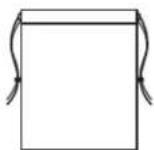
• Bolsade armazenamento
natural_image
Mechanical component diagram showing a rotating wheel assembly with a downward arrow indicating motion (no text or symbols)natural_image
Mechanical diagram showing a rotating component with no visible text or symbols
natural_image
Pure geometric diagram with intersecting lines and circles, no text or symbols present
natural_image
Pure geometric diagram with intersecting lines and circles, no text or symbols present
WRA1103A PO.fm Page 5 Monday, March 12, 2007 8:25 PM
natural_image
Pure geometric diagram with intersecting lines and circles, no text or symbols presentnatural_image
Mechanical component diagram showing a rotating wheel assembly with an upward arrow indicator (no text or symbols present)natural_image
Diagram showing a computer monitor connected to an audio headset via a cable (no text or symbols present)natural_image
Line drawing of a pair of headphones connected to a device (no text or symbols present)Português
natural_image
Pure geometric diagram with intersecting lines and circles, no text or symbols present
WRA1103A PO.fm Page 6 Monday, March 12, 2007 8:25 PM
natural_image
Pure geometric diagram with intersecting lines and circles, no text or symbols presentNota
natural_image
Pure geometric diagram with intersecting lines and circles, no text or symbols present

WRA1103A PO.fm Page 7 Monday, March 12, 2007 8:25 PM
natural_image
Diagram showing a pair of headphones rotating around a device, with no visible text or symbols.natural_image
Diagram showing the change in headband design from front to side view, with no text or symbols present.
natural_image
Pure geometric diagram with intersecting lines and circles, no text or symbols presentPortuguês
natural_image
Pure geometric diagram with intersecting lines and circles, no text or symbols present

WRA1103A PO.fm Page 8 Monday, March 12, 2007 8:25 PM
natural_image
Pure geometric diagram with intersecting lines and circles, no text or symbols presentDetecção de avarias
natural_image
Pure geometric diagram with intersecting lines and circles, no text or symbols present

WRA1103A PO.fm Page 9 Monday, March 12, 2007 8:25 PM
natural_image
Pure geometric diagram with intersecting lines and circles, no text or symbols presentWRA1103A SW.fm Page 2 Friday, March 30, 2007 4:38 PM


natural_image
Pure geometric diagram with intersecting lines and circles, no text or symbols present
WRA1103A SW.fm Page 3 Friday, March 30, 2007 4:38 PM
natural_image
Pure geometric diagram with intersecting lines and circles, no text or symbols presentHuvudegenskaper
WRA1103A SW.fm Page 4 Friday, March 30, 2007 4:38 PM
natural_image
Pure geometric diagram with intersecting lines and circles, no text or symbols present1 Driftindikator
OFF, ON1 (brusreducering på), ON2
(brusreducering + SRS surroundljud på)
4 Ljudnivåkontroll (VOLUME)
natural_image
Mechanical diagram showing a rotating component with a downward arrow indicating motion (no text or symbols)natural_image
Mechanical diagram showing a rotating component with no visible text or symbolsnatural_image
Technical line drawing of a mechanical component with an upward arrow indicating motion (no text or symbols)natural_image
Pure geometric diagram with intersecting lines and circular shapes, no text or symbols present

WRA1103A SW.fm Page 5 Friday, March 30, 2007 4:38 PM
natural_image
Pure geometric diagram with intersecting lines and circles, no text or symbols presentnatural_image
Illustration of an electronic device connected to a pair of headphones, showing ear and cable connection (no text or symbols)
Observera
natural_image
Pure geometric diagram with intersecting lines and circles, no text or symbols present

WRA1103A SW.fm Page 6 Friday, March 30, 2007 4:38 PM
natural_image
Pure geometric diagram with intersecting lines and circles, no text or symbols presentFunktion för brusreducering + SRS surroundljud\*1
natural_image
Diagram showing the change in headband from left to right (no text or symbols present)natural_image
Pure geometric diagram with intersecting lines and circles, no text or symbols present

WRA1103A SW.fm Page 7 Friday, March 30, 2007 4:38 PM
natural_image
Pure geometric diagram with intersecting lines and circles, no text or symbols presentFelsökning
natural_image
Pure geometric diagram with intersecting lines and circles, no text or symbols present

WRA1103A SW.fm Page 8 Friday, March 30, 2007 4:38 PM
natural_image
Pure geometric diagram with intersecting lines and circles, no text or symbols presentnatural_image
Pure geometric diagram with intersecting lines and circles, no text or symbols present
WRA1103A SW.fm Page 9 Friday, March 30, 2007 4:38 PM

WRA1103A GR.fm Page 2 Monday, March 12, 2007 8:26 PM


WRA1103A GR.fm Page 3 Monday, March 12, 2007 8:26 PM
natural_image
Pure geometric diagram with intersecting lines and circles, no text or symbols presentWRA1103A GR.fm Page 4 Monday, March 12, 2007 8:26 PM
natural_image
Mechanical diagram showing a rotating component with a downward arrow indicating motion (no text or symbols)natural_image
Mechanical diagram showing a rotating component with a curved arrow indicating rotation (no text or symbols present)natural_image
Pure geometric diagram with intersecting lines and circles, no text or symbols present
natural_image
Pure geometric diagram with intersecting lines and circular shapes, no text or symbols present
WRA1103A GR.fm Page 5 Monday, March 12, 2007 8:26 PM
natural_image
Mechanical component diagram showing a rotating wheel and housing (no text or symbols)natural_image
Diagram showing a CD player connected to an ear of headphones (no text or symbols present)natural_image
Pure geometric diagram with intersecting lines and circles, no text or symbols present
natural_image
Pure geometric diagram with intersecting lines and circles, no text or symbols present
WRA1103A GR.fm Page 6 Monday, March 12, 2007 8:26 PM
natural_image
Line drawing of a vintage-style earphone connected to a pair of headphones (no text or symbols present)
Σημείωση
natural_image
Pure geometric diagram with intersecting lines and circles, no text or symbols present
natural_image
Pure geometric diagram with intersecting lines and circles, no text or symbols present
WRA1103A GR.fm Page 7 Monday, March 12, 2007 8:26 PM

Σημείωση
natural_image
Diagram showing the change in headband design from front to side view (no text or symbols present)natural_image
Diagram showing a pair of headphones with rotating arms and a device with a rectangular component, both without any text or symbols.natural_image
Pure geometric diagram with intersecting lines and circles, no text or symbols present
natural_image
Pure geometric diagram with intersecting lines and circles, no text or symbols present
Ανίχνευση λαθών
WRA1103A GR.fm Page 9 Monday, March 12, 2007 8:26 PM
natural_image
Pure geometric diagram with intersecting lines and circular shapes, no text or symbols presentWRA1103A TU.fm Page 2 Monday, March 12, 2007 1:00 PM


natural_image
Pure geometric diagram with intersecting lines and circles, no text or symbols present
WRA1103A TU.fm Page 3 Monday, March 12, 2007 1:00 PM
natural_image
Pure geometric diagram with intersecting lines and circles, no text or symbols presentTemel Özellikler
WRA1103A TU.fm Page 4 Monday, March 12, 2007 1:00 PM
natural_image
Pure geometric diagram with intersecting lines and circles, no text or symbols present1 Güç göstergesi
natural_image
Mechanical assembly diagram showing a rotating component with no visible text or symbolsnatural_image
Technical line drawing of a mechanical component with an upward arrow indicating motion (no text or symbols)natural_image
Mechanical diagram showing a rotating component with a downward arrow indicating motion (no text or symbols)
natural_image
Pure geometric diagram with intersecting lines and circles, no text or symbols present
WRA1103A TU.fm Page 5 Monday, March 12, 2007 1:00 PM
Kulaklık Kullanımı
natural_image
Illustration of an audio recording device connected to a pair of headphones (no text or symbols present)natural_image
Line drawing of a device connected to an earphone (no text or symbols present)Not
natural_image
Pure geometric diagram with intersecting lines and circles, no text or symbols present
Tu

natural_image
Pure geometric lines and circles without any text, numbers, or symbols

WRA1103A TU.fm Page 6 Monday, March 12, 2007 1:00 PM
natural_image
Pure geometric diagram with intersecting lines and circles, no text or symbols presentnatural_image
Diagram showing the change in headband from left to right (no text or symbols present)natural_image
Diagram showing a pair of headphones with rotating arms and a device with a base, illustrating the concept of mechanical or electronic components (no text or symbols present)natural_image
Pure geometric diagram with intersecting lines and circles, no text or symbols present
WRA1103A TU.fm Page 7 Monday, March 12, 2007 1:00 PM
natural_image
Pure geometric diagram with intersecting lines and circles, no text or symbols presentSorun giderme
natural_image
Pure geometric lines and circles without any text, numbers, or symbols
WRA1103A TU.fm Page 8 Monday, March 12, 2007 1:00 PM
natural_image
Pure geometric diagram with intersecting lines and circles, no text or symbols presentGüç....DC 3 V (AAA pil x 2)
Telif Hakki © 2007 Pioneer Corporation.
natural_image
Pure geometric diagram with intersecting lines and circles, no text or symbols present
WRA1103A TU.fm Page 9 Monday, March 12, 2007 1:00 PM

WRA1103A NO.fm Page 2 Friday, March 30, 2007 4:38 PM


natural_image
Pure geometric diagram with intersecting lines and circles, no text or symbols present
natural_image
Pure geometric diagram with intersecting lines and circles, no text or symbols present
WRA1103A NO.fm Page 3 Friday, March 30, 2007 4:38 PM
natural_image
Pure geometric diagram with intersecting lines and circles, no text or symbols presentHovedfunksjoner
WRA1103A NO.fm Page 4 Friday, March 30, 2007 4:38 PM
natural_image
Pure geometric diagram with intersecting lines and circles, no text or symbols present1 Strømindikator
natural_image
Mechanical diagram showing a rotating component with no visible text or symbolsnatural_image
Technical line drawing of a mechanical component with an upward arrow indicating motion (no text or symbols)natural_image
Mechanical component diagram showing a rotating wheel assembly with a downward arrow indicator (no text or symbols present)
natural_image
Pure geometric diagram with intersecting lines and circles, no text or symbols present

WRA1103A NO.fm Page 5 Friday, March 30, 2007 4:38 PM
natural_image
Pure geometric diagram with intersecting lines and circles, no text or symbols presentnatural_image
Illustration of an electronic device connected to a pair of headphones, showing ear and ear connections (no text or symbols)natural_image
Line drawing of a portable electronic device connected to a pair of headphones (no text or symbols visible)Merknad
natural_image
Pure geometric diagram with intersecting lines and circles, no text or symbols present

WRA1103A NO.fm Page 6 Friday, March 30, 2007 4:38 PM
natural_image
Pure geometric diagram with intersecting lines and circles, no text or symbols presentnatural_image
Diagram showing the change in headband from left to right (no text or symbols present)natural_image
Pure geometric diagram with intersecting lines and circles, no text or symbols present
WRA1103A NO.fm Page 7 Friday, March 30, 2007 4:38 PM
natural_image
Pure geometric diagram with intersecting lines and circles, no text or symbols presentFeilsøking
natural_image
Pure geometric diagram with intersecting lines and circles, no text or symbols present

WRA1103A NO.fm Page 8 Friday, March 30, 2007 4:38 PM
natural_image
Pure geometric diagram with intersecting lines and circles, no text or symbols presentnatural_image
Pure geometric diagram with intersecting lines and circles, no text or symbols present
WRA1103A NO.fm Page 9 Friday, March 30, 2007 4:38 PM

WRA1103A CZ.fm Page 2 Monday, March 12, 2007 1:01 PM
natural_image
Pure geometric diagram with intersecting lines and circles, no text or symbols present
natural_image
Pure electrical circuit lines without any symbols
WRA1103A CZ.fm Page 3 Monday, March 12, 2007 1:01 PM
natural_image
Pure geometric diagram with intersecting lines and circles, no text or symbols presentHlavní funkce
WRA1103A CZ.fm Page 4 Monday, March 12, 2007 1:01 PM
natural_image
Pure geometric diagram with intersecting lines and circles, no text or symbols present1 Ukazatel napájení
natural_image
Mechanical diagram showing a rotating component with no visible text or symbolsnatural_image
Technical line drawing of a mechanical component with an upward arrow indicating motion (no text or symbols)natural_image
Mechanical diagram showing a rotating component with a downward arrow indicating motion (no text or symbols)
natural_image
Pure geometric diagram with intersecting lines and circles, no text or symbols present
WRA1103A CZ.fm Page 5 Monday, March 12, 2007 1:01 PM
Používání sluchátek
natural_image
Illustration of an electronic device connected to a pair of headphones (no text or symbols present)natural_image
Line drawing of a portable electronic device connected to an earphone (no text or symbols present)
Poznámka
natural_image
Pure geometric diagram with intersecting lines and circles, no text or symbols presentCesky
natural_image
Pure geometric diagram with intersecting lines and circles, no text or symbols present

WRA1103A CZ.fm Page 6 Monday, March 12, 2007 1:01 PM
natural_image
Diagram showing the change in headband from front to side (no text or symbols present)natural_image
Diagram showing a pair of headphones with rotating arms and a device with a battery stack (no text or symbols)natural_image
Pure geometric diagram with intersecting lines and circles, no text or symbols present
natural_image
Pure electrical circuit lines without any symbols
WRA1103A CZ.fm Page 7 Monday, March 12, 2007 1:01 PM
natural_image
Pure geometric diagram with intersecting lines and circles, no text or symbols presentOdstraňování potíží
natural_image
Pure geometric diagram with intersecting lines and circles, no text or symbols present
WRA1103A CZ.fm Page 8 Monday, March 12, 2007 1:01 PM
natural_image
Pure geometric diagram with intersecting lines and circles, no text or symbols presentO použití sluchátek
natural_image
Pure geometric diagram with intersecting lines and circles, no text or symbols present
WRA1103A CZ.fm Page 9 Monday, March 12, 2007 1:01 PM
WRA1103A Hu. fm Page 2 Friday, March 30, 2007 4:38 PM
natural_image
Pure geometric diagram with intersecting lines and circles, no text or symbols present
natural_image
Pure geometric diagram with intersecting lines and circles, no text or symbols present
WRA1103A Hu. fm Page 3 Friday, March 30, 2007 4:38 PM
natural_image
Pure geometric diagram with intersecting lines and circles, no text or symbols presentFő jellemzők
WRA1103A llu. fm Page 4 Friday, March 30, 2007 4:38 PM
natural_image
Pure geometric diagram with intersecting lines and circles, no text or symbols present1 Állapotjelző
natural_image
Mechanical component diagram showing a rotating wheel and adjustment arrow (no text or symbols)natural_image
Mechanical diagram showing a rotating component with directional arrow (no text or labels)natural_image
Technical line drawing of a mechanical component with an upward arrow indicating motion (no text or symbols)
natural_image
Pure geometric diagram with intersecting lines and circular shapes, no text or symbols present
WRA1103A llu. fm Page 5 Friday, March 30, 2007 4:38 PM
natural_image
Illustration of an audio recording device connected to a pair of headphones (no text or symbols present)natural_image
Illustration of a pair of headphones connected to a device (no text or symbols visible)
Megjegyzés
natural_image
Pure geometric diagram with intersecting lines and circles, no text or symbols presentMagyar
natural_image
Pure geometric diagram with intersecting lines and circles, no text or symbols present

WRA1103A llu. fm Page 6 Friday, March 30, 2007 4:38 PM
natural_image
Pure geometric diagram with intersecting lines and circular shapes, no text or symbols present
natural_image
Pure geometric diagram with intersecting lines and circles, no text or symbols present
WRA1103A Hu. fm Page 7 Friday, March 30, 2007 4:38 PM
Használat után
natural_image
Diagram showing two types of headband earments before and after assembly, with no text or symbols present.natural_image
Diagram showing a pair of headphones with rotating arms and a device with a plug, illustrating the concept of mechanical or electronic components (no text or symbols present)natural_image
Pure geometric diagram with intersecting lines and circular shapes, no text or symbols presentMagyar

WRA1103A llu. fm Page 8 Friday, March 30, 2007 4:38 PM
natural_image
Pure geometric diagram with intersecting lines and circles, no text or symbols presentHibaelhárítás
natural_image
Pure geometric diagram with intersecting lines and circles, no text or symbols presentKiadja a Pioneer Corporation.
Copyright (c) 2007 Pioneer Corporation.
Minden jog fenntartva.
natural_image
Pure geometric diagram with intersecting lines and circles, no text or symbols present


WRA1103A SK.fm Page 2 Monday, March 12, 2007 8:26 PM


WRA1103A SK.fm Page 3 Monday, March 12, 2007 8:26 PM
natural_image
Pure geometric diagram with intersecting lines and circles, no text or symbols presentHlavné funkcie
WRA1103A SK.fm Page 4 Monday, March 12, 2007 8:26 PM
natural_image
Pure geometric diagram with intersecting lines and circles, no text or symbols present3 Spínač napájania
natural_image
Mechanical diagram showing a rotating component with a downward arrow indicating motion (no text or symbols)natural_image
Mechanical diagram showing a rotating component with no visible text or symbols
natural_image
Pure geometric diagram with intersecting lines and circles, no text or symbols present
WRA1103A SK.fm Page 5 Monday, March 12, 2007 8:26 PM
natural_image
Mechanical component diagram showing a rotating wheel assembly with an upward arrow indicator (no text or symbols present)Kedy vymieňat' batérie
natural_image
Diagram showing a computer monitor connected to an audio headset via cable (no text or symbols)natural_image
Line drawing of a cassette tape connected to an earless headphones (no text or symbols present)
natural_image
Pure geometric diagram with intersecting lines and circles, no text or symbols presentSlovensky
WRA1103A SK.fm Page 6 Monday, March 12, 2007 8:26 PM
natural_image
Pure geometric diagram with intersecting lines and circles, no text or symbols present
Poznámka
natural_image
Pure geometric diagram with intersecting lines and circles, no text or symbols present
WRA1103A SK.fm Page 7 Monday, March 12, 2007 8:26 PM

Poznámka
natural_image
Diagram showing the change in headband design from front to side view (no text or symbols present)natural_image
Diagram showing a pair of headphones rotating around a device, before and after assembly (no text or symbols)natural_image
Pure geometric diagram with intersecting lines and circles, no text or symbols presentSlovensky
natural_image
Pure geometric diagram with intersecting lines and circles, no text or symbols present
WRA1103A SK.fm Page 8 Monday, March 12, 2007 8:26 PM
natural_image
Pure geometric diagram with intersecting lines and circles, no text or symbols presentRiešenie problémov
natural_image
Pure geometric diagram with intersecting lines and circles, no text or symbols present
WRA1103A SK.fm Page 9 Monday, March 12, 2007 8:26 PM
natural_image
Pure geometric diagram with intersecting lines and circles, no text or symbols presentnatural_image
Pure geometric diagram with intersecting lines and circles, no text or symbols present

WRA1103A RU.fm Page 2 Friday, March 30, 2007 4:39 PM

WRA1103A RU.fm Page 3 Friday, March 30, 2007 4:39 PM
natural_image
Pure geometric diagram with intersecting lines and circles, no text or symbols presentГлавные особенности
natural_image
Pure geometric diagram with intersecting lines and circles, no text or symbols present

WRA1103A RU.fm Page 4 Friday, March 30, 2007 4:39 PM
1 Индикатор питания
natural_image
Technical line drawing of a mechanical component with a circular housing and a downward arrow indicating motion (no text or symbols)natural_image
Mechanical diagram showing a rotating component with no visible text or symbols

natural_image
Pure geometric diagram with intersecting lines and circles, no text or symbols present
natural_image
Pure geometric diagram with intersecting lines and circles, no text or symbols present
WRA1103A RU.fm Page 5 Friday, March 30, 2007 4:39 PM
natural_image
Pure geometric diagram with intersecting lines and circles, no text or symbols presentnatural_image
Mechanical component diagram showing a rotating wheel and housing (no text or symbols)natural_image
Diagram showing a CD player connected to an ear of headphones (no text or symbols present)natural_image
Pure geometric diagram with intersecting lines and circles, no text or symbols present
WRA1103A RU.fm Page 6 Friday, March 30, 2007 4:39 PM
natural_image
Line drawing of a pair of headphones connected to a device (no text or symbols present)
Примечание
natural_image
Pure geometric diagram with intersecting lines and circles, no text or symbols present
natural_image
Pure geometric diagram with intersecting lines and circles, no text or symbols present
WRA1103A RU.fm Page 7 Friday, March 30, 2007 4:39 PM
natural_image
Pure geometric diagram with intersecting lines and circles, no text or symbols presentnatural_image
Diagram showing the change in headband composition before and after, with no text or symbols present.Русский
natural_image
Pure geometric diagram with intersecting lines and circles, no text or symbols present
WRA1103A RU.fm Page 9 Friday, March 30, 2007 4:39 PM
natural_image
Pure geometric diagram with intersecting lines and circles, no text or symbols presentWRA1103A Pol.fm Page 2 Monday, March 12, 2007 8:27 PM


natural_image
Pure electrical circuit lines without any symbols
WRA1103A Pol.fm Page 3 Monday, March 12, 2007 8:27 PM
natural_image
Pure geometric diagram with intersecting lines and circles, no text or symbols presentGłówne elementy
WRA1103A Pol.fm Page 4 Monday, March 12, 2007 8:27 PM
natural_image
Pure geometric diagram with intersecting lines and circles, no text or symbols present1 W s k a žnik zasilania
natural_image
Mechanical diagram showing a rotating component with no visible text or symbolsnatural_image
Mechanical component diagram showing a rotating wheel assembly with an upward arrow indicator (no text or symbols present)natural_image
Mechanical component diagram showing a rotating wheel assembly with a downward arrow indicator (no text or symbols present)
natural_image
Pure geometric diagram with intersecting lines and circles, no text or symbols present
WRA1103A Pol.fm Page 5 Monday, March 12, 2007 8:27 PM
Używanie słuchawek
natural_image
Illustration of an electronic device connected to a pair of headphones (no text or symbols present)natural_image
Line drawing of a portable electronic device connected to an earphone (no text or symbols visible)
Uwaga
natural_image
Pure geometric diagram with intersecting lines and circles, no text or symbols present
WRA1103A Pol.fm Page 6 Monday, March 12, 2007 8:27 PM
natural_image
Pure geometric diagram with intersecting lines and circles, no text or symbols presentnatural_image
Diagram showing the change in headband from left to right (no text or symbols present)natural_image
Pure geometric diagram with intersecting lines and circles, no text or symbols present
WRA1103A Pol.fm Page 7 Monday, March 12, 2007 8:27 PM
natural_image
Pure geometric diagram with intersecting lines and circles, no text or symbols presentnatural_image
Pure geometric diagram with intersecting lines and circles, no text or symbols present
WRA1103A Pol.fm Page 8 Monday, March 12, 2007 8:27 PM
natural_image
Pure geometric diagram with intersecting lines and circles, no text or symbols presentnatural_image
Pure geometric diagram with intersecting lines and circles, no text or symbols present
WRA1103A Pol.fm Page 9 Monday, March 12, 2007 8:27 PM
WRA1103A Pol.fm Page 10 Monday, March 12, 2007 8:27 PM
WRA1103A Pol.fm Page 11 Monday, March 12, 2007 8:27 PM


natural_image
Pure geometric lines and crosshair symbols without any text, numbers, or labelsPublished by Pioneer Corporation.
Copyright © 2007 Pioneer Corporation.
All rights reserved.
Publication de Pioneer Corporation.
© 2007 Pioneer Corporation.
PIONEER ELECTRONICS OF CANADA, INC 300 Allstate Parkway, Markham, Ontario L3R 0P2, Canada
PIONEER EUROPE NV Haven 1087, Keetberglaan 1, B-9120 Melsele, Belgium / Belgique TEL:03/570.05.11
PIONEER ELECTRONICS AUSTRALIA PTY.LTD.
178-184 Boundary Road, Braeside, Victoria 3195, Australia / Australie, TEL:[03]9586-6300
PIONEER ELECTRONICS DE MEXICO S.A. DE C.V.
San Lorenzo 1009 3er Piso Desp.302 Col.DelValle,Mexico / Mexique D.F.C.P.03100 TEL:5-688-52-90




- Pioneer SE-MJ7NC
- Information to User
- WARNING
- Operating Environment
- Main Features
- Supports noise canceling + surround to enjoy a wide range of sound sources, from music to movies.
- Switchable between "noise canceling" and "noise canceling + surround"
- Large-diameter unit closed type headphones for powerful sound experience
- Easy-to-use, easy-to-store design
- Regarding noise-canceling
- Set Contents
- Inserting Batteries
- Using the Headphones
- Note
- Normal headphones use
- Noise canceller
- Noise canceller + SRS surround *1 function
- After use
- Storing the headphones
- Troubleshooting
- Precautions
- Environmental conditions
- About use of headphones
- Ear pads
- Cleaning and care
- In event of malfunction
- Other information
- Specifications
- Accessories
- Remarque
- Guide de dépannage
- Wichtigste Merkmale
- Einschaltanzeige
- Hinweis
- Störungsbeseitigung
- Uso della cuffia
- Nota
- Diagnostica
- Hoofdkenmerken
- Opmerking
- Detecção de avarias
- Huvudegenskaper
- Driftindikator
- Ljudnivåkontroll (VOLUME)
- Observera
- Funktion för brusreducering + SRS surroundljud\*1
- Felsökning
- Σημείωση
- Ανίχνευση λαθών
- Temel Özellikler
- Kulaklık Kullanımı
- Not
- Sorun giderme
- Hovedfunksjoner
- Strømindikator
- Merknad
- Feilsøking
- Hlavní funkce
- Používání sluchátek
- Poznámka
- Odstraňování potíží
- O použití sluchátek
- Fő jellemzők
- Megjegyzés
- Használat után
- Hibaelhárítás
- Hlavné funkcie
- Spínač napájania
- Kedy vymieňat' batérie
- Riešenie problémov
- Главные особенности
- Примечание
- Główne elementy
- Używanie słuchawek
- Uwaga
Brand : PIONEER
Model : SEMJ7NC
Category : Earphones