SE-NC21M - Earphones PIONEER - Free user manual and instructions
Find the device manual for free SE-NC21M PIONEER in PDF.

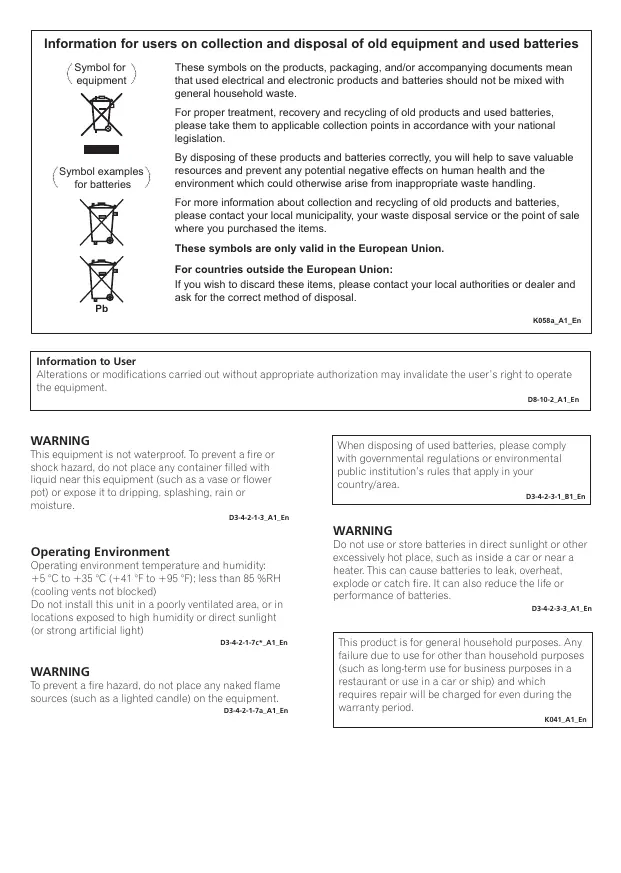


| Product Type | Noise-cancelling headphones |
| Brand | PIONEER |
| Model | SE-NC21M |
| Transducer Type | Dynamic, closed |
| Speaker Diameter | 30 mm |
| Impedance | 145 Ω (ON), 44 Ω (OFF) |
| Sound Output Level | 92 dB (ON), 95 dB (OFF) |
| Frequency Response | 10 Hz – 22,000 Hz |
| Noise Cancellation | 20 dB (up to 90% of ambient noise) |
| Power Supply | 1 AAA battery (alkaline recommended) |
| Battery Life (alkaline) | Approx. 120 hours |
| Battery Life (manganese) | Approx. 60 hours |
| Weight (without battery or cable) | Approx. 120 g |
| Cable Length | 1.5 m |
| Connector | 3.5 mm stereo mini plug L-type |
| Included Accessories | Carrying case, airline adapter, test AAA battery |
| Foldable | Yes, with carrying case |
| Operating Temperature | +5 °C to +35 °C |
| Operating Humidity | Less than 85% RH |
| Maintenance and Cleaning | Clean the plug with a soft, dry cloth |
| Safety | Do not expose to water, open flames, or excessive heat |
| Repairability | Consult your dealer or a Pioneer service center |
| Intended Use | Home use, music listening. Do not use for piloting or aeronautical communications |
Frequently Asked Questions - SE-NC21M PIONEER
User questions about SE-NC21M PIONEER
0 question about this device. Answer the ones you know or ask your own.
Ask a new question about this device
Download the instructions for your Earphones in PDF format for free! Find your manual SE-NC21M - PIONEER and take your electronic device back in hand. On this page are published all the documents necessary for the use of your device. SE-NC21M by PIONEER.
USER MANUAL SE-NC21M PIONEER
Noise-canceling Headphones
natural_image
Line drawing of a pair of audio headphones (no text or symbols)Operating Instructions
Mode d'emploi
Bedienungsanleitung
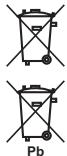
Information for users on collection and disposal of old equipment and used batteries
(Symbol for equipment)

(Symbol examples for batteries)
chemical
Chemical structure diagram of a Pb-based catalyst with two identical configurationsThese symbols on the products, packaging, and/or accompanying documents mean that used electrical and electronic products and batteries should not be mixed with general household waste.
For proper treatment, recovery and recycling of old products and used batteries, please take them to applicable collection points in accordance with your national legislation.
By disposing of these products and batteries correctly, you will help to save valuable resources and prevent any potential negative effects on human health and the environment which could otherwise arise from inappropriate waste handling.
For more information about collection and recycling of old products and batteries, please contact your local municipality, your waste disposal service or the point of sale where you purchased the items.
These symbols are only valid in the European Union.
For countries outside the European Union:
If you wish to discard these items, please contact your local authorities or dealer and ask for the correct method of disposal.
K058a_A1_En
Information to User
Alterations or modifications carried out without appropriate authorization may invalidate the user's right to operate the equipment.
D8-10-2_A1_En
WARNING
This equipment is not waterproof. To prevent a fire or shock hazard, do not place any container filled with liquid near this equipment (such as a vase or flower pot) or expose it to dripping, splashing, rain or moisture.
D3-4-2-1-3_A1_En
Operating Environment
Operating environment temperature and humidity: +5 °C to +35 °C (+41 °F to +95 °F); less than 85 %RH (cooling vents not blocked)
Do not install this unit in a poorly ventilated area, or in locations exposed to high humidity or direct sunlight (or strong artificial light)
D3-4-2-1-7c*_A1_En
WARNING
To prevent a fire hazard, do not place any naked flame sources (such as a lighted candle) on the equipment.
D3-4-2-1-7a_A1_En
When disposing of used batteries, please comply with governmental regulations or environmental public institution's rules that apply in your country/area.
D3-4-2-3-1_B1_En
WARNING
Do not use or store batteries in direct sunlight or other excessively hot place, such as inside a car or near a heater. This can cause batteries to leak, overheat, explode or catch fire. It can also reduce the life or performance of batteries.
D3-4-2-3-3_A1_En
This product is for general household purposes. Any failure due to use for other than household purposes (such as long-term use for business purposes in a restaurant or use in a car or ship) and which requires repair will be charged for even during the warranty period.
K041_A1_En
Thank you for buying this Pioneer product. Please read through these operating instructions so you will know how to operate your model properly. After you have finished reading the instructions, put them away in a safe place for future reference.
Main Features
Suppresses up to 90 % of ambient noise, great listening even in noisy locations.
- Based on proprietary measurement methods.
- Not all surrounding sounds are eliminated.
Folds compactly for storage in accessory carrying case.
Energy-saving design allows up to 120 hours of continuous listening enjoyment.
- When using Alkaline battery.
Neodymium-magnet ∅30 mm driver unit for high audio fidelity.
Noise-canceling function can be switched off when not needed, allowing use as ordinary headphones.
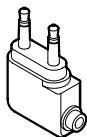
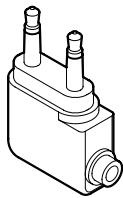
Includes in-flight adapter for use on airplanes.
Set Contents
Confirm the presence of all parts and components before use.
- Headphones
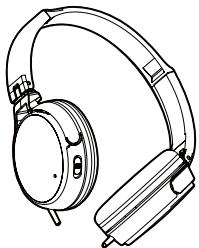
natural_image
Line drawing of a pair of audio headphones (no text or symbols)- In flight plug adapter
natural_image
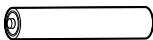
Technical line drawing of a mechanical component with three cylindrical ports (no text or symbols)• AAA manganese battery (1) (for confirming operation)
- Accessory carrying case
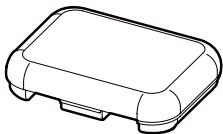
natural_image
Line drawing of a rectangular electronic device casing (no text or symbols)- Operating instructions (this document)
Names and Functions of Parts
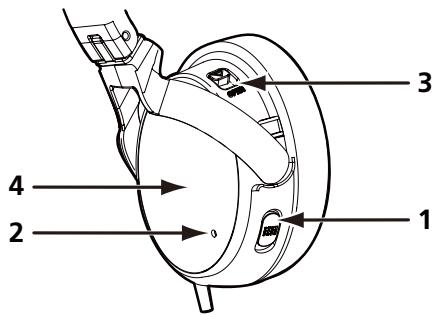
1 Power switch
Use to turn noise-canceling function ON/OFF.
2 Power indicator
Lights when power is turned on.
3 Battery cover latch
Slide the battery cover latch (triangle mark) in the direction of the arrow to open the battery cover [4].
4 Battery cover
Press in direction of arrow (triangle) to open battery cover.
Inserting Battery
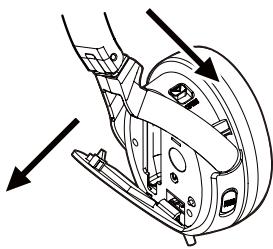
1 Slide the battery cover latch (triangle mark) in the direction of the arrow to open the battery cover.
2 Insert battery, taking care to align its ⊕ and ⊖ polarities correctly.
3 Press in direction of arrow to close battery cover.
natural_image
Mechanical assembly diagram showing a clamping mechanism with arrows indicating motion direction (no text or symbols)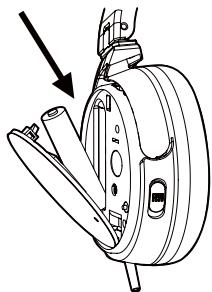
natural_image
Technical line drawing of a mechanical device with an arrow indicating assembly or motion (no text or symbols present)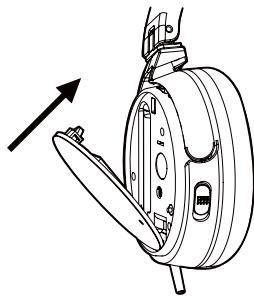
natural_image
Technical line drawing of a mechanical assembly with no visible text or symbolsWhen to replace battery
When battery becomes expended, the power indicator will become darker, and sound will appear distorted, with greater than normal amounts of noise. Always replace a new battery. Nominal battery life is as follows when noise-canceling function is used continuously:
AAA Alkaline battery: About 120 hours
AAA Manganese battery: About 60 hours
(Battery life may vary depending on surrounding temperatures and other conditions of use.)
Using the Headphone
1 Connection to AV devices
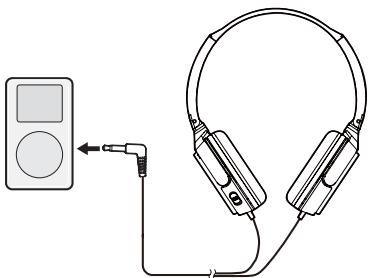
natural_image
Illustration of an audio recording device connected to a multi-band headphones (no text or symbols present)In flight plug adapter
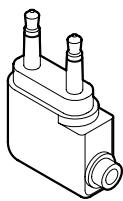
natural_image
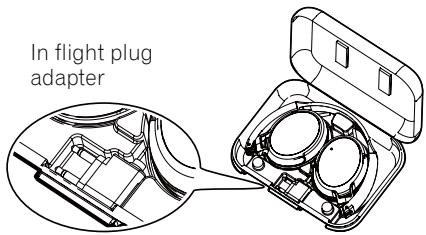
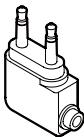
Technical line drawing of a mechanical component with two cylindrical ports and a rectangular housing (no text or symbols)When connecting the headphones to an airline onboard audio system, use the supplied plug adapter.
2 Using the headphones
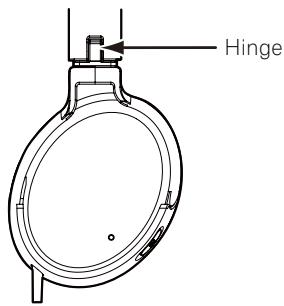
Confirm the left/right orientation by the L/R marks or hinge color, and place the headphones on your head. Adjust the length of the headphones band for most comfortable fit.
L: left (black) R: right (red)
3 Playing music
1. When power is ON
When the power switch is set to ON, the power indicator lights green, and the noise-canceling function operates, allowing you to listen to music without excessively raising the volume, thus eliminating the need to raise sound volume excessively, and reducing disturbance to nearby people.
* If battery is depleted, no sound will be audible.
2. When power is OFF
When the power switch is set to OFF, the noise-canceling function stops, and the unit can be used as ordinary headphones.
4 Following Use
When not using the headphones, set the power switch to OFF. The headphones and airline plug adapter can be stored in the accessory carrying case.
5 Precautions
- When disconnecting the cord, grasp the plug and do not pull the cord.
- The furnished in flight plug adapter may not be compatible with the jacks on all airplanes.
-
Do not use with airline onboard sound systems under the following conditions:
-
Whenever the cabin crew announces that electronic devices are prohibited.
-
When the use of privately owned headphones is prohibited inside the plane.
-
The noise-canceller function is designed to reduce noise primarily in the low-frequency range, and is not effective at reducing high-frequency noise.
- If the earpads do not correctly match the size and contours of your ears, excessive sound may escape, or you may sense insufficient bass sound, and the effect of the noise-canceling function may be reduced.
- High-pitched feedback (howling) may occur if the headphones are pressed against the ears.
Troubleshooting
If you suspect a malfunction, perform the following checks, since a simple operating error may be the cause of the problem. The problem may also be caused by factors other than the headphones themselves, so be sure to check the sound components with which the headphones are used.
Perform the following checks, and if the problem persists, consult your dealer or nearest Pioneer service station.
| Problem | Remedy |
| No sound. | Check connection between headphones and AV device.Confirm that power is turned on to the AV component.Adjust the output sound volume on the AV component.Replace the headphone battery. |
| Sound is distorted. | Lower the sound volume on the connected AV component.Replace the headphone battery. |
| Power won't turn on. | Replace the headphone battery.Check that battery is installed correctly (are ⊕ and ⊖ polarities correct?). |
| Noise canceller produces no effect. | Set the power switch to position ON (power indicator lights green). |
| High-pitched feedback sound (howling) is heard. | Do not use hands to press headphones against the ears. |
About use of headphones
- Do not subject headphones to dropping, striking, or other severe impacts, since damage may result.
- To ensure high quality sound reproduction, keep the plug clean by wiping occasionally with a soft clean cloth.
- In the event of a malfunction, or if a foreign object becomes lodged in the headphones, turn off the power and consult your dealer or Pioneer service station.
- During use of the headphones, if you sense an allergic reaction (rash, etc.), stop using the headphones immediately.
- This product has been designed to reduce noise and enhance your listening experience. It has not been designed for pilot use or for inflight communications as designated by the FAA (Federal Aviation Administration). Do not use this product for purposes other than those for which it was designed.
Specifications
Type .... Closed dynamic
Driver unit diameter ....030 mm
Maximum input. 500 mW / 32 Ω
Impedance....145 Ω (ON), 44 Ω (OFF)
Output sound level 92 dB (ON), 95 dB (OFF)
Frequency response 10 Hz to 22 000 Hz
Connection cord . . . 1.5 m cord with ø3.5 mm L-type stereo mini-plug
Ear pads. . . . . . . . . . . . . . . . . . . . . . . . . . . . . . . . . . . . . . . . . . . . . . . . . . . . . . . . . . . . . Polyurethane (leather finish)
Power....AAA battery x 1
Weight . . . . . . . . . . . . . . . . . . . . . . . . . . . . . . . . . . . . . . . . . . . . . . . . . . . . . . . . . . . . . about 120 g
(not including battery and connecting cord)
Accessories
In flight plug adapter ....1
AAA manganese battery (for confirming operation) .....1
Accessory carrying case ....1
Operating Instructions....1

Note
- The appearance and specifications of this product are subject to change without notice.
© 2011 PIONEER CORPORATION.
All rights reserved.
natural_image
Line drawing of a pair of audio headphones (no text or symbols)natural_image
Line drawing of a rectangular electronic device casing (no text or symbols)natural_image
Technical line drawing of a mechanical component with three cylindrical ports (no text or symbols)© 2011 PIONEER CORPORATION.
natural_image
Line drawing of an electronic headboard with earbuds and charging case (no text or symbols)natural_image
Technical line drawing of a mechanical component with three cylindrical ports (no text or symbols)natural_image
Line drawing of a rectangular electronic device casing (no text or symbols)natural_image
Three-step diagram showing mechanical assembly steps with arrows indicating direction of movement (no text or symbols present)natural_image
Illustration of an electronic device connected to a pair of headphones, showing earbuds and cable (no text or symbols)natural_image
Technical line drawing of a mechanical component with two cylindrical ports and a rectangular housing (no text or symbols)© 2011 PIONEER CORPORATION.
chemical
Chemical structure diagram of a Pb (potassium borate) with two identical configurations marked by 'X' and 'X̄'natural_image
Line drawing of an outdoor headphones with earbuds and case (no text or symbols)natural_image
Isometric line drawing of a mechanical component with three cylindrical ports (no text or symbols)natural_image
Line drawing of a rectangular electronic device casing (no text or symbols)natural_image
Mechanical assembly diagram showing a brake caliper and housing with directional arrows indicating motion (no text or labels)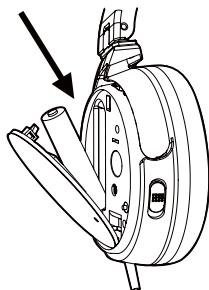
natural_image
Technical line drawing of a mechanical device with an arrow indicating assembly or operation (no text or symbols present)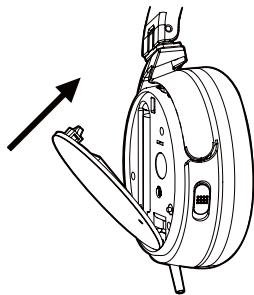
natural_image
Technical line drawing of a mechanical assembly with an arrow indicating direction (no text or symbols present)natural_image
Diagram showing a CD player connected to an audio headset via cable (no text or symbols present)natural_image
Technical line drawing of a mechanical component with two protruding pins (no text or symbols)© 2011 PIONEER CORPORATION.
chemical
Chemical structure diagram of a Pb (potassium) battery with crossed and unconnected terminalsnatural_image
Line drawing of a pair of headphones with earbuds and charging case (no text or symbols)natural_image
Technical line drawing of a mechanical component with three cylindrical ports (no text or symbols)natural_image
Line drawing of a rectangular electronic device casing (no text or symbols)natural_image
Mechanical assembly diagram showing a brake caliper and housing with directional arrows indicating motion (no text or labels)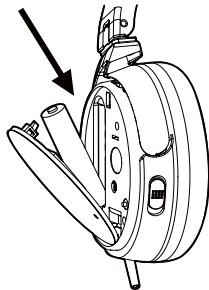
natural_image
Technical line drawing of a mechanical device with an arrow indicating assembly or operation (no text or symbols present)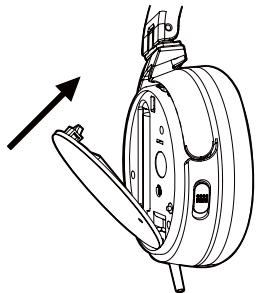
natural_image
Technical line drawing of a mechanical device with an arrow indicating direction (no text or symbols)natural_image
Diagram showing a portable electronic device connected to an audio headset via cable (no text or symbols present)natural_image
Technical line drawing of a mechanical component with two cylindrical ports and a rectangular housing (no text or symbols)© 2011 PIONEER CORPORATION.
chemical
Chemical structure diagram of a Pb-based organometallic compound with two identical components and cross-shaped substituentsnatural_image
Line drawing of a pair of audio headphones (no text or symbols)natural_image
Technical line drawing of a mechanical component with three cylindrical ports (no text or symbols)natural_image
Line drawing of a rectangular electronic device casing (no text or symbols)- Handleiding (dit document)
natural_image
Mechanical assembly diagram showing a motor and gear assembly with directional arrows (no text or labels)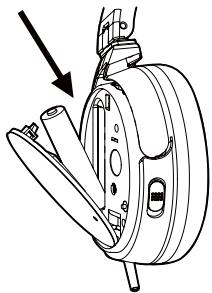
natural_image
Technical line drawing of a mechanical device with an arrow indicating assembly or adjustment (no text or symbols present)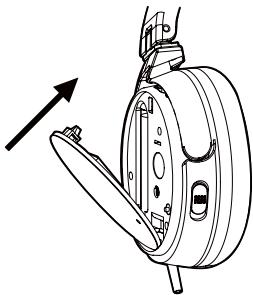
natural_image
Technical line drawing of a mechanical assembly with no visible text or symbolsnatural_image
Diagram showing a portable electronic device connected to an audio jack and a multi-band headphones (no text or symbols present)natural_image
Technical line drawing of a mechanical component with two cylindrical ports and a base (no text or symbols)© 2011 PIONEER CORPORATION.
natural_image
Line drawing of a pair of headphones with earbuds and charging case (no text or symbols)natural_image
Technical line drawing of a mechanical component with two cylindrical ports and a flanged end (no text or symbols)natural_image
Line drawing of a rectangular electronic device casing (no text or symbols)natural_image
Mechanical assembly diagram showing a brake caliper and housing components with directional arrows (no text or labels)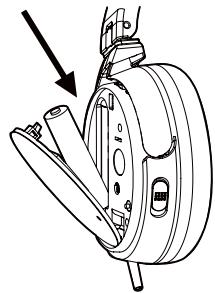
natural_image
Technical line drawing of a mechanical device with an arrow pointing to a component (no text or symbols present)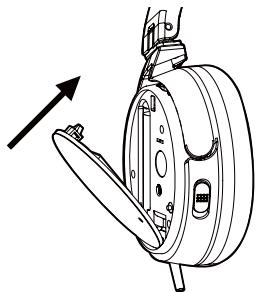
natural_image
Technical line drawing of a mechanical assembly with no visible text or symbolsnatural_image
Diagram showing a portable electronic device connected to an audio headset via cable (no text or symbols present)natural_image
Technical line drawing of a mechanical component with two cylindrical ports and a base (no text or symbols)3 Audição de música
© 2011 PIONEER CORPORATION.
natural_image
Line drawing of a pair of headphones with earbuds and charging case (no text or symbols)natural_image
Technical line drawing of a mechanical component with three cylindrical ports (no text or symbols)natural_image
Line drawing of a rectangular electronic device casing (no text or symbols)- Bruksanvisning (detta dokument)
natural_image
Technical line drawing of a mechanical component with arrows indicating assembly or motion (no text or symbols)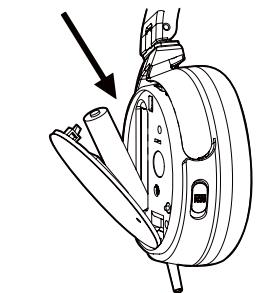
natural_image
Technical line drawing of a mechanical device with an arrow indicating assembly or adjustment (no text or symbols present)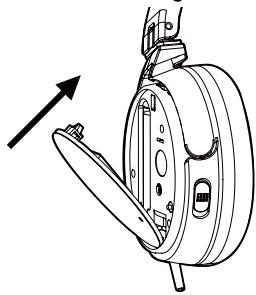
natural_image
Technical line drawing of a mechanical assembly with an arrow indicating direction (no text or symbols)natural_image
Diagram showing a portable electronic device connected to an audio headset via cable (no text or symbols present)natural_image
Technical line drawing of a mechanical component with two cylindrical ports and a central housing (no text or symbols)Brusreducing....20 dB
Anslutningssladd
Öronkuddar....Polyuretan (läderfinish)
Strömförsörjning. . . . . . . . . . . . . . . . . . . . . . . . . . . . . . . . . . . . . . . . . . . . . . . . . . . . . . . . . . . . . . . . . . . . . . . . . . . . . . . . . . . . . . . . . . AAA-batteri x 1
Vikt ca. 120 g
© 2011 PIONEER CORPORATION.
natural_image
Line drawing of an outdoor headphones with earbuds and charging case (no text or symbols)natural_image
Technical line drawing of a mechanical component with two cylindrical ports and a base (no text or symbols)natural_image
Line drawing of a rectangular electronic device casing (no text or symbols)natural_image
Technical line drawing of a mechanical component with arrows indicating assembly or motion (no text or symbols)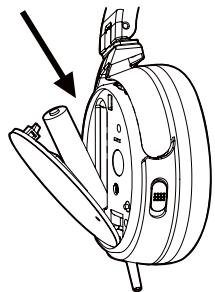
natural_image
Technical line drawing of a mechanical device with an arrow indicating assembly or operation (no text or symbols present)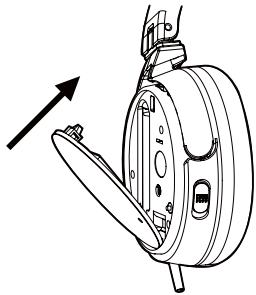
natural_image
Technical line drawing of a mechanical assembly with an arrow indicating direction (no text or symbols)natural_image
Diagram showing a portable electronic device connected to an audio headset via a cable (no text or symbols present)natural_image
Technical line drawing of a mechanical component with two cylindrical ports and a flanged base (no text or symbols)natural_image
Line drawing of a pair of audio headphones (no text or symbols)natural_image
Line drawing of a rectangular electronic device casing (no text or symbols)natural_image
Technical line drawing of a mechanical component with three cylindrical ports (no text or symbols)natural_image
Mechanical assembly diagram showing a clamping mechanism with arrows indicating motion (no text or symbols)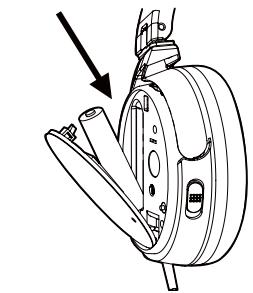
natural_image
Technical line drawing of a mechanical device with an arrow indicating assembly or adjustment (no text or symbols present)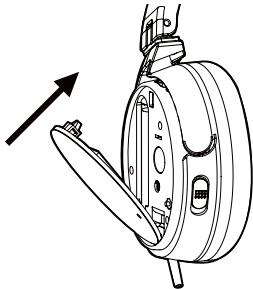
natural_image
Technical line drawing of a mechanical device with an arrow indicating direction (no text or symbols)natural_image
Diagram showing an audio recording device connected to a pair of headphones (no text or symbols present)Uçuş adaptörü
natural_image
Technical line drawing of a mechanical component with two cylindrical ports and a base (no text or symbols)© 2011 PIONEER CORPORATION.
natural_image
Line drawing of a pair of headphones with earbuds and headband (no text or symbols)natural_image
Technical line drawing of a mechanical component with three cylindrical ports (no text or symbols)natural_image
Line drawing of a rectangular electronic device casing (no text or symbols)- Bruksanvisning (dette dokumentet)
natural_image
Technical line drawing of a mechanical device with arrows indicating assembly or motion (no text or symbols)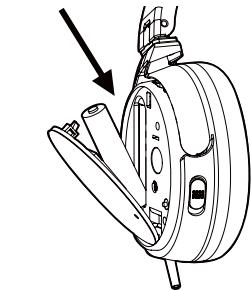
natural_image
Technical line drawing of a mechanical device with an arrow indicating assembly or adjustment (no text or symbols present)
natural_image
Technical line drawing of a mechanical component with an arrow indicating direction (no text or symbols)natural_image
Diagram showing a portable electronic device connected to an audio headset via cable (no text or symbols present)natural_image
Technical line drawing of a mechanical component with two cylindrical ports and a flanged base (no text or symbols)Bruk den medfølgende pluggadapteren når hodetelefonen kobles til et flys innebygde lydsystem.
2 Bruke hodetelefon
© 2011 PIONEER CORPORATION.
Alle rettigheter reserververt.
natural_image
Line drawing of a pair of electronic headphones (no text or symbols)natural_image
Technical line drawing of a mechanical component with three cylindrical ports (no text or symbols)natural_image
Line drawing of a rectangular electronic device casing (no text or symbols)natural_image
Mechanical assembly diagram showing a clamping mechanism with arrows indicating motion direction (no text or symbols)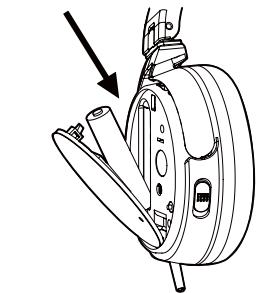
natural_image
Mechanical assembly diagram showing a clamping mechanism with a downward arrow indicating force or motion (no text or symbols present)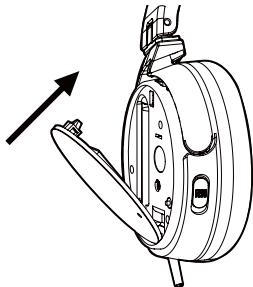
natural_image
Technical line drawing of a mechanical assembly with no visible text or symbolsnatural_image
Illustration of an audio recording device connected to a multi-band headphones (no text or symbols present)natural_image
Technical line drawing of a mechanical component with two cylindrical ports and a flanged base (no text or symbols)© 2011 PIONEER CORPORATION.
natural_image
Line drawing of a pair of audio headphones (no text or symbols)natural_image
Technical line drawing of a mechanical component with three cylindrical ports (no text or symbols)natural_image
Line drawing of a rectangular electronic device casing (no text or symbols)natural_image
Mechanical assembly diagram showing a brake caliper and suspension components (no text or labels)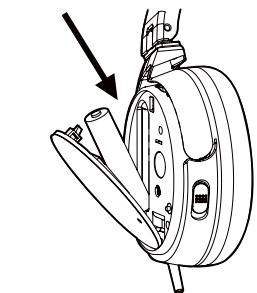
natural_image
Technical line drawing of a mechanical device with a downward arrow indicating a component (no text or symbols present)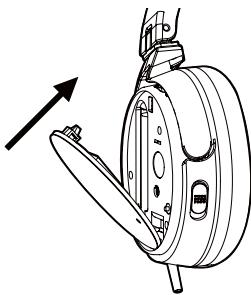
natural_image
Technical line drawing of a mechanical assembly with no visible text or symbolsnatural_image
Illustration of an audio recording device connected to a multi-band headphones (no text or symbols present)natural_image
Technical line drawing of a mechanical component with two cylindrical ports and a flanged base (no text or symbols)© 2011 PIONEER CORPORATION.
Minden jog fenntartva.
natural_image
Line drawing of a pair of electronic headphones (no text or symbols)- Adaptér na zástrčku do lietadla
natural_image
Technical line drawing of a mechanical component with three cylindrical ports (no text or symbols)natural_image
Line drawing of a rectangular electronic device casing (no text or symbols)natural_image
Mechanical assembly diagram showing a hand operating a circular component with arrows indicating motion direction (no text or symbols)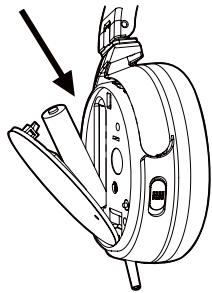
natural_image
Technical line drawing of a mechanical device with an arrow indicating assembly or motion (no text or symbols present)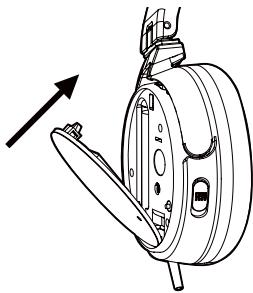
natural_image
Technical line drawing of a mechanical assembly with no visible text or symbolsKedy vymieňat' batériu
natural_image
Illustration of an audio recording device connected to a multi-band headphones (no text or symbols present)natural_image
Technical line drawing of a mechanical component with two cylindrical ports and a flanged base (no text or symbols)© 2011 PIONEER CORPORATION.
chemical
Chemical structure diagram of a Pb (potassium borate) with two identical configurations shown above and below.natural_image
Line drawing of a pair of headphones (no text or symbols)natural_image
Technical line drawing of a mechanical component with three cylindrical ports and a base (no text or symbols)natural_image
Line drawing of a rectangular electronic device casing (no text or symbols)natural_image
Technical line drawing of a mechanical assembly with arrows indicating motion (no text or symbols)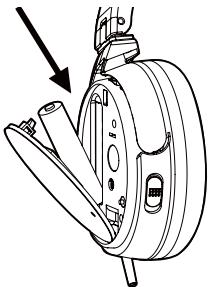
natural_image
Technical line drawing of a mechanical device with an arrow indicating direction (no text or symbols present)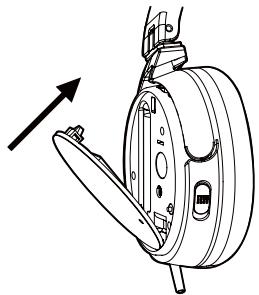
natural_image
Technical line drawing of a mechanical assembly with an arrow indicating direction (no text or symbols)natural_image
Diagram showing a portable electronic device connected to an audio headset via cable (no text or symbols present)natural_image
Technical line drawing of a mechanical component with two cylindrical ports and a rectangular housing (no text or symbols)© PIONEER CORPORATION, 2011.
Все права защищены.
Примечание:
natural_image
Line drawing of a pair of electronic headsets (no text or symbols)natural_image
Technical line drawing of a mechanical component with three cylindrical ports (no text or symbols)natural_image
Line drawing of a rectangular electronic device casing (no text or symbols)natural_image
Three-step diagram showing mechanical assembly steps: disassembly, attachment, and mounting (no text or labels)natural_image
Illustration of an audio recording device connected to a pair of headphones (no text or symbols present)natural_image
Technical line drawing of a mechanical component with two cylindrical ports and a base (no text or symbols)© 2011 PIONEER CORPORATION.
© 2011 PIONEER CORPORATION.
All rights reserved.
© 2011 PIONEER CORPORATION.
PIONEER ELECTRONICS (USA) INC.
P.O. BOX 1540, Long Beach, California 90801-1540, U.S.A. / Etats-Unis. TEL: (800) 421-1404
PIONEER ELECTRONICS OF CANADA, INC.
340 Ferrier Street, Unit 2, Markham, Ontario L3R 2Z5, Canada TEL: 1-877-283-5901, 905-479-4411
PIONEER EUROPE NV
Haven 1087, Keetberglaan 1, B-9120 Melsele, Belgium / Belgique TEL: 03/570.05.11
PIONEER ELECTRONICS ASIACENTRE PTE. LTD.
253 Alexandra Road, #04-01, Singapore / Singapour 159936 TEL: 65-6472-7555
PIONEER ELECTRONICS AUSTRALIA PTY. LTD.
5 Arco Lane, Heatherton, Victoria, 3202, Australia / Australie, TEL: (03) 9586-6300
PIONEER ELECTRONICS DE MEXICO S.A. DE C.V.
Blvd.Manuel Avila Camacho 138 10 piso Col.Lomas de Chapultepec, Mexico / Mexique, D.F. 11000 TEL: 55-9178-4270
K002_B4_Ru