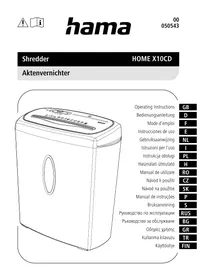
USER MANUAL Home X10CD HAMA
Operating Instructions
Bedienungsanleitung
Mode d'emploi
PykoBoCTBO nO kcnIyatauIN
PbKOBOIcTBo 3aO6cJyKBaHe
O8nyieXpnonc
Kullanma kilavuzu
Käyttoöhje
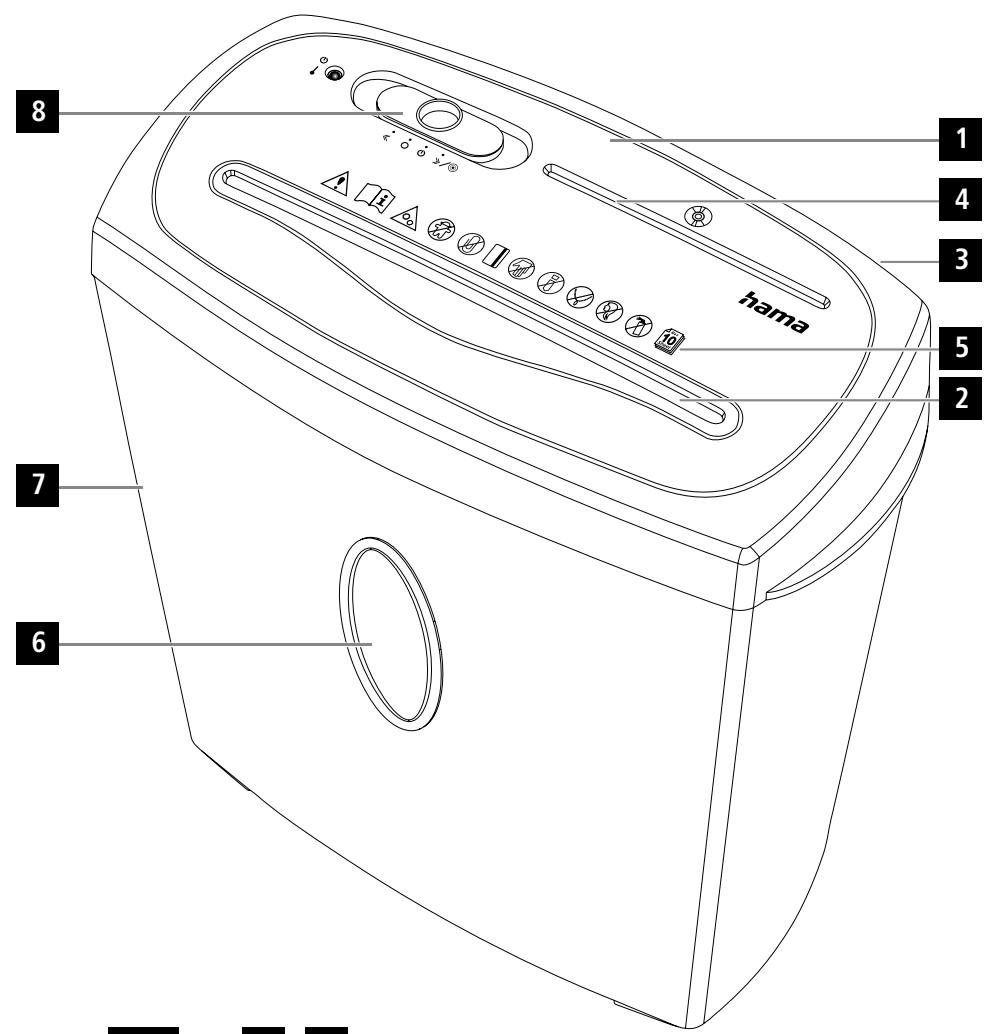
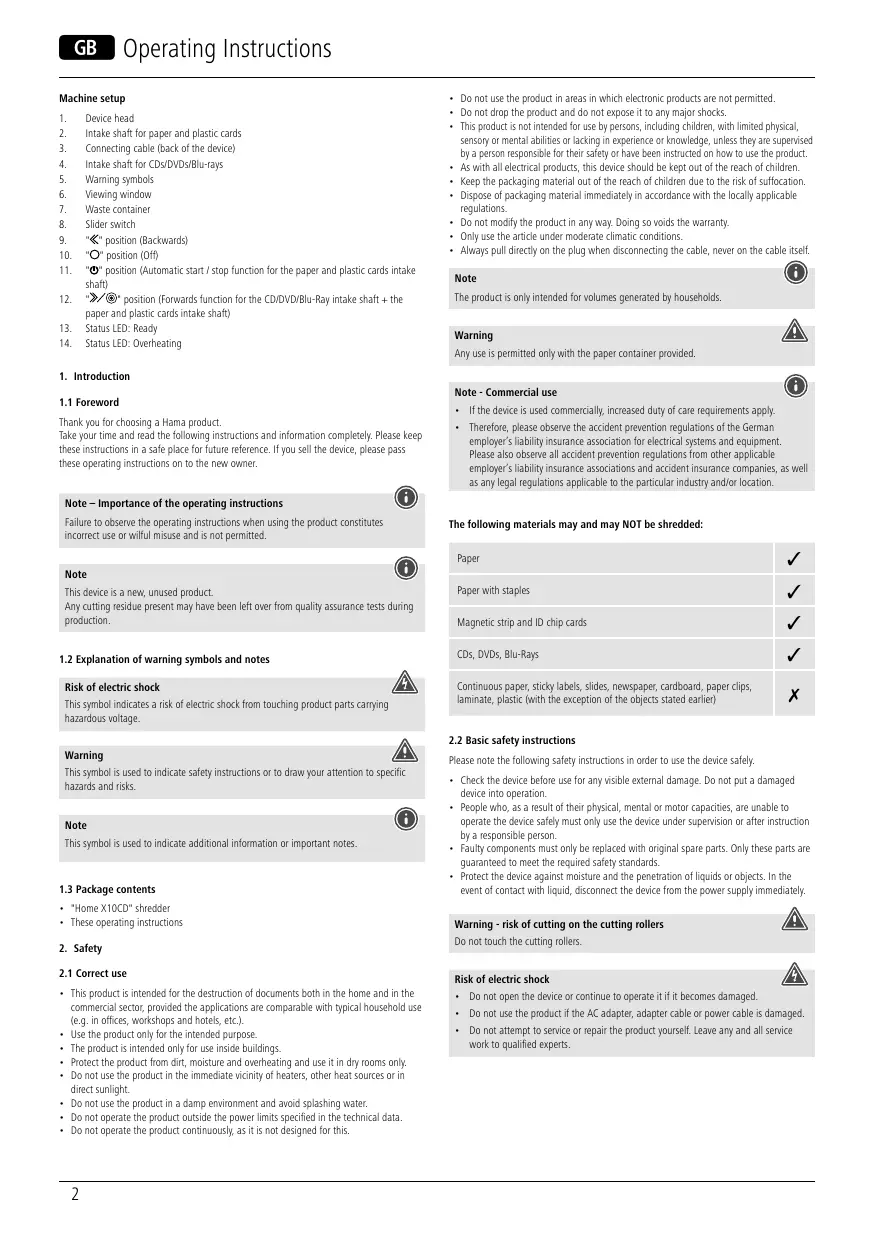
Machine setup
- Device head
- Intake shaft for paper and plastic cards
- Connecting cable (back of the device)
- Intake shaft for CDs/DVDs/Blu-rays
- Warning symbols
- Viewing window
- Waste container
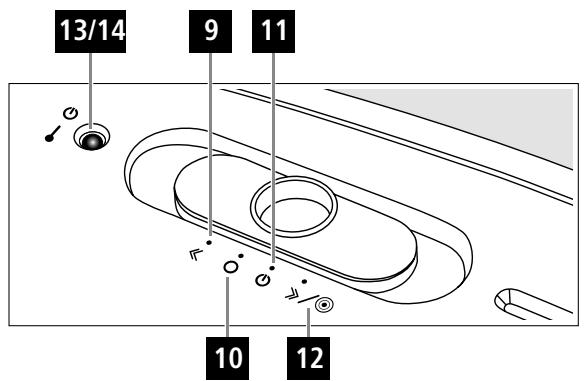
- Slider switch
- " " position (Backwards)
- "O" position (Off)
- "Φ" position (Automatic start / stop function for the paper and plastic cards intake shaft)
- " position (Forwards function for the CD/DVD/Blu-Ray intake shaft + the paper and plastic cards intake shaft)
- Status LED: Ready
- Status LED: Overheating
1. Introduction
1.1 Foreword
Thank you for choosing a Hama product.
Take your time and read the following instructions and information completely. Please keep these instructions in a safe place for future reference. If you sell the device, please pass these operating instructions on to the new owner.
Note - Importance of the operating instructions

Failure to observe the operating instructions when using the product constitutes incorrect use or wilful misuse and is not permitted.

Note
This device is a new, unused product.
Any cutting residue present may have been left over from quality assurance tests during production.
1.2 Explanation of warning symbols and notes
Risk of electric shock

This symbol indicates a risk of electric shock from touching product parts carrying hazardous voltage.
Warning
This symbol is used to indicate safety instructions or to draw your attention to specific hazards and risks.

Note
This symbol is used to indicate additional information or important notes.
1.3 Package contents
Home X10CD" shredder
These operating instructions
2. Safety
2.1 Correct use
- This product is intended for the destruction of documents both in the home and in the commercial sector, provided the applications are comparable with typical household use (e.g. in offices, workshops and hotels, etc.).
- Use the product only for the intended purpose.
- The product is intended only for use inside buildings.
- Protect the product from dirt, moisture and overheating and use it in dry rooms only.
- Do not use the product in the immediate vicinity of heaters, other heat sources or in direct sunlight.
- Do not use the product in a damp environment and avoid splashing water.
- Do not operate the product outside the power limits specified in the technical data.
-
Do not operate the product continuously, as it is not designed for this.
-
Do not use the product in areas in which electronic products are not permitted.
- Do not drop the product and do not expose it to any major shocks.
- This product is not intended for use by persons, including children, with limited physical, sensory or mental abilities or lacking in experience or knowledge, unless they are supervised by a person responsible for their safety or have been instructed on how to use the product.
- As with all electrical products, this device should be kept out of the reach of children.
- Keep the packaging material out of the reach of children due to the risk of suffocation.
- Dispose of packaging material immediately in accordance with the locally applicable regulations.
- Do not modify the product in any way. Doing so voids the warranty.
Only use the article under moderate climatic conditions.
- Always pull directly on the plug when disconnecting the cable, never on the cable itself.
Note
The product is only intended for volumes generated by households.

Warning

Any use is permitted only with the paper container provided.

Note - Commercial use
If the device is used commercially, increased duty of care requirements apply.
- Therefore, please observe the accident prevention regulations of the German employer's liability insurance association for electrical systems and equipment. Please also observe all accident prevention regulations from other applicable employer's liability insurance associations and accident insurance companies, as well as any legal regulations applicable to the particular industry and/or location.
The following materials may and may NOT be shredded:
| Paper | ✓ |
| Paper with staples | ✓ |
| Magnetic strip and ID chip cards | ✓ |
| CDs, DVDs, Blu-Rays | ✓ |
| Continuous paper, sticky labels, slides, newspaper, cardboard, paper clips, laminate, plastic (with the exception of the objects stated earlier) | ✗ |
2.2 Basic safety instructions
Please note the following safety instructions in order to use the device safely.
- Check the device before use for any visible external damage. Do not put a damaged device into operation.
- People who, as a result of their physical, mental or motor capacities, are unable to operate the device safely must only use the device under supervision or after instruction by a responsible person.
- Faulty components must only be replaced with original spare parts. Only these parts are guaranteed to meet the required safety standards.
- Protect the device against moisture and the penetration of liquids or objects. In the event of contact with liquid, disconnect the device from the power supply immediately.
Warning - risk of cutting on the cutting rollers
Do not touch the cutting rollers.

Risk of electric shock

- Do not open the device or continue to operate it if it becomes damaged.
- Do not use the product if the AC adapter, adapter cable or power cable is damaged.
- Do not attempt to service or repair the product yourself. Leave any and all service work to qualified experts.
2.3 Explanation of symbols used on the product label
Warning - risk of injury

Note the warning symbols in order to avoid injuries or damage to the device.
| General warning symbol |
| Before commissioning, read the enclosed operating instructions.
You must comply with the safety instructions at all times. |
| ·This device is not intended for use by children.
·Avoid touching the intake opening with hands, clothing or hair.
·Unplug the device if it is not going to be used for a prolonged period. |
| Children must be supervised when using the device. |
| Do not insert paper clips into the intake shaft. |
| Do not reach into the intake shaft. |
| Keep clothing away from the intake shaft. |
| Keep jewellery, e.g. necklaces, away from the intake shaft. |
| Keep hair away from the intake shaft. |
| Do not use any aerosol products on or near the device. |
| Insert no more than 10 sheets of paper at any one time into the intake shaft (see 7. Technical Data). |
| Intake shaft for CDs/DVDs and Blu-Rays. Only insert one CD/DVD or Blu-Ray at a time into the intake shaft. |
| Intake shaft for credit cards. Only insert one credit card at a time into the intake shaft for credit cards. |
2.4 Safety device
The device is equipped with a safety switch and can only be operated if the device head (1) is correctly placed on the waste container (7).
Warning

Any tampering with or modification of the safety features can result in serious injury and is not permitted.
3. Installation / Setup
Warning

- Only operate the product from a socket that has been approved for the device. The socket must be installed close to the product and must be easily accessible.
- Disconnect the product from the power supply using the On/Off switch - if this is not available, unplug the power cord from the socket.
- If using a multi-socket power strip, make sure that the total power consumption of all connected devices does not exceed the power strip's maximum throughput rating.
- If you will not be using the product for a prolonged period, disconnect it from mains power.
Note

4. Operation

Note
- Be aware that the thickness of paper increases when it is folded, leading to the device's maximum page capacity being exceeded.
- Always wait until one cutting operation is finished before starting the next one.
- Do not use the device continuously for more than 2 minutes at a time.
- Empty the container regularly in order to avoid damaging the device.
4.1 Switching the device on
- Move the slider switch (8) to the "O" position (11).
The status LED Ready (13) lights up solid green.
The device is now ready for use.
4.2 Switching the device off
- Move the slider switch (8) to the "O" position (10).
4.3 Shredding paper
- Insert the paper into the centre of the intake shaft (2). The cutting rollers switch on automatically.
- Let go of the paper. Once the cutting process is complete, the device switches itself off again.
4.4 Shredding plastic cards
- Insert the plastic card into the centre of the intake shaft (2). The cutting rollers switch on automatically.
- Let go of the plastic card. Once the cutting process is complete, the device switches itself off again.
4.5 Shredding CDs, DVDs, Blu-Rays
- Move the slider switch (8) to the "»/@" position (12).
The cutting rollers are switched on and operate constantly.
- Insert the CD, DVD or Blu-Ray into the centre of the intake shaft (4).
- Let go of the CD, DVD or Blu-Ray.
- After the cutting process, move the slider switch (8) to the "O" position (10) to switch the device off or to the "O" position (11) to shred paper or plastic cards in the intake shaft (2).
4.6 Forwards / backwards mode

Note
These modes are designed to release any blockages of the cutting mechanism.
- Move the slider switch (8) to the "<<" position (9). The rollers on the cutting mechanism now rotate in the reverse direction.
- Move the slider switch (8) alternately to the ^ position (12) and the ^ position (9). Repeat this process around three times.
- Then switch the device off - as described in 4.2 Switching the device off - and disconnect the mains plug.
- Remove the blocked cut material carefully from the intake shaft (2).
- Reconnect the device - as described in 3. Installation/Setup - to the power supply.
Note

- Forwards mode can be used if the material to be shredded has not been drawn in all the way, e.g. if the sensor was unable to detect it. This may occur especially with small quantities of paper.
- Move the slider switch (8) to the × position (12) until the paper to be shredded has been pulled all the way in.
5. Care and Maintenance
Danger - risk of death from electric shock

Disconnect the mains plug from the socket before starting any cleaning work.
Warning - risk of cutting on the cutting rollers
Do not touch the cutting rollers.

Warning - damage to the device from moisture
Ensure, when cleaning, that no moisture penetrates the device in order to avoid irreparable damage to it.

5.1 Emptying the container
- Switch the device off - as described in 4.2 Switching the device off - and disconnect the mains plug.
- Lift the device head (1) off the waste container (7).
Empty the container (7).
- Place the device head (1) back on the waste container (7).
- Reconnect the device - as described in 3. Installation/Setup - to the power supply.
5.2 Cleaning the device
- Switch the device off - as described in 4.2 Switching the device off - and disconnect the mains plug.
- Clean the device with a dry cloth. In cases of heavy soiling, the cloth can be dampened a little.
- Allow the device to dry completely afterwards.
- Reconnect the device - as described in 3. Installation/Setup - to the power supply.
5.3 Cleaning / oiling the cutting rollers

Note
5.3.1 Cleaning with Hama cleaners for shredders (item number: 113820)
- Apply the Hama cleaner for shredders (item number: 113820) in several strips onto a piece of DIN A4-size paper.
- Insert the paper into the centre of the intake shaft (2). The cutting rollers switch on automatically.
- Once the cutting process is complete, the device is ready for operation again.
5.3.2 Cleaning with cleaning paper
| Error | Possible cause | Remedy |
| The cutting rollers do not switch on automatically when material to be shredded is inserted. | The slider switch (8) is in the “○” position (10). | Move the slider switch (8) to the “○” position (11). |
| The connecting cable (3) is not connected correctly. | Ensure that the mains plug is in the mains socket. |
| The socket is not live. | Check the domestic fuses. |
| The device is faulty. | Notify Customer Services. |
| The status LED: Overheating (14) is lit up red. | The device has become too hot. | Switch the device off and allow it to cool down for at least 30 minutes. |
- Technical data
| Input voltage | 220-240 V~ |
| Mains Frequency | 50 Hz |
| Max. power consumption | 460 W |
| Dimensions (W x H x D) | \( {34.0} \times {17.0} \times {39.0}\mathrm{\;{cm}} \) |
| Weight (net) | 4730 g |
| Weight (gross) | 5343 g |
| Basket capacity for paper and plastic cards | 15 litres |
| Basket capacity for CDs/DVDs/Blu-Rays | 0.8 litres |
| Max. noise level | 72 dB |
| Max. cutting performance - paper (70 gsm) | 11 sheets (DIN A4 paper)* |
| Max. cutting performance - paper (80 gsm) | 10 sheets (DIN A4 paper)* |
| Max. cutting performance - CDs/DVDs/Blu-Rays/ plastic cards | 1 |
| Max. cutting speed | 2.0 m/minute |
| Max. feed width for paper / plastic cards | 220 mm |
| Max. feed width for CDs/DVDs/Blu-rays | 120 mm |
| Cutting size for paper / plastic cards | 4 mm x 40 mm |
| Max. constant operation time | 2 minutes |
| Nominal idle period | min. 30 minutes |
| Protection class (as per DIN 66399) | 2 |
| Safety levels (as per DIN 66399) | P-4 / T-4 / E-3 |
- Thicker paper, moisture or any voltage other than that permitted may reduce the performance.
8. Warranty Disclaimer
All of the technical information, data and instructions regarding operation contained in these operating instructions was up to date at the time of printing and is provided based on previous experience and to the best of our knowledge.
Hama GmbH & Co KG assumes no liability and provides no warranty for damage resulting from improper installation/mounting, improper use of the product or from failure to observe the operating instructions and/or safety notes.
Maschinenaufbau
Este.), but it is not clear why it would be so important.
Aviso

4.5 Cd's/dvd's/Blu-rays versnipperen
4.4 Rozézani plastovych karet
CnedyuomeMatepnablpa3pewaaetcnnHEPA3PEWAETcYHHTOxatb:
Bymara
Bymara co ckpenlauoumn ckoabnn
KapTbMaHHTBIMnIIOJocAMnID-kapTbCYNOM
ДиKenn CD, DVD, Blu-Ray
Pyunohnaibymara, Kneebwe 3tmeKTN, PnHeka, rae3tnha Bymara, kaptOH, KaHJIeJPRcKHe CKPENK, JAMNHAT, nTAACTIK (3a NCKJIOHEnM yKa3aHbHex Bhuie pepeMTED)
2.2 06une npabnla TeXnKn 6e3oNaCHOCTN
Onachoct-onachoct3aXMBOTA npadn eEKeTpneCTBO
N3BaTeIe Iencena ot KOntakTa, npedn da 3anOHTe NOHCTBaHETo.

Pnepynpexdene - onaHcO7 o npra3BaHa ne pexeumite Balaan
He dokocbaitepexeuiteBaiau.

PpeynpexdneHne -noBpeHa hypea nopadn Bnara
Yubepe c, e pe nno HcBHTAeHo He NabH3a Bnla B ypeza, 3a da npedotbpatithe HenopanbaMA nopeBaHa hypeza.
5.1 N3npa3BaHe Ha KOHTeHepa
- Искneyтое урEDA - Като E опиcaно В 4.2 Искneyтое на урEDA - Искneyтое уреса.
- I.
- IOBUNHETe IaBata Ha ypea (1) OT KOHTeHepa 3a OTnabu (7).
- IN3npa3Hete KOHTeHepa (7).
- NocTabete OTHOBO rnaBata Ha ypea (1) Bbpyk KOtheHepa 3a Otnabbcn (7).
CneTOBAOTHOBO CbpxeTe ypeDa ceneKtpo3axpaHbaHeTo -KaKTo eONmcaHO B 3.
OnncnHnHCTanaa/CRno6BaHae-CbC CNTcMeTa3a eNEKtp03xaPahBaHe
5.2 NocHTBaHe Ha ypea
- Искneyтое уреда - кто с описно в 4.2 Искneyтое на уреда - и Искneyтое уреда.
ПОНТETESугдаьсчуКьрп.ПритсиноЗамльбаян Кьрпато може дбду leko habлалхена.
CneTobAOCTABeTe ypeDaI3cbxHHe HnblHO.
CnTeT OTO hONBO CbXpRte yEaD cEnKToP3axPAHBAHeto-KaKTo eOniKAHO B 3. OniCAHNtHcAutaN/crOnbAea-HCb CcCTMATA 3e KToP3AXPAHBAHae
5.3 NocHTBaHc/ma3BaHa Ha pexeIte BaJIaIe

Yka3aHne
CzmaaBaepeKneHepaBnIeNcBCKrnp3AbaBHeNA KOhtKeHepBa 3a OToTbA,3a da YbeynepHecPcOHaEknCnPaTaunHa NtpeDepa.
Cb08BTHN3I36OPOTNOJXDOJUINOONCTBAUNINPepapATNIeHAMEPNTRE HA www.hama.com.
BkIIOUe ypea -KaKTo e OnncAo B.4.1 BkIOUbaHe Ha ypea
5.3.1 Pochometrabe N coNHTBau n pnpaT Hama 3a wpepeepn (HOMEP na atptKynl:113820)
- Hahenece NOCTHCAIHTA pIepePnH (HOpE hA npTkyn: 113820) HA
HKNKIO LINHN bPyX nC xaptn C pamep DIN A4.
B. Kwapaie batynta Bc nepdata na HTbpa 3a noctabnE (2). PexekuTte bannIce BKNJIOB ATOMTNHO.
Cne3abbpwbaHe na npoueca no pra3aHe ypebT oTHOBe e roTOB 3a m3non3BaHe.
5.3.2 NocHTBaHe c noNCTBaJa xapTna
B-Kapatae no nnoctbaaata xaptra b Cpeada h O tbopa 3a noctabane (2). Pekceuite Bauiliue ce BkNoohBaT ABOTMAHNO.
Cne3abbpwbaHe na npoueca no paahe ypebT oTHOBo e rTOB 3a n3nON3BaHe.
- OCTpaHbAhe Ha Heu3npaBHOCTM
| Héniэnpaßhoct | Bbзможна рпчниа | Остразнаве |
| Рөсөшіte валачи не се вклічат autOMatунно cIeД noct\'abRHE Na MaTEрnaɪл з рязne. | Пгевклічateьгіт (8) e на пошицya "O" (10). | Пocstавete ngвс\'клічateьгіе (8) bnoшіцya "O" (11). |
| Сbvрзвашіот创新能力 (3) Ne e Cbvрзанп rapavilnHO. | Уberете ce, che üncelten't e noct\'abeN b KONTakta. |
| Контаксыт Ne ocst\'урва нанрex胶囊. | Поверете ngвс\'дэз\'тел"п Yeжлишто. |
| Урden'te e Deфekten. | Сbvрimeste ce сcentыр за осьл\'хваNe hy KMЛЕNTи. |
| Сbvetо\'dno\'t 3a CTatucy "Пгэррванe" (14) CBETВ aЧеревно. | Урden'te ce hGaropeuznil Tbvрд'mHOrO. | Из\'kлічete урда и ro oct\'abete du che oxlia'da 3a Най-Малко 30 MнутNi. |
- TexHHueckn daHHN
| Вхобно наразмене | 220 - 240 V~ |
| Мразкова чебота | 50 Hz |
| маск. консу матя | 460 W |
| Разmersи (Ш × B × Д) | 34,0 × 17,0 × 39,0 cm |
| Тergло (нето) | 4730 g |
| Тergло (бруто) | 5343 g |
| Овесь по Кочицата захар'tи и пл actмасови karрtn | 15 litра |
| Овесь по Кочицата за CD/DVD/Blu-Ray дисcope | 0,8 litра |
| маск. НИБО на Шу m | 72 dB |
| маск. калачтET на рязANE нахар'tи (70 g/m²) | 11 litca (хар'tи DIN A4)* |
| маск. калачтET на рязANE нахар'tи (80 g/m²) | 10 litca (хар'tи DIN A4)* |
| маск. калачтET на рязANE на CD/DVD/Blu-Ray дисcope/пл actмасови karрtn | 1 бpoi |
| маск. скорOST на рязANE | 2,0 m/Minhyta |
| маск.ширина за поставrese нахар'tи / пл actмасови karрtn | 220 mm |
| маск.ширина за поставrese на CD/DVD/Blu-Ray дисcope | 120 mm |
| разmersр на рязANEхар'tи / пл actмасови karрtn | 4 mm x 40 mm |
| маск. врeme на павotas в сенpeкъдан chat paBOTEN peshIM | 2MinHytni |
| Номинално врeme за почыka | поны 30 MinHytni |
| Клас на зашитa (сыласno DIN 66399) | 2 |
| Нива на Бэрэнэ�ocHT (сыласno DIN 66399) | P-4/T-4/E-3 |
*Plo-Debena Xaptrn, Bnara IINI PAH3NIHNO OT DONYCTMOTHO HANPEXHENMOrAT Da HAMJAR MOUCHCTA.
8.ИЗкlioуbahe ha OTROBOPHOCT
BcNCHcIcbpJkaaIe cB TOBAyTbBaTaBe 3aOcbNyXbaTe HxNtueckn DetaiHn, daHNHa n yka3AHn 3a OcbNyKbaHeto cSbOTetCBat Ha noCneHata Bepcn npi otneTaBaHTo n ca ba3aata Na doCeuaerHn Hn ONITn NO3AHn.
Hama GmbH 8 Co KG He noema OTOBOPBONH oI ranaparua 3n oBepdien, KOOTCApezITAT ON hENpABVIIHa HmCTaIana, MONTAK yNtPOBe6a Ha npOyDka IINOn OTHeNCbAbe HA yNbTBaTeHO 3a OBcNkBaBe wIIna hYka3AHHaT4 a BeGonlachOTC.
86652 Monheim/Germany
Service & Support

www.hama.com

+49 9091 502-0


C E