USER MANUAL L10 PRIME DREAME
For more support, contact us via https://global.dreametech.com
Manufactured by: Drame Trading (Tianjin) Co., Ltd.
Made in China

RLL11GC-EU/AU-A03
04/2023
DreameBot L10
Prime
Robot Vacuum and Mop with Automatic Mop Cleaning User Manual
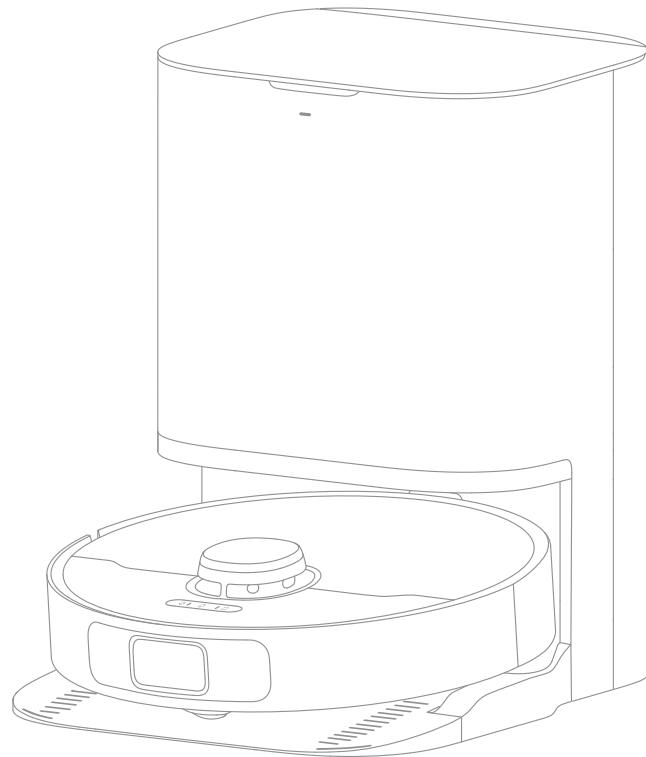
The illustrations in this manual are for reference only. Please refer to the actual product.
Contents
EN User Manual
DE Benutzerhandbuch 18
FR Manuel d'utilisation 36
IT Manuale utente 54
ES Manual de usuario 72
RU RykoBoIDCTBO noIb3OBaTeJIa 90
PL Instrukcja obstugi 109
SV Anvandarmanual 127
NO Brukerhandbok 144
NL Gebruikershandleiding 161
VI Huong dan sdu ng 178
TH 195
HE 212
SA 228
To avoid electric shock, fire or injury caused by improper use of the appliance, please read the user manual carefully before using the appliance and keep it for future reference.
Usage Restrictions
This product should not be used by children younger than 8 years old nor persons with physical, sensory, intellectual deficiencies, or limited experience or knowledge without the supervision of a parent or guardian to ensure safe operation and to avoid any risks. Cleaning and maintenance shall not be performed by children without supervision.
- The appliance is only to be used with the power supply unit provided with the appliance.
· This appliance contains batteries that are only replaceable by skilled persons.
- Clear the area to be cleaned. Children shall not play with the appliance. Ensure children and pets are kept at a safe distance from the robot while it is operating.
· Do not install, charge or use the appliance in the bathrooms or around the pools.
This product is for floor cleaning in a home environment only. Do not use it outdoors, on non-floor surfaces, or in a commercial or industrial setting.
- Ensure that the appliance operates correctly in a proper environment. Otherwise, do not use the appliance.
If the power cord is damaged, it must be replaced by a special cord or assembly available from the manufacturer or its service agent.
- Do not use the robot in an area suspended above ground level without a protective barrier.
Usage Restrictions
-
Do not place the robot upside down. Do not use the LDS cover, robot cover, or bumper as a handle for the robot.
-
Do not use the robot at an ambient temperature above 40^ or below 0^ or on a floor with liquids or sticky substances.
- To prevent damage or harm from dragging, clear any loose objects from the floor, and remove cables or power cords on the cleaning path before operating the appliance.
- Remove fragile or small items from the floor to prevent the robot from bumping into and damaging them.
- Keep hair, fingers, and other body parts away from the suction opening of the robots.
- Keep the cleaning tool out of reach of children.
- Do not operate the appliance in a room where an infant or child is sleeping.
- Do not place children, pets, or any item on top of the robot regardless of whether it is stationary or moving.
- Keep the cleaning solution out of reach of children.
- Use only the officially-approved detergent. Do not add any liquid such as alcohol or disinfectant.
- Do not use the robot to clean any burning objects. Do not use the robot to pick up flammable or combustible liquids, corrosive gases, or undiluted acids or solvents.
Usage Restrictions
- Do not vacuum hard or sharp objects. Do not use the appliance to pick up objects such as stones, large pieces of paper or any item that may clog the appliance.
Plug must be removed from the socket-outlet before cleaning or maintaining the appliance.
Do not wipe the robot or the base station with a wet cloth or rinse them with any liquid. After cleaning washable parts, fully dry the parts before reinstalling and using them.
Please use this product in accordance with the instructions in the User Manual. Users are responsible for any loss or damage that arises from improper use of this product.
Batteries and Charging
- Do not use any third-party battery or base station. The robot can only be used with the model RCWC1 base station.
Do not attempt to disassemble, repair, or modify the battery or the base station on your own.
Do not place the base station near a heat source.
Do not use a wet cloth or wet hands to wipe or clean the base station's charging contacts.
Do not improperly dispose of old batteries. Unneeded batteries should be discarded at an appropriate recycling facility.
If the power cord becomes damaged or broken, stop using it immediately and contact after-sales service.
Batteries and Charging
Make sure the robot is turned off when being transported and kept in its original packaging if possible.
If the robot will not be used for an extended period of time, fully charge it, then turn it off and store it in a cool, dry place. Recharge the robot at least once every 3 months to avoid over-discharging the battery.
The lithium-ion battery pack contains substances that are hazardous to the environment. Before disposing of the robot vacuum, please first remove the battery pack, then discard, or recycle it in accordance with local laws and regulations of the country or region it is used in.
When removing the batteries from the product, it is better to use up the batteries and make sure your product is disconnected from power.
1) Uninstall the screw on the bottom, then remove the cover.
2) Unplug the battery connector, then remove the batteries. Do not damage the battery case to avoid any risk of injuries.
3) Return the batteries to a professional recycling organization.
The laser sensor in this product meets the IEC 60825-1: 2014 Standard for Class 1 laser products. Please avoid direct eye contact with it during use.
Hereby, Dreame Trading (Tianjin) Co., Ltd. declares that the radio equipment type RLL11GC is in compliance with Directive 2014/53/EU. The full text of the EU declaration of conformity is available at the following internet address: https://global.dreametech.com
For detailed e-manual, please go to https://global.dreametech.com/pages/user-manuals-and-faqs
EN Product Overview
Package Contents
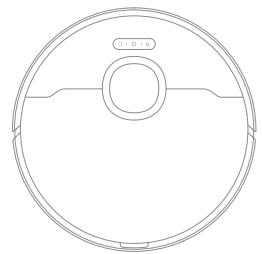
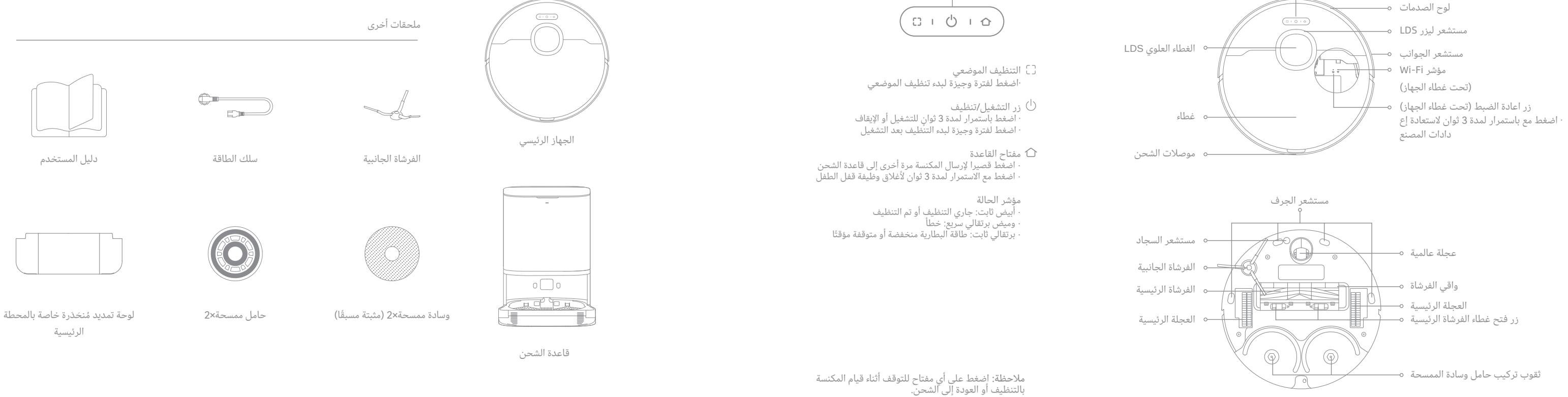
Robot
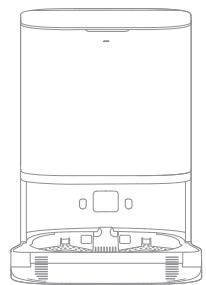
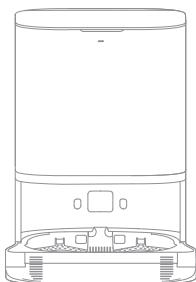
Base Station
Other Accessories
User Manual
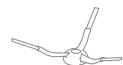
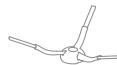
Side Brush
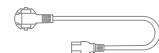
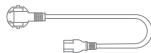
Power Cord
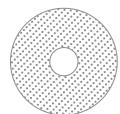
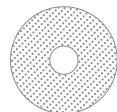
Mop Pad × 2 (pre-installed)

Mop Pad Holder × 2
Base Station Ramp Extension Plate
Product Overview
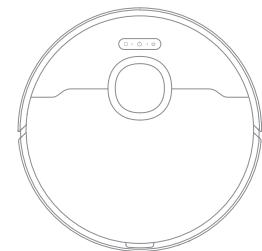
Robot
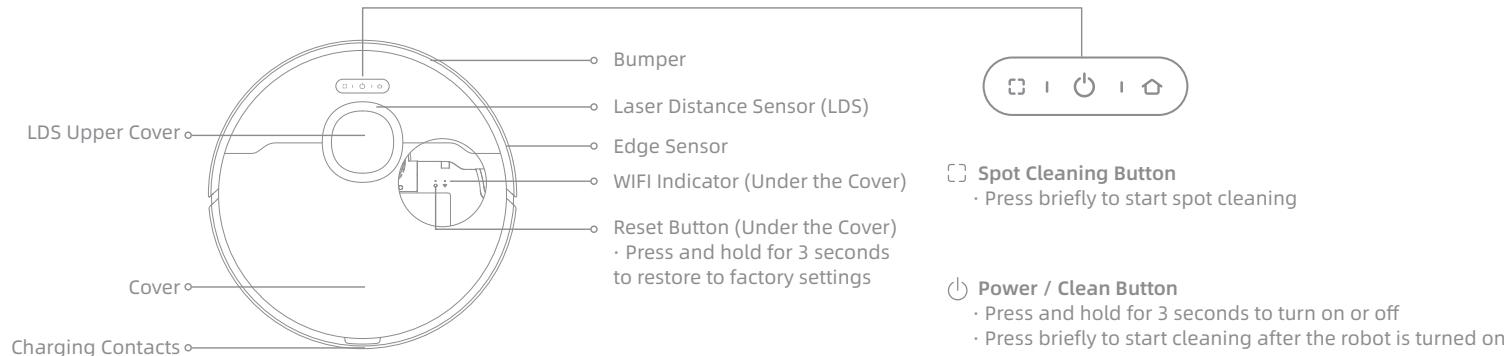
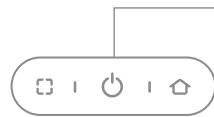
- Press briefly to send the robot back to the base station
- Press and hold for 3 seconds to disable Child Lock
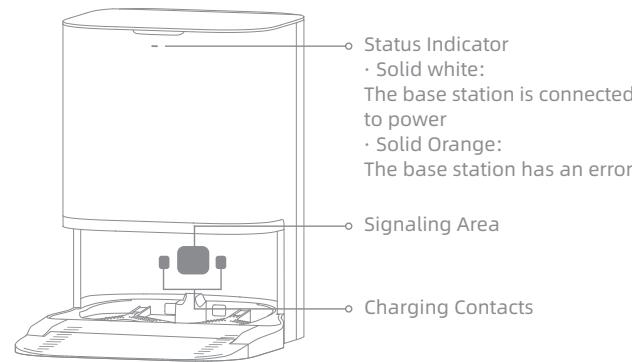
Status Indicator
Solid White: Cleaning or cleaned
- Quickly Blinking Orange: Error
Solid Orange: Low battery or paused
Note: Press any button to pause the robot while it is cleaning or returning to charge.
EN Product Overview
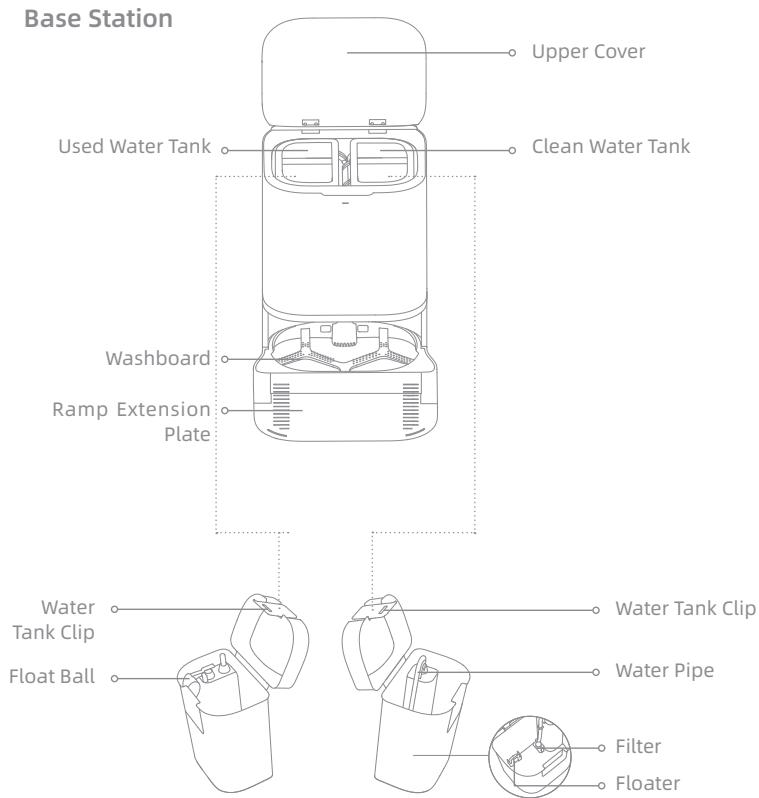
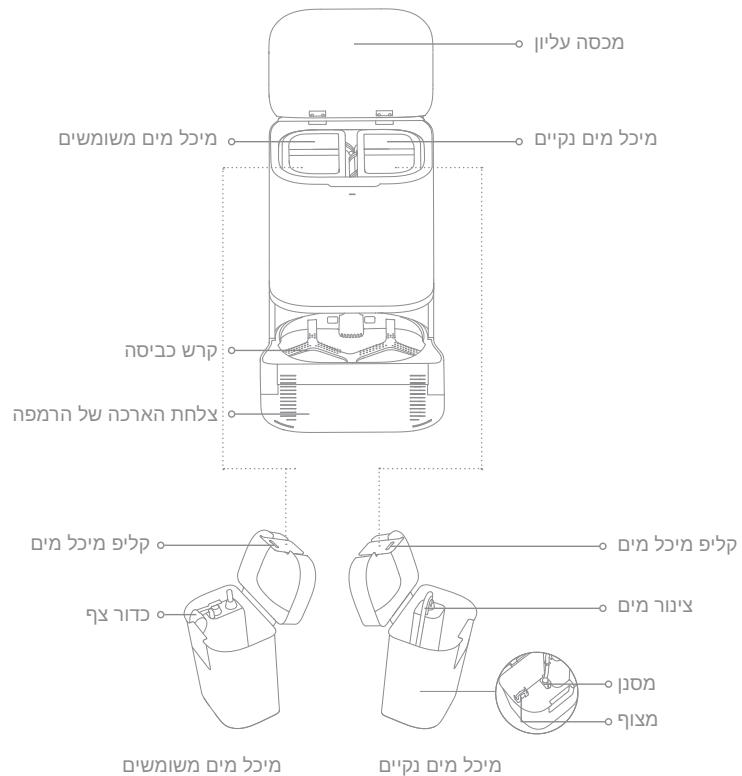
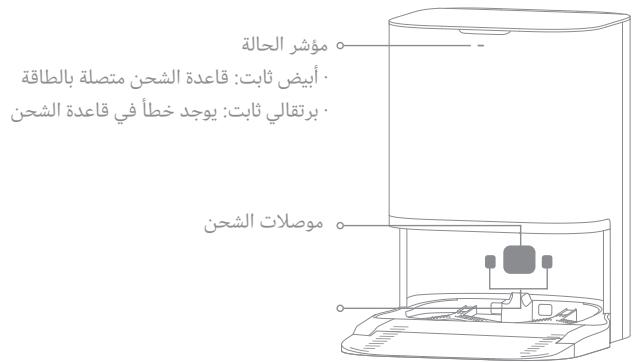
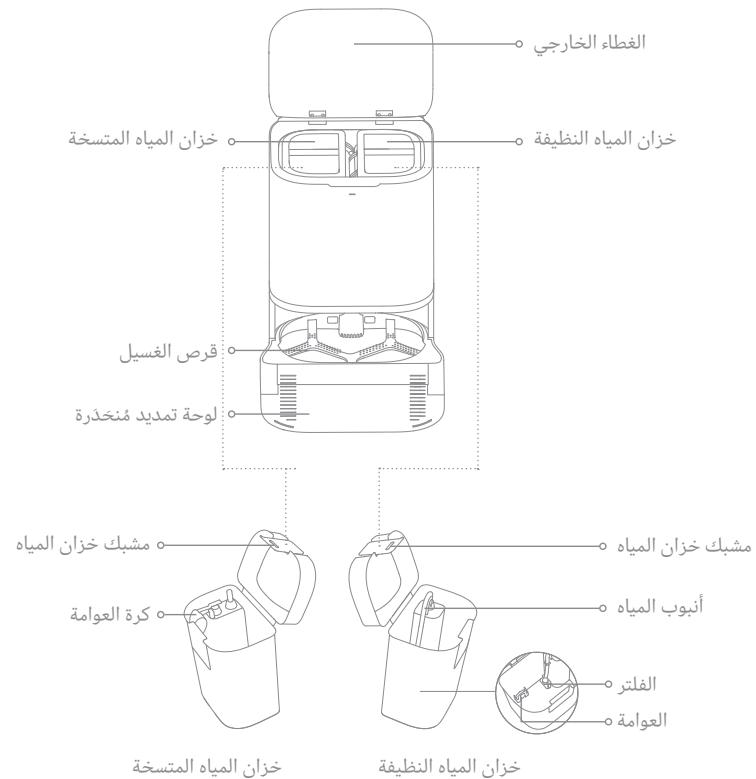
Used Water Tank
Clean Water Tank
Before Use
1. Set up the Base Station
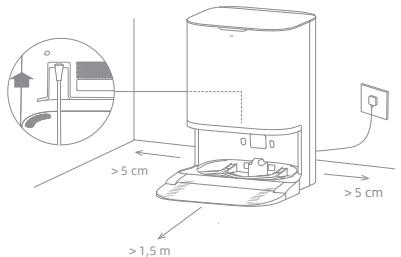
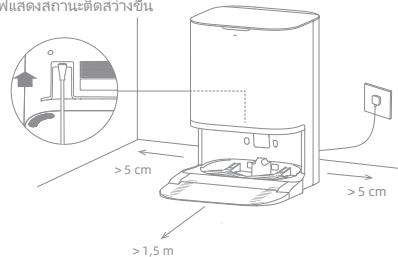
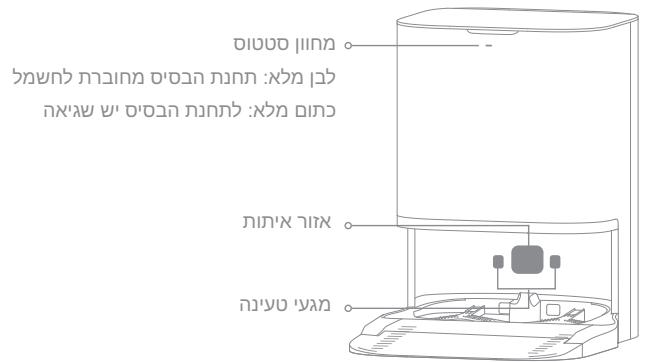
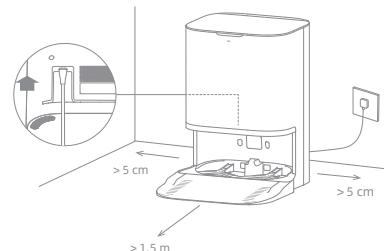
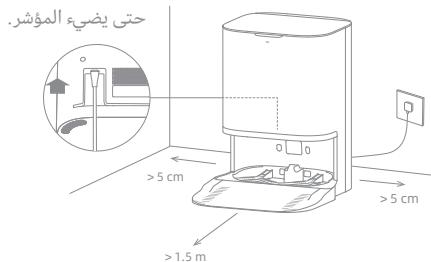
Place the base station in a location that is as open as possible with a good Wi-Fi signal. Insert the power cord into the base station and plug it into the socket. Then install the ramp extension plate down to the base station.
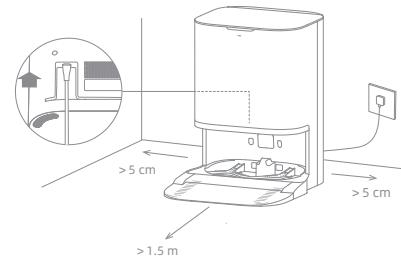
Firmly insert the power cord upwards until the indicator turns on.
Note:
- Make sure that no objects might block the signaling area.
- To prevent water stains from damaging wood floors or carpets, it is recommended to place the base station on tile or marble floors.
2. Remove the Protections and Install the Accessories
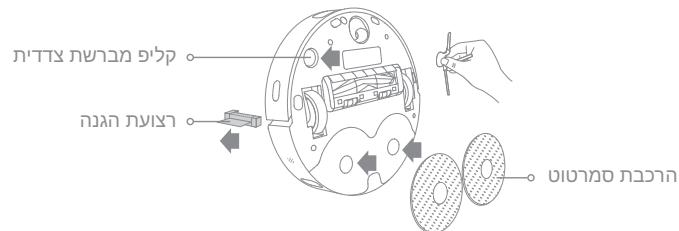
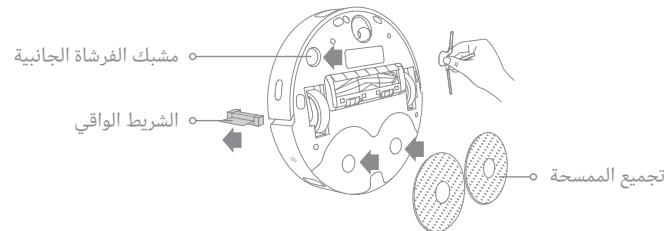
Remove the sticker and the protective strips on the robot, and then install the side brush and mop assembly.
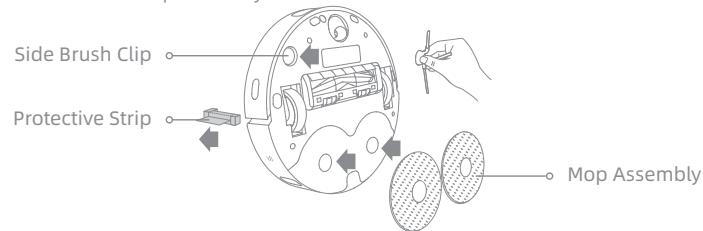
Note: Install the side brush until it clicks into place.
3. Add Water to the Clean Water Tank
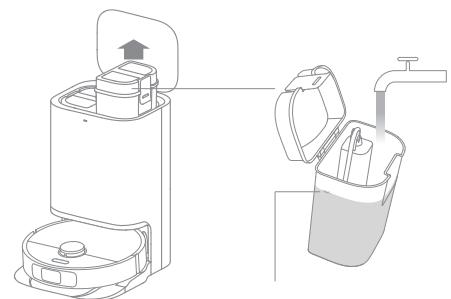
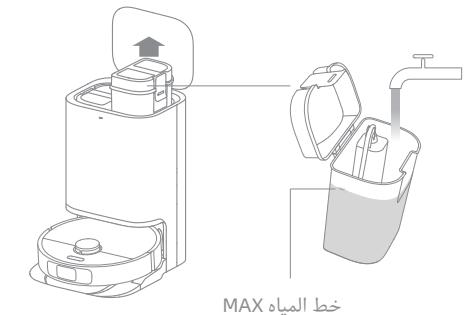
Take out the clean water tank from the base station, and fill it with clean water up to the max water line. Then install it back into the base station.

Note:
- Do not fill the water tank with hot water as this may cause the water tank to warp.
- Do not add any liquid other than the officially-approved cleaning solution to help prevent base station malfunction.
4. Place the Robot
Press and hold the button on the robot for 3 seconds to turn it on. Place the robot onto the base station with the mop assembly facing toward the washboard. Then you will hear a voice notification when the robot successfully connects to the base station and starts charging.
Note: It is recommended to fully charge the robot before its first use. When the robot cannot be turned on after the battery is depleted, manually connect the robot with the station to charge it.
Connecting with Dreamehome App
This product works with the Dreamhome app which can be used to control your device.
1. Download the Dreamehome App
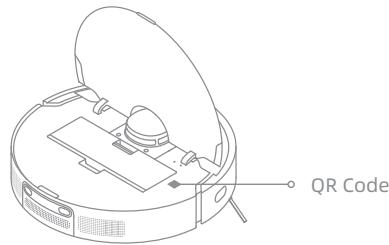
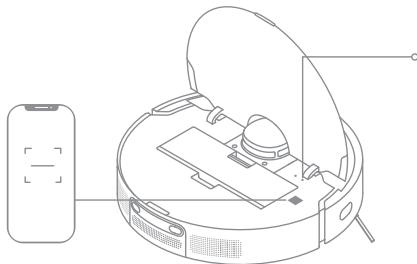
Scan the QR code on the robot, or search for "Dreamhome" in the app store to download and install the app.
2. Add Device
Open the Dreamehome App, tap " " in the upper right corner, and scan the QR code above again to add "DreameBot L10 Prime". Please follow the prompts to finish the Wi-Fi connection.
Wi-Fi Indicator
- Blinking slowly: To be connected
- Blinking quickly: Connecting
- On: Connected
Note:
- Only 2.4GHz Wi-Fi is supported.
- Due to upgrades in the app software, the actual operations may differ from the directions in this manual. Please follow the instructions based on the current app version.
3. Reset Wi-Fi
Simultaneously press and hold the and buttons until you hear a voice prompt say, "Waiting for the network configuration." Once the Wi-Fi indicator is blinking slowly, the Wi-Fi has been successfully reset.
Note: If your robot cannot connect to the app successfully, reset the Wi-Fi and add the device again.
How to Use
Fast Mapping
After configuring the network for the first time, follow the instructions on the app to quickly create a map. The robot will start mapping without cleaning. When the robot returns to the base station, the mapping process has been completed and the map will be saved automatically.
Turn On/Off
Press and hold the button for 3 seconds to turn on the robot. The power indicator should be illuminated. Place the robot onto the base, the robot should turn on automatically and begin charging. To turn off the robot, move the robot away from the base and press and hold the button for 3 seconds.
Pause/Sleep
When the robot is running, press any button to pause it.
If the robot is paused for more than 10 minutes, it automatically enters sleep mode. The power indicator and charging indicator will turn off. Press any button on the robot or base, or use the app to wake up the robot.
Note:
- The robot will turn off automatically if it is left in sleep mode for more than 12 hours.
- If the robot is paused and placed onto the base station, the current cleaning process will end.
Do Not Disturb (DND) Mode
When the robot is set to the Do Not Disturb (DND) mode, the robot will be prevented from resuming cleaning and the power indicator will go out. The DND mode is disabled by default at the factory. You can use the app to enable the DND mode or modify the DND period. The DND period is 22:00-8:00 by default.
Note:
- The scheduled cleaning tasks will be performed on time during the DND period.
- The robot will resume cleanup where it left off after the DND period expires.
Spot Cleaning
When the robot is on standby, briefly press the button to enable spot cleaning mode. In this mode, the robot will clean a square-shaped area of 1.5 × 1.5 meters around it and return to its starting point once spot cleaning is completed.
Robot Restarting
If the robot stops responding or cannot be turned off, press and hold the button for 10 seconds to force a shutdown. Press and hold the button for 3 seconds to turn the robot back on.
EN How to Use
Sweeping & Mopping
Note: When using the mop assembly for the first time, the robot will perform the sweeping and mopping task by default.
1. Start sweeping and mopping
Press the button on the robot, or use the app to make the robot start from the base station. Then the robot will plan the optimal cleaning route and perform the cleaning task based on the created map.
Note:
- The mop pads will be cleaned before the robot starts mopping, please wait patiently.
- Do not move the base station, the clean water tank, the used water tank, or the washboard during operation.
2. Return to clean mop pads midway
When mopping, the robot will automatically return to the base station to wash its mop pads based on the mop pad cleaning frequency specified in the app.
3. Clean the mop pads
After the robot finishes a cleaning task and returns to the base station to charge, the base station will automatically clean the mop pads.
Routine Maintenance
Parts
To keep the robot in good condition, it is recommended to refer to the following table for routine maintenance.
| Part | Maintenance Frequency | Replacement Period |
| Used Water Tank | After each use | / |
| Dust Bin | As needed |
| Clean Water Tank | Once every 2 weeks |
| Main Brush | Every 6 to 12 months |
| Dust Bin Filter | Every 3 to 6 months |
| Side Brush |
| Mop Pad | / | Every 1 to 3 months |
Note:
- The replacement frequency will depend on your usage of the robot. If an exception occurs due to special circumstances, the parts should be replaced.
- For more information, you can open the Dremehome App, tap "More Actions" at the bottom of the device page, and then tap " " > "Help" to learn more details. (Due to upgrades in the app software, the actual operations may differ from the directions in this manual.)
Used Water Tank
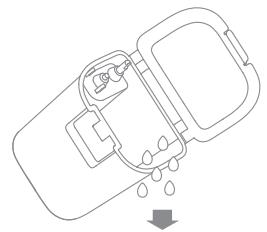
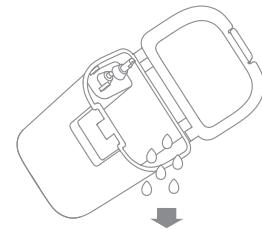
- Remove the used water tank, open its cover and pour out the dirty water.
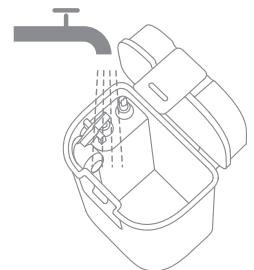
- Rinse the used water tank with clean water, and use a proper tool to clean its inner wall.
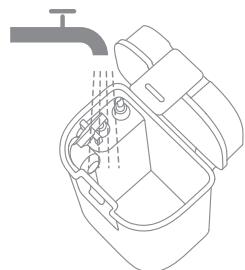
Note: The float ball in the used water tank is a movable part. Do not apply too much force when cleaning it to avoid damaging it.
EN Routine Maintenance
Main Brush, Side Brush and Universal Wheel
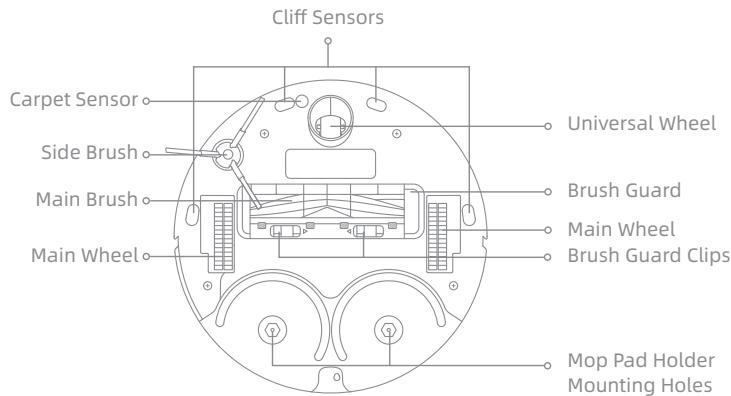
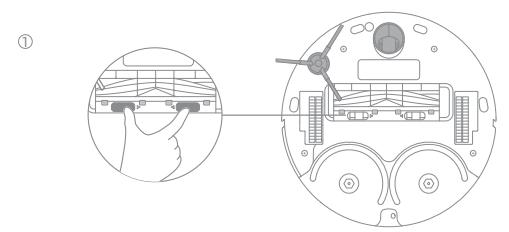
- Press the brush guard clips inwards to remove the brush guard and lift the brush out of the robot.
- Pull out the brush covers as shown in the diagram. Use a proper tool to remove the hair tangled in the brush.
- Remove and clean the side brush.
- Use a tool such as a small screwdriver to separate the axle and tire of the universal wheel. Do not use excessive force.
- Rinse the universal wheel under the running water and put it back after drying it completely.

Filter
- Remove the filter and tap its basket gently.
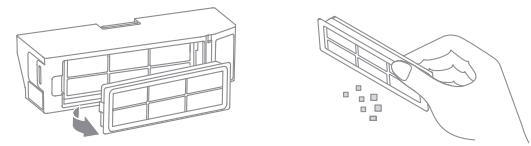
Note: Do not attempt to clean the filter with a brush, finger, or any sharp objects so as to avoid damaging it.
- Rinse the dust bin and filter with water and dry them completely before reinstalling.
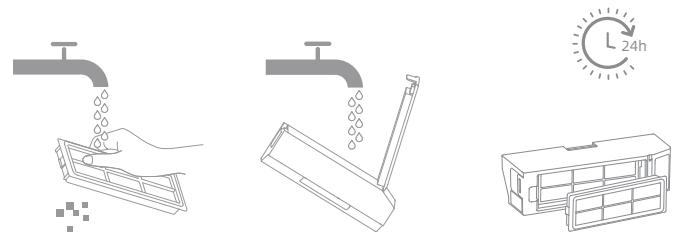
Note:
- Rinse the dust bin and filter with clean water only. Do not use any detergent.
- Use the dust bin and filter only when they are completely dry.
Routine Maintenance
Wipe sensors and charging contacts of the robot by using a soft, dry cloth:
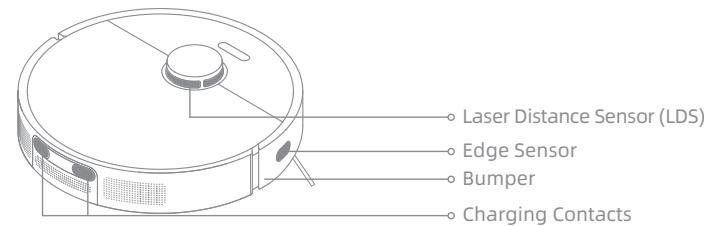
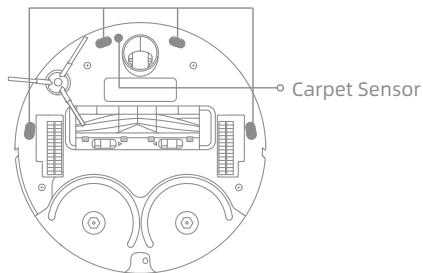
Cliff Sensors
Note: Wet cloth can damage sensitive elements within the robot and the base station. Please use dry cloth for cleaning.
Clean the charging contacts and the signaling area of the base station with a soft, dry cloth.
Mop Pad
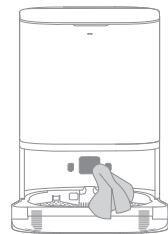
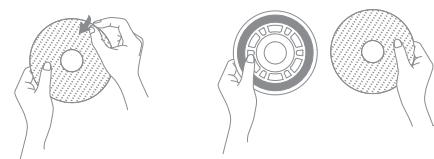
Remove the mop pad from the mop pad holder to replace it.
Battery
The robot contains a high-performance lithium-ion battery pack. Make sure that the battery remains well-charged for daily use to maintain optimal battery performance. If the robot is not used for an extended period of time, turn it off and put it away. To prevent damage from over-discharging, charge the robot at least once every three months.
EN Troubleshooting
| Problem | Solution |
| The robot does not turn on. | · The battery may be low. Recharge the robot on the base and try again.
· The temperature of the battery is too low or too high. It is recommended to operate the appliance at a temperature between 32 °F (0°C) and 104 °F (40°C). |
| The robot does not recharge. | · The base station may not be receiving power. Please confirm that both ends of the power cord are plugged in correctly.
· The robot may be in poor contact with the charging contacts. Clean the charging contacts on both the base station and the robot.
· Check whether there is any foreign object at the connector of the robot and remove the foreign object if any. |
| The robot cannot connect to Wi-Fi. | · The password of Wi-Fi may be incorrect. Please enter the correct password.
· You may be connected to a 5GHz Wi-Fi band, which is not supported. Please ensure your robot is connected to a 2.4GHz band.
· The Wi-Fi signal may be weak. Make sure the robot is in an area with good Wi-Fi coverage.
· The robot may not be ready to be configured. Please exit and re-enter the app, and then try again as instructed. |
| The robot cannot find and return to the base station. | · The base station may be disconnected from power or may have been moved when the robot is not on it.
· There may be too many obstructions around the base station. Place the base station in a more open area.
· Moving the robot may cause it to re-position itself, and it will recreate a map if re-positioning fails. If the robot is too far from the base station, it might not be able to automatically return on its own, in which case you will need to manually place the robot onto the base station.
· Wipe the signaling area on the base station to remove dust or debris. |
| The robot will not turn off. | · The robot cannot be turned off when it is charging. It is recommended to move the robot from the base station, and then press and hold the power button for three seconds to turn it off.
· If the robot cannot be turned off by performing step 1, press and hold the ( ) button for 10 seconds to forcibly turn off the robot. If the problem persists, please contact after-sales service. |
Troubleshooting
| Problem | Solution |
| The charging speed is slow. | ·It takes about 6 hours to fully charge the robot when its battery is low.
·If you operate the robot at temperatures outside of the specified range, the charging speed will automatically slow down to extend the battery life.
·The charging contacts on both the robot and the base may be dirty, please wipe them with a dry cloth. |
| The robot is making a strange noise. | ·Check whether the dust bin filter is clogged. If so, clean it or replace it.
·A hard object may be caught in the multi-surface rubber brush or the dust bin. Check and remove any hard object.
·The main brush or the side brush may become tangled. Check and remove any foreign objects.
·Switch the suction mode to Standard or Quiet. |
| The robot moves without following the set route. | ·Objects such as power cords and slippers should be organized before using the robot.
·Working on wet slippery surfaces may cause the main wheel to slip. It is recommended to dry the wet places before using the robot. |
| The robot misses the rooms to be cleaned. | ·Make sure that the doors of the rooms to be cleaned are open.
·Check whether there is a threshold higher than 2 cm at the door of the room. The robot cannot climb over high thresholds or steps.
·The place in front of the room to be cleaned may be wet and slippery, causing the robot to work abnormally. It is recommended to dry the floor before using the robot. |
| The water level in the washboard is abnormal. | ·Check whether the seal on the used water tank is loose or not correctly installed. Manually reset it if so.
·Gently press down on the used water tank to make sure it is installed correctly.
·Remove the washboard and check whether the sewage drain is blocked and clean it.
·Check the cleaning solution. Do not add any liquid other than the officially-approved cleaning solution.
·If the problem persists, please contact the after-sales service team. |
For more information, you can open the Dramehome App, tap "More Actions" at the bottom of the device page, and then tap " " > "Help" to learn more details. (Due to upgrades in the app software, the actual operations may differ from the directions in this manual.)
For additional services, please contact us via https://global.dreametech.com
EN Specifications
Robot
| Model | RLL11GC |
| Charging Time | Approx. 6 hours |
| Rated Voltage | 14.4 V --- |
| Rated Power | 60 W |
| Operation Frequency | 2400-2483.5 MHz |
| Maximum Output Power | <20 dBm |
Base Station
| Model | RCWC1 |
| Rated Input | 100-240 V~50-60 Hz |
| Rated Output | 20 V== 1 A |
| Rated Power | 30 W |
Under normal use of condition, this equipment should be kept a separation distance of at least 20cm between the antenna and the body of the user.
All products bearing this symbol are waste electrical and electronic equipment (WEEE as in directive 2012/19/EU) which should not be mixed with unsorted household waste. Instead, you should protect human health and the environment by handing over your waste equipment to a designated collection point for the recycling of waste electrical and electronic equipment, appointed by the government or local authorities. Correct disposal and recycling will help prevent potential negative consequences to the environment and human health. Please contact the installer or local authorities for more information about the location as well as terms and conditions of such collection points.
IIN peHNoHa nCpOJIb3OBaHnI.
Ipn n3BvleHn aKKyMylrTOPOB n3 n3dJIpy peKOMeHdyETc
ChaJlA NaJHocTbU n3paCXoOBAt b Nx 3apJd n y6eJITbc8, YTO
IpoDyKT OKJIIOueH OT nCTOuHnKa PNTAHN.
1) BbIKpyTNTe BnHT B HnXHeY qACTn, 3aTeM CHIMNTe KpbIuKy.
2) OTCOeHnHTe pa3bem aKKymyIaTOPa n I3BVeKInTe aKKymyIaTOPbI. Bo n36exhaHne BO3MOxHbIX TpaBM CLeIte 3a ZcENoCTHOCTbIO aKKymyIaTOPHOrO OTceKa.
3)перааиTe aKKymлЯТорыnpocpeccnoHaJIbHOnОpraHn3aципопераразOTke.
Texnka 6e30napochtnpi Na3epHbI DaTUnK 3TOrO yCTpOJCTBa COOTBeTCTByET Tpe6oBaHnM K Na3epHbIM n3dEJIyM Klacca 1, npedymOTpeHHbIM CTaHdaptOM IEC 60825-1:2014. Bo BpemЯ nCpOJIb3OBaHnI n36eaiTe npamoro nonadaHnI na3epa B rIa3a.
1. Hactpoja Ka 6a3OBoB CTaHcnn
Pa3MeCTIe 6a3OByIO CTaHcUIO Ha OTKpbTOM NOBepxHOCTN B MecTe CO cTa6NbHbIM CnHAlOM Wi-Fi. BCTaBBte UHyp NITaHINB 6a3OByIO CTaHcUIO IPOkJIIOuHTe erO K PO3Etke. 3aTeM yCTaHOBtE ydInHInTeJbHyIO pIaCTnHy paMnbl Do 6a3OBOI CTaHcUIN.
HadexkHO BCTaBte 5hup nItaNnTaTAK, yTo6bI 3arOpEcn HndnKaTOp.
PnmuMeaHne.
- y6eHntecb,уTO 30Ha nOaH cNHa cB6oHa OT noCTOpOHnX npEmdetOB.
YTObI PnTHA BObI He CMaUHbAlN DepeBcHHbIe NOnIb IIN KOBpbl, peKmEHyTeCpa3MeaTaB 6a3OByIO CTaHcIIO Ha IInTOuHbIX NOnJax IN mPamOpHbIX nOax.
2. CHINMITE 3auntHbIe NOLocIy UCTaHOBnte PnHaIeXHOCTN
WuWanWanWanWanWanWanWanWanWanWan
:
a
W
vouu:uyyuyuuyuuyuuyuuyuuyuuyuuyuuyuuyuuyuuyuuyuuy
yuuu uuuuauuauu 3 uuuuuuuuuuuuuuuuuuuuuuuuuuuuuuuuuuuuuuuuuuuuuuuuuuuuuuuuuuuuuuuuuuuuuuuuuuuuuuuuuuuuuuuuuuuuuuuuuuuuuuuuuuuuuuuuuuuuuuuuuuuuuuuuuuuuuuuuuuuuuuuuuuuuuuuuuuuuuuuuuuuuuuuuuuuuuuuUU
nnae: ynnnnnne nnnnnnnnnnnnnnnnnnnnnnnnnnnnnnnnnnnnnnnnnnnnnnnnnnnnnnnnnnnnnnnnnnnnnnnnnnnnnnnnnnnnnnnnnnnnnnnnnnnnnnnnnnnnnnnnnnnnnn nn
TH Dramehome
Waeuuee uuee euee U Dreamehome aee
1. Dreamehome
yuuu uuuu uuuuuuuuuuuuuuuuuuuuuuuuuuuuuuuuuuuuuuuuuuuuuuuuuuuuuuuuuuuuuuuuuuuuuuuuuuuuuuuuuuuuuuuuuuuuuuuuuuuuuuuuuuuuuuuuuuuuuuuuuuuuuuuuuuuuuuuuuuuuuuuuuuuuuuuuuuuuuuuuuuuuuuuuuuuuuuuuuuuUU
y
9178199
WuWuWuWuWuWuWuWuWuWuWuWuWuWuWuWuWuWuWuWuWuWuWuWuWuWuWuWuWuWuWuWuWuWuWuWuWuWuWuWuWuWuWuWuWuWuWuWuWuWuWw
·nunnnnnnnnnnnnnnnnnnnnnnnnnnnnnnnnnnnnnnnnnnnnnnnnnnnnnnnnnnnnnnnnnnnnnnnnnnnnnnnnnnnnnnnnnnnnnnnnnnnnnnnnnnnnnnn
wouwuyuuyuuyuyuuyuuyuuyuuyuuyuuyuuyuuyuuyuuyuuyuuyuuyuuyuuyuuyuuyuuyuuyuuyuuyuuyuuyuuyuuyuuyuuyuuyuuyuuyuuyuuy
#
nnaeannnnnne nnnnnnne nnnnne nnnnne nnnnne nnnnne nnnnne nnnnne nnnnne nnnnne nnnnne nnnnne nnnnne nnnnne nnnnne nnnnne nnnnne nnnnne nnnnne nnnnne nnnnne nnnnne nnnnne nnnnne nnnnne nnnnne nnnnne
nunu: wuiuui uuiuui uuiuui uuiuui uuiuui uuiuui uuiuui uuiuui uuiuui uuiuui uuiuui uuiuui uuiuui uuiuui uuiuui uuiuui uuiuui uuiuui uuiuui uuiuui uuiuui uuiuui uuiuui uuiuui uuiuui uuiuui
n
#
wouyuyuoyuoyuaanw anwunrnuoyuanyuanyuuyuyuy
.00nn IN nbnn nn nn IN ,Dnn Dn ,Dn
TNN,ONN NNNNNNNNNNNNNNNNNNNNNNNNNNNNNNNNNNNNNNNNNNNNNNNNNNNNNNNNNNNNNNNNNNNNNNNNNNNNNNNNNNN
wn nn yipnb bbyy yon bn nni
Nn nn nn nn nn nn nn nn nn
"nnn .n nn nnn nnn nnn nnn nnn nnn nnn nnn
.0n yin yin nn npnn n nn 1n nn nn nn nn nn nn nn nn
n nn nnnn nn nn nn nn nn nn nn nn nn nn
n nn nnnnnnnnnnnnnnnnnnnnn
OONN'N'O'pWNN'U. 100-IX'N'N'U
.RCWC1 np
.
.0IN TIPN T'OIOIIN NNN OPON |N
.00nn nn nn nn nn n nn nn nn nn nn nn nn nn nn nn nn nn nn nn nn nn nn nn nn nn nn nn nn nn nn nn nn nn nn nn nn nn nn nn nn nn nn nn nn nn nn nn nn nn nn nn nn nn nn nn nn nn nn nn nn nn nn nn nn nn nn nn nn nn nn nn nn nn nn nn
ywn nn ywn nnn nn nn nn nn nn nn nn nn nn nn nn nn nn nn nn nn nn nn nn nn nn nn nn nn nn nn nn nn nn nn nn nn nn nn nn nn nn nn nn nn nn nn nn nn nn nn nn nn nn nn nn nn nn nn nn nn nn nn nn nn nn nn nn nn nn nn nn nn nn nn nn nn nn nn nn nn nn nn nn nn nn nn
.
n nn n nn nn nn nn nn nn nn nn nn nn nn nn nn nn nn nn nn nn nn nn nn nn nn nn nn nn nn nn nn nn nn nn nn nn nn nn nn nn nn nn nn nn nn nn nn nn nn nn nn nn nn nn nn nn nn nn nn nn nn nn nn nn nn nn nn nn nn nn nn nn nn nn nn nn nn nn nn nn nn nn nn nn nn nn nn nn nn nn nn nn nn nn nn nn nn nn nn nn nn nn
JINN NNNNININININININININININ
n nn nnnn nn nnnnnnnnnnnnnnnnnnnnnnnnnnnnnnnnnnnnnnnnnnnnnnnnnnnnnnnnnnnnnnnnnnnnnnnnnnnnnnnnnnnnnnnnnnnnn
n nn nnnnnnnnnnnnnnnnnnnnnnnnnnnnnnnnnnnnnnnnnnnnnnnnnnnnnnnnnnnnnnnnnnnnnnnnnnnnnnnnnnnnnnnnn
nbnon nn yynnnn by nni 3-nyin
nnn nn nnnnnnnnnnnnnnnnnnnnnnnnnnnnnnnnnnnnnnn
pipin nn nnnn nnnn nnnn nnnn nnnn nnnn nnnn nnnn nnnn nnnn nnnn nnnn nnnn nnnn nnnn nnnn nnnn nnnn nnnn nnnn nnnn nnnn nnnn nnnn nnnn nnnn nnnn nnnn nnnn nnnn nnnn nnnn nnnn nnnn
XINIINNIN
wnnnn nn nn nnnn nn nnnn nn nn nn nn nn nn nn nn nn
100n nn nn nn nn nn nn nn nn nn nn (1
n nnnnnnnnnnnnnnnnnnnnnnnnnnnnnnnnnnnnnnnnnnnnnnnnnnnnnnnnnnnnnnnnnnnnnnnnnnnnnnnnnnnnnnnnn
JYIYIYI
.1yipn nn n nn nn nn nn (3
1 | 0 0 0 0 0 0 0 0 0 0 0 0 0 0 0 0 0 0 0 0 0 0 0 0 0 0 0 0 0 0 0 0 0 0 0 0 0 0 0 0 0 0 0
.ynnn nn nn nn nn nn . (Class 1)
N
ninn
n nn nnnnnnnnnnnnnnnnnnnnnnnnnnnnnnnnnnnnnnnnnnnnnnnnnnnnnnnnnnnnnnnnnnnnnnnnnnnnnnnnnnnnnnnnnnnnnnnnnnnnn
https://global.dreametech.com/pages/user-manuals-and-faqs
Xinnip
nannnn
XINANPO
0121
wnnnn nn

oannnnn nn nnnn

2xwnn nn
( UNN1PN1N) 2 × 2 N_1
017
00nn
[ ]
nnpnnnnn npnnn
1
oannnnn nn nnnn nn nnnn nn nnnn nn nnnn nn nnnn nn
iannnnn ninnn nn nnnn nn nnnn nn nnnn nn nnnn nn nnnn nn
Xinnip
00nn
Dn nn n nn .3
nnn nn nnnnnnnnnnnnnnnnnnnnnnnnnnnnnnnnnnnnnnnnnnnnnnnnnnnnnnnnnnnnnnnnnnnnnnnnnnnnnnnnnnnnnnnnnnnnnnnnnnnnnnnnn
MAXDnip
:
n nn nnnnnnnnnnnnnnnnnnnnnnnnnnnnnnnnnnnnnnnnnnnnnnnnnnnnnnnnnnnnnnnnnnnnnnnnnnnnnnnnnnnnnnn
UINNnOpn.4
nnnnn nn nnnn nn nnnn nn nnnn nn nnnn nn nnnn nn nnnn nn nnnn nn nnnn nn nnnn nn nnnn nn nnnn nn nnnn nn nnnn nn nnnn nn nnnn nn nnnn nn nnnn nn nnnn nn nnnn nn nnnn nn nnnn nn nnnn nn nnnn nn nnnn nn nnnn nn
y
002nn nn np.1
nnn nn nnnnnnnnnnnnnnnnnnnnnnnnnnnnnnnnnnnnnnnnnnnnnnnnnnnnnnnnnnnnnnnnnnnnnnnnnnnnnnnnnnnnnnn
wnnn nn npnna nnnn nn nnnnnnnnnnnnnnnnnnnnnnnnnnnnnnnnnnnnnnnnnnnnnnnnnnnnnnnnnnnnnnnnnnnnnnnnnnnnnnnnnnnnnnnnnnnnnnnnnnnnnnnnnnnnnnnnnnnnnnnnnnnnn
:
n nn nnnnnnnnnnnnnnnnnnnnnnnnnnnnnnnnnnnnnnnnnnnnnnnnnnnnnnnnnnnnnnnnnnnnnnnnnnnnnnnnnnnnnnnnnnnnnnnnnnnnnnnnnnnnnnnnnnnnnnnnnnnnnnnnnnnnnnnnnnnnnnnnn
12
y
nnpynnnnnnnnnnnnnnnnnnnnnnn
Dreamehome n'XnNnNn
S OBC = S COD + S_ BOC
.2.4Ghz WiFi
ninnnn nnnnnn nnynn nnynnnn nnynnnn nnynnnn nnynnnn nnynnnn nnynnnn nnynnnn nnynnnn nnynnnn nnynnnn nnynnnn nnynnnn nnynnnn nnynnnn nnynnnn nnynnnn nnynnnn nnynnnn nnynnnn nnynnnn nnynnnn nnynnnn nnynnnn nnynnnn nnynnnn nnyn
Dreamehome nynnny
Dreamehome n'xp'xnn nn Tn .1
"Dreamehome" nx yn iN ,iinn n QR-n tip nx pino .yni nn nnnn nn nnnn nn nnnn nn
Wi-Fi wwninn.3
T 100000000000000000000000000000000000000000000000000000000000
WiFin n nn nn nn nn nn nn nn nn nn nn nn nn nn nn nn nn nn nn nn nn nn nn nn nn nn nn nn nn nn nn nn nn nn nn nn nn nn nn nn nn nn nn nn nn nn nn nn nn nn nn nn nn nn nn nn nn nn nn nn nn nn nn nn nn nn nn nn nn nn nn nn nn nn nn nn nn nn nn nn nn nn nn nn nn nn nn nn nn nn nn nn nn nn nn nn nn nn nn nn nn
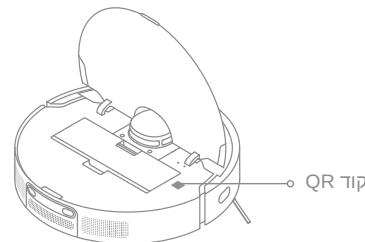
uiin .2
"DreameBot L10 Prime"
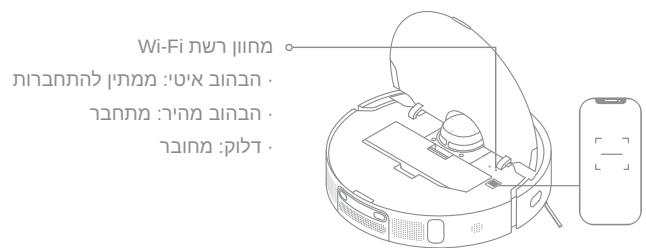
y
wnnnn nn nnnn n 20 by pnn n n by nnnn
$$
\ddot {a} _ {0} \dot {a} _ {1} \dot {a} _ {2} \dot {a} _ {3} \dot {a} _ {4} \dot {a} _ {5} \dot {a} _ {6} \dot {a} _ {7} \dot {a} _ {8} \dot {a} _ {9} \dot {a} _ {1 0} \dot {a} _ {1 1} \dot {a} _ {1 2} \dot {a} _ {1 3} \dot {a} _ {1 4} \dot {a} _ {1 5} \dot {a} _ {1 6} \dot {a} _ {1 7} \dot {a} _ {1 8} \dot {a} _ {1 9} \dot {a} _ {2 0} \dot {a} _ {2 1} \dot {a} _ {2 2} \dot {a} _ {2 3} \dot {a} _ {2 4} \dot {a} _ {2 5} \dot {a} _ {2 6} \dot {a} _ {2 7} \dot {a} _ {2 8} \dot {a} _ {2 9} \dot {a} _ {3 0} \dot {a} _ {3 1} \dot {a} _ {3 2} \dot {a} _ {3 3}
$$
$$
. j l q \geqslant \rho \rho \rho \rho \rho \rho \rho \rho \rho \rho \rho \rho \rho \rho \rho \rho \rho \rho \rho \rho \rho \rho \rho \rho \rho \rho \rho \rho \rho \rho \rho \rho \rho \rho \rho \rho \rho \rho \rho \rho \rho \rho \rho \rho \rho \rho \rho
$$
$$
\begin{array}{l} \text {a s s u s t a n t i c a l} \ \text {g l} \ \text {g l} \ \text {g l} \ \text {g l} \ \text {g l} \ \text {g l} \ \text {g l} \ \text {g l} \ \text {g l} \ \text {g l} \ \text {g l} \ \text {g l} \ \text {g l} \ \text {g l} \ \text {g l } \ \text {g l } \ \text {g l } \ \text {g l } \ \text {g l } \ \text {g l } \ \text {g l } \ \text {g l } \ \text {g l } \ \text {g l } \ \text {g l } \ \text {g l } \ \text {g l } \ \text {g l } \ \text {g l } \
$$
$$
. \dot {a} l \dot {a} \dot {l} \dot {w}! j g v \dot {a} l w a l l g \dot {a} b i \dot {w} l g c J l a b \dot {b} \dot {2} 1 d a e \dot {2} 1 c u s \dot {c} J b l \dot {c} o
$$
$$
j l q \equiv 1 1 g o a d e d i a l y s e r s i l a l b a l l o l o g o b e d j l q \equiv 1 1 p o l u t w i l l p o w e r .
$$
$$
\therefore a _ {1} = \frac {a _ {2}}{a _ {3}} = \frac {1}{2},
$$
$$
\ddot {a} \dot {a} \dot {b} \dot {b} \dot {b} \dot {b} \dot {b} \dot {b} \dot {b} \dot {b} \dot {b} \dot {b} \dot {b} \dot {b} \dot {b} \dot {b} \dot {b} \dot {b} \dot {b} \dot {b} \dot {b} \dot {b} \dot {a} \dot {a} \dot {a} \dot {a} \dot {a} \dot {a} \dot {a} \dot {a} \dot {a} \dot {a} \dot {a} \dot {a}
$$
$$
. d a t a s i n g l e f o r m a l
$$
$$
. \ddot {a} \dot {a} \dot {a} \dot {a} \dot {a} \dot {a} \dot {a} \dot {a} \dot {a} \dot {a} \dot {a} \dot {a} \dot {a} \dot {a} \dot {a} \dot {a} \dot {a} \dot {a} \dot {a} \dot {a} \dot {a} \ddot {a} \dot {a} \dot {a} \dot {a} \dot {a} \dot {a} \dot {a} \dot {a} \dot {a} \dot {a} \dot {a} \dot {a} \dot {a} \dot {a} \dot {a} \dot {a} \dot {a} \dot {a} \dot {a} \dot {b} \dot {b} \ddot {b} \ddot {b} \ddot {b}
$$
$$
\ddot {a} \dot {a} \dot {a} \dot {a} \dot {a} \dot {a} \dot {a} \dot {a} \dot {a} \dot {a} \dot {a} \dot {a} \dot {a} \dot {a} \dot {a} \dot {a} \dot {a} \dot {a} \dot {a} \dot {a} \dot {a} \ddot {a} \dot {a} \dot {a} \dot {a} \dot {a} \dot {a} \dot {a} \dot {a} \dot {a} \dot {a} \dot {a} \dot {a} \dot {a} \dot {a} \dot {a} \dot {a} \dot {a} \dot {a} \dot {a} \dot {a}.
$$
$$
. \dot {a} c l i o g \dot {g} \dot {a} r l a j \dot {a} s \dot {g}
$$
$$
. j _ {4} \text {a l l} \rho \dot {s} \dot {s} \ddot {s} \dot {s} \dot {s} \dot {s} \dot {s} \dot {s} \dot {s} \dot {s} \dot {s} \dot {s} \dot {s} \dot {s} \dot {s} \dot {s} \dot {s} \dot {s} \dot {s} \dot {s} \dot {s} \dot {s} \dot {s} \ddot {s} \ddot {s} \ddot {s} \ddot {s} \ddot {s} \ddot {s} \ddot {s} \ddot {s} \ddot {s} \ddot {s} \ddot {s} \ddot {s} \ddot {s}
$$
$$
. \ddot {a} a d \dot {z} \text {l l} S g \dot {g} \dot {a} e i a a o l l \ddot {a} S \dot {r} \dot {s} \dot {w} \dot {u} \dot {n} \dot {o} \ddot {a} o l \dot {c} a c g a z o g \dot {g} \dot {o} \dot {l} \ddot {c} l l w b u d d w w w w w w w w w w w w w w w w w w w w w w w w w w w w w w w w w w w w w w w w w w w w w w w w w w w w w w w w
$$
$$
. \ddot {g} g j \dot {j} \dot {j} \dot {j} \dot {j} \dot {j} \dot {j} \dot {j} \dot {j} \dot {j} \dot {j} \dot {j} \dot {j} \dot {j} \dot {j} \dot {j} \dot {j} \dot {j} \dot {j} \dot {j} \dot {j} \dot {j}.
$$
$$
. j l _ {j} \text {l} _ {j} \text {l} _ {j} \text {l} _ {j} \text {l} _ {j} \text {l} _ {j} \text {l} _ {j} \text {l} _ {j} \text {l} _ {j} \text {l} _ {j} \text {l} _ {j} \text {l} _ {j} \text {l} \text {l} _ {j} \text {l} _ {j} \text {l} _ {j} \text {l} _ {j} \text {l} _ {j} \text {l} _ {j} \text {l} _ {j} \text {l} _ {j} \text {l} _ {j} \text {l} _ {j} \text {l} _ {j},
$$
$$
J e \quad a _ {i} ^ {j} \quad a _ {j} ^ {k} \quad a _ {k} ^ {l} \quad a _ {l} ^ {m} \quad a _ {m} ^ {n} \quad a _ {n} ^ {o} \quad a _ {o} ^ {p} \quad a _ {p} ^ {q} \quad a _ {q} ^ {r} \quad a _ {r} ^ {s} \quad a _ {s} ^ {t} \quad a _ {t} ^ {u} \quad a _ {u} ^ {v} \quad a _ {v} ^ {w} \quad a _ {w} ^ {x} \quad a _ {x} ^ {y} \quad a _ {y} ^ {z} \quad a _ {z} ^ {w} \quad a _ {w} ^ {x} \quad a _ {x} ^ {y} \quad a _ {y} ^ {z} \quad a _ {z} ^ {w} \quad a _ {w} ^ {x} \quad a _ {x} ^ {y} \quad a _ {y} ^ {z} \quad a _ {z} ^ {w} \quad a _ {\mathrm {的}} ^ {x} \quad a _ {\mathrm {的}} ^ {y} \quad a _ {\mathrm {的}} ^ {z} \quad a _ {\mathrm {的}} ^ {w} \quad a _ {\mathrm {的}} ^ {x} \quad a _ {\mathrm {的}} ^ {y} \quad a _ {\mathrm {的}} ^ {z} \quad a _ {\mathrm {的}} ^ {w} \quad a _ {\mathrm {的}} ^ {x} \quad a _ {\mathrm {的}} ^ {y} \quad a _ {\mathrm {的}} ^ {z} \quad a _ 1 2 3 4 5 6 7 8 9 0 1 2 3 4 5 6 7 8 9 0 1 2 3 4 5 6 7 8 9 0 1 2 3 4 5 6 7 8 9 0 1 2 3 4 5 6 7 8 9 0 1 2 3 4 5 6 7 8 9 0
$$
$$
i. i. o. 2 \downarrow l g o g \downarrow j l g w L e q
$$
$$
j \neq a \text {a l l} j \neq k \omega \text {l g} \text {c o n s t a n t i n} j \neq k \omega \text {l g} \text {c o n s t a n t i n} j \neq k \omega \text {l g} \text {c o n s t a n t i n} j \neq k \omega \text {l g} \text {c o n s t a n t i n} j \neq k \omega \text {l g} \text {c c o n s t a n t i n} j \neq k \omega \text {l g} \text {c o n s t a n t i n} j \neq k \omega \text {l g} \text {c o n s t a n t i n} j \neq k \omega \text {l g} \text {c o n s t a n t i n} j \neq k \omega \tag {2.1.3.4}
$$
$$
\therefore \text {a n d} \text {a n d} \text {a n d} \text {a n d} \text {a n d} \text {a n d} \text {a n d}
$$
$$
. l a y _ {i} \text {d i s t i n g} \quad \left. \right.\left. \right.\left. \right.\left. \right.\left. \right.\left. \right.\left. \right.\left. \right.\left. \right.\left. \right.\left. \right.\left. \right.\left. \right.\left. \right.\left. \right.\left. \right.\left. \right.\left.\left.\left.\left.\left.\left.\left.\left.\left.\left.\left.\left.\left.\left.\left.\left.\left. 1 0 0 0 0 0 0 0 0 0 0 0 0 0 0 0 0 0 0 0 0 0 0 0 0 0 0 0 0 0 0 0 0 0 0 0 0 0 0 0 0 0 0 0 0 0 0 0 0 0 0 1\right)\right)\right)\right)\right)\right)\right)\right)\right)\right)\right)\right)\right)\right)\right)\right)\right)
$$
aOxuU Uloglo
aOxwU loglo
$$
\therefore \text {a l l} \quad \text {a l l} \quad \text {b e t a l l} \quad \text {a c c i d} \quad \text {j e t} \quad \text {d e j e c t} \quad \text {g r i d} \quad \text {p u n j e l} \quad \text {s l a c l} \quad g \quad \text {l o w} \quad g \quad \text {r e s h} \quad \text {t h} \quad \text {a b} \cdot
$$
$$
. J l \dot {b} \dot {b} \dot {2} \dot {1} J g l i \ddot {l} \dot {c} \dot {c} | \dot {J} \dot {J} \dot {J} \dot {J} \dot {J} \dot {J} \dot {J} \dot {J} \dot {J} \dot {J} \dot {J} \dot {J} \dot {J} \dot {J} \dot {J} \dot {J} \dot {J} \dot {J} \dot {J}
$$
$$
. \int_ {a} ^ {b} \int_ {1} ^ {2} \int_ {0} ^ {1} \int_ {0} ^ {1} \int_ {0} ^ {1} \int_ {0} ^ {1} \int_ {0} ^ {1} \int_ {0} ^ {1} \int_ {0} ^ {1} \int_ {0} ^ {1} \int_ {0} ^ {1} \int_ {0} ^ {1} \int_ {0} ^ {2} \dots
$$
$$
. \downarrow \downarrow \downarrow \downarrow \downarrow \downarrow \downarrow \downarrow \downarrow \downarrow \downarrow \downarrow \downarrow \downarrow \downarrow \downarrow \downarrow \downarrow \downarrow \downarrow \downarrow \downarrow \downarrow \downarrow \downarrow \downarrow \downarrow \downarrow \downarrow \downarrow \downarrow \downarrow \downarrow \downarrow
$$
$$
. J l a b \text {与} J g i t i o n e j e l a y e r a k i n o l I k a n
$$
$$
. \text {a b o l l} g \stackrel {\prime} {=} \text {l a m b d a} \text {l i n} \text {j i n} \text {j i l w} \text {j i} \text {i} \text {i} \text {i} \text {i} \text {i} \text {i} \text {i} \text {i} \text {i} \text {i} \text {i} \text {i} \text {i} \text {i} \text {i} \text {i} \text {i} \text {i} \text {i} \text {i} \text {o u t} \text {o u t} \text {o u t} \text {o u t} \text {o u t} \text {o u t} \text {o u t} \text {o u t}
$$
$$
\left. \text {L a} \right\rangle \left. \text {L a} \right\rangle \left. \text {L a} \right\rangle \left. \text {L a} \right\rangle \left. \text {L a} \right\rangle \left. \text {L a} \right\rangle \left. \text {L a} \right\rangle \left. \text {L a} \right\rangle \left. \text {L a} ^ {\prime} \right\rangle \left. \text {L a} ^ {\prime} \right\rangle \left. \text {L a} ^ {\prime} \right\rangle \left. \text {L a} ^ {\prime} \right\rangle \left. \text {L a} ^ {\prime} \right\rangle \left. \text {L a} ^ {\prime} \right\rangle \left. \text {L a} \right\rangle \left. \text {L a} ^ {\prime} \right\rangle \left. \text {L a} ^ {\prime} \right\rangle \left. \text {L a} ^ {\prime} \right\rangle \left. \text {L a} ^ {\prime} \right\rangle \left. \text {L a} ^ {\prime} 2 ^ {\prime} \right\rangle
$$
$$
. \dot {a} \dot {a} \dot {a} \dot {a} \dot {a} \dot {a} \dot {a} \dot {a} \dot {a} \dot {a} \dot {a} \dot {a} \dot {a} \dot {a} \dot {a} \dot {a} \dot {a} \dot {a} \dot {a} \dot {a} \dot {a}.
$$
$$
\left. \right.\left. \right.\left. \right.\left.\left.\left.\left.\left.\left.\left.\left.\left.\left.\left.\left.\left.\left.\left.\left.\left.\left.\left.\left.\left.\left.\left.\left.\left.\left.\left.\left.\left.\left.\left.\right.\right.\right.\right.\right.\right.\right.\right.\right.\right.\right.\right.\right.\right.\right.\right.\right.\right.\right.\right.\right.\right.\right.\right.\right.\right.\right.\right.\right.\right.\right.
$$
$$
. \text {S G N O L L} \Delta \Delta \Delta \Delta \Delta \Delta \Delta \Delta \Delta \Delta \Delta \Delta \Delta \Delta \Delta \Delta \Delta \Delta \Delta \Delta \Delta \Delta \Delta \Delta \Delta \Delta \Delta \Delta \Delta \Delta \Delta \Delta \Delta \Delta \Delta \Delta \Delta \Delta \Delta \Delta
$$
$$
\ddot {a} \dot {a} \dot {a} \dot {a} \dot {a} \dot {a} \dot {a} \dot {a} \dot {a} \dot {a} \dot {a} \dot {a} \dot {a} \dot {a} \dot {a} \dot {a} \dot {a} \dot {a} \dot {a} \dot {a} \dot {a} \ddot {a} \dot {a} \dot {a} \dot {a} \dot {a} \dot {a} \dot {a} \dot {a} \dot {a} \dot {a} \dot {a} \dot {a} \dot {a} \dot {a} \dot {a} \dot {a}
$$
$$
\Delta l \Delta l \Delta l \Delta l \Delta l \Delta l \Delta l \Delta l \Delta l \Delta l \Delta l \Delta l \Delta l \Delta l \Delta l \Delta l \Delta l \Delta l \Delta l \Delta l \Delta l \Delta l \Delta l \Delta l \Delta l \Delta l \Delta l \Delta l \Delta l \Delta l \Delta l \Delta l \Delta l \Delta l \dots
$$
$$
l a g o l a s i w a l g l a u s j d o l c l J _ {j} l o w j 1 j _ {j} 2 1 a d a y a y p a, J u e l l
$$
$$
\left. \int_ {0} ^ {1} \frac {\mathrm {d} y}{y - 1} \right| _ {0} ^ {1} \cdot \int_ {1} ^ {2} \frac {\mathrm {d} y}{y - 1} \cdot \int_ {2} ^ {3} \frac {\mathrm {d} y}{y - 1} \cdot \int_ {3} ^ {4} \dots \int_ {4} ^ {5} \dots \int_ {5} ^ {6} \dots \int_ {6} ^ {7} \dots \int_ {7} ^ {8} \dots \int_ {8} ^ {9} \dots
$$
$$
. \dot {c} \dot {a} \dot {u} \dot {l} \dot {l} \dot {u} \dot {c} \dot {c} \dot {u} \dot {c} \dot {u} \dot {c} \dot {u} \dot {l} \dot {l} \dot {u} \dot {c} \dot {u} \dot {l} \dot {u} \dot {c}
$$
$$
. R C W C 1 \quad \text {d i s t a n t} \quad \text {d i s t a n t} \quad \text {d i s t a n t} \quad \text {d i s t a n t} \quad \text {d i s t a n t} \quad \text {d i s t a n t} \quad \text {d i s t a n t} \quad \text {d i s t a n t} \quad \text {d i s} \quad \text {d i s} \quad \text {d i s} \quad \text {d i s} \quad \text {d i s} \quad \text {d i s} \quad \text {d i s} \quad \text {d i s} \quad \text {d i s} \quad \text {d i s} \quad \text {d i s} \quad \text {d i s}.
$$
$$
\therefore \text {s l a w i t y} \cup \text {w i l l} \cup \text {s c l a s} \cup \text {i} \cup \text {j} \cup \text {b u l l} \cup \text {d e f} \cup \text {c l a s} \cup \text {g l a s} \cup \text {l}
$$
$$
. \dot {o} j _ {i} = j _ {i} a _ {i} + j _ {i} b _ {i} + j _ {i} c _ {i} + j _ {i} d _ {i}
$$
$$
j a w i l l s e l a j j a w l u g y b l a t i c b a t i c f o r w a l l l l a l y g a l l i g a l l i g a l l i g a l l i g a l l i g a l l i g a l l i g a l l i g a l l i g a l l i g a l l i g a l l i g a l l i g a l l i g a l l i g a l l i g a l l i g a l l i g a l l i g a l l i g a l l
$$
$$
\therefore \text {c u l l} \quad \text {a d} \quad \text {d} \quad \text {e l} \quad \text {e} \quad \text {g} \quad \text {g} \quad \text {a} \quad \text {a} \quad \text {b} \quad \text {b} \quad \text {g} \quad \text {c} \quad \text {c} \quad \text {l} \quad \text {l} \quad \text {b} \quad \text {b} \quad \text {b} \quad \text {b} \quad \text {b} \quad \text {b} \quad \text {b} \quad \text {b} \quad \text {b} \quad \text {b} \quad \text {b} \quad \text {b} \quad \text {b} \quad \text {b} \quad \text {b}
$$
p
J 1
$$
\cdot \quad \text {l a} \text {d} \text {i} \text {a} \text {o} \text {d} \text {i} \text {b} \text {j} \text {g} \text {f} \text {g} \text {f} \text {f} \text {f} \text {f} \text {f} \text {f} \text {f} \text {f} \text {f} \text {f} \text {f} \text {f} \text {f} \text {f} \text {f} \text {f} \text {f} \text {f} \text {f} \text {f} \text {i} \text {c} \text {e} \text {d} \text {i} \text {a} \text {i} \text {a} \text {i} \text {a} \text {i} \text {a} \text {i} \text {a} \text {i} \text {a} \text {i} \text {a} \text {i} \text {a} \text {i} \text {a} \text {i} \text {a} \text {i} \text {i} \text {a} \text {i} \text {a} \text {i} \text {a} \text {i} \text {a} \text {i} \text {a} \text {i} \text {a} \text {i}
$$
$$
\therefore \sum_ {j = 1} ^ {n} j! \text {d i s o l o w d i f f i e r} \text {d i s o l o w d i f f i e r} \text {d i s o l o w d i f f i e r} \text {d i s o l o w d i f f i e r} \text {d i s o l o w d i f f i e r} \text {d i s o l o w d i f f i e r} \dots
$$
$$
. \ddot {a} \dot {b} \ddot {b} \ddot {b} \ddot {b} \ddot {b} \ddot {b} \ddot {b} \ddot {b} \ddot {b} \ddot {b} \ddot {b} \ddot {b} \ddot {b} \ddot {b} \ddot {b} \ddot {b} \ddot {b} \ddot {b} 3 J S J J J J J J J J J J J J J J J J J J J J J J J J J J J J J J J J J J J J J J J J J J J J J J J J J J J J J J J J J J J J J J J J J J J J J J J J J J J J J J J J J J J J J J J J J J J
$$
$$
\left. \right.\left. \right.\left. \right.\left. \right.\left. \right.\left.\left.\left.\left.\left.\left.\left.\left.\left.\left.\left.\left.\left.\left.\left.\left.\left.\left.\left.\left.\left.\left.\left.\left.\left.\left.\left.\left.\left.\right.\right.\right.\right.\right.\right.\right.\right.\right.\right.\right.\right.\right.\right.\right.\right.\right.\right.\right.\right.\right.\right.\right.\right.\right.\right.\right.\right.\right\rangle_ {0} ^ {1} = 0, 0, 0, 0, 0, 0, 0, 0, 0, 0, 0, 0, 0, 0, 0, 0, 0, 0, 0, 0, 0, 0, 0, 0, 0, 0, 0, 0, 0, 0, 0, 0, 0, 0,
$$
$$
g \left\lceil \sum_ {i = 1} ^ {n} \sum_ {j = 1} ^ {m} \sum_ {k = 1} ^ {n} \sum_ {l = 1} ^ {m} \sum_ {m = 1} ^ {n} \sum_ {n = 1} ^ {m} \sum_ {l = 1} ^ {n} \sum_ {m = 1} ^ {n} \sum_ {n = 1} ^ {m} \right\rceil
$$
$$
l a d o d e f i c i e n t i l l a b i l l
$$
$$
. \ddot {a} \dot {a} \dot {b} \dot {b} \dot {c} \dot {c} \dot {c} \dot {c} \dot {c} \dot {c} \dot {c} \dot {c} \dot {c} \dot {c} \dot {c} \dot {c} \dot {c} \dot {c} \dot {c} \dot {c} \dot {c} \dot {c} \dot {c} \dot {c} \dot {d} \dot {d} \dot {d} \dot {d} \dot {d} \dot {d} \dot {d} \dot {d} \dot {d} \dot {d} \dot {d} \dot {d} \dot {d} \dot {d} \dot {d} \dot {d} \dot {d} \dot {d} \dot {d} \dot {d} \dot {c} \dot {c} \dot {c} \dot {c} \dot {c} \dot {c} \dot {c} \dot {c} \dot {c}
$$
$$
. s l b \dot {s} \dot {l} \quad d \dot {l} \quad j \dot {j} \quad p \ddot {p} \quad \dot {p} \dot {j}, \quad J \dot {\omega} \dot {\lambda} \quad \dot {g} \quad g \omega \quad g \omega \quad g \omega \quad g \omega \quad g \omega \quad g \omega \quad g \omega (1
$$
$$
b l \dot {z} \dot {z} \dot {z} \dot {z} \dot {z} \dot {z} \dot {z} \dot {z} \dot {z} \dot {z} \dot {z} \dot {z} \dot {z} \dot {z} \dot {z} \dot {z} \dot {z} \dot {z} \dot {z} \dot {z} \dot {z}.
$$
$$
. \ddot {u} l w! g ] r
$$
$$
. \ddot {a} a a c \dot {c} \text {i g} \ddot {s} \text {j l c} \ddot {l} \text {a e b i o} \text {j l} \text {a j} \text {l b} \text {j l} \text {d l c} \text {j l} \text {p} \ddot {\alpha} (3
$$
$$
. 1 \text {d i f f} \left| \right| \text {d i f f} \left| \right| \text {d i f f} \left| \right| \text {d i f f} \left| \right| \text {d i f f} \left| \right| \text {d i f f} \left| \right| \text {d i f f} \left| \right| \text {d i f f} \left| \right| \dots \text {I E C} 6 0 8 2 5 - 1: 2 0 1 4 \text {d i f f} \left| \right| \dots \text {I E C} 6 0 8 2 5 - 1: 2 0 1 4
$$
$$
. p l d i s s i s t s l i k j \dot {g} \ddot {s} \dot {w} \dot {l} \dot {u} \dot {v} \dot {w} \dot {l} \dot {u} \dot {v} \dot {w} \dot {l} \dot {u} \dot {v} \dot {w} \dot {l} \dot {u} \dot {v} \dot {w} \dot {l} \dot {u}
$$
$$
J! J _ {1} \dots J _ {k} \dots J _ {l} \dots J _ {m} \dots J _ {n} \dots J _ {p} \dots J _ {q} \dots J _ {r} \dots J _ {s} \dots J _ {t} \dots J _ {u} \dots J _ {v} \dots J _ {w} \dots
$$
$$
\mathrm {t h} \mathrm {t s}: / / \mathrm {g l o b a l . d r e a m e t e c h . c o m / p a g e s / u s e r - m a n u a l s - a n d - f a q s}
$$

oojoluygco


jaii dci
a 1000000000000000000000000000000000000000000000000000
aawwsl 1 abzol 1 uclly .1
1
auiSoll 20g9.4
a bdo 1000000000000000000000000000000000000000000000000000000
aLg aasall g .alw 3 oal aaiSall g ogaoall ( ) tao a Lgdo bdo Iooie lglawl g w gws Jauell yjg axaaoll agaxo ggo jn xwl Jxwll f uag n xwl dclay cax ayssall Jauy
aaiSall jiajixjxuyloic.0yogolalwJd Jollyuaiisall juxiygol:alxo .
:abdo 1.ajw jgj g jg jg jg jg jg jg jg jg jg jg jg jg jg jg jg jg jg jg jg jg jg jg jg jg jg jg jg jg jg jg jg jg jg jg jg jg jg jg jg jg jg jg jg
LALI LIL 2
aIJI IOLI 10000000000000000000000000000000000000000000000000000000000000000000000000
Lgilo jaiuui jaoauiolal oalrall aaa:dafo
Dreamehome
4k > x_0
24 24 24 24 24 24 24 24 24 24 24 24 24 24 24 24 24 24 24 24 24 24 24 24 24 24 24 24 24 24 24 24 24 24 13 a b c d e f g h i j k l m n o p q r s t
Wi-Fi bawdol.3
laal yaoag 1e xgao laol .Wi-Fi jwgo ne aaiu galell sall Wl-Fi wgo gao jyaiil ,4aaii jngski jaygi alw qai i icagll fai jiaai jiyj
lko lco
ak = 10
12 gjg jg jg lsslalai jaiil alai jai jai jai jai jai jai jai jai jai jai jai jai jai jai jai jai jai jai jai jai jai jai jai jai jai jai jai jai jai jai jai jai jai jai jai jai jai jai jai jai jai jai jai jai jai jai jai jai jai
puiuui 1
aassssolol jdsabii.4
:la 10
Jb21 J
Jg aasall j Jd aaaal oJlg aaiy aiaa
J 1 J 1 J 1 J 1 J 1 J 1 J 1 J 1 J 1 J 1 J 1 J 1 J 1 J 1 J 1 J 1 J 1 J 1 J 1 J 1 J 1
aannnll lalw g a bjj j 2
sLg axaaal lIwog Jaua aai wll abaoi Iy Iaia iag ggyj gaw, caliaialg cuaal slz
. aaiil y d aaiall aaannl oIw gaii jio Jd
auaaJ UJluog aLbii.3
abaxll pgaew jxwll aaswol 1aaxall Jgogell aaiiag no yggygwl sajl ay
.aaanall lalug aaiy iaiy aaiy
a
a_1 = 23,a_2 = - 43,b_1 = 56,b_2 = - 78
.1
aaglllallllglgglgglgglgglgglgglgglgglgglg
111 111 111 111 111 111 111 111 111 111 111 111 111 2
sie ogall jno sull ouiu 8. jxio xjg aaioll oaii jxj g axilll ojjl:
aDyli i aaii dabii
a a a a a a a a a a a a a a a a a a a a a a a a a a a a a a a a a
VI T "dreme" la tén viét tát cua Drame Technology Co., Ltd. vá cac cóng ty con tai Trung Quoc. T "dreme" l phien am tén tieng Trung "追觅" cua cóng ty, mang y nghia phan dau dat trinh do xuat sacstrong miq no luc va phan anh tam nhin cua cóng ty strong viec khong ngng theo duoi, kham pha va tim toi cóng nghe.
TH "n" dreame" uunuouu Drame Technology Co., Ltd. uunuununuunu ununununununununununununununununununununununununununununununununununun
"1 111111111111111111111111111111111111111