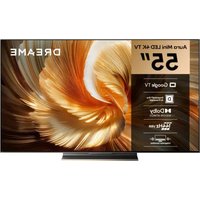
55S100 - TV DREAME - Free user manual and instructions
Find the device manual for free 55S100 DREAME in PDF.


| Product Type | LED TV |
| Brand | Dreame |
| Model | 55S100 |
| Screen Size (Diagonal) | 55 inches |
| Operating System | Google TV |
| Screen Resolution | 3840 x 2160 pixels (Ultra HD) |
| Dimensions without Stand (W × H × D) | 1233 × 721.6 × 87.3 mm |
| Dimensions with Stand (W × H × D) | 1233 × 763.2 × 261.9 mm |
| Net Weight without Stand | 15.4 kg |
| Gross Weight | 19.2 kg |
| Power Supply | 100-240 V ~ 50/60 Hz |
| Power Consumption (On) | 180 W |
| Power Consumption (Standby) | < 0.5 W |
| Total Audio Power | 70 W (2×15 W + 20 W + 2×10 W) |
| Audio Technologies | Dolby Vision, Dolby Atmos |
| Wireless Connectivity | Wi-Fi 2.4/5 GHz, Bluetooth |
| Video Inputs | HDMI, AV (via adapter), RF Antenna, Satellite |
| USB Ports | 1 USB port |
| Digital Audio Output | Optical (S/PDIF) |
| Other Connectors | LAN (Ethernet), CI (Common Interface), Headphone |
| Supplied Accessories | Remote control, AAA batteries, stand, screws, AV cable, spacers, quick start guide, warranty card |
| Maintenance | Clean with a dry cloth only |
| Warranty | 5 years (subject to conditions) |
| Operating Temperature | 5 °C to 40 °C |
| Operating Humidity | 20 % to 80 % |
Frequently Asked Questions - 55S100 DREAME
User questions about 55S100 DREAME
0 question about this device. Answer the ones you know or ask your own.
Ask a new question about this device
Download the instructions for your TV in PDF format for free! Find your manual 55S100 - DREAME and take your electronic device back in hand. On this page are published all the documents necessary for the use of your device. 55S100 by DREAME.
USER MANUAL 55S100 DREAME
Before using this product, please read this instruction manual carefully and keep it in a safe place.
PREPARATION
Note:
1). The pictures are only for references.
2). Avoid pressing the screen to prevent screen damage.
3). Two or more persons are required for safe handling of a large TV to prevent any damages or injuries.
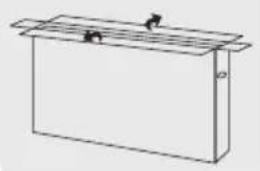
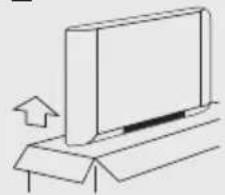
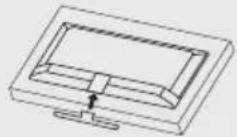
Unpacking and Installation
1
natural_image
Simple line drawing of a rectangular box with a lid and two small objects on top (no text or symbols)2
natural_image
Simple line drawing of a monitor on a stand with an arrow indicating upward motion (no text or symbols)3
4
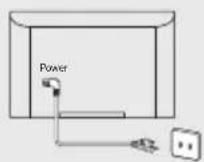
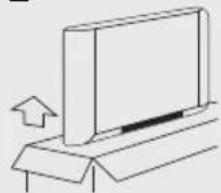
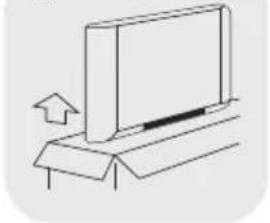
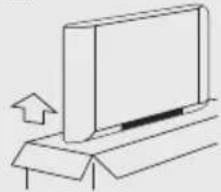
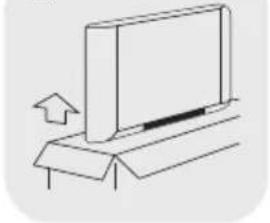
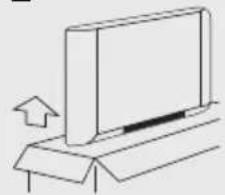
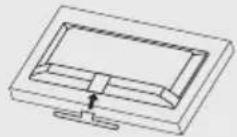
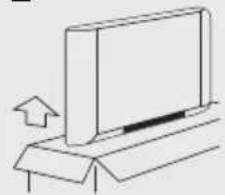
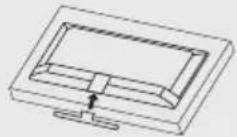
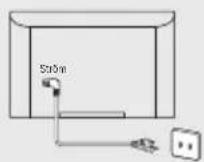
Open the package. Take out the TV. Install the TV stands. Connect the power cord.
Standard Accessories
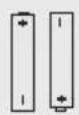
Batteries /2
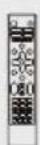
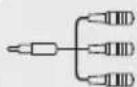
Quick Start GuideRemoteControlCard
AV Converting Cable

Stand Screws /4
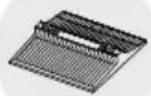
Stand Base
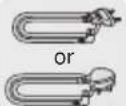
Power Cord

Wall Mount Spacers /4
Stand Installation
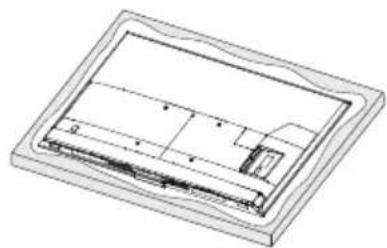
Step 1: Take out the TV and carefully put it (screen downward) on a stable and flat table with a soft cloth or cushion on it.
Step 2: Align and insert the stand base to the stand holes located at the TV bottom.
Step 3: Fix the stand base to the TV by fastening the matching stand screws provided in the box. (The bases may vary depending on the model.)
natural_image
Isometric line drawing of a rectangular frame with internal compartments and a small protrusion (no text or symbols)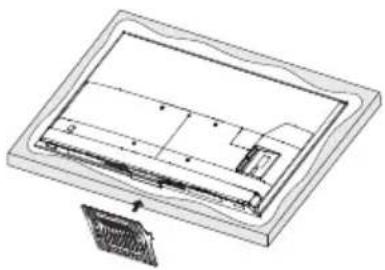
natural_image
Technical line drawing of a rectangular electronic component with internal structure and mounting bracket (no text or symbols)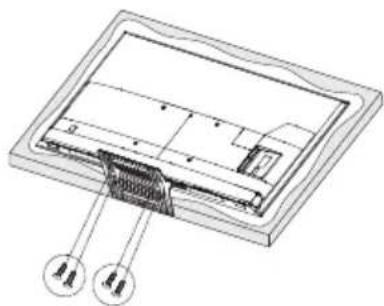
natural_image
Technical diagram of a device interior with labeled components (no text or symbols present)WARNING AND PRECAUTION
Read all of the instructions before operating the set. Keep these instructions well for later use.
Important Safety Instructions
- Read these instructions – All the safety and operating instructions should be read before this product is operated.
- Keep these instructions – The safety and operating instructions should be retained for future reference.
- Heed all warnings – All warnings on the appliance and in the operating instructions should be adhered to.
- Follow all instructions – All operating and use instructions should be followed.
- Do not use this apparatus near water – The appliance should not be used near water or moisture – for example, in a wet basement or near a swimming pool, and the like.
- Clean only with dry cloth.
- Do not block any ventilation openings. Install in accordance with the manufacturer's instructions.
- Do not install near any heat sources such as direct sunlight, radiators, heat registers, stoves, or other apparatus (including amplifiers) that produce heat.
- Do not defeat the safety purpose of the polarized or grounding plug. A polarized plug has two blades with one wider than the other. A grounding plug has two blades and a third grounding prong. The wide blade or the third prong is provided for your safety. If the provided plug does not fit into your outlet, consult an electrician for replacement of the obsolete outlet.
- Protect the power cord from being walked on or pinched particularly at the plugs, convenience receptacles, and at the point where they exit from the apparatus.
- Only use attachments/accessories specified by the manufacturer.
• Use only with the cart, stand, tripod, bracket, or table specified by the manufacturer, or sold with the apparatus. When a cart or rack is used, use caution when moving the cart/apparatus combination to avoid injury from tip-over.
- Unplug the apparatus during lightning storms or when unused for long periods of time.
- Refer all servicing to qualified personnel. Servicing is required when the apparatus has been damaged in any way, such as power supply cord or plug is damaged, liquid has been spilled or objects have fallen into the apparatus, the apparatus has been exposed to rain or moisture, does not operate normally, or has been dropped.
- CAUTION: These servicing instructions are for use by qualified service personnel only. To reduce the risk of electric shock, do not perform any servicing other than that contained in the operating instructions unless you are qualified to do so.
- Do not install this equipment in a confined or building-in space such as a book case or similar unit, and remain a well ventilation conditions at open site. The ventilation should not be impeded by covering the ventilation openings with items such as newspaper, table-cloths, curtains etc.
- Please refer the information on rear enclosure for electrical and safety information before installing or operating the apparatus.
- To reduce the risk of fire or electric shock, do not expose this apparatus to rain or moisture.
- The apparatus shall not be exposed to dripping or splashing and that no objects filled with liquids, such as vases, shall be placed on the apparatus. Do not use the set near dust place.
- For the terminals marked with symbol of “ 14 ” may be of sufficient magnitude to constitute a risk of electric shock. The external wiring connected to the terminals requires installation by an instructed person or the use of ready-made leads or cords.
- To prevent injury, use the stand/wall-mount bracket to securely install this apparatus on the table/wall in accordance with the installation instructions.
- Danger of explosion if battery is incorrectly replaced. Replace only with the same or equivalent type.

Use only with the cart, stand, tripod, bracket, or table specified by the manufacturer, or sold with the apparatus. When a cart or rack is used, use caution when moving the cart/apparatus combination to avoid injury from tip-over.
- The battery (battery or batteries or battery pack) shall not be exposed to excessive heat such as sunshine, fire or the like.
- Excessive sound pressure from earphones and headphones can cause hearing loss. Listening to music at high volume levels and for extended durations can damage one's hearing. In order to reduce the risk of damage to hearing, one should lower the volume to a safe, comfortable level, and reduce the amount of time listening at high levels.
• The appliance coupler is used as disconnect device, the disconnect device shall remain readily operable.
- When not in use and during movement, please take care of the power cord set, e.g. tie up the power cord set with cable tie or something like that. It shall be free from sharp edges and the like that can cause abrasion of the power cord set. When put into use again, please make sure the power cord set being not damaged, if any damages found, please look for the service person to replace the power cord set specified by the manufacturer or have the same characteristics as the original one.
- Attention should be drawn to environmental aspects of battery disposal.
- No naked flame sources, such as lighted candles, should be placed on the apparatus. To prevent the spread of fire, keep candles or other open flames away from the apparatus at all times.
- If the apparatus have the symbol ☐ in its rating label and the power cord has two pins, it means that the equipment is a Class II or double insulated electrical appliance. It has been designed in such a way that it does not require a safety connection to electrical earth (Only for Class II appliance).
- Protective earthing terminal. The apparatus should be connected to a mains socket outlet with a protective earthing connection (Only for Class I appliance).
- If the apparatus doesn't have the symbol □ in its rating label and its power cord has three pins, it means protective earthing connection is needed. The apparatus should be connected to a mains socket outlet with a protective earthing connection (Only for Class I appliance).
- Warning for Apparatus containing COIN / BUTTON CELL BATTERIES (Below instruction only used for the apparatus containing a user-replaceable coin/button cell battery) WARNING: Do not ingest the battery, Chemical Burn Hazard (The remote control supplied with) this product contains a coin/button cell battery. If the coin/button cell battery is swallowed, it can cause severe internal burns in just 2 hours and can lead to death. Keep new and used batteries away from children. If the battery compartment does not close securely, stop using the product and keep it away from children. If you think batteries might have been swallowed or placed inside any part of the body, seek immediate medical attention.
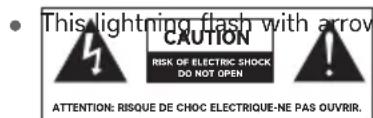
head symbol within an equilateral triangle is Intended to alert the user to the presence of non-insulated “dangerous voltage” within the product’s enclosure that may be of sufficient magnitude to constitute a risk of electric shock.
To reduce the risk of electric shock. Do not remove cover (or back). No user serviceable parts inside. Refer to qualified service personnel. The exclamation point within an equilateral triangle is intended to alert the user to the presence of important operating and maintenance instructions in the literature accompanying the appliance.
• The following information are recommended to be included as far as applicable where applicable:
| ~ Refer to alternating current(AC) | ⊕ Refer to stand-by or power on. |
| == Refer to direct current(DC). | | Refer to power on. |
| □ Refer to Classll equipment. | ≠ Refer to dangerous voltage. |
Correct Disposal of this product. This marking indicates that this product should not be disposed with other household wastes throughout the EU. To prevent possible harm to the environment or human health from uncontrolled waste disposal, recycle it responsibly to promote the sustainable reuse of material resources. To return your used device, please use the return and collection systems or contact the retailer where the product was purchased. They can take this product for environmental safe recycling.
Positioning the TV
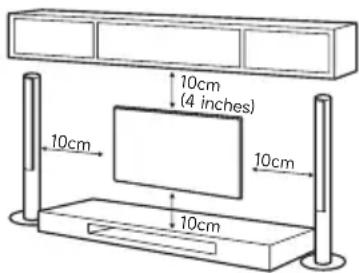
- Install Display on solid horizontal surface such as a table or desk. For ventilation, leave a space of at least 10cm free all around the set. To prevent any fault and unsafe situations, please do not place any objects on top of the set.
- Fix the rear of enclosure to wall(only for some countries)
• Warning: Stability Hazard

Note: The picture is only for reference.
A television set may fall, causing serious personal injury or death. Many injuries, particularly to children, can be avoided by taking simple precautions such as:
- ALWAYS use cabinets or stands or mounting methods recommended by the manufacturer of the television set.
- ALWAYS use furniture that can safely support the television set.
- ALWAYS ensure the television set is not overhanging the edge of the supporting furniture.
- ALWAYS educate children about the dangers of climbing on furniture to reach the television set or its controls.
- ALWAYS route cords and cables connected to your television so they cannot be tripped over, pulled or grabbed.
- NEVER place a television set in an unstable location.
- NEVER place the television set on tall furniture (for example, cupboards or bookcases) without anchoring both the furniture and the television set to a suitable support.
- NEVER place the television set on cloth or other materials that may be located between the television set and supporting furniture.
- NEVER place items that might tempt children to climb, such as toys and remote controls, on the top of the television or furniture on which the television is placed. If the existing television set is being retained and relocated, the same considerations as above should be applied.
Mounting on a Wall
- An optional wall mount can be used with your television. Consult with your local dealer to purchase the recommended wall mount bracket. Carefully attach the wall mount bracket at the rear of the TV. Install the wall mount bracket on a solid wall perpendicular to the floor. If you are attaching the TV to other building materials, please contact qualified personnel to install the wall mount. Detailed instructions will be included with the wall mount. Please use a wall mount bracket where the device is adequately secured to the wall with enough space to allow connectivity to external devices.
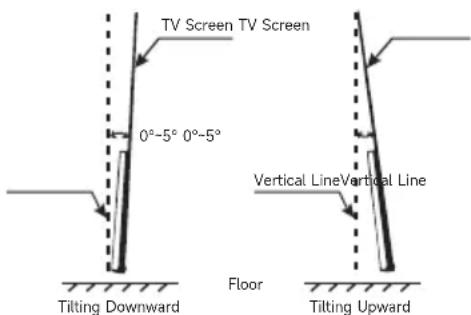
- To prevent product damages or personal injuries, please make sure that the TV screen is kept upright, or tilted upward or downward within the angle range of 0^ 5^ while mounting the TV onto the wall.
- In case of exceeding the above angle range (0°\~5°) of tilting downward, please purchase the auxiliary accessories from the local dealer to mount the TV for safe installation and usage. Otherwise, it will not be covered by the warranty and the user should be liable for all consequences and responsibilities.
- The installation height must be greater than 800 mm and less than 1100 mm. The minimum horizontal distance is 450 mm.
- Disconnect the power before moving or installing the TV. Otherwise electric shock may occur.
- Remove the stand before installing the TV on a wall mount by performing the stand attachment in reverse.
- If you install the TV on a ceiling or slanted wall, it may fall and result in severe injury. Use an authorized wall mount and contact the local dealer or qualified personnel. Otherwise it is not covered by the warranty.
- Do not over tighten the screws as this may cause damage to the TV and void your warranty.
- To prevent injury, this apparatus must be securely attached to the floor/wall in accordance with the installation instructions.
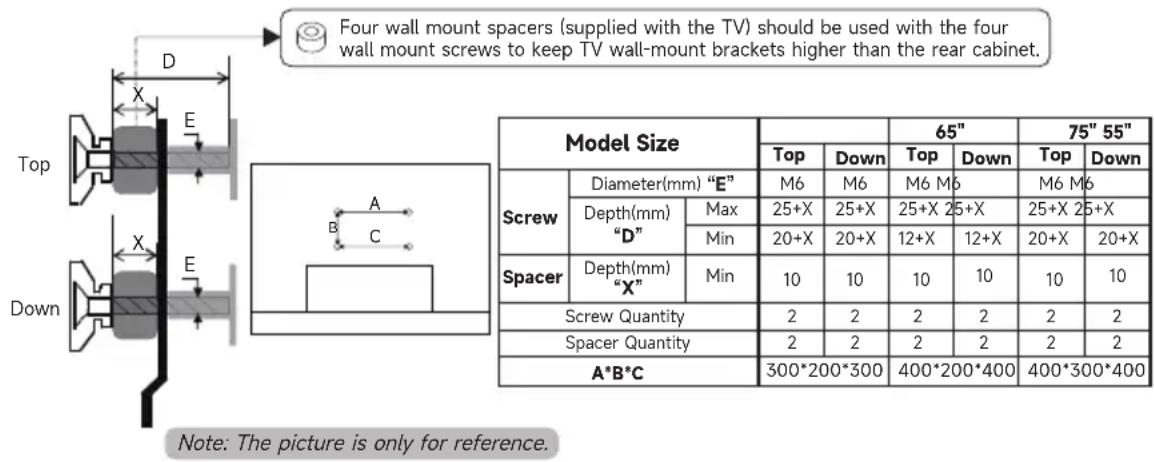
- Use the screws and wall mounts that meet the following specifications. Any damages or injuries by misuse or using an improper accessory are not covered by the warranty.
Precautions For Using Remote Control
- Use the remote control by pointing it towards the remote sensor. The items between the remote control and the remote sensor will interfere the normal operation.
- Do not make remote control vibrate violently. Also, do not splash liquid on the remote control, also do not put the remote control in high humidity place.
- Do not place remote control under direct sunlight which will cause deformation of the unit by heat.
- When the remote sensor is under direct sunlight or strong lighting, the remote control will not work. If so please change the lighting or TV's position, or operate the remote control closer to the remote sensor.
- Before Bluetooth searching, please make sure you have turned external Bluetooth devices in the pairing mode. For the Bluetooth remote control supplied with the TV (may not be available), you can press BACK and HOME buttons together to open its pairing mode. For other Bluetooth devices, please read their own instruction manuals for opening the pairing mode.
Precautions For Using Battery
Improper using of the battery will cause leakage. So please do as the following methods and use carefully.
- Please note the batteries' polarity, to avoid short circuit.
- When the battery's voltage is insufficient which affect the use range, you should replace new battery. Remove the batteries from the remote control unit if you do not intend to use it for a long time.
- Do not use different types of batteries (for example, Manganese and Alkaline batteries) together.
- Do not put the battery into fire, and charge or decompose the battery.
- Please dispose of batteries in compliance with relevant environmental protection regulations.
- WARNING: The batteries (battery pack or batteries installed) shall not be exposed to excessive heat such as sunshine, fire or the like.
- WARNING: A battery should not be exposed to extremely low air pressure that may result in an explosion or the leakage of flammable liquid or gas.
TERMINAL CONNECTION
Note:
1). The pictures are only for reference.
2). Terminal quantities and names may vary depending on the region or model.
3). External equipments and cables shown herein are not supplied with the TV.
4). To avoid product damage or personal injury, please make sure that you have disconnected the TV power cord before connecting the external devices.
5). To reduce the risk of fire, the CI port should be covered by the plastic cover when it is not used. Before you use the
CI port, please make sure that the fire enclosure of connected equipment is made of non-combustible material or UI94
V-0 rated material. After you finish using the CI port, please make sure the CI port is covered by the plastic cover.
Please keep the plastic cover well for future use. If the plastic cover is lost, please contact the local dealer for a new one.
• AV IN
Receive analog audio and video signals from external AV devices.

flowchart
graph LR
    A["AV IN"] --> B["+"]
    B --> C["DVD"]
    C --> D["STB"]
    D --> E["Camcorder"]
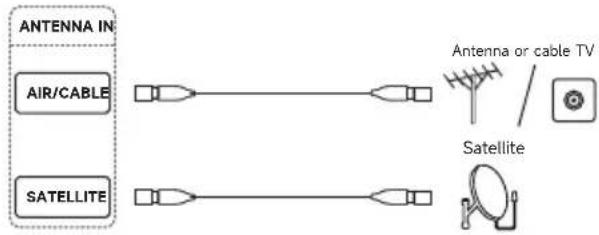
• ANTENNA IN
Connect a coaxial cable to receive signals from the antenna, cable or satellite.
flowchart
graph LR
    A["ANTENNA IN"] --> B["AIR/CABLE"]
    A --> C["SATELLITE"]
    D["Antenna or cable TV"] --> E["Satellite"]
    F["Satellite"] --> G["Satellite"]
• USB
Connect a USB storage device.

flowchart
graph LR
    A["USB"] --> B["USB Disk"]
    style A fill:#fff,stroke:#000
    style B fill:#fff,stroke:#000
• HDMI
Receive digital audio and video signals from external HDMI devices.

• DIGITAL AUDIO OUT
Use an optical cable to output your TV's audio signal to a compatible digital audio receiver.

• LAN
Wired network port.

• Cl
CI card port.

flowchart
graph LR
    A["CI"] --> B(( ))
    style A fill:#fff,stroke:#000
    style B fill:#fff,stroke:#000
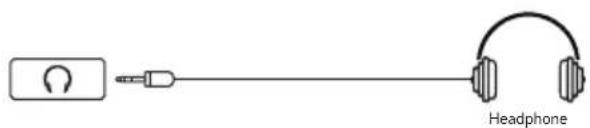
• HEADPHONE
Output the TV sound to the connected headphone. Speakers will be muted when headphone is plugged in.
REMOTE CONTROL
Note:
1). The picture is only for reference.
2). You can press the MIC button to quickly pair the Bluetooth remote control with your TV set.
3). The image, buttons and functions of remote control may vary depending on the region or model.
4). Due to software upgrades or updates, the functions of remote control are subject to change without notice.
Please refer to your actual TV set.
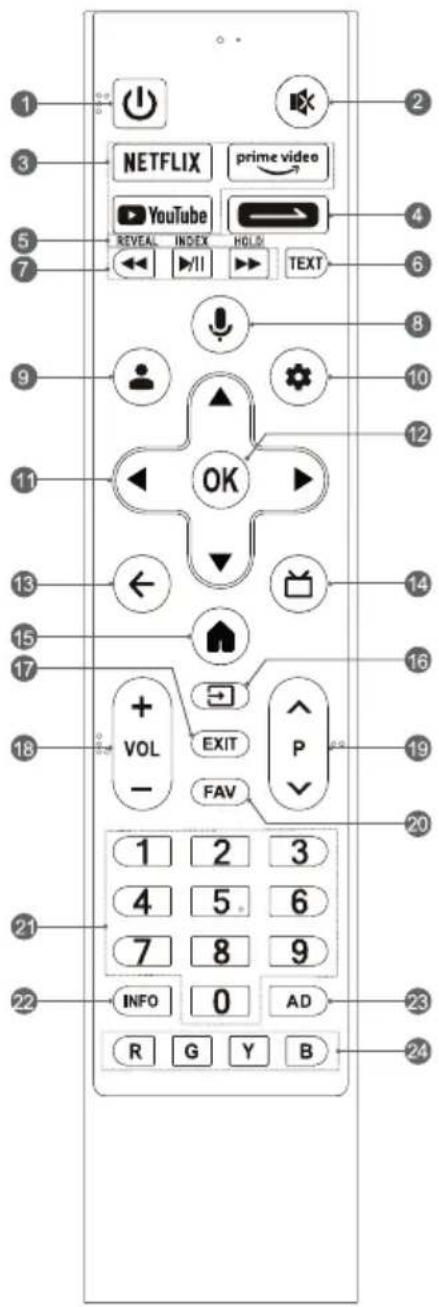
- POWER ( ⏻ ): Turn on or turn off the TV.
• In working status:
Short press POWER button to turn the TV to fastboot mode.
Long press POWER button to turn the TV to standby mode.
- In fastboot mode, which is less energy saving, press POWER button to turn on the TV in a short time.
-
In standby mode, which is more energy saving, press POWER button to turn on the TV in a standard time.
-
MUTE ( ☑ ): Mute or restore the TV sound.
- Application Buttons: Access specific applications quickly and directly.
-
Daily Key ( ):
-
Short press to start the shortcut function, or setup it for the first time.
- Long press to setup the shortcut function.
5 & 6. Teletext Buttons
- TEXT: Access or exit the teletext menu.
• REVEAL: Display or hide the concealed information.
• INDEX: Display index page. -
HOLD: Hold the teletext page on screen without updates or changes.
-
Media Player Buttons
-
Play/Pause ( ▶/ll ): Start or pause the playback.
- Fast Backward ( ◀◀ ): Fast backward the playback.
-
Fast Forward (▶): Fast forward the playback.
-
MIC ( ↓ ): Start using the near field voice function.
-
Short press MIC button to wake up the voice assistant.
-
Long press MIC button to start receiving your voice command. After your speaking, release MIC button to run voice function.
-
ACCOUNT ( 👁 ): Sign in with your Google account to get the entertainment you love.
-
Dashboard ( ⚙ ): Access the dashboard of your Google TV.
- UP/DOWN/LEFT/RIGHT ( ▲ / ▼ / ◀ / ▶ )
Navigate the menu to select the content you need.
- Press UP/DOWN button to change channels.
- OK: Confirm, enter or execute the selected item or access the channel list.
- BACK ( ← ): Return to upper-level content, or exit the current screen.
- GUIDE ( ☐ ): Access Live TV or access the Electronic Program Guide.
- HOME ( 🔗 ): Access the home screen.
-
SOURCE ( → ): Access the source menu.
-
EXIT: Exit the current operation.
- Volume Up/Down (VOL +/-): Adjust the sound volume.
- Program Up/Down (P ∧/∨): Switch channels.
- FAV: Access the list of favorite channels.
- Number Buttons (0\~9): Select the channel directly, or input a number.
- INFO: Access the INFO interface.
- AD: Adjust audio settings including audio language, sound tracks, audio type, and so on.
- Color Buttons (R/G/Y/B): Execute the prompt function in specific mode.
VOICE FUNCTION
Note:
1). The pictures are only for reference.
2). The voice function may not be available depending on the region, model or language.
3). Due to software upgrades or updates, the function of TV control button is subject to change without notice.
Please refer to your actual TV set.
Far Field Voice
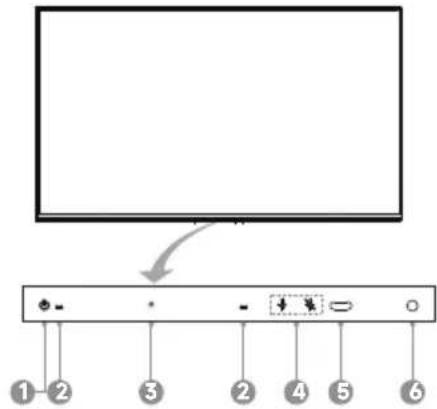
1. TV Control Button (Located under this icon)
** In standby mode:
Press TV control button to turn on the TV.
* In working status:
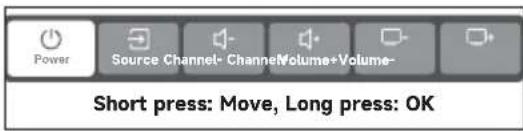
Short press TV control button to call out the following menu of soft keyboard. Inside it, short press TV control button to move the cursor and select the desired item, then long press TV control button to enter or execute the selected item.
2. Far Field Microphones
Microphones of far field voice function. It is best to keep yourself within 3 meters away from the far field microphones while using the far field voice function.
3. Power Indicator
Indicate the status of the TV power.
4. Switch of Far Field Microphones (Located under these icons)
Turn on or turn off the microphones of far field voice function.
5. Remote Sensor
Receive the signal transmitted by the remote control.
6. Far Field Indicator
Indicate the status of far field microphones and far field voice function.
Near Field Voice
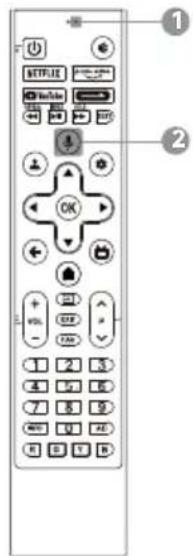
1. Near Field Microphone
Microphone of near field voice function. It is best to keep your mouth within 5 centimeters away from the near field microphone while using the near field voice function.
2. MIC Button of Near Field Voice Function
Press to start using the near field voice function.
Pair Bluetooth remote control with your TV
For the remote control supplied with your TV, please finish pairing with your TV before using it for near field voice function. The pairing can be done by just pressing the MIC button on any interface, or at the first step of "Initial Settings", or in "Settings".
In settings, please refer to the following steps to pair the remote control:
- Select Dashboard button → < Ⓞ > icon → Remotes & Accessories → Pair accessory.
- Press BACK and HOME buttons simultaneously until there shows the name of your Bluetooth remote control on the TV searching interface.
- Press OK button to start pairing.
- It will show "Paired" after Bluetooth remote control is paired with the TV successfully.
BASIC OPERATION
Note: The picture is only for reference.
E-Manual
E-Manual is built into your TV and can be displayed on the screen. To learn more about your TV features, access the E-Manual by referring to the following operation. E-Manual may not be available depending on the region or model.
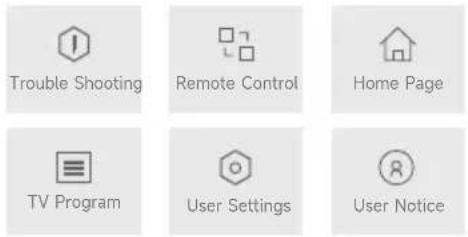
- Press HOME button to access the home screen.
- Press UP/DOWN/LEFT/RIGHT and OK button to select and enter "E-Manual" in the app list.
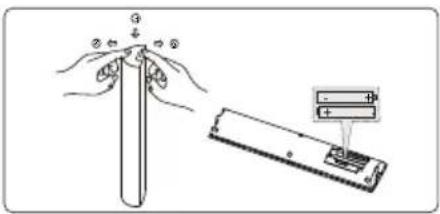
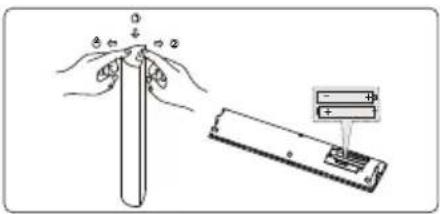
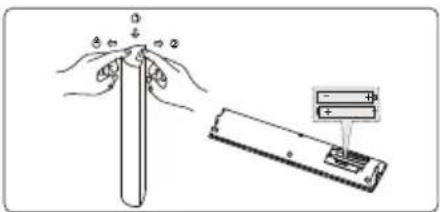
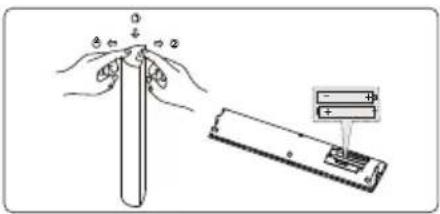
Install Remote Control Batteries
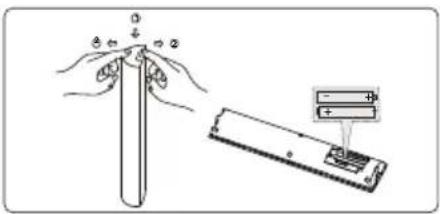
Place two AAA size batteries in the remote control's battery compartment, making sure to match the polarity markings inside the compartment.
E-Manual
Note: The picture is only for reference.
TROUBLE SHOOTING
Before calling a service technician, please check the following table for a possible cause of the symptom and some solutions.
General Problem / Solution
- Remote control does not work
Change the batteries.
Check if batteries are installed correctly.
Check if main power is connected.
Check if there are some items between remote sensor and remote control.
- Poor Signal
This is usually caused by interference from electronic equipments or radio interference sources.
Picture and Sound / Solution
- No picture, no sound
Check the signal source.
Plug another electrical device into the outlet to check if it is working or turned on. Check if power plug is in good contact with the outlet.
• No sound, picture OK
If no sound, unmute the sound or increase the volume.
Open the sound menu and adjust 'Balance'.
- Abnormal picture
For no color or bad picture quality, you may:
-
Adjust the color option in menu settings.
-
Keep the TV at a sufficient distance from other electronic products.
-
Try another channel.
Bad TV signal (Display mosaic or snowflakes)
-
Check the signal cable and adjust the antenna.
-
Fine tune the channel.
-
Try another channel.
Multimedia Player / Solution
- 'This file is invalid' /'Unsupported audio' appears, or audio is normal but video is abnormal, or video is normal but audio is abnormal
The media file maybe damaged, check if the file can be played on the PC.
Check if video and audio codec is supported.
Network / Solution
• Network failure
Check if the router works well.
Make sure the TV has connected to the router successfully.
Browser / Solution
- Web page can not be displayed completely
Some third-party extensions of the current web page may not be supported, and please close the current web page.
- Browser is forced to be shut down
The current web page may include too many contents which cause there isn't sufficient memory and the browser is closed.
SPECIFICATION
Note: Specifications may vary depending on the region or model.
※Device designed for displaying of text and graphic information
| Product type: | LED TV |
| Audio power output: | 2×15W+20W+2×10W |
| Working voltage: | 100-240V~ 50/60 Hz |
| Dimensions without stand (W × H × D): | 55": 1233 x 721.6 x 87.3 mm65": 1452.5 x 845.9 x 86.8 mm75": 1674.5 x 973.4 x 87.3 mm |
| Dimensions with stand (W × H × D): | 55": 1233 x 763.2 x 261.9 mm65": 1452.5 x 897.2 x 312.3 mm75": 1674.5 x 1024.0 x 371.0 mm |
| Carton box dimensions(W × H × D): | 55": 1335 x 868 x 160 mm65": 1600 x 1048 x 185 mm75": 1790 x 1178 x 224 mm |
| Net weight without stand: | 55": 15.4 kg65": 23.0 kg75": 32.3 kg |
| Gross weight: | 55": 19.2 kg65": 31.5 kg75": 44.2 kg |
| RF aerial input: | 75 ohm unbalanced |
| Language of OSD: | Multiple options |
| System: | DTV: DVB-C/T/T2/S/S2ATV: PAL-B/G D/K I, SECAM-B/G D/K K L, NTSC-M |
| Power Consumption(On): | 55": 180 W65": 240 W75": 280 W |
| Power Consumption(Standby): | < 0.5 W |
| Channel coverage: | DVB-C: 48MHz ~ 859MHzDVB-T/T2: 50MHz ~ 862MHzDVB-S/S2: 950MHz ~ 2150MHzATV: 44MHz ~ 870MHz |
| Environment: | Working temperature: 5°C~40°CWorking humidity: 20%~80%Storage temperature: -15°C~45°CStorage humidity: 10%~90%, non-condensing |
RADIO MODULE
Note: Hereby, [Dreame Technology Netherlands B.V.] declares that the radio equipment type [55S100/65S100/75S100] is in compliance with Directive 2014/53/EU. The full text of the EU declaration of conformity is available at the following internet address: global.dreametech.com.
| Radio Module Specifications | ||||||||
| Wireless Network(WLAN) | ||||||||
| Frequency Band | Transmitting Power(Max.) | |||||||
| 2.4G:2412 ~ 2472 MHz2422 ~ 2462 MHz5G:Band I:5180~5240 MHz5190~5230 MHz5210 MHz (May not be available)Band II:5260~5320 MHz5270~5310 MHz5290 MHz (May not be available)Band III:5500~5700 MHz5510~5670 MHz5530~5610 MHz (May not be available) | <20dBm | |||||||
| Bluetooth | ||||||||
| Frequency Band | Transmitting Power(Max.) | |||||||
| 2.402GHz~2.480GHz | <20dBm | |||||||
| Remark:1). The device should be positioned or operated at least 20cm away from the user.2). Due to various sales regions, the wireless module may have different configurations which will not exceed the maximum described in this manual.3). Restrictions or Requirements in following countries: Indoor use only within 5150-5350MHz. | ||||||||
 | FR | DE | UK | IT | NL | BE | LU | TR |
| DK | IE | GR | ES | PT | AT | FI | LI | |
| SE | CY | MT | PL | HU | CZ | SK | IS | |
| SI | EE | LV | LT | BG | RO | HR | NO | |
LICENSE

Google TV
Google TV is the name of this device's software experience and a trademark of Google LLC. Google, YouTube, Google Cast and other related marks are trademarks of Google LLC.
HDMI®
The terms HDMI, HDMI High-Definition Multimedia Interface, HDMI Trade dress and the HDMI Logos are trademarks or registered trademarks of HDMI Licensing Administrator, Inc.
Dolby
VISION·ATMOS
Dolby, Dolby Vision, Dolby Atmos, and the double-D symbol are registered trademarks of Dolby Laboratories Licensing Corporation. Manufactured under license from Dolby Laboratories. Confidential unpublished works. Copyright © 2012-2024 Dolby Laboratories. All rights reserved.
HDR10+
HDR10+ logo is a trademark of HDR10+ Technologies, LLC.
Note:
1). The pictures in this document are only for reference.
2). Due to software upgrades or updates, functions are subject to change without notice. Please refer to your actual TV set.
3). In dry environment due to static electricity, the product may restart and return to the main OSD interface, USB player interface or the previous source mode. It is normal and please continue to operate the TV as you will.
CUSTOMER SERVICE AND WARRANTY TERMS
Customer Service
Please refer to “Troubleshooting” if there are some problems occurred on the television you purchased. If you fail to solve the problem, please keep the television properly and contact Dreame Customer Service.
Please contact:
If you encounter any problems during use, you can scan the QR code on the right to obtain the service hotline number and call for consultation.
Contact us
Warranty Terms
Dear Customer,
Thank you for choosing Dreame's products. Our products always comply with tech regulations of Eurasian Economic Union. In order to ensure high-quality operation of products and compliance with operation rules, the life span of television is five years since it is delivered to final users. Considering our high quality, its actual life span may be longer than the officially listed. We recommend that you contact authorized customer service center for precaution when the life span ends, and obtain further use suggestion.
To avoid misunderstanding, we kindly request that you carefully read product manual and after-sales warranty terms when you purchase the product. This product is a technologically sophisticated household appliance. If the product you purchased need special installation and connection, we highly recommend that you contact the customer service center authorized by Dreame.
Dreame, against product defects, is obliged to comply with the current Customer Protection Act and to meet customer requirements under other regulations. However, if you do not comply with the following terms and conditions, Dreame shall reserve the right to reject the warranty service for the product.
Warranty Service Conditions:
The warranty period specified by Dreame shall be counted from the day when the product is delivered to customer. To avoid possible misunderstanding, please keep properly the documents (cheque, cash receipt, and operation document) attached to the product in sales. Spare parts and replaceable units for repair can be new or renovated.
The warranty service shall not apply to those products that is defective due to the following reasons:
- Customer violates conditions and rules for cargo handling, storage and/or transportation; improper product installation and/or connection;
- Customer violates electrical connection engineering technology and arranges unqualified person to participate in product installation, which has been proved by proof documents;
- Customer has not timely conducted technical inspection for the product in spite of requirements of operation documents;
- Customer uses detergent that is not suitable for the product type and exceeds the recommended dosage;
- Customer uses the product for unintended purpose;
- Third-party actions: repairs or unauthorized modifications to the manufacturer's structure or circuitry by unauthorized personnel;
- Deviation from the standards and norms of the electricity network;
- Force majeure (nature, fire, and lighting, etc.); accidental, intentional or negligent acts of the customer or third parties;
- If there is any damages caused by foreign objects, substances, liquids, insects, or insect byproducts infiltrating the product's interior;
- The product is used for commercial activities.
The following consumables and accessories shall not be warranted.
- Remote control, batteries, external power supply, port cables (e.g. HDMI cable and AV adapter cable);
- Printed materials provided with the product;
- Dreame shall not be liable for the user's loss of any confidential or personal information during his/her use of the product;
- Services and/or software provided by third parties may be changed, suspended or terminated without additional notice.
IMPORTMENT! A lost or destroyed serial number sticker on the product will prevent the manufacturer from identifying the device for warranty purposes. Removal of the factory nameplate from the device is prohibited, and the absence of the factory nameplate may result in failure of Dreame's fulfillment of warranty services.
TV-KURZANLEITUNG
55/65/75S100
Deutsch
VORBEREITUNG
Hinweis:
natural_image
Simple line drawing of a rectangular box with a lid and two small objects on top (no text or symbols)natural_image
Simple line drawing of a monitor on a stand with an arrow indicating upward motion (no text or symbols)natural_image
Pure technical line drawing of a rectangular component with a small attached base (no text or symbols)natural_image
Isometric line drawing of a rectangular frame with internal compartments and a small protrusion (no text or symbols)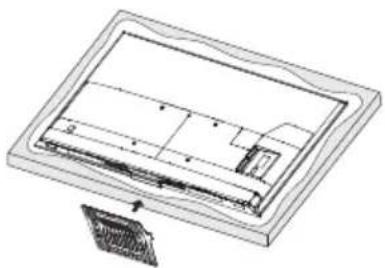
natural_image
Technical line drawing of a mechanical assembly with no visible text or symbols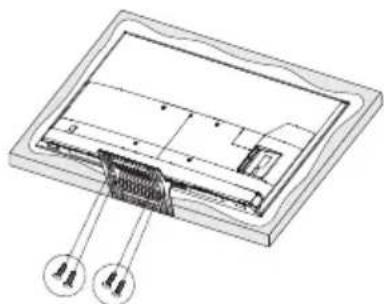
natural_image
Technical diagram of a device interior with labeled components (no text or symbols present)2. Fernfeld-Mikrofon
natural_image
Simple line drawing of a rectangular box with a lid and two small arrows pointing to the top section (no text or symbols)Ouvrez l'emballage.
2
natural_image
Line drawing of a computer monitor on a stand with an arrow indicating upward motion (no text or symbols)natural_image
Technical line drawing of a rectangular electronic component or enclosure with internal structure (no text or symbols)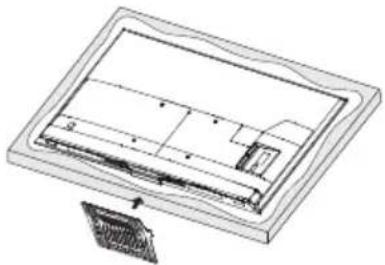
natural_image
Technical line drawing of a mechanical component with no visible text or symbols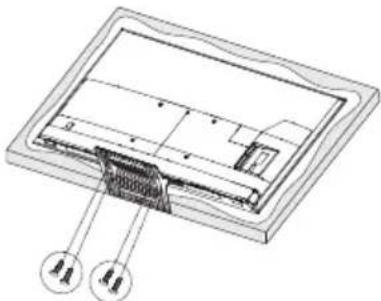
natural_image
Technical diagram of a device interior with labeled components (no text or symbols present)AVERTISSEMENT ET PRÉCAUTIONS
TÉLÉCOMMANDE
Remarque :
natural_image
Simple line drawing of a rectangular box with a lid and two small protrusions on top (no text or symbols)natural_image
Line drawing of a flat-screen monitor mounted on a stand with an arrow indicating upward motion (no text or symbols)natural_image
Isometric line drawing of a rectangular frame with internal compartments and a small protrusion (no text or symbols)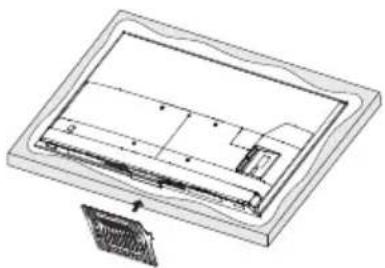
natural_image
Technical line drawing of a mechanical component or assembly (no text or symbols visible)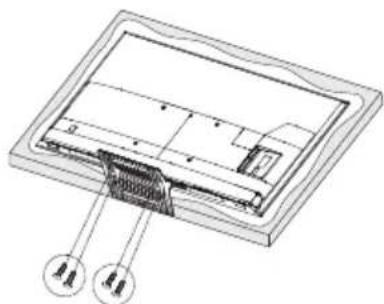
natural_image
Technical diagram of a device interior with labeled components (no text or symbols present)natural_image
Simple line drawing of a microphone connected to an earphone and cuffie (no text or symbols on the devices)TELECOMANDO
Nota:
2. Microfoni a campo lontano
natural_image
Simple line drawing of a rectangular box with a lid and two small objects on top (no text or symbols)natural_image
Simple line drawing of a monitor on a stand with an arrow indicating upward motion (no text or symbols)de la caja.
natural_image
Isometric line drawing of a rectangular frame with internal compartments and a small protrusion (no text or symbols)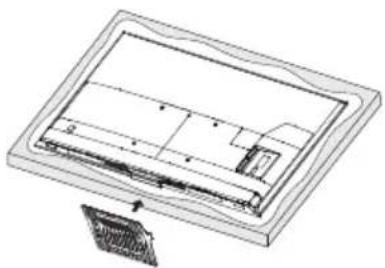
natural_image
Technical line drawing of a mechanical component or assembly (no text or symbols visible)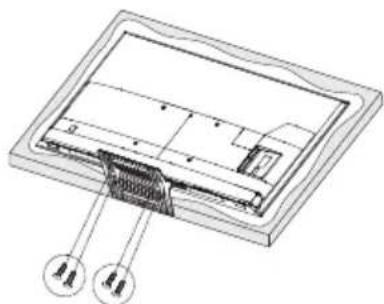
natural_image
Technical diagram of a device interior with labeled components (no text or symbols present)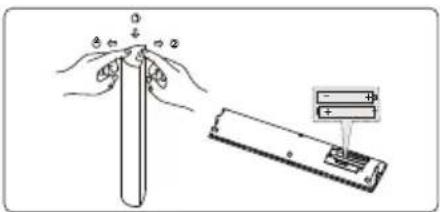
natural_image
Simple line drawing of a rectangular box with a lid and two small objects on top (no text or symbols)2
natural_image
Simple line drawing of a monitor mounted on a stand with an arrow indicating upward motion (no text or symbols)natural_image
Isometric line drawing of a rectangular frame with internal compartments and a small protrusion (no text or symbols)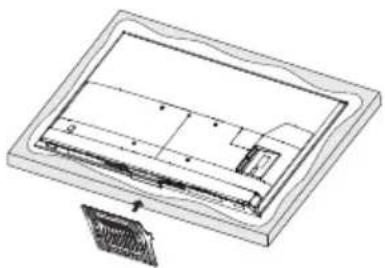
natural_image
Technical line drawing of a mechanical component or assembly (no text or symbols visible)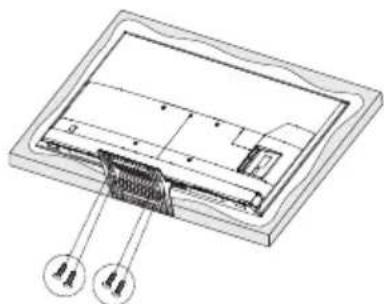
natural_image
Technical diagram of a device interior with labeled components (no text or symbols present)AVISO E PRECAUÇÕES
2. Microfones de campo distante
Instalar as pilhas do controlo remoto
natural_image
Simple line drawing of a rectangular box with a horizontal lid and two small arrows pointing to the top section (no text or symbols)Open de verpakking.
2
natural_image
Simple line drawing of a monitor on a stand with an arrow indicating upward motion (no text or symbols)natural_image
Isometric line drawing of a rectangular frame with internal compartments and a small protrusion (no text or symbols)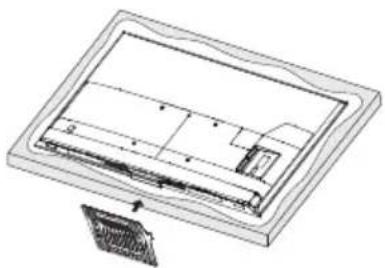
natural_image
Technical line drawing of a rectangular electronic component with internal structure and mounting bracket (no text or symbols)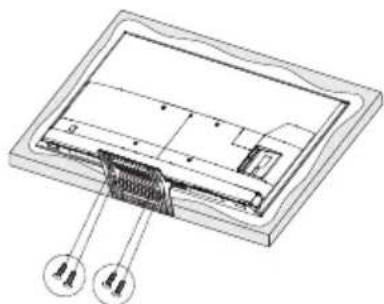
natural_image
Technical diagram of a device interior with labeled components (no text or symbols present)WAARSCHUWING EN VOORZORGSMAATREGELEN
1. TV-bedieningsknop (gelegen onder dit pictogram)
** In de stand-bymodus:
Multimediaplayer / Oplossing
- 'This file is invalid' /'Unsupported audio' verschijnt, of audio is normaal maar video is abnormaal, of video is normaal maar audio is abnormaal
natural_image
Simple line drawing of a rectangular box with a lid and two small objects on top (no text or symbols)2
natural_image
Simple line drawing of a monitor mounted on a stand with an arrow indicating upward motion (no text or symbols)natural_image
Isometric technical drawing of a rectangular frame with internal compartments and mounting holes (no text or symbols)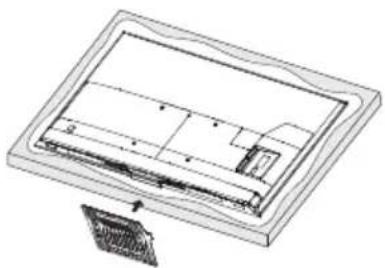
natural_image
Technical line drawing of a mechanical component or assembly (no text or symbols visible)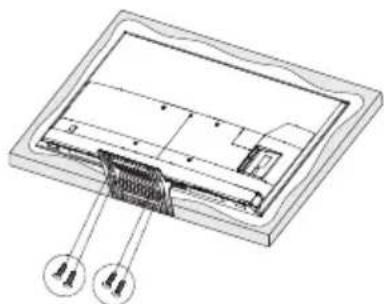
natural_image
Technical diagram of a device interior with labeled components (no text or symbols present)75 cali: 1674,5 × 1024,0 × 371,0 mm
ATV: PAL-B/G D/K I, SECAM-B/G D/K K L, NTSC-M
OBSŁUGA KLIENTÓW I WARUNKI GWARANCJI
Obstuga klientów
natural_image
Simple line drawing of a rectangular box with a lid and two small objects on top (no text or symbols)2
natural_image
Simple line drawing of a monitor on a stand with an arrow indicating upward motion (no text or symbols)3
4

natural_image
Isometric line drawing of a rectangular frame with internal compartments and a small protrusion (no text or symbols)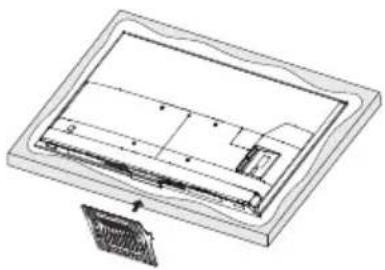
natural_image
Technical line drawing of a rectangular electronic component with internal structure and mounting bracket (no text or symbols)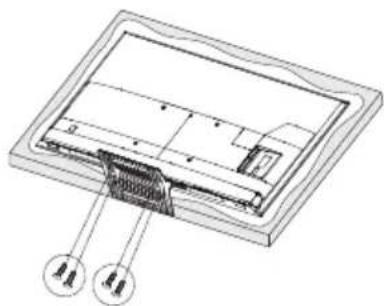
natural_image
Technical diagram of a device interior with labeled components (no text or symbols present)BRĪDINĀJUMS UN PIESARDZĪBAS PASĀKUMI
2. Tālā lauka mikrofoni
natural_image
Simple line drawing of a rectangular box with a lid and two small objects on top (no text or symbols)2
natural_image
Simple line drawing of a monitor on a stand with an arrow indicating upward motion (no text or symbols)3
4
natural_image
Isometric technical drawing of a rectangular frame with internal components and mounting holes (no text or symbols)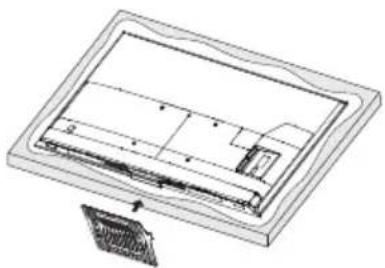
natural_image
Technical line drawing of a mechanical component or assembly (no text or symbols visible)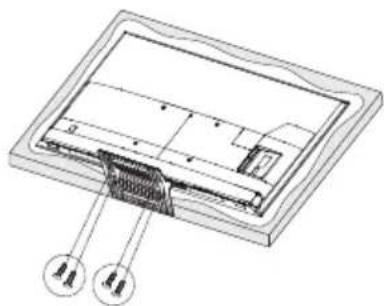
natural_image
Technical diagram of a device interior with labeled components (no text or symbols present)VARNINGAR OCH FÖRSIKTIGHETSANVISNINGAR
1. Tv-strömbrytare (placerad under denna ikon)
** | vänteläge:
ATV: PAL-B/G D/K I, SECAM-B/G D/K K L, NTSC-M

- PREPARATION
- Note:
- Unpacking and Installation
- Standard Accessories
- Stand Installation
- WARNING AND PRECAUTION
- Important Safety Instructions
- Positioning the TV
- Mounting on a Wall
- Precautions For Using Remote Control
- Precautions For Using Battery
- TERMINAL CONNECTION
- • AV IN
- • ANTENNA IN
- • USB
- • HDMI
- • DIGITAL AUDIO OUT
- • LAN
- • Cl
- • HEADPHONE
- REMOTE CONTROL
- VOICE FUNCTION
- TV Control Button (Located under this icon)
- Far Field Microphones
- Power Indicator
- Switch of Far Field Microphones (Located under these icons)
- Remote Sensor
- Far Field Indicator
- Near Field Microphone
- MIC Button of Near Field Voice Function
- Pair Bluetooth remote control with your TV
- BASIC OPERATION
- E-Manual
- Install Remote Control Batteries
- TROUBLE SHOOTING
- General Problem / Solution
- - Remote control does not work
- - Poor Signal
- Picture and Sound / Solution
- - No picture, no sound
- • No sound, picture OK
- - Abnormal picture
- Multimedia Player / Solution
- - 'This file is invalid' /'Unsupported audio' appears, or audio is normal but video is abnormal, or video is normal but audio is abnormal
- Network / Solution
- • Network failure
- Browser / Solution
- - Web page can not be displayed completely
- - Browser is forced to be shut down
- SPECIFICATION
- RADIO MODULE
- LICENSE
- CUSTOMER SERVICE AND WARRANTY TERMS
- Customer Service
- Please contact:
- Warranty Terms
- Warranty Service Conditions:
- The warranty service shall not apply to those products that is defective due to the following reasons:
- The following consumables and accessories shall not be warranted.
- TV-KURZANLEITUNG
- 55/65/75S100
- VORBEREITUNG
- Hinweis:
- Fernfeld-Mikrofon
- AVERTISSEMENT ET PRÉCAUTIONS
- TÉLÉCOMMANDE
- Remarque :
- TELECOMANDO
- Nota:
- Microfoni a campo lontano
- AVISO E PRECAUÇÕES
- Microfones de campo distante
- Instalar as pilhas do controlo remoto
- WAARSCHUWING EN VOORZORGSMAATREGELEN
- TV-bedieningsknop (gelegen onder dit pictogram)
- Multimediaplayer / Oplossing
- OBSŁUGA KLIENTÓW I WARUNKI GWARANCJI
- Obstuga klientów
- BRĪDINĀJUMS UN PIESARDZĪBAS PASĀKUMI
- Tālā lauka mikrofoni
- VARNINGAR OCH FÖRSIKTIGHETSANVISNINGAR
- Tv-strömbrytare (placerad under denna ikon)
Brand : DREAME
Model : 55S100
Category : TV