PortFresh - Deep fryer DREAME - Free user manual and instructions
Find the device manual for free PortFresh DREAME in PDF.


| Product Type | Portable Blender |
| Brand | Dreame |
| Model | PortFresh |
| Bowl Capacity | 400 ml (MAX fill line) |
| Bowl Material | BPA-free Plastic |
| Battery Type | Built-in Rechargeable Lithium-ion |
| Power Supply | 9 V 2.5 A (USB-C fast charger) |
| Charging Time | Approximately 1 hour |
| Blending Functions | Smoothie, Crush, Blend, Pulse, Clean |
| Operating Time | 34 to 60 seconds depending on mode (max 1 minute continuous) |
| Storage Temperature | 10°C to 40°C |
| Child Safety | Yes (auto-lock after 15 s of inactivity) |
| Overheat Protection | Yes (temporary shutdown, 30 min cooling) |
| Cleaning | Dishwasher safe (except motor base) or automatic Clean cycle |
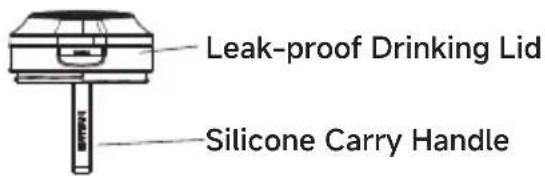
| Leakproof | Leakproof drink lid |
| Battery Indicator | White LED (30%-100%), red (<30%), flashing during charging |
| Warranty | Statutory warranty according to local laws |
| After-sales Service | https://global.dreametech.com |
Frequently Asked Questions - PortFresh DREAME
User questions about PortFresh DREAME
0 question about this device. Answer the ones you know or ask your own.
Ask a new question about this device
Download the instructions for your Deep fryer in PDF format for free! Find your manual PortFresh - DREAME and take your electronic device back in hand. On this page are published all the documents necessary for the use of your device. PortFresh by DREAME.
USER MANUAL PortFresh DREAME
Dreame PortFresh™ Portable Blender
DREAME
Twist & Go, Blend on the hold Operating and Safety Instructions

natural_image
Curved brown shape on white background, no text or symbols presentFor indoor and household use only
Welcome to Dreame Products
Register Your Product

https://global.dreametech.com
Product Features and Technical Specifications
Product Name: Portable Blender
Model Number: PB10
Rated Voltage: 11.1 V=
Rated power: 120 W
Charging Input: 9V 2.5A =
Battery: 11.1V =
Control Type: Push Button
Blade structure: 6-blade stainless steel knife
Cup material: PCTG
Body Material: ABS
Usage time: 1 minute
Rated Capacity of Blending Cup: 500 mL
Table of Contents
EN Product Manual 01
DE Produkt-Handbuch 21
FR Manuel du produit 41
IT Manuale del prodotto 61
ES Manual del producto 81
EL Εγχειρίδιο προϊόντος 101
PT Manual do produto 121
NL Producthandleiding 141
EN
IMPORTANT SAFEGUARDS
Read all instructions before using your Blender.
When using electrical appliance, basic safety precautions should always be followed, including the following:
WARNINGS
1 This appliance shall not be used by children. Keep the appliance out of reach of children.
2 Appliances may be used by persons with reduced physical, sensory or mental capabilities or lack of experience and knowledge if they have been given supervision or instruction concerning use of the appliance in a safe way and if they understand the hazards involved.
3 Always power off the appliance if it is left unattended and before assembling, disassembling or cleaning.
4 WARNING — Always operate the blender with the lid or the guard in position as indicated in the instructions.
5 Not for commercial use. This appliance is for household use only. Do not use this appliance for anything other than its intended use. Do not use in moving vehicles or boats. Do not use outdoors. Misuse may cause injury.
6 Use only a power supply with an extra low voltage corresponding to the marking on the bottom of the motor base. Charge the unit using the provided charging cord and a 9V 2.5A power supply until the LEDs illuminate solid white. The charging port is located at the back of the motor base.
7 ALWAYS exercise care when handling the blade assembly. The blades are sharp, and shall be handled carefully. Failure to use care when handling the blade assembly will result in a risk of laceration.
8 Take your time and exercise care during unpacking and appliance setup. This appliance contains sharp, loose blades that may cause injury if mishandled.
⚠️ WARNINGS
9 Take inventory of all contents to ensure you have all parts needed to properly and safely operate your appliance.
10 Before use, wash all parts that may contact food. Follow the washing instructions covered in this User's Manual.
11 DO NOT blend hot liquids, effervescent, or carbonated liquids, as doing so may cause pressure buildup, resulting in risk of burns or other injuries to the user.
12 DO NOT fill the blending vessel past the MAX FILL line.
13 Blades are sharp. Handle carefully.
14 Keep hands, hair, and clothing out of the vessel when loading and operating. DO NOT put your hands inside the vessel or anywhere near the blade assembly. Blades may still activate when the sip lid is removed.
15 Remove utensils prior to processing. Failure to remove may cause the blending vessel to be damaged or to shatter, which may cause personal injury.
16 To protect against the risk of fire from battery damage, DO NOT submerge the motor base in any form of liquid.
17 DO NOT store outdoors or allow the product to be submerged in liquid.
18 Children shall not play with the appliance. DO NOT allow children to operate this appliance or use it as a toy. Close supervision is necessary when any appliance is used near children.
19 Before each use, inspect the blade assembly for damage. If a blade is bent or damage is suspected, contact customer service to arrange for replacement.
20 DO NOT attempt to sharpen blades.
21 DO NOT allow any part of the unit to contact hot surfaces, including stoves and other heating appliances.
22 ALWAYS use the appliance on a dry and level surface.
23 Keep hands, hair, and clothing out of the vessel when loading and operating.
24 ONLY use attachments and accessories that are provided with the product. The use of attachments not recommended may cause fire, electric shock, or injury.
25 During operation and handling of the appliance, avoid contact with moving parts.
IMPORTANT SAFEGUARDS
WARNINGS
26 DO NOT operate the appliance with an empty container.
27 DO NOT microwave any containers or accessories provided with the appliance.
28 DO NOT perform grinding operations.
29 Before operation, ensure all utensils are removed from containers. Failure to remove utensils may cause the vessel to shatter and potentially result in personal injury and property damage.
30 DO NOT attempt to defeat the interlock mechanism. Ensure the vessel and sip lid are properly installed before operation.
31 DO NOT expose the containers and accessories to extreme temperature changes. They may experience damage.
32 NEVER leave the appliance unattended while in use.
33 If you find unmixed ingredients sticking to the sides of the cup, turn off the appliance using the Power Button, and use a scraper to dislodge ingredients.
34 DO NOT attempt to remove the vessel and/or sip lid from the motor base while the blade assembly is still spinning. Allow the appliance to come to a complete stop before removing the lid and/or vessel.
35 DO NOT store ingredients for extended amounts of time before or after blending them. Some foods may contain active ingredients or release gases that will expand if left in a sealed container, resulting in excessive pressure buildup that may pose a risk of injury.
36 If the appliance overheats, a thermal control will activate and temporarily disable the motor. To reset, turn OFF the Portable Blender using the Power Button and cool for approximately 30 minutes before using again.
37 DO NOT process dry ingredients without adding liquid to the blending vessel. The unit is not intended for dry blending.
38 Operate ONLY with the sip lid on.
39 DO NOT refrigerate or freeze the blender.
BATTERY SAFETY
1 This Blender contains rechargeable lithium-ion batteries. The batteries are not replaceable and must be recycled or disposed of properly. Opening and/or repairing or attempting to replace the batteries to your device may cause electric shock, device damage, fire, and personal injury, or property damage.
2 This product contains lithium-ion batteries. Dispose of your Motor Base properly. Improper disposal may result in injury, death, or property damage as a result of battery fluid leakage, fire, overheating, or explosion. Lithium-ion batteries contain elements that may pose health risks to individuals if they are allowed to leach into the groundwater supply. Disposing of these batteries in standard household waste may be illegal in some countries. Please consult your local jurisdiction for regulations regarding proper disposal.
3 Contact your local recycling or hazardous waste disposal centers in your area for proper disposal instructions.
4 Do not expose the Motor Base containing the battery pack to fire or excessive heat.
5 Exposure to fire or temperatures above 265^ F/ 130^ C may damage the batteries and cause an explosion.
6 Do not recharge this Blender near a fire, heat source, or in extremely hot conditions.
7 Recommended storage and ambient charging temperature: 50°F–104°F (10°C–40°C).
8 Do not use your unit in any area with a potentially explosive atmosphere (e.g., fueling areas or fuel service stations, below decks on boats or other vessels, fuel and/or chemical transfer and storage facilities, and areas where flammable chemicals or particles, such as grain dust or metal powders, have collected in the air). In such areas, sparks may occur and cause an explosion or fire.
9 Do not use your unit if the Motor Base is overheated, has an odor, leaks, is bulging, or changes in color/shape. Leaks from battery cells may occur under extreme conditions. Battery fluid is corrosive and may be toxic. It may cause burns and may be harmful or fatal if swallowed. Turn off immediately, discontinue use, and contact Customer Service for assistance.
10 AVOID CONTACT WITH BATTERY FLUID. IF A BATTERY LEAKS:
- Keep the leaked fluid from touching your skin, eyes, clothes, or other surfaces. If the battery fluid contacts your skin, eyes, or clothes, immediately rinse the affected area with water and contact your doctor or other medical providers as appropriate.
11 Do not use your unit in any area with a potentially explosive atmosphere, such as a cabinet above your oven or stove, near a radiator or heater, or in any area exposed to direct sunlight.
12 Do not incinerate the Motor Base. The batteries may explode.
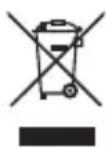
This marking indicates that this product should not be disposed of with other household wastes. To prevent possible harm to the environment or human health from uncontrolled waste disposal, recycle it responsibly to promote the sustainable reuse of material resources. To return your used device, please use the return and collection systems or contact the retailer where the product was purchased. They can take this product for environmentally safe recycling.
Save these Instructions for future reference.

READ OPERATOR'S MANUAL
This marking means reading and reviewing instructions to understand operation and use of the product.
EN
Battery Usage
The lithium-ion battery built into the motor base serves as a power source for the DREAME Portable Blender. Please read and follow all charging instructions.
- Never burn the appliance, even if it is severely damaged. Lithium may be hazardous in a fire. Always recycle products powered by lithium-ion batteries properly.
- Because there is no power cord, ensure that the appliance is turned off when not in use, during handling, or when drinking from the drinking lid to prevent accidental activation of the blades.
- Keep the battery away from all metal objects such as paper clips and coins. Short-circuiting the positive and negative terminals of the battery together may increase the risk of fire or burns.
- Under abuse conditions, liquid may be ejected from the battery. Avoid contact, as it may cause irritation or burns.
- If contact occurs, rinse the affected area with water.
- If the liquid comes into contact with eyes, seek immediate medical attention.
- This appliance contains a non-replaceable battery and moving parts that may pose risks to the user.
Charging
- Before first use, charge the appliance using the accompanying charging cable. The charging port is located on the back of the motor base.
- Use the accompanying charging cable and a 9V 2.5A fast-charging power adapter to charge the appliance until the LED indicator light remains steadily lit in white. The charging port is located on the back of the motor base.
- During Charging
- The LED light will flash in white. When charging is completed, the power icon LED will remain steadily lit in white. A full charge may take up to 1 hour.
EN
Product Components and Names
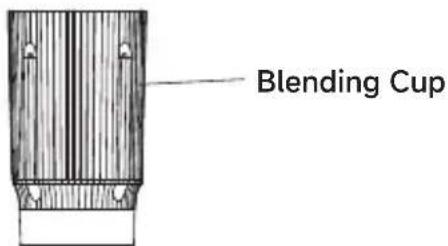
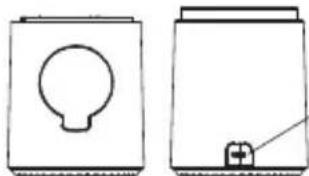
natural_image
Two simple line drawings of containers or containers, one with a circular opening and the other with a plus button (no text or symbols)Charging Port
Note: When charging, gently pull open the silicone cover of the charging port.
Motor Base
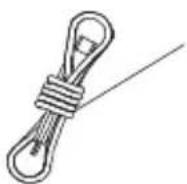
Charging Cable
Note: It is recommended to use this cable with a certified 9V 2.5A fast-charging power adapter (charger plug), which is user-supplied. Third-party adapters must comply with USB safety certification standards. Avoid using adapters with incompatible power output or without proper safety certification.
Before First Use
EN
Important: Before proceeding, be sure to read all warnings at the beginning of this User's Manual.
Note:
- All accessories except the motor base may be safely washed on the upper rack of a dishwasher. Do not use the heating and drying procedure. Ensure that the container is removed from the motor base before placing it in the dishwasher. Handle the portable blending cup with care when cleaning. Thoroughly rinse and air dry all applicable parts.
- Remove all packaging materials from the appliance. Be careful when disassembling the portable blending cup components, as the blades are sharp.
- To clean the container and lid, remove the container from the motor base, take off the lid, and add warm water up to the minimum level line. Then, add a small drop of dishwashing detergent. Secure the lid to the container, reinstall the container onto the motor base, and activate the blending function.
- After blending, remove the container from the motor base and pour the liquid into the sink. Rinse the container and lid with warm water and allow them to air dry.
- Do not submerge the motor base in water when cleaning. Handle the portable blending cup with care, as the blades are sharp.
Icon Description
SMOOTHIE:
For fresh or frozen fruit smoothies
PULSE:
Manual blending – start when pressed and stop when released
BLEND:
For protein shakes and sauces
Battery status indicator light
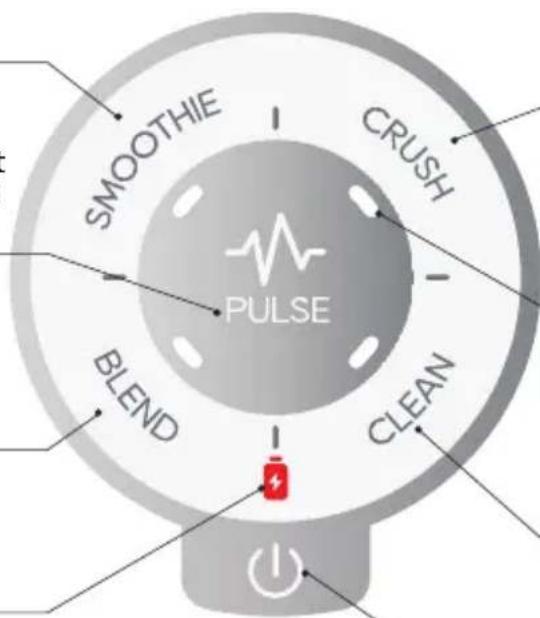
CRUSH:
For crushing ice or ice-based frozen drinks
LED Lights:
Four white function indicator lights
CLEAN:
For cleaning after use
Power Button:
Turn the device on or off
| Icon/Name | Function | Operating Time | Remarks |
| SMOOTHIE | Designed specifically for preparing fine, pulp-free beverages, it achieves blending of fresh fruits, yogurt, frozen fruits, and other ingredients into a smooth-texture beverages through continuous medium-to-high-speed mixing, retaining fiber while eliminating any lumpiness. | 34 s | |
| CRUSH | High-intensity crushing of hard ingredients (such as ice cubes or frozen beverages with ice). The motor accelerates instantaneously, and works with specialized blades to quickly break down solids. | 34 s | |
| BLEND | General-purpose, medium-speed blending that combines various ingredients (liquids and soft solids) into a uniform consistency without over-crushing. | 40 s | |
| PULSE | Short, intermittent high-speed operation (start when pressed and stop when released), allowing users to manually control the blending intensity and duration. | Start when pressed and stop when released | |
| CLEAN | Automatic cleaning program that uses high-speed rotating water flow to rinse residues from the blade assembly and cup walls. | 1 minute | Recommended cleaning method: Add 400 ml of water and 2-5 ml of alkaline cleaner. |
EN
EN
| Icon/Name Function Remarks | ||
| Control the turn-on, stop, or the child lock unlock function of the appliance | 1. Turn-on function: When the appliance is off, press and hold the Power Button for more than 3 seconds to turn the appliance on.2. Power-off function: When the appliance is in the standby mode, press and hold the Power Button for more than 3 seconds to turn the appliance off.3. Stop function: During activation of the Clean, Blend, Crush, or Smoothie function, press this button to immediately disable the function.4. Child lock unlock function: The appliance automatically enters the child lock mode after 15 seconds of inactivity, indicated by flashing of the four function indicator lights clockwise. Press the Power Button once within 75 seconds to disable the child lock and return to the standby mode.The appliance will turn off automatically after 75 seconds of inactivity. | |
| Battery status indicator light | White Light: Indicates a high battery level, covering approximately 30% to 100% battery level.Red Light: Indicates a low battery level, covering less than approximately 30% battery level.White Light Flashing Continuously: Charging in progress with more than 30% battery level.Red Light Flashing Continuously: Charging in progress with less than 30% battery level. | |
Note:
- If food is stuck to the cup walls or blending slows due to excessive ingredients during operation, gently shake the appliance or add a small amount of liquid to assist blending. This will improve blending effects.
- Do not run the motor more than one minute at a time. Allow the motor to cool for two minutes after each one-minute operation.
Display Status Description
| Indicator Light Status | Explanation |
| All four function indicator lights remaining lit | The product is ready for use |
| All four function indicator lights flashing | The blending cup is not properly installed. |
| All four function indicator lights and battery status indicator light flashing | The product is overheated. Allow the appliance to rest and cool for 30 minutes. Do not charge while the appliance is overheated. |
| All four function indicator lights flashing clockwise | The child lock mode is active. Press the Power Button to deactivate it. |
| Blend function indicator light flashing | Blade rotation is obstructed. Remove the obstruction. |
| Clean function indicator light flashing | Please contact after-sales service. |
EN
How to Use
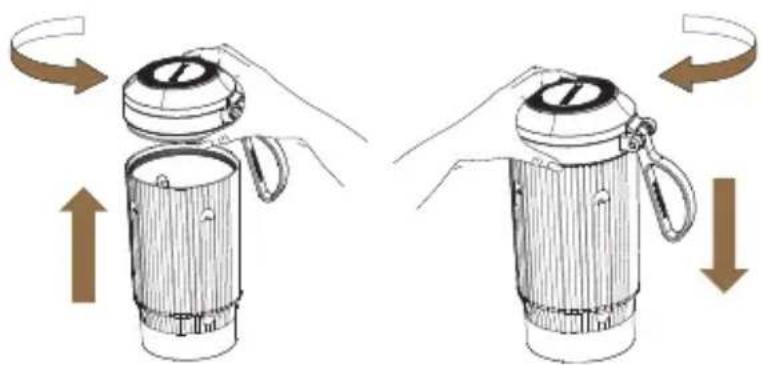
Take out the cleaned blending cup. Unscrew the lid counterclockwise, and add ingredients, starting with liquids followed by solids. If using ice cubes, always add them last. Finally, screw the lid clockwise.
natural_image
Illustration of a hand holding a portable blender with rotating arrows indicating rotation (no text or symbols)Note: Never exceed the maximum fill line
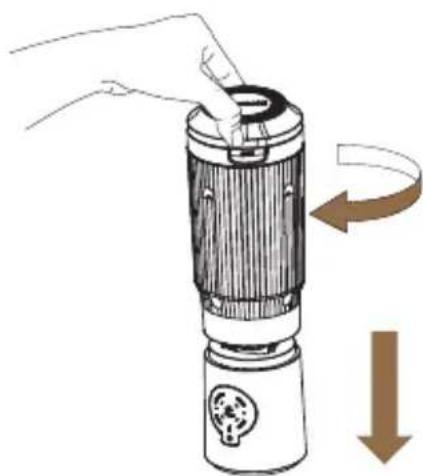
Install the blending cup with the leak-proof drinking lid onto the motor base. Rotate it clockwise until it snaps securely into place.
natural_image
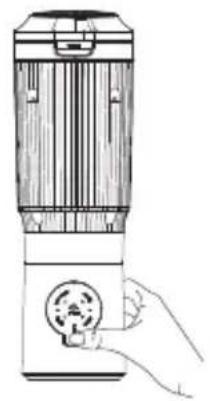
Illustration of a hand inserting a device into a cylindrical device with a curved arrow indicating rotation (no text or symbols)Press and hold the Power Button for more than three seconds until all function indicator lights are lit in solid white and the battery status indicator light turns on. Ensure the appliance is fully charged (The battery status indicator light is not lit if the cup is not installed).
natural_image
Line drawing of a portable device with a hand holding a circular button (no text or symbols)To make a fresh or frozen Smoothie, press the SMOOTHIE button. To crush ice or make frozen beverages with ice, press the CRUSH button. To prepare protein shakes or sauces, press the BLEND button. For manual control, press and hold the PULSE button — blending starts while pressed and stops when released. If uniform mixing is needed, gently shake the blender Note: Do not use any of the above functions continuously for more than one minute.
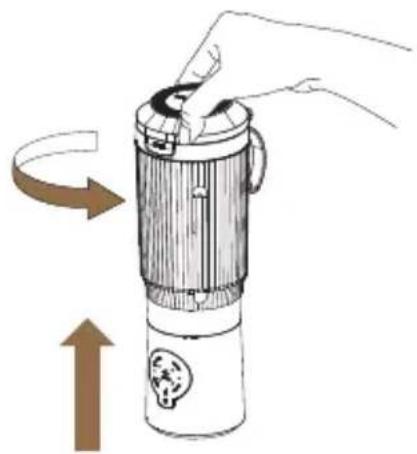
After blending, rotate the container counterclockwise and lift it upward to detach the blending cup from the motor base Do not remove the blending cup until the blades have come to a complete stop.
natural_image
Illustration of a hand holding a device with a scroll, showing a curved arrow and an upward arrow (no text or symbols)- Open the leak-proof drinking lid to consume the beverage.
Press and hold the Power Button 🎨 for more than three seconds to turn off the appliance. If you wish to drink with the motor base still attached, turn off the motor base before drinking Note: The appliance automatically enters the child lock mode after 15 seconds of inactivity. Briefly press the Power Button once, and the appliance returns to the standby mode. If there is no operation within 75 seconds after entering the child lock mode, the appliance will automatically power off.
Refer to the "Cleaning and Maintenance" section for cleaning and storage instructions.
Cleaning and Maintenance
Regarding cleaning: Please clean the product after each use and keep it hygienic
① After use, promptly disconnect the power and clean the product.
② Do not use steel wool, abrasive cleaners, or corrosive liquids (such as gasoline or acetone) to clean this product.
③ Wipe the motor base with a damp cloth. Do not rinse, soak, or spray the main unit with water or other liquids, as this may damage components or cause electric shock.
④ Rinse the blending cup and any parts that come into contact with food with clean water, and promptly dry or air-dry them. Empty the cup or clean parts with care and always be mindful of the sharp blades to avoid injury (protective gloves may be worn).
⑤ Quick cleaning: It is recommended to add 400 ml of water and 2-5 ml of alkaline cleaner into the portable blending cup. Attach the drinking lid, then install the cup with the drinking lid onto the motor base. First, press the Power Button (💡) to turn on the appliance, then press the CLEAN button to activate the automatic cleaning function. After cleaning, press and hold the Power Button (💡) again to turn off the appliance. Remove the blending cup, open the leak-proof drinking lid, pour out the water, rinse the blending cup thoroughly, and finally wipe-dry or air-dry the blending cup.
Regarding storage, please follow the instructions below
① Unplug the appliance and allow it to cool completely
② Ensure all parts are clean and completely dry.
③ Store in a dry, well-ventilated place away from direct sunlight.
Troubleshooting
| Issue | Cause | Solution |
| Blending fails - All four function indicator lights flash slowly | The blending cup is not properly installed | Reinstall the blending cup. |
| All four function indicator lights and battery status indicator light flash rapidly simultaneously | The appliance is overheated | Turn off the power and allow the blender to cool for at least 30 minutes before using again. |
| The battery indicator light shows red light | Low battery level | Fully charge the battery using the charging cable. |
| No response to mode selection - All four function indicator lights flash clockwise in sequence | Child lock mode | Press the Power Button to unlock the appliance, then select a mode. |
EN
| Issue | Cause | Solution |
| The appliance fails to start | The battery is depleted | Fully charge the battery using the charging cable. |
| Ingredients are not blended evenly | Incorrect setting selected | Ensure that the correct setting is used:- BLEND: For protein shakes and sauces- SMOOTHIE: For fresh or frozen fruit smoothies- CRUSH: For crushing ice and frozen beverages with ice- PULSE: For manual control of blending degree |
| Too many ingredients are added | Reduce food quantity to below the MAX graduation line. | |
| Ingredients are added in an incorrect order | Add liquids first, then fibrous foods, and finally ice cubes. | |
| Ingredients are too thick | Add an appropriate amount of liquid or gently shake the cup. | |
| Water leakage | Overfilled | Do not exceed the maximum graduation line on the cup. |
| Beverage has unusual odor or texture | The appliance is not thoroughly cleaned after last use | Thoroughly clean all parts before next use. |
| The appliance makes loud noise | Ingredients are too hard or dense | Use softer ingredients or cut them into smaller pieces |
| Burning smell from the appliance | Blades are jammed or obstructed | Turn off power and ensure there are no obstructions |
| The motor is damaged or faulty | Contact the customer service center or a technician to check the motor. | |
| Overuse or prolonged blending causes overheating | Allow the appliance to cool for at least 30 minutes before using again. | |
| Blades do not rotate normally | Ingredients are too hard or packed too tightly | Cut ingredients into smaller pieces and avoid overfilling. |
| The BLEND function indicator light flashes slowly | Blades cannot rotate normally / are jammed | Remove the cup, shake it several times, and reinstall it, or remove any excessively hard ingredients. |
EN
EN
Ordering Accessories
If you have difficulty obtaining appliance accessories, please contact

https://global.dreametech.com
Environment
Do not dispose of the appliance with regular household waste at the end of its life. Instead, take it to designated recycling collection points. This helps protect the environment.
Warranty and Service
Under the consumer protection laws of your jurisdiction, this product is subject to statutory guarantees that cannot be excluded. In case of a major failure, you are entitled to request a replacement or refund, as well as compensation for any other reasonably foreseeable losses or damages. For non-major defects, you may also request repair or replacement.
This warranty does not affect any other rights you may have under mandatory local consumer protection laws; where such laws require a longer warranty period, the legal provisions shall prevail.
- This warranty does not cover damages or defects resulting from:
1) Commercial or unintended use of this product designed for personal/household purposes.
2) Failure to follow operation or installation instructions specified in the user manual.
3) Evidence of improper repair, use of non-genuine parts or unapproved accessories.
4) Mechanical stress, chemical exposure, electromagnetic interference, extreme high or low
temperatures, corrosion, oxidation, or ingress of foreign objects, substances, liquids, insects, or animals.
5) Normal wear and tear due to aging, or technical condition or appearance deterioration from prolonged use.
6) Invalid warranty claims due to lacking proof as explicitly required, including model number, product serial number, date of purchase, and buyer's signature or other valid purchase proof.
For more information & after-sales support, contact us via

https://global.dreametech.com
Product Warranty Card
| Customer Name | Mailing Address | Contact Phone Number | Product Name and Model (Number) | Product SN | Product Purchase Date |
Maintenance
| Description of Faults and Replacement Parts | Maintenance Date | Service & Maintenance Center | |
| 1 | |||
| 2 | |||
| 3 |
natural_image
Two simple line drawings of containers or containers, one with a circular opening and the other with a plus button (no text or symbols)Ladeanschluss
natural_image
Illustration of a hand holding a cylindrical device with a lid, showing rotational motion (no text or symbols)natural_image
Illustration of a hand holding a device with a scroll arrow indicating rotation (no text or symbols)natural_image
Line drawing of a portable electronic device with a hand inserting a button (no text or symbols)natural_image
Illustration of a hand holding a device with a scroll, showing a rotating arrow and a flame symbol (no text or labels)natural_image
Illustration of two hands holding a cylindrical device with a lid, showing rotational motion (no text or symbols)natural_image
Illustration of a hand holding a device with a scroll arrow indicating rotation (no text or symbols)natural_image
Line drawing of a portable electronic device with a hand inserting a button (no text or symbols)natural_image
Illustration of a hand holding a device with a scroll, showing a curved arrow indicating rotation (no text or symbols present)natural_image
Illustration of a hand holding a portable blender with rotating arrows indicating rotation (no text or symbols)natural_image
Illustration of a hand holding a device with a curved arrow indicating rotation or movement (no text or symbols)natural_image
Line drawing of a portable blender with a hand inserting a button (no text or symbols)natural_image
Illustration of a hand holding a device with a scroll, showing rotational motion (no text or symbols)natural_image
Illustration of two hands holding a cylindrical device with a lid, showing rotational motion (no text or symbols)natural_image
Illustration of a hand inserting a device into a cylindrical device with a scroll arrow indicating rotation (no text or symbols)natural_image
Line drawing of a portable electronic device with a hand adjusting its button (no text or symbols)natural_image
Illustration of a hand holding a device with a scroll, showing a curved arrow indicating rotation (no text or symbols present)natural_image
Two simple line drawings of containers or containers, one with a circular opening and the other with a plus button (no text or symbols)Θύρα Φόρτισης
natural_image
Illustration of two hands holding a portable device with arrows indicating rotation and movement (no text or symbols)natural_image
Illustration of a hand inserting a device into a cylindrical device with a curved arrow indicating rotation (no text or symbols)natural_image
Line drawing of a portable blender with a hand inserting a button (no text or symbols)natural_image
Illustration of a hand holding a device with a scroll arrow indicating rotation (no text or symbols)natural_image
Illustration of a hand holding a portable steamer with rotating arrows indicating rotation (no text or symbols)natural_image
Illustration of a hand inserting a device into a cylindrical device with a curved arrow indicating rotation (no text or symbols)natural_image
Line drawing of a portable electric shaver with a hand adjusting its button (no text or symbols)natural_image
Illustration of a hand holding a device with a scroll, showing a curved arrow indicating rotation (no text or symbols present)natural_image
Two simple line drawings of containers or containers, one with a circular opening and the other with a plus sign (no text or symbols)Oplaadpoort
natural_image
Illustration of a hand holding a portable blender with rotating arrows indicating rotation (no text or symbols)natural_image
Illustration of a hand inserting a device into a cylindrical device with a curved arrow indicating rotation (no text or symbols)natural_image
Line drawing of a portable electronic device with a hand inserting a button (no text or symbols)natural_image
Illustration of a hand holding a device with a scroll, showing a rotating arrow and an upward arrow (no text or symbols)The word "dreame" is the abbreviation of Dreame Technology Co., Ltd. and its subsidiaries in China. It is the transliteration of the company's Chinese name "追觅",
which means striving for excellence in every endeavor and reflects the company's vision of continuous pursuit, exploration and search in technology.
Scan the QR code for more benefits
Scan the QR code to get the recipes from the official website.
Scan the QR code to get the recipes from the APP.

Scan the code to access the product usage tutorial

For more support, contact us via https://global.dreametech.com
Manufactured by: Dreame Trading (Tianjin) Co., Ltd.
Made in China
EU-A00