
EA 819E - Automatic coffee machine KRUPS - Free user manual and instructions
Find the device manual for free EA 819E KRUPS in PDF.




| Product Type | Automatic coffee machine with built-in grinder |
| Brand | KRUPS |
| Model | EA 819E |
| Power supply | 230 V, grounded plug |
| Water tank capacity | 1.7 L max |
| Coffee type | Coffee beans (not ground coffee) |
| Prepared beverages | Espresso, Ristretto, Lungo, Cappuccino |
| Two cups preparation | Yes, for coffee recipes |
| Grind fineness adjustment | Yes, via rotary knob in the bean container (adjust during grinding) |
| Coffee strength adjustment | 3 levels (1 to 3 beans) |
| Volume adjustment | In 10 ml increments, depending on recipe |
| Temperature adjustment | 3 levels |
| Water hardness adjustment | From 0 (very soft) to 4 (very hard) |
| Milk system | Integrated milk jug with cappuccino and cleaning function (CAPPUCCINO/CLEAN button) |
| Favorites function | Store 2 coffee recipes and 2 cappuccino recipes (A and B) |
| Automatic shut-off | Adjustable from 15 to 120 minutes |
| Automatic rinsing | Programmable at startup |
| Cleaning | Cleaning cycle with KRUPS tablet (every 3 months or on demand) |
| Descaling | Cycle with KRUPS descaler (every 3 months or on demand) |
| Milk jug maintenance | Automatic rinsing after each cappuccino, manual cleaning of parts |
| Indicators | Water level, coffee grounds, drip tray, maintenance messages |
| Accessories | Claris Aqua Filter System filter cartridge (optional), KRUPS tablet and descaler |
Frequently Asked Questions - EA 819E KRUPS
User questions about EA 819E KRUPS
0 question about this device. Answer the ones you know or ask your own.
Ask a new question about this device
Download the instructions for your Automatic coffee machine in PDF format for free! Find your manual EA 819E - KRUPS and take your electronic device back in hand. On this page are published all the documents necessary for the use of your device. EA 819E by KRUPS.
USER MANUAL EA 819E KRUPS
www.krups.com
EA819 ARABICA LATTE
KRUPS
Dear customer,
Thank you for purchasing your KRUPS espresso maker with bean grinder. Designed and manufactured in France to deliver a café-quality drink with the greatest ease of use, your KRUPS machine enables you to enjoy espresso, ristretto, lungo, and cappuccino coffees at any time of day.
Your espresso maker with bean grinder is equipped with advanced technologies and an intuitive interface; to obtain the best possible extraction with ease, to reveal a maximum amount of aromas and flavours from freshly ground coffee beans. For an optimal taste experience, be sure to use fresh tap water.
For increased pleasure, you may use your KRUPS ARABICA LATTE machine to automatically make perfect cappuccinos with frothy foam at the touch of a button, thanks to its built-in milk pot.
Since all coffees are not alike, you may personalise your drinks:
- By changing the coffee beans (different mix or roast), you may discover different flavours. You will probably need several trials to find the coffee beans that match your taste.
- By varying the fineness of the grind, you may obtain coffees that are more or less full-flavoured.
- By choosing your length and strength to obtain the perfect cup.
- By saving your favourite coffees using the favourites key.
We wish you pleasant moments spent around coffee and we hope that your KRUPS machine will fully satisfy you.
The KRUPS team

Tips
- The quality of the water strongly influences the quality of the aromas. Limescale and chlorine can alter the taste of coffee. We recommend that you use the Claris Aqua Filter System cartridge, or water with low mineral content, in order to preserve all the aromas of your coffee.
- When preparing drinks we recommend using preheated cups (by passing them under hot water) whose size is adapted to your desired quantity.
- The roasted coffee beans can lose their aroma if they are not protected. We advise you to use the amount of beans equivalent to your consumption over the coming 2-3 days and to choose 250g bags.
- The quality of the coffee beans is variable and tastes are subjective. Arabica will give you fine, floral aromas unlike Robusta which is higher in caffeine, more bitter and full-bodied. It is common to mix the two types of coffee to get a more balanced coffee. Please do not hesitate to seek advice from your roaster.
- We do not recommend the use of oily and caramelised beans as these can damage the machine.
- The fineness of the ground beans influences the strength of the aromas and the quality of the crema. The more finely ground the beans, the smoother the crema. Grinding can also be adapted for the desired drink.
- Use pasteurised, UHT, skimmed, semi-skimmed or whole milk from the fridge (3 - 5°C) for best results.
- The use of special milks: micro filtered, raw, fermented, enriched or plant milks such as rice, oat or almond milk can give results that are less satisfactory in terms of quality and quantity of froth.
CONTROL PANEL
| Keys and overall functions | |||
| ① | Start/stop button Turn the machine on and off | → | Navigation button Go from one function to another |
| ② | Recipes selection button Choose coffee or cappuccino recipe | - + | + or - button Raise or lower |
| ③ | Favourites button Save your favourite recipes | START STOP | Start/stop button Start or stop a function |
| ④ | Settings and maintenance button Access settings | Grind fineness setting button Choose the grind fineness | |
SIGNIFICANCE OF THE PICTOGRAMS
| Pictograms | Steady | Flashing | Significance |
| ● | The coffee grounds collector is absent or improperly positioned. | ||
| ● | Empty the coffee grounds collector and the drip tray. | ||
| ● | Fill the water reservoir. The water reservoir is improperly positioned. | ||
| ● | Position a container of approximately 600 ml under the coffee and steam outlets. | ||
| ● | Maintenance cycle under way. | ||
| ● | Faulty operation: unplug the appliance for 20 seconds then plug in again. | ||
| ● | Installing the filter cartridge. | ||
| ● | Rinse cycle under way. | ||
| ● | ● | Request to rinse the milk pot. | |
| ● | ● | Request to clean using a KRUPS cleaning tablet. | |
| ● | Interrupted cleaning cycle. | ||
| ● | ● | Request for descaling with KRUPS descaler. | |
| ● | Descaling cycle interrupted. | ||
| ● | Water hardness setting. | ||
| ● | Programming the automatic rinse of the coffee outlets at machine start-up. | ||
| ● | Programming the period of non-use after which the machine will automatically turn off. | ||
| ● | ● | Coffee temperature setting Preheating indicator. | |
| ● | Choice of desired milk volume. | ||
| A B | ● | A-B favourites Ability to save 2 coffee recipes and 2 cappuccino recipes. | |
| ● | Saving favourites A or B. | ||
| ● | ● | Preparation progress indicator. | |
| PRESS START | ● | Press the start/stop button. | |
| [000] | ● | Coffee strength indicator. | |
| [BBBmin] | Volume indicator. | ||
| [00] | ● | Number of cups (1 or 2). | |
| ▲ | Selection indicator. |
APPLIANCE DESCRIPTION
A Water reservoir handle/lid B Water reservoir C Coffee grounds collector D Coffee outlets E Grill and removable drip tray F Coffee bean reservoir lid
1 Coffee bean reservoir
Grind fineness setting button H Metal burr mill I Opening for the cleaning tablet J Cup tray
Screen and control panel
K Start/stop button
L Recipe selection button
M Favourites button N Settings and maintenance button O Start/stop button P + or - button Q Navigation button
3 Milk pot
R Lid S Lock lever T CAPPUCCINO/CLEAN selection knob U Flexible tube for milk foam flow V 3-part cassette which can be dismantled W Container X Steam nozzle
USING YOUR APPLIANCE INSTALLING THE APPLIANCE

Danger: Connect the appliance to an earthed 230 V mains socket. Failure to do so means that you run the risk of fatal injury due to electricity!
Respect the safety guidelines indicated in the "Safety guidelines" booklet.
Preparing the appliance
To prevent used water flows from dirtying your counter top or from potentially burning you, don't forget to insert the drip tray. (E)
- Remove, fill the water reservoir and put it back in place. (1-2)
- Remove the coffee bean reservoir lid, pour in the coffee beans and put the lid back on. (3)
First use
- Switch the appliance on by plugging it in
- Press the start/stop button (4)
- The machine preheats, at the end of the cycle, the pictograms and press start PRESS START flash.
- Place a container (at least 600 ml) under the coffee and steam nozzles, then press the start/stop key (7).
- The machine primes itself and rinses the hydraulic circuits (coffee and steam) for approximately 2 minutes.
- At the end of the cycle, the coffee recipe menu is displayed (8).
Installing the cartridge in the appliance: Sold separately
We advise the use of a Claris Aqua Filter System filter cartridge to eliminate all traces of chlorine and limescale. Limits the formation of limescale and ensures your machine's longevity. The use of this cartridge ensures a more flavourful coffee.
To perform the installation, you will need:
-1 filter cartridge - 1 container (minimum 600 ml)
Attention: to properly prime your filter cartridge, ensure that you have properly followed the installation procedure at each set-up.
- Set the date by turning the grey ring located on the upper end of the cartridge (5).
- Screw the cartridge into the water reservoir (6).
- Press the settings and maintenance button.
- Using the navigation key, select the pictogram.
- The pictograms and press start flash.
- Place the 600 ml container under the coffee outlets (7).
- Press the start key (7); the priming cycle starts.
The installation of the filter cartridge is complete; the coffee recipe menu appears, and you may again use your machine (8).
Water hardness
Water hardness is a high concentration of minerals, specifically of calcium, which is responsible for the formation of limescale. To prevent the scaling of your machine, which may lead to improper operation or alter the taste of your coffee, you must set your machine according to the hardness of your water (between 0 and 4).
Prior to the first use and in order to set your machine, determine the hardness of your water by using a pH test stick:
- Fill a glass of water.
- Immerse the stick.
- Wait 1 minute for the result
It is also possible to contact your water company.
You will find detailed information on the classes in the table below:
| Degree of hardness | Class 0 Very soft | Class 1 Soft | Class 2 Average hardness | Class 3 Hard | Class 4 Very hard |
| ° dH | < 3° | > 4° | > 7° | > 14° | > 21° |
| ° e | < 3,75° | > 5° | > 8,75° | > 17,5° | > 26,25° |
| ° f | < 5,4° | > 7,2° | > 12,6° | > 25,2° | > 37,8° |
| Appliance setting | 0 | 1 | 2 | 3 | 4 |

Be sure to perform this operation each time you use your machine in a place where the water hardness is different or if you notice a change in the hardness of your water.
BEFORE PREPARED DRINKS IMPORTANT INSTRUCTIONS
Your machine offers pre-set drinks to obtain optimal results. You may nonetheless personalize your coffee and have an effect on the results in your cup.
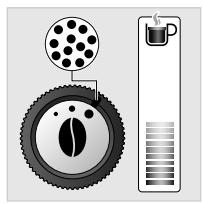
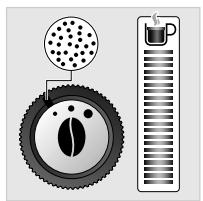
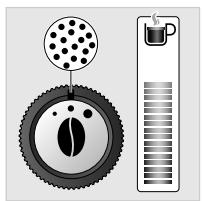
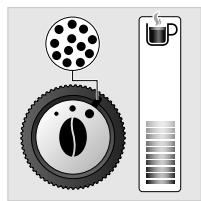
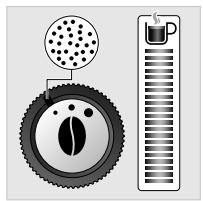
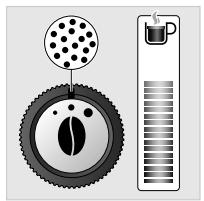
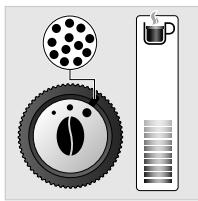
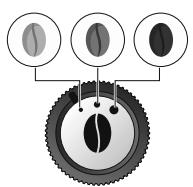
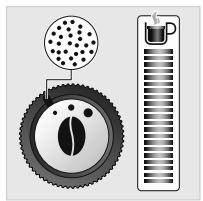
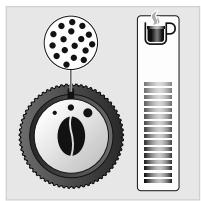
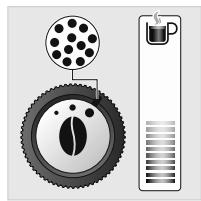
Preparing the grinder: set the grind fineness (9)
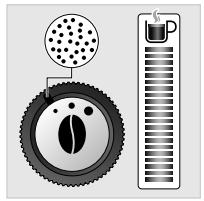
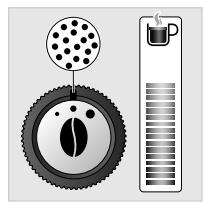
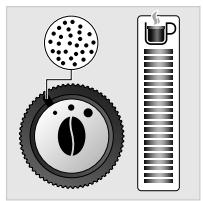
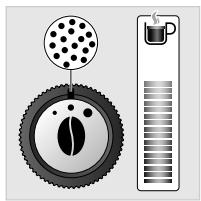
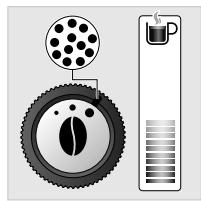
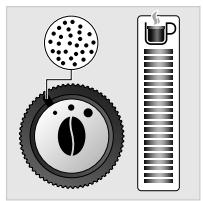
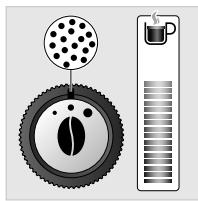
You may adjust the strength of your coffee by setting the grind fineness of the coffee beans; the finer the setting of the coffee grinder, the stronger and creamier the coffee. The type of coffee used may also influence the result obtained.
We recommend a very fine setting for ristretto, fine for espresso, and coarser for lungo.
To set the level of grind fineness:
- Turn the setting knob located in the bean reservoir. This setting must be performed during grinding and notch by notch.
- After 3 preparations, you will notice a very distinct taste difference.
The variation of grinding fineness allows:
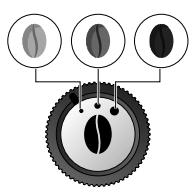
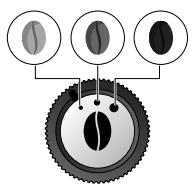
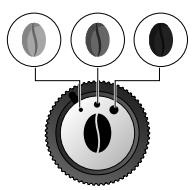
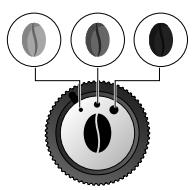
- To be able to adapt to the different types of bean: a highly roasted and rather oily bean will require a coarse grinding while a more lightly roasted bean will be drier and will require a finer grinding (dark to light bean)
Roasting:
Light (Blonde)
Average (Light French)
Long (Brune)
Adjusting the coffee outlet (10)
For all drinks offered, you may lower and raise the coffee outlets depending on the size of your cup(s).
Stopping a drink while preparation is under way
You may stop the preparation at any time by pressing the start/stop key.
When a cycle is interrupted, stoppage is not immediate. The machine will be inaccessible over a certain period.
Preparing two cups
You may use your appliance to simultaneously prepare two cups. The double cups function is only accessible for coffee recipes by choosing 2 cups when you enter the settings of your drinks.
PREPARING DRINKS
| COFFEE RECIPES | Number of cups possible | Recommended settings Volume (10 ml increments) | Possible settings Strength |
| RISTRETTO | 1 | 20 to 30 ml | 1 to 3 beans |
| 2 | 2x 20 to 30 ml In two cycles | ||
| ESPRESSO | 1 | 30 to 70 ml | 1 to 3 beans |
| 2 | 2 x 30 to 70 ml In two cycles | ||
| LUNG | 1 | 80 to 180 ml | 1 to 3 beans |
| 2 | 2 x 80 to 180 ml In two cycles | ||
| CAPPUCCINO | 1 | 60 to 100 ml | 1 to 3 beans |
PREPARING AN ESPRESSO, RISTRETTO AND LUNGO
Please note: each time a drink is started, the machine will take into account the settings of the last drink made.
Ristrettos, with a strong, powerful taste, covered with a caramel-coloured crema for those difficult mornings. To prepare a ristretto, choose a volume between 20 ml and 30 ml.
Espressos, with full-flavoured taste and pronounced aromas, are covered with a slightly bitter caramel-coloured crema. Choose a volume between 40 ml and 50 ml.
A café lungo is an 80 ml espresso, with a higher caffeine content but lighter on the palate. Very appreciated in the morning.
Steps involved in making the drink:
- Coffee bean grinding
- Compacting the coffee grounds -Percolation
Starting the preparation (for 1 or 2 cups):
- Press the recipe choice key (11) until the pictogram is displayed.
- The coffee recipe menu is displayed.
- Place either 1 cup or 2 cups under the coffee outlets. You may lower or raise the coffee outlets based on the size of your cup (10).
Personalisation
Strength
- Select the coffee strength (symbolised by coffee beans displayed on-screen between brackets) [000] using the + key to increase it or the - key to reduce it (-[+]). (12)
Volume
- Press the navigation key to go to the setting of the recipe volume.
- Select the desired volume [120] using the + or -[+] keys (13).
Number of cups
- Press the navigation key → to go to the setting of the number of cup(s).
- Select 1 or 2 cups using the + or - keys (14).
If you choose 2 cups, the machine will automatically link 2 full coffee preparation cycles.
- Press the START key (15).
At any time, you may set the recipe volume using the + or - keys - + .
To stop the flow into your cup, press the START/STOP key.
You may also adjust the temperature of your coffee; to do so, press the settings and maintenance button 60 then, using the navigation key, position it on 61 and set the desired temperature level using the keys -1 + .
BE CAREFUL, IF YOU INTERRUPT THE PREPARATION OF YOUR DRINK, STOPPAGE IS NOT IMMEDIATE.
Depending on your drink, you may modify the grind level of the coffee beans; to do so, please refer to the "BEFORE PREPARED DRINKS IMPORTANT INSTRUCTIONS" chapter.
Saving to your favourites
After having made your drink, you may save it to your favourites.
To do so, at the end of the flow of your drink, press the favourites key once to select favourite A or twice to select favourite B.
For more details, refer to the section SAVE YOUR FAVOURITES.
PREPARING A GAPPUCCINO
Please note: each time a drink is started, the machine will take into account the settings of the last drink made.
To obtain a good quality foam, we recommend using recently opened fresh, pasteurised or UHT milk (4 - 5°C). Raw milk will not produce optimal results.
Steps involved in making the drink:
- Preheating the machine: at any time during this phase, you may set the volume of milk using the + and - keys
- Milk frothing phase
- Coffee flow: at any time during this phase, you may set the volume of coffee using the + and - keys.
Starting the preparation
For a personalised cappuccino, the machine enables you to choose different volumes of milk and coffee, according to your preferences.
- Press the recipe choice key (17) until the pictogram is displayed.
Installing the milk pot on the machine
Prior to first use, carefully clean the various elements.
The milk pot is composed of a plastic container (W), a lid (R) including a cassette (V) and a flexible tube (U) connecting to the machine's drink outlet.
- Pour the milk in the pot (a minimum of 150 ml) (18).
- Put the lid on the pot by screwing it on (19).
- Lift the lock lever (20).
- Install the milk pot on the machine by connecting it to the steam outlet (21) then lower the lock lever (22).
- Insert the flexible tube into the cassette opening intended for this purpose (23), then place the other end under the magnetic drink outlet (23).
- Check that the cappuccino/clean selection knob on the milk pot lid is properly set to the cappuccino position (24).
Personalization
Strength
- Choose the desired intensity by increasing or reducing the number of coffee beans [∅ ∅ ∅] using the keys + (25).
Volume of coffee
- Next, press the navigation key → to go to the setting of the final desired drink volume. You may increase or reduce the volume using the keys → (26).
Volume of milk
- And finally, you may set the desired volume of milk using the keys (27).
- Press the start/stop key (28).
To stop the flow into your cup, press the start/stop key (C).
You may also adjust the temperature of your coffee; to do so, press the settings and maintenance button (念), then using the navigation key, position it on (念) and set the desired temperature level using the keys (-1 +).
BE CAREFUL, IF YOU INTERRUPT THE PREPARATION OF YOUR DRINK, STOPPAGE IS NOT IMMEDIATE.
Rinse of the milk pot (approximately 30 seconds)
Each time a cappuccino recipe is prepared, the machine prompts you to perform a rinse of the milk pot via the appearance of the pictogram (31). It is preferable to perform the rinse of your milk pot to guarantee the performance of your machine and optimal hygiene. To perform this rinse, it is not necessary to empty the milk remaining in the milk pot.
- When the pictogram is displayed, press the parameters button (31).
- Turn the knob of the milk pot to the CLEAN position (32).
- Ensure that the milk pot is properly connected to the machine and in locked position (lever lowered) (22).
- Press the START/STOP button (33), the rinse cycle starts.
SAVE YOUR FAVOURITES
Your ARABICA LATTE machine gives you the option to save 2 coffee recipes and 2 cappuccino recipes.
Saving a new favourite
After your drink has stopped flowing, you may press the favourites key once to select favourite A or twice to select favourite B (29).
To save the recipe, hold down the favourites key.
Replace your favourites
Proceed in the same manner as for a 1st save.
GENERAL MAINTENANCE
Performing proper maintenance of the machine will extend the life of your machine and will preserve the authentic taste of your coffee.
Maintenance of the coffee grounds collector tray and drip tray
The drip tray collects the used water.
The coffee grounds collector tray collects the used coffee grounds.
If the pictogram flashes, empty and clean:
- The drip tray (some ground coffee may be present). The drip tray is equipped with floats that constantly indicate when it must be emptied (34).
- The coffee grounds collector tray. Empty it completely to avoid any overflows afterwards (35,36).
The warning message will remain displayed if the coffee grounds collector is not properly pushed in or installed. It will then be impossible to prepare any drinks.
Rinsing the coffee circuit
You may perform this operation whenever you wish to rinse the coffee outlets. We recommend that you perform a rinse each time you turn off your machine to ensure optimal hygiene.
After several days without use, rinsing the coffee circuit is recommended.
- Press the settings and maintenance key
- Using the navigation key , select the rinse pictogram
- Press the START key
- Once the coffee menu appears, you may again use your machine.
Activating and deactivating the automatic rinse of the circuits upon switching on the machine
By default, the option to automatically rinse the circuits upon switching on the machine is activated. You may choose to activate or deactivate the automatic rinse at each start-up.
To do so:
- Press the Settings and maintenance key
- Using the navigation key, select the automatic rinse pictogram.
- Press the start/stop key to choose to activate the automatic rinse.
- To deactivate, press the + key, the automatic rinse is then no longer programmed.
- The cycle only lasts a few seconds and will stop automatically.
- To go back to the coffee menu, press the settings and maintenance key.
BE CAREFUL: during this rinse operation, hot water flows through the coffee outlets. Ensure that the drip tray is always in place, even when the machine is not used.
IMPORTANT: it is advised to perform this rinse: - After each cappuccino for optimal hygiene. - Before placing the milk pot in the refrigerator if it still contains some milk.
After each rinse, it is advised to clean the different parts of the system by running them under water; please refer to the "Milk Pot Maintenance Manual" chapter.
The machine offers to perform a rinse of the milk pot after making cappuccinos, but you may also perform this rinse any time that you wish to do so. This is possible even if there is some milk left in the container.
- Ensure that the milk pot is properly connected to the machine in locked position (lever lowered) (32).
- Turn the lid knob to the CLEAN position (32).
- Press the settings and maintenance key (31).
- Using the navigation key, position on
- Press START (33).
At the end of this cycle, return the cappuccino system knob to the CAPPUCCINO position (24) before starting a new recipe.
Manual maintenance of the milk pot: Approximately 5 minutes
IMPORTANT: it is recommended to clean the different parts of the milk pot by running them under clean water.
These parts are not designed to be dishwasher-safe.
- Remove the flexible tube from the pot's opening and from the drink outlet (37)
- Unlock the milk pot by lifting the lock lever (38)
- Turn the knob to clean position (39)
- Extract the cassette (40)
- Remove by pulling the cappuccino/clean selection knob (41)
- Remove the black silicone body from the cassette (42)
- Unscrew the steam nozzle tip located on the pot lid (43), unplug it if need be, using the needle provided for this purpose (44)
- The milk pot is now fully disassembled.
- Clean each element using warm water (45)
- Dry them.
- Put them back in place (46) (to properly insert the knob, be sure to put it in clean position!)
- Again place the cassette in the pot lid (47)
Cleaning program: Approximately 13 minutes
Cleaning the coffee circuit serves to combat residue, greasy coffee deposits and to preserve the aromas of your drinks.
To perform this cleaning, you will need:
-1 KRUPS cleaning tablet - 1 container (minimum 600 ml)
The cycle will link two phases:
- 1 cleaning phase -1 rinse phase
When should this program be performed?
-Each quarter. - When the appliance advises you by lighting up the pictogram δ.

Important: You are not obliged to immediately perform the cleaning program when the appliance requests it, but you must perform it soon. If the cleaning is postponed; the pictogram will remain displayed so long as the operation is not performed.
It is recommended to perform the cleaning operation to degrease the appliance and to ensure optimal preservation of your drinks' aromas.
The cleaning program is an intermittent cycle; do not place hands mains under the coffee outlets during the cycle.
When the pictogram δ is displayed, you may start the cleaning program:
- Press the settings and maintenance key
- Ensure that the pictogram δ is selected, otherwise use the navigation key →.
- The pictogram flashes.
The cleaning cycle: approximately 10 minutes
- Lift the cup tray (J).
- Insert the KRUPS cleaning tablet in the opening intended for this purpose (I).
- Fill the water reservoir up to its maximum level of 1.7L (2).
- Empty the coffee grounds collector and the drip tray (34, 35, 36).
- Place the 600ml container under the coffee outlets and the steam nozzle (7).
- Press the START (DAP)
- The pictogram stops flashing.
- The first phase of the cleaning cycle starts.
- At the end of this cycle, the pictogram flashes.
- Empty the container and the drip tray and put them back in place.
The rinse cycle: approximately 3 minutes
- Press the START (do)
- The pictogram stops flashing.
- At the end of this cycle, empty the container and drip tray (34, 35, 36).
- Put the drip tray back in place.
Important: if you turn off or unplug your machine during cleaning or in the event of a power failure, the cleaning program will start again at the step under way during the incident. It will not be possible to postpone this operation, this is compulsory in order to rinse the water circuit. In this case, a new cleaning tablet may be necessary. Properly perform the entire cleaning program to eliminate any trace of cleaning product harmful to health.
Descaling program: Approximately 20 minutes
Running your machine's descaling program ensures that it is operating properly and eliminates any limescale deposits that may influence the taste of the coffee.
The frequency at which this program is run depends on the quality of water used and whether or not a Claris Aqua Filter System filter cartridge is used. The harder your water, the greater the frequency of descaling.

Important: ensure that you disconnect the milk pot (37) and remove the Claris Aqua Filter System cartridge if it is fitted before starting a descaling cycle.
To perform this descaling, you will need:
- 1 dose of KRUPS descaler
- 1 container (minimum 600 ml)
The cycle will link three phases:
-1 cleaning phase - 1st rinse phase - 2nd rinse phase
When should this program be performed?
-Each quarter. - When the appliance advises you by lighting up the pictogram.

Important: You are not obliged to immediately perform the descaling program when the appliance requests it, but you must perform it as soon as possible. If the descaling is postponed, the pictogram will remain displayed so long as the operation has not been performed.
It is recommended to perform the descaling to eliminate any limescale deposits that may influence the taste of coffee.
The descaling program is an intermittent cycle; do not place hands under the steam outlet.
When the pictogram 8 is displayed, you may start the cleaning program:
- Press the settings and maintenance key
- Ensure that the pictogram 0 is selected, otherwise use the navigation key.
- The pictogram flashes.
The descaling cycle: approximately 8 minutes
- Fill the water reservoir up to the CALC mark.
- Pour a dose of KRUPS descaler into it.
- Place the 600 ml container under the coffee outlets and the steam nozzle.
- Press START
- The pictogram stops flashing.
- Empty the container, the drip tray and put them back in place.
- Clean the water reservoir, clean it using a sponge, then fill it and put it back in place.
- At the end of this cycle, the pictogram flashes.
The 1st rinse cycle: approximately 6 minutes
- Press START (G)
- The pictogram stops flashing.
- Empty the container and the drip tray and put them back in place.
- The pictogram flashes.
The 2nd rinse cycle: approximately 6 minutes
- Press START (start)
- The pictogram stops flashing.
- Empty the container, the drip tray and put them back in place.
Descaling is complete; the coffee recipe menu appears, and you may again use your machine.

Important: if you turn off or unplug your machine during descaling or in the event of a power failure, the descaling program will start again at the step under way during the incident. It will not be possible to postpone this operation; this is compulsory in order to rinse the water circuit. Properly perform the entire cleaning program to eliminate any trace of descaling product harmful to health.
OTHER FUNCTIONS
- To access the machine's other functions, press the settings and maintenance button
- To go from one function to another, use the navigation key
- To modify the values, you must use the keys.
- To exit the settings and maintenance menu, press the settings and maintenance button.
Maintenance
| To start a rinse of the coffee outlet circuit for optimal hygiene. | |
| To start a cleaning of the coffee circuit to eliminate greasy deposits and coffee residues. | |
| To start a descending of the water circuit to combat limescale. | |
| For the set-up and priming of your Claris Aqua Filter System filter cartridge. |
Settings
| Enables you to set your water hardness at a value between 0 and 4 by pressing the keys ⋅. See Water hardness below. | |
| Enables you to activate or deactivate automatic rinsing each time the machine is switched on. Press the start/stop key ⋅ to activate and the key ⋅ to deactivate. | |
| Enables you to choose the period of non-use after which your appliance will stop automatically, from 15 to 120 minutes, by pressing the keys ⋅. | |
| Enables you to adjust the temperature of your coffee by pressing the keys ⋅, 3 levels available. |
Switching off
You may stop your appliance at any time. While the appliance is stopped, it produces a double beep and OFF is displayed on-screen.
The appliance has received your request and will stop as soon as possible.
PROBLEMS AND CORRECTIVE MEASURES

If one of the problems listed in the table persists, contact the KRUPS customer service department.
| OPERATION | The appliance does not turn on after pressing the Start/Stop key. | Turn off and unplug the machine, remove the filter cartridge; wait 20 seconds and restart the machine. Check that the plug of the electrical cord is properly pushed into the outlet |
| The logo \(\ddagger\)is displayed | Unplug the appliance for 20 seconds, remove the Claris Aqua Filter System cartridge if applicable, then put it back into service. | |
| A power outage occurred during a cycle. | The appliance automatically resets itself when its switches on again and is ready for a new cycle. If the power outage takes place during a cleaning or descaling cycle, the machine will continue the cycle at the step under way during the incident. | |
| The appliance is operating, but no liquid comes out. | Check that the water reservoir is properly in place and that the cord is not jammed between the body of the appliance and the water reservoir. | |
| USE | The grinder produces an abnormal noise. | Foreign bodies are present in the grinder. |
| There is some water or coffee under the appliance. | The drip tray has overflowed: empty it and clean the coffee grounds collector tray. Check the proper positioning of the drip tray. Do not remove the reservoir before the end of the cycle. | |
| The appliance did not output any coffee. | An incident was detected during preparation. The appliance has automatically reset itself and is ready for a new cycle. | |
| You used ground coffee instead of coffee beans. | Using your vacuum cleaner, vacuum the pre-ground coffee contained in the bean reservoir. | |
| The grind fineness setting knob is hard to turn. | An incident was detected during preparation. The appliance has automatically reset itself and is ready for a new cycle. | |
| Some water or steam abnormally comes out of the steam nozzle. | Using your vacuum cleaner, vacuum the pre-ground coffee contained in the bean reservoir. | |
| The grind fineness setting knob is hard to turn. | Only modify the setting of the grinder when it is in operation. Foreign bodies are present in the grinder: contact the KRUPS customer service department. | |
| Some water or steam abnormally comes out of the steam nozzle. | In the case of repeated operation, a few drops may flow out of the steam nozzle. | |
| The steam outlet of your cappuccino system seems to be partially or completely blocked. | Start the cappuccino system's rinse cycle to clear out the rest of the deposits. Clean the steam outlet and check that the nozzle hole is not obstructed by milk residues or limescale. Use the cleaning needle if necessary. | |
| Some ground coffee is found in the drip tray. | This occurs in cases where the coffee grounds fall outside of the percolation vat: this maintains the cleanliness of the inside of the machine. | |
| MAINTENANCE | After having emptied the coffee grounds collector tray, the warning message continues to be displayed. | Wait at least 6 seconds before properly reinstalling the coffee grounds collector tray. |
| After having filled the water reservoir, the warning message continues to be displayed on-screen | Check the proper positioning of the reservoir in the appliance. The float in the bottom of the reservoir must move freely. Check the float and unblock it, if necessary. | |
| The machine is not requesting any descaling. | The descaling cycle is requested due to a large number of uses of the steam circuit. | |
| DRINKS | The cappuccino system is not drawing up any milk. The cappuccino system produces little to no foam. | Check that the system is properly assembled. Check that the setting knob is on the CAPPUCCINO position. Check that the steam outlet is not blocked. Check that the flexible tube is not obstructed or pierced and that it is properly fitted into the cassette so as to avoid any air intake. Check that the milk suction tube is properly immersed in the milk. Rinse and clean the system (see corresponding chapter). For milk-based preparations: we recommend using recently opened fresh, pasteurised or UHT milk. It is also recommended to use a cold container. |
| The coffee flows too slowly or does not flow at all. | Turn the grind fineness button to the right to obtain a coarser grind (may depend on the type of coffee bean used). Perform one or several rinse cycles. Run a damp sponge under the coffee outlet. | |
| The espresso or coffee is not hot enough. | Change the coffee temperature setting . Heat the cups by rinsing them under hot water. | |
| The coffee is too light or not full-flavoured enough. | Check that the coffee bean reservoir contains coffee and that it is flowing properly. Avoid using oily, caramelised or flavoured coffee. Reduce the volume of coffee using the + and - buttons. Turn the grind fineness knob to the left to obtain a finer grind. Make your preparation in two cycles by using the 2-cup function. | |
| The coffee is too acidic | The infusion temperature is too low The water is too acidic | |
| The coffee is too bitter | The infusion temperature is too high The level of grinding is too fine The water is too hard | |
| The coffee has little aroma | The infusion temperature is too low The ground coffee is too old The grind is too coarse The water is too soft/alkaline | |
| The coffee has no body | The infusion temperature is too low The ground coffee is too old The grind is too coarse The water is too soft/alkaline | |
| The coffee is not very creamy. | Turn the grind fineness knob to the left for a finer grind (may depend on the type of coffee used). Change the Aqua Filter System cartridge (follow the installation procedure on page 3). Perform one or several rinse cycles. | |
| The cappuccino foam is too liquid | Use fresh (3/5C°), UHT or whole milk. Check that the milk pot and the tube are not obstructed |
Here are some recipes to make:
Café crème
Prepare a lungo in a large cup, sweeten it and then pour in thick cream. For even more luxuriousness add chocolate chips.
Moka
Run a cappuccino, sprinkle the milk foam with a teaspoon of cocoa and finally cover with whipped cream.
Coffee Smoothie
For a luxurious breakfast, mix a natural yoghurt with an espresso. To soften add 1 teaspoon of liquid honey, then depending on the season, add a banana or a peach to make the smoothie more creamy.
Viennese Coffee
Make yourself a double espresso or doppio, sweetened, and then cover it with a generous layer of whipped cream. Those looking for something more luxurious can sprinkle with a teaspoon of cocoa and/or add chocolate sprinkles.
Medium (Light French)
Long (Brown)
DESCRIPTION OF THE APPLIANCE
Medium (Light French)
Long (Brown)
Medium (Light French)
Long (Brown)

Adjusting the coffee outlet (10)
GENERAL MAINTENANCE
Performing proper maintenance will extend the life of the machine and preserve the authentic coffee flavor.
-1 KRUPS cleaning tablet - 1 container (minimum 600ml )
K Start/stop button
K Start/stop button
L Reseptin valintapainike
Media (Light French)
Larga (Brune)
Intermedia (Light French)
Lunga (Brune)
Média (Light French)
Longa (Brune)
PROBLEMS AND CORRECTIVE ACTIONS

Here are the recipes to prepare:
Café crème
EvapEnTncnapaokeuuc(yia1n2kouneC):
- Pntto To koumi Eiloyic ovTuayw (11) mexvi a eavioi te to ekovidio
- Θα εμφανισει to Μενού συντayων καρέ.
- TOnoTeTnOte 1 n 2 KouteKATw anTo tic Edooc Kape. Mtopeite va xaunlambdae tva avuwoote tic Edooc Kaape avaloya me To meyEooC nou exi n Kouna (10).
PpOoWNIkEc EINIOyEc
Medium (Light French)
Long (Brune)
PROBLEMS AND CORRECTIVE ACTIONS

3 EMKOCtB Jnra MoNoka
R Kpbilka S Pbyar 6JIOKINPOBKN T Khonka Bb6opa «KANUYUNHOOCTKA» U I6Ka Tpy6Ka IJI NOaun MoLouHoi NeHKN V Pa3bemna Kacceta n3 3eTanei W KOnTeHep X OTrBepTne IJn BbIXOda npa
PREPARATION FOR WORK INSTALLATION OF THE DEVICE

Danger: Connect the device to an earthed 230 V electrical socket. Otherwise you may receive a fatal electric shock!
Follow the safety instructions in the booklet "Safety Information".
Device preparation
Do not forget to install the drip tray to collect drips to avoid soiling the work surface and the appliance from the used water dripping out. (E)
Preparing the coffee grinder: changing the grind fineness (9)
The strength of the coffee can be adjusted by changing the grind level of the coffee beans. The finer the grind, the higher the coffee strength and the lower the yield. If you use ground coffee, it also affects the result.
We recommend an extra-fine grind for filter coffee, fine for espresso, and coarser for plunger.
Adjusting the degree of grinding:
Fine (Light French)
Coarse (Brune)
Adjusting the coffee volume (10)
For all the proposed drinks, you can decrease or increase the volume depending on the height of the cups.
Stopping the drink preparation
The device allows you to prepare two cups of drink at the same time. The function of preparing two drinks is available only for coffee makers with the selection of 2 cups [O] when the drink setting is performed.
Starting the preparation procedure (1 or 2 cups):
- Press and hold the recipe selection button (11) until the indicator lights up.
- The coffee recipe is displayed. -Place the cups under the coffee dispensing spout 1 and/or 2. The coffee dispensing tube can be lowered or raised depending on the height of the cups (10).
Individual settings
Strength
- Select the coffee strength (shown on the screen in the form of coffee beans in square boxes)[00], increasing it with the «+» button and decreasing it with the «-» button. [12]
Volume
- Press the start button √ to go to the drink volume setting.
- Adjust the required volume [120] using the '+' and '-' buttons (13).
Number of cups
- Press the navigation button to go to the number of cups setting.
- Select 1 or 2 cups [ ] using the '+' or '-' buttons (14).
If you select 2 cups, the device will automatically perform 2 full cycles for preparing coffee.
- Press the 'START' button (15).
You can change the drink volume at any time using the '+' or '-' buttons (1+).
To stop the drink preparation in a cup, press the 'START/STOP' button (100).
You can also change the coffee temperature by pressing the settings and service button, then selecting the temperature level with the navigation buttons and setting the desired temperature with the buttons.
ATTENTION! In case of interruption of drink preparation, the stop does not occur instantly.
Depending on the drink, you can change the degree of grinding of coffee beans, see the section 'BEFORE STARTING PREPARATION OF DRINKS. IMPORTANT INSTRUCTIONS.'
Saving the selection
After the preparation of the drink is complete, you can save your selection.
To do this, press the add selection button () once after the drink is complete to save the selected drink as 'A', or press it twice to save as 'B'.
For more details, see the section 'SAVING THE SELECTION'.
PREPARING THE DEVICE
Note: When preparing the device for the first time, the device records the history of the last preparation.
To obtain a higher quality drink, it is recommended to use only freshly opened, pasteurized or ultra-pasteurized milk (4-5°C). Using raw milk does not guarantee optimal results.
Stages of preparing the drink:
IMPORTANT! It is recommended to rinse all parts of the container with clean water.
These parts are not intended for washing in a dishwasher.
- Pull the flexible tube out of the opening of the container from the drink opening (37). -Unlock the milk container by lifting the locking ring (38). -Move the button to the "CLEANING" position (39). -Remove the cassette (40). -Remove the drink spout (41).
- Remove the silicone seal from the cassette body (42).
- Open the nozzle of the opening for the steam outlet (43), clean it with the brush intended for this purpose (44). -Now the milk container is completely disassembled. -Rinse all parts with clean water (45). -Dry all parts.
- Install the parts in place (46) (to insert the seal correctly, set it in the "CLEANING" position).
- Insert the cassette into the container lid (47).
Cleaning program: approx. 13 minutes.
Cleaning the milk circuit removes various contaminants and fat deposits to preserve the aroma of drinks.
When to perform the procedure?
-Every three months. -When the device displays a sign.

Important! You are not obliged to start the descaling program immediately after the device informs you of the need to run it, however, try to carry out this procedure as soon as possible. If the descaling process is delayed, the corresponding indicator will keep flashing until the descaling is performed.
Descaling is recommended to remove limescale deposits and maintain optimal coffee aroma.
The descaling program is performed intermittently; do not place your hands under the coffee spout during the descaling process.
When the indicator appears, you can start the descaling program:
- Press the service button - make sure the indicator is lit; otherwise, use the button with the indicator.
Descaling cycle: approx. 10 minutes
- Lift the brewing unit handle (J). - Insert the KRUPS descaling tablet into the designated opening (I). - Fill the water reservoir up to the maximum level - 1.7 L (2). - Empty the container for used coffee grounds and the drip tray (34, 35, 36). - Place a container with a capacity of 600 ml under the coffee spout. - Press the START button - the indicator will light up continuously. - The first descaling cycle begins. - At the end of the cycle, the indicator will start flashing. - Empty the containers and the drip tray and put them back in place.
Rinse cycle: approx. 3 minutes
- Press the START button - the indicator will light up continuously. - At the end of the cycle, empty the container for used coffee grounds and the drip tray (34, 35, 36). - Put the drip tray back in place.
Descaling is complete; the coffee recipes menu appears on the screen. You can now use the device as usual.

Important! If during the descaling process you switch off the device or there is a power outage, the descaling program will resume at the stage where it was interrupted. It is impossible to postpone this procedure once it has started, as it is mandatory for the proper functioning of the water circuit. In this case, it is necessary to use a new descaling tablet. Proper execution of the descaling procedure will help remove all harmful descaling residues.
Descaling program against limescale: approx. 20 minutes
Descaling the appliance ensures its correct operation and removes limescale deposits that can affect the taste of coffee.
The frequency of this procedure depends on the quality of the water used and the Claris Aqua Filter System. The higher the calcium content in the water, the more often you should descale.

Important! Before starting the descaling cycle, remove the milk container (37) and the Claris Aqua Filter System, if they were previously installed.
When can I run the descaling program?
-Every three months. -When the device displays the scale symbol.

Important! You are not obliged to run the descaling program immediately after the device informs you of the need to do so. However, try to run this procedure as soon as possible. If the descaling process is delayed, the corresponding symbol will keep flashing until the descaling is performed.
It is recommended to run the descaling cycle following all the deferred scale cleaning operations, which may affect the taste of coffee.
The descaling program runs intermittently. Do not place your hands under the steam outlet.
When the symbol appears, you can start the descaling program:
- Press the settings button for descaling - make sure that the zone is selected, otherwise use the navigation button - the symbol flashes.
Descaling cycle: approx. 8 minutes
-Fill the water tank with the descaling solution marked "CALC". -Add the KRUPS descaling tablet. -Place a container with a capacity of 600 ml under the coffee spout and steam outlet. -Press the "START" button - the symbol will light up continuously. -Empty the drip tray and put it back in place. -Clean the water reservoir with a sponge, fill it with water, and put it back in place. -At the end of the cycle, the symbol will flash.
First rinse cycle: approx. 6 minutes
- Press the "START" button - the symbol will light up continuously.
- Empty the container used for collecting drips and put it back in place. -The symbol flashes.
Second rinse cycle: approx. 6 minutes
- Press the "START" button - the symbol will light up continuously.
- Empty the container used for collecting drips and put it back in place.
The cleaning cycle is complete, the coffee recipes will appear on the screen, now you can use the device as usual.

Important! If during the cleaning cycle you turn off the device or a power outage occurs, the cleaning program will resume at the stage where it was interrupted. It is impossible to postpone this procedure after it has started, as it is a mandatory part of the water circuit maintenance. Proper execution of the cleaning cycle helps remove all harmful deposits for healthy operation.
Other functions
- To access other functions, use the navigation buttons ( - - To change the value, use the buttons 1 - To open the settings menu, press the settings button.
Maintenance

To clean the coffee circuit, use the cleaning system.
The key to blocking and the button for selecting CAPPUCCINO/CLEAN (Cappuccino/Clean) and the milk jug with the milk container and the water tank.
Preparation for operation, installation of the device

Danger! Connect the device to a 230 V socket with grounding. In this exercise, you risk fatal injuries due to electric shock!
Follow the safety instructions in the booklet "Safety Information".
Device description
To avoid contamination of the work surface and the risk of getting burns from hot water, which may leak from the device, do not forget to install the drip tray. (E)
- Remove and fill the water reservoir and place it in position. (1-2) - Remove the lid from the coffee bean container, pour in the coffee beans and close the lid. (3)
First use
- Turn on the device by plugging it into the socket.
- Press the "Start/Stop" button (4).
- The machine will perform a preliminary rinse, the indicator lights will flash alternately. Press START (press "Start"). Place a container with a capacity of at least 600 ml under the steam and water outlet and press the "Start/Stop" button (7).
- The machine will start and perform a correct control (water and steam) for approximately 2 minutes.
- The indicator light will display the coffee recipes (8).
Installation of the filter cartridge: sold separately
We recommend using a Claris Aqua Filter System filter cartridge, which filters all water and scale. It prevents the formation of limescale and ensures the durability of the machine. Using another cartridge guarantees the coffee quality.
To install the filter, you need:
- 1 filter cartridge - 1 container with a capacity of at least 600 ml
Attention! For the correct functioning of the filter cartridge, you must follow the procedure for its installation.
- Install the cartridge by turning the ring on the upper part of the cartridge (5).
- Screw the cartridge into the water reservoir (6).
- Press the adjustment and maintenance button - the pictograms will flash.
The pictograms "i press start" and "PRESS START" will flash. Place a container with a capacity of 600 ml under the steam and water outlet (7). Press the start button (7), the rinse cycle will begin.
The installation of the filter cartridge is complete, the coffee recipes will appear, and you can use the machine again (8).
Use
Water hardness - a high concentration of minerals, especially calcium, is responsible for the formation of limescale. To prevent limescale buildup in the coffee machine, which can cause malfunctions or alter the taste of the coffee, it is necessary to adjust the coffee machine according to the water hardness, from 0 to 4.
Before first use, to adjust the coffee machine, determine the water hardness using the test strip included in the package.
- Dip the strip into the water for a second, then remove it and wait for one minute to obtain the result.
You can also contact your water supplier.
IMPORTANT SAFETY INSTRUCTIONS
The coffee machine offers pre-set levels for optimal results. However, you can personalize the coffee and influence the result as desired.
Preparing the coffee: Adjusting the grinding fineness (9)
You can adjust the strength of the coffee by adjusting the fineness of the coffee bean grind: the finer the grind, the stronger and more creamy the coffee. The type of coffee used can also affect the result.
We recommend a fine grind for espresso, a medium grind for filter coffee, and a coarse grind for French press.
To adjust the grinding fineness:
Medium (Light French)
Fine (Brune)
- To obtain a stronger and more aromatic coffee.
Adjusting the coffee outlet spout (10)
Depending on the size of the cup, you can lower or raise the coffee outlet spout.
Press the hot beverage button
You can prepare a drink in the cup. Press the "Start/Stop" button.
When the drink is being poured, the button will blink. The appliance will be unavailable for a short time.
Preparing drinks
The appliance allows you to prepare two cups at the same time. The function for preparing two cups is available only for espresso. Select 2 cups [ ] before starting preparation.
PREPARING DRINKS
| PEÇEPTTI KABN | Можлова Кількісты чашok | Рекомендовani наразуваши Об'EMS (10 мл на 10 мл) | Можлени наразуваши Miцпісты |
| РИСТРЕТо | 1 | 20-30 мл | 1-3 зерна |
| 2 | 2x 20-30 мл 3a дваartzкели | ||
| ECПЕССо | 1 | 30-70 мл | 1-3 зерна |
| 2 | 2x 30-70 мл 3a дваartzкели | ||
| ЛУНГо | 1 | 80-180 мл | 1-3 зерна |
| 2 | 2x 80-1800 мл 3a дваartzкели | ||
| КАПУСHО | 1 | 60-100 мл | 1-3 зерна |
PREPARING ESPRESSO, COFFEE, AND LUNGO
Note: before each drink preparation, the appliance will take into account the settings of the last prepared drink.
Coffee with milk and a mild taste, covered with a thick layer of caramel-colored foam, suitable for important occasions. To prepare coffee, select a volume of 20-30 ml.
Espresso with a mild taste and pronounced aroma, covered with a slightly thick caramel-colored foam. Select a volume of 40-50 ml.
Lungo is an espresso of 80 ml, containing more caffeine, but it is easier to drink. It is usually consumed in the morning.
Stages of drink preparation:
- Grinding - Tamping - Brewing
Starting preparation (1 or 2 cups):
- Press the selection button (11) until the desired drink appears on the display. - Select 1 or 2 cups under the coffee outlet. You can lower or raise the coffee outlet according to the cup size (10).
__SUPPIMER__
- Select the number of cups (indicated by coffee beans icons, displayed in square brackets) [O O O] using the + button to increase, or - to decrease, (12)
Volume
- Press the programming button to set the volume of the recipe. - Select the desired volume using the + or - buttons (13).
Number of cups
- Press the programming button to set the number of cups. - Select 1 or 2 cups [□] using the + or - buttons (14).
If you select 2 cups, the machine will automatically perform 2 full cycles for making coffee.
- Press the START button (15).
At any time, you can adjust the volume of the recipe using the + or - buttons.
To turn on the machine, press the ON/OFF button.
You can also set the coffee temperature. To do this, press the programming button and then use the navigation button to go to the temperature setting and set the desired level using the buttons.
ATTENTION! THE PREPARATION OF THE DRINK DOES NOT START IMMEDIATELY.
Before preparing the drink, you can adjust the strength of the coffee beans. For this, see the section «BEFORE PREPARING THE DRINK: IMPORTANT INDICATIONS».
Saving
Pour obtenir un café parfaitement chaud, il est important de le préparer dans des conditions appropriées.
Pour ce faire, appuyez sur le bouton de sélection 1 fois pour choisir la boisson A, ou 2 fois pour choisir la boisson B.
Veuillez noter : avant chaque démarrage de la préparation du café, la machine prendra en compte le réglage de la dernière boisson préparée.
Pour obtenir un résultat optimal, nous recommandons d'utiliser du lait frais, récemment ouvert, réfrigéré (4-5 °C), pasteurisé ou UHT. L'utilisation de lait en poudre ne garantit pas un résultat optimal.
Étapes de préparation du café :
- Préchauffage de la machine à café : pendant cette phase, vous pouvez régler le volume de lait à tout moment en utilisant les boutons + et - - Phase de moussage du lait - Distribution du café : pendant cette phase, vous pouvez régler le volume de café à tout moment en utilisant les boutons + et -
Démarrage de la préparation
Pour la préparation du cappuccino, la machine à café vous permet de choisir différents volumes de lait et de café selon vos préférences.
- Appuyez sur le bouton de sélection de recette (17) jusqu'à ce que le pictogramme souhaité s'affiche.
Installation du réservoir à lait
Avant la première utilisation, nettoyez soigneusement le réservoir et ses pièces.
Le réservoir à lait se compose d'un récipient en plastique (W), d'un couvercle (R) avec un joint (V) et d'un tube de remplissage (U), qui se connecte à l'ouverture de sortie du café sur l'appareil.
- Versez le lait dans le réservoir (environ 150 ml) (18). - Fermez-le avec le couvercle (19). - Abaissez le levier (20).
- Placez le réservoir de lait sur l'appareil, en l'alignant avec l'ouverture de sortie de vapeur (21), puis abaissez le levier (22).
- Insérez le tube de remplissage dans le trou prévu à cet effet sur le couvercle (23), et l'autre extrémité connectez-la à l'ouverture magnétique de sortie du café (23). - Vérifiez que le sélecteur cappuccino/clean (cappuccino/nettoyage) sur le couvercle du réservoir à lait est en position cappuccino (24).
Select the required capacity by increasing or decreasing the number of coffee beans [00] using the buttons (25).
WATER VOLUME
Press the water volume button, then set the required water volume using the buttons (26). You can increase or decrease the volume using the buttons.
MILK VOLUME
- Now you can adjust the required milk volume using the buttons (27). Press the "Start/Stop" button (28).
To combine the dispensing of milk, press the Start/Stop button.
You can also adjust the temperature of the coffee. For this, press the temperature and maintenance button 8, then using the adjustment button set the desired temperature level and confirm with the buttons.
ATTENTION: THE PREPARATION OF THE BEVERAGE STARTS IMMEDIATELY.
1 tablet of KRUPS coffee with a capacity of approximately 600 ml
1 dose of KRUPS coffee cleaning with a capacity of approximately 600 ml
The cycles proceed in three stages:
1st stage: rinsing - 1st stage: rinsing - 2nd stage: rinsing
When to perform according to the program?
- Press the button. - The device will warn you before displaying the pictogram.

Important! Do not start the descaling program immediately after the device asks you to do so; it is necessary to do it within a short time. If the descaling is interrupted, the pictogram will be displayed until the operation is completed.
It is recommended to use the descaling solution for descaling the appliance or a solution that may affect the taste of the coffee.
The descaling program runs with pauses. Due to this, the operation is prohibited to be interrupted until the end of the steam output.
When the pictogram is displayed, you can start the descaling program:
- Press the service button - it is recommended that the pictogram is displayed; otherwise, use the navigation button - the pictogram will appear.
Descaling cycle: approximately 6 minutes
- Fill the water reservoir up to the CALC mark. - Add the KRUPS descaling solution. - Place a container of 600 ml under the coffee and steam spout. - Press the start button - the pictogram will be displayed continuously - Empty the container and the drip tray and put them back in place. - Rinse the water reservoir, fill it with clean water, and put it back in place. - At the end of this cycle, the pictogram will disappear.
1st rinse cycle: approximately 6 minutes
- Press the start button - the pictogram will be displayed continuously
- Empty the container and the drip tray and put them back in place. - The pictogram will disappear.
2nd rinse cycle: approximately 6 minutes
- Press the start button - the pictogram will be displayed continuously
- Empty the container and the drip tray and put them back in place.
When the descaling is finished, the coffee recipes are ready, and you can use the device again.

If the power supply is disconnected or the device is turned off during the printing process, the program will automatically resume from the stage where it was interrupted. This operation is impossible to perform, it is mandatory due to the need to perform a full control. The performed power-off check allows you to check all the means for checking the power supply, including the power supply.
FUNCTIONS
- To access other machine functions, press the programming and service key - To change the settings, use the navigation key - To exit the programming and service menu, press the programming and service key
Service:

For optimal operation of the system, it is necessary to perform periodic maintenance.

Dear customer, dear customer,
medium (Light French)
long (Brune)
K Button for switching on/off
L Button for selecting a recipe
M Button for preheating N Button for setting P Button for start/stop R Button for + and - Q Button for setting the clock
S Button for milk
R Key S Lock Button for CAPPUCCINO/CLEAN U Mark for adjusting the milk foam V DEMO cassette W Button for steam X Button for hot water
USE OF THE DEVICE INSTALLATION OF THE DEVICE

Warning: The device is connected to the electrical network with a voltage of 230 V. In case of improper use, there is a risk of electric shock.
Read the safety instructions in the brochure "Safety Instructions".
Remove the water tank
Do not forget to regularly empty the used water to avoid the risk of overflow; do not forget to put the drip tray back in place. (E)
-Remove and empty the water tank, then put it back in place. (1-2) -Open the coffee bean container lid, pour in the coffee beans, and close the lid again. (3)
First use
- Connect the device to the power supply
- Press the start/stop button (4)
- The machine will start, and at the end of the cycle, the indicator will show PRESS START to begin again. -Place a coffee cup with a capacity of at least 600 ml under the spout and press the start/stop button (7).
- The machine will start and the grinding wheels (coffee and water) will operate for about 2 minutes. -At the end of the cycle, the menu for coffee recipes will be displayed (8).
Testing the filter cartridge: sold separately
When using the Claris Aqua Filter System filter cartridge, remove any traces of grease or limescale. It reduces limescale formation and ensures the longevity of your machine. Using this cartridge guarantees tastier coffee.
To complete the installation, you will need:
-1 filter cartridge -1 container with a capacity of at least 600 ml
Note: For proper installation of your filter cartridge, follow the installation procedure strictly as described.
- Adjust the date by turning the ring, aiming at the top edge of the cartridge (5).
- Fill the water reservoir with water (6)
- Press the button and the surface -Helpful tips for choosing the program -Program and indicator light START PRESS START MIRat.
-Compare the capacity of the container with 600 ml of water for coffee (7). - Press the START button (7), the cycle will start.
When the installation of the new cassette is complete, after replacing the coffee grounds, you can use the appliance again (8).
Water hardness
Hard water contains a high concentration of minerals, especially calcium, which is suitable for brewing and boiling. To avoid the formation of limescale in your machine, which can cause it to malfunction and also affect the taste of your coffee, you need to adjust your machine according to the hardness of the water you use, in the range from 0 to 4.
Before using, you can adjust your machine, determine the hardness of the water you use with the help of the test strip:
- Dip the test strip -Wait 1 minute, then read the result
You can also contact your local water company.
You will find the details for the classes in the table below:
| Стени на Тьрдост | Клас 0 Много мека | Клас 1 Мека | Клас 2 Среда на Тьрдост | Клас 3 Тьрда | Клас 4 Много Тьрда |
| °dH | < 3° | >4° | >7° | >14° | >21° |
| °e | < 3,75° | >5° | >8,75° | >17,5° | >26,25° |
| °f | < 5,4° | >7,2° | >12,6° | >25,2° | >37,8° |
| Нстрика на урEDA | 0 | 1 | 2 | 3 | 4 |

Repeat this procedure when you use your machine in a place with different water hardness, or when you notice a change in water hardness.
IMPORTANT INSTRUCTIONS BEFORE PREPARING DRINKS
Your machine has been pre-set for different drinks to achieve optimal results. You can also personalize your coffee and adjust the results as you wish.
Preparing the coffee maker: Adjusting the grinding level (9)
You can adjust the strength of your coffee by adjusting the grinding level of the coffee beans. The finer the grind, the stronger and with more crema the coffee will be. The type of coffee used can also affect the result.
Adjusting the grind setting for many types of coffee, for espresso, and coarser for filter coffee.
To adjust the coffee grinder setting:
-Turn the knob to adjust the pressure in the coffee bean hopper. This setting should be performed during the grinding process, step by step. Two or three attempts may be necessary to notice the difference in taste.
The coarse grind setting allows:
-To adapt to different types of beans: very strongly roasted beans and the most aromatic ones require a finer grind, while conversely, moderately roasted beans that are drier require a coarser grind (from darker to lighter).
Grinding:
Left (Blonde)
Medium (Light French)
Dark

Adjusting the coffee outlet (10)
For each of the preset drinks, you can raise or lower the coffee outlet depending on the size of your cup(s).
Stopping the drink during preparation
You can stop the preparation at any moment by pressing the START/STOP button.
When the preset drink is finished, stopping is not necessary. For small machines, it remains necessary for operation.
Preparing two cups
It is possible to prepare two cups at the same time. The two-cup function is available only for the coffee recipes, by selecting 2 cups [ ] in the settings for your drinks.
PREPARING DRINKS
| PEÇEPTTN 3A KAΦE | Възможен 6рй чаши | Преорьчтелни有很大тошки 0бем (10 ml по 10 ml) | Възможни有很大тошки Слana |
| РИСТРЕТО | 1 | ot 20 до 30 ml | ot 1 до 3 зрпа |
| 2 | 2x 20 до 30 ml На двацкъla | ||
| ECПЕССО | 1 | ot 30 до 70 ml | ot 1 до 3 зрпа |
| 2 | 2x 30 до 70 ml На двацкъla | ||
| ЛУНГо | 1 | ot 80 до 180 ml | ot 1 до 3 зрпа |
| 2 | 2x 80 до 1800 ml На двацкъla | ||
| КАПУСHО | 1 | ot 60 до 100 ml | ot 1 до 3 зрпа |
PREPARING ESPRESSO, COFFEE AND LUNGO
Note: at every drink start, the machine will remember the settings for the last prepared drink.
Coffee has a strong and full taste, covered with a layer of caramel cream, suitable for difficult mornings. To prepare coffee, select a volume between 20 ml and 30 ml.
Espresso has an intense flavor, pronounced aroma, covered with a caramel cream, slightly bitter taste. Select a volume between 40 ml and 50 ml.
Lungo is a drink of 80 ml, similar to a coffee, but lighter and with a milder taste. It is a mild morning drink.
Steps for preparing a drink:
-Filling the water tank -Grinding the coffee beans -Extraction
Starting preparation (for 1 or 2 cups):
- Press the recipe selection button (11) until the icon appears -The recipe menu is shown. -Place 1 cup under the coffee spouts. You can lower or raise the coffee spouts depending on the size of your cup (10).
Personalization
Cup
- Select the coffee strength (symbolized by the number of coffee beans shown on the display in brackets) [O O D] with the + button to increase or - to decrease - [D].(12)
Volume
- Press the button for navigation, to proceed to the setting of the recipe amount. Select the desired [120] with the buttons + or - (13).
Number of cups
- Press the navigation button, to proceed to the setting of the number of cups. Select 1 [or] 2 cups [with] the buttons + or - (14).
If you select 2 cups, the machine will automatically start the preparation of 2 cups of coffee.
- Press the START button (15).
At any moment you can adjust the recipe amount with the buttons + or -.
To stop the coffee flow in your cup, press the START/STOP button.
You can also adjust the temperature of your coffee. For this, press the SETTING button and then, with the navigation button, position yourself and adjust the desired temperature with the buttons + or -.
ATTENTION: IF YOU EXCEED THE LEVEL OF THE LIQUID, THE STOPPING IS NOT IMMEDIATE.
You can change the strength of the ground coffee according to the type of coffee, by setting it to the right with the knob, "DURING THE PREPARATION OF THE COFFEE, IMPORTANT INDICATIONS".
Recording preferences
During the preparation of your coffee, you have the possibility to record a preference.
To do this, at the end of the preparation of your coffee, press the PREFERENCE button 1 time to select preference A, or 2 times to select preference B.
For greater precision, make a correction with the division RECORDING IN PREFERENCES.
PREPARATION OF CAPPUCCINO
According to the type of drink, the machine automatically adjusts the settings for the last prepared drink.
To obtain a creamy foam, we recommend using pasteurized or UHT milk, which is processed at high temperature (4 - 5°C), which is why it is opened. Raw milk does not guarantee optimal results.
Starting the appliance
For a personalized coffee, the machine gives you the possibility to choose between different types of milk and coffee, depending on your preferences.
Press the recipe selection key (17) until the pictogram appears.
Testing the milk container on your machine
Before first use, carefully clean the individual elements.
The milk container consists of a plastic container (W), a lid (R), including a tube (V) and a connector (U) for connection to the drink outlet of the machine.
-Fill the milk container (minimum 150 ml) (18). -Place the lid on the container, turning it (19). -Insert the blocking device (20). -Insert the milk container into the machine, connecting it to the steam nozzle (21), then lock the blocking device (22). -Push the lever to open the tube, provided for this purpose (23), then place the other end under the drink outlet (23). -Turn the button for selecting milk/cleaning of the milk container to the milk position (24).
Personalization
Milk
-Select the milk intensity by increasing or decreasing the number of coffee beans [OOO] by pressing the keys (25).
Coffee volume
-Then press the navigation key → to move to the setting of the desired volume for your drink. You can increase or decrease the volume by pressing the keys (-+) (26).
Milk volume
Press the button to regulate the desired milk with the help of the + (27) and - (28) buttons.
To adjust the milk froth to your taste, press the START/STOP button.
You can also adjust the temperature of your coffee. To do this, press the SETUP button, then, using the navigation buttons, select and adjust the desired temperature with the + and - buttons.
CAUTION: If the milk froth overflows, the appliance will not work properly.
Milk froth dispensing (about 30 seconds)
After each dispensing of cappuccino, the machine will automatically start dispensing milk froth again (31). It is recommended to dispense milk froth to guarantee the working characteristics and the overall hygiene of your machine. For this dispensing, it is necessary to rinse the remaining milk in the container.
- When the pictogram appears, press the PARAMETERS button (31). - Close the milk froth container lid (32). - Make sure the milk container is connected to the machine and is in the locked position (lock button, post) (22).
Press the START/STOP button (33) to start the rinsing cycle.
RECORDING AND DELETING RECIPES
Your ARABICA LATTE machine gives you the possibility to record 2 coffee recipes and 2 cappuccino recipes.
Recording a new recipe
During the preparation of your drink, you can press the RECIPE 1 button to select recipe 1, or the RECIPE 2 button to select recipe 2 (29).
To record a recipe, you must press and hold the RECIPE button.
Deleting your recipes
Proceed in the same way as for recording.
The coffee machine is designed to preserve the authentic taste of your coffee.
Procedure for the drip tray and the drip tray grid
The drip tray collects the waste water.
The drip tray collects the used coffee grounds.
If the drip tray is full, empty and clean it:
- The drip tray (may also have a grid). The tray is equipped with a float that shows you at all times when to empty it (34).
- Drip tray. Empty it and clean it after each use (35,36).
The descaling warning remains on the display if the drip tray is not correctly inserted or is missing.
It is impossible to close the lid if any of the components are not in place.
Emptying the coffee grounds container
You can empty the coffee grounds container whenever you wish. We recommend that you empty it every time you use your machine, to guarantee optimal hygiene.
Emptying the coffee grounds container is recommended when the machine has been idle for a while without being used.
- Press the buttons on the front panel
- Using the navigation buttons, select the emptying program.
- Press the 6-button START - briefly press to start the coffee machine again.
Activate/deactivate the function for automatic rinsing when switching on the machine.
After switching on, the function for automatic rinsing of the circuits is activated. You can choose to activate or deactivate the function for automatic rinsing at every start.
To set:
- Press the MENU button and the surface
- Using the navigation buttons, select the program for automatic rinsing.
- Press the START/STOP button to select activation of automatic rinsing. - To deactivate, press the button again and the automatic rinsing is reprogrammed. - The cycle is a short time of a few seconds and stops automatically. - To return to the menu, press the MENU button and the surface.
CAUTION: During this operation, hot water comes out of the coffee spout. Be careful to keep the cup in place, even when the machine is not in use.
IMPORTANT: It is recommended that this rinsing be done:
- Before any use, especially after a long period of inactivity. - Before adding milk, if there is still milk in the container.
After each rinsing, it is recommended to clean the spout by rinsing it with water, as described in the chapter on cleaning the milk container.
When the pictogram appears on the screen, you can start the cleaning program:


- DEAR CUSTOMER
- THE KRUPS TEAM
- TIPS
- CONTROL PANEL
- APPLIANCE DESCRIPTION
- USING YOUR APPLIANCE INSTALLING THE APPLIANCE
- PREPARING THE APPLIANCE
- FIRST USE
- INSTALLING THE CARTRIDGE IN THE APPLIANCE: SOLD SEPARATELY
- WATER HARDNESS
- BEFORE PREPARED DRINKS IMPORTANT INSTRUCTIONS
- PREPARING THE GRINDER: SET THE GRIND FINENESS (9)
- ADJUSTING THE COFFEE OUTLET (10)
- STOPPING A DRINK WHILE PREPARATION IS UNDER WAY
- PREPARING TWO CUPS
- PREPARING AN ESPRESSO, RISTRETTO AND LUNGO
- STEPS INVOLVED IN MAKING THE DRINK
- STARTING THE PREPARATION (FOR 1 OR 2 CUPS)
- PERSONALISATION
- STRENGTH
- VOLUME
- NUMBER OF CUPS
- SAVING TO YOUR FAVOURITES
- PREPARING A GAPPUCCINO
- STARTING THE PREPARATION
- INSTALLING THE MILK POT ON THE MACHINE
- PERSONALIZATION
- VOLUME OF COFFEE
- VOLUME OF MILK
- RINSE OF THE MILK POT (APPROXIMATELY 30 SECONDS)
- SAVE YOUR FAVOURITES
- SAVING A NEW FAVOURITE
- REPLACE YOUR FAVOURITES
- GENERAL MAINTENANCE
- MAINTENANCE OF THE COFFEE GROUNDS COLLECTOR TRAY AND DRIP TRAY
- RINSING THE COFFEE CIRCUIT
- ACTIVATING AND DEACTIVATING THE AUTOMATIC RINSE OF THE CIRCUITS UPON SWITCHING ON THE MACHINE
- MANUAL MAINTENANCE OF THE MILK POT: APPROXIMATELY 5 MINUTES
- CLEANING PROGRAM: APPROXIMATELY 13 MINUTES
- THE CLEANING CYCLE: APPROXIMATELY 10 MINUTES
- THE RINSE CYCLE: APPROXIMATELY 3 MINUTES
- DESCALING PROGRAM: APPROXIMATELY 20 MINUTES
- THE DESCALING CYCLE: APPROXIMATELY 8 MINUTES
- THE 1ST RINSE CYCLE: APPROXIMATELY 6 MINUTES
- THE 2ND RINSE CYCLE: APPROXIMATELY 6 MINUTES
- OTHER FUNCTIONS
- MAINTENANCE
- SETTINGS
- SWITCHING OFF
- PROBLEMS AND CORRECTIVE MEASURES
- HERE ARE SOME RECIPES TO MAKE
- CAFÉ CRÈME
- MOKA
- COFFEE SMOOTHIE
- VIENNESE COFFEE
- DESCRIPTION OF THE APPLIANCE
- PROBLEMS AND CORRECTIVE ACTIONS
- HERE ARE THE RECIPES TO PREPARE
- EVAPENTNCNAPAOKEUUC(YIA1N2KOUNEC)
- PPOOWNIKEC EINIOYEC
- PREPARATION FOR WORK INSTALLATION OF THE DEVICE
- DEVICE PREPARATION
- PREPARING THE COFFEE GRINDER: CHANGING THE GRIND FINENESS (9)
- ADJUSTING THE COFFEE VOLUME (10)
- STOPPING THE DRINK PREPARATION
- STARTING THE PREPARATION PROCEDURE (1 OR 2 CUPS)
- INDIVIDUAL SETTINGS
- SAVING THE SELECTION
- PREPARING THE DEVICE
- STAGES OF PREPARING THE DRINK
- CLEANING PROGRAM: APPROX. 13 MINUTES
- DESCALING CYCLE: APPROX. 10 MINUTES
- RINSE CYCLE: APPROX. 3 MINUTES
- DESCALING PROGRAM AGAINST LIMESCALE: APPROX. 20 MINUTES
- DESCALING CYCLE: APPROX. 8 MINUTES
- FIRST RINSE CYCLE: APPROX. 6 MINUTES
- SECOND RINSE CYCLE: APPROX. 6 MINUTES
- PREPARATION FOR OPERATION, INSTALLATION OF THE DEVICE
- DEVICE DESCRIPTION
- INSTALLATION OF THE FILTER CARTRIDGE: SOLD SEPARATELY
- TO INSTALL THE FILTER, YOU NEED
- USE
- IMPORTANT SAFETY INSTRUCTIONS
- PREPARING THE COFFEE: ADJUSTING THE GRINDING FINENESS (9)
- ADJUSTING THE COFFEE OUTLET SPOUT (10)
- PRESS THE HOT BEVERAGE BUTTON
- PREPARING DRINKS
- PREPARING ESPRESSO, COFFEE, AND LUNGO
- STAGES OF DRINK PREPARATION
- STARTING PREPARATION (1 OR 2 CUPS)
- SUPPIMER
- SAVING
- ÉTAPES DE PRÉPARATION DU CAFÉ
- DÉMARRAGE DE LA PRÉPARATION
- INSTALLATION DU RÉSERVOIR À LAIT
- WATER VOLUME
- MILK VOLUME
- DESCALING CYCLE: APPROXIMATELY 6 MINUTES
- ST RINSE CYCLE: APPROXIMATELY 6 MINUTES
- ND RINSE CYCLE: APPROXIMATELY 6 MINUTES
- FUNCTIONS
- SERVICE
- DEAR CUSTOMER, DEAR CUSTOMER
- USE OF THE DEVICE INSTALLATION OF THE DEVICE
- REMOVE THE WATER TANK
- TESTING THE FILTER CARTRIDGE: SOLD SEPARATELY
- IMPORTANT INSTRUCTIONS BEFORE PREPARING DRINKS
- PREPARING THE COFFEE MAKER: ADJUSTING THE GRINDING LEVEL (9)
- STOPPING THE DRINK DURING PREPARATION
- PREPARING ESPRESSO, COFFEE AND LUNGO
- STEPS FOR PREPARING A DRINK
- STARTING PREPARATION (FOR 1 OR 2 CUPS)
- CUP
- RECORDING PREFERENCES
- PREPARATION OF CAPPUCCINO
- STARTING THE APPLIANCE
- TESTING THE MILK CONTAINER ON YOUR MACHINE
- MILK
- COFFEE VOLUME
- MILK FROTH DISPENSING (ABOUT 30 SECONDS)
- RECORDING AND DELETING RECIPES
- RECORDING A NEW RECIPE
- DELETING YOUR RECIPES
- PROCEDURE FOR THE DRIP TRAY AND THE DRIP TRAY GRID
- EMPTYING THE COFFEE GROUNDS CONTAINER
- ACTIVATE/DEACTIVATE THE FUNCTION FOR AUTOMATIC RINSING WHEN SWITCHING ON THE MACHINE
- TO SET
Brand : KRUPS
Model : EA 819E
Category : Automatic coffee machine