EA8738 - Automatic coffee machine KRUPS - Free user manual and instructions
Find the device manual for free EA8738 KRUPS in PDF.

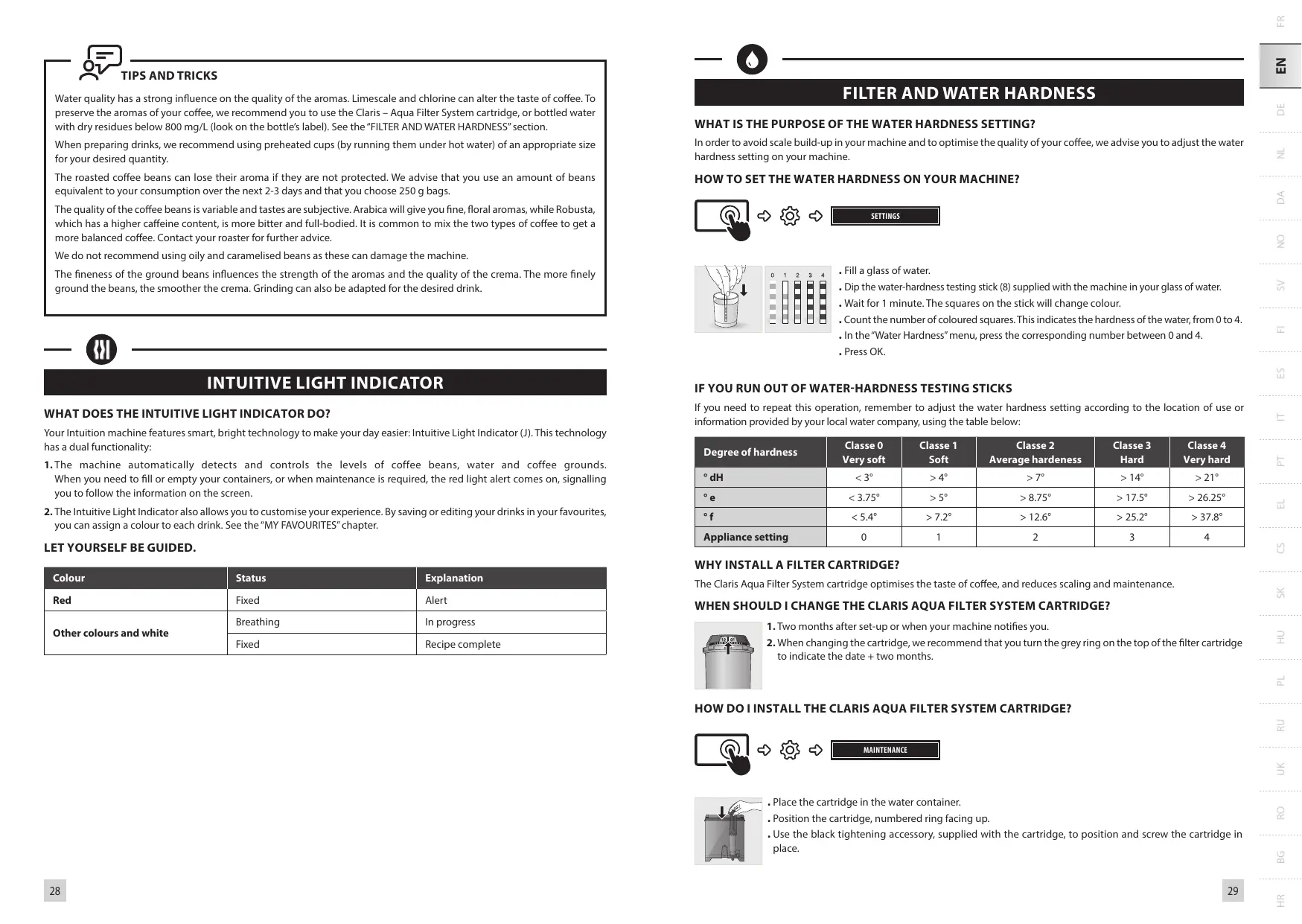


| Product type | Automatic coffee machine with built-in grinder |
| Brand | KRUPS |
| Model | EA8738 |
| Dimensions (H x W x D) | 365 x 240 x 400 mm |
| Weight | 8.2 kg |
| Power supply | 220-240 V~ / 50 Hz, 1550 W |
| Pump pressure | 15 bar |
| Water tank capacity | 3 L |
| Bean container capacity | 250 g |
| Available drinks | Ristretto, Espresso, Lungo, Doppio, Long Coffee, Americano, Cappuccino, Frothed Milk, Caffe Latte, Latte Macchiato, Hot Water |
| Display | Intuitive touch screen |
| Light indicator | Intuitive Light Indicator with alerts and color customization |
| Grinder | Conical metal burr grinder, grind adjustment |
| Milk system | Removable One Touch Cappuccino block, milk duct and milk tube |
| Filtration | Claris Aqua Filter System cartridge |
| Smart functions | Automatic standby, programmable auto-off, automatic on, auto rinse |
| Maintenance | Milk rinse, coffee rinse, machine cleaning, descaling (on-screen guided) |
| Included accessories | Cleaning tablets (x2), descaler, milk duct, additional milk tube, steam cleaning needle, filter cartridge, hardness test strip, brush, dishwasher-safe milk jug |
| Settings | Language, date/time, brightness, water hardness, coffee and water temperature, coffee strength (1-3), volume, coffee type |
| Spare parts and repairability | Parts available on KRUPS website; built-in maintenance tutorials |
| Warranty and safety | Made in France; automatic shut-off; detailed safety instructions |
Frequently Asked Questions - EA8738 KRUPS
User questions about EA8738 KRUPS
0 question about this device. Answer the ones you know or ask your own.
Ask a new question about this device
Download the instructions for your Automatic coffee machine in PDF format for free! Find your manual EA8738 - KRUPS and take your electronic device back in hand. On this page are published all the documents necessary for the use of your device. EA8738 by KRUPS.
USER MANUAL EA8738 KRUPS
1 1st USE

FR - 1ÈRE UTILISATION
NL - 1STE GEBRUIK
NO - F∅RSTE GANGS BRUK
FI - ENSIMMÄINEN KÄYTTÖKERTA
IT - PRIMO UTILIZZO
EL - ΠΡΩΤΗ ΧΡΗΣΗ
SK - PRVÉ POUŽITIE
PL - PIERWSZE UŻYCIE
natural_image
Hand holding a wall-mounted electrical socket with an arrow indicating direction (no text or symbols)
natural_image
Illustration of a mechanical device with a lever and handle (no text or symbols)
natural_image
Illustration of a KRUPS water dispenser with 600 ml volume, no text or symbols on the device itself
natural_image
Abstract diagram with overlapping rectangular shapes and dot patterns (no text or symbols)
natural_image
Illustration of a KRUPS water dispenser with liquid being poured into a bowl (no text or symbols visible)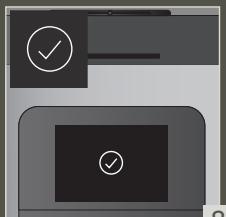
natural_image
Illustration of a hand pouring granular material into a container with chocolate chips (no text or symbols)
natural_image
Illustration of a hand inserting a device into a machine, showing the next button and control panel (no text or symbols)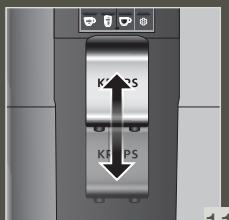
natural_image
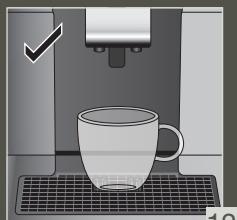
Illustration of a coffee machine with a mug on a keyboard and a checkmark above it (no text or symbols)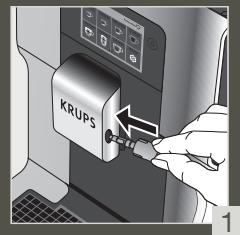
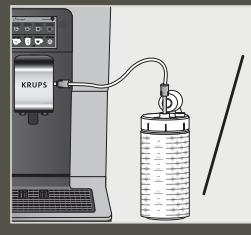
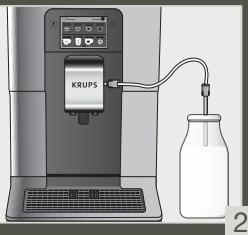
natural_image
Illustration of a Krups coffee maker with a cup on a grater (no text or symbols)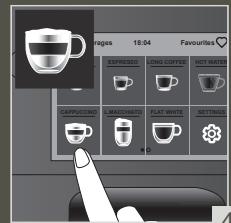
natural_image
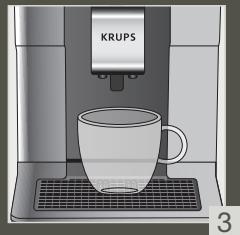
Illustration of a KRUPS coffee machine with a cup and tray (no text or symbols visible)3 MAKE 2 CUPS OF A MILK RECIPE AT ONCE

FR - POUR 2 TASSES INSTANTANÉES D'UNE RECETTE AVEC DU LAIT
NL - MAAK ONMIDDELLIJK 2 KOPJES VAN EEN MELKRECEPT
NO - LAG 2 KOPPER MED EN MELKEOPPSKRIFT PÅ EN GANG
FI - TEE 2 KUPILLISTA MAITOKAHVIA KERRALLA
natural_image
Illustration of two CRUPS coffee cups on a keyboard, no text or symbols present4 QUICK MILK RINSING AFTER A CAPPUCCINO
FR - RINÇAGE RAPIDE DU LAIT APRÈS UN CAPPUCCINO
NL - SNELLE MELKSPOELING NA EEN CAPPUCCINO
NO - HURTIG MELKESKYLLING ETTER EN CAPPUCCINO
FI - NOPEA MAIDON HUUHTELU CAPPUCCINON JÄLKEEN
IT - RISCIACQUO RAPIDO DEL CIRCUITO DEL LATTE DOPO UN CAPPUCCINO
EL - ΓΡΗΓΟΡΗ ΕΚΠΛΥΣΗ ΓΑΛΑΚΤΟΣ ΜΕΤΑ ΑΠΟ ΚΑΠΟΥΤΣΙΝΟ
SK - RÝCHLE OPLACHOVANIE MLIEKA PO CAPPUCCINE
PL - SZYBKIE PŁUKANIE SYSTEMU MLEKA PO CAPPUCCINO
UK - ШВИДКЕ ЗМИВАННЯ МОЛОКА ПІСЛЯ
ПРИГОТУВАННЯ КАПУЧИНО
BG - БЪРЗО ИЗПЛАКВАНЕ НА МЛЯКОТО СЛЕД КАПУЧИНО
DE - SCHNELLE MILCHSPÜLUNG NACH EINEM CAPPUCCINO
DA - HURTIG MÄLKESKYLNING EFTER EN CAPPUCCINO
SV - SNABB MJÖLKSKÖLJNING EFTER EN CAPPUCINO
ES - ENJUAGUE RÁPIDO DE LA LECHE DESPUÉS DE HACER UN CAPPUCCINO
PT - LAVAGEM RÁPIDA DO LEITE APÓS PREPARAÇÃO DE UM CAPPUCCINO
CS - RYCHLÉ OPLACHOVÁNÍ MLÉKA PO CAPPUCCINU
HU - A TEJ GYORS KIMOSÁSA CAPPUCCINO
KÉSZÍTÉSE UTÁN
RU - БЫСТРАЯ ПРОМЫВКА МОЛОЧНОЙ СИСТЕМЫ ПОСЛЕ ПРИГОТОВЛЕНИЯ КАПУЧИНО
RO - CLĂTIREA RAPIDĂ A LAPTELUI DUPĂ UN CAPPUCCINO
HR - BRZO ISPIRANJE MLIJEKA NAKON CAPPUCCINA
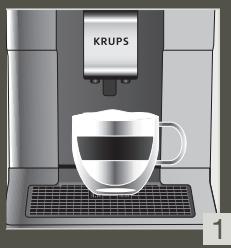
natural_image
Illustration of a KRUPS coffee maker with a cup on a gridded base (no text or symbols visible)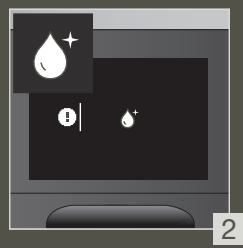
natural_image
Illustration of a computer monitor with icons for alert and notification (no text or symbols)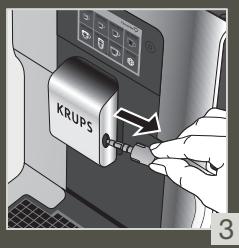
natural_image
Illustration of a Krups water dispenser with liquid flowing from the side, no text or symbols present
natural_image
Illustration of hands using a tool to install a pipe into a kitchen sink (no text or symbols)
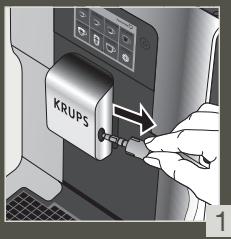
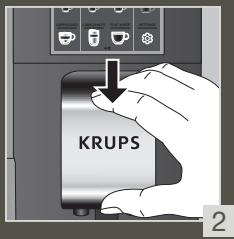
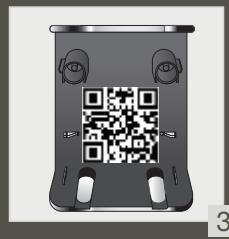
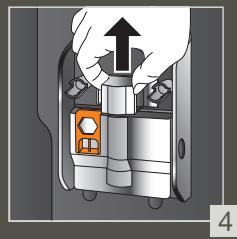
5 MANUAL DEEP CLEANING OF MILK SYSTEM – 5 MIN
FR - NETTOYAGE MANUEL APPROFONDI DU LAIT
- 5 MIN
NL - HANDMATIGE DIEPE REINIGING VAN HET MELKSYSTEEM - 5 MIN
NO - MANUELL ORDENTLIG RENGJ∅RING AV MELKESYSTEMET - 5 MIN
FI - MANUAALINEN MAITOJÄRJESTELMÄN
SYVÄPUHDISTUS – 5 MIN
IT - PULIZIA PROFONDA MANUALE DEL CIRCUITO DEL LATTE - 5 MIN
EL - XEIPOKINHTOΣ BAΘΥΣ KAΘΑΡΙΣΜΟΣ TOY ΣΥΣΤΗΜΑΤΟΣ ΓΑΛΑΚΤΟΣ – 5 ΛΕΠΤΑ
SK - MANUÁLNE HÍBKOVÉ ČISTENIE MLIEČNEHO SYSTÉMU - 5 MIN
PL - RĘCZNE SZCZEGÓŁOWE CZYSZCZENIE SYSTEMU MLEKA- 5 MIN
UK - ГЛИБОКЕ РУЧНЕ ОЧИЩЕННЯ СИСТЕМИ
МОЛОКА – 5 ХВ
BG - РЪЧНО ДЪЛБОКО ПОЧИСТВАНЕ НА СИСТЕМАТА ЗА МЛЯКО
DE - MANUELLE TIEFENREINIGUNG DES MILCHSYSTEMS – 5 MIN
DA - MANUEL HOVEDRENSNING AF MÄLKESYSTEMET – 5 MIN.
SV - MANUELL DJUPRENGÖRING AV MJÖLKSYSTEMET - 5 MINUTER
ES - LIMPIEZA PROFUNDA MANUAL DEL SISTEMA DE LECHE - 5 MINUTOS
PT - LIMPEZA MANUAL PROFUNDA DO SISTEMA DO LEITE – 5 MIN
CS - RUČNÍ HLOUBKOVÉ ČIŠTĚNÍ MLÉČNÉHO
SYSTÉMU - 5 MIN
HU - A TEJRENDSZER MANUÁLIS MÉLYTISZTÍTÁSA
- 5 PERC
RU - ЗАПУСКАЕМАЯ ВРУЧНУЮ ГЛУБОКАЯ ОЧИСТКА МОЛОЧНОЙ СИСТЕМЫ – 5 МИН
RO - CLĂTIREA MANUALĂ ÎN PROFUNZIME A SISTEMULUI DE LAPTE – 5 MIN
HR - RUČNO DUBINSKO ČIŠĆENJE SUSTAVA MLIJEKA
- 5 MIN.
natural_image
Diagram of a mechanical device with an upward arrow indicating motion or force, no text or symbols present
natural_image
Diagram showing mechanical components with upward arrows indicating motion or assembly (no text or symbols)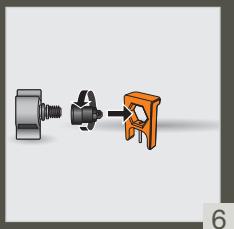
natural_image
Illustration of a mechanical component with three connected parts (no text or symbols)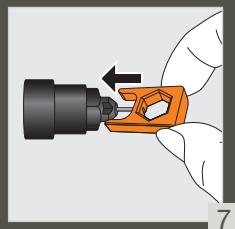
natural_image
Hand holding a black connector with an orange clamp, showing a mechanical assembly (no text or symbols visible)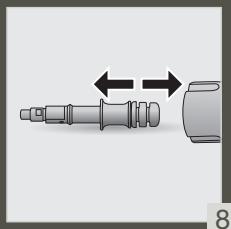
natural_image
Mechanical component diagram showing a shaft and housing with bidirectional arrows indicating movement (no text or symbols)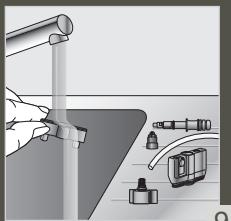
natural_image
Illustration of a hand using a tool to clean or wash a surface, with no visible text or symbols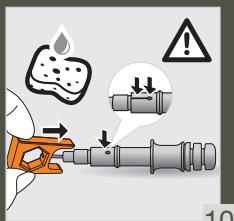
natural_image
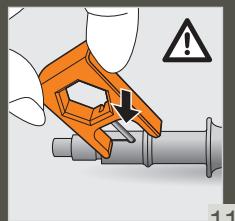
Illustration of a hand holding an orange tool with a warning symbol (no text or labels)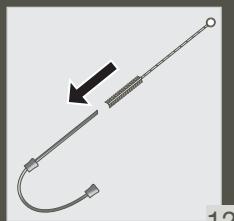
natural_image
Pure electrical circuit lines without any symbols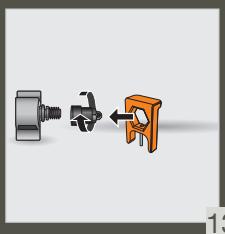
natural_image
Three-step diagram showing a mechanical assembly: a bolt, a valve, and a clamp (no text or symbols)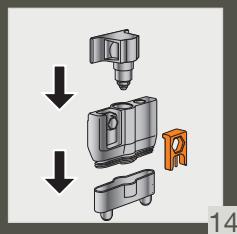
natural_image
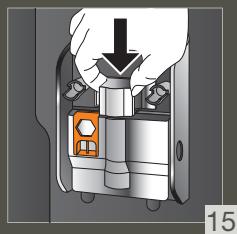
Diagram of a mechanical device with a downward arrow and orange button, no visible text or symbols
natural_image
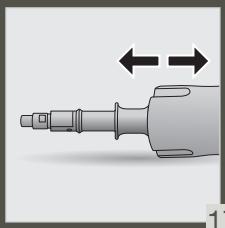
Illustration of a mechanical tool with bidirectional arrows indicating movement or alignment (no text or symbols)

natural_image
Diagram showing a red line intersecting a grid structure with a small black dot, no text or symbols present.
natural_image
Interior view of a refrigerator with a bag labeled 'KRUPS' and an arrow pointing to it (no other text or symbols visible)
natural_image
Illustration of a hand pouring dark granular material into a trash bin (no text or symbols)
natural_image
Interior view of a refrigerator with a bag labeled 'KRUPS' and an arrow indicating direction (no text or symbols beyond label)



6.A
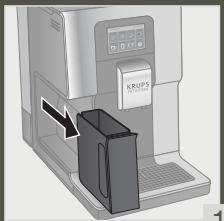
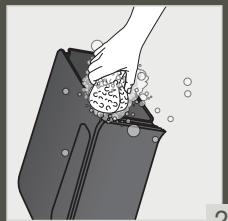
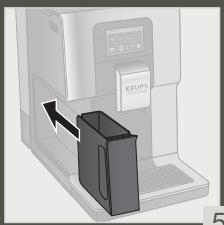
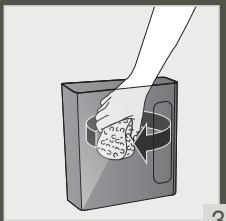
CLEAN THE COFFEE GROUND COLLECTOR REGULARLY

FR - NETTOYER LE BAC COLLECTEUR DE MARC
DE CAFÉ RÉGULIÈREMENT
NL - MAAK DE OPVANGBAK VOOR GEMALEN KOFFIE REGELMATIG SCHOON
NO - RENGJ∅R KAFFEGRUTOPPSAMLEREN REGELMESSIG
FI - PUHDISTA JAUHETUN KAHVIN KERÄÄJÄ SÄÄNNÖLLISESTI
IT - PULIRE REGOLARMENTE IL RACCOGLITORE DEL CAFFÈ
EL - ΚΑΘΑΡ'İZETE ΤΑΚΤΙΚΑ ΤΟΝ ΣΥΛΛ'ΕΚΤΗ ΥΠΟΛΕΙΜΜ'ΑΤΩΝ ΑΛΕΣΜ'ΕΝΟΥ ΚΑΦ'Ε
SK - ZBERNÚ NÁDOBU NA KÁVOVÉ USADENINY PRAVIDELNE ČISTITE
PL - PAMIĘTAJ O REGULARNYM CZYSZCZENIU ZBIORNIKA NA ZMIELONA KAWĘ
UK - РЕГУЛЯРНО ОЧИЩАЙТЕ ВІДСІК ДЛЯ
МЕЛЕНОЇ КАВИ
BG - ПОЧИСТВАЙТЕ РЕДОВНО КОЛЕКТОРА ЗА УТАЙКА
1
natural_image
Illustration of a hand cleaning a bag with bubbles and a cloth (no text or symbols)2
DE - REINIGEN SIE DEN KAFFEESATZBEHÄLTER REGELMÄSSIG
DA - RENG∅R KAFFEGRUMSBEHOLDEREN
REGELMÆSSIGT
SV - RENGÖR SUMPLÅDAN REGELBUNDET
ES - LIMPIA CON FRECUENCIA EL COLECTOR DE CAFÉ MOLIDO
PT - LIMPE O COLETOR DE BORRAS DE CAFÉ REGULARMENTE
CS - PRAVIDELNĚ ČISTĚTE SBĚRAČ KÁVOVÉ SEDLINY
HU - RENDSZERESEN TISZTÍTSA MEG A KÁVÉŐRLEMÉNY-GYÜJTŐT
RU - РЕГУЛЯРНО ОЧИЩАЙТЕ КОНТЕЙНЕР ДЛЯ
КОФЕЙНОЙ ГУЩИ
RO - CURĂȚAȚI COLECTORUL PENTRU ZAȚ ÎN MOD REGULAT
HR - REDOVITO ČISTITE SPREMNIK ZA MLJEVENU KAVU
natural_image
Interior view of a printer or scanner device with a black box inserted, showing no visible text or symbols.5
natural_image
Illustration of a hand pouring liquid into a container with a circular inset showing a magnified view (no text or symbols)3
natural_image
Illustration of a hand cleaning a bag with a cloth (no text or symbols)4
7
EMPTY THE DRIP TRAY

FR - VIDER LE BAC RÉCOLTE-GOUTTES
NL - DE LEGBAK LEGEN
NO - T∅M DRYPPBRETTET
FI - TIPPA-ASTIAN TYHJENTÄMINEN
IT - SVUOTAMENTO DELLA VASCHETTA
RACCOGLI-GOCCE
EL - ΑΔΕΙΑΣΤΕ ΤΟ ΔΟΧΕΙΟ ΣΥΛΛΟΓΗΣ
ΥΠΛΕΙΜΑΤΩΝ ΚΑΦΕ
SK - YPRÁZDNENIE ODKVAPKÁVACEJ NÁDOBY
PL - OPRÓŻNIANIE TACKI OCIEKOWEJ
UK - СПОРОЖНЕННЯ ПІДДОНА ДЛЯ КРАПЕЛЬ
BG - ИЗПРАЗНЕТЕ ТАВИЧКАТА ЗА ОТЦЕЖДАНЕ
DE - AUFFANGSCHALE ENTLEEREN
DA - TOM DRYPBAKKEN
SV - TÖMNING AV DROPPBRICKAN
ES - VACIAR LA BANDEJA DE GOTEO
PT - ESVAZIAR A GAVETA DE RECOLHA DE PINGOS
CS - VYPRÁZDNĚTE ODKAPÁVACÍ MISKU
HU - CSEPPTÁLCA KIÜRÍTÉSE
RU - ОЧИСТКА ПОДДОНА ДЛЯ СБОРА КАПЕЛЬ
RO - GOLIREA TĂVII COLECTOARE DE PICURI
HR - ISPRAZNITE POSUDU ZA TALOG KAVE
natural_image
Diagram showing two upward arrows above two stacked blocks on a grid background (no text or symbols)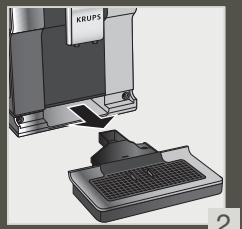
natural_image
Illustration of a computer monitor with a keyboard and a separate screen showing the same device (no text or symbols visible)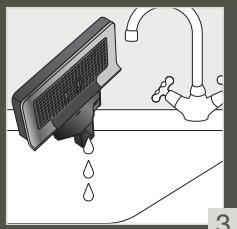
natural_image
Illustration of a kitchen sink with water droplets and a faucet (no text or symbols)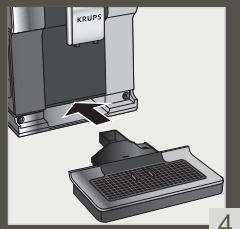
natural_image
3D illustration of a computer monitor with a keyboard and a separate screen (no text or symbols visible)1
3
4
7.A
CLEAN THE DRIP TRAY REGULARLY

FR - NETTOYER LE BAC RÉCOLTE-GOUTTES
RÉGULIÈREMENT
NL - MAAK DE LEKBAK REGELMATIG SCHOON
NO - RENGJ∅R DRYPPEBRETTET REGELMESSIG
FI - PUHDISTA TIPPA-ALLAS SÄÄNNÖLLISESTI
IT - PULIRE REGOLARMENTE IL VASSOIO RACCOGLIGOCCE
EL - ΚΑΘΑΡΙΖΕΤΕ ΤΑΚΤΙΚΑ ΤΟΝ ΔΪΣΚΟ ΑΠΌΝΕΡΩΝ
SK - PODNOS NA ODKVAPKÁVANIE PRAVIDELNE ČISTITE
PL - PAMIĘTAJ O REGULARNYM CZYSZCZENIU TACKI OCIEKOWEJ
UK - РЕГУЛЯРНО ОЧИЩАЙТЕ ЛОТОК ДЛЯ КРАПЕЛЬ
BG - ПОЧИСТВАЙТЕ РЕДОВНО ТАВИЧКАТА ЗА ОТЦЕЖДАНЕ
DE - REINIGEN SIE DIE ABTROPFSCHALE REGELMÄSSIG
DA - RENG∅R DRYPBAKKEN REGELMÆSSIGT
SV - RENGÖR DROPPSKÅLEN REGELBUNDET
ES - LIMPIA CON FRECUENCIA LA BANDEJA RECOGEGOTAS
PT - PRAVIDELNĚ ČISTĚTE ODKAPAVACI MISKU
CS - PRAVIDELNĚ ČISTĚTE ODKAPÁVACÍ MISKU
HU - RENDSZERESEN TISZTÍTSA MEG A CSEPEGTETŐ TÁLCÁT
RU - РЕГУЛЯРНО ОЧИЩАЙТЕ ПОДДОН ДЛЯ КАПЕЛЬ
RO - CURĂȚAȚI TAVA DE PICĂTURI ÎN MOD REGULAT
HR - REDOVITO ČISTITE POSUDU ZA KAPLJEVINU

natural_image
3D rendering of a kitchen appliance with a grater and base (no text or symbols visible)1
natural_image
Illustration of hands installing or adjusting a keyboard on a device (no text or symbols visible)乙
natural_image
Illustration of a hand pressing down on a device component with an upward arrow (no text or symbols)5
natural_image
Illustration of a hand holding a tablet device over a device with a lid and surrounding components (no text or symbols visible)4
natural_image
Illustration of a hand cleaning a printer with a cloth (no text or symbols visible)5
natural_image
Illustration of a hand holding a device with a grid on top, showing two downward arrows (no text or symbols)6
natural_image
Illustration of a computer monitor with a keyboard and a separate monitor showing the same screen (no text or symbols present)7
FR - NETTOYER LE RÉSERVOIR D'EAU RÉGULIÈREMENT
NL - MAAK HET WATERRESERVOIR
REGELMATIG SCHOON
NO - RENGJ∅R VANNTANKEN REGELMESSIG
FI - PUHDISTA VESISÄILIÖ SÄÄNNÖLLISESTI
IT - PULIRE REGOLARMENTE IL SERBATOIO DELL'ACQUA
EL - KAΘΑΡ'İZETE TAKTIΚΑ ΤΟ ΔΟΧΕ'ΙΟ NEΡΟ'Υ
SK - NÁDRŽ NA VODU PRAVIDELNE ČISTITE
PL - PAMIĘTAJ O REGULARNYM CZYSZCZENIU POJEMNIKA NA WODĘ
UK - РЕГУЛЯРНО ОЧИЩАЙТЕ РЕЗЕРВУАР
ДЛЯ ВОДИ
BG - ПОЧИСТВАЙТЕ РЕДОВНО РЕЗЕРВОАРА
ЗА ВОДА
DE - REINIGEN SIE DEN WASSERTANK
REGELMÄSSIG
DA - RENG∅R VANDBEHOLDEREN
REGELMASSIGT
SV - RENGÖR VATTENBEHÅLLAREN
REGELBUNDET
ES - LIMPIA CON FRECUENCIA EL DEPÓSITO DE AGUA
PT - LIMPE O RESERVATÓRIO DE ÁGUA REGULARMENTE
CS - PRAVIDELNĚ ČISTĚTE NÁDRŽKU NA VODU
HU - RENDSZERESEN TISZTÍTSA MEG A VÍZTARTÁLYT
RU - РЕГУЛЯРНО ОЧИЩАЙТЕ РЕЗЕРВУАР ДЛЯ ВОДЫ
RO - CURĂȚAȚI REZERVORUL DE APĂ ÎN MOD REGULAT
HR - REDOVITO ČISTITE SPREMNIK ZA VODU
natural_image
Illustration of a hand holding a mechanical component with an arrow indicating upward motion (no text or symbols)1
natural_image
Diagram of a mechanical device with a circular component and paper, showing internal structure (no text or symbols)2
natural_image
Illustration of a mechanical device with a handle and internal components (no text or symbols)3
natural_image
Illustration of a hand holding a mechanical device with a downward arrow indicating motion (no text or symbols)4
FR - NETTOYAGE AUTOMATIQUE COMPLET DE LA MACHINE 3 x / ANNÉE - 13 MIN
NL - VOLLEDIGE AUTOMATISCHE REINIGING
VAN DE MACHINE 3 x - JAAR - 13 MIN
NO - FULLFOR MASKINENS AUTOMATISKE
RENS 3 x / ARET – 13 MIN
FI - KEITTIMEN PERUSTEELLINEN AUTOMAATTINEN PUHDISTUS 3 KRT VUODESSA – 13 MIN
IT - PULIZIA AUTOMATICA COMPLETA DELLA MACCHINA (3x ANNO) – 13 MIN
EL - ΟΛΟΚΛΗΡΩΜΕΝΟΣ ΑΥΤΟΜΑΤΟΣ
ΚΑΘΑΡΙΣΜΟΣ ΤΗΣ ΣΥΣΚΕΥΗΣ 3 ΦΟΡΕΣ
ΤΟΝ ΧΡΟΝΟ - 13 ΛΕΠΤΑ
SK - REALIZÁCIA AUTOMATICKÉHO ČISTENIA
ZARIADENIA 3 x / ROK - 13 MIN
PL - PRZEPROWADZANIE
AUTOMATYCZNEGO CZYSZCZENIA
EKSPRESU 3x / ROK – 13 MIN
UK - ПОВНЕ АВТОМАТИЧНЕ ОЧИЩЕННЯ
КАВОМАШИНИ З РАЗИ НА РІК – 13 ХВ
BG - ПЪЛНО АВТОМАТИЧНО ПОЧИСТВАНЕ НА КАФЕМАШИНАТА 3 x / ГОДИШНО – 13 МИН
1
2
natural_image
3D rendering of a mechanical assembly with a component labeled 'KRUPS' and a base component (no readable text or symbols)3
natural_image
Illustration of a mechanical device with a lever and handle, no visible text or symbols4
5
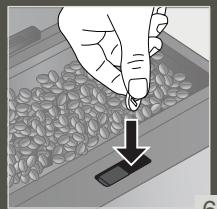
natural_image
Illustration of a hand inserting seeds into a tray with a downward arrow (no text or symbols)6
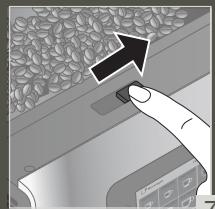
natural_image
Hand pressing a button on a surface with a finger, no visible text or symbols7
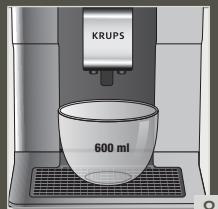
8
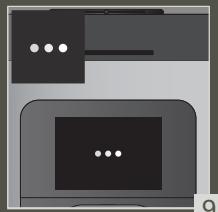
natural_image
Abstract diagram with two overlapping rectangular shapes and a central dark rectangle, no text or symbols present.9
natural_image
Illustration of a hand pouring liquid into a basin with a faucet (no text or symbols)10
natural_image
3D rendering of a mechanical device with a base and top component, no visible text or symbols11
12
DE - KOMPLETTE AUTOMATISCHE REINIGUNG
DER MASCHINE 3 x / JAHR – 13 MIN
DA - GENNEMF∅R AUTOMATISK RENSNING AF
MASKINEN 3 x OM ÅRET – 13 MIN
SV - AUTOMATISK RENGÖRING AV HELA MASKINEN 3 ggr / ÅR- 13 MIN
ES - COMPLETAR LA LIMPIEZA AUTOMÁTICA DE LA MÁQUNA 3 x / AÑO - 13 MIN
PT - LIMPEZA AUTOMATICA COMPLETA DA MAQUINA 3 x / ANO - 13 MIN
CS - KOMPLETNÍ AUTOMATICKÉ ČIŠTĚNÍ
STROJE 3 X / ROK - 13 MIN
HU - A GÉP TELJES AUTOMATIKUS TISZTÍTÁSA ÉVENTE HÁROMSZOR - 13 PERC
RU - ПРОГРАММА АВТОМАТИЧЕСКОЙ ОЧИСТКИ УСТРОЙСТВА З РАЗА В ГОД - 13 МИН
RO - CURĂȚAREA AUTOMATĂ COMPLETĂ A MAȘINII 3 x / AN - 13 MIN
HR - SPROVEDITE AUTOMATSKO ČIŠĆENJE UREĐAJA 3 x / GODIŠNJE - 13 MIN
10 DESCALING PROGRAM – 20 MIN

FR - PROGRAMME DE DÉTARTRAGE - 20 MIN
NL - ONTKALKINGSPROGRAMMA - 20 MIN
NO - AVKALKNINGSPROGRAM - 20 MIN
FI - KALKINPOISTO-OHJELMA - 20 MIN
IT - PROGRAMMA DI DECALCIFICAZIONE - 20 MIN
natural_image
3D rendering of a mechanical device with a baseplate and control panel (no visible text or symbols)
natural_image
Illustration of a portable printer with a hand inserting a paper into it, showing no text or symbols on the device itself.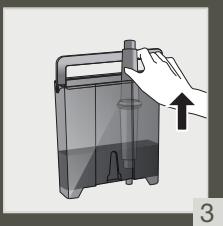
natural_image
Illustration of a hand holding a container with an arrow indicating upward motion (no text or symbols)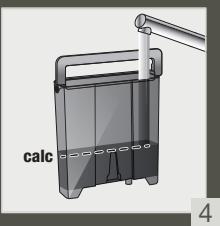
natural_image
Illustration of a hand pouring liquid into a container with a handle (no text or symbols)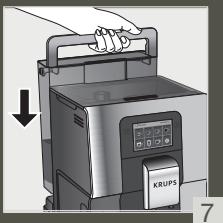
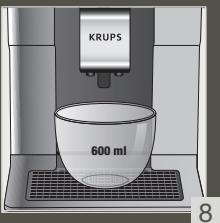
natural_image
Illustration of a laptop with two screens and a small object on top (no text or symbols)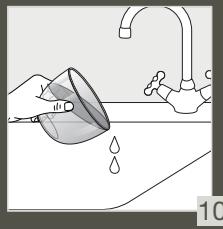
natural_image
Illustration of a hand pouring liquid into a sink with a faucet (no text or symbols)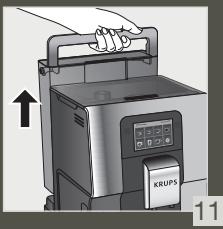
natural_image
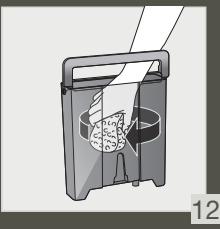
Illustration of a mechanical device with a handle and internal components (no text or symbols)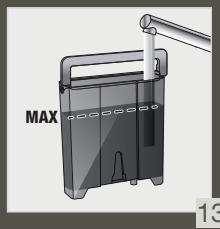
natural_image
Diagram of a device with a handle and labeled MAX, showing internal components (no readable text or symbols)
natural_image
Illustration of a laptop with two speech bubbles above it, no text or symbols present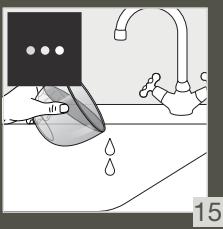
natural_image
Illustration of a kitchen sink with a hand holding a water droplet, no text or symbols present
natural_image
Illustration of a computer monitor with three dots on the screen (no text or symbols)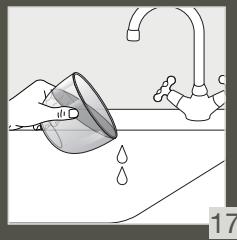
natural_image
Illustration of a hand cleaning a kitchen sink with a faucet and water droplets (no text or symbols)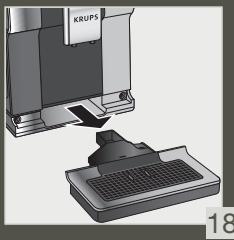
natural_image
3D illustration of a computer monitor with a keyboard and a mouse, no text or symbols present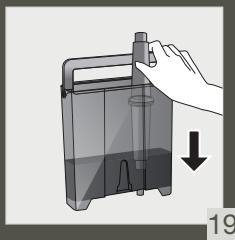
natural_image
Illustration of a hand holding a container with a downward arrow indicating a process (no text or symbols present)
natural_image
Diagram of a device with a handle and labeled MAX, showing internal components (no readable text or symbols)
natural_image
Illustration of two computer monitors with speech bubbles, no text or symbols present
natural_image
Two computer monitors with checkmarks, one open and one closed, shown without any text or symbols.Chère cliente, cher client,
INFORMATIONS IMPORTANTES SUR LE PRODUIT
ACCESSOIRES FOURNIS AVEC VOTRE MACHINE
MISE SOUS TENSION DE LA MACHINE

Thank you for purchasing a KRUPS Espresso machine with bean grinder.
KRUPS designs, develops and manufactures its Espresso machines in France, ensuring you the highest standards of origin and manufacturing quality.
Designed for ease of use, your machine is the effortless way to create café-quality drinks at home. With just one touch, you can enjoy coffees such as Espresso, Ristretto and Lungo, as well as Cappuccino, Latte Macchiato, Caffe Latte and other milky drinks!
To help you get the most out of your machine every day, KRUPS has developed an Intuitive Light Indicator. It will guide you in the use of your machine and brighten up your coffee breaks.
Your KRUPS Espresso machine also has a large, intuitive touchscreen, like a smartphone UX interface for an intuitive experience. In addition, your machine's advanced technology helps you get the best possible results, revealing maximum aroma and full-bodied flavour from the freshly ground coffee beans.
We hope you have a great coffee experience and that you are completely satisfied with you KRUPS machine.
The KRUPS team

NEED HELP GETTING STARTED WITH YOUR MACHINE?



HELP AND TUTORIALS
Find a list of tutorials saved in your machine to guide you in using it.
They will walk you through preparing a drink, managing your favourites and the maintenance of your machine.
List of available tutorials:
1. How do I make my drinks?
a. Starting a coffee drink
b. Starting a milky drink
c. Starting two drinks simultaneously
2. How to create and manage my favourites?
d. Accessing favourite drinks
e. Adding a favourite drink
f. Organising favourite drinks
g. Deleting a favourite drink
3. How to maintain your machine?
h. Performing a rinsing
i. Performing a cleaning
j. Performing descaling
k. Cleaning the milk system

IMPORTANT PRODUCT INFORMATION
Read the instruction manual carefully before using your appliance for the first time and keep it for future reference. Improper use will release KRUPS from any liability. It is important to follow the safety information.
GUIDE TO THE SYMBOLS USED IN THE INSTRUCTIONS

Danger: Warning about the risk of serious bodily injury or death.
The lightening symbol alerts you to electricity-related dangers.

Caution: Warning against any possible malfunction, damage or destruction of the appliance.

Important: General or important comment for operating the appliance.

PRODUCTS SUPPLIED WITH YOUR MACHINE
Check the products supplied with your machine. If one of the parts is missing, contact your KRUPS Consumer Service immediately.
Products supplied
| 1. | 2 cleaning tablets |  | |
| 2. | 1 descaling sachet |  | |
| 3. | Milk tube for the “One Touch Cappuccino” block |  | |
| 4. | Additional Milk tube for the “One Touch Cappuccino” block |  | |
| 5. | Cleaning needle of the steam circuit |  | |
| 6. | 1 Claris – Aqua Filter System cartridge with tightening accessory |  | |
| 7. | 1 water-hardness testing stick |  | |
| 8. | Instructions - Safety precautionsList of approved Krups service centresInternational guarantee |  | |
| 9. | Pipe cleaner |  | |
| According to model | |||
| 10. | Milk pot:You can put the milk pot in the dishwasher |  | |
According to model

TECHNICAL DATA
| Appliance | Automatic Espresso EA87 |
| Power supply | 220-240V~ / 50 Hz |
| Pump pressure | 15 bar |
| Coffee bean container | 250 g |
| Energy consumption | When operating: 1550 W |
| Water container | 3 L |
| Getting started and storage | Inside, in a dry place (away from ice) |
| Dimensions (mm) H x l x P | 365 x 240 x 400 |
| Weight EA87 (kg) | 8.2 |
Subject to technical modifications.
Place the appliance on an horizontale, stable, heat-resistant, clean and dry work surface

APPLIANCE DESCRIPTION
A. Handle for water container cover
B. Water container
C. Coffee grounds collector
D. Height-adjustable coffee nozzles
E. Grid and removable drip tray
F. Coffee bean container lid
G. "One Touch Cappuccino" block
G1. Accessory for cleaning the milk system,
2 in 1: disassembly tool
+ cleaning needle
G2. Removable one touch cappuccino block
H. Milk tube and connector
I. Water-level floats
J. Intuitive Light Indicator
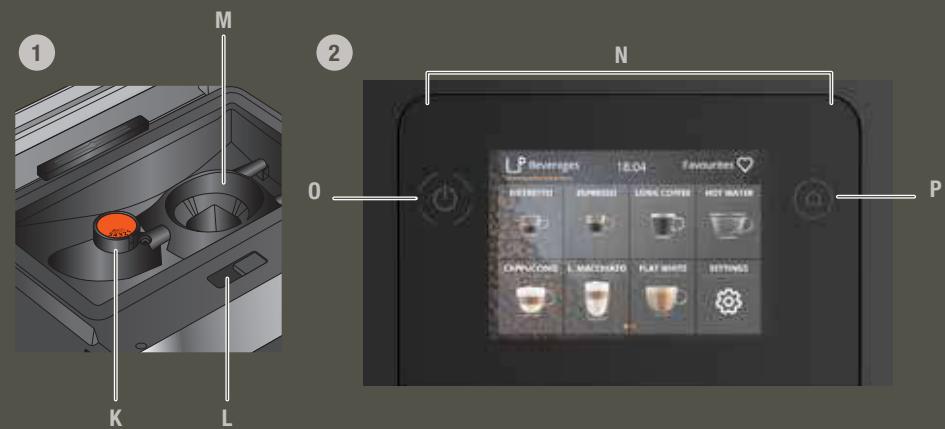
1. Coffee bean container
K. Grinding fineness adjustment button
L. Cleaning tablet funnel
M. Metal conical grinding mill
2. Display panel
N. Navigation touchscreen
0. ON/OFF
P. Home screen shortcut

GETTING STARTED & APPLIANCE SETUP
TURNING THE MACHINE ON

Danger: Connect the appliance to a grounded 230V socket. Not following this instruction puts you at risk of fatal injuries due to the presence of electricity!
Respect the safety information in the "Safety precautions" booklet.
GETTING STARTED (see 1.1 ^st use)
When using the machine for the first time, you will be asked to select various settings.
Follow the directions that appear on the screen.
Priming the machine allows the water circuits to be filled, so that the machine can operate. Preheating and automatic rinsing will take place.
PUTTING THE MACHINE ON STANDBY
Depending on the preparation, the machine performs automatic rinsing while on standby. The cycle only lasts a few seconds and stops automatically.

TIPS AND TRICKS
Water quality has a strong influence on the quality of the aromas. Limescale and chlorine can alter the taste of coffee. To preserve the aromas of your coffee, we recommend you to use the Claris – Aqua Filter System cartridge, or bottled water with dry residues below 800 mg/L (look on the bottle's label). See the "FILTER AND WATER HARDNESS" section.
When preparing drinks, we recommend using preheated cups (by running them under hot water) of an appropriate size for your desired quantity.
The roasted coffee beans can lose their aroma if they are not protected. We advise that you use an amount of beans equivalent to your consumption over the next 2-3 days and that you choose 250 g bags.
The quality of the coffee beans is variable and tastes are subjective. Arabica will give you fine, floral aromas, while Robusta, which has a higher caffeine content, is more bitter and full-bodied. It is common to mix the two types of coffee to get a more balanced coffee. Contact your roaster for further advice.
We do not recommend using oily and caramelised beans as these can damage the machine.
The fineness of the ground beans influences the strength of the aromas and the quality of the crema. The more finely ground the beans, the smoother the crema. Grinding can also be adapted for the desired drink.

INTUITIVE LIGHT INDICATOR
WHAT DOES THE INTUITIVE LIGHT INDICATOR DO?
Your Intuition machine features smart, bright technology to make your day easier: Intuitive Light Indicator (J). This technology has a dual functionality:
- The machine automatically detects and controls the levels of coffee beans, water and coffee grounds. When you need to fill or empty your containers, or when maintenance is required, the red light alert comes on, signalling you to follow the information on the screen.
- The Intuitive Light Indicator also allows you to customise your experience. By saving or editing your drinks in your favourites, you can assign a colour to each drink. See the "MY FAVOURITES" chapter.
LET YOURSELF BE GUIDED.
| Colour | Status | Explanation |
| Red | Fixed | Alert |
| Other colours and white | Breathing | In progress |
| Fixed | Recipe complete |

FILTER AND WATER HARDNESS
WHAT IS THE PURPOSE OF THE WATER HARDNESS SETTING?
In order to avoid scale build-up in your machine and to optimise the quality of your coffee, we advise you to adjust the water hardness setting on your machine.
HOW TO SET THE WATER HARDNESS ON YOUR MACHINE?


SETTINGS
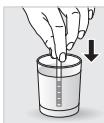
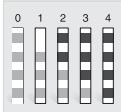
• Fill a glass of water.
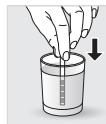
• Dip the water-hardness testing stick (8) supplied with the machine in your glass of water.
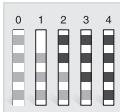
- Wait for 1 minute. The squares on the stick will change colour.
• Count the number of coloured squares. This indicates the hardness of the water, from 0 to 4.
• In the "Water Hardness" menu, press the corresponding number between 0 and 4.
- Press OK.
IF YOU RUN OUT OF WATER-HARDNESS TESTING STICKS
If you need to repeat this operation, remember to adjust the water hardness setting according to the location of use or information provided by your local water company, using the table below:
| Degree of hardness | Classe 0 Very soft | Classe 1 Soft | Classe 2 Average hardness | Classe 3 Hard | Classe 4 Very hard |
| ° dH | < 3° | >4° | >7° | >14° | >21° |
| ° e | < 3.75° | >5° | >8.75° | >17.5° | >26.25° |
| ° f | < 5.4° | >7.2° | >12.6° | >25.2° | >37.8° |
| Appliance setting | 0 | 1 | 2 | 3 | 4 |
WHY INSTALL A FILTER CARTRIDGE?
The Claris Aqua Filter System cartridge optimises the taste of coffee, and reduces scaling and maintenance.
WHEN SHOULD I CHANGE THE CLARIS AQUA FILTER SYSTEM CARTRIDGE?
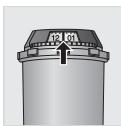
- Two months after set-up or when your machine notifies you.
- When changing the cartridge, we recommend that you turn the grey ring on the top of the filter cartridge to indicate the date + two months.
HOW DO I INSTALL THE CLARIS AQUA FILTER SYSTEM CARTRIDGE?


MAINTENANCE
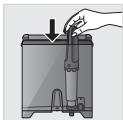
- Place the cartridge in the water container.
• Position the cartridge, numbered ring facing up. - Use the black tightening accessory, supplied with the cartridge, to position and screw the cartridge in place.
GRINDER: ADJUSTING THE FINENESS OF THE GROUND COFFEE
WHY SHOULD I ADJUST THE FINENESS OF THE GROUND COFFEE?
You can choose the strength of your coffee by adjusting how finely the coffee beans are ground.
Varying the fineness of the grinding enables you to adapt to the different types of bean:
. Darkly roasted and oily beans require coarse grinding,
. A more lightly roasted bean will be drier and will require finer grinding.
Note: the more finely the beans are ground, the more powerful the aroma.
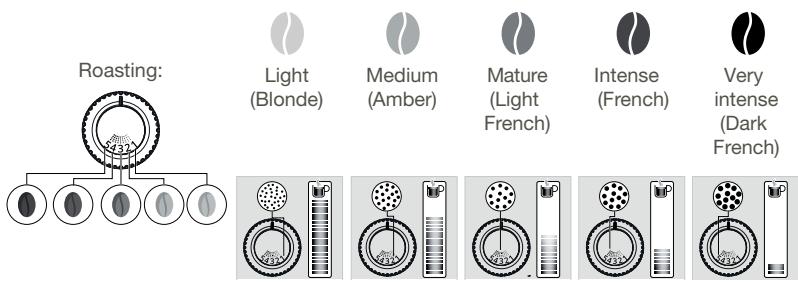
HOW DO I ADJUST THE FINENESS OF THE GROUND COFFEE?
Turn the grinding fineness adjustment button (K) located in the bean container, depending on the type of bean and the desired strength of aroma. This adjustment must be performed when the mill is in operation, notch by notch. After three preparations, you will notice a distinct difference in taste.
HOW DO I KNOW WHEN THERE ARE NO MORE BEANS IN THE CONTAINER?
Your Intuition machine has a sensor to warn you when the level of coffee beans in the container is running low. A message will appear on the screen and the Intuitive Light Indicator (J) will display red light.
WHAT IF THE ALERT APPEARS WHILE I'M MAKING A DRINK?
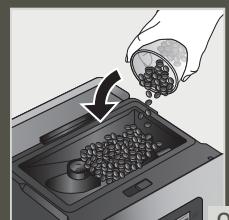
Fill the coffee bean container, press OK and the recipe will resume. So no coffee is wasted!
WHAT DO I DO IF I WANT TO CHANGE MY COFFEE OR IF I HAVE RUN OUT OF COFFEE?
If you press OK without adding coffee beans, the machine will try to restart and alert you again. If you press OK again, the machine will make the recipe using all of the remaining coffee. The grinder will then be empty.

Caution: We do not recommend using oily and caramelised beans that are difficult for the grinder to process. These can damage the machine and prevent the intuitive system from functioning correctly.
If an alert message appears on your screen and the red light comes on when there are enough beans:
- Press the OK button to continue the recipe.
- Or, turn off the "no bean" alert to prevent detection while there is still coffee in the coffee bean container.


SETTINGS
PREPARING OTHER DRINKS
DRINKS THAT CAN BE PREPARED WITH THIS MACHINE:
| Drinks | Approximate size | Possible volumes | Coffee strength | X2 | |
 | RistrettoShort Espresso with body | 25 ml | 20 - 40 ml | √ | √ |
 | EspressoThe full-bodied Espresso with pronounced aromas is covered with a slightly bitter caramel coloured crema | 40 ml | 40 - 70 ml | √ | √ |
 | LungoLong Espresso with caramel crema | 70 ml | 70 - 100 ml | √ | √ |
 | DoppioDouble Espresso with amber crema | 100 ml | 40 - 140 ml | √ | |
 | Long CoffeeHigher in caffeine but lighter on the palate.Very popular in the morning | 120 ml | 80 - 180 ml | √ | √ |
 | AmericanoDouble long Espresso combined with hot water | 120 ml | 90 - 150 ml | √ | |
 | CappuccinoA balance between milk, foam and coffee | M = 120 mlL = 180 mlXL = 240 ml | 120 - 240 ml | √ | √ |
 | Frothed MilkA large dose of milk with its milk froth | M = 120 mlL = 160 mlXL = 200 ml | 120 - 200 ml | √ | |
 | Caffe LatteFoam with a subtle coffee flavour | M = 200 mlL = 280 mlXL = 350 ml | 200 - 350 ml | √ | √ |
 | Latte MacchiatoA gourmet Espresso with milk foam | M = 190 mlL = 250 mlXL = 340 ml | 190 - 240 ml | √ | √ |
 | Hot Water | 200ml | 20 - 300 ml | ||
FOR INFORMATION, TO PREPARE YOUR DRINK, YOUR MACHINE AUTOMATICALLY PERFORMS THE FOLLOWING STEPS:
| For coffee recipes | For milky recipes other than Caffe Latte | For Caffe Latte |
1.  2. 2.  3. 3.  4. 4.  | 1. Pre-heating phase2. Frothing milk3. Grinding coffee beans4. Tamping the ground coffee5. Pre-infusion (a few drops may fall into your cup at this point)6. Percolation | 1. Grinding coffee beans2. Tamping the ground coffee3. Pre-infusion (a few drops may fall into your cup at this point)4. Percolation5. Pre-heating phase6. Frothing milk |
HOW DO I ADJUST THE HEIGHT OF THE COFFEE NOZZLES?
For all drinks, you can adjust the coffee nozzles according to the size of your cup(s).
HOW DO I PREPARE MY DRINK?
Refer to the "How to make drinks?" tutorial saved in your machine



HELP AND TUTORIALS
DIFFERENT SETTINGS ARE AVAILABLE, DEPENDING ON THE DRINK:
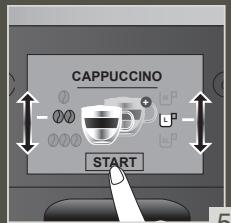
• One or two cups: to start the double recipe, select the drink and press
- Coffee strength: to increase or decrease the strength of the coffee by changing the amount of ground coffee, select your drink and choose between 1 and 3 beans, with 1 being the softest and 3 being the most full-bodied 📄.
• Cup volume: to increase or decrease the cup volume, scroll up or down the list of volumes and select the one you want.

For more information, see the drinks table in the instructions.

TIP
To select the coffee strength and cup volume, you can navigate up/down or press directly on your choice.
HOW DO I STOP A DRINK MID-PREPARATION?
STOP
Warning: You can stop the preparation of a drink at any time by pressing the button. When a cycle is interrupted, it does not stop immediately. The machine will be unavailable for a time, as indicated by a message on the screen.
MILK-BASED DRINKS

TIPS
For frothed milk, use pasteurised UHT milk straight from the fridge (3–5°C). It is possible to use special milks (micro filtered, raw, fermented, enriched) or plant-based milks (rice, oat or almond milk), but this can give less satisfactory results in terms of quality and quantity of the froth.
HOW DO I START THE PREPARATION OF A MILK-BASED DRINK?
Refer to "2 PREPARING A MILK-BASED RECIPE" earlier in the instructions, or see the "Starting a milky drink" tutorial stored in your machine.



HELP AND TUTORIALS
HOT WATER
For teas and infusions, your machine has a "Hot Water" option.
HOW DO I ADJUST THE WATER TEMPERATURE?



SETTINGS
Go to Settings, Adjust, Water temperature. You can set the temperature between T1 and T3, where T1 is the coolest and T3 is the hottest temperature.

MY FAVOURITES
WHAT IS THE PURPOSE OF THE FAVOURITES FEATURE?
The Favourites feature lets you access a menu where all of your custom settings are saved. Fast and ideal for everyday use, your drink is started at the touch of a button without having to adjust your favourite recipes every time.
You can store up to eight custom recipes, adjusting the volume, strength and colour of the Intuitive Light Indicator (J). For a more in-depth explanation of the Intuitive Light Indicator, see the INTUITIVE LIGHT INDICATOR chapter.
If i stop my favorite drink in progress, this length will be saved.
HOW DO I START A DRINK THAT IS SAVED IN MY FAVOURITES?
Tap Favourites at the top right of your home screen. Your saved recipes are displayed. Select the recipe you want and it will start automatically. Start your favourite drink with just one touch – it's so quick and easy!
Learn how to access Favourites, add a Favourite, organise Favourites and delete a drink saved in My Favourites by looking at the tutorials stored in your machine, "How do I create and manage my favourites?"



HELP AND TUTORIALS

GENERAL MAINTENANCE
Carrying out proper maintenance will optimise the life of your machine and preserve the authentic taste of your coffee.
The drip tray collects the used water and the coffee grounds collector collects the used ground coffee.
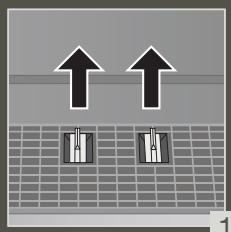
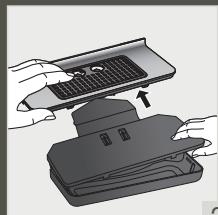
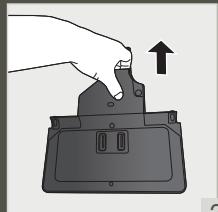
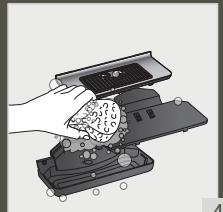
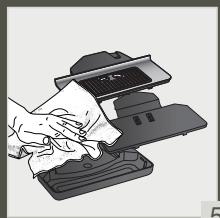
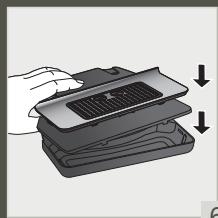
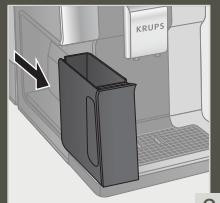
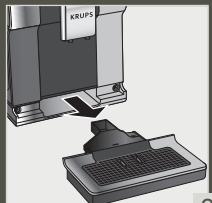
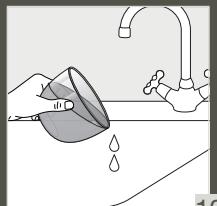
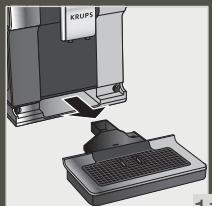
Important: For hygienic reasons, as this container is in contact with milk and coffee, we recommend that you fully dismantle and clean daily each element under hot water. It is recommended that you let it air dry before you put it back in the appliance. It is important to always leave it in place and to empty it regularly. You can put the drip tray in the dishwasher. You can put the drip tray in the dishwasher but without its cover.
WHEN SHOULD I EMPTY THE DRIP TRAY?
When the floats are in the raised position, indicating that it is too full.
When the machine notifies you or more regularly but when the machine is turned on so that it can register that the bin has been emptied.

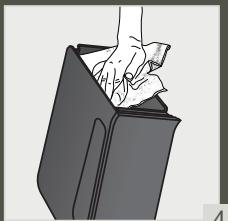
Important: Not emptying the coffee grounds collector and drip tray regularly as shown above may damage your machine. Do not put it in the dishwasher. For hygienic reasons, we recommend that you clean the coffee ground container daily under hot water with soap and sponge. It is recommended that you let it air dry before you put it back in the appliance.
MAINTENANCE OF WATER TANK AND COFFEE BEAN CONTAINER
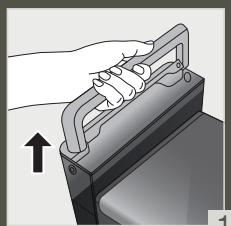
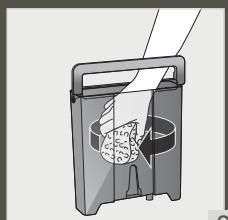
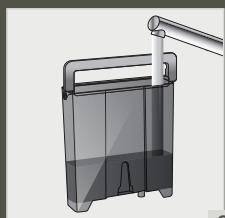
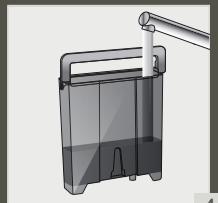
For the preservation of best coffee flavor impacted by the quality of the water and hygienic reasons, we advise you to use only fresh water and to daily clean the water tank with hot water and a bottle brush.
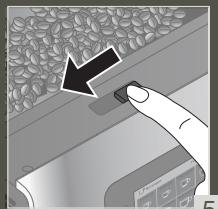
Coffee beans can leave greasy residue on the tank that can affect the quality of the coffee. For the preservation of best coffee flavor and hygienic reasons we recommend you to wipe it with a dry, soft cloth each time it needs to be refilled.

Important: Do not clean with water, the presence of water in the bean hopper could damage the machine

It is recommended that you let it air dry before you put it back in the appliance
WHY AND HOW DO I MAINTAIN THE MILK SYSTEM AFTER MAKING MILKY DRINKS?

Important: In order to obtain a consistent foam quality, we recommend that you:



HELP AND TUTORIALS
| Maintenance | When? | Explanation | Accessories required |
| Milk rinsing30 s / 20 ml | After each milky drink, when the machine notifies you | Allows you to rinse the machine's milk system. You can start a milk system rinsing at any time. | |
| Milk tube, nozzle rinsing and milk pot cleaning | After each milky drink | We recommend you to clean with hot water and soap the milk pot after each use. we recommend you to replace the milk tube approximately every three months. You will find these accessories available on the KRUPS.com website. | Hot water + soap + pipe cleaner |
| Milk accessory cleaning5 min | When the machine notifies you or at any time | This involves removing and cleaning the removable “One Touch Cappuccino” block. For optimum milk frothing, clean this regularly. See above in the instructions: 5. MANUAL DEEP CLEANING OF THE MILK DISTRIBUTION SYSTEM – 5 MIN. | Cleaning needle (n°5) |
OTHER MAINTENANCE
| Maintenance | When? | Explanation | Accessories required |
| Coffee rinsing 45 s / 30 ml | At any time | For hygienic reasons, it is recommended to rinse the coffee system daily or when not used for a longer period (more than 2 days). | |
| Tea rinsing 30 s - 20 ml | Before the drink starts flowing | Allows you to rinse with hot water to ensure an authentic taste of your tea or infusion. | |
| Coffee system cleaning 13 min / 600 ml | When the machine notifies you or at any time | For the preservation of best coffee flavor and hygienic reasons we recommend you to clean the coffee system 3 times a year. | 1 KRUPS cleaning tablet (n°1) |
| Descaling 20 min / 600 ml | When the machine notifies you or at any time | The appliance notifies you when it is necessary to run a descaling program.This step is very important to ensure the proper functioning and longevity of your appliance. | 1 sachet of KRUPS descaler (n°2) |

Important: You do not have to run the cleaning program as soon as the appliance notifies you, but you should do it reasonably soon after. If the cleaning is postponed, the alert message will remain displayed until the operation has been performed.

Important: If you unplug your machine during cleaning or in the event of electrical failure, the cleaning program will restart. It is not possible to postpone this operation: it is mandatory in order to rinse the water system. In this case, a new cleaning tablet may be necessary.
For further explanations, please see the tutorials available in your machine's settings.



HELP AND TUTORIALS

Want to know when you should perform the maintenance operations above?
An alert message will appear on the screen as soon as there is an action you need to take.

OTHER FUNCTIONS
Your KRUPS Intuition machine has a range of settings – check them out! They let you create a more personalised experience.
HOW DO I ACCESS MY MACHINE'S SETTINGS?



SETTINGS
LIST OF SETTINGS:
| Language | Select from 21 languages. |
| Date and time | You must set the date, particularly if using an anti-limescale cartridge. Time setting and 12 or 24 hour clock display. |
| Screen brightness | Adjusts the screen backlight. |
| Light | Turns the Intuitive Light Indicator on and off. |
| Display | Choose whether drink options are displayed as slides or tiles. |
| Auto-stop | Sets the period of time after which your appliance will stop automatically. This function lets you reduce your energy consumption. |
| Auto-start | Turns on the machine and automatically starts preheating the appliance at a chosen time. Do you have your coffee at the same time every day? This function is for you! By setting the auto-start, you can save time and no longer have to manually start your drink. |
| Volume unit | Selects the unit of measurement: ml or oz. |
| Auto-rinsing | You can choose whether or not to activate automatic rinsing of the coffee nozzle when starting the machine. |
| Water hardness | Set the hardness of the water between 0 and 4. For more information, see the “Water hardness measurement” chapter. |
| Coffee temperature | Is your coffee too hot? You can use this function to reduce the temperature. The machine has three temperature settings for your coffee drinks. |
| Water temperature | Do you always drink the same tea and want to set the water temperature? This function is for you! The machine has three temperature settings for your hot water. |
| Type of coffee | Turns off the ‘No beans’ function. This function indicates a lack of coffee beans in the container and resumes a recipe which is in progress. See the GRINDER paragraph. |
| Factory reset | Resetting clears your preferences and settings and restores the default settings. Your favourites will also be deleted. |

TROUBLESHOOTING
OPERATION
- The machine has a fault, the software is frozen OR the machine has a malfunction.
√ Turn off and unplug the machine, remove the filter cartridge, wait one minute and then restart the machine. Press and hold the ON/OFF button for at least three seconds to start the machine.
- The appliance does not turn on after pressing the ON/OFF button (for at least three seconds).
√ Check the fuses and the electrical power socket. Check that the plug is correctly inserted into the socket.
- A power failure has occurred during a cycle.
√ The device will reset automatically when it turns back on.
- The grinder is running empty.
√ This is normal if it is occasional and there are no or few coffee beans left. It can run empty for up to ten seconds to determine its consumption and ensure that it is working properly.
√ There are still coffee beans in the container:
. The coffee may be too oily and is not drawn into the machine properly. You can try encouraging the beans to fall and see if it works again. However, we recommend changing the coffee (see the bean type function).
. It is my usual coffee that has worked well up until now: please contact your contact KRUPS Consumer Service.
USE
- The grinder makes an abnormal noise.
√ There are most probably foreign bodies in the grinder. Try to clear it with a vacuum cleaner, otherwise contact your KRUPS Consumer Service.
- There is water under the appliance.
√ Before removing the drip tray, wait for 15 seconds after the coffee has flowed so that the machine finishes its cycle correctly.
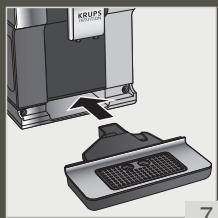
√ Check that the drip tray is positioned properly on the machine. It must always be in place even when the machine is not in use.
√ Check that the drip tray is not full.
- The adjustment button for the grinding fineness is difficult to turn.
√ Only turn the grinding fineness adjustment button when the grinder is running.
- The appliance has not produced any coffee.
√ An incident has been detected during preparation.
The appliance resets automatically and is ready for a new cycle.
- You have used ground coffee instead of coffee beans.
√ Use your vacuum cleaner to clear the ground coffee from the bean container. - Water flows from the coffee nozzles when the machine is stopped.
√ This is normal. This is an automatic rinse to clean the coffee nozzles and prevent them from getting clogged.
STEAM AND MILK
- The milk flow from your machine appears to be partially or completely blocked.
√ An alert message will appear on the screen if the nozzle is blocked. Clean the «One Touch Cappuccino» block. Refer to point 5 earlier in the instructions. MANUAL DEEP CLEANING OF THE MILK DISTRIBUTION SYSTEM – 5 MIN, or see the tutorial stored in your machine "Cleaning the milk nozzle".
- No steam comes out.
a. During the first use of a steam cycle, if no steam comes out correctly:
√ Check that the hole in the tip is not clogged. See section above: "The steam nozzle of your machine appears to be partially or completely clogged".
√ Carry out the following protocol once and only once:
Empty the water tank and temporarily remove the Claris Aqua Filter System cartridge. Fill the tank with mineral water high in calcium (>100 mg/L) and make successive steam cycles (5 to 10 cycles) in a container until a continuous jet of steam is obtained. Put the cartridge back in the tank.
b. The steam nozzle had already worked:
√ Check that the hole in the tip is not clogged. See section above: "The steam nozzle of your machine appears to be partially or completely clogged".
If after performing the above steps, the steam Nozzle still doesn't work, please contact KRUPS Consumer Service.
- Steam escapes from the grid of the drip tray.
√ Depending on the type of preparation, steam may escape from the grid of the drip tray.
4. Steam appears under the bean container lid.
√ Check that the cleaning tablet funnel under the cover (L) is closed.
MAINTENANCE
- The machine does not request descaling.
√ The descaling cycle is requested following preparation of a large number of milky or hot water-based drinks. If you only make coffee, descaling will not be required frequently. - Some grounds are in the drip tray.
√ A small amount of ground coffee can get into the drip tray. The machine is designed to clear any excess ground coffee so that the percolation area remains clean. - The Intuitive Light Indicator remains lit after you have emptied the coffee grounds collector.
√ Refitting the coffee grounds collector. - After filling the water container, the Intuitive Light Indicator stays on.
√ Check the container is positioned correctly in the appliance.
The floats at the bottom of the tank must move freely. Check and dislodge the floats if necessary.
DRINKS
- The coffee flows too slowly.
√ Turn the grinding fineness button to the right for a coarser grind (depending on the type of coffee used).
√ Perform one or several rinse cycles.
√ Change the Claris Aqua Filter System cartridge.
- The coffee is too light or not full-bodied enough.
√ Check that the bean container contains coffee and that it is moving down correctly.
√ Avoid using oily, caramelised or flavoured coffees that may not be drawn into the machine correctly.
√ Decrease the preparation volume and increase the strength using the coffee strength function. Turn the grinding fineness button to the left for a finer grind. Make your drink in two cycles using the two-cup function.
- The Espresso or coffee is not hot enough.
√ Increase the coffee temperature in the machine settings. Heat the cup by rinsing it in hot water before preparing the drink.
√ Perform a coffee system rinse before starting your coffee. A coffee rinse on start function can be activated in settings/auto-rinse.
- Clean water flows through the coffee nozzles before each coffee.
√ At the start of the recipe, there is a pre-infusion of coffee which can cause a small amount of water to flow from the coffee nozzles.
If one of the problems outlined in the table persists, contact KRUPS Consumer Service.

Important: Manufacturer:
SAS GSM
BESCHRIJVING VAN HET APPARAAT
HOE PAS IK DE FIJNHEID VAN DE GEMALEN KOFFIE AAN?
HOE BEREID IK MIJN DRANKJE VOOR?
PRODUKTER, DER F∅LGER MED MASKINEN
KOM GODT I GANG OG OPSTILLING AF APPARATET
SÅDAN TÆNDER DU FOR MASKINEN

L. Trakt for rensetablett
M. Konisk kaffekvern i metall
- Visningspanel
N. BER∅RINGSSKJERM MED navigering
- AV/PÅ
GENERELT VEDLIKEHOLD
VEDLIKEHOLD AV MELKESYSTEM
HVORFOR OG HVORDAN VEDLIKEHOLDER JEG MELKESYSTEMET ETTER Å HA LAGET MELKEBASERTE DRIKKER?

METTERE LA MACCHINA IN STANDBY
DŮLEŽITÉ INFORMACE O PRODUKTU
m = 311
NASTAVENÍ
PŘÍPRAVA DALŠÍCH NÁPOJŮ
NÁPOJE, KTERÉ LZE PŘIPRAVIT POMOCÍ TOHOTO ZAŘÍZENÍ:
DÔLEŽITÉ PRODUKTOVÉ INFORMÁCIE
WAŻNE INFORMACJE O PRODUKCIE
CARE ESTE SCOPUL SETĂRII DURITĂȚII APEI?
The image contains no text or characters.
SETĂRI
The image contains no text or characters.
ÎNTRETINERE