USER MANUAL INTUITION KRUPS
Thank you for purchasing your KRUPS espresso machine with bean grinder. Designed and manufactured in France to give you "cafe" quality drinks with the greatest ease, your KRUPS machine makes Espresso, Ristretto, and Lungo, and you can also manually make milk froth to create other milk-based drinks: Cappuccino, Latte Macchiato, Café Latte, etc. KRUPS has developed intuitive warning lights to make life easier. They will guide you in the use of your machine and brighten up your coffee breaks.
Your KRUPS espresso machine is equipped with advanced technologies and an intuitive touchscreen interface; in order to obtain the best extraction possible with total ease, to reveal maximum aromas and flavours from the freshly ground coffee.
Because not all coffees are the same, you can customise your drinks:
- By changing the coffee beans (different origins or roasts), you can discover different flavours. You will probably need to taste several different types to find the coffee beans that suit your tastes.
- By varying the grinding fineness you can obtain coffee that is more or less full-bodied.
- By choosing your shot length and coffee strength, you'll always achieve the perfect cup.
We wish you a great coffee experience and hope that you are completely satisfied with your KRUPS machine.
The KRUPS team
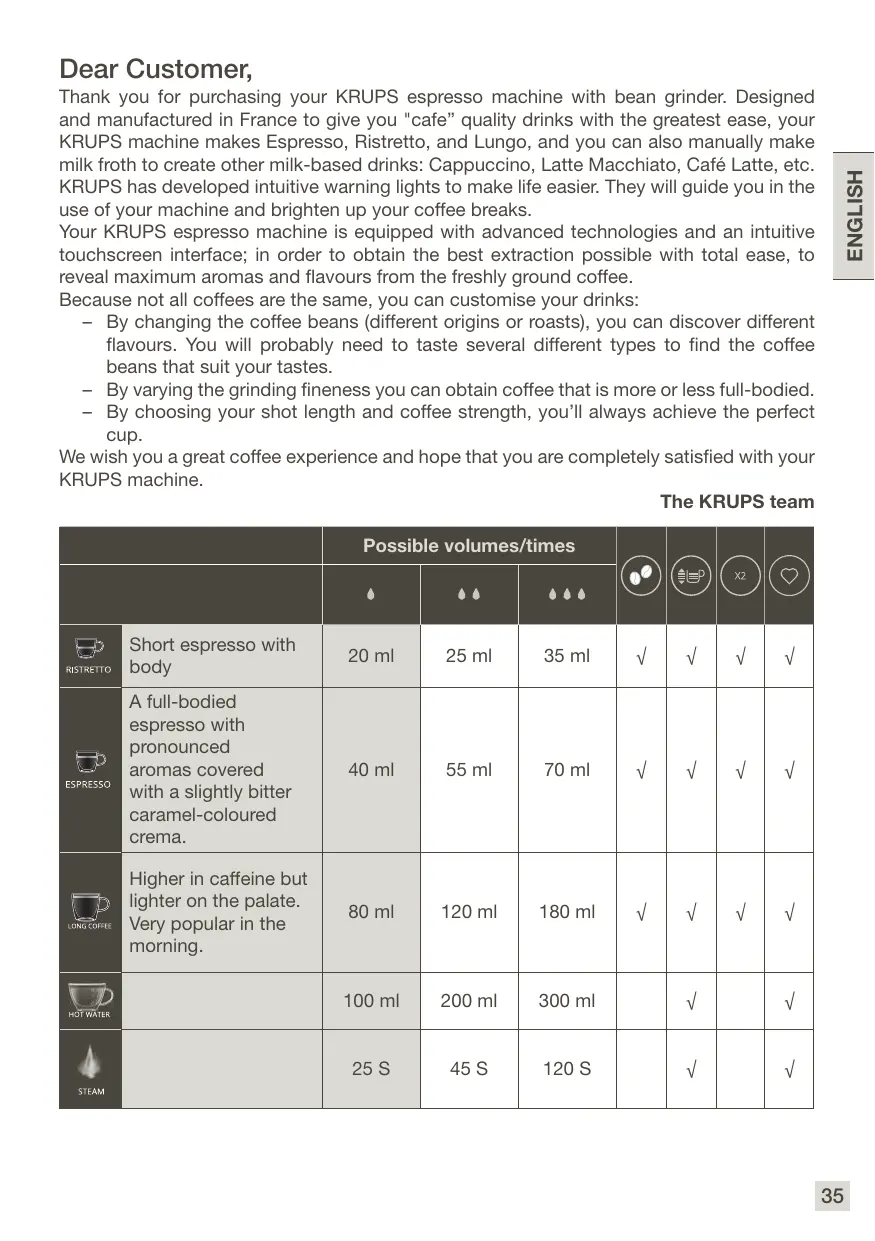
| Possible volumes/times | | | | |
| | | | | | | |
| RISTRETTO | Short espresso with body | 20 ml | 25 ml | 35 ml | √ | √ | √ | √ |
| ESPRESSO | A full-bodied espresso with pronounced aromas covered with a slightly bitter caramel-colouredcrema. | 40 ml | 55 ml | 70 ml | √ | √ | √ | √ |
| LONG COFFEE | Higher in caffeine but lighter on the palate. Very popular in the morning. | 80 ml | 120 ml | 180 ml | √ | √ | √ | √ |
| HOT WATER | | 100 ml | 200 ml | 300 ml | | √ | | √ |
| STEAM | | 25 S | 45 S | 120 S | | √ | | √ |
Advice and Tips
- The quality of the water strongly influences the quality of the flavours. Limescale and chlorine can alter the taste of coffee. We recommend that you use the Claris Aqua Filter System cartridge, or bottled water with a dry residue content lower than 800 mg/L (look at the label on the bottle), in order to preserve the flavours of your coffee.
- When preparing drinks we recommend using preheated cups (by passing them under hot water), their size adapted to your desired quantity.
- The roasted coffee beans can lose their flavour if they are not protected. We advise you to use the amount of beans equivalent to your consumption over the coming 2-3 days and to choose 250g bags.
- The quality of the coffee beans is variable and tastes are subjective. Arabica will give you delicate, floral flavours, unlike Robusta, which is higher in caffeine, more bitter and full-bodied. It is common to mix the two types of coffee to get a more balanced coffee. Please do not hesitate to seek advice from your roaster.
- We do not recommend the use of oily and caramelised beans as these can damage the machine.
- The fineness of the ground beans influences the strength of the flavors and the quality of the crema. The more finely ground the beans, the smoother the crema. Grinding can also be adapted for the desired drink.
Read the instruction manual carefully before you use your appliance for the first time and keep it for future reference: improper use will release KRUPS from any liability. It is important to respect the safety information.
SYMBOLS GUIDE FOR OPERATING INSTRUCTIONS

Danger:
Warning against the risk of serious bodily injury or death. The lightning symbol alerts you to the electricity-related dangers.

Please note:
Warning against any possible malfunction, damage or destruction of the appliance.

Important:
General or important remark for operating the appliance.
Products supplied with your machine
Check the products supplied with your machine. If an item is missing, contact your hotline immediately.
Parts supplied:
- Automatic Espresso Machine, EA870810 Series
- Two cleaning tablets
- One cleaning needle brush
- Safety information leaflet
- Instructions for use
- Directory of Krups After-Service centres Warranty documents
TECHNICAL DATA
| Appliance | Automatic Espresso EA87 |
| Power supply | 220-240V~ / 50 Hz |
| Pump pressure | 15 bar |
| Coffee bean container | 250 g |
| Energy consumption | When operating: 1450 W |
| Water container | 3 L |
| Getting started and storage | Inside, in a dry place (away from ice). |
| Dimensions (mm) H x L x P | 365 x 240 x 400 |
| Weight EA87 (kg) | 8.2 |
Subject to technical modifications. Place the appliance on a horizontal, stable, heat-resistant, clean and dry work surface.
APPLIANCE DESCRIPTION
A Handle for water container cover B Water container C Coffee grounds collector D Height-adjustable coffee outlets E Grid and removable drip tray F Coffee bean container lid G Steam nozzle H Water level floats
1 Coffee bean container
I Grinding fineness adjustment button J Cleaning tablet funnel K Metal grinding mill
2 Display panels
L ON/OFF button M Drink selection buttons N Coffee strength adjustment button
Important:

The drip tray allows you to collect the water or the coffee that flows from the appliance during and after preparation. It is important to always leave it in place and to empty it regularly or as soon as the floats indicate.
OVERVIEW
Overview of the control panel:
| Button | Description / General Functions |
| RISTRETTO ESPRESSOLONG COFFEE HOT WATER | Turn the machine on and off.A beep sounds each time the “ON/OFF” button is pressed. |
| Select a drink. The selection is backlit. |
| STEAM | Select the steam function in order to foam the milk to make a milk-based drink manually. The selection is backlit. |
| Press before drink selection to increase or reduce the coffee strength, by modifying the amount of ground coffee. You have 3 possible choices, from weak to strong. The selection is backlit with 1 to 3 beans. |
| Press before drink selection to increase or reduce the volume of the drink, by modifying the volume of water used. You have 3 possible choices, from a small to large drink. The selection is backlit with 1 to 3 drops. |
| STARTSTOP | Start or stop the current drink. |
| ! | This warning icon appears on the control panel when there is a problem linked to the machine's operation. For example, when there is no water, coffee beans or maintenance is required. |
| X2 | Press before drink selection to make double the amount. The selection is backlit with 2 cups. |
| CLEAN | Allows access to the maintenance functions: rinsing, cleaning and descaling. The relevant maintenance function is backlit. |
| Accesses the “Favourite” menu and your saved favourites / After a drink is made, it allows you to save a favourite. You can save 2 favourites: A and B. The selected favourite A or B is backlit. |
TOUCHSCREEN INTERFACE
Our interface and its buttons light up intuitively to facilitate the use of the machine and to guide you.
| Light status | Meaning |
| Unlit button | The corresponding function is not selected/is not accessible. |
| Press the pulsing light (dimly lit with long flashes) | An action with the selected function is in progress |
| Press the flashing light | An action is in progress |
| Lit button/bright light | The function is selected |
INTUITIVE WARNING LIGHTS
Your machine is equipped with intelligent technology to make daily life easier. The machine automatically detects and controls the levels of coffee beans, water, and ground coffee. When these containers must be filled or emptied, a warning light will notify you.
If maintenance is required, the "warning" LED A appears on the touchscreen interface and one or more of the three light bars will be lit:
| Intuitive warning light | Action to be performed |
| Water container (U) | The water tank is almost empty, it must be refilled. See 7 - REFILLING THE WATER TANK fig 1 to 7. |
| Coffee bean container (V) | The coffee bean container is almost empty, it must be refilled. See 8 - REFILLING THE COFFEE BEAN CONTAINER, fig 1 to 8. |
| Coffee grounds collector (W) | The collector is filled with coffee grounds, it must be emptied. See 9 - EMPTY THE COFFEE GROUNDSCOLLECTOR, fig 1 to 5. |
GETTING STARTED INSTALLING THE APPLIANCE
Switching on and preparing the machine

Danger:
Connect the appliance to a grounded 230 V socket. Otherwise, you expose yourself to fatal injuries due to the presence of electricity!
Respect the safety information in the "Safety information" leaflet.
Priming the machine allows the water circuits to be filled, so that the machine can operate.
Preheating and automatic rinsing will take place.
For more information, refer to section 1 - 1ST USE, fig 1 to 14.
Once the machine is switched on, it automatically switches to a default drink selection.
You can make your first coffee!
GRINDER: ADJUSTING THE GRINDING FINENESS
You can adjust the strength of your coffee by adjusting the grinding fineness of the coffee beans.
Varying the fineness of the grinding enables you to adapt to the different types of bean: a highly roasted and rather oily bean will require a coarse grinding while a more lightly roasted bean will be drier and will require a finer grinding. The finer the grinding, the more powerful the flavour.
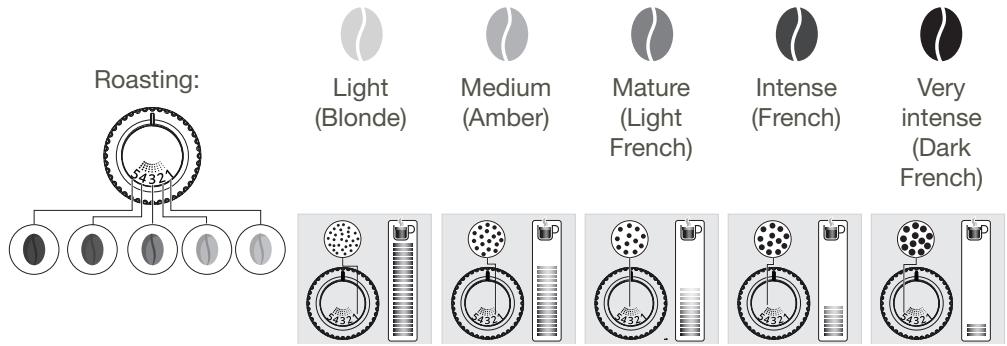
Turn the setting button located in the bean container (l), depending on your bean type and the strength of the desired flavour. This adjustment must be performed during grinding and notch by notch. After 3 preparations you will notice a very distinct difference in taste.
Adjusting the coffee output
For all drink types you can raise or lower the coffee outputs according to the size of your cup(s). Refer to section 2 - BEVERAGE SETTINGS, fig 7.
Stopping a drink mid-flow
Caution:

You can stop the preparation at any time by pressing the START/STOP button. When a cycle is interrupted, it does not stop immediately. The machine will be inaccessible for a period of time, which will be indicated by visual feedback.
PREPARING COFFEE DIRECTLY
The stages of preparing the drink:
- Bean grinding Grind compaction
- Pre-infusion (at this point, several drops may fall into your cup)
- Percolation
Starting a drink:
- Check that the coffee bean container is full. If there is no coffee, the machine will notify you via a warning light (V). Then press START/STOP to confirm the coffee refill. Refer to section 8 - REFILLING THE COFFEE BEAN CONTAINER, fig 1 to 7.

Caution: Ensure that no water is poured into the grinder, so as not to damage your machine.
- Check that the water tank is filled. If there is not enough water in the water tank, the machine will flash up an alert (U) and ask you to fill the tank. Refer to section 7 - REFILLING THE WATER TANK - fig 1 to 7.
- Place the cup or cups under the coffee nozzles.
- Press the button for the chosen drink.
Possible settings
For more information, refer to section 2 - BEVERAGE SETTINGS, fig 1 to 9.
FAVOURITES FUNCTION
The Favourites section, accessible by pressing O, allows you to access your preferred drink with a single press. Refer to section 2 - BEVERAGE SETTINGS, fig 1 to 9.
You can save a Favourite A and a Favourite B. Refer to section 3 - SAVE YOUR FAVOURITE SETTINGS / REPROGRAM A FAVOURITE, Fig 1 to 6.
- A favourite can only be saved after a drink has been made. You then have 10 seconds to press the Favourites button to save your preferred drink in A or B.
- You can customise your volume by stopping the drink while it is running. Press when it is running. The volume of your drink will then be saved in favourites.
Important:

When the flow stops, the machine returns automatically to its default drink. It is no longer possible to save it as a favourite.
If you save a favourite when a drink has already been saved, that drink will be deleted.
- Once a favourite has been saved, you can make your preferred drink by pressing a
single button. Then, follow the instructions in section 4 - START A FAVOURITE BEVERAGE, Fig 1 to 6.
DRINKS MADE USING STEAM
The steam nozzle (G) foams the milk to make a Cappuccino or Café Latte. As the steam production requires a higher temperature than for making an espresso, the appliance provides an additional preheating phase for the steam.
For manual milk foaming, use pasteurised or UHT milk from the refrigerator (3-5°C). The use of special milks (micro filtered, raw, fermented, enriched) or plant milks (rice, oat or almond milk) can give results that are less satisfactory in terms of quality and quantity of froth. It is not possible to make 2 cups at the same time: the "x2" function is not available.
The steps for making this drink with steam can be found in section 5 - MAKE A MILK RECIPE, fig 1 to 11.

Please note:
There are 2 preheating times: one for the machine and one for the steam. The LED flashes to indicate that the machine has finished preheating. Press "START/STOP" again to start steam production. See section 5 - MAKE A MILK RECIPE, fig 8.
Caution: risk of burns.
Important:
Steam production stops automatically depending on the steam time selected previously. You can press "START/STOP" before the end of the cycle if the amount of milk froth is sufficient.
THE CYCLE DOES NOT STOP IMMEDIATELY.
If you do not press the "START/STOP" button, the machine returns to its initial position after 2 minutes.
- The Favourites program is available for the steam function.
Advice and Tips:
To make the milk froth, fill 1/3 of the cup with milk. Immerse the steam nozzle in the milk and hold it against the edge of the cup. Tilt the cup 45 degrees. This technique creates a milk whirlpool, which makes the optimal amount of foam. By following these tips, you will create a barista-quality milk froth ready to be used to make a milky drink.
CLEANING THE STEAM NOZZLE

Important:
In order to obtain identical froth each time, we recommend that you carefully clean the tube and its connector AFTER EACH USE. Do not wash the steam nozzle in the dishwasher. It is recommended to clean the steam nozzle when not used for a longer period (more than 2 days).

Danger:
After using the steam function, the nozzle may be hot, we advise you to wait a few moments before handling it.
- The steam nozzle can be removed for deep cleaning. Wash it with water and some non-abrasive washing up liquid with a brush. The steps for cleaning the steam nozzle can be found in section 6 - CLEAN YOUR STEAM NOZZLE, Fig 1 to 8.
- To remove any traces of milk from the steam nozzle, place a container under the nozzle and launch a hot water drink. Then, take a clean, damp microfibre cloth and wipe the nozzle.
- If steam does not come out, the nozzle may be clogged: unclog with the needle supplied. See section 6-CLEAN YOUR STEAM NOZZLE, Fig 4 and 5.
HOT WATER DRINKS
- Place the cup under the STEAM NOZZLE (G).

- You can adjust the volume of the drink according to your preference. However, it is not possible to make 2 cups at the same time: the "x2" function is not available.

- Press STOP. The machine preheats (the lights flash), then the hot water starts to flow.
- The Favourites function is available. See section 3 - SAVE YOUR FAVOURITE SETTINGS / REPROGRAM A FAVOURITE, fig 1 to 6.
GENERAL MAINTENANCE
Carrying out proper maintenance will prolong the life of your machine and preserve the authentic taste of your coffee.

Important:
To make things simpler and more efficient, your Krups machine has an automated cleaning system: a tablet is all that's needed! The appliance requires no manual maintenance. We guarantee thorough cleaning at high temperatures for a perfect coffee every time.
The drip tray receives the waste water.
The coffee grounds collector receives the grounds extracted.
When do I empty the drip tray? See section 10 - EMPTYING THE DRIP TRAY, fig 1 to 5.
When the floats are in the upper position, indicating that it is too full.
For hygienic reasons, as this container is in contact with milk and coffee, we recommend that you fully dismantle and clean daily each element under hot water.
It is recommended that you let it air dry before you put it back in the appliance. You can put the drip tray in the dishwasher.
When do I empty the coffee grounds collector? See 9 - WARNING LIGHTS (W): EMPTY THE COFFEE GROUND COLLECTOR, fig 1 to 5.
When the "alert" LED □A on the interface and the warning light (W) are lit up.
You can periodically empty it before the machine asks you to, but only when the machine is turned on so that it can register that the bin has been emptied.
For hygienic reasons, we recommend that you clean the coffee ground container daily under hot water with soap and a sponge. It is recommended that you let it air dry before you put it back in the appliance.

Important:
The coffee grounds collector has enough capacity for about 9 coffee portions; not regularly emptying the coffee grounds container and drip tray as indicated above can damage your machine.
MAINTENANCE OF WATER TANK AND COFFEE BEAN CONTAINER
For the preservation of best coffee flavor impacted by the quality of the water and hygienic reasons, we advise you to use only fresh water and to daily clean the water tank with hot water and a bottle brush.
Coffee beans can leave greasy residue on the tank that can affect the quality of the coffee. For the preservation of best coffee flavor and hygienic reasons, we recommend you to wipe it with a dry, soft cloth each time it needs to be refilled.

Important:
Do not clean with water; the presence of water in the bean hopper could damage the machine.

It is recommended that you let it air dry before you put it back in the appliance.
Rinsing the coffee system
This function is available at any time, unless the machine requires other maintenance.
- Place a container under the coffee nozzles.
- Switch on your machine then press

- Select the rinse function

For hygienic reasons, it is recommended to rinse the coffee system daily or when not used for a longer period (more than 2 days).
This function can be automatically done on start up. For more information, please refer to "OTHER FUNCTIONS"
Full automatic cleaning program for the machine, 3 times a year (approximately 13 minutes)
For the preservation of best coffee flavor and hygienic reasons we recommend you to clean the coffee system 3 times a year.
For this cleaning you will need:
- 1 KRUPS cleaning tablet
- 1 container of at least 600 ml
The cycle will link two phases:
- 1 cleaning phase
- 1 rinsing phase
When do I run this program?
When it is necessary to run a cleaning program, the appliance notifies you.
When the machine is switched on, the "alert" LED A and the LED K on the interface will light up. See 11 - AUTOMATIC COFFEE SYSTEM CLEANING PROGRAM, fig 1 to 27.
- You can also start a cleaning cycle when you wish: by pressing and selecting the cleaning program, indicated by the LED K. Then see 11 - AUTOMATIC COFFEE SYSTEM CLEANING PROGRAM, fig 1 to 27.

Important:
You do not have to run the cleaning program as soon as the appliance requests it, but you must do it reasonably soon after. If cleaning is postponed, the alert message will remain displayed as long as the operation has not been performed.
Important:

if you unplug your machine during cleaning or in the event of electrical failure, the cleaning program will resume the current step at the time of the incident. It will not be possible to postpone this operation: rinsing the water circuit is mandatory. In this case a new cleaning tablet may be necessary.
Automatic descending program (approximately 20 minutes)
Descaling your machine ensures its proper functioning and eliminates any deposit of limescale or tartar.

Caution: If your appliance is equipped with our Claris Aqua Filter System cartridge please remove it before the descending procedure (see "Removing the Claris Aqua Filter System cartridge").
- 1 dose of KRUPS descaler
- 1 container of at least 600 ml
The cycle will link three phases:
- 1 descending phase
- 1st rinsing phase
- 2nd rinsing phase
When do I run this program?
The appliance notifies you when it is necessary to run a descaling program.
Descaling your machine ensures its proper functioning and eliminates any deposit of limescale or tartar. This step is very important to ensure the proper functioning and longevity of your appliance. When the machine is switched on, the "alert" LED [A] and the LED [D] on the interface will light up. Then, refer to section 12 - AUTOMATIC DESCALING PROGRAM, fig 1 to 30.

Important:
The machine lets you know when it is necessary to do so. However, you can start
descaling the machine at any time by pressing CLEAN and selecting
The Claris Aqua Filter System cartridge
Installation:
- Remove the water tank and empty it. If necessary, remove the used filter cartridge.
- Turn the grey ring located on the upper end of the filter cartridge until it displays the current date. The cartridge must be changed every 2 months.
- Screw the new filter cartridge into the bottom of the water tank using the accessory supplied with the cartridge.
- Fill the water tank and put it back in place.
- Switch on the machine by pressing ON/OFF.
- Place an empty container under the coffee nozzles.
- Press and hold "CLEAN"; the indicator lights will flash.
- Then press "START/STOP"; the water will then flow from the coffee nozzles.
- The filter is primed.
Removal:
- Remove the water tank and empty it.
- Remove the filter cartridge.
- Then follow the instructions above, in "Installation", to change the used cartridge.
OTHER FUNCTIONS
Adjustments
You can customise various settings on your machine, by adjusting the parameters of the machine.

Important:
The machine is connected, but not switched on.
Press for 3 seconds on , you will hear a beep.
| Coffee temperature | Press RISTRETTO then to set the coffee temperature. There are 3 temperature adjustment levels for your coffee drinks. The setting is at 2 drops by default. |
| Low Medium High |
| Auto OFF | You can also choose the length of time after which your selected appliance will automatically turn off in order to optimise your energy consumption: 15 minutes, 30 minutes and 3 hours. The setting is at 3 hours by default.
Press ESPRESSO then to set auto OFF. |
| 15 mins30 mins3 hours |
| Auto rinsing ON | You have the possibility of setting up an automatic rinsing which guarantees the preservation of best coffee flavor and an optimal hygiene.
Press LONG COFFEE then to set auto rinsing to ON. |
| InactiveActive |
| Inhibit the “no beans” function | You can remove the function that detects the absence of coffee beans. You will no longer see the corresponding alert lights. The setting is active by default.
Press HOT WATER then to inhibit the “no beans” function. |
| InactiveActive |
"No beans" function
This function is used to predict the lack of coffee beans in the coffee bean container. This lack is indicated by the warning light (V), the alert and the stopping of grinding while in operation.
To resume the current drink after adding beans, press "START/STOP".
Example:
- Starting a drink
- Detection of a lack of beans: warning light (V), alert (A) + grinder stop Put coffee beans in the coffee bean container
- Press "START/STOP"
- Restarts the drink, which means coffee is not wasted.

Please note:
Using greasy coffee can lead to incorrect detection as the beans descend poorly. If the detection function is activated, press the START/STOP button again to continue making the drink.
The function can be inhibited manually (see "OTHER FUNCTIONS" - "Inhibit "no beans" function).
PROBLEMS AND CORRECTIVE ACTIONS
| PROBLEM | CORRECTIVE ACTIONS |
| Operation | The machine displays a fault, the software is frozen. OR Your machine has a malfunction. | Turn off and unplug the machine, remove the filter cartridge, wait 1 minute and restart the machine. Press and hold the ON/OFF button for at least 3 seconds to start. |
| The appliance does not turn on after pressing the ON/OFF button (for at least 3 seconds). | Check the fuses and the power socket of your electrical installation. Check that the two power plugs are correctly inserted into the socket. |
| A power failure has occurred during a cycle. | The appliance resets automatically when it turns back on. |
| The grinder stops while making the drink and the bean LED lights up. | Add beans and press start. |
| Grinder turns empty. | The machine self-learns. |
| Use | The grinder makes an abnormal noise. | Foreign bodies are surely present in the grinder. |
| There is water under the appliance. | Before removing the water tank, wait 15 seconds after the flow of coffee so that the machine finishes its cycle correctly. Verify that the drip tray is well positioned on the machine. It must always be in place even when the machine is not in use. Verify that the drip tray is not full. |
| The adjustment button for the grinding fineness is difficult to turn. | Turn the grinding fineness adjustment button only when the grinder is operating. |
| The appliance has not issued any coffee. | An incident has been detected during its making. The appliance is reset automatically and is ready for a new cycle. |
| You have used ground coffee instead of coffee beans. | Use your vacuum cleaner to collect the ground coffee contained in the bean container. |
| Water flows from the coffee nozzles when the machine stops. | Automatic rinsing for cleaning the coffee nozzles and prevent clogging. |
| Steam | The steam nozzle makes noise. | Check that the steam nozzle is correctly positioned on its end. |
| The steam nozzle of your machine appears to be partially or completely clogged OR if the steam or hot water stops prematurely and the alert on the face flashes. | Check that the hole in the tip is not blocked by milk or limescale residue. Unclog the holes using the needle supplied with your appliance. See section 6 - CLEANING THE STEAM NOZZLE, fig 1 to 8. |
| The steam nozzle does not work or produces little foam. | For milk-based drinks, we advise you to use fresh, recently opened pasteurised or UHT milk. Using a cold container is also recommended. |
| No steam comes out. | A. During the first use of a steam cycle, if no steam comes out correctly:
· Check that the hole in the tip is not clogged.
See section above: “The steam nozzle of your machine appears to be partially or completely clogged”.
· Carry out the following protocol once and only once:
Empty the water tank and temporarily remove the Claris Aqua Filter System cartridge. Fill the tank with mineral water high in calcium (>100 mg/L) and make successive steam cycles (5 to 10 cycles) in a container until a continuous jet of steam is obtained. Put the cartridge back in the tank.
b. The steam nozzle had already worked:
· Check that the hole in the tip is not clogged.
See section above: “The steam nozzle of your machine appears to be partially or completely clogged”.
If after performing the above steps, the steam Nozzle still doesn’t work, please contact KRUPS Consumer Service. |
| The water or the steam leave the steam nozzle abnormally. | Check that the steam nozzle is correctly positioned on its end. At the beginning or end of making the drink, some drops may fall from the steam nozzle. |
| Appearance of steam under the bean tray lid. | Close the cleaning tablet funnel located under the lid. (J) |
| PROBLEM | CORRECTIVE ACTIONS |
| Maintenance | The machine does not request descending. | The descending cycle is requested after a large number of steam nozzle uses. |
| Some grounds are in the drip tray. | A small amount of ground coffee can get into the drip tray. The machine is designed to evacuate any excess ground coffee so that the percolation zone remains clean. |
| The warning messages are still displayed after the coffee grounds collector is emptied. | Reinstall the coffee grounds collector. |
| Maintenance | After having filled the water tank, the warning lights remain on. | Check the correct positioning of the tank in the appliance.
The floats at the bottom of the tank must move freely.
Check and unlock the floats if necessary. |
| Drinks | The coffee is flowing too slowly. | Turn the “grinding fineness” button to the right to obtain a coarser ground coffee (depending on the type of coffee used).
Perform one or several rinsing cycles.
Change the Claris Aqua Filter System cartridge. |
| The coffee is too light or not full-bodied enough. | Avoid the use of oily, caramelised or flavoured coffees.
Check that the bean container contains coffee and that it is moving down correctly.
Decrease the volume of the drink and increase the strength of the drink using the DARK function.
Turn the “grinding fineness” button to obtain a finer ground coffee.
Make your drink in two cycles using the 2-cup function. |
| The espresso or the coffee is not hot enough. | Rinse the coffee circuit before you start to make your coffee.
Increase the temperature of the coffee in the machine settings.
Heat the cup by rinsing it with hot water before starting to prepare the drink. |
| Clear water drips from the coffee nozzles before each coffee is made. | During the pre-infusion function, water may escape from the coffee nozzles. |
If one of the problems outlined in the table persists, contact KRUPS Consumer Service.
DESCRIPTION OF THE APPLIANCE
DESCRIPTION OF THE APPARATUS
INSTALLATION OF THE APPARATUS
GENERAL MAINTENANCE
Important:

Paraocularly, the opacification of the eye is necessary to be performed in order to achieve a good visual acuity. The opacification of the eye is achieved by using the following methods:
PROBLEMS AND CORRECTIVE MEASURES
PROBLEMS AND CORRECTIVE ACTIONS
MAINTENANCE OF THE WATER TANK AND THE COFFEE BEAN CONTAINER
FAVORITE RECIPES FUNCTION
The Favorite Recipes function is available using the button and allows you to access your favorite drinks with one button thanks to the settings you have made. Proceed according to chapter 2 - BEVERAGE SETTINGS, fig. 1 to 9.
You can store a favorite drink A and a favorite drink B. Proceed according to chapter 3 - SAVE YOUR FAVORITE SETTINGS, fig. 1 and 6.
- A favorite drink can only be saved after the recipe preparation is completed. You have 10 seconds to press the Favorite Recipe button to save the favorite drink A or B.
- It is possible to adjust the volume by stopping the preparation during the drink dispensing. During dispensing

press the button. The dispensed volume of the recipe will be saved among the favorite drinks.

STEAM PREPARATION
PROBLEMS AND REMEDIES
Dear Customer,
Thank you for purchasing the automatic coffee machine with built-in grinder from KRUPS. This device, designed and manufactured in France, allows you to prepare drinks that are not inferior in quality to professionally brewed coffee, but with much less effort. With the KRUPS device, you can enjoy espresso, ristretto, lungo, as well as obtain a milk froth for preparing milk-based drinks: cappuccino, latte macchiato, latte, etc.
To facilitate interaction with the device, KRUPS has developed intuitive light signals. They help you use the device, informing you about the status of coffee preparation.
The automatic coffee machine KRUPS was created using modern technologies and is equipped with an intuitive touch interface, thanks to which you can easily get drinks filled with the full range of flavors and aromas of freshly ground coffee beans.
Since coffee drinks are not alike, you can make your coffee individual:
- By using different types of coffee beans (different blends or roasting levels), you can discover different coffee flavors. You will probably not be able to choose coffee beans to your taste the first time.
- By changing the grinding level, you can get a more or less intense coffee.
- By choosing the height and strength of the coffee, you will find your ideal option.
We wish you many pleasant coffee moments and hope that the KRUPS device will give you unforgettable pleasure.
The KRUPS team
It is recommended to let it dry in the air after installation.
Rinsing the coffee circuit
The appliance requires regular maintenance, except for cleaning.
Place a container under the nozzle.
- Start the appliance and press the button.
CLEAN
Select the cleaning function.


Press the start cleaning button.
For hygienic reasons, it is recommended to rinse the coffee brewing system daily or in case it has not been used for a long time (more than 2 days).
This function can be performed automatically during appliance startup. For more details, see the section "Other Functions".
The program automatically cleans the entire appliance 3 times a year (approx. 13 minutes).
To preserve the best taste and aroma of coffee and for hygienic reasons, it is recommended to clean the coffee brewing system 3 times a year.
When to perform the procedure?
The appliance will indicate the need to run the descaling program. Descaling removes limescale and ensures proper operation and extends the service life of the appliance. This step is very important for proper operation and long service life of the appliance.
Limescale. When starting the appliance, the "Attention!" indicator and the indicator on the sensor line light up. See section 12 - DESCALING PROGRAM, fig. 1 - 30.
Important!

The appliance will notify you of the need to perform descaling. However, you can start the descaling cycle at any time by pressing the CLEAN button and selecting
Important recommendations
- The taste of coffee is strongly influenced by the quality of the finished drink. Scale and chlorine can change the taste of coffee. We recommend using cartridge filters Claris Aqua Filter System or water with mineralization of 800 mg/l (see label on the packaging) to preserve the true aroma of coffee. - To prepare the drink, we recommend using pre-heated cups (rinsed with hot water), the size of which corresponds to the selected quantity.
- Roasted coffee beans may lose their aroma if stored improperly. We recommend using the amount of beans that matches your consumption over the next 2-3 days, and prefer packaging of 250 g. - The quality of coffee beans varies and is assessed subjectively. Arabica has a subtle coffee aroma, unlike Robusta, which contains more caffeine and has a more bitter and intense taste. These varieties are often mixed to obtain a more balanced coffee. Please contact your coffee seller for advice.
- We do not recommend using oils and caramelized beans, which can damage the coffee machine.
- The degree of grinding of the beans affects the strength of the coffee and the quality of the crema. The finer the grind, the more creamy the crema will be. In addition, the degree of grinding can be adjusted according to the type of drink.
IMPORTANT INFORMATION ABOUT THE APPLIANCE
Before first use of the appliance, carefully read the instruction manual and keep it. Improper use of the appliance voids the KRUPS warranty and any liability. It is important to follow the safety instructions.
EXPLANATION OF SYMBOLS IN THE INSTRUCTION MANUAL

Danger:
Warning of possible accident or injury. The lightning symbol warns of danger related to electric current.

Attention!
Warning of possible malfunctions, damage, or breakage of the appliance.

Important.
General or important recommendation for operating the appliance.
Appliance package contents
If the complete set is not included, please contact the warranty service.
Complete set includes:
- Automatic coffee machine series EA870810
- 2 tablets for descaling
- User manual, safety instructions, operating instructions, list of authorized service centers, warranty documents
TECHNICAL SPECIFICATIONS
| Пробadge | АBSTOMатчна кавомаша серii EA87 |
| Еlektrочne жавлentesя | 220-240 B~ / 50 Гц |
| Тиwickуnomпi | 15 бар |
| Контейнера在这方面可靠您<|im_start|>assistant | 250 Г |
| Стоожиманая[eheprii] | У розочу му ржиму: 1450 Вт |
| Рezервayap за вори | 3л |
| Пдготовkadoespo6otniipozmiiцhevny | Усяревни розimциень, в сухому мicци (позади вidi дiiНизькх Tempeparatur) |
| Розміри(MM)ВхДхГ | 365 x 240 x 400 |
| Bara EA87 (кг) | 8,2 |
Possible technical changes. Install the device on a stable, horizontal, heat-resistant, clean and dry surface.
DEVICE DESCRIPTION
A Handle for opening the water tank lid B Water tank C Container for ground coffee D Opening for coffee beans, recommended height E Grinder and bean container F Container lid for coffee beans G Steam pipe and hot water indicator
1 Container for coffee beans
1 Grind size regulator for coffee beans Opening for ground coffee Metal grinder for coffee beans Grinder for coffee beans
2 Control panel
L ON/OFF button (ON/OFF) M Button for selecting programs
Important.

The drip tray is used to collect water or coffee that drips from the device during and after preparation. It is important to place it in its position and empty it regularly, otherwise the device may malfunction.
CONTROL PANEL
Description of the control panel:
Possible malfunctions
For additional information, see section 2 - PROGRAMMING THE BEVERAGES, pages 1-9.
“FAVORITE BEVERAGE” FUNCTION
The “Favorite Beverage” menu, which can be accessed using the buttons, allows you to prepare your favorite beverage with a single press and save the setting in memory. See section 2 - PROGRAMMING THE BEVERAGES, pages 1-9.
You can save favorite beverage A and favorite beverage B in memory. See section 3 - PROGRAMMING THE FAVORITE BEVERAGES, pages 1-6.
- Saving the favorite beverage is possible only after preparation is complete. You then have 10 seconds to press the “Favorite Beverage” button and save favorite beverage A or B.
- You can program the volume by stopping the preparation. Press the button during dispensing. The set volume will be saved as a parameter of the favorite beverage.
Important:

The beverage dispensing is automatically switched to the default beverage. It is no longer possible to save the programming of the favorite beverage.
If you save a “Favorite” beverage that was previously saved, the previous parameters will be overwritten.
CLEANING THE STEAM WAND

Important:
To always obtain frothy milk, it is recommended to thoroughly rinse the milk tube and steam wand after each use of the milk-based beverage preparation program. Do not put the steam wand in the dishwasher. It is recommended to clean the steam wand opening if it has not been used for a long time (more than 2 days).

Before using the steam nozzle for the first time, it may need to be rinsed for a few minutes before touching it.
- The steam nozzle can be removed for thorough cleaning. Rinse it with a small amount of mild detergent using a brush. For detailed information on how to clean the steam nozzle, see section 6 - Cleaning the steam nozzle, pages 1-8.
- To dispense milk foam from the steam nozzle, place a container under the nozzle and start the hot water function. Then take a clean damp cloth and wipe the steam nozzle. If steam does not come out, the nozzle may be clogged: clean it with the pin included in the kit. See section 6 - Cleaning the steam nozzle, pages 4 and 5.
HOT WATER DISPENSING
- Place a cup under the steam nozzle (G).

- Press the HOT WATER button.
- You can use the amount of water according to your preferences. However, preparing two cups at once is not possible: the “x2” function is not available.

- Press the button. The machine preheats (the indicator lights flash), then hot water is dispensed. The “favorites” function is available. See section 3 - SAVING FAVORITE DRINKS, pages 1-6.
MAINTENANCE
Proper maintenance extends the service life of the machine and preserves the true taste of coffee.

IMPORTANT:
Simple and effective: Krups gives you the ability to clean the machine automatically: insert a tablet, and it's done! No need to manually clean the brewing chamber. We guarantee thorough cleaning at high temperatures to obtain the perfect coffee.
CLEANING THE CONTAINER FOR USED COFFEE AND THE DRIP TRAY
In the drip tray, residual water collects.
The container for dispensing milk has been replaced.
When should the drip tray be emptied? See section 10 - EMPTYING THE DRIP TRAY, fig. 1-5.
When the indicator lights up, it indicates that the drip tray is full.
Due to hygienic reasons, since this container comes into contact with milk and coffee, we recommend completely disassembling it and cleaning each element with warm water. We also recommend drying each element on a cloth before installing it in the appliance. The drip tray can be washed in the dishwasher.
When should the container for dispensing milk be emptied? (See section 19 - LIGHT SIGNALS (W): EMPTYING THE CONTAINER FOR DISPENSING MILK, fig. 1-5.
When the indicator "Emptying on the sensor screen and light signal (W)" lights up.
The container can be emptied regularly, without waiting for a signal from the appliance. When the appliance is switched on, if it is not reset, the container for milk must be emptied.
Due to hygienic reasons, we recommend cleaning the entire container with warm water and a sponge. We also recommend drying this element on a cloth before installing it in the appliance.

Important:
The container for dispensing milk holds approximately 9 servings. If you do not regularly empty the container for dispensing milk and the drip tray, this can lead to damage to the appliance.
MAINTENANCE AND CLEANING OF THE CONTAINER FOR COFFEE BEANS
Press and hold for 3 seconds, you will hear an acoustic signal.
Dear customer,
Switching on the appliance and preparing the machine

Danger:
Replace the electrical contact 230 V. Otherwise, there is a risk of electric shock!
Read the safety instructions in the brochure, "Safety Instructions".
It is necessary to start the machine so that it can work and then check the water. The grinding and automatic dispensing are activated.
For more information, refer to the manufacturer, Fig. 1 to 14.
After connecting the machine to the power supply, it automatically starts the preheating program.
You can pour the first cup!
COFFEE GRINDER: ADJUSTING THE GRINDING LEVEL
You can adjust the strength of your coffee by setting the grinding level of the coffee beans.
The grinding level options allow you to adapt to different types of coffee beans: dark roasted beans require a coarser grind, and conversely, lighter roasted beans are drier and require a finer grind. The finer the coffee is ground, the stronger the aroma.
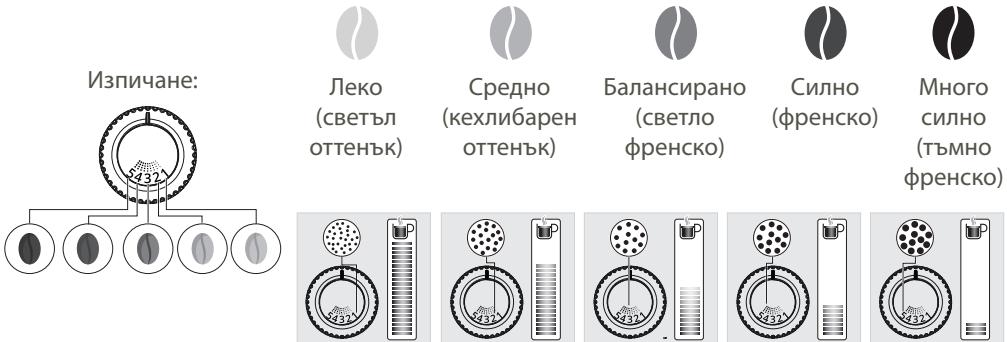
Turn the adjustment knob, located on top of the coffee bean container (I), according to the coffee beans and the desired aroma intensity. This adjustment should be made gradually, step by step. Only after 3 preparations will you notice a difference in taste.
Adjusting the coffee spouts
For each cup, depending on the size of your cup(s), raise or lower the coffee spouts. Refer to Chapter 2 - ADJUSTING THE SPOUTS, Fig. 7.
Stopping the drink during preparation
Attention:

You can stop the preparation at any time by pressing the START/STOP button. When you stop a program, the stop is not immediate. The machine will be inactive for a certain time, which will be signaled by an indicator light.
PREPARATION OF BEVERAGES WITH COFFEE THROUGH THE DIRECTIONS
Steps for preparing the drink:
- Grinding the beans
- Pressing the ground coffee
- Pre-infusion (the type of coffee determines how long this lasts)
- Extraction
Starting the process
- Check whether the coffee bean container is full. If there is no coffee, the machine will signal this with a visual and audible warning (V). Then press START/STOP to start filling with coffee. Refer to chapter 8 - FILLING THE COFFEE BEAN CONTAINER, Fig. 1 to 7.

Caution: Make sure not to pour water into the coffee machine, as this could damage your machine.
- Ensure that the water reservoir is full. If there is no water, the machine will signal this with a visual and audible warning (V) and will ask you to fill the reservoir. Refer to chapter 7 - FILLING THE WATER RESERVOIR, Fig. 1 to 7.
- Place the cup or cups under the coffee spouts.
- Press the button for the selected drink.
Possible settings
For more information, refer to chapter 2 - DRINK SETTINGS, Fig. 1 to 9.
The "PREFERENCE" function
The drink function, access from the button, you set your program on the drink itself, thanks to the settings you have set. Refer to Chapter 2 - SETTING THE DRINKS, fig. 1 to 9.
It is possible to save one preference A and one preference B. Refer to Chapter 3 - SAVING THE PREFERENCES AND PARAMETERS, fig. 1 to 6.
- Saving the preference can happen during the execution of the recipe. You have 10 seconds to press the Preference function and then to save the preferred drink A or B.
- You can personalize the drinks by stopping the recipes during execution.
I. During dispensing, press . Then the dispensed quantity of the recipe will be saved in the preference.
Important:

After dispensing, the machine automatically stops the recipe for adjustment. Then it is not possible to save the preference.
If you save the preference after the recipe has already been saved, it will be overwritten.
- After you have saved the preference, you can start the preferred drink.
The drink is made by pressing this button . Then follow the instructions in Chapter 4 - PREPARING THE PREFERRED DRINK, fig. 1 to 6.
DRINKS PREPARED WITH MILK
The milk frother (G) is used to froth milk for preparing, for example, cappuccino. Since the production of froth requires a higher temperature than that for preparing espresso, the device ensures a phase of additional preheating for the frother.
For frothing milk in the best way for preference, use pasteurized milk taken from the refrigerator (3 - 5°C) without prior treatment. The use of special milk (microfiltered, raw, fermented, organic) or milk of plant origin (soy, oat, almond milk) can lead to unsatisfactory results in terms of the quality and quantity of the froth.
It is not possible to prepare 2 cups at the same time: consequently the function "x2" is not available.
For more detailed information about the stages of preparing recipes with milk, see Chapter 5 - PREPARING MILK RECIPES, fig. 1 to 11.

Attention: To set the pre-steaming interval: press the machine button and the steam button. The light will flash to indicate that the machine is heating up. Press the START/STOP button to release the steam generator. See Chapter 5 - PREPARING THE MILK FROTH, fig. 8.
Warning: risk of burns.
Important:
The steam generator will stop automatically after the pre-selected time. You can press the START/STOP button before the end of the program if the amount of frothed milk is sufficient, and the steam generator will stop.
STOPPING THE PROGRAM IS NOT IMMEDIATE.
If you press the START/STOP button during the 2 minutes, the machine will return to the initial state.
- The pre-set delay is sufficient for the steam function.
Tips:
When preparing milk froth, fill the jug to 1/3 with milk. Place the steam nozzle into the milk and apply it to the surface of the milk. Tilt the jug at an angle of 45 degrees. This technique allows the milk to swirl and in this way you get optimal frothing. Follow these tips to get milk froth suitable for a barista and ready for use in preparing a milk-based drink.
CLEANING THE STEAM NOZZLE

Important:
To ensure consistent quality of the steam every time, we recommend that you carefully clean the nozzle and the tip after each use. Do not put the steam nozzle in the dishwasher. It is essential to clean the steam nozzle when it is not used for a longer period of time (more than 2 days).

Danger:
After using the steam function, the nozzle may be hot. We recommend that you wait a few minutes before handling it.
The steam nozzle is demonstrated so that it can be immersed in depth. Rinse with water and a small amount of unperfumed detergent using a brush. For details on cleaning the steam nozzle, see chapter - CLEANING THE STEAM NOZZLE, fig. 1 to 8. - To remove any remaining milk residue from the steam nozzle, place a container under the nozzle and run the hot water program. Then wipe the nozzle with a damp microfiber cloth. - If the nozzle does not work, it may be clogged: unscrew it with the provided tool. See chapter 6 - CLEANING THE STEAM NOZZLE, fig. 4 and 5.
PREPARING DRINKS WITH HOT WATER
- Place a cup under the steam nozzle (G).

- Press
- You can adjust the amount of hot water to your taste. However, it is not possible to dispense 2 cups simultaneously: the x2 function is not available.

- Press . The machine performs a preliminary rinse (the indicator lights flash), then it dispenses hot water. - The pre-infusion function is essential. See chapter 3 - ADJUSTING THE BREWING PARAMETERS, fig. 1 to 6.
GENERAL MAINTENANCE
Regular maintenance extends the life of the machine and preserves the aroma and taste of the coffee.

Important:
For easier and more effective use, the cleaning of your machine is automated: one tablet and it's done! No manual maintenance of the brewing unit is required. We guarantee thorough cleaning at high temperature for perfect coffee.
MAINTENANCE OF THE DRIP TRAY AND THE COFFEE GROUNDS CONTAINER
The drip tray collects the waste water.
The coffee grounds container collects the used ground coffee.
When to descale the appliance? See point 10 - DESCALING THE APPLIANCE, fig. from 1 to 5.
The indicator for descaling lights up in the upper position.
For hygienic reasons, we recommend that you disassemble and clean every element in contact with milk daily. Also, we recommend that you let it dry in the air before putting it back in place. You can put the descaling tablet in the dishwasher.
When should the container for collecting coffee grounds be cleaned? See point 9 - WARNING LIGHT (W): CLEANING THE CONTAINER FOR COLLECTING COFFEE GROUNDS, fig. from 1 to 5.
When the light, attention" of the sensor interest and the warning light (W) of the machine light up.
You can clean it more often and the maintenance will be shown to you. But when the machine is switched on, in order to register, the containers are empty.
For hygienic reasons, we recommend that you wash the container for ground coffee daily with warm water and dish soap. Also, we recommend that you let it dry in the air before putting it back in place.

Important:
The container for collecting coffee grounds has a capacity of about 9 doses. If the container for collecting coffee grounds and the descaling tablet are not cleaned according to the instructions, the machine may be damaged.
MAINTENANCE OF THE WATER RESERVOIR AND THE CONTAINER FOR GROUND COFFEE
To preserve the best aroma of the coffee, depending on the hardness of the water and the hygienic conditions, we recommend that you use only fresh water and daily clean the water reservoir with warm water and a brush for bottles.
The ground coffee may leave oily residues in the reservoir, which may affect the quality of the coffee. To preserve the best taste of the coffee and for hygienic reasons, we recommend that you empty it with a dry cloth every time, when it needs to be refilled.

Important:
Do not wash with water, the water level in the funnel for coffee may damage the machine.

Also, we recommend that you let it dry in the air before putting it back in place.
This function is available at any time, except when the machine is performing another operation.

Follow the instructions for coffee. Turn on the machine and press
- Select the rinsing function

It is recommended to rinse the coffee system daily and when it is not used for a longer period (more than 2 days).
This function can be performed automatically at startup. For more information, please refer to "OTHER FUNCTIONS".
Program for full automatic machine cleaning, lasting approximately 13 minutes.
To preserve the best taste of coffee and from hygienic considerations, we recommend descaling the coffee system 3 times a year.
For this descaling you will need:
- 1 descaling tablet KRUPS 1cbd with a capacity of more than 600 ml
The cycle consists of two phases:
-1 rinsing phase -1 descaling phase
When should this program be run?
When it is necessary to run the descaling program to remove limescale, the machine will inform you.
I Ue UyeTe 3ByKOB CnHaJ.
| Temnepatypa на
kaфeto | Наточete RISTRETTO,а с蜱ед това 3a настwo BAHE на Tempepatypata
нада kaфeto. Има 3стenvи за настwo BAHE на Tempepatypata
Башитkaфе напитки. По поразьбираhte настwo Кату e на 2 калу. |
| Hocksta
Среда
Виска | Hocksta
Среда
Виска |
| АвTomатчно
ИЗКЛЮЧBAнe | Можete даизburate петюда, с蜱ед ковто Вшият уreed вавоматчно
да сизлочь, здда ONТIMИЗIPATE пOTреблиениTo сдда насязгия:
15 мину,则, 30 мину,则 3 ча. ПО поразьбираhte настwo Кату e на 3
чес.
HATICHTE ESPRESSO, с蜱ед това 3дда настwo вавоматчно
ИЗКЛЮЧBAнe. |
| Hocksta
Среда
Виска | Hocksta
С克思
3чес |
| Вьлочьане на
авTomатчно
ИЗПЛAKBAнe | Имате Вьзможhoe Дд настwo вавоматчно ИЗПЛAKBAнe, koeto
ragаHTURA за пазывенTo най-добрия apomat на Кфeto, КсКTo и
ONТIMALHATA XIIIIGUEHa.
HATICHTE LONG COFFEE, с蜱ед това 3дда настwo вавоматчно BKЛЮЧBAнe
авTomatчно ИЗПЛAKBAнe. |
| Hocksta
С克思
3чес | Hocksta
С克思
3чес |
| Бл_OKрале на
функция лимса на
kaфе на 3bphа | Можete дд Забраниte Функцията зд ретистор�аны лимсата на
kaфе на 3bphа. Тогава Нема дд Имате сьOTBETNITE CBETLINHN
празу pridNETENI сИгналizац们 ПО поразьбираhte настwo Кату e
akTINBA.
HATICHTE HOT WATER, с蜱ед това 3дда Забраниte Функцията зд
pericntprapaine лимсата на Кфeto на 3bphа. |
| Hocksta
С克思
3чес | Hocksta
С克思
3чес |
Function of the coffee grinder scale
This function allows you to adjust the coffee scale in the coffee bean container. The scale is signaled by a light warning signal (V), a warning signal, and a stop of the current recipe.
To fill the current recipe after adding coffee beans, press "START/STOP".
Size:
- Recipe adjustment
- Recording the coffee scale: light warning signal (V), warning signal + stop of the coffee machine - filling of the coffee bean container with caffeinated coffee beans
- Press the button START/STOP
- Filling of the recipe, which will allow you to make coffee.
Attention:

Using too much coffee can cause incorrect recording, which is reflected in the difficult fall of the beans. If the recording is activated, it is enough to press the button START/STOP to skip the recipe.
The function can be temporarily blocked (see other function "Blocking of the coffee scale function").