USER MANUAL NZ64B5046FK/U1 SAMSUNG
The following symbols are used in this User Manual: 3
Model name & serial number 3
Safety instructions 3
Disposing of the packaging material 7
Proper disposal of your old appliance 7
Correct Disposal of This Product (Waste Electrical & Electronic Equipment) 7
Installing the hob 8
Safety instructions for the installer 8
Tools you will need 8
Connecting to the mains power supply 8
Installing into the countertop 9
Components 11
Before you start 11
Cooking zones 11
Control panel 12
Induction heating 13
Safety shutoff 13
Residual heat indicator 14
Temperature detection 14
Cookware 14
Using the touch buttons 18
Operating noises 18
Initial cleaning 18
Operation 18
Switching the appliance on 18
Switching the appliance off 18
Selecting cooking zone and power level 19
Max Boost 20
Using the Flex zone (Only for Flex zone applied models) 20
Flex zone Plus (Only for Flex zone plus applied models) 21
KeepWarm 22
Timer 22
Pause/Resume 22
Quick stop 22
Child safety lock 23
Maximum power limit 23
Sound on/off 24
Smart Connect 24
Hood control 25
Maintaining your appliance 25
Hob 25
Light soiling 25
Stubborn soiling 26
Problem dirt 26
Hob frame (option) 27
To avoid damaging your appliance 27
Troubleshooting and service 27
Troubleshooting 27
Service 29
Using this manual
Please take the time to read this owner's manual, paying particular attention to the safety information contained in the following section, before using your appliance. Keep this manual for future reference.
If transferring ownership of the appliance, please remember to pass the manual on to the new owner.
The following symbols are used in this User Manual:
WARNING
Hazards or unsafe practices that may result in severe personal injury or death.
CAUTION
Hazards or unsafe practices that may result in minor personal injury or property damage.
CAUTION
To reduce the risk of fire, explosion, electric shock, or personal injury when using your hob, follow these basic safety precaution.
NOTE
Useful tips, recommendations, or information that helps users manipulate the product.
Model name & serial number
Both the model name and the serial number are labeled underneath the hob base.
For later use, write down the information or attach the additional product label (located on the top of the product) onto the current page.
Model Name
Serial Number
Safety instructions
The safety aspects of this appliance comply with all accepted technical and safety standards. However, as manufacturers we also believe it is our responsibility to familiarize you with the following safety instructions.
WARNING
This appliance is not intended for use by persons (including children) with reduced physical, sensory or mental capabilities, or lack of experience and knowledge, unless they have been given supervision or instruction concerning use of the appliance by a person responsible for their safety.
Children should be supervised to ensure that they do not play with the appliance.
This appliance can be used by children aged from 8 years and above and persons with reduced physical, sensory or mental capabilities or lack of experience and knowledge if they have been given supervision or instruction concerning use of the appliance in a safe way and understand the hazards involved. Children shall not play with the appliance. Cleaning and user maintenance shall not be made by children without supervision. The means for disconnection must be incorporated in the fixed wiring in accordance with the wiring rules.
Safety instructions
This Appliance should be allowed to disconnection from the supply after installation. The disconnection may be achieved by having the plug accessible or by incorporating a switch in the fired wiring in accordance with the wiring rules.
If the supply cord is damaged, it must be replaced by the manufacturer, its service agent or similarly qualified persons in order to avoid a hazard.
The method of fixing stated is not to depend on the use of adhesives since they are not considered to be a reliable fixing means.
WARNING: If the surface is cracked, switch off the appliance to avoid the possibility of electric shock.
During use the appliance becomes hot. Care should be taken to avoid touching heating elements inside the hob.
WARNING: Accessible parts may become hot during use. Young children should be kept away.
A steam cleaner is not to be used.
Metallic objects such as knives, forks, spoons and lids should not be placed on the hob surface since they can get hot.
After use, switch off the hob element by its control and do not rely on the pan detector.
The appliance is not intended to be operated by means of an external timer or separate remote-control system.
CAUTION: The cooking process has to be supervised. A short term cooking process has to be supervised continuously.
The appliance must not be installed behind a decorative door in order to avoid overheating.
WARNING: The appliance and its accessible parts become hot during use. Care should be taken to avoid touching heating elements. Children less than 8 years of age shall be kept away unless continuously supervised.
WARNING: Unattended cooking on a hob with fat or oil can be dangerous and may result in a fire.
NEVER try to extinguish a fire with water, but switch off the appliance and then cover flame e.g. with a lid or a fire blanket. WARNING: Danger of fire: Do not store items on the cooking surfaces.
WARNING: Use only hob guards designed by the manufacturer of the cooking appliance or indicated by the manufacturer of the appliance in the instructions for use as suitable or hob guards incorporated in the appliance. The use of inappropriate guards can cause accidents.
The surfaces are liable to get hot during use.
This appliance can be used by children aged from 8 years and above and persons with reduced physical, sensory or mental capabilities or lack of experience and knowledge if they have been given supervision or instruction concerning use of the appliance in a safe way and understand the hazards involved. Children shall not play with the appliance. Cleaning and user maintenance shall not be made by children unless they are older than 8 and supervised. Keep the appliance and its cord out of reach of children less than 8 years.
CAUTION
Be sure the appliance is properly installed and grounded by a qualified technician.
The appliance should be serviced only by qualified service personnel. Repairs carried out by unqualified individuals may cause injury or serious malfunction. If your appliance is in need of repair, contact your local service centre. Failure to follow these instructions may result in damage and void the warranty. Flush - mounted appliances may be operated only after they have been installed in cabinets and workplaces that conform to the relevant standards. This ensures sufficient protection against contact for electrical units as required by the essential safety standards.
If your appliance malfunctions or if fractures, cracks or splits appear:
- switch off all cooking zones;
- disconnect the hob from the mains supply; and
- contact your local service centre.
If the hob cracks, turn the appliance off to avoid the possibility of electric shock. Do not use your hob until the glass surface has been replaced.
Safety instructions
Do not use the hob to heat aluminium foil, products wrapped in aluminium foil or frozen foods packaged in aluminium cookware.
Liquid between the bottom of the pan and the hob can produce steam pressure. Which may cause the pan to jump.
Always ensure that the hotplate and the base of the pan are kept dry.
The cooking zones will become hot when you cook.
Always keep small children away from the appliance.
Keep all packaging materials well out of the reach of children, as packaging materials can be dangerous to children.
This appliance is to be used only for normal cooking and frying in the home. It is not designed for commercial or industrial use. Never use the hob for heating the room.
Take care when plugging electrical appliances into mains sockets near the hob. Mains leads must not come into contact with the hob.
Overheated fat and oil can catch fire quickly. Never leave surface units unattended when preparing foods in fat or oil, for example, when cooking chips.
Turn the cooking zones off after use.
Always keep the control panels clean and dry.
Never place combustible items on the hob, it may cause fire.
There is the risk of burns from the appliance if used carelessly.
Cables from electrical appliances must not touch the hot surface of the hob or hot cookware.
Do not use the hob to dry clothes.
Users with Pacemakers and Active Heart Implants must keep their upper body at a minimum distance of 30~cm from induction cooking zones when turned on. If in doubt, you should consult the manufacturer of your device or your doctor. (Induction hob model only)
Do not attempt to repair, disassemble, or modify the appliance yourself.
Always turn the appliance off before cleaning.
Clean the hob in accordance with the cleaning and care instructions contained in this manual.
Keep pets away from the appliance because pets may step on the controls of the appliance, causing an malfunction.
Disposing of the packaging material
WARNING
All materials used to package the appliance are fully recyclable. Sheet and hard foam parts are appropriately marked. Please dispose of packaging materials and old appliances with due regard to safety and the environment.
Proper disposal of your old appliance
WARNING
Before disposing of your old appliance, make it inoperable so that it cannot be a source of danger. To do this, have a qualified technician disconnect the appliance from the mains supply and remove the mains lead.
The appliance may not be disposed of in the household rubbish.
Information about collection dates and public refuse disposal sites is available from your local refuse department or council.
Correct Disposal of This Product (Waste Electrical & Electronic Equipment)

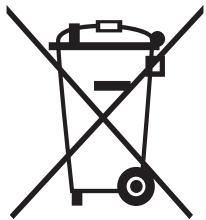
(Applicable in countries with separate collection systems) This marking on the product, accessories or literature indicates that the product and its electronic accessories (e.g. charger, headset, USB cable) should not be disposed of with other household waste at the end of their working life. To prevent possible harm to the environment or human health from uncontrolled waste disposal, please separate these items from other types of waste and recycle them responsibly to promote the sustainable reuse of material resources.
Household users should contact either the retailer where they purchased this product, or their local government office, for details of where and how they can take these items for environmentally safe recycling.
Business users should contact their supplier and check the terms and conditions of the purchase contract. This product and its electronic accessories should not be mixed with other commercial wastes for disposal.
For information on Samsung's environmental commitments and product specific regulatory obligations e.g. REACH visit: www.samsung.com/uk/aboutsamsung/sustainability/environment/our-commitment/data/

WARNING
Be sure the new appliance is installed and grounded only by qualified personnel.
Please observe this instruction. The warranty will not cover any damage that may occur as a result of improper installation.
Technical data is provided at the end of this manual.
Safety instructions for the installer
- A device must be provided in the electrical installation that allows the appliance to be disconnected from the mains at all poles with a contact opening width of at least 3mm . Suitable isolation devices include line protecting cut - outs, fuses (screw type fuses are to be removed from the holder), earth leakage trips and contactors.
- With respect to fire protection, this appliance corresponds to EN 60335 - 2 - 6. This type of appliance may be installed with a high cupboard or wall on one side.
The installation must guarantee shock protection.
- The kitchen unit in which the appliance is fitted must satisfy the stability requirements of DIN 68930.
- For protection against moisture, all cut surfaces are to be sealed with a suitable sealant.
- On tiled work surfaces, the joints in the area where the hob sits must be completely filled with grout.
- On natural, artificial stone, or ceramic tops, the snap action springs must be bonded in place with a suitable artificial resin or mixed adhesive.
- Ensure that the seal is correctly seated against the work surface without any gaps. Additional silicon sealant must not be applied; this would make removal more difficult when servicing.
The hob must be pressed out from below when removed.
A board can be installed underneath the hob.
- The ventilation gap between the worktop and front of the unit underneath it must not be covered.

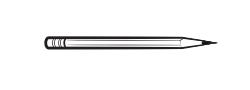
Pencil

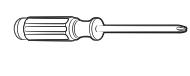
Phillips Head Screwdriver
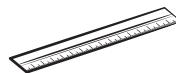
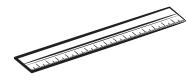
Ruler or Straightedge
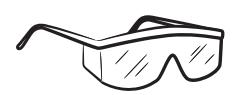
Safety Glasses
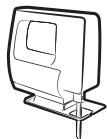
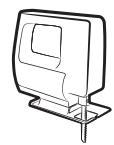
Saber Saw

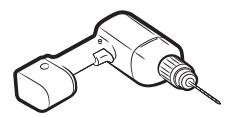
Drill
Connecting to the mains power supply
Before connecting, check that the nominal voltage of the appliance, that is, the voltage stated on the rating plate, corresponds to the available supply voltage. The rating plate is located on the lower casing of the hob.
WARNING
Shut off power to circuit before connecting wires to circuit.
The heating element voltage is AC 230 V~. The appliance also works perfectly on networks with AC 220 V~ or AC 240 V~. The hob is to be connected to the mains using a device that allows the appliance to be disconnected from the mains at all poles with a contact opening width of at least 3 mm, eg. automatic line protecting cut - out, earth leakage trips or fuse.
WARNING
The cable connections must be made in accordance with regulations and the terminal screws tightened securely.
WARNING
Once the hob is connected to the mains supply, check that all cooking zones are ready for use by briefly switching each on in turn at the maximum setting with suitable cookware.

WARNING
Pay attention (conformity) to phase and neutral allocation of house connection and appliance (connection schemes); otherwise, components can be damaged. Warranty does not cover damage resulting from improper installation.

WARNING
If the supply cord is damaged, it must be replaced by the manufacturer, its service agent or similarly qualified persons in order to avoid a hazard.
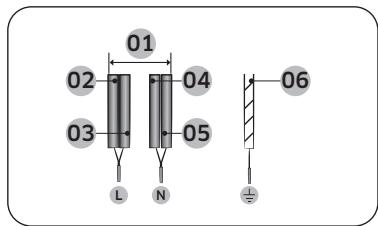
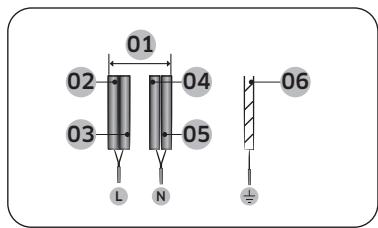
1N~ (32A)
| 01 | 220-240 V~ | 04 | Blue |
| 02 | Black | 05 | Gray |
| 03 | Brown | 06 | Green/Yellow |
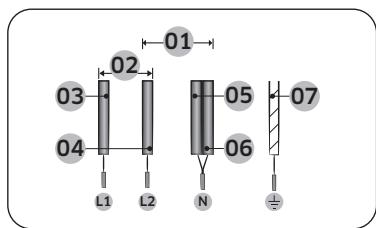
2N~ (16A): Separate the 2-phase wires (L1 and L2) before connection.
| 01 | 220-240 V~ | 05 | Blue |
| 02 | 380-415 V~ | 06 | Gray |
| 03 | Black | 07 | Green/Yellow |
| 04 | Brown | |
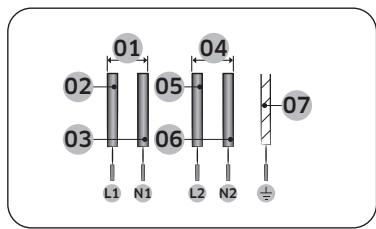
2 x 1N~ (16A): Separate the wires before connection.
| 01 | 220-240 V~ | 05 | Brown |
| 02 | Black | 06 | Gray |
| 03 | Blue | 07 | Green/Yellow |
| 04 | 220-240 V~ | |

WARNING
For correct supply connection, follow the wiring diagram attached near the terminals.
Installing into the countertop
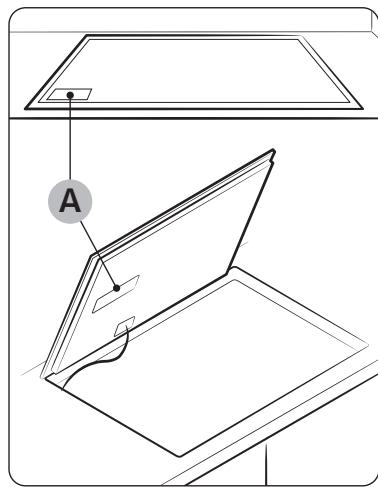
A. Serial number

NOTE
Make a note of the serial number on the appliance rating label prior to installation. This number will be required in the case of requests for service and is no longer accessible after installation, as it is on the original rating plate on the upperside or underside of the appliance.

NOTE
Pay special attention to the minimum space and clearance requirements.

NOTE
The bottom of the hob is equipped with a fan. If there is a drawer under the hob it should not be used to store small objects or paper, since they could damage the fan or interfere with the cooling if they are sucked into it.
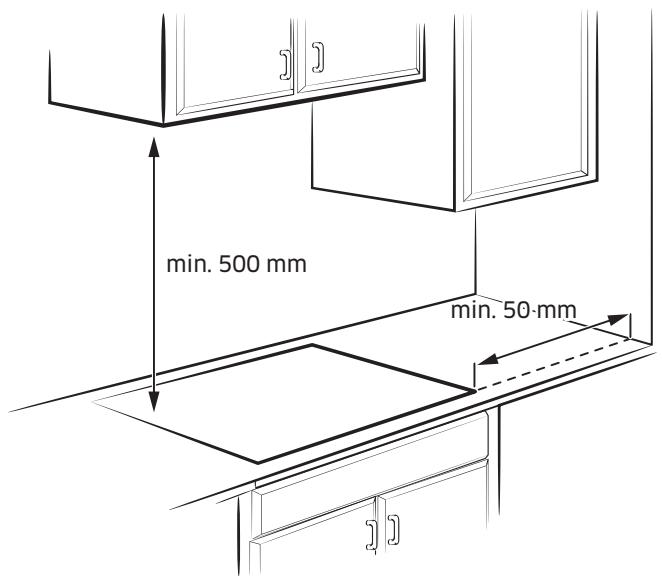
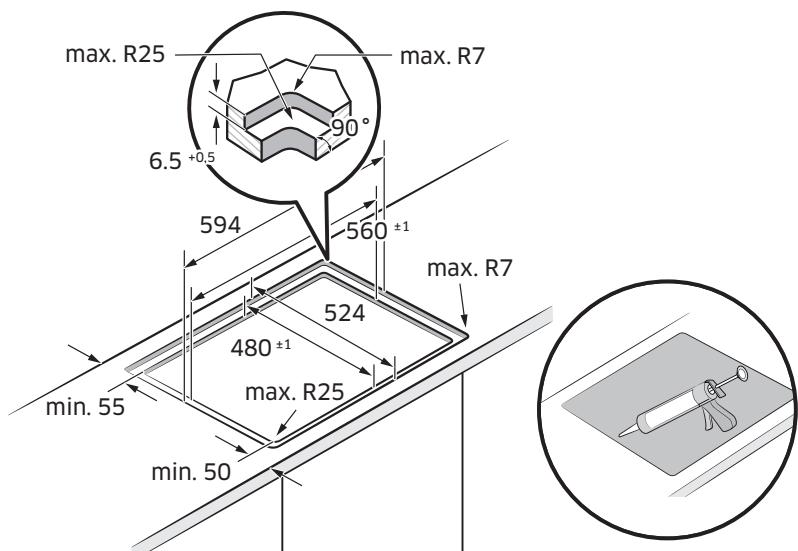
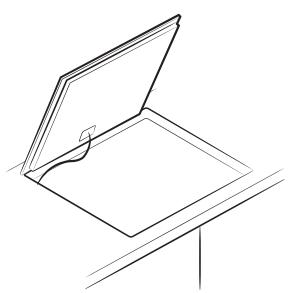
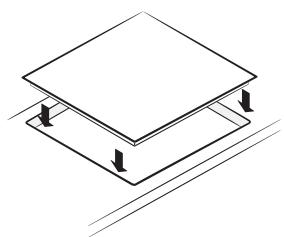
Flushed Fit Type (Only NZ6*FK model can be installed)
Before you start
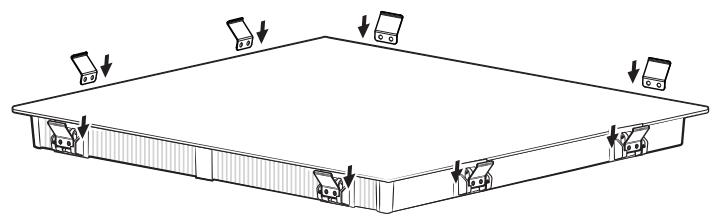
Components
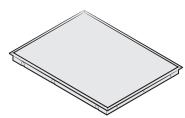
Induction hob
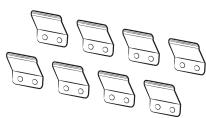
Bracket Spring
Cooking zones
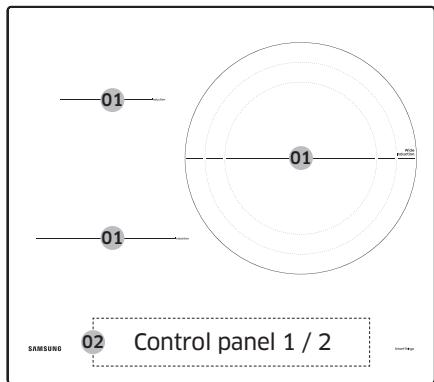
NZ63403GK
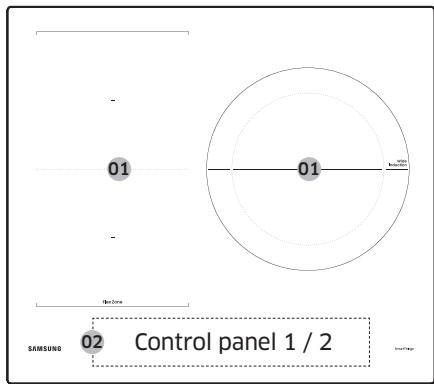
NZ63504K
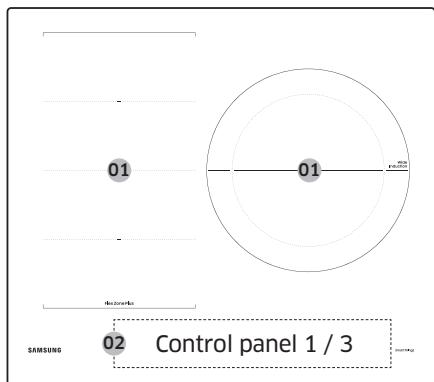
NZ63605K
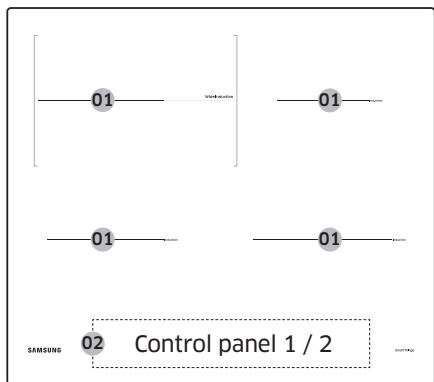
NZ64*401**K
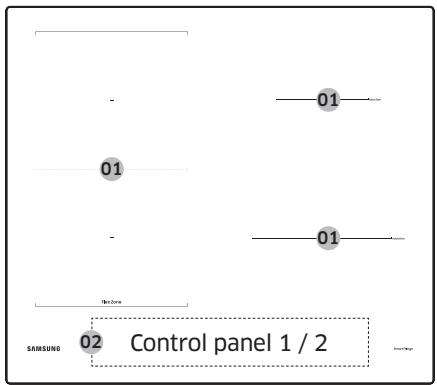
NZ64504K
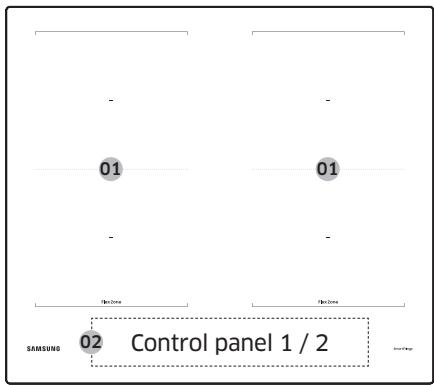
NZ645066K
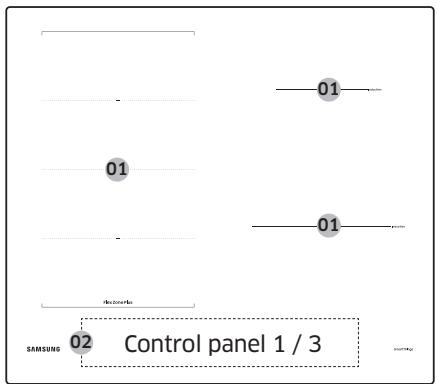
NZ64605*K
| 01 | Induction cooking zone |
| 02 | Control panel |
Control panel

Control panel 1

Control panel 2

Control panel 3
| 01 ① On/Off | To activate and deactivate the hob. |
| 02 ① Timer | To turn timer on or off and set timer. |
| 03 Keep warm | To keep cooked food warm. |
| 04 II Δ(5sec) Pause & Lock | To switch all cooking zones on to the low power setting. Press 3 seconds to lock or unlock the control panel. (Child safety lock) |
| 05 Flex zone | To select the flex zone. |
| 06 Cooking zone | To select the cooking zone. |
| 07 Max Max Boost | To activate the function. |
| 08 | Display | To show for heat settings, residual heat, and Wi-Fi connection. |
| 09 | Control bar | To set a heat setting and increase or decrease the time. |
| 10 | Control key | To set a heat setting and increase or decrease the time. |
| 11 | Control knob | To set a heat setting and increase or decrease the time. |
Induction heating
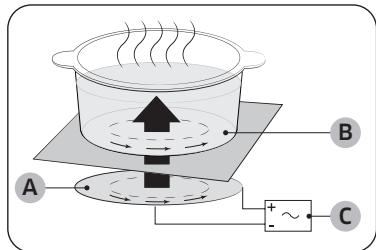
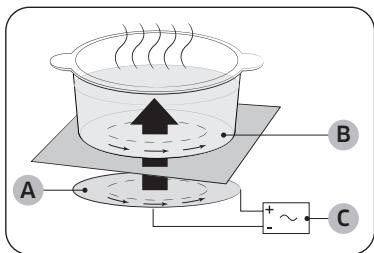
A. Induction coil
B. Induced currents
C. Electronic circuits
- The Principle of Induction Heating: When you place your cookware on a cooking zone and you turn it on, the electronic circuits in your induction hob produce "induced currents" in the bottom of the cookware which instantly raise cookware's temperature.
- Greater speed in cooking and frying: As the pan is heated directly and not the glass, the efficiency is greater than in other systems because no heat is lost. Most of the energy absorbed is transformed into heat.
Safety shutoff
If one of the cooking zones is not switched off or the power level is not adjusted after an extended period of time, that particular cooking zone will automatically switch itself off.
The cooking zones switch themselves off at the following times.
| Power level | Switch off |
| 1-3 | After 6 hours |
| 4-6 | After 5 hours |
| 7-9 | After 4 hours |
| 10-15 | After 1.5 hours |

NOTE
If the Hob is overheated because of abnormal operation, [H] will be displayed. And the Hob will be switched off.

NOTE
If cookware is unsuitable, too small, or no cookware has been placed on the cooking zone, will be displayed. And after 1 minute the corresponding cooking zone will be switched off.

NOTE
Should one or more of the cooking zones switch off before the indicated time has elapsed, see the "Troubleshooting".
Other reasons why a cooking zone will switch itself off
All cooking zones will switch themselves off if liquid boils over on the control panel.
The automatic shutoff will also be activated if you place a damp cloth on the control panel. In both of these instances, the appliance will need to be switched on again using the On/Off ① key after the liquid or the cloth has been removed.
Residual heat indicator
When an individual cooking zone or the hob is turned off, the presence of residual heat is shown with an H (for "hot") in the corresponding cooking zone display. Even after the cooking zone has been switched off, the residual heat indicator goes out only after the cooking zone has cooled. You can use the residual heat for thawing or keeping food warm.
WARNING
As long as the residual heat indicator is illuminated, there is a risk of burns.
WARNING
If the power supply is interrupted, the H h symbol will go out and information about residual heat will no longer be available. However, it may still be possible to burn yourself. This can be avoided by always taking care when near the hob.
Temperature detection
If for any reason the temperatures on any of the cooking zones were to exceed the safety levels, the cooking zone will automatically reduce to a lower power level. When you have finished using the hob, the cooling fan will continue to run until the hob's electronics has cooled down. And the cooling fan switches itself off depending upon the temperature of the electronics.
Cookware
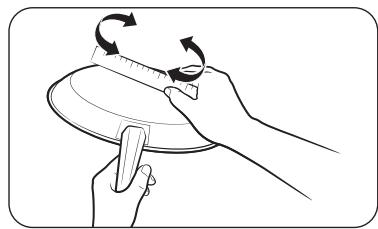
Use flat-bottomed cookware that completely contacts the entire cooking zone. Check for flatness by rotating a ruler across the bottom of the cookware. Be sure to follow all the recommendations for using cookware.
- Use cookware made with the correct material for induction cooking.
- Use quality cookware with heavier bottoms for better heat distribution. This gives best cooking results.
- Match the cookware size to the quantity of food being prepared.
- Do not let cookware boil dry. This may cause permanent damage in the form of breakage, fusion, or marring that can affect the ceramic hob. (This type of damage is not covered by your warranty).
- Do not use dirty cookware or cookware with heavy grease buildup. Always use cookware that is easy to clean after cooking.
CAUTION
- The cooking zones may appear cooled down after they have been turned off. However, the glass surface may be hot from residual heat transferred from the cookware. The risk of burns is still present.
- Do not touch hot cookware directly with your hands. Always use oven mitts or pot holders to protect your hands from burns.
- Do not slide cookware across the hob surface. Doing so may permanently damage the hob.
Cookware for induction cooking zones
The Induction burner can only be turned on when cookware with a magnetic base is placed on one of the cooking zones. You can use the cookware identified as suitable below.
| Material | Suitability |
| Steel, enameled steel, cast iron | Yes |
| Stainless steel | Yes (If magnet sticks to the bottom of the cookware) |
| Aluminum, copper, brass, glass, ceramic, porcelain | No |

NOTE
- Cookware appropriate for induction cooking is labelled as suitable by the manufacturer.
Certain cookware can make noises when being used on induction cooking zones.
These noises do not indicate that the hob is malfunctioning and do not affect its operation in any way.
- Special stainless-steel cookware may not be suitable for induction cooking. Check if the base of the cookware is attracted by a magnet.
Cookware sizes for induction cooking zones
Induction cooking zones adapt automatically to the bottom size of the cookware up to a certain limit. However, the magnetic part of the bottom of the cookware must have a minimum diameter depending upon the size of the cooking zone. For best results, use cookware whose ferromagnetic diameter match that of a burner. If the cookware is not sensed by the burner, try a smaller sized burner.

NOTE
For Cookware diameter, please refer to the model's Cooking zones specifications.
Other induction cookware
Some cookware has thin magnetic material on the bottom to work with an induction heating hob. These cookware has weak magnetism and may not work well. (Weak magnetism means a magnet does not stick firmly or the area where the magnet sticks is small.)
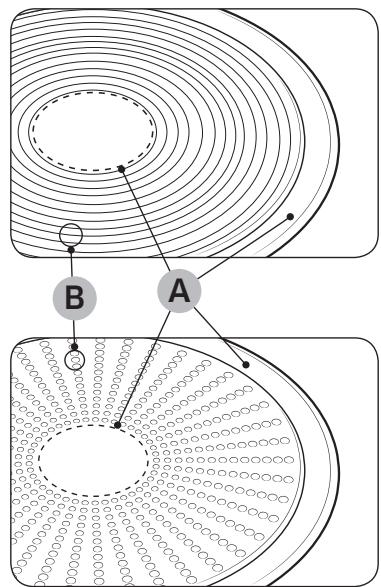
A. Area where magnet does not stick
B. Area where magnet sticks
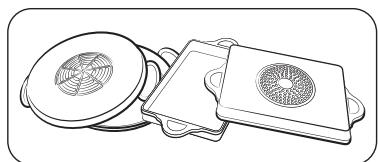
Even though cookware are designed for an induction hob, the heating performance could be weak or sometimes the hob may not detect the cookware depending on the size and strength of the magnetic area on the bottom of the cookware.
When using large cookware with a smaller ferromagnetic element, only the ferromagnetic element heats up. Consequently, heat might not be uniformly distributed.
Suitability test
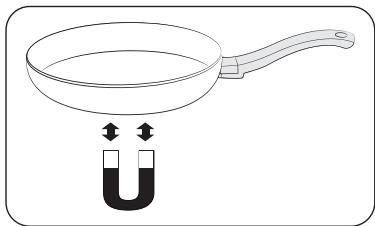
Cookware is suitable for induction cooking if a magnet sticks to the bottom of the cookware and the cookware is labelled as suitable by the cookware manufacturer.
- You can recognise good cookware by their bases. The base is supposed to be as thick and flat as possible.
- When buying new cookware, pay special attention to the diameter of the base. Manufacturers often give only the diameter of the upper rim.
- Do not use cookware which have damaged bases with rough edges or burrs. Damaged cookware can scratch the ceramic hob permanently if you slide them across the surface.
- When cold, cookware bases are normally bowed slightly inwards (concave). They must not be bent outwards (convex).
If you want to use a special type of cookware, for example, a pressure cooker, a simmering pan, or a wok, please follow the manufacturer's instructions.
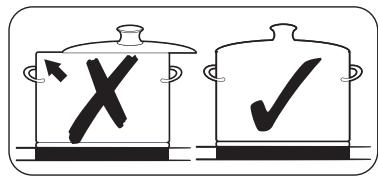
Correct positioning
| Correct | Incorrect |
| |
| Flat-bottomed cookware and straight sides | Cookware with curved or warped bottoms or sides |
| |
| The cookware meets or exceeds the recommended minimum size for the cooking zone. | The cookware does not meet the minimum size required for the current cooking zone. |
| |
| The cookware rests completely on the hob surface. | The cookware rests on the hob trim or does not rest completely on the hob surface. |
| |
| The cookware is properly balanced. | The heavy handle causes the cookware to tilt. |
Energy saving tips
Follow these tips to save power consumption.
Always put cookware on a cooking zone before you turn the corresponding burner on.
- Keep the cooking zones and cookware bases clean. Otherwise, more power will be consumed.
- Firmly close the cover of cookware if available. This will reduce power consumption.
- Turn the working burner off before the end of the cooking time. Use the residual heat to keep food warm.
Correct positioning
You can test cookware to see if they are suitable for use with the product.
- Press the On/Off ① key for 1-2 seconds to turn on the hob.
- Press the Pause & Lock key for 3 seconds to activate the child safety lock.
- Press the Timer key for 3 seconds to activate the cookware suitability test mode.
- Place the cookware on the one of the cooking zones, and then press and hold the Cooking zone key for 3 seconds.
| Display | Description |
| 0 | Cookware is unsuitable |
| 1-5 | Cookware is suitable, but inefficient |
| 6-10 | Cookware is suitable |
Before you start
To operate the touch buttons, touch the desired button with the tip of your pointed finger until the relevant displays illuminate or go out, or until the desired function is activated.
Ensure that you are touching only one button when operating the appliance. If your finger is too flat on the button, an adjacent button may be actuated as well.
Operating noises
If you can hear.
- Cracking noise: cookware is made of different materials.
- Whistling: you use more than two cooking zones and the cookware is made of different materials.
- Humming: you use high power levels.
- Clicking: electric switching occurs.
- Hissing, Buzzing: the fan operates.
The noise are normal and do not refer to any defects.
WARNING
Do not use cookware of different size and material.
Using cookware of different sizes or materials may cause noises and vibrations.
NOTE
Using low power levels (1-5) may cause clicking noises.
Initial cleaning
Wipe the ceramic glass surface with a damp cloth and ceramic hob glass cleaner.
WARNING
Do not use caustic or abrasive cleaners. The surface could be damaged.
Operation
Switching the appliance on
The appliance is switched on using the On/Off ① key. Press the On/Off ① key for approximately 1-2 seconds.
NOTE
After the On/Off ① key has been actuated to switch on your appliance, a power level must be selected within approximately 20 seconds. Otherwise, the appliance will switch itself off for safety reasons.
Switching the appliance off
To completely switch off the appliance, use the On/Off ① key.
Press the On/Off ① key for approximately 1-2 seconds.
NOTE
After switching off a single cooking zone or the entire cooking surface, the presence of residual heat will be indicated in the digital displays of the corresponding cooking zones in the form of an H, h two steps for "hot". The temperature is lowered, H, h will be disappeared.
Selecting cooking zone and power level
- For selecting the cooking zone, press the corresponding Cooking zone key.
- For setting and adjusting the power level, use the Control bar or Control key or Control knob.
| Control bar | 0 — — — 15 — Max |
| Control key | — + Max |
| Control Knob | Max |

NOTE
The default level is set to 15 when selecting the cooking zone.
If more than one key is pressed for longer than 8 seconds, d0 will show in the cooking zone display.
Suggested settings for cooking specific foods
The numbers in the table below are guidelines. The power level required for various cooking methods depend on a number of variables, including the quality of the cookware being used and the type and amount of food being cooked.
| Power level | Cooking method | Examples for Use |
| 14-15 | Warming / Sautéing / Frying | Warming large amounts of liquid, boiling noodles, searing meat, browning goulash, braising meat |
| 8-11 | Intensive frying | Steak, sirloin, hash browns, sausages, pancakes / griddle cakes |
| 7-10 | Frying | Schnitzel / chops, liver, fish, rissoles, fried eggs |
| 5-7 | Boiling | Cooking up to 1.5 l liquid, potatoes, vegetables |
| 2-4 | Steaming / Stewing / Boiling | Steaming and stewing of small amounts of vegetables, boiling rice and milk dishes |
| 1-2 | Melting | Melting butter, dissolving gelatine, melting chocolate |

NOTE
You will need to adjust the power level according to specific cookware and foods.
Operation
Max Boost
The Max Boost function makes additional power available to the each cooking zones. (example : bring a large volume of water to the boil)
After Max Boost times, the cooking zones automatically sets back to the highest heat setting.

NOTE
- In certain circumstances, the Max Boost function may be deactivated automatically to protect the internal electronic components of the hob. For example, It is impossible to output max power on Flex zone rear and Flex zone front at the same time.
Refer to your model's Cooking zones specification for Max Boost time.
Power management
The cooking zones have a maximum power available to them.
If this power range is exceeded by switching on the Max Boost function, Power Management automatically reduces the power level of cooking zone.
The display for this cooking zone alternates for some seconds between the set power level and the maximum possible power level. After then, the display changes from the set power level to maximum possible power level.
Using the Flex zone (Only for Flex zone applied models)
The Flex function can operate complete left side cooking zone for using large size cookware. (example : oval cookware, fish kettle)
- Press the Flex zone key.
- For setting and adjusting the power level, use the Power level key.

NOTE
- Press the Flex zone key during operating, Flex zone function will be off.
- If you press the Flex zone key while each burner operation different level, burner set at a high level.
Flex zone Plus (Only for Flex zone plus applied models)
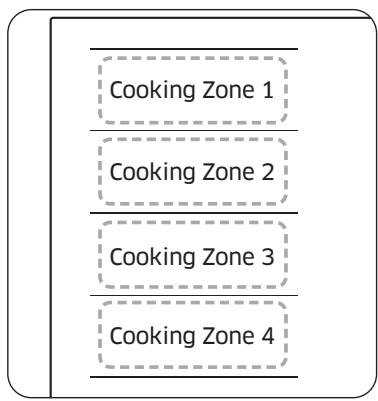
The Flex zone is the large cooking area located on the left side of the hob (see the figure left) that is specially designed to accommodate multiple pots and pans of varying shapes and sizes at once. The Flex zone has four zones that are operated by individual inductors, allowing you to cook regardless of where cookware is placed on a cooking zone.
With Flex zone Plus, you can use a combination of different cooking zones to enlarge the cooking area. Press the Flex zone key to use the cooking zone as follows.
| Cooking Zone 1 | Cooking Zone 1 | Cooking Zone 1 | Cooking Zone 1 |
| Cooking Zone 2 | Cooking Zone 2 | Cooking Zone 2 | Cooking Zone 2 |
| Cooking Zone 3 | Cooking Zone 3 | Cooking Zone 3 | Cooking Zone 3 |
| Cooking Zone 4 | Cooking Zone 4 | Cooking Zone 4 | Cooking Zone 4 |

NOTE
- When using only one cooking zone, the diameter of the bottom of the cookware must be less than 14 ~cm .
The hob may take 5-10 seconds to recognise the position of cookware.
Noises may occur while the hob recognise the cookware.
- Do not remove cookware during cooking. For safety purposes, the hob automatically stops if cookware has been removed for more than 5 seconds.
Using the Flex zone Plus (Only for Flex zone plus applied models)
- Press the Flex zone key.
- For setting and adjusting the power level, use the Power level key.

NOTE
- If you press the Flex zone key during operating, Flex zone function will be off.
- If you press the Flex zone key while each cooking zone is operating at different levels, it will be automatically adjusted to higher level.
- When moving or adding cookware to a new Flex zone, cancel the current operation, and then press the corresponding Cooking zone key to activate the cooking zone.
Operation
Keep Warm
- Use this function to keep cooked food warm. Press the corresponding Cooking zone key.
- Press the Keep warm key.
- The cooking zone display will be changed.
- Press the Keep warm key again to turn off the cooking zone.
Timer
Using the timer as a safety shutoff
If a specific time is set for a cooking zone, the cooking zone will shut itself off once this period of time has elapsed. This function can be used for multiple cooking zones simultaneously.
Setting the timer
The cooking zone(s) for which you want to apply the safety shutoff must be switched on.
- Press the Timer 心 key.
- Set timer by repeatedly pressing the Timer key.
- To cancel the timer settings, hold the Timer 口 key for 3 seconds.

NOTE
- To change the settings quicker, press and hold any of the Timer key until the desired value is reached.
- When the timer is terminated, it sounds a beep several times. However, the cooking zone will not be turned off.
Pause/Resume
The Pause/Resume function simultaneously switches all cooking zones that are switched on to the low power setting and then back to the power level that was previously set. This function can be used to briefly interrupt and then continue the cooking process e.g. to take a telephone call.
When the Pause/Resume function is activated, all keys except for the Pause & Lock _ (Sec)^ and the On/Off keys are disabled.
To resume cooking, press the Pause & Lock key again.
| Control Panel | Display |
| To Switch On | Press the
Pause & Lock II (3sec) key | " " |
| To Switch Off | Press the
Pause & Lock II (3sec) key | Return to previous power level |
Quick stop
This option reduces the step and time it takes to stop cooking.
To switch off a cooking zone, press the Cooking zone key for 2 seconds.

NOTE
The Flex zone key does not support quick stop function.
Child safety lock
You can use the child safety lock to safeguard against unintentionally turning on a cooking zone and activating the cooking surface. Also the control panel, with the exception of the On/Off ① key (Only turn off control), can be locked in order to prevent the settings from being changed unintentionally, for example, by wiping over the panel with a cloth.
Switching the child safety lock On/Off
- Press the Pause & Lock _ (5sec) key for approximately 3 seconds. An acoustic signal will sound as confirmation.
- Press any key. L will appear in the displays, indicating the child safety lock has been activated.
- For switching the child safety lock off, press the Pause & Lock key again for 3 seconds. An acoustic signal will sound as confirmation.

NOTE
- Regardless of power on/off, child lock is activated.
- You can set the child safety lock during cooking. To turn off the burner with the child safety lock on, press the On/Off ① key or turn off the child safety lock first and then press the corresponding Cooking zone ② key.
Maximum power limit
This function allows you to adjust the maximum power of the unit.
- Keep the power off.
- Press the Pause & Lock key for approximately 3 seconds to turn on the child safety lock.
- Press the left front Cooking zone key and right front Cooking zone key at the same time for approximately 3 seconds.
- Press the Timer key for approximately 3 seconds. The displays will show P_ and current maximum power.
- You can adjust the power limit using the Pause & Lock _ (ssec)^II key. (3000 W, 4000 W, 7400 W)
- Press the On/Off ① key to set the setting.

NOTE
In low-power (3000 W, 4000 W) mode, the power level will be adjusted automatically.
Sound on/off
- Press the On/Off ① key for approximately 1-2 seconds.
- Press the Timer 口 key for 3 seconds within 10 seconds after the power has turned on.
- Sound will turn off and DF will be displayed in the display.
- To change the sound setting, repeat steps 1 and 2. Sound will turn on and n will be displayed in the display.

NOTE
It is not possible to change the sound settings after 10 seconds from turning the power on.
Smart Connect
The hob has built in Wi-Fi module that you can use to sync the hob with the SmartThings app. On the smartphone app, you can:
- monitor the operating status and the power level settings of the hob elements.
check and change the timer settings.
Functions that can be operated from the SmartThings app may not work smoothly if communication conditions are poor or the product is installed in a place with a weak Wi-Fi signal.
How to connect the hob
Before you can use the remote features of your Samsung hob, you must pair it to the SmartThings app.
- Download and open the SmartThings app on your smart device.
- Press the On/Off ① key for approximately 1-2 seconds to turn the hob on.
- Press the Pause & Lock key for approximately 3 seconds to turn on the child safety lock.
- Follow the app's instructions, and then press and hold the Max key for 3 seconds.
- While the connection is being made, the Wi-Fi indicator will links. Once the process is complete, the indicator glows without blinking. Now the hob is connected successfully.
- If the Smart Connect Wi-Fi indicator does not turn on, follow the instruction in the app to reconnect.

NOTE
- Make sure to set the Smart Connect function only when no hob operation is in process.
For further instructions, refer to the web manual at www.samsung.com
Wi-Fi On/Off
To change the Wi-Fi On/Off, repeat steps 2 to 4.
Maintaining your appliance
Hood control
This product features a Bluetooth device that you can use to connect the hob to Samsung hood control models. Through the Bluetooth connection, you can use the hood control function on the SmartThings app.
To find out more about Samsung hood control-enabled models, visit www.samsung.com.
To connect to a hood control model
- Download and run the SmartThings app on your smartphone. Then, complete the Smart Connect procedure to connect to the hob.
- Follow the Bluetooth instructions of the hood control model and activate the Bluetooth connection.
- Press and hold the Timer 口 and Pause & Lock 口 (Sec) keys simultaneously to make the Bluetooth connection. When the Bluetooth connection is successfully established, 口 appears on the display.
- Follow the instructions in the user manual of the hood control model and the App guide to use the hood control.

NOTE
- If the Smart Connect connection is not successful, you cannot use the SmartThings app to monitor and control the hood.
- Without a Smart Connect connection to the hob, you can use a Bluetooth connection to pair the hob with the hood and sync them. To do this, follow steps 2 and 3 above.
Hob

WARNING
Cleaning agents must not come into contact with a heated ceramic glass surface: All cleaning agents must be removed with adequate amounts of clean water after cleaning because they can have a caustic effect when the surface becomes hot. Do not use any aggressive cleaners such as grill or oven sprays, scouring pads or abrasive pan cleaners.

NOTE
Clean the ceramic glass surface after each use when it is still warm to the touch. This will prevent spillage from becoming burnt onto the surface. Remove scales, watermarks, fat drippings and metallic discolouration with the use of a commercially available ceramic glass or stainless steel cleaner.
Light soiling
- Wipe the ceramic glass surface with a damp cloth.
- Rub dry with a clean cloth. Remnants of cleaning agent must not be left on the surface.
- Thoroughly clean the entire ceramic glass cooking surface once a week with a commercially available ceramic glass or stainless steel cleaner.
- Wipe the ceramic glass surface using adequate amounts of clean water and rub dry with a clean lint - free cloth.
Stubborn soiling
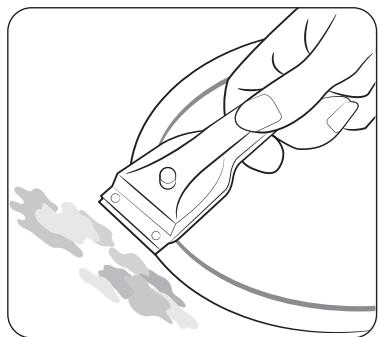
- To remove food that has boiled over and stubborn splashes, use a glass scraper.
- Place the glass scraper at an angle to the ceramic glass surface.
- Remove soiling by scraping with the blade.
NOTE
Glass scrapers and ceramic glass cleaners are available from specialty retailers.
Problem dirt

- Remove burnt-on sugar, melted plastic, aluminium foil or other materials with a glass scraper immediately and while still hot.
WARNING
There is a risk of burning yourself when the glass scraper is used on a hot cooking zone:
2. Clean the hob as normal when it has cooled down. If the cooking zone on which something has melted has been allowed to cool, warm it up again for cleaning.
NOTE
Scratches or dark blemishes on the ceramic glass surface, caused, for example, by a pan with sharp edges, cannot be removed. However, they do not impair the function of the hob.
Troubleshooting and service
Hob frame (option)
WARNING
Do not use vinegar, lemon juice or scale remover on the hob frame; otherwise dull blemishes will appear.
- Wipe the frame with a damp cloth.
- Moisten dried debris with a wet cloth. Wipe and rub dry.
To avoid damaging your appliance
- Do not use the hob as a work surface or for storage.
- Do not operate a cooking zone if there is no pan on the hob or if the pan is empty.
- Ceramic glass is very tough and resistant to temperature shock, but it is not unbreakable. It can be damaged by a particularly sharp or hard object dropping onto the hob.
- Do not place pans on the hob frame. Scratching and damage to the finish may occur.
- Avoid spilling acidic liquids, for example, vinegar, lemon juice and descaling agents, onto the hob frame, since such liquids can cause dull spots.
- If sugar or a preparation containing sugar comes into contact with a hot cooking zone and melts, it should be cleaned off immediately with a kitchen scraper while it is still hot. If allowed to cool, it may damage the surface when removed.
- Keep all items and materials that could melt, for example, plastics, aluminium foil and oven foils, away from the ceramic glass surface. If something of this nature melts onto the hob, it must be removed immediately with a scraper.
Troubleshooting
A fault may result from a minor information that you can correct yourself with the help of the following instructions. Do not attempt any further repairs if the following instructions do not help in each specific case.
WARNING
Repairs to the appliance are to be performed only by a qualified service technician. Improperly effected repairs may result in considerable risk to the user. If your appliance needs repair, please contact your customer service centre.
| Problem | Possible cause | Solution |
| What should I do if the cooking zones are not functioning? | ·The fuse in the house wiring is not intact. | ·If the fuses trip a number of times, call an authorised electrician. |
| What should I do if the cooking zones will not switch on? | ·The On/Off ① key was accidentally actuated.
·The control panel is partially covered by a damp cloth or liquid. | ·The appliance is properly switched on.
·Clean the control panel. |
| What should I do if the display except for H, H the residual heat indicator suddenly disappears? | ·The On/Off ① key was accidentally actuated.
·The control panel is partially covered by a damp cloth or liquid. | ·The appliance is properly switched on.
·Clean the control panel. |
| What should I do if, after the cooking zones have been switched off, residual heat is not indicated in the display | ·The cooking zone was only briefly used and therefore did not become hot enough. | ·If the cooking zone is hot, please call a local service centre. |
| Information code | Possible cause | Solution |
| CO | There is a problem with the burner temperature sensor. | Restart the appliance using the On/Off ① key. If the problem continues, disconnect power for more than 30 seconds. Then, restart the appliance and try again. If the problem still continues, contact a local service centre. |
| C1 | The temperature is sensed higher than specified. |
| C2 | There is a problem with the PBA sensor. |
| R2 | The DC Motor fails to operate because of problems with the PCB or wiring, or electrical disturbance on the motor blade. |
| d0 | A key is being pressed for more than 8 seconds. | Check if the key is wet or is being pressed. If the problem continues, restart the appliance using the On/Off ① key. If the problem still continues, contact a local service centre. |
| F0 | Communications between main and sub PCBs fail. | Restart the appliance using the On/Off ① key. If the problem continues, disconnect power for more than 30 seconds. Then, restart the appliance. If the problem still continues, contact a local service centre. |
| F2 | The touch-enabled IC communicates abnormally. |
| UP | It is out of normal voltage (220 ~ 240 V). | Check home power environment. |
| u | If the cooking container is not suitable for the induction, or operates without the cooking container, it is displayed. | Use a cooking container suitable for inductions. |
What should I do if the cooking zone will not switch on or off?
This could be due to one of the following possibilities:
The control panel is partially covered by a damp cloth or liquid.
The child safety lock is on. and display L.
What should I do if the display is illuminated?
Check for the following:
- The control panel is partially covered by a damp cloth or liquid. To reset, press the On/Off ① key.
If liquid has overflowed on control panel, please wipe the liquid.
What should I do if the [ ]display is illuminated?
Check for the following:
The hob is overheated because of abnormal operation.
After hob is cooled down, press the On/Off ① key for resetting.
What should I do if the display is illuminated?
Check for the following:
Cookware is unsuitable, too small, or no cookware has been placed on the cooking zone.
If you use suitable cookware, displayed message will automatically disappear.
What should I do if the cooling fan runs after the hob is turned off?
Check for the following:
- When you have finished using the hob, the cooling fan runs by itself for cooling down.
After the hob's electronics has cooled down or elapsed max time (10 minutes) the cooling fan will be turned off.
- If you request a service call because of an information made in operating the appliance, the visit from the customer service technician may incur a charge even during the warranty period.
Service
Before calling for assistance or service, please check the section "Troubleshooting". If you still need help, follow the instructions below.
Is it a technical fault?
If so, please contact your customer service centre.
Always prepare in advance for the discussion. This will ease the process of diagnosing the problem and also make it easier to decide if a customer service visit is necessary.
Please take note of the following information.
What form does the problem take?
Under what circumstances does the problem occur?
When calling, please know the model and serial number of your appliance. This information is provided on the rating plate as follows:
Model description
S/N code (15 digits)
We recommend that you record the information here for easy reference.
Model:
Serial number:
When do you incur costs even during the warranty period?
- If you could have remedied the problem yourself by applying one of the solutions provided in the section "Troubleshooting".
- If the customer service technician has to make several service calls because he was not provided with all of the relevant information before his visit and as a result, for example, has to make additional trips for parts. Preparing for your phone call as described above will save you the cost of these trips.
QUESTIONS OR COMMENTS?
| COUNTRY | CALL | OR VISIT US ONLINE AT |
| AUSTRIA | 0800 72 67 864 (0800-SAMSUNG) | www.samsung.com/at/support |
| BELGIUM | 02-201-24-18 | www.samsung.com/be/support(Dutch)
www.samsung.com/be_fr/support(French) |
| DENMARK | 707 019 70 | www.samsung.com/dk/support |
| FINLAND | 030-6227 515 | www.samsung.com/fi/support |
| FRANCE | 01 48 63 00 00 | www.samsung.com/fr/support |
| GERMANY | 06196 77 555 77 | www.samsung.com/de/support |
| ITALIA | 800-SAMSUNG (800.7267864) | www.samsung.com/it/support |
| CYPRUS | 8009 4000 only from landline, toll free | www.samsung.com/gr/support |
| GREECE | 80111-SAMSUNG (80111 726 7864) only from land line (+30) 210 6897691 from mobile and land line | www.samsung.com/gr/support |
| LUXEMBURG | 261 03 710 | www.samsung.com/be_fr/support |
| NETHERLANDS | 088 90 90 100 | www.samsung.com/nl/support |
| NORWAY | 21629099 | www.samsung.com/no/support |
| PORTUGAL | 210 608 098 Chamada para a rede fixa nacional Dias úteis das 9h às 20h | www.samsung.com/pt/support |
| SPAIN | 91 175 00 15 | www.samsung.com/es/support |
| SWEDEN | 0771-400 300 | www.samsung.com/se/support |
| SWITZERLAND | 0800 726 786 | www.samsung.com/ch/support(German)
www.samsung.com/ch_fr/support(French) |
| UK | 0333 000 0333 | www.samsung.com/uk/support |
| IRELAND (EIRE) | 0818 717100 | www.samsung.com/ie/support |
| COUNTRY | CALL | OR VISIT US ONLINE AT |
| ALBANIA | 045 620 202 | www.samsung.com/al/support |
| BOSNIA | 055 233 999 | www.samsung.com/ba/support |
| NORTH MACEDONIA | 023 207 777 | www.samsung.com/mk/support |
| BULGARIA | 0800111 31 - Бразлатен за вс neuropи оретаportи *3000 - Сени на[eин градскп разковения сpopе дарфата на мобiliansу оретаport 09:00 до18:00 - Понеделник до пétбк | www.samsung.com/bg/support |
| CROATIA | 072 726 786 | www.samsung.com/hr/support |
| CZECH | 800 - SAMSUNG (800-726786) | www.samsung.com/cz/support |
| HUNGARY | 0680SAMSUNG (0680-726-7864) | www.samsung.com/hu/support |
| MONTENEGRO | 020 405 888 | www.samsung.com/support |
| POLAND | 801-172-678* lub +48 22 607-93-33* (opłata wedlug taryfy operadora) | http://www.samsung.com/pl/ support/ |
| ROMANIA | 0800872678 - Apel Gratis *8000 - Apel tarifat in retea Program Call Center Luni - Vineri: 9 AM - 6 PM | www.samsung.com/ro/support |
| SERBIA | 011 321 6899 | www.samsung.com/rs/support |
| SLOVAKIA | 0800 - SAMSUNG (0800-726 786) | www.samsung.com/sk/support |
| LITHUANIA | 8-800-77777 | www.samsung.com/lt/support |
| LATVIA | 8000-7267 | www.samsung.com lv/support |
| ESTONIA | 800-7267 | www.samsung.com/ee/support |
| SLOVENIA | 080 697 267 (brezplačna številka) | www.samsung.com/si/support |
| KOSOVO | 038 40 30 90 | www.samsung.com/support |
QUESTIONS OU COMMENTAIREs?
| PAYS | APPELEZ-NOUS | OU VISITEZ-NOUS EN LIGNE À |
| AUSTRIA | 0800 72 67 864 (0800-SAMSUNG) | www.samsung.com/at/support |
| BELGIUM | 02-201-24-18 | www.samsung.com/be/support
(Dutch)
www.samsung.com/be_fr/support
(French) |
| DENMARK | 707 019 70 | www.samsung.com/dk/support |
| FINLAND | 030-6227 515 | www.samsung.com/fi/support |
| FRANCE | 01 48 63 00 00 | www.samsung.com/fr/support |
| GERMANY | 06196 77 555 77 | www.samsung.com/de/support |
| ITALIA | 800-SAMSUNG (800.7267864) | www.samsung.com/it/support |
| CYPRUS | 8009 4000 only from landline, toll free | www.samsung.com/gr/support |
| GREECE | 80111-SAMSUNG (80111 726 7864)
only from land line
(+30) 210 6897691 from mobile and
land line | www.samsung.com/gr/support |
| LUXEMBURG | 261 03 710 | www.samsung.com/be_fr/support |
| NETHERLANDS | 088 90 90 100 | www.samsung.com/nl/support |
| NORWAY | 21629099 | www.samsung.com/no/support |
| PORTUGAL | 210 608 098
Chamada para a rede fixa nacional
Dias Úteis das 9h às 20h | www.samsung.com/pt/support |
| SPAIN | 91 175 00 15 | www.samsung.com/es/support |
| SWEDEN | 0771-400 300 | www.samsung.com/se/support |
| SWITZERLAND | 0800 726 786 | www.samsung.com/ch/support
(German)
www.samsung.com/ch_fr/support
(French) |
| UK | 0333 000 0333 | www.samsung.com/uk/support |
| IRELAND (EIRE) | 0818 717100 | www.samsung.com/ie/support |
| PAYS | APPELEZ-NOUS | OU VISITEZ-NOUS EN LIGNE À |
| ALBANIA | 045 620 202 | www.samsung.com/al/support |
| BOSNIA | 055 233 999 | www.samsung.com/ba/support |
| NORTH MACEDONIA | 023 207 777 | www.samsung.com/mk/support |
| BULGARIA | 0800111 31 - Бразлaten за вClsчkn onepatopri *3000 - Сени на[eи范围内 градскп разковор пл сpopетд тарифата на моблиниот onepatop 09:00 до 18:00 - Понеделник до Пétьк | www.samsung.com/bg/support |
| CROATIA | 072 726 786 | www.samsung.com/hr/support |
| CZECH | 800 - SAMSUNG (800-726786) | www.samsung.com/cz/support |
| HUNGARY | 0680SAMSUNG (0680-726-7864) | www.samsung.com/hu/support |
| MONTENEGRO | 020 405 888 | www.samsung.com/support |
| POLAND | 801-172-678* lub +48 22 607-93-33* (opłata według taryfy operatora) | http://www.samsung.com/pl/ support/ |
| ROMANIA | 0800872678 - Apel Gratis *8000 - Apel tarifat în reftea Program Call Center Luni - Vineri: 9 AM - 6 PM | www.samsung.com/ro/support |
| SERBIA | 011 321 6899 | www.samsung.com/rs/support |
| SLOVAKIA | 0800 - SAMSUNG (0800-726 786) | www.samsung.com/sk/support |
| LITHUANIA | 8-800-77777 | www.samsung.com/lt/support |
| LATVIA | 8000-7267 | www.samsung.com/lv/support |
| ESTONIA | 800-7267 | www.samsung.com/ee/support |
| SLOVENIA | 080 697 267 (brezplačna številka) | www.samsung.com/si/support |
| KOSOVO | 038 40 30 90 | www.samsung.com/support |
Induktionskochfeld
Benutzerhandbuch
Inhalt
3
| Strømindstilling | Sluk |
| 1-3 | After 6 timer |
| 4-6 | After 5 timer |
| 7-9 | After 4 timer |
| 10-15 | After 1,5 timer |
BEMAERK
Nume model 山 numar de series 3
U3noA3BaHe Ha moBa pkoBogcmBo 3
Bpko8ogcmBomo 3a nompe6umela ca u3no3BaHc cleghme cumBou: 3
ImeHaMogelaU cepueH Homep 3
Hcmpykuuu 3a6e3onacnocm 3
U3xBbPpAHe Ha onakoBbHua Mamepua7
IpaBuaHOn u3xBpbLnHe Ha Bausha Cmap ypeg 7
Ipa8uAno u3xBbPpAne Ha npogykma
(Omnagbuc om ekempueceko ekempponno o6opygBahe) 7
HcmaIupaHeHa nloyama 8
Hcmpkyu 3a 6e3onacnocm 3a uncmalupaomol uue 8
Heo6xogumu uhcmpymehmu 8
C8bp3BaHe kBm ealekmpueckomo 3axpaHBaHe 8
HcmaIupaHeBnoma 9
Komnohehmu 11
Ipegu ga 3anouheme 11
3oHu 3a zomBene 11
Panae3aynpaBaeHue 12
IngykuoHno 3aepBahe 13
3aumno u3kau8ahe 13
Ihgukamop 3a ocmambcha monuha 14
UcmaHO8BaHeHa memnepamypama 14
Tom8apcku cgo8e 14
I3noa3BaHe ha ceH3OpHume 6ymoHu 18
Pa6omHu wymoBe 18
ПьрБонан nouchmBaHe 18
Pa6oma 18
BkIouBaHeHa ypega 18
I3kAnuBaHeHa ypega 18
U360pHa 30Ha 3a 2om8eHe u HuBo Ha MouHocm 19
YBeIuHaBHe Ha MoUHocmma 20
I3no3BaHe Ha 30Hama Flex (cAmo 3a Mogeu c6c 30Ha Flex) 20
30Ha Flex Plus (cAmo 3a MogeAu cbc 30Ha Flex) 21
3ana3eme monu 22
Taumep 22
Pay3a/nogho8Bahe 22
Бьрзо сиранe 22
3akIou8aHe 3a 3auima Ha geua 23
Aumum 3a MakcumaHa MoUHocm 23
BkIIOUBaHe/u3kIIOUBaHe Ha 38yka 24
Smart Connect 24
UnpaBLeHueHaab6cop6amopa 25
PoggbpkaheHa ypega 25
Плоча за зомВени 25
Aeko 3ambypcBahe 25
Ynopumo 3ambypc8Bahe 26
Ipo6aemno 3ambpcBahe 26
PamkaHa nloyama (onzua) 27
3a ga u36e2heme no8pega Ha ypega 27
OmcpaHaBae Ha Heu3npaBHocmu U cep8u3upahe 27
OmcpaHaBaHe Ha Heu3npaBHocmu 27
O6caykBaHe 29
ИзnoλЗВане на моВа рьkoВogсмВо
Omgeleme 8peme ga npouememe moBa pkoBogcmBo ha co6cmBeHuka, kamo o6bpne me oc6eNo BHumane Ha unHopMauzma 3a 6e3onacnocm, c6gpbkaa ce 8 clegBaua pa3geA, npegu ga u3noA3Bame ypega. 3ana3eme moBa pkoBogcmBo 3a 6bgeu cnpaBku.
Ako npegaBame npumekaHuemo Ha yega Ha gpy2, He 3a6paBmae ga npegageme pboKoBogcmBomo Ha HoBua co6cmBeHuk.
B pko8ogcm8omo 3a nompe6umeA ca u3noA3BaHu clegHume cumBoAU:
I PDEyIpyEKAEHNE
Onachocmu uu onach nu npakmuku, koumo mozam ga goBegam go mekku meAechu hapaHaBau uu cmbpm.
BHUMAHNE
Onachocmu uu onacnu npakmuku, koumo mozam ga goBegam go Aeku meAechu hapaHaBau uuu noBpega Ha umyuuecmBo.
BHIMAHHE
3a ga haama ume pucka om noxap, ekcnlo3u, moko8 ygp uu HapaHBahe npu u3no3Bahe Ha nIoYama, clegBaume me3u ochoBnu npegna3Hu mepku.
3A6EAEKKA
Ioe3HcB8emu, npenopbku ulu unphiopmaue, koryo nomaza ha nompe6umeame gapa6omam c npogykma.
ImeHaMogelaU cepuenHomep
Imemo Ha mogeaa u cepuunhurn homep ca om6eJ3aHn ha emukem nog ochoBama naOyama.
3a no-hamambshna ynompe6a 3anuweme uHΦopmauzma uu npukpeneme gonbHumeA emukem Ha npogykma (pa3noLoKeH B zoPama qacm Ha npogykma) kBM mekyama cmpahuca.
ImeHaMoga
Cepueh Homep
Инсмрукцuu 3a 6e3onacHocm
Mepkume 3a 6e3onachocm Ha moBa ycmpoucmbo cbomBemcBam Ha Bcuju npemu cmangapmu 3a mexnuka u 6e3onachocm. Bbnpeku moBa, kamo npou3Bogumeu, Hue uy8cmBame kamo cBoe 3agbAkeHue ga Bu 3ano3Haem cbc clegHume uHcmpykuu 3a 6e3onachocm.
A INPEAUYPEXKAEHNE
To3u ypeg He enpegha3haen 3a ynompe6a om Auza (BkauoumelHo geua) c hamaenu cemBnu uUy McBenu cnoc6hocmu, c Hegocmambueh onum u no3hanu, ocBEN akO He ce Ha6IogaBam Uu He ca um gagehu uncmpykuu omHocno ynompe6ama Ha ypega om Auue, om2oBopno 3a mXhama 6e3onacHocm.
Deuama mpr6Ba ga 6bgam nog hag3Op, 3a ga ce zapaHmupa, ye Hma ga cu u2paam cypega.
To3u ypeg moke ga ce u3no3Ba om geua nag 8-2oguusha Bb3pacm u om Aua c hamaelenu fU3uuecku,cemBhu uU ymcBenu cnoc6nocmu, c Hegocmambueh onum u no3haun,ako ce ha6IogaBam uU ca um gagehu uncmpykuu 3a ynompe6ama na ypega no 6e3onaceH naun u me pa3upam onacnocmume. Deuama He 6uBa ga cu u2paarm cyega. POnucmbaHemo u nogpbkkama om nompe6umela He mpr6Ba ga ce u3BbPwBam om geua 6e3 nag3op. PpekbAhemo Ha Bp3kama mpr6Ba ga 6bge BzpageboB8 ukcupahomo oka6eBAhe cnopeg npaBulama 3a okabEBAhe.
Инсмрукцuu 3a 6e3onacnocm
IpekbcBaanmo Ha Bpb3kama Ha ypega mpr6Ba ga e Bb3Moxkno cleg moHmack. ToBa moKe ga ce nocmu2He, kamo ocuzypume gocmbn go uencea unu B2pagume npekbC8auchn npaBulama 3a oka6eBbAhe.
Ako 3axpanBauzum ka6e enoBpegen, moi mpr6Ba ga 6bge
3aMeHen om npou3BogumeI, he2oB cepBu3en npegcmaBumeI uu
Luce cbc cxogHa kBaIuΦukauz, 3a ga ce u36e2He onacnocm.
Iocouhenm Memog Ha pfukcupane He mpr6Ba ga 3aBucu om
Aenula, mbu kamo me He ce cyumam 3a HageXgHu hauhu 3a
Φukcupane.
ПЕДУПЕЖДЕНЕ: Ако поьрхонсмma e науkaнa, узклочeme ypega, за ga у3бeиеме onachocmma om moko8 ygap.
Ypegbme haojaBa no BpeMe ha pa6oma. Tp6Ba ga ce u362Ba gokocBaHemo Ha haopeBamehume elemehmu BbB
BbmpewHoemmaHa nIoouama.
ПЕДУПЕЖДEHNE: Omkpumume часMu може ga ce haagsperm no BpeMe Ha pa6oma. ПаЗeme Maʌkume geua hacmpaHu.
He mpr6Ba ga ce u3no3Ba napocmpyuka.
MemaHume npegmemu kamo hokOBe, BuliUci, IbJkuU u kanaU He mpr6Ba ga ce nocmaBam Bbpxy nIoUama, 3aUomo moKe ga ce Ha2opeuIm.
Cleg u3noA3BaHe u3kIoUcHeme nIoUama u He pa3Umaume Ha gemekmopa 3a mu2aHu.
Eeekmpoypegbm He enpegha3haueh ga pa6omu nocpegcmBom BbHneH maUmep uU omgeHa cucmema 3a gucmaHuoHno ynpaBHeHue.
BHNMAHNE:Пюесьм Ha 2omBeHe mpr6Ba ga 6bge Ha6IoGaBaH. Kpamkume npouecu Ha 2omBeHe mpr6Ba ga ce Ha6IoGaBam nocmOHHo.
Ype6b m He mpr6Ba ga ce mohmupa 3ag gekopamuBnu Bpamu, 3a ga ce u36e2He npe2p8aHe.
ПЕДУПЕЖДEHИЕ:У pegьm u omkpumume уacmu мozam ga ce hazperm no 8bpeme ha pa6oma.Tpr6Ba ga ce BnMaBa ga ce u36a2Ba gonupb m go hazpeBameHume eIememu. Deua, koumo ca noMaAku om 82ogunu,mp6Ba ga He ce go6LxkaBam go fyphama, ocBen akO He ca Na6IoogaBanu Henpekbchamo.
ПЕДУПЕЖDEHNE: zomБенemo 6e3 nag30p Bbpy nIoya c Ma3HuHa uU oUo moKe ga e onacHo u ga goBege go noJkap.
HNKOΓA He ce onumBaumge ga zacume o2bH c Boga, a u3kLioyeme ypega u nocIe nokpuimc nnambka c kanak uu noxkapno ogeraIo.
ПЕДУПЕЖDEHNE: Onachocm om noжар: He cxbpaньаum npegmemu Bbpxy noBbpxhocmume 3a 2omBehe.
IPEyIPEKDEHNE: 3no3Baume camo npegna3umeu 3a
zomBapcu nloyu, koumo ca pa3pa6omehu om npou3BoogumeA
ha kyxHeNcku ypeg uuu nocoueHu kamo nogxogau om
npou3BoogumeA ha ypega B uncmpykuuume 3a ynomp6a, uuu
maku8a, koumo ca 82pagenu. I3no3BaHemo Ha Henogxogau
npegna3umeu moke ga goBege go 3Anonoyku.
Iobbpxhocmme moke ga ce haopezma no Bpeme ha u3noA3BaHe. To3u ypeg moke ga ce u3noA3Ba om geua hag 8-2oguusha B63pacm u om Aua c hamaenu fuzuecku,cemBnu UU ymcBenu cnoc6hocmu, c heqcmambuen onum u no3hanu,ako ce H6IoogaBam uu ca um gagehu uncmpykuu 3a ynompe6ama na ypega no 6e3onacehauun u me pa36upam onachocmume. Deuama He 6uBa ga cu u2paarm cyega. Pooucmbahemo u noggpbkkama om nompe6umeIe He mpr6Ba ga ce u3BbpuBam om geua, ocBeH akO He ca Ha B63pacm hag 8 2oguHu ca H6IoogaBahu.
Apbjkmye ypega u 3axpaHBauzma my ka6eI galeu om geua, no-MaIku om 82oguHu.
BHIMAHNE
Iopuxkeme ce ypegbm ga 6bge npaBuaHOn uHcmaUpaH u 3a3emohom kBaAuphiucpaH mexHuk.
Upeb mmp6Ba ga ce 06cIyKBa mexHuecku cmo om kBaIuΦuupan cepBuzen nepcoHa. Pemohmume, u3Bpweu om HekBaIuΦuupanxopa, mozam ga npuunHm hapaHaBahe uu cepuo3Ha Heu3npaBnocm. Ako ypeb m Bu mpr6Ba ga 6bge peMoHmuapan, ce cBpxkeme C mecHnra cepBu3eH ueHmbp. Hecna3BaHemo Ha me3u unHcmpykuu moKe ga goBege go no8pega ug aHyIupa zapaHua.
Upegume 3a BapaKgaHe moZam ga ce u3noA3Bam camo cleg kamo ca Mohmupanu B ukafoBe u pa6omHu nIomOBe, koumo om2oBapm Ha cboMBeHume cmaHgapmu. ToBa ocuzypBa gocmambyna 3auuma cpeuy konmakm c ealekmpuecku ypegu, kakBomo e u3uckBaHemo Ha npuLoKumme cmaHgapmu 3a 6e3onacnocm. Ako ypegbM Bu e Heu3npaBEn uu Ce no8Bm cynBaHua, HanykBaHua uu NaenBaHua:
uzkIouyeme Bcuku 30nU 3a 2omBene;
- u3kʌlʊeme nʌoma om eʌlekmpo3axpaHBaHemo u
ce cBpKeme c mecmnue cepBuzen eHmbp.
Ako nIoouama ce Hanyka, u3kIoUcHeme ypega, 3a ga u36e2Heme onacHocmma om moko8 ygap. He u3no3Baume nIoUaMA, gokamo cMbKLeHama noBbpxHocm He 6bge cMeHeHa.
Инсмрукцuu 3a 6e3onacnocm
He u3noλ3Baǔme nλoγama 3a hαρβBaHe ha aλymuHueBo φολuo, npogykmu, yBμmU B aλymuHueBO φολuo, uλu 3ampa3eHu xpaHu, onakoBaHn B aλymuHueBu cβgoBe.
TeuHocm MeXggy gBHomO Ha cBga U nIoYama MoXe ga cB3gage napHo HauJzHe.ToBa moXe ga hakapa cBga ga nogckou.
Bunazu ce yBepaBame, ye nloyama u ocnoBama ha c6ga ca cyxu. 3Onume 3a 2omBehe ce haopeuBam, kozamo 2omBume.
Bunazu nazeme maikume gea galey om yega.
Ia3eme Bcuku onakoBbnu MamepuaU u3BbN o6ce2a ha geua, mbu kamo onakoBbnuhme mamepuaU moke ga ca onacHu 3a geua.
To3u ypeg mpr6Ba ga ce u3noA3Ba camo 3a HopmaAnho 2omBeHe u nbpjkehe B gomaunu yc0Bua. ToH e npegHa3nueh 3a mbp2oBcka uu npomuUeHa ynompe6a.
Hukozha He u3no3Baume nIoayama 3a omonIeHue Ha nomeenuemo. BnmaBaume npu 8kIouBaHe Ha eIekmpoypegu 8 konmakmu 8 6U3ocm go nIoayama. MpekoBume ka6eLu He mpr6Ba ga ce gonupam go nIoayama.
Ipezprama Ma3nHa u oAuo Mozam ga ce 3anaAam 6bp30. Hukoza He ocmaBraume ypegume 6e3 hag3op, kozamo npuzomBame xpaHu B Ma3nHa uA uOuo, kamo Hanp. npu npuzomBane Ha unc.
Cleg ynompe6a u3kAIOUBaIme 30Hume 3a 20mBeHe.
Bunazu nazeme nahela 3a ynpaBleHue yucm u cyx.
He nocmaBjaume 3anaAumu npegmemu Bbypxy nIoayama, 3aouomo.
moke ga npegu3Bukam noxap.
Cbuecm8yBa onachocm om u32apnru om ypega, akc ce u3noa3Ba HenpegnazuBo.
Ka6eIume ha eIekmpuuecku ypegu He mpr6Ba ga gokocBam 2opeuzama noBbpxHocm Ha nIoUa ma uu Ha2opeuenceHu c6goBe.
He u3no3Baume nIooyama 3a cywehe Ha gpexu.
Pompe6umeu c neucmeukbpu u akmuBnu cbpgeHu umnlaHmu mpr6Ba ga noggbpkam muHmalaHo pa3cmoHue om 30 cm om unhykquohume 3oHu 3a 2omBene, kozamo ca Bkluoyehu. Ako ce koale6aeme, ce cBbpkeme c npou3BogumeHa ycmpoUcBomo uu Baushra lekap. (Camo 3a Mogela c unhykquoHna nloa)
He ce onumBaume ga pemohmupame, pa32Io6Bame uu u3meHame ypega camu.
Bunau u3kauBaume ypega npegu noucmbane.
Pouucmbaume nIooyama B cboBemcBue c uncmpykuume 3a noucmbahe u 2puku, Bkauene H hacmouo pkoBogcmBo.
Дрьжme gomaunume An6umu nagaue om ypega, mbu kamo moke ga cmbnam Bbpxy elemehmume 3a ynpaBleHue ha ypega u ganpuunam Heu3npa8nocm.
N3xBbPnHe Ha onakoBcHnMaMamepua
I PDEAUYPEXAEHNE
Bcuku Mamepua, u3no3BaHu 3a onakoBaHe ha yega, ca HanbHpo peukuPyemu.
UacmoBume yacmu u yacmume om mBbpga nHa ca mapkupaHn no cbomBemnua HauH.
13xBpAme onakoBchume MamepuaU cmapume ypegu, kamo hagAekHo cna3Bame
Mepkume 3a 6e3onachocm u okoLambda cpega.
PpAbuHou 3x6bpaHe Ha Baua cmap ypeg
I PDEAUYPEXAEHNE
Ipegu ga u3x8bPmme cmapu cu ypeg, zo HanpaBeme hezogen 3a ynompe6a, makae ga He moke ga 6bge u3mouHuk Ha onacHocm. 3a ga HanpaBume moBa, mpr6Ba kBaUfUpuAn mexHuk ga u3kLIOUypega om MpekoBomo 3axpaHBeHe u ga omcmpaHUmpekoBua ka6eA.
Ypegbm He moke ga ce u3xBbpyc 6umoBume omnagbu.
Информача за gamUME за сбupaанe у nyбluчиmaунknmoBe за npegaBahe на omnagbuz мокеме ga noLyuime om MecmHa mca cu cLyk6a no omnagbuzmte uUu om obuHama.
PpaBuaHNo u3x8bPaIHe Ha npogykma (Omnagbu om eAlekmpuuecko u eAlekmpoHNO 06OpygBaHe)

(npuokumbo 8bpxkaBcu cuscmemu 3pa43geAhoC6bupahe) Ta3u Mapkupo8ka Bpxy npogykma, akcecoapu uuu neamhu Mamepuauo 03naaBa, ye npogykmbu u HezoBu eekmpueecku akcecoapu (hanp. 3aprgno, CyaWaaKu, USB ka6eAn) Hmpe6Ba ga ce u3x8bpIamc 6muBou omnagbu ha kpar Ha ekcnloamaunHua XUBoom. 3a npegomBpamBaHe Ha eBemmyAuHu yBpeXgane Ha npupogama uu OBeewkomo 3gpaBe om HekoHpmuPano u3x8bpIaHe Ha omnagbu omgeAumeme3u eAEMehmu om gpyume munOBe omnagbu u zu peukLupaMe om2oBopHo, 3a ga nognomoHeme ycmoUbomo noBmOpNo u3no3BaHe Ha mapeuaAume.
Hempbz08ckume mpr6Ba ga ce cBpxkam c mtp20Beca Ha gpe6Ho, om kozomo ca 3akynu npogykma, uu Mecmhume op2aHu 3a nogpo6Ha unΦopMaucu kbg e u kak moke ga omhecam me3u npegmemu 3a npupogoc6bpa3Ho peuzuklupahe.
Tbp2oBckume nompe6umelmu 68a ga ce cBbpxkam c gocmaBvuka cu u ga npoBepm npaBulama u ycAoBura ma h go2oBopa 3a nokynka. To3u npogyk m u hezoBume eAekmpoHnu akcecoapu He mpa68a ga ce cmecBam c gpyz u bp2oBcu omnagbu 3a u3xBbPAAHe.
3a unфорmaцua omnocho 2pukume ha Samsung 3a okoLambda cpega u cneuФчhume 3a npogykmaHopmamuBnu 3agbλkeu, Hanp. REACH, nocememe agpec: www.samsung. com/uk/aboutsamsung/sustainability/environment/our-commitment/data/
A I P E D A Y N P E X K A E H N E
Iopuzkeme ce hoBum ypeg ga 6bge uHcmaunpaH u 3a3emeh cmo om kBaunuupua npepcoHaA.
Cna3Baume ma3u uncmpykuqura. Tapauncauma He nokpuBa hukak8u noBpegu, koumo Mozam ga Bb3hukham B pe3yam Ha HenpaBuaHo uHcmaUupahe.
Texhueckume gahnu ca gagenu 8 kpa ha mo8a pbkoBogcm8o.
Hcmpykuuu 3a 6e3onacHocm 3a uHcmaLupaaoMo Aue
B eIekmuueckama uHcmaauaqma mpa6Ba ga uma ycmpoucmbo, koemo no3Boa8a Ha ypega ga 6bge u3kauoyen om eIekmuueckama mpeka c Bcuuku nouocu npu upuHa ha konmakmua omBop om hau-malko 3 MM. Pogxoguzume u0lauoohnu ycmpoucmba 6kauyam 3auumen npekbcbay, npegna3umeu (npegna3umeu me om 6unmoB mun mpa6Ba ga ce u3Bagam om facohkama), npekbcayu 3a ymeuka Ha 3a3emraBaHemo u konmakmopu.
- Ito omnohenue ha npomuBonoXkapHama 6e3onacHocm mo3u ypeg om2oBapra Ha EN 60335-2-6. To3u mun ypeg moKe ga ce uHcmaUupa go Bucok 6iofem uu cmeha om egHama cmpaHa.
- Искmaцано мряб8а ga заранмupa зацima om eλe KMчесku ygapu.
Kyxhenckuam wkaΦ, 8 koUmo ce unHcmaUpa ypegbm,mpa6Ba ga om2oBapra ha u3uckBaHuaMa 3a cma6uHocm Ha DIN 68930.
3a 3auma om 8la2a 8cuuku u3pr3anu noBbpxhocmu mpr6Ba ga 6bgam 3aneyamahu c nogxogau ynmbhume.
- Ppu 06luo8aHu c nlochku pa6omhu no8bpxhocmu fyuume 8 zohama, kbgemo e pa3nooKeHa nloyama 3a zomBene, mpr6Ba ga 6bgam hantbHno 3anbHeHu c fyuupaa cmec.
- Ppu nIomOBe om ecmecmBEn uu u3kycmBEn kambk uu om kepaMuka mpr6Ba ga ce nocma8am npykuHnume ck6u, 3aIeneHu c nogxogra u3kycmBeHa cMOla uuu cmecen agxe3u8.
- Iozpujkeme ce ynmbmheuemo ga e nocmaBeno npaBuaHo kbm pa6omhama noBbpxhocm, 6e3 npolyku. He mpr6Ba ga ce go6aBgo nbaHumeen cuukohoB ynmbhmue; moBa 6u HanpaBauO CBAaHemo no-mpyHo npu hyxga om cep8u3.
- Ppu c8BaIHe nIooYama mpr6Ba ga ce hamuche NaBbH om goIhama yacm.
- Pog nIoayama moKe ga ce uHcmaUpa nIoM.
- BeHmuaaOnHHn mO Bop Mekggy zopHama yacm u npegHama yacm Ha ypega nog Hezo He 6uBa ga ce nokpuBa.
Heo6xogumu uhcmpymehmu
MoU8
Kpbcmama omBepmka
UHuaWaa6oHa HuaHuuka
Ppegn3Hu ouula
Ca6Anmpuoh
Apekka
C8bP3BaHe kM eIekmpuueckomo 3axpaHBaHe
Ipegu cBp3BaHe npoBepeme gaU homuHaHomo HanpeKeHue Ha ypega, m.e. HanpeKeHuemo, nocOeHo Ha fupMeHama ma6eKa, om2oBapr Ha hauuHomo 3axpaHbauo HanpeKeHue. OupMeHama ma6eKa ce haMupa Bbpxy goaHua kopnyc Ha nIoUama.
I PDEyIpyEKAEHNE
Изкалуеме зхаразовим кьм Верuzama, npegu ga cБьржеме кбм Верuzama. HanpeхенEuro ha NazepeВamelnue elememh e AC 230 V~. Ypegmb cbpo pa6omu nepfekmno cmpku c Hanpexehue AC 220 V~ uAU AC 240 V~.ПLOUAMA mpr6Ba ga ce cBbpxe kьm 3axpaHBAhemo, kamo ce u3no38a ycmpoucMBo, no3Bovlaaso Ha ypega ga ce omgeAЯ om 3axpaHBAhemo om BcuquknoAUCu C wupuna ha konmakma om nohe 3 MM, kamo hap. aBmomamuen 3auumen npekbC8a, npekbC8aHa Bepuzama 3a ymeukha 3emra umnpegna3umeA.
I PDEaYIPEKdEHNE
Ka6eIhume c8bpr3BauHmpe6Ba gaceu3Bpwham 8cbomBemcmBue c pa3nopeg6ume u BunmoBemeHa kIeMume gacezamezham go6pe.
I PEPaYI PEPXAEHNE
Cleg kamo nloyama e cBbpr3aHa kBm eekmp03axpaHbHemO, npoBepeme gaU BcuKu 30nU ca zomobu 3a u3no3BaHe, kamo 3a kpmko BkIoHume noclegoBameAHO BcKa 30Ha ha MakcumalHa cmeneH c nocmaBeH nogxogra Cbg.
I PDEyIpyEKAeHNE
Cna3Baume (cbomBemcmbuemo) Ha 4a3ama u Hyaama Ha cBb3BaHemo Ha ypega kBm gomaunama mpeka (cxemu 3a cBb3BaHe); B npomuBeH cIyauk oMnoHeHMume moke ga ce no8pegam.
TapaHuaMa He nokpuBa no8pegu, B3hukHaU om HenpaBuaen MoHmaK.
I PDEyI PEXKAEHNE
Ako 3axpaHbauqam ka6e eno8pegen, moMmpa6Ba ga 6bge 3aMehen om npou3Bogume, he2oB cepBuzen npegcmaBumeu uuuuue cbc cxogHa kBaUphiukaua, 3a ga ce u36eane onachocm.
1N~ (32 A)
HngykuzoHNo 3a2p8aHe
A.ИngykuzoHna606uHa
B. ɪŋgyüpaŋmok
C. EλekmpoHnBepuzu
- Ppuuun ha ungykuoHnmo 3a2p8Bahe: kozamo nocmaBume zomBapckura c6g Bbpxy 3ohama 3a zomBehe u y 6kIouhme, eekmpoHnme Bepu2u 8 ungykuoHnama nloya npou3BeXkgam „ungyupan mok" 8 goHama qacm Ha c6ga, koemo He3a6aBho noBuaBa memepamypama.
- По-Вucoka ckopocm npu 20mBene u nbpxehe: mbl kamo ce 3a2p8a gupekmno nloyama, a He cmbkIomo, ephiukacnocmma e no-20lma om ma3u Ha gpyu cuscmemu, 3a7oMo hMa 3a2y6a Ha monluHa. Poumu qllama a6cop6upaHa ehepura ce mpaHcfoMpura B monluHa.
3aumho u3kA0yBaHe
Ako egha om 3oHume 3a zomBehe He e u3kAnuyeHa uu Hacmpoukama 3a Hu8o Ha MoUHocm He e npomeHeHa cAg gb2 nepuog om BpeMe, ma3u koHkpemHa 30Ha 3a zomBehe ue ce u3kAnu aBmomamuHNo.
30hume 3a 2omBene ce u3kAIOyBam camu cIeg cIegHume nepuogu om BpeMe.
N3noa3BaHe Ha 3oHama Flex (cAmo 3a Mogeau cbc 3oHa Flex)
Функцуma Flex може ga уnpa6ьа вьама вьа 30на 3a 20мБе 3a u3no3ВаHe Ha 2oAmu 2omBapcku CBgoBe (Hanpumep: oBaMu 20mBapcku CBgoBe).
- Hamucheme 6ymoHa 3a 30Hama Flex
- 3a ga hacmpoume u pezynpame HuBomo Ha Mauhocm, u3noa3Baume 6ymoHa Power level (HuBo Ha Mauhocm).

3A6EAXKKA
- Hamucheme 6ymoHa 3a 30Hama Flex no BpeMe Ha pa6oma, fynkuqma Ha 30Hama Flex ue 6bge u3kauheHa.
Ako hamucheme 6ymoHa 3a 3ohama Flex , gokamo Bceku komIoH pa6omu Ha pa3auHo HuBO, komIoHbM ue 6ge 3agagen Ha BucoKo HuBO.
30Ha Flex Plus (camo 3a Mogeu c6c 30Ha Flex)
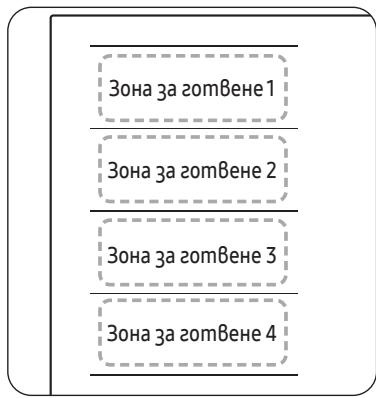
3oHama Flex e 20aMa 30Ha 3a 20mBeHe omABo Ha nOuAma 3a 20mBeHe (BuXme fUzypama BBo), kOmo e cneuaAHO npegHa3HaueHa ga no6upa HraKOAnko CbGa c pa3AUHa 20eMuHa U φOpMa egoBpeMeHNO. 3oHama Flex uma Yemupu 3Onu, kouMo ce hazp8am om omgeAhu unHykmopu, koemo Bu no3oAba Ga 20mBume, He3aBucumo om moBa kge e nocmaBeh Cgbm Bbpx y 3oHama 3a 20mBeHe.
CbC 3oHama Flex Plus Mojkeme ga u3no3Bame kom6uHaZou om pa3AuHu 3oHu 3a 2omBeHe, 3a ga y8eUuUme 3oHama 3a 2omBeHe. Hamuche 6ymoHa 3a 3oHama Flex , 3a ga u3no3Bame 3oHama 3a 2omBeHe, kakmo cAegBa.
| 3она 3a 2om8еи1 | 3она 3a 2om8еи1 | 3она 3a 2om8еи1 | 3она 3a 2om8еи1 |
| 3она 3a 2om8еи2 | 3она 3a 2om8еи2 | 3она 3a 2om8еи2 | 3она 3a 2om8еи2 |
| 3она 3a 2om8еи3 | 3она 3a 2om8еи3 | 3она 3a 2om8еи3 | 3она 3a 2om8еи3 |
| 3она 3a 2om8еи4 | 3она 3a 2om8еи4 | 3она 3a 2om8еи4 | 3она 3a 2om8еи4 |

3A6EΛΕΚKA
Kozamo u3no3Bame caMo eHa 30Ha 3a 2omBHe, guamembpbm Ha gHomo Ha cbga mpr6Ba ga e no-mAbk om 14 cm.
- Mozam ga u3munam 5 - 10 cekyngu, npegu nloyama 3a zomBene ga pa3no3hae no3uqma ha cbga.
- Ppu pa3no3Ha8aHemo Ha c6ga moke ga ce ueym 3Byu.
He omcmpaHBaUme 2omBapckuca ng no BpeMe Ha 2omBeHe. Om cbo6paKeHua 3a 6e3onacnOcm nAoYama 3a 2omBeHe aBmomamuHcnpa,ako 2omBapckuam cbg e 6u npemaxham 3a noBeue om 5 cekyHgu.
№3BaHe Ha 30Ha Flex Plus (cAmo 3a Mogeu CbC 30Ha Flex)
- Hamucheme 6ymoHa 3a 3ohama Flex
- 3a ga hacmpoume u pezyuapame HuBomo ha Mauhocm, u3noa3Baume 6ymoHa Power level (HuBo Ha Mauhocm).

3A6EΛΕΚΚΑ
- Ako hamucheme 6ymoHa 3a 30Hama Flex no BpeMe Ha pa6oma, fynkuuaHa 30Hama Flex ue ce u3kAIOU.
Ako hamucheme 6ymoHa 3a 3ohama Flex , gokamo Bcka 30ha 3a zomBene pa6omu Ha pa3luHn Hu8o, mraabmomamuHNo ue 6bge hacmpoeHa ha no-Bucoko HU8o.
Kozamo npemecmBame uuu go6aBame cbgBe kbm HoBa 30ha Flex, omMehememekyuama onepauu u gokoche mcbemnue 6ymo30ha 3a zomBeHe , 3a gaakmuBupame 3ohama.
3ana3em monAu
- Μιναλβαμεme ma3u φυκύμα, 3a ga noggβρκαme zomBēhama xραha monλa.
Hamucheme cβomBēmHua 6ymoH 3ɔHa 3a zomBēne □.
- Hamucheme 6ymoHa 3ana3eme monAu
- Ducnnaem Ha 3oHama 3a 2omBene ue ce npomehu.
- Hamucheme omho8o 6ymoHa 3ana3eme monlu 山 3a ga u3kIoume 3ohama 3a zom8ene.
Taumep
I3no3BaHe ha maumepa kamo 3auumno u3kA4Bae
Ako e 3agageho onpegeleho 8peme 3a gageha 30ha 3a 2omBene, mue ce u3kluoyu, cleg kamo mo3u nepuog om 8peme u3mee. Ta3u fynkua moke ga 6bge u3noa3BaHa 3a MHO2o 3OHu 3a 2omBehe egHo8pemehno.
HacmpouBahe ha maumepa
30hume 3a zomBene, 3a koumo uckame ga npuOxkume 3auumno u3kAnu8ahe,mp6Ba ga 6bgam 8kAnuoyeu.
- Hamucheme 6ymoHa Taumep 日
- Hacmpoume maumepa c MHOzOKpamHo Hamuckane Ha 6ymoHa Taumep 已
- 3a ommaHa ha hacmpoukume Ha maumepa 3agpbkme 6ymoHa Taumep 已 3a 3 cekyhgu.

3AbeEeKKA
3a ga npomehume hacmpoukume no-6b3o,Hamucheme u 3agpbxkme 6ymoha Taumep 口 go gocmu2ane ha keaHama cmouHocm.
Kozamo maumepm npukuou, mou u3gaBa 38ykoB cu2haN hko ko nmu. Bnpeku moBa 30hama 3a 2omBehe Hma ga 6bge u3kUOeHa.
Pay3a/nogHo8BaHe
Функцуma Пay3a/nogноьаhe egноьремно npe8kλιчьа 8cuuku 8kλιουчenu 30hu 3a 2om8ehe Na hacmpouka c no-hucka мошнocm u nocle opbamno Ha 3agagenomo npegu mo8a HuBo Ha mошнocm. Ta3u Функцу моcke ga ce u3noλ3Ba 3a kpmko npekbcBahe u nogноьаhe Na npoцca Ha 2om8ehe, Hanpumep 3a 8guzahe Ha meλefoha.
Ppu akmuBupahe Ha fynkquma Pny3a/nogho8Bahe Bcuku 6ymoHu c u3kIoueHue Ha Pny3a u 3akluOBaHe II BkluOBaHe/U3kluO4BaHe ①ca geakmuBupaHu.
3a ga noghoBume zomBeHemo,Hamucheme omHoBo 6ymoHa Puy3a u 3akAnuBaHe II (see).
| Панел 3a урараБavenе | Дucлел' |
| За 8КлочВанe | Hamuscheme 6у мona
Пay3a u 3akлочВанe II (5sec) | II |
| За uzklочВанe | Hamuscheme 6у мona
Пay3a u 3akлочВанe II (5sec) | Врьшале към пregушно
нubо на моцун检m |
Бьрзспupaанe
Ta3u onuur hamaBb Bpememo 3a cnupahe Ha zomBehemo.
3a u3kIIOU4BaHe Ha 30Ha 3a 20mBeHe Hamucheme 6ymoHa 30Ha 3a 20mBeHe 3a 2 cekyHgu.

3A6EΛΕΚΚΑ
Kombineeritav keeduala+
(üksnes mudelitele, millel on funktsoon Kombineeritav keeduala+) 21
Soojas hoidmine 22
Taimer 22
Peatamine/jatkamine 22
Kiirseiskamine 22
Lapselukk 23
Maksimumvoimsuse piirang 23
Heli sisse-/valjalulitamine 24
Nutikasuhendamine 24
CaIOBn 3a roTbeHe 14
YnoTpe6a Ha konuHbata Ha doOpnp 18
3Byu np pa6oTeheTo 18
Почетно чостеbe 18
Pa6ota 18
BknyBaHbHa ypeDoT 18
IcknyBaHbeHa ype,doT 18
I36npaHbHa 30Ha 3a roTbeHb HnBO Ha MOKHOCT 19
Makc.3acnlyBahe 20
KopncTeHe Ha Flex 30HaTa (Camo 3a moJeIte 1To ce npImeHyBaat co Flex 30Ha) 20
Flex 30ha nlyc (Camo 3a moJeIte ITO ce npImeHyBaAT co Flex 30ha nlyc) 21
OdpkUBaHbToTnlo 22
Tajmep 22
Pay3a/Прдолжуbahe 22
Брзо залиралье 22
БeЗбeДиСна 6рава 3a Deцa 23
OrpaHnUyBaHeHaMaKcImaJIHaTaMoKHOCT 23
BknyBaHe/ncKnyBaHe 3Byk 24
Smart Connect 24
KoHTpOlaHaacnnpaTopoT 25
OdpjyBaHbeHa ypeDoT 25
Плоча за ratbehe 25
JIecHa HeuNCTOTnJa 25
Tbprdkopna Heunctotnja 26
ПюбLEMатина Heuchstotnija 26
PamkaHaIIOUaTa3a roTbeHe (Ouju) 27
3a da ce n36eHne oWTeYBaHbe Ha ypeIOT 27
PeuabaBe npo6JIemn cepBnc 27
Peuabahe npo6nem 27
CepBic 29
KopncTe№Ha OBa yNaTCTBO
Ipei kopincteHa ypeoT, oJBojTe BpeMe Da ro npouHTate Oba ynaTCTBO 3a conCTBeHnKOT, o6pHyBaJkn Oc6eHO BHNMaHne Ha 6e36eHocHnTe INΦOpMaun CODpaHn BO cIeHnOt DeI. YbajTe ro OBA ynaTCTBO 3a nHa ynoTpe6a.
Ako ja npenehecybaTe conctbeHocTa Ha ypeIOT, He 3a6opabajTe da ro npedeJaTe ynaTCTBOTo Ha HOBnOT cOnCTBeHnK.
Bo Oba ynataCTBO 3a ynoTpe6a ce KopncTa T cIeHNBe Cm60JN:
I PDEyIpyBAHbE
Опаснои Иебe3бeДи пактуки ШTO може за peЗуNTираAT со Teшka Teleche NaOBpeDA nII n CMPT.
BHUMAHHE
Опаснои НебеЗдни практуки Што може за рezулtnupaаТ сюmonа телесна повревая илштета на ИМOTOT.
BHIMAHINE
3a da ce haMaJIn pI3NkoT oJ IOxap, ekCIIIO3NJa, cTpyeH ydAp IINI TELeCSHa NOBpeJa npi KOpIcTeHe Ha IIIOUaTa 3a rOToBeHe, cIeJeTe rN OBne OCHOBHn 6e36eHNOCHn MEpkn Ha npETNa3JIINBOCT.
HANIOMEHA
Kopncn coBertn, npenopakn nnnn HOpMaun ITO mN pomaraat Ha Kopncnnte da MaHnynpaatcno pON3BODT.
ImeHaMoJeNoTn cepncK6pOj
IMeTo Ha moJeIot I cepncknot 6poJ ce O3NaueHn PoI oCHOBaTa Ha IIOUaTza 3a rOToBeHe.
3a noounehka yontpe6a, 3aanweTe rHnHOpMaunite nIi 3aneneTe ja donolnHteHaTa eteketa h npoun3bODoT (ce Haofo B O rohpnoT deI od npoun3bOdoT) Ha TeKOBnata cTpaHnla.
ImeHaMoDJIeNOT
Cepinckn 6poj
БeЗб endocn ynpaTCTBa
6e36eHochnTe acneKtn Ha OoJ ypeI ce Bo cornaCnoCT co CITE npiaTeHN texHnUKN 6e36eHochn CTaHapdI. Cenak, kako npou3BoDInTeN, Hne IcTo Taka cMeTame Deka e Haawa oJroBOPHOCT Da Be 3aNo3HaemE Co CNeHnTE 6e36eHochn yNaTCTBa.
A INPEДУПЕДУBAнБE
Oboj ypei He e HameHET da ro Kopnctat Iuca (Bknyubajn deua) co HamaJIeHn fI3NcK, cTeIINH nIIM MeTaNH cNoC6HOCTN, IINI CO HeIOCTaTOK Ha NCKyCTBO n 3HaEHe, OCBEN aKO IInCe ODROBOPHO 3a HNBHata 6e36eJHOCT He IM OBO3MOJn HAd3Op IINI yPaTCTBa 3a KOpNCTeHBe Ha ypeDToT.
IeuaTpe6a da 6nDat noi ha3Op 3a da ce ocunpyn deka He cn nIgpaat co ypeodt.
Oboj ypeJ moJe Da ro KopnctaT Deca Ha Bo3pact OJ 8 roDHHI NOBeKe I Nua Ca HamaJIeHn FIn3NcK, CetINHn I Nm MeHTaJIHn Cno6HOCTn I Nn HeIOCTaTOK Ha NCKyCTBO I 3HaEHe DOKoLKy IM Ce OBO3MOKJat Na3Op I Nn UpaTCTBa 3a KopnCTeHbE Ha ypeJOT Ha 6e36eJen Naun H ra36npaat BkIyuHne To npacHOCTn. DeaTa He Tpe6a Da nIrpaat Co ypeJOT. YncTeHbETo N KopnCHNuKOTO ODpXyBaHbE He CMeat Da rO BrPsaT Deca 6e3 Na3Op.
CpeiCTBaTa 3a nCKIyUbaHe Mopa Da 6nDaT BrpaDeHn BO fNkCHOTo OxNchBaBe BO cOrnaCHOCT CO npabInata 3a OxNchBaHe.
ПО моNTираьeTO, на Oвоj урет Tпeба дa My ce ДОЗВОЛдa ce
ИСКлuyн oД НаюуBaьeTo. ИСКлuyчыьeTo мож e Дa ce NOCTURHc
со ппстан до ппклuyчokOT nlln CO BградуBaьe Ha пpeKENHyBaч BO
ФИКСНОТ OЖИЧУВаьe BO соглachocT CO правилata 3a OЖИЧУВаьe.
БeЗб endocn ypaTCTBa
Ako ka6eIOT 3a HanojyBaHBe e OwTeTeH, Mopa Da rO 3aMeHn Ipn3BODInTeIOT, HeROBnOT cepBncep nIi CnUH0 KBAJIuΦnKyuBaHn InuCa co ZeI da ce n36eRhe onaCHOCT.
HabeJeHnOT MeToI Ha fNkCupaJIe He Tpe6a Da 3aBnCn OJ yIpOte6aTa Ha IeINla 6nJejKn Tne He Ce CMeTaat 3a CnIpyHn cpeCTBa 3a fNkCupaJIe.
ПЕДУПЕДУBAHBE: Ако поршинatable e наукнata, Исклүүе туpeдот за избөгөтө можност odструен удap.
3a Bpeme Ha ynoTpe6ata, ypeoT ce BxkeuTyBa. Tpe6a Da ce BnImaba Da ce n36eHne DOpnpaHe Ha rpejHnte eIemEnT BO BHaTpeuHocTa Ha PloOaTa 3a rotBeHe.
ПРЕДУПЕДУBAHBЕ: Досташипеше дени може за се загpeат за врeme на уnotpe6ату. Малите Deца тpe6а за се джат hactpaHa.
He Tpe6a da ce kopnstu nctaHa napea.
MeTaNHN pIeDMeTn KaKo HOJKeBn, BnJbUShKn, JIaJNcN I KApaCn He Tpe6a Da Ce CTaBaat Ha NOBpShHaTa Ha NlOuata 3a rOTBeHe 6nDejK MoJKe Da Ce BJKeWtAt.
Iyo npotpe6a, ncknyte ro elementOT nloa 3a rotbebe co herobata KOHTpOJa I He notnpajTe ce Ha deTeKTOpOT 3a Tabn.
UpeoT He e HameHe 3a ynpaByBaHe CO NOMoH Ha NaBopeeH TajMep IIN Noce6e H CnCTeM 3a DaJIeUnHcO ynpaByBaHe.
BHHMAHNE:Процot ha rotbebe Tpe6a da 6иde noJ haI3Op. KpaTkoPouHnOТ прцec Ha rotbebe Tpe6a noCToJaHO da 6иde noJ haI3Op.
YpeIOT He cMee Da ce NoCTaByBa 3aJ yKpaCha Bpata 3a Da ce n36erHe nperepeBaHbe.
ПЕДУПЕДУBAHBE:УредOTи HEROBITEdoCTaHn DeJIOBn ce BЖeштуbaAT priu ynoTpe6a.Tpe6a Da ce BHNMaBa Da ce n36eRHe ДОпира№Ha rpejNITe eIemEnT.N. DeцATA co NOMaLa BO3pact Od 8 roDINn Tpe6a Da ceДржat NaCTpaHa,OCBeH aKO He Ce NOd NocTojaH NaD3Op.
ПРЕДУПРЕДУBAHBE: Говьето 6e3 надзор на плоча за говьени с о масоти и масло може да 6иde onacho и може дa peztунда с пожар.
HINKOTAI He oBnDyBaJTe ce da n3rachHeTe noXap co BOda, TyKy NCKnyuTe ro ypeoT n POKpNJTe ro PIIaMeHOT Ha np. co KaPak nn PpOtnBnOxapHo Ke6e.
ПРЕДУПРЕДУBAнБЕ:Опасноct od пожар:He chubte прдmetи на повшини te 3a roTbe№.
ПРЕДУПРЕДУBAHBE:Користе самоштHTици 3a п loча 3a roTBe№шTOгДИЗAJнралпpon3ВODHTeIOT ha уpeJOT 3a rotBe№ ИлнHa3NaЧИл пpon3ВODHTeIOT ha уpeJOT BO yPnATCTBOTO 3a yNTope6a кадcoOdBETHи ИлshTHTNiZI 3a пLOUa 3a rotBe№шTO ce BrpaDeHn BO уpeJOT.Уnotpe6aTa Ha HeCOoDBETHn SHTHTNIz MОжde ДпрдИЗВИкA HeCpeKn.
IobpunHte ce IopJoxn Ha BxeuTyBaBe 3a BpeMe Ha ynoTe6ata.
Oboj ypeJ moJe da ro kOpncTat Deca Ha BO3pact 0d 8 roDHHI NOBeKe I Nua co HamaJIeHn FIn3NcK, CetINHn IIN MeHTaHn CnOC6HOCTn IIN HeIOCTaTOK Ha NCKyCTBO I 3HaEHe DOKOLKY IM Ce OBO3MOJkat Na3Opr IIN yPaTCTBa 3a KOpNCteHbe Ha ypeDoT Ha 6e36eJen HauHH I IN pa3bnpaAT BkLyuHne ToaChocTn. DeaTa He Tpe6a Da nIrpaat co ypeIoT.
YnCTeHbETo N KOpncnUcKTo OndpKyBaHBe He CMeaT Da rO BpHaT Deca 6e3 HaI3Op, OCBeh Ako He ce NoctapN oD 8 rOdnH N POnd HAd3Op. DpJTe rN ypeIoT N HerOBnOT Ka6eN BOD oD IooaT Ha Deua POMaIIoD 8 rOdnH.
BHIMAHNE
OcunrgypeTe ce deKa KBaHnΦnKvBaH TexHnUap npaBnH0 rO MoHTnpaI n 3a3emjnl ypeDToT.
Upejot Tpe6a Da ro cepBncipa cAmo KBaJInΦIkyBaH nepcoHaJ 3a cepBnc. IopnpabKnte 7to rN BpShaT HeKBaJInΦIkyBaHn POeINHcN MoJCe Da npEiIN3BnKaat NOBpeJa nn CepNo3eH DeΦeKT. JOKoJcy Ha BaIshOT UpeJ My Tpe6a NonpaBka, KOHTaKTupajTe Co JOKaJIhNt cepBncen Zentap. HecJeDeHBeTo Ha OBne yPNaTCTBa MoJCe Da peZyIITnpa CO OSteTyBaHBe N da ja NoHNsTn rapaHcNjata.
Co ypeDN 7TO ce MOHTnpaHn Ha paMHn NOBpHnH MoJce Da ce UnpaByBa cAm OTKaKO Ke ce MOHTnpaAT Bo 7kaΦOBu N Ha pa6oTHn MeCTa 7TO Ce BO COrIacHOCT CO peJIeBAHTHnTe CTaHdApDn. OBa 06e36eYBa IOBOJHa 3aStNTa OD KOHTaKT 3a eJIeKtpUHnTe eINHnCn KaKO 7TO ce 6apa Co OCHOBnTe 6e36eHnOCHn CTaHdApDn.
Дokолky Baшnot урет He Функционupa плп akо ce поjabat скршени, рук hatини плп расец:
- NCKnyute Tn CNTe 30Hn 3a rotBeHe;
- NCKJIyUeTe ja nIIOuata 3a rotBeHbe OJ eNEKtpuHaTa MpeXa; I
KoHTaKtIpaJTe CO JOKaJIHnOT CepBnCeH ZeHTap.
Ako plochata 3a rotbe he hanykne, ncknyte ro ypeot 3a da n36eHete moxnoct oD ctpyeH yap. He kopncTe je plochata 3a rotbehe dokeka He ce 3aMeHn CTakJeHaTa NOBpUnHa.
He kopnstete ja nloyata 3a roTbe he 3a da 3arpeBaTe aLyMNHyMcKa oJnja, npOn3BODn 3aBNTkAHN BO aLyMNHyMcKa oJnja nn 3amP3HaTa XpHa CnakyBaHa BO aLyMNHyMcKN CaOBN 3a roTBeHe. TeuHocTa NOMEr y DnOTo Ha Tabata n PLOyata 3a roTBeHe MoJce da npedn3Bvka npITcOK od napeata. LTo moJce da npedn3Bvka Tabata da NOTCKOKHe.
CekoraoshocnhypeTeIIOUaTa3arotBeHcNCHOBaTaHaTabaTdaCe Ondjkat cyBn.
3ohnte 3a rotBeHe ke Ce BxkeWtAT kora rotBnTe.
Cekorawdpxkete rMaJIte deca hAcTaHa oD ypeDoT.
Држete Г сITE материда за пakуваъ поалень уд дофат на Deца, 6идевл materида за пakуваъ може за вдат onаши за Deцараз.
Oboj ypei Tpe6a da ce Kopnctn cmo 3a HopMaJIHO roTbe He npxeHe BO domOT. ToJ He e dI3ajHnpaH 3a KOMepzJaHa nIHHyCTpNcKa ynoTpe6a.
Hnkoraa He KopncTe je ja nloyata 3a roTbe 3a da ja 3arpeete npoctopnjata.
BnImabajte kora npiknyuBaTe eJeKtpuHn ypeNi BO uTekepnte Ha Mpejata Bo 6Ii3Ha Ha IIOUaTa 3a rOTBeHe. MpejHnte BODOBn He Cmeat Da doJdaT BO KOHTaKT CO IIOUaTa 3a rOTBeHe.
Прерраин MacHOTи И MacNo може 6р30 да ce 3aapanat. Нкогаш He octabajTe rI NOBpUnHcKIne eDINHnCи 6e3 NaДЗор кORA ПОДГOTBYВATE XpaHa CO MacHOTи Ил МaСNo, Ha ппмер, KOra ROTBInTe YHnC.
Icknyute rni 30nnte 3a rotbebe no ynoTpe6ata.
KoHTpOJIHnTe Ta6Ii OndjyBaJte rN uNCTn N cyBn.
Hnkoraш He ctabajte 3anaIbnu npedmetn Ha nlouata 3a rotbehe, Toa moKe da npedn3Bnka noxap.
I P E, D U N P E, D Y B A H E
Ncknyte ro hanojybaheTo Ha KOIto nped da rno nobp3e XnCHTe co KOIto.
HaHnoHOT ha rpeJHnOt eIemEnT e AC 230 V~. UpeDTo ncto taKa coBpSeHo pa60Tu Ha mpeJco AC 220 V~ nnn AC 240 V~. Pioouata 3a roTbe tpe6a da ce npKnyu Ha eJeKtpnuHaTa MpeJco NOMOsh Ha ypeJ shTO OBO3MOxBya UpeDTo Da CE NCKLyuN OD eJeKtpnuHaTa MpeJha CNTe PNOBn Co 7npnHa Ha OTBOPOT Ha KOHTAKTOT oHajMaJIky 3mm, Ha np. ABTOMaTcKO NCKLuyBaHe 3a 3aStTnTa Ha IINHjata, NCKLyUyBaHa 3apaDi NCTeKyBaHe Ha 3a3eMjYBaHeTo nll pereOpbyBaHe Ha OCINrpyBaQOT.
IPTE.DYTPE.DYBAHbE
Ka6eNcKInTe BpCKn MopA Da ce Haprabat BO corgnaChocT co npOnncTe n do6po 3aTeHaTn 1paObo Na TepMnHaJIte.
IPTEyTIPTEyBAHbE
Ötkako плоча та отveье ce noьрзе co elekeTpnuHaТ Мржа, поверете дали спту ЗOTи 3a отveье ce noДгтвен 3a унотpe6a co краТКВКУчВаBJе Ha cekoja nO peД ha MaKcIMaJIHаТа noctabka co COODBETH caIDOBn 3a отveьe.
A I P E D U N P E D Y B A H E
Ako ka6eNoT 3a HanojyBaHBe e OoTeTeH, Mopa Da rO 3aMeHn npOn3BODnTeNoT, HerOBnOT cepBncep nn CInuH No KbaIINKUBAHn IInca Co cEe da Ce n36erHe onaChocT.
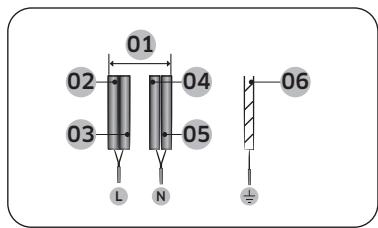
1N~ (32A)
| 01 | 220-240 V~ | 04 | Сина |
| 02 | Црна | 05 | Сива |
| 03 | Кафеава | 06 | Зелега/Жоблта |
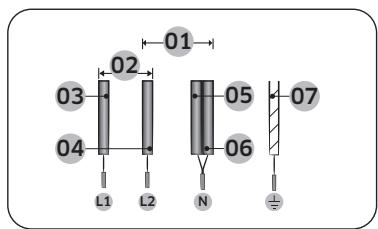
2N~(16A):OdJeIeTe rn 2-Φa3HnTe Jxu (L1 n L2) nped noBp3yBaHbeto.
A I P E D U N P E D Y B A H E
3a npabnHNO nobp3yBaHBe Ha HanojyBaHbTo, cneJeTe ro dnijarpaMoT 3a OxNcYBaHbe Ito e npikauhen BO 6IINiHa Ha TepmHaJInte.
PpabuHNO n03nOHHpahe
| Правлино | Нерравлино |
| Садови за(rotveны с рамно дно и правистрани | Садови за(rotveны с поckриberи ялс витkaши дно ялсстрани |
| Садови за(rotveны ja усколны ват ялп наиминуваат пелорачанata мимимална гolemina на зоната за(rotveны. | Садови за(rotveны не ъ усколны ват мимимална гolemina до сбара заTekobнatable зона за(rotveны. |
| — | — |
| Садови за(rotveны bo.notюност лжат на поршinata на плочata за(rotveны. | Садови за(rotveны leжат на павOT на плочATA за(rotveны. |
| — | — |
| Садови за(rotveны с правлино балансангни. | Тechкат рачка predecessorхува наavedунвальны на садови за(rotveны. |
Cobetn 3a 3auteega Ha eheprnja
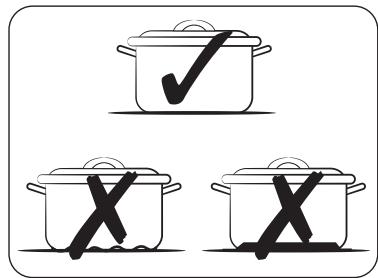
CneTe Tn OBNe COBEn 3a Da 3aUTeDnTe nToPoSyBaUka Ha eHeprNiJata.
- Cekorau ctabe rncaobnte 3a rotbehe Ha 30Ha 3a rotbehe nped da ja bKnynte COOdBETHATA pHHra.
Odpjxuybjte rnuuchtn30HnTe 3a rotBeHe n ochoBnTe Ha caDOBnTe 3a rotBeHe.Bo cnpotuBHO,Ke ce TpoOn nobEke eheprna.
Ubrpo 3atBopete ro Kaanok H a caobnte 3a rotbehe, aKe e doctaneH. Oba ke ja Hamaln NotpouByaKaTHa eheprnjata.
Icknye ja pinhflata sho pa60tn ppe3aBp7yBaHcTo Ha BpeMeTo 3a rotBeHe. Kopnctete ja npeoctaHaTata TOnnHa 3a da ja oDpxkyBate xpaHata ToIIa.
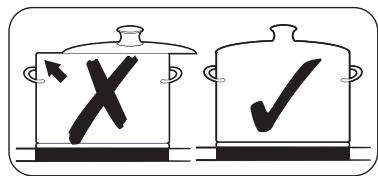
PpabuHNO n03nOHHpahe
Mоже ду петерate caювпe 3a rotbehe 3a da bduite daли ce cooDBetn 3a ynoTpe6a co npou3BOIDOT.
- Пптисhevу сею Konчeto 3a вклuyваьe/нckлuyваьe ① 1-2 cekyндза да щьклuyчite почараза з ratotbeHe.
- Пптиссные сокутоа пayз и заимлочье 3сякунддда ща щаaktnвира te 6e36ednochataбрава здаца.
- Пптисе Го кочуета 3a Tajmep 念 3cekyндза дугakTNBnpaTe peKIMOT 3a TECT Ha COOДБETHOCT Ha caD0T 3a rotBeHe.
- Ctabete rncaObHTe 3a rotBeHe Ha eHaTa 0d 3oHnTe 3a rotBeHe n ITOToa npITnCHte To n dpKeTe ro kOnyTe 3a 3oHa 3a rotBeHe 3 cekyHn.
| Ekpan | Опис |
| 0 | СадовITE за гогтBEиbe се несоДВeTHи |
| 1-5 | СадовITE за гогтBEиbe се-coОДВeTHи,
Но несоДИКаСи |
| 6-10 | СадовITE за гогтBEиbe се-coОДВeTHи |
Предда започе
YnOtpe6a Ha KOnuHbata Ha Donnp
3a da pa6oTIne co KOnuHbata Ha DoNup, DoPteTo cKaHoTo KOnue Co BpBoT Ha BnpeHnO T IpCT DoNeKa CooDbETnTe ekpaHn He CBeTHaT Nll He Ce n3rachat Nll DoKeKa He ce aKtBnPa cakaHaTa fynkCnja.
Ocunpyte Ce deka donnpate camo eHNO konue KORA pa6oTnte co ypeDTo. Ako npctot Bn e npemhory nncpnykeH Na konuye, MoKe Da ce aKTHBnpa n COeHOTO konye.
3Byu npa6oTeheto
Ako MoKe Ia cnyuHneTe.
3BykHa nykahe: caoBte 3a roTbeHe ce HappaBHeH oD pa3nUHN MaTepnjAIn.
Cbnpkahe: Kopncntte noBeke oD nDe 30Hn 3a rotBeHe u caOBeTe 3a rotBeHe ce HappaBHeN oD pa3JIuHm MaTePjJani.
3yeHe: KOpNCTIte BnCOKn HnBOa Ha MOkHOCT.
KlncKaHe:HaCTaHbAeIeKTpUHO npeΦpUyBaHe.
-Шштень,брмчен:работи вентларотор.
3ByuIte Ce HopMaJIHn I He yIaTyBaAT Ha HnKaKbN deΦeKTH.
I PDEyIPEyBAHc
He kopnstete caobn 3a roTbehe co pa3nnuHn rolemnaHa mATEpnjaJ.
KopncTeHbTo caOobn 3a roTbeHe co pa3nUHN rOleMnH nIi MaTePnJaN MoKe da npedn3BnKa 3Byu n Bv6paun.
HANIOMEHA
KopncTeHbTo HnCKn HnBOa Ha MokHoCT (1-5) MoJe da npedn3Bnka 3Byu Na KInKaHe.
PouetHo uCTeHe
I36pniSeTe ja KepamuKata CTaKHe NaovBnHa CO BnaXHa KpNa N CpeDCTBO 3a YnCTeHKepeamuKo CTaKNo Ha IIOUHTe 3a FOTBHe.
I P E D U Y P E D Y B A H E
He kopructe keayctuHn nnn a6pa3nBn cpeidCTBa 3a yncTeHe. Nobpunhata moKe da ce oWtETn.
Pa6ota
BknyuBaHéHa ypeoT
UpeIOT cE BknyuBa cO konHcTe 3a BknyuBaHe/ncknyuBaHe .PnPITnCHeTe ro konHcTe 3a BknyuBaHe/ncknyuBaHe np6bnKHO1-2 cekyni.
HANIOMEHA
Ötkako konqueto 3a BknyuBaHe/ncknyuBaHe ① Ke ce akTbnpa 3a da ro Bknyu ypeDoT, HNBOTo Ha moKHOCT MOpa da Ce n36epe Bo pok od npn6nnKHo 20 cekyn.Bo cnpotNBHO, ypeDont camnoT ke ce ncknyu ond 6e36edHocn npuHHn.
NcknyBaBeHaypeoT
3a notponHO ncknyybahe Ha ypeoT, KopncTeTe ro konuTeTo 3a BknyyBahe/ ncknyybahe ①.
PnTncHeTo KOnHeTo 3a BkLnyBaBe/ncKnyBaBe ① np6nnxH01-2ceyn.
HANIOMEHA
IIO NCKLNUyBaHBe Ha eHa 30Ha 3a rOTBeHBe nIeIaT a NobpUHa 3a rOTBeHBe, IpiNcycTBOTO Ha pReocTaHATA TOIInHa Ke ce NOKaJHe Ha dIgntaIHNte ekpaHn Ha COOdBETHnTe 30Hn 3a rOTBeHBe BO oBNIk Ha H, H, H, DBA YekOpn 3a „JeeuKo".
Temnepatypata ce hamaNyBa, Hke nce3He.
I36npaBe Ha 30Ha 3a roTBeHb e HNBO Ha MOKHOCT
- 3a n36npaHHe Ha 3oHaTa 3a roTBeHBe, npITNCHeTe rO COOBETHOTo KOJIe 3a 3oHa 3a roTBeHBe
- 3a noctabyaBHe nHaIyoDbAHe Ha HnBOTO Ha MOKHOCT, KOpNCHTe rN KOHTpOHaTaJIeHTa INI KoHTpOHNTE KOnuHbA.
EkpaHOT 3a OBaa 3OHa 3a rOtBeHe haNImHuO ce MeHyBa Ha HeKoIky cekyHnI nOmeYI NOCTaBeHOT HINBO HA MOKHOCT I MaKcIMaJIHOT O MOxHO HINBO HA MOKHOCT. I NotoA, ekpaHOT CE MeHyBa OD NoCTaBeHOT HINBO HA MOKHOCT Ha MaKcIMaJIHOT MOxHO HINBO Ha MOKHOCT.
KopncTeHe Ha Flex 3oHaTa (Camo 3a MoJeInTe 7To ce npImeHyBaat Co Flex 3oHa)
OrpaHnUyBaHe Ha MaKcImaHHaTa MoKHOCT
ObaaФункиJA Bn OBO3MOJyBa HArOyBaHBe Ha MaKcImaHaTa MoKHOCT Ha ypeIoT.
1.Држete ro hanojyaBaHTo ncknyeHo.
2. Пптиссные сокутоа 3a Палузи Зakлuyваье II npиблжно 3 cekyндзда ja вклuyчite 6e6eHochnata 6рава здаца.
3. Пптиссные ГКончето 3а Лева предна 30а 3a roTbe№ n konчето 3a Decha npedna 30а 3a roTbe№ nctobpeMeNo, риблжно 3 сekунд.
4. Пптисе Г кочуета 3a Tajmep!прблжно 3 секун.Екразов Кпркakxe P.И.TeКOBHmaМКСмДи МokhoCT.
5. Moze da ro haroДITE orpaHnUyBaHeTo Ha MOKHoCTa CO KOnHeTo 3a
Пay3a nЗakLnyuBaHe II (3000 W, 4000 W, 7400 W)
6. Пптиссенте Г кочето 3а Вклуваьe/нckлуваьe ① 3а да ѳ постаNTe noctabkata.

HANOMEHA
Bo pexkIm ha hncka mokhoct (3000 W, 4000 W), HnBTo Ha mokhoct ke ce hafoa ABTomatcKn.
BknyuBaHe/ncknyuBaHe 3ByK
1.пгИТСНЕТо кОПЧЕТа ВКЛУЧУBA№/нСКЛУЧУBA№ ① пиБлижно 1-2 секунди.
2. Ппчснete ro konчeto 3a Tajmep 念 3cekyHn BO pOK oJ 10 cekyHn OTKaKo ce BkIyUnno HanojyBaHbeto.
3. 3BykOT Ke ce nckluyn Ha ekpaHOT Ke ce npkaKe DF.
4. 3a MeHyBaHHe Ha NoctabKaTa 3a 3ByK, NobTope Te rN YeKOpnte1 n 2. 3ByKoT Ke ce BkIyUn Ha ekpaHot Ke ce npikakae On.

HANOMEHA
He mOxHn MeHyBaHb e Ha nocTabKInTe 3a 3Byk no10 cekyHn oD BknyBaHb e Ha hanojyBaHbeto.
Smart Connect
Плоча за за roтveье Има вгаден мodyн за Wi-Fi专项整治 за ra по кориспес за ja синхонистаре плоча за roтveье co anлкauида SmartThings. Ha anлкauида на nametchnot.Teleфон, може за:
- Ги Нальуновate CTaTycOT Ha pa60TaTaN IOCTaBknte 3a HNBO Ha MOKHOCT Ha
- селем entite Ha ПLOUaTa 3a ROTBeHe.
- Trn npOBepyBaTe mMeHyBaTe NoCTaBKnTe 3a TajMep.
PamkaHa nloyata 3a roTbeHe (onuja)
A IPEyIpyBAHbE
He KopinCTeOcET, cok od JIMMOH INIOTcPaHbau Ha 6nIrop Ha pAmkata Ha nIIOuAta 3a rotBeHe; BO cnpotINBHO, Ke ce nojabat dOcaADHn fneKN.
- ɪəsɒpɪnʌpɪe ja paʌmʌkɑta co Blaɪaʌkna Kpɪnʌ.
- HablaaJHHe Tn nCyuSeHIne OCTaToCu Co BLaJHa Kpna. I36PnUWeTe n CyuSeTe.
3a da ce n36eHne oWTeTyBaIbe Ha ypeDoT
He kopructe ja nloata 3a roTbe KaKo pa60tha noBpuHa nlln 3a cKnlaDnpahe.
He ynpaBybajte co 30Ha 3a roTBeHbe aKO Ha pIoChaTa 3a roTBeHbe Hema Taba nIi aKO Tabata e npa3Ha.
Kepamukoto cakno e Mhory zBpcto n OTnopHo Ha TempepatyeH oK, Ho He e HeckpruBo.Toa moKe da ce oUteTn oD ocObeHo octap nIIN TBpd npEmdet wTo Ke naHe Ha pIoouata 3a rotBeHe.
He ctabajte tabn ha paMKata ha nloyata 3a roTbe. Moke da dojde do rpebe n OHTeYBaHbHe na fHnHtOT.
- I36eHhyBaJte da nctypate Kncelen TeHuOCTn,Ha npimep,Ocet,COK od lamMOH n cpeiCTBa 3a OTcpanHyBaHe 6nrop Bp3 pamKaTa Ha nloata 3a rotBeHe,6nJeKn TaKBInTe TeHuOCTn MOKe da npdeiN3BnKaat DocaHN daMkn.
- Ako uekep nll npenapat tto coqpxn uekep dojde BO donnp co jeeka 30ha 3a roTbeHe i ce cToPi, Tpe6a BeDnAa Da ce nCnCTn Co KjHcKa CTpyraJa oDoeka e cE yUte Jeeoka. Ako ce DozBoIa da ce OlaIa, Toa MoKe da ja oUTeN NOBpUnHaTa KOra Ke ce otCTpaHyBa.
-Држete Г сITE п dedмети И матершалу StTo 6и можeled Да ce StOnaT,Ha npimep,пл actиka, anymnunmcka Фолиja и Фолин 3a pepha HabctpaHa OД Керамчкataстaklenha NOBpshna.Ако HeStO od OBOJ BvId ce StOni Ha ПLOUATA 3a rotbeHb, BeDHaM MOPa DA ce OTCTpaHn CO CTpyralka.
Peuabahe npo6lemn
Mоже да настане гршka како рezултат od погрушноинфорmaцишто сампесьдя ѳ поравпente симош на следниве уразсва. He obudyajte ceда правпесдоголнителни поравки akо следниве уразсва-he nomaraat BO cekoи поениевенсочuj.
I P E D U N P E D Y B A H E