
EA4500 - Wireless Router LINKSYS - Free user manual and instructions
Find the device manual for free EA4500 LINKSYS in PDF.

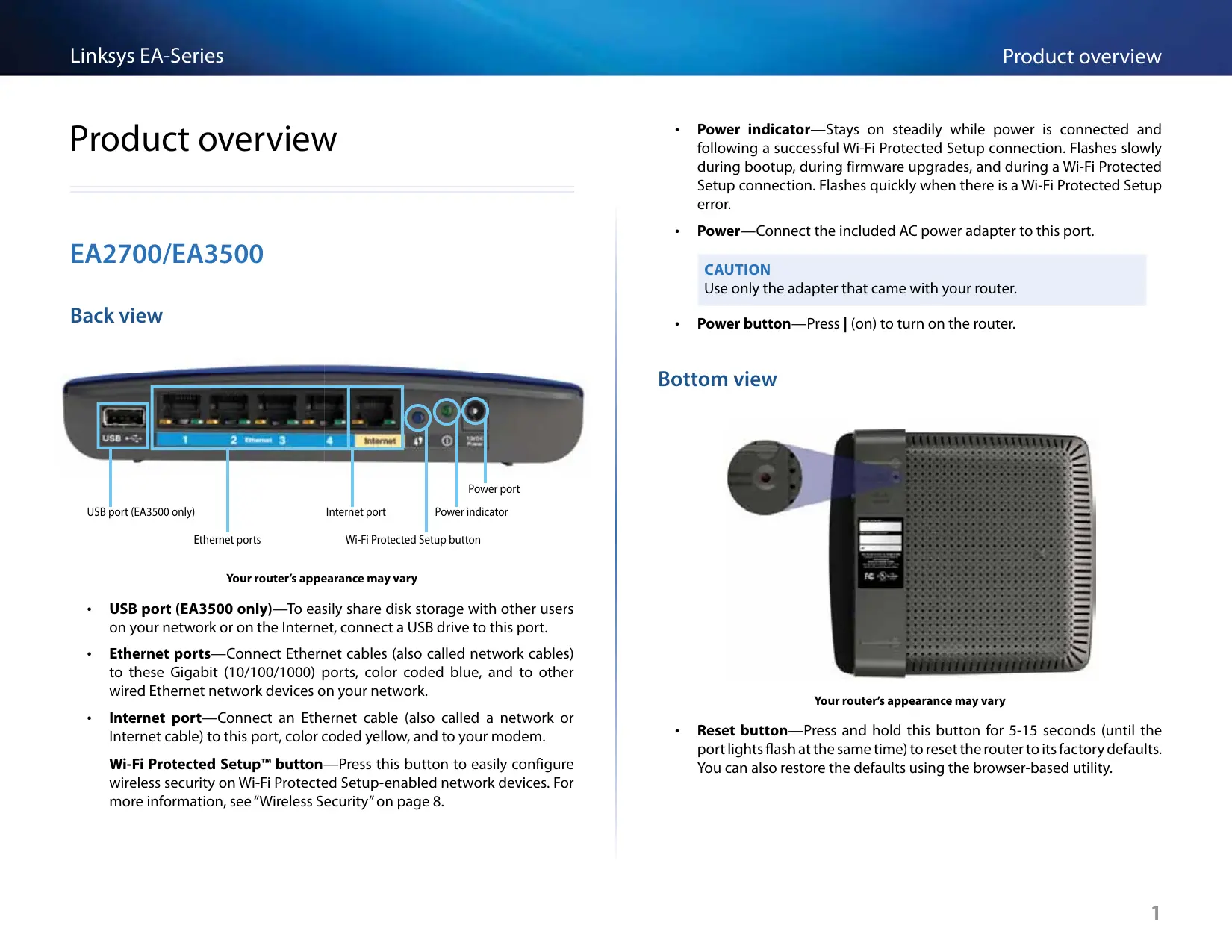


| Product Type | Dual-band Wireless Router |
| Brand | Linksys |
| Model | EA4500 |
| Wireless Standards | 802.11n, 802.11a, 802.11g, 802.11b |
| Radio Frequencies | 2.4 GHz and 5 GHz |
| Maximum Speed | Up to 900 Mbit/s (N900) |
| Ethernet Ports | 4 Gigabit ports (10/100/1000) |
| Internet Port | 1 Gigabit port (yellow) |
| USB Port | 1 USB 2.0 port for storage sharing |
| Antennas | 6 internal antennas (3 per band) |
| Buttons | Reset, Wi-Fi Protected Setup (WPS) |
| Wireless Security | WEP, WPA, WPA2 (Personal and Enterprise) |
| Management | Via Cisco Connect or web utility (192.168.1.1) |
| Supported File Systems (USB) | FAT32, NTFS, HFS+ |
| UPnP | Supported |
| Dimensions (L x H x D) | 225 x 25 x 160 mm |
| Weight | 360 g |
| Power Supply | 12 V DC, 2 A (power adapter included) |
| Power Consumption | 24 W maximum |
| Operating Temperature | 0°C to 40°C |
| Operating Humidity | 10% to 80% (non-condensing) |
| Maintenance and Cleaning | Clean with a soft, dry cloth. Do not use chemicals. |
| Safety Instructions | Use only the provided adapter. Do not expose to moisture. |
| Spare Parts and Repairability | No user-serviceable parts. Contact technical support. |
| General Information | Warranty and compliance available at Linksys.com/support |
Frequently Asked Questions - EA4500 LINKSYS
User questions about EA4500 LINKSYS
0 question about this device. Answer the ones you know or ask your own.
Ask a new question about this device
Download the instructions for your Wireless Router in PDF format for free! Find your manual EA4500 - LINKSYS and take your electronic device back in hand. On this page are published all the documents necessary for the use of your device. EA4500 by LINKSYS.
USER MANUAL EA4500 LINKSYS
11 (Windows XP Service Pack 3) Get Windows XP Service Pack 3
12 (Joo) Your Internet cable is not plugged in
13 (AJ JgJgJr)Cannot access your router
14 (jLJ Jc, eJ, aJ) Device not found Jw
Lg
16 Linksys EA2700
17 Linksys EA3500
18 Linksys EA4500
Jg
1 EA2700/EA3500
1
1
2 EA4500
2
2
EA-Series
3
3
3 Cisco Connect
3 Cisco Connect
3
P
4
5 (wLx)Basic Setup <(x) Setup
5 (AI) Language
5 (Internet Setup
6
Jl Jll Jll Jll Jll Jll Jll Jll Jll Jll Jll Jll Jll Jll Jll Jll Jll Jll Jll Jll Jll Jll Jll Jll Jll Jll Jll Jll Jll Jll Jll Jll Jll Jll Jll Jll Jll Jll Jll Jll Jll Jll Jll Jll Jll Jll Jll Jll Jll Jll Jll Jell
aaii iig jnnaaia Jll Jll aib Jgno Jusogiy a-aaLJI
.
4
aagai gai jai jai jai X! pss
a-gaJU+J(J+)|JcIb+ol-2aJIJJ j
aIwIgJ1
Laliso 10
15 5 dJ Lc JyBj- (nll ) Reset j
42345678901234567890123456789012345678901234567890123456789012345678901234567890123456789012345678901234567890
.
iiie 1c aolc oj
EA2700/EA3500
a1sJ1 aGJ1 2c
Laliso: jolssllgogjglg 2
JcJnssssssssssssssssssssssssssssssssssssssssssssssssssssssssssssssssssssssssssssssssssssssssssssssssssssssssssssssssssssssssssssssssssssssssssssssss
L 15 Lio (aS aJU U S w) Ethernet uS 5 Jw g -Ethernet Lio . aS uJ I c s2I aS uJ l Enerthet aS bg Jg. gJuLLb d000 (10/100/1000)
i<1JL S E) Ethernet 1S Jsogjg-()Internet .
Ic alg y S LwUJnL081 Jn nn jyS 1c Iaai-Wi-Fi aiai aai ai 8
a1sJ1 aGJ1 0
LLei (L) Eneret -Ethernet Lio .L Eneret aJg J000
1g (L) Cjgl aS Jl S Gwse) Ethernet Js S Lggi - (Cjll) Internet jia 1
Jc alg y LwU JLo 1j jll Jc bai-Wi-Fi aaiy aai J
Lc LogLeaJ no dJy Li JGwU.Wi-Fi aaiy y aai J
.8 axaill "sLwU JLo"
IgA<1IgCnJnJnJnJnJnJnJnJnJnJnJnJnJnJnJnJnJnJnJnJnJnJnJnJnJnJnJnJnJnJnJnJnJnJnJnJnJnJnJnJnJnJnJnJnJnJnJnJnJnJn
15 5 5 5 5 5 5 5 5 5 5 5 5 5 5 5 5 5 5 5 5 5 5 5 5 5 5 5 5 5 5 5 5 5 5 5 5 5 5 5 5 5 5 5 5 5 5 5 5 5 5
4 - 2r9 = 3
aJgjgljgljx
△gJJI()|c-2aJj
EA4500
aegell aee
JLJI JIJI JILJI JLIJI JLLJI JLIJI JLIJI JLIJI JLIJI JLIJI JLIJI JLIJI JLIJI JLIJI JLIJI JLIJI JLIJI JLIJI JLIJI JLIJI JLIJI JLIJI JLIJI JLIJI JLIJI JLIJI JLIJI JLIJI JLIJI JLIJI JLIJI JLIJI JLIJI JLIJI JLIJI JLIJI JLIJI JLIJI JLIJ
EA-Series
:JgJ 1 Cisco Connect J
DVD 1
(Lynsys Set up your Linksys Router 2
:1
Jggs Jggs Jggs Jggs Jggs Jggs Jggs Jggs Jggs Jggs Jggs Jggs Jggs Jggs Jggs Jggs Jggs Jggs Jggs Jggs Jggs Jggs Jggs Jggs Jggs Jggs Jggs Jggs Jggs Jggs Jggs Jggs Jggs Jggs J
.(1) Setup j0g abgs.
C haw lgc gaoaall yaoai jao gao Igao jao Jao Jao Mac Jao wll pkaill
(1) Setup jgjg
aJgJSLJLa5X aLJIc yjIyJcLJI J.3
Cisco Connect
Ciscocnccs cscocncc
jio aJgGwA
S OBC = S COD + S BOC - S BOC
JlJzJz
s
gJgoglaC!
a aolal jg aolal aLg agaal g
Lgds 4gol 1dcl a
jol aagall (logaall gall lclgogall) 1201010101010101010101010101010101010101010101010101010101010101010101010101010101010101010101010101010
4 aaiJg "joeioo Jdoauiuoi doLuoaiol
Laaan
aIblll SLoJI g cIooJIg CIOJIg IIOIOIg IIOIOIg IIOIOIg
.ahJLJI JJI. jJIJIJIJIJIJIJIJIJIJIJIJIJIJIJIJIJIJIJIJIJIJIJIJIJIJIJIJIJIJIJIJIJIJIJIJIJIJIJIJIJIJIJIJIJIJIJIJIJIJIJIJIJIJIJIJIJIJIJIJIJIJIJIJIJIJIJIJIJIJIJIJIJIJIJIJIJIJIJIJIJIJIJIJIJIJIJIJIJIJIJIJIJIJIJIJIJIJIJIJIJ
()
(1) Cisco Connect (2) Cisco Connect (3)
jdoaLwJl 1
(.)
A
. Cisco Connect, 12
Cisco Connect
Ciscn Cooct y
aJgll aJx Cisco Connect 1sclc Laoic Jyolj jgooSJI gLslal (a-golj
.
+ = 2
jolil jii 1sLg 1sLg 1sI 1sI
Linksys.com/support
Paaal jgSll
a128 aawjJ aoJal J ci j (gfo) OK gge jai jyogol aLg pdoJwJ j
.2
L
aLg pssuill Gsul .Cisco Connect plasilw nns 4gJl sblc y 13j .admin gJy JnssalJn j
alSg pssimall aag clls G Cisco Connect Cdoosimil
Router settings g Cisco Connect Lg Cg yg s yg
(1/3/s/)Router settings (j) Change jg Cisco Connect 1
.(g) OK gjg j (Adad) Advanced settings
-9
1.192.168.1.1 Jiaai a S, jiu Juaio jgaoS gao
0aolg pssnoo owl: aagll Jb
(4.1) Language
ailllll no aolg aelio aol plaiw (aull) Select your language
(Net) Internet Setup
e 15 Jgsslln 2000. 13 11 11 11 11 11 11 11 11 11 11 11 11 11 11 11 11 11 11 11
(1)Internet Connection Type
yIJIJIgJgJg.JJUWIOJIgOJIJIgOJIgOJIgOJIgOJIgOJIgOJIgOJIgOJIgOJIgOJIgOJIgOJIgOJIgOJIgOJIgOJIgOJIgOJIgOJIgOJIgOJIgOJIgOJIgOJIgOJIgOJIgOJIgOJIgOJIgOJIgOJIgOJIgOJIgO
(DHCP - L) Automatic Configuration - DHCP
(IP)Static IP
PPPoE
PPTP
L2TP
Bridge Mode
(DHCP - L) Automatic Configuration - DHCP
JgS) (DHCP - g) Automatic Configuration - DHCP g g aee 10e e ee i 11 11 11 11 11 11 11 11 11 11 11 11 11 11 11 11 11 11 11 11 11 11 11 11 11 11 11 11 11 1
(IP)Static IP
(IP) Static IP.
PPPoE
Jabai JgSgjg jy duiu Ls 131 Loo qaa .DSL Juaa Jus Ls 131 PPoE aodn uLs 131 (PPPoE) Ethernet jaabai
(Lw)Basic Setup<(A) Setup
Jolal 11 J 11 11 11 11 11 11 11 11 11 11 11 11 11 11 11 11 11 11 11 11 11 11 11 11 11 11 1
(1) Wireless Settings < (2) Wireless
( _1w( Lw) ^2 + _2w( Lw) ^2)
aLulolgcl aieo a.sLwUa5.1uLWU
ab = 16
LwUulolc!aLbL aLwU (uL) aLlalr
a<1w>1
Lolaoieewj 4sLswJLeJ (as) Network Mode
2.4) N- 一 _ 一 LwUaS aS uuauuagaiuui (bLio) Mixed . (Jia) Mixed .
aLJJJL aLJJJJJJJJJJJJJJJJJJJJJJJJJJJJJJJJJJJJJJJJJJJJJJJJJJJJJJJJJJJJJJJJJJJJJJJJJJJJJJJJJJJJJJJJJJJJJJJJJJJJJJJJJJJJJJJJJJJJJJJJJJJJJJJJJJJJJJJJJJJJJJJJJJJJJJJJJJJJJJJJJJJJJJJJJJJJJJJJJJJJJJJJJJJJJJJJJJJJJJJJJjj
Wireless-B/G Only 12 2.4 ssj) G- ± LwU ± Jg B- ± LwU (B/G- ± LwU _± JI)
B- ≤ LwLJ aS. wJ pacj o j 1Lai c s l; (Bae B-aaLwLJ aS. WJI) Wireless-B Only .(Bae B-aaLwLJ aS. WJI) Wireless-B Only
G-4<1wUJ 4<1wU J a j gj Lai c s l; (Ja G-4<1wUJ 4<1wJ) Wireless-G Only . (Ja G-4<1wUJ 4<1wJ) Wireless-G Only
N-aa<LuwUa<,uWj a<,uWj uWJ 15! (nae N-aa<LuwUa<,uWj) Wireless-N Only . (nae N-aa<LuwUa<,uWj) Wireless-N Only. Taee (jra L2.4 jz)
G- 一 _ 一 ^ ≤ L w L U I A B- 一 _ 一 ^ ≤ L w L U I A a一^ aJi Jn Jn Jn Jn Jn Jn Jn Jn Jn Jn Jn Jn Jn Jn Jn Jn Jn Jn Jn Jn Jn Jn Jn Jn Jn Jn Jn Jn Jn Jn Jn Jn Jn Jn Jn Jn Jn Jn Jn Jn Jn
+ = 2
Wireless-A Only g (1b:0) Mixed 154 155 156 157 158 159 160 161 162 163 164 165 166 167 168 169 170 171 172 173 174 175 176 177 178 179 180
jL5 jUuU (Jbea) abled
Mixed.
(1)
PPTP
a a (PPTP) abai abaa n 1jLwJg
Obtain an IP Address Automatically IP jng DHC PPTP Jauan L
Specify . IP jng cip 1jIP jngc ic (IP jngic ic Jgss)
L2TP
a a 1 2Lai 1 Lc g (L2TP) 2 a a b Jc g a a Jlaa JgSg
(Obu) Lc (Lg) Keep Alive g! (BbJ) (JL) Connect on Demand Lo Jz1 (Ib) (Lc) (Lg) Keep Aliveg (BbJ) (JL) Connect on Demand 12 Ld Ld Ld Ld Ld Ld Ld Ld Ld Ld Ld Ld Ld Ld Ld Ld Ld Ld Ld Ld Ld Ld Ld Ld Ld Ld Ld Ld Ld Ld Ld Ld Ld Ld Ld Ld Ld Ld Ld Ld Ld Ld Ld Ld Ld Ld Ld Ld Ld Ld Lda0000000000000000000000000000000000000000000000000000
32 1g j g j g j g j g j g j g j g j g j g j g j g j g j g j g j g j g j g j g j g j g j g j g j g j g j g j g j g j g j g j g j g j g j g j g j g j g j g j g j g j g j g j g j g j g j g j g j g j g j g j g j
ab = 30
j c hll) aagall aeinnall asy ylll aal lal ylll 10000000000000000000000000000000000000000000000000000000000000000000000000000000000000000
a5.11 a2.11 a5.11 1 L Jgss (olal) Channel Width 20 MHz or) Auto .(jzL2.4 2.1) N- · -S LwUJ 5.11 G- · S LwUJ 5.11 B- · S LwUJ
JzirzL20 20 120 20 40 g jzL20) (40 MHz
a<.B- a<.b<.b<.b<.b<.b<.b<.b<.b<.b<.b<.b<.b<.b<.b<.b<.b<.b<.b<.b<.b<.b<.b<.b<.b<.b<.b<.b<.b<.b<.b<.b<.b<.b<.b> (LiJI) Channel
Lssss sIy IiI y Iy 124 2.4 236) N- a<. b<. b<. b<. b<. b<. b<. b<. b<. b<. b<. b<. b<. b<. b<. b<. b<. b<. b<. b<. b<. b<. b<. b<. b<. b<. b<. b<. b<. b<. b<. b<. b<. b<. b> (JLa) Auto
a a a a b a b a b a b a b a b a b a b a b a b a b a b a b a b a b a b a b a b a b a b a b a b a b a b a b a b a b a b a b a b a b a b a b a b a b a b a b a b a b a b a b a b a b a b a b a b a b a b a b a b a ba ba ba ba ba ba ba ba ba ba ba ba ba ba ba ba ba ba ba ba ba ba ba ba ba ba ba ba ba ba ba ba ba ba ba ba ba ba ba ba ba ba ba ba ba ba ba ba ba ba ba ba ba ba ba ba ba ba ba ba ba ba ba ba ba ba ba ba ba ba ba ba ba ba ba ba ba ba ba ba ba ba ba ba ba ba ba ba ba ba ba ba ba ba ba ba ba ba ba ba BA.
a
WPA2) WPA2 Personal. (JbIc WPA2/WPA g) WPA2/WPA Mixed Mode
WPA) WPA Personal.
BAC = = 35
g) Security Mode S (JwPA2/WPA w) WPA2/WPA Mixed Mode 3j
jgJJI WPA2/WPA a≤LwUJI c< jlg>JS po#i#j (JL8)
[\therefore \lg \sin \alpha = \frac{2\sin \alpha }{1 + \cos \alpha }]
j (J) Security Mode S (WPA2) WPA2 Personal 13 jLw PwA2) WPA2 Personal a LwU Jg Jg
Lgui jyj
j (JLo2) Security Mode WPA) WPA Personal 13
gJJIaLg (wPA) WPA Personal aSLUUI 15: jLg JSS
[\therefore \lg \sin \alpha = \frac{2\sin \alpha }{2}]
a a a a a a a a a a a a a a a a a a a a a a a a a a a a a a a a a a a a a a a a a a a a a a a a a a a a a a a a a a a a a a a a a a a a a a a a aa
LwUJnLoX
L) Wireless Security < (L) Wireless
( x,y) = ( ab,52xy)
aIg aIg aIg aIg aIg aIg aIg aIg aIg aIg aIg aIg aIg aIg aIg aIg aIg aIg aIg aIg aIg aIg aIg aIg aIg aIg aIg aIg aIg aIg aIg aIg aIg aIg a
WPA2 Personal9 (JL10 WPA2/WPA g) WPA2/WPA Mixed Mode: LwU J LQY WPA2/ g) WPA2/WPA Enterprise Mixed Mode9 (g WPA) WPA Personal9 (g WPA2)
j0g WEPg (aS WPA) WPA Enterpriseg (aWPA2) WPA2 Enterpriseg (JbL WPA
aieLl l aagaaJI WEP JuaiaJyog.Wi-Fi aaiiaJgaoJI JgaoJI WPA JuaiaZI
( 1,L) = 8| L0| .a1 < L u_1 < L
a
WPA2. (Jaliso WPA2/WPA g) WPA2/WPA Enterprise Mixed Mode
(45 WPA) WPA Enterprise .(45 WPA2) Enterprise
Loic Ia 1000000000000000000000000000000000000000000000000000000000
(ADJLADOS RADIUSpLs
BAC = = 3
S (1) WPA2/WPA WPA2/WPA Enterprise Mixed Mode WPA2/Security Mode
jB j Bw g) Security Mode S (aWPA2) WPA2 Enterprise 1s w PwA2) WPA2 Enterprise aLwU Jg Jp
J (L) Security Mode S (A WPA) WPA Enterprise 12 JI J (A WPA) WPA Enterprise A L U Jg Jp Jp Jp Jp Jp

.RADIUS LJ IP (RADIUS Ls) RADIUS Server
1812 0. RADIUS (RADIUS) RADIUS Port
pLJIg aagJJJ jjaiJI CiaJI Jai (jiaaiJI) Shared Key
(jk)Disabled
Jgogll algln oic sLwUJnLojI JbHcip aai bcllolc! WsWUJnLozJI JbHcip aai bcllolc! 13
JJ2 x Ll RjBnAaJn JdNnLl gJy LwUJn LoZJn nn Lxio nnn. .00 JgX CnRn! J
< LwUJn LoZJn nn
Security Mode:
Disabled
L_g > L_ l_g( L_h + L_h)
Cisco Connect
Jlllllllllllllllllllllllllllllllllllllllllllllllllllllllllllllllllllllllllllllllllllllllllllllll
aJgaww aI Jy Cisco Connect pssw ciLs oLsic.
:Windows pLbBjJcCsc CcS Cisco Connect
Cisco Connect 1

Cisco Connect
Cisco Connect aJJIaJaiJI
:Mac OS X pLbi jjgoc5 Lc Cisco Connect
JgJ (CJIaJI) Applications 1

Applications
.Cisco Connect 2
Connect
Cisco Connect a 1
JL 1 JLL 1 JLL 1 JLL 1 JLL 1 JLL 1 JLL 1 JLL 1 JLL 1 JLL 1 JLL 1 JLL 1 JLL 1 JLL 1 JLL 1 JLL 1 JLL 1 JLL 1 JLL 1 JLL 1 JLL 1 JLL 1 JLL 1 JLL 1 JLL 1 JLL 1 J.
gagllgcjglglc jglglLil gllslll cdo do do do do do do
linksys.com/support
aJololjoljoljolj jil) 0g Jk jigssSjL jalll JaJl jjbei
aagolal Jgolal Jgolal Jgolal Jgolal Jgolal Jgolal Jgolal
Jus Jus Jus Jus Jus Jus Jus Jus Jus Jus Jus Jus Jus Jus
JgJL JgJgJgJg
Get Windows XP Service Pack 3
(Windows XP Service Pack 3
Service Pack 3 Cisco Connect .Windows XP pLbni jIjI jI jI jI jI jI jI jI jI jI jI jI jI jI jI jI jI jI jI jI jI jI jI jI jI jI jI jI jI jI jI jI jI jI jI jI jI jI jI jI jI jI jI jI jI jI jI jI jI jI jI
oLg>LoIg gIb>2I oIeS>Ug b>g 0Jg4 a>gl
Lig Service Pack 3 JjJ .3 j00
J5 pssu wcls aagbll aoaill aajj jijg c0g JJJU
.0JL 100gJgJgJgJgJgJgJgJgJgJgJgJgJgJgJgJgJgJgJgJgJgJgJgJgJgJgJgJgJgJgJgJgJgJgJgJgJgJgJgJgJgJgJgJgJgJgJgJgJgJg
:Service Pack 3
Jll Jg Ciscocnect g
.Mcrosoft (update.microsoft.com/windowsupdate)
.1J 1j Microsoft J J Jg g jg J Lg
logal jll Jc (Jc) Setup 1
a
C
:LiLo Lcck Ciscocnect J
Jusio JSLg (J5CABLE jiaol j 5j g jLj
LJU JI JIOO OIOO OIOO 0000
gJdDSL jaiuDSL dLjdsL.DSL gj
.USBJLSSUBJSLalwglgjLlJL1
JLgI JI L (JLJI Next gJgCISCO Connect JI
JgJL JgJQJgJgJgJgJgJgJgJgJgJgJgJgJgJgJgJgJgJgJgJgJgJgJgJgJgJgJgJgJgJgJgJgJgJgJgJgJgJgJgJg
J.S) Your Internet cable is not plugged in
Joo
JdA JgLoaic (Joo yj 1) Your Internet cable is not plugged in JwJl
oLgLgIgIgIgIgIgIgIgIg
a + b = 3
aiaipkLjiaia (agall gao aaiall jie Sgl) ciirjll kSgl Ethernet J5n 10s lI
.ogal Ic wlaill iaiaolg agall aiaiall agll Ic gogagl (ciin)Internet
g (i) Internet gaaan jn k sEhnetraagall iiaiaai
.WAN
aagol aalall agol j
J J) Cannot access your router
( 1 - a) + b + 1 = 1 + b + 1
View Available Wireless Networks
Change Windows Firewall settings
Open Network Connections
(1) Device not found
jio) a< jgJLwJlajgLoa c (jGJJ Jc gJl) "Device not found" JJw, L
LgSgSgSgSgSgSgSgSgSgSgSgSgSgSgSgSgSgSgSgSgSgSgSgSgSgSgSgSgSgSgSgSgSgSgSgSgSgSgSgSgSgSgSgSgSgSg
J 1 J 1 J 1 J 1 J 1 J 1 J 1 J 1 J 1 J 1 J 1 J 1 J 1 J 1 J 1 J 1 J 1 J 1 J 1 J 1 J 1 J 1

a1 = 30,2 = 230
Cisco Connect 1
:Mac pLbi jai jil jigssllj gajlc aLl JcX
pLwUu L. AiaJgAirPortjRgRrAeJgIeJgIeJgIeJgIeJgIeJgIeJgIe
LcS LwJ LLaCisco Connect
.JimsRouter
Joo JIOI JIO BroneEagle gog. Linksys E-Series aL
BroneEagle) Linksys E-Series 4
(JL)
gjg jzai jgjgl aol L g (JLoJI C1io) aSsLwUa SsUu Jg0 aol 3

Cisco Connect 150
Android
iPhone
gJLJI. JIJIJI .Cisco Connect (JLOJI (JLJI) 1sL Jzj .7 B6eM9UkCjz
ab = 30
a aal l llll 111111111111111111111111
Cisco Connect 日 _ 1 ^ 日 LgJUwJ J.2LjA.LwUJ A<,JU LwUJ JLWJ JLwJ .8 (Lq)Finish g
Computers and 1! b. (gj) jg jg jg jg jg jg jg .2
(,) other devices
(1) Other Wireless devices 3
aLwUJ aLjWJ pWJ nC JwJ aSLwUJ aLJI jGJWi-Fi Jlui jSQi j4 LqLeJI aJeJgJI gJI gJI
ab = 30
WPA/WPA2 1
.(JolcLio)gol aol JsJgagolalSawpWwJ,AsLwUJscJglg 5
(JIJ) Next .Cisco Connect 6
Date
WPA2 WPA 9 WEP
128 J
UPnP
Lol21 1
Lolci
aill lheol
174x190x28
(4 - 6.85 × 7.48 × 1.10)
(10.5) 297.7
- 12
FCC, IC, CE, Wi-Fi A/B/G/N
(20432)a 401
()104J
Lg-4) 60J-20
()140J
a 80% J10
15 19
15 90% 5
aJg
aolb
Lg
J 1
jJJIaJz
Jal Jol Jol Loglog Jol Jol Loglog a Jol Jol Jol Jol Jol Jol Jol Jol Jol Jol Jol
Joo 10000000000000000000000000000000
Lg 1528 lIe 1000. IEEE 802.11 1980.
Linksys EA2700
Linksys EA2700
Dual-Band N600 Router with Gigabit
EA2700
,802.3 ,802.11b ,802.11g ,802.11a ,802.11n
802.3ab .802.3u
jIbJ1
jIJI
L
1
4
jL5g jL2.4JwJb
(Computer Ethernet) 10/100/1000
BPSK ,QPSK ,CCK :802.11b
OFDM :802.11g
OFDM :802.11a
.16-QAM .QPSK .BPSK :802.11n
64-QAM
()Jaaill Jie
Jdall aill acw
J
j2.4
a110 11@JbIg JLo/J-90:802.11b
LJL L54 @ Jlgl/lls-75:802.11g
MCS15 @ 10910/12345678902.11n 20
MCS15 @ 109 JLo/JL8-70:238 L82.11n40
jL 5
LiJ54@JgJLo/J-72:802.11a
MCS15 @ 10911/12345678900-70:22:22 802.11n 20
MCS15 @ 109 JLo/1J-67:238 L802.11n40
2.4
aIJI aW
(y)-
Jy
gjgjgl a
≤ 3.45:1
Jg
≤ 2.46:2
y
j#35
4.4.1:1
J
≤5.15:2
yjg jy
WPA2 WPA g WEP
L081 12
128
HFS+NTFSFAT
Jolli Cio
jsslllo pLpa
aill lheol
L
190x25x170
(7.48×0.98×6.69)
(aug 11.5) 326
2.12
Windows 7. Wi-Fi A/B/G/N. CE. IC. FCC
Dual-Band N750 Router with Gigabit and USB
EA3500
,802.3,802.11b ,802.11g ,802.11a ,802.11n
802.3ab .802.3u
jblw
S OBC = S BOC + S_ BOC
jI
1
1 1
a1 = 2,a2 = - 4, b_2^2 = 4a
jL5g jL2.4 LwJJJJI J
X
(€iEhernet) 10/100/1000
LJg USBg (1-4) Ethernet. (n) Internet
Wi-Fi a. 品 品 1.(y)L!Reset
(1-4) Ethernetg LJI. (Cnnj) Internet
BPSK ,QPSK ,CCK :802.11b
OFDM :802.11g
OFDM :802.11a
64-QAM,16-QAM,QPSK,BPSK:802.11n
j2.4
aJI 11@Jg/Jb-87:802.11b
(g)
54 @ 10g/12s-77 :802.11g
(≤)
MCS15 @ 109g/1J272: (jz-20) 802.11n
()
MCS15 @ 10J&L/69:(zj40)802.11n
(y≥.)
jL5
54 @ 10 g L o/123456789011a
(g)
MCS23 @ 109&J L/O/J-67:22 Li 20 802.11n
(≤)
MCS23 @ Jol g JLo/Js-64:Jz 40 802.11n
(g>0)
()aaii jgjgjj)j2.4
yJgJ 2.7≥1g
yjgjglg3.7≥2glg
1gjgJgJgJgJgJgJgJgJgJgJgJgJgJgJgJgJgJgJgJgJgJgJgJgJgJgJgJgJgJgJgJgJgJgJgJgJgJgJgJgJgJgJgJgJgJgJgJgJgJgJg
()
14.6≥1
JgJgJgJgJgJgJgJgJgJgJgJgJgJgJgJgJgJgJgJgJgJgJgJgJgJgJgJgJgJgJgJgJgJgJgJgJgJgJgJgJgJgJgJgJgJgJgJgJgJgJ
yjgjg 3.88≥3
Date
(1)
Jiaol jaiI ac
1j8
1
J
ailll aW
UPnP a:aa
(a.15 PIFA jgj3)jL 5
(j+)gjgjgJgJgJgJgJgJgJgJgJgJgJgJgJgJgJgJgJgJgJgJgJgJgJgJgJgJgJgJgJgJgJgJgJgJgJgJgJgJgJgJgJgJgJgJg
Jal Jol Jol Jol Jol Jol Jol Jol Jol Jol Jol Jol Jol Jol Jol Jol Jol Jol Jol Jol Jol Jol Jol Jol Jol Jol Jol Jol Jol Jol Jol Jol Jol Jol Jol Jol Jol Jol Jol Jol Jol Jol Jol Jol Jol Jol Jol Jol Jol Jol Jol Joll
Jle 10000000000000000000000000000000000000
LgIeJlgl21 111111111111111111111111111111111111111111111
Linksys EA4500
Linksys EA4500
Dual-Band N900 Router with Gigabit and USB
EA4500
802.11n. 802.11a. 802.11g. 802.11b. 802.3
802.3u, 802.3ab
j2△Lc5g2.4
(€iEhernet) 10/100/1000
(1-4) Ethernetg (TJ) Internet g USB g aLJI
Wi-Fi aai ai gai (aui)Reset
aIJI:aIgloJI aIgUJI
Ethernet(1-4)g.(c)Internet:adLdA
4.15, 2.16, 3.17, 4.18, 5.19, 6
jL5g jL2.4 LwJJJJI J
X
BPSK.QPSK.CCK:802.11b
OFDM :802.11g
OFDM :802.11a
QAM-64,16-QAM,QPSK,BPSK:802.11n
j2.4
aJ11@Jg/Jo-87:802.11b
(y≥.)
LiJi 54@JbIg/10-77:802.11g
(y>·<≤)
MCS15 @ 上山与JL/下-70:20:802.11n
()
MCS15@Lg/0-66:24 40:802.11n
(y≥.)
jL 5
LiJ54@Jg/Jo-74:802.11a
()
MCS23 @ Lg/100/100-67:20:802.11n
()
MCS23 @ Lg JL/1-64:80.11n
(y>0
(aLlPIFA 3)jzL2.4
(j+)gjgjgJgJgJgJgJgJgJgJgJgJgJgJgJgJgJgJgJgJgJgJgJgJgJgJgJgJgJgJgJgJgJgJgJgJgJgJgJgJgJgJgJgJgJgJgJgJgJgJgJgJg
(JLJI)gjgjgJgJgJgJgJgJgJgJgJgJgJgJgJgJgJgJgJgJgJgJgJgJgJgJgJgJgJgJgJgJgJgJgJgJgJgJgJgJgJgJgJgJgJgJgJgJgJgJgJgJg
(ρLo2) 1.96 ≥ PIFA 3
jblww
jIJI
L
<
Jaiil aicjw
:
1
1g
1
(j)J#
aillaww
J 1
yjgjgJyJd
jJgJl Jc jJLJI yJdJl JcJU linksys.com/support aJz

JgJgJgJgJgJgJgJgJgJgJgJgJgJgJgJgJgJgJgJgJgJgJgJgJgJgJgJgJgJgJgJgJgJgJgJgJgJgJgJgJgJgJgJgJgJgJgJgJgJgJ
PьководстBO 3a notpe6nteЯ
CbDbPjKaHne
HactpoivBaHe Ha pyTepa EA-Series
Kbde da haMepe Te oue nomou 3
Kak da hactpoTe pyTepa 3
Kak da cnapate Cisco Connect 3
I3noI3BaHe Ha Cisco Connect 3a ynpaBHeHne Ha pyTepa 3
Kak da hactpoTe pbuHo pyTepa 3
Pa3шрета конфигуразnia
Kak da OTBOPnTe nOmoUHaTa nporpaMa-6pay3bp. 4
Setup > Basic Setup (HactpoKa > OchOBn HactpoKn) . . . . . 5
Language (E3uk) 5
Kak ce n3pbJnHЯBa Cisco Connect cIeI nHCTaIIpaHe 10
Baunr pyTepe h e nactpoen yCneuHO. 11
Cbo6eHne Get Windows XP Service Pack 3 (U3me2Ie Me Windows XP Service Pack 3). 11
Cbo6eHne Your Internet cable is not plugged in (Bawuum unmephem Ka6en He e BkIouen) 12
Cbo6eHneCannotaccess your router (HaMa docmbndo pymepa). 13
Cbo6eHne Device not found (He e HamepeHo ycmpoucMBO). . . . .14
TexHnueckn daHHN
Linksys EA2700. 16
Linksys EA3500. 17
Linksys EA4500. 18
Osshпразгелд на пpoукта
EA2700/EA3500
IzhneD ot3aD
BbHnHnT BnHa BaunpyTeP MoKe da Bapnpa
USB nopT (camo 3a EA3500) - 3a da cnojeIte Iecho nAmet Ha Dncka C npyri noTppe6nteIOn OT Ba7aTa Mpeka NIn B INHTepHET, CBpbXeTe USB yCTpOJCTBO KbM To3N IpOT.
- Ethernet noptoBe - CbþkæTe Ethernet Ka6eɪn (HapuñaHn Oüe MpexOBn Ka6eɪn) KbM Te3n nopToBe Gigabit (10/100/1000), cþc CnHbO CuBtOBO KoɪnpaHe, N KbM dþrŋ Ka6eɪn Hēthernet MpexOBn yctpɔjCTBa B MpexKaTa.
- INTepHET nopT - CbpxkTe Ethernet Ka6eI (Hapuah Ose mpeXOB Ka6eI nn INTepHET Ka6eI) KbM TO3n nopT, c KblTO cBeTOBO KoDnpaHe, n KbM Ba7nra MoDEM.
ByToH Wi-Fi Protected SetupTM - HaTnCSHeTe To3n 6yToH 3a JeChO KOHΦnrgpnpaHe Ha 3aunTata Ha 6e3xNUnHa MpeXa Ha MpeXOBnTe yCTpoiCTBa, Ha KOnTO pa6oTu Wi-Fi Protected Setup. 3a nobEue nHΦopMaζn BnXte,3aunTa Ha 6e3xNUnHa T a MpeXa" Ha cTp.8.
- Инданкатор на зхранвано - Свети посторно, дokaTo зхранвано e CBьрзано и сед успшно CBьрзвано c Wi-Fi Protected Setup. Мira 6abHo no Врeme на стартуразно, надстpoивано Ha Фьрмуера и по Врeme на CBьрзвано c Wi-Fi Protected Setup. Мira 6ьрз0, korato imma rpeшka в Wi-Fi Protected Setup.
3axpaHbaHe - CBbpxeTE BkIIOueHnB KOMPJIeKTA aIaITep 3a npOMEHnB TOK KbM TO3n IOpT.
BHIMMAHNE
I3noJI3BaIte caMo aIaITepe,IOCTaBeH cpyTepe.
Bytoh 3a 3axpaHbAhe -HaTncHe | (BKn.) 3a BkIIOUbaHe ha pyTepa.
IzhneoiOToDony
BbHnHnT BnHa BaunpyTeP MoKe Da Bapupa
Bytoh 3a Hynipahe - HaTnchete n 3aDpBxte To3n 6yToH 3a OKoI0 5-15 cekyHn (doKaTO CBeTnHnTe 3aOnuHaT da MInrTa eNHOpeMeHHO), 3a da Hynpate pyTepa do foabpnHnTe My hAcTroKn. MoKeTe cbIo da Bb3CTaHOBnTE NaCTPOkNe IIO npDpa36npaHe, KaTo N3PON3BaTe NOMOuHaTa npOrpMa-6pay3bp.
EA4500
Izhnei otrope

- Инданаторна CBETЛИHA - CBETи NOCTОгнHO, ДOKATO 3axpaHBAHeTO e CBbрзАно и сеД успeшно CBbрЗВаHe c Wi-Fi Protected Setup. ПунсIPA 6abHIO NO BpeMe Ha CTapTиРаHe, НдстpoьВаHe Na ФырмУЕрЯ и NO ВpeMe Ha CBbрЗВaHe c Wi-Fi Protected Setup. МURA 6bP3O, korATO ИMa rpeшka B Wi-Fi Protected Setup.
Izhneoi3aI
- Ethernet noptoBe - Cbpxte Ethernet ka6eHn (HapuHaHn Ose mpeXOBn Ka6eHn) KbM Te3n nopToBe Gigabit (10/100/1000), cbc cnHbO zuBetoBO KoDIPAHe, n KbM dpyrN ka6eHn Ethernet mpeXOBuycTpoiCTBa B MpeXaTa.
- INThepHnet nopT - CbBypKTe Ethernet Ka6eJ (Hapnuch OSe mpeXOB Ka6eJ nn INThepHnet Ka6eJ) KbM To3n NopT, c KblTO cBeTOBO KoDnpaHe, n KbM Ba7nra MoDem.
- BytOH Wi-Fi Protected SetupTM - HaTINCHETO3N 6yTOH 3a JIeCHO KOHΦIgUpyipaHe Ha 3aUnTata Ha 6e3KmHa MPexKa Ha MPeKOBITe yCTPoiCTBa, Ha KOnTO pa60Tu Wi-Fi Protected Setup. 3a NOBee INΦOpMaZn BIXTe,3aUnTa Ha 6e3KmHaT a MPexKa" Ha cTp.8.
USB nopT - 3a Да сюдение лесно памет на диска с дугни потулелуот ваша тмрека пли в Intерпсет, CBpbхete USB устороств Кьм тои пот.
Byton 3a HynipaHe - HaTncHe Te 3aDpBkTe To3n 6yToH 3a OKoNo 5-15 cekyHdn (doKaTO CBeTlnHInTe 3anOuHaT Da MmTaT eHNOBpeMeHHo), 3a da HyinpaTe pyTepa Do foabPnuHIne My HactpoiKn. MoKeTe cbIo da Bb3CTaHOBIne HactpoiKnTe No NOpda3bnpaHe, KaTo n3IOn3BaTe NOMOuHaTa nporpama-6pay3bp.
3axpaHbaHe - CbpbKeTe BkJIIOueHnB KOMPJIeKTa aJaITep 3a npOMEHnIB TOK KbM TO3N IOpT.
BHIMAHNE
I3non3BaIte cAmO aIaNTepa,IOCTaBENc pyTepa.
- Bytoh 3a 3axpaHbAhe - HaTncHe | (BKN.) 3a BkIIOUbaHe ha pyTepa.
Hac tropoBaHe Ha pyTepa EA-Series
Kbde da hamepnte ose nomou
BdoJIbHeHne KbM TOBa pbKOBoIDCTBO 3a IOTpe6HTeMa MoKeTe Da HamePnte NOMOu Ha CNeIdHnTE MeCTa:
- Linksys.com/support (ДOKум entaци, ИЗтеленя, чсTo 3адын Bьпроси, Тхическа подрьжka, за на жИВО, Форуни)
Cisco Connect nomou (n3nbHete Cisco Connect, cnei Koeto upaKHeBbpxy "HayuTe noBeue", ako iMa taKoBa)
KoHTeKCTHO-3aBnCmHa NOMOu Ha NOMOuHaTa NpOrpMa-6pay3bp (OTbOpTe NpOrpMaTa, CneI KOEtU pKaHHe T BbPxu NOMOu B JAcHata KOnoHa.)
Kakда наст ponte pytepa
Ha-Niechnay 6bpy NaHn 3a HacToBbHe Ha Baun pyTe e da n3nblHnte coΦTyepa 3a HacToPka Cisco Connect.
Kak da cTapTupate Cisco Connect
Korato cnapate nHCTaIauNHOHn KOMNaKTdIscK, Cisco Connect (coΦTyep 3a NaHacTpoiKa Ha pyTepa) ce nHCTaInpa aBtOMaTnUHo Ha KOMnIObpa BN. CneI TOBa Mochete da n3non3BaTe Cisco Connect, 3a da ynpablaBe lecho pyTepa.
3A6EJIEXKKA:
Ако зубитейн捶алачионни КOMпаКТДИСК, може за ИЗтглNTe coФтуера оТ Linksys.com/support.
3a da cnapate Cisco Connect 3a npbB nblr:
- ПoctabeTe KOMпakтДиСКАВ CD улл DVDs устpoИстBOTo.
- Ιцракнete Вьрху Setup your Linksys Router (Hac troйbahe Ha pyтepa Linksys). Ako He виждатова:
Automatic Configuration - DHCP (AbTomatnHa KaonHpyaun - DHCP)
Static IP (Ctatauueh IP)
PPPoE
PPTP
L2TP
Bridge Mode
Automatic Configuration - DHCP (АВТOMATИЧА konфигуразnia - DHCP)
TnIbI INTePHeT Bp3ka no noDpa36bpaHe e Automatic Configuration - DHCP (ABTomaTuHa KOHfNrguPaunia - DHCP) (IpotoKoJ 3a DInHaMuHNo KOHfNrguPaHne Ha XocToBe).3ana3e HacTpOiKaTa IIO noDpa36bpaHne cAmO aKO BaUHrT DoCTaBUnK Ha INTePHe YcLytnnoDdBpXa DHCP nIIu aKO ce CbBp3BaTe Upe3 DInHaMuChEn IP aAdpec. (Ta3n OOnZna OBukHObeHo Ce npilara 3a Ka6eHNn Bpv3Kn.)
Static IP (CTaTmueH IP)
Ako Tp86BaJa n3nOJI3BaTe ΦIκCupaH IP aIpec 3a CBbp3BaHe c IHTepHeT, n36epeTe Static IP (CtAtuyeH IP).
PPPoE
Ako ImaTe DSL Bpb3ka, npOBepe TaJIN Baunr TocTaNK Ha INtePHT yCnyn n3NoJ3Ba npOTOKoJa "Ot ToKa do ToKa"B Ethernet (PPPoE). Ako e Taka, n36epe PPPoE.
PPTP
TyneHnIpy npOTOKoI OT ToCKa Do ToCKa (PPTP) e ycnyra, KOrTO o6nKHOBeHo ce npInarag 3a BpB3Kn B Ebpona. Ako BaWata PPTP Bp3ka nOdIbpxa DHCP nINHaMnueh IP aDpec, n36epete Obtain an IP Address Automatically (ABTomatuHNo nOlyuBaHe Ha IP aDpec). Ako Tpr6BaJa n3nOJ3BaTe fNkCupan IP aDpec 3a CBp3BaHe C INTEpHET, n36epeTe Specify an IP Address (Yka3BaHe Ha IP aDpec) n KOHfNrgpuraTe onUInTe no-dony.
L2TP
TynenepnoToKoJ3aCto2(L2TP)eycnyra,KoToO6nKHOBeHo Ce npnilara 3a Bpb3Kn IV3paen.
OTbaprCe rIaBHOTo MeHIO Ha Cisco Connect.
3aДастарate Cisco Connect Ha KomnIOrIbpc Mac OS X:
- OTBopTe Finder n ⅢpaKHeTc Bbpxy PpInloXeHn B IeBn paHeI.

OTbaprCe rIaBHOTo MeHIO Ha Cisco Connect.
Ako Cisco Connect He 3aBbPm HacTpoiKaTa, MoXeTe da onuTaTe cnEHDoto:
- Hatahe Tn 3aPbXte 6yToHa Reset (HynpaHe) Ha pyTepa c KlaMep nn nIra 3a 5-15 cekyn, cIeK KOeTO CTapTnpaTe OTHOB nporpaMaTa Setup (Hactpoika) ot KomnaKTndsca Ha pyTepa.

BbHnHnT BnHa Baunn pyTeP MoKe da Bapupa
BpeMeHHo n3KJIouTe 3aIHTHaTa CteHa Ha KOMNIObpa CN (3a IMOU Bx. HnCTpyKcIINe Ha coTyepa), cIeI KOEt CTapTnpaIe nporpaMaTa Setup (HacTroPka) Ha KOMNaKTIDnCKa Ha pyTepa.
- Ako ИмаTe Дуг КOMПЮТьр, ИЗПОЛЗВай Te TOЗИ KOMПЮТьр, за д StapТираTe OTHOBО порогамаТа Setup (HacTpoIka) ot KOMпАктДИССка Ha pyTepa.
Съобъени Get Windows XP Service Pack 3 (Измене Windows XP Service Pack 3)
Ha komnIoIrpnc Windows XP, Cisco Connect n3nckBa Service Pack 3, 3a da pa6oTn. Ako noIyUHe cbo6eHne Get Windows XP Service Pack 3 (U3terIeTe Windows XP Service Pack 3), Korato hAcToPoBAte cB0r pyTeP 3a npbB nbT, n3nblHeTe cIeDnHte CTbIKN 3a OTCTpaHЯBaHe Ha HEn3IpaBHOCTn.
- CtraptnpaaiTe Cisco Connect.
- Μιρακητε Bbpxy Computers and devices (KOMπIoTpμ n yctpoiCTBa). Πολβγα Ce ekpaHbT Computers and other devices (KOMπIoTpμ n ἀργn yctpoiCTBa).
- ΜρακHeTe Bbpxy Other Wireless devices (Дугн 6eЗични устюства).
- Pa3peweTe Wi-Fi Bp3kata Ha BaWeTo MpeXOBO yCTpoiCTBO, cIeT TOBa npoBeTe TbpcHe Ha IMeTo Ha BaWata 6e3xNHa MPexa. BnKTe B DOKyMeHTaunTa Ha yCTpoiCTBOTO 3a NOMOu.
3ABEJIEXKA
BaeweTo 6e3xuNo yctpoiCTBO Tp86Ba da noDdbpxka WPA/WPA2.
- Ha yctpoiCTBOTO B 6e3xuHata Mpeka n36epeTe mMeTo Ha Mpekata Ha BaIpyTeP IN BBBeTe NapoJa (KJIouHa Mpekata).
- B Cisco Connect upaKaHete Bbpxy Next (HaIpeJ).
Ppimep:Ha Baushn CmapfoH nn Dpyro 6e3xuH OcTpoiCTBO HamepeTe Wi-Fi MeHIOTo n npoBeTe TbpcHe Ha doctbnH 6e3xuHmpeKn. B To3n npimep, KaTO n3noJI3BaTe mHphiOpMaunra 3a MpeKaTa, PpeOCTaBeHa oT Cisco Connect n Ioka3Ana B npednHn eKpaH, HATNCheTe BronzeEagle.
Android
iPhone
- BbBeTe napoJaTa (KIIou Ha MpeXaTa), npedocTaBHeN ot Cisco Connect. B To3n npimep KJIouyT ha MpeXaTa a e B6eM9UkCjz.
3ABEJIEXKA
B napona tce npabn pa3nka mejdy malkn ngabn 6ykbn. Ybepete ce, ye BbBeKdaTe npabnH0 6ykbnte.
- Korato BaaweTo 6e3xNHy OyCTpoiCTBO e ycneuHO Cbbp3aHo C BaWata 6e3xNHa MpeKa, BByBeTe NMe 3a yCTpoiCTBoto B Cisco Connect, a cIed TOBa upaKHe T Bpxy Finish (ToTOBO).
TexHnueckn daHnn
Linksys EA2700
| Име на м odeла | Linksys EA2700 |
| Описанце | Dual-Band N600 Router with Gigabit |
| Homeр на м odeла | EA2700 |
| Стандарту | 802.11n, 802.11a, 802.11g, 802.11b, 802.3, 802.3u, 802.3ab |
| Брочанeni | 4 obsso, 2 въtrightechи снынни за的老уот |
| разночесOTНITE диапазони | 2,4 GHz и 5 GHz |
| С отделяне (да/нe) | He |
| Скорост на komутугемия пост | 10/100/1000 Mbps (Gigabit Ethernet) |
| Моюлачия | 802.11b: CCK, QPSK, BPSK 802.11g: OFDM 802.11a: OFDM 802.11n: BPSK, QPSK, 16-QAM, 64-QAM |
| Чubст BVТелност на приемаhead (тППУНо) | 2.4 GHz 802.11b: -90 dBm @ 11 Mbps 802.11g: -75 dBm @ 54 Mbps 802.11n 20 MHz: -73 dBm @ MCS15 802.11n 40 MHz: -70 dBm @ MCS15 5 GHz 802.11a: -72 dBm @ 54 Mbps 802.11n 20 MHz: -70 dBm @ MCS15 802.11n 40 MHz: -67 dBm @ MCS15 |
| Усilване на снынatable в дBi | 2,4 GHz: Аntehа 1: ≤ 3,45 DBI aNTeha 2: ≤2,46 dBi 5 GHz AHTeha 1: ≤4.41 dBi AHTeha 2: ≤5,15 dBi |
| UPnP | побъpropriа ce |
| Фунkedи за зашита | WEP, WPA, WPA2 |
| Клоча за зашита - сию病变 | do 128-битовошифраваиne |
Pa60Tha cpea
| Габашни размeperи | 174 x 190 x 28 MM (6,85" x 7,48" x 1,10") |
| Терло на устroduствOTO | 297,7 r (10,5 унции) |
| Зхраимbaше | 12 V, 1 A |
| Сертофikати | FCC, IC, CE, Wi-Fi A/B/G/N |
| РавOTна Temпераразуа | ot 0 до 40°C (ot 32 до 104°F) |
| Temпераразуа за сбхсане | ot -20 до 60°C (ot -4 до 140°F) |
| РавOTна влажност | ot 10 до 80% отоночtenha влажност, 6e3 конденира themselves |
| Влажност за сбхсане | ot 5 до 90% 6e3 конденира themselves |
BENEXKNI
3a INΦopMaζη 3a HOpMaTnBHaTa ypeδa, rapaHζηra η 6e3oNaCHOCTTa BnKTe KOMNaKTДИСKa, IOCTaBeH C BaIηra pyTeρ, nIи OTnIDEte Ha Linksys.com/support.
CneuΦnKaunTe npAnEkaT Ha npomEn 6e3 npen3BecTne.
*MaKcImaHnHTe pa6oTHn poka3aTeJn ca n3BVeueHOn OT cneuФnKaUHnHa CtAndapr 802.11 Ha IEEE. DeIcTBnTeHnHTe pa6oTHn poka3aTeJnMOKe da ca pa3JInuChN, BKJIouCHnTeJHo PO-HNCbK KaNaCHTet 3a pa6oTaB 6e3JnUHa MPeka, npOyCsKaTeJHa CnOCo6HOCT 3a DaHHN, DnApa3OHnI N OOKPrtne. KaueCTBOTO Ha pa6oTa 3aBncn OT MHOro foAKTopn,UCIOBnI I npaMeTpN, BKJIouCHnTeJHo pa3CTOraHHeTO OT ToUkaT3aDOCTbN,Obema Ha TpaΦnKa B MPekaTaN, CTpOnTEHnTE MaTePnaI IN KOHCTpyKzIyTA Ha CrpaJaTaN, n3NoJ3BaHaTaN ONEpaCIOHNA CnCTeMn, KOMbHaZIyTA OT n3NoJ3BaHN yCTpoJCTBa 3a 6e3JNuHa MPeka, CMUeHnI n dpyrN He6laRopnTHiN UcIOBnI.
Linksys EA3500
ImeHaMoDena LinksysEA3500
Описане Dual-Band N750 Router with Gigabit and USB
HomepHaMoDena EA3500
Ctanhaptn 802.11n,802.11a,802.11g,802.11b,802.3, 802.3u,802.3ab
bpoaHTeHn 6 oBIO,3 BvTpeHH aHTeHN 3a BCEKN OT paIIOueCTOTHInTe dnaPAn3OHN 2,4 GHz u5 GHz
COTdJIaHe (da/He) He
Скорост на Комутугемя пот 10/100/1000 Mbps (Gigabit Ethernet)
ПортоBE ИntepHET, Ethernet (1-4), 3axpaHbaHe
Бутони Нулрази, Wi-Fi Protected Setup
CBeToIIOIo 3axpaHbAHe, INHTepHeT, Ethernet (1-4)
Módyana 802.11b: CCK, QPSK, BPSK
802.11g: OFDM
802.11a: OFDM
802.11n: BPSK, QPSK, 16-QAM, 64-QAM
UyBCTBnTeJIHOCT Ha npneMaHe 2.4 GHz
802.11b: -87 dBm @ 11 Mbps (Тишично)
802.11g: -77 dBm @ 54 Mbps (Тишично)
802.11n (20 MHz):-72 dBm @ MCS15 (тунчно)
802.11n (40 MHz): -69 dBm @ MCS15 (тунчно)
5 GHz
802.11a: -74 dBm @ 54 Mbps (т��пунно)
802.11n 20 MHz: -67 dBm @ MCS23 (TinuquHo)
802.11n 40 MHz: -64 dBm @ MCS23 (тинично)
YcINBaHe Ha aHTeHaTa 2.4 GHz (dINPOHn aHTeHn)
AHTeHa 1 ≤ 2,70 dBi
AHTeHa 2 ≤ 3,70 dBi
AHTeHa 3 ≤ 4,95 dBi
5 GHz (Диюлни сanteи)
ANTeha 1≤4,46 dBi
ANTeHa 2≤ 3,23 dBi
AHTeHa 3 ≤ 3,88 dBi
UPnP noIbpxka ce
Функцииза зацида WEP, WPA, WPA2
Klou 3a 3auNTa -6ntoBe Do 128-6ntoBO uΦpObaHe
IopdpbXkaHaaaiIOBaTa
CnCTema 3a cxbxaHene FAT u NTFS u HFS+
Pa60Tha cpea
Tg6apntn pa3mepn 170x25x190MM
(6,69^ × 0,98^ × 7,48^ )
TeTno Ha yCTpoNCTBOTo 326 r (11,5 yHcNn))
3axpaHbaHe 12V,2A
CeptnuKaTu FCC, IC, CE, Wi-Fi A/B/G/N, Windows 7
Pa6oTHa TeMnepaTypa ot 0do 40^ (ot 32 do 104^
Tempepatya 3a cxbxpanHeHne ot-20 do 60^ (ot-4 do 140^
Pa6OTHa BnaJxHocT 10do 80% OTHOCHTeJIHa BnaJxHocT, 6e3 KOHdEh3npaHe
BlaЖнocT 3a CBxpaHeneO t 5do 90% 6e3 KOHdE3npaH e
BENEXKNI
3a INΦopMaζη 3a HOpMaTnBHaTa ypeД6a, rapaHζηra η 6e3oNaChOCTTa BnXTe KOMnaKTДИСka, ДОctaBeH C Baшия pyTeρ, Илг ONТиDEte Ha Linksys.com/support.
CpeunfoikauinTe npLexkat Ha npomehn 6e3 npedn3BeCTne.
*MaKcIMaHnHTe pa6OTHN pOKa3aTeJN ca n3BLeueHEn OT cneUΦnKauNTHe Ha CtAndapT 802.11 Ha IEEE. DeIcTBnTEHnHTe pa6OTHN pOKa3aTeJN MoKeJa ca pa3JInuHn, BkJIIOuHTeJNHO PO-HNCbK KaNaCHTet 3a pa6Ota B 6e3JnUHa MPexa, npOnyckaTeJHa cNoOC6HOCT 3a DaHHn, DnApa3OHn I NOKpRITNe. KaueCTBOTO Ha pa6Ota 3aBnCSn OT MHOro foAKTopn, YcLOBnI I npaMeTpN, BkJIIOuHTeJNHO pa3CToRHeTO OT ToUkaTa 3a DoCTbN, O6eMa Ha TpaΦnKa B MPexaTa, CTpONTeJHnTe MaTePnaI IN KOHcTpyKcIyTa Ha CrpaJdaTaN3PON3BaHaTa ONepaCIOHn CaCTeMa, KOMbHaCzIyTA OT n3PON3BaHn UcTPOJCTBa 3a 6e3JNuHa MPexa, CmUeHnI dpyrN He6laorponrTHn YcLOBnI.
Linksys EA4500
| Име на модаlea | Linksys EA4500 |
| Описанne | Dual-Band N900 Router with Gigabit and USB |
| Homep на модаlea | EA4500 |
| Стондарту | 802.11n, 802.11a, 802.11g, 802.11b, 802.3, 802.3u, 802.3ab |
| Радиочьота | 2,4 n 5 GHz |
| Сторост на komутугемия пот | 10/100/1000 Mbps (Gigabit Ethernet) |
| Портоve | Зхраунbahe, USB, Иntер在网络, Ethernet (1-4) |
| Бутоны | Нулрале, Wi-Fi Protected Setup |
| Светоюду | Горен панел: 3ххалвае Заден панел: Иntер在网络, Ethernet (1-4) |
| Бpoй сantoны | 6 обsolete, 3 въtrightechни сantoны заallisота радиочьстOTнITE диапазони 2,4 GHz и 5 GHz |
| С отdenяне (da/he) | He |
| Модауальи | 802.11b: CCK, QPSK, BPSK 802.11g: OFDM 802.11a: OFDM 802.11n: BPSK, QPSK, 16-QAM, 64-QAM |
| Чubствителноct на поиманe | 2.4 GHz 802.11b: -87 dBm @ 11 Mbps (тлично) 802.11g: -77 dBm @ 54 Mbps (тлично) 802.11n 20 MHz: 20 MHz: -70 dBm @ MCS15 (тлично) 802.11n: 40 MHz: -66 dBm @ MCS15 (тлично) 5 GHz 802.11a: -74 dBm @ 54 Mbps (тлично) 802.11n: 20 MHz: -67 dBm @ MCS23 (тлично) 802.11n: 40 MHz: -64 dBm @ MCS23 (тлично) |
| Усilвае на сantoны в dBi | 2,4 GHz (3 въtrightechни сantoны PIFA) PIFA 1 ≤ 3.31 dBi (дясан) PIFA 2 ≤ 3.45 dBi (празда) PIFA 3 ≤ 1.96 dBi (лаява) 5 GHz (3 въtrightechни сantoны PIFA) PIFA 1 ≤ 3.71 dBi (дясан) PIFA 2 ≤ 3.60 dBi (празда) PIFA 3 ≤ 1.27 dBi (лаява) |
| Посьраими Файлови системи За устюсТВОТо 3а сбхра themselves | FAT32, NTFS и HFS+ |
| UPnP | посьра се |
| Функции 3a зашипа | WEP, WPA, WPA2 |
| Клоча 3a зашипа - 6итове | do 128-6итовошифраванe |
| РабOTна срEDA | |
| Габашни размера | 225 x 25 x 160 мм (8,86" x 0,98" x 6,30") |
| Тergо на устюсТВОТо | 360 r (12,7 уnstи) |
| Зхранвае | 12 V, 2A |
| Сертофikати | FCC, IC, CE, Wi-Fi a/b/g/n, Windows 7, DLNA |
| РабOTна Temпера typа | ot 0 до 40°C (ot 32 до 104°F) |
| Темпера typа за сбхра themselves | ot -20 до 60°C (ot -4 до 140°F) |
| РабOTна влажноct | ot 10 до 80% отнocителна влажноct, 6e3 конденира themselves |
| Влажноct за сбхра themselves | ot 5 до 90% 6e3 конденира themselves |
BENEXKNI
3a INΦopMaζη 3a HOpMaTnBHaTa ypeIδa, rapaHζηra η 6e3oNaChOCTTa BnXTe KOMnAκTДИСka, IOCTaBeH C BaɪnЯ pyTeρ, илг OТиДeTe Ha Linksys.com/support.
CpeuΦnKaunTe nOJIeXaT Ha npomEni 6e3 npedn3BeCTne.
*MaKcImaJIHnTe pa6oTHn pOKa3aTeIe n Ca I3BVeueHn OT cpeuΦNkauNTHe Ha CtaHdapr 802.11 Ha IEEE. DeiCTBnTeJHnTe pa6oTHn POKa3aTeIe MoKe Da ca Pa3JIuChN, BKNIOUHTeJIHO PO-HNCbK KaNaCIHTet 3a pa6oTa B 6e3JInuHa MpeKa, npOySCaTEJIHa CnOCo6HoCT 3a DaHN, DnaPAn3OH n NOKpIITne. KaueCTBOTO Ha pa6oTa 3aBvCSn OT MHOrO fakTopn, ycNoBn i NapaMeTpri, BKIOUHTeJIHO pa3CTOHHeTO OT ToUKaTa 3a DoCTbN, O6ema Ha TpaΦNka B MpeKaTa, CTPOntENHtme MaTePnAII IN KOHCTpyKzIyTA Ha CrpadaTa, I3NOJ3BaHATA ONepaCUNOHn CnCTema, KOM6bHaCuTЯTo NT I3NOJ3BaHn YcTpoCTBa 3a 6e3JNuHa MpeKa, CMUSeHnN IN dpyrN He6laGornpraTHn YcNobNia.
Iocete linksys.com/support 3a texHnuecka nOdprbXka, yOcToBaHa c HaRaDi

Cisco, em6nemata Ha Cisco n Linksys ca TbproBCK mApKn nn pernctpaHn TbproBCK mApKn Ha Cisco n/nn HeHnHTe ounn B CbeHNHeNTe 4aTn n dpyr cTpaHn. Cnscbk Ha TbproBCKnTE mApKn Ha Cisco moKe da 6bnde HamepeH na Www.cisco.com/go/trademarks.BcnuK dpyr TbproBCK mApKn, ynomehatn B TO3n DOkyMeHT, ca co6ctBeHOCT na CbOTBEHTne IM npntexkATENI.
WPA2/WPA Mixed Mode, WPA2 Personal, WPA Personal
POZNÁMKY
WPA2/WPA Enterprise Mixed Mode, WPA2 Enterprise, WPA Enterprise
- Spustte software Cisco Connect.

Sadan startes Cisco Connect 3
Bruge Cisco Connect til at administrire routeren 3
Your Internet cable is not plugged in
(Internetkablet er/DD)-meddeelse. 12
Cannot access your router
Sādan startes Cisco Connect
WPA2/WPA Mixed Mode, WPA2 Personal, WPA Personal
NOTER
WPA2/WPA Enterprise Mixed Mode, WPA2 Enterprise, WPA Enterprise
Meldung Your Internet cable is not plugged in
Beschreibung Dual-Band N900 Router with Gigabit and USB
Modellnummer EA4500
Standards 802.11n, 802.11a, 802.11g, 802.11b, 802.3, 802.3u, 802.3ab
PuOiOeic EpiIooyov 8
Mývúma Your Internet cable is not plugged in
(To kaIwδio IiaδikTóuδεv εival ouvδεδεμévo) 12
Mývúma Cannot access your router
WPA2/WPA Enterprise Mixed Mode (Mikntn etioupyia Etaipiko WPA2/WPA), WPA2 Enterprise (Etaipiko WPA2), WPA Enterprise (Etaipiko WPA)
Oi eioyec auetc xpoiopoiouovtae ouvduoouo deiaokoiotn RADIUS. (Oa npenei va xpoiopoiouovtai mvo otav o dpoooyntc evai ouvdeevoc oiaokoiotn RADIUS.)
ZHMEIΩΣEIZ
Av WPA2/WPA Enterprise Mixed Mode (Miknt i Etaipiko WPA2/WPA) c Security Mode (Aeitoupyia aopáλεiac), kαθεσωκευή στο αούρμato δικτuo ΠPEΠΕν υρηομοποιει WPA2/WPA Enterprise (Etaipiko WPA2/WPA) και το ἰδι κονίόχροτο κλειδι.
Av WPA2 Enterprise (Etaipiko WPA2) Security Mode (Aetoupyia aopafaliaç), kαθε σοκευη στο ασρμato δiktuo ΠPEPIEva xρησιμοπoieti WPA2 Enterprise (Etaipiko WPA2) kai to iδio KoivoxpnoT o Kλειδι.
Av WPA Enterprise (Etaipiko WPA) Security Mode (Aeitoupyia aopafalac), kae oovkeun oaupuatodeltaio IPEPII va xpnoiopoioi WPA Enterprise (Etaipiko WPA) kai to iio KoivoxpoTo Kk18i.
Setting Up Your EA-Series Router
Where to find more help. 3
How to set up your router 3
How to start Cisco Connect 3
Use Cisco Connect to manage your router 3
How to manually set up your router. 3
Advanced Configuration
How to open the browser-based utility 4
Setup > Basic Setup. 5
Language 5
Internet Setup 5
Wireless > Wireless Settings. 6
Wireless Settings 6
Wireless Security
Wireless > Wireless Security. 7
Personal options 7
Office options 7
Option settings 7
Troubleshooting
How to run Cisco Connect after setup 10
Your router was not successfully set up 11
Get Windows XP Service Pack 3 message 11
Your Internet cable is not plugged in message 12
Cannot access your router message 13
Device not found message 14
Specifications
Linksys EA2700. 16
Linksys EA3500. 17
Linksys EA4500. 18
Product overview
EA2700/EA3500
Back view
Your router's appearance may vary
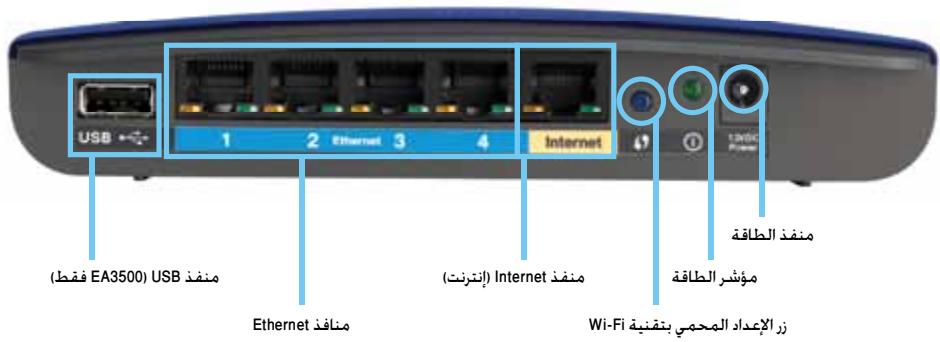
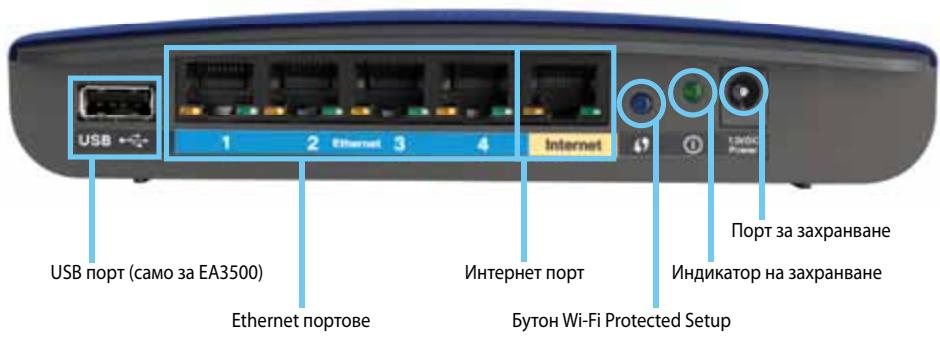
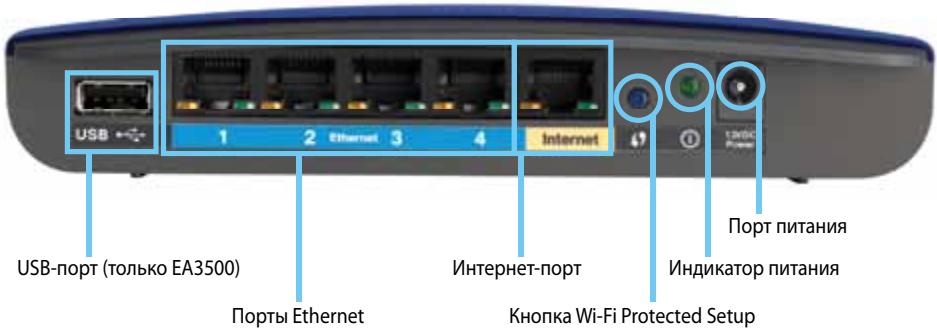
- USB port (EA3500 only)—To easily share disk storage with other users on your network or on the Internet, connect a USB drive to this port.
- Ethernet ports—Connect Ethernet cables (also called network cables) to these Gigabit (10/100/1000) ports, color coded blue, and to other wired Ethernet network devices on your network.
- Internet port—Connect an Ethernet cable (also called a network or Internet cable) to this port, color coded yellow, and to your modem.
Wi-Fi Protected Setup™ button—Press this button to easily configure wireless security on Wi-Fi Protected Setup-enabled network devices. For more information, see "Wireless Security" on page 8.
- Power indicator—Stays on steadily while power is connected and following a successful Wi-Fi Protected Setup connection. Flashes slowly during bootup, during firmware upgrades, and during a Wi-Fi Protected Setup connection. Flashes quickly when there is a Wi-Fi Protected Setup error.
- Power—Connect the included AC power adapter to this port.
CAUTION
Use only the adapter that came with your router.
- Power button—Press | (on) to turn on the router.
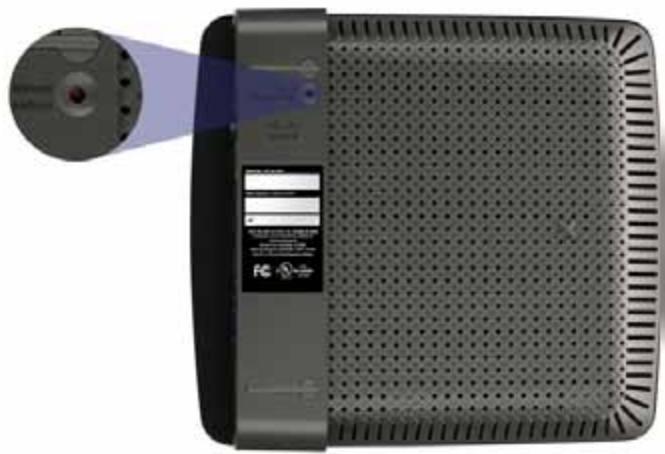
Bottom view
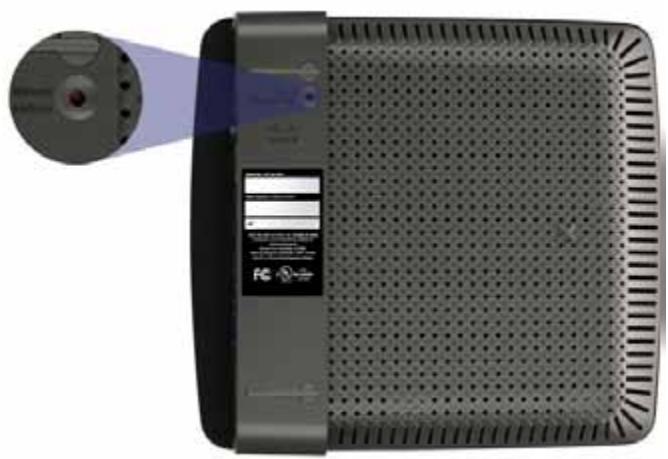
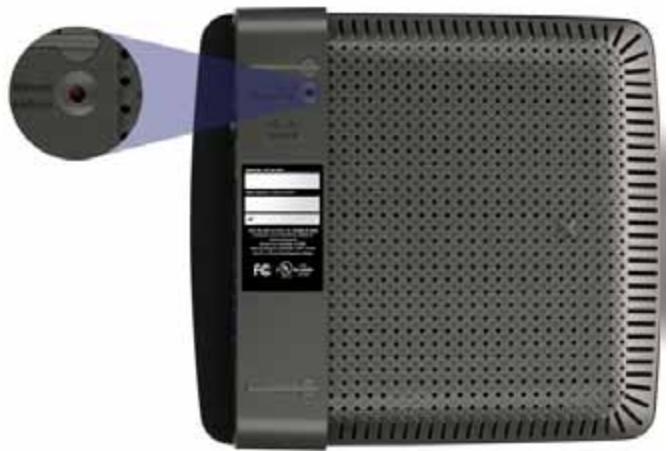
Your router's appearance may vary
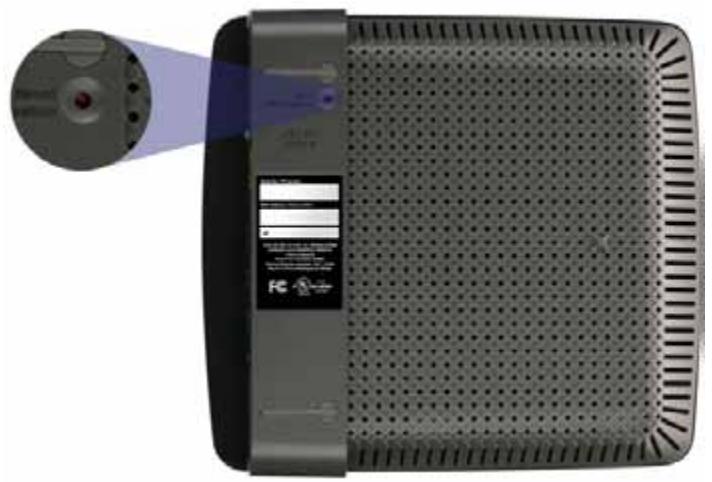
- Reset button—Press and hold this button for 5-15 seconds (until the port lights flash at the same time) to reset the router to its factory defaults. You can also restore the defaults using the browser-based utility.
EA4500
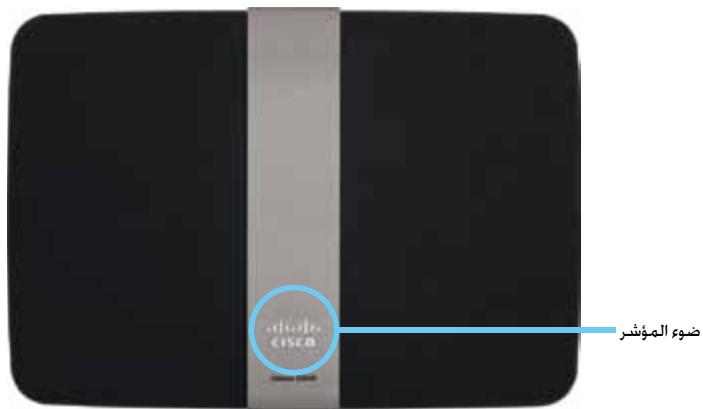
Top view
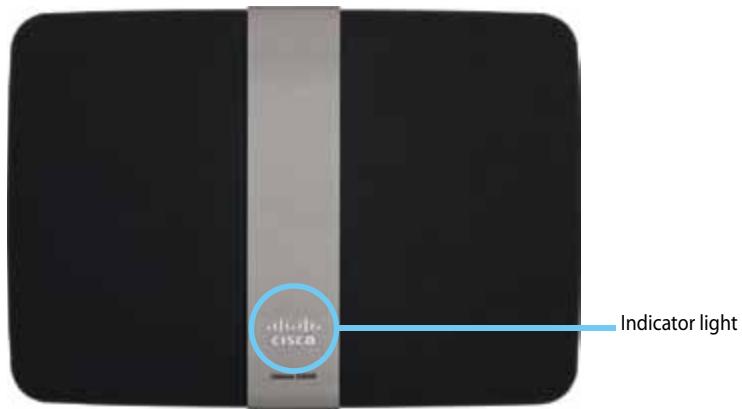
- Indicator light—Stays on steadily while power is connected and following a successful Wi-Fi Protected Setup connection. Pulses slowly during bootup, during firmware upgrades, and during a Wi-Fi Protected Setup connection. Flashes quickly when there is a Wi-Fi Protected Setup error.
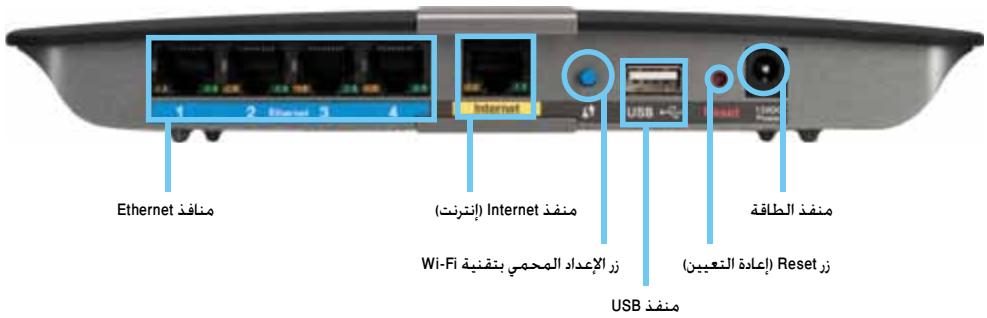
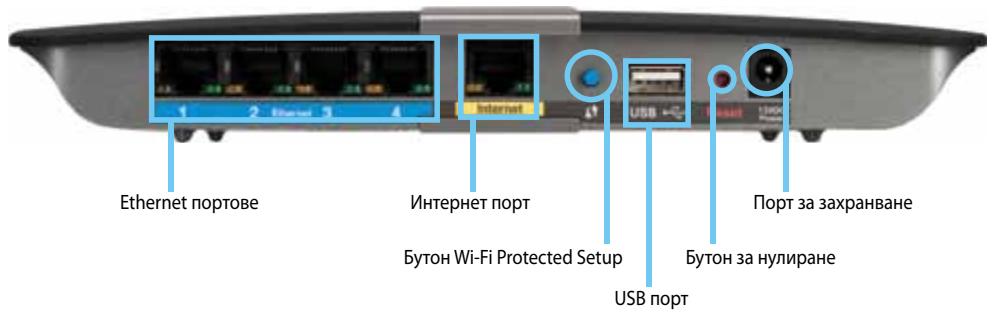
Back view
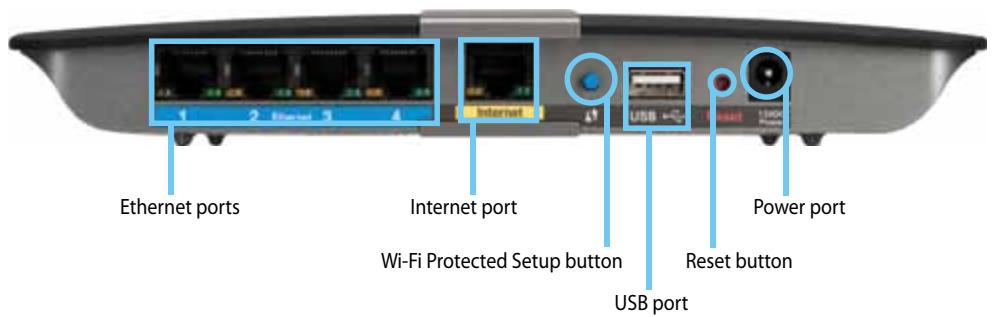
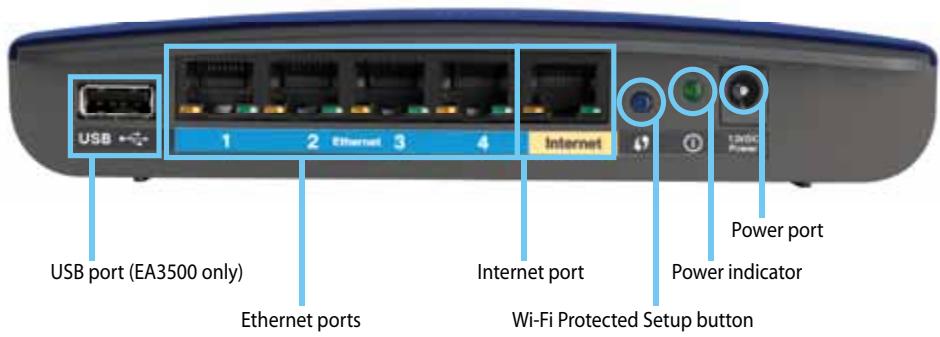
- Ethernet ports—Connect Ethernet cables (also called network cables) to these Gigabit (10/100/1000) ports, color coded blue, and to other wired Ethernet network devices on your network.
- Internet port—Connect an Ethernet cable (also called a network or Internet cable) to this port, color coded yellow, and to your modem.
- Wi-Fi Protected Setup™ button—Press this button to easily configure wireless security on Wi-Fi Protected Setup-enabled network devices. For more information, see "Wireless Security" on page 8.
- USB port—To easily share disk storage with other users on your network or on the Internet, connect a USB drive to this port.
- Reset button—Press and hold this button for 5-15 seconds (until the port lights flash at the same time) to reset the router to its factory defaults. You can also restore the defaults using the browser-based utility.
- Power—Connect the included AC power adapter to this port.
CAUTION
Use only the adapter that came with your router.
- Power button—Press | (on) to turn on the router.
Setting Up Your EA-Series Router
Where to find more help
In addition to this User Guide, you can find help at these locations:
- Linksys.com/support (documentation, downloads, FAQs, technical support, live chat, forums)
- Cisco Connect help (run Cisco Connect, then click Learn More where available)
- Browser-based utility context-sensitive help (open the utility, then click Help in the right-side column.)
How to set up your router
The easiest and fastest way to set up your router is to run the Cisco Connect setup software.
How to start Cisco Connect
When you run the setup CD, Cisco Connect (your router's setup software) is automatically installed onto your computer. You can then use Cisco Connect to easily manage your router.
NOTE:
If you lose your setup CD, you can download the software from Linksys.com/support.
To start Cisco Connect for the first time:
- Insert the CD into your CD or DVD drive.
- Click Set up your Linksys Router.
If you do not see this:
- For Windows, click Start, Computer, then double-click the CD drive and the Setup icon.
-
For Mac, double-click the CD icon on your desktop, then double-click the Setup icon.
-
Follow the on-screen instructions to complete your router setup.
Use Cisco Connect to manage your router
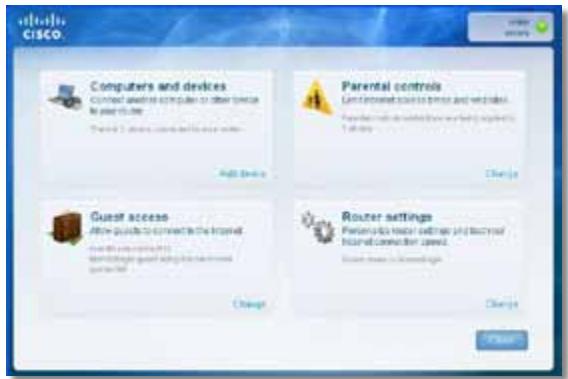
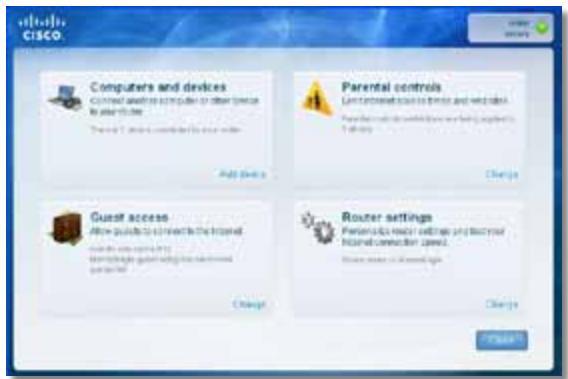
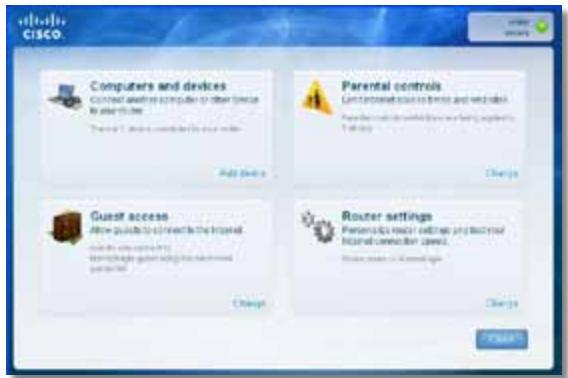
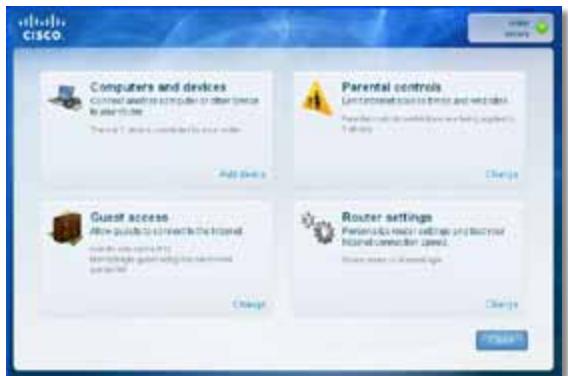
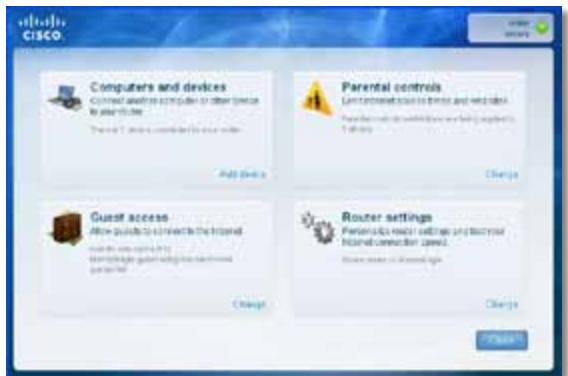
After your router has been set up and Cisco Connect has been installed, you can use Cisco Connect to easily manage many of your router's settings such as:
- Connect devices to your network
Test your Internet connection speed - Configure parental controls
- Set up guest access
- Change your router's name and password
How to manually set up your router
After setting up the router with the setup software (located on the CD), the router will be ready for use. If you would like to change its advanced settings, or if the software does not run, use the router's browser-based utility. You can access the utility with a web browser on a computer connected to the router. For more information on using the utility, see "How to open the browser-based utility" on page 3.
Advanced Configuration
How to open the browser-based utility
To access some advanced settings, you need to open the browser-based utility.
To open the browser-based utility:
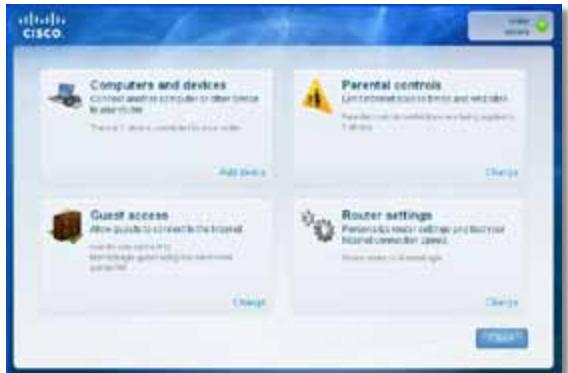
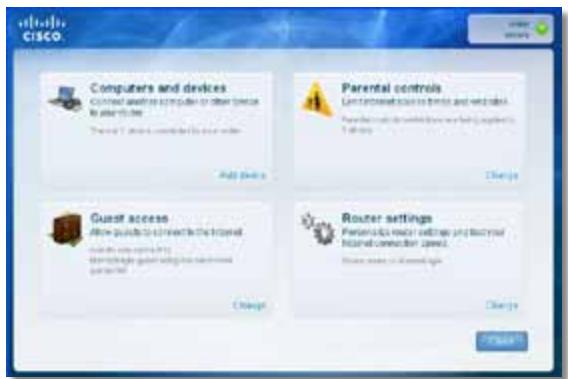
- Run Cisco Connect, click Change under Router settings, click Advanced settings, then click OK.
-or-
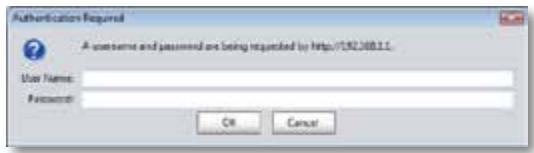
Open a web browser on a computer connected to your network, then go to 192.168.1.1.
The router prompts you for a user name and password.
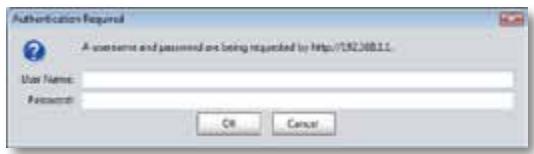
- Enter the user name and password, then click OK. The utility's main menu opens.
TIPS
If you set up your router without using Cisco Connect, your router's default username and password is admin.
If you used Cisco Connect to set up your router, you can see your router's user name and password by running Cisco Connect, then clicking Router settings.
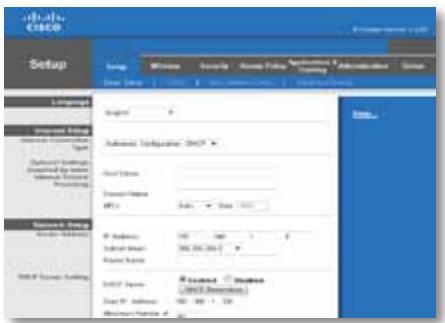
Setup > Basic Setup
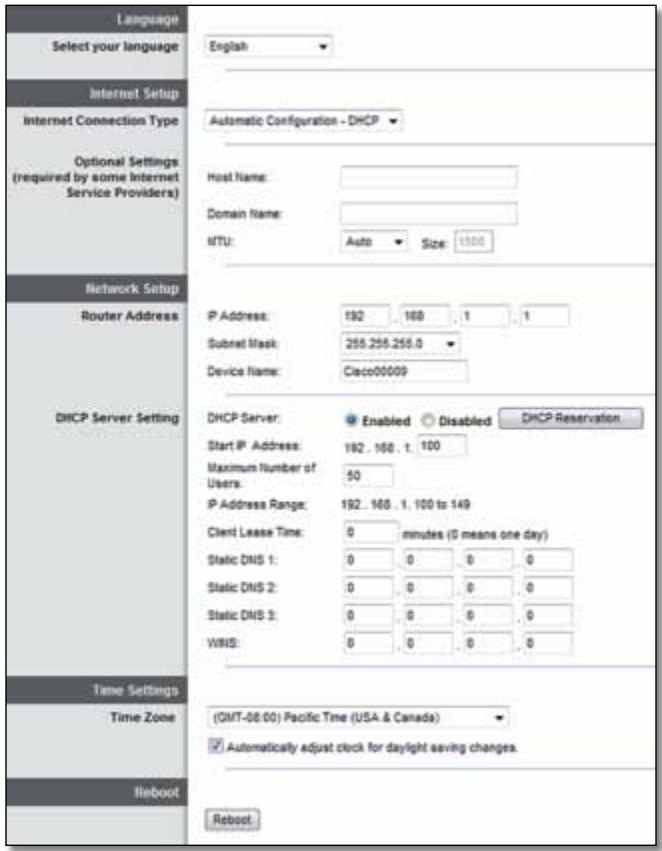
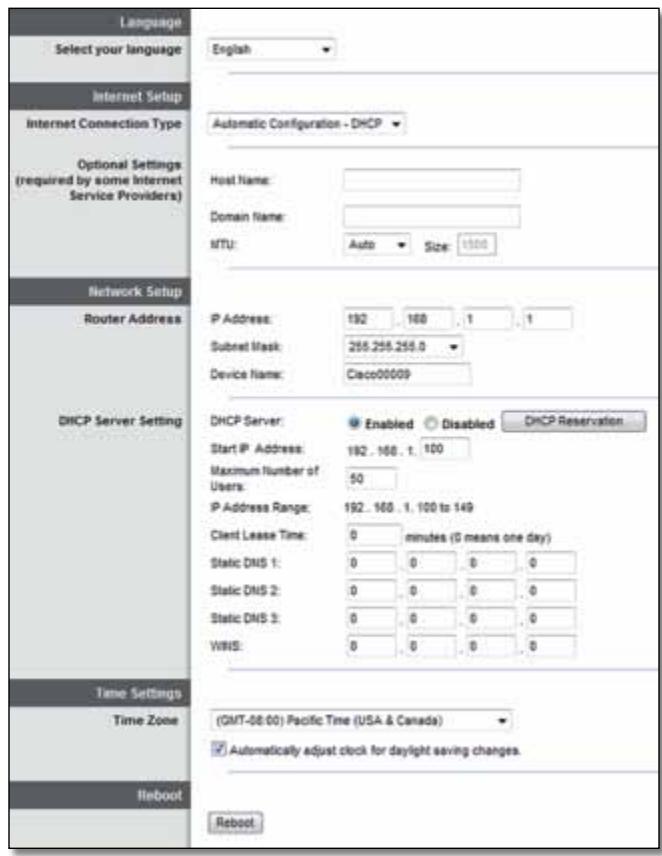
The first screen that appears is the Basic Setup screen. This allows you to change the router's general settings.
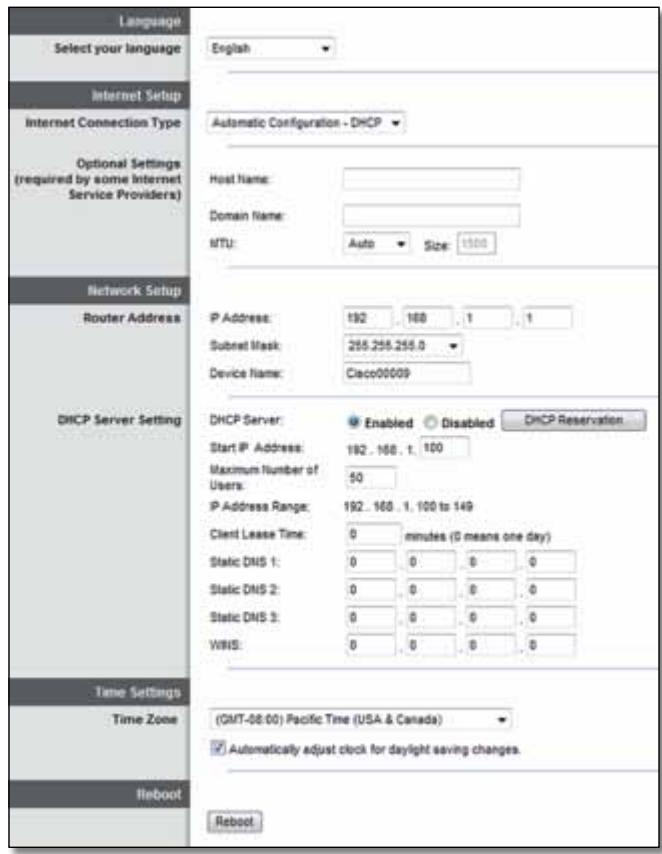
Language
Select your language To use a different language, select one from the dropdown menu. The language of the browser-based utility will change five seconds after you select another language.
Internet Setup
The Internet Setup section configures the router to your Internet connection. Most of this information can be obtained through your Internet Service Provider (ISP).
Internet Connection Type
Select the type of Internet connection your ISP provides from the drop-down menu. The available types are:
Automatic Configuration - DHCP
Static IP
- PPPoE
PPTP
L2TP
Bridge Mode
Automatic Configuration - DHCP
The default Internet Connection Type is Automatic Configuration - DHCP (Dynamic Host Configuration Protocol). Keep the default only if your ISP supports DHCP or if you connect using a dynamic IP address. (This option usually applies to cable connections.)
Static IP
If you are required to use a fixed IP address to connect to the Internet, select Static IP.
PPPoE
If you have a DSL connection, check whether your ISP uses Point-to-Point Protocol over Ethernet (PPPoE). If so, select PPPoE.
PPTP
Point-to-Point Tunneling Protocol (PPTP) is a service that generally applies to connections in Europe. If your PPTP connection supports DHCP or a dynamic IP address, then select Obtain an IP Address Automatically. If you are required to use a fixed IP address to connect to the Internet, then select Specify an IP Address and configure the options below.
L2TP
Layer 2 Tunneling Protocol (L2TP) is a service that generally applies to connections in Israel.
Connect on Demand or Keep Alive
The Connect on Demand and Keep Alive options let you choose whether the router connects to the Internet only as needed (useful if your ISP charges for connect time), or if the router should always be connected. Select the appropriate option.
Wireless > Wireless Settings
The settings for wireless networking are set on this screen.
NOTE
After you set up the wireless network(s), set up the wireless security settings.
Wireless Settings
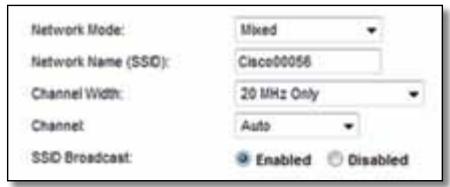
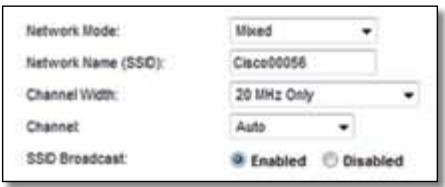
Network Mode Select the wireless standards your network will support.
- Mixed If you have Wireless-N (2.4 GHz), Wireless-G, and Wireless-B devices in your network, keep the default, Mixed.
- Wireless-B/G Only If you have both Wireless-B and Wireless-G (2.4 GHz) devices in your network, select Wireless-B/G Only.
- Wireless-B Only If you have only Wireless-B devices, select Wireless-B Only.
-
Wireless-G Only If you have only Wireless-G devices, select Wireless-G Only.
-
Wireless-N Only If you have only Wireless-N (2.4 GHz) devices, select Wireless-N Only.
- Disabled If you have no Wireless-B, Wireless-G, and Wireless-N (2.4 GHz) devices in your network, select Disabled.
NOTE
If you have a dual-band router, you can select Mixed, Wireless-A Only, Wireless-N Only, or Disabled for the 5 GHz band.
If you are not sure which mode to use, keep the default, Mixed.
Network Name (SSID) The Service Set Identifier (SSID) is the network name shared by all devices in a wireless network. It is case-sensitive and must not exceed 32 keyboard characters. The default is Cisco followed by the last 5 digits of the router's serial number, which is found on the bottom of the router. If you used the setup software for installation, then the default Network Name is changed to an easy-to-remember name.
NOTE
If you restore the router's factory default settings (by pressing the Reset button or using the Administration > Factory Defaults screen), the Network Name will return to its default value. Change the Network Name back to its original name, or you will have to reconnect all devices on your wireless network to the new network name.
Channel Width For best performance in a network using Wireless-B, Wireless-G and Wireless-N (2.4 GHz) devices, select Auto (20 MHz or 40 MHz). For a channel width of 20 MHz, select 20 MHz only.
Channel Select the channel from the drop-down list for Wireless-B, Wireless-G, and Wireless-N (2.4 GHz) networking. If you are not sure which channel to select, then keep the default, Auto.
SSID Broadcast When wireless clients survey the local area for wireless networks to associate with, they will detect the SSID broadcast by the router. To broadcast the router's SSID, keep the default, Enabled. If you do not want to broadcast the router's SSID, then select Disabled.
Wireless Security
Wireless > Wireless Security
The wireless security settings configure the security of your wireless network(s). The router supports the following wireless security options: WPA2/WPA Mixed Mode, WPA2 Personal, WPA Personal, WPA2/WPA Enterprise Mixed Mode, WPA2 Enterprise, WPA Enterprise, WEP, and RADIUS. (WPA stands for Wi-Fi Protected Access. WEP stands for Wireless Equivalent Privacy. RADIUS stands for Remote Authentication Dial-In User Service.)
Personal options
| Security Option | Strength |
| WPA2 Personal | Strongest |
| WPA2/WPA Mixed Mode | WPA2: Strongest WPA: Strong |
| WPA Personal | Strong |
| WEP | Basic |
Office options
The office options are available for networks that use a RADIUS server for authentication. The office options are stronger than the personal options because WPA2 or WPA provides encryption while RADIUS provides authentication.
| Security Option | Strength |
| WPA2 Enterprise | Strongest |
| WPA2/WPA Enterprise Mixed Mode | WPA2: Strongest WPA: Strong |
| WPA Enterprise | Strong |
| RADIUS | Basic |
Option settings
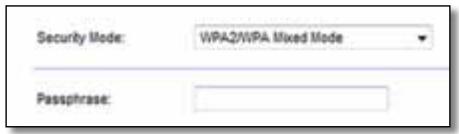
WPA2/WPA Mixed Mode, WPA2 Personal, WPA Personal
NOTES
If you select WPA2/WPA Mixed Mode as your Security Mode, each device in your wireless network MUST use WPA2/WPA and the same passphrase.
If you select WPA2 Personal as your Security Mode, each device in your wireless network MUST use WPA2 Personal and the same passphrase.
If you select WPA Personal as your Security Mode, each device in your wireless network MUST use WPA Personal and the same passphrase.
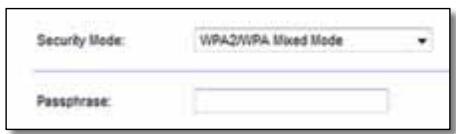
Passphrase Enter a passphrase of 8-63 characters. The default is password. If you used the setup software for installation, then the default is changed to a unique passphrase, which you can find by running Cisco Connect, then clicking Router settings.
WPA2/WPA Enterprise Mixed Mode, WPA2 Enterprise, WPA Enterprise
These option is used in coordination with a RADIUS server. (These should only be used when a RADIUS server is connected to the router.)
NOTES
If you select WPA2/WPA Enterprise Mixed Mode as your Security Mode, each device in your wireless network MUST use WPA2/WPA Enterprise and the same shared key.
If you select WPA2 Enterprise as your Security Mode, each device in your wireless network MUST use WPA2 Enterprise and the same shared key.
If you select WPA Enterprise as your Security Mode, each device in your wireless network MUST use WPA Enterprise and the same shared key.
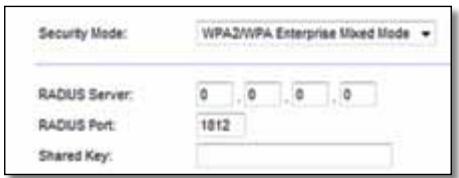
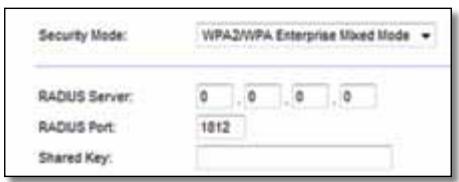
RADIUS Server Enter the IP address of the RADIUS server.
RADIUS Port Enter the port number of the RADIUS server. The default is 1812.
Shared Key Enter the key shared between the router and the server.
WEP
WEP is a basic encryption method, which is not as secure as WPA.
NOTE:
If you select WEP as your Security Mode, each device in your wireless network MUST use WEP and the same encryption and shared key.
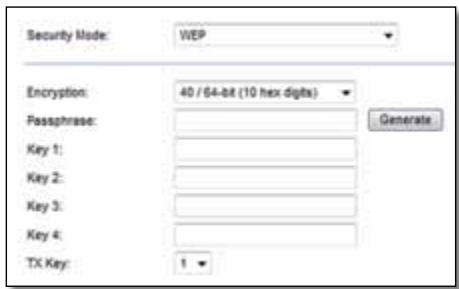
Encryption Select a level of WEP encryption, (40/64-bit 10 hex digits) or 104/128-bit (26 hex digits). The default is 40/64-bit (10 hex digits).
Passphrase Enter a passphrase to automatically generate WEP keys. Then click Generate.
Key 1-4 If you did not enter a passphrase, enter the WEP key(s) manually.
TX Key Select a default TX (Transmit) Key to use. The default is 1.
RADIUS
This option features WEP used in coordination with a RADIUS server. (This should only be used when a RADIUS server is connected to the router.)
NOTE:
If you select RADIUS as your Security Mode, each device in your wireless network MUST use RADIUS and the same encryption and shared key.
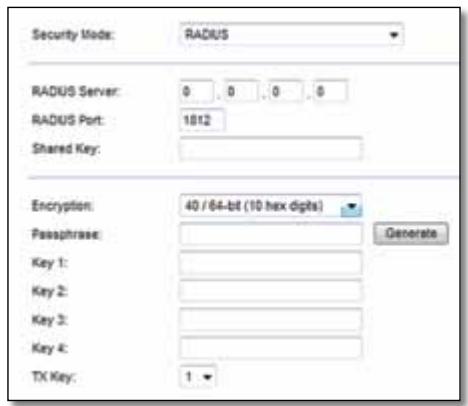
RADIUS Server Enter the IP address of the RADIUS server.
RADIUS Port Enter the port number of the RADIUS server. The default is 1812.
Shared Secret Enter the key shared between the router and the server.
Encryption Select a level of WEP encryption, (40/64-bit 10 hex digits) or 104/128-bit (26 hex digits). The default is 40/64-bit (10 hex digits).
Passphrase Enter a passphrase to automatically generate WEP keys. Then click Generate.
Key 1-4 If you did not enter a passphrase, enter the WEP key(s) manually.
TX Key Select a default TX (Transmit) Key to use. The default is 1.
Disabled
If you choose to disable wireless security, you will be informed that wireless security is disabled when you first attempt to access the Internet. You will given the option to enable wireless security, or confirm that you understand the risks but still wish to proceed without wireless security.

Troubleshooting
This chapter can help you solve common setup issues and connect to the Internet. Your router's CD includes Cisco Connect, the router setup software that makes it easy to connect network devices, change router settings, control guest access, enable parental controls, and connect to the Internet. Cisco Connect is also installed onto your computer during setup. If Cisco Connect is prevented from completing the setup, this chapter will guide you through finding solutions.
You can find more help from our award-winning customer support at linksys.com/support.
How to run Cisco Connect after setup
When you run the setup CD, Cisco Connect is automatically installed onto your computer. You can then use Cisco Connect to easily manage your network.
To start Cisco Connect on a Windows computer:
- Click Start, All Programs, then click Cisco Connect.

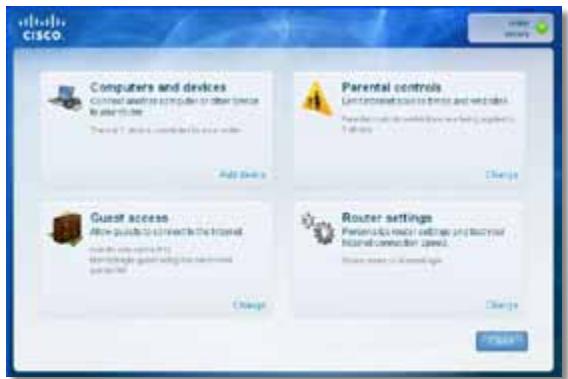
The Cisco Connect main menu opens.
To start Cisco Connect on a Mac OS X computer:
- Open Finder and click Applications in the left panel.

- Double-click the Cisco Connect icon.
The Cisco Connect main menu opens.
Your router was not successfully set up
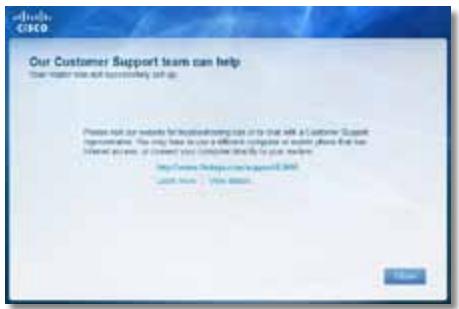
If Cisco Connect did not complete the setup, you can try the following:
- Press and hold the Reset button on your router with a paperclip or pin for 5-15 seconds, then run the Setup program again on the router's CD.
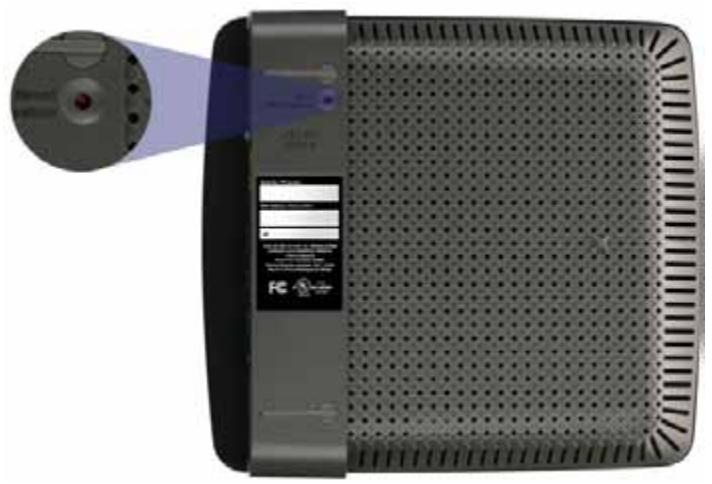

Your router's appearance may vary
- Temporarily disable your computer's firewall (see the security software's instructions for help), then run the Setup program again on the router's CD.
- If you have another computer, use that computer to run the Setup program again on the router's CD.
Get Windows XP Service Pack 3 message
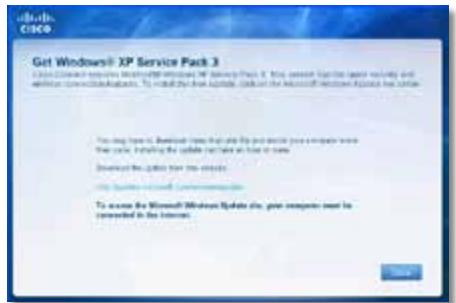
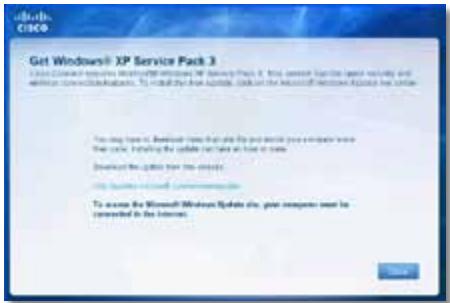
On Windows XP computers, Cisco Connect requires Service Pack 3 in order to work. If you receive a "Get Windows Service Pack 3" message when setting up your router for the first time, follow these troubleshooting steps.
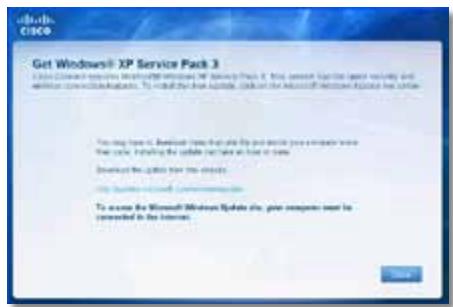
If the currently installed Service Pack is older than version 3, you need to download and install Service Pack 3.
TIP
To temporarily connect to the Internet and download the required Service Pack, you can use the included Ethernet cable to connect your computer directly to your modem.
To install Service Pack 3:
- Click the link in the Cisco Connect error message or connect to the Microsoft Update website (update.microsoft.com/windowsupdate).
- Follow the instructions on the website or contact Microsoft if you need further help.
- After downloading and installing Service Pack 3, run the Setup program on your router's CD.
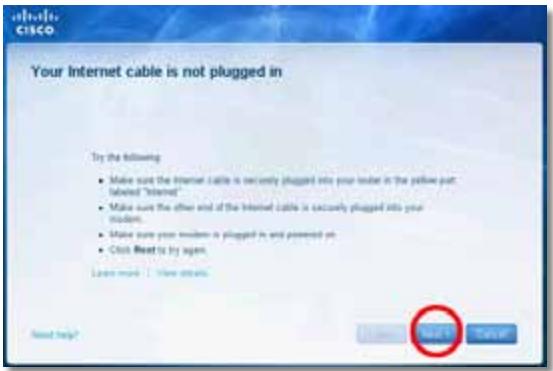
Your Internet cable is not plugged in
message
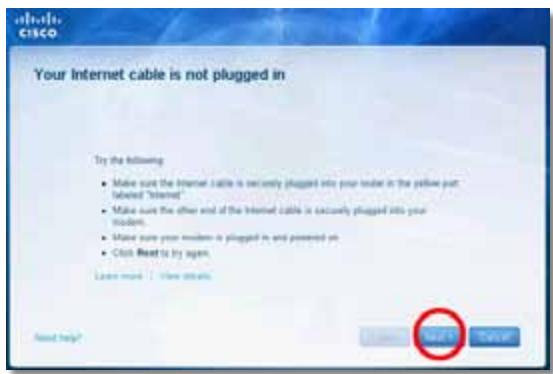
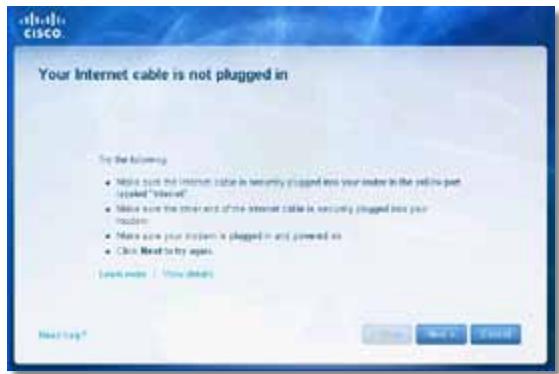
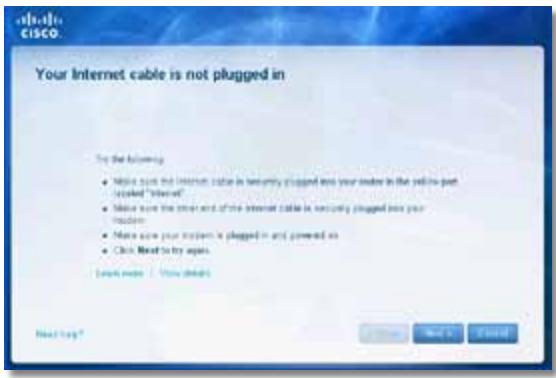
If you get a "Your Internet cable is not plugged in" message when trying to set up your router, follow these troubleshooting steps.
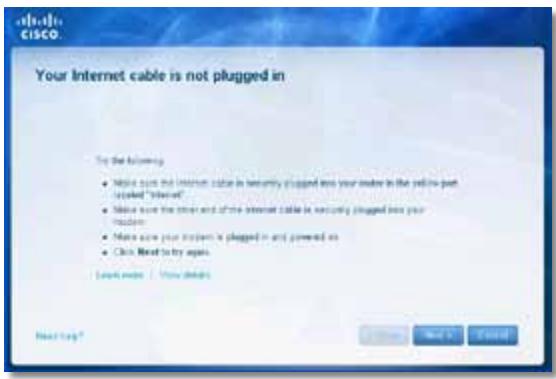
To fix the problem:
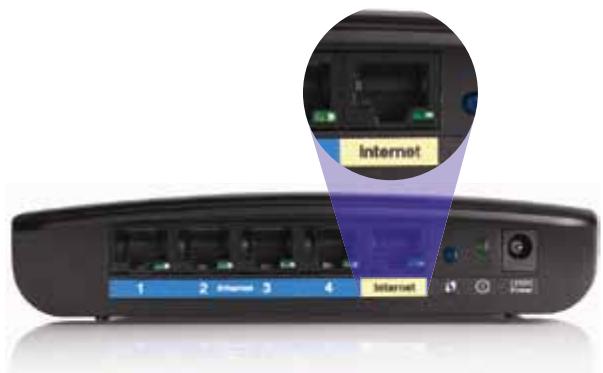
- Make sure that an Ethernet or Internet cable (or a cable like the one supplied with your router) is securely connected to the yellow Internet port on the back of the router and to the appropriate port on your modem. This port on the modem is usually labeled Ethernet, but may be named Internet or WAN.
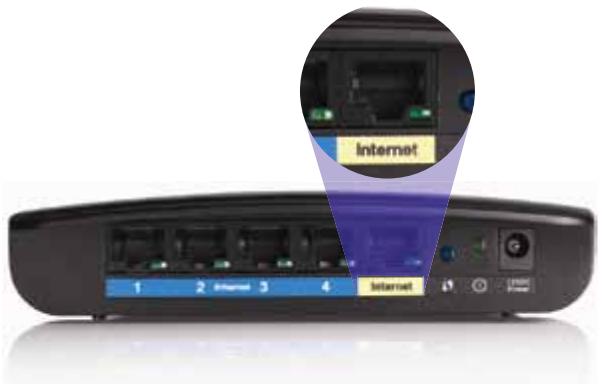
Back view of router
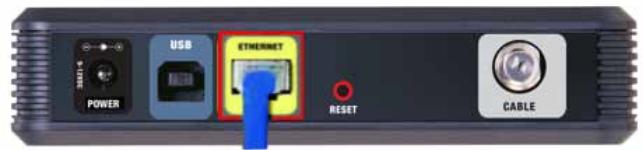
Back view of cable modem
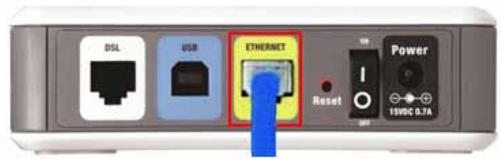
Back view of DSL modem
- Make sure that your modem is connected to power and is turned on. If it has a power switch, make sure that it is set to the ON or I position.
- If your Internet service is cable, verify that the cable modem's CABLE port is connected to the coaxial cable provided by your ISP.
Or, if your Internet service is DSL, make sure that the DSL phone line is connected to the modem's DSL port.
- If your computer was previously connected to your modem with a USB cable, disconnect the USB cable.
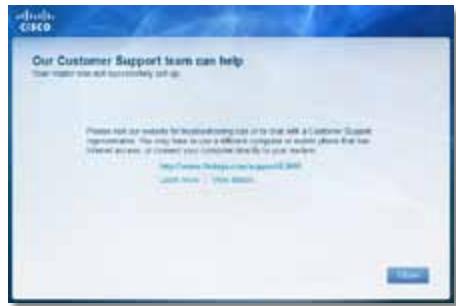
- Return to the Cisco Connect window and click Next to try again. If the window has already been closed, run the Setup program again on the router's CD.
Cannot access your router message
If you cannot access your router because your computer is not connected to your network, follow these troubleshooting steps.
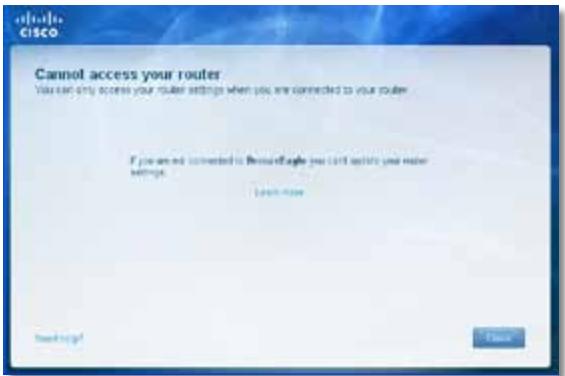
To access your router, you must be connected to your own network. If you currently have wireless Internet access, the problem may be that you have accidentally connected to a different wireless network.
To fix the problem on Windows computers:
- On your Windows desktop, right-click the wireless icon in the system tray.
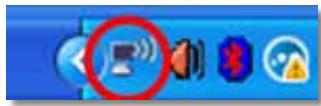
- Click View Available Wireless Networks. A list of available networks appears.
| Disable Status Repair |
| View Available Wireless Networks |
| Change Windows Firewall settings |
| Open Network Connections |
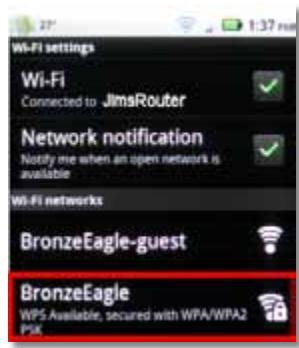
- Click your own network name, then click Connect. In the example below, the computer was connected to another wireless network named JimsRouter. The name of the Linksys E-Series network, BronzeEagle in this example, is shown selected.
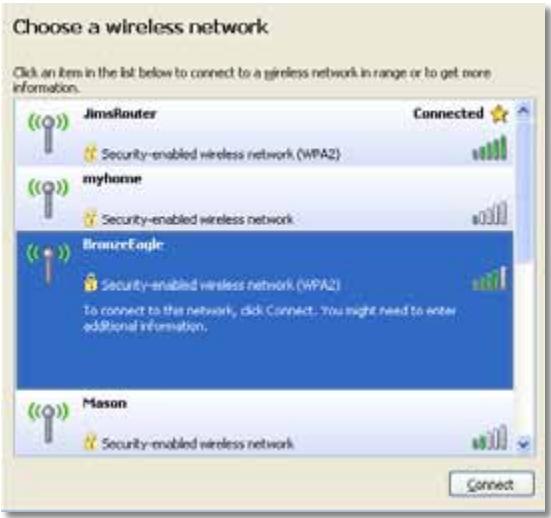
- If you are prompted to enter a network key, type your password (Security Key) into the Network key and Confirm network key fields, then click Connect.
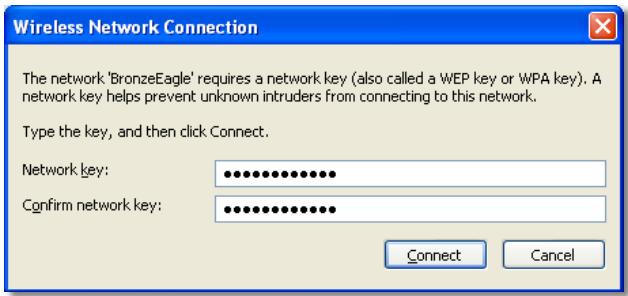
Your computer connects to the network, and you should now be able to access the router.
To fix the problem on Mac computers:
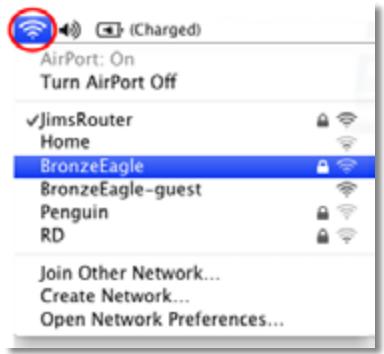
- In the menu bar across the top of the screen, click the AirPort icon. A list of wireless networks appears. Cisco Connect has automatically assigned your network a name.
In the example below, the computer was connected to another wireless network named JimsRouter. The name of the Linksys E-Series network, BronzeEagle in this example, is shown selected.
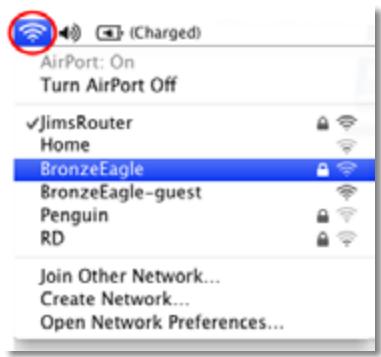
- Click the wireless network name of your Linksys E-Series router (BronzeEagle in the example).
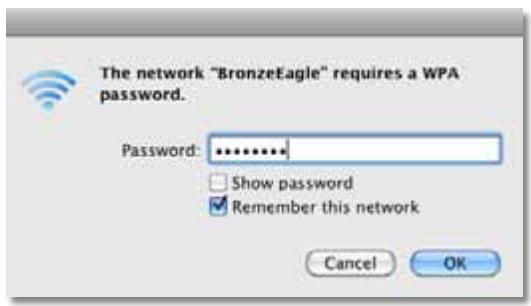
- Type your wireless network password (Security Key) into the Password field, then click OK.
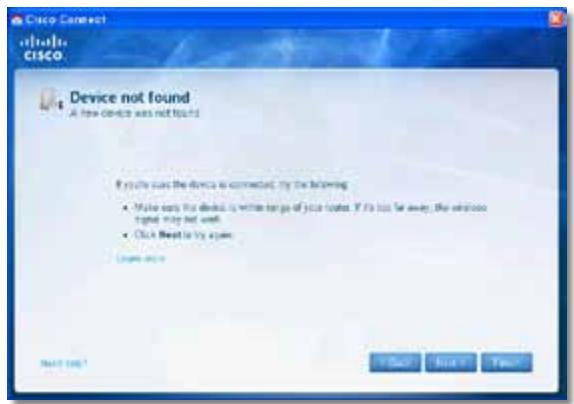
Device not found message
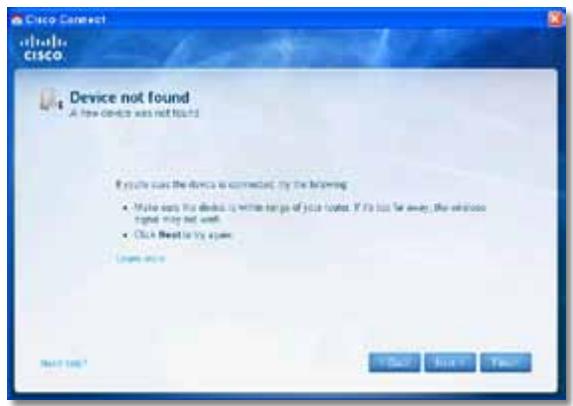
If you get a "Device not found" message when trying to connect a network device (such as an iPhone, iPod, or smartphone), follow these troubleshooting steps.
TIP
For a stronger signal during initial setup, move your wireless devices near your router. Long distances make it harder for the router to detect the devices.
To fix the problem:
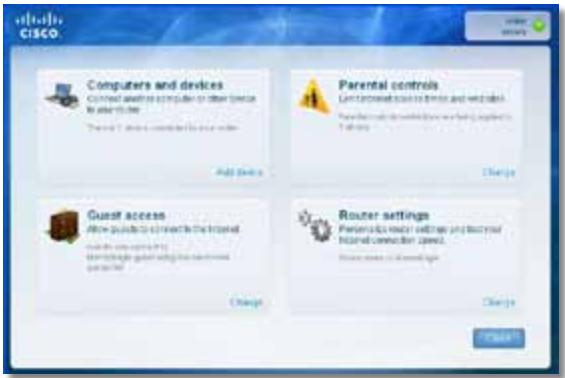
- Run Cisco Connect.
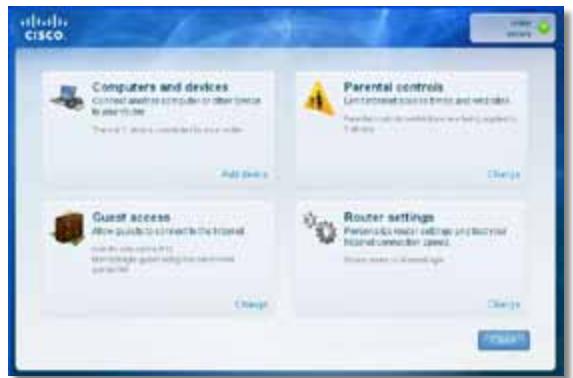
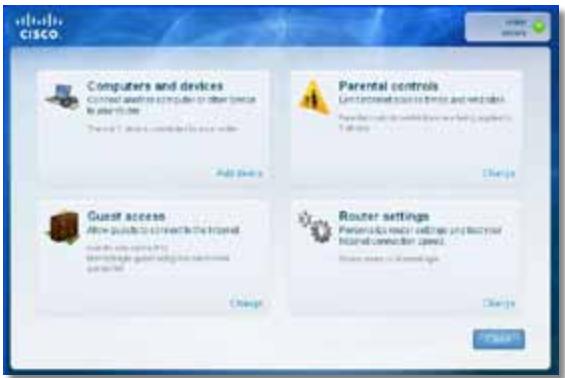
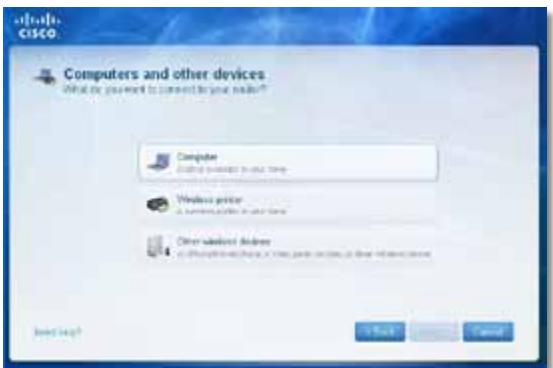
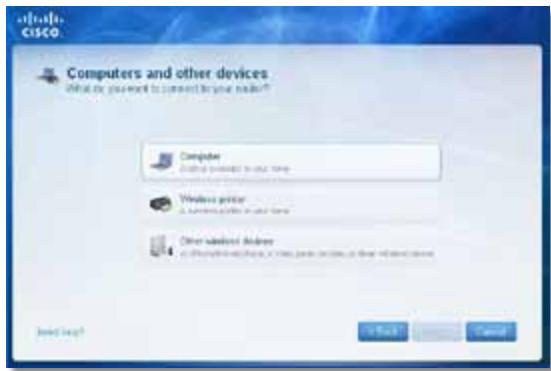
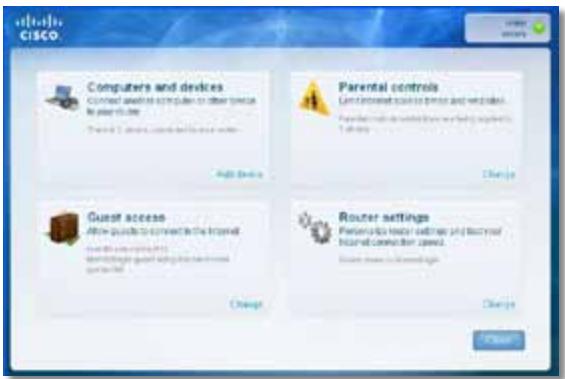
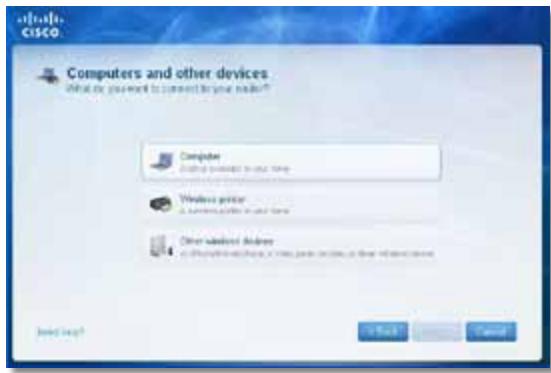
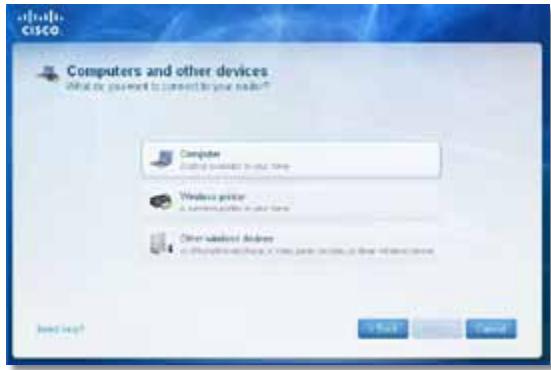
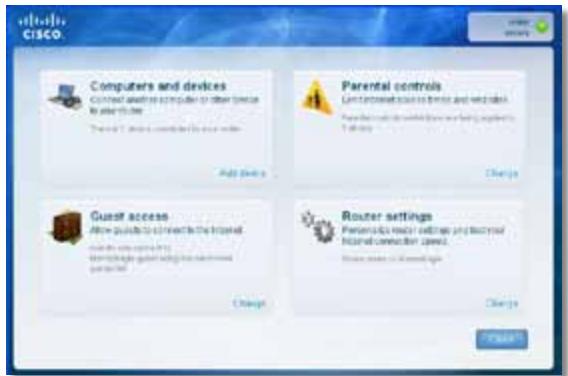
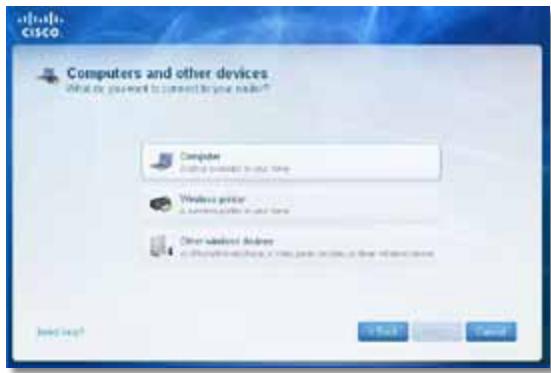
- Click Computers and devices. The Computers and other devices window appears.
- Click Other Wireless devices.
- Enable your wireless network device's Wi-Fi connection, then search for your wireless network name. See your device documentation for help.
NOTE
Your wireless device must support WPA/WPA2.
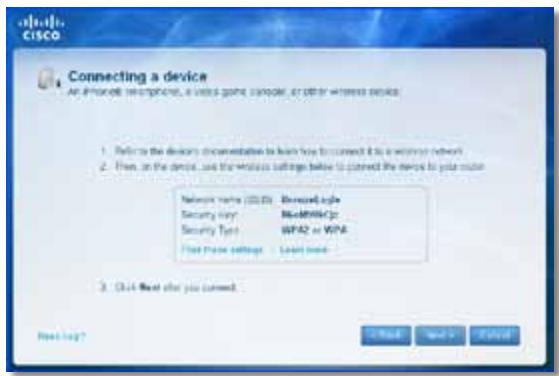
- On the wireless network device, select the network name of your router and enter the password (Security Key).
- In Cisco Connect, click Next.
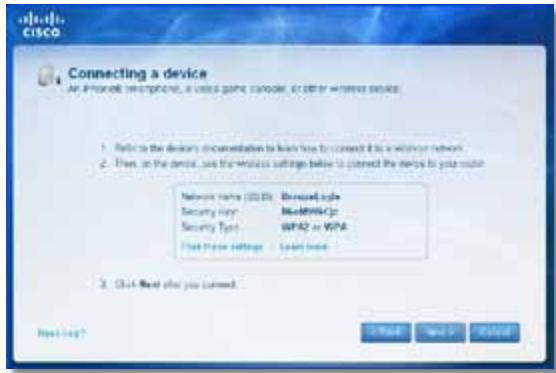
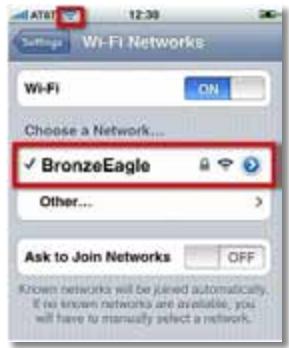
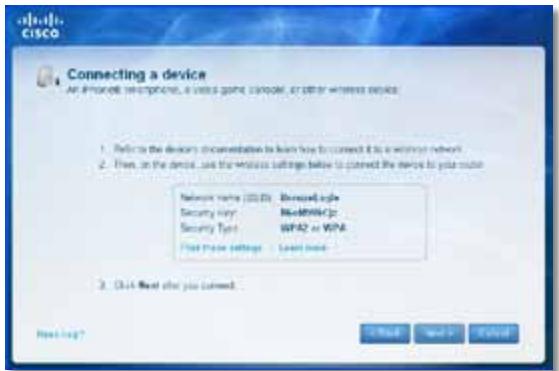
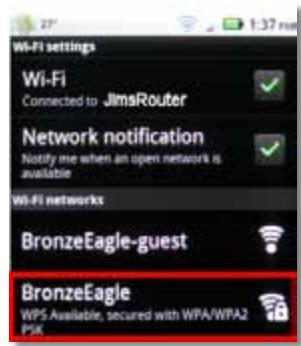
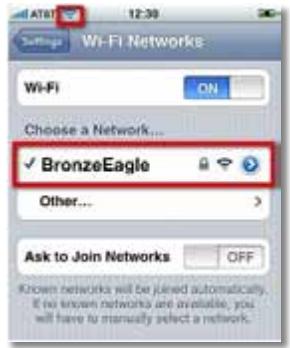
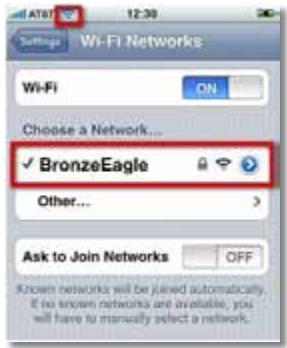
Example: On your Smartphone or other wireless device, locate the WiFi menu and search for available wireless networks. In this example, using the network information provided by Cisco Connect shown in the previous screen, click BronzeEagle.
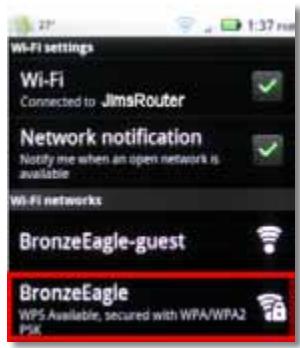
Android
iPhone
- Enter the password (Security Key) provided by Cisco Connect. In this example, the security key is B6eM9UkCjz.
NOTE
The password is case sensitive. Make sure that you enter letters in the correct case.
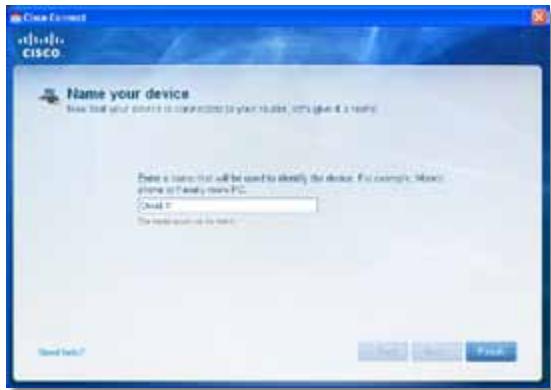
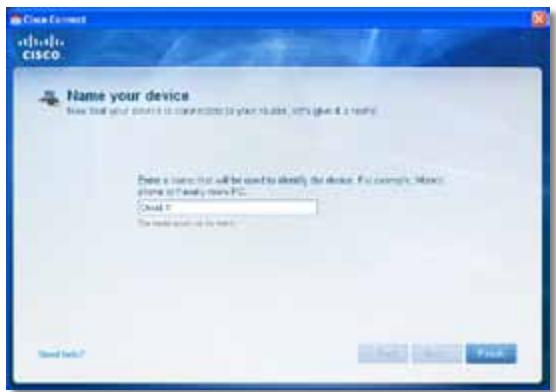
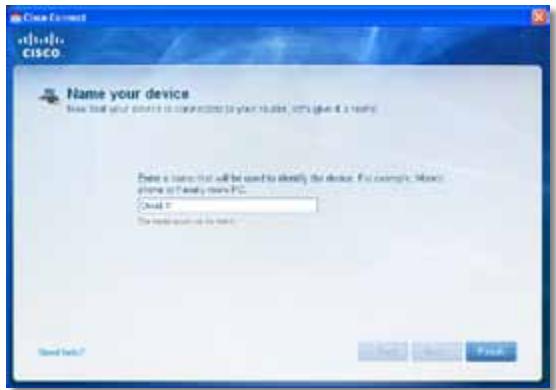
- When your wireless device is successfully connected to your wireless network, enter a name for the device in Cisco Connect, then click Finish.
Specifications
Linksys EA2700
| Model Name | Linksys EA2700 |
| Description | Dual-Band N600 Router with Gigabit |
| Model Number | EA2700 |
| Standards | 802.11n, 802.11a, 802.11g, 802.11b, 802.3, 802.3u, 802.3ab |
| # of Antennas | 4 total, 2 internal antennas per each 2.4 GHz & 5 GHz radio band |
| Detachable (y/n) | No |
| Switch Port Speed | 10/100/1000 Mbps (Gigabit Ethernet) |
| Modulation | 802.11b: CCK, QPSK, BPSK 802.11g: OFDM 802.11a: OFDM 802.11n: BPSK, QPSK, 16-QAM, 64-QAM |
| Receive Sensitivity (Typical) | 2.4 GHz 802.11b: -90 dBm @ 11 Mbps 802.11g: -75 dBm @ 54 Mbps 802.11n 20 MHz: -73 dBm @ MCS15 802.11n 40 MHz: -70 dBm @ MCS15 5 GHz 802.11a: -72 dBm @ 54 Mbps 802.11n 20 MHz: -70 dBm @ MCS15 802.11n 40 MHz: -67 dBm @ MCS15 |
| Antenna Gain | 2.4 GHz Antenna 1 ≤ 3.45 dBi Antenna 2 ≤ 2.46 dBi 5 GHz Antenna 1 ≤ 4.41 dBi Antenna 2 ≤ 5.15 dBi |
| UPnP | Supported |
| Security features | WEP, WPA, WPA2 |
| Security key bits | Up to 128-bit encryption |
Environmental
| Dimensions | 174 x 190 x 28 mm (6.85" x 7.48" x 1.10") |
| Unit Weight | 297.7 g (10.5 oz) |
| Power | 12V, 1A |
| Certifications | FCC, IC, CE, Wi-Fi A/B/G/N |
| Operating Temp. | 0 to 40°C (32 to 104°F) |
| Storage Temp. | -20 to 60°C (-4 to 140°F) |
| Operating Humidity | 10 to 80%, relative humidity, non-condensing |
| Storage Humidity | 5 to 90% non-condensing |
NOTES
For regulatory, warranty, and safety information, see the CD that came with your router or go to Linksys.com/support.
Specifications are subject to change without notice.
Maximum performance derived from IEEE Standard 802.11 specifications. Actual performance can vary, including lower wireless network capacity, data throughput rate, range and coverage. Performance depends on many factors, conditions and variables, including distance from the access point, volume of network traffic, building materials and construction, operating system used, mix of wireless products used, interference and other adverse conditions.
Linksys EA3500
| Model Name | Linksys EA3500 |
| Description | Dual-Band N750 Router with Gigabit and USB |
| Model Number | EA3500 |
| # of Antennas | 6 total, 3 internal antennas per each 2.4 GHz & 5 GHz radio band |
| Detachable (y/n) | No |
| Switch Port Speed | 10/100/1000 Mbps (Gigabit Ethernet) |
| Ports | Internet, Ethernet (1-4), USB, Power |
| Buttons | Reset, Wi-Fi Protected Setup |
| LEDs | Power, Internet, Ethernet (1-4) |
| Modulation | 802.11b: CCK, QPSK, BPSK 802.11g: OFDM 802.11a: OFDM 802.11n: BPSK, QPSK, 16-QAM, 64-QAM |
| Receive Sensitivity | 2.4 GHz 802.11b: -87 dBm @ 11 Mbps (Typical) 802.11g: -77 dBm @ 54 Mbps (Typical) 802.11n (20 MHz): -72 dBm @ MCS15 (Typical) 802.11n (40 MHz): -69 dBm @ MCS15 (Typical) 5 GHz 802.11a: -74 dBm @ 54 Mbps (Typical) 802.11n 20 MHz: -67 dBm @ MCS23 (Typical) 802.11n 40 MHz: -64 dBm @ MCS23 (Typical) |
| Antenna Gain | 2.4 GHz (Dipole Antennas) Antenna 1 ≤ 2.70 dBi Antenna 2 ≤ 3.70 dBi Antenna 3 ≤ 4.95 dBi 5 GHz (Dipole Antennas) Antenna 1 ≤ 4.46 dBi Antenna 2 ≤ 3.23 dBi Antenna 3 ≤ 3.88 dBi |
| UPnP | Supported |
| Security features | WEP, WPA, WPA2 |
| Security key bits | Up to 128-bit encryption |
| Storage File System Support | FAT, and NTFS, and HFS+ |
Environmental
| Dimensions | 6.69" x 0.98" x 7.48" (170 x 25 x 190 mm) |
| Unit Weight | 11.5 oz (326 g) |
| Power | 12V, 2A |
| Certifications | FCC, IC, CE, Wi-Fi A/B/G/N, Windows 7 |
| Operating Temp. | 32 to 95°F (0 to 35°C) |
| Storage Temp. | -4 to 140°F (-20 to 60°C) |
| Operating Humidity | 10 to 80% relative humidity, non-condensing |
| Storage Humidity | 5 to 90% non-condensing |
NOTES
For regulatory, warranty, and safety information, see the CD that came with your router or go to Linksys.com/support.
Specifications are subject to change without notice.
Maximum performance derived from IEEE Standard 802.11 specifications. Actual performance can vary, including lower wireless network capacity, data throughput rate, range and coverage. Performance depends on many factors, conditions and variables, including distance from the access point, volume of network traffic, building materials and construction, operating system used, mix of wireless products used, interference and other adverse conditions.
Linksys EA4500
| Model Name | Linksys EA4500 |
| Description | Dual-Band N900 Router with Gigabit and USB |
| Model Number | EA4500 |
| Standards | 802.11n, 802.11a, 802.11g, 802.11b, 802.3, 802.3u, 802.3ab |
| Radio Frequency | 2.4 and 5 GHz |
| Switch Port Speed | 10/100/1000 Mbps (Gigabit Ethernet) |
| Ports | Power, USB, Internet, Ethernet (1-4) |
| Buttons | Reset, Wi-Fi Protected Setup |
| LEDs | Top panel: Power Back panel: Internet, Ethernet (1-4) |
| Number of Antennas | 6 total, 3 internal antennas per each 2.4 GHz and 5 GHz radio band |
| Detachable (y/n) | No |
| Modulations | 802.11b: CCK, QPSK, BPSK 802.11g: OFDM 802.11a: OFDM 802.11n: BPSK, QPSK, 16-QAM, 64-QAM |
| Receive Sensitivity | 2.4 GHz 802.11b: -87 dBm @ 11 Mbps (Typical) 802.11g: -77 dBm @ 54 Mbps (Typical) 802.11n: 20 MHz: -70 dBm @ MCS23 (Typical) 802.11n: 40 MHz: -66 dBm @ MCS23 (Typical) 5 GHz 802.11a: -74 dBm @ 54 Mbps (Typical) 802.11n: 20 MHz: -67 dBm @ MCS23 (Typical) 802.11n: 40 MHz: -64 dBm @ MCS23 (Typical) |
| Antenna Gain in dBi | 2.4 GHz (3 internal PIFA antennas) PIFA 1 ≤ 3.31 dBi (Right) PIFA 2 ≤ 3.45 dBi (Front) PIFA 3 ≤ 1.96 dBi (Left) 5 GHz (3 internal PIFA antennas) PIFA 1 ≤ 3.71 dBi (Right) PIFA 2 ≤ 3.60 dBi (Front) PIFA 3 ≤ 4.27 dBi (Left) |
| Supported File Systems | |
| for Storage Device | FAT32, NTFS, and HFS+ |
| UPnP | Supported |
| Security Features | WEP, WPA, WPA2 |
| Security Key Bits | Up to 128-bit encryption |
| Environmental | |
| Dimensions | 8.86" x 0.98" x 6.30" (225 x 25 x 160 mm) |
| Unit Weight | 12.7 oz (360 g) |
| Power | 12V, 2A |
| Certifications | FCC, IC, CE, Wi-Fi a/b/g/n, Windows 7, DLNA |
| Operating Temp. | 32 to 104°F (0 to 40°C) |
| Storage Temp. | -4 to 140°F (-20 to 60°C) |
| Operating Humidity | 10 to 80% relative humid non-condensing |
| Storage Humidity | 5 to 90% non-condensing |
NOTES
For regulatory, warranty, and safety information, see the CD that came with your router or go to Linksys.com/support.
Specifications are subject to change without notice.
Maximum performance derived from IEEE Standard 802.11 specifications. Actual performance can vary, including lower wireless network capacity, data throughput rate, range and coverage. Performance depends on many factors, conditions and variables, including distance from the access point, volume of network traffic, building materials and construction, operating system used, mix of wireless products used, interference and other adverse conditions.
Visit linksys.com/support for award-winning technical support

Cisco, the Cisco logo, and Linksys are trademarks or registered trademarks of Cisco and/or its affiliates in the United States and other countries. A listing of Cisco's trademarks can be found at www.cisco.com/go/trademarks. All other trademarks mentioned in this document are the property of their respective owners.
Guía del usuario
Contedio
WPA2/WPA Mixed Mode (Modo WPA2/WPA mixto), WPA2 Personal y WPA Personal
NOTAS
- Execute Cisco Connect.
- Sezione Computers and devices (Computadoras y dispositivos). Aparece la pantalla Computers and other devices (Computadoras yotiros dispositivos).
- Hagacies en Other Wireless devices (Otros dispositivos inalambricos).
- Execute Cisco Connect.
Your Internet cable is not plugged in
WPA2/WPA Mixed Mode, WPA2 Personal, WPA Personal
HUOMAUTUKSIA
WPA2/WPA Enterprise Mixed Mode, WPA2 Enterprise, WPA Enterprise
- Kännista Cisco Connect.
Message Your Internet cable is not plugged in
Message Cannot access your router
WPA2/WPA mode mixte, WPA2 personnel, WPA personnel
REMARQUES
- Executez Cisco Connect.
- Double-cliquez sur I'icone Cisco Connect.
- Executez Cisco Connect.
A Cisco Connect elinditasa 3
Your Internet cable is not plugged in
WPA2/WPA Mixed Mode, WPA2 Personal, WPA Personal
MEGJEGYZESEK
WPA2/WPA Enterprise Mixed Mode, WPA2 Enterprise, WPA Enterprise
Pesan Your Internet cable is not plugged in
(Kabel Internet Anda tidak terhubung). 12
Pesan Cannot access your router
Static IP (IP Statics)
WPA2/WPA Mixed Mode (WPA2/WPA Mode Campuran), WPA2 Personal (WPA2 Pribadi), WPA Personal (WPA Pribadi)
CATATAN
WPA2/WPA Enterprise Mixed Mode (WPA2/WPA Enterprise Mode Campuran), WPA2 Enterprise, WPA Enterprise
- Klik ganda ikon Cisco Connect.
Jika Anda mendapatkan pesan "Your Internet cable is not plugged in" (Kabel Internet Anda tidak terhubung)—that's what it takes to get a computer network. It's the way you can get a computer network from a computer network.
- Jalankan Cisco Connect.
Messaggio Your Internet cable is not plugged in
Messaggio Cannot access your router
(Impossible accedere al router) 13
Internet Connection Type (Tipodi connectione Internet)
Static IP (IP statico)
Wireless > Wireless Settings (Impostazioni wireless)
Wireless > Wireless Security (Protezione wireless)
WPA2/WPA Mixed Mode (Modalità mista WPA2/WPA), WPA2 Personal, WPA Personal
NOTE
WPA2/WPA Enterprise Mixed Mode (Modalità mista WPA2/WPA Enterprise), WPA2 Enterprise, WPA Enterprise
Per installment Service Pack 3:
Your Internet cable is not plugged in
Cisco Connect starten
- Start Cisco Connect.
Internet Connection Type (Type Internett-tilkobling)
WPA2/WPA Mixed Mode, WPA2 Personal, WPA Personal
MERKNADER
WPA2/WPA Enterprise Mixed Mode, WPA2 Enterprise, WPA Enterprise
- Uruchom program Cisco Connect.
Opis Dual-Band N750 Router with Gigabit and USB
Numer modelu EA3500
Standardy 802.11n, 802.11a, 802.11g, 802.11b, 802.3, 802.3u, 802.3ab
Opis Dual-Band N900 Router with Gigabit and USB
Numer modelu EA4500
Standardy 802.11n, 802.11a, 802.11g, 802.11b, 802.3, 802.3u, 802.3ab
Mensagem Your Internet cable is not plugged in
Modo misto WPA2/WPA Enterprise, WPA2 Enterprise, WPA Enterprise
- Execute o Cisco Connect.
FCC, IC, CE, Wi-Fi a/b/q/n,
Windows 7, DLNA
Temp. de funciona
0 a 40^ (32 a 104^ )
Temp. de armazenamento
-20 a 60^ (-4 a 140^ )
WPA2/WPA Mixed Mode (Modo misto WPA2/WPA), WPA2 Personal (WPA2 personal), WPA Personal (WPA personal)
OBSERVATIONS
WPA2/WPA Enterprise Mixed Mode, WPA2 Enterprise, WPA Enterprise
Para instalar Service Pack 3:
- Execute o Cisco Connect.
Mesajul Your Internet cable is not plugged in
(Cablul dvs. de Internet nu este conectat) 12
Mesajul Cannot access your router
- Executați Cisco Connect, faceti clipe Change (Modificare) la Router settings (Setar router), faceti clipe Advanced settings (Setari avansate), apoi faceti clipe OK.
-sau-
Deschideti un browser Web pe un computer connectat la retea, apoi accesa t 192.168.1.1.
Routerul va solicita un nume de utiliser 山 o parola.
- Introduci numele de utilizator 山 parola, apoi faceti clipe OK. Se descide meniul principal al utilitarului.
SFATURI
Static IP (IP static)
WPA2/WPA Mixed Mode (Mod mixt WPA2/WPA), WPA2 Personal, WPA Personal
NOTE
WPA2/WPA Enterprise Mixed Mode (Mod mixt WPA2/WPA Enterprise), WPA2 Enterprise, WPA Enterprise
- Faceti clipe Start, Toate programele, apoi faceti clipe Cisco Connect.

Se deschide meniul principal Cisco Connect.
Se deschide meniul principal Cisco Connect.
- Executati Cisco Connect.
- Faceti clipe Computers and devices (Computere 山 dispositive). Apare fereastra Computers and other devices (Computere 山 alte dispositive).
- Faceti clic pe Other Wireless devices (Alte dispositive färä fir).
YcTaHOBka BaUeRo MapuTyN3aTopa He BbIOnHeHa. 11
Coo6eHne Get Windows XP Service Pack 3
(Пolyчимь nakем обномени 3 за Windows XP) . . . . . . . . . . . . . . . . . . . . . . . . . . .
Coo6üenhe Your Internet cable is not plugged in
(Ka6eIb IhmepeHa He nodkKIOueH). 12
Coobüenne Cannot access your router
(Mapupymuzamop HeodocmyneH) 13
Coobue He Device not found (YcmpoUcmbHe HaudeHo) .14
TexHnueckne xapaKTepeNCTnKN
Linksys EA2700. 16
Linksys EA3500. 17
Linksys EA4500. 18
O63op προύγκτa
EA2700/EA3500
Bvndc3aui
BheuHn Bm BaWero MappyTu3aTopa MoKeT OTNuHaTbCt OT NOKa3aHHoro Ha PncyHke
- Iopr USB (ToIbKO EA3500)—PoiKJIouHTe K ΘTomy nopTy USB-HaKOpNIteIb ДЯ COBMeCTHOICNoJb3OBAHnIДИCKOBOrO xpaHInIuIcA CДугIMN ПОЛьЗOBaTEJIaMnВ BaIeI CEtI INIIN B cEtN INHTepHET.
- Topb Ethernet—ПодключITE ka6eIb Ethernet (taKxe Ha3bIbAembie ceTebIMn Ka6eIaMn) K 3TtM nopTaM Gigabit (10/100/1000), ImeIoUIM CInHIOU ζBcTOBByO KoInpOBky, I K dpyrIM npOBODbIM yCTpOiCTBaM B BaSeI cTeN Ethernet.
- IopT INThepHET—IopKJIouHtTe Ka6eB Ethernet (TaKxHe Ha3bIBaEmbl CeTeBbIM NJIu INThepHET-Ka6eJem) K 3TOMy IopTy JeJrTO rBeTa, n K BaWeMy MoJdemy.
Khonka "Wi-Fi Protected Setup"-HaXMMTe 3Ty KHONKy, YTO6bI cJIerKocTbIO HAcTPOINb CnCTeMy 6e3OpaCHOCrN 6ecnpoBOHOcTi Wi-Fi Protected Setup-dJa IOnkJIuOeHHbIX yCTpoiCTB cETn.ДЯ NOLyueHn IOnpO6HO nHΦopMaun ΜeJKNHTe 3deCb: «Be3OpaCHOCt b 6ecnpoBOHOcTn» Ha cTp.8.
YcTaHOBka MapшpyTu3aTopa EA-Series
Setup (Hactpoia) > Basic Setup (OchOBhIe HaCTpOiKN)
СачANA оTKpbIbAeTcЯКран Basic Setup (OchOBHbIe HacmpoKu).В hem MoxHo n3MeHnTB o6uzne HacTpOiKu МаршуТиЗaTopa.
Language (Язвíк)
Internet Connection Type (Tin coeHHeNc INHTepHeTOM)
BbI6epnte B BBInadaiooem MeHIO TnT coeINHeHc c INHTepHeTOM, npeIOCTaBnaEMoro BaAMm INHTepHeT-tpoBaIdepom. PpeIaraiOTca CneNyIOUne BapnaHTbl:
Automatic Configuration - DHCP (ABTomatueckaj konhnygupaia - DHCP)
Static IP (Ctatauueckn IP-aipec)
- PPPoE
PPTP
L2TP
Bridge Mode
Automatic Configuration - DHCP (AbTomatnuecka konΦuŋpaúna - DHCP)
Tin coeHHeHn c INHTepHcTOM nO yMOJuaHnO - Automatic Configuration - DHCP (ABTomatuecka KOHfNpyaun - DHCP) (PpOTOKoI dInHaMnueckoKOHfNpyaun xOCTa). IcnoJIb3yIte erO ToJIbKO B TOM cIyae, ecNI noCTabuNK INHTepHcT-YcIyR oEcsneUBAeT pOdEprkKy npOTOKoI DHCP nIIeCNI coeDInHeHne yCTaHaBnIBaEeTc r C pONou DInHaMnueckoro IP-aDpeca. (B TAKOM BapNaHTe POnKJIIOyeHn ObBuHNo pPImeHJeOTcKa6eNbHbIe coeDInHeHn.)
Static IP (Ctatauueckn IP-aDpec)
Channel (KaHaI) B packpbivbAoUeMcCnncke Bbl6epnte KaHaI dIa CeTei Wireless-B, Wireless-G n Wireless-N (2,4 T). Ecnn Bbl He yBepEnb, KaKo KaHaI CneDyET NcNoJIb3OBAtB, OCTaBbTe BapNaHT, NcNoJIb3yEmbI NO yMOJIuaHInIO - Auto (ABTO)
WPA2/WPA Mixed Mode, WPA2 Personal, WPA Personal
ПОНМЕЧАЙ
WPA2/WPA Enterprise Mixed Mode, WPA2 Enterprise, WPA Enterprise
3Ta onu nCnoB3yeTcBO B3aHMoJeCTBnC RADIUS-cepBepom. (3ToT cNoCo6 moKHO npImeHrTb TOnbKO B cLyuae NOpKnIoueHnRADIUS-cepBepa K MapspTytn3aTopy.)
ПРМЕЧАЙ
Coo6eHne Your Internet cable is not plugged in (Ka6eIb IInmepHema He noDkIoueH)
Ecn npu yctaHOBKe MapwpyTu3aTopa Bbl noluynIn coo6eHne «Ka6eJb INtepHeTa He NpDKJIoucH«, BblnoJIHnTe CLeDyUOuNe DeICTBnI NO yCTpaHEnIO HenolanaDOK.
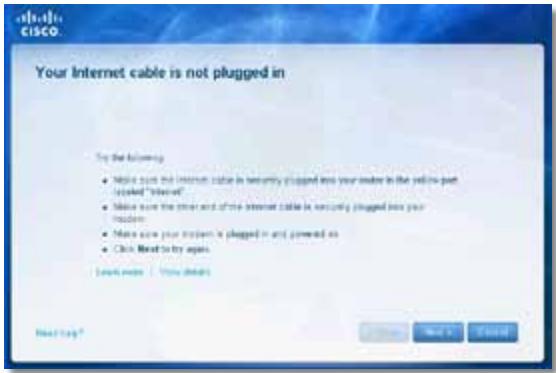
CoobseHne Device not found (YcmpoUcMbO He hauDeHo)
Ecn npn nonbItke noklueHnCeTeBbX yctpoiCTB (taKnx kaK iPhone, IPod nn cMaprfoH) bI noluynn coo6eHne «YcTpoiCTBO He haJeHO», BblONHnTE cIeDyUOuNe DeICTBnPo YcTpaHeHIO HenoJaOK.
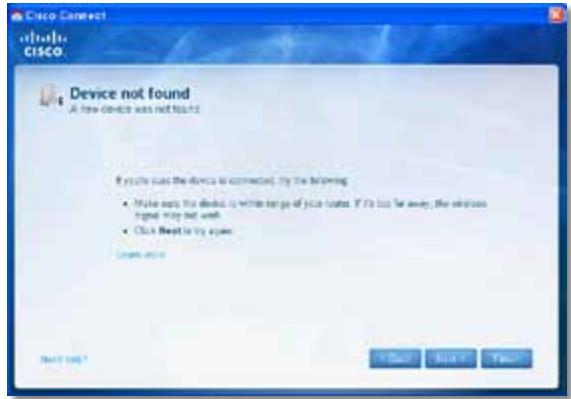
COBET
yctpoiCTBa FAT32,NTFSnHFS+
Подержka UPnP Да
Бeэпасноctь WEP, WPA, WPA2
Pa3paHIOCTb KJIIOUa
6e30nacnoCTn Do 1286ntOB
Sporocilo »Your Internet cable is not plugged in
(Internetkabel ni priklopljen)« 12
Sporocilo »Cannot access your router
- ZaZenite Cisco Connect.
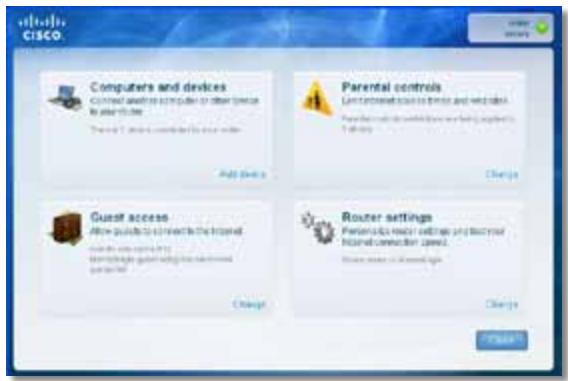
- Kliknite Computers and devices (Računalniki in naprave). Prikaže sezaslon Computers and other devices (Računalniki in druge naprave).
- Kliknite Other Wireless devices (Druge brezije naprave).
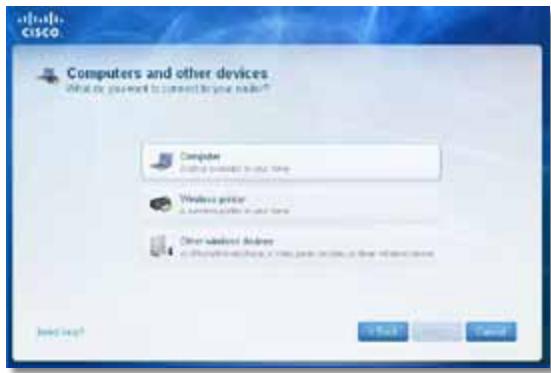
- Omogocite povezavo Wi-Fi omreznepnaprave, nato pa poiscite ime breznicega omreza. Pomooc poiscite v dokumentaciji naprave.
OPOMBA
Brežićna naprava mora podpirati način WPA/WPA2.
Starta Cisco Connect 3
Anvanda Cisco Connect till att hantera routern 3
Meddelandet Your Internet cable is not plugged in
Starta Cisco Connect
Your Internet cable is not plugged in
(1)
Cannot access your router
(13
Jana Device not found (Wu Jn) 15
nauu
Linksys EA2700 17
Linksys EA3500 18
Linksys EA4500 19
N
EA2700/EA3500
nun
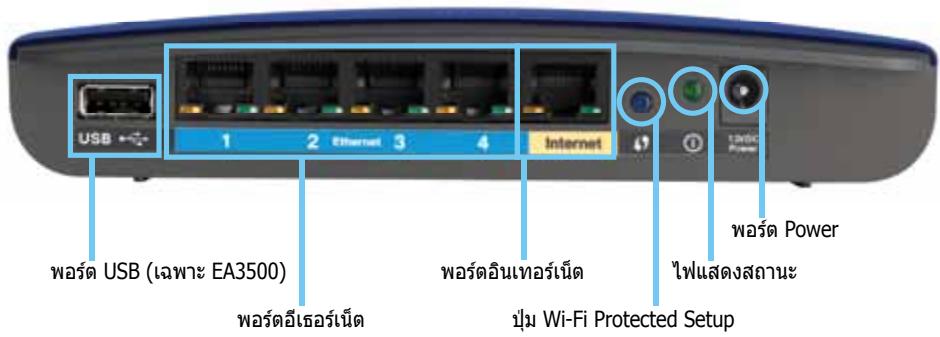
y
- WSA USB (EA3500) — UNTUZIINNINININININININININININININININININININININININININININININININININININININININININININININININININININININININININININININININININININININININININININININININININININININININININ
Waaasaaa-aaananaananaananaananaananaananaananaananaananaananaananaananaananaananaananaananaananaananaananaananaananaananaananaananaananaananaananaananaananaananaananaananaananaananaananaananaananaananaananaananaananaananaananaananaananaananaananaananaananaananaanaraannnna - Wsraaunasnae-nananaananaananaananaananaananaananaananaananaananaananaananaananaananaananaananaananaananaananaananaananaananaananaananaananaananaananaananaananaananaananaananaananaananaananaananaananaananaananaananaananaananaananaananaananaananaananaananaananaananaanara
Wi-Fi Protected SetupTM-nuunuueauannuuunuunnunnnnun nuiu uuuu"
Wuaanana-wwwauananaaunwauananaan nwnnna Wi-Fi Protected Setup wannnnnna Wwauanwnnnaan nwnnnnna Wi-Fi Protected Setup wannnnnnaa Wwauanwnnnaa
Power—LauanaaunueAC
2017年/5月1日
Wuaanana-wwaaananaaannananaananaananaananaananaananaananaananaananaananaananaananaananaananaananaananaananaananaananaananaananaananaananaananaananaananaananaananaananaananaananaananaananaananaananaananaananaananaananaananaananaananaananaananaananaananaananaananaananaananaanara an
#
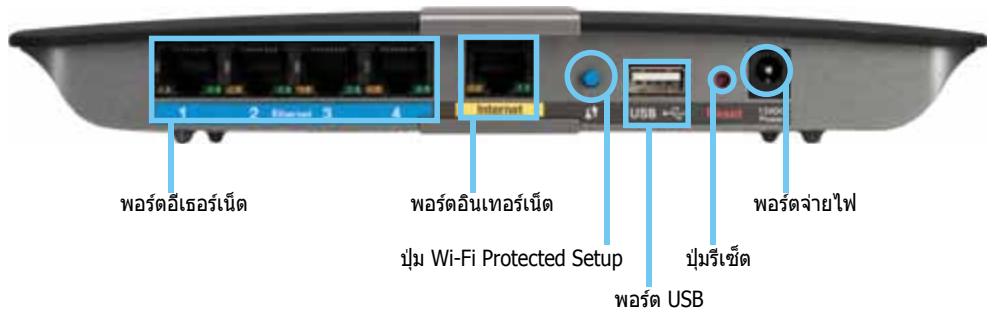
CISCO Connect (wWuWuWuWuWuWuWuWuWuWuWuWuWuWuWuWuWuWuWuWuWuWuWuWuWuWuWuWuWuWuWuWuWuWuWuWuWuWuWuWuWuWuWuWuWuWuWuWuWuWuWU WU WU WU WU WU WU WU WU WU WU WU WU WU WU WU WU WU WU WU WU WU WU WU WU WU WU WU WU WU WU WU WU WU WU WU WU WU WU WU WU WU WU WU WU WU WU WU WU WU WU
nannnnnnnnnnnnnnnnnnnnnnnnnnnnnnnnnnnnnnnnnnnnnnnnnnnnnnnnnnnnnnnnnnnnnnnnnnnnnnnnnnnnnnnnnnnnnnnnnnnnnnnnnnnn
Linksys.com/support
Cisco Connect
- Iduruiu uululwun
- Set up your Linksys Router (wau)
nnaunuaunuunan:
Windows Start (5u), Computer (nauwua) uauuuaaunw CD uauanau Setup (
- Mac Mac Mac Mac Mac CD 10000000000000000000000000000000000000000000000000000000000000000000000000000000000
3. 1
Cisco Connect
Nvnnnne nnnnne nnne nnnnne nnnnne nnnnne nnnnne nnnnne nnnnne nnnnne nnnnne nnnnne nnnnne nnnnne nnnnne nnnnne nnnnne nnnnne nnnnne nnnnne nnnnne nnnnne nnnnne nnnnne nnnnne nnnnne nnnnne nnnnne nnnnee
- 7
·
Guest
山
1
wuuu uunu uunu uunu uunu uunu uunu uunu uunu uunu uunu uunu uunu uunu uunu uunu uunu uunu uunu uunu uunu uunu uunu uunu uunu uunu uunu uunu uunu uunu uunu uunu uunu uunu uun
75
1
uauuaaunuauuuuauuuuauuauuauuuuuuuuuuuuuuuuuuuuuuuuuuuuuuuuuuuuuuuuuuuuuuuuuuuuuuuuuuuuuuuuuuuuuuuuuuuuuuuuuuuuuuuuuuuuuuuuuuuuuuuuuuuuuuuuuuuuuuuuuuuuuuuuuuuuuuuuuuuuuuuuuuuuuuuuuuuuuuuuuuuuuuuuuuuuuuuuuuuuuuuuuuuuuuuuuuuuuuuuuUU
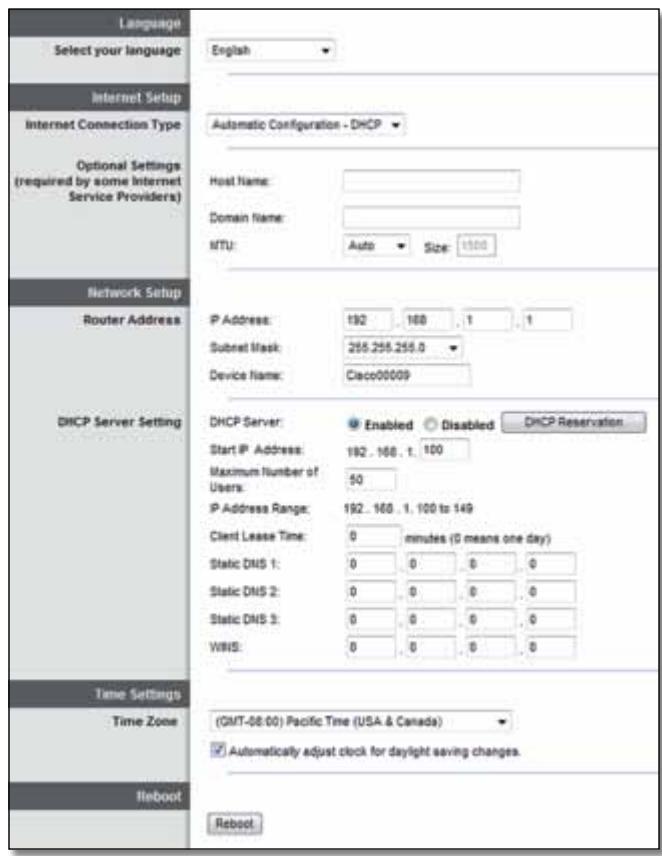
Language (n)
Internet Connection Type (15)
Jusnuuunuaaunauunununununununun Unnunnnnaa Automatic Configuration - DHCP (Dynamic Host Configuration Protocol) (nurnuununun) - DHCP) nnuuununun unnuuunnuu ISP wauuuuuuuuDHCP uuuuuuuuuuuuuuuuuuuuuuuuuuuuuuuuuuuuuuuuuuuuuuuuuuuuuuuuuuuuuuuuuuuuuuuuuuuuuuuuuuuuuuuuuuuuuuuuuuuuuuuuuuuuuuuuuuuuuuuuuuuuuuuuuuuuuuuuuuuuuuuuuuuuuuuuuuuuuuuuuuuuuuuuuuuuuuuuuuuuuuuuuuuuuuuuuuuuuUU
Static IP (IP地址)
wnnnnnnnaip IP nannnnnnaaennnnae nnne nnne nnne nnne nnne nnne nnne nnne nnne nnne nnne nnne nnne nnne nnne nnne nnne nnne nnne nnne nnne nnne nnne nnne nnne nnne nnne nnne nnne nnne nnne nnne nnne nnne nnne nnne nnne nnne nnne nnne nnne nnne nnne nnne nnne nnne nnne nnne nnne nnne nnnee
PPPoE
wnnnnnaaennnnnaeDSL nnnnnaaann ISP naan Point-to-Point Protocol over Ethernet (PPPoE) nn nn nn nn nn PPoE
PPTP
Point-to-Point Tunneling Protocol (PPTP) 1uununununununununununun unnu u n PPTP uauunununuDHCP wra IP uauonunu uunu uan uan uan uan uan uan uan uan uan uan uan uan uan uan uan uan uan uan uan uan uan uan uan uan uan uan uan uan uan uan uan uan uan uan uan uan uan uan uan uan uan uan uan uan uan uan uan uan uan uan uwan uan unuunuunuunuunuunuunuunuunuunuunuunuunuunuunuunuunuunuunuunuunuunuunuunuunuunuunuunuunuunuunuunuunuunuunuunuunuunuunuunuunuunu
L2TP
Layer 2 Tunneling Protocol (L2TP) iuunnnnnaaiaua
An Connect on Demand (uaaiaaaan) uae Kep Alive (nnaa) nanaananaananaananaananaananaananaananaananaananaananaananaananaananaananaananaananaananaananaananaananaananaananaananaananaananaananaananaananaananaananaananaananaananaananaananaananaananaananaananaananaananaananaananaananaananaananaananaananaananaanana an
>
nnae nwnnnnne nnnnne nnnnnnne nnnnnnne nnnnnnne
y
n75v7u7u7u
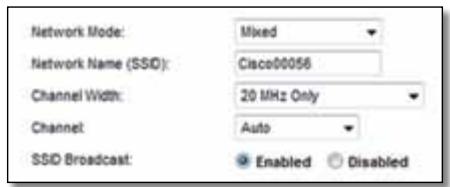
| "WPA2 Personal | watnam |
| WPA2/WPA Mixed Mode | WPA2:watnam WPA:watn |
| WPA Personal | watn |
| WEP | watnam |
#
rnnnnae nnnnne nnnnne nnnnne nnnnne nnnnne nnnnne nnnnne nnnnne nnnnne nnnnne nnnnne nnnnne nnnnne nnnnne nnnnne nnnnne nnnnne nnnnne nnnnne nnnnne nnnnne nnnnne nnnnne nnnnne nnnnne nnnnnee nnnnne nnnnne nnnnne nnnnne nnnnne nnnnne nnnnne nnnnne nnnnne nnnnne nnnnne nnnnne nnnnne nnnnne nnnnne nnnnne nnnnne nnnnne nnnnne nnnnne nnnnne nnnnne nnnnne nnnnne nnnnae
| "WPA2 Enterprise" | "WPA2" |
| WPA2/WPA Enterprise Mixed Mode | WPA2:"WPA2"WPA:"WPA2" |
| WPA Enterprise | "WPA2" |
| RADIUS | "WADIUS" |
n
WPA2/WPA Mixed Mode, WPA2 Personal, WPA Personal
#
WPA2/WPA Enterprise Mixed Mode, WPA2 Enterprise, WPA Enterprise
的圆半圆半圆半圆半圆半圆半圆半圆半圆半圆半圆半圆半圆半圆半圆半圆半圆半圆半圆半圆半圆半圆半圆半圆半圆半圆半圆半圆半圆半圆半圆半圆半圆半圆半圆半圆半圆半圆半圆半圆半圆半圆半圆半圆半圆半圆半圆半圆半圆半圆半圆
#
wnnnnnaan WPA2/WPA Enterprise Mixed Mode nnnnnnnnnnnnnnnnnnnnnnnnnnnnnnnnnnnnnnnnnnnnnnnnnnnnnnnnnnnnnnnnnnnnnnnnnnnnnnnnnnnnnnnnnnnnnnnnnnnnnnnnnnnnnnnnnnnnnnnnnnnnnnnnnnnnnnnnnnnnnnnnnnnnnnnnnnnnn
WPA Enterprise WPA Enterprise
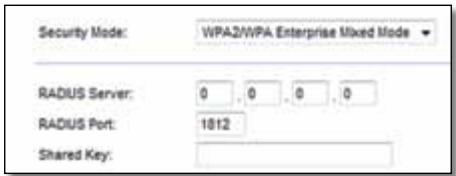
RADIUS Server (RADIUS) IP Address: 10.169.255.10 RADIUS
RADIUS Port (wa) RADIUS) 1aunwnuuaawwraanr wraa RADIUS
Shared Key (xiv)
Disabled (fliqnu)
nunnnnnnnnnnnnnnnnnnnnnnnnnnnnnnnnnnnnnnnnnnnnnnnnnnnnnnnnnnnnnnnnnnnnnnnnnnnnnnnnnnnnnnnnnnnnnnnnnnnnnnnnnnnnnnnnnnnnnnnnnnnnnnnnnnnnnnnnnnnnnnnnnnnnnnnnnn nn nannn nannn nannn nannn nannn nannn nannn nannn nannn nannn nannn nannn nannn nannn nannn nannn nannn nannn nannn nannn nannn nannn nannn nannn nannn nannn nannn nannn nannn nannn nannn nannn nannn nannn nn annn nn annn nn annn nn annn nn annn nn annn nn annn nn annn nn annn nn annn nn annn nn annn nn annn nn annn nn annn nn annn nn annn nn annn nn annn nn annn nn annn nn annn nn annn nn annn nn annn nn annn nn annn nn annn nn annn nn annn nn annn nn annn nn annn nn ann

n756n 1y
- 5-15 5-15 Setup (5-15)
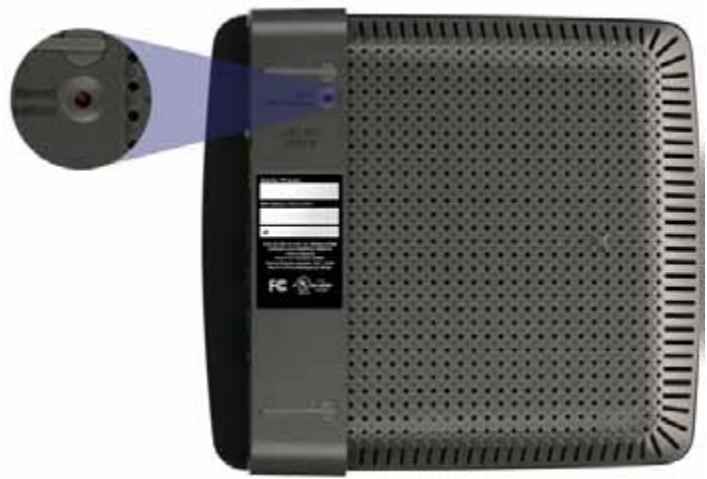

y
- 1
- wunnnaaunwauuauauu uunuaunwauauauauuu Setup (nu)
Get Windows XP Service Pack 3
Windows XP Service Pack 3
wnnnnnaeWindowsXPawnnncr Cisco Connect nnuuau Service Pack 3 wannnnnnaeunnue nnnnneau "Get Windows Service Pack 3" uannnneauonnneauauauauauauau
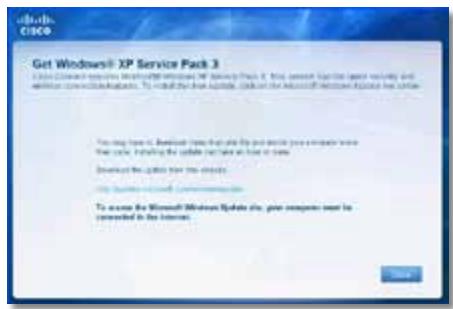
- 1.1.1.1.1.1.1.1.1.1.1.1.1.1.1.1.1.1.1.1.1.1.1.1.1.1.1.1.1.1.1.1.1.1.1.1.1.1.1.1.1.1.1.1.1.1.1.1.1.1.1 500000000000000000000000000000000000000000000000000000000000000000000000000000000000000000000
-
wntwunwnuunwunwunwunwunwunwunwunwunwunwunwunwunwunwunwunwunwunwunwunwunwunwunwunwunwunwunwunwunwunwunwunwunw
-
nnuuunnuuunnuuauauauauauauauauauauauauuuauuuuuuuuuuuuuuuuuuuuuuuuuuuuuuuuuuuuuuuuuuuuuuuuuuuuuuuuuuuuuuuuuuuuuuuuuuuuuuuuuuuuuuuuuuuuuuuuuuuuuuuuuuuuuuuuuuuuuuuuuuuuuuuuuuuuuuuuuuuuuuuuuuuuuuuuuuuuuuuuuuuuuuuuuuuuuuuuuuuuuuuuuuuuuuuuuuuuuuuuuUU
Your Internet cable is not plugged in (
"Your Internet cable is not plugged in" (You'll see a red box on your computer).
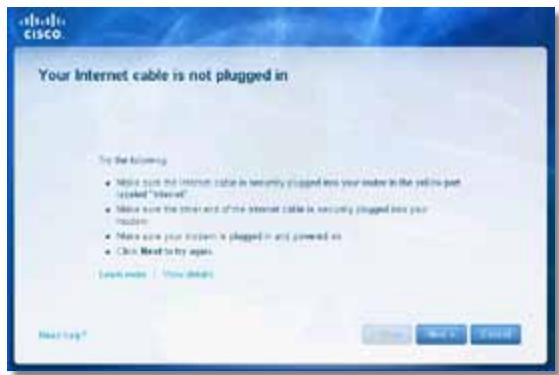
ununulzaynuu:
- 1
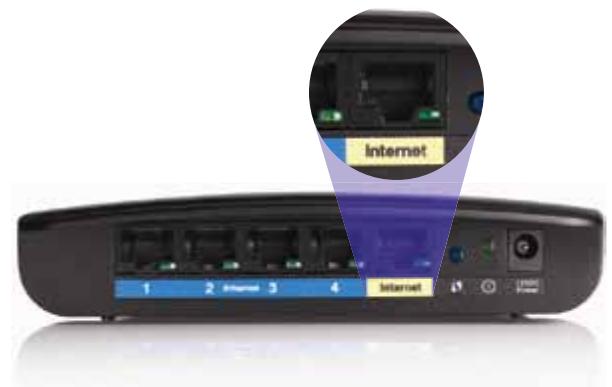
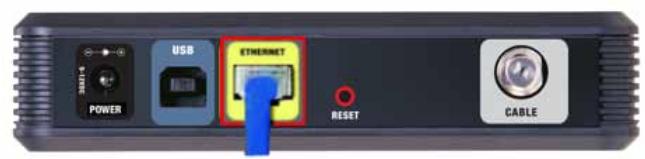
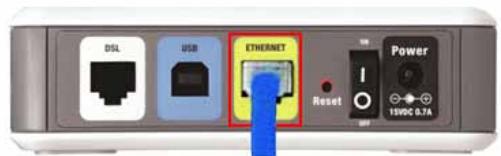
mnuuynnuuysdsl
- 2023年全国春季学业水平考试语文(15分)卷16(20分)第14题(20分)
- wannuulwurunwauunwauunwauunwauunwau CABLE uauuuuauuuuuuuuuuuuuuuuuuuuuuuuuuuuuuuuuuuuuuuuuuuuuuuuuuuuuuuuuuuuuuuuuuuuuuuuuuuuuuuuuuuuuuuuuuuuuuuuuuuuuuuuuuuuuuuuuuuuuuuuuuuuuuuuuuuuuuuuuuuuuuuuuuuuuuuuuuuuuuuuuuuuuuuuuuuuuuuuuuuuuuuuuuuuuuuUU
nwnnnnnaananaananaananaananaananaananaananaananaananaananaananaananaananaananaananaananaananaananaananaananaananaananaananaananaananaananaananaananaananaananaananaananaananaananaananaananaananaananaananaananaananaananaananaananaananaananaananaananaananaananaanaraannnnaaennnnnnnnnnnnnnnnnnnnnnnnnnnnnnnnnnnnnnnnnnnnnnnnnnnnnnnnnnnnnnnnnnnnnnnnnnnnnnnnnnnnnnnnnnnnnnnnnnnnnnnnnnnnnnnnnnnnnn
- wannanwWnnaaavnnnnaaennnneu USB aenauwnu nnaeau USB uuaan
- nauuunnuu Cisco Connect uanuaan Next (nul) waaanauauauu nnuunuuuauuauuuuuuuuuuuuuuuuuuuuuuuuuuuuuuuuuuuuuuuuuuuuuuuuuuuuuuuuuuuuuuuuuuuuuuuuuuuuuuuuuuuuuuuuuuuuuuuuuuuuuuuuuuuuuuuuuuuuuuuuuuuuuuuuuuuuuuuuuuuuuuuuuuuuuuuuuuuuuuuuuuuuuuuuuuuuuuuuuuuuuuuuuuuuuuuuuuuuuuuuuUU

Cannot access your router
()
yannnnnnae nnnnne nee eae nee nee nee nee nee nee nee nee nee nee nee nee nee nee nee nee nee nee nee nee nee nee nee nee nee nee nee nee nee nee nee nee nee nee nee nee nee nee nee nee nee nee nee nee nee nee nee nee nee nee neee
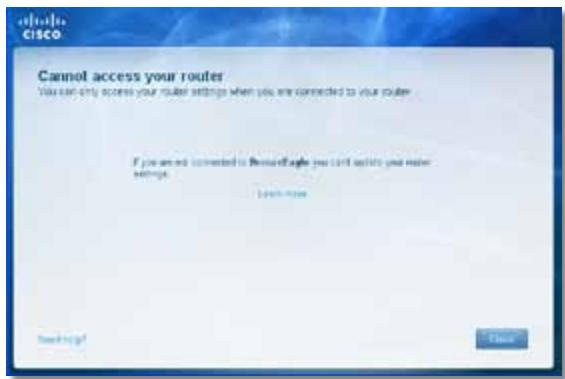
- Network key (B) Confirm network key Connect (u)
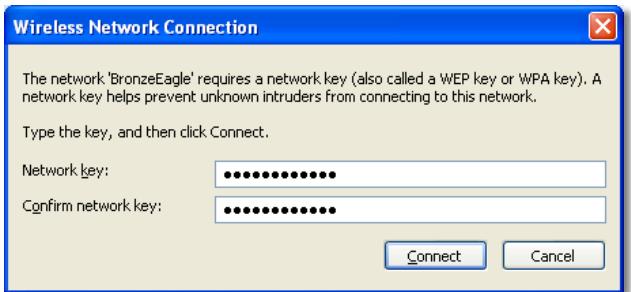
y
- 2019年全国联考卷15题解析 Linksys E-Series 2019 (BronzeEagle 2019)
- wuwwawwawwawwawwawwawwawwawwawwawwawwawwawwawwawwawwawwawwawwawwawwawwawwawwawwawwawwawwawwawwawwawwawwawwawwawwawwawwaw
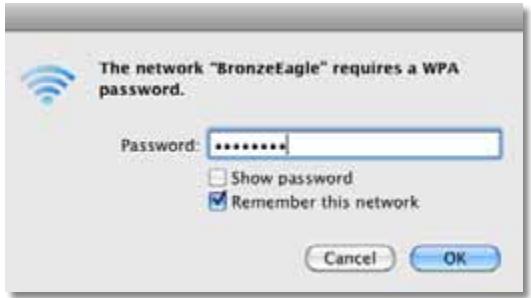
Device not found (Jwwnn)
nuuunnuuunnu "Device not found" (nuuunnuu) uuuuwwu uuuuauu uuuuuuuuuuuuuuuuuuuuuuuuuuuuuuuuuuuuuuuuuuuuuuuuuuuuuuuuuuuuuuuuuuuuuuuuuuuuuuuuuuuuuuuuuuuuuuuuuuuuuuuuuuuuuuuuuuuuuuuuuuuuuuuuuuuuuuuuuuuuuuuuuuuuuuuuuuuuuuuuuuuuuuuuuuuuuuuuuuuuuuuuuuuuuuuuuuuuuuuuuUU
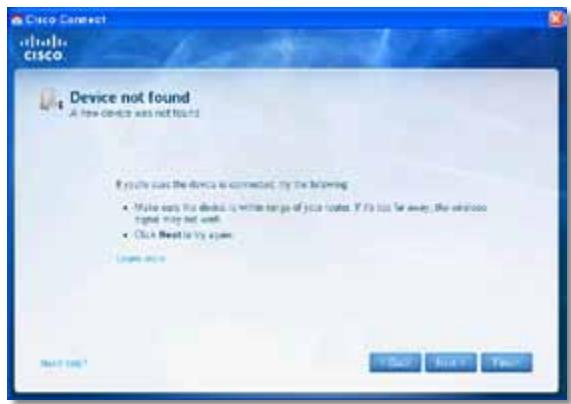
山
- Computers and devices (nauwuiuuaaun) nnuu Computer and other devices (nauwuiuuaaun) uuu
- Other Wireless devices (aunnnaeuae)
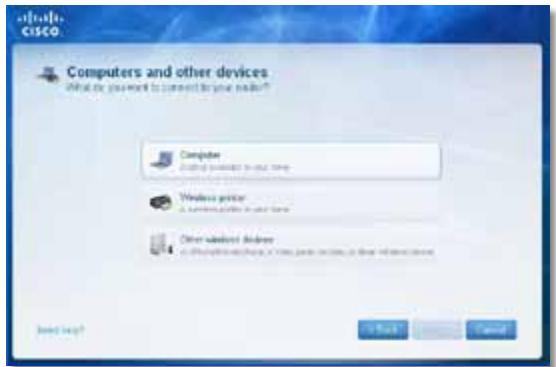
- 1uunwua Wi-Fi wauanuwnuauuauu uauuun
#
WPA/WPA2
: 1: 1: 1: 1: 1: 1: 1: 1: 1: 1: 1: 1: 1: 1: 1: 1: 1: 1: 1: 1: 1: 1: 1: 1: 1: 1: 1: 1: 1: 1: 1: 1: 1: 1
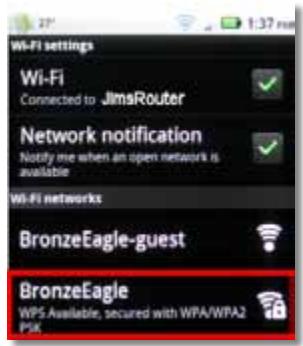
Android
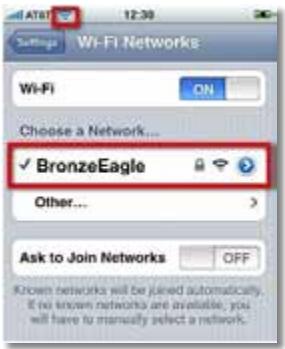
iPhone
- iauwawu (nunwnu wnuu u) nncisco Connect uauu u u u u u u u u u u u u u u u u u u u u u u u u u u u u u u u u u u u u u u uuuuuuuuuuuuuuuuuuuuuuuuuuuuuuuuuuuuuuuuuuuuuuuuuuuuuuuuuuuuuuuuuuuuuuuuuuuuuuuuuuuuuuuuuuuuuuuuuuuuuuuuuuuuuuuuuuuuuuuuuuuuuuuuuuuuuuuuuuuuuuuuuuuuuuuuuuuuuuuuuuuuuuuuuuuuuuuuuuuuuuuuuuuuuuuuuuuUU
H
- 1auauauuauuuuauauauauuuuuuuuuuuuuuuuuuuuuuuuuuuuuuuuuuuuuuuuuuuuuuuuuuuuuuuuuuuuuuuuuuuuuuuuuuuuuuuuuuuuuuuuuuuuuuuuuuuuuuuuuuuuuuuuuuuuuuuuuuuuuuuuuuuuuuuuuuuuuuuuuuuuuuuuuuuuuuuuuuuuuuuuuuuuuuuuuuuuuuuuuuuuuuuuuuuuuuuUU
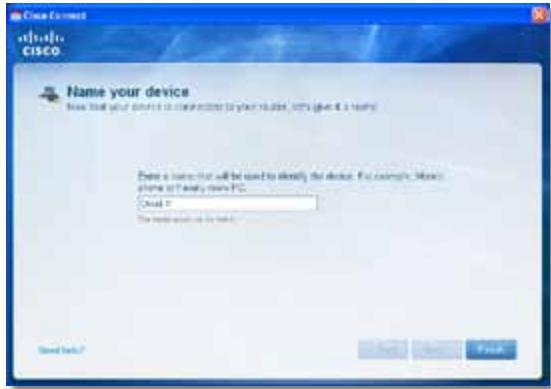
N
Linksys EA2700
| ### | Linksys EA2700 |
| ### | Dual-Band N600 Router with Gigabit |
| ### | EA2700 |
| ### | 802.11n, 802.11a, 802.11g, 802.11b, 802.3, 802.3u, 802.3ab |
| ### | ### 6 dBm, ### 2 dBm, ### 2.4 GHz uav 5 GHz |
| ### | ### 10/100/1000 Mbps (Gigabit Ethernet) |
| ### | 802.11b: CCK, QPSK, BPSK |
| 802.11g: OFDM | |
| 802.11a: OFDM | |
| 802.11n: BPSK, QPSK, 16-QAM, 64-QAM | |
| ### | 2.4 GHz |
| ### | 802.11b: -90 dBm @ 11 Mbps |
| 802.11g: -75 dBm @ 54 Mbps | |
| 802.11n 20 MHz: -73 dBm @ MCS15 | |
| 802.11n 40 MHz: -70 dBm @ MCS15 | |
| 5 GHz | |
| 802.11a: -72 dBm @ 54 Mbps | |
| 802.11n 20 MHz: -70 dBm @ MCS15 | |
| 802.11n 40 MHz: -67 dBm @ MCS15 | |
| ### | 2.4 GHz: |
| ### 1: ≤3.45 dBi | |
| ### 2: ≤2.46 dBi | |
| 5 GHz: | |
| ### 1: ≤4.41 dBi | |
| ### 2: ≤5.15 dBi | |
| UPnP | ### |
| watwunlalau | WEP, WPA, WPA2 |
| watwunlalau | |
| watwunlalau | 128 ① |
| watwunlalau | |
| watwunlalau | 174 x 190 x 28 mm. (6.85" x 7.48" x 1.10") |
| watwunlalau | 297.7 n. (10.5 aau) |
| watwunlalau | 12V, 1A |
| watwunlalau | FCC, IC, CE, Wi-Fi A/B/G/N |
| watwunlalau | 0 ① 40°C (32 ① 104°F) |
| watwunlalau | -20 ① 60°C (-4 ① 140°F) |
| watwunlalau | 10 ① 80%, ① 80% |
| watwunlalau | |
| watwunlalau | 5 ① 90% |
vua
n nn nnnn nnnn nnnn nnnn nnnn nnnn nnnn nnnn nnnn nnnn nnnn nnnn nnnn nnnn nnnn nnnn nnnn nnnn nnnn nnnn nnnn nnnn nnnn nnnn nnnn nnnn nnnn nnnn nnnn nnnn nnnn nnnn nnnn nnnn nnne
Linksys EA3500
| ### | Linksys EA3500 |
| ### | Dual-Band N750 Router with Gigabit and USB |
| ### | EA3500 |
| ### | 802.11n, 802.11a, 802.11g, 802.11b, 802.3, 802.3u, 802.3ab |
| ### | ###6 a#e, ###a###a###a###a###a###a###3 a#e |
| ### | ###2.4 GHz a#e 5 GHz |
| ### | ### |
| ### | 10/100/1000 Mbps (Gigabit Ethernet) |
| ### | ###(1-4), USB, Power |
| ### | ###, Wi-Fi Protected Setup |
| ### | Power, ###a###a###, ###a###a### (1-4) |
| ### | 802.11b: CCK, QPSK, BPSK |
| ### | 802.11g: OFDM |
| ### | 802.11a: OFDM |
| ### | 802.11n: BPSK, QPSK, 16-QAM, 64-QAM |
| ### | 2.4 GHz |
| ### | 802.11b: -87 dBm @ 11 Mbps (###) |
| ### | 802.11g: -77 dBm @ 54 Mbps (###) |
| ### | 802.11n (20 MHz): -72 dBm @ MCS15 (###) |
| ### | 802.11n (40 MHz): -69 dBm @ MCS15 (###) |
| ### | 5 GHz |
| ### | 802.11a: -74 dBm @ 54 Mbps (###) |
| ### | 802.11n 20 MHz: -67 dBm @ MCS23 (###) |
| ### | 802.11n 40 MHz: -64 dBm @ MCS23 (###) |
| ### | 2.4 GHz (###a###a### Dipole) |
| ### | ###1 ≤ 2.70 dBi |
| ### | ###2 ≤ 3.70 dBi |
| ### | ###3 ≤ 4.95 dBi |
| ### | 5 GHz (###a###a### Dipole) |
| ### | ###1 ≤ 4.46 dBi |
| ### | ###2 ≤ 3.23 dBi |
| ### | ###3 ≤ 3.88 dBi |
| UPnP | ### |
| watwalaanwah | WEP, WPA, WPA2 |
| watwalaanwahwah | 128 ① |
| watwalaanwahwahwah | FAT, NTFS u& HFS+ |
| watwalaanwahwah | 170 x 25 x 190 mm. (6.69" x 0.98" x 7.48") |
| watwalaanwahwah | 326 n. (11.5 a a w) |
| watwalaanwahwah | 12V, 2A |
| watwalaanwahwah | FCC, IC, CE, Wi-Fi A/B/G/N, Windows 7 |
| watwalaanwahwah | 0 ① 40°C (32 ① 104°F) |
| watwalaanwahwah | -20 ① 60°C (-4 ① 140°F) |
| watwalaanwahwah | 10 ① 80%, ① 80% ① 80% ① 80% ① 80% |
| watwalaanwahwah | 5 ① 90% ① 90% ① 90% ① 90% |
yinjue
nwnnnnnaa nnnnnnna uannnnnnaananaan anan anan anan anan anan anan anan anan anan anan anan anan anan anan anan anan anan anan anan anan anan anan anan anan anan anan anan anan anan anan anan anan anan anan anan anan anan anan anan anan anan anan anan anan anan anan anan anan anan anan
nnae nnnnnaaee nnnnne nnnnne nnnnne nnnnne nnnnne nnnnne nnnnne nnnnne nnnnne nnnnne nnnnne nnnnne nnnnne nnnnne nnnnne nnnnne nnnnne nnnnne nnnnne nnnnne nnnnne nnnnne nnnnne nnnnne nnnnne nnnnnee nnnnne nnnnne nnnnne nnnnne nnnnne nnnnne nnnnne nnnnne nnnnne nnnnne nnnnne nnnnne nnnnne nnnnne nnnnne nnnnne nnnnne nnnnne nnnnne nnnnne nnnnne nnnnne nnnnne nnnnne nnnnae
Linksys EA4500
| ### | Linksys EA4500 |
| ### | Dual-Band N900 Router with Gigabit and USB |
| ### | EA4500 |
| ### | 802.11n, 802.11a, 802.11g, 802.11b, 802.3, 802.3u, 802.3ab |
| ### | 2.4 μs/s 5 GHz |
| ### | 10/100/1000 Mbps (Gigabit Ethernet) |
| ### | Power, USB, ### ### ###, ### ### ### (1-4) |
| ### | ###, Wi-Fi Protected Setup |
| ### LED | ###: Power |
| ###: ###: ###: ###: ###: (1-4) | |
| ### | ###: 6 dB, ### ### ### ###: 3 dB |
| ###: 2.4 GHz ### 5 GHz | |
| ### | ### |
| ### | 802.11b: CCK, QPSK, BPSK |
| 802.11g: OFDM | |
| 802.11a: OFDM | |
| 802.11n: BPSK, QPSK, 16-QAM, 64-QAM | |
| ### | 2.4 GHz |
| 802.11b: -87 dBm @ 11 Mbps (###) | |
| 802.11g: -77 dBm @ 54 Mbps (###) | |
| 802.11n: 20 MHz: -70 dBm @ MCS15 (###) | |
| 802.11n: 40 MHz: -66 dBm @ MCS15 (###) | |
| 5 GHz | |
| 802.11a: -74 dBm @ 54 Mbps (###) | |
| 802.11n: 20 MHz: -67 dBm @ MCS23 (###) | |
| 802.11n: 40 MHz: -64 dBm @ MCS15 (###) | |
| ### | 2.4 GHz (###) PIFA ### ### ### 3 ###) |
| PIFA 1 ≤ 3.31 dBi (###) | |
| PIFA 2 ≤ 3.45 dBi (###) | |
| PIFA 3 ≤ 1.96 dBi (###) | |
| 5 GHz (###) PIFA ### ### ### 3 ###) | |
| PIFA 1 ≤ 3.71 dBi (###) | |
| PIFA 2 ≤ 3.60 dBi (###) | |
| PIFA 3 ≤ 4.27 dBi (###) |
| watwawwawwawwawwawwawwawwawwawwawwawwawwawwawwawwawwawwawwawwawwawwawwawwawwawwawwawwawwawwawwawwawwawwawwawwawwawwawwawwawwawwawwawwawwawwawwawwawwawwawwrawwawwawwawwawwawwawwawwawwawwawwawwawwawwawwawwawwawwawwawwawwawwawwawwawwawwawwawwawwawwawwawwawwawwawwawwawwawwawwawwawwawwawwawwawwawwawwawwawwawwlaw |
| FAT32, NTFS, uas HFS+ |
| ### |
| WEP, WPA, WPA2 |
| ### 128 # |
| 225 x 25 x 160 ### (8.86" x 0.98" x 6.30") |
| 360 n. (12.7 a a a) |
| 12V, 2A |
| FCC, IC, CE, Wi-Fi a/b/g/n, Windows 7, DLNA |
| 0 # 40°C (32 # 104°F) |
| -20 # 60°C (-4 # 140°F) |
| 10 # 80%, ### uas wawwawu wawwawu wawwawu wawwawu wawwawu wawwawu wawwawu wawwawu wawwawu wawwawu wawwawu wawwawu wawwawu wawwawu wawwawu wawwawu wawwawu wawwawu wawwawu wawwawu wawwawuin |
| 5 # 90% ### uas wawwawu wawwawu wawwawu wawwawu wawwawu wawwawu wawwawu wawwawu wawwawu wawwawu wawwawu wawwawu wawwawu wawwawu wawwawu wawwawu wawwawu wawwawu wawwawu wlaw |
vuiu
Cisco, Iaivnvo Cisco uae Linksys 1uovnnunrnuuauoavvocnunnuuauoovvocnvo Cisco uav/vuauvnuuauuauuauuauuauuauuauuauuauuauuauuauuauuauuauuuauuauuuuuuuuuuuuuuuuuuuuuuuuuuuuuuuuuuuuuuuuuuuuuuuuuuuuuuuuuuuuuuuuuuuuuuuuuuuuuuuuuuuuuuuuuuuuuuuuuuuuuuuuuuuuuuuuuuuuuuuuuuuuuuuuuuuuuuuuuuuuuuuuuuuuuuuuuuuuuuuuuuuuuuuuuuuuuuuuuuuuuuuuuuuuuuuuuuuuuUU
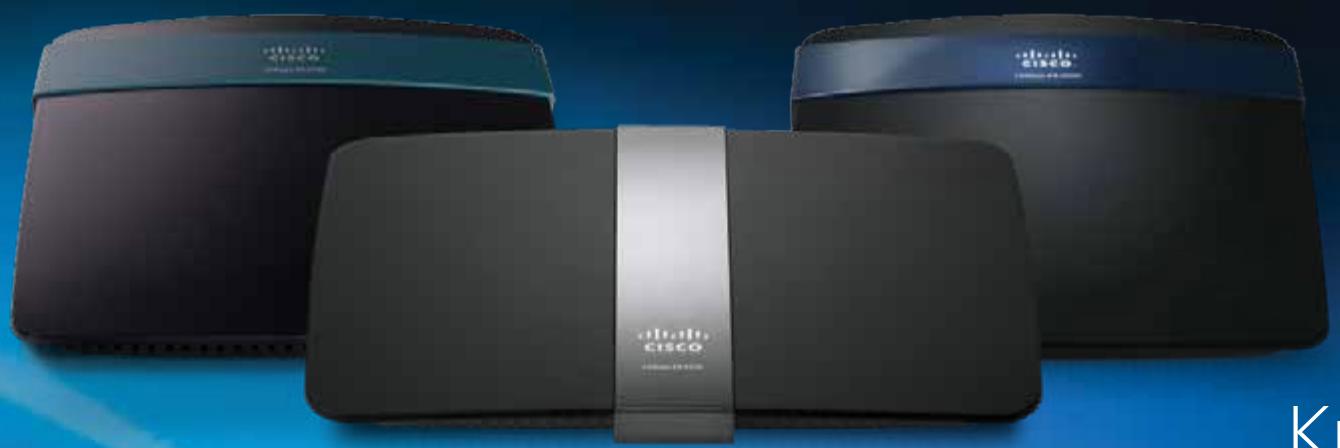
Kullanıci Kilavuzu
Içindekiler
Ürüne Genel Bakış
EA2700/EA3500 1
Arkadan görünüm 1
Alt tan gorunum 1
EA4500. 2
Ustten görünüm 2
Arkadan görünüm 2
EA-Series Router'inizi Kurma
Your Internet cable is not plugged in
(Internet kablonuz takili degil) mesaji 12
Static IP (Statik IP)
WPA2/WPA Mixed Mode (WPA2/WPA Karma Modu), WPA2 Personal (WPA2 Kişisel), WPA Personal (WPA Kişisel)
NOTLAR
WPA2/WPA Enterprise Mixed Mode (WPA2/WPA Şirket Karma Modu), WPA2 Enterprise (WPA2 Şirket), WPA Enterprise (WPA Şirket)
Aşaqidaki örnekte, bilgisayar JimsRouter adlı baska bir kablosuz ağa®,®,®,®,®,®,®,®,®,®,®,®,®,®,®,®,®,®,®,®,®,®,®,®,®,®,®,®,®,®,®,®,®,®,®,®,®,®,®,®,®,®,®,®,®,®,®,®,®,®,®,®,®,®,®,®,®,®,®,®,®,®,®,®,®,®,®,®,®,®,®,®,®,®,®,®,®,®,®,®,®,®,®,®,®,®,®,®,®,®,®,®,®,®,®,®,®,®,®,®,®. Bü örnekte, Linksys E-Series ağl olan BronzeEagle seçili gÖsterilmektedir.
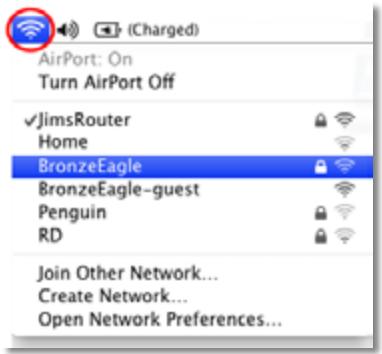
| Boyutlar | 174 x 190 x 28 mm (6,85 inç x 7,48 inç x 1,10 inç) |
| Birim A®,rl®, | 297,7 g (10,5 oz) |
| Güç | 12V, 1A |
| Sertifikalar | FCC, IC, CE, Wi-Fi A/B/G/N |
| Çalışa Sıçak®, | 0 - 40 °C (32 - 104 °F) |
| Depolama Sıçak®, | -20 - 60 °C (-4 - 140 °F) |
| Çalışa Nem Orani | %10 - 85 arasi,®,®,®,®,®,®,®,®,®,®,®,®,®,®,®,®,®,®,®,®,®,®,®,®,®,®,®,®,®,®,®,®,®,®,®,®,®,®,®,®,®,®,®,®,®,®,®,®,®,®,®,®,®,®,®,®,®,®,®,®,®,®,®,®,®,®,®,®,®,®,®,®,®,®,®,®,®,®,®,®,®,®,®,®,®,®,®,®,®,®,®,®,®,®,®,®,®,®,®,®,® |
| Depolama Nem Orani | %5 - 85 arasi,®,®,®,®,®,®,®,®,®,®,®,®,®,®,®,®,®,®,®,®,®,®,®,®,®,®,®,®,®,®,®,®,®,®,®,®,®,®,®,®,®,®,®,®,®,®,®,®,®,®,®,®,®,®,®,®,®,®,®,®,®,®,®,®,®,®,®,®,®,®,®,®,®,®,®,®,®,®,®,®,®,®,®,®,®,®,®,®,®,®,®,®,® |
NOTLAR
JaHCTaJIIOBaTnMapuPyTu3aTOp 3
JaK3aynctntiCisco Connect 3
KepyIte cBoiM MapuTy3aTopoM 3a DOnomoroCisco Connect 3
JaHaAsTByBaTnMapwpyTu3aTopBpyHy. 3
Додасткови налaweтувашия
Yk BiikpnTu cnjx6oBy nporpamy, 0n pauioe y 6pay3epi . . . .4
Setup > Basic Setup (HanaTbVAHHa > Ba3OBe HanaTbVAHHa).5
Language (MoBa) 5
Internet Setup (HanaHTyBaHHa IInTepeHTy) 5
UcynenHHeCnPaBHOCTeI
Jk 3anyctntn Cisco Connect nicna iHctalayci.. .10
MapuTn3aTOp He BdaIOcra ycpiHoi iHCTaIIOBAtn 11
Повимлени Your Internet cable is not plugged in
(IHTepHeT-Ka6eIb He πiKluOyeHo) 12
Повимлени Cannot access your router
(HemoxjNBO OTRPMaTN DoCTyn Do MapuTy3aTopa). 13
YcyHeHHa HeCpPaBHOCTeH
Ihopmaiz y zbomy po3diJI MOxE dONOMOTn po3'B'3aTn po3NOBcIOJxHei np6lEMNI, 0o BHNkaIOb ti nd icHCTaJIu, ta NiKIOUHTncsdo IntepHeTy. Ha KOMNaKT-dNcKy do Mapwpytn3aTopa e iHCTaJIuHa nporpama Cisco Connect, 1OoD3BOJAE IerKO niKIIouATm MepexeBi npicTpoi, 3miHIOBAtn HanaWtBuHnna Mapwpytn3aTopa, KOHTPOIIOBAtn DocTy n JIra RoCTeB, BMKAtu 6aTBkICbkN KoHTpOlb Ta NiKIIouATncsdo IntepHeTy. Cisco Connect nd uac iHCTaJIuTi TAKOX BCTAHIOJEbCn Ha Baaw KOMN'IoTeP. JaKIO nporpami Cisco Connect He BdaETbcra BIKOHATn IHCTaJIuIO, y zbomy po3diJI moXHa 3HaNTn notpi6Hi piWeHHN.
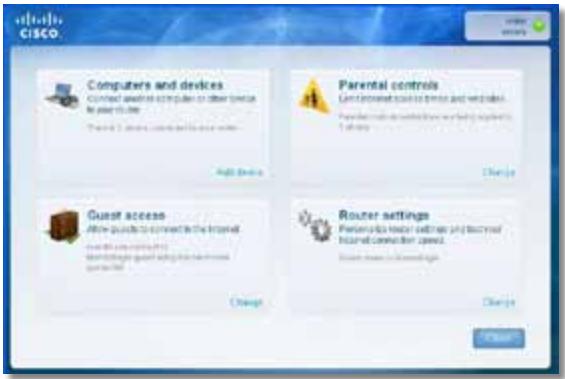
- Hatachitb Ncck, Yci nporpaMn, nOtIM Bn6epiB Cisco Connect.

BikpneTbcra TOnOBHe MeHIO Cisco Connect.
Uo6 3anyctntu Cisco Connect Ha KOMn'ioTepi i3 cnCTeMoIO Mac OS X:
- BiKpnTe Finder i Bn6epiB Iporpamn Ha naHeni Iibopyu.

Bikpntbca rOIOBHe MeHIO Cisco Connect.
Uo6 BCTaHOBTu Service Pack 3:
- Knaichi Nobinahn B nobiOmJeHni Cisco Connect npo nomuKy a60 niiklouitbcy do Be6-caity Microsoft Update (update.microsoft.com/ windowsupdate).
- Дотримутесь сгтукци Ha Be6-caTi a60 3BepHITbC8 B KOMпаHIO Microsoft, якso Bam Notpi6Ha ДдатКOBa ДОномORA.
- Пись заразхения Татов的服务 Pack 3 заунустіп рорpaу Setup (Востаюнения) на komпакт-диwickу до марштузаТopa.
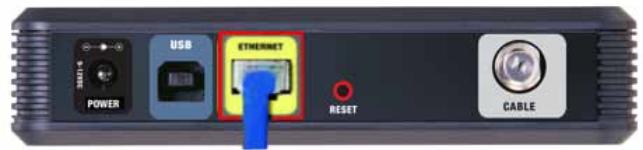
BuznKa6eBbNoo Modemy 33aoy
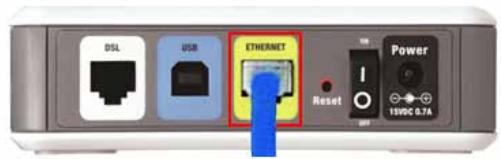
BuznyoMoemyDSL33aoy
- NepekoHaITeC8, 10 MoDEm PiKluOeHo Do eJekTpOmepeKi Ta BBIMKHeHO. KaHbOMy E nepemKau XnBLeHH, nepekoHaITeC8. 10 No rO BCTaHOBJeHO B noloxeHH ON (YBMK.) a6o I.
3.ЯкwoiHTepHeT-nocnynHaadaIObCBAm 3aДOnOMoroIO Ka6eJIIO,pepeBipTe, 1o6do npOpy CABLE (KA6EJIb) Ha moJemi 6yNo NidkIIOUeHO KoakciAlbHn Ka6eJIb,HaadHn npObaIdepom HTepHeTy.
A6o J, yKIO IHTepHET HaJaEtbcra 3a DOnOMOrOIO a6OHeHTcbKoi LiHiDsl, IpekeHaTecra, 10 TeJefoH DSL nIKnIoueHO do nopTy DSL Ha MoJemI.
4.Якwo kOMn'IOTe paHIe 6yNo NiKJIuOeHo Do MoEmy 3a DoIOnOMoroUo USBKa6eJIIO, BiD'EnHaIte USB-Ka6eIb.
5. ПовернiTься до ВікHA Cisco Connect Ta HaTucHiTB Next (Дani), сio6 NOBTOpItn CnpO6y.Якso BIKHO 6уNo 3akpIto, 3aNyctiTB nporpaMy Setup (ВCTaHOBJIeHHЯ)Ha KOMNaKT-DnCKydo MapuPyTu3aTopa.
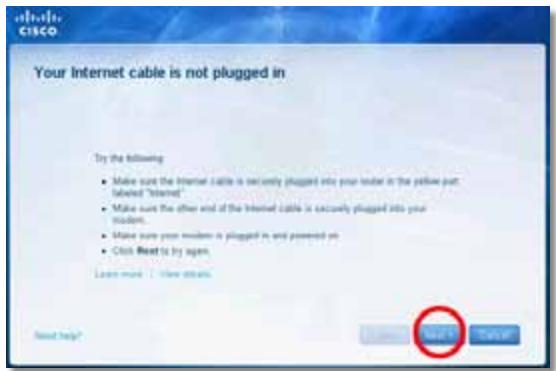
Повidiомлени Cannot access your router (Hemожимьо отpresmaТи достун до марштунзаTopа)
Cach khoi dong Cisco Connect 3
Su dung Cisco Connect de quan ly bo dinh tuyen 3
Cach cai dāt bó dinh tuyén theo cach thu cóng . . . . . . . . . . . . . . . . . . . . . . . . . . .
Cái tiên nang cao
Wireless > Wireless Settings
(Khongday>Cai dát khongday) 6
Càidat khongday 6
BáoMZt khOngday
Wireless > Wireless Security (KhôngDay > Bǎo mat khôngDay) .8
Tuy chon cānhàn 8
Thòng bó Your Internet cable is not plugged in
(Chua cãm cap Internet) 12
Thòng bó cannot access your router
(Khong the truy cap bo dinh tuyén). 13
Thong bao Device not found (Khong tim thay thi'betbj). 15
Đếctinh ký thuat
Linksys EA2700. 17
Linksys EA3500. 18
Linksys EA4500. 19
Tóng quan sàn phám
EA2700/EA3500
Matsau
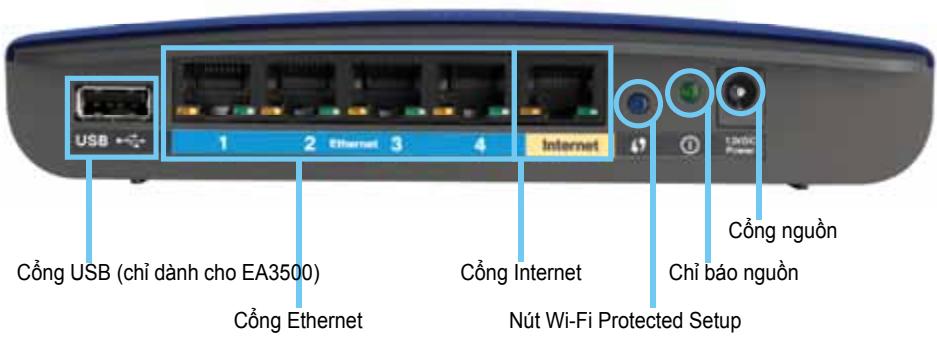
Cach khói dong Cisco Connect
Khi ban chay CD cai dát, Cisco Connect (phân mém cai dát cua bó dinh tuyén) duoc tu dong cai dát trén may tính cua ban. Sau do, ban co the su dung Cisco Connect de quan ly bó dinh tuyénMZt cach dé dang.
LUU Y:
Wireless > Wireless Settings
Sau khi ban cai dāt mang khong day, thiét lap cai dāt bao māt khong day.
Cái khác khòngday
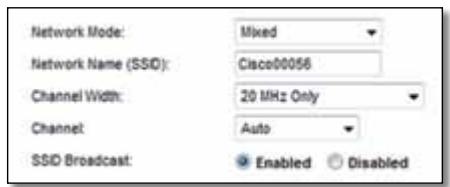
Network Mode (Ché do mang) Chon chuàn khòngday mā mang cúa ban hǎ troy.
- Mixed (Két hop) Néu ban có thiet bi Wireless-N (2,4 GHz), Wireless-G và Wireless-B trong mang, giµ cai dát mac dinh, Mixed (Két hop).
- Wireless-B/G Only (Chi Wireless-B/G) Néu bàn có cà thiet bj Wireless-B va Wireless-G (2,4 GHz) trong mäng, chon Wireless-B/G Only (Chi Wireless-B/G).
- Wireless-B Only (Chi Wireless-B) Néu ban chǐ có thiet bi Wireless-B, chon Wireless-B Only (Chi Wireless-B).
- Wireless-G Only (Chi Wireless-G) Néu bàn chǐ có thiet bì Wireless-G, chòn Wireless-G Only (Chi Wireless-G).
- Wireless-N Only (Chì Wireless-N) Néu bàn chì có thiet bi Wireless-N (2,4GHz), chôn Wireless-N Only (Chì Wireless-N).
- Disabled (Tát) Néu bàn khòng có thiet bì Wireless-B, Wireless-G và Wireless-N (2,4 GHz) trong máng cuà minh, chon Disabled (Tát).
LUU Y
Néu bàn có bó dinh tvén bang tan kép, bàn có the chon Két hop, Chi Wireless-A, Chi Wireless-N hoac Tát cho bang tan 5 GHz.
Néu ban khong chac chan nèn su dungché do nao, hay giu cai dát mac dinh, Mixed (Két hop).
Thòng bóa Your Internet cable is not plugged in (Chūa*cám cap Internet)
Néu bàn nhān duoc thong bó “Your Internet cable is not plugged in” (Chua cām cap Internet) khi có cai dαt bó dinh tuyén, hāy lam theo cac buóc khác phuc su co sau.
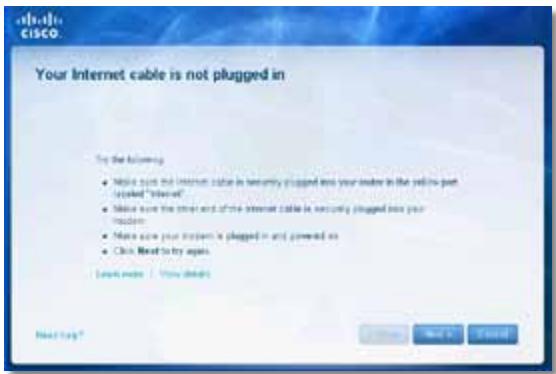
Dé khac phuc su co:
FAT32, NTFS, and HFS+
UPnP
Có hótro
Tinh nang bao mát
WEP, WPA, WPA2
Bit mā khoá bao māt
Ma hóa tí da 128-bit
Mói truong