
EASYCALL - Bluetooth Headset JABRA - Free user manual and instructions
Find the device manual for free EASYCALL JABRA in PDF.



User questions about EASYCALL JABRA
0 question about this device. Answer the ones you know or ask your own.
Ask a new question about this device
Download the instructions for your Bluetooth Headset in PDF format for free! Find your manual EASYCALL - JABRA and take your electronic device back in hand. On this page are published all the documents necessary for the use of your device. EASYCALL by JABRA.
USER MANUAL EASYCALL JABRA
Thank you for purchasing the Jabra EASYCALL Bluetooth® wireless technology headset. We hope you enjoy it! This instruction manual will get you started and ready to make the most of your headset.
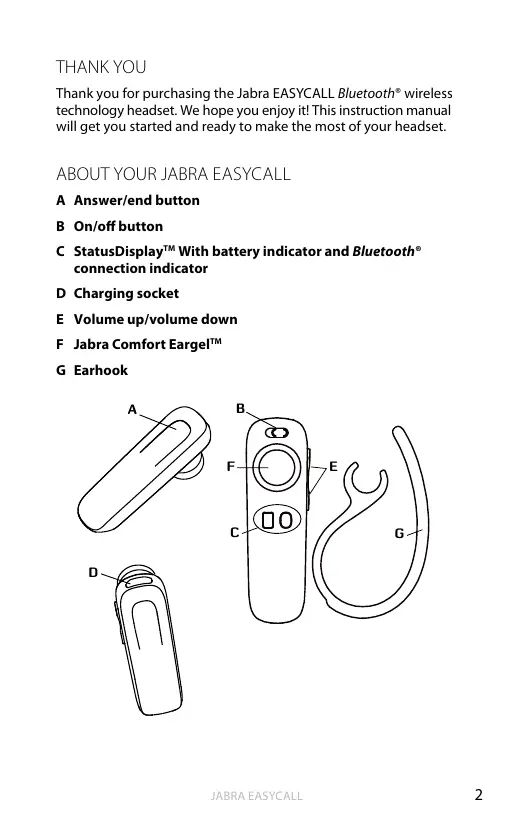
ABOUT YOUR JABRA EASYCALL
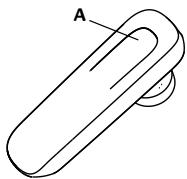
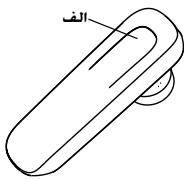
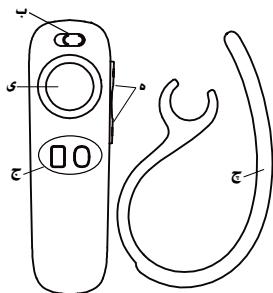
A Answer/end button
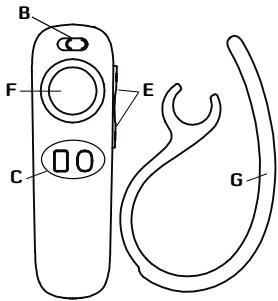
B On/off button
C StatusDisplay™ With battery indicator and Bluetooth® connection indicator
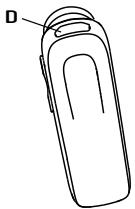
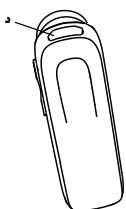
D Charging socket
E Volume up/volume down
F Jabra Comfort EargelTM
G Earhook
WHAT YOUR HEADSET DOES
Your Jabra EASYCALL lets you do all this:
- Answer calls
- End calls
Reject calls*
Voice dialling* - Last number redialling*
- Call waiting
Put call on hold - Mute
- Multiuse™ - being connected to two Bluetooth® devices at the same time
Specifications
- Talk time 6 hours
- Standby time 8 days
- Bluetooth® specification version 2.1 with EDR and eSCO
Weight 8 gram - Operating range up to 10 meters (approximately 33 feet)
Supported Bluetooth® profiles: HFP, HSP - Internal rechargeable battery charged by wall charger
Always see your battery and connection status on the Jabra StatusDisplay™ - Digital sound enhancement via DSP technology
- Noise reduction on transmitted and received audio
- Noise dependent volume control*
Automatic volume adjustment on receive audio - Acoustic shock protection
- e-SCO for enhanced audio quality
- 128 bit encryption
GETTING STARTED
Follow these three steps before using your headset:
- Charge your headset
- Activate Bluetooth® on your mobile phone (refer to the manual for your Mobile phone)
- Pair your headset to your mobile phone
The Jabra EASYCALL is easy to operate. The answer/end button on the headset performs different functions depending on how long you press it.
| Instruction | Duration of press |
| Tap | Press briefly |
| Double Tap | 2 quickly repeated taps |
| Press | Approx: 1 second |
| Press and hold | Approx: 5 seconds |
CHARGE YOUR HEADSET
Make sure that your headset is fully charged for two hours before you start using it. Use the AC power supply to charge from a power socket. When the battery indicator has a solid red light, your headset is charging. When the headset is fully charged the battery indicator turns solid green for five minutes and is then turned off.
Use only the charger provided in the box - do not use chargers from any other devices as this may damage your headset.
Please note: The lifetime of the battery will be significantly reduced if your device is left uncharged for a long period. We therefore recommend that you recharge your device at least once a month.
TURING YOUR HEADSET ON AND OFF
- Slide the on/off button towards the symbol "I" to turn the headset ON. When you do so both indicators will flash on the Jabra StatusDisplay™.
- Slide the on/off button towards the symbol "O" to turn the headset off.
PAIRING IT WITH YOUR PHONE
Headsets are connected to phones using a procedure called 'pairing'. By following a few simple steps, a phone can be paired with a headset in a matter of minutes.
1 Put the headset in pairing mode
- When you turn on your Jabra EASYCALL for the first time, the headset will automatically start up in pairing mode - i.e. it is discoverable for your phone. When the headset is in pairing mode the Bluetooth® status indication on the StatusDisplay™ is flashing.
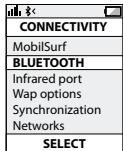
2 Set your Bluetooth® phone to 'discover' the EASYCALL
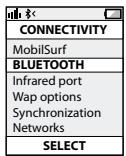
- Follow your phone's instruction guide. First make sure that Bluetooth® is activated on your mobile phone. Then set your phone to discover new devices. This usually involves going to a 'setup,' 'connect' or 'Bluetooth' menu on your phone and selecting the option to 'discover' or 'add' a Bluetooth® device.*
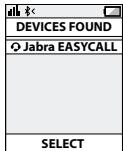
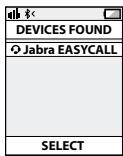
3 Your phone will find the Jabra EASYCALL
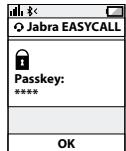
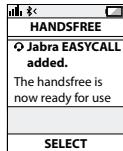
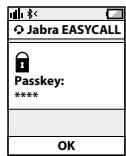
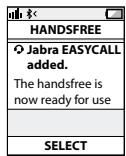
- Your phone will find the headset under name "Jabra EASYCALL". Your phone then asks if you want to pair with the headset. Accept by pressing 'Yes' or 'OK' on the phone. You may be asked to confirm with a passkey or PIN. Then use 0000 (4 zeros). Your phone will confirm when pairing is complete and the Bluetooth® status indication on the StatusDisplay™ will shift from flashing light to steady light and the headset voice guidance will say "connected".
Manual pairing mode
If you wish to use the headset with a different phone, or if the pairing process was interrupted, you can manually set the headset to pairing mode.
Make sure the headset is on. Press and hold the answer/end button for approximately 5 seconds until the Bluetooth® icon turns from a steady light to a flashing light. Then repeat steps 2 and 3 in the above pairing guide.
Connecting with your phone
Pairing is only needed the first time a headset and phone are used together. When the headset and phone have been paired once, they will automatically connect when the headset is on and Bluetooth® is activated on the phone. The headset can be used when it is "connected" to the phone. If the devices are paired, but do not immediately connect, tap the answer/end button. When your headset is connected the Bluetooth® connection icon in the STATUSDISPLAY™ WILL BE CONSTANT ON FOR 3 SECONDS and the headset voice guidance will say "connected".
WEARING STYLE
The Jabra EASYCALLS is ready to be worn with or without the ear hook. The ear hook can be removed and the headset can be used with the Ultimate-fit Eargels™.
The Ultimate-fit Eargels™ can be used for both left and right wearing. The Ultimate-fit Eargels™ come in two different styles to fit any ear. You can also twist the eargel slightly to optimize the fit and comfort.
For optimal performance, wear the Jabra EASYCALL and your mobile phone on the same side of your body or within line of sight. You will get better performance when there are no obstructions between your headset and your mobile phone.
HOW TO
Answer a call
- Tap the answer/end button on your headset to answer a call.
End a call
- Tap the answer/end button to end an active call.
Reject a call*
- Press the answer/end button when the phone rings to reject an incoming call. Depending on your phone settings, the person who called you will either be forwarded to your voice mail or will hear a busy signal.
Make a call
- When you make a call from your mobile phone, the call will (subject to phone settings) automatically transfer to your headset. If your phone does not allow this feature, tap on the Jabra EASYCALL's answer/end button to transfer the call to the headset.
Activate voice dialling*
- Press the answer/end button. For best results, record the voice dialling tag through your headset. Please consult user manual of your phone for more information about using this feature.
Redial last number\*
- Double tap the answer/end button when the headset is on and not used.
Adjust sound and volume*
- Tap the volume up or down to adjust the volume.
Mute/un-mute
- To mute, press both volume up and down at the same time. A low beep alert plays during a muted call.
- To un-mute, tap either of the volume buttons.
Call waiting and placing a call on hold*
- This lets you put a call on hold during a conversation and answer a waiting call.
- Press the answer/end button once to put the active call on hold and answer the waiting call.
- Press the answer/end button to switch between the two calls.
- Tap the answer/end button to end the active conversation.
HOW THE STATUSDISPLAY™ WORKS
| Bluetooth® Indicator | Indicates if your headset is connected to your phone - Solid light means headset is connected to your phone - Flashing light means headset is in ‘pairing mode’ and ready to be connected to a new phone |
| Battery Indicator | Indicates battery level and if headset is turned ON - Green light indicates that the headset has more than 30 minutes of talk time remaining - Red light indicates that the headset has less than 30 minutes of talk time remaining |
To save battery the Jabra StatusDisplay™ is turned off after 3 seconds. Get an instant status from the Jabra StatusDisplay™ by a tap on any button on the headset when you are not on a call.
When your headset has established a connection to your phone (or other Bluetooth device) the voice guidance will say "connected".
When your headset has less than 30 minutes talk time remaining the voice guidance will say "low battery".
USING JABRA EASYCALL WITH TWO MOBILE PHONES
Jabra EASYCALL is capable of having two mobile phones (or Bluetooth® devices) connected to the headset at the same time. This will give you the freedom of having only one headset to operate both your mobile phones.
In order to use the headset with two mobile phone please make sure you have "paired" the Jabra EASYCALL with both phones. See the section "PAIRING IT WITH YOUR PHONE" for instructions.
Once you have "paired" your headset with two phones simply make sure your headset is on, and that Bluetooth® is enabled on the phones and the headset will then automatically connect to both phones.
Please note that Last Number Redial will dial the number from the last outgoing call, independent of the mobile phone, and the Voice Dialling function will only work on the last paired mobile phone.
TROUBLESHOOTING & FAQ
I hear crackling noises
- Bluetooth® is a radio technology, which means it is sensitive to objects between the headset and the connected device. It is designed for the headset and the connected device to be used within 10 meters (33 feet) of each other, with no major objects in the way (walls, etc.).
I cannot hear anything in my headset
- Increase the volume in the headset.
- Ensure that the headset is paired to a device that is playing.
- Make sure your phone is connected to the headset by tapping the Answer/End button.
I am having pairing problems
- You may have deleted your headset pairing connection in your mobile phone. Follow the pairing instructions.
I want to reset the headset
It is possible to reset the headset. Turn the headset ON. Then 'Press and hold' the volume down and answer/end buttons at the same time for approx. 5 seconds until the battery icon and Bluetooth® icon flash 5 times simultaneously - then the pairing list is reset.
- Turn the headset OFF. The next time you power on, the headset will go into pairing mode as the first time you powered your new EASYCALL on.
Will the Jabra EASYCALL work with other Bluetooth® equipment?
- The Jabra EASYCALL is designed to work with Bluetooth® mobile phones. It can also work with other Bluetooth® devices that are compliant with Bluetooth® version 1.1 or higher and support a headset and hands-free profile.
I cannot use Reject call, call on hold, Redial or voice dialling
These features are dependent on the ability of your phone to support a hands-free profile. Even if the hands-free profile is implemented reject call, call hold and voice dialling are optional features which are not supported by all devices. Please consult your device manual for details.
Please note that some features can only be operated from the primary device e.g. voice dial using Jabra EASYCALL with 2 mobile phones.
NEED MORE HELP?
- Web: www.jabra.com
(for the latest support info and online User Manuals)
- E-mail:
Deutsch support.de@jabra.com
English support.uk@jabra.com
Espanol support.es@jabra.com
François support.fr@jabra.com
Italiano support.it@jabra.com
Nederlandssupport.nl@jabra.com
Polska support.pl@jabra.com
Scandinavian support.no@jabra.com
Poccsy support.ru@jabra.com
Information: info@jabra.com
- Phone:
Belgique/Belgie 0080072252272
Danmark 70252272
Always store the Jabra EASYCALL with the power off and safely protected.
- Avoid storage at extreme temperatures (above 45^ / 113^ including direct sunlight - or below -10^ / 14^ ). This can shorten battery life and may affect operation. High temperatures may also degrade performance.
- Do not expose the Jabra EASYCALL to rain or other liquids.
GLOSSARY
1 Bluetooth® is a radio technology that connects devices, such as mobile phones and headsets, without wires or cords over a short distance (approx. 10 meters/33 feet). Bluetooth® is safe to use. It is secure too, so once a connection has been made no-one can listen in and there is no interference from other Bluetooth® devices either. Get more information at www.bluetooth.com.
2 Bluetooth® profiles are the different ways that Bluetooth® devices communicate with other devices. Bluetooth® phones support the headset profile, the hands-free profile or both. In order to support a certain profile, a phone manufacturer must implement certain mandatory features within the phone's software.
3 Pairing creates a unique and encrypted link between two Bluetooth® devices and lets them communicate with each other. Bluetooth® devices will not work if the devices have not been paired.
4 Passkey or PIN is a code that you enter on your Bluetooth® enabled device (e.g. a mobile phone) to pair it with your Jabra EASYCALL. This makes your device and the Jabra EASYCALL recognize each other and automatically work together.
5 Standby mode is when the Jabra EASYCALL is passively waiting for a call. When you 'end' a call on your mobile phone, the headset goes into standby mode.
CONTENU
MERCI 2
À PROPOS DE VOTRE JABRA EASYCALL 2
FONCTIONNALITÉS DE VOTRE ORELLETTE 3
MISE EN ROUTE 4
CHARGER VOTRE OREILLETTE 4
MISE EN MARCHE ET ARRÉT DE VOTRE ORELLETTE 5
APPAIRAGE AVEC VOTRE TELPHONE 5
STYLE DE PORT 6
COMMENT. 7
UTILISATION DE JABRA EASYCALL AVEC DEUX
TELEPHONES PORTABLES 9
DIAGNOSTIC DES PANNES ET QUESTIONS FRÉQUENTES. 9
AVEZ-VOUS BESOIN D'AIDE ? 11
POUR BIEN TRAITER VOTRE CASQUE 12
GLOSSaire. 12
MERCI
Italian support.it@jabra.com
Spanish support.es@jabra.com
Informationen: info@jabra.com
3. Telefon:
Belgien 0080072252272
Dänemark 70252272
PFLEGE IHRES HEADSETS
WAT U KUNT DOEN MET UW HEADSET
CÓMOFUCTIONAELSTATUSDISPLAYTM
FELSOKNING OCH VANLIGA FRAGOR
BO3MOXKHOCTI TAPHINTyPbI
TapnIpya Jabra EASYCALL o6ecneuNbAe npBBeDeHbIe HIXKe BO3MOXHOCTM:
-OTBETHa Bbl3OBbl
- 3aBepueHne Bbl3OBOB
- OTKIOHeHne Bbl3OBoB*
- Toliocoboi Ha6op
- Повторный набор постдимера
- OxNuaHne BbI3Oba
-ПocтабКа ВьзОва Нуджанпe
- OTKIIOUeHne 3Byka
MultiuseTM OndHOBpeMeHHoe PNOKJIIOueHne K DByM yCTpOJCTBaM Bluetooth
Texnueckne xapaKTePncTmKn
- Bpempa60tb6 yacobBpexime pa3robopa
Bpempa60tby8dneBpeximeoxndaHn - Bepcna Bluetooth® 2.1 c EDR n eSCO
- Bec 8 rpaMMOB
- PaDnyc DeiCTBnIy Do 10 MetPoB (Pnp6Hn3nteIbHO 33 fyTa)
-Подэржваемы пpoфилblueth:HFP,HSP.
3apdka BHTpeHneAkkymyIaTOPHO6atapenOT HacteHHoro 3apdHoro yCTpoIcTBa - Постоньhoe оTOбразени соctоньня зада akkymлетора истуca coeINENHa на дсплee Jabra StatusDisplayTM
- YluyuHHeO KaueCTBO UΦpOBOro BOCpnOn3BedeHn 3Byka Ha 6a3e TexHoIormU NΦpOBoi O6pa60Tkn CnHnAla (DSP)
- lJymonoabBne npnpepaue n npne me ayinocrha
-
Peryunipobka rponkoCTN B 3aBnCIMOCTN OT ypOBH YAma*
-
AByKOBORO CnHana
- 3aunita oT akyctnueckoro ydapa
TexHONOrn ynyuWeHHaueCTBa 3Byka e-SCO - 128-6nTHoe uΦpOBaHne
IIOIFOTOBKA K PABOTE
Ipeep nCpOJIb3OBaHnEM rapHNrTpbl BbIpONHITe Tpr CneNyUoXN DeiCTBnJ.
- 3apndte rapnHtpy.
- BkIouHTe Moynb Bluetooth® Ha M6nBHom Tenefohe (cm. pykoBocCTBO nonb3ObaTeNa Mo6nBHoro TenefoHa).
- BbInonHnTe cOpraKeHne raphNtypbl C Mo6nIbHbIM TenefoHOM.
Пльзвоться rapн'tурй Jabra EASYCALL Oчень npocTo. Khoнka《OTBet/3aBepseHne》B3abcUnmoCTOn DTДиNTeHbOCTn HAKatniPNOBOLJET BblIOJNHTb HECKONBko pazlMHbIX KOAMHaD.
BKJIIOUeyHIEI BbIKIOUeyHIE TAPHTyPbI
- YtO6bI BKNJUHONJIrBpHNHTpy, cDINHbTe KHOKny «On/off (BKN./BykKn.)» NO nHaNPaBNeHIO K CMBNYO «I|. Nocse 1ToR o6a nHdNkAtopora ZAMMIAOT Na Hcncnnee Jabra StatusDisplay™.
- YTO6bI BbIKHIOHTb raphHtpy, cZBHNbTe KHOJky «On/off (BKn./ BbKl.)» no HapnbEHHIO K CUMBOJy «O».
COPRJXEHNE C TEJIEOHOM
YTo6bI rapHnTypa MOrla aBtOMaTnueckN noDkJIouaTbcK MO6InbHOMy TeneOHOy, Heo6xODIMo OcUyIeCTBnT npOuEdupy, mHeMyEYO cOpRJaKeHHm. COnpRJaKeHne TeneOHa c rApHnTypoI Tpe6yEt BbIOnHEnHe NcKOBkX IpocTbX JeCTBn I 3aHNMaET BCErO HEcKoJIbKO MINHT.
1 IpebeDnte raphnTypy B pexm cnpjxehna.
- Pnp nepbom BkIouhenn rapHntypa Jabra EASYCALL nepexodnt B pEXM cOpRJeHnA bOMTuMHeCKn, nO30mY cpa3y MOKET 6bTb 6bnapyKeHa TenefoHOM. KOrJa rApHNTpya haoDHTcB B pEXMc cOpRJeHnA, INdInKaTOp COToTHNc CoeINHeHn BA lTee HnEe StatusDisplayTM.
2 HacptpoTe TeneoC nOndepKkoB Bluetooth Ha o6hapyKeHne raphnTypbE EASYCALL.
CneyuTe HnCTpyKzIyM, npBBeEHbIM B pyKOBoDCTBE NO 3KcNpYatauHn TeteFOHa. ChaHana y6eIHTecB, YTO MOyIb Bluetooth® TeteFOHa aKtBNiPoBAH. NocLe 3TOrO nepeBedeITe TeteFOH B pEXHM O6hApUKeHnA dpyTnx UcTPOIcTB. OBuHNo IJIN 3TOrO CNeEyt PeNEHn B MEOH
3 Telefoh Hauet raphynotypy Jabra EASYCALL.
TeneoH onpeenienraretrapnntypkakyctpoictbo《Jabra EASYCALL》. 3aemHa nDcnlnee TeaneoH noanitcra3npoc H cnprajhenne c raptnHTpyo.IoNTBepdnte CBOE cornae HaxaTneM «Ja»IIN «OK》.MooTe NTope6obTaCn oNtBepdntb CBOW bbl6op nyTmem BBOA kIIOUa dcOtuNA IIN NIN KNODa.ДЯЗТOrO nCNoIb3yIte pNNKOD «0000»(4Hnyla).Pocne 3TOrO TeneoH dONJxeh COO6uHTb ob yCneuHOM ZABPeuHm INpOueDpyb coPRAKeHHN, INDInKaTOp COCTOHNH CoENHNEI Bluteoth Ha nDcnlnee StatusDisplayTM nepeCTaHET MIRTaB, a Takke 6ydet BoCpOniB3BeDeHa roONOCOBa INCTpykUgra «Connected» (PiokKnloUeHo)
Puyho napeboB pexm conpXeHn
TcBbI noqkIIOuHTb raphNTpyK kDpyrMO TeJeOHOy, IIN IN B cLnyae, ecnn npOeUdpa copraJKeHn He bbla 3abpeuHa, moKHO nepeBeCTn raphNTpyB peXIM cOnpRAKeHn BpyuHyo.
Y6eHntecb, YTO raphnHTypa BkIIOUeHa. HaxMITE u ydepJINBaIte npN6bn3NTBbHO 5 cekyHd KhoNkY «OTBet/3abepeHneH«, NOKA nHnDKaTOp Bluetooth® He 3aMnraet. 3aTe MblONnHTe DeiCTBnI, ONCaHnBbIe BnyHKtax 2 n 3 npVBeHNOB BbIwe npOceDpybl COpRAKeHnI.
Подкlioочин eКтелфону
ConpЯжени Tpe6yetca Tolbko npri nepBOM nOdknIOUeHIM
rapNHTpybK Te9eOHy. Pocne BblOJIeHNeR 3ToI npOcEduPb
BKIOUeHNaRAg HAPNTypa 6dyet ABOTAMUeChekNs 6hApuyKbAbt
pa6OtaIoUsM OMyIb Bluetooth® Te9ePhoHa N UCTAHANIBaBt C Hm
coeHNHe. TapHypraT oROTaB K pa6Ote C te9eFOHM cpa3Y pOncse
yCTAHOBEnHr CoeHNHeN. Ecln 6ba yCTPOJCTBa 6bln COpRAxeHb,
ODHAKo He yCTAOBNIu CoeHNHeN ABOTMATUeCKN, CNEyET
CnETrKa HAcKAtb KHONK «OTBET/3ABepHEMe". Prn nOdkNIOUeHIN
rapNHTpyb 3HAOK coeHNHeNl BluTeoth" Ha DCnIee StatusDisplayTM
6dyet ropeB noctoTHNoB V ToeHene 3 cekyHd, a TAKKe 6dyet
BOcPon3BeDeHa rOLOCOBA INHCTpyKsna «Connected» (POnkIOUeHo).
BAPNAHT HOSEHIN
Garhntyra Jabra EASYCABLE rotoba K noohenniu c dykkoi jny uya mnn 6e3 nee. MoKHO CnTb dykky jny uya nncIb3oBaTb Garhntypu yuHbIMN BkJadlbuaMm Ultimate-fit Eartgelm
BknadbiUltimate-fit EargelTM MoKET NcIIOJIb3ObABycIraI HoUeHnIaRapHIpybI KaH Na IEBOM YxE, TAK HnIpaBOM. UyHbIe BknadblIuI ultme-fit EargELTM noCTabJIHOCTOB aDyX paZINHbIX BApNAHTax dIraNcIPOJIb3OBAHnI CIObIM yXOM. MoKHO tKaTKeIaNOrHyTB BKnadblIdI OecneueHnMI KACmMAbHOrO ydo6CTBa.
Длго ONТIMмьноу рабOTы yctpoICTBA HeO6xOДМо HOCNTb
rapHnTpy Jaba EASYCALL nMObIbHy nTepeHOn Ha OДиH
STOPOHe nII B ppeJenax BvIMIOmTO bOuXy cTpoICTB. B cIeLOM,
RAPHnTpy 6yET pA6ToTb IyUSe, eCJI mEkJy NeI MoBbIbHyMe
TEpeHOM OTCYCTBYK TpIeYCTBnI.
PEKIMBNI ONIEPAUIN
OTBeTH Ha Bbl3OB
ДлЯ OTBeta Ha Bb3OB 6bICTpo haxMITE KhoNky «OTBet/ 3aBepeHne».
3aBepeHne BbI3Oba
KAK PABOTAOIOT FJIOCOBBy IHNCTPYKUIN
BbIyOnIHNB cOprrJXHeHrApHNTpybI cDyBMyTeLEFOHAMn, npOCToYbEaNtCeb, YTO raptHNTpya BkLIOUeHa, a Ha TeLEFOHAX actINBPOBaHO CoeINHEHne Bluetooth®, nOcNE yero raptHNTpya ABOTMATUeCKN NpOKJIIOUITCR K O60MI TELEFOHAM.
06paTHe BnHMaHne, YTO fHyKnIg IIOBtOpHbI HApOp nOcIeHero HomepA NO3BOITN HApBaTb HOMeP NOcIeHero ICSOJIaRcE Bo3OBA BHE 3aBICMNOCTn OToro, C KaKOrO MOiNbHoro TeteOHa OHbI CseLaH, a FyHKuIg TIoLcOBoN HApOp?BdET pa6OtTaB ToJbKO h Mo6InhomTeJeOHe, KOTOpb b6Ib cOnpJxHe n OcIeHm.
B raphnType HmUero He cnbluho
- YBENNUyTe rPOMKoCTb rapHNTypbl.
-Поверпс соржени rapнчтуblc устюгвом,на КOTOPOM BылONнЯтсь BOCрОИЗБЕнe. - Y6eIntecb,чTO TepeOH NIOKNoueH K rapHnTpe, cIerKa Haxkab KhoNky «OTBET/3aBePseHne|.
He ydaetcBbInonHnItcOpnxKeHne
- Bo3MOxHO, C Mo6uNbHOro TeneΦOna 6bIIO ydaJIeHO CoPraJKeHHe OpoKJIouHEnIe K raphHnIype. CneDuIte INCTpyKUmI NO BbIIOJIeHNIO COprJaEHHIA.
Tpe6yeetc6pocntb rapHnTypy
CcyecTByeT Bo3MOKHOCTb C6pOca raphNtpybl. BkIIOHHTe raphNtpy. POnce 3TOrO OndOBpeMeHHO HAnKMITE u YepKINBAITE KONKy UMeHbSeHHn rPOMKcTNI KONKY «OTBeT/3aBepSeHHe» B TeueHHe npInbI.5 CeKYND, Noka 3Nauchkn aKKymJITopA n Bluetooth OndOBpeMeHHo He 3Amiraiot 5 pa3.3aTEM npOn3OJET C6poc CNsCKa cOpraKeHHa.
- BvKlIOUHTe rapHnTpy. Ппс nIeDyUoiEM BKIOUOHeHn rAPHTypa nepeiEeT b pexm cOpRjExeHn no aHaIOnn C nepbIMB BKIOUoHem HOBoi rapHTypby EASYCALL.
Pa6otaert mrapnHtpy Jabra EASYCALL c npyrmn o6opydoBaHm e cnndepkKoi Bluetooth?
- TapurHnIpya Jabra EASYCALL npedHa3NaueHa dI pyabotb CMOBnblbIMTNeteFOHAMC MOnyEm Bluetho0. OHa TaKKe MoKTe pOABtB C DpyrIMN yCTpoiCTBaMn Bluetho0, COOTBeTCTByIOUzMMn BepcNn BLuetho0 1.1 nnn BbIwe,ecnB ETHnx yCTpoiCTBax npedyCMOTpeHbI npOfHNrAPHnTpybI n rPOMKO CBa3N.
He pa6oTaIOT fYHKUIN OTKNOHEnHbI3OBA,ydepKaHnBaBbI3OBA, NOBtOPHorO BbI3OBA HnRrOncoboro Ha6opa
OCTyHIOCTb 3tNx yHKuIN 3aBcNT OT hANuIN B TEefoHe npOFOI rGOMKOB CBAIN.Дaxe eCNI NMeETcPnOPOBf rGOMKO CB3N,ФHKUIN OKILOHEHIN BbI3OBA,yDepXaHIN BbI3OBA uNr oIocOBOrHO HabOpA MOrT He pa6oTaB, NOCKoJIbK OHN oNDaejKbAOTcHe BCEMN yCTpoiCBAM.DonOIHTeNBbIe CBeDEHm CM.BpyKOBoCTBeNo KcPiNyatauIN yCTpoiCTBa.
06paTIne BHIMAHne, yTO HeKOTOpBie fHyHKUIN MOryT nCIOIb3OBaTcBToLbKc rTbAHOrO yCTPOJcTBa, HAnpIMep roNOCOBnHaBcCnHPTpyb JAbraEASYCAALL, NoKnIQUeHNoH K DByM Mo6NbHBm TeneΦoHAM.
ПИНЕОБXOДМОCTIДОПОЛНITEЛьНОПOMOUI
- INHTepHer: www.jabra.com (3deCb MOxHO NaHTo NocLeDnHe CBeDeHnO nOpDepeKHe INHTepaKtINBHeIe pyKOBoDCTBa nonb3OBaTeJIa)
JAK PRACUJE INDIKÁTOR STAVU™
3BepHtB yBary: TepmIi Chnyk6n AkymyTnroTa 3aHuHO CKOpOuyEtbcra, kAIO nprictpr He 3apdKatn pnoTfR om TrpBaIoro cay. Tomy PekOMeHNyCTbCnpe3aPdKaTn raHpITy pnuHMIH p3a Na MICAJIb.
YBIMKHEHHA TABIMKHEHHIAPHITYPU
MoxJINBO, BN BuaJIINN 3'eHaHnH 3 rapHiTpyoIO Ha CBOEmy TenefoH.I. BnuKohaTe IcHtpykui 3i 3'eHaHnHn.
Xouy cknHytn cTah rapHitypn
HanaatbyaHnraRapHitypnnoJhaOHOBHTN.YbIMKHiTb raphHitypy. BiDtak OnduHacCHO HATmCHITb I ytpmHyIe peryIaTOp RyHocTi BHN3 i KhoNky BiDnOII/3abepeHHnBA BKNiKy npOTrOM npINbI3No 5ceynD, nokni INdMkTuTOp zapAynAcymyIaTOp Ta iINdkaTOp BluotoothHa 6bnMHTb 5pa3IB OnduHacNO-, NiCIA yBoTO CnIOcOK 3'EnDaHnx npICTpoIB 6yde OHOBHeo.
BIMKHTIb raphityp. PII, quc hac HcTynHoro yBIMKHeHHra pHITypa nepeiade b peXm3'cHaHHa, kI nd aoc nepwO roy BVMKHeHHHOBoi raphity EASYCALL.
Yu nIi3yIte uei biPi6 biJIOB iDIO
yoMiCueBIX CTaHdapti I npabn.
www.jabra.com/weeve
SPISTRESCI
WSTEP 2
JABRA EASYCALL - INFORMACJE. 2
FUNKCJE ZESTAWU SŁUCHAWKOWEGO 3
WPROWADZENIE. 4
LADOWANIE ZESTAWU SLUCHAWKOWEGO 4
WLACZANIE I WYLAGZANIE ZESTAWU SUSHAWKOWEGO.....5
PAROWANIE ZESTAWU Z TELEFONEM 5
SPOSOB NOSZENIA 6
WSKAZOWKI DOTYCZACE OBSLUGI 7
KORZYSTANIE Z ZESTAWU JABRA EASYCALL Z DWOMA TELEFONAMI KOMÖRKOWYMI. 9
ROZWIAZYWANIE PROBLEMOWICZESTO ZADAWANE PYTANIA 9
POTRZEBUJESZ DALSZEJ POMOCY? 11
KONSERWACJA ZESTAWU SUSHAWKOWEGO 12
SLOWNIK 12
WSTEP
(pa)yjg)Jia1·J!Jzjjjjjj
HFP.HSP:AcuBluetooth 一 _ 1 一 _ 2 一 _ 3
1
Jabra StatusDisplayTM aLc JLaIg AaIaIa IaL Log
DSP aaiai plaii Jn jooaJUgJUyu3
glllglJyIgUgUJyAolUgUgUJy
glagalllcIaiclcgail
山 aolalwlll aclawssj 1gj
JxjLg jjI 1000000000000000000000000000000000000000000
y 1 y
Lg 1
aic. jllacow Jl 1j0jagai jil jil jil jil jil jil jil jil jil jil jil jil jil jil jil jil jil jil jil jil jil jil jil jil jil jil jil jil jil jil jil jil jil jil jil jil jil jil jil jil jil jil jil jil jil jil jil jil jil jil jili
J 1
LalolgoJlclawgjlo
jag."aggl"ale glls jplnwiw wllgll wllclaw jwogj p 10000000000000000000000000000000000000000000000
aagai gao y wai acLaw 1
JlAclaw jLjw yjw JyjBra EASYCALL Jzwi jyjLoaic Lioic .laioia aIbuiy Igaii iS 1s .ai gil - aagll gaiy jliu J5. iJc 2001 l Btooth all 1o 1000 1000 1000 1000 1000 StatusDisplayTM ALiUs
EASYCALL 1
Jc Bluetooth" aaii iaii 2g jaii gaii jaii aiaiyai jaii gaii
La oiae aaii aaii aiai iaiyai ayai yai iaiyai ayai yai iaiyai
Ic aoi aoi "Bluetooth" g."JuaXAI" g"alxYAI" g"JiaXAI" liaiyai Liayai
"Bluetooth" jaoa" aaii" g" alxSi"Liayai
JrllacLwIc ILaIg Jaba EASYCALL
Jabra EASYCALL" JcA 111111111111111111111111111111111111111111111111111
Ie Ie Ie Ie Ie Ie Ie Ie Ie Ie Ie Ie Ie Ie Ie Ie Ie Ie Ie Ie Ie Ie Ie Ie Ie Ie Ie Ie Ie Ie Ie Ie Ie Ie Ie Ie Ie Ie Ie Ie Ie Ie Ie Ie Ie Ie Ie Ie Ie Ie Ie 2 2 2 2 2 2 2 2 2 2 2 2 2 2 2 2 2 2 2 2 2 2 2 2 2 2 2 2 2 2 2 2 2 2 2 2 2 2 2 2 2 2 2 2 2 2 2 2 2 2 0
Ia II Jla Sla CliaIg aag (Jaa) ... PIN Jg g jg jg jg jg jg jg jg jg jg jg jg jg jg jg jg jg jg jg jg jg jg jg jg jg jg jg jg jg jg jg jg jg jg jg jg jg jg jg jg jg jg jg jg jg jg jg jg jg jg jg j
| CONNECTIVITY |
| MobiSurf |
| BLUETOOTH |
| Infrared port |
| Wap options |
| Synchronization Networks |
| SELECT |
| DEVICES FOUND |
| Jabra EASYCALL |
| SELECT |
| O Jabra EASYCALL |
| Passkey:*** |
| OK |
| HANDSFREE |
| O Jabra EASYCALL added. |
| The handsfree is now ready for use |
| SELECT |
g
aLac aelbao allg j 1j 1j 1j 1j 1j 1j 1j 1j 1j 1j 1j 1j 1j 1j 1j 1j 1j 1j 1j 1j 1j 1j 1j 1j 1j 1j 1j 1j 1j 1j 1j 1j 1j 1j
jgl jasal ggl 1/2,11 jie jiaaiyai balei jil jai calee aee e 5a 1
g f yjgblk 1/2,11 n oog 1/2,11 glll gseeln J0 Jg jzj zj 1
ggl 1/2,11 ggl 1/2,11 ggl 1/2
ailljll
golJlacLoaI pluIgai gll bia jyI yI aIgai IaIcIIe 95i
Loricic lalai agllai pao Jgagglg, wJlAclauo aIgai poaiciaia
aclaw plai sccnlll cie Bluetooth" 103i 8wJlAclaw sWjPoi
JLsagllai pao gllgai aIgai gllg "connected" 95i Loricic wJl
JUaia jyI aIqdlalil WJlAclaw Juaai gllai oiaic 211j 103i 8yog
Lzai pao aegssgng JraI li ng StatusDisplayTM aik iLc agg yIg Bluetooth
:"connected" gglg JyI aIgai IaIc Loaai
12
s 1234567890000000000000000000000000000000000000000000000000000000000000000000000000000000000000000
J 1 J 1 J 1 J 1 J 1 J 1 J 1 J 1 J 1 J 1 J 1 J 1 J 1 J 1 J 1 J 1 J 1 J 1 J 1 J 1 J 1 J 1 J 1 J 1 J 1 J 1 J 1 J 1 J 1 J 1 J 1 J 1 J 1 J 1 J
Jl JlJIaJabra EASYALL aclaw slalr jai Jla JauuJ 1 JauuJ Lc JgljIaJia Jla Jla Jla JauJ Ia JauJ JauJ JauJ JauJ JauJ JauJ JauJ JauJ JauJ JauJ JauJ JauJ JauJ JauJ JauJ JauJ JauJ JauJ JauJ JauJ JauJ JauJ JauJ JauJ JauJ JauJ JauJ
-ρg2a
allso
aLc 2y1 Lc aol31 wJl lclaw y s2g jll slgjll 2j ll bla
a b c d e f g h i j k l m n o p q r s t
a1y 11500000000000000000000000000000000000000000000000000000000000000000000000000
Jg3 (aIglblacIcIgIbIzcl) mnn JgI cIgI aI IGL oI gI cIgI aI
gI cIgI aI cIgI aI bI. IcIgI aI gI aI cIgI aI gI aI
gI aI cIgI aI gI aI cII JcIgI JcIgI JcIgI aI bI aI
jigallalbail buiu
a 1
aIgllpiaiioo jdo aegjy jybjaiolilwJlalclaw Jls no gill
aJd aia piai Jg clogell no djjll jgannl
JLJIJIJIJIJIJIJIJIJIJIJIJIJIJIJIJIJIJIJIJIJIJIJIJIJIJIJIJIJIJIJIJIJIJIJIJIJIJIJIJIJIJIJIJIJIJIJIJIJIJIJIJIJIJIJIJIJIJIJIJIJIJIJIJIJIJIJIJIJIJIJIJIJIJIJIJIJIJIJIJIJIJIJIJIJIJIJIJIJIJIJIJIJIJIJIJIJIJIJIJIJ
jag Jg aJg aclaw gSic Lsic logjog jgsj1/2jjjc
.
*olgiinogigaih
gall ginnn lnial gail ginnn nn jj jlc nni
ugallis
aagjwai gag aal gssaaagg jss JsIc inti.ogall poSJ
gall gag gag gag gag gag gag gag gag gag gag gag gag gag gag gag gag gag gag gag gag gag gag gag gag gag gag gag gag gag gag gag gag gag gag gag gag gag gag gag gag gag gag
gall gss gjoo jolnol.
aLLgolgallso
allllglgabaiill allllggeolgogslgljll
.
11511 jj111 111
abii allSo slgj8 slgj1/2j jllcbai
STATUSDISPLAYATM aLJac
| العربية الحرفية الحرفية الحرفية الحرفية الحرفية الحرفية الحرفية - "العربية الحرفية" و LOGitech الحرفية الحرفية الحرفية الحرفية - ملاوي الحرفية الحرفية الحرفية - ملاوي الحرفية - ملاوي الحرفية - ملاوي - ملاوي - ملاوي - ملاوي - ملاوي - ملاوي - ملاوي - ملاوي - ملاوي - ملاوي - ملاوي - ملاوي - ملاوي - ملا inflammations - ملاوي - ملا inflammations - ملا inflammations - ملا inflammations - ملا inflammations - ملا inflammations - ملا inflammations - ملا inflammations - ملا inflammations - ملا inflammations - ملا inflammations - ملا inflammations - ملا inflammations - ملا inflammations - ملا inflammations - ملا inflammations - ملا inflammations - ملا inflammations - ملا inflammations - ملا inflammations - ملا inflammations - ملا inflammATIONS - ملا inflammations - ملا inflammations - ملا inflammations - ملا inflammations - ملا inflammations - ملا inflammations - ملا inflammations - ملا inflammations - ملا inflammations - ملا inflammations - ملا inflammations - ملا inflammations - ملا inflammations - ملا inflammations - ملا inflammations - ملا inflammations - ملا inflammations - ملا inflammations - ملا inflammations - ملا inflammatis - ملا inflammatis - ملا inflammatis - ملا inflammatis - ملا inflammatis - ملا inflammatis - ملا inflammatis - ملا inflammatis - ملا inflammatis - ملا inflammatis - ملا inflammatis - ملا inflammatis - ملا inflammatis - ملا inflammatis - ملا inflammatis - ملا inflammatis - ملا inflammatis - ملا inflammatis - ملا inflammatis - م Plexus - م Plexus - م Plexus - م Plexus - م Plexus - م Plexus - م Plexus - م Plexus - م Plexus - م Plexus - م Plexus - م Plexus - م Plexus - م Plexus - م Plexus - م Plexus - م Plexus - م Plexus - م Plexus - م Plexus - م Plexus - م Plexus - م Plexus - م Plexus - م Plexus - م Plex� - م Plexus - م Plexus - م Plexus - م Plexus - م Plexus - م Plexus - م Plexus - م Plexus - م Plexus - م Plexus - م Plexus - م Plexus - م Plexus - م Plexus - م Plexus - م Plexus - م Plexus - م Plexus - م Plexus - م Plexus - م Plexus - م Plexus - م Plexus - م Plexus - م PlexUS - م PlexUS - م PlexUS - م PlexUS - م PlexUS - م PlexUS - م PlexUS - م PlexUS - م PlexUS - م PlexUS - م PlexUS - م PlexUS - م PlexUS - م PlexUS - م PlexUS - م PlexUS - م PlexUS - م PlexUS - م PlexUS - م PlexUS - م PlexUS - م PlexUS - م PlexUS - م PlexUS - م PlexUS - م Plex US - م PlexUS - م PlexUS - م PlexUS - م PlexUS - م PlexUS - م PlexUS - م PlexUS - م PlexUS - م PlexUS - م PlexUS - م PlexUS - م PlexUS - م PlexUS - م PlexUS - م PlexUS - م PlexUS - م PlexUS - م PlexUS - م PlexUS - م PlexUS - م PlexUS - م PlexUS - م PlexUS - م PlexUS - م Plexus - م PlexUS - م PlexUS - م PlexUS - م PlexUS - م PlexUS - م PlexUS - م PlexUS - م PlexUS - م PlexUS - م PlexUS - م PlexUS - م PlexUS - م PlexUS - م PlexUS - م PlexUS - م PlexUS - م PlexUS - م PlexUS - م PlexUS - م PlexUS - م PlexUS - م PlexUS - م PlexUS - م Plex US - م Plex US - م PlexUS - م PlexUS - م PlexUS - م PlexUS - م PlexUS - م PlexUS - م PlexUS - م PlexUS - م PlexUS - م PlexUS - م PlexUS - م PlexUS - م PlexUS - م PlexUS - م PlexUS - م PlexUS - م PlexUS - م PlexUS - م PlexUS - م PlexUS - م PlexUS - م PlexUS - م PlexUS - م Plex US - م Plexus - م PlexUS - م PlexUS - م PlexUS - م PlexUS - م PlexUS - م PlexUS - م PlexUS - م PlexUS - م PlexUS - م PlexUS - م PlexUS - م PlexUS - م PlexUS - م PlexUS - م PlexUS - م PlexUS - م PlexUS - م PlexUS - م PlexUS - م PlexUS - م PlexUS - م PlexUS - م PlexUS - م Plexus - م Plex US - م PlexUS - م PlexUS - م PlexUS - م PlexUS - م PlexUS - م PlexUS - م PlexUS - م PlexUS - م PlexUS - م PlexUS - م PlexUS - م PlexUS - م PlexUS - م PlexUS - م PlexUS - م PlexUS - م PlexUS - م PlexUS - م PlexUS - م PlexUS - م PlexUS - م PlexUS - م PlexUS - م Plexus - م Plexus - م PlexUS - م PlexUS - م PlexUS - م PlexUS - م PlexUS - م PlexUS - م PlexUS - م PlexUS - م PlexUS - م PlexUS - م PlexUS - م PlexUS - م PlexUS - م PlexUS - م PlexUS - م PlexUS - م PlexUS - م PlexUS - م PlexUS - م PlexUS - م PlexUS - م PlexUS - م Plex US - م PlexUS - م Plex US - م PlexUS - م PlexUS - م PlexUS - م PlexUS - م PlexUS - م PlexUS - م PlexUS - م PlexUS - م PlexUS - م PlexUS - م PlexUS - م PlexUS - م PlexUS - م PlexUS - م PlexUS - م PlexUS - م PlexUS - م PlexUS - م PlexUS - م PlexUS - م PlexUS - م PlexUS - م Plex US - م PlexUS - م Plexus - م PlexUS - م PlexUS - م PlexUS - م PlexUS - م PlexUS - م PlexUS - م PlexUS - م PlexUS - م PlexUS - م PlexUS - م PlexUS - م PlexUS - م PlexUS - م PlexUS - م PlexUS - م PlexUS - م PlexUS - م PlexUS - م PlexUS - م PlexUS - م PlexUS - م PlexUS - م Plex US - م Plex US - م Plex US - م PlexUS - م PlexUS - م PlexUS - م PlexUS - م PlexUS - م PlexUS - م PlexUS - م PlexUS - م PlexUS - م PlexUS - م PlexUS - م PlexUS - م PlexUS - م PlexUS - م PlexUS - م PlexUS - م PlexUS - م PlexUS - م PlexUS - م PlexUS - م PlexUS - م PlexUS - م Plex US - م Plex US - م Plexus - م PlexUS - م PlexUS - م PlexUS - م PlexUS - م PlexUS - م PlexUS - م PlexUS - م PlexUS - م PlexUS - م PlexUS - م PlexUS - م PlexUS - م PlexUS - م PlexUS - م PlexUS - م PlexUS - م PlexUS - م PlexUS - م PlexUS - م PlexUS - م PlexUS - م PlexUS - م Plex US - م Plexus - م Plex US - م PlexUS - م PlexUS - م PlexUS - م PlexUS - م PlexUS - م PlexUS - م PlexUS - م PlexUS - م PlexUS - م PlexUS - م PlexUS - م PlexUS - م PlexUS - م PlexUS - م PlexUS - م PlexUS - م PlexUS - م PlexUS - م PlexUS - م PlexUS - م PlexUS - م PlexUS - م Plex US - م Plexus - م Plexus - م PlexUS - م PlexUS - م PlexUS - م PlexUS - م PlexUS - م PlexUS - م PlexUS - م PlexUS - م PlexUS - م PlexUS - م PlexUS - م PlexUS - م PlexUS - م PlexUS - م PlexUS - م PlexUS - م PlexUS - م PlexUS - م PlexUS - م PlexUS - م PlexUS - م PlexUS - م Plexus - م PlexUS - م Plex US - م PlexUS - م PlexUS - م PlexUS - م PlexUS - م PlexUS - م PlexUS - م PlexUS - م PlexUS - م PlexUS - م PlexUS - م PlexUS - م PlexUS - م PlexUS - م PlexUS - م PlexUS - م PlexUS - م PlexUS - م PlexUS - م PlexUS - م PlexUS - م PlexUS - م PlexUS - م Plexus - م PlexUS - م Plexus - م PlexUS - م PlexUS - م PlexUS - م PlexUS - م PlexUS - م PlexUS - م PlexUS - م PlexUS - م PlexUS - م PlexUS - م PlexUS - م PlexUS - م PlexUS - م PlexUS - م PlexUS - م PlexUS - م PlexUS - م PlexUS - م PlexUS - م PlexUS - م PlexUS - م PlexUS - م Plexus - م Plex US - م Plex US - م Plex US - م Plex US - م Plex US - م Plex US - م Plex US - م Plex US - م Plex US - م Plex US - م Plex US - م Plex US - م Plex US - م Plex US - م Plex US - م Plex US - م Plex US - م Plex US - م Plex US - م Plex US - م Plex US - م Plex US - م Plex US - م Plex US - م Plex US - م PlexUS - م Plex US - م Plex US - م Plex US - م Plex US - م Plex US - م Plex US - م Plex US - م Plex US - م Plex US - م Plex US - م Plex US - م Plex US - م Plex US - م Plex US - م Plex US - م Plex US - م Plex US - م Plex US - م Plex US - م Plex US - م Plex US - م Plex US - م Plex US - م Plex US - م Plex-US - م Plex US - م Plex US - م Plex US - م Plex US - م Plex US - م Plex US - م Plex US - م Plex US - م Plex US - م Plex US - م Plex US - م Plex US - م Plex US - م Plex US - م Plex US - م Plex US - م Plex US - م Plex US - م Plex US - م Plex US - م Plex US - م Plex US - م Plex US - م Plex US - م Plex Us - م Plex US - م Plex US - م Plex US - م Plex US - م Plex US - م Plex US - م Plex US - م Plex US - م Plex US - م Plex US - م Plex US - م Plex US - م Plex US - م Plex US - م Plex US - م Plex US - م Plex US - م Plex US - م Plex US - م Plex US - م Plex US - م Plex US - م Plex US - م Plex US - م Plexus - م Plex US - م Plex US - م Plex US - م Plex US - م Plex US - م Plex US - م Plex US - م Plex US - م Plex US - م Plex US - م Plex US - م Plex US - م Plex US - م Plex US - م Plex US - م Plex US - م Plex US - م Plex US - م Plex US - م Plex US - م Plex US - م Plex US - م Plex US - م PlexUS - م PlexUS - م Plex US - م Plex US - م Plex US - م Plex US - م Plex US - م Plex US - م Plex US - م Plex US - م Plex US - م Plex US - م Plex US - م Plex US - م Plex US - م Plex US - م Plex US - م Plex US - م Plex US - م Plex US - م Plex US - م Plex US - م Plex US - م Plex US - م Plex US - م PlexUS - م Plexus - م Plex US - م Plex US - م Plex US - م Plex US - م Plex US - م Plex US - م Plex US - م Plex US - م Plex US - م Plex US - م Plex US - م Plex US - م Plex US - م Plex US - م Plex US - م Plex US - م Plex US - م Plex US - م Plex US - م Plex US - م Plex US - م Plex US - م PlexUS - م Plex US - م PlexUS - م Plex US - م Plex US - م Plex US - م Plex US - م Plex US - م Plex US - م Plex US - م Plex US - م Plex US - م Plex US - م Plex US - م Plex US - م Plex US - م Plex US - م Plex US - م Plex US - م Plex US - م Plex US - م Plex US - م Plex US - م Plex US - م Plex US - م PlexUS - م Plex US - م Plex-US - م Plex US - م Plex US - م Plex US - م Plex US - م Plex US - م Plex US - م Plex US - م Plex US - م Plex US - م Plex US - م Plex US - م Plex US - م Plex US - م Plex US - م Plex US - م Plex US - م Plex US - م Plex US - م Plex US - م Plex US - م Plex US - م Plex US - م PlexUS - م Plex US - م Plex |
1234567890
Jz Jz Jz Jz Jz Jz Jz Jz Jz Jz Jz Jz Jz Jz Jz Jz Jz Jz Jz Jz Jz Jz Jz Jz Jz Jz Jz Jz Jz Jz Jz Jz Jz Jz Jz Jz Jz Jz Jz Jz Jz Jz Jz Jz Jz Jz Jz Jz Jz Jz Jz
gagall aalac
Jgawsbluetooth Jg> JzJlJooJooJooJooJooJooJooJooJooJooJooJooJooJooJooJooJooJooJooJooJooJooJooJooJooJooJooJooJooJooJooJooJooJooJooJooJooJooJooJoo
I I I I I I I I I I I I I I I I I I I I I I I I I I I I I I I I I I I I I I I I I I I I I I I I I I I I I I I I I I I I I I I I
JABRA EASYCALL
Bluetho 9 Jg Jg Jg Jg Jg Jg Jg Jg Jg EASYCALL waiw jwJtJtJtJtJtJtJtJtJtJtJtJtJtJtJtJtJtJtJtJtJtJtJtJtJtJtJtJtJtJtJtJtJtJtJtJtJtJtJtJtJtJtJtJtJtJtJtJtJtJtJ t Jg Jg Jg Jg Jg Jg Jg
"aaJg" 0a a Jg Jg Jg Jg Jg Jg Jg Jg Jg Jg Jg Jg Jg Jg Jg Jg Jg Jg Jg Jg Jg Jg Jg Jg Jg Jg Jg Jg Jg Jg Jg Jg Jg Jg Jg Jg Jg Jg Jg Jg Jg Jg Jg Jg
J 21 J 21 J Lle Le yaiyj go du aolil jull Aclaw ayo ayi y
aLL11 yoojollll paoiaw "yoi jaiy jauoJia210ale" uoueJia 1 aoe Jaa Jgail lall aizb Jaoiing Jgl dali jlc aic Yi jz Jzal Jzal
Aajilil aliwlglgLgXlglx
iigui ciigui igu gai
y jy jy jy plu u u u u u u u u u u u u u u u u u u u u u u u u u u u u u u u u u u u u u u u u u u u uu uu uu uu uu uu uuuu
"gagalllllgl"gl"lllllgl"gl"dllllllgl"gl"dllllllgl"pl
111 111 111 111 111 111 111 111 111 111 111 111 111 111 111 111 111 111 111 111 1
Jolalil JcJgauucljolaljLjdoa
lll lio. wuwu 1jg 1o hao gla mui kai jia hao sll Jy jia Jia Jia EASYALL pssw
5oLwU 100
www.jabra.com
(cuijuiyicpaaiuillLiYgacalllLogLeo JcJGua
:
support.es@jabra.com
support.no@jabra.com
support.de@jabra.com
support.uk@jabra.com
support.it@jabra.com
support.pl@jabra.com
support.ru@jabra.com
support.fr@jabra.com
support.nl@jabra.com
info@jabra.com:LogLog11
:
984572 900
52272 722 00800 JLei
72 22 25 70
020792522
1826756 0800 L
0327026 0800 aill
61272800
52272 722 00800 LuaJI
786532 800
52272 722 00800 L
5508000801
0069246916+7 Lwj
52272 722 00800
900325 0800
52272 722 00800
52272 722 00800
0223039 0800
52272 722 00800
JJI acLoa aLiOJI
Igic aIbJI Jaa Jabra EASYCALL wJJI acLoa JyJbLc - aIj AByJbI gJc>
1/2/2020 1/2/2020 1/2/2020 1/2/2020 1/2/2020 1/2/2020 1/2/2020 1/2/2020 1/2/2020 1/2/2020 1/2/2020 1/2/2020 3
clcLagllglllglj 100000000000000000000000000000000000000000000000000000000000000000000000000000000000000000
Bluetooth 品 _ 品 ^ 品 lgLd 10000000000000000000000000000000000000000000000000000000000000000000000000000000000000
a:Jae jge y ally 50, Jie g aaiil aalj g jg jll Ciao 1
Jaba EASYCALL go aaijgl (Jg jie JLLJJ Jus Lc) Bluetooth
Lao Joalg Jae JI Logiag Jie Jell Jaba EASYCALL g Jlg JlL
JALs JS
Jabla A Jabra EASYCALL 055 Lioic duu jauo aalw yoo o
e o w jai caw Jaui. Jgol clie Ic alLsO slqin ic alssI yuu
1goo
1
JABRA EASYCALL
1
4 0e: wj 1 osi:wi 4 e:
0, 4 , k ,k z
9 1
0 1
- =
A. JABRA EASYCALL
9 Jgio 21j g 8 jglao
1.
11. ·s < 2( j - 1) S3S2 < 0 时
11 20
w
Jablai,Bluetooth Jablai Jablai Jablai Jablai Jablai Jablai Jablai Jablai Jablai Jablai Jablai Jablai Jablai Jablai Jablai Jablai Jablai Jablai Jablai Jablai Jablai Jablai Jablai Jablai Jablai Jablai Jablai Jablai Jablai Jablai Jablai Jablai Jablai Jablai
LaJABRA EASYCALL
wJyJyJyJyJyJyJyJyJy
jgol/(1jog,405
Bluetooth® JLAduJ LdUg JbUeU StatusDisplayTM C
jL
10
Jabra Comfort EargelTM
Lai Lai Lai Lai Lai Lai Lai Lai Lai Lai Lai Lai Lai Lai Lai Lai Lai Lai Lai Lai Lai Lai Lai Lai Lai Lai Lai Lai Lai Lai Lai Lai Lai Lai Lai Lai Lai Lai Lai Lai Lai Lai Lai Lai Lai Lai Lai Lai Lai Lai Lai
LwLd aJzJzW
LwLdJy
*LwLzJyS 2
gss
*oLaa 12
-
JLJI JU
1
Bluetooth 品 _ 已 wss 4jLajJLaii - MultiuseTM
cLwF allSoJ loj
jgAJL4oLoI JLj
esco g EDR L f,1 sblteth
P≤A0g
(L)
HFP,HSP: 12 Bluetooth® 日 _ 1 日 _ 2 日 _ 3
gJyjJJLwJwJyJLwJyJy
Jabra StatusDisplayTM 1, g jg jg jj g jg
DSP ggliejolaoaiL jIg 2
Jg JwJgJgJgJgJgJgJgJgJgJgJgJgJgJgJgJgJgJgJgJgJgJgJgJgJgJgJgJgJgJgJgJgJgJgJgJgJgJgJgJgJgJgJgJgJgJgJgJgJgJgJ
Jy JwL Ws Jss
i 1
Sg Sg
120 158 159 160 e-SCO g
1
olwjolawl4
jLj jj 100000000000000000000000000000000000
1
jali gao jy jai j 1
( 1,2,5) g > y,2g = 0y,4
i 1
4a 100000000000000000000000000000000000000000000000000000
100 100
| HANDSFREE |
| Jabra EASYCALL added. |
| The handsfree is now ready for use |
| SELECT |
gws"ss
a 1 1 1 1 1 1 1 1 1 1 1 1 1 1 1 1 1 1 1 1 1 1 1 1 1 1 1 1 1 1 1 1
1234567890
a 100 a 100
1g j 1j Bluetooth 5L i d g o a
aies jy1 ygfo 2s c aeg slaioi, g f Jy0 wuw. dss yj
goljdo jdi Jai
jlaalaiwglg 1s g cwwss 45g lgs
(pain)
Bb
"connected" 445
JgduoovoofoLguyogooos
a 45 g. 42 43 44 45 46 47 48 49 49 49 49 49 49 49 49 49 49 49 49
Lg
"connected" 15
051
Jabra EASYCALL
Ultimate-fit EargelTM
00000000000000000000000000000000000000000000000000000000000000000000000000000000000
gLi ddo 1000 LUltimate-fit EargelsTM JJ.
jJg> jg> 1j gJj dgi Jg
Lg 1
Jabra EASYCALL J
Jy/8g 40s2 g3,100L j00a2wJ Lj-9g00gj w 40s JLo;
1
a 1000
100
J 1
1 1
JL
0aJg 1234567890101123456789010112345678901011234567890101123456789010112345678901011234567890101123456789010112345678
wL 1 wL 2 a b c d e f g h i j k l m n o p q r s t
LulwglgjyagzicgJwUzUyawu
a a 1
| Jaio Luoi Gaiyu Bai Luoi Cunwua Da iis yu jia niang yiu Jia Si Wei Ji Wei | Ji Liu Bluetooth |
| Jaio Luoi Gaiyu Bai Cunwua Da iis yu jia niang zuo zuo zuo zuo zuo zuo zuo zuo zuo zuo zuo zuo zuo zuo zuo zuo zuo zuo zuo zuo zuo zuo zuo zuo zuo zuo zuo zuo zuo zuo zuo zuo zuo zuo zuo zuo zuo zuo zuo zuo zuo zuo zuo zuo zuo zuo zuo zuo zuo zuo zua oai lal gaiyiu liu | |
| Jaio yu jia niang iui Cunwua Da iis yu jia niang zuo zuo zuo zuo zuo zuo zuo zuo zuo zuo zuo zuo zuo zuo zuo zuo zuo zuo zuo zuo zuo zuo zuo zuo zuo zuo zuo zuo zuo zuo zuo zuo zuo zuo zuo zuo zuo zuo zuo zuo zuo zuo zuo zai aai laiyiu alls co jia jia niang iui r' jia niang zuo zuo zuo zuo zuo zuo zuo zuo zuo zuo zuo zuo zuo zuo zuo zuo zuo zuo zuo zuo zuo zuo zuo zuo zuo zuo zuo zuo zuo zuo zuo zuo zuo zuo zuo zuo zuo zuo zuo zuo zuo zuo zuo zuo zuo zuo zuo zu0i aai laiyiu alls co jia jia niang iui r' jia niang zuo zuo zuo zuo zuo zuo zuo zuo zuo zuo zuo zuo zuo zuo zuo zuo zuo zuo zuo zuo zuo zuo zuo zuo zuo zuo zuo zuo zuo zuo zuo zuo zuo zuo zuo zuo zuo zuo zai aai laiyiu alls co |
g 1000000000000000000000000000000000000000000000000000000000000000000000000
gsslaol ySLac g
. 品 _ 1 ^ 一 . 品 _ 2 ^ 一 . 品 _ 3 ^ 一 .
JABRA EASYCALL
(Bluetoth) oLsL L) 0a aai gaa 2j Jabra EASYCALL
as aijis Juaa Juiuobol [alai, ojao jaii go ly iuaa Joiia jaii juaio" jus "pair Juaio" oJaii gaiy oL Jaba EASYCALL 1
a a a a a a a a a a a a a a a a a a a a a a a a a a a a a a a a a a a a a a a a a a a a a a a a a a a a a aaa
L
1 1
100 100
(Lip(pair)
4Lw gas 45 JnJnabJnJyJyJyJyJyJyJy
Juaio
pJ 10
gj gj j1 1 1 1 1 1 1 1 1 1 1 1 1 1 1 1 1 1 1
JLj jyS 100
aies giliijj1i iiaaae aegao
gaa aagaaaagaaagaaagaaagaaagaaagaaagaaagaaagaaagaaagaaagaaagaaagaaagaaagaaagaaagaaagaaagaaagaaagaaagaaagaaagaaagaaagaaagaaagaaagaaagaaagaaagaaagaaagaaagaaagaaagaaagaaagaaagaaagaaagaaagaaagaaagaaagaaagaaagaaagaaagaaa
. 品 出 出 (pairing)
45, gj j j j j j j j j j j j j j j j j j j j j j j j j j j j j j j j j j j j j j j j j j j j j j j j j j j j j j j j j j j j j j j j j j j j j j j j j j j j j j j j j j j j
:bln 1j J J J J J J J J
© 2010 GN Netcom US, Inc. All rights reserved. Jabra® is a registered trademark of GN Netcom A/S. All other trademarks included herein are the property of their respective owners. The Bluetooth® word mark and logos are owned by the Bluetooth SIG, Inc. and any use of such marks by GN Netcom A/S is under license. (Design and specifications subject to change without notice).
© 2010 GN Netcom A/S. All rights reserved. Jabra® is a registered trademark of GN Netcom A/S. All other trademarks included herein are the property of their respective owners. The Bluetooth® word mark and logos are owned by the Bluetooth SIG, Inc. and any use of such marks by GN Netcom A/S is under license. (Design and specifications subject to change without notice).
MADE IN CHINA
TYPE:OTE4


Bluetooth