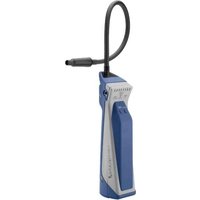
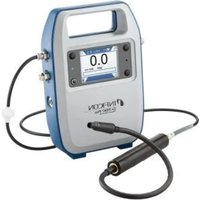
D-TEK 3 - Measuring equipment INFICON - Free user manual and instructions
Find the device manual for free D-TEK 3 INFICON in PDF.


| Product type | Refrigerant leak detector |
| Brand | INFICON |
| Model | D-TEK 3 |
| Weight (with battery) | 0.44 kg |
| Battery type | Lithium-ion rechargeable |
| Charge time (0 to 100%) | Approximately 3 hours |
| Typical battery life | Approximately 9 hours |
| Sensor type | Infrared (replaceable cartridge) |
| Compatible refrigerants (standard sensor) | All CFC, HCFC, HFC, HFO, blends (including A2L) |
| Sensitivity (R134a) | 1 g/year |
| Sensitivity (R1234yf) | 0.5 g/year |
| Sensitivity (R290) | 5 g/year |
| Sensitivity (R744 CO2) | 2 g/year |
| Sensitivity (Ammonia R717) | 3 g/year |
| Warm-up time | 45 to 90 seconds |
| Operating temperature range | -20 to 50 °C |
| Storage temperature range | -20 to 60 °C |
| Maximum humidity | 95% RH non-condensing |
| Maximum altitude | 2,000 m |
| Charge input voltage | 5 V (DC) ± 5%, 1 A ± 5% |
| Charge connector | Micro USB |
| Detection modes | Pinpoint (directional) and Manual Zero |
| Included accessories | Wall charger, micro USB cable, battery, earphones, standard probe, filter |
| Optional sensors | CO2 (R744) and flammable refrigerant (HC) |
| Maintenance | Clean with mild detergent or isopropyl alcohol; replace filter and sensor if necessary |
| Warranty | 1 to 2 years depending on region (excluding batteries, sensors, filters) |
Frequently Asked Questions - D-TEK 3 INFICON
User questions about D-TEK 3 INFICON
0 question about this device. Answer the ones you know or ask your own.
Ask a new question about this device
Download the instructions for your Measuring equipment in PDF format for free! Find your manual D-TEK 3 - INFICON and take your electronic device back in hand. On this page are published all the documents necessary for the use of your device. D-TEK 3 by INFICON.
USER MANUAL D-TEK 3 INFICON
1 Cautions andWarnings 4
2 Specifications 5
3 D-TEK 3
4Charging the Battery 8
5 Turning On the Instrument and Preparing for Use 9
6 Pinpoint Mode 9
7 Manual Zero Mode 10
8 Earbuds and Volume Control 10
9 Removing and Installing the Lithium Ion Battery. 11
10 Removing and Installing the Sensor 12
11 Replacing Filters 13
12 Extra-long Probe 14
13 Optional Sensors 15
14 Cleaning and Storage 16
15 Replacement Parts and Accessories 16
16 Troubleshooting Guide 17
17 Warranty and Liability-Limitation 18
1 Cautions andWarnings
Cautions:
- Only use a certified charger/cord with an output of 5V (dc) ± 5% , 1A ± 5% .
- Keep the device out of extremely high or low temperature locations.
- Do not expose the battery to liquid.
- Do not use the device if you notice any damage to the battery.
- Do not disassemble or modify the battery.
- Handle and dispose of the battery per local regulations.
- If the recharging operation fails to complete, even when the specified recharging time has elapsed, immediately stop further recharging.
- Do not leave the battery unattended while charging.
- Unplug the charger when the battery is fully charged.
- Improper use or disposal of lithium ion batteries can cause a fire.
High RF environments may cause a false alarm.

WARNING
This symbol alerts the user to the presence of important operating and maintenance (servicing) instructions.
WARNING
Exposure to high concentrations of CO_2 or refrigerants is dangerous and can be life-threatening.
The instrument is not for use in toxic or hazardous environments. It is not a personal protection or life-saving device. Always exercise extreme caution in potentially toxic or hazardous environments.

WARNING
This product is not intrinsically safe and should not be used in the presence of explosive fumes, explosive dust, or other explosive chemicals. Use in an environment with flammable refrigerant concentration approaching the LEL (lower explosive limit) could cause an explosion or fire resulting in serious injury, death, or damage to property.
2 Specifications
| Usage indoor/outdoor | |
| Sensor type infrared | |
| Compatible refrigerants | |
| · Refrigerant sensor (standard, PN 724-701-G1) | All CFCs, HCFCs, HFCs, HFOs, and blends (including A2Ls) |
| · CO2 sensor (PN 724-701-G2) R744 (carbon dioxide) | |
| · Flammable refrigerant (HC) sensor (PN 724-701-G3) | R290, R600a, R441a (see safety warnings) |
| Sensitivity (tested to EN14624 standard)1 | |
| · R134a 0.04 oz./yr (1g/yr) | |
| · R1234yf 0.02 oz./yr (0.5g/yr) | |
| · R290 0.2 oz./yr (5g/yr) | |
| · R744 (CO2) 0.07 oz./yr (2g/yr) | |
| · Ammonia 0.1 oz./yr (3g/yr) | |
| Battery type lithium ion | |
| Charging input type micro USB | |
| Charging time (starting at 0%) approximately 3 hours | |
| Battery life approximately 9 hours | |
| Sensor life Up to 2000 hrs | |
| Input voltage 5 V (dc) ±5% | |
| Input current | 1 A ±5% |
| Warm-up period | 45–90 seconds |
| Temperature ranges and humidity | |
| · Storage | -20–60°C (-4–140°F) |
| · Operating2 | -20–50°C (-4–122°F) |
| · Charging | 0–45°C (32–113°F) |
| · Humidity | 95% RH NC maximum |
| Altitude | 2000 m (6500 ft.) |
| Pollution degree | 2 |
| Overvoltage category | 2 |
| Weight (with battery; not including carrying case or accessories) | 0.97 lb. (0.44 kg) |
To achieve optimal performance and the specified sensitivities, it is recommended to allow D-TEK 3 to run for 15 minutes prior to use.
^2 Use in temperatures below 0^ C( 32^ F) should be limited. Extended warm-up time is recommended before use in low temperature environments.
Specification table in accordance with EN 14624:2020
| R134a R1234yf R744 | \( \left( {\mathrm{{CO}}}_{2}\right) \) | Ammonia (R717) | R290 | ||
| Minimum sensitivity, fixed (static) | 1 g/yr 0.5 g/yr 2 g/yr 3 g/yr 5 g/yr | ||||
| Minimum sensitivity, moving (dynamic) | 1 g/yr 1 g/yr 2 g/yr 3 g/yr 5 g/yr | ||||
| Minimum response/ detection time | <1 s <1 s <1 s <1 s <1 s | ||||
| Recovery time for x g/yr exposure \( {}^{3} \) | 7.6 s 6.4 s | 13 s 4 s 4 s | |||
| Minimum sensitivity in contaminated environment | >2 g/yr 1 g/yr > 4g/yr 3 g/yr 7 g/yr | ||||
| Calibration frequency Check annually with calibrated leak standard | |||||
$$ \begin{array}{l} { } ^ { 3 } \mathrm { x } = \mathrm { R } 1 3 4 \mathrm { a } : 3 2 \mathrm { g / y r } \ R 1 2 3 4 y f: 3 5 g / y r \ R 7 4 4: > 5 0 g / y r \ R 7 1 7: 3 5 g / y r \ R 2 9 0: 3 0 g / y r \ \end{array} $$
Patents (Pending) Application #10 2018 208 826.8
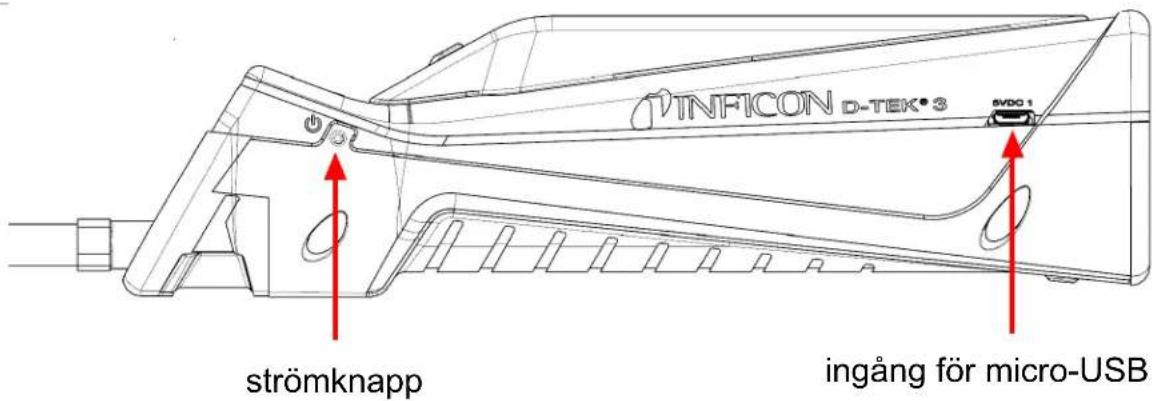
3 D-TEK 3
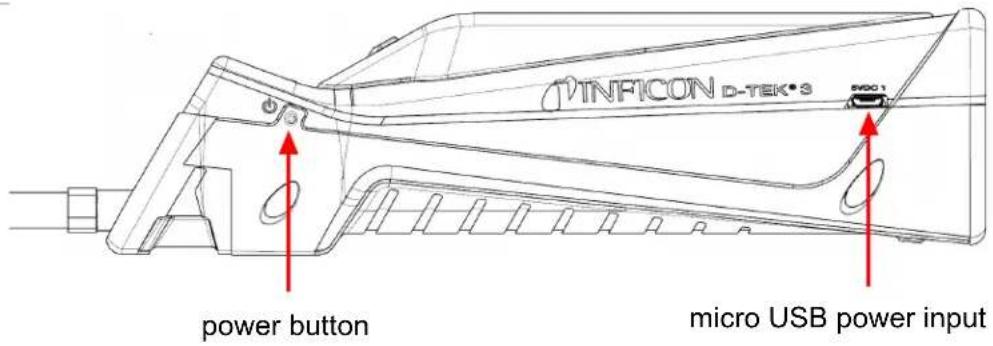
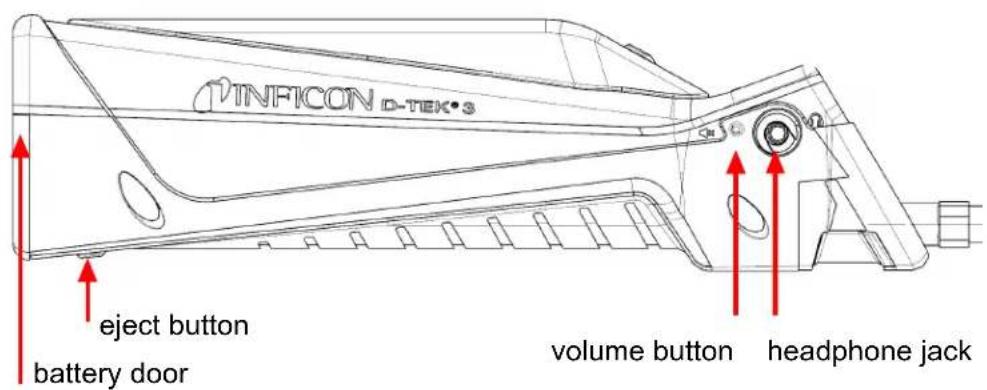
4 Charging the Battery
D-TEK 3 uses a rechargeable lithium ion battery that comes partially charged. INFICON recommends charging the battery before use. Using the supplied charger or charging cradle accessory, a dead battery can be charged to 80% in approximately 2 hours and 100% in approximately 3 hours. A full charge typically lasts about 9 hours of operation, depending on the operating temperature. The power indicator indicates the remaining battery percentage.
| Color % Charge | |
| Green >30% | |
| Orange 10–29% | |
| Red <10% |

D-TEK 3 can be used while charging.
5 Turning On the Instrument and Preparing for Use

If the unit does not turn on, the battery is low and needs to be charged. D-TEK 3 can be used while charging.
1 Long press the power button (located on the left side of the body of the instrument) to turn D-TEK 3 On or Off.
D-TEK 3 begins a variable-time warm-up for 45 to 90 seconds. When warm-up is complete, D-TEK 3 is ready to use.
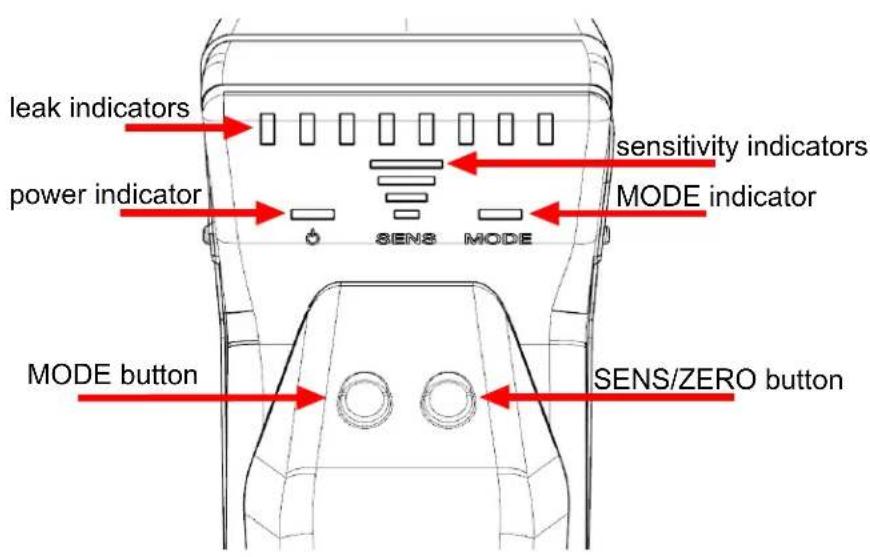
2 To switch modes, press the MODE button. This toggles between Pinpoint and Manual Zero modes.

D-TEK 3 always starts in the last mode that was used.
6 Pinpoint Mode
1 Place the tip of D-TEK 3 as close as possible to the suspected leak (do not block the air flow).
2 Slowly move the probe past each possible leak point.
If a leak is detected, D-TEK 3 alarms and the leak indicators illuminate.
3 When a leak is identified, pull the probe away from the leak for a few seconds and then recheck the spot to verify the leak.

In Pinpoint mode, D-TEK 3 automatically zeros to the background refrigerant concentration and only alarms again with a higher concentration of refrigerant. When this occurs, either continue looking for a higher concentration of refrigerant or move the probe to an area of lower concentration for a few seconds to reset the zero point.

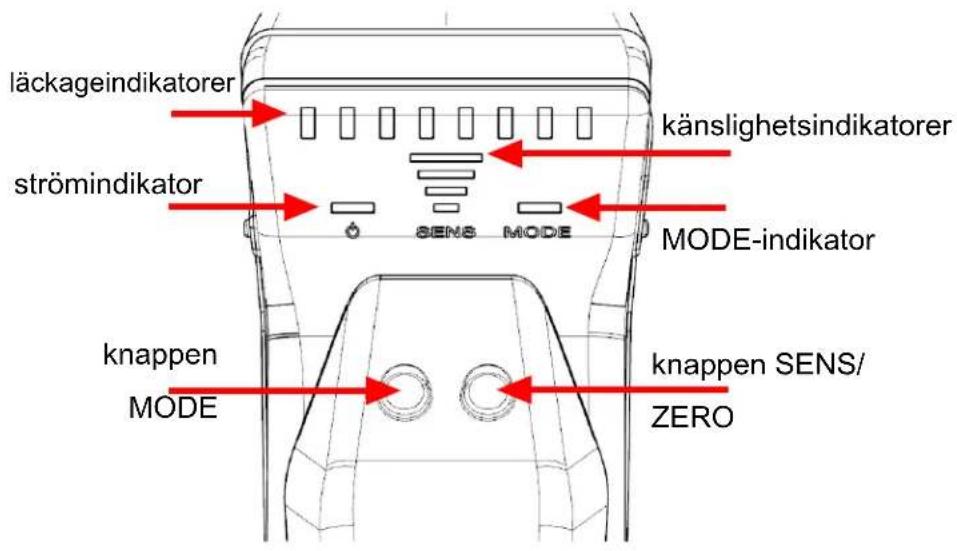
Press the SENS/ZERO button to switch the sensitivity setting. When working with a large leak, it can be easier to pinpoint the leak location using a lower sensitivity setting. The current sensitivity is displayed by the sensitivity (SENS) indicator.
7 Manual Zero Mode
Manual Zero mode operates similar to Pinpoint mode, but is identified by the MODE indicator slowly flashing. Manual Zero mode allows the user to manually zero to the background refrigerant by pressing the SENS/ZERO button. Once the new zero point is set, D-TEK 3 will not alarm unless a higher concentration of refrigerant is detected.
Manual Zero mode beeps faster at the zero point than other modes. If the concentration is lower than the current zero point, the beeping slows. This allows the user to know if they are moving away from the leak by listening to a change in the beep rate.

There is no sensitivity setting in Manual Zero mode.

Manual Zero mode requires an extra warm-up time of up to 15 minutes for optimal performance.
8 Earbuds and Volume Control
A headphone jack is located on the right side of D-TEK 3 for listening to the alarm sounds through headphones or earbuds.

WARNING
If attempting to use headphones not supplied by INFICON, be sure to test them carefully to avoid hearing damage.
A volume button is located next to the headphone jack. Press the volume button to toggle from 100% volume, to 50% volume, and to mute. The volume defaults to 100% at startup. When headphones or earbuds are plugged in, the volume toggles between 100% volume and mute.
9 Removing and Installing the Lithium Ion Battery
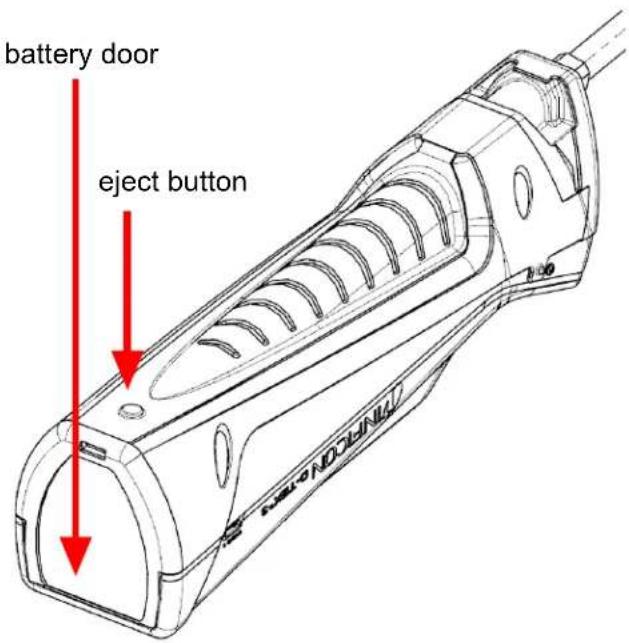
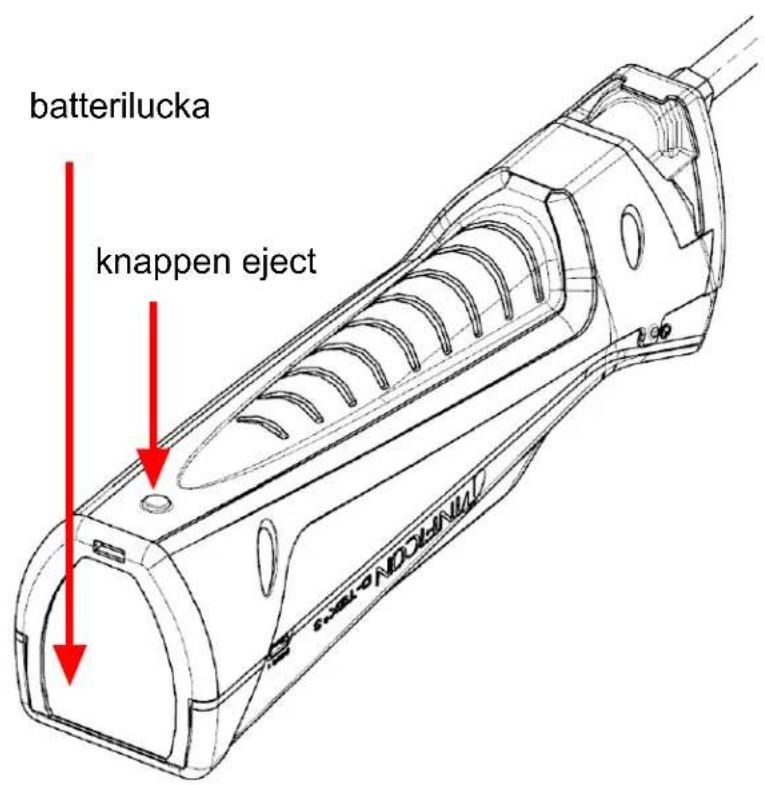
1 Press the eject button on the back of D-TEK 3 and remove the battery door.
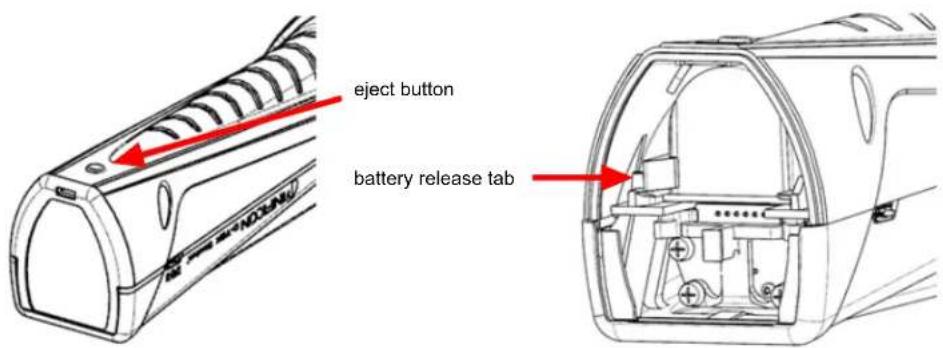
2 Remove the battery by moving the battery release tab to the side until the battery begins to eject. Slide the battery out.
3 Re-insert the battery by first aligning the battery with the rails.
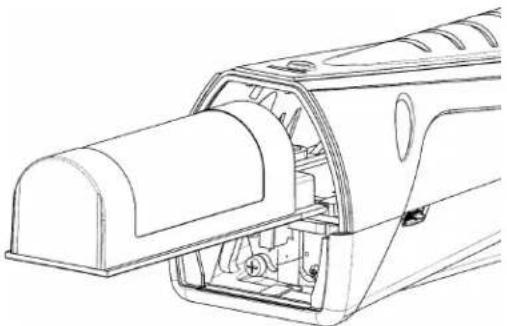
4 Gently push the battery along the rails until the battery release tab engages.
Do not force the battery. If the battery does not slide freely, check the alignment and try again.
5 Reinstall the battery door.
10 Removing and Installing the Sensor
D-TEK 3 uses a cartridge style sensor that is quick and easy to remove and replace in the field. In addition to the standard sensor, INFICON offers a CO_2 specific sensor for use in refrigeration and air conditioning applications. See Replacement Parts and Accessories [16].
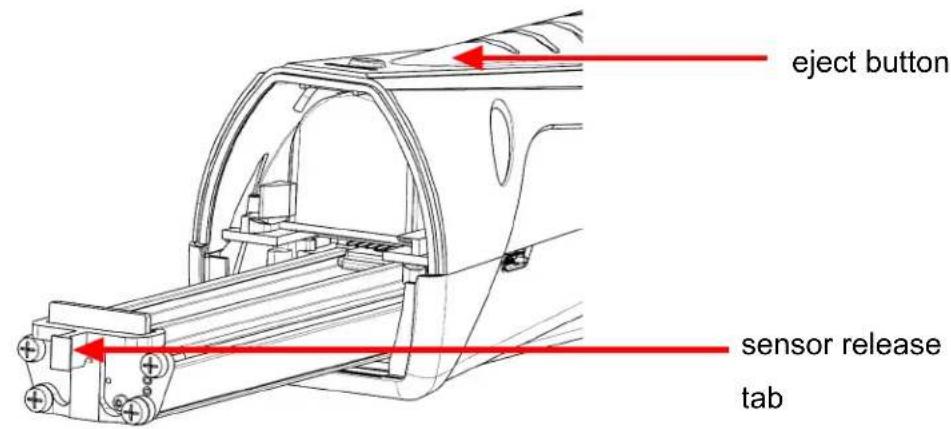
To replace the sensor:
1 Press the eject button on the back of D-TEK 3 and remove the battery door.
2 Grasp the sensor release tab and gently pull it out.
3 Align the new sensor with the rails.
4 Gently push the sensor along the rails until it is fully inserted.
Do not force the sensor. If it does not slide freely, check the alignment and try again.
5 Reinstall the battery door.
11 Replacing Filters
D-TEK 3 uses a hydrophobic filter cartridge that allows air and refrigerants to pass through while filtering out water, dirt, and oil. Examine the white cloth to determine if the filter needs to be changed. If the cloth appears discolored, install a new filter. Changing the filter is also an easy troubleshooting step if you suspect your leak detector is not properly detecting refrigerants. A clogged air filter can limit the sample air flow.


Exposing the filter to water or oil can block air flow. If this occurs, remove the filter with the unit turned off and the probe facing down to avoid getting contaminants in the probe and install a new filter. If the filter is wet, it can be reused once it dries.

CAUTION
Never use the instrument without a probe tip and filter.
To replace the filter:
1 Unscrew the probe tip and remove the filter.
2 Insert the new filter into the probe.
3 Screw the probe tip on. Do not overtighten.
12 Extra-long Probe
The optional extra-long replacement probe can be used for leak checking in hard-to-reach areas.
To install the extra-long probe:
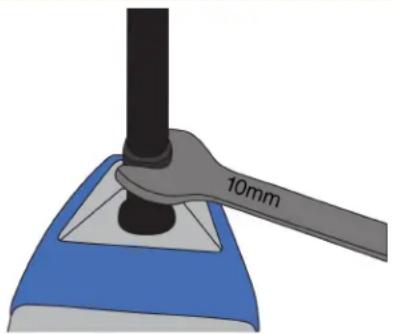
1 Unscrew the standard probe from the D-TEK 3 body using a 10mm wrench.
2 Screw on the extra-long probe to approximately 35 in·lb (4 N·m). Do not overtighten.
3 Unscrew the probe tip from the standard probe and remove the filter (or use a new one).
4 Insert the filter into the extra-long probe.
5 Screw the probe tip onto the extra-long probe. Do not overtighten.

CAUTION
Always remove the probe with a 10mm wrench at the base of the probe.
Unscrewing the probe in any way other than the specified method can cause damage to the probe.
13 Optional Sensors
Optional sensors are available for use in CO2 (PN 724-701-G2) or flammable refrigerant (PN 724-701-G3) applications. To use the CO2 or flammable refrigerant sensor, remove the standard sensor and install the new sensor following the instructions in Removing and Installing the Sensor [12]. D-TEK 3 automatically recognizes the sensor type and the MODE indicator illuminates the appropriate color to indicate the sensor type the entire time the sensor is installed. Green indicates CO_2 , red indicates flammable refrigerant, and orange indicates the standard refrigerant sensor is installed.

If D-TEK 3 does not automatically recognize your flammable refrigerant sensor, contact INFICON to arrange a software update.

The flammable refrigerant sensor does not detect hydrogen, including hydrogen forming gas.

While searching for CO2 leaks, it is recommended to wear a respirator or mask to avoid exhaling CO2 toward the probe.

WARNING
Exposure to high concentrations of CO_2 or refrigerants is dangerous and can be life-threatening.
The instrument is not for use in toxic or hazardous environments. It is not a personal protection or life-saving device. Always exercise extreme caution in potentially toxic or hazardous environments.

WARNING
This product is not intrinsically safe and should not be used in the presence of explosive fumes, explosive dust, or other explosive chemicals. Use in an environment with flammable refrigerant concentration approaching the LEL (lower explosive limit) could cause an explosion or fire resulting in serious injury, death, or damage to property.
14 Cleaning and Storage
D-TEK 3 can be cleaned with mild detergent or isopropyl alcohol. Care should be taken to prevent cleaner from entering the instrument. Do not clean with gasoline, acetone, or other aggressive solvents as they may damage the plastic or display.
15 Replacement Parts and Accessories
| Replacement carrying case 721-700-G1 | |
| Earbuds 721-607-G1 | |
| 12 V (dc) car charger 721-605-G1 | |
| AC wall charger (includes plugs for multiple regions) | 721-606-G1 |
| Lithium ion battery 721-702-G1 | |
| Battery charging cradle 721-610-G1 | |
| Battery/charging cradle combination 721-604-G1 | |
| Standard sensor (detects CFCs, HCFCs, HFCs, HFOs, and blends (including A2Ls)) | 724-701-G1 |
| CO2 sensor 724-701-G2 | |
| Flammable refrigerant (HC) sensor 724-701-G3 | |
| Filter cartridges (quantity, 5) 712-707-G1 | |
| Replacement probe cap 712-705-G1 | |
| Needle probe extension 721-612-G1 | |
| Extra-long probe 721-611-G1 | |
| TEK-Check R134a test leak 703-080-G10 |
16 Troubleshooting Guide
| Problem Cause Remedy | ||
| The power indicator quickly flashes red. | A battery error has occurred. This can be caused by a failed battery or by the battery being improperly installed, or having a poor connection. | Remove and reinstall the battery. If the problem is not fixed, replace the battery. See Removing and Installing the Lithium Ion Battery [ 11]. |
| The battery is above or below the ideal temperature range and may not charge properly. | Allow the battery to return to normal temperature. | |
| All leak indicators flash. A sensor | error has occurred. This can be caused by a failed sensor, or by the sensor being improperly installed, or having a poor connection. | Remove and reinstall the sensor. If the problem is not fixed, replace the sensor. See Removing and Installing the Sensor [ 12]. |
| The indicators do not turn on after long-pressing the power button. | The battery level is critically low. | Charge the battery or plug the unit into a charger. |
| The unit turns on, but does not detect refrigerant. | The unit has not completed warm-up. | Wait for the warm-up to complete. This takes 45 to 90 seconds. |
| The filter is clogged, restricting the air flow. | Replace the filter cartridge. See Replacing Filters [ 13]. | |
| The pump has failed. Listen for the pump sound. If the pump is not making a sound and the battery has a proper charge, contact INFICON. | ||
| The sensitivity is set too low (Pinpoint mode only). | Verify the sensitivity level. For very small leaks, High or Super should be used. | |
| The incorrect sensor is installed. | Verify that the correct sensor is being used (refrigerant sensor or CO2 sensor). | |
| The unit alarms in clean air. The incorrect sensor is installed. Verify that the refrigerant sensor is installed instead of the CO2 sensor. | ||
| The pump is not making a sound. | The pump has failed. If the battery has a proper charge, contact INFICON. | |
17 Warranty and Liability-Limitation
INFICON warrants your D-TEK 3 Refrigerant Leak Detector to be free from defects of materials or workmanship for one or two years (depending on region) from the date of purchase. INFICON does not warrant items that deteriorate under normal use, including batteries, sensors, and filters. In addition, INFICON does not warrant any instrument that has been subjected to misuse, negligence, or accident, or has been repaired or altered by anyone other than INFICON. INFICON liability is limited to instruments returned to INFICON, transportation prepaid, not later than thirty (30) days after the warranty period expires, and which INFICON judges to have malfunctioned because of defective materials or workmanship. INFICON liability is limited to, at its option, repairing or replacing the defective instrument or part. This warranty is in lieu of all other warranties, express or implied, whether of MERCHANTABILITY or of FITNESS FOR A PARTICULAR PURPOSE or otherwise. All such other warranties are expressly disclaimed. INFICON shall have no liability in excess of the price paid to INFICON for the instrument plus return transportation charges prepaid. INFICON shall have no liability for any incidental or consequential damages. All such liabilities are EXCLUDING.
He daBHTe Ha akKymyIaTOp CnNkOM CnIbHO. Ecnn OH He BCTabIaTe, BBipOBHnTE erO IN NOBTOpITe NOnblTy.
5 BepHnTe KpbIuKy 6aTaapeHOrO OTeKa Ha MeCTo.
YTo6bI 3aMeHHTbФnJIbTp:
1 Otkpynte HakoheuHK 30HnN n3BneKeTep
2 BctaBbTe B3OH HObBiΦnIbTp.
3 PnKpyTHe HakoHneHHK 30Hda. He 3aTnBaTe CInuKOM CInbHO.
12ДПИHHbI 3OHd
Patent (under handling)
Tillampning nr 10 2018 208 826.8
3 D-TEK 3

4 Ladda batteriet
Manual Zero MoDn is Pinpoint MoD with usa hge akndh jnt mode 10000000000000000000000000000000000000000000000000000000000000000
Two Technology Place
East Syracuse, NY 13057-9714 USA
Phone: +1.800.344.3304
E-Mail: service.tools@inficon.com
www.inficonserviceteools.com
Bonner Strasse 498
D-50968 Cologne, Germany
Phone: +49 221 56788-660
E-Mail: servicetools.europe@inficon.com
www.inficonservicetools-europe.com
Section A, Building 6
108 Shuya Road, Shanghai, China
Phone: +86-21-62093094
Email: reach.china@inficon.com
Korea
Phone: +82-31-206-2890
Email:reach.korea@inficon.com
Japan
Phone: +81-44-322-8901
Email: reach.japan@inficon.com
Singapore
Phone: +65-6631-0303
Email: reach.singapore@inficon.com
Taiwan
Phone: +886-3-5525828
Email: reach.taiwan@inficon.com
Due to our continuing program of product improvements, specifications are subject to change without notice.
All trademarks are the property of their respective owners.
074-710-P16B 2022INFICON
- Cautions andWarnings
- Cautions:
- WARNING
- Charging the Battery
- Turning On the Instrument and Preparing for Use
- Pinpoint Mode
- Manual Zero Mode
- Earbuds and Volume Control
- Removing and Installing the Lithium Ion Battery
- Removing and Installing the Sensor
- Replacing Filters
- CAUTION
- Extra-long Probe
- Optional Sensors
- Cleaning and Storage
- Replacement Parts and Accessories
- Warranty and Liability-Limitation
- 12ДПИHHbI 3OHd
- Ladda batteriet
Brand : INFICON
Model : D-TEK 3
Category : Measuring equipment