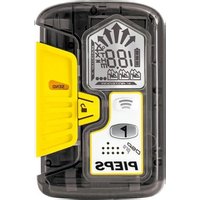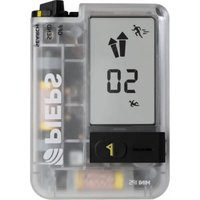
Mini IPS - Avalanche safety device Pieps - Free user manual and instructions
Find the device manual for free Mini IPS Pieps in PDF.


User questions about Mini IPS Pieps
0 question about this device. Answer the ones you know or ask your own.
Ask a new question about this device
Download the instructions for your Avalanche safety device in PDF format for free! Find your manual Mini IPS - Pieps and take your electronic device back in hand. On this page are published all the documents necessary for the use of your device. Mini IPS by Pieps.
USER MANUAL Mini IPS Pieps
Premium alpine performance.
PIEPS APP
Register your device today and get a warranty extension.
Parkring 4, B403 Lebring
Austria
www.pieps.com
The Bluetooth® work mark and focus are registered trademarks owned by Bluetooth SIC, Inc. and any use of such marks by PLSAs under license. Other trademarks and trade names are those of their respective owners.
PIEPS MINI IPS QUICK START GUIDE
M20281_B 10/2025
PIEPS MINI IPS
QUICK START GUIDE

PIEPS
text_image
It can be wild out there! We work hard to create products that keep you safe in the mountains. It is essential that you are familiar with your equipment. Practice with your friends and have fun on your adventures!It can be wild out there!
We work hard to
create products
that keep you safe
in the mountains.
It is essential that
you are familiar with
your equipment.
Practice with your
friends and have fun
on your adventures!
text_image
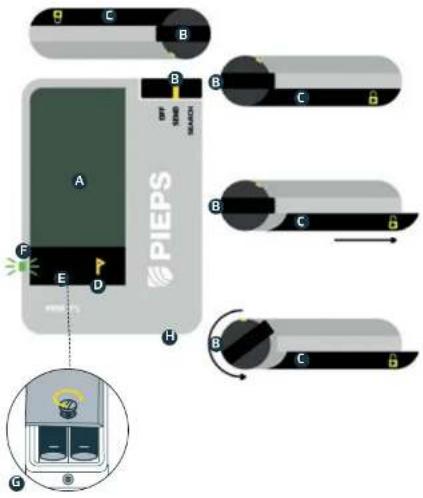
A B C D E F G H PIEPS OFF SHAND SMATCH B C D B C B GSYSTEM OVERVIEW
TRANSCEIVER ELEMENTS
A LCO display (backlit)
B Switch OFF/SEND/SEARCH
C Switch locking mechanism
D MARK button P
E Speaker
F Transmit Control LED
G Battery compartment
H Lanyard hole
CONTENTS
1x PIEPS MINIIPS
2x Akolire battenes
(in battery compartment)
1x P EPS MIN IPS Carrying system
with detachable handicap
1x Quick Start Guide
1x Legal Guide
1x FIFPS Sticker
text_image
Diagram showing a human torso with a medical device and a yellow arrow pointing to the right side of the torso.A single change and other reference [20/2015]

text_image
PIEPSPIEPS MINI IPS
QUICK START GUIDE
10/2025

text_image
QR code image containing encoded data, no visible human-readable textIMPORTANT!
Check for firmware updates upon first usage and regularly afterwards.

text_image
QR code image containing encoded data, no visible human-readable textFind the full manual at pieps.com
LANGUAGES
| Deutsch | 4 |
| English | 18 |
| Français | 32 |
| Italiano | 46 |
| Español | 60 |
| Nederlandse | 74 |
| Norsk | 88 |
| Svenska | 102 |
| Suomi | 116 |
| Polski | 130 |
| Český 144 | |
| Slovenský 158 | |
| Slovenščina 172 | |
| Hrvatski | 186 |
| Русский 200 | |
| 日本語 | 214 |
SYSTEMÜBERBLICK
ELEMENTE DES LVS-GERÄTS
natural_image
Diagram of a mechanical or electrical component with labeled parts (no readable text or symbols)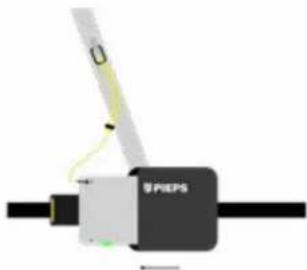
natural_image
Diagram of a mechanical device labeled 'SPEPS' with a tool interacting with it, showing no readable text or symbols beyond the label.natural_image
Illustration of three skiers on a track with one hand holding a small electronic device (no text or symbols present)text_image
GROUP CHECK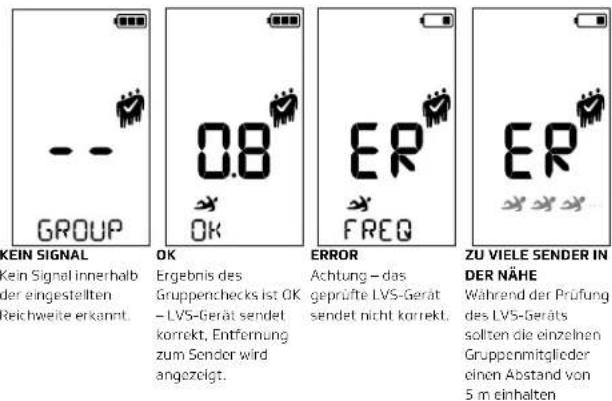
text_image
Diagram illustrating magnetic field lines around a current-carrying conductor with labeled components and directional arrowsnatural_image
Illustration of a person standing near three yellow wavefronts with a small object, no text or symbols presentA LCD Display (illuminated)
B SEND/SEARCH Switch
C Locking Mechanism
D MARK Button
E Speaker
F Transmission Control LED
G Battery Compartment
H Wrist Strap Attachment
PACKAGE CONTENTS
1x PIEPS MINI IPS
2x Alkaline batteries
(in the battery compartment
1x PIEPS MINI IPS carrying system with detachable wrist strap
1x Quick start guide
1x Legal notices
1x PIEPS sticker
text_image
ent stem with 0 SPO1PIEPS MINI IPS
QUICK GUIDE
WE ARE PLEASED THAT YOU HAVE CHOSEN TO PURCHASE A PIEPS MINI IPS!
Register your device in the PIEPS App and receive:
- a warranty extension from 2 to 5 years! and
- important information on software updates!
PIEPS APP:
GET THE MOST OUT OF YOUR AVALANCHE TRANSCEIVER!
- Connect your device via Bluetooth to the PIEPS APP.
- Extend the warranty to 5 years.
- Easily manage device settings.
• Free and useful firmware updates. - Access to PIEPS expertise.
- Creation of special training scenarios.
• Detailed device testing with the help of the app.



WARNING!
An avalanche transceiver does not protect you from avalanches! To be prepared for an emergency, it is essential to regularly practice companion rescue. Acquire in-depth knowledge about avalanche prevention before entering avalanche terrain. Always plan your tours carefully and make sure your transceiver is in SEND mode before starting. Remember: carrying a transceiver alone is not enough. Always bring a shovel and a probe to enable a successful rescue.
In an emergency, follow the basic procedures taught in avalanche training courses and specialized publications. We recommend following best practices and checking both the SEND and SEARCH functions before every use.
CARRYING SYSTEM
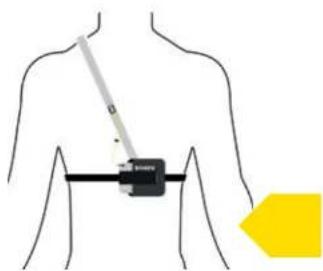
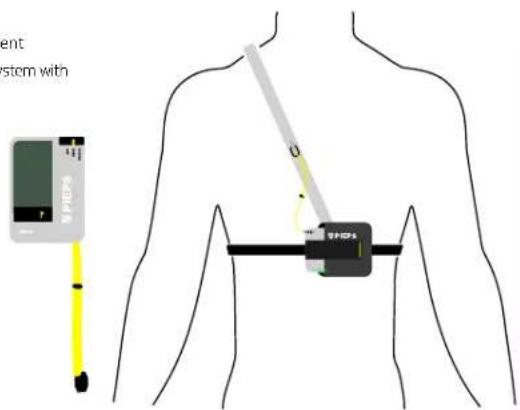
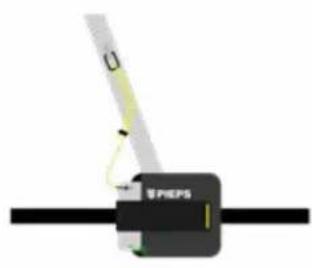
We recommend using the included carrying system or a pouch designed for avalanche transceivers. To protect the display, carry the avalanche transceiver with the display facing inward. The transmission control LED remains visible, even when the avalanche transceiver is stowed in the carrying system. The design ensures that the avalanche transceiver is secured by the tab after being inserted into the carrying system. The carrying system should always be worn under at least one layer of clothing. This prevents loss or damage in the event of a fall or an avalanche.
If you carry the avalanche transceiver in a designated clothing pocket, ensure that there are no other sharp, metallic, or electronic items (e.g., keys, coins, mobile phone) in the pocket that could damage or interfere with the avalanche transceiver.
natural_image
Pure electrical circuit lines without any symbols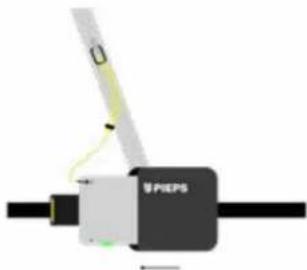
natural_image
Diagram of a mechanical device labeled 'SPEPS' with a tool interacting with it (no readable text or symbols beyond label)TURNING ON AND SELF-TEST
NOTE: Despite a comprehensive self-test of the device, it is necessary to check the device modes before each tour (SEND-Check and SEARCH-Check)! We also recommend that all members of your group ensure that both the SEND and SEARCH modes on their devices are functioning correctly.
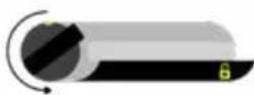
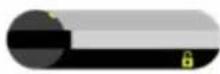
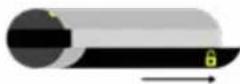
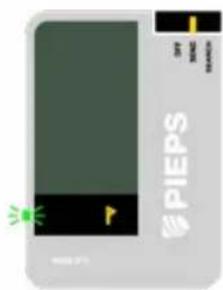
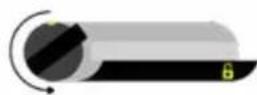
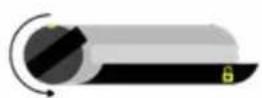
Unlock the locking mechanism (C) and turn the switch (B) counterclockwise to the SEND or SEARCH position. In the SEND position, ensure that the locking slider is fully engaged and the switch is securely fixed. In the SEARCH position, the switch does not intentionally engage, to be able to quickly switch to the SEND mode in the event of a secondary avalanche during the search.
1
2
text_image
SPEPS3
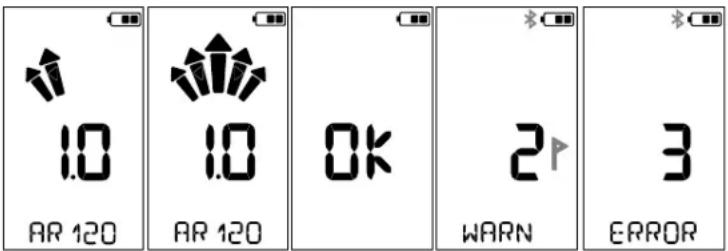
After switching on, the following information is displayed: firmware version (e.g., 1.0), progress of the self-check (arrows from left to right), result of the self-check (OK, WARN for warning, ERROR for error), battery level, and AR 60 (Auto-Revert function is factory-set with a 60-second delay). After the group check countdown, the MINI IPS switches to SEND mode: the transmission control LED begins to blink green.
POSSIBLE RESULTS OF THE SELF-TEST
text_image
1.0 AR 120 1.0 AR 120 OK 2 WARN 3 ERROROK Self-test successful: You are ready for your tour!
WARN WARNING: All essential functions are working properly, but some additional features are not available. Press the MARK button (D) to switch to SEND mode: You are ready for your tour! We recommend performing a device check using the PIEPS app to obtain further information about the warning and, if necessary, to contact PIEPS support.
ERROR Error: The device has malfunctioned! Do not use the avalanche transceiver! Perform a device check using the PIEPS app to obtain further information about the error and, if necessary, contact PIEPS support.
SWITCH OFF
To turn off, unlock the locking mechanism (C) and rotate the switch (B) clockwise to the OFF position.
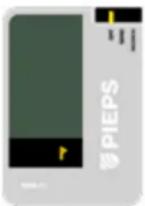
SWITCHING BETWEEN SEND UND SEARCH
Unlock the locking mechanism (C) and turn the switch (B) counterclockwise from the SEND position to the SEARCH position. The switch does not intentionally lock in the SEARCH position to allow for a quick switch back to the SEND mode in the event of a secondary avalanche during the search. To do this, simply press the protruding element of the switch to the left.
SEND MODE
While moving in avalanche-prone terrain, the avalanche transceiver must be in SEND mode, and the transmission control LED must be flashing green.
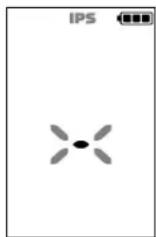
INTERFERENCES
All avalanche transceivers are highly sensitive to electronic, magnetic, and metallic interference. Therefore, all manufacturers recommend maintaining a minimum distance from devices such as mobile phones, smartwatches, radios, keys, heated clothing, electronic airbags, magnetic fasteners, etc.
Although the PIEPS MINI IPS is equipped with advanced protection technologies, we recommend the following minimum distances from potential sources of interference: Minimum distance in SEND mode: 20 cm; Minimum distance in SEARCH mode: 50 cm.
IPS - INTERFERENCE PROTECTION SYSTEM IN SEND MODE
IPS is a unique technology that continuously monitors the effects of electronic interference on the transmitting device by processing the interference signals and adapting to them. In this way, the PIEPS MINI IPS provides optimal transmission performance despite occurring interferences.


SIGNAL VERIFICATION - PROTECTION AGAINST INTERFERENCE IN SEARCH MODE
The PIEPS Advanced Signal Verification only displays signals from avalanche transceivers and does not show "ghost signals" from other sources.
GROUP CHECK
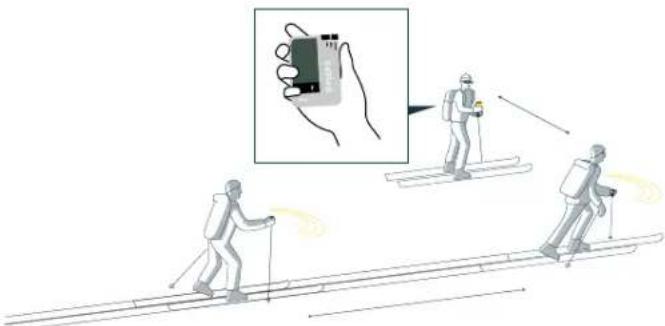
The PIEPS MINI IPS features a group check function, which does not replace the mandatory check of the SEND and SEARCH modes, but is particularly helpful for large groups. In group check mode, the reception range is limited to 1 meter (for groups with snowmobiles, adjustable to 3 meters in the PIEPS app).
natural_image
Illustration of three skiers on a track with one hand holding a small electronic device (no text or symbols present)In Group Check mode, you can test whether the avalanche transceivers of your group are transmitting correctly.
HOW TO ENTER THE GROUP CHECK MODE:
Switch on the MINI IPS by setting the switch to SEND. After the self-check, the group check countdown starts automatically. Press the MARK button once during this countdown to activate the group check.
The group check mode is active for 60 seconds and automatically ends after a countdown. However, to stay in group check mode press the MARK button (D) during the countdown.
You can exit the mode at any time (except during a countdown) by pressing the MARK button (D).
text_image
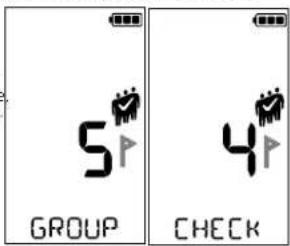
5 GROUP 4 CHECK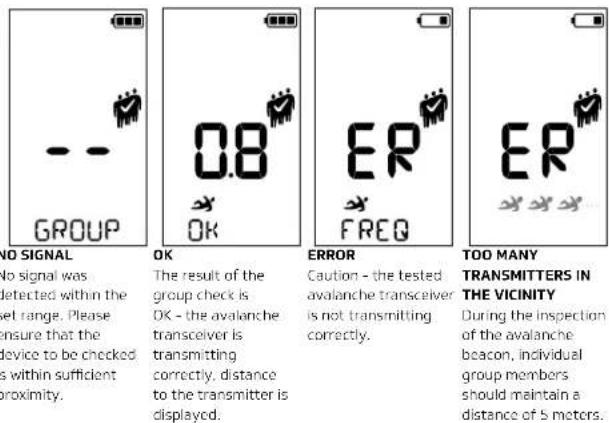
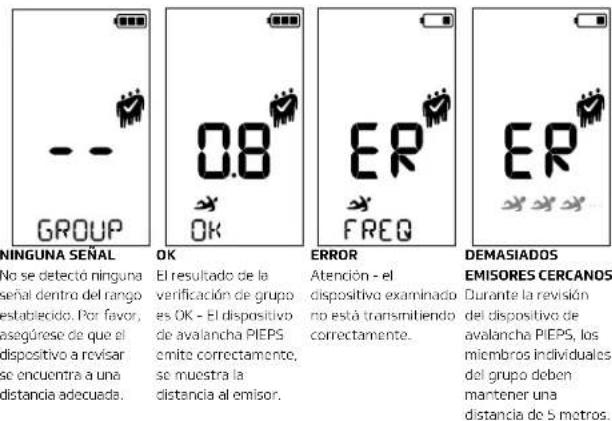
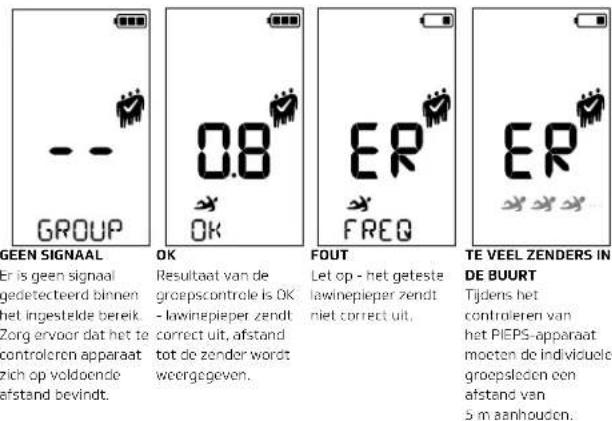
NO SIGNAL
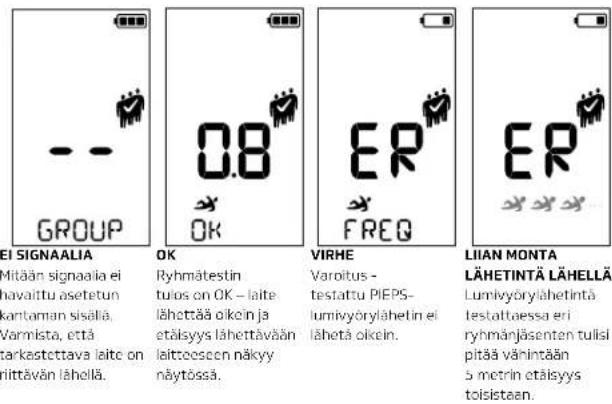
No signal was detected within the set range. Please ensure that the device to be checked is within sufficient proximity.
The result of the group check is OK - the avalanche transceiver is transmitting correctly, distance to the transmitter is displayed.
Caution - the tested avalanche transceive is not transmitting correctly.
During the inspection of the avalanche beacon, individual group members should maintain a distance of 5 meters.
SEARCH
SIGNAL SEARCH
If you do not receive a signal and see no indications of a buried person in the avalanche cone, move quickly through the search area. In doing so, maintain the recommended search strip width of your avalanche transceiver. The pictogram in the top left corner of the display assists you by providing information on the recommended search speed and the distance to the snow surface.
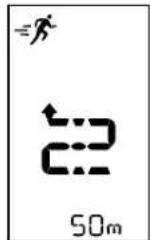
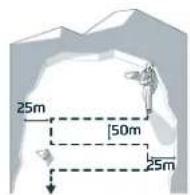
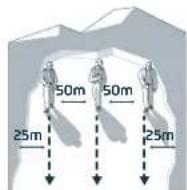
The search strip width of the PIEPS MINI IPS is 50 m, as displayed on the screen. In the event of interference signals, the MINI IPS shows a reduced search strip width.
COARSE SEARCH
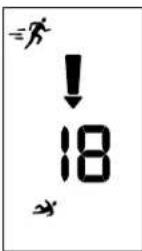
As soon as the avalanche transceiver receives a signal, it starts beeping, and an arrow indicates the direction to the buried person. Follow the direction quickly and check whether the distance value decreases.
If the distance value increases, you are moving in the wrong direction. In this case, the arrow points toward you, prompting you to turn around.
When the distance to the buried person is less than 10 meters, the pictogram in the top left corner of the display changes to remind you to reduce your search speed.
text_image
PS → → → →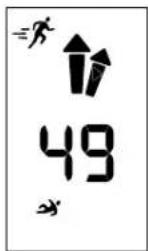
Distance and Direction Rotate 180° Distance < 5 m
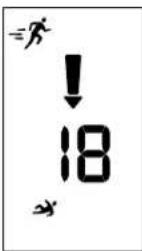

Distance < 10 m
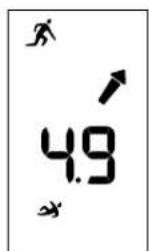
FINE SEARCH
Fine Search begins with a "landing" on the snow surface.
When the displayed distance value reaches 5, the icon indicates that the transceiver should be moved as close to the snow surface as possible.
Guide the transceiver like an airplane during landing: slowly and at a shallow angle toward the snow. Significantly reduce your search speed and proceed forward on your knees. The back of the hand holding the device should touch the snow and act as a brake.
When the distance value is 3 or less, slow down your movement speed to about 10 cm per second, as the device only receives a signal approximately once per second.
CROSS SEARCH
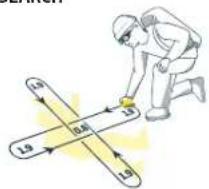
text_image
1.9 0.46 1.9 1.9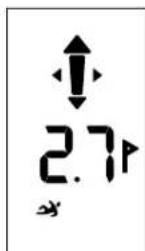
As soon as the distance value reaches 2, the direction arrow disappears. Make sure you had a straight direction arrow before this.
Now start the cross-grid search, determine the lowest distance value, and begin the pinpoint search or probing.
TIP: For up to 3x faster fine and pinpoint searching, we recommend using the PIEPS iPROBE, which is compatible with all avalanche transceivers from all manufacturers.
PINPOINT SEARCH
Check the results of the avalanche transceiver by systematic probing. If you get a hit, leave the probe in the snow. Use your shovel to dig out the victim and administer first aid.
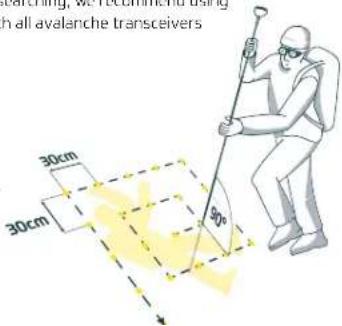
text_image
30cm 30cm 90° Lunching, we recommend us with all avalanche transceiversMULTIPLE BURIAL
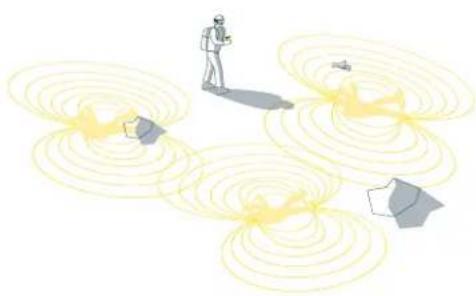
natural_image
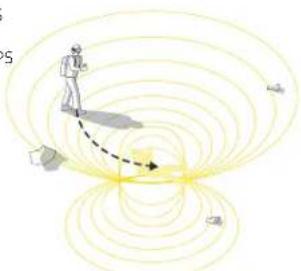
Illustration of a person standing on a path surrounded by concentric yellow wave patterns, with no visible text or symbols.A multiple burial will be indicated to you by the number of buried person symbols displayed on the screen.
MARK
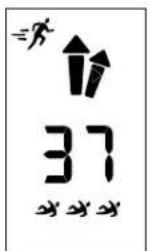
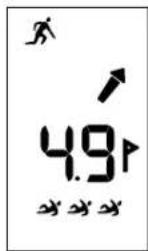
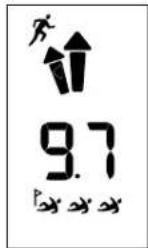
The MARK function is essential in multiple burial situations: it allows you to suppress and "mark" a located signal. This enables efficient continuation of the search for the next buried subject.
Marking is possible from a distance of 5 m and is indicated by a flag icon on the display. Briefly press the MARK button (D) to suppress the located transmitter.
Successful marking is confirmed by a flag displayed on the buried subject icon. The transceiver now indicates the direction and distance to the next strongest signal. The marking range can be configured via the PIEPS App.
DEVICE MANAGEMENT WITH THE PIEPS APP
NOTE! Users are responsible for keeping the firmware of their avalanche transceivers up to date. PIEPS recommends checking for updates at the start of each season and monthly with regular use of the devices.
ACTIVATION OF BLUETOOTH® - CONNECTING WITH THE PIEPS APP
Bluetooth and the PIEPS APP enable easy device management (e.g., firmware updates or device configuration) and also offer a practical training mode. Download the PIEPS APP, connect your PIEPS device, and take advantage of all features! Available for Android and Apple.


NOTE! If you have already installed the PIEPS APP, make sure you are using the most current version.
To activate Bluetooth, press the MARK button (D) within 1 second after turning on the device. Once the Bluetooth symbol appears on the display, you can release the MARK button. The Bluetooth mode will be audibly confirmed (2 beep sounds). To deactivate Bluetooth, press the MARK button (D) again.
DANGER! The device may not be able to transmit when Bluetooth is activated.
Use the Bluetooth mode only for device management and training mode. Never use the Bluetooth mode in avalanche-prone terrain.
ALKALINE AND LITHIUM BATTERIE
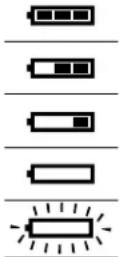
Change the batteries at the latest when the display shows an empty battery! Always replace all batteries at the same time.
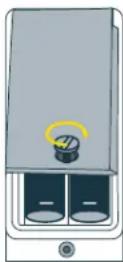
Open the battery compartment and insert the new batteries in the correct position. You can use Alkaline (LR03) and Lithium (FR03) type batteries. Make sure the correct battery type is selected in the PIEPS app, otherwise the battery display will not function correctly. By default, Alkaline (LR03) is selected. Close the lid and tighten the screw to secure the battery compartment.
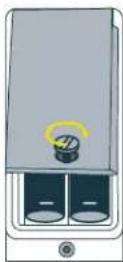
NOTE: Some batteries may protrude slightly due to their length when inserted. This is no cause for concern, as the closed battery compartment lid with tightened screw secures the batteries in place and ensures a correct fit.
Dispose of the device and batteries in accordance with applicable local laws and regulations.
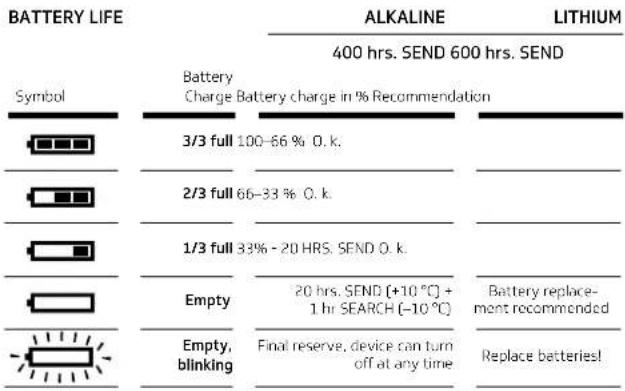 |
STORAGE
Store the device in a dry place at room temperature. Remove the batteries during long-term storage (e.g., over the summer months) to prevent possible damage from leaking batteries.
MAINTENANCE
An avalanche transceiver is a safety product that is exposed to extreme conditions such as sub-zero temperatures and moisture. In addition, the components are subject to an aging process. PIEPS recommends sending 3rd generation avalanche rescue devices (PRO IPS and MINI IPS) for maintenance 5 years after the purchase date and every 3 years thereafter. For more information, visit pieps.com.
WARRANTY CONDITIONS
The manufacturer is responsible for the material and workmanship of the PIEPS MINI IPS for two years from the date of purchase. Excluded are the batteries, the carrying system, and the wrist strap, as well as damages caused by improper use or disassembly of the device by unauthorized persons. All other warranties and liability for consequential damages are expressly excluded. For warranty claims, please bring your purchase receipt to the point of sale.
TECHNICAL SPECIFICATIONS
| DEVICE NAME | TRANSMISSION FREQUENCY |
| PIEPS MINI IPS | 457 kHz |
| TRANSMISSION POWER | |
| Max. 7 dBμA/m (2.23 μA/m) at a distance of 10 m | |
| BLUETOOTH TRANSMISSION FREQUENCY | BLUETOOTH TRANSMISSION POWER |
| 2.402-2.480 GHz | 2,5 dBm |
| POWER SUPPLY | BATTERY LIFE (TRANSMIT MODE) |
| 2 Alkaline (AAA) LR03 1.5 V or | 400 hrs. (Alkaline) |
| 2 Lithium (AAA) FR03 1.5 V | 600 hrs. (Lithium) |
| DIMENSIONS (L × W × H) | SEARCH STRIP WIDTH |
| 104 × 74 × 20 mm | 50 m |
| TEMPERATURE RANGE | WEIGHT |
| -20 +45 °C | 158 g (including batteries) |
STORAGE TEMPERATURE RANGE
-25 +70 °C
Further important information, including conformity, can be found in the accompanying Legalguide.
APERÇU DU SYSTÈME
ÉLÉMENTS DU DVA (DÉTECTEUR DE VICTIMES D'AVALANCHE)
natural_image
Pure electrical circuit lines without any symbols
natural_image
Mechanical device labeled 'SPEPS' with a lever and pivot point (no readable text or symbols beyond label)natural_image
Illustration of three skiers in action on a track, with one hand holding a small electronic device (no text or symbols present)text_image
Diagram illustrating magnetic field lines around a person, with labeled vectors and concentric circlesnatural_image
Illustration of a person standing near floating yellow wave signals with a small object nearby (no text or symbols)CONDITIONS DE GARANTIE
text_image
EPS MINI IPS con bile (art Guide) 7 O EPS 100000000000000000000000000000000000000000000000000000000000000000000000000000000000PIEPS MINI IPS
ISTRUZIONI BREVI
SIAMO LIETI CHE ABBIATE SCELTO DI ACQUISTARE IL PIEPS MINI IPS!
natural_image
Pure electrical circuit lines without any symbols
natural_image
Diagram of a mechanical device labeled 'SPEPS' with a tool interacting with a central component (no readable text or symbols beyond label)ACCENSIONE E AUTO-TEST
natural_image
Illustration of three skiers in action with one hand holding a small device, no text or symbols presenttext_image
Diagram illustrating magnetic field lines around a person, showing current direction and field lines with labeled points.natural_image
Illustration of a person standing near three yellow wavefronts with a small object, no text or symbols presentnatural_image
Diagram of a mechanical or electrical component with a labeled part 'O' and a base labeled 'SPHEPS', no readable text or symbols present.
text_image
U UPIEPSENCENDER Y AUTOEXAMEN
natural_image
Illustration of three skiers on a track with one hand holding a small electronic device (no text or symbols present)text_image
GROUP CHECK66 67
text_image
Diagram illustrating magnetic field lines around a person, showing current direction and field lines with labeled points.natural_image
Illustration of a person standing near three yellow wavefronts with a small object, no text or symbols presentnatural_image
Diagram of a mechanical or electrical component with labeled parts (no readable text or symbols)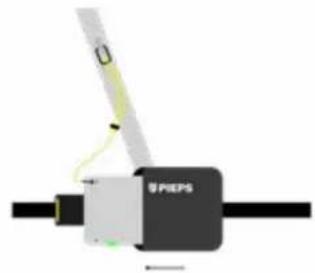
text_image
O S PIEPSINSCHAKELEN EN ZELFTEST
natural_image
Illustration of three skiers in action on a track, with one hand holding a small electronic device (no text or symbols present)text_image
GROUP CHECK80 81
text_image
Diagram illustrating magnetic field lines around a current-carrying conductor with labeled components and directional arrowsnatural_image
Illustration of a person standing near three yellow wavefronts with a small object, no text or symbols presentAPPARAATBEHEER MET DE PIEPS APP
VI ER GLAD FOR AT DU HAR VALGT Å KJ∅PE PIEPS MINI IPS!
natural_image
Pure electrical circuit lines without any symbols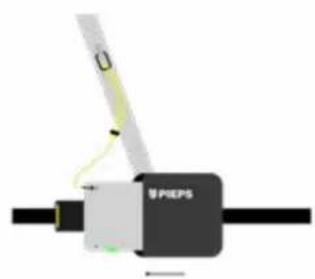
text_image
SPEPSSLÅ PÅ OG SELVTEST
natural_image
Two cylindrical objects with internal structures and a lock icon, labeled 1 and 2, with no visible text or symbols.
text_image
PIEPS P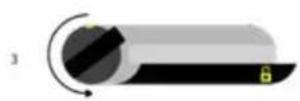
natural_image
Illustration of three skiers on a track with one hand holding a small electronic device (no text or symbols present)I gruppesjekkmodus kan du teste om skredvarslerne til gruppen din sender korrekt.
SLIK KOMMER DU INN I GRUPPESJEKK-MODUS:
text_image
GROUP CHECK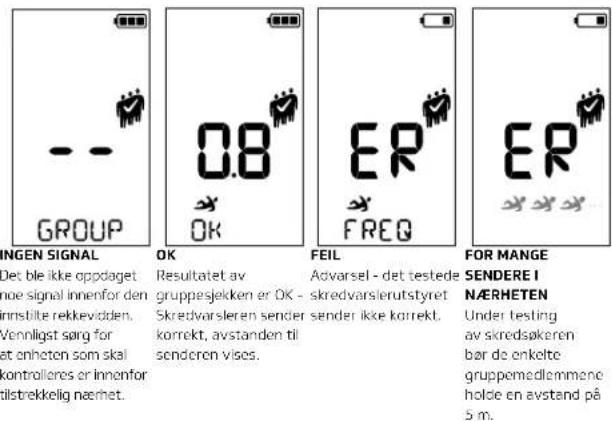
text_image
Diagram illustrating magnetic field lines around a conductor with labeled vectors and componentsnatural_image
Illustration of a person standing near three yellow wavefronts with a small object, no text or symbols presentEn flerfoldig begravelse vil bli vist til deg ved antall begravelsessymboler på displayet.
MERK
natural_image
Diagram of a mechanical or electrical component with a labeled part 'SPEPS' and a diagonal line, no readable text or symbols present.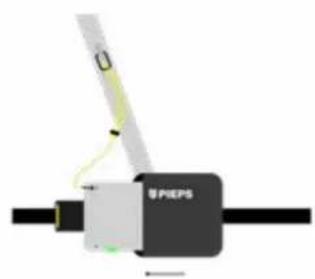
natural_image
Mechanical device labeled 'SPEPS' with a yellow-green tool interacting with a black body (no readable text or symbols beyond label)STARTA OCH SJÄLVTEST
natural_image
Illustration of three skiers in action on a track, with one hand holding a small electronic device (no text or symbols present)text_image
GROUP CHECK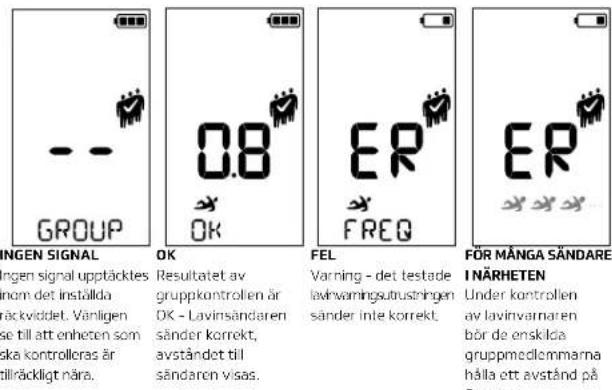
text_image
Diagram illustrating magnetic field lines around a current-carrying conductor with labeled components and directional arrowsnatural_image
Illustration of a person standing near three yellow wavefronts with a small object, no text or symbols presenttext_image
e (guide) PHYS O PHYS116 117
PIEPS MINI IPS
PIKAOPAS
OLEMME ILOISIA, ETTÄ VALITSIT OSTAA PIEPS MINI IPS -LAITTEEN!
natural_image
Pure electrical circuit lines without any symbols
natural_image
Mechanical device labeled 'PIEPS' with a tool interacting with it (no readable text or symbols beyond label)KYTKEYTÄMINEN PÄÄLLE JA ITSETESTAUS
text_image
Diagram illustrating a ski training scenario with three skiers and an inset showing a hand holding a device.text_image
GROUP CHECK122 123
text_image
Diagram illustrating magnetic field lines around a current-carrying conductor with labeled vectors and components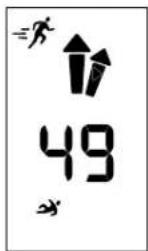
natural_image
Illustration of a person standing near three yellow wavefronts with a small object, no text or symbols presentnatural_image
Diagram of a mechanical device labeled 'PIEPS' with a tool interacting with it (no readable text or symbols beyond label)WŁĄCZANIE I TEST SAMODZIELNY
natural_image
Illustration of three skiers in action on a track, with one hand holding a small electronic device (no text or symbols present)text_image
Diagram illustrating magnetic field lines around a current-carrying conductor with labeled components and directional arrowsnatural_image
Illustration of a person standing near three yellow wavefronts with a small object, no text or symbols presenttext_image
MINI IPS s na rukuPIEPS MINI IPS
STRUČNÝ NÁVOD K POUŽITÍ
TĚŠÍ NÁS, ŽE JSTE SE ROZHODLI PRO KOUPI PIEPS MINI IPS!
natural_image
Diagram of a mechanical or electrical component with a labeled part 'SPEPS' and a diagonal line, no readable text or symbols present.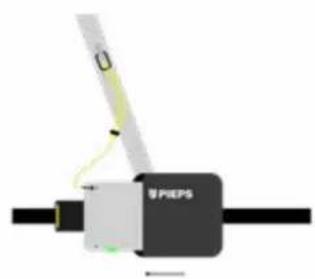
natural_image
Mechanical device labeled 'PIEPS' with a tool interacting with a central component (no readable text or symbols beyond label)ZAPNUTÍ A SEBEKONTROLA
text_image
PIEPS MINI MINI MINI3

natural_image
Illustration of three skiers in protective gear performing a trail crossing exercise, with an inset showing hand holding a device (no text or symbols)text_image
GROUP CHECK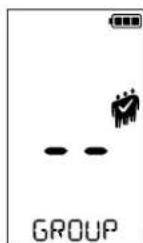
ŽÁDNÝ SIGNÁL
natural_image
Diagram of a person moving a boat toward a target with a dashed trajectory line, surrounded by concentric yellow circles (no text or symbols)natural_image
Illustration of a person standing near three yellow wavefronts with a small object, no text or symbols presenttext_image
INI IPS s na ruku start Guide]PIEPS MINI IPS
STRUČNÝ NÁVOD
TEŠÍ NÁS, ŽE STE SA ROZHODLI PRE KÚPU PIEPS MINI IPS!
natural_image
Diagram of a mechanical or electrical component with labeled parts (no readable text or symbols)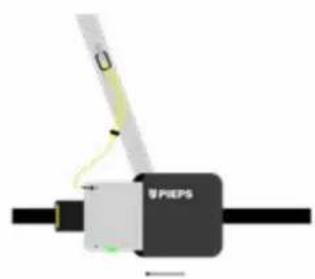
natural_image
Mechanical device labeled 'PIEPS' with a tool interacting with a central component (no readable text or symbols beyond label)ZAPNUTIE A SAMOTESTOVANIE
natural_image
Illustration of three skiers in protective gear performing a trail crossing exercise, with an inset showing a hand holding a device (no text or symbols present)text_image
Diagram illustrating magnetic field lines around a current-carrying conductor with labeled components and directional arrows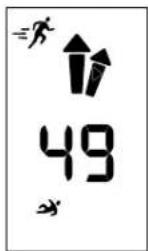
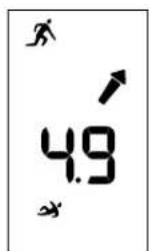
Vzdialenost a smer Otočit o 180° Vzdialenost < 5 m
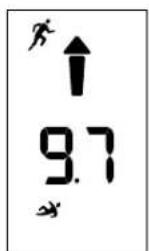
Vzdialenosf < 10 m
JEMNÉ VYHL'ADÁVANIE
natural_image
Illustration of a person standing near three yellow wavefronts with a small object, no text or symbols presenttext_image
NI IPS z StartPIEPS MINI IPS
KRATEK NAVODILA
VESELI SMO, DA STE SE ODLOČILI ZA NAKUP PIEPS MINI IPS!
Registirajte svojo napravo v aplikaciji PIEPS in prejmite:
natural_image
Diagram of a mechanical or electrical component with labeled parts (no readable text or symbols)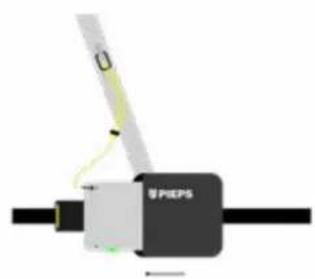
text_image
PIEPSVKLOP IN SAMODEJNO TESTIRANJE
natural_image
Illustration of three skiers in protective gear performing a trail crossing exercise, with an inset showing a hand holding a small device (no text or symbols present)text_image
GROUP CHECK178 179
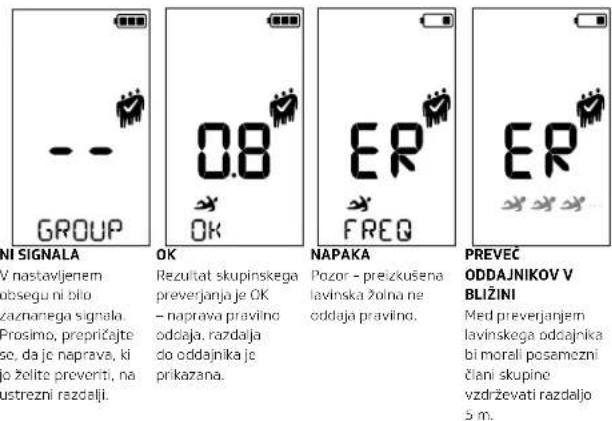
V nastavljenem obsegu ni bilo
text_image
Diagram illustrating electric field lines around a moving object, showing incident, reflected, and transmitted rays with labeled components.natural_image
Illustration of a person standing near three yellow wavefronts with a small object, no text or symbols presentnatural_image
Diagram of a mechanical or electrical component with labeled parts (no readable text or symbols)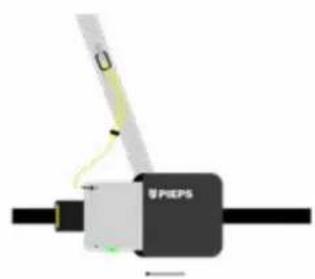
natural_image
Mechanical device labeled 'PIEPS' with a tool interacting with a central component (no readable text or symbols beyond label)UKLJUČIVANJE I SAMOTESTIRANJE
natural_image
Illustration of three skiers in action on a track, with one hand holding a small electronic device (no text or symbols present)U modusu provjere grupe možete testirati šalju li uređaji za lavine vaše grupe ispravno.
KAKO PRISTUPITI MODU ZA PROVJERU U GRUPI:
Uključite MINI IPS prbacivanjem prekidača na SLANJE (SEND). Nakon samotesta automatski počinje odbrojavanje za grupnu provjeru. Tijkom odbrojavanja jednom pritisnite gumb MARK (D) za aktivaciju grupne provjere.
Način rada za provjeru grupe aktivan je 60 sekundi i automatski se završava nakon isteka odbrojavanja. Međutim, da biste ostali u načinu rada za provjeru grupe, pritisnite tipku MARK (D) tijckom odbrojavanja.
text_image
Diagram illustrating magnetic field lines around a current-carrying conductor with labeled components and directional arrows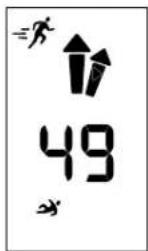
natural_image
Illustration of a person standing on a path surrounded by yellow wave patterns and abstract shapes (no text or symbols)Višestruko zatrpavanje bit će vam prikazano kroz broj simbola zatrpanih osoba na zaslonu.
OZNAKA
ALKALINSKA I LITIJSKA BATERIJA
Promijenite baterije najkasnije kada pri-kaz na zaslonu pokazuje praznu bateri-ju! Uvijek mijenjajte sve baterije istovremeno.
Otvorite odjeljak za baterije i postavite nove baterije u pravilnom položaju. Mogu se koristiti baterije tipa Alkaline (LR03) I Lithium (FR03). Provjerite Je II u PIEPS aplikaciji odabran pravilan tip baterije, Inače Indikator baterije neće ispravno funkcionirati. Standardno je odabran Alkaline (LR03). Zatvorite poklopac i čvrsto zategnite vijak kako biste osigurali odjeljak za baterije.
NAPOMENA: Neke baterije mogu zbog svoje dužine prilikom umetanja lagano stršiti. To nije razlog za brigu, jer zatvoreni poklopac baterijskog odjeljka s pritegnutim vijkom osigurava baterije na njihovom mjestu i jamči ispravno postavljanje.
Odlagajte uredaj i baterije u skladu s važećim lokalnim zakonima i propisima.
| TRAJANJE BATERIJE | ALKALINE | LITHIUM | |
| 400 sati SEND | 600 sati SEND | ||
| Simbol | Stanje baterije Postotak napunjenosti baterije Preporuka | ||
 | 3/3 puno 100-66 % U redu. | ||
| 2/3 puno 66-33 % U redu. | |||
| 1/3 puno 33 % - 20 SATI SEND U redu. | |||
| Prazno | 20 sati SLANJE (+10 °C) + 1 h TRAZENJE (-10 °C) | Preporučena zamje-na baterije | |
| Prazno, trepće | Posjednja rezerva, uređaj se može u biko kojem trenutku iskjučiti | Zamijenite baterijel | |
SKLADIŠTENJE
text_image
MINI IPS c RT Guide)200 201
PIEPS MINI IPS
КРАТКОЕ РУКОВОДСТВО
МЫ РАДЫ, ЧТО ВЫ ВЫБРАЛИ ПРИОБРЕСТИ PIEPS MINI IPS!
natural_image
Diagram of a mechanical or electrical component with labeled parts, no readable text or symbols present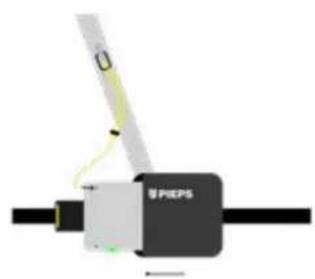
natural_image
Mechanical device labeled 'PIEPS' with a tool interacting with a central component (no readable text or symbols beyond label)202 203
natural_image
Illustration of three skiers in action on a track, with one hand holding a small electronic device (no text or symbols present)text_image
Diagram illustrating magnetic field lines around a current-carrying conductor with labeled components and directional arrowsnatural_image
Illustration of a person standing near three yellow wavefronts with a small object, no text or symbols presentnatural_image
Diagram of a mechanical or electrical component with labeled parts (no readable text or symbols)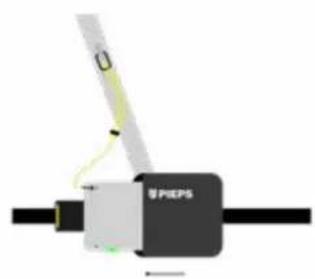
text_image
PIEPS電源を入れて自己診断を行う
text_image
PIEPS MINI MINI MINI