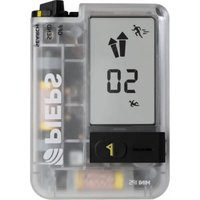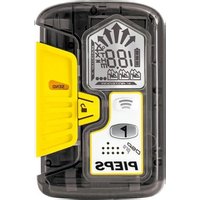
DSP Pro - Avalanche beacon Pieps - Free user manual and instructions
Find the device manual for free DSP Pro Pieps in PDF.


User questions about DSP Pro Pieps
0 question about this device. Answer the ones you know or ask your own.
Ask a new question about this device
Download the instructions for your Avalanche beacon in PDF format for free! Find your manual DSP Pro - Pieps and take your electronic device back in hand. On this page are published all the documents necessary for the use of your device. DSP Pro by Pieps.
USER MANUAL DSP Pro Pieps
text_image
18.0 m PIEPS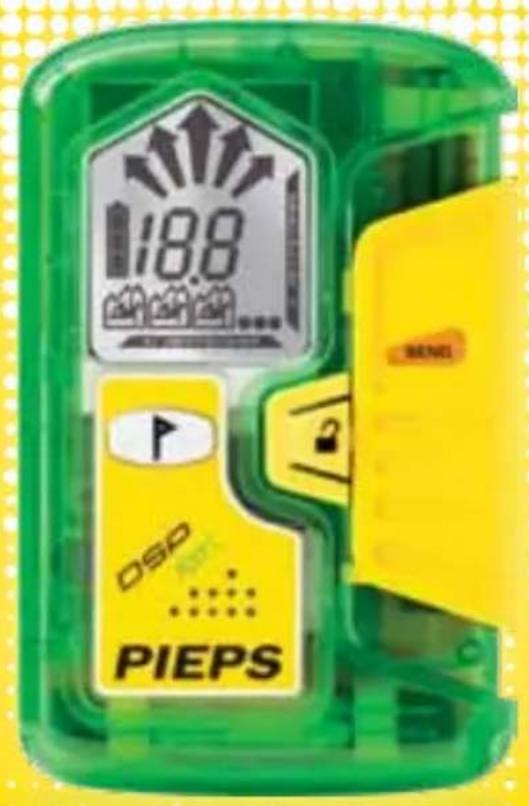
text_image
18.8 DSP PIEPSMANUAL
PIEPS
DSP PRO
DSP SPORT

text_image
PIEPSPREMIUM
ALPINE
PERFORMANCE
www.pieps.com
text_image
DEUTSCH .... 03 - 22 ENGLISH .... 23 - 42 ESPAÑOL .... 43 - 62 FRANÇAIS .... 63 - 82 ITALIANO .... 83 - 102 ČEŠKÝ .... 103 - 122 SLOVENSKÝ .... 123 - 142 SLOVENŠČINA .... 143 - 162 PYCCKIЙ .... 163 - 182 日本の .... 183 - 202text_image
19.8 TX m V PATTERNnatural_image
3D rendered male torso with a black harness and belt, no visible text or symbolsflowchart
graph LR
    A["1"] --> B["SEARCH"]
    B --> C["5-50m"]
    C --> D["SEND"]
SEND-MODUS
text_image
Illustration showing two figures in suits with floating bubbles and a trajectory arrow, depicting a physical or mathematical concept.Congratulations on having purchased a PIEPS DSP PRO/DSP SPORT.
The PIEPS DSP PRO/DSP SPORT is a digital 3-antenna transceiver designed to be the easiest to use in a companion rescue. Equipped with DSP technology (Digital Signal Processing) and a triple-antenna-search system, the PIEPS DSP PRO/DSP SPORT not only offers a maximum circular range, but also simplifies the rescue, especially in a case with multiple burials. The new functions of the Intelligent Transmitter help to maximize support for the user in SEND-mode - you will be found faster with your PIEPS DSP PRO/DSP SPORT!
A transceiver cannot protect you against avalanches! Obtaining the proper level of avalanche education, and regular practicing with all avalanche rescue equipment is essential to carry out a safe, and effective rescue. The procedures and instructions described refer solely to specific applications in connection with PIFPS DSP PRO/DSP SPORT. The basic rules of conduct in case of an emergency – as defined in the relevant specialist publications and in training sessions – must be observed without fail.
text_image
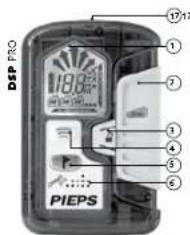
DSP PRO 18.8kW ① ② ③ ④ ⑤ ⑥ PIEPS1 LCD-Display (backlight)
2 Main switch
OFF-SEND-SEARCH
3 Lock
4 SCAN Button
5 MARK Button
text_image
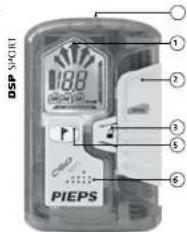
DSP SHORT 188 PIEPS ① ② ③ ⑤ ⑥6 Loudspeaker
7 Direction Indicate
8 Numeric Information
9 Battery Level
10 Display "SEND"
11 Number of Burials
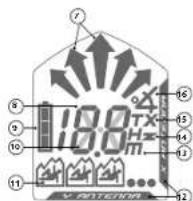
12 Current Sending Antenna
13 Meter-indication at SCAN
14 Frequency measurement.
15 TX600-Made
16 Inclinometer
17 Transmit Light
* Only for DSP PRO
QUICKSTART IN 3 STEPS
Your PIEPS DSP PRO/DSP SPORT is ready to use directly out of the box!
Step 1:
Putting on the carrying harness, place the shoulder strap loop over head and shoulder. Lead the body strap around your back, fix the quick fastener and adjust to the proper length.
Step 2:
Switch on the PIEPS DSP PRO/ DSP SPORT (SEND) and wait for the results of the self-check,
Step 3:
Put the PIEPS DSP PRO/DSP SPORT back into the carrying system and enjoy your tour.
WARNING!
The volume level of an avalanche transceiver can be up to 100 dB (decibels), and may cause damages to your hearing! Make sure that there is always a minimum distance of 50 cm between the avalanche transceiver and your ears!
06/15 2524
natural_image
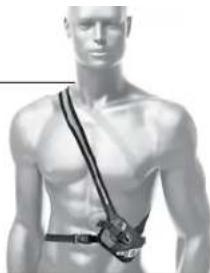
Medical illustration of a human torso with a surgical band attached (no text or symbols)Carrying recommendation: PIEPS recommends carrying the PIEPS DSP PRO/DSP SPORT using the supplied carrying harness. The neoprene-material is water repellent, for the functional control take a look on the transmit light, the "Quick-Pull-System" enables you to access the PIEPS DSP PRO/DSP SPORT very quickly in case of emergency. Insert the beacon with the display towards the body for best protection (see picture).
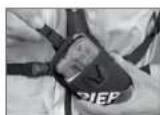
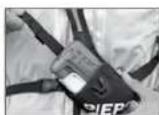
"Quick-Pull-System"
There is also the option to carry the PIEPS DSP PRO/DSP SPORT with the supplied hand loop in a securely closeable trouser pocket without a protective case. The hand loop can be fixed around your wrist during the search to rule out losing the PIEPS DSP PRO/DSP SPORT.
SWITCHING ON | SELF-CHECK
Press the button „Lock“ and push the main switch up to the position „SEARCH“. Release the button „Lock“ and push down the main switch till latching noticeable in the position „SEND“. The PIEPS DSP PRO/DSP SPORT is now in SEND-mode.
During power-on, the PIEPS DSP PRO/DSP SPORT will carry out an extensive self-check. All relevant hardware-components are tested and the latest firmware is displayed. During the self-check, a minimum distance of 5 meters should be maintained to other beacons, and any electronic or magnetic interference.
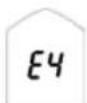
If the self-check is successful, "OK" is indicated on the display. In the event of a device warning, an alert signal sounds and the display indicates "E" in combination with a warning-code (overview table in chapter warning-codes). If the warnings are still shown in an interference-free area the PIEPS DSP PRO/DSP SPORT is not fully functional. Bring your PIEPS DSP PRO/DSP SPORT to a PIEPS authorized service center.
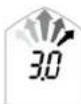
Display
Firmware Version

Display
Self check OK

Display
Self-check error
BEACON-CHECK | GROUP-CHECK
Despite the extensive self-check, PIEPS recommends that all users perform a beacon check before each tour! Your PIEPS DSP PRO/DSP SPORT is equipped with a group-check-function. A check is simple and efficient, it tests to be sure your partners avalanche transceiver is sending a signal and whether the frequency is in compliance with standards.
06/15
BEACON-CHECK | GROUP-CHECK
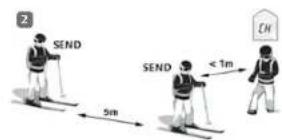
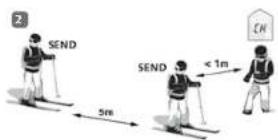
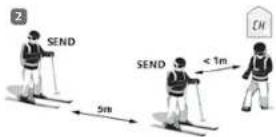
Activation of group-check-function:
-
Turn on your PIEPS DSP PRO/DSP SPORT (Position SEND).
-
Wait until „CH ^a appears on the display (CH = CHECK).
-
Press and continue to hold the MARK button.
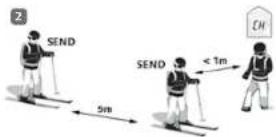
The group-check-function is active as long as the MARK button is pressed. Release the MARK button to exit the group-check-function. After a countdown of three seconds, your DSP PRO/SPORT automatically turns into the SEND mode. During the countdown, the group-check-function can be reactivated. The maximum range in group-check-mode is one meter!
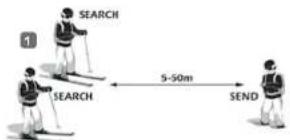
Conduct the "big" beacon-check as follows:
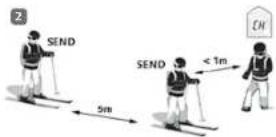
(1) Receiving control
Group leader - SEND-mode: Device is sending? All others - SEARCH-mode: Devices are receiving?
(2) Transmission control
Group leader - group-check-mode: Device is receiving? All others -SEND-mode: Devices are sending?
TIP! The receive control can be combined with a range test in long distance.
06/15 2726
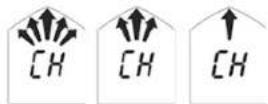
3 second countdown

Device is not sending or distance is too large (>1 m).
Device is sending.
Frequency not within the acceptable range.
text_image
SEARCH SEARCH 5-50m SEND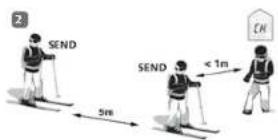
SEND-MODE
Press the main switch lock and push the main switch to the "SEND" position. The display indicates the SEND-symbol, the remaining battery capacity, and the transmitting antenna. Additionally an LED indicator light flashes simultaneous with the transmitter bit timing.
When you are on a tour, make sure the "SEND"-mode is selected throughout. The PIEPS DSP PRO/DSP SPORT will transmit a continuously defined signal (457kHz) that can be picked up from all other avalanche beacons (according EN300718).
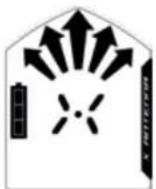
The Intelligent Transmitter - Maximum support in SEND-mode
In SEND-mode there are functions working in the background of PIEPS DSP PRO/DSP SPORT that help to be found faster and more efficiently in case of an emergency.
Auto-Antenna-Switch
If the transmitting antenna is negatively influenced through external devices (i.e., mobile phone), the range of receiving beacons is directly influenced (reduction could be 30 % or greater). The PIEPS DSP PRO/DSP SPORT is always transmitting with the strongest antenna for the maximum range to the receiving beacon!
iPROBE-Support
Beacons with iPROBE Support? will be automatically deactivated when probing with the electronic probe PIEPS iPROBE. Signal overlap is eliminated and the next strongest signal is automatically shown on the display of the receiving beacon. The PIEPS iPROBE supports maximal in the case of a multiple burial. See also chapter "Multiple Burials". The PIEPS iPROBE Support gives the best solution for multiple burial situations!
*Beacons with iPROBE Support: PIEPS DSP PRO, PIEPS DSP SPORT, PIEPS DSP (with Software version 5.0 or greater), PIEPS DSP TOUR, PIEPS FREERIDE
More information can be found on www.pieps.com.
IN CASE OF EMERGENCY
A victim has the best chance of being rescued if the largest possible number of companions in a given group have not been buried and work efficiently as a team to search and rescue their companion. In the event of an accident, the most important considerations are to: STAY CALM, BE OBSERVEANT, and RAISE THE ALARM.
① Stay calm &
Assess the situation
Are there any other risks?
How many victims?
Determine the primary search areal
② Call emergency services:
max. 2 minutes
140 (Austria), 1414 (Switzerland),
118 (Italy), 15 (France), 112 (EU),
911 (NA)
③ Burial search
Signal search (EYE + ear, beacon)
Coarse search (starting with first signal)
Fine search (closer than 5 m on the surface)
Pinpointing (systematic probing)
④ Systematic digging
⑤ First Aid
©
⑤ Rescue
text_image
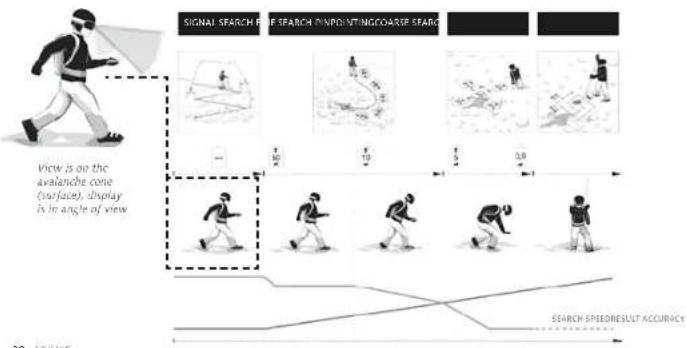
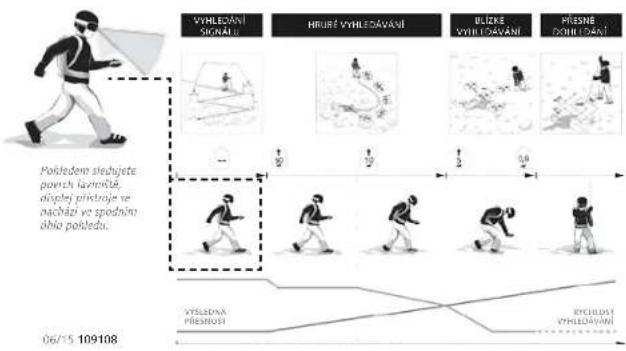
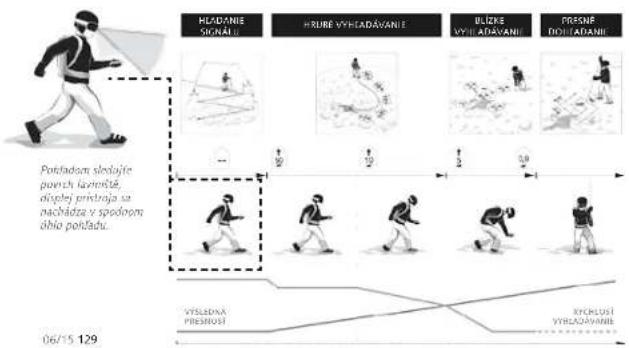
SIGNAL SEARCH PUE REFLECTION ON POURING COARSE SEARCH View is on the avalanche cone (surface), display is in angle of view SEARCH SPEED RESULT ACCURACY28 [06/15]
SEARCH-MODE | SIGNAL SEARCH
Press the main switch lock and push the main switch to the "SEARCH" position.
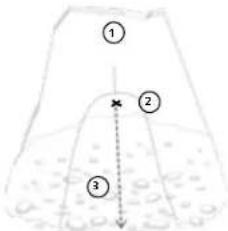
Observe the course of the avalanche and make an exact mental note of (1) where the victim was impacted by the avalanche, (2) the point of disappearance. (3) The extension of these points indicates the flow direction of the avalanche! The primary search area is to the left and right of this.
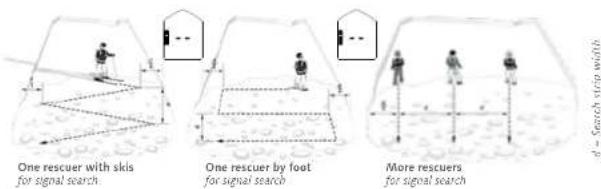
You are now beginning with the search for initial detection. The PIEPS DSP PRO/DSP SPORT has a circular receiving range and allows a direction and distance indication from the first signal (no special method of operation necessary). All signals of the burials that are within the maximum receiving range are received at the same time. To find the first signal walk along the defined search area in the stated search-strip width quickly. The recommended search strip width is 60 m for PIEPS DSP PRO / 50 m for PIEPS DSP SPORT.
text_image
① ② ③1 Point of impact
2 Point of disappearance
3. Flow direction
text_image
One rescuer with skis for signal search One rescuer by foot for signal search More rescuers for signal searchIMPORTANT! All participants (including observers) must switch their devices to receiving (SEARCH) mode. Always make sure there are no electronic devices (e.g. mobiles, radios) or solid metal items in the direct vicinity of the search.
06/15|29
COARSE SEARCH
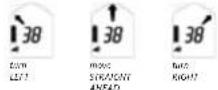
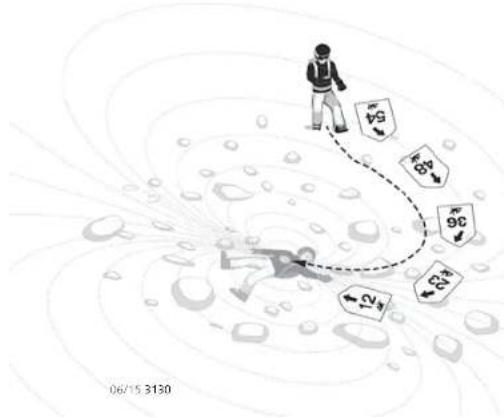
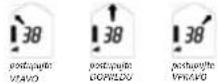
(1) As soon as the PIEPS DSP PRO/DSP SPORT picks up signals, the approximate distance and direction appear in the display. Matchstick men represent the number of burials within the range of the device. Using the arrow and distance reading, follow the strongest of the received signals along the field lines.
(2) Move in the direction indicated by the PIEPS DSP PRO/DSP SPORT. The distance reading should become progressively smaller. If it gets larger, switch the search direction by 180°, i.e. turn round and follow the opposite direction.

Number of Burials

Direction Indication
text_image
6G 6G 6G 6G 2G 2G 06/15 3130IMPORTANT!
When working in the SEARCH-mode, remain calm and concentrated, and avoid hasty movements!
FINE SEARCH
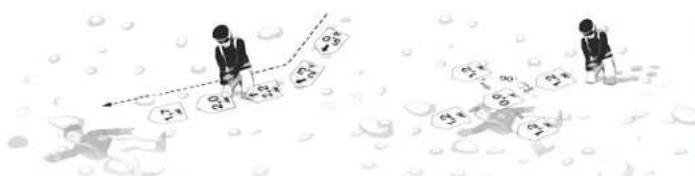
(1) When you are closer than 5 m to the burial, it is strongly recommended to reduce your moving speed (50 cm/sec). Keep the PIEPS DSP PRO/DSP SPORT as close as possible to the surface of the snow to have the minimum distance to the transmitting beacon.
(2) To avoid confusion, the direction indication is suppressed at distances less than 2 m. Make an exact last direction correction before the directional arrows are suppressed.
(3) Reduce your moving speed again (10 cm/sec). Continue in the last displayed direction. If the distance reading starts increasing again, move back to the point with the lowest distance reading. At this point, try to get the lowest distance reading, using cross-like movements (90°). Repeat the cross-like approach as long as no lower distance reading can be determined. Do not rotate your PIEPS DSP PRO/DSP SPORT during the cross-like movements. The PIEPS DSP PRO/DSP SPORT only shows one minimum pertaining to any orientation of the transmitting beacon.
The dynamic acoustic signal supports the fine search: The closer the searcher gets to the victim the beacons tone will become a faster pace/higher pitch.
text_image
Illustration showing two figures in water with bubbles, one holding a number line and the other displaying numbers like 3x2, 3x1, 3x0, 3x1, 3x2.Important! Before the direction arrows are suppressed, the last distance correction has to be done exactly. You are then moving to the transmitting beacon in best coupling position and save time during the cross-like movements. In the case of a deep burial it could happen that the minimum direction indication is higher than 2 ml
Important! It's strongly recommended to avoid hasty movements (move approx. 10 cm/sec) and avoid turning and rotating the PIEPS DSP PRO/DSP SPORT.
06/15 ||
MULTIPLE BURIALS
The optimized multiple burial search is based on a separation of signals via the digital signal processor (DSP).
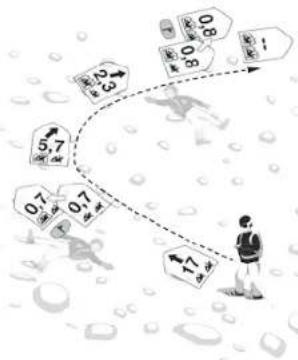
(1) If there are multiple burials, this is clearly indicated by the number of matchstick men.
(2) By default, the PIEPS DSP PRO/DSP SPORT will automatically search for the strongest signal.
(3) Once the position of the first burial has been located (see fine search), press the button MARK without moving away from this point. This signal is now suppressed. Once a signal has been successfully suppressed, an outline appears around the matchstick man.
(4) The PIEPS DSP PRO/DSP SPORT will automatically search for the next strongest signal.
(5) Now continue the search as described above, and repeat the procedures until all transmitters are located. If there are no further signals within the receiving range the display indicates "No Signal".
Marking is possible within a range of 5 m to the transmitting beacon. Marking of a second transmitter is possible after 3 seconds after marking the first transmitter at the earliest. If these requirements are not provided, an alert signal sounds by pressing the button „MARK“ again.
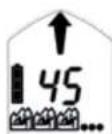
Number of possible marks:
max. 5 transmitters, 3 are indicated on the display
text_image
5.7 0.7 0.7 0.8 0.8 0.8 0.8 0.8 0.8 0.8 0.8 0.8 0.8 0.8 0.8 0.8 0.8 0.8 0.8 0.8 0.8 0.8 0.8 0.8 0.8 0.8 0.8 0.8 0.9 0.9 0.9 0.9 0.9 0.9 0.9 0.9 0.9 0.9 0.9 0.9 0.9 0.9 0.9 0.9 0.9 0.9 0.9 0.9 0.9 0.9 0.9 0.9 0.9 0.1 0.1 0.1 0.1 0.1 0.1 0.1 0.1 0.1 0.1 0.1 0.1 0.1 0.1 0.1 0.1 0.1 0.1 0.1 0.1 0.1 0.1 0.1 0.1 0.1 0.2 0.2 0.2 0.2 0.2 0.2 0.2 0.2 0.2 0.2 0.2 0.2 0.2 0.2 0.2 0.2 0.2 0.2 0.2 0.2 0.2 0.2 0.2 0.2 0.2 0.306/15 3332
MULTIPLE BURIALS
Mark reset of single suppressed signals: To reset the MARK function for single signals, press the button MARK for 3 seconds.
Mark reset of all suppressed signals: To reset the MARK function switch your PIEPS DSP PRO/DSP SPORT into SEND-mode and then back to SEARCH-mode. With the PIEPS DSP PRO you also have the possibility to reset MARK with the following described SCAN-function. All information from previously suppressed signals is now reset and you can start with MARK again.
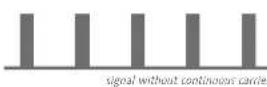
Old device mode: Older analog transceivers are transmitting a weak continuous signal additional to the digital pulse signal that can have an impact on the digital signal separation. In such cases, you may find for a short time that more signals are indicated than actually exist – the display 'number of burials' starts flashing (display of "old device mode"). To suppress (MARK) these transmitters keep a distance of more than 1 m.

IMPORTANT! The MARK function is subject to physical and technical limitations. This applies to all transceivers with MARK function! In practice, one might observe performance-reducing limitations which get intensified by overlapping signals. More information can be found on www.pieps.com.
PIEPS provides with the PIEPS SAFETY SYSTEM (digital PIEPS beacon and electronic probe PIEPS iPROBE) a technical 100% solution for multiple burials. By using a digital PIEPS beacon in combination with the PIEPS iPROBE or iPROBE ONE someone can solve a multiple burial without any performance-reducing limitations! See also chapter "iPROBE Support".
06/15
SECONDARY AVALANCHE | AUTO-SEARCH-TO-SEND
A secondary avalanche is an avalanche that occurs during a rescue situation. In this case, the avalanche transceiver of the rescuer is switching immediately to SEND mode, if the device is in SEARCH mode.
Slide the main switch of the PIEPS DSP PRO/DSP SPORT from SEARCH to SEND without pressing the lock button. The main switch is engaged in SEND mode. Store the device and hold it firmly against the body.
The function Auto-Search-to-Send switches the PIEPS DSP PRO/DSP SPORT automatically from SEARCH- into SEND-mode. The switching of the PIEPS DSP PRO is based on non-movement and time, at the PIEPS DSP SPORT only on time.
By default, this function is disabled! The activation of the function „Auto-Search-to-Send“ is carried out by all PIEPS competence partners (PIEPS Service Center). Find more information at www.pieps.com.
PIEPS advises that the function Auto-Search-to-Send does not help, when the rescuer has lost his/her beacon in the case of a secondary avalanche. Only if a rescuer wears an active transmitter, the rescuer is properly equipped in the case of a secondary avalanche.
PIEPS BACKUP: PIEPS recommends to deactivate the Auto-Search-to-Send function in every beacon and instead use an emergency transmitter such as the PIEPS BACKUP.
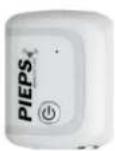
The PIEPS BACKUP is a mini emergency-transmitter (frequency 457 kHz) that is worn in addition to a beacon directly on the body and only starts to transmit in case of an emergency. So PIEPS provides the first 100% solution for being located in the case of a possible secondary avalanche
The PIEPS BACKUP can be received with every standard beacon! Active search operations are never influenced!
ADDITIONAL FUNCTIONS FOR PIEPS DSP PRO
The following additional functions are only valid for PIEPS DSP PRO. The functions cannot be used or added to the PIEPS DSP SPORT.
1. SCAN-FUNCTION
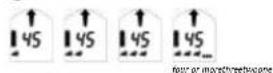
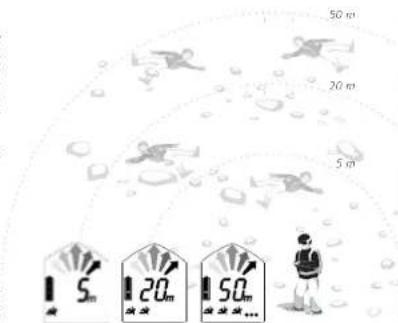
Press the SCAN button while in the SEARCH-mode. The PIEPS DSP PRO will begin scanning the entire receiving range. During the scan, stand still and hold the device steady. This will give you an overview of all buried devices within the detectable range, classified according to three groups:
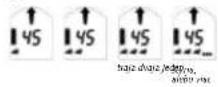
Reading 1: Number of beacons within a distance of approx. 5 m Reading 2: Number of beacons within a distance of approx. 20 m Reading 3: Number of beacons within a distance of approx. 50 m
All information from previously suppressed (MARKED) signals will be reset and you can start the suppression again (MARK) or follow the direction indication to the next strongest signal.
Press the button SCAN again to stop the SCAN function.
IMPORTANT! Once you have located all burials, move away from their locations in a star shape and use the SCAN function to check the scenario again. That way you can make sure you haven't missed any other burials.
text_image
50 m 20 m 5 m 5 m 20 m 50 m1 One beacon within 5 m
2 One further beacon between 5 and 20 m
3 Two or more further beacons between 20 and 50 m
ADDITIONAL FUNCTIONS FOR PIEPS DSP PRO
2. TRANSMIT PARAMETER CHECK
The transmit characteristics of an avalanche transceiver have to be in accordance with the standard EN300718. The most important parameters are frequency, pulse length, period length. Parameters outside of the allowed range may result in a serious limitation when searching for such a device!
While the group-check-function (see BEACON-CHECK|GROUP-CHECK) only checks the existence of a transmit signal and its frequency, the PIEPS DSP PRO allows a comprehensive check of the transmit parameters:
Activation of the transmit parameter check:
- Turn on your PIEPS DSP PRO
(Position SEND). - Wait until "CH" appears on the display
(CH = CHECK). - Press and continue to hold the SCAN button.
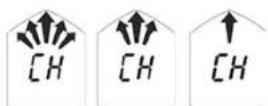
3 second cooldown
The function is active as long as the SCAN button is pressed. Release the SCAN button to exit the function. After a countdown of three seconds, your PIEPS DSP PRO automatically turns into the SEND mode. During the countdown, the function can be reactivated.
Note: Accurate measurement takes a little time!
Further transceivers should keep a minimum distance of 5m.
CHECK RESULT

Check mode More than one
transceiver within receiving range ^1
06/15 37

Device is sending within the acceptable range.
Error: Device is not sending within the acceptable range.

Device is sending with continuous signal.
ADDITIONAL FUNCTIONS FOR PIEPS DSP PRO
3. FREQUENCY MEASUREMENT
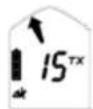
Press the SCAN button for more than 3 seconds while in the SEARCH-mode. The PIEPS DSP PRO uses the frequency measurement to check the frequency of all other beacons. The frequency of the strongest (closest) beacon is measured. The deviation from the standardized frequency 457kHz is indicated. The shown number is the deviation in Hz and the arrows indicates + (right) or - (left). The frequency measurement ends when the button SCAN is not pressed any longer.
IMPORTANT! Check the transmitting frequency of your ski partners regularly to ensure best performance. According the standard EN300718 a beacon must transmit within the range of 457 kHz +/- 80 Hz. Ideal and reasonable technical operation will have a maximum deviation of no more than +/- 30 Hz.
4. TX600-SUPPORT
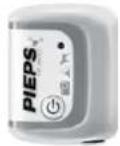
The PIEPS TX600 is a mini-transmitter for dogs and equipment that transmits at 456 kHz, which is out of the standard EN300718 (457 kHz +/- 80 Hz) and can be received with every PIEPS DSP PRO.
Hold the MARK and SCAN buttons simultaneously for 3 seconds while in the SEARCH-mode. The PIEPS DSP PRO switches into the TX600-mode ("TX"-indication on the display) and indicates the direction and distance to the strongest TX600 signal. Also the functions MARK, SCAN and frequency measurement are available in TX600-mode. To activate the search according to the standard EN300718 again, switch the PIEPS DSP PRO to the SEND-mode and then back to the SEARCH-mode.
IMPORTANT! In the standard SEARCH-mode the PIEPS DSP PRO does not indicate the TX600. Active search operations are never influenced. A detection of the TX600 without switching to a special mode is only possible in immediate vicinity (<1 m).

Example:
the frequency of the measured signal is 457 kHz + 10 Hz (=457.010 Hz)
06/15 ||
ADDITIONAL FUNCTIONS FOR PIEPS DSP PRO
5. INCLINOMETER
The PIEPS DSP PRO has an integrated three dimensional inclinometer.
You can quickly check the angle of a slope:
1) Put your ski pole in slope line at that point
of the slope you want to measure.
2) Hold the SCAN button for 3 seconds while in SEND-mode.
3) Put your PIEPS DSP PRO next to the ski pole and the
angle of the slope is indicated. The display switches back
into SEND-mode automatically after 20 seconds.
Important! During the measurement the PIEPS DSP PRO is transmitting. In case of an emergency the beacon can be lost. PIEPS recommends to make measurements in avalanche dangerous areas only in combination with the PIEPS BACKUP!
SOFTWARE UPDATE
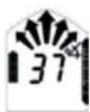
Every PIEPS DSP PRO/DSP SPORT can be tested and updated with the latest PIEPS firmware. With your safety in mind our R&D team is constantly working, on improving the firmware to reflect and incorporate all our experiences in the field. Every new firmware is developed to be compatible with any PIEPS DSP PRO/DSP SPORT. You can have your PIEPS DSP PRO/DSP SPORT checked and its firmware updated at every PIEPS Service Center and PIEPS distributor.
How can you display your firmware?
When you are switching the beacon on the latest firmware is indicated on the display.
Further information about the PIEPS firmware
can be found on www.pieps.com
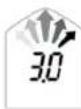
BATTERIES
The battery compartment is located on the backside of the housing. The safety screw connection can be easily opened and closed using a coin. Only use battery type alkaline LR03/AAA and always replace all 3 batteries with new ones of the same type. Never use rechargeable batteries and always change all batteries at the same time!
The battery indication is based on measuring the actual battery voltage. Due to the temperature influence the actual battery voltage may vary. A change from cold (outdoor) to warm (mountain hut) the battery capacity typically recovers.
| PIEPS DSP PRO PIEPS DSP SPORT | |||
| 3/3 filled 400-250 h SEND 200-120 h SEND | |||
| 2/3 filled 250-120 h SEND 120-60 h SEND | |||
| 1/3 filled 120-20 h SEND 60-20 h SEND | |||
| empty 20 h SEND (+10°C) + 1 h SEARCH (-10°C) | |||
| empty, flashing last reserve, transceiver can be switched off at anytime | |||
IMPORTANT! During a longer time of no use (e.g. summer) the batteries have to be removed from the PIEPS DSP PRO/DSP SPORT. Damages because of leaked batteries are not included in the warranty.
Electromagnetic Compatibility (EMC) and PIEPS Auto-Antenna-Switch:
All beacons are very sensitive against electrical and magnetic interferences. Due to this, it's a recommendation from all manufacturers that minimum distances should be maintained between avalanche beacons and electronic, magnetic or metallic influences (like radios, mobile phones, MP3-players, bunch of keys)!
PIEPS recommends: Minimum distance in SEND-mode: 20 cm | SEARCH-mode: 50 cm
Your PIEPS DSP PRO/DSP SPORT has an Auto-Antenna-Switch included:
If there is an external influence the strongest antenna will begin transmitting. Further information can be found in the chapter "Intelligent Transmitter".
TECHNICAL DATA
| Device designation PIEPS DSP PRO PIEPS DSP SPORT | ||
| Transmission frequency 457 kHz | (EN 300/18) 457 kHz (EN 300/18) | |
| Power supply 3 batteries, Alkaline | (AAA) 3 batteries, Alkaline (AAA) | |
| Battery lifetime min. 400 h SEND | min. 200 h SEND | |
| Maximum range | 60 m 50 m | |
| Search strip width 60 m 50 m | ||
| Temperature range -20°C to +45°C | -20°C to +45°C | |
| Weight 198 g (incl. batteries) 198 g (incl. batteries) | ||
| Dimensions (LxWxH) 115 x 75 x | 28 mm | 115 x 75 x |
| DIFFERENCES | PIEFS DSP PRO | PIEFS DSP SPORT |
| 3 Receiving Antennas | √ | √ |
| Maximum Range | 60 m | 50 m |
| Search Strip Width | 60 m | 50 m |
| Circular Receiving Shape | √ | √ |
| Self-check | √ | √ |
| Group-check | √ | √ |
| Intelligent Transmitter• Auto-Antenna-Switch• iProbe-Support | √ | √ |
| MARK | √ | √ |
| SCAN | √ | — |
| Old Device Mode | √ | √ |
| Transmitt Parameter Check | √ | — |
| Frequency Measurement | √ | — |
| TX600-Support | √ | — |
| Auto-Search-to-Send | √ | √ |
| Inclinometer | √ | — |
| Motion Sensor | √ | — |
| Battery Lifetime | min. 400 h | min. 200 h |
| Ergonomic Shape | √ | √ |
| Hardened Display-Glass | √ | √ |
| Carrying Harness | yellow printing | green printing |
| Hand Loop | √ | √ |
| Updating Possibility | √ | √ |
WARNING CODES
| ERROR (E) | WARNING DESCRIPTION | WARNING CORRECTION |
| No indication on display. | Check batteries (polarity and voltage) and replace if required. If there is no indication again, bring beacon to your nearest authorized Service Center. | |
| E1 | The beacon has very limited functionality. | Bring the beacon to your nearest authorized Service Center. |
| E2 | The beacon has limited functionality. | Repeat the process in an interference free area (outdoor). Check your immediate environment due to external interferences (c. transmitting beacons, mobile phones). If the warning is indicated again, bring beacon to your nearest authorized Service Center. |
| E3 | The transmitting and receiving function is reduced. | |
| E4 | ||
| E5 | The beacon is not fully functional - stop your tour! | Bring the beacon to your nearest authorized Service Center. |
| E6 | The beacon has limited functionality. The receiving function is reduced. | Bring the beacon to your nearest authorized Service Center. |
| E8 | The beacon has limited functionality. The transmitting and receiving function is not reduced. | Bring the beacon to your nearest authorized Service Center. |
STORAGE | CLEANING
Always store your PIEPS DSP PRO/DSP SPORT at room temperature (15°C-25°C) in a dry environment. Remove the batteries when not in use for an extended period (eg summer). Do not use aggressive cleaning agents and no metallic cloth for cleaning the surface.
WARRANTY | SERVICE
PIEPS SERVICE PORTAL
The PIEPS Service Portal is the free-based online service of PIEPS. Your advantages:
• Warranty extension
• Device registration
• Information about latest software updates
• Background knowledge about your registered products
If you need further information please contact us support@pieps.com
PIEPS Warranty Extension free of charge: Extend the warranty of your PIEPS DSP PRO/DSP SPORT from 2 to 5 years. With the PIEPS warranty extension you have the possibility to extend the standard warranty of your PIEPS DSP PRO/DSP SPORT free of charge. Simply register online at the PIEPS Service Portal and get your warranty certificate for 5 years valid from the date of purchase. The warranty can be extended within 3 months from the date of purchase.
Warranty Conditions: The device is guaranteed by the manufacturer against defects in material and workmanship for a period of 2 years from the date of purchase. This warranty does not apply to damage caused by incorrect use, dropping or dismantling of the device by unauthorized persons. Any further warranty or liability for consequential damage is expressly excluded. • Warranty claims should be addressed - enclosing the receipt of purchase - to the relevant sales outlet.
CERTIFICATION | CONFORMITY

Certification: Manufacturer: Pieps GmbH; Country of manufacture: Austria; Model: PIEPS DSP02; The device complies with the Standard ETS 300718 WEEE 2002/96/CE; Canada: IC_7362A-DSP02; USA: FCC ID: REAMDSPO2; This device complies with Part 15 of the FCC Rules and IC RSS-210. Operation is subject to the following two conditions: 1) This device may not cause harmful interference, and 2) this device must accept any interference received, including interference that may cause undested operation. Warning: Any changes or modifications not expressly approved by the manufacturer, responsible for compliance, could void the user's authority to operate this device. On the device, the certification codes and serial number can be found within the battery compartment.
Conformity: Pieps GmbH declares hereby, that the product PIEPS DSP02 furth's all requirements and regulations of directive 1999/5/EC. The declaration of conformity can be downloaded at the following source: http://www.picps.com/certification
Manufacturer, Sales & Service
Pieps GmbH, Parkring 4, 8403 Lebring, Austria, office@pieps.com, www.pieps.com
All information is supplied without liability. 06/2015.
The most recent version of the manual can be found at www.pieps.com
natural_image
Frontal view of a muscular man wearing a full-body harness (no text or symbols visible)flowchart
graph LR
    A["SEARCH"] --> B["5-50m"]
    B --> C["SEND"]
MODO ENVIAR
text_image
Illustration showing a person walking with directional signs and arrows, including '65', '64', '63', '62', '61', and '59' with numerical labels.text_image
Illustration showing two figures in water with floating bubbles and numbered bubbles, likely illustrating a concept or concept in physics.text_image
Illustration showing a person running away from a path with floating numbers and directional arrows, likely depicting a physics or math concept.06/15 5352
natural_image
Medical illustration of a human torso with a surgical band attached (no text or symbols)Etape 1:

Affichage
Self-check OK*

Affichage
Self-check error
FONCTION DE CONTRÔLE AVANCE | CONTRÔLE DE GROUPE
text_image
SEARCH SEARCH 5-50m SEND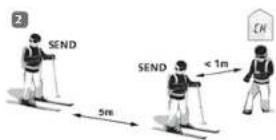
MODE EMISSION
flowchart
graph LR
    A["Signal of Rischerschrie"] --> B["1.0"]
    B --> C["2.0"]
    C --> D["3.0"]
    D --> E["4.0"]
    E --> F["5.0"]
    F --> G["6.0"]
    G --> H["7.0"]
    H --> I["8.0"]
    I --> J["9.0"]
    J --> K["10.0"]
    K --> L["11.0"]
    L --> M["12.0"]
    M --> N["13.0"]
    N --> O["14.0"]
    O --> P["15.0"]
    P --> Q["16.0"]
    Q --> R["17.0"]
    R --> S["18.0"]
    S --> T["19.0"]
    T --> U["20.0"]
    U --> V["21.0"]
    V --> W["22.0"]
    W --> X["23.0"]
    X --> Y["24.0"]
    Y --> Z["25.0"]
    Z --> AA["26.0"]
    AA --> AB["27.0"]
    AB --> AC["28.0"]
    AC --> AD["29.0"]
    AD --> AE["30.0"]
    AE --> AF["31.0"]
    AF --> AG["32.0"]
    AG --> AH["33.0"]
    AH --> AI["34.0"]
    AI --> AJ["35.0"]
    AJ --> AK["36.0"]
    AK --> AL["37.0"]
    AL --> AM["38.0"]
    AM --> AN["39.0"]
    AN --> AO["40.0"]
    AO --> AP["41.0"]
    AP --> AQ["42.0"]
    AQ --> AR["43.0"]
    AR --> AS["44.0"]
    AS --> AT["45.0"]
    AT --> AU["46.0"]
    AU --> AV["47.0"]
    AV --> AW["48.0"]
    AW --> AX["49.0"]
    AX --> AY["50.0"]
MODE RECHERCHE | RECHERCHE DU SIGNAL
text_image
Illustration showing a person walking with a path marked with arrows and numerical values (e.g., 54, 49, 36, 27) indicating movement or flow.IMPORTANT!
text_image
Illustration showing two figures in suits with floating objects labeled with symbols like 'O', 'S', and 'P' on water, possibly illustrating a physics or mathematics concept.Fabrication, Distribution, Service :
Pieps GmbH, Parkring 4. 8403 Lebring, Austria office@pieps.com, www.pieps.com
text_image
DPSP PRO 18.8V PIEPS ① ⑦ ① ④ ⑤ ⑥ ⑰ ⑰ ⑰ ⑰ ⑰ ⑰natural_image
Frontal view of a male torso wearing a full-body harness (no text or symbols visible)ACCENSIONE | SELF-CHECK

Display
Self-check OK*
Display
"Error self-check"
TEST APPARECCHI ARTVA | TEST DI GRUPPO
flowchart
graph LR
    A["1"] --> B["SEARCH"]
    B --> C["5-50m"]
    C --> D["SEND"]
text_image
2 SEND 5m SEND < 1m ENTRASMISSIONE (SEND-MODE)
text_image
Illustration showing two figures in suits with floating objects and labeled symbols, possibly illustrating a concept or concept in water.natural_image
Medical illustration of a human torso with a surgical band attached (no text or symbols)flowchart
graph LR
    A["1"] --> B["SEARCH"]
    B --> C["5-50m"]
    C --> D["SEND"]
VYSÍLÁNÍ (SEND MÓD)
⑥ Záchrana a transport
flowchart
graph LR
    A["Start: VYHLEDANI SIGNATI"] --> B["Move 1"]
    B --> C["Move 2"]
    C --> D["Move 3"]
    D --> E["Move 4"]
    E --> F["Move 5"]
    F --> G["Move 6"]
    G --> H["Move 7"]
    H --> I["Move 8"]
    I --> J["Move 9"]
    J --> K["Move 10"]
    K --> L["Move 11"]
    L --> M["Move 12"]
    M --> N["Move 13"]
    N --> O["Move 14"]
    O --> P["Move 15"]
    P --> Q["Move 16"]
    Q --> R["Move 17"]
    R --> S["Move 18"]
    S --> T["Move 19"]
    T --> U["Move 20"]
    U --> V["Move 21"]
    V --> W["Move 22"]
    W --> X["Move 23"]
    X --> Y["Move 24"]
    Y --> Z["Move 25"]
    Z --> AA["Move 26"]
    AA --> AB["Move 27"]
    AB --> AC["Move 28"]
    AC --> AD["Move 29"]
    AD --> AE["Move 30"]
    AE --> AF["Move 31"]
    AF --> AG["Move 32"]
    AG --> AH["Move 33"]
    AH --> AI["Move 34"]
    AI --> AJ["Move 35"]
    AJ --> AK["Move 36"]
    AK --> AL["Move 37"]
    AL --> AM["Move 38"]
    AM --> AN["Move 39"]
    AN --> AO["Move 40"]
    AO --> AP["Move 41"]
    AP --> AQ["Move 42"]
    AQ --> AR["Move 43"]
    AR --> AS["Move 44"]
    AS --> AT["Move 45"]
    AT --> AU["Move 46"]
    AU --> AV["Move 47"]
    AV --> AW["Move 48"]
    AW --> AX["Move 49"]
    AX --> AY["Move 50"]
    AY --> AZ["Move 51"]
    AZ --> BA["Move 52"]
    BA --> BB["Move 53"]
    BB --> BC["Move 54"]
    BC --> BD["Move 55"]
    BD --> BE["Move 56"]
    BE --> BF["Move 57"]
    BF --> BG["Move 58"]
    BG --> BH["Move 59"]
    BH --> BI["Move 60"]
    BI --> BJ["Move 61"]
    BJ --> BK["Move 62"]
    BK --> BL["Move 63"]
    BL --> BM["Move 64"]
    BM --> BN["Move 65"]
    BN --> BO["Move 66"]
    BO --> BP["Move 67"]
    BP --> BQ["Move 68"]
    BQ --> BR["Move 69"]
    BR --> BS["Move 70"]
    BS --> BT["Move 71"]
    BT --> BU["Move 72"]
    BU --> BV["Move 73"]
    BV --> BW["Move 74"]
    BW --> BX["Move 75"]
    BX --> BY["Move 76"]
    BY --> BZ["Move 77"]
    BZ --> CA["Move 78"]
    CA --> CB["Move 79"]
    CB --> CC["Move 80"]
    CC --> CD["Move 81"]
    CD --> CE["Move 82"]
    CE --> CF["Move 83"]
    CF --> CG["Move 84"]
    CG --> CH["Move 85"]
    CH --> CI["Move 86"]
    CI --> CJ["Move 87"]
    CJ --> CK["Move 88"]
    CK --> CL["Move 89"]
    CL --> CM["Move 90"]
VYHLEDÁVÁNÍ (SEARCH) | DETEKCE SIGNÁLU
text_image
Illustration showing a person falling with a dashed path connecting numbered boxes (e.g., 56, 42, 36) to a circular background with floating symbols.text_image
Illustration showing two figures in suits with floating bubbles and a dashed arrow, depicting a physics or mathematics concept.1. PROHLEDÁVAT (SCAN)
natural_image
Frontal view of a human torso with a black harness and belt (no text or symbols visible)flowchart
graph LR
    A["1"] --> B["SEARCH"]
    B --> C["5-50m"]
    C --> D["SEND"]
VYSIELANIE (SEND MÓD)
⑥ Záchrana a transport
text_image
Illustration showing a person walking away from a circular path with labeled directional arrows and symbols like 'tS', '6C', and '3S'.130 106/15

Počet zasypných

Zobrzeenie smenu
DÔLEŽITÉ!
text_image
Illustration showing two figures in water with floating bubbles and a trajectory arrow, depicting a physics or mathematics concept.natural_image
Frontal view of a male torso wearing a full-body biceps bar (no text or symbols visible)text_image
SEARCH SEARCH 5-50m SEND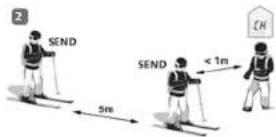
NAČIN SEND
Pritisnite na gumb odkleni (ključavnica) in potisnite glavno stikalo v položaj „SEND“. Zaslon bo prikazal simbol za način SEND, stanje baterij in oddajno anteno. Obenem začne simultano z ritmom oddajnika utripati kontrolna LED lučka.
text_image
Illustration showing two figures in water with floating bubbles, one standing on a path marked with symbols like 'O', 'a', 'b', and 'c'.natural_image
Human torso with a full-body medical harness and 'HANIO' text overlay (no other symbols or labels)War 1:
text_image
Illustration showing a person walking with directional arrows and labeled price points (e.g., 54, 42, 36, 28, 12) on a wave-like background.text_image
Illustration showing two figures in suits with floating bubbles and a dashed line connecting them, possibly representing a math or logic problem.http://www.pieps.com/certification
natural_image
Frontal view of a male torso wearing a full-body biceps bar (no text or symbols visible)ビーコンの推奨携帯方法:
text_image
Illustration showing two figures in suits with floating objects and labeled points, possibly illustrating a concept or concept in physics or mathematics.重要!