
TC-IT 550 - Measuring equipment EINHELL - Free user manual and instructions
Find the device manual for free TC-IT 550 EINHELL in PDF.
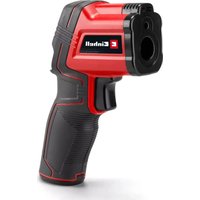


| Brand | Einhell |
| Model | TC-IT 550 |
| Product type | Infrared thermometer |
| Category | Measuring equipment |
| Power supply | 2 AA 1.5 V batteries (LR6) |
| Measuring range | -50 °C to +550 °C |
| Accuracy (0 °C to 500 °C) | ± 2 °C |
| Accuracy (-50 °C to 0 °C) | ± 3 °C |
| Operating temperature | 0 °C to 50 °C |
| Laser class | 2 |
| Laser wavelength | 630-670 nm |
| Weight | 0.2 kg |
| Display | LCD display with backlight |
| Temperature units | °C / °F (switchable) |
| Main functions | Ambient and surface temperature measurement, laser targeting, emissivity adjustment (0.75 / 0.85 / 0.95), min/max limit value setting with LED indicator |
| Automatic shutdown | After approx. 1 minute of inactivity |
| Maintenance and cleaning | Clean with a damp cloth, do not use solvents, do not immerse in water |
| Safety instructions | Do not look into the laser beam, protect from moisture, avoid extreme temperatures, follow battery instructions |
| Spare parts and repairability | Parts available via Einhell after-sales service (www.Einhell-Service.com) |
| General information | User manual available in several languages, warranty according to terms |
Frequently Asked Questions - TC-IT 550 EINHELL
User questions about TC-IT 550 EINHELL
0 question about this device. Answer the ones you know or ask your own.
Ask a new question about this device
Download the instructions for your Measuring equipment in PDF format for free! Find your manual TC-IT 550 - EINHELL and take your electronic device back in hand. On this page are published all the documents necessary for the use of your device. TC-IT 550 by EINHELL.
USER MANUAL TC-IT 550 EINHELL
GB Original Operating Instructions Infrared Thermometer
-2-
D
Danger!
When using the equipment, a few safety precautions must be observed to avoid injuries and damage. Please read the complete operating instructions and safety regulations with due care. Keep this manual in a safe place, so that the information is available at all times. If you give the equipment to any other person, hand over these operating instructions and safety regulations as well. We cannot accept any liability for damage or accidents which arise due to a failure to follow these instructions and the safety instructions.
Explanation of the symbols used (see Fig. 7)
- Danger! - Read the operating instructions to reduce the risk of injury.
1. Safety regulations
WARNING!
Read all safety warnings, instructions, illustrations and specifications provided with this power tool. Failure to follow all instructions listed below may result in electric shock, fire and/or serious injury.
Save all warnings and instructions for future reference.
Safety information on the measuring device
- Keep the measuring instrument out of the rain and away from moisture.
- Keep the measuring instrument away from direct sunlight.
- Keep the measuring device away from extreme temperatures and do not expose it to extreme fluctuations in temperature.
- Keep the measuring device away from flammable gases, vapors and solvents.
- Avoid damage and shocks.
- After it is exposed to strong changes in temperature, let the measuring device adjust to ambient temperature for approx. 60 minutes.
Special information about the laser

Caution: Laser radiation Do not look into the beam Laser class 2
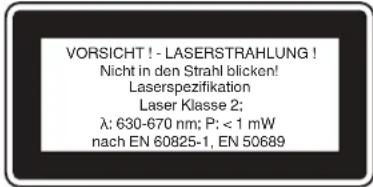
• Never look directly into the laser path. - Never direct the laser beam at reflecting surfaces or persons or animals. Even a low output laser beam can inflict injury on the eye. - Caution: It is vital to follow the work procedures described in these instructions. Using the equipment in any other way may result in hazardous exposure to laser radiation. • Never open the laser module. - It is prohibited to carry out any modifications to the laser to increase its power. - The manufacturer cannot accept any liability for damage due to non-observance of the safety information.
Safety information on the batteries
Use of the batteries
- Inserting the batteries when the laser is switched on can cause accidents.
- If the equipment is not used correctly, the batteries may leak. Avoid contact with the battery fluid. If you come into contact with battery fluid, clean the affected body part with running water. If you get battery fluid in your eyes, seek immediate medical assistance. • Escaped battery fluid can cause skin irritation and acid burns.
- Never expose the batteries to excess heat such as sunshine, fire or similar.
- Never recharge batteries that are not suitable for recharging. Risk of explosion!
- Keep batteries away from children, do not short circuit batteries or disassemble.
- Seek a doctor's advice immediately if a battery is swallowed.
- If necessary, clean the contacts on the battery and equipment before inserting the batteries.
- Ensure that you insert the batteries the right way round.
- Remove flat batteries immediately from the equipment. There is an increased risk of leakage. • Always change all batteries in one go.
- Insert only batteries of the same type, do not
GB
use different types of batteries or used and new batteries together.
• Make sure that the equipment is switched off after use. - Remove the batteries if the equipment is not used over a longer period.
2. Layout and items supplied
2.1 Layout (Fig. 1)
- Laser outlet
- Sensor
- On/Measure switch
- Battery compartment cover
- Display
- SET button
- LASER button
- Up arrow button
- Down arrow button
- °C/°F button
- Info LED
2.2 Display in measuring mode (Fig. 2)
a. Above/below threshold value b. Emissivity c. Ambient temperature d. Surface temperature e. Temperature unit of measurement f. Battery capacity g. Measurement h. Laser active/inactive
2.3 Items supplied
Please check that the article is complete as specified in the scope of delivery. If parts are missing, please contact our service center or the sales outlet where you made your purchase at the latest within 5 working days after purchasing the product and upon presentation of a valid bill of purchase. Also, refer to the warranty table in the service information at the end of the operating instructions.
- Open the packaging and take out the equipment with care.
- Remove the packaging material and any packaging and/or transportation braces (if available). • Check to see if all items are supplied.
- Inspect the equipment and accessories for transport damage.
- If possible, please keep the packaging until the end of the guarantee period.
Danger!
The equipment and packaging material are not toys. Do not let children play with plastic bags, foils or small parts. There is a danger of swallowing or suffocating!
• Original operating instructions • Infrared Thermometer
3. Intended use
The infrared thermometer is suitable for measuring the ambient temperature or surface temperature of solid substances.
The infrared thermometer is not suitable for measuring the temperature of people or animals or for measuring the surface temperature of food, liquids or gases.
The equipment is to be used only for its prescribed purpose. Any other use is deemed to be a case of misuse. The user / operator and not the manufacturer will be liable for any damage or injuries of any kind caused as a result of this.
Please note that our equipment has not been designed for use in commercial, trade or industrial applications. Our warranty will be voided if the machine is used in commercial, trade or industrial businesses or for equivalent purposes.
4. Technical data
Power supply: 2 x 1.5V; Type AA (LR6)
Measuring range: - 50 ° to + 550 °C
Ideal operating temperature: 0 ° to 50 °C
Accuracy at 0 ° to 500 °C: +/- 2 °C
Accuracy at - 50 ° to 0 °C: +/- 3 °C
range: 0.3-1.2 m
Measuring time: 0.5 s
Laser class: 2
Laser wavelength: 630 - 670 nm
Weight: 0.2 kg
GB
5. Before using for the first time
Inserting/changing batteries (Fig. 3 / Item 4)
- Insert 2x 1.5 V Type AA (LR6) batteries as follows
- Press down on the latch (a) to open the battery compartment cover (4)
- Insert the batteries, ensuring that you fit them the right way round
- Close the battery compartment cover (4) and engage the latch (a)
- The battery charge status is shown in indicator position (f) on the display (5). See Fig. 2.
6. Operation
Important!
The measuring distance and measuring accuracy can be affected by ambient conditions such as sunlight or poor reflection, which can have an adverse effect on the resulting measurement.
6.1 Switching the measuring device On/Off (Fig. 1 / Item 3)
Press the On/Measure switch (3) briefly to switch the measuring device on.
The instrument switches off automatically after approx. 1 min. when not in use.
6.2 Setting the temperature unit (Fig. 1-2 / Item 10)
You can choose from 2 temperature unit settings:
• Celsius (°C) - Fahrenheit (°F) By default, it is set to Celsius (°C). Press the °C/°F button (10) to change this.
6.3 Activating/deactivating the laser (Fig. 1-2 / Item 7)
You can switch the laser pointer on to be used as a visual aid or switch it off.
The laser pointer is switched on by default.
Press the LASER button (7) to switch it off or back on.
6.4 Setting the maximum temperature (Fig. 4)
You can set a maximum temperature threshold value.
To set the threshold value, proceed as follows:
- In measuring mode, press the SET button (6) 1x.
- Set the desired value using the arrow buttons (8+9).
- Press the SET button (6) 3x to return to measuring mode.
Below the threshold, the Info LED (11) lights up green.
Above the threshold, the Info LED (11) lights up red.
"Hi" will also appear in indicator position (a) of the display (5). (See Fig. 2)
6.5 Setting the minimum temperature (Fig. 5)
You can set a minimum temperature threshold value.
To set the threshold value, proceed as follows:
- In measuring mode, press the SET button (6) 2x.
- Set the desired value using the arrow buttons (8+9).
- Press the SET button (6) 2x to return to measuring mode.
Above the threshold, the Info LED (11) lights up green.
Below the threshold, the Info LED (11) lights up blue.
"Low" will also appear in indicator position (a) of the display (5). (See Fig. 2)
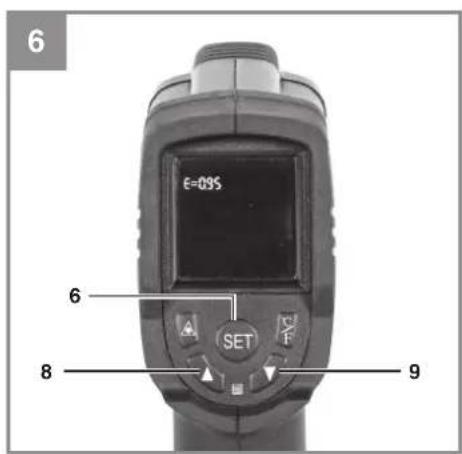
6.6 Adjusting the emissivity ε (Fig. 6)
Different bodies emit varying levels of thermal radiation depending on their color and texture. The emissivity level ε indicates the thermal radiation of a body.
This value ranges from 0 (no radiation) to 1 (100% radiation).
This value can be adjusted depending on the material so as to offer optimum temperature values.
You can choose from 3 value settings (0.75 / 0.85 / 0.95) on the device. Proceed as follows:
• In measuring mode, press the SET button (6) 3 times. • Use the arrow buttons (8+9) to choose a value in accordance with the table shown below. - Press the SET button (6) once to return to measuring mode.
| Emissivity0.95 | Emissivity0.85 | Emissivity0.75 |
| Hardwood Cast iron Cotton | ||
| Paper Soft rubber | Cork | |
| Glass Enamel Ox | dized steel | |
| Plaster Sand | ||
| Concrete Sandstone | ||
| Brick Plywood | ||
| Woodchip wall-paper | Fireclay | |
| Matte tiles Clear lacquer | ||
| Plastic: | Stahl ver- rostet | |
| PE, PP, PVC Rusty steel | ||
6.7 Measuring the temperature (Fig. 1-2)
In measuring mode, the ambient temperature (c) and surface temperature (d) are shown in the display (5). See Fig. 2.
The ambient temperature (c) is automatically measured and shown in real time. Important!
After it is exposed to strong changes in temperature (e.g. from <0°C / >50°C to 20°C ), let the measuring device adjust to ambient temperature for approx. 60 minutes.
To measure the surface temperature, proceed as follows.
- Aim the measuring device at the surface to be measured. Use the laser to help you if necessary (see section 6.3) and be aware of the maximum range (see section 4).
- Press the On/Measure switch (3) until the surface temperature (d) is shown. The value is shown until the next measurement is taken.
- Hold the On/Measure switch (3) down to take measurements in real time.
7. Cleaning, maintenance and ordering spare parts
7.1 Cleaning the tool
Only store and transport the measuring instrument in the protective bag supplied with the product and keep the laser distance meter clean at all times. Never immerse the measuring instrument in water or other liquids. Do not use cleaning agents or solvents to clean the equipment if it is only slightly dirty, just wipe it down with a damp cloth. The receiver lens must be looked after with great care.
7.2 Maintenance
There are no other parts inside the tool which require maintenance.
7.3 Ordering spare parts and accessories
Please provide the following information when ordering spare parts:
- Type of unit • Article number of the unit • ID number of the unit
- Spare part number of the required spare part. For our latest prices and information, please go to www.Einhell-Service.com

Tip! For good results, we recommend high-quality accessories from kwb! www.kwb.eu welcome@kwb.eu
GB
8. Disposal and recycling
The equipment is supplied in packaging to prevent it from being damaged in transit. The raw materials in this packaging can be reused or recycled. The equipment and its accessories are made of various types of material, such as metal and plastic. Never place defective equipment in your household refuse. The equipment should be taken to a suitable collection center for proper disposal. If you do not know the whereabouts of such a collection point, you should ask in your local council offices.
9. Storage
Store the equipment and accessories in a dark and dry place at above freezing temperature. The ideal storage temperature is between 5 and 30 °C. Store the electric tool in its original packaging.
Disposal

Power tools, rechargeable batteries, accessories and packaging should be sorted for environmental-friendly recycling.
Do not dispose of power tools and batteries/re-chargeable batteries into household waste!
Only for EU countries:
According to the Directive 2012/19/EU on waste electrical and electronic equipment and its transposition into national law, power tools that are no longer usable, and, according to the Directive 2006/66/EC, defective or drained batteries must be collected separately and disposed of in an environmentally correct manner.
If disposed incorrectly, waste electrical and electronic equipment may have harmful effects on the environment and human health, due to the potential presence of hazardous substances.
Only for United Kingdom:
According to The Waste Electrical and Electronic Equipment Regulations 2013 (SI 2013/3113) (as amended) and the Waste Batteries and Accumulators Regulations 2009 (SI 2009/890) (as amended), products that are no longer usable must be collected separately and disposed of in an environmentally friendly manner.
The reprinting or reproduction by any other means, in whole or in part, of documentation and papers accompanying products is permitted only with the express consent of the Einhell Germany AG.
Subject to technical changes
GB
Service information
We have competent service partners in all countries named on the guarantee certificate whose contact details can also be found on the guarantee certificate. These partners will help you with all service requests such as repairs, spare and wearing part orders or the purchase of consumables.
Please note that the following parts of this product are subject to normal or natural wear and that the following parts are therefore also required for use as consumables.
| Category Example | |
| Wear parts* | |
| Consumables* | |
| Missing parts |
* Not necessarily included in the scope of delivery!
In the effect of defects or faults, please register the problem on the internet at www.Einhell-Service.com. Please ensure that you provide a precise description of the problem and answer the following questions in all cases:
• Did the equipment work at all or was it defective from the beginning? • Did you notice anything (symptom or defect) prior to the failure? • What malfunction does the equipment have in your opinion (main symptom)? Describe this malfunction.
F
Danger!
Subject to change without notice
Archive-File/Record: NAPR030176
Documents registrar: Georg Riedel
Wiesenweg 22, D-94405 Landau/Isar
BG Infrared Thermometer - F Thermometer Intercuge - DN/Infrared-termometer - S Infrared-termometer - CZ Infrared-termometer - SK Infrared-termometer - NL Infrared-thermometer - E Termometer de Infrarojos - FW in pulsed-pulsed-mittler - SLO Infrared-termometer - H Infrared-hometer - RO Termometer cu Infarojos - P Seira de fita para metal - HR/BH Infrared-termometer - RS Trakasta testosterone za metal. PL Termometer na posiceverien - RUS letrichovia pilna po korelary - BG Indiforocerven terrokomtpur

Declaration of conformity
We, Einhell UK Ltd
Champions Business Park, First Floor Unit 10, Arrowe Brook Rd, Upton, Wirral CH49 0AB, United Kingdom
declare the conformity to UK standards and legislation was assessed for:
Infrared Thermometer TC-IT 550 (Einhell)
UK legislation
□ Simple Pressure Vessels (Safety) Regulation □ Electrical Equipment (Safety) Regulation □ Radio Equipment Regulation □ Personal Protective Equipment Regulation □ The Ecodesign for Energy-Related Products and Energy Information Regulation X The Restriction of the Use of Certain Hazardous Substances in Electrical and Electronic Equipment Regulation □ Noise Emission in the Environment by Equipment for use Outdoors Regulation ☒ Electromagnetic Compatibility Regulation □ Measuring Instruments Regulation □ Pressure Equipment (Safety) Regulation [Non-Text] Information Regulation ces in Electrical and Electronic Equipment Regulation e Outdoors Regulation
Annex V
Annex VI
Noise: measured L ww = dB (A); guaranteed L ww = dB (A) P = kW; L/∅ = cm UK Approved Body: P = kW; L/∅ = cm UK Approved Body:
□ Supply of Machinery (Safety) Regulation
□ Annex IV
UK Approved Body:
UKTE Certificate No.:
□ Supply of Machinery (Safety) Regulation
□ Annex IV
UK Approved Body:
UKTE Certificate No.:
Standards: BS EN 60825-1; BS EN 50689; BS EN 61326-1

Tom Chambers, Managing Director Einhell UK Ltd.
Wirral, 2024.09.10
Archive-File/Record: NAPR030176
Article Number: 22.701.80 I.-No.: 21013
Subject to change without notice. Wiesenweg 22, 94405 Landau/Isar, Germany
Documents registrar: Georg Riedel

EH 12/2024 (01)


- D
- DANGER
- EXPLANATION OF THE SYMBOLS USED (SEE FIG. 7)
- SAFETY REGULATIONS
- WARNING
- SAFETY INFORMATION ON THE MEASURING DEVICE
- SPECIAL INFORMATION ABOUT THE LASER
- SAFETY INFORMATION ON THE BATTERIES
- GB
- LAYOUT AND ITEMS SUPPLIED
- LAYOUT (FIG. 1)
- DISPLAY IN MEASURING MODE (FIG. 2)
- ITEMS SUPPLIED
- INTENDED USE
- TECHNICAL DATA
- BEFORE USING FOR THE FIRST TIME
- INSERTING/CHANGING BATTERIES (FIG. 3 / ITEM 4)
- OPERATION
- IMPORTANT
- SWITCHING THE MEASURING DEVICE ON/OFF (FIG. 1 / ITEM 3)
- SETTING THE TEMPERATURE UNIT (FIG. 1-2 / ITEM 10)
- ACTIVATING/DEACTIVATING THE LASER (FIG. 1-2 / ITEM 7)
- SETTING THE MAXIMUM TEMPERATURE (FIG. 4)
- SETTING THE MINIMUM TEMPERATURE (FIG. 5)
- ADJUSTING THE EMISSIVITY Ε (FIG. 6)
- MEASURING THE TEMPERATURE (FIG. 1-2)
- CLEANING, MAINTENANCE AND ORDERING SPARE PARTS
- CLEANING THE TOOL
- MAINTENANCE
- ORDERING SPARE PARTS AND ACCESSORIES
- DISPOSAL AND RECYCLING
- STORAGE
- DISPOSAL
- ONLY FOR EU COUNTRIES
- ONLY FOR UNITED KINGDOM
- SERVICE INFORMATION
- F
- DECLARATION OF CONFORMITY
- INFRARED THERMOMETER TC-IT 550 (EINHELL)
- UK LEGISLATION
Brand : EINHELL
Model : TC-IT 550
Category : Measuring equipment