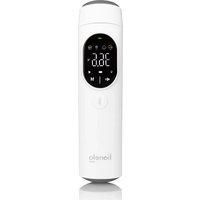
FeverScan - Thermometer Lionelo - Free user manual and instructions
Find the device manual for free FeverScan Lionelo in PDF.


| Product type | Infrared thermometer |
| Brand / Model | Lionelo / FeverScan |
| Dimensions | 16,5 × 4 × 4,3 cm |
| Weight (without batteries) | 75 g |
| Power supply | 2 AAA 1.5 V batteries (included) |
| Measurement range (forehead and ear) | 32.0 °C – 42.9 °C (89.6 °F – 109.2 °F) |
| Measurement range (environment) | 0 °C – 40 °C (32 °F – 104 °F) |
| Accuracy | ± 0.3 °C (± 0.6 °F) |
| Measurement time | Approximately 1 second |
| Memory | Up to 40 measurements, with mode indication |
| Display | LED screen, backlight in ear mode |
| Automatic shutdown | After 30 seconds of inactivity |
| Main functions | Forehead measurement (adults and children), ear measurement (from 3 months), ambient temperature; unit change °C/°F; sound on/off; audible and visual fever indicator |
| Fever indicator | Green (normal), orange (slightly elevated), red (elevated) with beeps |
| Cleaning and disinfection | Probe: dry cotton swab; housing: soft cloth with disinfectant (70% isopropyl alcohol, 75% medical alcohol, 3% sodium hypochlorite). Do not immerse |
| Operating conditions | 10 °C – 40 °C, 15 % – 95 % RH, 700 – 1060 hPa |
| Storage and transport conditions | -20 °C – 55 °C, 0 % – 95 % RH, 500 – 1060 hPa |
| Applied part | Type BF (probe) |
| Expected lifetime | 5 years |
| Package contents | Thermometer, storage pouch, 2 AAA batteries |
| Maintenance | Clean the probe after each use; store in a dry place, away from dust and direct sunlight |
| Warranty / Repair | Do not disassemble; contact the manufacturer's authorized service |
Frequently Asked Questions - FeverScan Lionelo
User questions about FeverScan Lionelo
0 question about this device. Answer the ones you know or ask your own.
Ask a new question about this device
Download the instructions for your Thermometer in PDF format for free! Find your manual FeverScan - Lionelo and take your electronic device back in hand. On this page are published all the documents necessary for the use of your device. FeverScan by Lionelo.
USER MANUAL FeverScan Lionelo
Infrared thermometer
natural_image
White lionelo medical thermometer device with digital display and control buttons (no visible text or symbols on device body)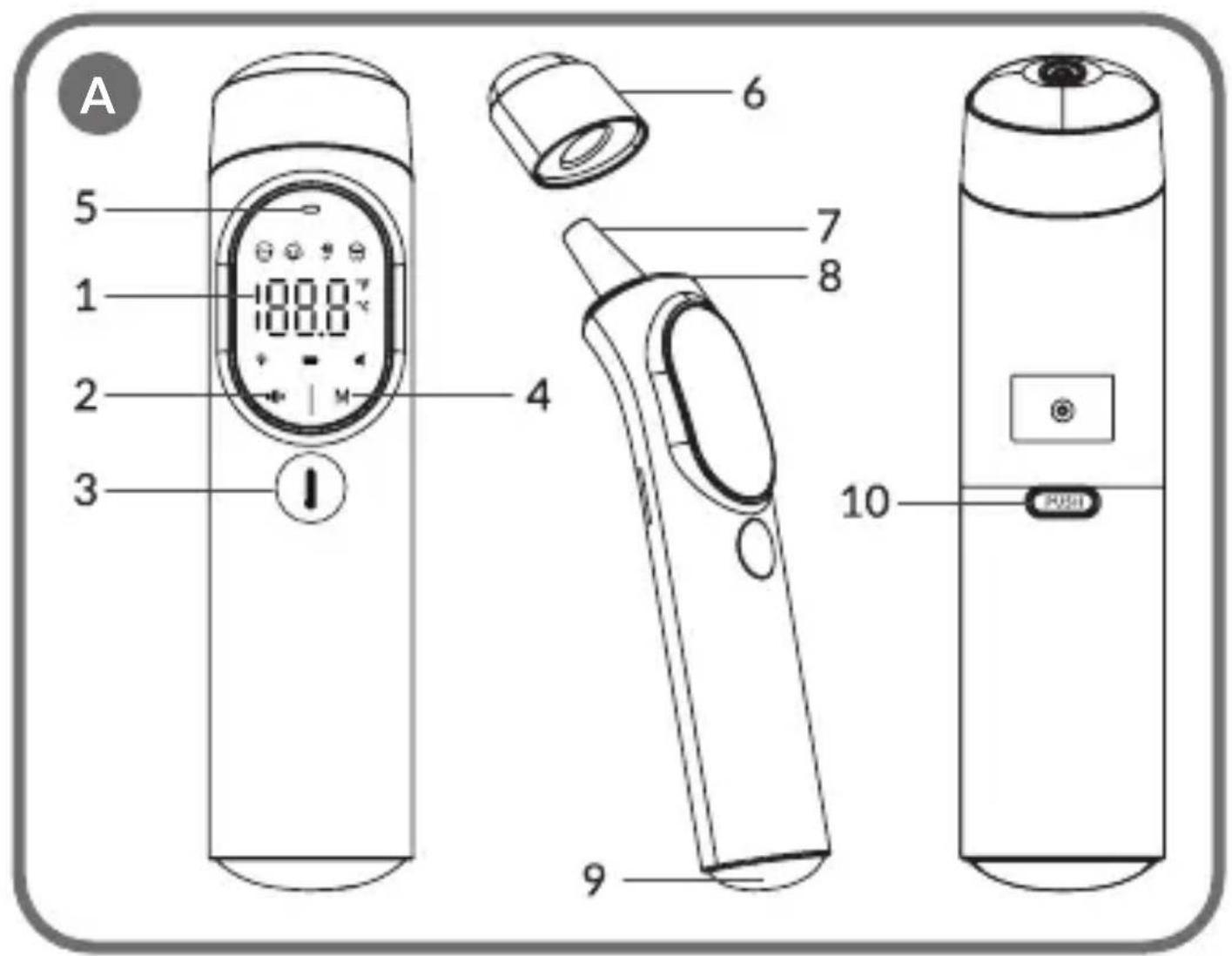
line
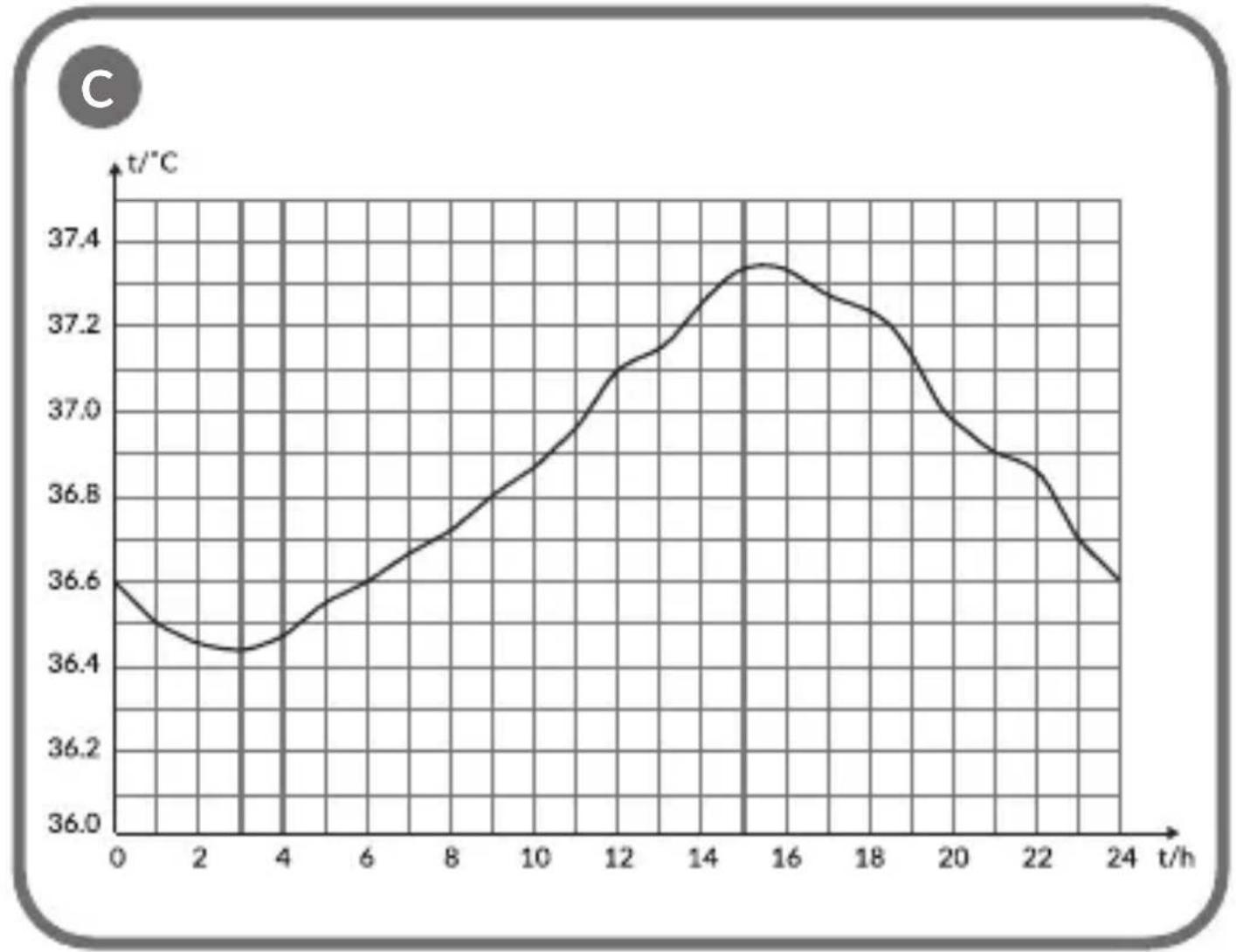
| t/h | t/°C | | --- | ---- | | 0 | 36.6 | | 2 | 36.4 | | 4 | 36.4 | | 6 | 36.6 | | 8 | 36.8 | | 10 | 37.0 | | 12 | 37.1 | | 14 | 37.3 | | 16 | 37.4 | | 18 | 37.2 | | 20 | 37.0 | | 22 | 36.8 | | 24 | 36.6 |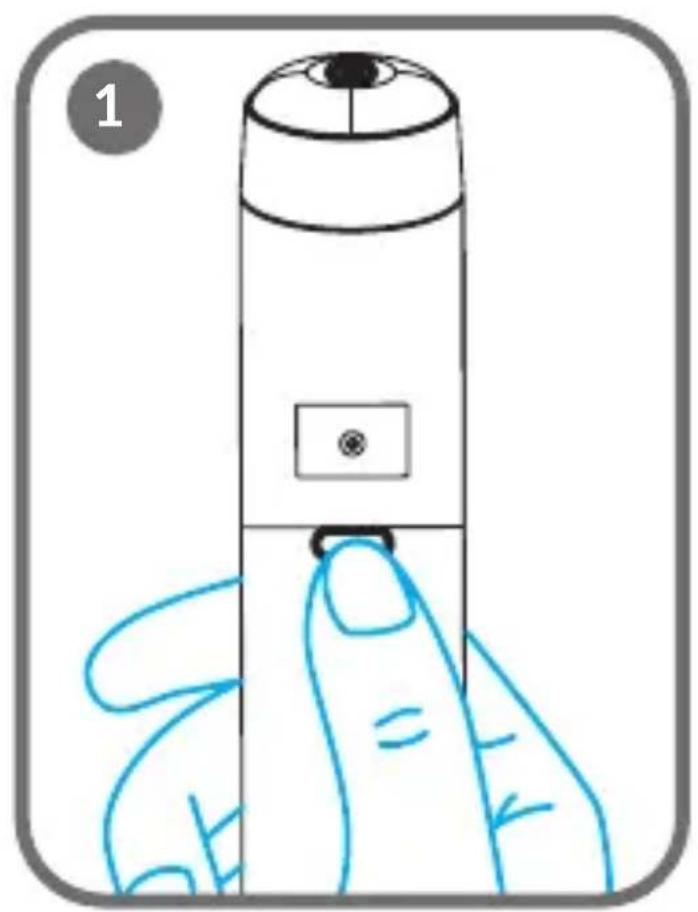
natural_image
Illustration of a hand holding a cylindrical device with a small screen and button, no text or symbols present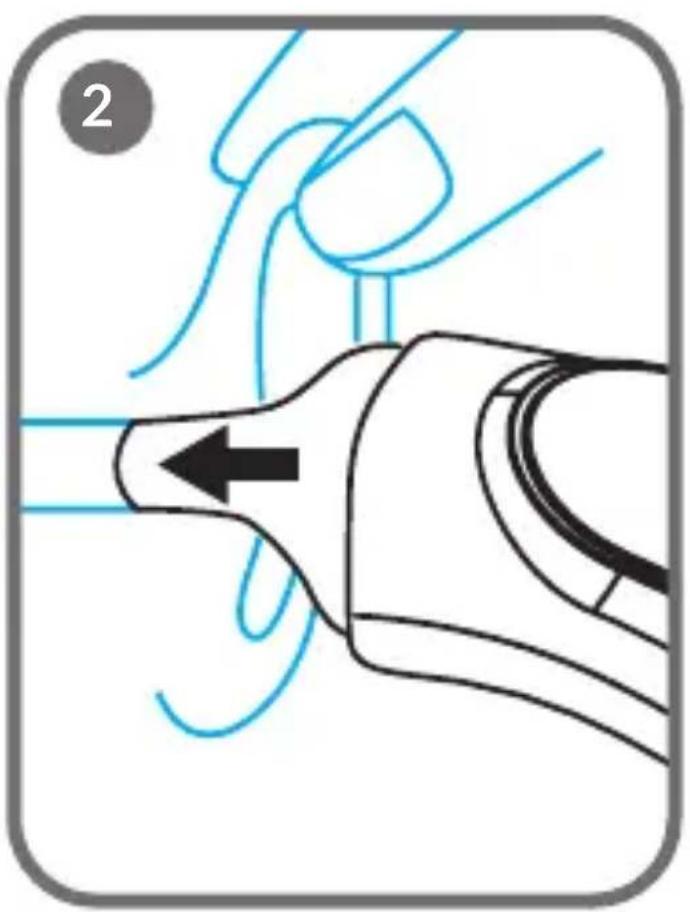
natural_image
Diagram showing a mechanical or fluidic device with blue lines and arrows indicating motion or flow, no readable text or symbols present.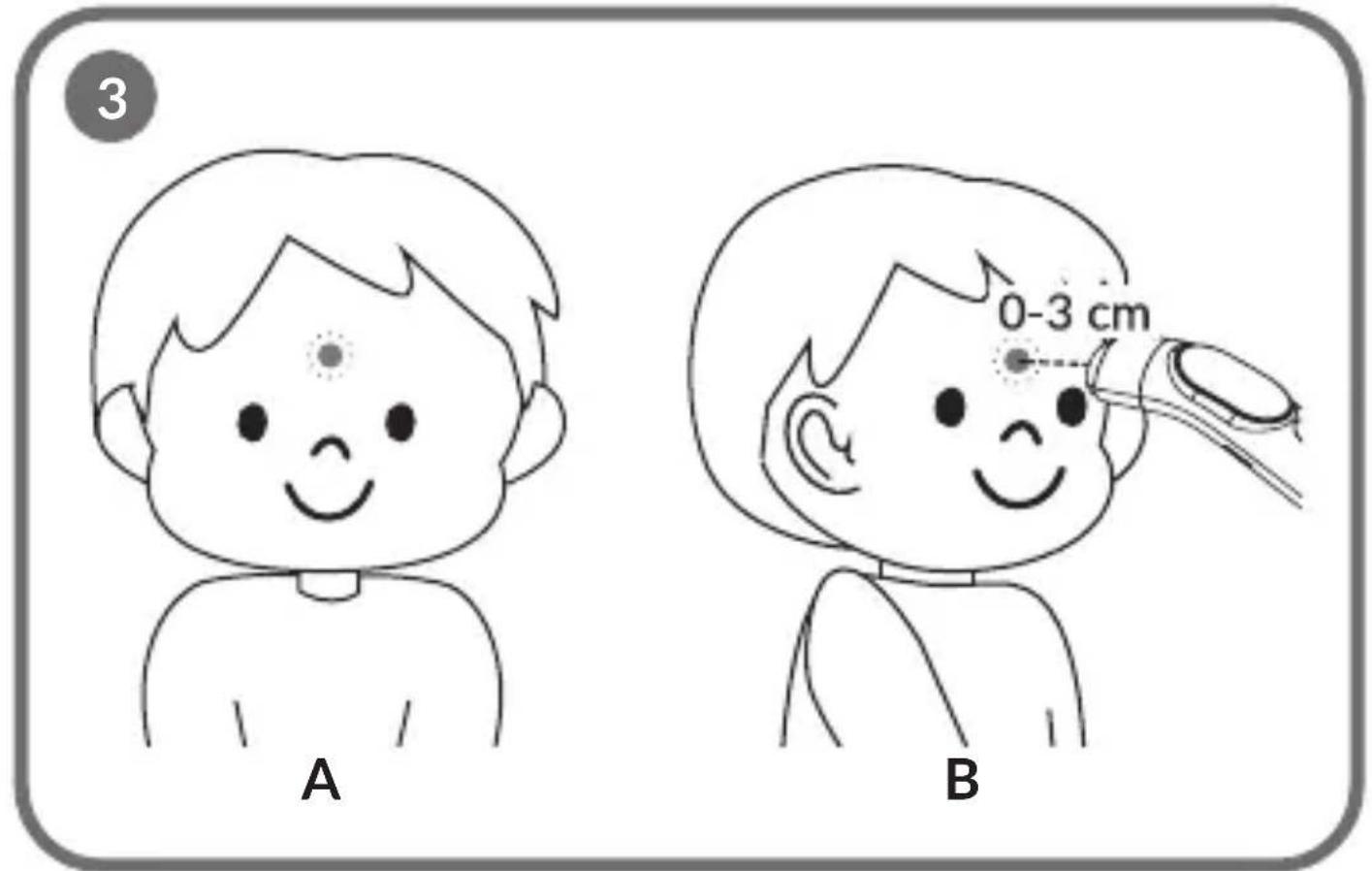
IMPORTANT INFORMATION
Please read this instruction manual before operating the product to familiarise yourself with its functions and use it as intended. Failure to follow the safety instructions and use not in accordance with the instructions may result in damage to your health. Keep this instruction manual for future reference.
- This device is not a toy. Do not allow children to play with it. Keep the device out of the reach of children and pets.
- Check the device regularly for damage. Do not use a damaged device. Do not attempt to repair or modify the device yourself – contact the manufacturer's authorised service centre. Do not undertake disassembly of the thermometer as this may cause irreparable damage to the device.
- Do not undertake service or maintenance while the device is in operation.
- The device is intended for home use.
- The patient is the operator of the device.
- The device sensor is a type BF application part.
- The device may only be used for temperature measurement. Do not use it for any other purpose incompatible with its intended use.
- The use of this thermometer is only intended to provide information on body temperature and should not be used for self-diagnosis or treatment of diseases. Temperature readings should be considered informative.
- If you experience any discomfort, stop using the device immediately and consult your doctor.
- Stop using the device if its components are damaged or accidentally immersed in water.
- Use only spare parts supplied or recommended by the manufacturer.
- Do not immerse the device in water or other liquids.
- Do not use the device in high temperatures, near a heating device or over an open flame.
- Do not subject the device to high shocks or strong vibrations.
- Do not use microwave ovens to dry or disinfect the device due to the risk of fire.
- Do not store the device in a humid, dusty environment or exposed to sunlight.
- Do not use the device if it has been dropped, exposed to high levels of moisture, or submerged in water. Contact the manufacturer's authorised service centre.
- Do not expose the device and accessories to corrosive liquids or gases.
- Contact an authorised manufacturer's representative if you have any doubts about commissioning, use or maintenance of the device, or if the device malfunctions.
- Avoid taking temperature measurements immediately after physical activity or in a state of increased emotional arousal. It is recommended to wait about twenty minutes for the body to return to a resting state to ensure the accuracy of the reading.
- Clean the probe after each use.
- Do not take the measurement in an environment with a temperature higher than 40^ C ( 104^ F) or lower than 10^ C ( 50^ F). After moving from the storage environment to the measurement environment, wait approximately 30 minutes before measuring.
- The use of mobile phones or other RF wireless communication devices during measurement may affect the accuracy of the infrared thermometer. Avoid using such devices during the measurement process.
- The device must not be used in the presence of a mixture of flammable anaesthetic gases with air or nitrous oxide or nitrous oxide.
- Expected service life: 5 years.
BATTERY INFORMATION
- Do not charge disposable batteries.
- Do not mix batteries of different types or old (used) batteries with new ones.
- Insert batteries into the compartment according to the polarity (+ and -) and the markings inside the battery compartment.
- Always remove an exhausted battery. A battery left in the product may leak or explode and destroy the product.
- Do not short-circuit the power supply terminals.
- To ensure proper operation of the product, ensure that AAA type batteries are used.
- If the product is not used for a long period of time, remove the batteries from the compartment.
- Keep batteries away from children.
- Do not throw batteries into fire. Explosion hazard.
- Dispose of batteries according to regulations by disposing of them in specially designated containers.
CONTRAINDICATIONS
Do not use the thermometer if there is an ear infection such as otitis media or an abscess.
USE
The infrared thermometer is a measuring device that works on the principle of detecting infrared radiation to determine body temperature. To measure, point the thermometer's sensor at the forehead or towards the ear and press the button to initiate the measurement process.
The forehead temperature measurement function is universal and can be used for people of all ages. The ear temperature function can be used above the age of three months.
SPECIFICATION
| Power supply | 2x 1.5V AAA | Device accuracy | + - 0.3 C / + - 0.6 F |
| Security level Application part type BF | |||
| Operating mode Continuous Measurement range | |||
| Measurement time | ~ 1 second - forehead, ear 32.0 °C - 42.9 | °C / 89.6 °F - 109.2 °F | |
| - ambient 0.0 °C - 40 °C / 32.0 °F - 104 °F | |||
| Period between measurements | Minimum 30 seconds | Dimensions / product weight (without battery) | 16.5 x 4 x 4.3 cm / 75 g |
| Automatic switch off | After 30 seconds of inactivity | Operating conditions | 10 °C - 40 °C (50 °F - 104 °F), 15%-95% RH (non-condensing), 700-1060 hPa |
| Measurement memory | 40 Storage and | transport conditions | -20°C - 55°C (-4°F-131°F), 0%-95% RH (non-condensing), 500-1060 hPa |
SET
The set includes a thermometer, pouch and AAA batteries (two pieces).
DESCRIPTION OF THE DEVICE (FIG. A)
- LED display
- Button for mute and restore sound / Button for unit change
- Measurement button / Front light on/off button / Power on/off button
- Mode change button / Memory button
- LED light indicator
- Probe cover (applied when measuring forehead temperature)
- Probe (cover must be removed when measuring ear temperature)
- Backlighting in ear measurement mode
- Battery compartment
- Battery compartment release button
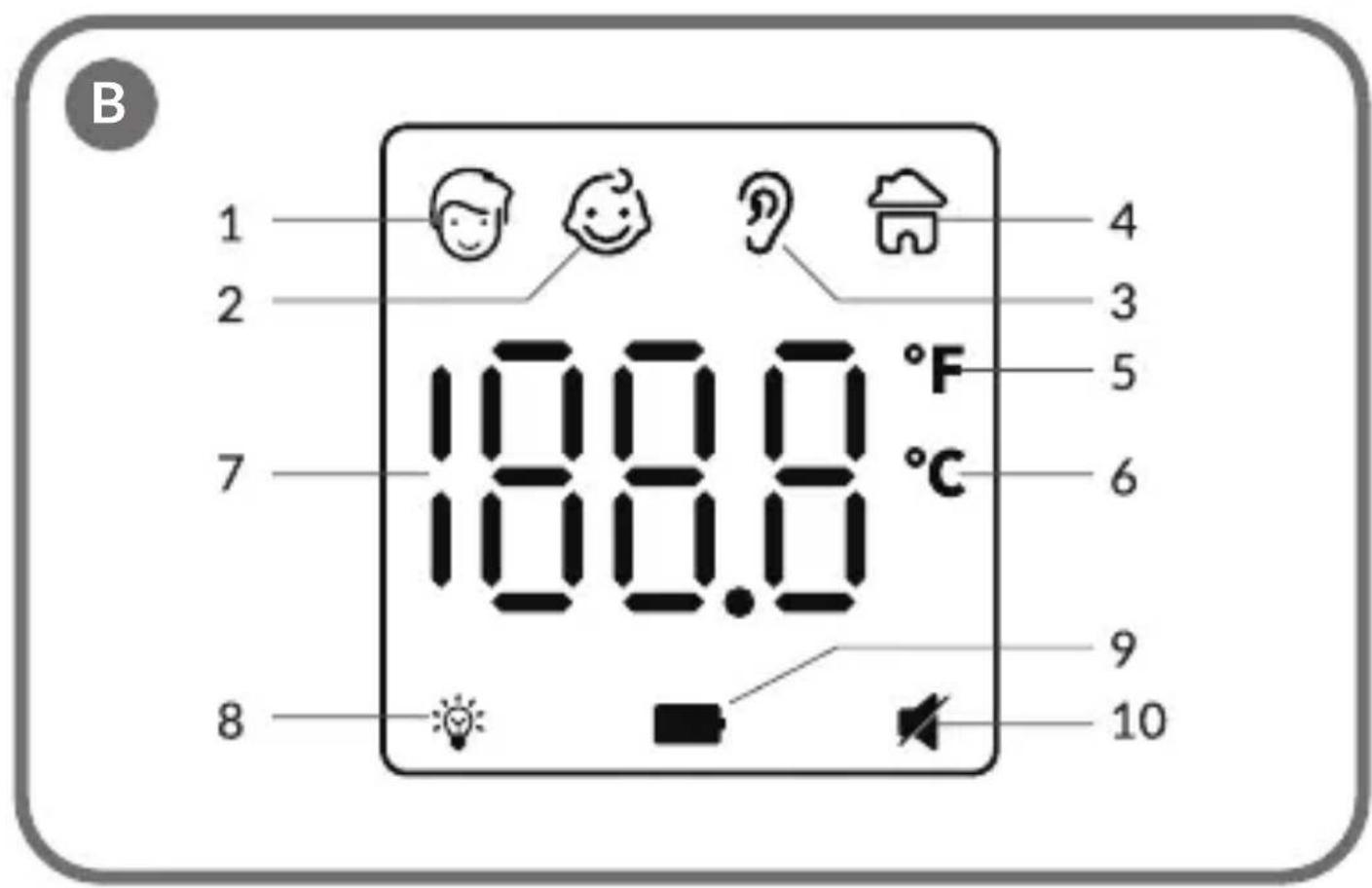
DISPLAY (FIG. B)
- Forehead temperature measurement mode for adults and children over 12 years of age
- Forehead temperature measurement mode for children
- Ear temperature measurement mode
- Ambient temperature mode
- Degrees Fahrenheit (°F)
- Degrees Celsius (°C)
- Temperature value
- Backlight indicator in ear measurement mode
- Low battery indicator
- Mute/restore sound indicator
GRAPH OF TEMPERATURE CHANGE (FIG. C)
Human body temperature varies during the day and is influenced by external factors. Under normal conditions, the temperature difference between day and night does not exceed 1^ C. The range of body temperature can vary between different individuals. People of different ages and sexes show small differences in the normal body temperature range. A newborn or child's temperature is higher than an adult's, an adult's temperature is higher than an older person's, and a woman's temperature is about 0.3^ C higher than a man's.
The temperature can also vary, depending on where it is measured:
| Place of measurement Normal temperature range |
| Forehead temperature 36.1°C – 37.5°C / 97.0°F–99.5°F |
| Ear temperature 35.8°C – 37.5°C / 96.44°F–99.5°F |
BATTERY REPLACEMENT
Press the battery compartment release button (fig. 1) to open the compartment. Remove the exhausted batteries and then place 2 new AAA batteries in the compartment, paying particular attention to their polarity (+ and -).
OPERATING INSTRUCTIONS
Avoid taking temperature measurements immediately after physical activity or in a state of increased emotional arousal. It is recommended to wait about 30 minutes for the body to return to a resting state to ensure the accuracy of the reading.
Wait a minimum of 30 seconds between measurements. Measurements taken one after the other may result in an erroneous result.
Ear temperature measurement
- Remove the probe cover before measuring the temperature from the ear.
- Press the measurement button (3, fig. A) to switch the thermometer on. The icon will automatically appear on the screen.
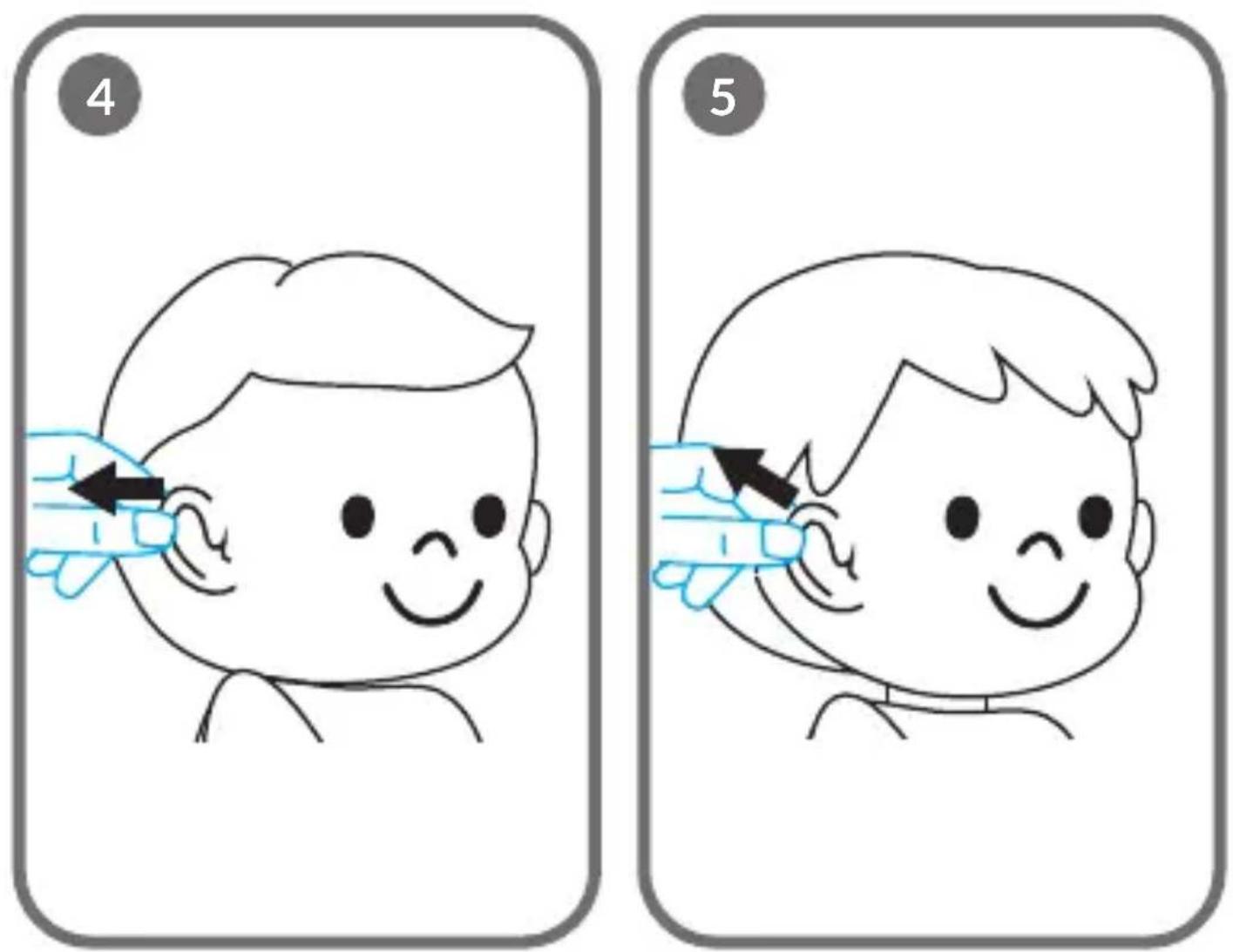
- With children under one year of age, gently pull the auricle straight towards the back of the head (fig. 4).
- With children over one year of age, pull the auricle gently upwards and towards the back of the head (fig. 5).
- Carefully insert the probe into the ear canal (fig. 2). Press the measurement button again (3, fig. A) and the temperature reading from the ear will immediately appear on the screen.
Note! Insert the probe into the ear carefully and without using force due to the risk of damaging the ear. Make sure the ear canal is clean and dry before measuring.
The backlight (8, fig. A) can be switched off by holding down the measurement button (3, fig. A) for approx. 5 seconds. To switch the backlight on, hold down the measurement button again for approx. 5 seconds. The device saves the selected settings.
Forehead temperature measurement
Note! To measure correctly from the forehead, make sure the forehead is dry, clean and not covered by hair.
- Keep or put on the probe cover when measuring forehead temperature. The probe cover is held in place on the device by the built-in magnets.
- Press the measurement button (3, fig. A) to switch the thermometer on.
- Depending on the need, press the change mode button (4, fig. A) to switch the mode to adult or child forehead temperature measurement mode. The screen will display the icon 📄 or .
- Point the probe at the centre of the forehead (A, fig. 3) so that it touches the skin of the forehead or is approximately 0 - 3 cm away (B, fig. 3).
- Press the measurement button again (3, fig. A) and the temperature reading from the forehead will immediately appear on the screen.
Ambient temperature measurement
- Keep or put on the probe cover when measuring the ambient temperature.
- Press the measurement button (3, fig. A) to switch the thermometer on.
- Press the change mode button (4, fig. A). The icon will appear on the screen.
- Press the measurement button again (3, fig. A) and the ambient temperature reading will immediately appear on the screen.
- If the surroundings change, wait at least 30 minutes before taking a temperature measurement.
The thermometer will automatically switch off if no action is taken within 30 seconds. You can also press and hold the measurement button (3, fig. A) for 5 seconds to manually switch off the thermometer (with the probe cover on).
SPECIAL MESSAGES
Temperature too high
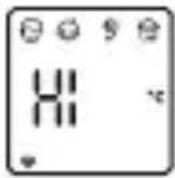
Ear temperature mode: when the measured ear temperature is higher than 42.9°C (109.2°F).
Forehead temperature measurement mode: when the measured temperature from the forehead is higher than 42.9°C (109.2°F).
The device will emit one long sound signal and the light indicator will illuminate red.
Temperature too low
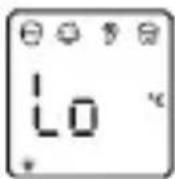
Ear temperature measurement mode: when the measured ear temperature is lower than 32.0^ C ( 89.6^ F).
Forehead temperature measurement mode: when the measured temperature from the forehead is lower than 32.0^ C ( 89.6^ F).
The device will emit one long sound signal and the light indicator will illuminate red.
Switching the mute on/off
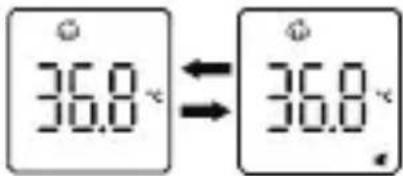
Press the mute/restore sound button (2, fig. A) to switch the sound on or off.
When the sound is switched on, the device will give a long sound signal. When the sound is switched off, the display will show the mute icon
Mode change
To change mode, press the change mode button (4, fig. A). The icon at the top will change to correspond to the selected mode.
Temperature unit change
To change the temperature unit, press and hold the change unit button (2, fig. A) for approx. 5 seconds.
Ambient temperature too high
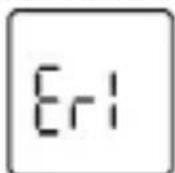
When the ambient temperature is higher than 40.0°C (104.0°F) or lower than 0.0°C (32.0°F), the device will emit one long sound signal and the light indicator will illuminate red.
Internal memory or calibration error

Internal memory error or temperature calibration not completed.
The thermometer will automatically switch off after approximately 3 seconds.
Low battery
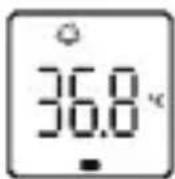
If the battery level is low, the battery icon will appear on the display.

If the battery level is very low, only the battery icon will remain on the display.
MEMORY FUNCTION
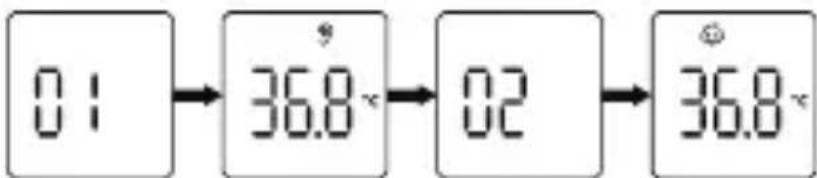
Press and hold the memory button (4, fig. A) for approx. 5 seconds.
The display will show "01" and then the most recent temperature measurement will be displayed.
Press the memory button (4, fig. A) again to display the next recorded value. The display will show "02" and then the previous value will be displayed.
You can check a total of 40 temperature readings. When the maximum number of records is exceeded, the oldest recorded data will be overwritten.
The icon on the display indicates the location from which the stored temperature measurement was taken. The memory function does not include ambient temperature measurement.
SOUND AND LIGHT INDICATOR
| Temperature range | Sound (does not apply to silent mode) | Light indicator |
| Forehead temperature | ||
| 32.0°C - 37.5°C /89.6°F - 99.5°F | One long sound signal Green | |
| 37.6°C - 38.0°C /99.6°F - 100.4°F | 6 short sound signals (2 short soundsignals each) | Orange |
| 38.1°C - 42.9°C /100.5°F - 109.2°F | 6 short sound signals (2 short soundsignals each) | Red |
| Ear temperature | ||
| 32.0°C - 37.5°C /89.6°F - 99.5°F | One long sound signal Green | |
| 37.6°C - 38.0°C /99.6°F - 100.4°F | 6 short sound signals (2 short soundsignals each) | Orange |
| 38.1°C - 42.9°C /100.5°F - 109.2°F | 6 short sound signals (2 short soundsignals each) | Red |
| Ambient temperature | ||
| 0°C - 40°C /32.0°F - 104.0°F | One long sound signal - | |
When the measured forehead or ear temperature is within the range 32.0^ C to 37.5^ C ( 89.6^ F to 99.5^ F), the thermometer will emit a long sound signal and the indicator will be illuminated in green, indicating that the temperature is normal.
When the measured forehead or ear temperature is within the range of 37.6^ C to 42.9^ C ( 99.6^ F to 109.2^ F), the thermometer will give 6 short sound signals (2 short sound signals each time) and the indicator will be illuminated in orange or red, indicating that the temperature is too high.
TROUBLESHOOTING
| Problem Possible cause Solution | ||
| The device does not switch on. | 1. Battery level is too low.2. Batteries have been placed in the device with the wrong polarity.3. The device has been damaged. | 1. Replace the batteries.2. Ensure that the batteries have been correctly inserted in the device.3. Contact an authorised service centre. |
| Er1 error on the display. | Ambient temperature is above 40°C (104°F) or below 0°C (32°F). | Carry out the measurement at an ambient temperature between 0°C and 40°C (32°F and 104°F). |
| The measured temperature is too low compared to the normal temperature range. | 1. The probe lens is dirty.2. The probe is placed too far from the ear/forehead.3. The probe is damaged. | 1. Clean the probe with a cotton swab.2. Reduce the distance.3. Contact an authorised service centre. |
| The measured temperature is too high compared to the normal temperature range. | 1. The required 30 minutes have not elapsed since the thermometer was transferred from a low temperature surroundings.2. The probe is damaged. | 1. Leave the thermometer at room temperature for at least 30 minutes.2. Contact an authorised service centre. |
CLEANING AND DISINFECTION
Cleaning
Recommended cleaning agents:
• Medical cleaner
• Neutral household cleaner
Remove the batteries from the device before cleaning. Then wipe the thermometer body with a clean, soft cloth (optional cleaner) and the probe with a dry cotton swab.
Disinfection
Recommended disinfectants:
• 70% isopropyl alcohol solution
• 75% medical alcohol
• 3% sodium hypochlorite solution
Before disinfection, remove the batteries from the device and then wipe the thermometer body with a clean, soft cloth soaked in a little disinfectant. Wipe dry immediately after disinfection.
Important information
- Do not allow water to get inside the probe lens as this may damage the device.
- Wiping the probe lens with a tissue can scratch the lens, which can make the measurement results inaccurate.
- The use of caustic cleaner is not permitted. Take special care when cleaning. Do not touch the probe lens with hard tools and do not immerse any part of the thermometer in water to avoid any fluids entering the thermometer.
- It is recommended to clean the thermometer once a week. Cleaning should not take longer than 3 minutes.
• After cleaning the thermometer with a medical detergent, wait 5 minutes before using it again, otherwise the measurement results may be affected. - Do not use high-temperature steam or ultraviolet light for disinfection, as this may damage the device or accelerate its ageing.
- It is recommended to disinfect the thermometer before and after each use. Disinfection should not take longer than 1 minute.
• After disinfection, wait at least 10 minutes before using again.
MAINTENANCE
During normal use, regularly check the thermometer for potential safety hazards – that the lens is not cracked, the outer body is not cracked, and that the probe is not dirty. If there is a safety hazard, stop using the thermometer immediately.
Clean the probe after each use (see: Cleaning and disinfection).
Store the thermometer in a dry, well-ventilated place, free of dust and dirt and out of direct sunlight.
If the thermometer will not be used for an extended period (more than 2 months), remove the batteries and store the thermometer according to the instructions (see: Transport and storage).
TRANSPORT AND STORAGE
During transport, avoid heavy impacts, vibration and exposure of the device to precipitation. Transport and storage of the packaged infrared thermometer should meet the following conditions: ambient temperature between -20^ and +55^ ( -4^-131^ ), relative humidity below 95%, non-condensing, atmospheric pressure between 50kPa and 106kPa, free of corrosive gases and in a well-ventilated indoor room.
EMC INFORMATION
This equipment requires special precautions related to EMC. Use the device in accordance with the EMC information given.
The device may be affected by portable radio communication devices. Such devices should be used at a distance of at least 30 metres.
The device should not be used in the vicinity of devices generating a strong magnetic field and, if necessary, the device should be observed to verify correct operation in the configuration used.
The use of accessories other than those supplied may result in increased emissions or reduced immunity of the product.
ELECTROMAGNETIC EMISSION GUIDELINES AND DECLARATIONS
This device is intended for use in the electromagnetic environment described below. The user should only use the device in this environment.
| Emissivity test Compliance Electromagnetic environment – guidelines | ||
| CISPR 11 radio frequency emissions | Group 1 The thermometer generates radio frequency energy only as a consequence of internal functions. Radio frequency emissions are negligible and are unlikely to cause interference with electronic equipment in the vicinity of the device. | |
| CISPR 11 radio frequency emissions | Class B The thermometer can be used in all establishments, including domestic premises and premises directly connected to the low-voltage power supply to residential buildings. | |
ELECTROMAGNETIC RESISTANCE GUIDELINES AND DECLARATIONS
This device is intended for use in the electromagnetic environment described below. The user should only use the device in this environment.
| Resistance tests IEC | 60601 test level | Compliance level | Electromagnetic environment – guidelines |
| Electrostatic discharge (ESD)IEC 61000-4-2 | ±8 kV tactile, ±15 kV airborne | ±8 kV tactile, ±15 kV airborne | The floor should be wooden, concrete, or tiled. If the floor is covered with synthetic material, the relative humidity should be at least 30%. |
| Mains frequency magnetic field (50 Hz/60 Hz) IEC 61000-4-8 | 30 A/m 30 A/m | The mains frequency magnetic field should be at a level consistent with a typical commercial or hospital environment. |
ELECTROMAGNETIC RESISTANCE GUIDELINES AND DECLARATIONS FOR NON-LIFE-SUPPORT EQUIPMENT AND SYSTEMS
This device is intended for use in the electromagnetic environment described below. The user should only use the device in this environment.
| Resistance tests | IEC 60601 test level | Compliance level | Electromagnetic environment – guidelines |
| Radiation in accordance with IEC61000-4-3 | 3 V/m80 MHz to 2.5 GHz | 3 V/m Portable radio communication devices should not be used in the vicinity of any part of the thermometer, including cables, at a distance less than the recommended distance, calculated from an appropriate equation matched to the transmitter frequency. Recommended distance: d = [ 3.5V_i ] d = [ 3.5E_i ] 80 MHz to 800 MHz d = [ 7E_i ] 800 MHz to 2.5 GHz where P is the maximum output power rating of the transmitters in watts (W) as given by the transmitter manufacturer, d is the recommended distance in metres (m). The field strength from fixed radio transmitters, determined by measuring the electromagnetic interference of the terrain, should be less than the compliance level for each frequency band. Interference may occur in the vicinity of equipment marked with the following symbol: |
NOTE! For 80 MHz and 800 MHz, the higher frequency range applies.
NOTE! These guidelines may not apply in some cases. The propagation of electromagnetic waves is altered by absorption and reflection from structures, objects and people.
It is not possible to accurately determine the strength of the field from fixed transmitters such as base stations for radio (mobile/wireless) telecommunications, land mobile and amateur radio transmitters, AM and FM radio transmitters, and television transmitters. To determine the electromagnetic conditions associated with fixed radio transmitters, electromagnetic interference measurements should be carried out at the location. If the measured field strength at the location where the thermometer is used exceeds the applicable compliance level stated above, observations of the thermometer should be made to verify proper operation. If abnormal operation is observed, additional measures such as repositioning or relocating the device may be necessary.
Recommended distance between portable radio communication devices and the thermometer
The thermometer is designed for use in an electromagnetic environment with limited interference from radio waves. The user of the thermometer can limit electromagnetic interference by maintaining a minimum distance between mobile radio communication devices (transmitters) and the thermometer as recommended below, according to the maximum output power rating of the communication device.
| Maximum output power rating of transmitter (W) | Distance adjusted to transmitter frequency (m) | ||
| 150 kHz to 80 MHz d = [ 3.5V_i ] | 80 MHz to 800 MHz 800 MHz to 2,5 GHz d = [ 3.5E_i ] | MHz to 2,5 GHz d = [ 7E_i ] | |
| 0,01 - 0,12 0,23 | |||
| 0,1 - 0,38 0,73 | |||
| 1 - 1,2 2,3 | |||
| 10 - 3,8 7,3 | |||
| 100 - 12 23 | |||
For transmitters whose maximum output power rating is not listed above, the recommended distance d in metres (m) can be estimated using the equation appropriate to the transmitter frequency, where P is the maximum output power rating of the transmitters in watts (W) as given by the transmitter manufacturer.
NOTE! For 80 MHz and 800 MHz, the higher frequency range applies.
NOTE! These guidelines may not apply in some cases. The propagation of electromagnetic waves is altered by absorption and reflection from structures, objects and people.
The photos are for illustrative purposes only, the actual appearance of the products may differ from those shown in the photos.
WAŻNE INFORMACJE
flowchart
graph LR
    A["0:1"] --> B["36.8"]
    B --> C["02"]
    C --> D["36.8"]
flowchart
graph LR
    A["0:1"] --> B["36.8"]
    B --> C["02"]
    C --> D["36.8"]
INFORMATIONS SUR CEM
flowchart
graph LR
    A["0:1"] --> B["36.8"]
    B --> C["02"]
    C --> D["36.8"]
OMSCHRIJVING VAN HET APPARAAT (AFB. A)
Geluid uit

flowchart
graph LR
    A["0:1"] --> B["36.8"]
    B --> C["02"]
    C --> D["36.8"]
flowchart
graph LR
    A["0:1"] --> B["36.8"]
    B --> C["02"]
    C --> D["36.8"]
VÝKRES ZMĚN TEPLOTY (OBR. C)
flowchart
graph LR
    A["0:1"] --> B["36.8"]
    B --> C["02"]
    C --> D["36.8"]
PRODUKTBESKRIVNING (FIG. A)
TRANSPORT OCH FÖRVARING
PRODUKTBESKRIVELSE (FIG. A)
flowchart
graph LR
    A["0:1"] --> B["36.8"]
    B --> C["02"]
    C --> D["36.8"]
EN: The product complies with the requirements of European Union directives. In accordance with Directive 2012/19/EU, this product is subject to separate collection. The product should not be disposed of with municipal waste as it may pose a risk to the environment and human health. Return the used product to the recycling centre for electrical and electronic equipment.
Shenzhen AOJ Medical Technology Co., Ltd.
Room 301&4F, Block A, Building A, Jingfa Intelligent
Manufacturing Park, Xiaweiyuan, Gushu Community, Xixiang Street, Bao'an District, 518126, Shenzhen, China
Made in PRC

Share Info GmbH
Heerdter Lohweg 83,
40549 Düsseldorf, Germany
Tel: 0049 179 5666 508
E-mail: EU-Rep@share-info.com

BrandLine Group Sp. z o.o.
61-248 Poznań, Poland
V2: 31.10.2024
