PA-210 - Speaker LENCO - Free user manual and instructions
Find the device manual for free PA-210 LENCO in PDF.


User questions about PA-210 LENCO
0 question about this device. Answer the ones you know or ask your own.
Ask a new question about this device
Download the instructions for your Speaker in PDF format for free! Find your manual PA-210 - LENCO and take your electronic device back in hand. On this page are published all the documents necessary for the use of your device. PA-210 by LENCO.
USER MANUAL PA-210 LENCO
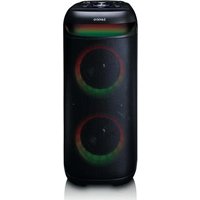
Bluetooth® Party Speaker
USER MANUAL
natural_image
Line drawing of a Lenco air purifier device with control panel and circular vent slots (no text or symbols)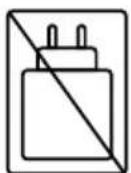
No USB Power adaptor included.
Please use a USB adaptor delivering minimum 5W.
EN User manual 3
DE Betriebsanleitung 10
FR Manuel d'utilisation 18
NL Gebruikershandleiding 26
IT Manuale d'uso 34
E9 Manual del usuario 42
PT Manual do utilizador 50
SV Användarmanual 58
FI Käyttäjän käsikirja 65
NO Brukerhåndbok 72
DA Brugervejledning 79
HU Felhasználói kézikönyv 86
PL Podręcznik użytkownika 94
EL Εγχειρίδιο χρήσης 102
SK Použivatel'ská príručka 110
cs Uživatelská přiručka 117
RD Manual de utilizare 124
EN User manual
Bluetooth® Party Speaker
PA-2:0BK
Aboutthisdocument
This document is the user manual and contains all the information for correct, efficient, and safe use of the product.
Ensure you have fully read and understood the instructions in this document before you install or use the product. Keep the packaging and this document for future reference.
Symbols used
| WARNING! | Signal word used to indicate a potentially hazardous situation which, if not avoided, could result in death or serious injury. |
| CAUTION! | Signal word used to indicate a potentially hazardous situation which, if not avoided, could result in minor or moderate injury. |
| NOTICE | Signal word used to address practices not related to physical injury. |
Productdescription
Content of the giftbox
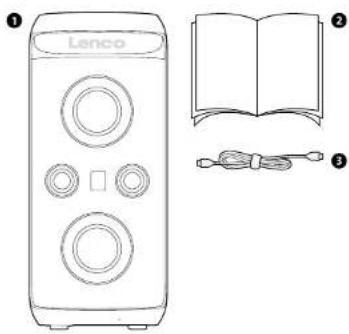
① Speaker
② USB-Cchargingcable
3 Manual
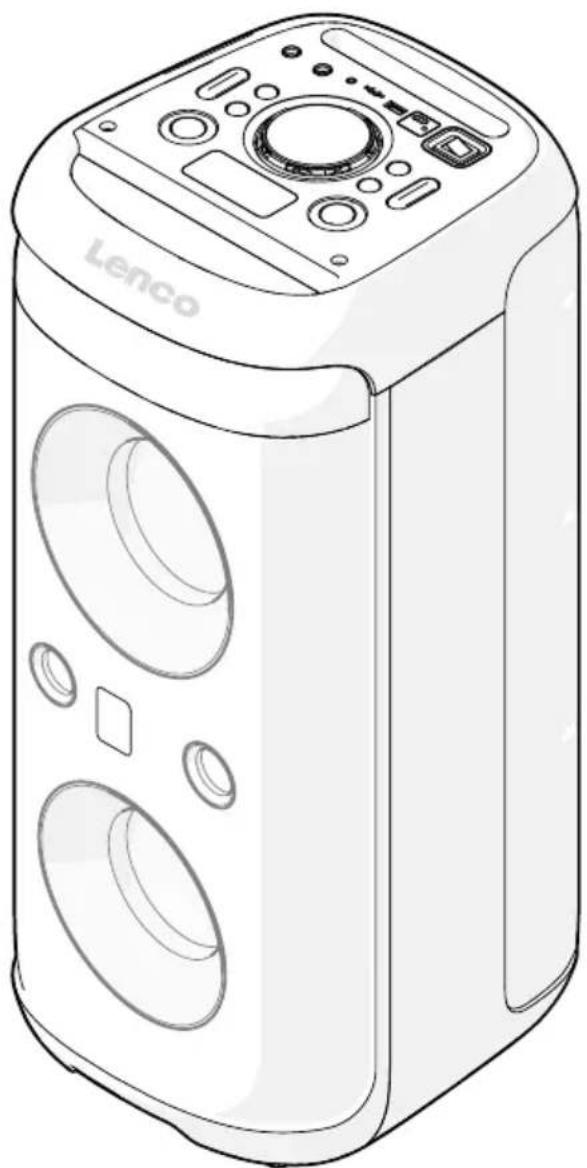
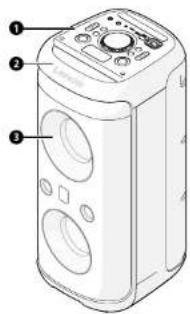
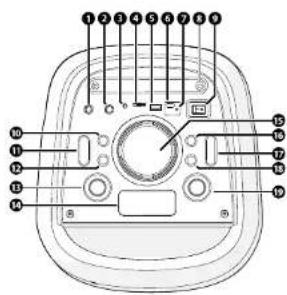
Main parts
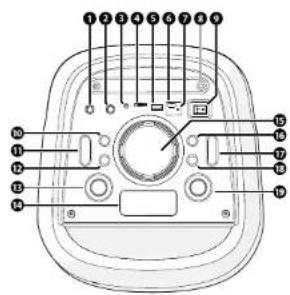
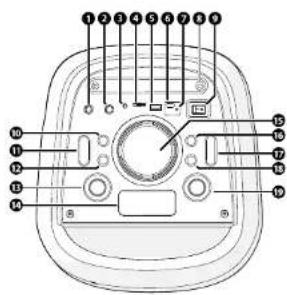
1 Control panel
2 Handle
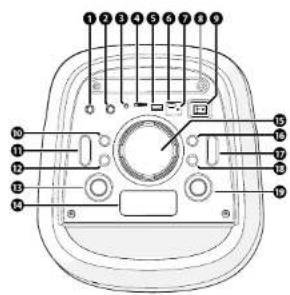
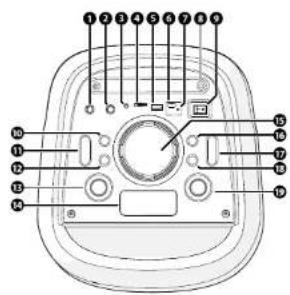
Control panel
1 Microphone Input 1
2 Microphoneinput2
3 AUXinput
4 MicroSDcardslot
5 USBinput
④ USBchargeport
7 Charging indicator LED
8. Smartphoneholder
1. Powerswitch
10 Tonebutton
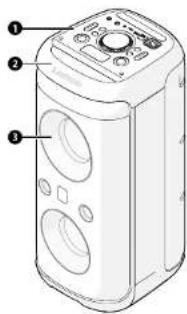
3 Drivers
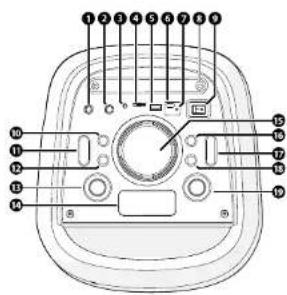
Lightmodebutton
12 Previousstrackbutton
13 Standby/Inputmodebutton
14 Display
15 Multi-ControlDipl
14 Repenthbutton
17 FOselectionbutton
18. Nexttrackbutton
19. Play/pausebutton
Specifications
| SpecificationsValue | |
| Product Bluetooth® Party Speaker | |
| TypePA-2108K | |
| Input Bluetooth®, AUX, USB | |
| Bluetooth® versions.3 | |
| Bluetooth® frequency range 2402 - 2480 MHz | |
| Maximum output power 8 dBm max. | |
| Speaker output power 100W | |
| Power Adapter Input AC 100 - 240 V -50/60 Hz 0.5 A | |
| Power Adapter Output DC 21 V - 15 A - 31.5 W | |
| Inputpower IXC 21 V - 15 A | |
| Powerconsumption10W | |
| No-load power consumption | <=1 W |
| Operatingconditions | 0 - 35 °C |
| Dimensions (I × b × h) | |
| Mainunit | 265 × 260 × 600 mm |
| Total (including main unit, packaging and accessories) | 340 × 305 × 702 mm |
| Weight | |
| Mainunit | 6.2kg |
| Total (including main unit, packaging and accessories) | 7.2kg |
Intended use
This product is intended to stream audio from your media device via Bluetooth ^® , audio cable, or from a USB flash drive.
This product is intended for indoor use only.
Only use the product as described in this user manual.
This product is not intended for commercial use.
Any modification of the product may have consequences for safety, warranty and proper functioning
This device is not intended for use by persons (including children) with reduced physical sensory or mental capabilities, or lack of experience and knowledge, unless they have been given supervision or instruction concerning use of the device by a person responsible for their safety, regarding the use of the device.
Safety instructions
Ensure you have fully read and understood the instructions in this document before you install or use the product. Keep the packaging and this document for future reference.
WARNING!
Chokinghazard:
- Do not let children play with packaging material. Packaging materials can lead to choking and suffocation. Always keep the packaging material out of reach of children.
Electrical hazard: -
Do not expose the product to water, rain, moisture, or high humidity.
• Do not immerse the product in water or other liquids.
• Do not use the product in damp environments, such as a bathroom or kitchen. -
Do not use this device in environments where condensation may form. If the device is used in a warm, humid room, moisture or water droplets can build up inside, which may cause it to malfunction. If this happens, turn off the device and leave it unplugged for 1 to 2 hours to allow it to dry completely before turning it back on.
- Never insert any object into the ventilation opening of the product. The product contains electrical components.
- Never place this product on top of other electrical devices
- Only use the provided charging cable.
- Keep the product away from pets and other animals. Animals can bite through the power cable and suffer electrical shock.
- Do not open the product, there are no user serviceable parts inside.
• This product may only be serviced by a qualified technician for maintenance. - Disconnect the product from the power source before cleaning
- Disconnect the product from the power source before service and when replacing parts.
- A USB adapter is not included. Only use a 5V/2A USB adapter to charge the product.
Firehazard: - Do not use the product if a part is damaged or defective. Always replace a damaged or defective product immediately.
- Unplug the product from the power source and other equipment if problems occur.
- Do not cover the ventilation openings. Always leave at least 5 cm of space around the product.
- Do not place the product on top of other electrical equipment.
- Never use the product with a damaged power cable or adapter.
CAUTION!
Risk of hearing loss:
- Extended exposure to high volumes can cause hearing loss.
NOTICE
Risk of damaging the product
- Keep the product away from heat sources, such as radiators, heaters, stoves, and naked flames.
- Keep the product away from strong magnetic objects.
• Always keep the power cable and the product away from usual walkways.
- Do not disconnect the product by pulling on the cable. Always grasp the connector and pull
- Avoid electrostatic discharge when handling the product. Electrostatic discharge can disturb the normal functioning of the product.
- Disconnect the product from the power outlet during lightning storms or before prolonged periods of disuse.
- Only use the product as described in this document.
- Do not drop the product and avoid bumping.
- Clean the outside of the product every month with a soft, damp cloth. Avoid abrasives that can damage the surface.
Installation
Check the contents of the package
Check that all parts are present and that no damage is visible on the parts. If parts are missing or damaged, contact the Lenco B.V. service desk via the website: www.lenco.com.
Charging the product
-
Place the product on a flat and stable surface close to a power outlet.
-
Plug a USB power adapter (not included) into a power outlet.
-
Plug the USB-C charging cable into the USB power adapter.
-
Switch the power on using the Power switch.
The display lights up.
- Press and hold the Standby to put the speaker on Standby mode.
The charging indicator LED lights up red during charging and switched off when the product is fully charged.
Using the product
Press and hold the Standby button to switch on the speakers.
Inputselection
The speaker automatically switches to the active input source. If multiple sources are connected, use the input mode button to change the input.
Press the input mode button repeatedly to cycle through the input modes.
The display show which input mode has been selected:
Input mode selected Message on display
| Bluetooth*BT | |
| USBUSB | |
| SD-CardTF | |
| AUXinputAUX |
Pairing with a Bluetooth® device
- Select the Bluetooth® input mode, using the instructions from the chapter 'Input selection'.
- Open the Bluetooth® settings on your mobile device and connect to "Lenco PA-210".
If prompted for a password, enter '0000'. - When connected, use the media control buttons to control the music.
Only one Bluetooth ^ device can be paired at one time. Not all Bluetooth ^ devices are compatible. - To disconnect Bluetooth ^® , press and hold the Pause/Play button.
AUXinput
- Select the Aux input mode, using the instructions from the chapter 'Input selection'.
- Plug the 3.5 mm audio cable (not included) into the AUX input of the speaker.
- Plug the other end of the 3.5 mm audio cable into your audio source.
- Play music from the connected device.
USB or SD-Card input
- Connect a USB device (not included) to the USB input port on the top of the speaker.
- After connecting the USB device, the speaker automatically switches to USB mode and starts audio
playback. - Use the control panel to play the next / previous track, or play/pause the music.
Do not use an extension cable to connect a memory stick, this may cause interference and result in loss of data.
ConnectMicrophones
- Plug the cable of a microphone (not included) in one of the two Mic input slots.
- Press the Multi-control button, and turn the Multi-control dial to adjust the volume.
The volume level shows on the display as 'PHxx', xx is a value between 00 and 32.
Adjust microphone echo
- Press the multi-control dial twice, and turn the Multi-control dial to adjust the volume.
The display shows 'ECxx', xx is a value between 00 and 32.
Generalsettings
Trebleadjustments
- Press the Tone button twice.
The display shows t00 ( Treble adjustment mode) - Turn the Multi-control dial to adjust the Treble:
• From t00 (neutral) - Down to t-09 (less)
• Up to t+09 (more)
This setting is saved automatically after 3 seconds.
Bassadjustments
- Press the Tone button
The display shows b00 (Bass adjustment mode)
- Turn the Multi-control dial to adjust the Bass;
• From b00 (neutral)
• Down to b-09 (less)
- Up to t+09 (more)
This setting is saved automatically after 3 seconds.
After standby or power off, the Treble and Bass adjustments reset to neutral.
Equalizerfunction
- Press the EQ button repeatedly to cycle through the EQ modes.
The display shows the selected EQ mode.
- Rotate the Multi-control dial to adjust the selected EQ mode.
Partylights
-
Press the light mode button repeatedly to cycle through the party light effects.
-
Press and hold the light mode button to switch off the Party lights.
True Wireless Stereo (TWS)
- Press the Standby / Input mode button twice.
The display shows SEAr (Search), and is searching for a connection.
- To disconnect, press the Standby / input mode button twice again.
Troubleshooting
| ProblemPossiblecauseSolution | ||
| The speakers produce no sound. | Speakers are switched off. Make sure the speakers are switched on. | |
| Volume is set too low. Increase the volume on the speaker or the connected device. | ||
| There is not audio signal coming from the connected device. | Make sure the connected device is playing audio and outputting a signal. | |
| The product does not connect to my audio device via Bluetooth ^4 . | The speaker is not in Bluetooth ^ mode. | Make sure Bluetooth ^ input mode is selected. See the 'Input Selection' chapter for more information. |
| The speaker is connected to a different device. | Press and hold the Play/Pause button to disconnect all connected Bluetooth ^ devices. Reconnect your device. | |
| The connected device is not compatible. | Try connecting a different Bluetooth ^ device. | |
| The speaker does not switch on. | The power adapter (not included) is not connected. | Make sure the power cable is connected properly. |
| No power on the wall outlet. Make sure the moins power is connected and the outlet is switched on. | ||
| Battery level is to low Charge the battery. | ||
Maintenance
Cleaning
Before cleaning and maintenance, switch off the product and disconnect the power.
Clean the outside of the product every month with a soft, damp cloth. Avoid abrasives that can damage the surface.
Guarantee
Commax B.V. offers service and warranty in accordance with the European law, which means that in case of repairs (both during and after the warranty period) you should contact your local dealer.
- It is not possible to send products that need repairs to Commaxx B.V. directly.
- If this unit is opened or accessed by a non-official service centre in any way, the warranty expires.
- This device is not suitable for professional use. In case of professional use, all warranty obligations of the manufacturer will be voided.
- The supplier is not responsible for damage or lost data caused by malfunction, misuse, modification of the device.
Disclaimer
Updates to firmware and/or hardware components are made regularly. Therefore some of the instruction, specifications, and pictures in this documentation may differ slightly from your particular situation. All items described in this guide are for illustration purposes only and may not apply to your particular situation. No legal right or entitlements may be obtained from the description made in this manual.
Disposal

This symbol indicates that the relevant electrical product or battery should not be disposed of as general household waste in Europe. To ensure the correct waste treatment of the product and battery, please dispose them in accordance to any applicable local laws of requirement for disposal of electrical equipment or batteries. In doing so, you will help to conserve natural resources and improve standards of environmental protection in treatment and disposal of electrical waste (Waste Electrical and Electronic Equipment Directive).
DeclarationofConformity
We, Commax B.V. declare as manufacturer that the product PA-210BK from our brand Lence®, produced in China, has been tested according to all relevant CE standards and regulations and that all tests have been passed successfully. This includes, but is not limited to the RED 2014/53/EU regulation.
The complete Declaration of Conformity (and the safety datasheet if applicable) can be found and downloaded via:
https://doc.nedls.com/en-us/PA210BK
Service
For more information and helpdesk support, please visit www.lenco.com
Commaxx B.V. Wiebachstraat 37, 6466 NG, Kerkrade, The Netherlands.
natural_image
Line drawing of a Lenco device with three labeled parts: an open book, a cable, and a circular ports (no text or symbols on the devices themselves)3 Treiber
Bedienfeld
True Wireless Stereo (TWS)
19 Boutondelecture/pause
Spécifications
True Wireless Stereo (TWS)
Bedieningspaneel
② Hanovat
③ Luidsprekers
Bedieningspaneel
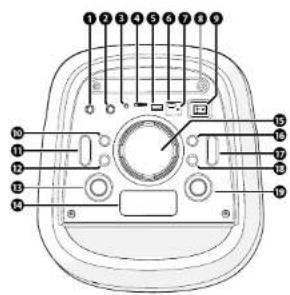
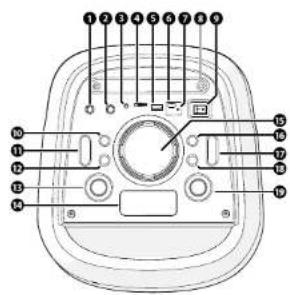
① Microfooningang 1
② Microfooningang2
3 AUX-ingang
4 MicroSD-kaartsleut
⑤ USB-Ingang
6 USB-oplaadpoort
7 Led-controlelampjesvcoropladen
8Smartphonehoulder
9 Aon-/uitschakelaar
10 Toon-knop
Lichtmodus-knop
Driver
True Wireless Stereo (TWS)
① Panel de control
② Aso
2 Controladores
Panel de control
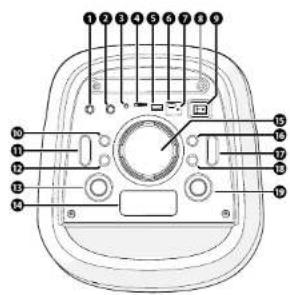
3 Controladores
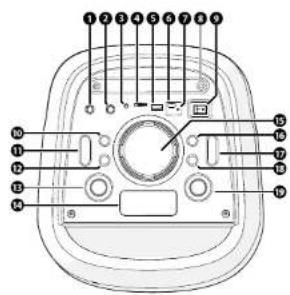
True Wireless Stereo (TWS)
3 Drivrutiner
natural_image
Line drawing of a Lenco device with three labeled parts: an open book, a connected cable, and a circular control panel (no text or symbols on the devices themselves)3 Ajurit
1 Ohjouspaneeli
2 Kahva
Ohjauspaneeli
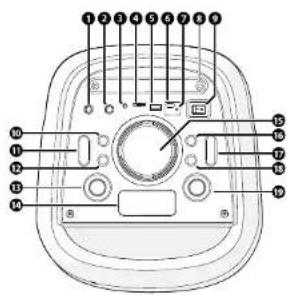
natural_image
Line drawing of a Lenco device with three labeled parts: an open book, a cable, and a circular ports (no text or symbols on the devices themselves)1 Høyttaler
USB-C-lodekabel
3Höndbok
Hoveddeler
1 Kontrollpanel
2 Hánatok
3 Drivere
Kontrollpanel
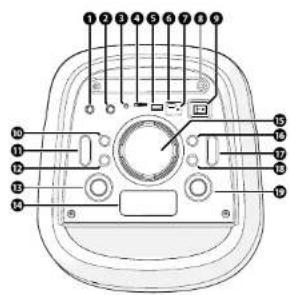
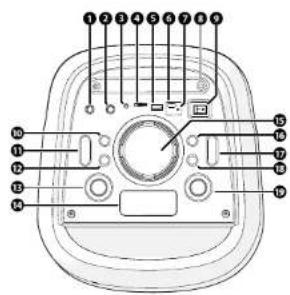
① Mikrofeninngang1
② Mikrofoninngang2
3 AUX-inngang
4 ApningforMicroSD-kort
⑤ USB-Inngang
6 USB-ladeport
⑦ Ladeindikatorlys
Smarttelefonholder
9 Strombryten
10 Tone-knapp
Lysmodus-knapp
12 Forrigespor-knapp
Standby-/inngangsmodusknopp
14 Skjerm
15 Multi-ControlDial
16 Gjenta-knapp
7 KnappforvalgavEQ
18 Nestespor-knapp
Spillov-/pouse-knapp
Spesifikasjoner
Displayet lyser opp.
True Wireless Stereo (TWS)
3 Drivere
Lysstyrkeknap
12 Forrigenummer-knop
13 Standby/Inputmode-knap
14 Skopim
15 Multi-ControlDial
16 Gentag-knap
17 KnaptilyalqafEQ
18 Noestenummer-knap
19 Afspil-/pause-knap
Specifikationer
| SpecifikationerVærdi | |
| ProduktBluetooth*festhøjitoler | |
| TypePA-2108K | |
| Input Bluetooth*, AUX, USB | |
| Bluetooth*versiona3 | |
| Bluetooth*frekvensinterval 2402 - 2480 MHz | |
| Maksimaludgangsstrøm 6 dæm max. | |
| Højitalerensudgangseffekt100W | |
| Strømadapterinput AC 100 - 240 V ~50/80 Hz 0,5 A | |
| Strømadapteroutput DC 21 V - 1.5 A - 31.5 W | |
| Inputeffekt DC 21 V - 1.5 A | |
| Strømforbrug10W | |
| Strømforbrug ved tomgang | <= 1 W |
| Driftsbetingeiser | 0 - 35 °C |
| Mål (I x b x h) | |
| Hovedenhed | 295 x 260 x 600 mm |
| I alt (inklusive hovedenhed, emballage og tilbehør) | 340 x 305 x 702 mm |
| Vægt | |
| Hovedenhed | 6,2kg |
| I alt (inklusive hovedenhed, emballage og tilbehør) | 7,2kg |
Tilsigtet brug
True Wireless Stereo (TWS)
True Wireless Stereo (TWS)
1 Panel steruicy
② Uchwyt
3 Sterowniki
Panel sterujący
True Wireless Stereo (TWS)
3 Drivers
True Wireless Stereo (TWS)
Reproduktory
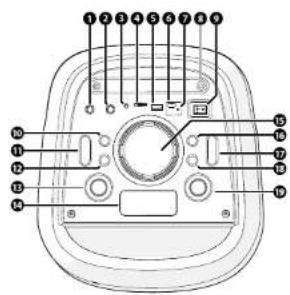
① Vstup pre mikrofón I
2 Vstuppremikrofön2
3 VstupAUX
4 SlotnakartuMicroSD
5 VstupUSB
6 NabijaciportUSB
7 LEDindikatomabijania
Držiak smartfónu
9 Vypínac
TU Tlačiclo tónu
natural_image
Line drawing of a Lenco device with three circular buttons and an open book, alongside a cable (no text or symbols)3 audice
3 Drivere
Panou de comandă