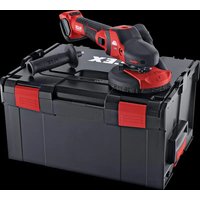
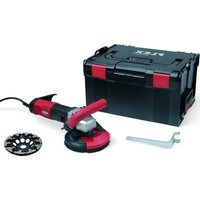
SE 125 18.0-EC - Sander Flex - Free user manual and instructions
Find the device manual for free SE 125 18.0-EC Flex in PDF.


| Brand | Flex |
| Model | SE 125 18.0-EC |
| Product type | Cordless surface sander |
| Rated voltage | 18 V |
| No-load speed | 1 - 1,500 min⁻¹ (depending on battery) |
| Max. grinding tool diameter | 125 mm |
| Spindle thread | M14 |
| Weight (without battery) | 2.2 kg |
| Battery weight (2.5 / 5.0 / 8.0 Ah) | 0.42 / 0.72 / 1.1 kg |
| Operating temperature | -10 to +40 °C |
| Charging temperature | 0 to 40 °C |
| Storage temperature | -20 to 50 °C |
| Sound pressure level LPA | 79 dB(A) |
| Sound power level LWA | 87 dB(A) |
| Total vibration value (sanding) | <2.5 m/s² |
| Uncertainty K (vibrations) | 1.5 m/s² |
| Power supply | Li-ion battery (2.5 / 5.0 / 8.0 Ah) |
| Sanding pad | Hook-and-loop, ∅ 125 mm |
| Dust extraction connection | Yes (connection nozzle) |
| Main functions | Dry sanding of metals, stone, wood, paints; dust extraction; 4-position speed adjustment; continuous operation |
| Auxiliary handle | Yes (mountable) |
| Protection hood | With crown brushes, height adjustable |
| Spindle lock | Yes |
| Maintenance and cleaning | Regular cleaning of ventilation slots and dust filter; do not use water or liquid products |
| Spare parts and repairability | Repairs only by authorized service center; exploded views at www.flex-tools.com |
| Certifications | CE, UKCA |
Frequently Asked Questions - SE 125 18.0-EC Flex
User questions about SE 125 18.0-EC Flex
0 question about this device. Answer the ones you know or ask your own.
Ask a new question about this device
Download the instructions for your Sander in PDF format for free! Find your manual SE 125 18.0-EC - Flex and take your electronic device back in hand. On this page are published all the documents necessary for the use of your device. SE 125 18.0-EC by Flex.
USER MANUAL SE 125 18.0-EC Flex
natural_image
Illustration of a cleaning power tool with mesh base and circular head (no text or symbols)natural_image
Illustration of a mechanical tool being adjusted for a workpiece, showing tool positioning and cutting process (no text or symbols)natural_image
Illustration of a hand cutting a circular object with a curved arrow indicating rotation (no text or symbols)natural_image
Mechanical gear assembly with a large 'X' symbol, no text or labels presentnatural_image
Illustration of a cleaning or cleaning tool with directional arrows indicating rotation (no text or symbols)natural_image
Illustration of a cleaning or cleaning tool on a surface, showing a brush and tool interacting with a circular object (no text or symbols present)natural_image
Close-up of a car's internal component showing a connector and cable (no text or symbols visible)natural_image
Close-up of a car's side panel showing a button and internal component, with no visible text or symbols.natural_image
Close-up of a camera control panel with buttons and an arrow pointing to the button (no text or symbols visible)natural_image
Two hands using a power tool on a tiled floor, no text or symbols visiblenatural_image
Close-up illustration of a cleaning or cleaning tool with directional arrows indicating motion (no text or symbols)natural_image
Illustration of a hand using a power tool to cut or spread material on a cutting board (no text or symbols visible)natural_image
Close-up of a car door handle with a black arrow indicating clockwise motion (no text or symbols)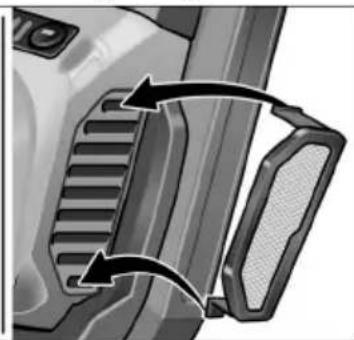
natural_image
Close-up of a mechanical component with two curved arrows indicating motion or force direction (no text or symbols)Symbols used in this manual ..... 16
Symbols on the power tool 16
For your safety 16
Noise and vibration 19
Technical specifications 20
Overview 21
Instructions for use 22
Maintenance and care 26
Disposal information 27
C ∈ / □ Declaration of Conformity .... 27
Exemption from liability 27
Symbols used in this manual

WARNING!
Denotes impending danger.
Non-observance of this warning may result in death or extremely severe injuries.

CAUTION!
Denotes a possibly dangerous situation.
Non-observance of this warning may result in slight injury or damage to property.

NOTE
Denotes application tips and important information.
Symbols on the power tool

Before switching on the power tool, read the operating manual!

Wear goggles!

Always operate with two hands!

Disposal information for the old machine (see page 27)!

CE label

UKCA label
For your safety

WARNING!
Before using the power tool, please read and follow:
– these operating instructions,
- the "General safety instructions" on the handling of power tools in the enclosed booklet (leaflet-no.: 315.915),
– the currently valid site rules and the regulations for the prevention of accidents.
This power tool is state of the art and has been constructed in accordance with the acknowledged safety regulations.
Nevertheless, when in use, the power tool may be a danger to life and limb of the user or a third party, or the power tool or other property may be damaged.
The power tool may be operated only if it is – as intended,
- in perfect working order.
Faults which impair safety must be repaired immediately.
Intended use
The surface sander SE 125 18.0-EC is designed
– for commercial use in industry and trade,
- for the dry surface grinding of metal, stone, and wood as well as for the dry sanding of paintwork,
- for use with Velcro sandpaper on backing pads which FLEX offers for this device,
– for use with flap sanding discs which FLEX offers for this device,
Tools must be authorised to run at a speed of at least 3,000 rpm.
Cutting-off and grinding wheels must not be used on this electric power tool.
When using the surface sander SE 125 18.0-EC, connect a Class M dust extractor.
Safety instructions

WARNING!
Read all safety instructions and other instructions. Failure to observe the safety instructions and other instructions may result in an electric shock, fire and/or serious injuries. Keep all safety instructions and other instructions in a safe place for the future.
■ This power tool is to be used as a sander. Read all safety warnings, instructions, illustrations and specifications provided with this power tool. Failure to follow all instructions listed below may result in electric shock, fire and/or serious injury.
■ This power tool is not recommended for sanding, polishing, wire brushing, hole cutting or cutting-off. Operations for which the power tool was not designed may create a hazard and cause personal injury.
■ Do not use any insertion tools that have not been specially designed and specified by the manufacturer for this power tool. Just because an accessory can be attached to the power tool does not mean that it is safe to use.
■ The rated speed of the accessory must be at least equal to the maximum speed marked on the power tool. Accessories running faster than their rated speed can break and fly apart.
■ The outside diameter and the thickness of your accessory must be within the capacity rating of your power tool. Incorrectly measured insertion tools cannot be adequately shielded or controlled.
■ Sanding discs, sanding pads or other accessories must fit exactly on the grinding spindle of your electric power tool. Insertion tools, which do not fit exactly on the grinding spindle of the electric power tool, rotate unevenly, vibrate violently and may result in loss of control.
■ The dimensions of the accessory mounting must fit the dimensions of the mounting hardware of the power tool. Accessories that do not match the mounting hardware of the power tool will run out of balance, vibrate excessively and may cause loss of control.
■ Do not use a damaged accessory. Before use, always check insertion tools for splinters and cracks, sanding pad for cracks, wear and severe abrasion. If power tool or accessory is dropped, inspect for damage or install an un-damaged accessory. After inspecting and installing an accessory, position yourself and bystanders away from the plane of the rotating accessory and run the power tool at maximum no-load speed for one minute. Damaged accessories will normally break apart during this test time.
■ Wear personal protective equipment. Depending on application, use face shield, safety goggles or safety glasses. If appropriate, wear a dust mask, hearing protection, protective gloves and/or a special apron which protect you from small sanding and material particles.
The eye protection must be capable of stopping flying debris generated by various operations. The dust mask or respirator must be capable of filtrating particles generated by your operation. Prolonged exposure to high intensity noise may cause hearing loss.
- Keep bystanders a safe distance away from work area. Anyone entering the work area must wear personal protective equipment. Fragments of workpiece or of a broken accessory may fly away and cause injury beyond immediate area of operation.
■ Never lay the power tool down until the accessory has come to a complete stop. The spinning accessory may grab the surface and pull the power tool out of your control.
■ Do not run the power tool while carrying it at your side. Accidental contact with the spinning accessory could snag your clothing, pulling the accessory into your body.
■ Regularly clean the power tool's air vents.
The motor's fan will draw the dust inside the housing and excessive accumulation of powdered metal may cause electrical hazards.
■ Do not operate the power tool near flammable materials. Sparks could ignite these materials.
■ Do not use accessories that require liquid coolants. Using water or other liquid coolants may result reresult in electrocution or shock.
Special safety instructions for sanding
- Do not use oversized sanding sheets, but follow the manufacturer's specifications for the size of sanding sheets. Sanding sheets which project over the sanding pad may cause injuries as well as block and rip the sanding sheets or cause a kickback.
Kickback and Related Warnings
Kickback is the sudden reaction to a pinched or snagged rotating insertion tool, such as a sanding disc, sanding pad, wire brush, etc. Pinching or snagging may cause a rotating insertion tool to stop abruptly. For example, if an abrasive wheel is snagged or pinched by the workpiece, the edge of the wheel that is entering into the pinch point can dig into the surface of the material causing the wheel to climb out or kick out.
The wheel may either jump toward or away from the operator, depending on direction of the wheel's movement at the point of pinching. Abrasive wheels may also break under these conditions.
For example, if a sanding disc is snagged or pinched by the workpiece, the edge of the sanding disc which is entering the workpiece may become caught and cause the sanding disc to break off or kick back.
The sanding disc then moves towards or away from the operator, depending on the direction in which the disc is rotating at the point of pinching. Sanding discs may also break under these conditions.
A recoil occurs if the electric power tool is used incorrectly or improperly.
A recoil can be prevented by appropriate precautions as described below.
■ Maintain a firm grip on the power tool and position your body and arm to allow you to resist kickback forces.
Always use auxiliary handle, if provided, for maximum control over kickback or torque reaction during start-up. The operator can control torque reactions or kickback forces, if proper precautions are taken.
■ Never place your hand near the rotating accessory. Accessory may kickback over your hand.
■ Do not position your body in the area where power tool will move if kickback occurs.
Kickback propels the electric power tool in the direction opposite to the movement of the sanding disc at the point of pinching.
■ Use special care when working corners, sharp edges etc. Avoid bouncing and snagging the accessory. Corners, sharp edges or bouncing have a tendency to snag the rotating accessory and cause loss of control or kickback. This causes a loss of control or kickback.
■ Do not attach a saw chain woodcarving blade or toothed saw blade. Such blades create frequent kickback and loss of control.
Additional safety instructions

WARNING!
Touching or inhaling harmful/toxic dust is a hazard to the operator and to people in the vicinity.
It is not recommended to sand lead paint. Lead paint should be removed by a specialist only.
■ Do not work on materials which release hazardous substances (e.g. asbestos). Take precautions if hazardous, combustible or explosive dust is likely to occur. Wear protective dust mask. Use dust extraction system.

DAMAGE TO PROPERTY!
The mains voltage and the voltage specifications on the rating plate must correspond.
Noise and vibration

WARNING!
The indicated measurements refer to new power tools. Daily use causes the noise and vibration values to change.

NOTE
The vibration emission level given in this information sheet has been measured in accordance with a standardised test given in EN 62841 and may be used to compare one tool with another. It may be used for a preliminary assessment of exposure. The declared vibration emission level represents the main applications of the tool.
However if the tool is used for different applications, with different accessories or poorly maintained, the vibration emission may differ. This may significantly increase the exposure level over the total working period.
For a precise estimation of the vibrationload the times should also be considered during which the power tool is switched off or even running, but not actually in use. This may significantly decrease the exposure level over the total working period.
Identify additional safety measures to protect the operator from the effects of vibration such as: maintain the tool and the accessories, keep the hands warm, organisation of work patterns.

CAUTION!
Wear ear protection at a sound pressure above 85 dB(A).
Technical specifications
| Product Surface sander | ||
| Product type SE 125 18.0-EC | ||
| Nominal voltage V 18 | ||
| Battery Ah | AP 18.0/2,5AP 18.0/5,0AP 18.0/8,0 | |
| Idling speed | min^-1 | 1 - 6602 - 9303 - 1,1954 - 1,500 |
| Spindle thread mm M14 | ||
| Max. grinding tool ∅ mm 125 | ||
| Weight according to “FLEX procedure 01” (without battery) | kg 2,2 | |
| Weight of batteryAP 18.0/2.5AP 18.0/5.0AP 18.0/8,0 | kg | 0.420.721,1 |
| Working temperature | °C | -10~40 |
| Charging temperature 0~40 | ||
| Storage temperature -20~50 | ||
| A-weighted sound pressure level according to EN 62841 (see “Noise and vibration”): | ||
| Sound pressure level L_PA | db(A) 79 | |
| Sound power level L_WA | db(A) 87 | |
| Uncertainty K db 3 | ||
| Total vibration value accordance with EN 62841 (see „Noise and vibration“): | ||
| Emission value ah when grinding with sanding sheet | m/s^2 | <2.5 |
| Uncertainty K m/s^2 1.5 | ||
Overview
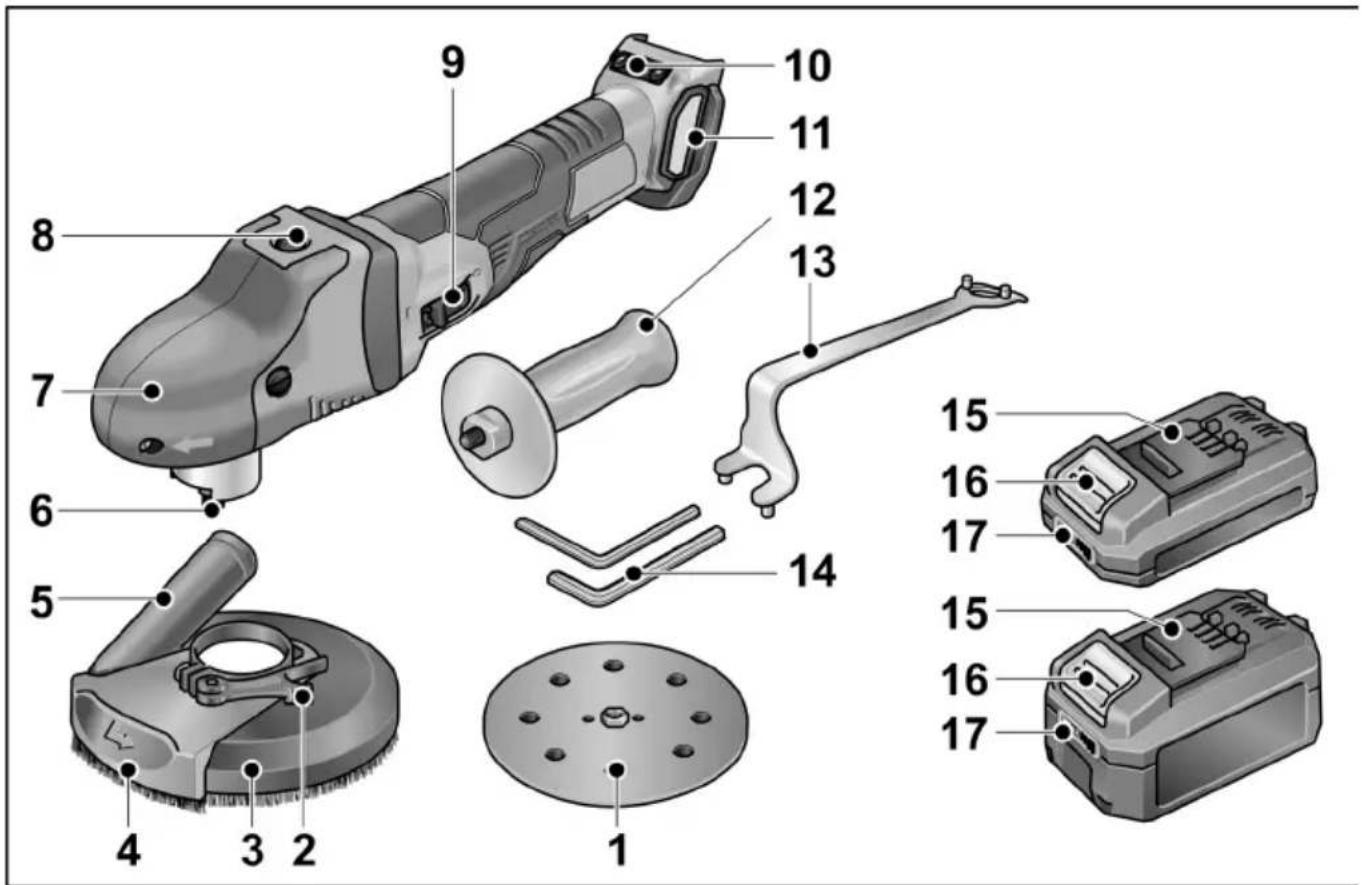
1 Velcro sanding disc
2 Clamping lever for guard hood
3 Guard hood with brush ring
4 Pivoted edge segment
5 Connection for dust extraction
6 Tool holder
7 Handle cover
With air outlet and direction-of-rotation arrow.
8 Spindle lock
Secures the spindle when the tool is changed.
9 Switch rocker
Switches the power tool on and off.
With notched position for continuous operation.
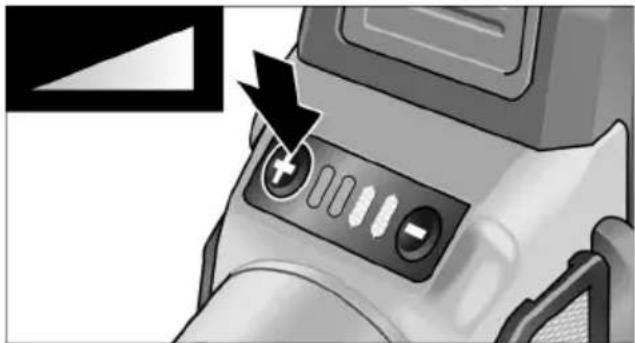
10 Speed control button
+/- function with 4 levels
11 Filter cover
12 Auxiliary handle
13 Clamping nut wrench
14 Allen key
15 Li-ion battery (2.5 Ah or 5.0 Ah)
16 Release button for battery
17 State of charge indicator
Instructions for use

WARNING!
Remove the battery before carrying out any work on the power tool.
Before switching on the power tool
Unpack power tool and accessories and check that no parts are missing or damaged.
i NOTE
The batteries are not fully charged on delivery. Prior to initial operation, charge the batteries fully. Refer to the charger operating manual.
Inserting/replacing the battery
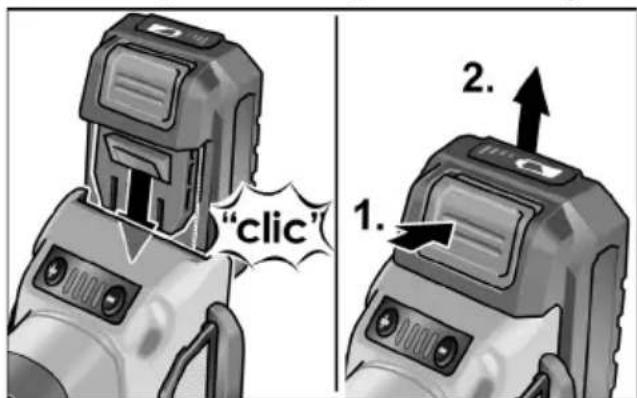
■ Press the charged battery into the power tool until it clicks into place.
■ To remove, press the release button (1.) and pull out the battery (2.).

CAUTION!
When the device is not in use, protect the battery contacts. Loose metal parts may short-circuit the contacts; explosion and fire hazard!
Battery state of charge
■ Press the button to check the state of charge at the state of charge indicator LEDs.
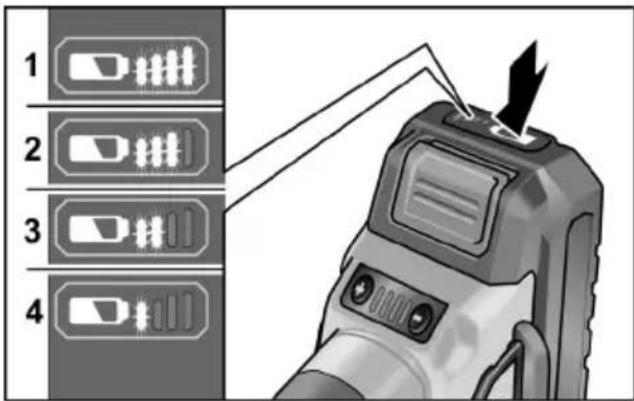
The indicator goes out after 5 seconds. If one of the LEDs flashes, the battery must be recharged. If none of the LEDs light up after the button is pressed, the battery is faulty and must be replaced.
Attaching the auxiliary handle
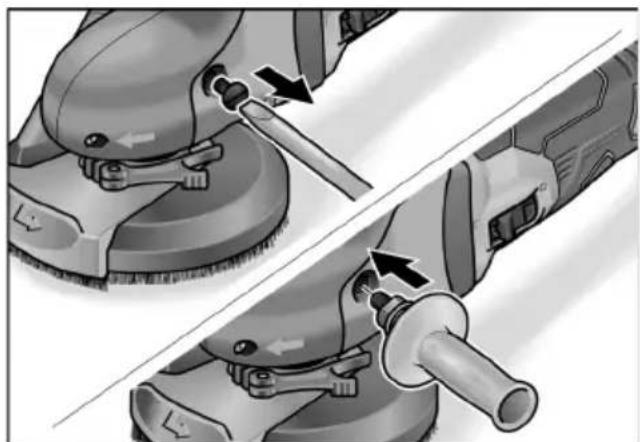
The auxiliary handle can be attached to improve handling of the electric power tool.
natural_image
Illustration of a hand using a power tool to adjust or install a mechanical component (no text or symbols visible)■ Remove fastening screw from the left side of the grip hood.
■ Screw in and tighten auxiliary handle.
When removing the auxiliary handle, put back the screw which was removed beforehand.
Connecting an extraction system

NOTE
It is recommended to use the FLEX special extractor VCE 44 MAC.
■ Attach the suction hose to the connection of the protective hood.
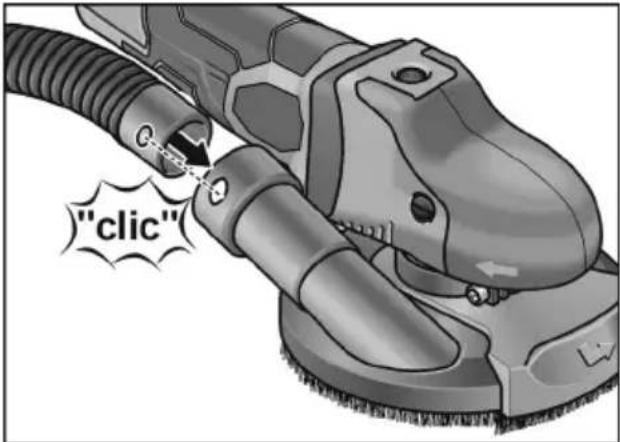
■ Connect the suction hose to the dust extraction system. Observe the operating instructions of the dust extraction system. Check the attachment.
■ Slide the enclosed adapter onto the suction connection of the suction hood.
■ Connect the suction hose.
Attaching/changing the Velcro sandpaper
natural_image
Illustration of a hand using a tool to cut a circular component with holes, showing mechanical deformation (no text or symbols)■ Remove the battery.
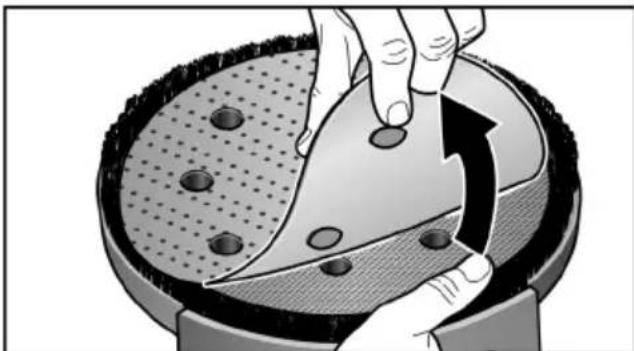
■ Remove worn sanding tool from the backing pad.
■ Place the Velcro sandpaper in the centre of the backing pad and press on.
Note position of the holes to ensure that the sanding dust is extracted.
■ Conduct a test run to check that the sanding tool is clamped in the centre.
Working with flap sanding discs

NOTE
Flap sanding discs are a component of the "Metal working" accessory set.
■ Remove the battery.
■ Press and hold down the spindle lock.
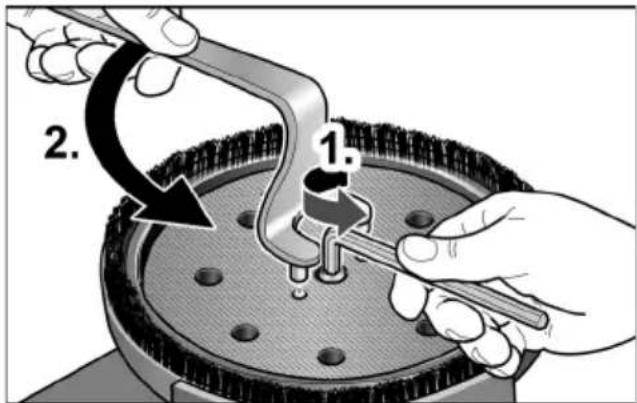

NOTE
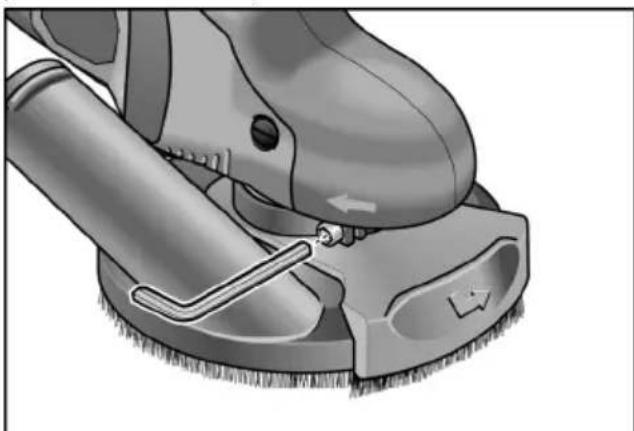
If the Velcro pad is stuck, hold the gear shaft in place using an Allen key(1.).
■ Loosen the Velcro pad by hand or using a two-hole wrench (2.).
■ Screw Velcro pad anti-clockwise off the spindle.
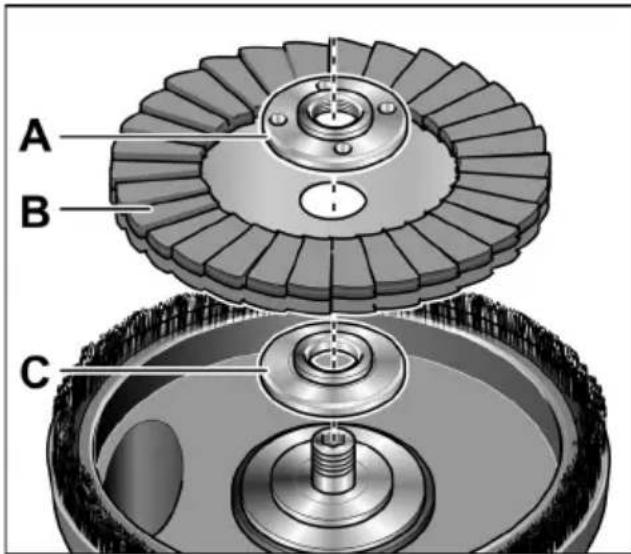
■ Place clamping flange (A) on spindle.
■ Place flap sanding disc (B) on clamping flange.
■ Screw the clamping nut (C), with flange face up, onto the spindle.
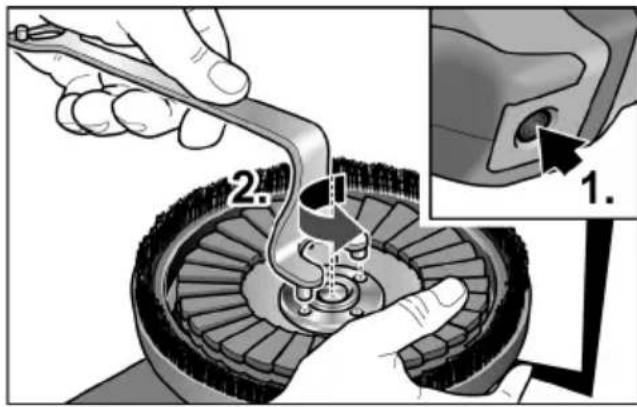
■ Press and hold down the spindle lock (1.).
■ Tighten clamping nut clockwise using the holding wrench (2.).
■ Conduct a test run to check that the sanding tool is clamped in the centre.

CAUTION!
Never use a diamond sanding disc not approved by FLEX on this electric power tool. Risk of damaging the device!
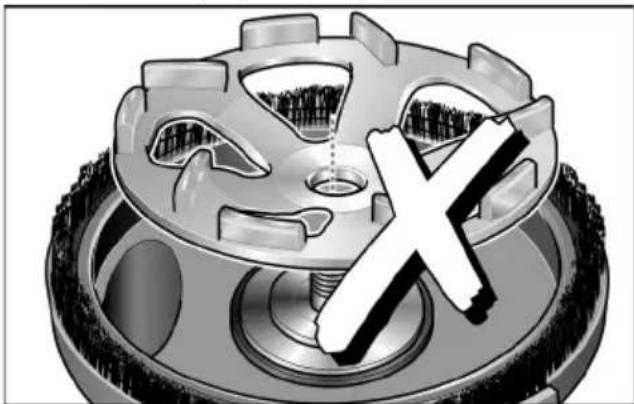
natural_image
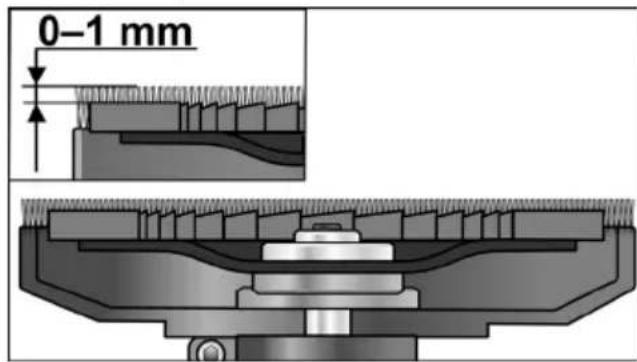
Mechanical gear assembly with a cross symbol overlay (no text or labels)Check position of the guard:
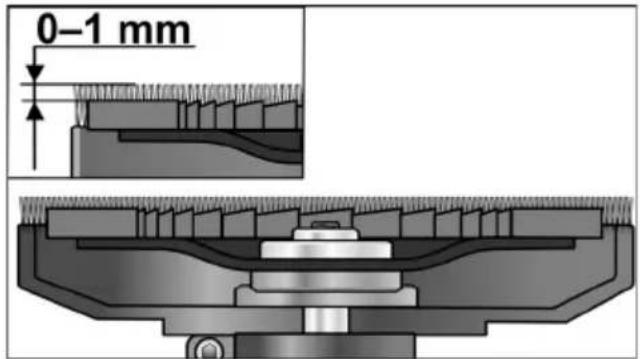
The brush ring should protrude over the sanding tool by approx. 0–1 mm. Correct if required.
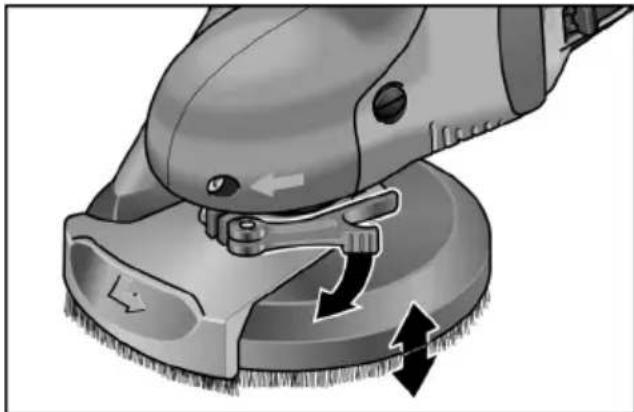
■ Loosen clamping lever on guard hood.
■ Set the guard hood to the required height.
natural_image
Close-up of a cleaning or cleaning tool with directional arrows indicating motion (no text or symbols)■ Tighten the clamping lever.

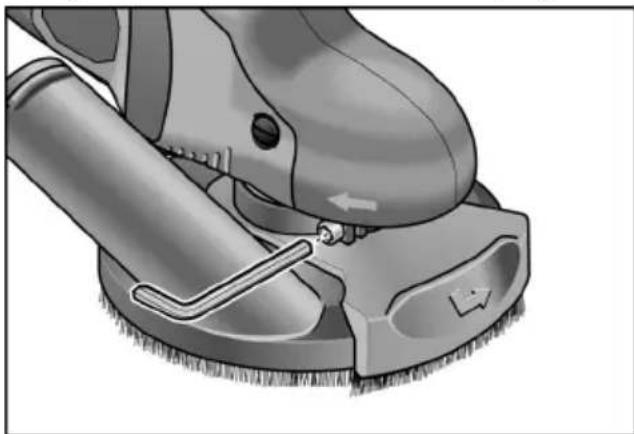
NOTE
If the clamping force decreases, the clamping can be adjusted by tightening the hexagon socket screw on the clamping lever.
natural_image
Illustration of a cleaning or cleaning tool on a surface, showing a brush and tool interacting with a circular component (no text or symbols present)Switching the electric power tool on and off
Brief operation without engaged switch rocker
natural_image
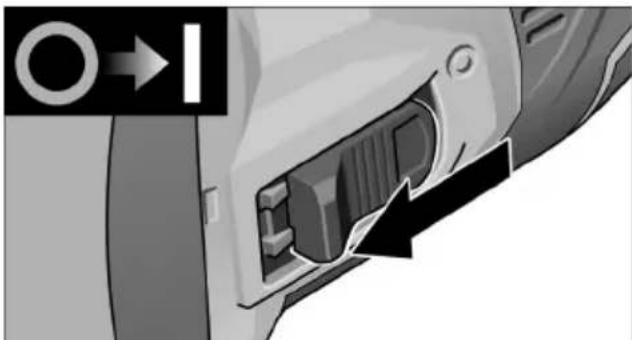
Close-up of a car's internal component with a black arrow pointing to a port, no visible text or symbols■ Push the switch rocker forwards and hold in position.
■ To switch off the power tool, release the switch rocker.
Continuous operation with engaged switch rocker
i NOTE
Following a power failure, the switched-on electric power tool will not start running again.
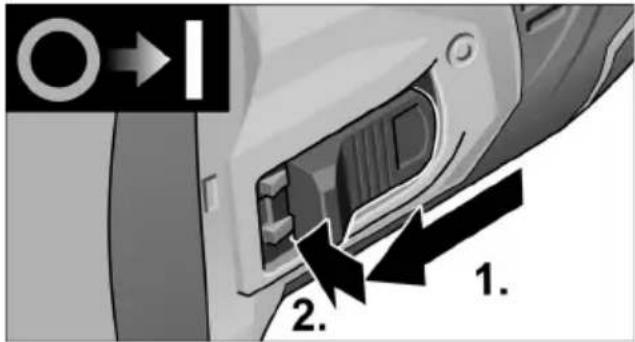
■ Push the switch rocker forwards and engage by pressing the front end.
Switch off the machine
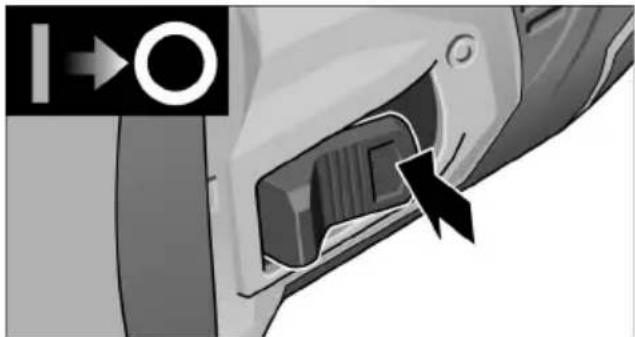
natural_image
Close-up of a car's side panel showing a black arrow pointing to the internal component (no text or symbols visible)■ To switch off the power tool, release the switch rocker by pressing the rear end.
Preselecting the speed
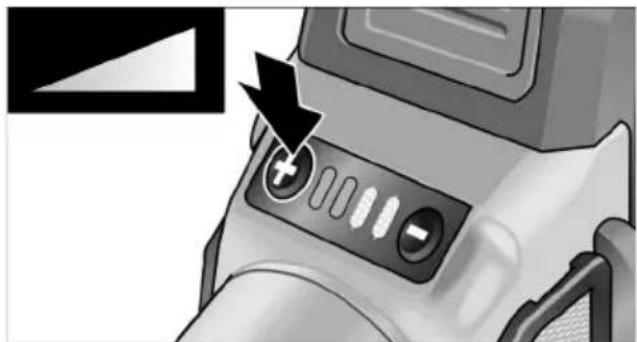
natural_image
Close-up of a camera lens control panel with buttons and an arrow pointing to the button (no text or symbols visible)■ To set the operating speed, press the speed control button. Selected speed is maintained even when switching off. ■ Gently press the switch to accelerate the power tool up to the preselected speed.
CAUTION!
Risk of injury due to destruction of the tool. Use the appropriate tool for the job.
i NOTE
- Overload protection: switches the machine off in the event of overload.
- Sensor-controlled temperature monitoring: If there is a risk of overheating the machine switches off.
Working with the power tool
WARNING!
The rotating sanding disc must not come into contact with sharp projecting objects. Danger of kickback! Damage to sanding pad. If the sanding pad is damaged or severely worn, it must be replaced.
CAUTION!
Hold the electric power tool with both hands!
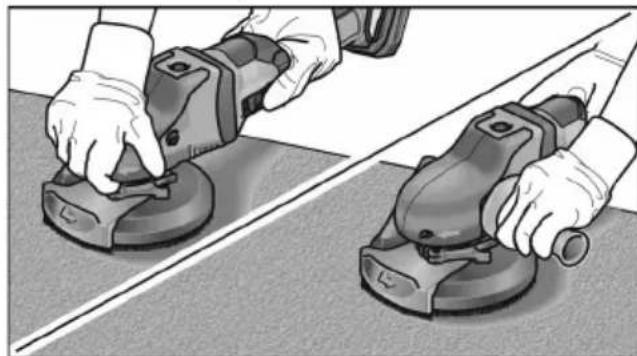
natural_image
Two hands using a power tool on a flat surface, no text or symbols visible- Attach sanding tool.
- Check position of the guard.
- Connect dust extraction system.
- Switch on dust extraction system.
- Switch on the power tool.
- Place electric power tool on the work surface. The brush ring must be flush with the work surface.
-
Increase the pressure to bring the sanding pad into contact with the work surface. In doing so, slew the electric power tool with overlapping movements.
-
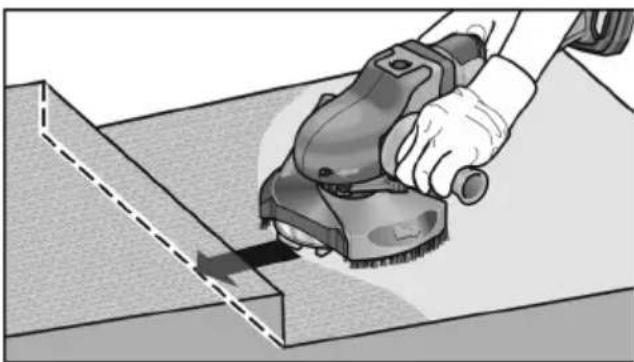
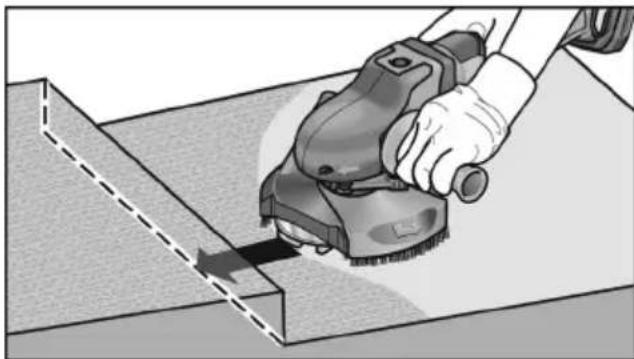
Sanding in corners:
- Switch off the power tool and wait until the sanding tool has come to a standstill.
– Pull out pivoted edge segment and swivel to left.
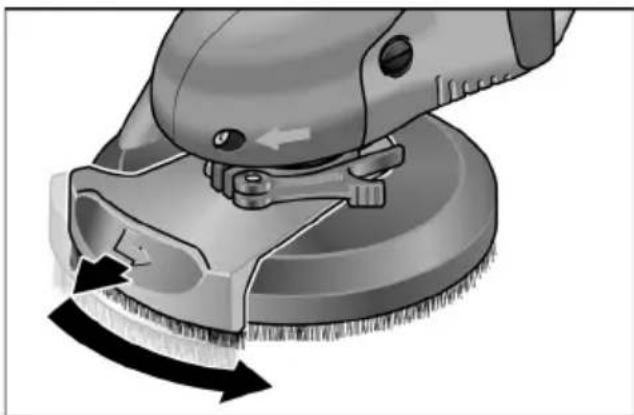
natural_image
Close-up of a cleaning brush on a circular base with black arrows indicating motion (no text or symbols)- Switch on power tool again.
- Place electric power tool on the work surface.
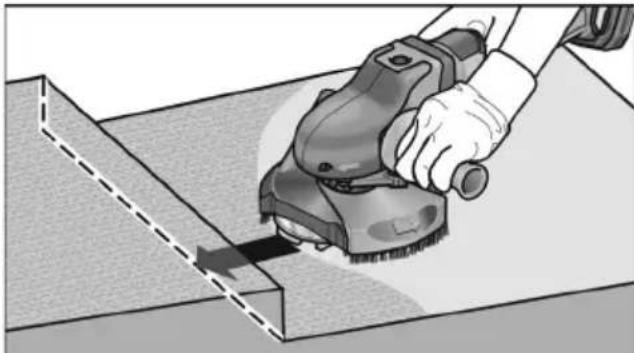
natural_image
Illustration of a hand using a power tool to cut or spread material on a cutting board (no text or symbols visible)- After work, switch off the electric power tool.
Brush ring
The guard features a brush ring.
This ring has two functions:
- As the ring projects above the surface of the sanding pad, it is the ring which comes into contact with the work surface first. As a result, the sanding pad is brought parallel to the work surface before the sanding tool comes into contact with the work surface. This avoids a sickle-shaped depression caused by the edge of the sanding pad.
- The ring retains the dust until it is extracted by the dust extractor.
If the brush ring is damaged or excessively worn, it should be replaced.
A replacement brush set is available from any FLEX customer service centre.
Maintenance and care

WARNING!
Remove the battery before carrying out any work on the power tool.
Cleaning

WARNING!
Do not use water or liquid detergents.

CAUTION!
When cleaning with compressed air, always wear goggles.
■ Regularly clean the power tool and ventilation slots. Frequency of cleaning is dependent on the material and duration of use.
■ Regularly blow out the housing interior and motor with dry compressed air.
■ Regularly clean the filter cover.
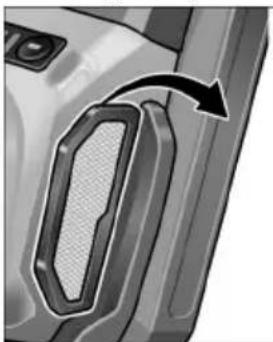
natural_image
Close-up of a car door panel with a curved arrow indicating rotation or movement (no text or symbols visible)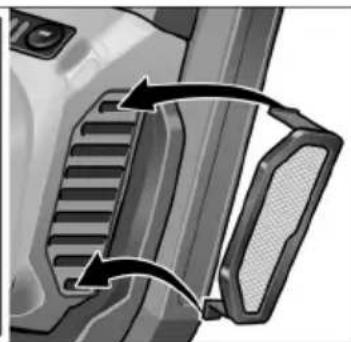
natural_image
Close-up of a mechanical component with two arrows indicating direction (no text or symbols visible)■ Remove filter cover and blow it out with dry compressed air.
Repairs
Repairs may be carried out by an authorised customer service centre only.

NOTE
During the warranty period do not loosen the screws on the motor housing. Non-compliance will deem the guarantee obligations of the manufacturer null and void.
Spare parts and accessories
Other accessories, in particular insertion tools, can be found in the manufacturer's catalogues.
Exploded drawings and spare-part lists can be found on our homepage:
www.flex-tools.com
Disposal information

WARNING!
Render redundant power tools unusable:
- mains operated power tool by removing the power cord,
- battery operated power tool by removing the battery.
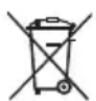
EU countries only
Do not throw electric power tools into the household waste!
In accordance with the European Directive 2012/19/EU on Waste Electrical and Electronic Equipment and transposition into national law used electric power tools must be collected separately and recycled in an environmentally friendly manner.

Raw material recovery instead of waste disposal.
Device, accessories and packaging should be recycled in an environmentally friendly manner. Plastic parts are identified for recycling according to material type.

WARNING!
Do not throw batteries into the household waste, fire or water. Do not open used batteries.
EU countries only:
In accordance with Directive 2006/66/EC defective or used batteries must be recycled.

NOTE
Please ask your dealer about disposal options!

/ Declaration of
Conformity
The Declarations of conformity are included in Annex 1 to this instruction manual.
Exemption from liability
The manufacturer and his representative are not liable for any damage and lost profit due to interruption in business caused by the product or by an unusable product.
The manufacturer and his representative are not liable for any damage which was caused by improper use of the power tool or by use of the power tool with products from other manufacturers.
Table des matières
natural_image
Two-step illustration of a power tool being inserted into a workpiece, showing tool positioning and cutting (no text or symbols)natural_image
Illustration of a hand using a tool to cut a circular object with holes, showing mechanical components and motion (no text or symbols)natural_image
Mechanical gear assembly with a central screw and a large 'X' symbol, no text or labels present.natural_image
Close-up illustration of a cleaning or polishing tool with directional arrows indicating process flow (no text or symbols)natural_image
Illustration of a cleaning or cleaning tool on a surface, showing a brush and tool (no text or symbols)natural_image
Close-up of a mechanical component with a black arrow pointing to a port, no visible text or symbolsnatural_image
Close-up of a car's side panel showing a button and handle, with no visible text or symbols.natural_image
Close-up of a camera lens control panel with buttons and an arrow pointing to the button (no text or symbols visible)natural_image
Two hands using a power tool on a flat surface, no text or symbols visiblenatural_image
Close-up of a cleaning brush on a circular base with a curved arrow indicating rotation (no text or symbols)natural_image
Illustration of a hand using a power tool to cut or spread material on a workbench (no text or symbols visible)natural_image
Two-panel illustration showing a vehicle's side profile of the front and side compartments, with arrows indicating motion or movement (no text or symbols present)natural_image
Illustration of a mechanical tool being adjusted for a workpiece, showing step-by-step assembly (no text or symbols)natural_image
Illustration of a hand using a tool to cut a circular object on a textured surface, with no visible text or symbols.natural_image
Mechanical component with gear and screw assembly, no visible text or symbolsnatural_image
Illustration of a cleaning or cleaning tool with directional arrows indicating process flow (no text or symbols)natural_image
Illustration of a cleaning or cleaning tool with a brush and lever mechanism (no text or symbols)natural_image
Close-up of a mechanical component with a black arrow pointing to a port, no visible text or symbolsnatural_image
Close-up of a car's side panel showing a black arrow pointing to a component, with no visible text or symbols.natural_image
Close-up of a camera lens with adjustment knobs and a black arrow pointing to the button (no text or symbols visible)natural_image
Two hands using a power tool on a tiled floor, no text or symbols visiblenatural_image
Close-up of a cleaning or cleaning tool with a brush and circular brush, showing mechanical components and motion arrows (no text or symbols)natural_image
Illustration of a hand using a power tool to cut or spread material on a workbench (no text or symbols visible)natural_image
Mechanical component diagrams showing two views of a bracket with internal channels and arrows indicating motion (no text or symbols)natural_image
Illustration of a hand using a power tool to adjust or install a mechanical component (no text or symbols visible)natural_image
Illustration of a hand using a tool to cut a circular object on a textured surface, with no visible text or symbols.natural_image
Mechanical gear assembly with a cross symbol overlay (no text or labels)natural_image
Close-up of a cleaning or cleaning tool with directional arrows indicating motion (no text or symbols)■ Ajustar la palanca de ajuste.

NOTA
natural_image
Illustration of a cleaning or cleaning tool with a brush and tool, showing no text or symbols.natural_image
Close-up of a car's internal component showing a connector and cable (no text or symbols visible)natural_image
Close-up of a car's side panel showing a black arrow pointing to the internal component (no text or symbols visible)natural_image
Close-up of a camera lens with adjustment knobs and a black arrow pointing to the button (no text or symbols visible)natural_image
Two hands using a power tool on a flat surface, no text or symbols visiblenatural_image
Close-up of a cleaning brush on a circular base with black arrows indicating rotation direction (no text or symbols)natural_image
Illustration of a hand using a power tool to cut or spread a rectangular block, no text or symbols presentnatural_image
Two-panel diagram showing mechanical component changes, with arrows indicating motion or movement (no text or symbols)natural_image
Illustration of a hand using a power tool to adjust or install a mechanical component (no text or symbols visible)natural_image
Illustration of a hand cutting a circular object with holes, showing a curved arrow indicating rotation (no text or symbols)■ Retirar o acumulador.
■ Retirar o elemento de lixar gasto do prato de suporte.
■ Assentar a folha de lixa auto-aderente no meio do prato de suporte.
natural_image
Mechanical component with a central cross symbol, no visible text or labelsnatural_image
Illustration of a cleaning or polishing process with a brush and tool, showing no text or symbolsnatural_image
Close-up illustration of a cleaning or cleaning tool on a surface, showing a brush and tool (no text or symbols)natural_image
Close-up of a mechanical component with a black arrow pointing to a port, no visible text or symbolsnatural_image
Close-up of a car's side panel showing a black arrow pointing to the internal component (no text or symbols visible)natural_image
Close-up of a camera lens control panel with buttons and a black arrow pointing to the button (no text or symbols visible)natural_image
Two hands using a power tool on a flat surface, no text or symbols visiblenatural_image
Close-up of a cleaning brush with a curved arrow indicating rotation (no text or symbols)natural_image
Illustration of a hand using a power tool to cut or spread material on a cutting board (no text or symbols visible)natural_image
Close-up of a car door panel with a curved arrow indicating motion or change (no text or symbols visible)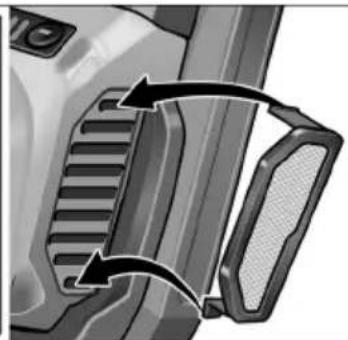
natural_image
Close-up of a mechanical component with two arrows indicating direction (no text or symbols visible)SE 125 18.0-EC is bestemd
natural_image
Two-step illustration of a mechanical tool being adjusted, showing tool positioning and adjustment (no text or symbols)natural_image
Illustration of a hand cutting a circular object into a mechanical component with a curved arrow indicating rotation (no text or symbols)natural_image
Mechanical gear assembly with a cross symbol, no visible text or labelsStand van de beschermkap controleren
natural_image
Close-up illustration of a cleaning or cleaning tool with directional arrows indicating process flow (no text or symbols)■ Draai de spanhendel vast.

LET OP
natural_image
Illustration of a cleaning or cleaning tool on a surface, showing a brush and tool interacting with a circular object (no text or symbols present)natural_image
Close-up of a mechanical component with a black arrow pointing to a port, no visible text or symbolsnatural_image
Close-up of a car's side panel showing a black plastic component with an arrow pointing to the front panel (no text or symbols visible)natural_image
Close-up of a camera lens control panel with buttons and an arrow pointing to the button (no text or symbols visible)natural_image
Two hands using a power tool on a tiled floor, no text or symbols visiblenatural_image
Close-up of a cleaning or cleaning tool with a brush and brush head, showing mechanical components and motion arrows (no text or symbols)natural_image
Illustration of a hand using a power tool to cut or spread material on a workbench (no text or symbols visible)natural_image
Close-up of a car door handle with a black arrow pointing to the right side (no text or symbols visible)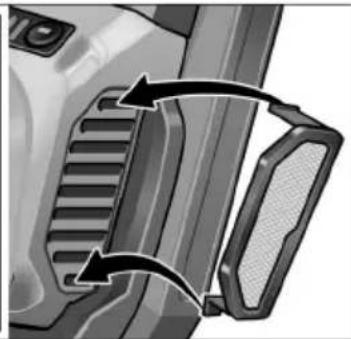
natural_image
Close-up of a mechanical component with two arrows indicating direction (no text or symbols visible)natural_image
Illustration of a mechanical tool being adjusted for a workpiece, showing tool positioning and cutting process (no text or symbols)natural_image
Illustration of a hand using a tool to cut a circular object with holes, showing mechanical components and motion (no text or symbols)natural_image
Mechanical component with gear and screw, featuring a large 'X' symbol overlay (no text or symbols present)natural_image
Illustration of a cleaning or polishing process with a brush and tool, showing no text or symbolsnatural_image
Close-up of a cleaning or cleaning tool on a circular base, showing tool path and adjustment arrows (no text or symbols)natural_image
Close-up of a car's internal component with a black arrow pointing to a port, no visible text or symbols■ Skub vippekontakten fremad og hold den fast.
■ Slip vippekontakten for at slukke.
natural_image
Close-up of a car's side panel showing a black arrow pointing to the vent, with no visible text or symbols.■ Frigør vippekontakten ved at trykke på bagerste ende for at slukke.
natural_image
Close-up of a camera lens control panel with buttons and a black arrow pointing to the button (no text or symbols visible)natural_image
Two hands using a power tool on a flat surface, no text or symbols visiblenatural_image
Close-up of a cleaning brush on a circular base with black arrows indicating motion (no text or symbols)natural_image
Illustration of a hand using a power saw to cut a rectangular block (no text or symbols visible)natural_image
Close-up of a car door panel with a black arrow pointing to the side panel (no text or symbols visible)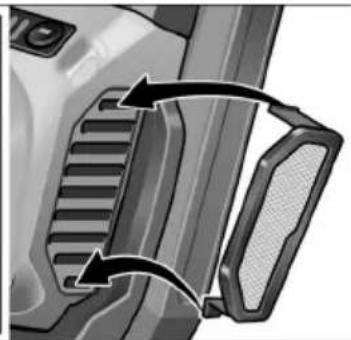
natural_image
Close-up of a mechanical component with two arrows indicating direction (no text or symbols visible)1 Slipetallerken med borrelås
2 Spennspak for vernehette
3 Vernehette med børstekrans
4 Svingbart kantsegment
5 Forbindelsesstuss for avsuging
6 Verktøyholder
7 Hettehåndtak
natural_image
Illustration of a mechanical tool being adjusted for a screwdriver, showing step-by-step assembly (no text or symbols)natural_image
Illustration of a hand cutting a circular object with holes, showing a curved arrow indicating rotation (no text or symbols)natural_image
Mechanical gear assembly with a large 'X' symbol, no text or labels presentnatural_image
Close-up of a cleaning or cleaning tool with directional arrows indicating motion (no text or symbols)■ Skru spennspaken fast.

HENVISNING
natural_image
Close-up of a cleaning or cleaning tool on a circular surface, showing mechanical components and tool path (no text or symbols visible)natural_image
Close-up of a car's internal component with a black arrow pointing to a port, no visible text or symbolsnatural_image
Close-up of a car's side panel showing a black arrow pointing to the internal component (no text or symbols visible)natural_image
Close-up of a camera lens control panel with an arrow pointing to the button (no text or symbols visible)natural_image
Two hands using a power tool on a flat surface, no text or symbols visiblenatural_image
Close-up of a cleaning brush on a circular base with black arrows indicating motion (no text or symbols)natural_image
Illustration of a hand using a power tool to cut or spread a rectangular block, no text or symbols presentnatural_image
Close-up of a car door panel with a black arrow pointing to the side (no text or symbols visible)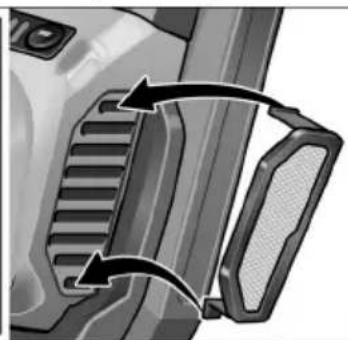
natural_image
Close-up of a mechanical component with two curved arrows indicating direction (no text or symbols)natural_image
Illustration of a mechanical tool being adjusted for a workpiece, showing step-by-step assembly (no text or symbols)natural_image
Illustration of a hand using a tool to cut a circular object with holes, showing mechanical components and motion (no text or symbols)natural_image
Mechanical gear assembly with a central screw and a large 'X' symbol, no text or labels present.natural_image
Close-up of a cleaning or polishing tool with directional arrows indicating process flow (no text or symbols)natural_image
Close-up illustration of a cleaning or cleaning tool on a surface, showing a brush and tool (no text or symbols)natural_image
Close-up of a mechanical component with a black arrow pointing to a port, no visible text or symbolsnatural_image
Close-up of a car's side panel showing a black arrow pointing to the internal component (no text or symbols visible)natural_image
Close-up of a camera lens control panel with an arrow pointing to the button (no text or symbols visible)natural_image
Two hands using a power tool on a flat surface, no text or symbols visiblenatural_image
Close-up of a cleaning brush with a curved arrow indicating rotation (no text or symbols)natural_image
Illustration of a hand using a power tool to cut or spread material on a cutting board (no text or symbols visible)natural_image
Close-up of a car door handle with a mesh grille and directional arrow (no text or symbols)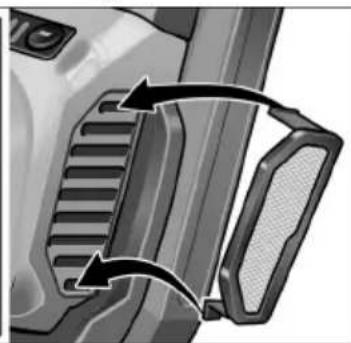
natural_image
Close-up of a mechanical component with two arrows indicating direction (no text or symbols visible)natural_image
Illustration of a mechanical tool being adjusted for a workpiece, showing step-by-step assembly (no text or symbols)natural_image
Illustration of a hand using a tool to cut a circular object with holes, showing mechanical components and motion (no text or symbols)natural_image
Illustration of a robotic car wheel with a large 'X' symbol, no text or symbols presentTarkista laikan suojuksen asento
natural_image
Illustration of a cleaning or polishing process with a brush and directional arrows indicating motion (no text or symbols)natural_image
Medical illustration of a surgical procedure on a patient's knee joint, showing tool placement and alignment (no text or labels)natural_image
Close-up of a mechanical device's internal component with a black arrow pointing to a port, no visible text or symbols.natural_image
Close-up of a car's side panel showing a button and handle, with no visible text or symbols.natural_image
Close-up of a camera lens with adjustment knobs and a black arrow pointing to the button (no text or symbols visible)natural_image
Two hands using a power tool on a flat surface, no text or symbols visiblenatural_image
Close-up of a cleaning brush on a circular base with black arrows indicating motion (no text or symbols)natural_image
Illustration of a hand using a power tool to cut or spread material on a workbench (no text or symbols visible)natural_image
Close-up of a car door panel with a mesh grille and an arrow indicating rotation (no text or symbols)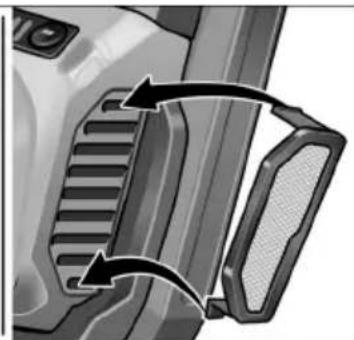
natural_image
Close-up of a mechanical component with two curved arrows indicating motion or force direction (no text or symbols)natural_image
Illustration of a mechanical tool being adjusted for a screwdriver, showing two different states of tool positioning (no text or symbols present)natural_image
Illustration of a hand using a tool to cut a circular object with holes, showing mechanical components and motion direction (no text or symbols)natural_image
Mechanical gear assembly with a large 'X' symbol emerging from the center (no text or labels)natural_image
Close-up illustration of a cleaning or polishing tool with directional arrows indicating process flow (no text or symbols)natural_image
Mechanical cleaning device showing a tool interacting with a surface (no text or symbols visible)natural_image
Close-up of a mechanical component with a black arrow pointing to a section, no visible text or symbols.natural_image
Close-up of a car's side panel showing a black arrow pointing to a component, with no visible text or symbols.natural_image
Close-up of a camera lens control panel with buttons and an arrow pointing to the button (no text or symbols visible)natural_image
Two hands using a power tool on a flat surface, no text or symbols visiblenatural_image
Close-up of a cleaning brush on a circular base with black arrows indicating rotation direction (no text or symbols)natural_image
Illustration of a hand using a power tool to cut or spread material on a cutting board (no text or symbols visible)natural_image
Close-up of a car door handle with a curved arrow indicating rotation or movement (no text or symbols)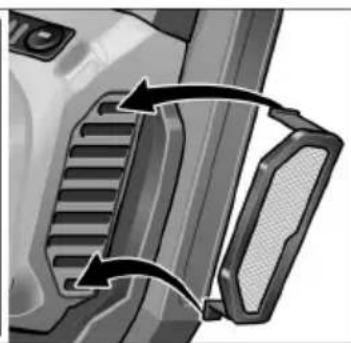
natural_image
Close-up of a mechanical component with two arrows indicating direction (no text or symbols visible)natural_image
Illustration of a power tool being adjusted for cleaning or disassembly (no text or symbols present)natural_image
Illustration of a hand using a tool to cut a circular object with holes, showing mechanical components and motion (no text or symbols)natural_image
Mechanical gear assembly with a cross symbol, no visible text or labelsnatural_image
Close-up of a cleaning or cleaning tool with a brush applying material, showing no text or symbols.natural_image
Close-up illustration of a cleaning or cleaning tool on a surface, showing a brush and tool (no text or symbols)natural_image
Close-up of a car's internal connector with a black arrow pointing to a port (no text or symbols visible)natural_image
Close-up of a car's side panel showing a button and arrow, no readable text or symbols present.natural_image
Close-up of a camera lens control panel with buttons and an arrow pointing to the button (no text or symbols visible)natural_image
Two hands using a power tool on a flat surface, no text or symbols visiblenatural_image
Close-up of a cleaning or cleaning tool with a brush and brush head, showing mechanical components and motion arrows (no text or symbols)natural_image
Illustration of a hand using a power saw to cut a metal sheet (no text or symbols visible)natural_image
Close-up of a car door panel with a highlighted vent and arrow indicating direction (no text or symbols)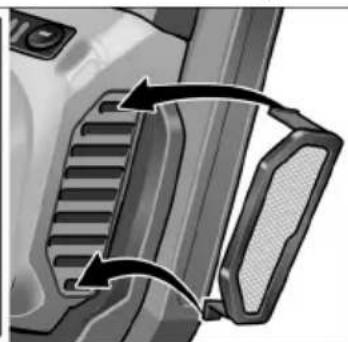
natural_image
Close-up of a vehicle's front bumper and side bumper showing internal gear structure (no text or symbols)natural_image
Two-step illustration of a power tool being inserted into a lathe, showing tool positioning and cutting process (no text or symbols)natural_image
Illustration of a hand cutting a circular object into a container with a curved arrow indicating rotation (no text or symbols)natural_image
Illustration of a robotic arm with a large 'X' symbol, no text or symbols presentnatural_image
Close-up illustration of a cleaning or cleaning tool with directional arrows indicating process flow (no text or symbols)natural_image
Illustration of a cleaning or cleaning tool on a circular base, showing mechanical components and a tool inserted (no text or symbols)natural_image
Close-up of a mechanical component with a black arrow pointing to a port, no visible text or symbolsnatural_image
Close-up of a car's side panel showing a button and arrow, with no visible text or symbols.natural_image
Close-up of a camera lens control panel with buttons and an arrow pointing to the button (no text or symbols visible)natural_image
Two hands using a power tool on a flat surface, one applying the other to the other (no text or symbols visible)natural_image
Close-up of a cleaning or cleaning tool with a brush and brush head, showing mechanical components and motion arrows (no text or symbols)natural_image
Illustration of a hand using a power tool to cut or spread material on a cutting board (no text or symbols visible)natural_image
Two grayscale illustrations showing a mechanical component with internal channels and arrows indicating motion or rotation (no text or symbols)natural_image
Illustration of a hand using a power tool to adjust or install a mechanical component (no text or symbols visible)natural_image
Illustration of a hand pressing down on a circular object with holes, showing mechanical deformation (no text or symbols)natural_image
Illustration of a robotic gear with a large 'X' symbol, no text or symbols presentnatural_image
Close-up of a cleaning brush on a circular base with directional arrows indicating motion (no text or symbols)natural_image
Illustration of a cleaning or cleaning tool on a surface, showing a brush and tool (no text or symbols)natural_image
Close-up of a mechanical component with a black arrow pointing to a port, no visible text or symbolsnatural_image
Close-up of a car's side panel showing a black plastic component with an arrow pointing to the front panel (no text or symbols visible)natural_image
Close-up of a camera lens control panel with buttons and an arrow pointing to the button (no text or symbols visible)natural_image
Two hands using a power tool on a tiled floor, no text or symbols visiblenatural_image
Close-up of a cleaning brush on a circular base with black arrows indicating rotation direction (no text or symbols)natural_image
Illustration of a hand using a power tool to cut or spread material on a workbench (no text or symbols visible)natural_image
Mechanical component diagrams showing two views of a bracket with internal channels and arrows indicating motion (no text or symbols)natural_image
Four circular icons representing different workplace and safety symbols: person holding a document, helmet with glasses, hand holding a pen, and no cross symbol (no text or labels)natural_image
Illustration of a mechanical tool being adjusted for a workpiece, showing tool positioning and cutting process (no text or symbols)natural_image
Illustration of a hand using a tool to cut a circular object with holes, showing mechanical components and motion direction (no text or symbols)natural_image
Mechanical gear assembly with a large 'X' symbol, no visible text or labelsnatural_image
Close-up of a cleaning brush on a circular base with directional arrows indicating tool movement (no text or symbols)natural_image
Mechanical cleaning device showing a tool interacting with a surface finish (no text or symbols visible)natural_image
Close-up of a mechanical component with a black arrow pointing to a port, no visible text or symbolsnatural_image
Close-up of a car's side panel showing a button and handle, with no visible text or symbols.natural_image
Close-up of a camera lens control panel with buttons and an arrow pointing to the button (no text or symbols visible)natural_image
Two hands using a power tool on a flat surface, no text or symbols visiblenatural_image
Close-up of a cleaning or cleaning tool with a brush applying material, showing no text or symbols.natural_image
Illustration of a hand using a power tool to cut a saw on a workbench (no text or symbols visible)natural_image
Close-up of a car door handle with a black arrow pointing to the side panel (no text or symbols visible)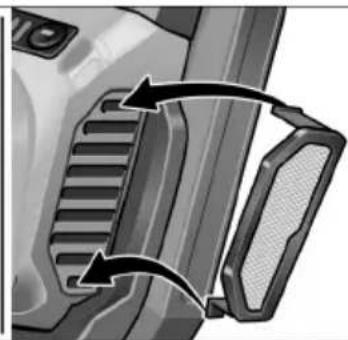
natural_image
Close-up of a mechanical component with two arrows indicating direction (no text or symbols visible)natural_image
Three circular icons representing people, safety, and a device (no text or symbols)natural_image
Illustration of a cleaning or polishing process using a power tool, showing step-by-step steps (no text or symbols present)natural_image
Illustration of a hand using a tool to cut a circular object with holes, showing mechanical components and motion direction (no text or symbols)natural_image
Mechanical gear assembly with a large 'X' symbol, no text or labels presentnatural_image
Close-up illustration of a cleaning or cleaning tool with directional arrows indicating motion (no text or symbols)■ Upínaciu páku pevne utiahnite.

UPOZORNENIE
natural_image
Close-up illustration of a cleaning or cleaning tool on a circular surface, showing mechanical components and a tool inserted (no text or symbols visible)natural_image
Close-up of a car's internal component with a black arrow pointing to a section (no text or symbols visible)natural_image
Close-up of a car's side panel showing a black arrow pointing to the internal component (no text or symbols visible)natural_image
Close-up of a camera lens with control buttons and a black arrow pointing to the button (no text or symbols visible)natural_image
Two hands using a power tool on a flat surface, no text or symbols visiblenatural_image
Close-up of a cleaning brush on a circular base with directional arrows indicating motion (no text or symbols)natural_image
Illustration of a hand using a power tool to cut or spread material on a flat surface (no text or symbols visible)natural_image
Close-up of a car door panel with a black arrow pointing to the side panel (no text or symbols visible)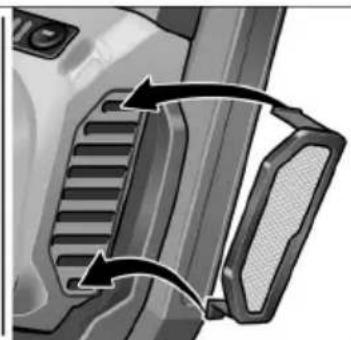
natural_image
Close-up of a mechanical component with two curved arrows indicating motion or force direction (no text or symbols)1 Brusni tanjur s čičak prihvatom
2 Poluga za zatezanje štitnika
3 Štitnik s vijencem s četkama
4 Zakretni rubni segment
5 Priključak za nastavak za usisavanje
6 Prihvat alata
7 Poklopac ručke
■ Napunjeni akumulator pritisnite tako da do kraja uskoči u električni alat.
■ Za vađenje pritisnite tipku za debolkadu (1.) i izvucite akumulator (2.).

OPREZ!
Kada alat nije u uporabi zaštitite kontakte akumulatora. Nepričvršćeni metalni dijelovi mogu kratko spojiti kontakte, postoji opasnost od eksplozije i požara!
Stanje napunjenosti akumulatora
natural_image
Illustration of a mechanical tool being adjusted for a workpiece, showing two different states of tool positioning (no text or symbols present)Izvadite vijak za pričvršćivanje na lijevoj strani poklopca ručke.
■ Uvrnite i pritegnite dodatnu ručku.
Pri demontaži dodatne ručke ponovno umetnite prethodno izvađeni vijak.
natural_image
Illustration of a hand using a tool to cut a circular object with holes, showing mechanical components and motion (no text or symbols)■ Izvadite akumulator.
■ Skinite istrošeno brusno sredstvo s potpornog tanjura.
■ Stavite centrirano brusni papir s čičak prihvatom na potporni tanjur i pritisnite ga. Pazite na položaj rupica kako bi se osiguralo usisavanje prašine od brušenja.
■ Za provjeru centričnog opterećenja sredstva za brušenje provedite probni rad.
Rad s lepezastim brusnim tanjurima

NAPUTAK
Lepezasti brusni tanjuri sastavni su dio kompleta pribora za „obradu metala“.
■ Izvadite akumulator.
■ Pritisnite blokadu vretena i držite je pritisnutu.


NAPUTAK
natural_image
Mechanical gear assembly with a cross symbol, no text or labels presentnatural_image
Illustration of a cleaning or polishing process with a brush and circular tool (no text or symbols)■ Pritegnite polugu za zatezanje.

NAPUTAK
Ako se sila stezanja smanji, stezanje se može prilagoditi pritezanjem imbus vijka na poluzi za zatezanje.
natural_image
Illustration of a cleaning or cleaning tool on a surface, showing a brush and tool interacting with a circular object (no text or symbols present)natural_image
Close-up of a car's internal component with a black arrow pointing to a button (no text or symbols visible)natural_image
Close-up of a car's side panel showing a button and internal component, with no visible text or symbols.■ Radi isključivanja ozibnu sklopku deblokirati pritiskom na zadnji kra.
Odabir broja okretaja
natural_image
Close-up of a camera lens control panel with buttons and an arrow pointing to the button (no text or symbols visible)Kako biste namjestili radnu brzinu, pritisnite tipku za regulaciju broja okretaja. Odabrana brzina ostaje pohranjena čak i pri isključivanju.
natural_image
Two hands using a power tool on a flat surface, no text or symbols visiblenatural_image
Close-up of a cleaning or cleaning tool with a brush and brush head, showing mechanical components and motion arrows (no text or symbols)natural_image
Illustration of a hand using a power tool to cut or spread material on a cutting board (no text or symbols visible)natural_image
Close-up of a car door panel with a black arrow pointing to the side (no text or symbols visible)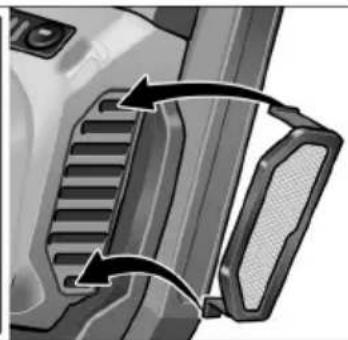
natural_image
Close-up of a mechanical component with two arrows indicating direction (no text or symbols visible)Izvadite filtar za prašinu i ispušite suhim komprimiranim zrakom.
Popravci
Napolnjeno akumulatorsko baterijo v električno orodje potisnite tako daleč, da se popolnoma zaskoči.
natural_image
Two-step illustration of a power tool being inserted into a workpiece, showing tool positioning and cutting (no text or symbols)natural_image
Illustration of a hand using a tool to cut a circular object on a textured surface, with no visible text or symbols.■ Odstranite akumulatorsko baterijo.
■ Pritisnite in držite zaporo vretena (1.).
■ Vpenjalno matico zategnite z zadrževalnim ključem v desno (2.).
■ Preizkusite orodje, da tako preverite, ali je brusilno sredstvo sredinsko vpeto.

POZOR!
natural_image
Mechanical gear assembly with a central screw and a cross symbol (no text or labels)Preverite položaj zaščitnega pokrova
Krtačni venec mora štrleti pribl. 0–1 mm čez brusilni krožnik. Po potrebi popravite.
natural_image
Close-up of a cleaning or cleaning tool with directional arrows indicating process flow (no text or symbols)■ Zategnite vpenjalno ročico.

OPOMBA
natural_image
Mechanical cleaning device showing a brush applying material to a surface (no text or symbols visible)natural_image
Close-up of a car's internal component with a black arrow pointing to a port, no visible text or symbols■ Prekucno stikalo potisnite naprej in ga pridržite.
■ Za izklop prekucno stikalo izpustite
Neprekinjeno delovanje z uporabo prekucnega stikala
i OPOMBA
natural_image
Close-up of a car's side panel showing a black arrow pointing to a button or connector (no text or symbols visible)■ Za izklop pritisnite na zadnji del prekucnega stikala, tako da sprostite zaporo.
natural_image
Close-up of a camera lens control panel with buttons and a black arrow pointing to the button (no text or symbols visible)natural_image
Two hands using a power tool on a flat surface, no text or symbols visible- Pritrdite brusilno sredstvo.
- Preverite položaj zaščitnega pokrova.
- Priključite sesalnik.
- Vklopite sesalnik.
- Vklopite električno orodje.
- Namestite električno orodje na delovno površino.
natural_image
Close-up of a cleaning brush with a brush applying material, showing mechanical components and motion arrows (no text or symbols)– Znova vklopite orodje.
– Namestite električno orodje na delovno površino.
natural_image
Illustration of a hand using a power tool to cut or spread a rectangular block, no text or symbols presentnatural_image
Close-up of a car door panel with a black arrow pointing to the side panel (no text or symbols visible)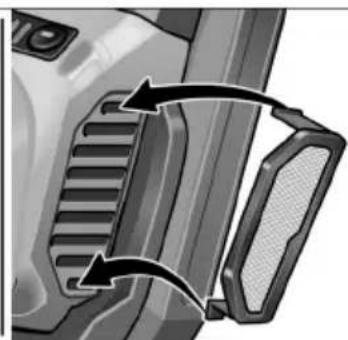
natural_image
Close-up of a car's front bumper and side bumper with directional arrows indicating movement (no text or symbols)■ Snemite filter za prah in ga izpihajte s suhim stisnjenim zrakom.
Popravila
natural_image
Two-step illustration of a mechanical tool being inserted into a workpiece, showing tool positioning and cutting (no text or symbols)natural_image
Illustration of a hand using a knife to cut a circular object on a textured surface, with no visible text or symbols.natural_image
Mechanical gear assembly with a cross symbol overlay (no text or labels)natural_image
Illustration of a cleaning or cleaning tool with directional arrows indicating rotation (no text or symbols)natural_image
Close-up illustration of a cleaning or cleaning tool on a surface, showing a brush and adjustment knob (no text or symbols)natural_image
Close-up of a mechanical component with a black arrow pointing to a port, no visible text or symbolsnatural_image
Close-up of a car's side panel showing a button and arrow, no readable text or symbols present.natural_image
Close-up of a camera lens control panel with buttons and an arrow pointing to the button (no text or symbols visible)natural_image
Two hands using a power tool on a flat surface, no text or symbols visiblenatural_image
Close-up of a cleaning or cleaning tool with a brush and brush head, showing mechanical components and motion arrows (no text or symbols)natural_image
Illustration of a hand using a power tool to cut or spread material on a workbench (no text or symbols visible)natural_image
Close-up of a car door panel with a mesh grille and an arrow indicating rotation (no text or symbols)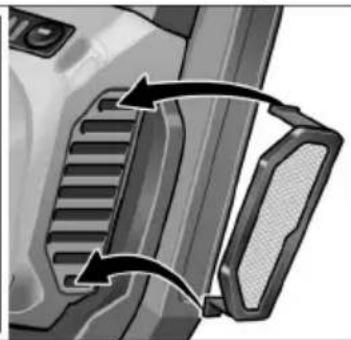
natural_image
Close-up of a vehicle's side profile showing grille and handle components (no text or symbols)natural_image
Two-step illustration of a power saw tool being adjusted, showing tool positioning and cutting process (no text or symbols)natural_image
Illustration of a hand pressing down on a circular object with a curved arrow indicating motion (no text or symbols)natural_image
Mechanical gear assembly with a cross symbol overlay (no text or labels)natural_image
Close-up of a cleaning or cleaning tool with directional arrows indicating motion (no text or symbols)natural_image
Close-up illustration of a cleaning or cleaning tool on a surface, showing mechanical components and no text or symbols.natural_image
Close-up of a mechanical component with a highlighted internal section and directional arrow (no text or symbols)natural_image
Close-up of a car's side panel showing a black arrow pointing to the internal component (no text or symbols visible)natural_image
Close-up of a camera lens control panel with buttons and a black arrow pointing to the button (no text or symbols visible)natural_image
Two hands using a power tool on a flat surface, no text or symbols visiblenatural_image
Close-up of a cleaning brush on a circular base with black arrows indicating rotation direction (no text or symbols)natural_image
Illustration of a hand using a power tool to cut or spread material on a workbench (no text or symbols visible)natural_image
Close-up of a car door handle with a black arrow indicating rotation (no text or symbols)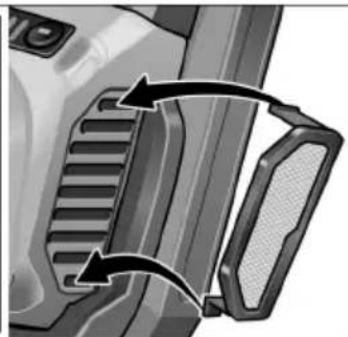
natural_image
Close-up of a mechanical component with two arrows indicating direction (no text or symbols visible)natural_image
Two-step diagram showing a tool being inserted into a cleaning or polishing machine, with no visible text or symbols.natural_image
Illustration of a hand using a tool to cut a circular object with holes, showing mechanical components and motion (no text or symbols)natural_image
Mechanical gear assembly with a large 'X' symbol emerging from the center (no text or labels)natural_image
Illustration of a cleaning or cleaning tool with directional arrows indicating rotation (no text or symbols)natural_image
Close-up illustration of a cleaning or cleaning tool on a surface, showing a brush and handle (no text or symbols)natural_image
Close-up of a car's front panel showing internal components and a directional arrow (no text or symbols)natural_image
Close-up of a car's side panel showing a black arrow pointing to the internal component (no text or symbols visible)natural_image
Close-up of a camera lens with adjustment knobs and a black arrow pointing to the button (no text or symbols visible)natural_image
Two hands using a power tool on a flat surface, no text or symbols visiblenatural_image
Close-up of a cleaning brush on a circular base with directional arrows indicating motion (no text or symbols)natural_image
Illustration of a hand using a power tool to cut or spread material on a cutting board (no text or symbols visible)natural_image
Close-up of a car door handle with a curved arrow indicating rotation or movement (no text or symbols)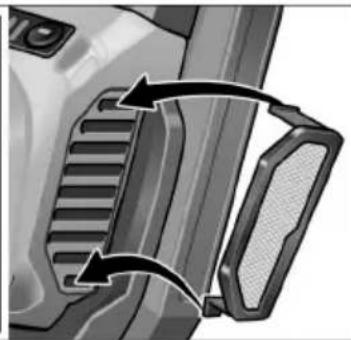
natural_image
Close-up of a mechanical component with two arrows indicating direction (no text or symbols visible)natural_image
Illustration of a hand using a power tool to adjust or install a mechanical component (no text or symbols visible)natural_image
Illustration of a hand using a tool to cut a circular object on a textured surface, with no visible text or symbols.natural_image
Mechanical gear assembly with a central screw and a large 'X' symbol, no text or labels present.natural_image
Illustration of a cleaning or polishing tool with directional arrows indicating process flow (no text or symbols)■ Tõmmata kinnitushoob kinni.

MÄRKUS
natural_image
Illustration of a cleaning or cleaning tool on a surface, showing a brush and tool interacting with a circular component (no text or symbols present)natural_image
Close-up of a mechanical component with a black arrow pointing to a section, no visible text or symbols.natural_image
Close-up of a car's side panel showing a button and handle, with no visible text or symbols.natural_image
Close-up of a camera lens control panel with buttons and a black arrow pointing to the button (no text or symbols visible)natural_image
Two hands using a power tool on a flat surface, no text or symbols visiblenatural_image
Close-up illustration of a cleaning or cleaning tool on a circular base, showing brush and cleaning components (no text or symbols)natural_image
Illustration of a hand using a power tool to cut or spread material on a cutting board (no text or symbols visible)natural_image
Close-up of a car door panel with a curved arrow indicating rotation or movement (no text or symbols visible)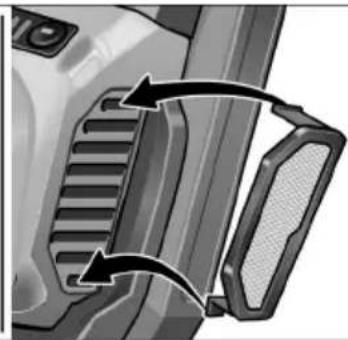
natural_image
Close-up of a mechanical component with two arrows indicating direction (no text or symbols visible)natural_image
Two-step illustration of a hand using a power tool to adjust the blade and handle (no text or symbols present)natural_image
Illustration of a hand pressing down on a circular object with holes, showing a curved arrow indicating rotation (no text or symbols present)natural_image
Mechanical gear assembly with a large 'X' symbol, no text or labels presentnatural_image
Close-up of a cleaning or cleaning tool with directional arrows indicating motion (no text or symbols)natural_image
Close-up illustration of a cleaning or cleaning tool with a brush and lever mechanism (no text or symbols)natural_image
Close-up of a mechanical component with a black arrow pointing to a port, no visible text or symbolsnatural_image
Close-up of a car's side panel showing a button and lock mechanism (no text or symbols visible)natural_image
Close-up of a camera lens with adjustment knobs and a black arrow pointing to the button (no text or symbols visible)natural_image
Two hands using a power tool on a flat surface, no text or symbols visiblenatural_image
Close-up of a cleaning brush on a circular base with black arrows indicating rotation direction (no text or symbols)natural_image
Illustration of a hand using a power tool to cut or spread material on a workbench (no text or symbols visible)natural_image
Close-up of a car door handle with a curved arrow indicating rotation or movement (no text or symbols)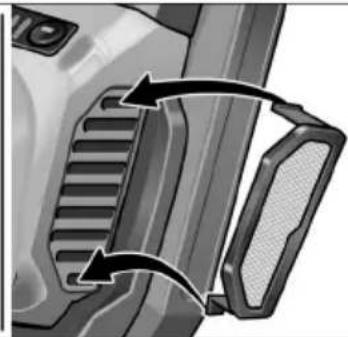
natural_image
Close-up of a mechanical component with two arrows indicating direction (no text or symbols visible)natural_image
Illustration of a mechanical tool being adjusted for a workpiece, showing step-by-step assembly (no text or symbols)natural_image
Illustration of a hand using a tool to cut a circular object with holes, showing mechanical components and motion (no text or symbols)natural_image
Mechanical gear assembly with a cross symbol overlay (no text or labels)natural_image
Close-up of a cleaning or cleaning tool with directional arrows indicating motion (no text or symbols)■ Stingri pievelciet savilcējsviru.

NORĀDĪJUMS!
natural_image
Close-up illustration of a cleaning or cleaning tool on a surface, showing a brush and tool (no text or symbols)natural_image
Close-up of a car's internal connector with a black arrow pointing to a component (no text or symbols visible)natural_image
Close-up of a car's side panel showing a black arrow pointing to the vent, with no visible text or symbols.natural_image
Close-up of a camera control panel with buttons and a black arrow pointing to the button (no text or symbols visible)natural_image
Two hands using a power tool on a workbench, no text or symbols visiblenatural_image
Close-up of a cleaning brush on a circular base, showing tool and component details (no text or symbols visible)– leslēdziet ierīci no jauna.
– Uzlieciet elektroinstrumentu uz darba virsmas.
natural_image
Illustration of a hand using a power tool to cut or spread material on a workbench (no text or symbols visible)natural_image
Close-up of a car door panel with a black arrow indicating clockwise motion (no text or symbols)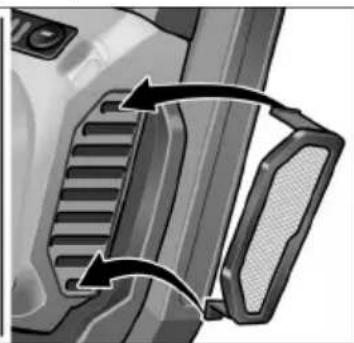
natural_image
Close-up of a mechanical component with two curved arrows indicating motion or force direction (no text or symbols)■ Putekļu filtru nonņemiet un izpūtiet ar sausu saspiesto gaisu.
Remontdarbi
natural_image
Close-up of a car door handle with a circular vent and arrow indicating rotation (no text or symbols)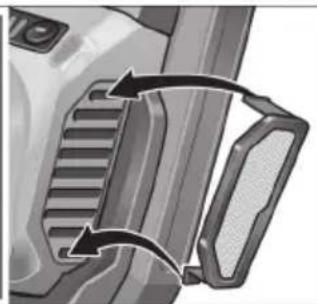
natural_image
Close-up of a mechanical component with a belt buckle and side teeth (no text or symbols visible)natural_image
Close-up of a mechanical component with a lever and adjustment knob (no visible text or symbols)- أحمد تشغيل الجهاز
natural_image
Illustration of a hand using a power tool to cut or spread material on a cutting board (no text or symbols visible)natural_image
Close-up of a camera lens control panel with an arrow pointing to the button (no text or symbols visible)natural_image
Two hands using a power tool on a flat surface, no text or symbols visiblenatural_image
Close-up of a mechanical component with a black arrow pointing to a section, no visible text or symbols.natural_image
Close-up of a car's side panel showing a button and lock mechanism (no text or symbols visible)natural_image
Close-up illustration of a cleaning or cleaning tool with directional arrows indicating motion (no text or symbols)natural_image
Illustration of a cleaning or cleaning tool on a circular surface, showing mechanical components and a directional arrow (no text or symbols)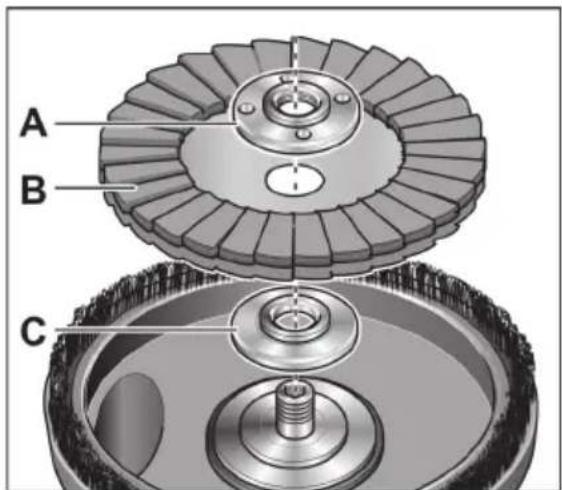
natural_image
Mechanical gear assembly with a central screw and a large 'X' symbol (no text or labels)natural_image
Illustration of a hand using a knife to cut a circular object on a textured surface, with no visible text or symbols.اخлог البطارية.
natural_image
Illustration of a mechanical tool being adjusted for a screwdriver, showing step-by-step assembly (no text or symbols)4 - ar ...... Patient's questions
Unit 8 Anglo Office Park
Lincoln Road
HP12 3RH, High Wycombe, Buckinghamshire
United Kingdom
Phone: +44 (0)1325 741 793
E-Mail: uk.sales@flex-tools.com




- Symbols used in this manual
- WARNING!
- CAUTION!
- NOTE
- Symbols on the power tool
- For your safety
- Intended use
- Safety instructions
- Special safety instructions for sanding
- Kickback and Related Warnings
- Additional safety instructions
- DAMAGE TO PROPERTY!
- Noise and vibration
- Overview
- Instructions for use
- Before switching on the power tool
- i NOTE
- Inserting/replacing the battery
- Battery state of charge
- Attaching the auxiliary handle
- Connecting an extraction system
- Attaching/changing the Velcro sandpaper
- Working with flap sanding discs
- Check position of the guard:
- Switching the electric power tool on and off
- Continuous operation with engaged switch rocker
- Switch off the machine
- Preselecting the speed
- Working with the power tool
- Brush ring
- Maintenance and care
- Cleaning
- Repairs
- Spare parts and accessories
- Disposal information
- Raw material recovery instead of waste disposal.
- / Declaration of
- Conformity
- Exemption from liability
- Table des matières
- NOTA
- Stand van de beschermkap controleren
- LET OP
- HENVISNING
- Tarkista laikan suojuksen asento
- UPOZORNENIE
- OPREZ!
- Stanje napunjenosti akumulatora
- Rad s lepezastim brusnim tanjurima
- NAPUTAK
- Odabir broja okretaja
- Popravci
- POZOR!
- Preverite položaj zaščitnega pokrova
- OPOMBA
- Neprekinjeno delovanje z uporabo prekucnega stikala
- i OPOMBA
- Popravila
- MÄRKUS
- NORĀDĪJUMS!
- Remontdarbi
Brand : Flex
Model : SE 125 18.0-EC
Category : Sander