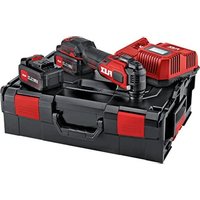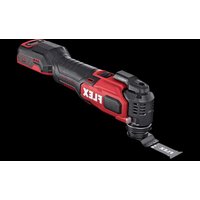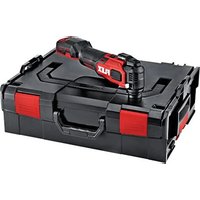
MT 18.0-EC - Multitools Flex - Free user manual and instructions
Find the device manual for free MT 18.0-EC Flex in PDF.


| Product type | Oscillating multi-tool |
| Brand | Flex |
| Model | MT 18.0-EC |
| Rated voltage | 18 V DC |
| No-load speed | 10,000 - 20,000 oscillations/min |
| Weight (without battery) | 1.3 kg |
| Compatible battery | Flex AP 2.5 (0.42 kg) or AP 5.0 (0.72 kg) |
| Sound pressure level | 77.03 dB(A) |
| Sound power level | 88.03 dB(A) |
| Vibration (wood cutting) | < 1.28 m/s² |
| Vibration (sheet metal cutting) | < 2.28 m/s² |
| Speed settings | 5 levels (10,000 - 20,000 oscillations/min) |
| Accessory attachment system | STARLOCK, STARLOCK PLUS, STARLOCK MAX |
| LED lighting | Integrated work light |
| Intended use | Plunge cutting (wood, plastic, non-ferrous metals), sanding, scraping |
| Cleaning | Clean the ventilation slots regularly with dry compressed air |
| Operating temperature | -10 °C to 40 °C |
| Storage temperature | Max. 50 °C |
| Charging temperature | 0 °C to 40 °C |
| Compatible chargers | CA 10.8/18.0, CA 18.0 |
| Recommended accessories | Blades, sanding pads, scrapers, depth gauge, cutting guide |
| Safety | Automatic shut-off in case of overload or overheating |
| Warranty | Consult the manufacturer |
Frequently Asked Questions - MT 18.0-EC Flex
User questions about MT 18.0-EC Flex
0 question about this device. Answer the ones you know or ask your own.
Ask a new question about this device
Download the instructions for your Multitools in PDF format for free! Find your manual MT 18.0-EC - Flex and take your electronic device back in hand. On this page are published all the documents necessary for the use of your device. MT 18.0-EC by Flex.
USER MANUAL MT 18.0-EC Flex
en Original operating instructions....14
natural_image
Line drawing of a mechanical device with directional arrows indicating motion or force (no text or symbols)C
natural_image
Cross-sectional diagram of a mechanical component with internal channels and a directional arrow (no text or symbols)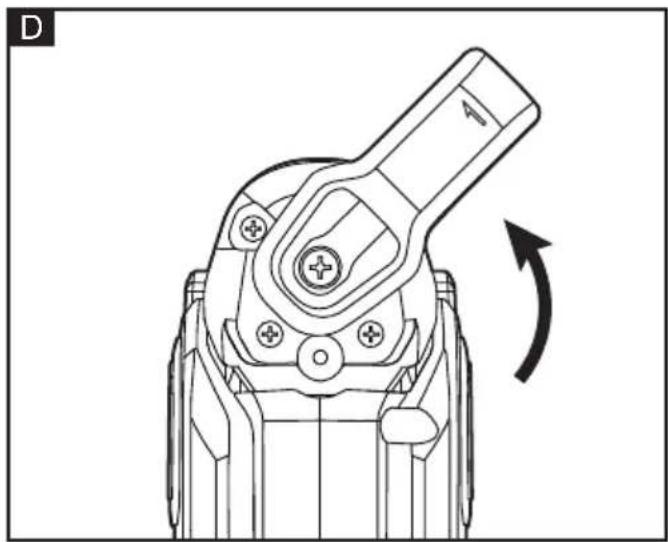
natural_image
Technical line drawing of a mechanical component with an arrow indicating rotational motion (no text or symbols)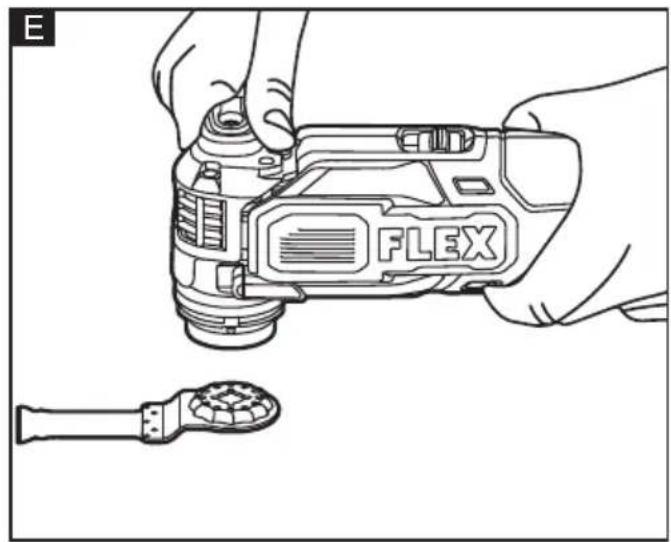
natural_image
Line drawing of hands holding a Flex digital camera with a screwdriver nearby (no text or symbols)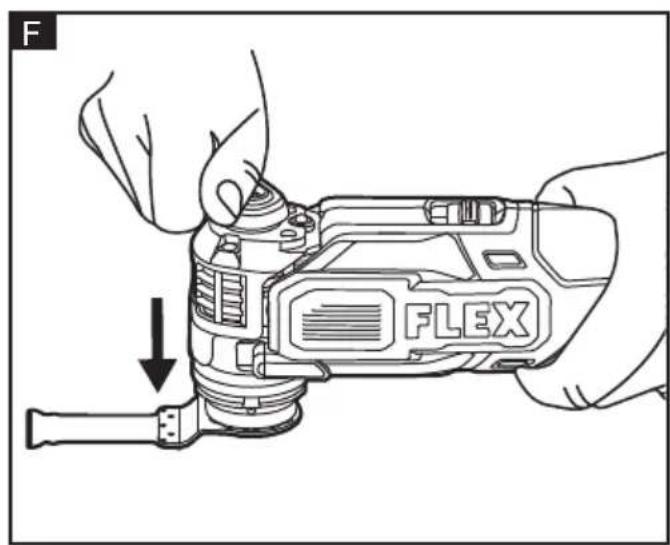
natural_image
Technical line drawing of a mechanical device with internal components and a cross symbol (no text or labels)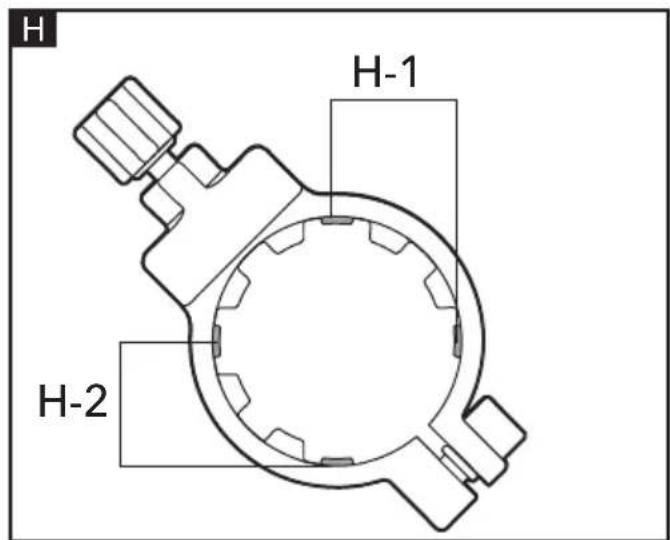
natural_image
Technical line drawing of a mechanical component with internal channels and mounting base (no text or symbols)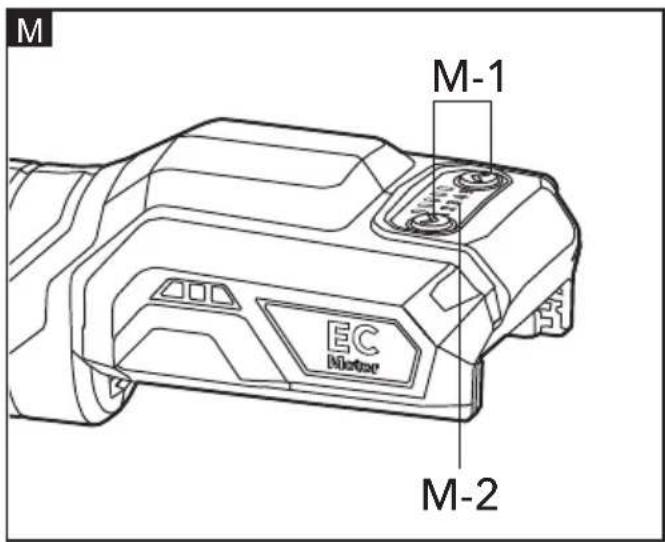

Technical specifications
Symbols used in this manual

WARNING!
Denotes impending danger. Non-observance of this warning may result in death or extremely severe injuries.

CAUTION!
Denotes a possibly dangerous situation. Non-observance of this warning may result in slight injury or damage to property.

NOTE
Denotes application tips and important information.
Symbols on the power tool
V
Volts
/minRotationrate

To reduce the risk of injury, read the operating instructions!

Disposal information for the old machine (see page 19)!
For your safety

WARNING!
Before using the power tool, please read and follow:
– these operating instructions,
- the "General safety instructions" on the handling of power tools in the enclosed booklet (leaflet-no.: 315.915),
- the currently valid site rules and the regulations for the prevention of accidents.
This power tool is state of the art and has been constructed in accordance with the acknowledged safety regulations.
Nevertheless, when in use, the power tool may be a danger to life and limb of the user or a third party, or the power tool or other property may be damaged.
The multi tool may be used only -asintended,
- in perfect working order. Faults which impair safety must be repaired immediately.
Intended use
The multi tool is designed
– for commercial use in industry and trade,
- for plunge cut in wood, plastics and soft (non-ferrous) metals.
- for sanding (not for plaster/drywalls) and scraping by using appropriate accessories.
Safety warnings for multi tool

WARNING!
Read all safety warnings, instructions, illustrations and specifications provided with this power tool. Failure to follow all instructions listed below may result in electric shock, fire and/or serious injury. Save all warnings and instructions for future reference.
- Hold power tools by insulated gripping surfaces when performing an operation where the cutting tool may contact hidden wiring. Contact with a "live" wire will make exposed metal parts of the tool "live" could give the operator an electric shock.
Take protective measures when dust can develop during working that is harmful to one's health, combustible or explosive.
Example: Some dusts are regarded as carcinogenic. Wear a dust mask and work with dust/chip extraction when connectable.
■ Use the machine only for dry sanding. Penetration of water into the machine increases the risk of an electric shock.
■ Secure the workpiece. A workpiece clamped with clamping devices or in a vice is held more secure than by hand.
■ Wear protective gloves when changing cutting tools. Cutting tools become hot after prolonged usage.
Noise and vibration
The noise and vibration values have been determined in accordance with EN 62841. The evaluated noise level of the power tool is typically:
- Sound pressure level L_pA : 77.03 dB(A);
- Sound power level L_WA : 88.03 dB(A);
- Uncertainty: K = 3 dB.
- Total vibration value
-
Emission value a_h,B (cutting boards): < 1.28 m/s
-
Emission value a_h,M (cutting sheet metal): < 2.28 m/s
- Uncertainty: K = 1.5 m/s

CAUTION!
The indicated measurements refer to new power tools. Daily use causes the noise and vibration values to change.

NOTE
The vibration emission level given in this information sheet has been measured in accordance with a standardised test given in EN 62841 and may be used to compare one tool with another.
It may be used for a preliminary assessment of exposure. The declared vibration emission level represents the main applications of the tool. However if the tool is used for different applications, with different accessories or poorly maintained, the vibration emission may differ. This may significantly increase the exposure level over the total working period. For a precise estimation of the vibration load the times should also be considered during which the power tool is switched off or even running, but not actually in use. This may significantly decrease the exposure level over the total working period.
Identify additional safety measures to protect the operator from the effects of vibration such as: maintain the tool and the accessories, keep the hands warm, organisation of work patterns.

CAUTION!
Wear ear protection at a sound pressure above 85 dB(A).
Technical specifications
| TOOL | MT 18.0-EC CMT 18.0-ECMT 18.0-EC/5.0 Set | ||
| U Vdc 18 | |||
| n_o | /min | 10000-20000 | |
| m (w/o battery) kg | 1.3 | ||
| Battery AP 2.5 AP | 5.0 | ||
| Weight ofbattery/kg | 0.42 0.72 | ||
| Working Temperature | -10 - 40°C |
| Storage Temperature | less than 50°C |
| Charging Temperature | 0-40°C |
| Charger CA 10.8/1 | 8.0, CA 18.0 |
Overview (see figure A)
The numbering of the product features refers to the illustration of the machine on the graphics page.
1 Accessory release lever
2 On/off switch
3 Speed control panel
4 Led work light
5 Neck
6 Accessory holder
7 Clamping jaws
Operating instructions

WARNING!
Remove the battery before carrying out any work on the power tool.
Before switching on the power tool
Unpack the multi tool and check that here are no missing or damaged parts.

NOTE
The batteries are not fully charged on delivery. Prior to initial operation, charge the batteries fully. Refer to the charger operating manual.
Inserting/replacing the battery (See figure B)
■ Press the charged battery into the power tool until it clicks into place.
■ To remove, press the release button and pull out the battery.

CAUTION!
When the device is not in use, protect the battery contacts. Loose metal parts may short circuit the contacts; explosion and fire hazard!
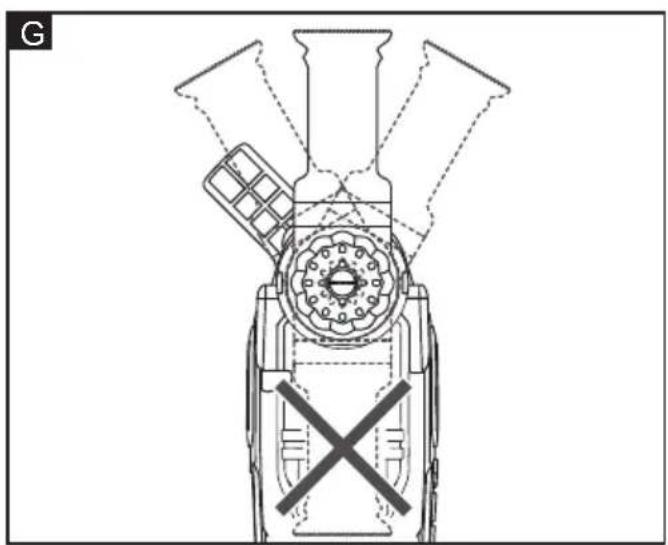
Installing and removing accessories (See figure C, D, E, F, G)
WARNING!
Only use FLEX accessories rated 20000
OPM or greater. Using accessories not designed for this tool may result in serious personal injury and property damage.
NOTE: The accessories are not included with your tool and should be purchased separately.
To install the accessory
Make sure that the On/Off switch is in the OFF position and detach the battery pack from the tool.
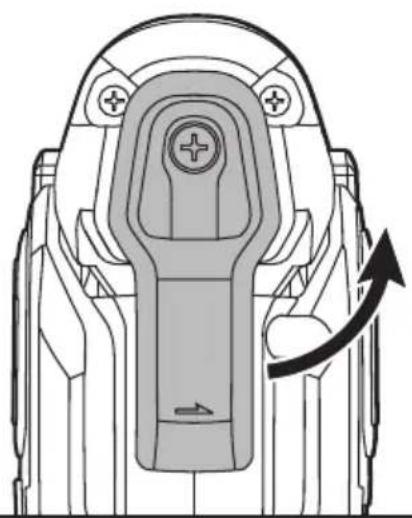
■ Turn the accessory release lever 1 counterclockwise past the first "click" which signals that the lever has been engaged.
■ Continue to turn the lever counterclockwise as far as it will go, which will be indicated by the second "click". (see figure D). Place the accessory on a flat surface. Grasp the machine body with one hand and the accessory release lever with another hand. Align the star-shaped interfaces of the accessory holder with the accessory (see figure E, F).
Note that the accessory can be positioned at various angles if desired (see figure G).
■ Turn the accessory release lever clockwise to return it to its original position (see figure C). The clamping jaws 7 of the accessory holder 6 will open and lock the accessory in place.
WARNING!
Do not attach the accessories in such a way that they face backward. Operation in this position may cause serious injury (see figure G).
To remove the accessory
Make sure that the On/Off switch is in the OFF position and detach the battery pack from the tool.
■ Turn the accessory release lever 1 counterclockwise past the first "click" which signals that the lever has been engaged (see figure D).
■ Continue to turn the lever counterclockwise as far as it will go, which will be indicated by the second "click". The clamping jaws
7 of the accessory holder 6 will move to center position and the accessory will fall out of the accessory holder 6.
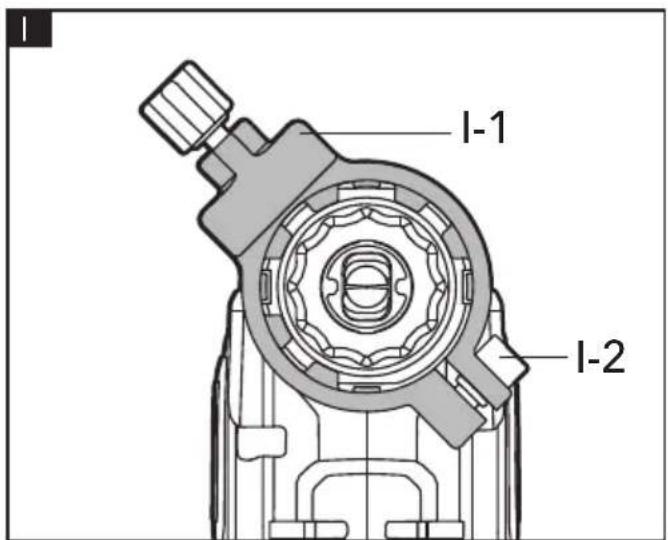
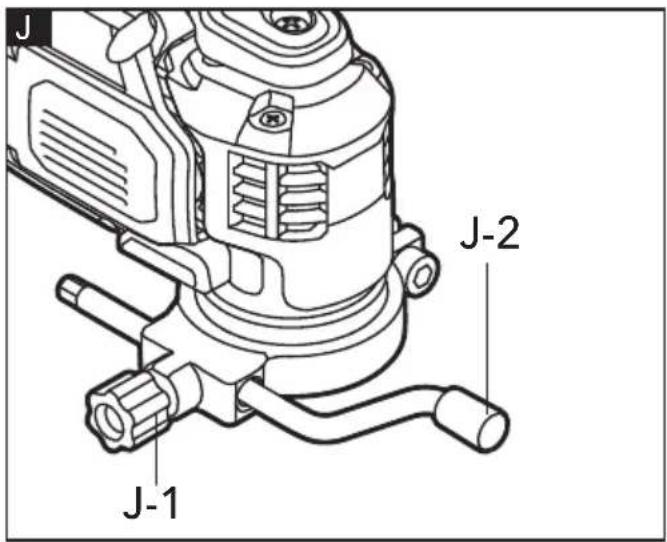
Installing and removing the attachment collar (See figure H, I, J)
NOTE
The attachment collar I-1 will be packaged and sold separately.
■ Loosen the collar locking bolt H-1 by using the depth gauge J-2 or guide fence and align the four positioning tabs H-2 (see figure H) of the clamp assembly with the grooves on the neck 5. Then install the clamp assembly on the tool, adjust it to the desired angle and securely tighten the collar locking bolt I-2 (see figure I).
■ Loosen the locking knob to insert the depth gauge J-2 or edge guide and then tighten the locking knob J-1 (see figure J).
Operating instructions
WARNING!
After tool use, detach the battery pack to prevent accidental starts and possible injury.
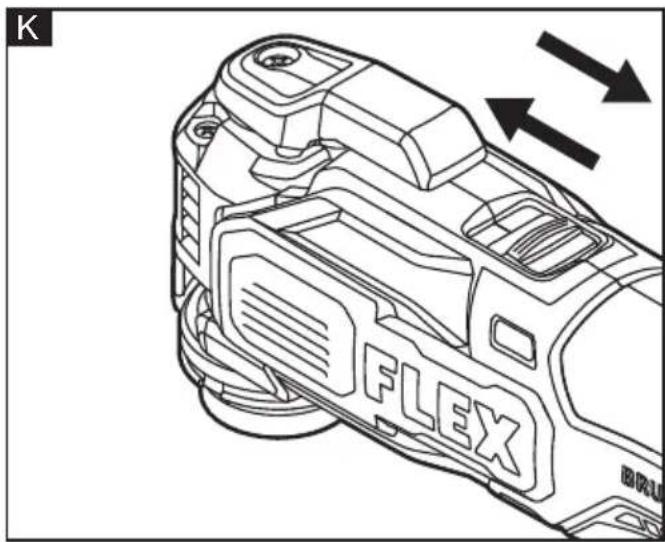
On/off switch (See figure K)
Hold the tool firmly within the soft grip area and keep your hands away from the blade. To turn the multi-tool on, push the On/Off switch 2 forward.
To turn it off, move the On/Off switch toward the rear.
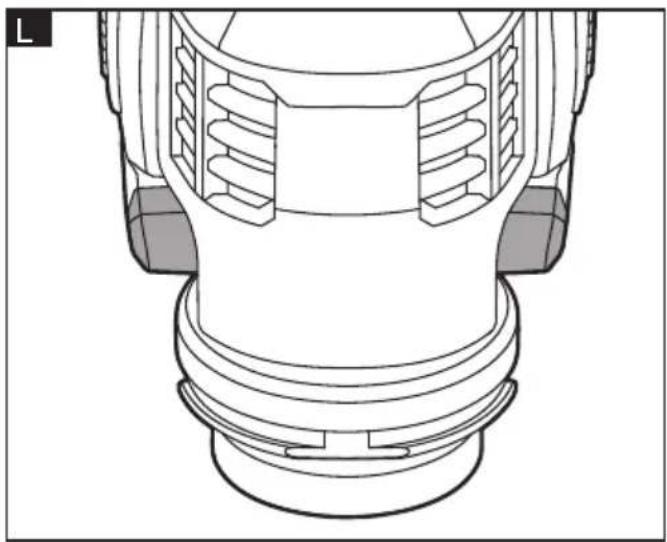
LED work light (See figure L)
The work light 4 will automatically turn on when the tool is turned on and will turn off approximately 10 seconds after the tool is turned off.
The work light will rapidly flash when the tool and/or battery pack becomes overloaded or too hot.
The internal sensors will turn the tool off if the tool and/or battery pack are overloaded. Rest the tool for a while or place the tool and battery pack separately under air flow to cool them.
The work light will flash more slowly to indicate that the battery is at low-battery capacity.
Recharge the battery pack.
If the work light fails to light up when you switch the tool on, or it turns off suddenly
during operation, please contact customer service or an authorized service center for assistance.
Setting the speed (See figure M)
- There are five speed levels that can be changed using the speed setting buttons M-1. Press the “∧” button to increase the speed. Press “∨” button to decrease the speed. The LED lights above the numbers indicate the current speed level.
The speed level can be set before the tool is turned on or when the tool is already in operation.
The approximate OPM (oscillations per minute) are:
| Speed Level /min (OPM) | |
| 1 10000 | |
| 2 12000 | |
| 3 15000 | |
| 4 18000 | |
| 5 20000 | |
If the tool is OFF:
- Press one of the speed setting buttons. This will "wake up" the control panel M-2 and the LED lights will indicate the current speed level.
■ Change the speed level by pressing the "∧" or "∨" buttons.
■ After 15 seconds of inactivity, the LED lights on the control panel will turn off. The memory function will remember and revert to the last active speed level the next time one of the speed setting buttons is pressed or the tool is turned on.
If the tool is already ON:
- Change the speed level by pressing the “∧” or “∨” buttons. You will feel and hear the speed change and the LED lights will indicate the current speed level.
■ After you turn the tool off, the memory function will remember and revert to the last active speed level the next time the tool is turned on.
WARNING!
Adjust the speed only when the tool is off or when the tool is running at no-load. Make sure to hold the tool firmly within the soft grip area with one hand, keeping the tool under control, when adjusting the
speed when running at no-load. Failure to obey this caution could cause loss of control and result in serious personal damage.
Using accessories
WARNING!
Use sharp, undamaged accessories only.
Deformed or blunt or otherwise damaged accessories can break causing injuries or property damage.
WARNING!
Do not attach the accessories in such a way that they face backward. Operation in this position may cause serious injury.
A range of available accessories easily turn the tool into a saw or into a sander, into a scraper or a grout remover.
NOTE: Not all accessories are included with your tool and should be purchased separately.
Accessories with STARLOCK interface from other manufacturers should be compatible with this tool.
| Application tool MT 18.0-EC | ||
| STARKLOCK |  | √ |
| STARKLOCK PLUS | 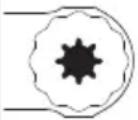 | √ |
| STARKLOCK MAX | 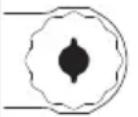 | √ |
Cutting
The plunge saw blades are ideal for making precise cuts in tight areas, close to edges or flush to a surface. Set the tool to a medium speed (3) for greater control when making the initial plunge. After making the initial cut, the speed can be increased for faster cutting. When flush cutting, do not force the tool. A strong vibration during the plunge cut is an indicator that you are applying too much pressure – let the speed of the tool do the work.
Grout removal
Before starting, measure the grout line width to pick the appropriate blade. Set the tool to a medium to high speed (3 - 5). To remove the grout, use a back-and-forth motion, making several passes along the grout line. Do your best to keep the grout blade aligned with the grout line and do not apply too much side pressure on the grout blade during the process.
Use the carbide grit line on the blade as an indicator to monitor the plunge depth. Do not plunge beyond the carbide grit line to avoid damage to the backer board.
Scraping
Set the tool to low to medium speed (1 - 3). Turn the tool on and place the scraper on the area where material is to be removed. Begin with light pressure. Excessive pressure can damage the background surface.
Sanding
After turning the tool on, allow it to reach its full speed before contacting the workpiece with the tool and remove it from the workpiece before switching the tool off. Sand with a continuous motion and light pressure. Do not apply excessive pressure - let the speed of the tool do the work. Work with the complete surface of the sanding pad, not only with the tip. The sanding pad should occasionally be rotated to distribute the wear on the sanding sheet and backing pad surface.
Using attachments

WARNING!
Detach the battery pack from the tool before performing any assembly, adjustments, or changing accessories. Such preventive safety measures reduce the risk of starting the tool accidentally.
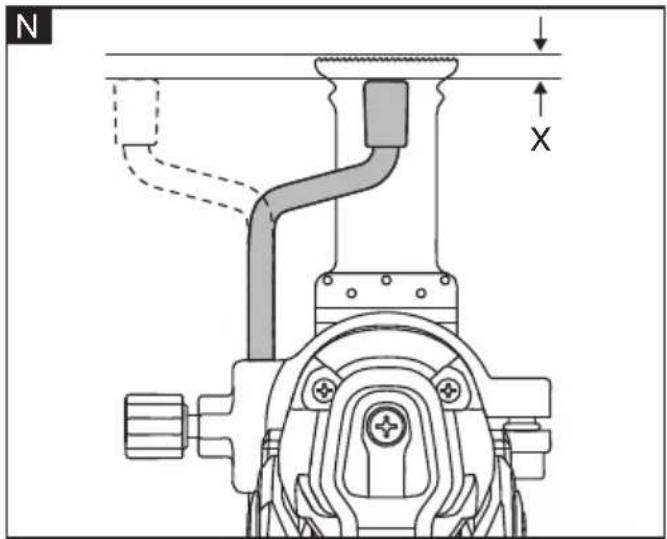
Depth gauge (See figure N)
The depth gauge allows you to control the depth of the plunge cuts. This is especially helpful when plunge cutting an opening in drywall where you don't want to accidentally damage objects or surfaces behind the drywall.
To use the depth gauge:
- Insert it into the attachment collar and set the distance "X" between the tip of the
plunge blade and the tip of the depth gauge.
■ If the blade is installed at an angle, loosen the collar locking bolt and rotate the collar around the neck of the tool until the depth gauge is parallel to the blade. Tighten the collar locking bolt.
■ The bent tip of the depth gauge can be positioned either above the blade or to the side based on your preference and situation.
■ Tighten the locking knob. This will be your depth of cut.
The edge guide O-3 is used to make thru cuts parallel to a straight edge or a piece of plywood temporarily secured to the workpiece with screws or clamps O-1. Make sure that the clamps do not interfere with the free movement of the tool throughout the entire length of the cut.
To use the edge guide:
■ Insert it into the attachment collar and position it at an angle to the blade (see figure O).
■ Loosen the collar locking bolt and rotate the collar around the neck to make sure that blade is fully engaged into the workpiece throughout the complete stroke (oscillation) of the blade. If either edge of the blade travels outside of the workpiece, the tool may jump causing loss of control and damage to the workpiece. Tighten the collar locking bolt (see figure O).
- Press the right edge of the edge guide against the straight edge O-2 and start the tool. Continue cutting along the straight edge (see figure O).
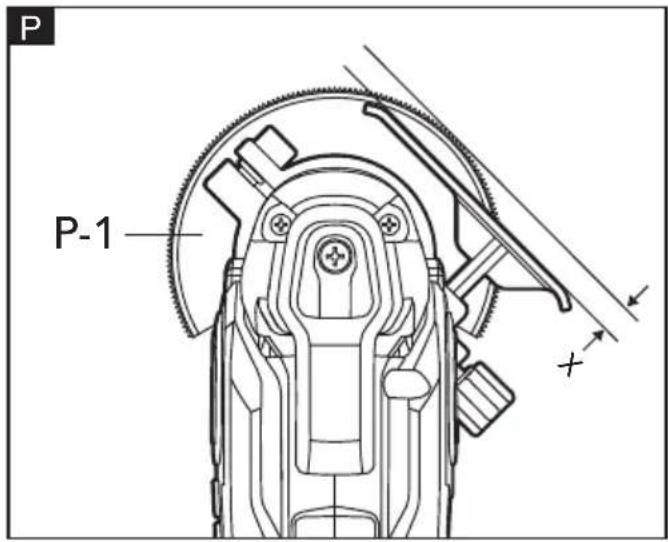
The edge guide can also function as the depth gauge when using a segment blade P-1(not included with the tool).
- With the segment blade installed, move the edge guide do desired distance "X" away from the tips of the segment blade teeth (see figure P).
■ Tighten the locking knob (see figure P).
Maintenance and care

WARNING!
Before performing any work on the power tool, remove the battery pack from the tool.
Cleaning
■ Clean the power tool and grille in front of the vent slots regularly. Frequency of cleaning is dependent on the material and duration of use.
■ Regularly blow out the housing interior and motor with dry compressed air.
Spare parts and accessories
For other accessories, in particular tools and accessories, can be found in the manufacturer's catalogues. Exploded drawings and spare-part lists can be found on our homepage: www.flex-tools.com
Disposal information

WARNING!
Render redundant power tools unusable:
- battery operated power tool by removing the battery.

EU countries only Do not throw electric power tools into the household waste! In accordance with the European
Directive 2012/19/EU on Waste Electrical and Electronic Equipment and transposition into national law used electric power tools must be collected separately and recycled in an environmentally friendly manner.

Raw material recovery instead of waste disposal.
Device, accessories and packaging should be recycled in an environmentally friendly manner. Plastic parts are identified for recycling according to material type.

WARNING!
Do not throw batteries into the household waste, fire or water. Do not open used batteries.
EU countries only: In accordance with Directive 2006/66/EC defective or used batteries must be recycled.

NOTE
Please ask your dealer about disposal options!
CE-Declaration of Conformity
We declare under our sole responsibility that the product described under "Technical specifications" conforms to the following standards or normative documents:
EN 62841 in accordance with the regulations of the directives 2014/30/EU, 2006/42/EC, 2011/65/EU.
Responsible for technical documents: FLEX-Elektrowerkzeuge GmbH, R & D Bahnhofstrasse 15, D-71711 Steinheim/Murr
Peter Lameli Klaus Peter Weinper Technical Head Head of Quality
Department (QD)
Declaration of Conformity
We as the manufacturer: FLEX
Elektrowerkzeuge GmbH, Business address: Bahnhofstr. 15, 71711 Steinheim, Germany declare under our sole responsibility, that the product(s) described under „Technical specifications“ fulfills all the relevant provisions of The Supply of Machinery (Safety) Regulations S.I. 2008/1597 and also fulfills all the relevant provisions of the following UK Regulations:
Electromagnetic Compatibility Regulations S.I. 2016/1091, The Restriction of the Use of Certain Hazardous Substances in Electrical and Electronic Equipment Regulations S.I. 2012/3032 and are manufactured in accordance with the following designated Standards: BS EN 62841-1:2015, BS EN 62841-2-4:2014, BS EN 55014-1:2017, BS EN 55014-2:2015
Place of declaration: Steinheim, Germany. Responsible person: Peter Lameli, Technical Director - FLEX-Elektrowerkzeuge GmbH
Contact details for Great Britain: FLEX Power Tools Limited, Unit 8 Anglo O ce Park, Lincoln Road, HP 12, 3RH Buckinghamshire, United Kingdom.
Peter Lameli Klaus Peter Weinper
Technical Head Head of Quality
Department (QD)
12.05.2021
Exemption from liability
The manufacturer and his representative are not liable for any damage and lost pro-t due to interruption in business caused by the product or by an unusable product. The manufacturer and his representative are not liable for any damage which was caused by improper use of the power tool or by use of the power tool with products from other manufacturers.
Peter Lameli Klaus Peter Weinper Technical Head Head of Quality Department
Peter Lameli Klaus Peter Weinper Technical Head Head of Quality
Department (QD)
Peter Lameli Klaus Peter Weinper Technical Head Head of Quality Department
Peter Lameli Klaus Peter Weinper Technical Head Head of Quality Department
Peter Lameli Klaus Peter Weinper Technical Head Head of Quality
Department (QD)
Peter Lameli Klaus Peter Weinper Technical Head Head of Quality
Department (QD)
Peter Lameli Klaus Peter Weinper Technical Head Head of Quality Department