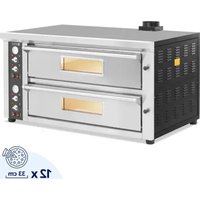
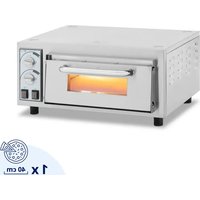
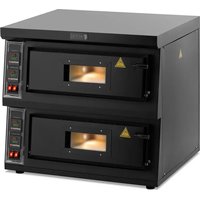
RCPO-1011-N - Pizza oven Royal Catering - Free user manual and instructions
Find the device manual for free RCPO-1011-N Royal Catering in PDF.


| Product type | Pizza oven |
| Brand | Royal Catering |
| Model | RCPO-1011-N |
| Power supply | 230 V / 50 Hz |
| Rated power | 16800 W (16.8 kW) |
| Rated current | 42 A |
| Protection class | I |
| IP rating | IPX3 |
| Dimensions (Length x Depth x Height) | 1420 x 945 x 825 mm |
| Net weight | 208 kg |
| Temperature range | 30 to 450 °C |
| Number of cooking chambers | 1 |
| Control panel type | Digital with LED display |
| Temperature settings | Independent top and bottom heating |
| Timer | Up to 99 minutes 99 seconds |
| Temperature memory | 6 presets (F1 to F6) |
| Interior lighting | Yes, dedicated switch |
| Exhaust chimney | Yes, to be installed |
| Housing material | Stainless steel |
| Intended use | Professional (pizzas, breads, pastries) |
| Thermal safety | Overheating protection (530-550°C) with manual reset |
| Cleaning | Soft damp cloth, do not immerse |
| Spare parts available | Handle, bulb, temperature probe, heating elements |
| Repairability | By authorized service center only |
| Included accessories | Door handle, exhaust chimney, Allen key, screws |
Frequently Asked Questions - RCPO-1011-N Royal Catering
User questions about RCPO-1011-N Royal Catering
0 question about this device. Answer the ones you know or ask your own.
Ask a new question about this device
Download the instructions for your Pizza oven in PDF format for free! Find your manual RCPO-1011-N - Royal Catering and take your electronic device back in hand. On this page are published all the documents necessary for the use of your device. RCPO-1011-N by Royal Catering.
USER MANUAL RCPO-1011-N Royal Catering
natural_image
Abstract white line drawing of a stylized mythical creature on a dark blue background (no text or symbols)| DE | Produktname | PIZZAOFEN |
| EN | Product name | PIZZA OVEN |
| PL | Nazwa produktu | PIEC DO PIZZY |
| CZ | Název výrobku | PEC NA PIZZU |
| FR | Nom du produit | FOUR À PIZZA |
| IT | Nome del prodotto | FORNO PER PIZZA |
| ES | Nombre del producto | HORNO DE PIZZA |
| HU | Termék neve | PIZZASÜTŐ |
| DA | Produktnavn | PIZZAOVN |
| FI | Tuotteen nimi | PIZZAUUNI |
| NL | Productnaam | PIZZAUGN |
| NO | Produktnavn | PIZZOVN |
| SE | Produktnamn | PIZZAUGN |
| PT | Nome do produto | FORNO DE PIZZA |
| SK | Názov produktu | PEC NA PIZZU |
| BG | Име на продукта | ПИЦА ФУРНА |
| EL | Όνομα προϊόντος | ФОУРNOΣ ПІТЗАΣ |
| HR | Naziv proizvoda | РЕĆ ZA PIZZU |
| LT | Produkto pavadinimas | PICOS KROSNELÉ |
| RO | Numele produsului | CUPTOR PENTRU PIZZA |
| SL | Ime izdelka | РЕČ ZA PICO |
| DE Modell | EN Product model | PL Model produktu | CZ Model výrobku | FR Modèle | IT Modello | ES Modelo | HU Modell | DA Model | FI Tuotteen malli | NL Productmodel | NO Produktmodell | SE Produktmodell | PT Modelo do produto | SK Model | BG Модел на продукт | EL Movtéλo προϊόντος | HR Model proizvoda | LT: Gaminio modelis | RO: Model de produs | SL: Model izdelka | RCPO-1005-NRCPO-1008-NRCPO-1009-NRCPO-1010-NRCPO-1011-NRCPO-1012-NRCPO-1013-NRCPO-1016-N | |
| DE Hersteller | EN Manufacturer | PL Producent | CZ Výrobce | FR Fabricant | IT Produttore | ES Fabricante | HU Termelő | DA Producent | FI Valmistaja | NL Producent | NO Produsent | SE Tillverkare | PT Fabricante | SK Výrobca | BG Производител | EL Κατασκευαστής | HR Proizvođač | LT Gamintojas | RO Producător | SL Proizvajalec | expondo Polska sp. z o.o. sp. k. | |
| DE Anschrift des Herstellers | EN Manufacturer Address | PL Adres producenta | CZ Adresa výrobce | FR Adresse du fabricant | IT Indirizzo del produttore | ES Dirección del fabricante | HU A gyártó címe | DA Producentens adresse | FI Valmistajan osoite | NL Adres producent | NO Produsentens adresse | SE Tillverkarens adress | PT Endereço do fabricante | SK Adresa výrobcu | BG Адрес на производителя | EL: Διεύθυνση κατασκευαστή | HR Adresa proizvođača | LT Gamintojo adresas | RO Adresa producătorului | SL Naslov proizvajalca | ul. Nowy Kisielin – Innowacyjna 7, 66-002 Zielona Góra | Poland, EU | |

natural_image
Close-up of a mechanical device with attached components and a hand holding a metal bracket (no visible text or symbols)natural_image
Two black industrial metal components with circular cutouts, shown from front and side angles (no text or symbols visible)This User Manual has been translated using machine translation. We have made every effort to ensure the translation is accurate, but please note that automated translations are not perfect and are not meant to replace human translators. The official version of the User Manual is in English. Any differences between the translated version and the original English are not legally binding. If you have any questions about the accuracy of the translation, please refer to the English version, which is the official reference. More language versions are available upon request via info@expondo.com
Technical data
| Parameter description Parameter value | ||||||||
| Product name | Pizza oven | |||||||
| Model | RCPO-1005-N | RCPO-1008-N | RCPO-1009-N | RCPO-1010-N | RCPO-1011-N | RCPO-1012-N | RCPO-1013-N | RCPO-1016-N |
| Rated voltage [V~] / frequency [Hz] | 230/50 | 400/50 | 230/50 | 400/50 230/50 | ||||
| Rated power [W] | 4200 | 6600 | 8400 | 13200 | 16800 | 4200 | 8400 | |
| Rated current [A] | 18.3 | 16.5 | 21 | 33 | 42 | 18.3 | 21 | |
| Protection class | I | |||||||
| IP protection rating | IPX3 | |||||||
| Dimensions [width x depth x height; mm] | 1100x 945x 510 | 1420x 945x 510 | 1100x 945x 830 | 1750x 945x 510 | 1420x 945x 825 | 1750x 945x 825 | 1100x 945x 510 | 1100x 945x 820 |
| Weight [kg] | 94 | 122 | 154 | 152 | 208 | 258 | 94 | 157 |
| Temperature range [°C] | 12-450 / 30-400 | |||||||
| Number of chambers | 1 | 2 | 1 | 2 | 1 | 2 | ||
1. General description
The user manual is designed to assist in the safe and trouble-free use of the device. The product is designed and manufactured in accordance with strict technical guidelines, using state-of-the-art technologies and components. Additionally, it is produced in compliance with the most stringent quality standards.
DO NOT USE THE DEVICE UNLESS YOU HAVE THOROUGHLY READ AND UNDERSTOOD THIS USER MANUAL.
To increase the product life of the device and to ensure trouble-free operation, use it in accordance with this user manual and regularly perform maintenance tasks. The technical data and specifications in this user manual are up to date. The manufacturer reserves the right to make changes associated with quality improvement. The device is designed to reduce noise emission risks to a minimum, taking into account technological progress and noise reduction opportunities.
Legend
 | The product satisfies the relevant safety standards. |
 | Read instructions before use. |
 | The product must be recycled. | |
 | WARNING! or CAUTION! or REMEMBER! Applicable to the given situation.(general warning sign) | |
 | Wear protective gloves. | |
 | ATTENTION! Electric shock warning! | |
 | ATTENTION! Hot surface, risk of burns! | |
 | Only use indoors. |

PLEASE NOTE! Drawings in this manual are for illustration purposes only and in some details may differ from the actual product.
2. Usage safety

ATTENTION! Read all safety warnings and all instructions. Failure to follow the warnings and instructions may result in electric shock, fire and/or serious injury or even death.
The terms "device" or "product" are used in the warnings and instructions to refer to the: PIZZA OVEN.
2.1. Electrical safety
a) The electrical connection should be performed by a qualified person.
b) The plug must fit the socket. Do not modify the plug in any way.
c) Avoid touching earthed elements such as pipes, heaters, boilers and refrigerators. There is an increased risk of electric shock if the earthed device is exposed to rain, comes into direct contact with a wet surface or is operating in a damp environment. Water getting into the device increases the risk of damage to the device and of electric shock.
d) Do not touch the device with wet or damp hands.
e) Use the cable only for its designated use. Never use it to carry the device or to pull the plug out of a socket. Keep the cable away from heat sources, oil, sharp edges or moving parts. Damaged or tangled cables increase the risk of electric shock.
f) Do not use the device if the power cord is damaged or shows obvious signs of wear. A damaged power cord should be replaced by a qualified electrician or the manufacturer's service centre.
g) To avoid electric shock, do not immerse the cord, plug or device in water or other liquids. Do not use the device on wet surfaces.
h) ATTENTION! DANGER TO LIFE! While cleaning, never immerse the device in water or other liquids.
i) Do not use in very humid environments or in the direct vicinity of water tanks.
j) Prevent the device from getting wet. Risk of electric shock!
2.2. Safety in the workplace
a) Make sure the workplace is clean and well lit. A messy or poorly lit workplace may lead to accidents. Try to think ahead, observe what is going on and use common sense when working with the device.
b) If you discover damage or irregular operation, immediately switch the device off and report it to a supervisor without delay.
c) If you are unsure about whether the product is operating correctly or if you find damage, please contact the manufacturer's service centre.
d) Only the manufacturer's service centre may make repairs to the product. Do not attempt to make repairs yourself!
e) In case of fire, use a powder or carbon dioxide (CO2) fire extinguisher (one intended for use on live electrical devices) to put it out.
f) Children or unauthorised persons are forbidden to enter a work station. (A distraction may result in loss of control over the device).
g) Use the device in a well-ventilated space.
h) Regularly inspect the condition of the safety labels. If the labels are illegible, they must be replaced.
i) Please keep this manual available for future reference. If this device is passed on to a third party, the manual must be passed on with it.
j) Keep packaging elements and small assembly parts in a place not available to children.
k) Keep the device away from children and animals.
I) If this device is used together with another equipment, the remaining instructions for use shall also be followed.
2.3. Personal safety
a) Do not use the device when tired, ill or under the influence of alcohol, narcotics or medication which can significantly impair the ability to operate the device.
b) The device can be handled only by physically fit persons who are capable of handling it, properly trained, familiar with this manual and trained within the scope of occupational health and safety.
c) When working with the device, use common sense and stay alert. Temporary loss of concentration while using the device may lead to serious injuries.
d) Use personal protective equipment as required for working with the device, specified in section 1 (Legend). The use of correct and approved personal protective equipment reduces the risk of injury.
e) To prevent the device from accidentally switching on, make sure the switch is on the OFF position before connecting to a power source.
f) The device is not a toy. Children must be supervised to ensure that they do not play with the device.
2.4. Safe device use
a) Do not use the device if the ON/OFF switch does not function properly (does not switch the device on and off). Devices which cannot be switched on and off using the ON/OFF switch are hazardous, should not be operated and must be repaired.
b) Disconnect the device from the power supply before commencement of adjustment, cleaning and maintenance. Such a preventive measure reduces the risk of accidental activation.
c) When not in use, store in a safe place, away from children and people not familiar with the device who have not read the user manual. The device may pose a hazard in the hands of inexperienced users.
d) Keep the device in perfect technical condition. Before each use check for general damage and especially check for cracked parts or elements and for any other conditions which may impact the safe operation of the device. If damage is discovered, hand over the device for repair before use.
e) Keep the device out of the reach of children.
f) Device repair or maintenance should be carried out by qualified persons, only using original spare parts. This will ensure safe use.
g) To ensure the operational integrity of the device, do not remove factory-fitted guards and do not loosen any screws.
h) Do not touch articulated parts or accessories unless the device has been disconnected from the power source.
i) Do not move, adjust or rotate the device in the course of work.
j) Clean the device regularly to prevent stubborn grime from accumulating.
k) The device is not a toy. Cleaning and maintenance may not be carried out by children without supervision by an adult person.
I) It is forbidden to interfere with the structure of the device in order to change its parameters or construction.
m) Keep the device away from sources of fire and heat.
n) Do not cover the ventilation openings!
o) NOTE: At the first use after heating up, an unpleasant odour may be emitted from the product, which should disappear in time - this is a normal phenomenon and does not constitute a defect of the device.

ATTENTION! Despite the safe design of the device and its protective features, and despite the use of additional elements protecting the operator, there is still a slight risk of accident or injury when using the device. Stay alert and use common sense when using the device.
3. Use guidelines
This product is designed to quick bake pizzas by using electric heating elements that deliver high, even temperatures, mimicking the intense heat of traditional wood-fired ovens. These commercial use appliances are also versatile enough to cook other foods, such as flatbreads, pastries, and small dishes that require high, consistent heat.
The user is liable for any damage resulting from unintended use of the device.
3.1. Device description
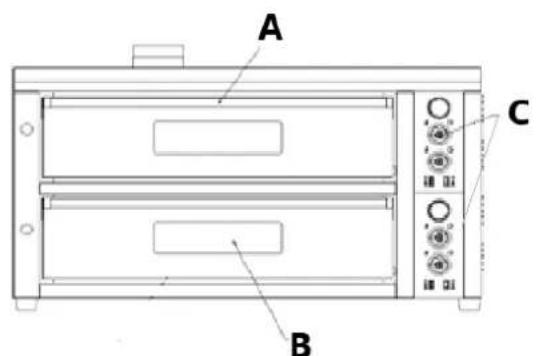
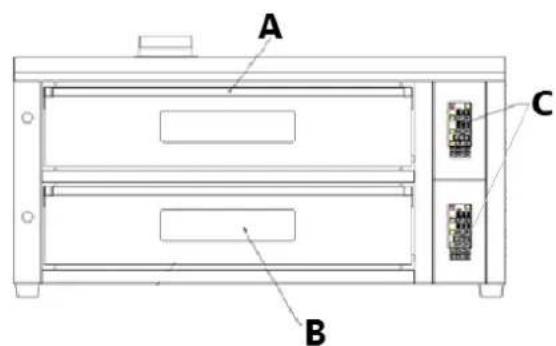
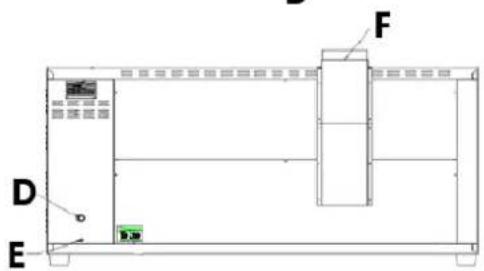

A. Oven door handle
B. Oven glass window
C. Control panel (left with knobs – manual, right with keypad – digitalised)
D. Power cord
E. Earthing line screw
F. Exhaust chimney
G. Oven thermometer
H. Top/bottom heating light indicator
I. Top heater temperature adjustment knob
J. Bottom heater temperature adjustment knob
K. Oven lighting on/off switch
L. Power switch
M. Top chamber temperature display
N. Bottom chamber temperature display
O. Timer display
Digitalised control panel:
| Button | Function | ||
 | Power buton with working light indicator | ||
 | Temperature setting “+” (increase) | ||
 | Temperature setting “-”(decrease) | ||
 | Lighting button with on light indicator | ||
 | Top heater temperature controller with heating light indicator | ||
 | Bottom heater temperature controller with heating light indicator | ||
 | Timer with on light indicator | ||
 |  |  | F1-F6 function button (can store 6 memory temperatures) with working light indicator. |
3.2. Preparing for use
APPLIANCE LOCATION
The temperature of environment must not be higher than 40^ C and the relative humidity should be less than 85%. Ensure good ventilation in the room in which the device is being used. There should be at least 50 cm distance between each side and top of the device and the wall or other objects. The device should always be used when positioned on an even, stable, clean, fireproof and dry surface, and be out of the reach of children and persons with limited mental and sensory functions. Position the device such that you always have access to the power plug. The power cord connected to the appliance must be properly grounded and correspond to the technical details on the product label.
Before the first use heat up the oven to the max temperature to eliminate the assembly and material odour, which will disappear with time.
ASSEMBLING THE APPLIANCE
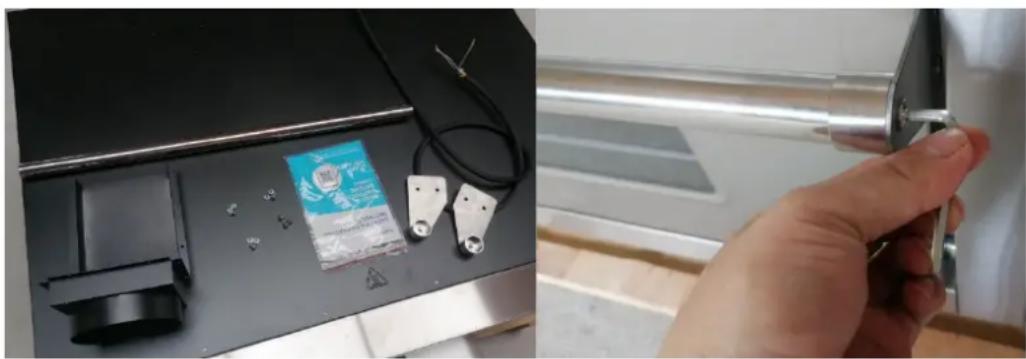
This product is being delivered almost ready for use. After unpacking the whole product take the handle parts, assemble the handle and screw it on the door by using the included bolts (screwed in the door by delivery). Use for assembly the attached allen wrench.
natural_image
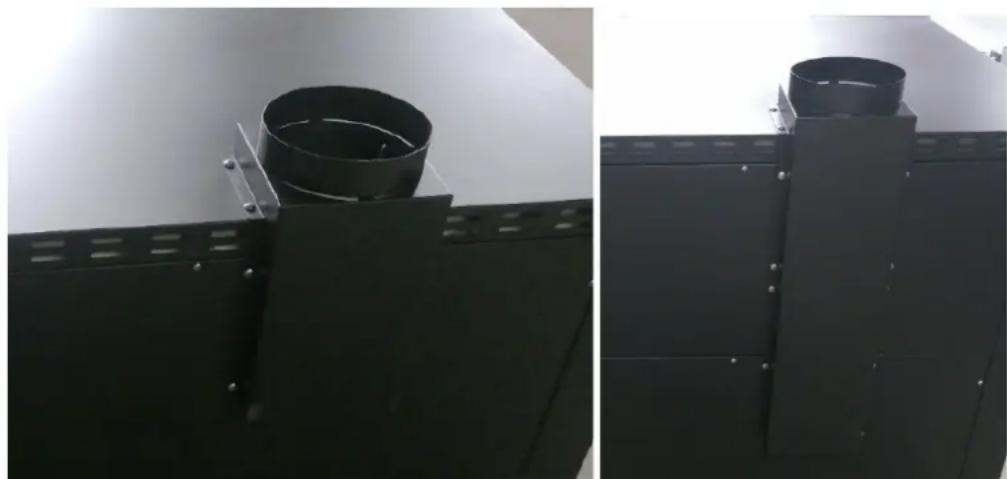
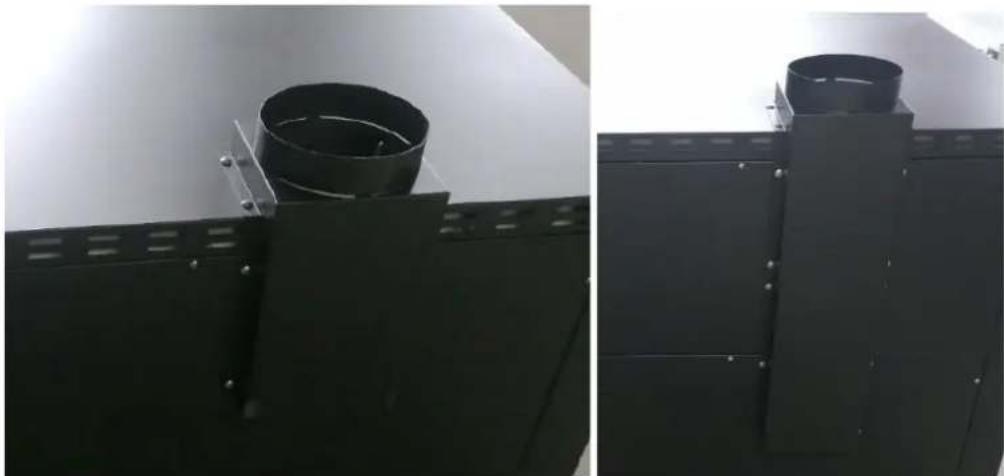
Two-panel image showing a device with attached components and a hand holding a small metallic object (no visible text or symbols)Next fix the exhaust chimney by bolting it to the edge on the back of the housing – use the included metal screws (see picture below left).
NOTE: on some models the chimney can consist of two parts – install it as shown on the picture below on the right.
natural_image
Two black industrial metal components with circular cutouts, displayed side by side against a plain background (no text or symbols visible)Next install an appropriate power plug at the end of the power cord – pay attention to the wires colours. NOTE: it is advised that the power plug should be installed by a professional.
3.3. Device use
MODELS WITH MANUAL CONTROL PANEL:
- Switch on the power, open the furnace door, turn on the power switch, set the top heater temperature and bottom heater temperature and then oven will enter the heating status automatically (the set temperature must exceed the ambient temperature)
- When the heating light indicator lamp on the temperature controller is lit on, the oven will start heating. When the heating light indicator lamp on the temperature controller is lit on, the oven will start heating. When the temperature in the chamber reaches the set temperature, the temperature will stop rising, and the oven will enter the set-temperature remaining state.
- When the temperature in the chamber is lower than the set temperature, device starts hearing until it reaches again the set temperature.
- The oven is equipped with a light which can be turned on when needed (please do not keep the light on for a long time).
- Abnormal operation: The oven is equipped with abnormal operating temperature protection (abnormal operating temperature protection is 530-550 degrees. If the temperature exceeds this level, the oven will automatically cut off all power supplies). The abnormal operating temperature protection of the oven is not automatically resettable and needs to be reset manually to ensure work safety. When resuming work, first turn off the external power supply of the oven (make sure to turn off the power supply of the oven and the external connection, and ensure that the oven is not energized), then open the electrical box and turn on the trip switch, and the oven can enter the “stand-by” state.
MODELS WITH DIGITALIZED CONTROL PANEL:
- Turn on the power switch, set the top and bottom heater temperature and then oven will enter the heating status automatically (set the temperature must exceed the ambient temperature).
- When the heating light indicator lamp on the temperature controller is lit on, the oven will start heating. When the heating light indicator lamp on the temperature controller is lit on, the oven will start heating. When the temperature in the chamber reaches the set temperature, the temperature will stop rising, and the oven will enter the set-temperature remaining state.
- When the temperature in the chamber is lower than the set temperature, device starts hearing until it reaches again the set temperature.
- The oven has 99 minutes 99 seconds timer, that you can activate when needed.
- [optional] Set the temperature parameter at F1–F6 (6 sets of temperature are able to save) – select the corresponding saving key (Long press for 3 seconds and the indicator of red window will light), set the required Top/Bottom temperature, then press saving key (for 3 seconds) again until the buzzer rings, indicating the data has been recognized and saved successfully.
- Abnormal operation: The oven is equipped with abnormal operating temperature protection (abnormal operating temperature protection is 530-550 degrees. If the temperature exceeds this level, the oven will automatically cut off all power supplies). The abnormal operating temperature protection of the oven is not automatically resettable and needs to be reset manually to ensure work safety. When resuming work, first turn off the external power supply of the oven (make sure to turn off the power supply of the oven and the external connection, and ensure that the oven is not energized), then open the electrical box and turn on the trip switch, and the oven can enter the “stand-by” state.
3.4. Cleaning and maintenance
a) Unplug the mains plug and allow the device to cool completely before each cleaning, adjustment or replacement of accessories, or if the device is not being used.
b) Use only mild, food-safe detergents to wash the device.
c) Store the unit in a dry, cool place, free from moisture and direct exposure to sunlight.
d) Do not spray the device with a water jet or submerge it in water.
e) Do not allow water to get inside the device through vents in the housing of the device.
f) Clean the vents with a brush and compressed air.
g) Use a soft, damp cloth for cleaning.
h) Do not use sharp and/or metal objects for cleaning (e.g. a wire brush or a metal spatula) because they may damage the surface material of the appliance.
i) Do not clean the device with an acidic substance, agents of medical purposes, thinners, fuel, oils or other chemical substances because it may damage the device.
3.5 Disposing of used devices
Do not dispose of this device in municipal waste systems. Hand it over to an electric and electrical device recycling and collection point. Check the symbol on the product, instruction manual and packaging. The plastics used to construct the device can be recycled in accordance with their markings. By choosing to recycle you are making a significant contribution to the protection of our environment.
Contact local authorities for information on your local recycling facility.
3.6 Troubleshooting
| Problem | Possible cause | Solution |
| The indicator lamps of oven are not lit on after the power switch is turned on. | Fuse or power switch fault. | Inspect the fuse core.Inspect the operating selector switch. |
| Failed automatic temperature control. | Alternating current connector. | Inspect alternating current connector. |
| Top or bottom heater fault code. | - Temperature probe is broken. | |
| The oven fails to automatically control the temperature (the thermometer has output signal). | AC connector fault. | Inspect the AC contactor. |
| Press the light switch, the light does not come on. | Light bulbs burnt. | Change the light bulb to a new one. |

natural_image
Close-up of a mechanical device with attached components and a hand holding a metal bracket (no visible text or symbols)natural_image
Two black industrial equipment panels with circular components mounted on metal brackets, shown from angles (no text or symbols visible)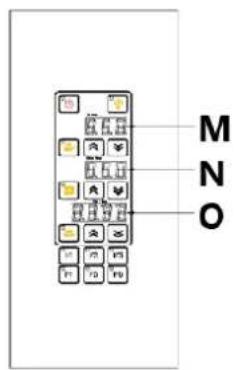
natural_image
Close-up of a mechanical device with attached components and a hand holding a metal bracket (no visible text or symbols)natural_image
Two black industrial equipment panels with circular components mounted on metal brackets, shown from front and side views (no text or symbols visible)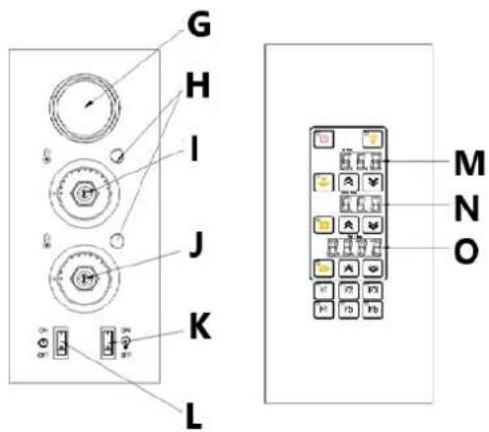
natural_image
Two-panel image: left shows a 3D printer with attached metal components and a small product; right shows a hand holding a metallic tool, no visible text or symbols.natural_image
Close-up of a black cylindrical object mounted on a metal frame, no visible text or symbols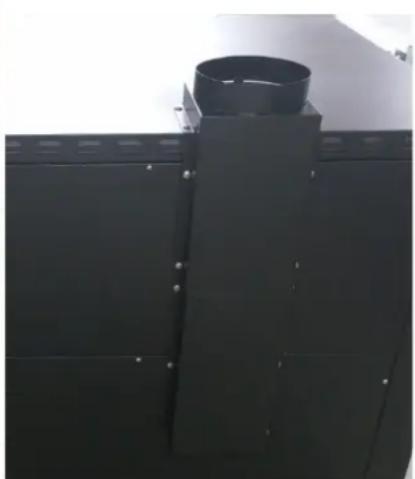
natural_image
Close-up of a black industrial chimney mounted on a metal frame (no visible text or symbols)natural_image
Two-panel image: left shows a mechanical device with labeled parts and a warning label; right shows a hand holding a metallic tool, no visible text or symbols.natural_image
Two black industrial metal components mounted on a panel, shown from angles (no text or symbols visible)natural_image
Two-panel image: left shows a 3D printer with attached metal components and a small product; right shows a hand holding a metallic tool, no visible text or symbols.natural_image
Close-up of a black cylindrical object mounted on a metal frame, no visible text or symbols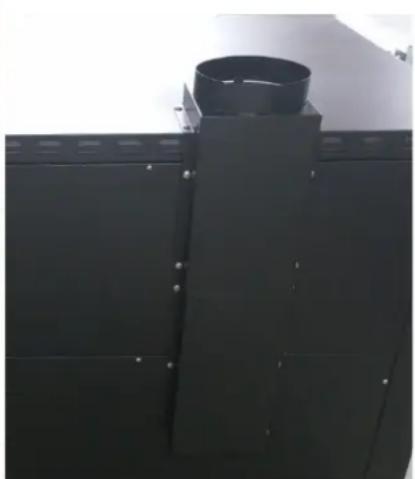
natural_image
Close-up of a black industrial chimney mounted on a metal frame (no visible text or symbols)natural_image
Two-panel image: left shows a 3D printer with mechanical components and a small inset image of a hand holding a metal tool (no visible text or symbols)natural_image
Close-up of a black cylindrical object mounted on a metal frame, with no visible text or symbols.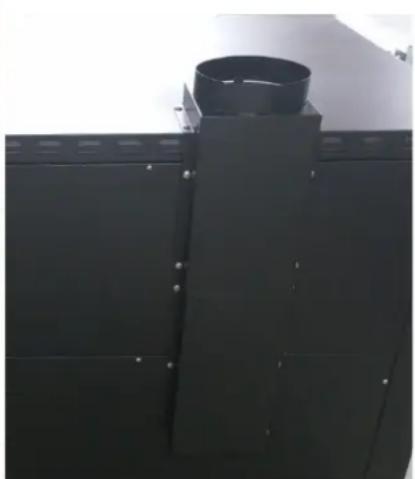
natural_image
Close-up of a black industrial chimney mounted on a metal frame (no visible text or symbols)APPARATETS PLACERING
SAMLING AF APPARATET
natural_image
Two-panel image: left shows a device with labeled components and a small product; right shows a hand holding a metallic tool, no visible text or symbols.natural_image
Two black industrial metal components mounted on a panel, showing circular and cylindrical features (no text or symbols visible)natural_image
Two-panel image showing a 3D printer with attached electronic components and a hand holding a metallic tool, no visible text or symbols.natural_image
Close-up of a black cylindrical component mounted on a metal frame, with no visible text or symbols.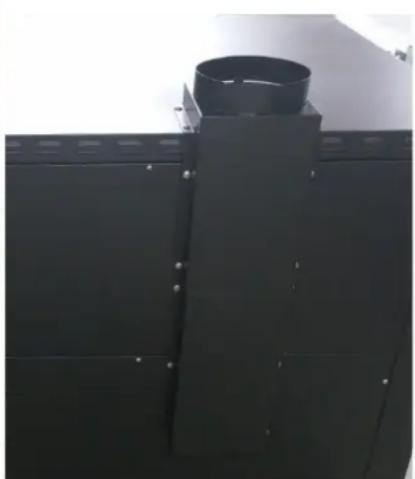
natural_image
Close-up of a black industrial chimney mounted on a metal frame (no visible text or symbols)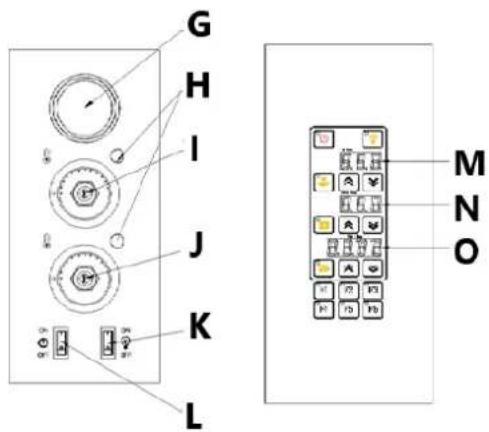
A. Ovendeurgreep
B. Ovenglas raam
PLAATS VAN HET APPARAAT
HET APPARAAT MONTEREN
natural_image
Two-panel image: left shows a 3D printer with mechanical components and a small inset image of a hand holding a metal tool (no visible text or symbols)natural_image
Close-up of a black cylindrical component mounted on a metal frame, no visible text or symbols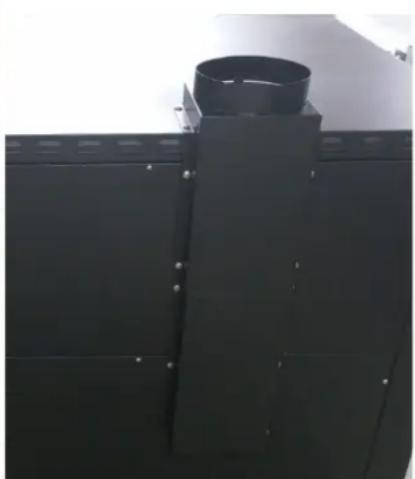
natural_image
Close-up of a black industrial chimney mounted on a metal frame (no visible text or symbols)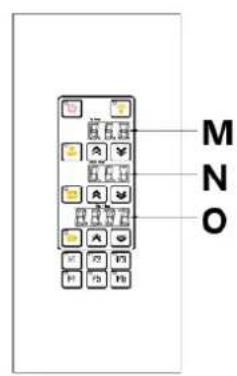
A. Ovnsdørhåndtak
B. Ovnsglassvindu
natural_image
Close-up of a hand holding a small electronic device next to a metal bracket (no visible text or symbols)natural_image
Two black industrial equipment panels with circular components mounted on metal brackets, no visible text or symbols.APPARATENS PLACERING
natural_image
Two-panel image showing a 3D printer with attached electronic components and a hand holding a metallic tool, no visible text or symbols.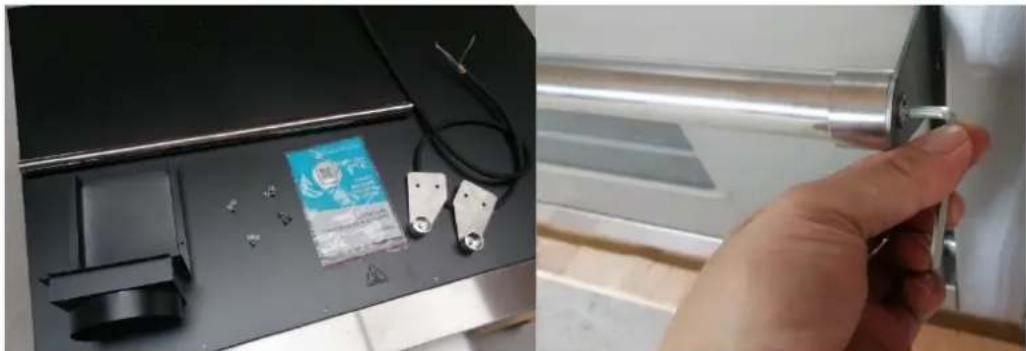
natural_image
Two-panel image showing a 3D printer with attached electronic components and a hand holding a metallic tool, no visible text or symbols.natural_image
Close-up of a black metal bracket with a cylindrical component mounted on a flat surface (no text or symbols visible)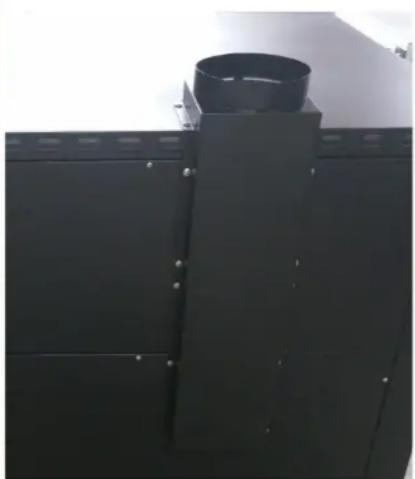
natural_image
Exterior view of a black industrial chimney with a cylindrical top (no visible text or symbols)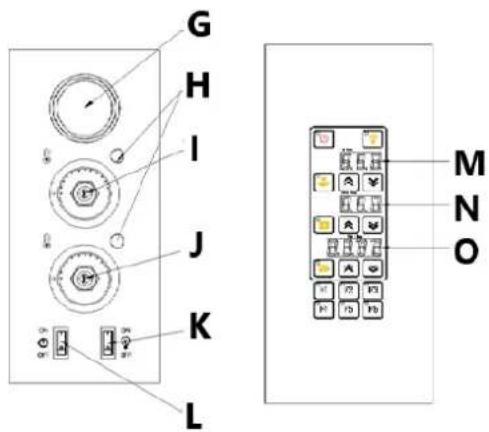
natural_image
Two-panel image: left shows a 3D printer with attached metal components and a small inset showing a hand holding a metallic tool (no visible text or symbols)natural_image
Close-up of a black cylindrical object mounted on a metal frame, with no visible text or symbols.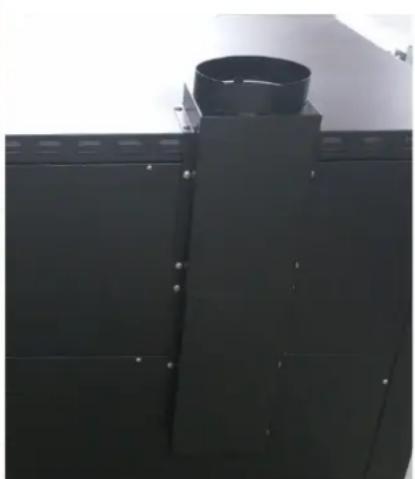
natural_image
Close-up of a black industrial chimney mounted on a metal frame (no visible text or symbols)natural_image
Close-up of a hand holding a small metallic object next to a device with attached components (no visible text or symbols)natural_image
Two black industrial metal components with circular cutouts, displayed side by side against a plain background (no text or symbols visible)natural_image
Close-up of a mechanical device with attached components and a hand holding a metal bracket (no visible text or symbols)natural_image
Two black industrial metal components with circular cutouts, shown from front and side angles (no text or symbols visible)natural_image
Close-up of a mechanical device with attached components and a hand holding a metallic tool (no visible text or symbols)natural_image
Two black industrial metal components with circular cutouts, shown from front and side angles (no text or symbols visible)natural_image
Two-panel image: left shows a 3D printer with electronic components and a warning label; right shows a hand holding a metallic tool, no visible text or symbols.Zatim pričvrstite ispušni dimnjak tako da ga pričvrstite za rub na stražnjoj strani kućišta – koristite priložene metalne vijke (pogledajte sliku dolje lijevo).
NAPOMENA: kod nekih modela dimnjak se može sastojati od dva dijela – postavite ga kao što je prikazano na slici dolje desno.
natural_image
Two black industrial equipment panels with circular components mounted on metal brackets, shown from front and side views (no text or symbols visible)Zatim postavite odgovarajući utikač na kraju kabela za napajanje – obratite pozornost na boje žica. NAPOMENA: preporuča se da strujni utikač instalira stručna osoba.
3.3. Upotreba uređaja
MODELI S RUČNOM UPRAVLJAČKOM PLOČOM:

natural_image
Two-panel image: left shows a 3D printer with attached electronic components and a small product; right shows a hand holding a metallic mechanical component (no visible text or symbols)natural_image
Two black industrial equipment panels with circular components mounted on metal brackets, displayed side by side (no visible text or symbols)natural_image
Two-panel image: left shows a 3D printer with attached metal components and a small product; right shows a hand holding a metallic tool, no visible text or symbols.natural_image
Close-up of a black cylindrical object mounted on a metal frame, no visible text or symbols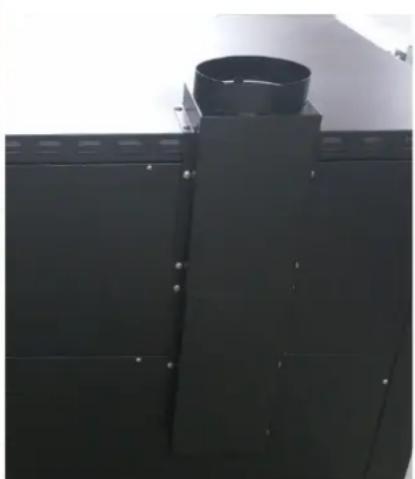
natural_image
Close-up of a black industrial chimney mounted on a metal frame (no visible text or symbols)A. Ročaj vrat pečice
B. Stekleno okno pečice
C. Nadzorna plošča (levo z gumbi – ročno, desno s tipkovnico – digitalizirano)
D. Napajalni kabel
E. Vijak ozemljitvenega voda
F. Izpušni dimnik
G. Termometer za pečico
natural_image
Two-panel image: left shows a 3D printer with mechanical components and a small product; right shows a hand holding a metallic device (no visible text or symbols)Nato pritrdite izpušni dimnik tako, da ga privijete na rob na zadnji strani ohišja – uporabite priložene kovinske vijake (glejte sliko spodaj levo).
natural_image
Two black industrial equipment panels with circular components mounted on metal brackets, shown from angles (no text or symbols visible)For the disposal of the device please consider and act according to the national and local rules and regulations.
CONTACT
expondo Polska sp. z o.o. sp. k.
- General description
- DO NOT USE THE DEVICE UNLESS YOU HAVE THOROUGHLY READ AND UNDERSTOOD THIS USER MANUAL.
- Usage safety
- Electrical safety
- Safety in the workplace
- Personal safety
- Safe device use
- Use guidelines
- Device description
- Preparing for use
- APPLIANCE LOCATION
- ASSEMBLING THE APPLIANCE
- Device use
- MODELS WITH MANUAL CONTROL PANEL:
- MODELS WITH DIGITALIZED CONTROL PANEL:
- Cleaning and maintenance
- Disposing of used devices
- Troubleshooting
- APPARATETS PLACERING
- SAMLING AF APPARATET
- PLAATS VAN HET APPARAAT
- HET APPARAAT MONTEREN
- APPARATENS PLACERING
- Upotreba uređaja
- CONTACT
Brand : Royal Catering
Model : RCPO-1011-N
Category : Pizza oven