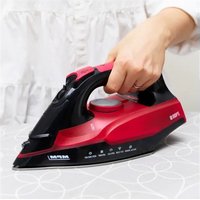
MZE-27 - Iron MPM - Free user manual and instructions
Find the device manual for free MZE-27 MPM in PDF.


| Product type | Steam iron |
| Brand | MPM |
| Model | MZE-27 |
| Power supply | 220-240 V ~ 50/60 Hz |
| Rated power | 2000-2400 W |
| Water tank capacity | 240 ml |
| Power cord length | 1.9 m |
| Soleplate | Ceramic soleplate |
| Steam function | Yes, adjustable |
| Water spray function | Yes |
| Steam boost function | Yes, in vertical and horizontal position |
| Anti-drip system | Yes |
| Anti-scale system | Active anti-scale cartridge |
| Self-cleaning function | Yes |
| Automatic shut-off | Yes |
| Operating indicator | Yes, heating and automatic shut-off indicator |
| Standby consumption | 0.33 W |
| Off consumption | 0.31 W |
| Recommended use | Household use only |
| Weight | Not specified |
| Dimensions | Not specified |
Frequently Asked Questions - MZE-27 MPM
User questions about MZE-27 MPM
0 question about this device. Answer the ones you know or ask your own.
Ask a new question about this device
Download the instructions for your Iron in PDF format for free! Find your manual MZE-27 - MPM and take your electronic device back in hand. On this page are published all the documents necessary for the use of your device. MZE-27 by MPM.
USER MANUAL MZE-27 MPM
EN W/VE wish you satisfactor from using the product and invite you to check a wide range of other MPM apparatus
SHUQAAVAXONHINGNCHAMCA
CARLI XNGN VAS SIK RAMIN RAI
2017年1月2日
HIERDECAELTCCABGCACTPACCE
1
HLCKASKEJAMCKOGZELM&OULOCFO
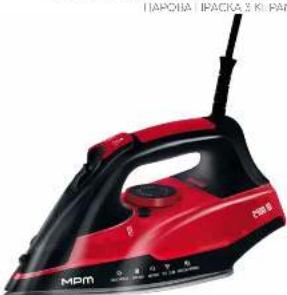
CZ NAVOD KOBSLUZE 3
DE SEDENUNGSANLETUNG 9
FF KASUTUSUHEND 16
EL EEXIPADXPHE 22
ENUSERMANUAL 29
ESMANUAL DE INSTRUCCIONES 35
FR MANUEL DE LUTILISATEUR 41
HU HASZNALATUTASITAS 48
MANUALE D'USO 54
VARTOTOIOVADOVAS 61
LJETOTAJAROKASGRAMATA 67
NC GEBRIKERSHANDELEING 73
PL NSTRUCC/AOBSLUGI 50
NO MANUAL DE UTILIZATION 86
RU AHCIPYKLIHITIO OBCNYKIBAHNO 93
SKPOUZIVATELSKAPPIRUCKA 100
VA TOCIEHK KOPHCTYBAHA 106
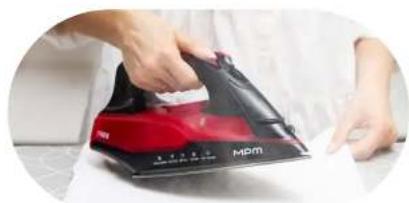
Rubberized handle / ANTI-DRIP system to prevent dripping
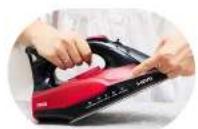
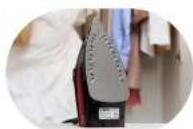
Water spray / 240 ml water tank / Adjustable steam and temperature control
Non stick soleplate / ANTI-CALC system to prevent lime scale
BEZPECNOSTNI POKNY PRIPOUZIVANI
- Read this Manual thoroughly before use.
-
Plug the iron to PE (protective earth) mains outlets only.
-
Be extremely careful when children are near the appliance! Never touch or let the appliance hot surfaces be touched when ironing.
-
Do not immerse the appliance or its power cord in water or other liquids.
-
Never leave the iron unattended when plugged into mains.
-
Never leave the power cord hanging over sharp edges and keep it away from hot surfaces.
-
Periodically inspect the power cord for damage.
-
Do not use the appliance when damaged and/or its power cord or plug is damaged; have an Authorised Service repair it for you.
-
Always unplug the power cord when the appliance is not in use.
-
Before cleaning the appliance, unplug it from the mains and wait until it cools down completely.
-
When refilling the appliance tank water or emptying it, first unplug the power cord from the mains.
-
Fill the iron water tank with water only. Distilled (demineralised) water is recommended to prevent scale deposit on the inner surfaces of the iron.
-
Never add any chemicals to the water for the iron. They may damage the appliance.
-
Use this appliance only as intended.
-
This appliance is intended for household use only.
-
Do not use this appliance outdoors.
-
Do not open the water tank lid when ironing.
-
Use and put away the iron on a solid, firm surface.
-
Do not use the iron if it has fallen down, has visible damage or leaks water.
-
This product may only be operated by children 8 or more years old, mentally and/or physically deficient persons and persons without knowledge of or experience in operation of this appliance type if supervised or instructed in safe operation, with clear understanding of all related risks. Children without supervision may never clean or maintain/care for this appliance.
-
Keep this appliance and its power cord out of the reach of children below 8 years old.
- Children must not play with the device.
- When finished ironing, empty the iron water tank completely.
- Never iron any clothes or materials on people or animals.
- Risk of burns - do not direct vapour at people or animals.
- Never unplug the appliance by pulling by the power cord.
- Never plug the power cable with wet hands.
- Never wind the power cord around the iron before it cools down.
- Never put the appliance near electric or gas burners, cookers, ovens, etc.
- This appliance is not compatible for use with external power timers or separate remote control systems.
- Before putting the iron away on a pad or base, make sure that the pad/base rests on a solid, firm surface.
- Before turning on the appliance, make sure that the mains voltage matches the parameters on the appliance nameplate.
- Keep your children safe: do not leave any parts of the packaging readily accessible (i.e. plastic bags, cardboard boxes, polystyrene inserts, etc.).
-WARNING! Never let children play with plastic film or bags. Choking/asphyxiation hazard!
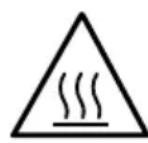
CAUTION! Hot surface! This symbol
indicates that the surface of the appliance may reach very high temperatures during use. Touching it may result in burns; do not touch the hot surfaces of the appliance e.g. the working elements of the iron (the iron's foot), parts of the casing located in the immediate vicinity of the working elements of the appliance.
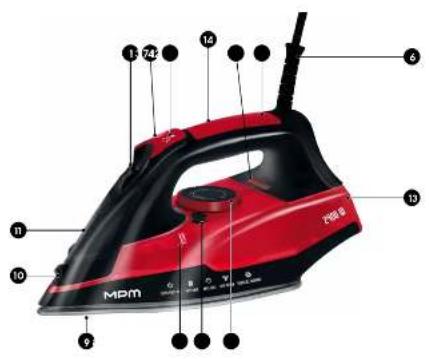
APPLIANCE OVERVIEW
- Steam output control slider
- SELF-CLEAN button (cleans the iron of scale)
- Water spray button
- Steam blast button
- Temperature adjustment knob
- Power cord with swivel
-
Operation status indicator light
-
240 ml water tank
- Ceramic sole
- Spray jet nozzle
- Water fill lid
- Grip
- Rear body/base
- Mains On and Auto Shut Off indicator
BEFORE FIRST USE
- Remove all stickers, protective padding and protective film from the iron sole.
- Wash and rinse the water measuring cup.
CAUTION! The iron may emit smoke during the first use. This happens for a short while only.
PREPARING FOR USE
FILLING THE WATER TANK
- Make sure that the appliance is unplugged from the mains.
- Set the steam output control slider (1) to "NO STEAM"
- Open the water fill lid (11).
- Fill the iron water tank (8) up to the MAX level. Check the max level in the tank by putting the iron straight up.
CAUTION! Do not overfill the water tank above the MAX level. Always use fresh demineralised/distilled water for best ironing performance. Never use chemically decalcified water or any other liquids.
- Close the water fill lid (11).
USING THE APPLIANCE
TEMPERATURE SETTING
- Plug the power cord (6) to a PE mains outlet. The red indicator (14) will turn on.
- Put the iron standing up and set the required ironing temperature by turning the temperature control knob (5) to the desired position. The indicator light (7) will illuminate to indicate heating.
| TEMP KNOB POSITION | THERMOSTAT ADJUSTMENT | TEXTILE TYPE |
| • | Low temperature Synthetic fibres | |
| •• | Moderate temperature Silk / wool | |
| •••/ Max | High temperature Cotton / linen |
CAUTION! Check the required ironing temperature of your textile product by referring to its information tab. If you are unsure what fabric type the product to be ironed is, find the correct temperature setting by ironing the part of the product that will be concealed when in use/worn. Start from the lowest temperature setting and increase it gradually. Silk, cotton and synthetics: to prevent glossy spots from heat, iron these materials inside out and covered with another thin fabric. Do not use the spray jet to avoid stains while ironing. Velvet and similar materials must be ironed in one direction only. Do not hold the iron in one spot, make full passes. Iron synthetics and silk inside out and without steam.
CAUTION! Always start ironing with the products that require the lowest temperature setting.
- When the iron reaches the preset temperature and the indicator (7) will turn off, wait a few seconds and start ironing.
- The indicator light (7) will be on and off during ironing.
NOTE! Your iron has the AUTO SHUT OFF function - an electronic device allowing to shut the iron off safely when it is not used for some time. This protection will work regardless of the position of the iron (horizontal or vertical).
STEAM IRONING
- Make sure that the water tank (8) has enough water.
- Set the recommended temperature (see TEMPERATURE SETTING).
- Set the correct steam output with the control slider (1).
CAUTION! Steam ironing is only possible at higher temperatures (temperature settings from · · up to MAX level).
CAUTION! When the iron reaches the preset temperature, it will begin steaming. The appliance generates very hot steam!
DRY (NO STEAM) IRONING
- Set the steam output control slider (1) to "NO STEAM".
- Set the recommended ironing temperature (see TEMPERATURE SETTING).
SPRAY JET FUNCTION
This function helps removing persistent creases.
- Make sure that the water tank (8) has enough water.
- To dampen the textile being ironed, press the water spray button (3) several times.
STEAM BLAST
This function (4) can be used in the horizontal and vertical positions. It helps removing creases on hanging clothes, curtains, etc.
CAUTION! The iron blasts much steam! Hazard of burns! Never direct steam jets towards people or animals!
ANTI DRIP LOCK
The iron features the Anti Drip lock: the appliance automatically stops steam when the temperature becomes too low.
IRONING FINISH
- Set temperature adjustment knob to MIN.
- Remove the power cord plug (6) from the mains outlet.
- Empty the water tank (8) after steam ironing.
- Put away the iron standing up in a safe place and wait for it to cool down.
CLEANING AND MAINTENANCE
CAUTION! Never immerse the iron in water or rinse it under a tap.
- Wipe scale flakes and other deposits from the iron sole (9) with a damp cloth and a non-abrasive (liquid) detergent.
CAUTION! Keep the iron away from metal objects to protect the sole from scratching. Never clean the iron sole with abrasive pads (incl. hard sponges), vinegar or other chemicals.
- Wipe the iron top body with a damp cloth.
- Periodically flush the water tank (8) with clean water and empty the tank when done.
SELF CLEAN FUNCTION
Use this function every two weeks. It is highly recommended if you use tap water instead of distilled water. If your water supply is very hard (which is evident by e.g. scale flakes falling off the iron sole), use the Self Clean function more often.
- Make sure that the appliance is unplugged from the mains.
- Set the steam output control slider (1) to "NO STEAM".
- Fill the iron water tank to MAX.
- Plug the power cord to a PE mains outlet.
- Set the maximum temperature.
- When the red indicator goes off unplug the iron from the power outlet.
- Hold the iron with its sole down over a sink, then press the SELF CLEAN button (2) and gently shake the appliance. The iron sole will blow steam and hot water. This will flush the dirt and scale flakes.
- When the water tank is empty, release the SELF CLEAN button (2). Repeat this if there still is much dirt inside the iron.
ACTIVE ANTI CALC FUNCTION
The anti-calc cartridge prevents clogging of the steam nozzles with scale. The cartridge remains active and does not need to be replaced.
Do not use any descending agents with the appliance, otherwise the anti-calc cartridge can be damaged.
STORAGE
- Set the steam output control slider to "NO STEAM" and unplug the power cord.
- Empty the water tank (8).
- Wait until the iron cools down. Wind the power cord around the iron.
- Stow the empty iron standing up on a solid, firm surface.
TECHNICAL DATA
| Model MZE-27 | |
| Power supply 220-240V | ~50-60Hz |
| Rated power 2000-2400W | |
| Off and standby mode available available | |
| Power consumption in standby mode | 0,33W |
| Power consumption in off mode 0,31W | |
| Power consumption in network standby mode | - |
| It automatically goes into standby mode after - | |
| Automatically goes into shutdown mode after - | |
| Network standby mode, if the device has a connection function with the appli-cation | - |
| Length of mains cable 1,9m |
CE
CAUTION! MPM agd S.A. reserves the right to technical changes.
Proper disposal of the product (waste electrical and electronic equipment)
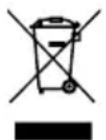
Marking on the product indicates that after the service-life of the product expires, it should not be disposed with other type of municipal waste. Used equipment may have a negative impact on the environment and health of people due to potentially containing hazardous substances, mixtures and components. Mixing electric waste with other types of waste or disassembling those in an unprofessional manner may cause a release of substances that are hazardous to the environment and health.
Used equipment should be handed-over to a point for collection of electric waste. In order to obtain detailed information regarding the electric waste collection points, the user should contact the municipal point of electric waste collection or used equipment processing department.
BESCHRIJVING VAN HET APPARAAT
ANTI CALC FUNC TIE - ACTIEF ANTIKALKSYSTEEM
FUNCTIA ANTI CALC - SISTEM ACTIV ANTICALC
Legible signature of the buyer


- BEZPECNOSTNI POKNY PRIPOUZIVANI
- CAUTION! Hot surface! This symbol
- APPLIANCE OVERVIEW
- BEFORE FIRST USE
- PREPARING FOR USE
- FILLING THE WATER TANK
- USING THE APPLIANCE
- TEMPERATURE SETTING
- STEAM IRONING
- DRY (NO STEAM) IRONING
- SPRAY JET FUNCTION
- STEAM BLAST
- ANTI DRIP LOCK
- IRONING FINISH
- CLEANING AND MAINTENANCE
- SELF CLEAN FUNCTION
- ACTIVE ANTI CALC FUNCTION
- STORAGE
- Proper disposal of the product (waste electrical and electronic equipment)
- BESCHRIJVING VAN HET APPARAAT
- ANTI CALC FUNC TIE - ACTIEF ANTIKALKSYSTEEM
- FUNCTIA ANTI CALC - SISTEM ACTIV ANTICALC
Brand : MPM
Model : MZE-27
Category : Iron