MZP-04 - Iron MPM - Free user manual and instructions
Find the device manual for free MZP-04 MPM in PDF.


| Product Type | Steam Iron |
| Brand | MPM |
| Model | MZP-04 |
| Power | 2000 W |
| Water Tank Capacity | 250 ml |
| Soleplate Material | Stainless Steel |
| Dimensions (LxWxH) | 28 x 12 x 15 cm |
| Weight | 1.2 kg |
| Cable Length | 2 m |
| Steam Output | Continuous steam up to 30 g/min |
| Spray Function | Yes |
| Self-Clean Function | Yes |
| Anti-Drip System | Yes |
| Auto Shut-Off | Yes (when left unattended) |
| Voltage | 220-240 V, 50/60 Hz |
| Non-Stick Soleplate | No (stainless steel) |
| Vertical Steaming | Yes |
| Temperature Control | Adjustable thermostat |
| Cleaning | Use descaling solution periodically |
| Safety Features | Auto shut-off, thermal fuse |
| Warranty | 2 years |
Frequently Asked Questions - MZP-04 MPM
User questions about MZP-04 MPM
0 question about this device. Answer the ones you know or ask your own.
Ask a new question about this device
Download the instructions for your Iron in PDF format for free! Find your manual MZP-04 - MPM and take your electronic device back in hand. On this page are published all the documents necessary for the use of your device. MZP-04 by MPM.
USER MANUAL MZP-04 MPM
natural_image
White electric toothbrush with black filter teeth and circular head (no text or symbols visible)- Panel sterowania
Read the instructions carefully before use.
Insert the device's power plug to an earthed power socket.
Take special care when children are near the device. Do not let anyone touch the device during steam ironing.
Do not immerse the device, cable or plug in water or other liquids!
Do not leave the device unattended if connected to the mains.
Do not hang the cable on sharp edges or allow it to come into contact with hot surfaces.
▶ Regularly check the power cord and the connecting hose for any damage.
Never use a damaged device, including one with a damaged cord or plug, in which case have it repaired at an authorised service centre.
▶ Always unplug the device when not in use.
Before cleaning, assembling or disassembling the device, unplug it from the mains socket and wait until it has cooled down completely.
- Disconnect the device from the mains before filling in or emptying the tank.
Never touch the device's soleplate when it is on!
Fill the tank with water only. It is recommended to use distilled water to avoid limescale buildup on the device's internal parts.
Do not add any chemical agents to the water in the tank - they may damage the device.
To avoid burns, do not touch the device's hot metal parts, hot water or steam.
Do not use the device for purposes other than those for which it was intended.
The device is intended for domestic use only.
Do not use the device outdoors.
Do not open the water tank's cover when using the device.
Place the device on a stable surface when not in use
Do not use the device if it fell down, shows signs of damage or leaks.
This equipment may be used by children of at least 8 years of age and by persons of diminished physical, mental capacity and lack of experience and knowledge of the equipment if supervision or instruction is provided regarding the safe use of the equipment so that the hazards involved are understood. Unsupervised children should not perform cleaning and maintenance on the equipment.
- Keep the device and its cord out of reach of children under 8 years of age.
Children should be supervised to ensure that they do not play with the equipment/device.
Pour out the water remaining in the tank after the ironing is finished.
▶ Never iron clothes or fabric that are worn or placed on people or pets.
▶ Never direct the steam at people or pets.
Do not pull the plug out of the power socket by pulling the cord.
Do not connect the plug to the power socket with wet hands.
Do not wind the power cable around the device until it cools down.
Do not place the device near electric or gas cookers, burners, ovens, etc.
The equipment is not designed to operate using external timers or a separate remote control.
When putting the iron away on the stand, make sure the surface on which the stand is placed is stable.
Before switching the device on, make sure the mains parameters match the values on the device's identification plate.
For the safety of children, please do not leave freely accessible parts of the packaging (plastic bags, cardboard boxes, polystyrene, etc.).
WARNING! Do not allow children to play with the film. Danger of suffocation!
Place the device no closer than 20 cm from walls, curtains or other materials sensitive to heat or steam. Make sure there is ample empty space on all sides of the device for air circulation.
Exercise caution when using the device as it generates steam.
Do not let the power cord touch any hot surfaces.
Do not use the device without water. This can damage the device.
Do not use the device for cleaning electrical equipment and installations.
Do not touch any hot surfaces. Before installing or removing accessories, turn the device off and wait for cooling down.
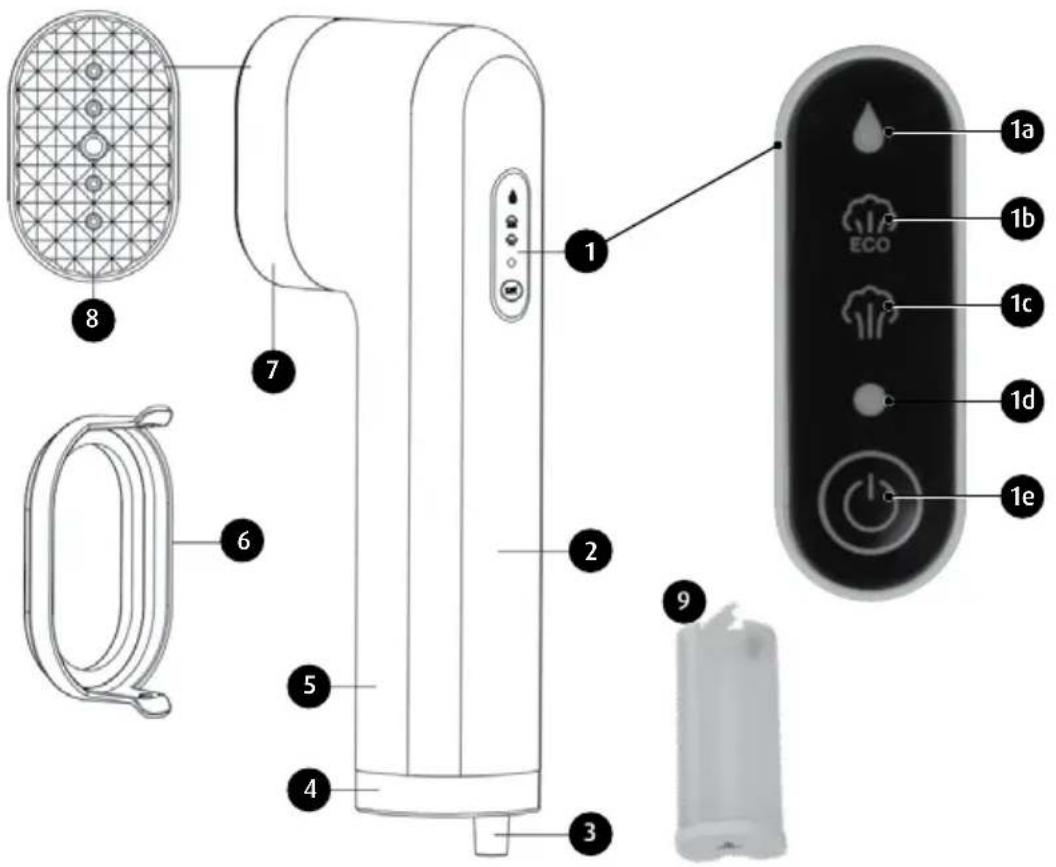
- Control panel
a. water drop icon
b. ECO mode
c. normal mode
d. power indicator
e. on/off button
-
Handle
-
Power cord cover
- Bottom edge
- Handle
- Thick fabric brush
- Steam plate cover
- Metal steam plate
- Water tank
BEFORE FIRST USE
- Before use, remove all stickers and protective material from the steam head and straighten out the power cord.
- When switching on the steamer for the first time, leave it on for a few minutes to get ride of any impurities and odours that may have been introduced during production.
- When using the steamer for the first time, try it out on an old piece of fabric.
WARNING! To avoid overloading the electric installation, it is recommended that no other appliances are connected to the circuit supplying power to the steamer.
CAUTION! When unpacking the newly purchased steamer, before you discard the packaging materials, make sure that all elements listed on the list of parts have been delivered.
- Gently press the water tank until it slides out from the steamer's handle, remove the water tank, open the water inlet cover and fill up the tank with distilled water. Once the water tank is filled up, reinsert it to the appliance. Note: When filling up the water tank, make sure it is at filled up to at least 33%.
- Hold the appliance with your hand safely placed on its handle. With the appliance in vertical position, attach the thick fabric brush to the steam head. The fabric brush may be attached both ways and locks with an audible click.
- Connect the appliance to the mains, press the on/off button. The flashing power LED means the appliance is starting to heat up. Once it stops flashing and stays on, the steamer can be used. Press the on/off button once to have the appliance generate steam in normal mode. Press the on/off button again to have the appliance switch to ECO mode. The appliance is switched off if disconnected from the mains.
- Once the steamer is topped up with water and connected to the mains, press the on/off and wait until the steamer warms up.
- The steamer has a smart switch off function. After some time of inactivity, the appliance will switch off by itself. To reactivate the appliance after it switched off automatically, press the on/off button.
- If all water from the tank is used up, the appliance's pump generates a sound signal, the droplet icon on the display starts flashing and the pump automatically switches off. Refill the water tank and press the on/off button to reactivate the appliance.
STEAMING CLOTHES
The steamer is easy to use and great for removing any creases on clothing or curtains and for refreshing upholstery fabric.
The steamer can be used with most fabrics. The appliance is best used upright, sliding up and down along the fabric.
- Make sure the fabric is permeable. Otherwise, humidity may accumulate on it, resulting in mould.
- Make sure any pockets in the clothing are empty and that any rolled up sleeves and hems are unfolded.
- Hang the clothing on a hanger, gently pull down the fabric with one hand, making sure that no part of it can be damaged by the steam.
CAUTION! We recommend not steaming metal elements and accessories. Work carefully and avoid steaming areas adjacent to any metal parts.
-
Press and keep depressed the on/off button - you will feel vibrations and hear a faint buzz while steaming - this is normal behaviour. Make sure to direct the steam away from yourself and keep the steamer upright.
-
Gently press the brush against the clothing, moving the steamer up and down, aimed at any creases.
-
Press the on/off button again to stop the steam.
CAUTION! Stretch the fabric to achieve the best results.
CAUTION! The steam generated by the steamer is very hot - do not touch the appliance's head and make sure the steamer is always directed away from you and upright.
- When using the steamer without any accessories, always keep the head 5 cm away from the steamed clothing.
CURTAINS
- Wash and dry the curtains as per recommendations for the fabric
- Hang the curtains first and steam in place.
- To remove any creases more easily, gently stretch the curtains with one hand while steaming.
UPHOLSTERY
- The steamer can also be used for refreshing furniture upholstery, furniture covers and cushions. Before steaming, always test how the steamed fabric behaves on a small, hidden piece.
- Keep the steamer upright and slide it up and down. Steam the upholstery fabric gently. Take any cushions out and keep upright when steaming. Leave the cushions to fully dry before placing them back on the furniture.
CAUTION! When steaming delicate fabric, such as silk, it is recommended to use the thick fabric brush to minimise the risk of contact between the fabric and the steam plate. To achieve better results when steaming stubborn creases, remove the accessory and keep the steamer longer at the area, until the crease is gone.
CAUTION! If there are any metal accessories in the clothing, be careful when steaming and do not place the steamer directly over the metal so as not to discolour it.
WARNING! Always disconnect the steamer from the mains before attaching or removing the fabric accessory.
CAUTION! Only use the accessories delivered with the steamer.
CAUTION! If the appliance becomes loud and stops generating steam, check the water level in the tank. This behaviour may mean the tank is empty and must be refilled.
WARNING! Never apply the steamer directly onto anyone's body, animals or the worn clothing!!!
AFTER EVERY USE
- Disconnect the power supply to the mains socket and disconnect the appliance's power cord.
- Open the water tank's cover and turn it upside down to drain any remaining water.
- Leave the steamer in an upright position to cool down.
CLEANING AND STORING
CLEANING
Remove the accessory from the head and wipe it with a clean cloth.
Do not use any sharp or abrasive cleaning agents or solvents.
Do not submerge the steamer in water or other liquids.
Do not throw, drop or bend the steamer.
Do not attempt to disassemble the appliance.
The steamer is only meant for household use and may be used with regular, tap water. Do not add any perfumes, vinegar or any other chemical agents to the water. The appliance has not been designed to work with such chemical substances.
▶ Always empty the tank after every use and flush it with fresh water.
▶ Wipe the steamer with a damp cloth.
Do not store the appliance in places with high humidity.
Do not place the steamer near sources of heat or in direct sunlight.
Make sure the steam outlet is clean, unclogged and there is no scale.
CAUTION! The steamer has been designed to work with regular, tap water, but it is recommended to use distilled water to extend the appliance's life.
STORAGE
After steaming, let the steamer cool down, empty the water tank and wind the power cord around the appliance to keep it in place.
It is recommended to place the steamer on a flat surface, e.g. in a cabinet, until the next use.
TROUBLESHOOTING
| Problem Possible solution | |
| The steamer will not heat up Make sure the power cord's plug is inserted securely.Check the mainsCheck the on/off button | |
| The steamer will not generate steam | Check the water level and make sure the water tank's cover is placed on it correctly.Press the steam generation button a little harder.Keep the steamer upright. |
| Water is pouring out of the water tank. Make sure the level of water is not over the max indicated level.The water tank's inlet is not secured correctly.The steamer is upright, as per the operating instruction. | |
| The steamer buzzes loudly or generates pumping noises | Check the water level; if there is no water or only a little water is left, fill up the water tank. |
| It seems the steamer fails to straighten out creases easily | Keep the steamer upright and stretch the fabric down for best results. |
| You are not sure when to use the fabric accessory Use the accessory if the steamer is not supposed to touch the fabric.When steaming delicate fabrics, such as silk, to limit the risk of contact between the fabric and the steam plate and to prevent droplets of water falling on the steamed clothing | |
| Discolouration of metal accessories on the clothing Do not point the steamer at any metal accessoriesApply the steam around the metal accessories. | |
TECHNICAL DATA
Technical specifications are given on the product nameplate.
Length of mains cable: 1.95 m

PROPER DISPOSAL OF THE PRODUCT (waste electrical and electronic equipment)
Marking on the product indicates that after the service-life of the product expires, it should not be disposed with other type of municipal waste. Used equipment may have a negative impact on the environment and health of people due to potentially containing hazardous substances, mixtures and components. Mixing electric waste with other types of waste or disassembling those in an unprofessional manner may cause
a release of substances that are hazardous to the environment and health. Used equipment should be handed-over to a point for collection of electric waste. In order to obtain detailed information regarding the electric waste collection points, the user should contact the municipal point of electric waste collection or used equipment processing department.
- Панель керування
- Bedienfeld
We wish you satisfaction from using the product and invite you to check a wide range of other MPM appliances


Brand : MPM
Model : MZP-04
Category : Iron